

Page 1
Safety and Reference
Please read this manual carefully before operating your set and
retain it for future reference.
OLED55B7P
OLED55C7P
OLED55E7P
OLED55B7A
*MFL69707602*
OLED65B7P
OLED65C7P
OLED65E7P
OLED65B7A
www.lg.com
P/NO : MFL69707602 (1705-REV02)
Copyright 2017 LG Electronics Inc.
All Rights Reserved.
Page 2
Warning! Important Safety
instructions
Read these instructions. Keep these instructions.
Heed all warnings. Follow all instructions.
CAUTION
RISK OF ELECTRIC SHOCK
DO NOT OPEN
CAUTION : TO REDUCE THE RISK OF ELECTRIC
SHOCK DO NOT REMOVE COVER (OR BACK).
NO USER SERVICEABLE PARTS INSIDE. REFER
TO QUALIFIED SERVICE PERSONNEL.
The symbol is intended to alert the user
to the presence of uninsulated dangerous
voltage within the product’s enclosure that
may be of sufficient magnitude to constitute a
risk of electric shock to persons.
The symbol is intended to alert the user
to the presence of important operating
and maintenance (servicing) instructions in
ENGLISH
the literature accompanying the device.
WARNING : TO REDUCE THE RISK OF FIRE
AND ELECTRIC SHOCK, DO NOT EXPOSE THIS
PRODUCT TO RAIN OR MOISTURE.
f Do not use this apparatus near water.
f Clean only with dry cloth.
f Do not block any ventilation openings. Install in
accordance with the manufacturer’s instructions.
f Do not install near any heat sources such
as radiators, heat registers, stoves, or other
apparatus (including amplifiers) that produce
heat.
f Do not defeat the safety purpose of the
polarized or grounding-type plug. A polarized
plug has two blades with one wider than the
other. A grounding type plug has two blades
and a third grounding prong. The wide blade or
the third prong are provided for your safety. If
the provided plug does not fit into your outlet,
consult an electrician for replacement of the
obsolete outlet.
f Protect the power cord from being walked on
or pinched particularly at plugs, convenience
receptacles, and the point where they exit from
the apparatus.
2
f Only use attachments/accessories specified by
the manufacturer.
f Use only with the cart, stand, tripod, bracket, or
table specified by the manufacturer, or sold with
the apparatus. When a cart is used, use caution
when moving the cart/apparatus combination to
avoid injury from tip-over.
f Unplug this apparatus during lightning storms
or when unused for long periods of time.
f Refer all servicing to qualified service personnel.
Servicing is required when the apparatus has
been damaged in any way, such as power-supply
cord or plug is damaged, liquid has been spilled
or objects have fallen into the apparatus, the
apparatus has been exposed to rain or moisture,
does not operate normally, or has been dropped.
f Do not press strongly upon the panel with a
hand or a sharp object such as a nail, pencil, or
pen, or make a scratch on it.
f Do not stick metal objects or any other
conductive material into the power cord. Do
not touch the end of the power cord while it is
plugged in.
f Keep the packing anti-moisture material or
vinyl packing out of the reach of children.
Anti-moisture material is harmful if swallowed.
If swallowed, induce vomiting and go to the
nearest hospital. Additionally, vinyl packing can
cause suffocation. Keep it out of the reach of
children.
f Concerning the Power Cord (Can differ by
country): Check the specification page of this
owner’s manual to be certain concerning
current requirements. Do not connect too
many devices to the same AC power outlet as
this could result in fire or electric shock. Do not
overload wall outlets. Overloaded wall outlets,
loose or damaged wall outlets, extension cords,
frayed power cords, or damaged or cracked
wire insulation are dangerous. Any of these
conditions could result in electric shock or fire.
Periodically examine the cord of your device,
and if its appearance indicates damage or
deterioration, unplug it, discontinue use of
the device, and have the cord replaced with
an exact replacement part by an authorized
servicer. Protect the power cord from physical or
mechanical abuse, such as being twisted, kinked,
pinched, closed in a door, or walked upon. Pay
particular attention to plugs, wall outlets, and
the point where the cord exits the device. Do not
move the TV with the power cord plugged in. Do
not use a damaged or loose power cord. Be sure
do grasp the plug when unplugging the power
cord. Do not pull on the power cord to unplug
the TV.
Page 3

f To reduce the risk of fire or electrical shock,
do not expose this product to rain, moisture
or other liquids. Do not touch the TV with
wet hands. Do not install this product near
flammable objects such as gasoline or candles,
or expose the TV to direct air conditioning.
f Do not use high voltage electrical equipment
near the TV (e.g., a bug zapper). This may result
in product malfunction.
f Do not expose to dripping or splashing and
do not place objects filled with liquids, such as
vases, cups, etc. on or over the apparatus (e.g.,
on shelves above the unit).
f Grounding (Except for devices which are not
grounded.) Ensure that you connect the earth
ground wire to prevent possible electric shock
(i.e., a TV with a three-prong grounded AC plug
must be connected to a three-prong grounded
AC outlet). If grounding methods are not
possible, have a qualified electrician install a
separate circuit breaker. Do not try to ground
the unit by connecting it to telephone wires,
lightning rods, or gas pipes.
f As long as this unit is connected to the AC wall
outlet, it is not disconnected from the AC power
source even if the unit is turned off.
f Do not attempt to modify this product in any
way without written authorization from LG
Electronics. Unauthorized modification could
void the user’s authority to operate this product.
f Outdoor Antenna Grounding (Can differ by
country): If an outdoor antenna is installed,
follow the precautions below. An outdoor
antenna system should not be located in the
vicinity of overhead power lines or other electric
light or power circuits, or where it can come in
contact with such power lines or circuits as death
or serious injury can occur. Be sure the antenna
system is grounded to provide some protection
against voltage surges and built-up static
charges. Section 810 of the National Electrical
Code (NEC) in the U.S.A. provides information
with respect to proper grounding of the mast
and supporting structure, grounding of the
lead-in wire to an antenna discharge unit, size
of grounding conductors, location of antenna
discharge unit, connection to grounding
electrodes and requirements for the grounding
electrode. Antenna grounding according to the
National Electrical Code, ANSI/NFPA 70
f Moving Make sure the product is turned off,
unplugged, and all cables have been removed.
It may take 2 or more people to carry larger TVs.
Do not press or put stress on the front panel of
the TV.
f Ventilation Install your TV where there is proper
ventilation. Do not install in a confined space
such as a bookcase. Do not cover the product
with cloth or other materials while plugged. Do
not install in excessively dusty places.
f Take care not to touch the ventilation openings.
When watching the TV for a long period, the
ventilation openings may become hot. This does
not affect the performance of the product or
cause defects in the product.
f If you smell smoke or other odors coming from
the TV, unplug the power cord and contact an
authorized service center.
f If water or another substance enters the
product (like an AC adapter, power cord, or TV),
disconnect the power cord and contact the
service center immediately. Otherwise, this may
result in fire or electric shock.
f Do not install this product on a wall if it could be
exposed to oil or oil mist. This may damage the
product and cause it to fall.
f Use only an authorized AC adapter and power
cord approved by LG Electronics. Otherwise, this
may result in fire, electric shock, malfunction, or
product deformation.
f Never disassemble the AC adapter or power
cord. This may result in fire or electric shock.
f Handle the adapter carefully to avoid dropping
or striking it. An impact could damage the
adapter.
f Keep the product away from direct sunlight.
f Never touch this apparatus or antenna during a
lightning storm.
f When mounting a TV on the wall, make sure not
to install the TV by hanging the power and signal
cables on the back of the TV.
f Do not allow an impact shock, any objects to fall
into the product, and do not drop anything onto
the screen.
f DISCONNECTING THE DEVICE FROM THE MAIN
POWER The power plug is the disconnecting
device. In case of an emergency, the power plug
must remain readily accessible.
f Make sure the power cord is connected securely
to the power plug on the TV.
f Batteries Store the accessories (battery, etc.) in a
safe location out of the reach of children.
f This apparatus uses batteries. In your community
there might be regulations that require you
to dispose of these batteries properly due to
environmental considerations. Please contact
your local authorities for disposal or recycling
information.
f Do not dispose of batteries in a fire.
f Do not short circuit, disassemble, or allow the
batteries to overheat.
f Cleaning When cleaning, unplug the power
cord and wipe gently with a soft cloth to prevent
scratching. Do not spray water or other liquids
directly on the TV as electric shock may occur. Do
not clean your TV with chemicals including glass
cleaner, aerial fresher, insecticide, lubricants,
wax (car, industrial), abrasive, thinner, benzene,
alcohol etc., which can damage the product and/
or its panel.
ENGLISH
3
Page 4
Preparing
f When the TV is turned on for the first time after
being shipped from the factory, initialization of
the TV may take approximately one minute.
f Image shown may differ from your TV.
f Your TV’s OSD (On Screen Display) may differ
slightly from that shown in this manual.
f The available menus and options may differ from
the input source or product model that you are
using.
f New features may be added to this TV in the
future.
f The items supplied with your product may vary
depending upon the model.
f Product specifications or contents of this manual
may be changed without prior notice due to
upgrade of product functions.
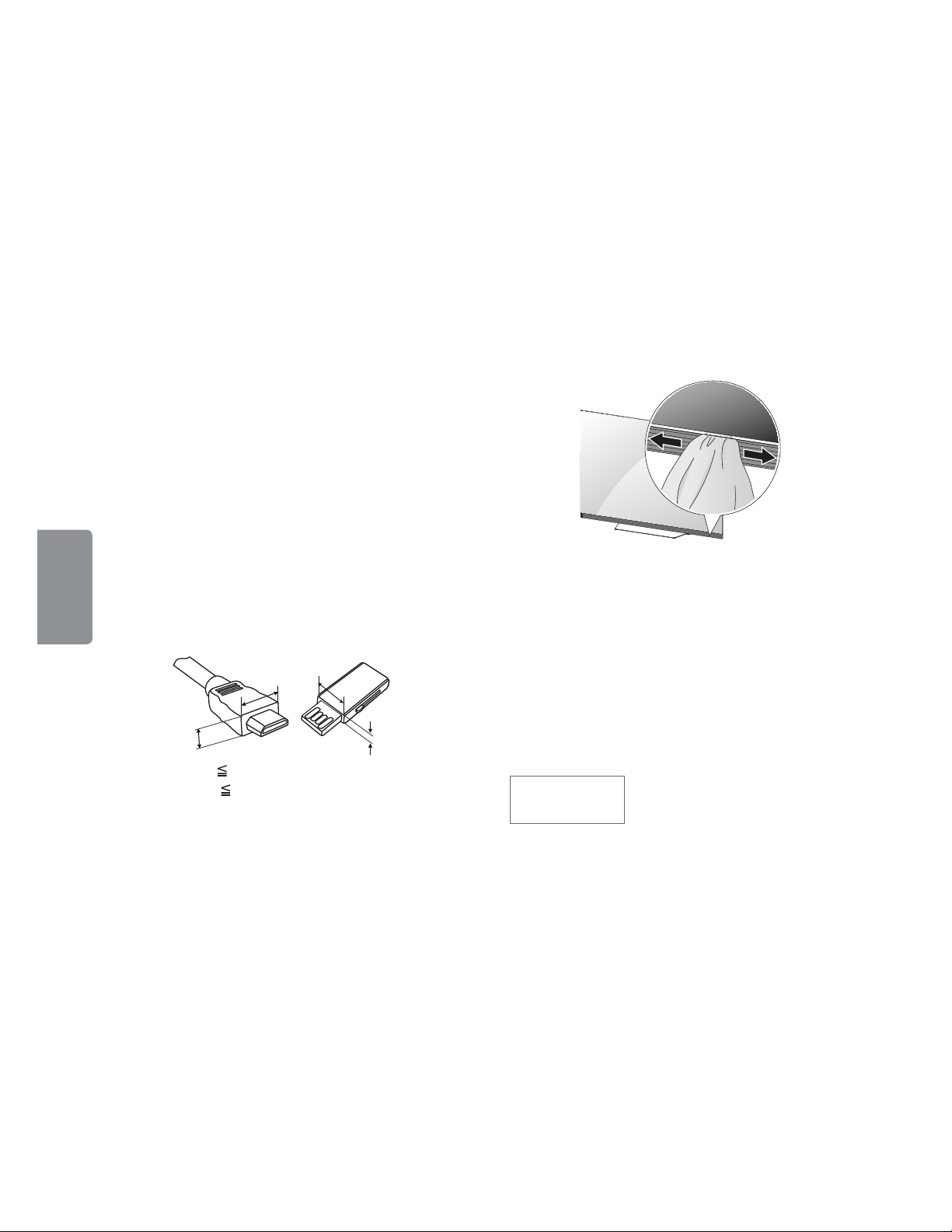
f For an optimal connection, HDMI cables and
USB devices should have bezels less than 10 mm
(0.39 inches) thick and 18 mm (0.7 inches) width.
f Use an extension cable that supports USB 2.0 if
the USB cable or USB flash drive does not fit into
your TV’s USB port.
ENGLISH
f Use a certified cable with the HDMI logo
attached. If you do not use a certified HDMI
cable, the screen may not display or a
connection error may occur.
f Recommended HDMI cable types (3 m or less)
- High-Speed HDMI®/™ cable
- High-Speed HDMI®/™ cable with Ethernet
f Do not use any unapproved items to ensure the
safety and lifespan of the product.
f Any damages or injuries by using unapproved
items are not covered by the warranty.
f Some models appear to have a thin film on the
screen. It is actually part of the screen; do not
remove it.
f When attaching the stand to the TV set, place
the screen facing down on a cushioned table or
flat surface to protect the screen from scratches.
B
A
*A 10 mm (0.39 inches)
*B
18 mm (0.7 inches)
f Make sure that the screws are fastened tightly.
(If they are not fastened securely enough, the TV
may tilt forward after being installed.)
f Do not fasten the screws with excessive force
otherwise they may be worn out and become
loose.
f Make sure to wring any excess water or cleaner
from the cloth.
f Do not spray water or cleaner directly onto the
TV screen.
f Make sure to spray just enough of water or
cleaner onto a dry cloth to wipe the screen.
f If the lower area of the back side of the glass has
been contaminated with dust, etc., use a clean
dry cotton or flannel cloth to clean it.
(For OLED65E7P)
Optional Extras
Optional extras can be changed or modified for
quality improvement without any notification.
B
A
Contact your dealer for buying these items. These
devices work only with certain models. The model
name or design may be changed due to the
manufacturer’s circumstances or policies.
(Depending upon model)
AN-MR650A
Magic Remote
4
Page 5
Lifting and Moving the TV
Using the Joystick Button
When moving or lifting the TV, read the following
to prevent the TV from being scratched or
damaged and for safe transportation regardless of
its type and size.
f It is recommended to move the TV in the box or
packing material that the TV originally came in.
f Before moving or lifting the TV, disconnect the
power cord and all cables.
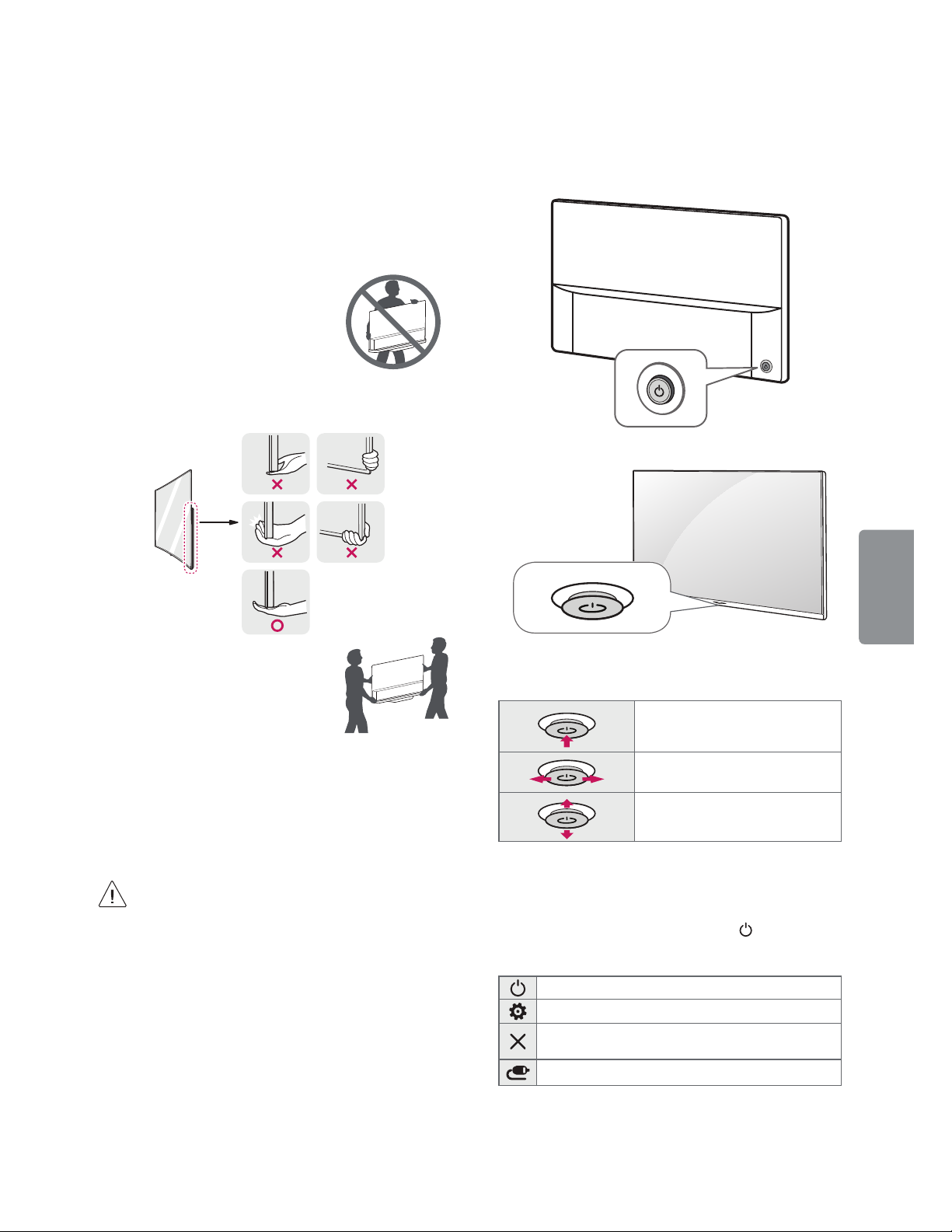
f When holding the TV, the screen
should face away from you to
avoid damage.
f Hold the side and bottom of the TV frame firmly.
Make sure not to hold the transparent part,
speaker, or speaker grille area.
(Depending upon model)
You can operate the TV functions, using the
button.
or
ENGLISH
f Use at least two people to move
a large TV.
f When transporting the TV by
hand, hold the TV as shown in the
following illustration.
f When transporting the TV, do not expose the TV
to jolts or excessive vibration.
f When transporting the TV, keep the TV upright;
never turn the TV on its side or tilt towards the
left or right.
f When handling the TV, be careful not to damage
the protruding buttons.
f Avoid touching the screen at all times, as
this may result in damage to the screen.
f Do not place the product on the floor with
its front facing down without padding.
Failure to do so may result in damage to the
screen.
f Do not move the TV by holding the cable
holders, as the cable holders may break,
and injuries and damage to the TV may
occur. (Depending upon model)
Basic Functions
Power On (Press)
1
Power Off
Volume Control
Channels Control
1 All running apps will close.
(Press and Hold)
Adjusting the Menu
When the TV is turned on, press the button one
time. You can adjust the Menu items using the
button. (Depending upon model)
Turns the power off.
Accesses the setting menu.
Clears on-screen displays and returns to TV
viewing.
Changes the input source.
5
Page 6
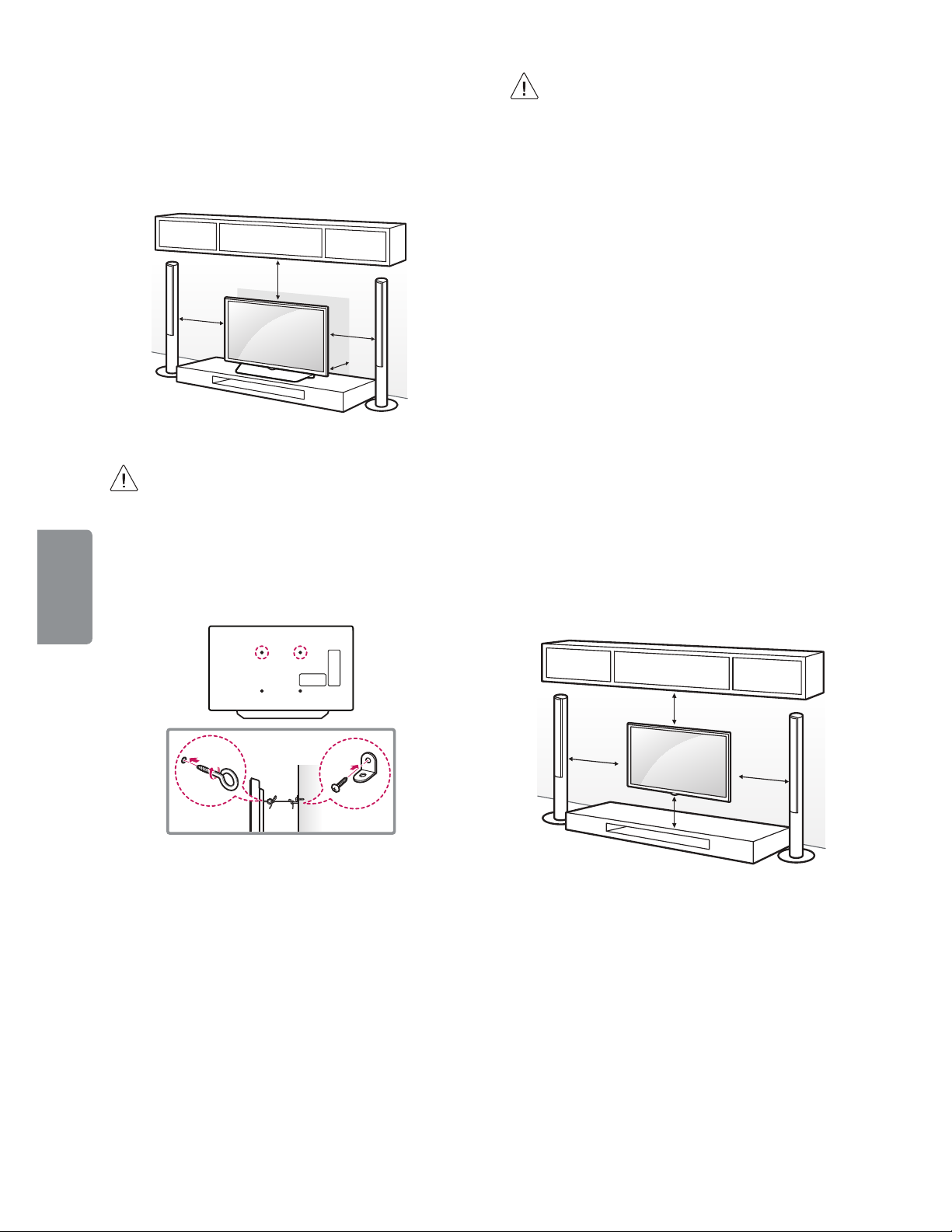
Mounting on a Table
1 Lift and tilt the TV into its upright position on a
table.
- Leave a 10 cm (4 inches) (minimum) space from
the wall for proper ventilation.
10 cm
(4 inches)
10 cm
10 cm
10 cm
2 Connect the power cord to a wall outlet.
f Do not apply foreign substances (oils,
lubricants, etc.) to the screw parts when
assembling the product. (Doing so may
damage the product.)
ENGLISH
Securing the TV to a Wall (optional)
(Depending upon model)
f Make sure that children do not climb on or
hang on the TV.
f Use a platform or cabinet that is strong and
large enough to support the TV securely.
f Brackets, bolts, and ropes are optional. You
can obtain additional accessories from your
local dealer.
Mounting on a Wall
An optional wall mount can be used with your
LG Television. Consult with your local dealer for
a wall mount that supports the VESA standard
used by your TV model. Carefully attach the wall
mount bracket at the rear of the TV. Install the wall
mount bracket on a solid wall perpendicular to the
floor. If you are attaching the TV to other building
materials, please contact qualified personnel to
install the wall mount. Detailed instructions will
be included with the wall mount. We recommend
that you use an LG brand wall mount. The LG wall
mount is easy to adjust or to connect the cables.
When you do not use LG’s wall mount bracket,
use a wall mount bracket where the device is
adequately secured to the wall with enough space
to allow connectivity to external devices. If you are
using a non-adjustable mount, attach the mount
to the wall. Attach the cables to the TV first, then
attach the TV to the mount.
1 Insert and tighten the eye-bolts or TV brackets
and bolts on the back of the TV.
- If there are bolts inserted at the eye-bolts
position, remove the bolts first.
2 Mount the wall brackets with the bolts to the
wall. Match the location of the wall bracket and
the eye-bolts on the rear of the TV.
3 Connect the eye-bolts and wall brackets tightly
with a sturdy rope or cable. Make sure to keep
the rope parallel to the flat surface.
6
10 cm
(4 inches)
10 cm
10 cm
10 cm
Make sure to use screws and wall mounts that
meet the VESA standard. Standard dimensions for
the wall mount kits are described in the following
table.
Page 7
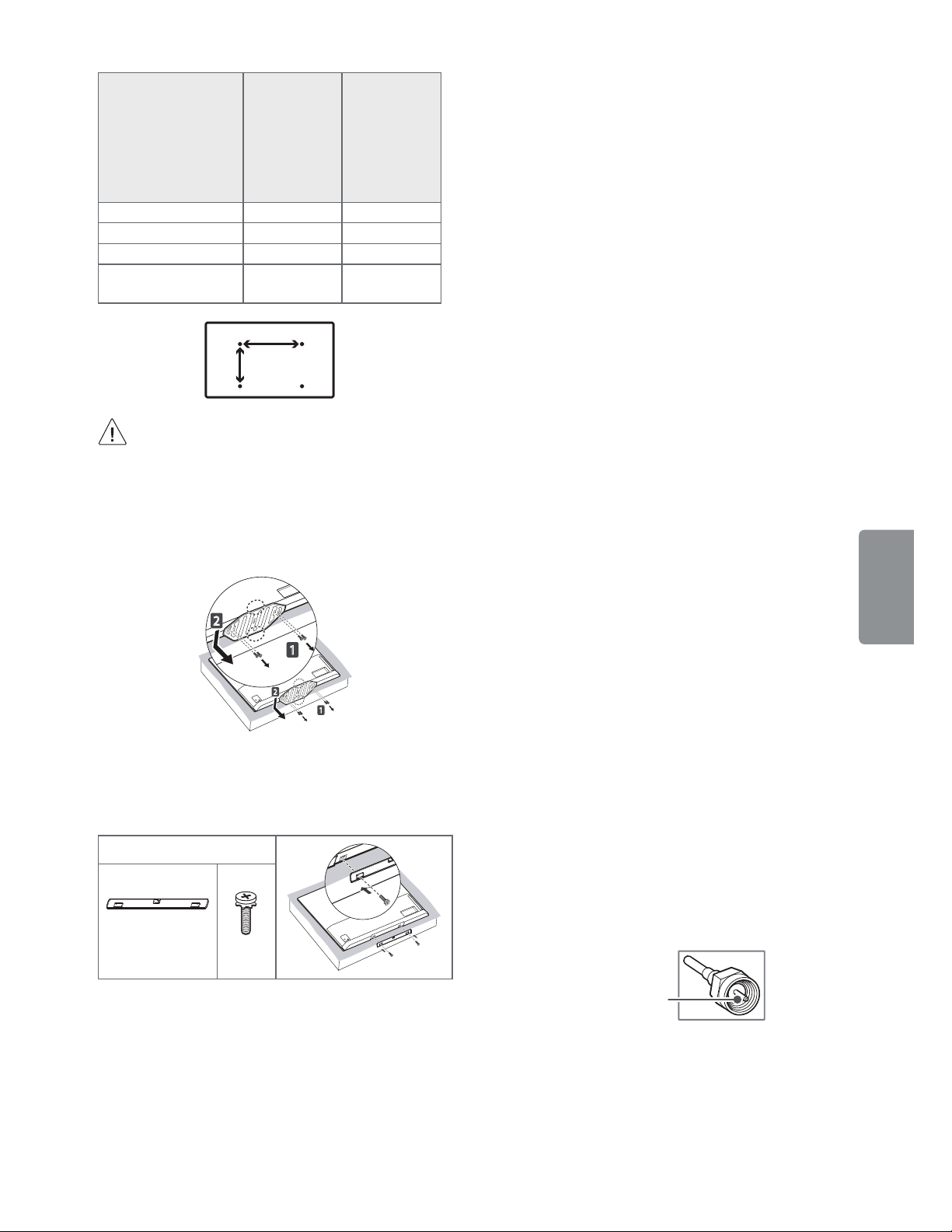
OLED55B7P
1
2
OLED55C7P
OLED65B7P
Model
OLED65C7P
OLED55E7P
OLED65E7P
OLED55B7A
OLED65B7A
VESA (A x B) 300 x 200 400 x 200
Standard screw M6 M6
Number of screws 44
Wall mount bracket
(optional)
OTW420B OTW420B
A
B
f Remove the stand before installing the TV
on a wall mount by performing the stand
attachment in reverse.
f To remove the stand, hold the top and bottom
of stand, then pull it out while also lowering it as
shown in the following illustration.
(For OLED55E7P)
2
1
f To install the wall mount, use the stand assembly
screws to attach the wall mount cover to the
bottom of the product as shown in the following
illustration. (For OLED55E7P)
Provided item
Wall mount
cover
x 2
Connections (Notifications)
You can connect various external devices to the TV.
Supported external devices are: HD receivers, DVD
players, VCRs, audio systems, USB storage devices,
PC, gaming devices, and other external devices. For
more information on external device’s connection,
refer to the manual provided with each device.
f If you record a TV program on a DVD recorder or
VCR, make sure to connect the TV signal input
cable to the TV through a DVD recorder or VCR.
For more information about recording, refer to
the manual provided with the connected device.
f The external device connections shown may
differ slightly from illustrations in a manual.
f Connect external devices to the TV regardless
about the order of the TV port.
f If you connect a gaming device to the TV, use the
cable supplied with the gaming device.
f Refer to the external equipment’s manual for
operating instructions.
f In PC mode, there may be noise associated
with the resolution, vertical pattern, contrast
or brightness. If noise is present, change the PC
output to another resolution, change the refresh
rate to another rate or adjust the brightness and
contrast on the Picture menu until the picture is
clear. Depending upon the graphics card, some
resolution settings may not allow the image to
be positioned on the screen properly.
f Some USB Hubs may not work. If a USB device
connected through a USB Hub is not detected,
connect it directly to the USB port on the TV.
f The TV may be capable of operating without
a set-top-box from a multichannel video
programming distributor (MVPD).
f When connecting via a wired LAN, it is
recommended to use a CAT 7 cable.
Connecting to an Antenna or Cable
Connect an antenna, cable, or cable box to watch
TV while referring to the following. The illustrations
may differ from the actual items and an RF cable is
optional.
f Make sure not to bend the copper wire of the RF
cable.
ENGLISH
Copper wire
f Use a signal splitter to use 2 TVs or more.
f DTV Audio Supported Codec: MPEG, Dolby
Digital
f This TV cannot receive ULTRA HD (3840 x 2160
pixels) broadcasts directly because the related
standards have not been confirmed. (Depending
upon model)
7
Page 8
Other Connections
Connect your TV to external devices. For the best
picture and audio quality, connect the external
device and the TV with the HDMI cable.
> > > General > HDMI ULTRA HD
f
Deep Color:
- On : Support 4K @ 60 Hz (4:4:4, 4:2:2, 4:2:0)
- Off : Support 4K @ 60 Hz 8bit (4:2:0)
f If the device connected to Input Port also
supports ULTRA HD Deep Color, your picture
may be clearer. However, if the device doesn’t
support it, it may not work properly. In that case,
connect the device to a different HDMI port or
change the TV’s HDMI ULTRA HD Deep Color
setting to off.
f HDMI Audio Supported Format: DTS (44.1 kHz /
48 kHz), Dolby Digital / Dolby Digital Plus (32 kHz
/ 44.1 kHz / 48 kHz), PCM (32 kHz / 44.1 kHz / 48
kHz / 96 kHz / 192 kHz) (Depending upon model)
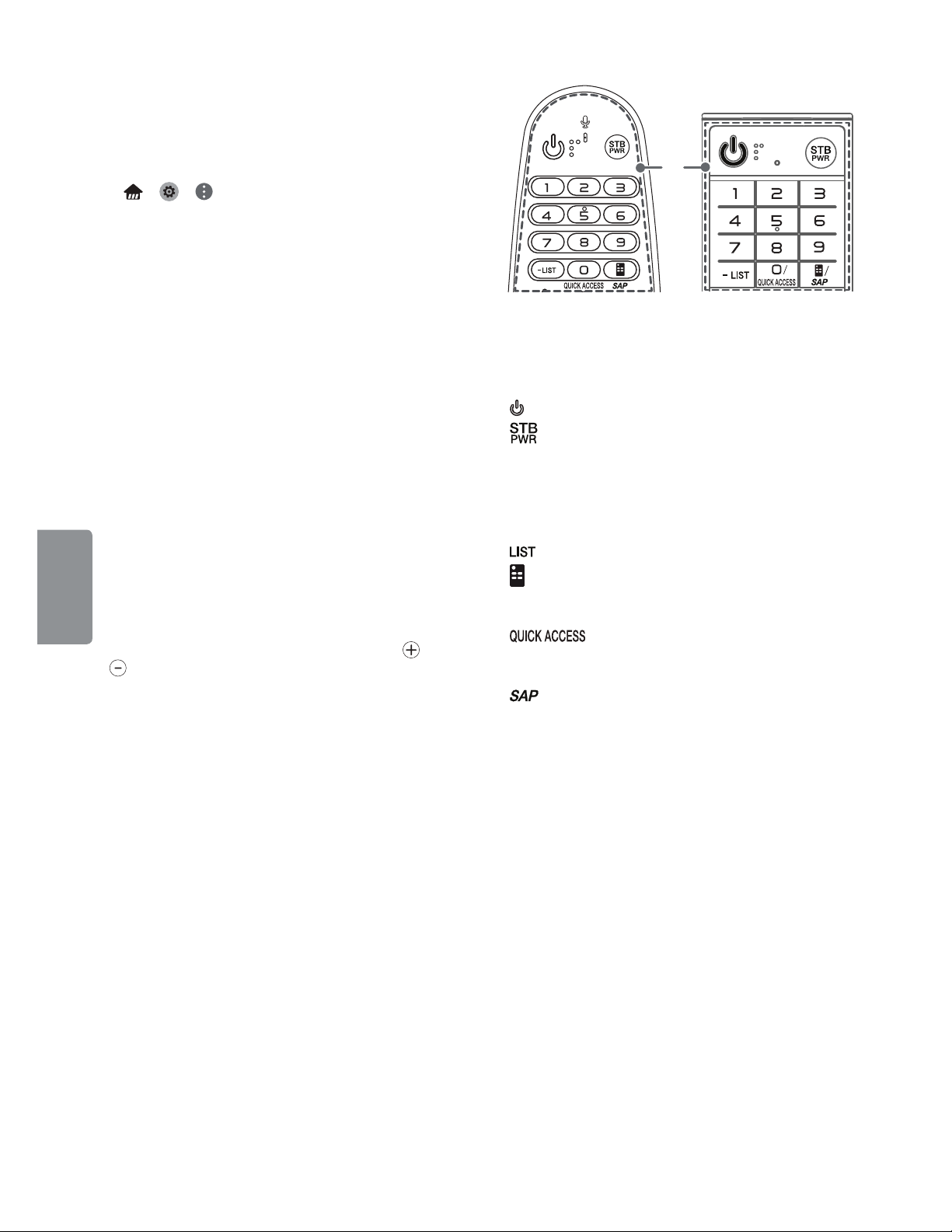
Magic Remote Functions
ENGLISH
(Some buttons and services may not be provided
depending upon models or regions.)
When the message Magic remote battery is low.
Change the battery. is displayed, replace the
batteries. To install batteries, open the battery
cover, replace batteries (1.5 V AA) matching
ends to the label inside the compartment, and
close the battery cover. Failure to match the correct
polarities of the battery may cause the battery to
burst or leak, resulting in fire, personal injury, or
ambient pollution. Be sure to point the remote
control at the remote control sensor on the TV.
To remove the batteries, perform the installation
actions in reverse.
This remote uses infrared light. When in use, it
should be pointed in the direction of the TV’s
remote sensor.
and
A
A
(Power) Turns the TV on or off.
You can turn your set-top box on or off by
adding the set-top box to the universal
remote control for your TV.
Number button Enters numbers.
- (Dash) Inserts a dash between numbers such as
2-1 and 2-2.
Accesses the saved channel list.
(Screen Remote) Displays the Screen Remote.
f Accesses the Universal Control Menu in some
regions.
* You can access the application or
Live TV channel by using the number buttons as
registered.
* SAP (Secondary Audio Program) Feature can
be enabled by pressing the key.
8
Page 9
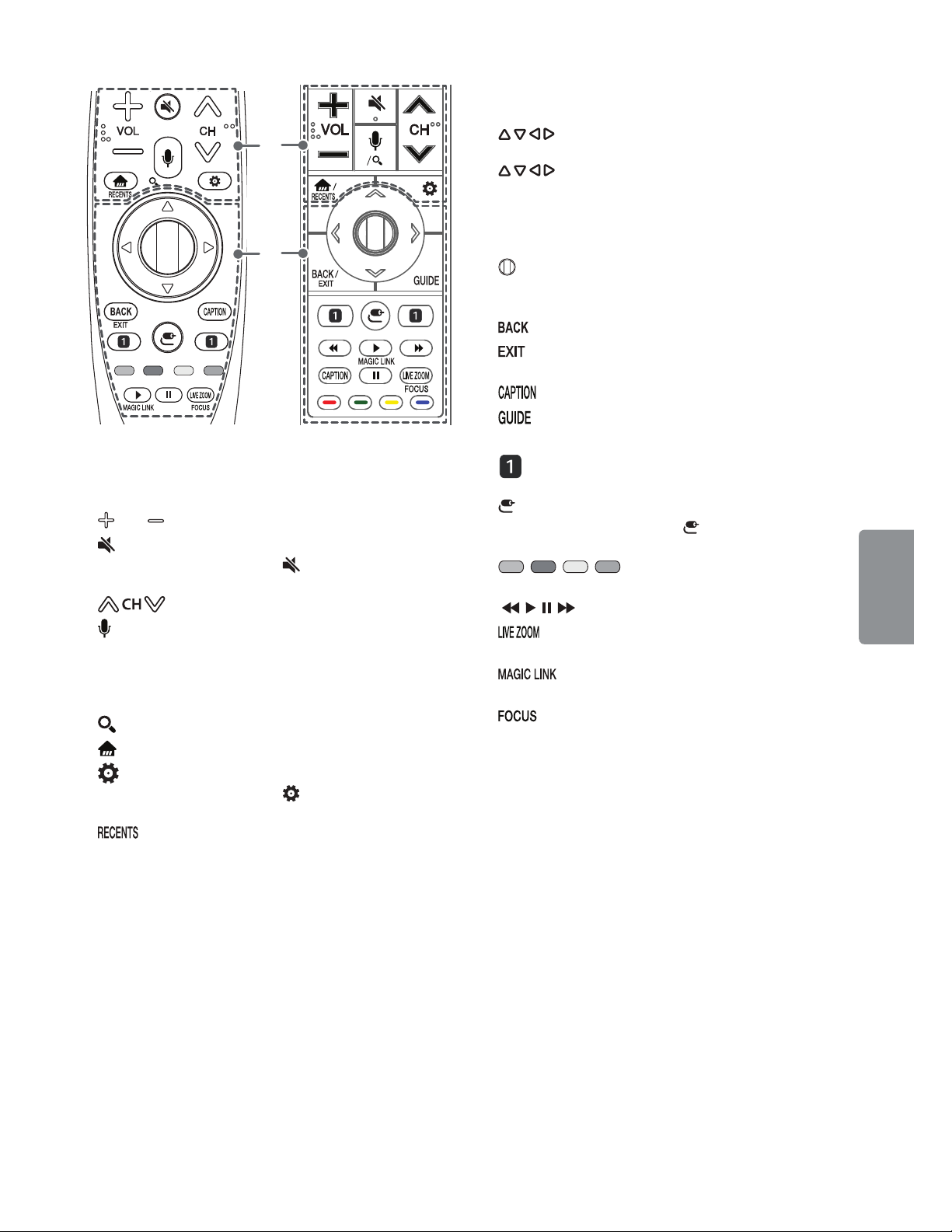
C
B
C
B
VOL Adjusts the volume level.
(Mute) Mutes all sounds.
f Pressing and holding the
displays the Accessibility menu.
Scrolls through the saved channels.
(Voice recognition) Press the button and speak
when the voice display window appears on the TV
screen.
f Network connection is required to use the voice
recognition function.
* (Search) Shows the search mode.
(Home) Accesses the Home menu.
(Q. Settings) Accesses the quick settings.
f Pressing and holding the
displays the All settings menu.
* Shows the previous history.
(Mute) button
(Q. Settings) button
(up/down/left/right) Press the up, down,
left or right button to scroll the menu. If you press
buttons while the pointer is in use, the
pointer will disappear from the screen and Magic
Remote will operate like a general remote control.
To display the pointer on the screen again, shake
Magic Remote to the left and right.
Wheel (OK) Press the center of the Wheel
button to select a menu. You can change channels
by using the Wheel button.
Returns to the previous screen.
* Clears all on-screen displays and returns to
TV viewing.
Activates or deactivates the subtitles.
Displays the program event according to time
scheduler.
Streaming Service buttons Connects to the
Video Streaming Service.
(Input) Changes the input source.
f Pressing and holding the
displays all the lists of external inputs.
, , , These access special functions in
some menus.
, , , Control buttons for media contents
By zooming in on the selected area, you can
view it in full screen.
* Provides content related to the program
you are currently watching.
* You can zoom in on the area where the
remote control is pointed.
* To use the button, press and hold for more than
3 seconds.
(Input) button
ENGLISH
9
Page 10
Registering Magic Remote
Open Source Software Notice
How to Register the Magic Remote
To use the Magic Remote, first pair it with your TV.
1 Put batteries into the Magic Remote and turn
the TV on.
2 Point the Magic Remote at your TV and press the
Wheel (OK) on the remote control.
f If the TV fails to register the Magic Remote, try
again after turning the TV off and back on.
How to Deregister the Magic Remote
f Press the and (Home) buttons at the
same time, for five seconds, to unpair the Magic
Remote with your TV.
f Pressing and holding the
you cancel and re-register Magic Remote at
once.
ENGLISH
f It is recommended that an Access Point (AP)
be located more than 0.2 m (0.65 ft) away
from the TV. If the AP is installed closer than
0.2 m (0.65 ft), the Magic remote control
may not perform as expected due to
frequency interference.
button will let
Information
To obtain the source code under GPL, LGPL, MPL,
and other open source licenses, that is contained in
this product, please visit http://opensource.lge.com.
In addition to the source code, all referred license
terms, warranty disclaimers and copyright notices
are available for download.
LG Electronics will also provide open source code
to you on CD-ROM for a charge covering the cost
of performing such distribution (such as the cost of
media, shipping, and handling) upon email request
to opensource@lge.com. This offer is valid for three
(3) years from the date on which you purchased
the product.
External Control Device Setup
To obtain the external control device setup
information, please visit www.lg.com.
Licenses
Supported licenses may differ by model. For more
information about licenses, visit www.lg.com.
Troubleshooting
f Cannot control the TV with the remote control.
- Check if anything such as tape has been placed
over the receiver.
- Check if there is any obstacle between the
product and the remote control.
- Replace the batteries with new fresh ones.
f No image display and no sound is produced.
- Check if the product is turned on.
- Check if the power cord is connected to a wall
outlet.
- Check if there is a problem in the wall outlet by
connecting other products.
f The TV turns off suddenly.
- Check the power control settings. The power
supply may be interrupted.
- Check if the Timer Power Off / Sleep Timer
feature is activated in the Timers settings.
- If there is no signal while the TV is on, the TV
will turn off automatically after 15 minutes of
inactivity.
10
Page 11
f Abnormal Display
- If the TV feels cold to the touch, there may be a
small flicker when it is turned on. This is normal;
there is nothing wrong with TV. Some minute
dot defects may be visible on the screen,
appearing as tiny red, green, or blue spots.
However, they have no adverse effect on the
TV’s performance. Avoid touching the screen
or holding your finger(s) against it for long
periods of time. Doing so may produce some
temporary distortion effects on the screen.
- This panel is an advanced product that contains
millions of pixels. In a very few cases, you could
see fine dots on the screen while you’re viewing
the TV. Those dots are deactivated pixels and
do not affect the performance and reliability
of the TV.
- Displaying a still image for a prolonged period
of time may cause an image sticking. Avoid
displaying a fixed image on the TV screen for a
extended length of time.
- Some horizontal lines may appear when the
Pixel Refresher feature is performed. It is
normal and there is no need to be concerned.
f Generated Sound
- Cracking noise A cracking noise that occurs
when watching or turning off the TV is
generated by plastic thermal contraction
due to temperature and humidity. This noise
is common for products where thermal
deformation is required.
- Electrical circuit humming/panel buzzing
A low level noise is generated from a highspeed switching circuit, which supplies a
large amount of current to operate a product.
It varies depending upon the product.
This generated sound does not affect the
performance and reliability of the product.
Specifications
Product specifications may be changed without
prior notice due to upgrade of product functions.
Estimated yearly energy consumption indicated on
the FTC label is measured in accordance with the
Test Procedures for Television Sets (USA only).
The actual energy consumption depends on the
usage environment (The content watched, TV
settings, etc.).
Television System
ATSC, NTSC-M, 64 & 256 QAM
Program Coverage
VHF 2-13, UHF 14-69, DTV 2-69, CATV 1-135,
CADTV 1-135
External Antenna Impedance
75 Ω
Environment condition
f Operating Temperature
0 °C to 40 °C (32 °F to 104 °F)
f Operating Humidity
Less than 80 %
f Storage Temperature
-20 °C to 60 °C (-4 °F to 140 °F)
f Storage Humidity
Less than 85 %
Wireless Module (LGSBWAC72)
Specifications
ENGLISH
Wireless LAN (IEEE 802.11a/b/g/n/ac)
Frequency Range Output Power (Max.)
2400 to 2483.5 MHz
5150 to 5725 MHz
5725 to 5850 MHz
Bluetooth
Frequency Range Output Power (Max.)
2400 to 2483.5 MHz 8.5 dBm
f As band channels can vary per country, the
user cannot change or adjust the operating
frequency. This product is configured for the
regional frequency table.
f For consideration of the user, this device should
be installed and operated with a minimum
distance of 20 cm (7.8 inches) between the
device and the body.
f FCC ID: BEJLGSBWAC72 / IC: 2703H-LGSBWAC72
15 dBm
14.5 dBm
14.5 dBm
11
Page 12

Regulatory
FCC NOTICE
(For USA)
This equipment has been tested and found to
comply with the limits for a Class B digital device,
pursuant to Part 15 of the FCC Rules. These limits
are designed to provide reasonable protection
against harmful interference in a residential
installation. This equipment generates, uses
and can radiate radio frequency energy and, if
not installed and used in accordance with the
instructions, may cause harmful interference
to radio communications. However, there is no
guarantee that interference will not occur in a
particular installation. If this equipment does
cause harmful interference to radio or television
reception, which can be determined by turning
the equipment off and on, the user is encouraged
to try to correct the interference by one or more of
the following measures:
- Reorient or relocate the receiving antenna.
ENGLISH
- Increase the separation between the
equipment and the receiver.
- Connect the equipment to an outlet on a circuit
different from that to which the receiver is
connected.
- Consult the dealer or an experienced radio/TV
technician for help.
This device complies with part 15 of the FCC
Rules. Operation is subject to the following two
conditions: (1) this device may not cause harmful
interference and (2) this device must accept any
interference received, including interference that
may cause undesired operation of the device. Any
changes or modifications in construction of this
device which are not expressly approved by the
party responsible for compliance could void the
user’s authority to operate the equipment.
FCC Radio Frequency Interference
Requirements (for UNII devices)
High power radars are allocated as primary users
of the 5.25 to 5.35 GHz and 5.65 to 5.85 GHz bands.
These radar stations can cause interference with
and/or damage this device. This device cannot be
co-located with any other transmitter.
FCC RF Radiation Exposure Statement
[For having wireless function (WLAN, Bluetooth,...)]
This equipment complies with FCC radiation
exposure limits set forth for an uncontrolled
environment. This transmitter must not be
colocated or operating in conjunction with any
other antenna or transmitter. This equipment
should be installed and operated with minimum
distance 20 cm (7.8 inches) between the radiator
and your body. Users must follow the specific
operating instructions for satisfying RF exposure
compliance.
Industry Canada Statement
(For Canada)
[For having wireless function (WLAN, Bluetooth,...)]
This device complies with Industry Canada’s
applicable licence-exempt RSSs. Operation is
subject to the following two conditions:
(1) This device may not cause interference; and
(2) This device must accept any interference,
including interference that may cause undesired
operation of the device.
IC Radiation Exposure Statement
(For Canada)
[For having wireless function (WLAN, Bluetooth,...)]
This equipment complies with IC radiation
exposure limits set forth for an uncontrolled
environment. This equipment should be installed
and operated with minimum distance 20 cm (7.8
inches) between the antenna & your body.
NOTE : THE MANUFACTURER IS NOT RESPONSIBLE
FOR ANY RADIO OR TV INTERFERENCE CAUSED
BY UNAUTHORIZED MODIFICATIONS TO THIS
EQUIPMENT. SUCH MODIFICATIONS COULD
VOID THE USER’S AUTHORITY TO OPERATE THE
EQUIPMENT.
12
Page 13
(For Canada)
[For product having the wireless function using 5
GHz frequency bands]
f The device for operation in the band 5150–5250
MHz is only for indoor use to reduce the
potential for harmful interference to co-channel
mobile satellite systems;
f For devices with detachable antenna(s), the
maximum antenna gain permitted for devices in
the bands 5250-5350 MHz and 5470-5725 MHz
shall be such that the equipment still complies
with the e.i.r.p. limit;
f For devices with detachable antenna(s), the
maximum antenna gain permitted for devices in
the band 5725-5850 MHz shall be such that the
equipment still complies with the e.i.r.p. limits
specified for point-to-point and non-point-topoint operation as appropriate; and
f The worst-case tilt angle(s) necessary to remain
compliant with the e.i.r.p. elevation mask
requirement set forth in Section 6.2.2(3) shall be
clearly indicated.(devices operating in the band
5250-5350 MHz with a maximum e.i.r.p. greater
than 200 mW)
f High-power radars are allocated as primary users
(i.e. priority users) of the bands 5250–5350 MHz
and 5650–5850 MHz and that these radars could
cause interference and/or damage to LE-LAN
devices.
NOTE TO CABLE/TV INSTALLER
(For USA and Canada)
This reminder is provided to call the CATV system
installer’s attention to Article 820-40 of the
National Electric Code (U.S.A.). The code provides
guidelines for proper grounding and, in particular,
specifies that the cable ground shall be connected
to the grounding system of the building, as close
to the point of the cable entry as practical.
WARNING!
Never place a television set in an unstable
location. A television set may fall, causing serious
personal injury or death. Many injuries, particularly
to children, can be avoided by taking simple
precautions such as:
f Using cabinets or stands recommended by the
manufacturer of the television set.
f Only using furniture that can safely support the
television set.
f Ensuring the television set is not overhanging
the edge of the supporting furniture.
f Not placing the television set on tall furniture
(for example, cupboards or bookcases) without
anchoring both the furniture and the television
set to a suitable support.
f Not placing the television set on cloth or other
materials that may be located between the
television set and supporting furniture.
f Educating children about the dangers of
climbing on furniture to reach the television set
or its controls.
If your existing television set is being retained
and relocated, the same considerations as above
should be applied.
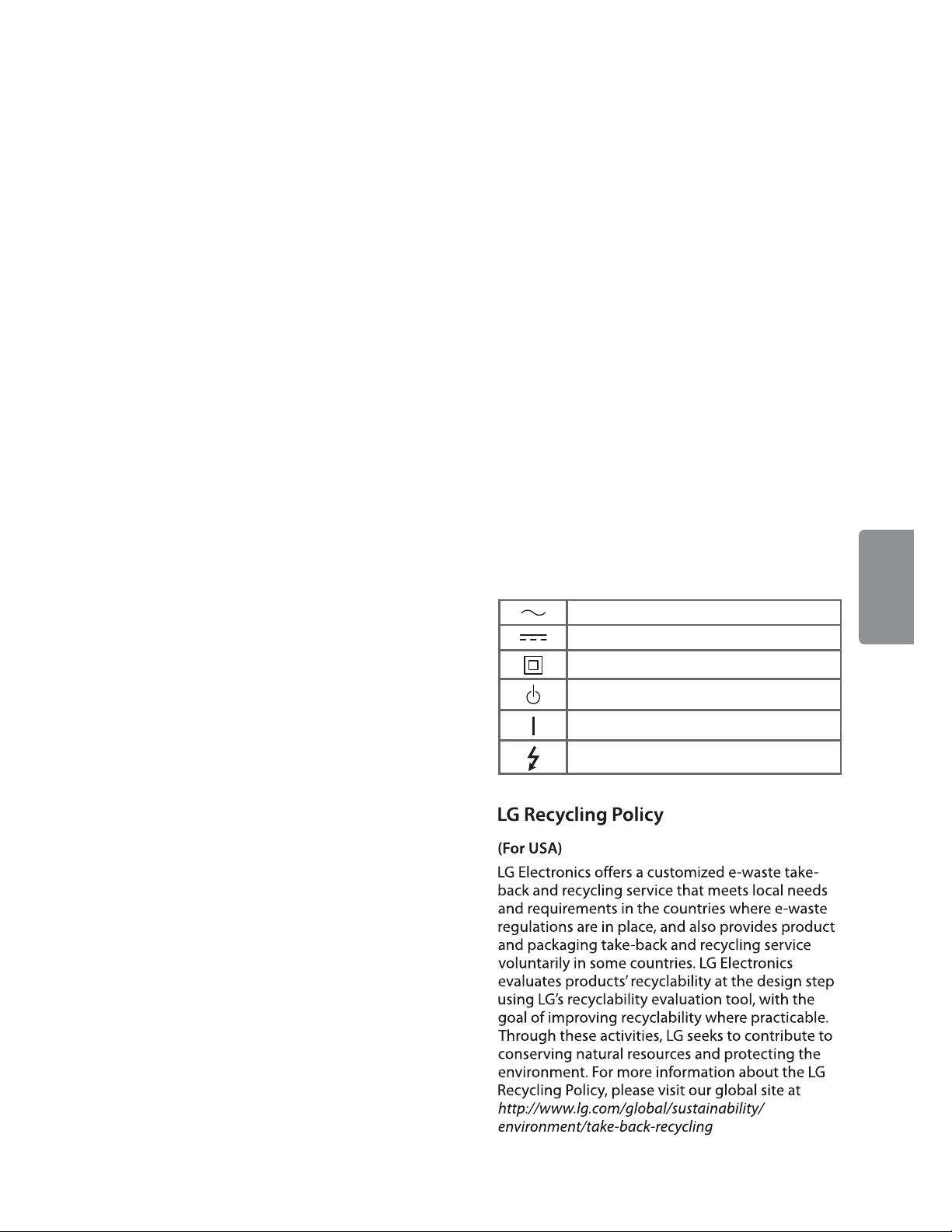
Symbols
Refers to alternating current (AC).
Refers to direct current (DC).
Refers to class II equipment.
Refers to stand-by.
Refers to “ON” (power).
Refers to dangerous voltage.
ENGLISH
13
Page 14

CHILD SAFETY:
PROPER TELEVISION PLACEMENT MATTERS
THE CONSUMER ELECTRONICS INDUSTRY CARES
BVcj[VXijgZgh! gZiV^aZgh VcY i]ZgZhi d[i]Z XdchjbZgZaZXigdc^Xh ^cYjhign VgZXdbb^iiZY id
bV`^c\]dbZZciZgiV^cbZcihV[ZVcYZc_dnVWaZ#
6hndjZc_dnndjgiZaZk^h^dc!eaZVhZcdiZi]ViVaaiZaZk^h^dch¸cZlVcYdaY"bjhiWZhjeedgiZYdc
egdeZghiVcYhdg^chiVaaZYVXXdgY^c\idi]ZbVcj[VXijgZg½hgZXdbbZcYVi^dch#IZaZk^h^dchi]Vi
VgZ^cVeegdeg^ViZanh^ijViZYdcYgZhhZgh!Wdd`XVhZh!h]ZakZh!YZh`h!heZV`Zgh!X]Zhih!XVgih!ZiX#!
bVn[VaadkZg!gZhjai^c\^c^c_jgn#
TUNE IN TO SAFETY
ALWAYS[daadli]ZbVcj[VXijgZg½hgZXdbbZcYVi^dch[dgi]ZhV[Z^chiVaaVi^dcd[ndjgiZaZk^h^dc#
ALWAYSgZVYVcY[daadlVaa^chigjXi^dch[dgegdeZgjhZd[ndjgiZaZk^h^dc#
NEVERVaadlX]^aYgZcidXa^bWdcdgeaVndci]ZiZaZk^h^dcdgi]Z[jgc^ijgZdcl]^X]i]ZiZaZk^h^dc
^heaVXZY#
NEVEReaVXZ i]ZiZaZk^h^dc dc [jgc^ijgZi]Vi XVc ZVh^anWZ jhZYVh hiZeh! hjX]Vh VX]Zhi d[
YgVlZgh#
ALWAYS^chiVaai]ZiZaZk^h^dcl]ZgZ^iXVccdiWZejh]ZY!ejaaZYdkZgdg`cdX`ZYYdlc#
ALWAYS gdjiZ XdgYh VcY XVWaZhXdccZXiZY id i]Z iZaZk^h^dc hd i]Vi i]Zn XVccdi WZig^eeZY
dkZg!ejaaZYdg\gVWWZY#
WALL OR CEILING MOUNT YOUR TELEVISION
ALWAYSXdciVXindjggZiV^aZgVWdjiegd[Zhh^dcVa^chiVaaVi^dc^[ndj]VkZVcnYdjWihVWdjindjg
VW^a^inidhV[ZanbdjcindjgiZaZk^h^dc#
ALWAYSjhZ Vbdjcii]Vi]VhWZZc gZXdbbZcYZYWni]ZiZaZk^h^dcbVcj[VXijgZgVcY]Vh V
hV[ZinXZgi^ÅXVi^dcWnVc^cYZeZcYZciaVWdgVidgnhjX]VhJA!8H6!:IA#
ALWAYS[daadlVaa^chigjXi^dchhjeea^ZYWni]ZiZaZk^h^dcVcYbdjcibVcj[VXijgZgh#
ALWAYSbV`ZhjgZi]Vii]ZlVaadgXZ^a^c\l]ZgZndjVgZbdjci^c\i]ZiZaZk^h^dc^hVeegdeg^ViZ#
HdbZbdjcihVgZ cdiYZh^\cZYidWZ bdjciZYidlVaah VcY XZ^a^c\hl^i]hiZZahijYh dg X^cYZg
WadX`XdchigjXi^dc#>[ndjVgZjchjgZ!XdciVXiVegd[Zhh^dcVa^chiVaaZg#
IZaZk^h^dchXVc WZ]ZVkn# 6 b^c^bjb d[ ild eZdeaZ ^h gZfj^gZY [dg VlVaa dgXZ^a^c\ bdjci
^chiVaaVi^dc#
MOVING AN OLDER TELEVISION TO A NEW PLACE IN
YOUR HOME
BVcn cZl iZaZk^h^dcWjnZghbdkZi]Z^gdaYZg8GIiZaZk^h^dch^cid V hZXdcYVgn gddb V[iZg i]Z
ejgX]VhZd[VÆVi"eVcZaiZaZk^h^dc#HeZX^VaXVgZh]djaYWZbVYZ^ci]ZeaVXZbZcid[daYZg8GI
iZaZk^h^dch#
ALWAYSeaVXZ ndjgdaYZg 8GIiZaZk^h^dcdc[jgc^ijgZi]Vi^hhijgYnVcYVeegdeg^ViZ[dg^ihh^oZ
VcYlZ^\]i#
NEVER eaVXZndjgdaYZg8GIiZaZk^h^dcdcVYgZhhZgl]ZgZX]^aYgZcbVnWZiZbeiZYidjhZi]Z
YgVlZghidXa^bW#
ALWAYSbV`ZhjgZndjgdaYZg8GIiZaZk^h^dcYdZhcdi]Vc\dkZgi]ZZY\Zd[ndjg[jgc^ijgZ#
CE.org/safety
Page 15

Declaration of Conformity
Trade Name LG
Model OLED55B7P-U,
OLED55C7P-U,
OLED55E7P-U,
OLED55B7A-U,
OLED65B7P-U,
OLED65C7P-U,
OLED65E7P-U,
OLED65B7A-U
Responsible Party LG Electronics Inc.
Address 1000 Sylvan Ave. Englewood
Cliffs NJ 07632 U.S.A
TEL 201-266-2534
LG Customer Information Center
For inquires or comments, visit www.lg.com or call;
1-800-243-0000 USA, Consumer User
1-888-865-3026 USA, Commercial User
1-888-542-2623 CANADA
Register your product Online!
www.lg.com
The model and serial numbers of the TV are located
on the back and on one side of the TV. Record them
below should you ever need service.
MODEL
SERIAL
Page 16

OWNER’S MANUAL
EXTERNAL CONTROL DEVICE SETUP
Please read this manual carefully before operating the set and retain it for
future reference.
www.lg.com
Page 17

KEY CODES
2
2
ENGLISH
ENG
KEY CODES
This feature is not available for all models.
Code
(Hexa)
00 CH +, PR + R/C Button 53 List R/C Button
01 CH -, PR - R/C Button 5B Exit R/C Button
02 Volume + R/C Button 60 PIP(AD) R/C Button
03 Volume - R/C Button 61 Blue R/C Button
06 > (Arrow Key / Right Key) R/C Button 63 Yellow R/C Button
07 < (Arrow Key / Left Key) R/C Button 71 Green R/C Button
08 Power R/C Button 72 Red R/C Button
09 Mute R/C Button 79 Ratio / Aspect Ratio R/C Button
0B Input R/C Button 91 AD (Audio Description) R/C Button
0E SLEEP R/C Button 9E LIVE MENU R/C Button
0F TV, TV/RAD R/C Button 7A User Guide R/C Button
10 - 19 * Number Key 0 - 9 R/C Button 7C Smart / Home R/C Button
Function Note
Code
(Hexa)
Function Note
1A Q.View / Flashback R/C Button 7E SIMPLINK R/C Button
1E FAV (Favorite Channel) R/C Button 8E ŹŹ)RUZDUG R/C Button
20 Text (Teletext) R/C Button 8F ŻŻ5HZLQG R/C Button
21 T. Opt (Teletext Option) R/C Button AA Info R/C Button
28 Return (BACK) R/C Button AB Program Guide R/C Button
30 AV (Audio / Video) Mode R/C Button B0 Ź3OD\ R/C Button
39 Caption/Subtitle R/C Button B1 䲘 (Stop / File List) R/C Button
40 ȁ
41
42 My Apps R/C Button BB Soccer R/C Button
43 Menu / Settings R/C Button BD 䱅 (REC) R/C Button
44 OK / Enter R/C Button DC 3D R/C Button
45 Q.Menu R/C Button 99 AutoConfig R/C Button
4C List, - (ATSC Only) R/C Button 9F App / * R/C Button
4D PICTURE R/C Button 9B TV / PC R/C Button
(Arrow Key / Cursor Up)
V (Arrow Key / Cursor
Down)
R/C Button B5 RECENT R/C Button
R/C Button BA
䲙 (Freeze / Slow Play /
Pause)
R/C Button
52 SOUND R/C Button
* Key code 4C (0x4C) is available on ATSC/ISDB models which use major/minor channel.
(For South Korea, Japan, North America, Latin America except Colombia models)
Page 18

EXTERNAL CONTROL DEVICE SETUP
3
3
EXTERNAL CONTROL DEVICE SETUP
Image shown may differ from your TV.
Connect the USB to Serial converter/RS-232C input jack to an external control device (such as a computer
or an A/V control system) to control the product’s functions externally.
Note: The type of control port on the TV can be different between model series.
* Please be advised that not all models support this type of connectivity.
* Cable is not provided.
USB to Serial converter with USB Cable
USB Type
(PC)
LGTV supports PL2303 chip-based (Vendor ID : 0x0557, Product ID : 0x2008) USB to serial converter
which is not made nor provided by LG.
It can be purchased from computer stores that carry accessories for IT support professionals.
USB IN
(TV)
ENGENGLISH
RS-232C With RS232C Cable
DE9 (D-Sub 9pin) Type
You need to purchase the RS-232C (DE9, D-Sub 9pin female-to-female type) to RS-232C cable required
for the connection between the PC and the TV, which is specified in the manual.
RS-232C IN
(CONTROL & SERVICE)
(PC)
The connection interface may differ from your TV.
(TV)
Page 19

EXTERNAL CONTROL DEVICE SETUP
4
4
ENGLISH
ENG
Phone jack Type
You need to purchase the phone-jack to RS-232 cable required for the connection between the PC and
the TV, which is specified in the manual.
* For other models, connect to the USB port.
* The connection interface may differ from your TV.
1
3
(PC)
- or
(PC)
2
1
3
2
SERVICE ONLY
RS-232C IN
(CONTROL & SERVICE)
(TV)
(TV)
Customer Computer RS-232C configurations
3-Wire Configurations(Not standard)
1
6
RS-232C
(Serial port)
Set ID
For Set ID number, see "Real Data Mapping" on p.6
1. Press SETTINGS to access the main menus.
2. Press the Navigation buttons to scroll to *HQHUDOĺ$ERXWWKLV79RU237,21 and press OK.
3. Press the Navigation buttons to scroll to SET ID and press OK.
4. Scroll left or right to select a set ID number and select CLOSE. The adjustment range is 1-99.
5. When you are finished, press EXIT.
* (Depending on model)
5
RXD 2 2 TXD
TXD 3 1 RXD
GND 5 3 GND
9
RXD 3 2 TXD
TXD 2 1 RXD
GND 5 3 GND
PC TV
OR
D-Sub 9 Phone
Page 20

EXTERNAL CONTROL DEVICE SETUP
5
5
Communication Parameters
Baud rate : 9600 bps (UART)
Data length : 8 bits
Parity : None
Stop bit : 1 bit
Communication code : ASCII code
Use a crossed (reverse) cable.
Command reference list
(Depending on model)
COMMAND1 COMMAND2
01. Power* k a 00 to 01 15. Balance k t 00 to 64
02. Aspect
Ratio
03. Screen
Mute
04. Volume
Mute
05. Volume
Control
06. Contrast k g 00 to 64
07.
Brightness
08. Color/
Colour
09. Tint k j 00 to 64
10.
Sharpness
11. OSD
Select
12. Remote
Control Lock
Mode
13. Treble k r 00 to 64
k c (p.7)
k d (p.7)
k e 00 to 01 18. Equalizer j v (p.8)
k f 00 to 64
k h 00 to 64
k i 00 to 64 22. Key m c Key Codes
k k 00 to 32
k l 00 to 01
k m 00 to 01
DATA
(Hexadecimal)
16. Color
(Colour)
Temperature
17. ISM
Method (Only
Plasma TV)
19. Energy
Saving
20. Tune
Command
21. Channel
(Programme)
Add/Del(Skip)
23. Control
Backlight,
Control Panel
Light
24. Input
select (Main)
25. 3D (Only
3D models)
26. Extended
3D (Only 3D
models)
27. Auto
Configure
COMMAND1 COMMAND2
x u 00 to 64
j p (p.8)
j q 00 to 05
m a (p.9)
m b 00 to 01
m g 00 to 64
x b (p.11)
x t (p.11)
x v (p.12)
j u (p.12)
DATA
(Hexadecimal)
ENGENGLISH
14. Bass k s 00 to 64
* Note: During playing or recording media, all commands except Power (ka) and Key (mc) are not
executed and treated as NG.
With RS232C cable, TV can communicate "ka command" in power-on or power-off status. but with
USB-to-Serial converter cable, the command works only if TV is on.
Page 21

EXTERNAL CONTROL DEVICE SETUP
6
6
ENGLISH
ENG
Transmission / Receiving Protocol
Transmission
[Command1][Command2][ ][Set ID][ ][Data][Cr]
[Command 1] : First command to control the TV. (j, k, m or x)
[Command 2] : Second command to control the TV.
[Set ID] : You can adjust the [Set ID] to choose desired monitor ID number in option menu.
Adjustment range in TV is 1 to 99. If [Set ID] value is selected to ‘0’, every connected set
can be controlled.
* [Set ID] is indicated as decimal (1 to 99) on menu and as Hexadecimal (0x00 to 0x63) on
transmission/receiving protocol.
[DATA] : To transmit command data (hexadecimal). Transmit ‘FF’ data to read status of command.
[Cr] : Carriage Return - ASCII code ‘0x0D’
[ ] : Space – ASCII code ‘0x20’
OK Acknowledgement
[Command2][ ][Set ID][ ][OK][Data][x]
* The set transmits ACK (acknowledgement) based on this format when receiving normal data. At this time,
if the data is data read mode, it indicates present status data. If the data is data write mode, it returns the
data of the PC computer.
Error Acknowledgement
[Command2][ ][Set ID][ ][NG][Data][x]
* The set transmits ACK (acknowledgement) based on this format when receiving abnormal data from
non-viable functions or communication errors.
Data 00: Illegal Code
Real data mapping (Hexadecimal b Decimal)
* When you enter the [data] in hexadecimal, refer to following conversion table.
* Channel Tune (ma) Command uses two-byte hexadecimal value([data]) to select channel number.
00 : Step 0 32 : Step 50 (Set ID 50) FE : Step 254
01 : Step 1 (Set ID 1) 33 : Step 51 (Set ID 51) FF : Step 255
... ... ...
0A : Step 10 (Set ID 10) 63 : Step 99 (Set ID 99) 01 00 : Step 256
... ... ...
0F : Step 15 (Set ID 15) C7 : Step 199 27 0E : Step 9998
10 : Step 16 (Set ID 16) C8 : Step 200 27 0F : Step 9999
... ... ...
Page 22

EXTERNAL CONTROL DEVICE SETUP
* Commands may work differently depending on model and signal.
01. Power (Command: k a)
Ź To control Power *On or Off of the set.
Transmission[k][a][ ][Set ID][ ][Data][Cr]
Data 00 : Power Off 01 : *Power On
Ack [d][ ][Set ID][ ][OK/NG][Data][x]
* In case of video mute on only, TV will display On
Screen Display(OSD). But, in case of Screen mute
on, TV will not display OSD.
7
7
ENGENGLISH
Ack [a][ ][Set ID][ ][OK/NG][Data][x]
Ź To Show TV is Power On or *Off
Transmission [k][a][ ][Set ID][ ][FF][Cr]
Ack [a][ ][Set ID][ ][OK][Data][x]
* Similarly, if other functions transmit ‘FF’ data
based on this format, Acknowledgement feedback
presents status about each function.
02. Aspect Ratio (Command: k c)
(Main Picture Size)
Ź To adjust the screen format. (Main picture format)
You can also adjust the screen format using the
Aspect Ratio in the Q.MENU. or PICTURE menu.
Transmission [k][c][ ][Set ID][ ][Data][Cr]
Data 01 : Normal screen
(4:3)
02 : Wide screen
(16:9)
04 : Zoom
05 : Zoom 2
(Latin America
except Colombia
Only)
06 : Set by Program/
Original
Ack [c][ ][Set ID][ ][OK/NG][Data][x]
07 : 14:9
(Europe, Colombia, Mid-East,
Asia except South Korea and
Japan)
09 : * Just Scan
0B : Full Wide
(Europe, Colombia, MidEast, Asia except South
Korea and Japan)
10 to 1F : Cinema Zoom 1 to 16
0c : 21:9 (Depending on model)
* Using the PC input, you select either 16:9 or 4:3
screen aspect ratio.
* In DTV/HDMI/Component mode (high-definition),
Just Scan is available.
* Full wide mode may work differently based on
model and is supported for DTV fully, and ATV,
AV partially.
04. Volume Mute (Command: k e)
Ź To control volume mute on/off.
You can also adjust mute using the MUTE button
on remote control.
Transmission [k][e][ ][Set ID][ ][Data][Cr]
Data 00 : Volume mute on (Volume off)
01 : Volume mute off (Volume on)
Ack [e][ ][Set ID][ ][OK/NG][Data][x]
05. Volume Control (Command: k f)
Ź To adjust volume.
You can also adjust volume with the volume
buttons on remote control.
Transmission [k][f][ ][Set ID][ ][Data][Cr]
Data Min : 00 to Max : 64
Ack [f][ ][Set ID][ ][OK/NG][Data][x]
06. Contrast (Command: k g)
Ź To adjust screen contrast.
You can also adjust contrast in the PICTURE
menu.
Transmission [k][g][ ][Set ID][ ][Data][Cr]
Data Min : 00 to Max : 64
Ack [g][ ][Set ID][ ][OK/NG][Data][x]
07. Brightness (Command: k h)
Ź To adjust screen brightness.
You can also adjust brightness in the PICTURE
menu.
Transmission [k][h][ ][Set ID][ ][Data][Cr]
03. Screen Mute (Command: k d)
Ź To select screen mute on/off.
Transmission [k][d][ ][Set ID][ ][Data][Cr]
Data 00 : Screen mute off (Picture on)
Video mute off
01 : Screen mute on (Picture off)
10 : Video mute on
Data Min : 00 to Max : 64
Ack [h][ ][Set ID][ ][OK/NG][Data][x]
Page 23

EXTERNAL CONTROL DEVICE SETUP
8
8
ENGLISH
ENG
08. Color/Colour (Command: k i)
Ź To adjust the screen Color(Colour).
You can also adjust colour in the PICTURE menu.
Transmission [k][i][ ][Set ID][ ][Data][Cr]
Data Min : 00 to Max : 64
Ack [i][ ][Set ID][ ][OK/NG][Data][x]
09. Tint (Command: k j)
Ź To adjust the screen tint.
You can also adjust tint in the PICTURE menu.
Transmission [k][j][ ][Set ID][ ][Data][Cr]
Data Red : 00 to Green : 64
Ack [j][ ][Set ID][ ][OK/NG][Data][x]
10. Sharpness (Command: k k)
Ź To adjust the screen sharpness.
You can also adjust sharpness in the PICTURE
menu.
Transmission [k][k][ ][Set ID][ ][Data][Cr]
Data Min : 00 to Max : 32
Ack [k][ ][Set ID][ ][OK/NG][Data][x]
13. Treble (Command: k r)
Ź To adjust treble.
You can also adjust in the AUDIO menu.
Transmission [k][r][ ][Set ID][ ][Data][Cr]
Data Min : 00 to Max : 64
Ack [r][ ][Set ID][ ][OK/NG][Data][x]
* (Depending on model)
14. Bass (Command: k s)
Ź To adjust Bass.
You can also adjust in the AUDIO menu.
Transmission [k][s][ ][Set ID][ ][Data][Cr]
Data Min : 00 to Max : 64
Ack [s][ ][Set ID][ ][OK/NG][Data][x]
* (Depending on model)
15. Balance (Command: k t)
Ź To adjust balance.
You can also adjust balance in the AUDIO menu.
Transmission [k][t][ ][Set ID][ ][Data][Cr]
Data Min : 00 to Max : 64
Ack [t][ ][Set ID][ ][OK/NG][Data][x]
11. OSD Select (Command: k l)
Ź To select OSD (On Screen Display) on/off when
controlling remotely.
Transmission [k][l][ ][Set ID][ ][Data][Cr]
Data 00 : OSD off 01 : OSD on
Ack [l][ ][Set ID][ ][OK/NG][Data][x]
12. Remote control lock mode (Command: k m)
Ź To lock the front panel controls on the monitor and
remote control.
Transmission [k][m][ ][Set ID][ ][Data][Cr]
Data 00 : Lock off 01 : Lock on
Ack [m][ ][Set ID][ ][OK/NG][Data][x]
* If you are not using the remote control, use this
mode.
When main power is off & on (plug-off and plug-in,
after 20 - 30 seconds), external control lock is
released.
* In the standby mode (DC off by off timer or ‘ka’,
‘mc’ command), and if key lock is on, TV will not
turn on by power on key of IR & Local Key.
16. Color(Colour) Temperature (Command: x u)
Ź To adjust colour temperature. You can also adjust
Color(Colour) Temperature in the PICTURE menu.
Transmission [x][u][ ][Set ID][ ][Data][Cr]
Data Min : 00 to Max : 64
Ack [u][ ][Set ID][ ][OK/NG][Data][x]
17. ISM Method (Command: j p) (Only Plasma TV)
Ź To control the ISM method. You can also adjust
ISM Method in OPTION menu.
Transmission [j][p][ ][Set ID][ ][Data][Cr]
Data Min : 02: Orbiter
08: Normal
20: Color(Colour) Wash
Ack [p][ ][Set ID][ ][OK/NG][Data][x]
Page 24

EXTERNAL CONTROL DEVICE SETUP
9
9
18. Equalizer (Command : j v)
Ź Adjust EQ of the set.
Transmission [j][v][ ][Set ID][ ][Data][Cr]
06%
/6%
)UHTXHQF\ 'DWD
000
001
010
011
100
Acknowledgement [v][ ][Set ID][ ][OK/NG][Data][x]
Frequency
VW%DQG
QG%DQG
UG%DQG
WK%DQG
WK%DQG
6WHS
00000
00001
... ... ... ... ...
10011
10101
GHFLPDO
GHFLPDO
GHFLPDO
GHFLPDO
* It depends on model, and can adjust when sound
mode is EQ adjustable value.
19. Energy Saving (Command: j q)
Ź To reduce the power consumption of the TV. You
can also adjust Energy Saving in PICTURE menu.
Transmission [j][q][ ][Set ID][ ][Data][Cr]
Data
00 : Off
01 : Minimum
02 : Medium
03 : Maximum
04 : Auto (For LCD TV / LED TV) /
Intelligent sensor (For PDP TV)
05 : Screen off
* (Depending on model)
Ack [q][ ][Set ID][ ][OK/NG][Data][x]
20. Tune Command (Command: m a)
* This command may work differently depending on
model and signal.
For Europe, Mid-East, Colombia, Asia except
South Korea and Japan Model
Ź Select channel to following physical number.
Transmission [m][a][ ][Set ID][ ][Data 00][ ]
[Data 01][ ][Data 02][Cr]
* Analog Antenna/Cable
ENGENGLISH
[Data 00][Data 01] Channel Data
Data 00 : High byte channel data
Data 01 : Low byte channel data
- 00 00 ~ 00 C7 (Decimal : 0 ~ 199)
Data 02 : Input Source (Analog)
- 00 : Antenna TV (ATV)
- 80 : Cable TV (CATV)
* Digital Antenna/Cable/Satellite
[Data 00][Data 01]: Channel Data
Data 00 : High Channel data
Data 01 : Low Channel data
- 00 00 ~ 27 0F (Decimal: 0 ~ 9999)
Data 02 : Input Source (Digital)
- 10 : Antenna TV (DTV)
- 20 : Antenna Radio (Radio)
- 40 : Satellite TV (SDTV)
- 50 : Satellite Radio (S-Radio)
- 90 : Cable TV (CADTV)
- a0 : Cable Radio (CA-Radio)
* Tune Command Examples:
1. Tune to the Analog antenna (PAL) Channel 10.
Set ID = All = 00
Data 00 & 01 = Channel Data is 10 = 00 0a
Data 02 = Analog Antenna TV = 00
Result = ma 00 00 0a 00
2. Tune to the digital antenna (DVB-T) Channel 01.
Set ID = All = 00
Data 00 & 01 = Channel Data is 1 = 00 01
Data 02 = Digital Antenna TV = 10
Result = ma 00 00 01 10
3. Tune to the satellite (DVB-S) Channel 1000.
Set ID = All = 00
Data 00 & 01 = Channel Data is 1000 = 03 E8
Data 02 = Digital Satellite TV = 40
Result = ma 00 03 E8 40
Ack [a][ ][Set ID][ ][OK][Data 00][Data 01]
[Data 02][x][a][ ][Set ID][ ][NG][Data 00][x]
For South Korea, North/Latin America except
Colombia Model
Ź To tune channel to following physical/major/minor
number.
Transmission [m][a][ ][0][ ][Data00][ ][Data01]
[ ][Data02][ ][Data03][ ][Data04][ ][Data05][Cr]
Digital channels have a Physical, Major, and Minor
channel number. The Physical number is the actual
digital channel number, the Major is the number that
the channel should be mapped to, and the Minor is
the sub-channel. Since the ATSC tuner automatically
maps the channel from the Major / Minor number,
the Physical number is not required when sending a
command in Digital.
Page 25

EXTERNAL CONTROL DEVICE SETUP
10
10
ENGLISH
ENG
* Analog Antenna/Cable
Data 00 : Physical Channel Number
- Antenna (ATV) : 02~45 (Decimal: 2 ~ 69)
- Cable (CATV) : 01, 0E~7D (Decimal : 1, 14~125)
[Data 01 ~ 04]: Major/Minor Channel Number
Data 01 & 02: xx (Don't care)
Data 03 & 04: xx (Don't care)
Data 05: Input Source (Analog)
- 00 : Antenna TV (ATV)
- 01 : Cable TV (CATV)
* Digital Antenna/Cable
Data 00 : xx (Don't care)
[Data 01][Data 02]: Major Channel Number
Data 01 : High byte Channel Data
Data 02 : Low byte Channel Data
- 00 01 ~ 27 0F (Decimal: 1 ~ 9999)
[Data 03][Data 04]: Minor Channel Number
Data 03 : High byte Channel Data
Data 04 : Low byte Channel Data
Data 05 : Input Source (Digital)
- 02 : Antenna TV (DTV) – Use Physical Channel
Number
- 06 : Cable TV (CADTV) – Use Physical Channel
Number
- 22 : Antenna TV (DTV) – Don’t Use Physical
Channel Number
- 26 : Cable TV (CADTV) - Don’t Use Physical
Channel Number
- 46 : Cable TV (CADTV) – Use Physical/Major
Channel Number Only (One Part Channel)
- 66 : Cable TV (CADTV) – Use Major Channel
Number Only (One Part Channel)
- 0b : Cable DTV Plus – Use Physical Channel
Number
- 2b : Cable DTV Plus – Don’t Use Physical
Channel Number
- 4b : Cable DTV Plus – Use Physical/Major
Channel Number Only (One Part Channel)
- 6b : Cable DTV Plus – Use Major Channel
Number Only (One Part Channel)
Two bytes are available for each major and minor
channel data, but usually the low byte is used alone
(high byte is 0).
2. Tune to the digital antenna (ATSC) channel 30-3.
Set ID = All = 00
Data 00 = Don’t know Physical = 00
Data 01 & 02 = Major is 30 = 00 1E
Data 03 & 04 = Minor is 3 = 00 03
Data 05 = Digital Antenna TV = 22
Total = ma 00 00 00 1E 00 03 22
Ack [a][ ][Set ID][ ][OK][Data 00][Data 01]
[Data 02][Data 03][Data 04][Data 05]
[x][a][ ][Set ID][ ][NG][Data 00][x]
For Japan Model
Ź To tune channel to following physical/major/minor
number.
Transmission [m][a][ ][0][ ][Data00][ ][Data01]
[ ][Data02][ ][Data03][ ][Data04][ ][Data05][Cr]
* Digital Antenna/Satellite
Data 00: xx (Don't care)
[Data 01][Data 02]: Major Channel Number
Data 01: High byte Channel Data
Data 02: Low byte Channel Data
- 00 01 ~ 27 0F (Decimal: 1 ~ 9999)
[Data 03][Data 04]: Minor/Branch Channel Number
(Don’t care in Satellite)
Data 03: High byte Channel Data
Data 04: Low byte Channel Data
Data 05 : Input Source (Digital/Satellite for Japan)
- 02 : Antenna TV (DTV)
- 42 : Antenna TV (DTV) – Use Physical/Major
Channel Number Only (One Part Channel)
- 62 : Antenna TV (DTV) – Use Major Channel
Number Only (One Part Channel)
- 07 : BS (Broadcasting Satellite)
- 08 : CS1 (Communication Satellite 1)
- 09 : CS2 (Communication Satellite 2)
* Tune Command Examples:
Tune to the digital antenna (ISDB-T) channel 17-1
1
Set ID = All = 00
Data 00 = Don’t know Physical = 00
Data 01 & 02 = Major is 17 = 00 11
Data 03 & 04 = Minor/Branch is 1 = 00 01
Data 05 = Digital Antenna TV = 02
Total = ma 00 00 00 11 00 01 02
.
* Tune Command Examples:
1. Tune to the Analog cable (NTSC) channel 35.
Set ID = All = 00
Data 00 = Channel Data is 35 = 23
Data 01 & 02 = No Major = 00 00
Data 03 & 04 = No Minor = 00 00
Data 05 = Analog Cable TV = 01
Total = ma 00 23 00 00 00 00 01
Page 26

EXTERNAL CONTROL DEVICE SETUP
11
11
2. Tune to the BS (ISDB-BS) channel 30.
Set ID = All = 00
Data 00 = Don’t know Physical = 00
Data 01 & 02 = Major is 30 = 00 1E
Data 03 & 04 = Don’t Care = 00 00
Data 05 =
Total = ma 00 00 00 1E 00 00 07
* This feature is varied based on the model.
Ack [a][ ][Set ID][ ][OK][Data 00][Data 01]
[Data 02][Data 03][Data 04][Data 05]
[x][a][ ][Set ID][ ][NG][Data 00][x]
Digital BS TV = 07
21. Channel(Programme) Add/Del(Skip)
(Command: m b)
Ź To skip current channel(programme) for next time.
Transmission [m][b][ ][Set ID][ ][Data][Cr]
Data 00 : Del(ATSC,ISDB)/Skip(DVB) 01 : Add
Ack [b][ ][Set ID][ ][OK/NG][Data][x]
* Set the saved channel status to del(ATSC, ISDB)/
skip(DVB) or add.
22. Key (Command: m c)
Ź To send IR remote key code.
Transmission [m][c][ ][Set ID][ ][Data][Cr]
Data Key code - p.2.
Ack [c][ ][Set ID][ ][OK/NG][Data][x]
23. Control Backlight (Command: m g)
For LCD TV / LED TV
Ź To control the backlight.
Transmission [m][g][ ][Set ID][ ][Data][Cr]
Data Min : 00 to Max : 64
Ack [g][ ][Set ID][ ][OK/NG][Data][x]
Control Panel Light (Command: m g)
24. Input select (Command: x b)
(Main Picture Input)
Ź To select input source for main picture.
Transmission [x][b][ ][Set ID][ ][Data][Cr]
Data
00 : DTV
02 : Satellite DTV
ISDB-BS (Japan)
03 : ISDB-CS1 (Japan)
04 : ISDB-CS2 (Japan)
11 : CATV
20 : AV or AV1 21 : AV2
40 : Component1
60 : RGB
90 : HDMI1
92 : HDMI3
Ack [b][ ][Set ID][ ][OK/NG][Data][x]
* This function depends on model and signal.
01 : CADTV
10 : ATV
41 : Component2
91 : HDMI2
93 : HDMI4
25. 3D(Command: x t) (only 3D models)
(Depending on model)
Ź To change 3D mode for TV.
Transmission [x][t][ ][Set ID][ ][Data 00][ ][Data 01]
[ ][Data 02][ ][Data 03][Cr]
* (Depending on model)
Data Structure
[Data 00] 00 : 3D On
01 : 3D Off
02 : 3D to 2D
03 : 2D to 3D
[Data 01] 00 : Top and Bottom
01 : Side by Side
02 : Check Board
03 : Frame Sequential
04 : Column interleaving
05 : Row interleaving
[Data 02] 00 : Right to Left
01 : Left to Right
[Data 03] 3D Effect(3D Depth): Min : 00 - Max : 14
(*transmit by Hexadecimal code)
ENGENGLISH
For Plasma TV
Ź To control the panel light.
Transmission [m][g][ ][Set ID][ ][Data][Cr]
Data Min : 00 to Max : 64
Ack [g][ ][Set ID][ ][OK/NG][Data][x]
Page 27

EXTERNAL CONTROL DEVICE SETUP
12
12
ENGLISH
ENG
* [Data 02], [Data 03] functions depend on model
and signal.
* If [Data 00] is 00 (3D On), [Data 03] has no
meaning.
* If [Data 00] is 01 (3D off) or 02 (3D to 2D), [Data
01], [Data 02] and [Data 03] have no meaning.
* If [Data 00] is 03 (2D to 3D), [Data 01] and
[Data 02] have no meaning.
* If [Data 00] is 00 (3D On) or 03 (2D to 3D), [Data
03] works when 3D Mode (Genre) is manual only.
* All 3D pattern options ([Data 01]) may not be
available according to broadcasting/video signal.
[Data 00] [Data 01] [Data 02] [Data 03]
00 O O O
01 X X X
02 X X X
03 X O O
X : don’t care
Ack [t][ ][Set ID][ ][OK][Data00][Data01][Data02]
[Data03][x]
[t][ ][Set ID][ ][NG][Data00][x]
26. Extended 3D(Command: x v) (only 3D models)
(Depending on model)
Ź To change 3D option for TV.
Transmission [x][v][ ][Set ID][ ][Data 00][ ]
[Data 01][Cr]
[Data 00] 3D option
00 : 3D Picture Correction
01 : 3D Depth (3D Mode is Manual Only)
02 : 3D Viewpoint
06 : 3D Color Correction
07 : 3D Sound Zooming
08 : Normal Image View
09 : 3D Mode (Genre)
3) When [Data 00] is 06, 07
00 : Off
01 : On
4) When [Data 00] is 08
00 : Revert to 3D video from 3D-to-2D
converted 2D video
01 : Change 3D video to 2D video, except
2D-to-3D video
* If conversion condition doesn’t meet, command is
treated as NG.
5) When [Data 00] is 09
00 : Standard
02 : Cinema
04 : Manual
Ack [v][ ][Set ID][ ][OK][Data00][Data01][x]
[v][ ][Set ID][ ][NG][Data00][x]
01 : Sport
03 : Extreme
05 : Auto
27. Auto Configure (Command: j u)
(Depending on model)
Ź To adjust picture position and minimize image
shaking automatically. It works only in RGB (PC)
mode.
Transmission [j][u][ ][Set ID][ ][Data][Cr]
Data 01 : To set Auto Configure
Ack [u][ ][Set ID][ ][OK/NG][Data][x]
[Data 01] It has own range for each 3D option
determined by [Data 00].
1) When [Data 00] is 00
00 : Right to Left
01 : Left to Right
2) When [Data 00] is 01, 02
Data Min: 0 - Max: 14 (*transmit by Hexadecimal
code)
Data value range(0 - 20) converts Viewpoint range
(-10 - +10) automatically (Depending on model)
* This option works when 3D Mode (Genre) is manual
only.
Page 28

Page 29

ENGLISH
Easy Setup Guide
Please read this manual carefully before operating your set and retain it for future reference.
ESPAÑOL
Guía Rápida de Configuración
Lea atentamente este manual antes de poner en marcha el equipo y consérvelo para futuras consultas.
FRANÇAIS
Guide de configuration rapide
Avant d’utiliser l’appareil, veuillez lire attentivement ce manuel et le conserver pour pouvoir vous y reporter ultérieurement.
OLED TV
OLED55B7P
OLED65B7P
OLED55B7A
OLED65B7A
www.lg.com
AA
X 4
(M4 x L12)
P/No: MFL69648406 (1705-REV02)
Page 30

ENGLISH Read Safety & Reference.
ESPAÑOL Leer Seguridad y Consultas.
FRANÇAIS Lisez Sécurité et références.
Page 31

1
4 5
2
3
Page 32

www.lg.com/us/support
ENGLISH
Easy TV Connect Guide
(Animation)
ESPAÑOL
Guía Rápida de Conexión del televisor
(Sólo en Inglés)
FRANÇAIS
(VJEFTJNQMJŻ¨QPVSMBDPOOFYJPOEV
téléviseur (Offert en anglais seulement)
Page 33

Page 34

1
3 4
2
Page 35

1
2
0
, , , ,
: mm (inches / pulgadas / po)
: kg (lbs / libras / lb)
,
OLED55B7P-U
OLED55B7A-U
OLED65B7P-U
OLED65B7A-U
1,229
(48.3)
1,451
(57.1)
1 229
(48,3)
1 451
(57,1)
759
(29.8)
882
(34.7)
759
(29,8)
882
(34,7)
225
(8.8)
225
(8.8)
225
(8,8)
225
(8,8)
708
(27.8)
831
(32.7)
708
(27,8)
831
(32,7)
48.6
(1.9)
48.6
(1.9)
48,6
(1,9)
48,6
(1,9)
20.5
(45.1)
26.4
(58.2)
20,5
(45,1)
26,4
(58,2)
17.2
(37.9)
23.1
(50.9)
17,2
(37,9)
23,1
(50,9)
3.7 A / 370 W 3,7 A / 370 W
5.0 A / 500 W 5,0 A / 500 W
AC 120 V ~ 50 / 60 Hz
Page 36

*MFL69648406*
Page 37

Magic
Remote
lnfonnation
Model
Name
.LG
MBM63935971
(1609-REVOS)
User
:
AN-MR650A
Ute's Good
mm.m
._.
1.
2.1£{!21
(1)
7H
(2)
Xil
2.
-';'21
At~
3.
i!<ll
;>;1'[,!
1.
2.1.!i!tl217119.
l1l1Hll.
DH!l
[!.J21:!2J
01
2.12
f.!g
Ni
~
C>lW
\1*W
~~
.J:j
J
Oj
W
*
~nt*-
,
~
··
ol
I
'I
.til
?
~
~
3.
Cil
(
m
¥
i: :
~~
~
'
10'1
~
HI
2.
-';'21
At~
(1)
/!O!Aif
~au
Af~~ct.
(2)
?:!t:!A
I
~
11!1(}!~
~~~
(3)
~P
i
ll
212{!~
¥E
?;!O
141
i!O!Aii
(5)
~~.XI.
M
l<
W1~~@C/.
16
)
i!O!AI!!
(7)
{!~Ale
(8
)
Al~f!
~~Oil
(9)
-l!~A
I
~~~
7H9.
:1.!
Xil~
9.
\',!
:l!
~1'[,!
At§
'bf~g
f]f
~Ul01
CU~
~~££MI.
t'.'!
2
.4
GHzQi
'II
I
.
...
C:
£
ni
·)
Jll
~
:
TV
A1
2.12.
71~
OU
"i~
RF
2.12{!0
·~
,
2.400
A~;I:
4
-'IJOIIJ!~
~~
g.s:.
'0
·
.i>jjl~
~~
~
~
2J£<!
ii91~
~
011
2l2t!
[}AI
all
-?
Al
iR
At
g
~
f
A
I
WM
.
[l_J7
1W.
I
il01'
1~
~~
Affi
t!
~12:!
.
?11:;
'ili
TQ
O
~
AI
&~21
{:!~AI~
2.1~~
I
ic.t.
!i!OII
~(}jS
~~
l~.:P~
~·
DH!rr~~
~~6
f
AI
{ji
~21~
~
m
GHz
OI
~{t~~fA
7i'H<1e
I~7t
@i:l.
~£JW
R
~
DfSf~ji~
A~~IOI
e12.~0
1
~J
01~~1<1\!lt~l
Aig~()fl
~.!f.
~~01
~171
{,'OU
#~O
J
Q.(~~£!~AI~
)
':':'
2
..
4835
-~
GH
4
dBm
.:
n';c":"·
<Ij2Jllj()j>J
I
?Je
~¥.
~{!A
I
§
J:P
~
@ct
e~
i!
~
££
~~t!
CU
e}.
~q
.
*
CU§Llef.
Z
i51l
I
<
~
,-
3 .
.i!~
XI~
1V
llHir~21
Ail:l
l
~
[KC
~~
~
2.
;!j:
'!/Aie!A
K
:
MSIP-CRM
:
2017.
f/
Ail~~7f
:
21
~{!/£'@!~
1
7
1(!f!t![i
1
D
if:I~
<;i
~AI{!.X:
~AI~~~
~Stt!~
A~±<C!~
Aii±A
7I
J:
fAI!
.!jltj7
Table
1.
Overview
and
remote control
'l
Overview
2
Specification
J
2. recautions
3.
Customer Support
1.
OVerView
and
for
the
Rer!!!lte
(
1)
Overview
Instructions
for
in
the
TV
manual.
this
remote
uses
(I
nfuRed
l~ht)
this
does
recognition
(2)
.
remote
will
not
require~
support)
SpecifiCations
~~*~J.
~20
0
~
3
';,!
~%~
~
)
-L
GE
- M
R650A
H
~
)/QI~I(l:i}
:
~~~~
~
~~
7
1
71)
of
Contents
specification
Spec:lfic:ation
CDntrol
using
the
Magic
Rf{Rad
io
Frequency
operate
with
in
be
pointed
(1)
Besdl
101.7g±
fA
We
i
i
i
R
~
]
Power
ght
sourte
2
alkalne
~~IO'll1
Power
consumption
8g
(exdud
i
ng
battery
)
~are
O
used
'C
N60
'C
300mw
2. Precautions
(I)
Mer
rep
l
acerrent
ri
the
battery,
use
the
/
AN
-
MR65
0
A
of
the
Re
lmt
e
control
)
instea
d
ri
1
0m
of
the
tv
and
at
the
tv.
(
lllice
are
IR
co
ntrol
follow
ma
n
ua
l.
(2)
If
the
unit
does
ba
ttery
,
reattempt
ma
n
ual.
(3)
If
the
remote
pro
l
onged
period
rerrove
the
( 4J
(5
(6
(7
(BJ
(9
Refer
in
1.
-
2.
3.
1.11e5dil\!ibung
battery
Do
not
disma
Do
not
drop
battery
may
even
cause
J
Do
not
immerse
There
is
danger
inserted
reverse
Properly
di
spose
Open
the
battel'{
3.
Customei':Support
to
the
contact
the
lV
Manual.
Beschreibung
Fembedienung
(1)
Beschre
i
bung
(2)
Techn
i
sche
Wamhinweise
Kundendienst
~cfer
i
ng
pai
ring
in
acmrdance
rot
operate
pairing
in
control
ler
~
rot
of
time
,
it
from
the
ntle
or
exert
heat
or
exert
the
case
to
the
battery
of
explosion
~
.
of
used
batteries.
cover
to
find
number
In
halt
und
technisdle
Spezifikation
und
tePm~
,
fembediel)llng
with
aftEr
re~acemen
acmrdance
with
being
used
~
recomme
n
ded
u
nrt:.
to
the
balteiY.
extJ1l"ne
i
mpact
be
damaged
.
in
water
.
a
a
the
battery
the
la
be
.
for
services
prov
Spezifikation
remote
user
t
of
the
fo
r
you
that
is
ided
der
..
user
reibU"l
ln
roonatiooen
1\1"
VetwendU"l
der
Bed
i
01
U"JS''10MJ
Die
Fembed
ienung
ka
um
Fembed
bedent
lren
tdebigen
rul0mbed
(2)
TedYl&he
Frequenzbereldl
Ausgangsle;stu"l
~"'
' , .
~Be
_
Energ(equelle
Arbetstempera
SlromVer:brauch
2.
W:aii!h!nwelse
(1)
Nachdem
<1e
121
so-.
Batt~
oo
Magi:
'"'
(3)
\Ven
es
(4)
Zerlegen
(5)
Lassen
illennaBigen
(6}
Die
(7)Esl<steh
(
8)
Enlsorge!l
(9)
bl!nen
3
.
K!J~nst
Die
Kunden
Bedienungsa
nn
derl
r.msel"e
r
ru
bed<re
ienungen
mit
denen
wenlen
kam,
kam
2.4
GHz
Freq
OO"lZberedl
R.ich
tung
aus
<ren
.
(
Sp-ad"ell<en~r1Er5tii121J"l)
Spezffikation
Mode
ll
(
Max
.)
Kani!le
,
l
m!ll
l
Gewicht
tu;
Si
e
do
Batte
Ferrbed
i
enun
g
der
o
dl
d<
Mag
<
Remote
ndlt
ml
d<
Batter.n
ordnungsgema
R
""'"'
nach
wo""
im
Har<lbudlbesdllieben
n
Sie
die
Fembed
besser
die
Batterien
und
erhitzen
Sie
die
Batteri
en
Druck
a
uf
Batteri
en
sol
l
en
kei
!ExplosOOsge
f
Si
e die
Baller
Sie
d
en
Ba
tteriefachdeckel
di
enst
Rlinummer
nl
eitung
d
es
der
Magic-
I
Wie
in
1
1
!\11
t-res
man
Ihrem
bedOn
f<msehger.<s.
ei
ne
sdvlurhse
Maus
n.
1m
Gegensal2ru
de
r
Femsener
ru
rM
di
eser
RF
Fartlecr
den
Femoller>OO
Ha
us
u
rd
bei
1
"'
~:i!l§~
~
AN
-M
R
2.
400
GHz- 2.
4
d8m
40~1e
•
94
.5
-,~&1=1
~
~
~,l,;;
£~n
2Aika
H-
~
.:,
s~~
0
1:
-60
JOO
,
nen
ausg
e
tauscllt
l'<l
folger<l
r.mbe:l
ierulg
Femseher-.
6
emgesetzt
rOcht,
verl;nden
,
emeut
ml
g
fur
~
re
die
Bat:terie
n
cht
faUen
ll1d
Fembed~
Kootakt
m
it
doBatt...,
an ei
nem
dafur
,
lJ1l
das
finde
n
Sie
ben,
nach
1'1\Jrderl
Sie
dem
leit
.
nidi.
OOen
a
W
a59!r
1K>"geSei-<nen
Etil<ett
in
der
Beschreibung
dem
i
enlll
herauszunehmen
S
ie
ni
die
nen
ahrwennSie
l
en
Fernsehers.
ll1!)
fi
nden
So
in
~
werden
hotiimn
l
d"el
aus
kt.rzef
Dista
nz
1.
Vue
leiloog
mit
i:gendere
r
einem
Absta
rd
von
bis
~
llllJld!i!tJ!
6SOA
4835
GHz
d'ensemble
telecommande
( 1l
Vue
(2
Specification
2.
Precautions
3.
Service
1.
~d:.:,~~~
(1)
Vue
~
ensemble
~t:.:r~~~
dBm
t
mw
IOIWende
.
c1em
iiberpliifen
.
Furldilriert
~-
Fembed
Femseher
nicht
Sie
keinen
us.
haben
_e,_,
zu
83
)
"
i
01U"l,
(
Paii"l
benliZen,
.
finden.
n
Ort
~~~~~r:~~~
Ia
TV
et
ne
(
support
5
Sie
So
,
die
).
ist
.
de
(2)
Spidlicatioos
(I)
Apresremplacemert
re
l
ia
nt
suivan
(
2
)Sila
reiicom
~Ies
.
~de
(
3)
Si
o
t
eJeo:xrroande
pro~ngee.
(4)
Ne
pas
demoo
Table
des
matieres
et
d'
ensem
specification
ble
de
Ia
Consommateurs
~
l!
ll
~
~t=::::::=:
:
=cie
reqli
ere
pas
d'etre
po
i
o
fo
r<t.OO
t
le
ma
ma
nde
~
est
recommande
t
er
nte.
de
reo:mnais5anre
AN
c
i~
~
des
~
Ies
,
..O
I
Oer
Ia
erutiisatel.l".
Slivan
est
pas
exerce
r u
uti
d'
ne
t~
li<Oe
en
fo
tilicommande
pres
n'""
per<lant
...,r
rte
nueld
refoncliJ!v"opasa
Ia
relieren
n'
oo
vers
Ia
TV.
voca
~
)
-
MR650A
;
~Giii
4dBm
~des
'"
de
rutifisatar
une
Ies
~les
de
d1aleu
r
su
10m
01
Ia
pOriode
ce
~
r
les
pi
les
de
•
.
.
.
(5)
Ne
pas
fa
violert
qli
telimmmande.
(6)
Ne
pas
i
mme<gerles
(7)
II
y a
un
danger
l'envers.
(8)
Debarra""'
(9)
OtMir
le
C<lU'II!rde
'j
~
~
~
Se
reterer
au
dans~
ma
ooel
lmi!!!!!m
WJiiWI
i
re
tomba"
pounat
vous
·
~~
numEro
TV.
les
piles
endornmager
piles
dans
d'expk>sion
comctement
des
~les
de
contact
ou
soumettre
l'eau.
si
les
des
pour
des
le
boitier
~les
soot
pies
l!"ou'.<r
~ ~
:i\:;
services
a
lNl
impact
de
Ia
inserees
usagees.
l
'itiquette.
~
associes,
a
foumi
; i
CulcliliiOs
!!!
:.
!iiiii~
i!li
(1)/¢;
troca
de~""',;,.,
televisao,
de
aaJOO
(2)
Api6
a
troca
das
:;;::).'
proces!O
(3)Senaolliizarocomooremo
recomendado
(4)
NOO
desmonte
{5)
NOO
deixe
cair
forte.
Nao~aspllas.
i'e"igo
de""*""'
~
C<;oqt<
as
!ilhas
Abra
a
tlmpa
3.
SjiPGrta
Ver
dados
para
contato
como
~lhas
de
r~
OUaQI.ll';a
as
pillas
se
roloolr
em
local
da
baletia
~
:
~
impresso
lii
emp;r.;har
nova"""teooornandoaJI11
ma
n
ua
l
do
aparelho.
,
se
o
coma
ndo
niio
pa,..mentD
(OJrTfcnre
topor
ao~adosperiodose
as
pil
has.
as
pihas.
ou
que
estao
sofram
as
~ll'<ls
na
posiiOo
recomendado.
p;ra
eocontrar
a
etiqueta.
,,
no
Manual
fundonar,
qualquer
de
Indice
1.
Sumario
y
especificaciones
remoto
(1)
Sumario
(2)
EspedfiCadones
2.
CUidados
3.
Soporte
al
diente
ii
~
·
~
=~~~~~~
(1)Sumario
Las
instrucciones
control
de
sin
en
el
como
que,
dentro
2.4
importar
para
manual
de
remote
es
lll
ra
ton
a
difererx:ia
convencionales
del
radio
GHz
que
puede
Ia
direcd6n
estan
Este
usandolo
usuario
infrarrojo
ubicados
RF
m
apoyo)
(2)
Espedficadooes
uti
li
za
r
el
Ia
TV
.
un
producto
i
na
l
ambOco
de
los
controles
que
conl:Jdaban
de
Ia
visi6n,
cootro
.
{
Reconocimiento
mando
para
dentro
lar
dentro
del
a
distanda
controlar
remotos
los
es
un
de
control
eretue
maMI
de
i
mpaciD
enada
.
TV.
1
:1~
'
Magico
Ia
TV
de
Ia
casa
del
a
rayo
productos
control
remoto
un
rad~
de
10
de
voz
de
Grado
de
recepci6n
~li!ili)
a
Peso
'"
~
:·w~~
T
empera
tu~deoperoci(in
'
l!llnSUm~~·ei$.l~a
(
l
)
:~~~~
(2)
si
empare
(3)
~b~
41
No
~
~6
1
~
=1:.~~~~~~re:
9
Abra
3.
vea
l
as
1.
l!~~WI!ill
(1J
(2J
2.
i±l.i!:
3
.~
1.
11J
ml!
~-l!~H
!i!\!i
!!!l!iitllil.l:l!~!!!l!ifl~~~m
i!ltll!!~~frr~f!iii~Hff~
ttiJlD~PJm~lllf'>
r~
n
no
fundona
despues
jar
el
mando.
=las~
desanne
~s
~las
~~e;~~s::
Ia
tapa
del
recinto
~~~diente
direcciones
y
los
B.I.IWm
m
I!
ml§
'<~<
J1Hjjj
.Fi!&l"1l
Ji~~f.:IJEmli.l.lwm~*
~~mm
~l&HlllfflJ5tti5t¥~~ffl
-94.5
NltciDx~
:~
·'''"'
de
ri
ap!que
~i:::e
para
dBm
:~
\~~n
~a~
~
,,
..
z~r~~~~
01:-60
·,wn·
~oo
.
mw
s~~
~
==·eJmando
coloca
r l
as
~las
por
un
tiempo
cak>r
.
Ia
caja
para
~
r:::
~&~~
pilas
para
encontrar
.
tetefonos
de
servido
eo
13
•
l§'ll<
~a~m~~ffl¥
.
J':liliJ
.
iltffll!iiil':'H
~5
~
~'~
i'i'
H
1:
,
rei
nt
ente
prd
ongado,
evita
r
dai1ar1a.
~'"""
Ia
etiqueta.
el
manua
l
de
Ia
~~
.
•
es
·
1\1.
: 1
(1
(2)
(3
(4J
(5)
(6
(7)
(8)
(9
~~ffll
iil':'~lll1f~<I'10~R~..(I'IJ
~ff~n~~~~E:'~
(
iltiil':'HJi:lllBJ:fillgU!J.J~l
2
.
j~~
)
il!jj!
ll!:i1!liti
.
1fil!mliit!!Z.iti
m~~~m~~
)
EJ.ii:II~Fs,:f~ffliil':'H.
~wl"lrrm:m•;t!!<tll:all~~it!ln
~it!l~iiii!Z~:IJWI:k!f4~1itiil':'H'IUi:'li!ll.
)
~
!li1!lfflJ&!EiiB#
WlllUti1!l~@li&!i
)
!J
~lel~~lffii&E:'H~ill
o/J!l4i
1Hi\~
7.1<..
.
~Il!:it!l
BJ:t!!
3.~.1=!11~
TV
il!IIJl
i!JI"lfl9!&fllJm~m
,
~~iil':'H.
1.
2.490
G!lz
N
2:
;
'183S
'
G!lz
4 dBm
40&
·94.5
U
:iii·
dBm
48.3
x
.!Jil33.
1x
WI
(i'l¢li
rim)
101.7g
±
8g
(::V:@!
i5~il!:i
t!!)
AA
i;s>V:
·''
liffl2@11$~0
O
'C
ii'
-
60
t:
300mW
.,;·
BJl
1l!~
~
.
~
:l(j't.
lll.
lU
i1ll
.
n
;xa.
~.
ifo'i.
'i\'iJ3fflli1iiE
~
m*iii!C~.
~~~~~l'
~PJ~~Iittit'F~ffl;
UmlElt!l
U
iltr.lit.
18
3
.5
>li
ll!~
2.
3.
1.
(1)
(2)
.:'!'1!
Ha38aHi-1e MOAe
~~P
&ixoo!HaOHOOIHOC!b
4yecrsKreni>HOCTb
Pa3M<!!it>i
Pa6o4aA
~l«)
2.Mepbln~
(1}
(2)
KpaTKoe
COAep)l(aHMe
onHCaHHe
xapaOCTepHCTHKH
AMCTaH4MOHHOrO
(nynbTAY}
(
1)
Kpan<O
e
on"caH"e
(2)
Te
x""
"e'""e
Mepbl
npeAoCTOpOlKHOCTH
TexHH•ecKall
Kpmcoe
xapaiC1'epoocnoKII
KpaTKoe
~~
~
Ami)'!l;)aB.IleiMRTE!Ile!llmpoH
KQ-1fl:,IQTeJ)a
n
pew;tt~X
ynpa
'(ll)aMilTbBJ106::JHHanpaeneH11
pa<ro><aea
T
e.xHI1'-IeOOie
~
~~
npH
OpMMe
Emt
noAAOplKKa
OMIICaHoe
M
nym;ra
on
""'"
""
~~no
~cnonbXlBi!HifO
=~~~=
,
~MeeTI)aAI(l
"'a
MO~
HH¢J
pa!<paCH
an!!ThTOIJbKOB
~~MOCll1,
H
,.ronoca
)
xa
pa
KTepi1Cll1KH
''''
Hillflfuil!ll,
JU
1
~d
!'!'CT()T
iMa<c.
J
aJi
bi
.
r
CMI"Jiana
(mm)
parypa
lllfi(IC1b
eHe
6arape
i1
Heo5
H
IO
ny
nbTa
{J.'I.
He
pa6or
aer
w=~~=
'
'
~
110CJ1e
Bee
TeMne
3aM
HeH
nynbT
H
TexHH•ecKHe
nynbTil
ynpaBileHKA
napaM
eT
iJb
l
Tellltll'teaole
AY
rl)'nbra
fJ:J
Magt
HaXWTOI
s
=
~~Mbl(ronb30
OO
t~
o5Ho
~MbiWKHQ11!1
C1Ul)'
B
2
.4IT
ttHBOTJ1~~
biX
rl'j
l
lll08
11
0
l~
1
3Ta
HQAelbi"XJ3B01111
11
B
paJl,Wf(e10MeljXlB
~·~;
AN-
M
R650A
2.
400
rr
~
;-:
:
4n
611
·
4
o
:
~
~
-
94.5
1
(
~~.~.~
en
6~~
~~~
0 1: -
60
J
oo:jri
c
X()Ait
MO
cne,QOli3Tb
JaMeHbl6arapeH,
BaH
0T
ll)38()J1llll
~
eT
. (
nQA!Iei»KKa
~
:,,;,.:i
i!W
2
[
\m~~J'r~
!
li
! !
I
!
·
n5M
~
?4~f
!
~
~
~
~
~
~ ~
~~!
i
1;
w:
,":
"
lt-ICTp'(KLI
HH
00
3?f~
r1o
B0r1)0Ca
o6pa~
yKaJaHHbiM
I"IOIIIIeplKICa
M
3KCJVI'y
'aTi
U~
I1lo1Jae
B
CJ1'{'Iff:J(
I'IOMep)!(
8111C1"PY1Q.11-11
no
T
JUU
I
H
cep~OK>rO
~
Kll
ltE!HT
~
KOVJy
ara
~I1H
AN
-
W
2:4&
~
4d
~~~,
4Q':~
-
94.5
'
·~m
f~~~~
08
no
rene¢laiaM,
Tene!!H30pa
MR6SOA
~
.
i
·.
~s
Bm
*
dBm
\
~BaH~
.
GHl
J~
i!
H/
·
s
,
ljtfjl
Page 38

10
(r
i
..
••
u
IIJt
'F
i
l:
llfn
l!ll
~~
·
·
;,
3.
:I.JA~<'
,:
j_,;:
*
*
ll\<IJ~
'I
lli
;f--1-
i!
11
21
!li=!Oll~ntd
1?
/ :l'-<IJ
illll
ReiJ
I!~~
'n
KCStatement(
'Xii~
C?l£El£
NCC
i!I. NCCflttll*
f!
~)
P:t
~
~t
!
.Xt~
!()~?_t~1}
Statement(Taiwan)
•alll
=~
#
GIIff~&
DJ
,
~
!IS!f£
tt
z
~tt&
foil<'il!lf!
:
~*~M'f
m
ll<l!!
JE
l1ff
lt
'il!lill~
'f!l
!lll
zun
'OJ
l'li~~it!lli:
'l'
JJJIII!
.li
I!Uf!J!'Ii'f
ll
~n~•
~•z•~
~Fil!I'I
~
llt
~t,~~!lll
•
~
llllHi2.
;
7MJ
0
t;A
.
J7.
l\'0'
#
1\ll
l..
""C
OH~
~t!~
~
l
7f
~~~
Al UI
.6E
t<ttt
•ll
!l
u!a.
~
Jm:klll
*
~lf
Zff
.
!ll'l'ltli
W
ll
lll~~.
•
~m ~
•
~m~lll
IR;
~
!I!&
B
1.
7g
±
8g
TIJ~~(
)
M1
.
5V
,
1
J.ftll2tllitlll
'C>
60
"C
300mW
:l'
<
-"'t
(t=~~'
o
t!rrt~t-
J
J
f
l=;~
!t
9
~*·
lf
ll
l!lil<
l!!
lE
'l'
l!!Jl{
llllti'l<~:al
l!!lllllliJ
!Il
~ffll<'il!lm.m~
>~'
"!lll
•
Ji!ll.i!llllt<ttt
Japan
~
<:
UI~oOJ/l!ll.t
OOJII
Ol
l
lb•I
l
*~fl!t
l
WI:T'
1
OOlllil!!lllllHOil:,
1]
\·:J]-M;
(.,'(
2
)j
- .
i!>Ol.f!!b'l!'tL
li'/I;JIOJ!!Il!IU Lio.t.
fhaJinii
2!.
\
3
tOJffi!.
'f>71111U
lil!l'JOJ
federal
This
the
l
im
the
FC
protectiona
Thi
s
equ
en
ergy
i
nstructions,
commu
interference
DI
If
this
telev
i
equ
i
pment
the
i
nterference
·Reo
-I
ncre
-
Olnnect
from
-
C:U.U
Th
is
d
is subj
'fll
•~
1)
•
this
2)
thi
i
nte
You
are
approved
th
e
user's
.
tt
=
OJ!l;r.
J!
~
niti:
t .
OJ
i!lf"l>
III
OJ
fl
!/1 /ll
l
!ll
iiOJNi!
7
{;,lj
~
lll
i
UIJ&!!":i:
H
>711llt!O
tiij
J!i:V:
I
:T
"'f
~
~
\
0
OOlll/il!h
•
>.IJI!i*l
i
o
W
(M
~I!
,
O
Olll/llb•
>.IJ
li
=>IL
'Cli
OI:
b'li~t
LG
Ek!
ctr
-
~~~
L
0
.
~!?_:!
Communications
eq
u
ipmen
t
ha
s
its
for
a
Oass
C
ru
l
es
.
These
gai
nsthann
i
pment
genera
a
nd,
if
not
installed
may
ca
use
ni
ca
tions.
However,
will
not
eq
uip
men
t
does
sion
reception
,
off
and
on
by
one
ri
en
t
or
relocate
ase
the
separalioo
tr.
eq
li!Jment
that
to
vft:h
i
tr.
dea
8or
ev
ke
compi;,s
ect
to
the
following
device
ma
y
not
s
device
must
accept
rference
tha
t
ca
u
ticred
that
by
the
pa
rt
a
uthority
to
OJ
M MUIIllllli.24GIUli!!UL
L
'(
lli~
l
;i:
,
't'
/l!/l~ll
I
*
II
H
li(1:
'?
T
.J..71!R:
U I
ll
~
l
:
li.
,<
- T
-1'
I!I*
'l!f
iJtil<
,t
@
l
i
,
on
it
JJ
•p•
~~
:
.
~~3
been
t
est
B
dig
il:il
li
mits
ful
i
nterfe
tes,
ha
rmful
OOO.J
r
in
ca
u
se
wh
ich
ca
,
the
user
or
mOf
the
rece
between
m an
the
recetver
an~
with
Pa
two
cause
a
may
cause
dlanges
resjX)I1
opera
n•
Ff+-S
Sn
>!
!Jl!!/I
t'fc;,~IJOJiU·!1'1'·
n
'~31!!UI~!/IOJ/ll
'l'
'ii:IJI/1/llili
*
!
t~l/l!lt
!;i
io<;J
3
11i
l*
ili
~
llllOJ!lll'l
M
~
b<il
ffl
I!I
OJ
/ll
l'!l!ilt!;I
;il'b•i:fllllllllii!U
H
I;JIII$U:O:i111;
'/3/a:>!!tilf.iC
IU I
I!IOJa:i:'
l
''l:IJI/I!Il
'f
~OJ·f!!b'l!'t
"<
OJ
;il!lt~lir
n(
tl
)
'fJ
A?";f
;:~~
\~·'"·:
;:,:
Commission(FCC)
ed
and
found
l
dev
ice,
p
ursuan
are
drs
ig
ned
to
rence
ina
u
ses
a
nd
ca
n
rad
and
used
in
accor
int
erfere
nce
th
e
re
is
no
guarantee
a
partiOJia
r i
nstallation
harm
fu
l
in
t
erference
n
be
det
erm
i
ned
is
encouraged
e
of
the
fo
l
lowi
i
vi
ng
an
t
en
na
the
eq
ui
Jll1en
outlet
on
a
is
CIJ(lnected
radio(IV
rt
1S
of
1!1
e F
CC
co
n
di
tion
s:
h
armfu
l
int
erf
ny
i
nt
erfere
n
ce
u
ndesired
operatio
or
modifications
sible
for
compliance
te
the
eq
uip
me
H .
L, l;T$1!11;/:1
""
~
i
ll! lll
lllll
l'!
lll/
I
2=tL
J!
:.?!.
,
lc
to
prov
residentia
iate
.
eTa!
tedYl<ian
er
rece
nt
lli!
Hl!
Lt.<
C•IIlltlil
J
Jll
~
ll
n'tt
.
lll
ltlill
W"
:;:
n\
fJ
L';::J::Ht
l!
=>!
L
'Cli\lff,:ili
;JI
'f
J!
t~
h•
Jt
JI
~
,
;J!F.I!!li!
Oll
o
\'(
:'
ftlltl. l T
!;
M c
'1
;/:H
L
io
li~
I
Jc
/ilb•
·~iottHc
'•
"f;f(
~'t!
/
?
,
I
"'"'""""
I
Statement
comply
w
ith
t
to
part
15
d
ide
r~
a
bl
e
l
insta
l
lation
.
rad
io
freq
uency
d
ance
wit
h the
to
radio
that
.
to
radio
or
by
turn
i
ng
the
to
try
to
correct
ng
m
ea
sures
:
t
a
nd
r
ereiver.
I d-
ta-
/lei>.
R~
es
.
Opero
tioo
ence
,
a~
ived
,
includi
ng
n
of
th
e
device
.
not
expressly
cou
ld
void
FCC
caution
~
~J.es.,:'=
o
pe
rate
th
other
modes
r
egula
tioo
FC
C
RF
Radiation
This
eq
u
ipme
forth
fo
r
an
spec
ific
ope
Industry
~~
~
coo:J
i
tion
s:
(1)
This
(2)
Th
is
in
te
rference
Avis
d1ndustrie
Cet
ap
pa
re
a
ppl
icab
l
es
L'
ex
ploi
tati
1)
l'ap
pa
reil
2)
l
'util
isa
u
esu
bi,
me
le
f
on
ctio
nn
IC
Radiation
Th
is
equ
i
pment
forth
for
an
OOTE
:
THE
OR
1V
I
NTE
TH
IS
EQU
IP
SUCH
MOOI
OPERA
TE
TH
Avis
d'Industrie
rayonnements
cet
ap
pare
rayonn
ements
REMARQU
lf
F
AB
RI
CANT
RAOJO
EllfTRIQUES
A
UT
ORIS
EES
MOOJ
FJ
CATIONS
AC
CO
R
DEE
IFT
(
Me
xico)
La
ope
rad6
con
dici
on
es
(1)
es
posib
int
e
rferenda
{2)
este
eq
i
nd
uyen
~"':=(;~
is
equ
i
pment
and
For
CO'Y'efed
ate
tr.
Exposure
com
pl
ies
€S1Wooment
ilstructions
Statement
may
not
must
accept
t
may
cause
Canada
conforme
di
spositif
s
a
lt
orisEe
doi
t
pas
prod
l
'a
ppa
reildoit
le
br
ou
il
lageest
t.
romplies
tr
ol
l
ed
e
FA
CTURER
CAUSCO
ONS
CCUD
I
PME
NT
.
Canada
f
onne
aux
Cl
P
AS
J;AU!;EES
S
A
POURRAIE
USATEUR
este
equ
ipo
e
este
eq
pe~
udida
o
d
ispositivo
que
pueda
inOOor
by
th
is
manual
user
autronty
Statement
with
FCC
rad
iation
.
End
f
Cf
sa
tisfying
~~
~b~~
cause
i
nterference
a
ny
in
t
erf
un
desi
red
aux
nonnes
exefT'4)ts
de
a
ux
deu
x
conditio
uire
de
l:rou
aa:f:Jter
susc
e
ptible
Statement
with
IC
rad
iation
nvir
orvnent
.
IS
OO
T
RfSPIJNSI
BY
UNAUTH
VOID
THE
USER
surt'
exposition
limites
d'
expositio
nada
lXXI"
un
envioonement
/lfSPOOSABI£
PAR
0ES
CET
APPAREIL.
NT
AN
NU
LE
R
llE
F
AI
RE
FONCTI
esta
sujeta
u
ipo
o
dispositive
l
y
debe
a
cep
causa
r
su
ope
not
aoo
vid
nt
uncontrolled
rating
Canada
~pt
~.~~
device
dev
i
ce
tha
il
est
aux
on
est
ne
te
ur
de
mesi
emen
Exposure
uncon
MAN
U
RF
ERENCE
M
ENT.
F
ICA
TI
E
E
QU
il
est
oon
d1ndustrie
E: ,
N'EST
APPORTEE
A
L
\ITl
n
de
:
le
qu
ui
po
do
Ia
='\';pany
use
only,
use
outdoors
or
la
te
the
FCC
product
re
l
imi
ts
set
m
ust
follow
s
ure
compliance.
!ing
two
ud
i
ng
of
the
device
str
ie
ca
n
ada
s
uiv
ant
es
:
ll
a
geradioe
l
ecbtJ
pr001ettre
re
li
mits
set
/IN!
RA
OJO
IACATIONS
H
OR!TY
TO
in
the
.
TO
ma
y
vio
to
use
tr.
exposu
users
RF
e
xpo
a~~~~
;
and
ere
nce
,
incl
operati
on
CN
R d1
ndu
li
ce
nce
.
ns
ill
ag
e;
tou
t
broui
d'
e
ncom
exposu
BI£
FOR
ORJ
ZEO
MOD
~
A
UT
aux
n
aux
001
c:ootJ-Oie.
D
ES
INTE
RF
EREN
FI
DE
TE
L'A
UTORJSA
ON
a
las
no
r
OJ
al
ra
d
CATI
L
NER
sigu
cause
quier
6n
LES
no
CES
ON
S
NON
TI
ON
l
'APP
i
ent
es
d
interferenda
deseada.
AREIL
os
,
MOO/
ta
CE
Statement
EU
Conformity
N
otice:
CE
ENGUSH
~:~l~
~
=~~~
~
~~
e1
the
EU
dec
l
aration
address
:
http://www.
lg
.
com
LG
Electron
i
cs
Eu
ropea
Ktijgsman1
11
86
DMAm
st
elv
een
The
Nethe
rl
an
ds
INire
lessfunctionS/Wversion:
DE
UTSCH
~e;~~f:~~~~~:~~O
r:=~~~Ug~
~
:
//www.l
g
.com
LG
Electro
ni
cs
E
uropean
Klijgsman
1
1186
DM
Amstel
v
een
The
Nethe
rl
a
nds
So
ftwarevers
ionder
F
RAN
CA
IS
le
SOUSSiru
·
ne
,
LG
El
du
type
erecommande
201
<1
/
53
UE.
Le
texte
dispon
ibleil l'
ad
resseinternet
http
://
www
.lg
.com/
LG
Electronics
European
~!~n
A
~st
e
lveen
The
Netherlands
Versionlog
id
el
le
de
ITALIANO
Uf
a
bb
rica
nte,
LGE
~~~=l:o~~~
seg
uente
indiriuolntemet
http:
//
www
.lg
.co
m/
LG
ElectroniCS
E
uropean
~~~~
nA~stelveen
The
Netherlands
Versione
9-N
funzione
ESP
AN
OL
Pot
Ia
presente,
LG
radioe
l
ectrico
[M
an
~~4~w~~~%~t~~r
of
con
fo
rm
i
ty
is
av
ai
l
able
at
the
fol
l
ow
i
ng
i
nternet
j
globa
l/s
up
port/
cedoc/
c
n
~
{
g
l
oW
kabellosen
ectronic>,
comp
gl
oba
lafonction!iansfil: 1.0
l
ectronies,
u
~
global/
wi
reless
Bectrooics
do
a
D
edoc#
Sh
ared
Se
rvice
Center
B
.V
.
1.0
~
~~~~=nrnt
~
:
o
nf
ormitatserk!arung
I/
support/cedoc/cedoc
Shared
Service
Cente
f
unld:ion
:
1.0
declare
qu
e
I'
Magic
R
emot
e
est
le
t
de
Ia
~
ration
sulvan
te
:
l/
support/
cedOC/cedoc#
Sha
r
edServiceCerJter
d
ich
i
ara
cheiltipodi
i
~
r
~~~~
nn:i~~ad
support/
cedoc/cedoc#
Shared
servi
ce
Cente
: LO
de
d
ara
que
istand
a Magi
co
)
es
lstunterderfolg
#
r B.V.
I!Qu
i
pement
oonforme
UE
B.
r B
.V.
el tipo
confOI'TT\e
de
V.
apparecdl
de
rad
il ia
oonform
f~~
e
quipo
con
.
i
oelectriq
d
i
~ve
Ia Dir
De
1
te
i
atura
~~
r
enden
ectiva
est
U~
ue
20
14
/53/U
E.
E1
texto
comp
le
te
de
Ia
dedaraci6n
UE
de
se
den
r
Center
deda
Center
m fi
Center
wio
(Mo
C
b
li
I
nternet
geraad
edoc#
r
ente
20
ca
ra q
os:
6n 0
i9f:T0
1.
#
B.V.
:
1.
ue
:
B.
LO
::~~~
B
14/S) /
1
r
B
.V.
0
#
confor
0
o
cnte
~~~~dea
V.
pl
eegd
.V
.
oOOiod;onA.
EE
.
To
0Tf]V
OK6J.ou91'\
estiidlsponibleen ladir
http
://
LG
El
ectron
~
rlsottn~ste
The
Netherlands
V
er.;i
6ndelsoftwarede lafunci6n
PORT\JGUES
O(
a) a
~~~~
est!
di
h
ttp://WNW.
lG
8
ectr
~
r~
~
Th
e
Neth
V
ers3o
NEDERLANDS
~
=i
de
E
U-confOfTTl
volgendeinte
http://www.lg
LG
8
ectron
Kti
jgsman
11
86DM
The
Netherlands
Or
aac
lloz
EMHNI
Mt
TllV
(
T
f}Atxtlp!OT~5Mag
K£i~
IUTooVJ6o
http:
//WNW
LG
Electron
~
~
6~"kste
The
Netherlands
'E
KOOO'
http
://
LGEiectron
~n~elveen
The
N
etherl
ecc
i
6n
www.lg.com
ics
ba
i
xo
~n
fvel
I
onics
n~~veen
er
lands
de
software
e
i~f~~·i;~~~e~~ti
i
cs
1
Amstelveen
e
functiesoftwareversle
K'A
nopo{Joo
Til~
6
OTO
.
Ig.
i
cs
fl
MlVJ<J~.~Koti
www
.
lg
icsE
a
Intemetsiguiente:
/g
lobal/support/cedoc/cedoc
E
uropea
n
Shared
Service
rv
een
ina
assinadl?
{
a),
LG
Electronics
1
0
/d
5~
~~
.
d=
n~~
;~dl~~onde
no
seg
ui
nte
endere.;o
g.com
/gl
oba
l/
support/c:edoc/cedoc#
E
uropean
Shared
Serv
da
fundona
l
ldade
1
i
j~,
2
l
teitsverk
rnetadres
.com/globai/support/cedoc,lc
E
1'i
com
E
uropean
r
.
com
uro
nds
~1~,~~
lar
mg
kan
:
urop
ean
Sh
ared
Service
:
1.
O/
!l
LG
E
lectronics,
l
c]
M
~
poi
TI)V
~
cr
u
j.i!KIP<PWO!l
1
itcruo
:
/g
loba
l
/sup
port/cedoc/cedoc#
Shared
Service
veen
aaUpj.i0'111<;
M.rroul1'(ioc;:
/gl
obal/sopport/cedoc,lcedoc
peanShared
Se
wo
0
OO
~
rv
l<im
de
i
ce
r
6rY-Wva
EE
icecenter B.V.
m
idad
Vereteknelki.il
PO
lSKl
LG
Electron
~~toJ
n
a~
http
:/
L~
Electronics
Kn.Jgsman
1186
The
ti
po
de
Wers
CESKY
~~~G~~
pr
oh
http
://
LG
El
~~lSO':~etteen
Th
e
~kJ~~ic
op
het
Netherlands
Softwa
SL
OV
LGElectrooies~tovyhlasuje,Ze
~arse:
http://www.
LG
Electronics
Krijgsman
1185DMAmstelveen
T
~e
I
IJI,JO<;
M~pt~
Netherlands
Sott:verovaverz
ROMiNA
v
~::a~~~~
u
~~~:~
http
://
L(!
Electronics
~Ni~nkstelveen
The
N
F~awirelessversiu
6bJJr
~;~,;
,lll1peKrnea
Usinocnuun
Ha
Meplo\Ha
http
://
i lixl
kci6
szottververz
Kl
ja:
1.
0
ics
nini
eJszy
m
oSw
iada.a,
Ze
typ
~~w~~
=
i
~e~~~
U)<lCYJTI
;nese
m in
/WWN.Ig.com/
DMA.mstelveen
Netherlands
ja
oprog
l
ii:SerJ1
wm~
earonics
rov
EN(J
www
etherlands
APC
www
ternetowy
g
lobaVsupport/CedOC/cedoc
European
Shared
l
r
amowan
la
funk.cj
~
~S:~ba
oshock!:jek d1
spozid
.l
g
.
com/globa
l/
E
uropea
n
Shared
t.verze
f
~S~kce
bezdratoveno
NA
~;
~~~~~r:~~~~~~
lg
.
comt
gtobal
/
Europe
an
Sh
I
ia
fu
nk
ciebezdr6tovehopr
ectre:~~~~~~
inf:~:U
.
lg
.c
om/
g
!obal/
su
European
Sh
n
ea
KM
e~~E
l
:~~U:!
2014/5
3/
EC
.
ret<CT
Ha
EC
,qemapau11.1ITa
CII@lV!Io\
AH
HTepHeT<!llpec
.l
g.convgloba
l/
sopport/cedoc/cedoc#
~
~
~~nr~~~
m:
#
Serv
ic
e
Cente
r B.V.
i
bezprzewodcmej
: 1.0
u
Sui:~~
c~?.1f
st;oJE~
na
teto
internetoveadrese:
supportJcedoc/cedoc#
Service
Center
B.V.
pfipojeni
:
1.0
r.3
diove
za
riadeoie~
support/cedoc/cedoc#
ared
Service
Cente
r
B.V.
i
pojenia
: l
E
deoo
nformi
tateestedispon
PIXlrt/cedoc/cedoc#
a
red
Sel'v
i
ce
Center
B.V.
S
[W:
L
O
i7~~:c
J:
!~rCTB41e
3a
C'bO'TBI!TCTBI1e
:
i
a
radioweg
o
jX)d
~~~u
~
Diai'kpve
EU
.O
~,;:~.
l
bi
l
la
c
MOlKe
.Qa
ce
L
GEiectroniesEuropean
?t
i
~sr:"~een
The
Nethe
6epci1A
SVENSKA
~~
fu
ll
st
iind
fu
l
ja
nde
http:fl
www.lg
LG
E
iectronlcs
~
The
Netherlands
T
~IOsfunktio
NORSK
LGEiectr
~~U~~~,:~~irn~~d~~~:
htq):Jiwww
LG
E
lectr
~
~n~een
The
Netherlands
Programvareversjoo
DANSK
Hermed
[Magi
c
~F
20W53
fin
des
http:/
/WNW
LG
Electro
~
nrn:
Th
e
Netherlands
Sottwareversion
SUOMI
LGE
i
ectron
d
irekt!
Mn
EU-
vaatimustenmuka
saatavi
la
http:
/Jw.Nw.
LG
El
ectron
~l
~~
ro:
The
Netherland
La
ngattom
E
ESTI
K
iieSO
iev
tUlip
[
Uikum
SMaredSe
rla
n
ds
Ka
C
O$fyepa
H
il
$YHI(
UIUITa 3
F
~~~r~~
~
1g
a
texten
till
EU
-
rorsakran
webback'ess:
.
com/
gi
OOal/suppo
E
uropean
Shared
n
~een
n,
prog
ra
mv
a
ruversion
onlcs
~rhervedat
.lg.
comfgloba
l/
su
pp
onics
~rer
betierling.
EU.
f
01gende
.
Ig
nics
~
st
ies
2014
seuaava5!ia
lg
iCs
~stervee
an
aga
d
istmdlik
ortf
E
I.X'Ope
iffl
Shared
for
~los
funksjon
LG
Electronics,
] er i
ov
er
Ell
ensstemme
-
oveiensstenvne
~n
tem
etad
resse
.
com/g
l
oba
l
/s
up
po
Europea
n
Shared
elveen
tiltr
~d
i
DSfu
nktl
vaklJuttaa
,
etta
r
adiol
/
53/
EU
mukai
nen.
iswsvak
uutuksen
i
ntemetosoitteessa
.rom/
global
/s
upportJced
Eu
ropean
Shared
n
s
to
i
minno
n
ohjelm
lstoversl
ekla
reeri
b
LG
Electron
Kaugju
htimis
MceCentetB
.V
.
il
6e
3*114iol
il
Hpe)l0
:
1.
0
~~~e;:,:r
~
~J~
Overenssta
m
mel
l
.
pen
·v
20
14
/53
cedoc#
Cen
t
er
B.
V.
:
1.0
oudstyrstypen
.l
semed
di
rekt:iv
I
~nngens
fulde
cedoc#
Cent
er
B
.V
.
(T
ai
kakaukos3a
i
mittainen
:
oc
#
Center
B.V.
1.
0
et
kaesol
ev
raadioseadme
v
astab
direktii
vi
/E
teksti
=:
se
U.
tekst
2
014
fi
rm
ou
kan
on
/
om
rt/
cedoc/cedoc
ServiceCenterB.V
:
l.O
r
ad
l
ouWektietavty
ce
doCf
Se
rv
ice
at
ra
di
l
seser'K
:
rt/cedoc/
Se
rvice
on
:
1.0
a
itetyyppi
~ys
ocJced
Service
o:
i
cs,
pul
t]
Den
s~
f~nner
cli
n)
on
53
/EL
nOuetele
.
EU
vastavusddda
~g
m
lse
l
http:/
/ww-N
LG
Electr
onics
~
i
R
~
n~
The
N
etherlands
Tr
aadl
ta
side
UETUYI\1
!J:S,
LG
Eiectronies
Nu
9to
li
ni
o
atitikties
cle
http
:fl
www.lg
LG
Electronics
~~6sD~n~e
The
Netherlands
Belald
esfu
LAMESU
~tb~
st
l
gl
;~
pi
eejams
sa&i
http
:/I
W«W.Ig.
L
GEiectronks:EuropeanS
~r
~%0Mn~ee
The
Netherlands
Bezvad
u
funk
SLOVENSCINA
~~~~~~~
s
ld
adnostijenavo
http
://
www.
LG E
lect
r
onics
~r
~~~n~
The
N
etherl
Razl
iC
ic
a
pr
SRPSKJ
~
adl
ci
~~l
20
14
/53/
EU
Ce
lok
upan
lnternetad
http
://
www.
LG
El
ectr
oniCs
~
~~~n
~
The
Ne
th
er
V
er.z
l
ja
sottve
ratsiooni
lnternetlaadress
i1·
.
Ig.
com/g!obal}support/
Eu
ropea
n
Sha
r
ed Serv
eWeen
fu
n
ktsioon
i
ta
rkv
K.
,
patvi
rtinu
,
va
kl
n
keijOS
lg.oomjglobaljsupport/c
an
og
~
.
tekstlzjave
resl
lg
l
ands
kadr
ldymo
pult.as
]
ati
tin
ac
acijos
t:ekstas
priem
.com/
g
lobal/supportJcedoc/
Eu
r
opea
n
Shared
lveen
Pf
versi
ja
:
1.0
:
~
~~
.
~
intemeta
vietne:
comJ
g
lobal/su
p
port/c
haredServi
n
dj
as
pr
og
ra
mmaturas
~Mf
l
jOn
a
naslednje
Eur
opean
S
hared
v
een
ds
rams
ke
o
preme
br
~
~
=r
~~
ousldadeno
:
.com/globaVsopportJc
E
uropean
Shared
steNeen
ra
za
tun
kdju
beiienog
~
i
e
li
k
tekst
cedoc,lcedoc
ic
e C
enter
a
ra
ve
rs
ioon:
1.0
ad
i
jo
j
reng
ka
Direktyv~
amas
Siuo
cedoc#
Serv
i
ce
Center
~
~~
~=~
edoc/
cedoc#
ceCe
nter
verslja
:
1.0
,
~~~
~~~e
c
~r:ae~~
m
spl
etn
emna
ed
oc,lc
ed
oc
ServiCe
Center
e
ziiC
ne
povezav
~
~~~
~~i
~~~~~:
sti za EUdo
edOC/
ce
d
oc#
Se
rvice
Center
povez
lvanj
on
k:!ttesaada
#
B.V.
i
n
i
4
ti
~s
[..M
20
1
4/53
/
ES.
mte
me
to
ad
B
.V
.
~
k
-r:~~
B.
V.
~
slovu
:
#
B.V.
e:
1.0
~~=i
stu
panjenasledeCoj
B.V
a:
1.
0
v
agic"
Visas
ES
r
es
u:
~
J~ni
HRVATSKI
LG
Electr
onics
~
m
~~ij
~j
~~ug:~:aJ~~
http:
f!
WtNW
.Ig.
com/g
LG
El
ect
ron
ics
European
~~~D
~nk
ste
l
veen
The
Ne
th
e
rland
s
Verzija
so
ftv
era
za
T(jRK(;E
~~~
~~6
1
~~
s
~~~ti
u
ygunl
uk
beyan
1
n1
n
http
://
v.ww
.
lg
.c
om
LG
Electr
on
ics
E
uropean
~~~s
~nA~ste
l
vee n
The
N
etherlands
Kab
lo
s
uz
i
~
~y
a
~
k
zi
SH
QIP
Me
an~
te k
iW
i
dok
~gi4Vs~1
~r
;
e
n
~
ne
adrese
n
e
m
eposhtme
http
://
www.lg
.com/
LG
Electr
oni
cs
European
~~~~
~n~
l
veen
The
Ne
the
rl
a
nd
s
Verslo
nllsoftuerit
BOSANS
KI
~uT~~W
~
i~
j
~J
tekst
i
z}aveo
u
sklac:tenostiza
adresi:
http
://
www.
lg.com/
LG El
ectronics
Eu
ropean
t
~~~D
~
n
A~ste
lv
een
The
Ne
th
erlands
Verz
ijasoftveraza
MAKEAOHCKH
cga~~~
H
~~~?n~"~~
~peKrn
aara
20
14
ycornace
HOCT
Ha
EY
a,o.peca
:
http://www.lg
.com/globaljsupport/cedoc/cedoc#
LG
Electro
ni
cs
Eur
opean
Krljgsma
n
1
e
i
zjavl
juje
da
je
radl}ska
oprerna
~j~~J~H~{!~
lo
ba
l
/sopport/cedoc/cedoc#
Sha
r
ed
Ser'lice
be!Knu
fu
nkeiju:
~reo~~~dd~J~
tam
metn
ine
~
/glo
bal
/
so
pportJcedoc/cedoc#
Sha
red
Service
iim
sUrilmii:
I.
O
umenti
,
..
LG
El
ectron
1
=~
~~~~
te
intemetit:
global
/su
ppo
rt/cedoc!cedoc#
Shared
Service
tef
un
ksionit
mevale
~
:1e~~~~a
EU
dostupan
gl
oba
l/su
pport/cedoc/cecloc#
S
ha
red
Service
fu
nk
eiju
beiiinogpovezi
:a~=
,n
3/E
U.
~
enoou10r
MOlK
ere
.Qa
ja
tta
Shared
Service
tipa
~~~r~
Center
B.V.
1.0
u
h~
Center
i
cs»
adres
B
.V
deklaron
i
nden
.
se
~~
u
i
11ternet
~~~~~~ti:"e
Center
B.V.
:
1.0
5
v~~d1
4~
sjfE~~l
Jenasl
jedeCo
Center
B.V
.
vanja:
1.0
;::~~~::!]~:~~
ret<cr
Ha
AeKna
pa
jaere
Ha
Cfle,o.HaT
a
11
Center
B.V.
[
Ma9ic
~~.
As
la~b
~
ir
si
niz:
rad
iopa
j
is
ja
e
&
se
jepet
.
~~~
~~
j
in
ter
netskoj
~~co
uHja
ra
Ja
HT
epHET
1186
DM
Amstelveen
The
N
etherla
n
ds
Bein"ja
Ha
coQrroe
p
Ja
6eJ
lKM
'*l3
I\A3
A~
WA
Oc:biMe
H
LG
Elect
aTTbl
P
~
.
o
)l(d5,nbl~
KenenHA
ifiH
)l(ai)I1Mai1D.bl.
H
<ITiHi
Keflet
i B
e6
http
:jf
www
.lg
.com
LG
Electron
ics
Europea
Ktijgsman
1
11
86
DM
Amstelveen
The
N
ether
lan
ds
CbJHCb13
¢lYHK
U
I1SI
PYC
Ck
MR
Hacro
AUII'IM
KOMnaHHA
=mt~~~~
no
CfleA'(IOWeMy
ttlp
://www.lg.
com/g
LG
El
ect
ronics
E
uropea
~rro~
n
kster
veen
The
Nethertands
BepcMA
no
<PYI-lKU11116ecnpoBO,!Ioo~
YkPAIHCbKA
UMH
KOMnaHi
A LG
~c~:;;p~~
-
n
http://
WI.wv
.lg.
com
LG
Electr
oniCs
European
Kri
j
gsman
1
1186
OM
Amst
elveen
The
Nether
lan
ds
1 ,
1
!
43150
!
Address
I
~~~
f----r.==="'
1
Name
I
~
~Ja~~~
41YHKU
r
on
i
cs
K~
Mna
rMS~Cbi
!K,a
1)'P
·M
et(eH)I(a
/g
lobal
6a
r
napnaHa!1>111;
~
~~~~
a,a
pecy
l
obaljsopporttcedoc/cedoc#
Bectronics
c~~
/
globa
,
P¢1
:
~~~opoxOBCKoe,
wb!IO'aH
IH
II
1
20
1
4}53/~
EO
~Kecrtn
'1
6Qj;
b1
H
UJa
ii;Oflll(et
/suppc:r'Vcedor.Jcedoc#
n
S
ha
r
ed
Service
Center
lK
ata
l(t
LG
El
ectron
i
cs
3a
A
TA
~
KI\il~~
l1
crc~~~Jle
B
CeTM
l'iHTepHeT:
n
Shared
Ser'l
i
ce
Cen
ce~
JaC
ei.Q]!;
,
~
=m
=e
l/
supportJcedOC/cedoc#
Shared
ServiCe
Cente
,
M
OCK
OBO<ON
o6nacrb,
86-M
Kaza
=
kh
=
""
="
==
3fleKTPO
H
11
KC
AnHm~
11
ja:
1.
0
~~apy
~veanbl]
.
W\pei(TI1BaCbiHa
ca11Kec
i
K
AeKnapal.IHRO>I
H
b111
TO!l
i
M,II
i:
B
.V.
aMacbiHbl
f\
fl¥o;i!Cbl
:
1.
Bfi
Aer,
'ITO
rnn
l'l:~~neH
ter
B.V
:
1.
0
1110
1.1
e
pa,o.
i
oo6
n
at~HaHHA,
2
~~=~8HH
r B
.V
.
PyJCK~~
10-1.
M~HcKoro
--
·
----
Russ
ia
bl~
n
peretf34111
T
eXHI1'4eCKQeo6cJJ'()I(I1Ba
Cll
l'/l)f'tettibJH
crp
.2
.
Hl«j)oj)M(IU
B
CflylK6e
Ka
zakhstan
l(,a
~
0
ry<XeH
H
eHTeXf<l.iKaflbll';ll;bi3MeTKepteTe
3
neKTpOH~KC
P
ecny611LtKaCbl,
6ac:-.a
ll;bl)MC
T Keprery
Uknl
ine
npereHJi
o6cnyroe:ysaHH
«CTJ)aTe.I:VKI1
KoprrycG
iH(jlopMaU
3
8ep
HY8W
T
en:
0
-SOG-3
a
Israel
~
MoC
MoC:
Oman
OMAN-TRA
TRAfTA,R/3575116
0080134
Ukraine
c±
032
Ooo
«flr
143
150,
P¢1,
pa'10H,
Cn
wocce
, A.9.
(npe.!VIO)I(eH11
tepBJIIC
H
b
~!OO
.Q
pyrnx
nOA.Qep)I(
K~
HPeOly6
fi~
Katb1
Tallanrap
HeH
AnHaTbl
A11HaTb11';
ceps11C
op
ra
nbl
opramofbi
i
(npo003
~Ui
1
)
A
B
~
HOlKe
K
Ceps
i
c»
.
iiO
npoa.Q.peci1CepBIOlHX
I1
Cb
A0
(lly>K611
0
3-CXXJ
MoC
ID
:
51-5
79
16
51
-5
62
40
"""""
'
nil
.
nr
EnEKTPO
By
n.
Eiace
TM
.:
+38 (044)201-4l-50
JI(9HAey
6oJlaa
57
16
ED
in
bl.
rO
,
,
22
BRAZIL
04482-16-09946
,,.,.,.,....,.,,,,,,
rAoten
di
l
mesmo
de
irmferffiaa
P
hil
ippines
.
~
0
Russia
n
l
D
Kaza
khstan language
[S
pecification]
1)
Model
Nam
2)
Batd1/Sefial
l)
Ma
n
ufacturer:
4)
Facto<y
:
S)
Product
Belan&S
3neKTpoHI1K
C
PYC
•
Moc:KOBCKaA
o6nacn.,
,
86-H
Ka
'!eCI'EJY
r
osapa
B3Pa
fl)l1+li1HCII?T:
r.
MocKBa
,
n.n.
H
biX
U
etfJl)CIX
.
l(a
pa~
TiH
VJ'(bi
H:
H,.
,
05006
1,
opa~,2A.
Ma.Ffl~bl
Te11e¢ol'.
warry
i
TO&apy
i
Cfla
T
I1
Ja
aJ:~pt'CUIO
YKpai'Ha
,
Kl1iB
I.I
eHTp
i
BBI1MOlKeTeOTplo\MaTI1
i€KTi
HI
KC
'l
•
pai
..a
~
·
K~
'l
11
,
01004.
Africa
·
~
·
I C ·
S/1.
··
Py'JcxM~
KM.
M11
1-1
0:Clr0
,
peMOHT
llo6e.ilbl
, A· 2,
HOJKHOI10!1YY
J«
atl
e T
ayaf)Abl
AK;
«3n
t1Jm
~a
3
t
li
~CTaH
'"T
1J'b!
ap!l.blllbl
61nyre
,
peHOHTy
'l
H
:
TOB
,
n
p-T
.
flepeM0101
e:
TA-201
APP
ROV
11
I1Tb
H
ywblra
TeXI-!iYMO
61
.Qopoxoi!CKoe
.11}
no
l-ll1e
TO
l
~
L(eHTp
Cep811C
Kfl~et!TOB
T
eppHTopio1$1CbiHJiaTVfbiH'fWblllap,(laHK@fl
V
Cbi
HbiCfaPAbl
Ka3aXeta
.,
K&K
l(tapbiJKaHbiHAa
Ha"
WOAO
AKOCT
re
HaA
03062
,
ni,aTpMHK11Kil
"oo
'n'"'
~H
a
.
e.
"'
South
ff1ANATEL
mwi<e
c
.
reitxla~contra
estac;;:0es
a
sistemas
UAE
anguage
e:
AN-
N
o.:
OIIstJ/GEiedron
Na
me:
""""""
i
n
terferEnriaprejudicial
do
mes;oo
ti~
,
e
operando
em
ca
rater
TRA
R
EGISTERE
878
14318/
MR6
SOA
-
Electroolcs
K:s/
ag
k
Remote
D N
/16
No:
08
Inc
HANstJIG
ER49
DEALER
00
LG
M
r.iio
primim. -
o:
,
iSioo
pode
Russia
Kazak
Be
E
iectrorics
,
,
causae
la
rus
(R
'I
,
h
stan
,
[
Page 39

Be
careful when cleaning
OK
the
TV
screen.
P/NO:
Printed
•
Make sure
• Do
•
MBM63882502
in
Mexico
not
Make sure
to
wring any excess
spray
(1504-REV02)
water
to
spray
water
or
cleaner directly
just
enough
of
water
or
cleaner
onto
or
from
the
TV screen.
cleaner
the
onto
cloth.
a
dry
cloth
to
wipe
the
screen.
Page 40

Please
or comments to lgusa.com/support
or call 1-800-243-0000
VDH01
LG
direct
all
service-related questions
Electronics U.S.A.,
Inc
First-Class
postage required .
Post
Office
will
not
deliver
without proper
postage.
REGISTER
0LG
Thank you for purchasing
enjoying it!
ACTIVATE
-
LG
PO BOX
LG
Electronics
ELECTRONICS
174355
U.S.A.
DENVER, CO 80217-4355
11.1111··1111111111•
YOUR
YOUR
an
LG
product. We hope you're
11•1111··
PRODUCT
WARRANTY
INC
1111••1•
111·111111·1·1·
1111111111
3 EASY WAYS
to register your product
1
11
Now it's important to register your
ple
process with many benefits:
•
Serves as verification
• Helpful emails on how to make the most
•
Reminders about
•
More efficient warranty service
• Exclusive
• Special
111111111111
*
3 8 4
information on new products and innovations
offers and promotions
1
1111111
11
111
1
111111111
0
V
A
of
downloads
11
1111111
111
111
111111
0 0 4
ownership if it's
and firmware updates
1111
11
111
2 G
*
product-a
lost
of
quick, sim-
or
stolen
your product
Welcome
LG
family!
Please seal
with tape. Do not staple.
to the
0
PHOTOREGISTER
text photo to 77228
see back for
ONLINE
visit www.lgusa.com/register
drop this
card
in
P/N:
3840VA0042G (1604-REV10)
Printed
in
Mexico
details
a1t'a
·~~·
MAIL
completed
the
mailbox
Page 41

LG
Electronics U.S.A., Inc
VDH01
REGISTER
YOUR
CTIVATE Y UR
0 REGISTER EASILY WITH
Take a photo
D
El
Need help?
or
text
of
the
camera
Send it
Text
HELP
photo
Visit
to
icon
to
the
right
in:
to
77228
Photoregister.com/help
77228.
PRODUCT
ARRANTY
YOUR
PHONE
®
®-
LGHE
®
e:::
LJ...J
t-
V>
lD
LJ...J
e:::
0
t-
o
:c
a...
-®
Other easy ways
~ta
REGISTER ONLINE
•.;~•
Visit lgusa.com/register
Mr.
First Name
Street
City
Email
of
Date
Model Number
Serial Number
Mrs. Ms.
Purchase
to
register:
Miss
REGISTER BY MAIL
Within the next 10 days
•
Initial Last Name
Phone Number
Apt
State/Provi nee Zip/Postal Code
By checking this box, I wish to receive helpful information about my new
product as well as news and offers from
with the privacy policy located at www.lgusa.com/privacy.
LG
Electronics U.S.A., Inc.
in
accordance
Name
of
Purchase Location
To
update your communication preferences, please visit MyLG
at www.lgusa.com/mylg. Failure to return this card will
not diminish your warranty rights.
Copyright©
2016. All Rights Reserved.
Page 42

Your
LG
Electronics ("LG")
proves
listed below, effective
is good
Territories.
to
be defective in material
only
to
the
original purchaser
LCD I LED
LCD I LED
from
the
(GLG
LG
I OLEO Television
I OLED Television
or
workmanship
date
("Date
of
the
of
unit
Life's Good
Electronics, Inc.
Limited
("unit")
under
normal use, during
Purchase")
and effective only when used in
of
original
Warranty
will be repaired
consumer
the
- USA
or
replaced,
warranty
purchase
the
United States, excluding U.S.
at
LG's option,
period ("Warranty Period")
of
the
unit.
This
if it
warranty
WARRANTY PERIOD I
LABOR:
PARTS:
Replacement Units and Repair Parts
factory remanufactured.
Replacement Units and Repair Parts are warranted
the
period.
THIS
LIMITATION,
THE
EXPRESS
BE
LIABLE
ANY
OR
DATA,
do
not
warranty
rights and you
One
(1)
Year
One
(1)
Year
remaining portion
WARRANTY
EXTENT
WARRANTY
FOR
NATURE,
OR
allow
the
lasts, so
IS
ANY
WARRANTY
ANY
IMPLIED
ANY
INCLUDING
ANY
OTHER
exclusion
the
may
also have
from
the
Date
from
the
Date
of
the
original
IN
LIEU
OF
ANY
OF
WARRANTY
PERIOD
INCIDENTAL,
or
above exclusion
ABOVE.
WITHOUT
DAMAGE
limitation
other
rights
of
Purchase.
of
Purchase.
may
be new
unit's
OTHER
MERCHANTABILITY
NEITHER
CONSEQUENTIAL,
LIMITATION,
WHETHER
of
incidental
or
limitation
that
or
warranty
WARRANTY,
IS
REQUIRED
BASED
or
vary
THE
from
HOW
SERVICE
Please
ticket
warranty, and
service person
CONSUMER
Please
getting
Visit
http:/
for
COMMERCIAL
Please
getting
Visit
http://www.lg.com/us/commercial/display
MANUFACTURER
INDIRECT,
LOST
IN
consequential damages
may
not
state
retain
as evidence
Call
the
our
website
fwww.lg.com
Call
the
our
website
EXPRESS
OR
FITNESS
BY
LAW,
PROFITS,
CONTRACT,
apply
to
to
state.
IS
HANDLED
dealer's dated bill
of
the
Date
submit
at
USER
1-800-243-0000
defective
(888)
defective
IT
SPECIAL,
LOST
you. This
a copy
the
time
warranty
unit
repaired
at:
USER
865-3026
unit
repaired
at:
OR
IMPLIED,
FOR A PARTICULAR
IS
LIMITED
NOR
ITS
OR
OR
CORRUPTED
TORT,
OR
or
limitations on
warranty
of
of
IN
U.S.
PUNITIVE
OTHERWISE.
of
sale
or
delivery
Purchase
the
service is provided.
for
or
for
or
INCLUDING
DURATION
DISTRIBUTOR
how
gives you specific legal
for
proof
bill
of
sale
to
instructions on
replaced.
instructions on
replaced.
WITHOUT
PURPOSE.
TO
SHALL
DAMAGES
PROGRAMMING
Some states
long an implied
the
THE
of
TO
OF
THIS
LIMITED
•
damage
• service required as a
including incorrect
consult
requirements).
• installation
converters, cable company supplied
other
components in a video system
set-up
•
damage caused by
• damage caused
• any
unit
any
other
• replacement
The cost
of repair
WARRANTY
caused in shipping
result
or
insufficient
the
owner's
or
or
adjustment
that
unit.
of
manual
repair
of
on consumer controls,
improper
by other system comp onen
has been modified
batteries on
or
replaceme
DOES
or
of
antenna systems, cable
NOT
APPLY
transit
impr
oper
installation,
AC
supply
for
power supply
equipment, or
adjustments
or
incorporated
the
remote
nt
under these excluded circum stances shall be borne
control.
TO:
(please
or
ts
into
• damage (including cosmetic damage), failure, loss
or
personal
improper
n
ature or
beyond
lightning strike, powe r surges,
water
•
image
•
repair
than
units pu
•
•
units
been removed, defaced
•
units
disclaimer.
injury
maintenance
oth
er causes beyond
our
control include
damage.)
burn-in
or
replacement
an
LG
authorized service centers .
rchased
where
sold and labeled
or serviced
the
original
due
to
misuse, abuse, negligence,
or
storage,
of
warranted parts
factory
or
as
"as
by
or
to
acts
of
our
control. (Causes
but
are
not
limited
power
outages and
by
other
out
side
of
the U.S.A.
serial numbers have
changed in any way.
is, where is"
the
consumer.
or
similar
to
Page 43

LCD
I
LED
I
OLED Television
Limited
Warranty
- USA
(continued)
CUSTOMER
To
obtain
Product
Authorized
CONCERNING
vidual pixels.
display
not
effect
BEFORE
Please
Under
some circumstances you
deposit
If
a
replacement
defective
INTERACTIVE
Customer
Information,
Service
PIXEL
LCD/LED/OLED
CENTER
Assistance,
or
Dealer
Center
FUNCTIONALITY: Your LCD/LED/OLED
displays typically
has been inspected and is in
the
operation
CALLING
have
your
for
advanced shipment,
unit
to
or
use
of
FOR SERVICE:
unit's
model
unit
is received,
an
LG
authorized service center.
Parts and service in accordance
Other service requirements
service,
To
any
assure
unit
write
proper
to
the
or
call
credit and avoid unnecessary charges, you
Factory Service Center. Contact
the
will
LG
Customer
location:
compliance
your
display.
number,
may
be
or
cost
please
with
the
be
at
the
NUMBERS
CONSUMER USER
Please
and
Or
or
http://www.lg.com
select
visit
call
1-800-243-0000
the
appropriate option
our
website
at:
COMMERCIAL USER
Please call
and
select
Or
visit
(888)
865-3026
the
appropriate option
our
website
at:
http://www.lg.com/us/commercial/display
contain a
with
serial
number, and
asked
to
provide credit card information
of
unreturned
use
the
carton and packaging
LG
warranty
owner's expense.
Interactive
Center.
the
television
small
number
manufacturer's specifications, indicating
the
date
loaner
unit.
is LG's responsibility and
If
you have problems
must
obtain a Return Authorization before returning
Customer
Interactive
contains hundreds
of
pixels
of
purchase
from
that
Center
from
the
menu.
from
the
menu.
of
thousands
that
do
not
function
that
any
normally.
pixel
available.
for
a non-warranty service fee, as a
replacement
will
be provided
unit
in returning
without
in obtaining satisfactory
for
details.
of
indiYour
defects do
the
charge.
warranty
Service
for
LG
LG
for
your
LG
Television
the
United States.
LCD/LED/OLED Televisions
Electronics
111111111
*
3 8 4
1
11111
11
1111
U.S.A., Inc.,
1
111
1
111
1
11
111
11
11
11
1
T
11111111111111
W L
0
0
is provided
TO
CONTACT
LG
Customer
P.
0 .
Box
201
James Record Road
Interactive
240007
Huntsville, Alabama
ATTN:
CIC
are marketed and distributed in
1000
Sylvan Avenue,
11
11
1
1111
5 6 A
*
through
LG
ELECTRONICS BY
LG
Center
35824
Englewood Cliffs,
Electronics Alabama,
MAIL:
the
United States by:
NJ
07632
PINO
Inc.,
the
3840TWL056A
authorized
LG
Service Center
(1506-REV04)
Printed in Mexico
 Loading...