

Page 1

Website:http://biz.LGservice.com
E-mail:http://www.LGEservice.com/techsup.html
COLOR MONIT OR
SER VICE MANUAL
CHASSIS NO. : CL-66
MODEL: L1515S(K) (L1515SN-AL**B)
( ) **Same model for Service
CAUTION
BEFORE SERVICING THE UNIT,
READ THE SAFETY PRECAUTIONS IN THIS MANUAL.
*To apply the Genesis ZAN3SL Chip.
*Same looking with new chassis.
Issue Date; 2004.9.
Page 2

1
Page 3
CONTENTS
SPECIFICATIONS ................................................... 2
PRECAUTIONS ....................................................... 3
TIMING CHART ....................................................... 7
BLOCK DIAGRAM .................................................. 8
DESCRIPTION OF BLOCK DIAGRAM.....................9
ADJUSTMENT ...................................................... 10
SPECIFICATIONS
1. LCD CHARACTERISTICS
Type : TFT XGA LCD Module
Size : 352.0(H) x 263.5(V) x 14.0(T)
Pixel Pitch : 0.297mm x 0.297mm
Color Depth :
Active Video Area : 15.0inch
Surface Treatment : Anti-Glare, Hard Coating (3H)
Backlight Unit : Top/Bottom edge side 2CCFL
Electrical Interface : LVDS interface
2. OPTICAL CHARACTERISTICS
2-1. Viewing Angle by Contrast Ratio
Left : 55° min. 65° typ. Right: 55° min. 65° typ.
Top : 45° min. 45° typ. Bottom: 50° min. 55° typ.
2-2. Luminance
200(min.), 250(typ.) at Center point
:
2-3. Contrast Ratio :300(min.), 400(typ.)
6bits(with FRC)/ 16M colors
(304.128 x 228.096)
≥
10
SERVICE OSD ...................................................... 11
TROUBLESHOOTING GUIDE .............................. 12
WIRING DIAGRAM ............................................... 16
EXPLODED VIEW...................................................17
REPLACEMENT PARTS LIST ...............................19
SCHEMATIC DIAGRAM......................................... 21
4. POWER SUPPLY
4-1. Power
100-240V~, 50/60Hz 0.6A
4-2. Power Consumption
MODE
POWER ON (NORMAL)
STAND-BY
SUSPEND
DPM OFF
POWER S/W OFF
H/V SYNC
ON/ON
OFF/ON
ON/OFF
5. ENVIRONMENT
5-1. Operating Temperature: 10°C~35°C (50°F~95°F)
5-2. Operating Humidity : 10%~80%
5-3. MTBF : 50,000 Hours (Min.)
Lamp Life : 40,000 Hours (Min.)
OFF
-
VIDEO
POWER CONSUMPTION
ACTIVE
OFF
OFF
OFF
-
less than 25 W
less than 1 W
less than 1 W
less than 1 W
less than 1 W
LED COLOR
GREEN
AMBER
AMBER
AMBER
OFF
3. SIGNAL (Refer to the Timing Chart)
3-1. Sync Signal
1) Type : Separate Sync. (Horizontal & Vertical)
2) Input Voltage Level: Low=0~0.8V, High=2.1~5.5V
3) Sync Polarity : Positive or Negative
3-2. Video Input Signal
1) Type : R, G, B Analog
2) Voltage Level : 0~0.7 V
a) Color 0, 0 : 0 Vp-p
b) Color 7, 0 : 0.35 Vp-p
c) Color 15, 0 : 0.7 Vp-p
3) Input Impedance : 75 Ω
3-3. Operating Frequency
Horizontal : 30 ~ 63kHz
Vertical : 56 ~ 75Hz
6. DIMENSIONS (with TILT/SWIVEL)
(FULL Up Position)
Width : 350mm (13.78'')
Depth : 133mm (5.24'')
Height : 318mm (12.52'')
(Folded Position)
Width : 350mm (13.78'')
Depth : 64mm (2.52'')
Height : 334mm (13.15'')
7. WEIGHT (with TILT/SWIVEL)
Net. Weight : 2.5kg (5.51 lbs)
Gross Weight : 5.5kg (12.13 lbs)
2
Page 4

PRECAUTION
WARNING FOR THE SAFETY-RELATED COMPONENT.
• There are some special components used in LCD
monitor that are important for safety. These parts are
marked on the schematic diagram and the
replacement parts list. It is essential that these critical
parts should be replaced with the manufacturer’s
specified parts to prevent electric shock, fire or other
hazard.
• Do not modify original design without obtaining written
permission from manufacturer or you will void the
original parts and labor guarantee.
TAKE CARE DURING HANDLING THE LCD MODULE
WITH BACKLIGHT UNIT.
• Must mount the module using mounting holes arranged
in four corners.
• Do not press on the panel, edge of the frame strongly
or electric shock as this will result in damage to the
screen.
• Do not scratch or press on the panel with any sharp
objects, such as pencil or pen as this may result in
damage to the panel.
WARNING
BE CAREFUL ELECTRIC SHOCK !
• If you want to replace with the new backlight (CCFL) or
inverter circuit, must disconnect the AC adapter
because high voltage appears at inverter circuit about
650Vrms.
• Handle with care wires or connectors of the inverter
circuit. If the wires are pressed cause short and may
burn or take fire.
• Protect the module from the ESD as it may damage the
electronic circuit (C-MOS).
• Make certain that treatment person’s body are
grounded through wrist band.
• Do not leave the module in high temperature and in
areas of high humidity for a long time.
• The module not be exposed to the direct sunlight.
• Avoid contact with water as it may a short circuit within
the module.
• If the surface of panel become dirty, please wipe it off
with a softmaterial. (Cleaning with a dirty or rough cloth
may damage the panel.)
CAUTION
Please use only a plastic screwdriver to protect yourself
from shock hazard during service operation.
3
Page 5

SERVICING PRECAUTIONS
CAUTION: Before servicing receivers covered by this
service manual and its supplements and addenda, read
and follow the SAFETY PRECAUTIONS on page 3 of this
publication.
NOTE: If unforeseen circumstances create conflict
between the following servicing precautions and any of the
safety precautions on page 3 of this publication, always
follow the safety precautions. Remember: Safety First.
General Servicing Precautions
1. Always unplug the receiver AC power cord from the AC
power source before;
a. Removing or reinstalling any component, circuit
board module or any other receiver assembly.
b. Disconnecting or reconnecting any receiver electrical
plug or other electrical connection.
c. Connecting a test substitute in parallel with an
electrolytic capacitor in the receiver.
CAUTION: A wrong part substitution or incorrect
polarity installation of electrolytic capacitors may
result in an explosion hazard.
d. Discharging the picture tube anode.
2. Test high voltage only by measuring it with an
appropriate high voltage meter or other voltage
measuring device (DVM, FETVOM, etc) equipped with
a suitable high voltage probe.
Do not test high voltage by "drawing an arc".
3. Discharge the picture tube anode only by (a) first
connecting one end of an insulated clip lead to the
degaussing or kine aquadag grounding system shield
at the point where the picture tube socket ground lead
is connected, and then (b) touch the other end of the
insulated clip lead to the picture tube anode button,
using an insulating handle to avoid personal contact
with high voltage.
4. Do not spray chemicals on or near this receiver or any
of its assemblies.
5. Unless specified otherwise in this service manual,
clean electrical contacts only by applying the following
mixture to the contacts with a pipe cleaner, cottontipped stick or comparable non-abrasive applicator;
10% (by volume) Acetone and 90% (by volume)
isopropyl alcohol (90%-99% strength)
CAUTION: This is a flammable mixture.
Unless specified otherwise in this service manual,
lubrication of contacts in not required.
6. Do not defeat any plug/socket B+ voltage interlocks
with which receivers covered by this service manual
might be equipped.
7. Do not apply AC power to this instrument and/or any of
its electrical assemblies unless all solid-state device
heat sinks are correctly installed.
8. Always connect the test receiver ground lead to the
receiver chassis ground before connecting the test
receiver positive lead.
Always remove the test receiver ground lead last.
9. Use with this receiver only the test fixtures specified in
this service manual.
CAUTION: Do not connect the test fixture ground strap
to any heat sink in this receiver.
Electrostatically Sensitive (ES) Devices
Some semiconductor (solid-state) devices can be
damaged easily by static electricity. Such components
commonly are called Electrostatically Sensitive (ES)
Devices. Examples of typical ES devices are integrated
circuits and some field-effect transistors and
semiconductor "chip" components. The following
techniques should be used to help reduce the incidence of
component damage caused by static by static electricity.
1. Immediately before handling any semiconductor
component or semiconductor-equipped assembly, drain
off any electrostatic charge on your body by touching a
known earth ground. Alternatively, obtain and wear a
commercially available discharging wrist strap device,
which should be removed to prevent potential shock
reasons prior to applying power to the unit under test.
2. After removing an electrical assembly equipped with
ES devices, place the assembly on a conductive
surface such as aluminum foil, to prevent electrostatic
charge buildup or exposure of the assembly.
3. Use only a grounded-tip soldering iron to solder or
unsolder ES devices.
4. Use only an anti-static type solder removal device.
Some solder removal devices not classified as "antistatic" can generate electrical charges sufficient to
damage ES devices.
5. Do not use freon-propelled chemicals. These can
generate electrical charges sufficient to damage ES
devices.
6. Do not remove a replacement ES device from its
protective package until immediately before you are
ready to install it. (Most replacement ES devices are
packaged with leads electrically shorted together by
conductive foam, aluminum foil or comparable
conductive material).
7. Immediately before removing the protective material
from the leads of a replacement ES device, touch the
protective material to the chassis or circuit assembly
into which the device will be installed.
CAUTION: Be sure no power is applied to the chassis
or circuit, and observe all other safety precautions.
8. Minimize bodily motions when handling unpackaged
replacement ES devices. (Otherwise harmless motion
such as the brushing together of your clothes fabric or
the lifting of your foot from a carpeted floor can
generate static electricity sufficient to damage an ES
device.)
4
Page 6

General Soldering Guidelines
1. Use a grounded-tip, low-wattage soldering iron and
appropriate tip size and shape that will maintain tip
temperature within the range or 500。F to 600。F.
2. Use an appropriate gauge of RMA resin-core solder
composed of 60 parts tin/40 parts lead.
3. Keep the soldering iron tip clean and well tinned.
4. Thoroughly clean the surfaces to be soldered. Use a
mall wire-bristle (0.5 inch, or 1.25cm) brush with a
metal handle.
Do not use freon-propelled spray-on cleaners.
5. Use the following unsoldering technique
a. Allow the soldering iron tip to reach normal
temperature.
(500。F to 600。F)
b. Heat the component lead until the solder melts.
c. Quickly draw the melted solder with an anti-static,
suction-type solder removal device or with solder
braid.
CAUTION: Work quickly to avoid overheating the
circuitboard printed foil.
6. Use the following soldering technique.
a. Allow the soldering iron tip to reach a normal
temperature (500。F to 600。F)
b. First, hold the soldering iron tip and solder the strand
against the component lead until the solder melts.
c. Quickly move the soldering iron tip to the junction of
the component lead and the printed circuit foil, and
hold it there only until the solder flows onto and
around both the component lead and the foil.
CAUTION: Work quickly to avoid overheating the
circuit board printed foil.
d. Closely inspect the solder area and remove any
excess or splashed solder with a small wire-bristle
brush.
IC Remove/Replacement
Some chassis circuit boards have slotted holes (oblong)
through which the IC leads are inserted and then bent flat
against the circuit foil. When holes are the slotted type,
the following technique should be used to remove and
replace the IC. When working with boards using the
familiar round hole, use the standard technique as
outlined in paragraphs 5 and 6 above.
Removal
1. Desolder and straighten each IC lead in one operation
by gently prying up on the lead with the soldering iron
tip as the solder melts.
2. Draw away the melted solder with an anti-static
suction-type solder removal device (or with solder
braid) before removing the IC.
Replacement
1. Carefully insert the replacement IC in the circuit board.
2. Carefully bend each IC lead against the circuit foil pad
and solder it.
3. Clean the soldered areas with a small wire-bristle
brush. (It is not necessary to reapply acrylic coating to
the areas).
"Small-Signal" Discrete Transistor
Removal/Replacement
1. Remove the defective transistor by clipping its leads as
close as possible to the component body.
2. Bend into a "U" shape the end of each of three leads
remaining on the circuit board.
3. Bend into a "U" shape the replacement transistor leads.
4. Connect the replacement transistor leads to the
corresponding leads extending from the circuit board
and crimp the "U" with long nose pliers to insure metal
to metal contact then solder each connection.
Power Output, Transistor Device
Removal/Replacement
1. Heat and remove all solder from around the transistor
leads.
2. Remove the heat sink mounting screw (if so equipped).
3. Carefully remove the transistor from the heat sink of the
circuit board.
4. Insert new transistor in the circuit board.
5. Solder each transistor lead, and clip off excess lead.
6. Replace heat sink.
Diode Removal/Replacement
1. Remove defective diode by clipping its leads as close
as possible to diode body.
2. Bend the two remaining leads perpendicular y to the
circuit board.
3. Observing diode polarity, wrap each lead of the new
diode around the corresponding lead on the circuit
board.
4. Securely crimp each connection and solder it.
5. Inspect (on the circuit board copper side) the solder
joints of the two "original" leads. If they are not shiny,
reheat them and if necessary, apply additional solder.
Fuse and Conventional Resistor
Removal/Replacement
1. Clip each fuse or resistor lead at top of the circuit board
hollow stake.
2. Securely crimp the leads of replacement component
around notch at stake top.
3. Solder the connections.
CAUTION: Maintain original spacing between the
replaced component and adjacent components and the
circuit board to prevent excessive component
temperatures.
5
Page 7

Circuit Board Foil Repair
Excessive heat applied to the copper foil of any printed
circuit board will weaken the adhesive that bonds the foil
to the circuit board causing the foil to separate from or
"lift-off" the board. The following guidelines and
procedures should be followed whenever this condition is
encountered.
At IC Connections
To repair a defective copper pattern at IC connections use
the following procedure to install a jumper wire on the
copper pattern side of the circuit board. (Use this
technique only on IC connections).
1. Carefully remove the damaged copper pattern with a
sharp knife. (Remove only as much copper as
absolutely necessary).
2. carefully scratch away the solder resist and acrylic
coating (if used) from the end of the remaining copper
pattern.
3. Bend a small "U" in one end of a small gauge jumper
wire and carefully crimp it around the IC pin. Solder the
IC connection.
4. Route the jumper wire along the path of the out-away
copper pattern and let it overlap the previously scraped
end of the good copper pattern. Solder the overlapped
area and clip off any excess jumper wire.
At Other Connections
Use the following technique to repair the defective copper
pattern at connections other than IC Pins. This technique
involves the installation of a jumper wire on the
component side of the circuit board.
1. Remove the defective copper pattern with a sharp
knife.
Remove at least 1/4 inch of copper, to ensure that a
hazardous condition will not exist if the jumper wire
opens.
2. Trace along the copper pattern from both sides of the
pattern break and locate the nearest component that is
directly connected to the affected copper pattern.
3. Connect insulated 20-gauge jumper wire from the lead
of the nearest component on one side of the pattern
break to the lead of the nearest component on the
other side.
Carefully crimp and solder the connections.
CAUTION: Be sure the insulated jumper wire is
dressed so the it does not touch components or sharp
edges.
6
Page 8
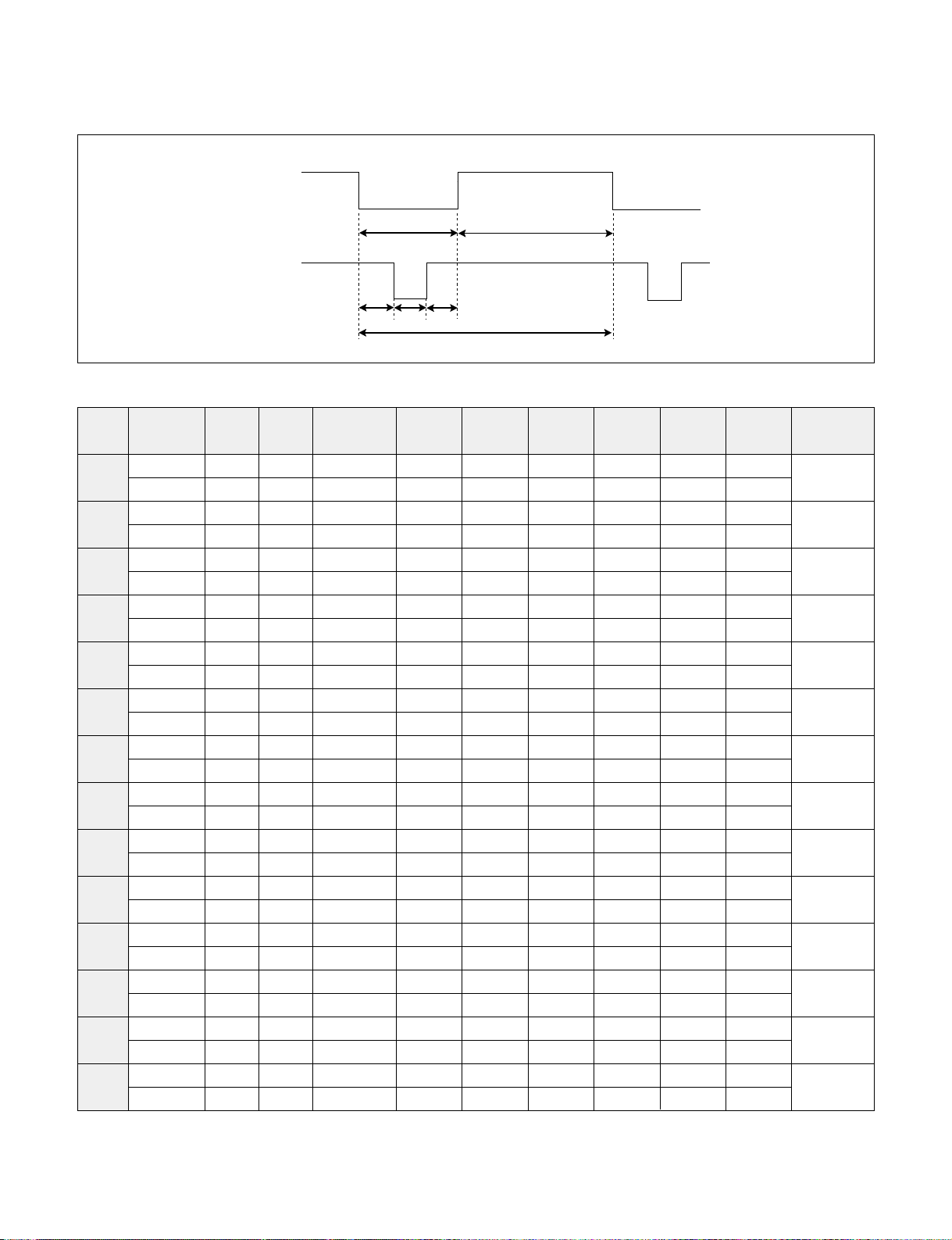
TIMING CHART
VIDEO
SYNC
C
E
D
F
A
B
MODE
1
2
3
4
5
6
7
8
9
10
11
12
13
14
H / V
H (Pixels)
V (Lines)
H (Pixels)
V (Lines)
H (Pixels)
V (Lines)
H (Pixels)
V (Lines)
H (Pixels)
V (Lines)
H (Pixels)
V (Lines)
H (Pixels)
V (Lines)
H (Pixels)
V (Lines)
H (Pixels)
V (Lines)
H (Pixels)
V (Lines)
H (Pixels)
V (Lines)
H (Pixels)
V (Lines)
H (Pixels)
V (Lines)
H (Pixels)
V (Lines)
Sync
Polarity
+
–
–
+
–
–
–
–
–
–
–
–
+
+
+
+
+
+
+
+
–
–
–
–
–
–
+
+
Dot
Clock
25.175
28.322
25.175
30.24
31.5
31.5
36.0
40.0
50.0
49.5
57.2832
65
75
78.75
Frequency
31.468 KHz
70.0 Hz
31.468 KHz
70.0 Hz
31.469 KHz
60.0 Hz
35.00 KHz
66.67 Hz
37.861 KHz
72.8 Hz
37.50 KHz
75.0 Hz
35.156KHz
56.25 Hz
37.879 KHz
60.3 Hz
48.077 KHz
72.188 Hz
46.875 KHz
75.0 Hz
49.725 KHz
74.55 Hz
48.363 KHz
60.0 Hz
56.476 KHz
70.0 Hz
60.023 KHz
75.0 Hz
Total
Period
( E )
800
449
900
449
800
525
864
525
832
520
840
500
1024
625
1056
628
1040
666
1056
625
1152
667
1344
806
1328
806
1312
800
Video
Active
Time ( A )
640
350
720
400
640
480
640
480
640
480
640
480
800
600
800
600
800
600
800
600
832
624
1024
768
1024
768
1024
768
Blanking
Time
( B )
160
99
180
49
160
45
224
45
192
40
200
20
224
25
256
28
240
66
256
25
320
43
320
38
304
38
288
32
Sync
Duration
( D )
96
2
108
2
96
2
64
3
40
3
64
3
72
2
128
4
120
6
80
3
64
3
136
6
136
6
96
3
Back
Porch
( F )
48
60
55
34
48
33
96
39
128
28
120
16
128
22
88
23
64
23
160
21
224
39
160
29
144
29
176
28
Front
Porch
( C )
16
37
17
13
16
10
64
3
24
9
16
1
24
1
40
1
56
37
16
1
32
1
24
3
24
3
16
1
Resolution
640 x 350
720 x 400
(TEXT)
640 x 480
640 x 480
640 x 480
640 x 480
800 x 600
800 x 600
800 x 600
800 x 600
832 x 624
(MAC)
1024 x 768
1024 x 768
1024 x 768
7
Page 9

BLOCK DIAGRAM
Panel
LVDS
LVDS
3.3V VMOD
Switch
Transmitter
(System)
3.3V
MOD-ON
EEPROM
(System)
+
MCU
5V
3.3 V
1.8 V
Regulator
Scaling
gmZAN3SL
ADC
3.3 V
Analog(R/G/B)
OSD
PLL
1.8 V
To Key Control
LIPS
BRT-CTL
INV-CTL
5V
Inverter
Power +
5V
D-Sub
8
Page 10

DESCRIPTION OF BLOCK DIAGRAM
1. Video Controller Part.
This part amplifies the level of video signal for the digital conversion and converts from the analog video signal to
the digital video signal using a pixel clock.
The pixel clock for each mode is generated by the PLL.
The range of the pixel clock is from 25MHz to 80MHz.
This part consists of the Scaler, ADC and TMDS receiver .
The Scaler gets the video signal converted analog to digital, interpolates input to 1024 X768 resolution signal and
outputs 8-bit R, G, B signal to transmitter.
2. Power Part.
This part consists of the one 5V, one 3.3V, and one 1.8V regulators to convert power which is provided 5V in
Power board.
3.3V is provided for LCD panel and inverter, 5V is provided for micom.
Also, 5V is converted 3.3V and 1.8V by regulator. Converted power is provided for IC in the main board.
3. MICOM Part.
This part consists of EEPROM IC which stores control data, Reset IC and the Micom.
The Micom distinguishes polarity and frequency of the H/V sync are supplied from signal cable.
The controlled data of each modes is stored in EEPROM.
9
Page 11

ADJUSTMENT
Windows EDID V1.0 User Manual
Operating System: MS Windows 98, 2000, XP
Port Setup: Windows 98 => Don’t need setup
Windows 2000, XP => Need to Port Setup.
This program is available to LCD Monitor only.
1. Port Setup
a) Copy “UserPort.sys” file to
“c:\WINNT\system32\drivers” folder
b) Run Userport.exe
c) Remove all default number
d) Add 300-3FF
2. EDID Read & Write
1) Run WinEDID.exe
2) Edit Week of Manufacture, Year of Manufacture,
Serial Number
a) Input User Info Data
b) Click “Update” button
c) Click “ Write” button
e) Click Start button.
f) Click Exit button.
10
Page 12

220
IBM
Compatible PC
Video Signal
Generator
PARALLEL PORT
Power inlet (required)
Power LED
ST Switch
Power Select Switch
(110V/220V)
Control Line
Not used
RS232C
PARALLEL
V-SYNC
POWER
ST
VGS
MONITOR
E
E
V-Sync On/Off Switch
(Switch must be ON.)
F
F
A
A
B
B
C
C
15
10
5
5
69
1
1
1
14
13
25
6
5V
5V
5V
4.7K
4.7K
4.7K
74LS06
74LS06
OFF ON
OFF
ON
11
SERVICE OSD
1) Turn off the power switch at the front side of the display.
2) Wait for about 5 seconds and press MENU, POWER switch with 1 second interval.
3) The SVC OSD menu contains additional menus that the User OSD menu as described below.
a) Auto Color : W/B balance and Automatically sets the gain and offset value.
b) NVRAM INIT : EEPROM initialize.(24C08)
c) CLEAR ETI : To initialize using time.
d) AGING : Select Aging mode(on/off).
e) R/G/B-9300K : Allows you to set the R/G/B-9300K value manually.
f) R/G/B-6500K : Allows you to set the R/G/B-6500K value manually.
g) R/G/B-Offset : Allows you to set the R/G/B-Offset value manually.(Analog Only)
h) R/G/B-Gain : Allows you to set the R/G/B-Gain value manually.(Analog Only)
i) PANEL : To select applied module.
Figure 1. Cable Connection
11
Page 13

TROUBLESHOOTING GUIDE
NO POWER
(POWER INDICATOR OFF)
1. NO POWER
1
CHECK J707
VOLTAGE
PIN5, PIN6 (5V)?
YES
1
CHECK
U801 PIN 1& U803
PIN 3 VOLTAGE
(5V) ?
YES
CHECK
Q803 PIN 3(3.3V) &
U803 PIN 4 (1.8V)?
YES
CHECK KEY CONTROL
CONNECTOR ROUTINE
NO
NO
NO
CHECK POWER
BOARD, AND FIND
OUT A SHORT POINT
AS OPENING
EACH POWER LINE
CHECK U801.
CHECK 5VR LINE
(OPEN CHECK)
NO PROBLEM
1
22
IS U201
PIN88
VOLTAGE REPEATED
AS PULSE
SHAPE ?
YES
CHECK IIC LINE CONNECTION
(U501, U502)
Waveforms
1 2
J707-#5, 6 / U801-#1/U803-#3 U201-#88
NO
CHECK U201 VCC, XTAL, RESET
12
Page 14

2. NO RASTER (OSD IS NOT DISPLAYED) – LIPS
NO RASTER
(OSD IS NOT DISPLAYED)
1
J707
PIN5, PIN 6
5V?
YES
NO
CHECK LIPS
J707 PIN2
2.5V?
YES
J707 PIN1
5V?
YES
CHECK
PULSE AS
CONTACTING SCOPE
PROBE TO CAUTION LABEL.
(CONTACT PROBE TO
CAUTION LABEL.
CAN YOU SEE PULSE
AT YOUR
SCOPE?
YES
NO
NO
NO
CHECK MICOM INV
ON/OFF PORT.
(U501 PIN9)
1. CONFIRM BRIGHTNESS
OSD CONTRL STATE.
2. CHECK MICOM DIM-ADJ
PORT(U501 PIN41)
LIPS
3 4
REPLACE CCFL LAMP
IN THE LCD MODULE
Waveforms
1
J707-#5, 6 / U801-#1/U803-#3
3 4
J707-#2 J707-#2
Inverter Off
Micom Port check
J705 Inverter output
13
Inverter On
Micom Port check
J705 Inverter output
Page 15

3. NO RASTER (OSD IS NOT DISPLAYED) – gmZAN3SL
NO RASTER
(OSD IS NOT DISPLAYED)
U201
POWER PINS
3.3V?
2
U201
PIN88
OSCILLATE AS
12MHZ?
6
U501
PIN43 IS 48KHz H-SYNC?
PIN44 IS 60Hz V-SYNC?
IS PULSE APPEARED
AT SIGNAL PINS?
YES
YES
NO
NO
NO
CHECK U803, U801
1. CHECK PIN88
SOLDERING CONDITION
2. CHECK X501
3. TROUBLE IN U201
CHECK CONNECTION LINE
FROM U201 TO U501
2
U201-#88
U501 PIN8
TROUBLE IN CABLE
OR LCD MODULE
Waveforms
5V?
YES
YES
6
U501-#43, 44
NO
CHECK 5VR LINE
14
Page 16

4. NO RASTER (OSD IS DISPLAYED) – gmZAN3SL
NO RASTER
(OSD IS DISPLAYED)
YES
U201
POWER PIN99(1.8V)
PIN33(3.3V)
?
YES
CHECK
R,G,B INPUT?
U201 PIN 70,74,77
YES
CHECK
H-SYNC INPUT
U201 PIN 95?
YES
CHECK
V-SYNC INPUT
U201 PIN 96?
NO
NO
NO
NO
CHECK U803, U801
1. CHECK PC
2. CHECK SIGNAL CABLE
& D-SUB CONNECTOR
LINE
CHECK H-SYNC LINE
(D-SUB→U501 →U201
PIN95)
CHECK V-SYNC LINE
(D-SUB→U501 →U201
PIN96)
TROUBLE IN
LCD MODULE
YES
15
Page 17

J706
J704
CN1
CN2
J707
J8
J1
WIRING DIAGRAM
Connector Ass’y P/N:
6631T11012R
Connector Ass’y P/N:
6631T20024B
16
Page 18

040
030
EXPLODED VIEW
090
100
080
110
070
060
020
050
17
010
Page 19

EXPLODED VIEW PARTS LIST
010
020
030
040
050
060
070
080
090
100
110
Part No.Ref. No.
3091TKL068R CABINET ASSEMBLY, L1515SL BRAND .. BK PC+ABS, BK SPRAY"
6304FLP156A
6304FLP146A
3809TKL047H BACK COVER ASSEMBLY, L1515SL .. BK,PC+ABS"
3043TKK122Q TILT SWIVEL ASSEMBLY, L1515SL .. B/C:BK,PC+ABS"
6871TST393A PWB(PCB) ASSEMBLY,SUB, L1515SL CONTROL TOTAL BRAND CL-32
3313TL5109A MAIN TOTAL ASSEMBLY, L1515SN ZAN3SL PRN BRAND CL-66
6871TPT271X
6871TPT271N PWB(PCB) ASSEMBLY,POWER, M-CHASSIS 15INCH POWER TOTAL LIEN CHANG C306 68PF
6631T11012R CONNECTOR ASSEMBLY, 20P H-H 140MM UL20276 PANEL LINK CABLE LM567D
4951TKS104R METAL ASSEMBLY, FRAME L1515SL LPL X08
4814TKK236A SHIELD, INVERTER WIRE SHIELD(TOP)
4814TKK237A SHIELD, INVERTER SHIELD CAP(BOTTOM)
LCD(LIQUID CRYSTAL DISPLAY), LM150X08-A4NA LG PHILPS TFT COLOR PSWG,LVDS,16MS,SS S D-IC LPL NJ,250NITS
LCD(LIQUID CRYSTAL DISPLAY), LM150X08-A4K8 LG PHILPS TFT COLOR PSWG,LVDS,16MS,SS S D-IC
PWB(PCB) ASSEMBLY,POWER, M-CHASSIS 15INCH POWER TOTAL LIEN CHANG C306 68PF 450V
Description
18
Page 20

REPLACEMENT PARTS LIST
CAUTION: BEFORE REPLACING ANY OF THESE COMPONENTS,
READ CAREFULLY THE SAFETY PRECAUTIONS IN THIS MANUAL.
* NOTE : S SAFETY Mark
AL ALTERNATIVE PARTS
DATE: 2004. 9. 10.
*S *AL LOC. NO. PART NO. DESCRIPTION / SPECIFICATION
MAIN BOARD
CAPACITORS
C204 0CK103CK51A 0.01UF 1608 50V 10% R/TP B
C205 0CK103CK51A 0.01UF 1608 50V 10% R/TP B
C206 0CK103CK51A 0.01UF 1608 50V 10% R/TP B
C207 0CK103CK51A 0.01UF 1608 50V 10% R/TP B
C208 0CK103CK51A 0.01UF 1608 50V 10% R/TP B
C210 0CK103CK51A 0.01UF 1608 50V 10% R/TP B
C213 0CK103CK51A 0.01UF 1608 50V 10% R/TP B
C214 0CK103CK51A 0.01UF 1608 50V 10% R/TP B
C215 0CK103CK51A 0.01UF 1608 50V 10% R/TP B
C216 0CK103CK51A 0.01UF 1608 50V 10% R/TP B
C217 0CK103CK51A 0.01UF 1608 50V 10% R/TP B
C218 0CK103CK51A 0.01UF 1608 50V 10% R/TP B
C219 0CK103CK51A 0.01UF 1608 50V 10% R/TP B
C220 0CK103CK51A 0.01UF 1608 50V 10% R/TP B
C221 0CK103CK51A 0.01UF 1608 50V 10% R/TP B
C222 0CK103CK51A 0.01UF 1608 50V 10% R/TP B
C223 0CK103CK51A 0.01UF 1608 50V 10% R/TP B
C224 0CK103CK51A 0.01UF 1608 50V 10% R/TP B
C225 0CK103CK51A 0.01UF 1608 50V 10% R/TP B
C226 0CK103CK51A 0.01UF 1608 50V 10% R/TP B
C227 0CK103CK51A 0.01UF 1608 50V 10% R/TP B
C231 0CK103CK51A 0.01UF 1608 50V 10% R/TP B
C232 0CK103CK51A 0.01UF 1608 50V 10% R/TP B
C233 0CK103CK51A 0.01UF 1608 50V 10% R/TP B
C234 0CK103CK51A 0.01UF 1608 50V 10% R/TP B
C503 0CK103CK51A 0.01UF 1608 50V 10% R/TP B
C504 0CE106CK610 "10UF SHL,SD 50V 20% BULK F"
C506 0CC030CK01A 3PF 1608 50V 0.25 PF R/TP
C507 0CC180CK41A 18PF 1608 50V 5% R/TP NP0
C508 0CK103CK51A 0.01UF 1608 50V 10% R/TP B
C701 0CK105CD56A 1UF 1608 10V 10% R/TP X7R
C708 0CK103CK51A 0.01UF 1608 50V 10% R/TP B
C709 0CK103CK51A 0.01UF 1608 50V 10% R/TP B
C717 0CC101CK41A 100PF 1608 50V 5% R/TP NP0
C718 0CC101CK41A 100PF 1608 50V 5% R/TP NP0
C720 0CC680CK41A 68PF 1608 50V 5% R/TP NP0
C721 0CC680CK41A 68PF 1608 50V 5% R/TP NP0
C727 0CK105CD56A 1UF 1608 10V 10% R/TP X7R
C732 0CK103CK51A 0.01UF 1608 50V 10% R/TP B
C733 0CK104CK56A 0.1UF 1608 50V 10% R/TP X7
C734 0CK104CK56A 0.1UF 1608 50V 10% R/TP X7
C735 0CK104CK56A 0.1UF 1608 50V 10% R/TP X7
C801 0CK103CK51A 0.01UF 1608 50V 10% R/TP B
C819 0CK103CK51A 0.01UF 1608 50V 10% R/TP B
C820 0CE107EF610 "100UF KMG,RD 16V 20% FL BU"
C821 0CK103CK51A 0.01UF 1608 50V 10% R/TP B
C829 0CK103CK51A 0.01UF 1608 50V 10% R/TP B
C831 0CE107EF610 "100UF KMG,RD 16V 20% FL BU"
C832 0CE107EF610 "100UF KMG,RD 16V 20% FL BU"
C833 0CK105CD56A 1UF 1608 10V 10% R/TP X7R
C834 0CC102CK41A 1000PF 1608 50V 5% R/TP NP
DATE: 2004. 9. 10.
*S *AL LOC. NO. PART NO. DESCRIPTION / SPECIFICATION
DIODEs
D701 0DS226009AA KDS226 TP KEC SOT-23 80V
D702 0DS226009AA KDS226 TP KEC SOT-23 80V
D706 0DS226009AA KDS226 TP KEC SOT-23 80V
ZD701 0DZKE00138A KDZ5.6V KEC R/TP USC 0.2W
ZD702 0DZKE00138A KDZ5.6V KEC R/TP USC 0.2W
ZD703 0DZKE00138A KDZ5.6V KEC R/TP USC 0.2W
ZD704 0DZKE00138A KDZ5.6V KEC R/TP USC 0.2W
ZD705 0DZKE00138A KDZ5.6V KEC R/TP USC 0.2W
ZD711 0DZKE00138A KDZ5.6V KEC R/TP USC 0.2W
ICs
U501 0IZZTSZ577A L1515SN ZAN3SL MICOM ASSY
U502 0ISG240860B M24C08W6 SGS-THOMSON 8SOP
U801 0IPMGKE011A KIA78D33F KEC DPAK R/TP 3.
U803 0IPMGSG019A LD1117S18TR STM SOT223 R/T
Q502 0IKE704200H KIA7042AP TO-92 TP 4.2 VO
TRANSISTOR
U802 0TFVI80023A VISHAY SI3865DV R/TP TSOPQ503 0TR390409AE FAIRCHILD KST3904(LGEMTF)
Q504 0TR390409AE FAIRCHILD KST3904(LGEMTF)
Q505 0TR390409AE FAIRCHILD KST3904(LGEMTF)
Q703 0TR390609FA KST3906-MTF TP SAMSUNG SO
Q704 0TR390609FA KST3906-MTF TP SAMSUNG SO
RESISTORs
R201 0RJ1000D677 100 OHM 1/10 W 5% 1608 R/T
R202 0RJ1000D677 100 OHM 1/10 W 5% 1608 R/T
R203 0RJ1000D677 100 OHM 1/10 W 5% 1608 R/T
R208 0RJ1200D677 120 OHM 1/10 W 5% 1608 R/T
R209 0RJ1200D677 120 OHM 1/10 W 5% 1608 R/T
R210 0RJ1200D677 120 OHM 1/10 W 5% 1608 R/T
R211 0RJ1000D677 100 OHM 1/10 W 5% 1608 R/T
R213 0RJ0000D677 0 OHM 1/10 W 5% 1608 R/TP
R214 0RJ0000D677 0 OHM 1/10 W 5% 1608 R/TP
R220 0RJ0000D677 0 OHM 1/10 W 5% 1608 R/TP
R221 0RJ0000D677 0 OHM 1/10 W 5% 1608 R/TP
R222 0RJ1004D677 1000000 OHM 1/10 W 5% 1608
R506 0RJ4701D677 4.7K OHM 1/10 W 5% 1608 R/
R508 0RJ4701D677 4.7K OHM 1/10 W 5% 1608 R/
R514 0RJ4701D677 4.7K OHM 1/10 W 5% 1608 R/
R515 0RJ4701D677 4.7K OHM 1/10 W 5% 1608 R/
R516 0RJ4701D677 4.7K OHM 1/10 W 5% 1608 R/
R518 0RJ4701D677 4.7K OHM 1/10 W 5% 1608 R/
R520 0RJ4701D677 4.7K OHM 1/10 W 5% 1608 R/
R521 0RJ4701D677 4.7K OHM 1/10 W 5% 1608 R/
R522 0RJ4701D677 4.7K OHM 1/10 W 5% 1608 R/
R523 0RJ4701D677 4.7K OHM 1/10 W 5% 1608 R/
R534 0RJ0000D677 0 OHM 1/10 W 5% 1608 R/TP
R535 0RJ3301D677 3.3K OHM 1/10 W 5% 1608 R/
R537 0RJ3301D677 3.3K OHM 1/10 W 5% 1608 R/
- 19 -
Page 21

DATE: 2004. 9. 10.
*S *AL LOC. NO. PART NO. DESCRIPTION / SPECIFICATION
R541 0RJ1000D677 100 OHM 1/10 W 5% 1608 R/T
R542 0RJ1000D677 100 OHM 1/10 W 5% 1608 R/T
R543 0RJ4701D677 4.7K OHM 1/10 W 5% 1608 R/
R544 0RJ4701D677 4.7K OHM 1/10 W 5% 1608 R/
R545 0RJ4700D677 470 OHM 1/10 W 5% 1608 R/T
R547 0RJ4700D677 470 OHM 1/10 W 5% 1608 R/T
R548 0RJ0332D677 33 OHM 1/10 W 5% 1608 R/TP
R549 0RJ0332D677 33 OHM 1/10 W 5% 1608 R/TP
R555 0RJ1000D677 100 OHM 1/10 W 5% 1608 R/T
R557 0RJ1000D677 100 OHM 1/10 W 5% 1608 R/T
R560 0RJ4702D677 47000 OHM 1/10 W 5% 1608 R
R561 0RJ4701D677 4.7K OHM 1/10 W 5% 1608 R/
R566 0RJ1002D677 10K OHM 1/10 W 5% 1608 R/T
R701 0RJ0752D677 75 OHM 1/10 W 5% 1608 R/TP
R703 0RJ0752D677 75 OHM 1/10 W 5% 1608 R/TP
R706 0RJ0752D677 75 OHM 1/10 W 5% 1608 R/TP
R708 0RJ4700D677 470 OHM 1/10 W 5% 1608 R/T
R709 0RJ1001D677 1K OHM 1/10 W 5% 1608 R/TP
R716 0RJ4701D677 4.7K OHM 1/10 W 5% 1608 R/
R717 0RJ4701D677 4.7K OHM 1/10 W 5% 1608 R/
R721 0RJ4700D677 470 OHM 1/10 W 5% 1608 R/T
R722 0RJ1000D677 100 OHM 1/10 W 5% 1608 R/T
R723 0RJ0682D677 68 OHM 1/10 W 5% 1608 R/TP
R724 0RJ0682D677 68 OHM 1/10 W 5% 1608 R/TP
R726 0RJ1002D677 10K OHM 1/10 W 5% 1608 R/T
R727 0RJ1002D677 10K OHM 1/10 W 5% 1608 R/T
R728 0RJ1502D677 15K OHM 1/10 W 5% 1608 R/T
R735 0RJ0000D677 0 OHM 1/10 W 5% 1608 R/TP
R737 0RJ0000D677 0 OHM 1/10 W 5% 1608 R/TP
R744 0RJ4701D677 4.7K OHM 1/10 W 5% 1608 R/
R747 0RJ4701D677 4.7K OHM 1/10 W 5% 1608 R/
R749 0RJ0000D677 0 OHM 1/10 W 5% 1608 R/TP
R770 0RJ0000D677 0 OHM 1/10 W 5% 1608 R/TP
R771 0RJ0000D677 0 OHM 1/10 W 5% 1608 R/TP
R775 0RJ0682D677 68 OHM 1/10 W 5% 1608 R/TP
R779 0RJ0682D677 68 OHM 1/10 W 5% 1608 R/TP
R780 0RJ2001D677 2K OHM 1/10 W 5% 1608 R/TP
R781 0RJ2001D677 2K OHM 1/10 W 5% 1608 R/TP
R782 0RJ0471D677 4.7 OHM 1/10 W 5% 1608 R/T
R803 0RJ0000D677 0 OHM 1/10 W 5% 1608 R/TP
R811 0RJ2202D677 22K OHM 1/10 W 5% 1608 R/T
R812 0RJ5600D677 560 OHM 1/10 W 5% 1608 R/T
R813 0RJ0472D677 47 OHM 1/10 W 5% 1608 R/TP
R814 0RJ0472D677 47 OHM 1/10 W 5% 1608 R/TP
R815 0RJ0472D677 47 OHM 1/10 W 5% 1608 R/TP
R816 0RJ0472D677 47 OHM 1/10 W 5% 1608 R/TP
R817 0RJ0472D677 47 OHM 1/10 W 5% 1608 R/TP
R818 0RJ0472D677 47 OHM 1/10 W 5% 1608 R/TP
R819 0RJ0472D677 47 OHM 1/10 W 5% 1608 R/TP
R820 0RJ0472D677 47 OHM 1/10 W 5% 1608 R/TP
R821 0RJ0472D677 47 OHM 1/10 W 5% 1608 R/TP
R822 0RJ0472D677 47 OHM 1/10 W 5% 1608 R/TP
R827 0RJ0000D677 0 OHM 1/10 W 5% 1608 R/TP
U201 0IPRPGN016A "GMZAN3SL-BD GENESIS 128P,P"
DATE: 2004. 9. 10.
*S *AL LOC. NO. PART NO. DESCRIPTION / SPECIFICATION
R2 0RD4701Q609 4.70K 1/4W(3 5% TA52
R3 0RD1501Q609 1.50K 1/4W(3 5% TA52
R4 0RD1501Q609 1.50K 1/4W(3 5% TA52
R5 0RD3301Q609 3.30K 1/4W(3 5% TA52
R6 0RD3301Q609 3.30K 1/4W(3 5% TA52
R7 0RD9101Q609 9.10K 1/4W(3 5% TA52
SW1 140-058E SKHV10910B LGEC NON 12V 20
SW2 140-058E SKHV10910B LGEC NON 12V 20
SW3 140-058E SKHV10910B LGEC NON 12V 20
SW4 140-058E SKHV10910B LGEC NON 12V 20
SW5 140-058E SKHV10910B LGEC NON 12V 20
SW6 140-058E SKHV10910B LGEC NON 12V 20
SW7 140-058E SKHV10910B LGEC NON 12V 20
ZD1 0DZ560009AG GDZJ5.6B TP GRANDE DO-34 5
ZD2 0DZ560009AG GDZJ5.6B TP GRANDE DO-34 5
OTHERs
X501 6212AA2004A HC-49U TXC 12.0MHZ +/- 30
CONTROL BOARD
LED1 0DLLT0089AA LITEON LTL-1BEDJ-0C2 TP GR
R1 0RD4701Q609 4.70K 1/4W(3 5% TA52
- 20 -
Page 22

2 5
U201-#88
SCHEMATIC DIAGRAM
1. SCALER
# 1
L1515/L1715
ZAN3SL
52
- 21 -
Page 23

6
U501-#43, 44
2. MICOM
# 2
L1515/L1715
MICOM
- 22 -
6
1.5K(17")
Page 24

1
J707-#5,6/U801-#1/U803-#3
3. POWER
390
# 3
L1515/L1715
POWER
1
390
390 390
1
- 23 -
Page 25

Inverter On
Micom Port check
J705 Inverter output
4
J707-#2
4. CONNECTOR & JACKS
3
J707-#2
Inverter Off
Micom Port check
J705 Inverter output
1
J707-#5,6/U801-#1/U803-#3
1
43
15K
# 4
L1515/L1715
CONNECTOR & JACKS
- 24 -
Page 26

Blank Page1
Page 27

Blank Page2
Page 28

Sep. 2004
P/NO : 3828TSL097T Printed in Korea
 Loading...