

Page 1

Checked
YN PARK
Jan/17/2013
Printing Specification
Signature
MMM/DD/YYYY
Drawn Approved
SH JO Jongok.kim
Jan/17/2013 Jan/17/2013
1. Model Description
:Model name
26LN4500-ZA LG MFL67707903
:2nd, 3rd Suffix
EU/BG/PI 26LN4500-ZA (1301-REV00)
:Brand name
:Product name
(Revision number)
2. Printing Specification
182 mm x 257 mm (B5)
:1. Trim size (Format)
2. Printing colors
1 Color (Black)
: • Cover
1 Color (Black)
: • Inside
3. Stock (Paper)
Coted, Snow white paper 150 g/㎡
: • Cover
: • Inside
Uncoted, wood-free paper 60 g/㎡
:4. Printing method
Off set
Perfect binding
:5. Bindery
Eng/Ger/Fra/Ita/Spa/Por/Ned/Gr/Slo (9)
:6. Language
220
:7. Number of pages
“This part contains Eco-hazardous substances (Pb, Cd, Hg, Cr6+, PBB, PBDE, etc.) within LG standard level,
N
Details should be followed Eco-SCM management standard[LG(56)-A-2524].
O
Especially, Part should be followed and controlled the following specification.
T
(1) Eco-hazardous substances test report should be submitted when Part certification test and First Mass Production.
E
(2) Especially, Don’t use or contain lead(Pb) and cadmium(Cd) in ink.
:Part number
3. Origin Notification
Printed in Kazakhstan
:LGEAK :LGEKR :LGERS
Printed in Brazil
:LGEAZ :LGEMA :LGESY
:LGEEG :LGEMX :LGETH
Printed in India
:LGEIL :LGEND :LGEVN
Printed in Indonesia
:LGEIN :LGERA :LGEWR
4. Changes
10
9
8
7
6
5
4
3
Printed in Korea
Printed in Poland
Printed in MexicoPrinted in Egypt
Printed in China Printed in Vietnam
Printed in Russia
Printed in Mexico
Printed in China
Printed in Thailand
Printed in Poland
2
1
Rev. Number MMM/DD/YYYY
Signature Change ContentsECO Number
Page 2

Pagination sheet
Front
P/No.
Front
(EN)
Front
(GE)
Front
(FR)
:Part number MFL67707903
(1301-REV00)(Revision number)
:Total pages 220 pages
A-2 … A-4
2… 20
2… 20
2… 20
Front
(IT)
Front
(SP)
Front
(PO)
Front
(DU)
Front
(GR)
2 … 22 23 Blank
2… 20
2… 20
2… 20
2… 20
Front
(SL)
2… 20
Page 3

B-1 B-2 … B-30 B-31
:Part number MFL67707903
(Revision number) (1301-REV00)
:Total pages 220 pages
Back
Cover
Page 4

OWNER’S MANUAL
LED TV
* LG LED TV applies LCD screen with LED backlights.
Please read this manual carefully before operating
your set and retain it for future reference.
LN45
P/NO : MFL67707903(1301-REV00)
Printed in Korea
**
www.lg.com
Page 5

TABLE OF CONTENTS
A-2
TABLE OF CONTENTS
A-3 SETTING UP THE TV
A-3 Attaching the stand
A-3 Detaching the stand
A-4 Tidying cables
LANGUAGE LIST
English
Deutsch
Français
Italiano
Español
Português
Nederlands
Ελληνικά
Slovenščina
COMMON
LANGUAGE
B-1 MAKING CONNECTIONS
B-1 Antenna connection
B-3 Satellite dish connection
B-4 Adapter connection
B-6 HDMI connection
B-8 HDMI to DVI connection
B-10 MHL connection
B-13 RGB connection
B-14 Component connection
B-15 Composite connection
B-16 Euro Scart connection
B-19 USB connection
B-20 CI module connection
B-22 Headphone connection
B-29 SPECIFICATIONS
COMMON
Page 6

Setting up the TV
SETTING UP THE TV
A-3
Image shown may differ from your TV.
Attaching the stand
22/24/26/28/29LN45
**
1
Stand Base
2
Detaching the Stand
22/24/26/28/29LN45
**
1
Stand Base
2
CAUTION
When attaching the stand to the TV, place
y
the screen facing down on a cushioned
table or flat surface to protect the screen
from scratches.
NOTE
yWhen Detaching the stand from TV, Detach
the stand with lifting up the lever in the
direction of the arrow.
Page 7

SETTING UP THE TV
A-4
Tidying cables
Gather and bind the cables with the cable holder.
Cable Holder
CAUTION
yDo not move the TV by holding the cable
holder, as the cable holders may break, and
injuries and damage to the TV may occur.
Page 8

OWNER’S MANUAL
LED TV
* LG LED TV applies LCD screen with LED backlights.
Please read this manual carefully before operating
your set and retain it for future reference.
www.lg.com
Page 9

TABLE OF CONTENTS
2
ENGLISH
ENG
TABLE OF CONTENTS
3 LICENSES
3 OPEN SOURCE SOFTWARE NOTICE
3 EXTERNAL CONTROL DEVICE
SETUP
4 SAFETY INSTRUCTIONS
10 INSTALLATION PROCEDURE
10 ASSEMBLING AND PREPARING
10 Unpacking
12 Parts and buttons
13 Lifting and moving the TV
14 Mounting on a table
15 Mounting on a wall
17 REMOTE CONTROL
18 ENTERTAINMENT
18 Wired Network Connection
18 Network setting
19 USING THE USER GUIDE
20 MAINTENANCE
20 Cleaning your TV
20 - Screen, frame, cabinet and stand
20 - Power cord
20 TROUBLESHOOTING
WARNING
yIf you ignore the warning message, you may
be seriously injured or there is a possibility
of accident or death.
CAUTION
yIf you ignore the caution message, you may
be slightly injured or the product may be
damaged.
NOTE
yThe note helps you understand and use
the product safely. Please read the note
carefully before using the product.
Page 10

LICENSES / OPEN SOURCE SOFTWARE NOTICE / EXTERNAL CONTROL DEVICE SETUP
3
LICENSES
Supported licenses may differ by model. For more information about licenses, visit www.lg.com.
Manufactured under license from Dolby Laboratories.
“Dolby” and the double-D symbol are trademarks of Dolby Laboratories.
The terms HDMI and HDMI High-Denition Multimedia Interface, and the HDMI logo
are trademarks or registered trademarks of HDMI Licensing LLC in the United States
and other countries.
ABOUT DIVX VIDEO: DivX® is a digital video format created by DivX, LLC, a
subsidiary of Rovi Corporation. This is an ofcial DivX Certied® device that plays
DivX video. Visit divx.com for more information and software tools to convert your
les into DivX video.
ABOUT DIVX VIDEO-ON-DEMAND: This DivX Certied® device must be registered
in order to play purchased DivX Video-on-Demand (VOD) movies. To obtain your
registration code, locate the DivX VOD section in your device setup menu. Go to vod.
divx.com for more information on how to complete your registration.
“DivX Certied® to play DivX® video up to HD 1080p, including premium content.”
ENGENGLISH
“DivX®, DivX Certied® and associated logos are trademarks of Rovi Corporation or
its subsidiaries and are used under license.”
“Covered by one or more of the following U.S. patents :
7,295,673; 7,460,668; 7,515,710; 7,519,274”
OPEN SOURCE SOFTWARE NOTICE
To obtain the source code under GPL, LGPL, MPL and other open source licenses, that is contained in this
product, please visit http://opensource.lge.com .
In addition to the source code, all referred license terms, warranty disclaimers and copyright notices are
available for download.
LG Electronics will also provide open source code to you on CD-ROM for a charge covering the cost of
performing such distribution (such as the cost of media, shipping and handling) upon email request to
[email protected]. This offer is valid for three (3) years from the date on which you purchased the
product.
EXTERNAL CONTROL DEVICE SETUP
To obtain the external control device setup information, please visit www.lg.com
Page 11

SAFETY INSTRUCTIONS
4
ENGLISH
ENG
SAFETY INSTRUCTIONS
Please read these safety precautions carefully before using the product.
WARNING
yDo not place the TV and remote control in the following environments:
- A location exposed to direct sunlight
- An area with high humidity such as a bathroom
- Near any heat source such as stoves and other devices that produce heat
- Near kitchen counters or humidifiers where they can easily be exposed to steam
or oil
- An area exposed to rain or wind
- Near containers of water such as vases
Otherwise, this may result in fire, electric shock, malfunction or product deformation.
yDo not place the product where it might be exposed to dust.
This may cause a fire hazard.
yMains plug is the disconnecting device. The plug must remain readily operable.
yDo not touch the power plug with wet hands. Additionally, if the cord pin is wet or
covered with dust, dry the power plug completely or wipe dust off.
You may be electrocuted due to excess moisture.
yMake sure to connect the power cable to the grounded current. (Except for devices
which are not grounded.)
You may be electrocuted or injured.
yInsert the power cable completely into wall socket.
If the power cable is not inserted completely into wall socket, a fire could break out.
yEnsure the power cord does not come into contact with hot objects such as a
heater.
This may cause a fire or an electric shock hazard.
yDo not place a heavy object, or the product itself, on power cables.
Otherwise, this may result in fire or electric shock.
yBend antenna cable between inside and outside building to prevent rain from
flowing in.
This may cause water damaged inside the Product and could give an electric
shock.
yWhen mounting a TV on the wall, make sure not to install TV by hanging power
and signal cables on the back of the TV.
It may cause fire, electric shock.
Page 12

SAFETY INSTRUCTIONS
Desiccant
5
yDo not plug too many electrical devices into a single multiple electrical outlet.
Otherwise, this may result in fire due to over-heating.
yDo not drop the product or let it fall over when connecting external devices.
Otherwise, this may result in injury or damage to the product.
yKeep the packing anti-moisture material or vinyl packing out of the reach of
children.
Anti-moisture material is harmful if swallowed. If swallowed by mistake, force the
patient to vomit and visit the nearest hospital. Additionally, vinyl packing can cause
suffocation. Keep it out of the reach of children.
yDo not let your children climb or cling onto the TV.
Otherwise, the TV may fall over, which may cause serious injury.
yDispose of used batteries carefully to protect a child from eating them.
Please seek Doctor- Medical Attention immediately if child consumes batteries.
yDo not insert any metal objects/conductors (like a metal chopstick/cutlery/
screwdriver) between power cable plug and input Wall Socket while it is connected
to the input terminal on the wall. Additionally, do not touch the power cable right
after plugging into the wall input terminal.
You may be electrocuted.(Depending on model)
yDo not put or store inflammable substances near the product.
There is a danger of combustion/explosion or fire due to careless handling of the
inflammable substances.
ENGENGLISH
yDo not drop metallic objects such as coins, hair pins, chopsticks or wire into the
product, or inflammable objects such as paper and matches. Children must pay
particular attention.
Electrical shock, fire or injury can occur. If a foreign object is dropped into the
product, unplug the power cord and contact the service centre.
yDo not spray water on the product or scrub with an inflammable substance (thinner
or benzene). Fire or electric shock accident can occur.
yDo not allow any impact, shock or any objects to fall into the unit, and do not drop
anything onto the screen.
You may be injured or the product can be damaged.
yNever touch this product or antenna during a thunder or lighting storm.
You may be electrocuted.
yNever touch the wall outlet when there is leakage of gas, open the windows and
ventilate.
It may cause a fire or a burn by a spark.
Page 13

SAFETY INSTRUCTIONS
6
ENGLISH
ENG
yDo not disassemble, repair or modify the product at your own discretion.
Fire or electric shock accident can occur.
Contact the service centre for check, calibration or repair.
yIf any of the following occur, unplug the product immediately and contact your local
service centre.
- The product has been impacted by shock
- The product has been damaged
- Foreign objects have entered the product
- The product produced smoke or a strange smell
This may result in fire or electric shock.
yIf you don’t intend to use the product for a long time, unplug the power cable from
the product.
Covering dust can cause a fire, or insulation deterioration can cause electric
leakage, electric shock or fire.
yApparatus shall not be exposed to dripping or splashing and no objects filled with
liquids, such as vases, shall be placed on the apparatus.
Page 14

SAFETY INSTRUCTIONS
7
CAUTION
yInstall the product where no radio wave occurs.
yThere should be enough distance between an outside antenna and power lines to
keep the former from touching the latter even when the antenna falls.
This may cause an electric shock.
yDo not install the product on places such as unstable shelves or inclined surfaces.
Also avoid places where there is vibration or where the product cannot be fully
supported.
Otherwise, the product may fall or flip over, which may cause injury or damage to
the product.
yIf you install the TV on a stand, you need to take actions to prevent the product
from overturning. Otherwise, the product may fall over, which may cause injury.
yIf you intend to mount the product to a wall, attach VESA standard mounting interface (optional
parts) to the back of the product. When you install the set to use the wall mounting bracket (optional
parts), fix it carefully so as not to drop.
yOnly use the attachments / accessories specified by the manufacturer.
yWhen installing the antenna, consult with a qualified service technician. If not
installed by a qualified technician, this may create a fire hazard or an electric shock
hazard.
ENGENGLISH
yWe recommend that you maintain a distance of at least 2 to 7 times the diagonal
screen size when watching TV.
If you watch TV for a long period of time, this may cause blurred vision.
yOnly use the specified type of battery.
This could cause damage to the remote control.
yDo not mix new batteries with old batteries.
This may cause the batteries to overheat and leak.
yBatteries should not be exposed to excessive heat.eg keep away from direct Sunlight , open fireplace
and electric heaters .
yDo not place non-rechargeable batteries in charging device.
yMake sure there are no objects between the remote control and its sensor.
ySignal from the remote control may be disturbed by sun light or other strong light.
In this case, darken the room.
yWhen connecting external devices such as video game consoles, make sure the
connecting cables are long enough.
Otherwise, the product may fall over, which may cause injury or damage the
product.
Page 15

SAFETY INSTRUCTIONS
8
ENGLISH
ENG
yDo not turn the product On/Off by plugging-in or unplugging the power plug to the
wall outlet. (Do not use the power plug for switch.)
It may cause mechanical failure or could give an electric shock.
yPlease follow the installation instructions below to prevent the product from
overheating.
- The distance between the product and the wall should be more than 10 cm.
- Do not install the product in a place with no ventilation (e.g., on a bookshelf or in
a cupboard).
- Do not install the product on a carpet or cushion.
- Make sure the air vent is not blocked by a tablecloth or curtain.
Otherwise, this may result in fire.
yTake care not to touch the ventilation openings when watching the TV for long
periods as the ventilation openings may become hot. This does not affect the
operation or performance of the product.
yPeriodically examine the cord of your appliance, and if its appearance indicates damage or
deterioration, unplug it, discontinue use of the appliance, and have the cord replaced with an exact
replacement part by an authorized servicer.
yPrevent dust collecting on the power plug pins or outlet.
This may cause a fire hazard.
yProtect the power cord from physical or mechanical abuse, such as being twisted,
kinked, pinched, closed in a door, or walked upon. Pay particular attention to plugs,
wall outlets, and the point where the cord exits the appliance.
yDo not press strongly upon the panel with a hand or sharp object such as nail,
pencil or pen, or make a scratch on it.
yAvoid touching the screen or holding your finger(s) against it for long periods of
time. Doing so may produce some temporary distortion effects on the screen.
yWhen cleaning the product and its components, unplug the power first and wipe it
with a soft cloth. Applying excessive force may cause scratches or discolouration.
Do not spray with water or wipe with a wet cloth. Never use glass cleaner, car or
industrial shiner, abrasives or wax, benzene, alcohol etc., which can damage the
product and its panel.
Otherwise, this may result in fire, electric shock or product damage (deformation,
corrosion or breakage).
yAs long as this unit is connected to the AC wall outlet, it is not disconnected from the AC power
source even if you turn off this unit by SWITCH.
When unplugging the cable, grab the plug and unplug it, by pulling at the plug.
Don’t pull at the cord to unplug the power cord from the power board, as this could
be hazardous.
yWhen moving the product, make sure you turn the power off first. Then, unplug the
power cables, antenna cables and all connecting cables.
The TV set or power cord may be damaged, which may create a fire hazard or
cause electric shock.
Page 16

SAFETY INSTRUCTIONS
9
yWhen moving or unpacking the product, work in pairs because the product is
heavy.
Otherwise, this may result in injury.
yContact the service centre once a year to clean the internal parts of the product.
Accumulated dust can cause mechanical failure.
yRefer all servicing to qualified service personnel. Servicing is required when the
apparatus has been damaged in any way, such as power supply cord or plug is
damaged, liquid has been spilled or objects have fallen into the apparatus, the
apparatus has been exposed to rain or moisture, does not operate normally, or has
been dropped.
yIf the product feels cold to the touch, there may be a small “flicker” when it is turned
on. This is normal, there is nothing wrong with product.
yThe panel is a high technology product with resolution of two million to six million
pixels. You may see tiny black dots and/or brightly coloured dots (red, blue or
green) at a size of 1 ppm on the panel. This does not indicate a malfunction and
does not affect the performance and reliability of the product.
This phenomenon also occurs in third-party products and is not subject to
exchange or refund.
yYou may find different brightness and colour of the panel depending on your
viewing position(left/right/top/down).
This phenomenon occurs due to the characteristic of the panel. It is not related with
the product performance, and it is not malfunction.
ENGENGLISH
yDisplaying a still image (e.g., broadcasting channel logo, on-screen menu, scene from a video
game) for a prolonged time may cause damage to the screen, resulting in retention of the image,
which is known as image sticking. The warranty does not cover the product for image sticking.
Avoid displaying a fixed image on your television’s screen for a prolonged period (2 or more hours
for LCD, 1 or more hours for Plasma).
Also, if you watch the TV at a ratio of 4:3 for a long time, image sticking may occur on the borders of
the panel.
This phenomenon also occurs in third-party products and is not subject to exchange or refund.
yGenerated Sound
“Cracking” noise: A cracking noise that occurs when watching or turning off the TV is generated by
plastic thermal contraction due to tempera-ture and humidity. This noise is common for products
where thermal deformation is required. Electrical circuit humming/panel buzzing: A low level noise is
generated from a high-speed switching circuit, which supplies a large amount of current to operate a
product. It varies depend-ing on the product.
This generated sound does not affect the performance and reliability of the product.
Page 17

ENGLISH
<
<
ENG
INSTALLATION PROCEDURE / ASSEMBLING AND PREPARING
10
NOTE
yImage shown may differ from your TV.
yYour TV’s OSD (On Screen Display) may differ slightly from that shown in this manual.
yThe available menus and options may differ from the input source or product model that you are
using.
yNew features may be added to this TV in the future.
yThe TV can be placed in standby mode in order to reduce the power consumption. And the TV should
be turned off if it will not be watched for some time, as this will reduce energy consumption.
yThe energy consumed during use can be significantly reduced if the level of brightness of the picture
is reduced, and this will reduce the overall running cost.
INSTALLATION PROCEDURE
1 Open the package and make sure all the accessories are included.
2 Attach the stand to the TV set.
3 Connect an external device to the TV set.
4 Make sure the network connection is available.
You can use the TV network functions only when the network connection is made. (Depending on model)
ASSEMBLING AND PREPARING
Unpacking
Check your product box for the following items. If there are any missing accessories, contact the local
dealer where you purchased your product. The illustrations in this manual may differ from the actual
product and item.
CAUTION
yDo not use any unapproved items to ensure the safety and product life span.
yAny damages or injuries by using unapproved items are not covered by the warranty.
ySome models have a thin film attached on to the screen and this must not be removed.
NOTE
yThe items supplied with your product may vary depending on the model.
yProduct specifications or contents of this manual may be changed without prior notice due to upgrade
of product functions.
yFor an optimal connection, HDMI cables and USB devices should have bezels less than 10 mm thick
and 18 mm width. Use an extension cable that supports USB 2.0 if the USB cable or USB memory
stick does not fit into your TV’s USB port.
B
A
B
*A
10 mm
=
*B
18 mm
A
=
Page 18

ASSEMBLING AND PREPARING
11
ENGENGLISH
Remote control,
batteries (AAA)
(See p.17)
Power Cord
(Depending on model & country)
(See p. B-4)
Stand Base
(See p. A-3)
Owner’s manual Cable holder
(See p. A-4)
or
AC-DC Adaptor
(See p. B-4)
AC-DC Adaptor
(Depending on model)
(See p. B-4)
Page 19

ASSEMBLING AND PREPARING
12
ENGLISH
ENG
Parts and buttons
Screen
Remote Control Sensor
Speakers
Touch Buttons
Touch Buttons Description
Scrolls through the saved programmes.
Adjusts the volume level.
ꔉ
OK
SETTINGS
INPUT
/ I
1 All of the buttons are touch sensitive and can be operated through simple touch with your nger.
Selects the highlighted menu option or confirms an input.
Accesses the main menu, or saves your input and exits the menus.
Changes the input source.
Turns the power on or off.
1
Page 20

ASSEMBLING AND PREPARING
13
Lifting and moving the TV
When moving or lifting the TV, read the following to
prevent the TV from being scratched or damaged
and for safe transportation regardless of its type
and size.
CAUTION
yAvoid touching the screen at all times, as
this may result in damage to the screen.
yIt is recommended to move the TV in the box
or packing material that the TV originally came
in.
yBefore moving or lifting the TV, disconnect the
power cord and all cables.
yWhen holding the TV, the screen should face
away from you to avoid damage.
yWhen transporting a large TV, there should be
at least 2 people.
yWhen transporting the TV by hand, hold the TV
as shown in the following illustration.
yWhen transporting the TV, do not expose the
TV to jolts or excessive vibration.
yWhen transporting the TV, keep the TV upright,
never turn the TV on its side or tilt towards the
left or right.
ENGENGLISH
yHold the top and bottom of the TV frame rmly.
Make sure not to hold the transparent part,
speaker, or speaker grill area.
Page 21

ASSEMBLING AND PREPARING
14
ENGLISH
ENG
Mounting on a table
1 Lift and tilt the TV into its upright position on a
table.
- Leave a 10 cm (minimum) space from the
wall for proper ventilation.
10 cm
10 cm
2 Connect the AC-DC Adapter and Power Cord
to a wall outlet.
CAUTION
yDo not place the TV near or on sources
of heat, as this may result in fire or other
damage.
10 cm
10 cm
Securing the TV to a wall
(This feature is not available for all models.)
1 Insert and tighten the eye-bolts, or TV brackets
and bolts on the back of the TV.
- If there are bolts inserted at the eye-bolts
position, remove the bolts first.
2 Mount the wall brackets with the bolts to the
wall.
Match the location of the wall bracket and the
eye-bolts on the rear of the TV.
3 Connect the eye-bolts and wall brackets tightly
with a sturdy rope.
Make sure to keep the rope horizontal with the
at surface.
CAUTION
yMake sure that children do not climb on or
hang on the TV.
NOTE
yUse a platform or cabinet that is strong and
large enough to support the TV securely.
yBrackets, bolts and ropes are not provided.
You can obtain additional accessories from
your local dealer.
Page 22

ASSEMBLING AND PREPARING
15
Using the Kensington security system
(Depending on model)
The Kensington security system connector is
located at the rear of the TV. For more information
of installation and using, refer to the manual
provided with the Kensington security system or
visit
http://www.kensington.com.
Connect the Kensington security system cable
between the TV and a table.
Mounting on a wall
Attach an optional wall mount bracket at the rear
of the TV carefully and install the wall mount
bracket on a solid wall perpendicular to the
oor. When you attach the TV to other building
materials, please contact qualied personnel.
LG recommends that wall mounting be performed
by a qualied professional installer.
10 cm
10 cm
10 cm
10 cm
Make sure to use screws and wall mount
bracket that meet the VESA standard. Standard
dimensions for the wall mount kits are described in
the following table.
ENGENGLISH
Separate purchase(Wall Mounting Bracket)
Model
VESA (A x B)
Standard screw
Number of screws
Wall mount bracket
22/24/26/28/29LN45
100 x 100
M4
4
LSW130B
**
Page 23

ENGLISH
ENG
ASSEMBLING AND PREPARING
16
A
B
CAUTION
yDisconnect the power first, and then move
or install the TV. Otherwise electric shock
may occur.
yIf you install the TV on a ceiling or slanted
wall, it may fall and result in severe injury.
Use an authorized LG wall mount and
contact the local dealer or qualified
personnel.
yDo not over tighten the screws as this may
cause damage to the TV and void your
warranty.
yUse the screws and wall mounts that meet
the VESA standard. Any damages or injuries
by misuse or using an improper accessory
are not covered by the warranty.
NOTE
yUse the screws that are listed on the VESA
standard screw specifications.
yThe wall mount kit includes an installation
manual and necessary parts.
yThe wall mount bracket is not provided. You
can obtain additional accessories from your
local dealer.
yThe length of screws may differ depending
on the wall mount. Make sure to use the
proper length.
yFor more information, refer to the manual
supplied with the wall mount.
Page 24

REMOTE CONTROL
17
REMOTE CONTROL
The descriptions in this manual are based on the buttons on the remote control.
Please read this manual carefully and use the TV correctly.
To replace batteries, open the battery cover, replace batteries (1.5 V AAA) matching
the and ends to the label inside the compartment, and close the battery cover.
To remove the batteries, perform the installation actions in reverse.
CAUTION
yDo not mix old and new batteries, as this may damage the remote control.
Make sure to point the remote control toward the remote control sensor on the TV.
Selects Radio, TV and DTV programme.
TV /
SUBTITLE
1
AD/PIP
RAD
INPUT
2 3
AD/PIP AD : Switches the audio description on or off. /
PIP : Turns the PIP mode on or off
User Guide Sees User Guide.
Changes the input source.
Number buttons Enters numbers
4 5 6
7 8 9
LIST
GUIDE
MUTE
1
TEXT
SETTINGS
INFO
2
0
FAV
TV/PC
Q.VIEW
T.OPT
Q.MENU
EXIT
Adjusts the volume level.
GUIDE Shows programme guide.
MUTE Mutes all sounds.
P Scrolls through the saved programmes.
PAGE Moves to the previous or next screen.
TELETEXT buttons These buttons are used for teletext.
screen.
Navigation buttons (up/down/left/right) Scrolls through
menus or options.
Selects menus or options and conrms your input.
BACK Returns to the previous level.
EXIT
SIMPLINK Accesses the AV devices connected with the HDMI
cable through HDMI-CEC. Opens the SIMPLINK menu.
TV/PC Selects TV or PC mode.
Control buttons( ) Controls the MY MEDIA
menus, or the SIMPLINK compatible devices (USB,SIMPLINK).
Coloured buttons These access special functions in some
menus. ( RED GREEN YELLOW BLUE)
controlling the screen backlight.
Recalls your preferred subtitle in digital mode.
Accesses the saved programme list.
Returns to the previously viewed programme.
Accesses your favourite programme list.
Views the information of the current programme and
Accesses the main menus.
Accesses the Quick menus.
Clears on-screen displays and return to TV viewing.
(Backlight) Adjusts the brightness of the screen by
ENGENGLISH
Page 25

ENGLISH
ENG
ENTERTAINMENT
18
ENTERTAINMENT
Only LN450U model(Only UK)
Image shown may differ from your TV.
Wired Network Connection
(*Not Provided)
Internet
connection
Network setting
1 Press the SETTING button to access the main
menu.
2 Select the NETWORK → Network Setting
menu.
NETWORK
Network Setting
Network Status
3 Select the Start Connection.
Network Setting
Connect a LAN cable to the back of TV.
Setting your network will enable network-related features on the TV.
Move OK
Wired router
4 The device automatically tries to connect to the
network.
Network Setting
Network connecting...
Cancel
Previous
5 The connected network is displayed.
Select the Complete to confirm the network
connection.
Network Setting
Wired network is connected.
For detailed settings, select [Set Expert].
CompleteSet Expert
Previous
Start Connection
Previous
NOTE
yU.K: LAN port is available. (The LAN port is
added to support HD MHEG.)
yOther areas: LAN port is not available.
Page 26

USING THE USER GUIDE
19
USING THE USER GUIDE
User Guide allows you to more easily access the detailed TV information.
1 Press SETTINGS to access the main menus.
2 Press the RED button to access the Customer
Support menus.
3 Press the Navigation buttons to scroll to User
Guide and press OK.
PICTURE
AUDIO
OPTIONLOCK
Press OK() to set picture settings.
TIME
SETUP
MY MEDIAINPUT
Customer Support
Software Update
Picture Test
Sound Test
Signal Test
Product/Service Info.
User Guide
Close
Exit
FAQ
User Guide
PROGRAMME Setting
PICTURE, SOUND Setting
OPTION
Advanced Function
Information
SETTING OPTION Language
You can select the language of the menu displayed on the screen and the digital
sound broadcasting.
y
Menu Language : Selects a language for the display text.
y
Audio Language [In Digital Mode Only] :
watching digital broadcasting containg several voice languages.
y
Subtitle Language [In Digital Mode Only] :
or more subtitle languages are broadcast.
✎ If subtitle data in a selected language is not broadcast, the default
language subtitle will be displayed.
Shows the description of the selected menu.
1
You can use ꕌ/ꕍto move between pages.
Zooms in or out the screen.
2
1
OPTION > To set language
SETTING OPTION Language
You can select the language of the menu displayed on the screen and the digital
sound broadcasting.
y
Menu Language : Selects a language for the display text.
y
Audio Language [In Digital Mode Only] :
watching digital broadcasting containg several voice languages.
y
Subtitle Language [In Digital Mode Only] :
or more subtitle languages are broadcast.
✎ If subtitle data in a selected language is not broadcast, the default
language subtitle will be displayed.
Zoom In
2
Zoom Out
2
Selects the desired language when
Use the Subtitle function when two
Close
selects the desired language when
Use the Subtitle function when two
Close
ENGENGLISH
User Guide
PROGRAMME Setting
PICTURE, SOUND Setting
OPTION
Advanced Function
Information
2
To use input device
To set ODC (Over Driving Circuit)
To use PIP (Picture In Picture)
To set time options
To set TV lock options
To set language
To set country
1
Image shown may differ from your TV.
Allows to select the category you want.
1
Allows to select the item you want.
2
You can use ꕌ/ꕍto move between pages.
Allows to browse the description of the
3
function you want from the index.
3
Page 27

MAINTENANCE / TROUBLESHOOTING
20
ENGLISH
ENG
MAINTENANCE
Cleaning your TV
Clean your TV regularly to keep the best performance and to extend the product lifespan.
CAUTION
yMake sure to turn the power off and disconnect the power cord and all other cables first.
yWhen the TV is left unattended and unused for a long time, disconnect the power cord from the wall
outlet to prevent possible damage from lightning or power surges.
Screen, frame, cabinet and stand
yTo remove dust or light dirt, wipe the surface with a dry, clean, and soft cloth.
yTo remove major dirt, wipe the surface with a soft cloth dampened in clean water or a diluted mild
detergent. Then wipe immediately with a dry cloth.
CAUTION
yAvoid touching the screen at all times, as this may result in damage to the screen.
yDo not push, rub, or hit the screen surface with your fingernail or a sharp object, as this may result in
scratches and image distortions.
yDo not use any chemicals as this may damage the product.
yDo not spray liquid onto the surface. If water enters the TV, it may result in fire, electric shock, or
malfunction.
Power cord
Remove the accumulated dust or dirt on the power cord regularly.
TROUBLESHOOTING
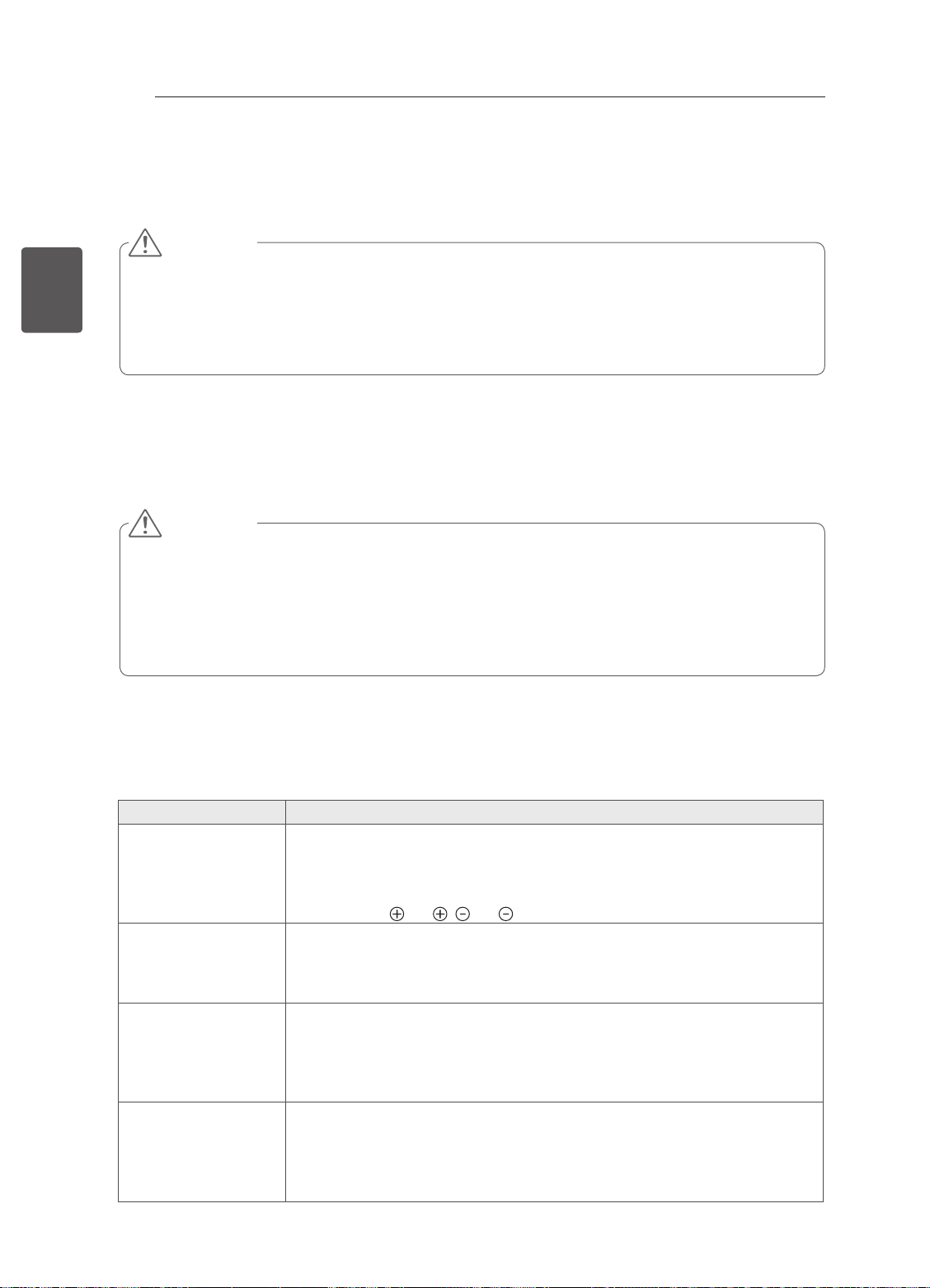
Problem Solution
Cannot control the
TV with the remote
control.
No image display
and no sound is
produced.
The TV turns off
suddenly.
When connecting
to the PC (RGB/
HDMI), ‘No signal’
or ‘Invalid Format’
is displayed.
yCheck the remote control sensor on the product and try again.
yCheck if there is any obstacle between the product and the remote control.
yCheck if the batteries are still working and properly installed ( to , to ).
yCheck if the product is turned on.
yCheck if the power cord is connected to a wall outlet.
yCheck if there is a problem in the wall outlet by connecting other products.
yCheck the power control settings. The power supply may be interrupted.
yCheck if the Auto sleep feature is activated in the Time settings.
yIf there is no signal while the TV is on, the TV will turn off automatically after
15 minutes of inactivity.
y Turn the TV off/on using the remote control.
y Reconnect the RGB/HDMI cable.
y Restart the PC with the TV on.
Page 28

BENUTZERHANDBUCH
LED TV
* LG LED TV verwendet LCD-Bildschirm mit LED-Beleuchtung
Bitte lesen Sie dieses Handbuch aufmerksam durch, bevor Sie Ihr
Gerät zum ersten Mal verwenden, und bewahren Sie es zur späteren
Verwendung auf.
www.lg.com
Page 29

INHALTSVERZEICHNIS
2
INHALTSVERZEICHNIS
DEUTSCH
DEU
3 LIZENZEN
3 ANMERKUNG ZU OPEN SOURCE-
3 EINRICHTUNG DER EXTERNEN
4 SICHERHEITSHINWEISE
10 INSTALLATIONSVERFAHREN
10 MONTAGE UND VORBEREITUNG
10 Auspacken
12 Gehäuse und Bedienelemente
13 Anheben und Bewegen des TV-Gerätes
14 Montage auf einem Tisch
15 Wandmontage
17 FERNBEDIENUNG
18 NETZWERKEINRICHTUNG
18 Kabelgebundene Netzwerkverbindung
18 Netzwerkeinrichtung
SOFTWARE
STEUERUNG
19 DAS BENUTZERHANDBUCH
VERWENDEN
20 WARTUNG
20 Reinigung des TV-Gerätes
20 - Bildschirm, Rahmen, Gehäuse und
Standfuß
20 - Netzkabel
20 FEHLERBEHEBUNG
WARNUNG
yBei Nichtbeachtung drohen schwere
Verletzungen, Unfälle und Tod.
VORSICHT
yBei Nichtbeachtung drohen leichte
Verletzungen oder eine Beschädigung des
Produkts.
HINWEIS
yDer Hinweis hilft Ihnen dabei, das Produkt
zu verstehen und sicher zu benutzen.
Bevor Sie das Produkt zum ersten Mal
verwenden, lesen Sie den Hinweis bitte
aufmerksam durch.
Page 30

LIZENZEN / ANMERKUNG ZU OPEN-SOURCE-SOFTWARE / EINRICHTUNG DER EXTERNEN STEUERUNG
LIZENZEN
Die unterstützten Lizenzen sind von Modell zu Modell verschieden. Weitere Informationen zu den Lizenzen
erhalten Sie unter www.lg.com.
3
Hergestellt unter Lizenz von Dolby Laboratories. „Dolby“ und das Doppel-D-Symbol
sind Warenzeichen von Dolby Laboratories.
The terms HDMI and HDMI High-Denition Multimedia Interface, and the HDMI logo
are trademarks or registered trademarks of HDMI Licensing LLC in the United States
and other countries.
Über DIVX-VIDEO: DivX® ist ein digitales Videoformat der Firma DivX, LLC, einem
Tochterunternehmen der Rovi Corporation. Dieses Gerät ist ofziell DivX Certied®
zur Wiedergabe von DivX-Videos. Weitere Informationen und Software-Tools zum
Konvertieren von Dateien in das DivX-Format nden Sie unter divx.com.
Über DIVX VIDEO-ON-DEMAND: Dieses DivX Certied® Gerät muss registriert
werden, damit Sie gekaufte DivX Video-on-Demand-Inhalte (VOD) wiedergeben
können. Um einen Registrierungscode zu erhalten, rufen Sie im Einstellungsmenü
des Geräts den Bereich „DivX VOD“ auf. Weitere Informationen darüber, wie Sie Ihre
Registrierung abschließen, nden Sie unter vod.divx.com.
„DivX Certied® zur Wiedergabe von DivX®-Videos bis zu HD 1080p, einschließlich
Premium-Inhalten.“
„DivX®, DivX Certied® sowie die entsprechenden Logos sind Marken der Rovi
Corporation oder ihrer Tochterunternehmen und werden unter Lizenz verwendet.“
DEUDEUTSCH
„Geschützt durch eines oder mehrere der folgenden US-Patente:
7,295,673; 7,460,668; 7,515,710; 7,519,274”
ANMERKUNG ZU OPEN SOURCE-SOFTWARE
Den Quellcode unter GPL, LGPL, MPL sowie weitere Open-Source-Lizenzen, der in diesem Produkt
enthalten ist, können Sie unter http://opensource.lge.com herunterladen.
Neben dem Quellcode stehen dort noch alle Lizenzbedingungen, auf die verwiesen wird,
Garantieausschlüsse sowie Urheberrechtshinweise zum Download bereit.
LG Electronics stellt Ihnen gegen eine Gebühr (für Distribution, Medien, Versand und Verwaltung) auch
den Quellcode auf CD-ROM bereit. Wenden Sie sich per E-Mail an LG Electronics: [email protected].
Dieses Angebot ist drei (3) Jahre ab Kaufdatum des Produkts gültig.
EINRICHTUNG DER EXTERNEN STEUERUNG
Informationen zur Einrichtung der externen Steuerung erhalten Sie unter www.lg.com.
Page 31
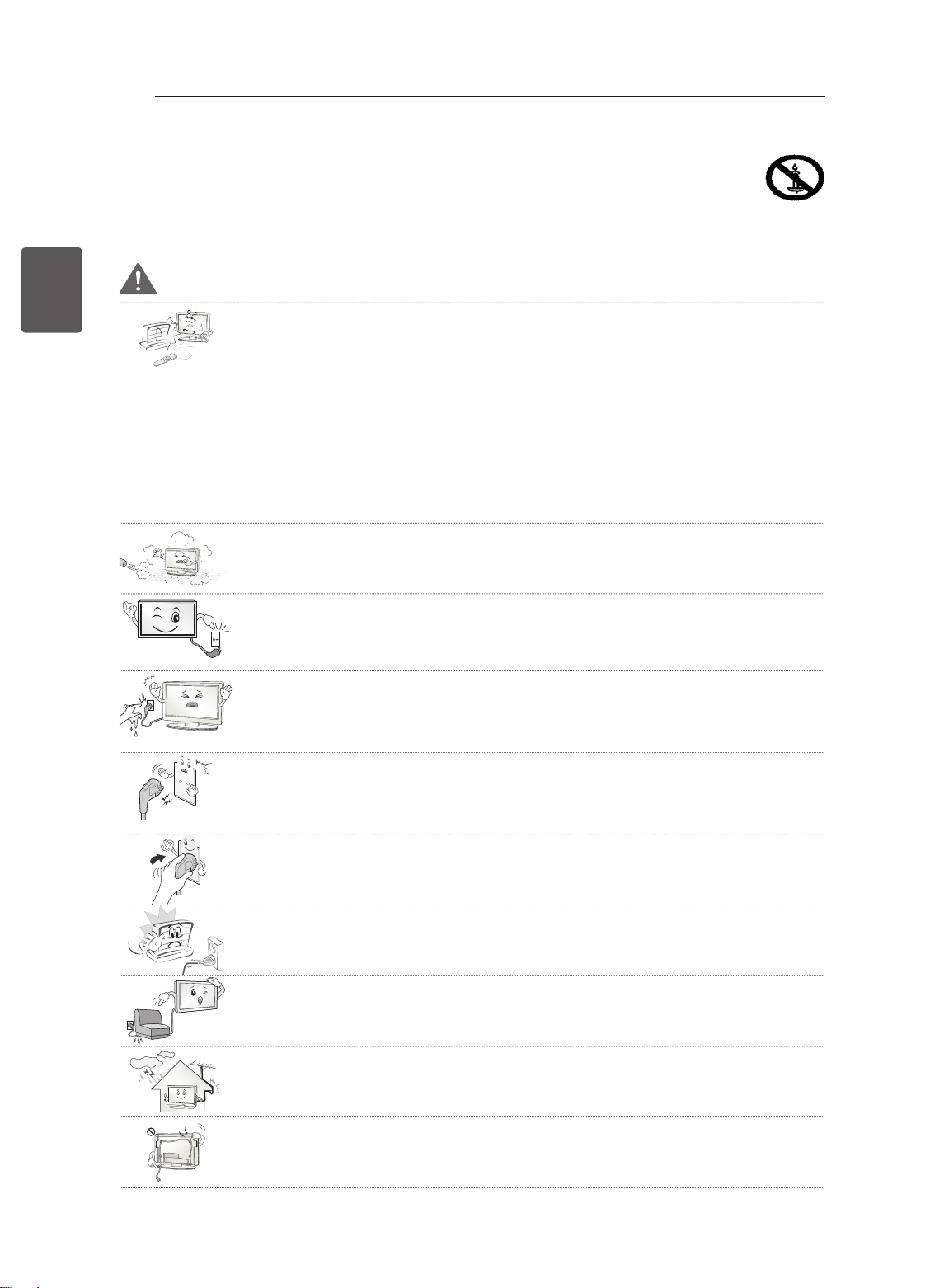
4
SICHERHEITSHINWEISE
Bevor Sie das Produkt zum ersten Mal verwenden, lesen Sie diese Sicherheitshinweise bitte aufmerksam
durch.
DEUTSCH
DEU
SICHERHEITSHINWEISE
WARNUNG
Stellen Sie das TV-Gerät mit Fernsteuerung nicht in folgenden Umgebungen auf:
y
- Unter direkter Sonneneinstrahlung
- In Bereichen mit hoher Luftfeuchtigkeit, wie z. B. einem Badezimmer
- In der Nähe von Hitzequellen, wie z. B. Öfen und anderen hitzeerzeugenden Geräten
- In der Nähe von Küchenzeilen oder Befeuchtern, wo das Gerät leicht Dampf
oder Öl ausgesetzt sein kann
- In Bereichen, die Regen oder Wind ausgesetzt sind
- In der Nähe von Behältern mit Wasser, wie z. B. Vasen
Andernfalls kann es zu Bränden, Stromschlägen, Fehlfunktionen oder Produktverformungen kommen.
Schützen Sie das Gerät vor Staub.
y
Es besteht Brandgefahr.
Wenn Sie das Gerät vom Stromnetz trennen möchten, müssen Sie den Netzste-
y
cker aus der Steckdose ziehen. Dieser Stecker muss jederzeit gut zugänglich sein.
Berühren Sie den Netzstecker nicht mit nassen Händen. Wenn die Kontaktstifte
y
nass oder verstaubt sind, trocknen Sie den Netzstecker vollständig ab, bzw. befreien Sie ihn von Staub.
Feuchtigkeit erhöht die Gefahr eines tödlichen Stromschlags.
Stellen Sie sicher, dass das Stromkabel geerdet ist. (Außer bei Geräten, die nicht
y
geerdet sind.)
Bei Nichtbeachtung besteht die Gefahr von Verletzungen oder eines tödlichen
Stromschlags.
Das Stromkabel muss vollständig in die Steckdose eingesteckt werden.
y
Ist das Stromkabel nicht fest in die Steckdose eingesteckt, besteht Brandgefahr.
Das Stromkabel darf nicht mit heißen Gegenständen wie einem Heizkörper in Be-
y
rührung kommen.
Andernfalls bestehen Brandgefahr und die Gefahr von Stromschlägen.
Stellen Sie keinen schweren Gegenstand oder das Gerät selbst auf das Stromka-
y
bel.
Andernfalls kann es zu Bränden und Stromschlägen kommen.
Platzieren Sie das Antennenkabel zwischen dem Innen- und Außenbereich des
y
Gebäudes so, dass kein Regen hereinfließen kann.
Etwaiger Wassereintritt kann zu Schäden am Gerät und Stromschlag führen.
Falls das TV-Gerät an der Wand montiert wird, darf es nicht an den Strom- und
y
Signalkabeln auf der Rückseite des TV-Gerätes aufgehängt werden.
Anderenfalls besteht die Gefahr von Bränden oder Stromschlägen.
Page 32
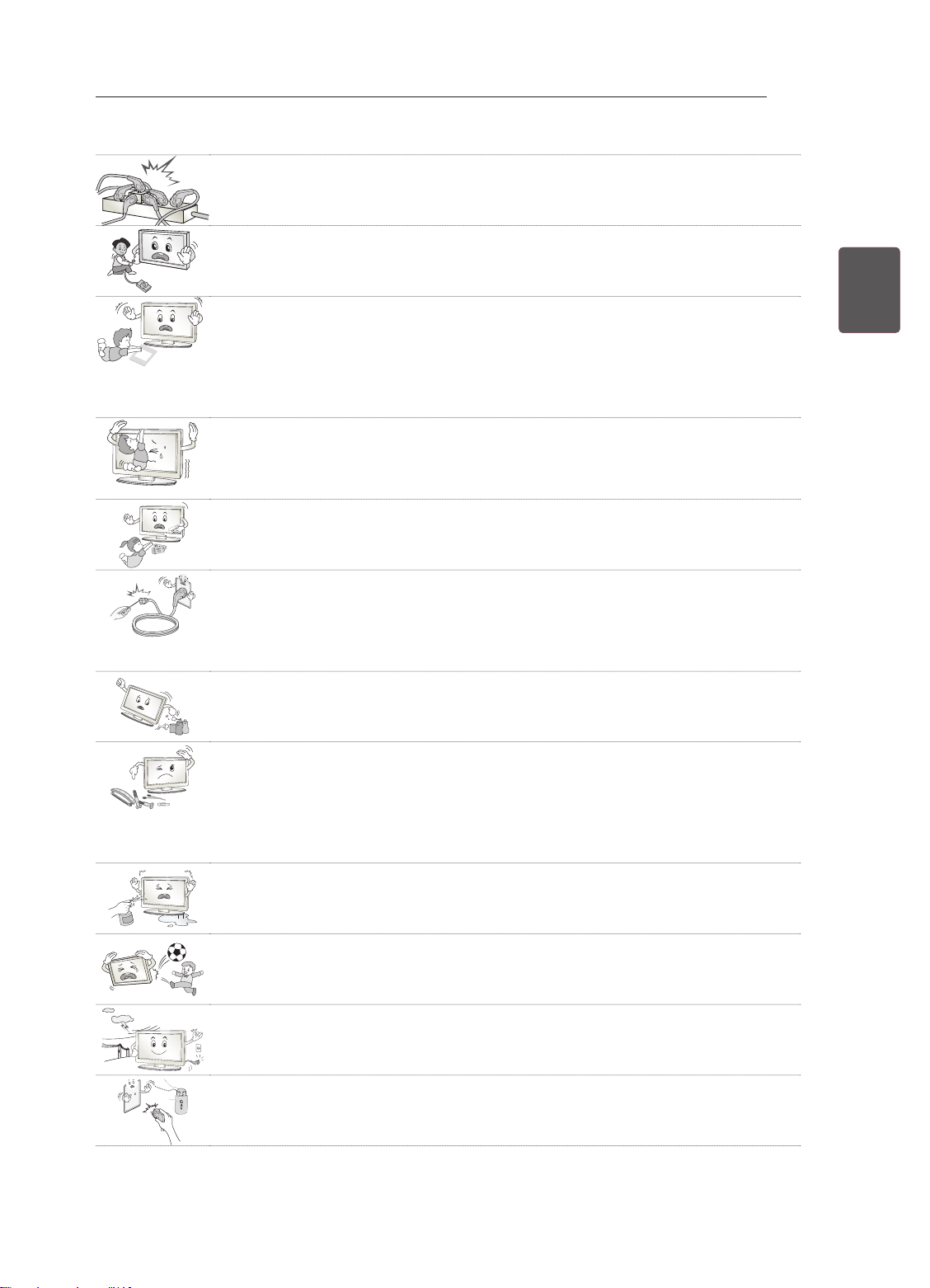
SICHERHEITSHINWEISE
Desiccant
Schließen Sie nicht zu viele Elektrogeräte an einer einzelnen Steckdose an.
y
Andernfalls kann es aufgrund von Überhitzung zu Bränden kommen.
Lassen Sie das Gerät beim Anschluss eines externen Gerätes nicht fallen.
y
Andernfalls können Verletzungen verursacht oder das Gerät beschädigt werden.
Bewahren Sie das Trockengranulat und die Vinyl-Verpackung außerhalb der
y
Reichweite von Kindern auf.
Trockengranulat ist bei Verschlucken gesundheitsschädlich. Falls es verschluckt
wurde, Erbrechen herbeiführen und die Person ins nächste Krankenhaus bringen.
Außerdem besteht Erstickungsgefahr durch die Vinyl-Verpackung. Bewahren Sie
sie außerhalb der Reichweite von Kindern auf.
Achten Sie darauf, dass sich Kinder nicht an das TV-Gerät hängen oder daran
y
hochklettern.
Andernfalls kann das Gerät umfallen, wodurch schwere Verletzungen hervorgerufen werden können.
Leere Batterien müssen sicher entsorgt werden, um zu verhindern, dass Kinder sie
y
verschlucken.
Wenn ein Kind eine Batterie verschluckt hat, sofort den Arzt aufsuchen.
5
DEUDEUTSCH
Berühren Sie das Ende des Netzkabels nicht mit einem leitenden Gegenstand (wie
y
einer Gabel), während das Netzkabel mit der Steckdose verbunden ist. Berühren
Sie das Netzkabel nicht, kurz nachdem Sie es mit der Steckdose verbunden haben.
Es besteht die Gefahr eines tödlichen Stromschlags. (Abhängig vom Modell)
Bringen Sie keine entflammbaren Stoffe in die Nähe des Gerätes.
y
Bei unsachgemäßem Umgang mit entflammbaren Stoffen besteht Explosionsgefahr.
Es dürfen keine Metallgegenstände wie Münzen, Haarnadeln, Besteck oder Draht
y
bzw. entzündliche Gegenstände wie Papier oder Streichhölzer in das Gerät gelangen. Achten Sie insbesondere auf Kinder.
Es besteht die Gefahr von Stromschlag, Brand oder Verletzung. Wenn ein Gegenstand in das Gerät gelangt, ziehen Sie das Stromkabel, und wenden Sie sich an
den Kundendienst.
Sprühen Sie kein Wasser auf das Produkt, und bringen Sie es nicht mit entzünd-
y
lichen Stoffen (Verdünnungsmittel oder Benzol) in Verbindung. Es besteht Stromschlag- und Brandgefahr.
Setzen Sie das Produkt keinen Schlägen und Stößen aus. Sorgen Sie dafür, dass
y
keine Gegenstände auf das Gerät oder den Bildschirm fallen.
Es besteht Verletzungsgefahr. Außerdem kann das Produkt beschädigt werden.
Berühren Sie das Produkt oder die Antenne nicht während eines Gewitters.
y
Es besteht die Gefahr eines tödlichen Stromschlags.
Im Falle eines Gasaustritts berühren Sie keinesfalls die Steckdose. Öffnen Sie
y
zum Lüften die Fenster.
Durch Funken können ein Brand oder Verbrennungen hervorgerufen werden.
Page 33
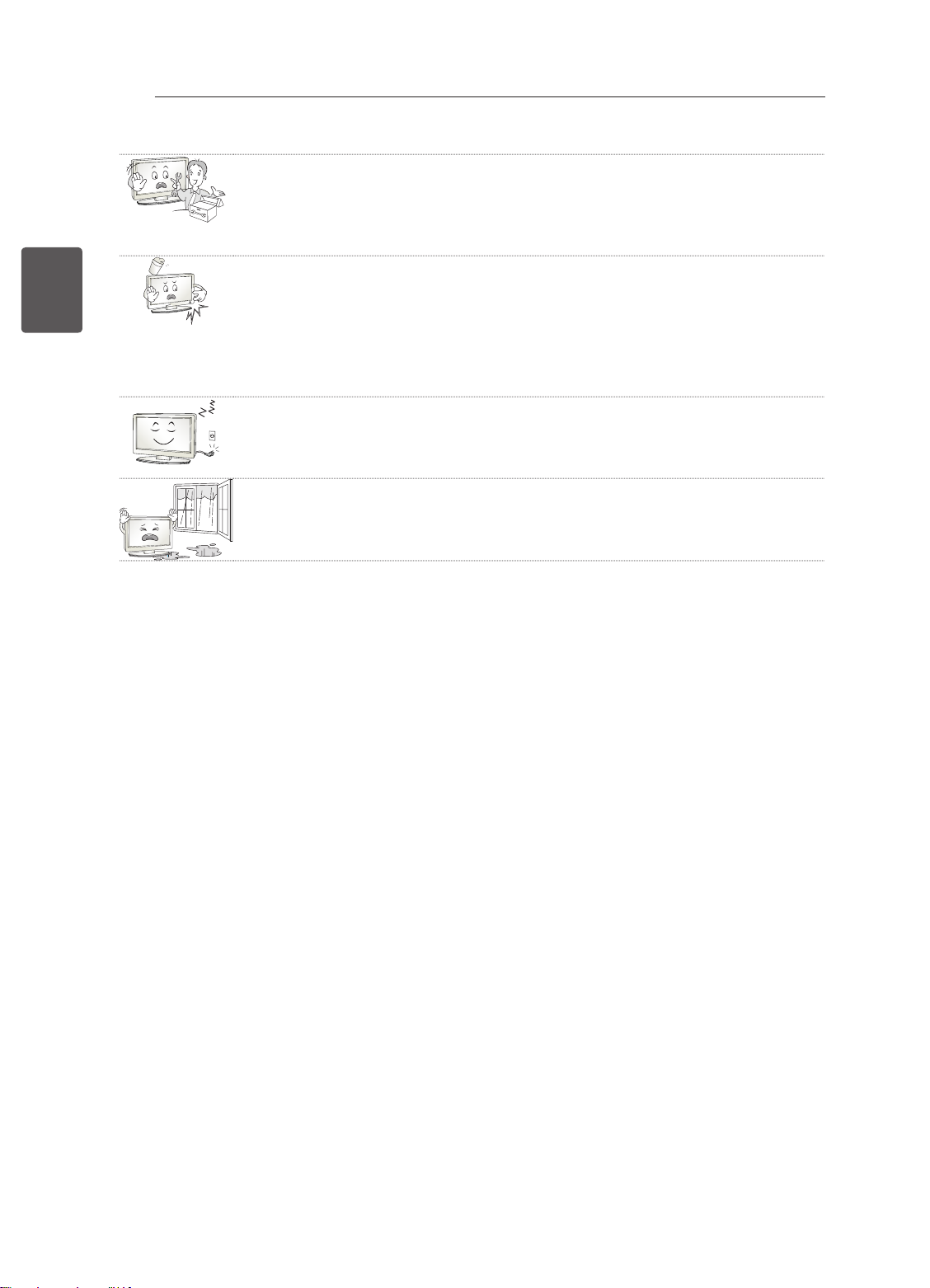
6
DEUTSCH
DEU
SICHERHEITSHINWEISE
Sie dürfen das Gerät nicht eigenmächtig auseinanderbauen, reparieren oder ver-
y
ändern.
Es besteht Stromschlag- und Brandgefahr.
Wenden Sie sich zur Überprüfung, Kalibrierung oder Reparatur an den Kundendienst.
Ziehen Sie in jedem der folgenden Fälle sofort den Netzstecker, und setzen Sie
y
sich mit Ihrem Kundendienst vor Ort in Verbindung.
- Das Gerät wurde einer Erschütterung ausgesetzt
- Das Gerät wurde beschädigt
- Fremdkörper sind in das Gerät gelangt
- Vom Gerät sind Rauch oder ungewöhnliche Gerüche ausgegangen
Dies kann Brand oder Stromschlag verursachen.
Ziehen Sie das Stromkabel aus der Steckdose, wenn das Gerät für längere Zeit
y
nicht verwendet wird.
Wenn das Gerät eingestaubt ist, besteht Brandgefahr. Ein Verschleiß der Isolation
kann zu Kriechverlust, Stromschlag oder Brand führen.
Achten Sie darauf, dass keine Flüssigkeit auf das Gerät spritzt oder tropft. Stellen
y
Sie keine Gegenstände, die Flüssigkeiten enthalten (z. B. Vasen), auf dem Gerät
ab.
Page 34
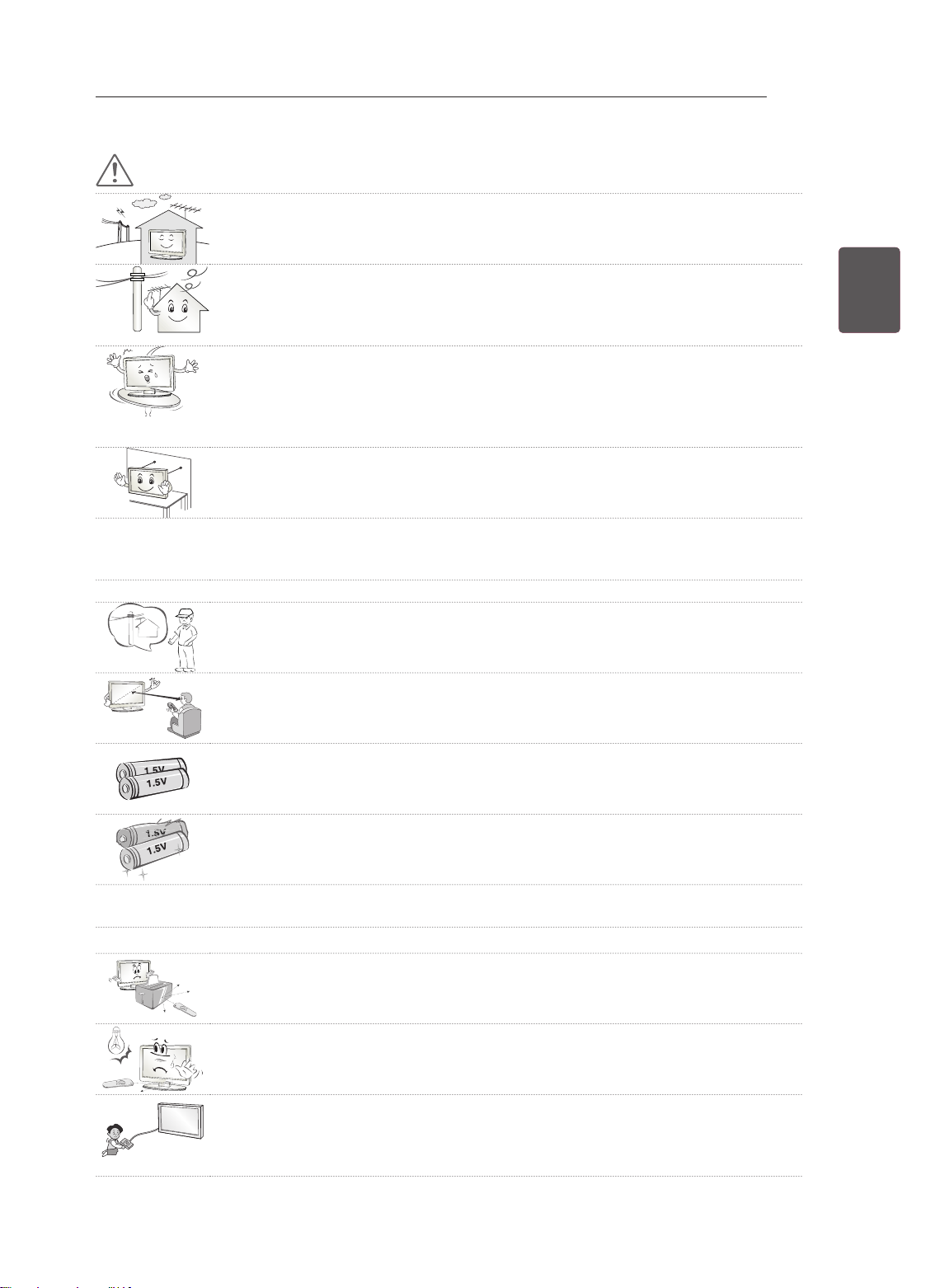
VORSICHT
Stellen Sie das Gerät nicht in der Nähe von Funkwellen auf.
y
SICHERHEITSHINWEISE
7
Der Abstand zwischen einer Außenantenne und Stromleitungen muss groß genug
y
sein, um eine Berührung der beiden zu verhindern, selbst wenn die Antenne herunterfällt.
Andernfalls besteht die Gefahr von Stromschlägen.
Stellen Sie das Produkt nicht auf unstabilen Regalen oder geneigten Oberflächen
y
auf. Vermeiden Sie außerdem Stellplätze, die vibrieren oder auf denen das Produkt
keinen sicheren Halt hat.
Andernfalls kann das Gerät herunter- oder umfallen, wodurch Verletzungen oder
Beschädigungen am Gerät verursacht werden können.
Wenn Sie das TV-Gerät auf einem Standfuß aufstellen, müssen Sie durch vor-
y
beugende Maßnahmen ein Umkippen verhindern. Andernfalls kann das TV-Gerät
umfallen, wodurch Verletzungen hervorgerufen werden können.
Wenn Sie das TV-Gerät an der Wand montieren, befestigen Sie eine VESA-Standardwandhalterung
y
(optional) an der Rückseite des Gerätes. Wenn Sie das TV-Gerät mit der optionalen Wandhalterung
montieren möchten, befestigen Sie diese sorgfältig, um ein Herunterfallen zu vermeiden.
Verwenden Sie nur vom Hersteller empfohlenes Zubehör.
y
Konsultieren Sie bei der Installation der Antenne eine qualifizierte Fachkraft.
y
Andernfalls besteht Brandgefahr bzw. die Gefahr von Stromschlägen.
Wir empfehlen einen Abstand vom Gerät, der mindestens dem 2- bis 7-Fachen der
y
Bildschirmdiagonale entspricht.
Das Fernsehen über einen langen Zeitraum hinweg kann zu Seheintrübung führen.
DEUDEUTSCH
Verwenden Sie nur den angegebenen Batterietyp.
y
Andernfalls könnte die Fernbedienung beschädigt werden.
Alte und neue Batterien dürfen nicht zusammen verwendet werden.
y
Andernfalls könnten die Batterien überhitzen und auslaufen.
Batterien dürfen keiner extremen Hitze, etwa durch Sonneneinstrahlung, offenes Feuer oder Heiz-
y
strahler, ausgesetzt werden.
Laden Sie nicht wiederaufladbare Batterien NICHT mit einem Ladegerät auf.
y
Es dürfen sich keine Gegenstände zwischen der Fernbedienung und dem Sensor
y
befinden.
Das Signal von der Fernbedienung kann durch Sonnenlicht oder andere starke
y
Lichteinstrahlung gestört werden. Verdunkeln Sie in diesem Fall den Raum.
Achten Sie beim Anschluss von externen Geräten, wie z. B. Videospielkonsolen,
y
darauf, dass die Anschlusskabel lang genug sind.
Ansonsten kann das Gerät umfallen, wodurch Verletzungen oder Beschädigungen
am Gerät verursacht werden können.
Page 35
8
DEUTSCH
DEU
SICHERHEITSHINWEISE
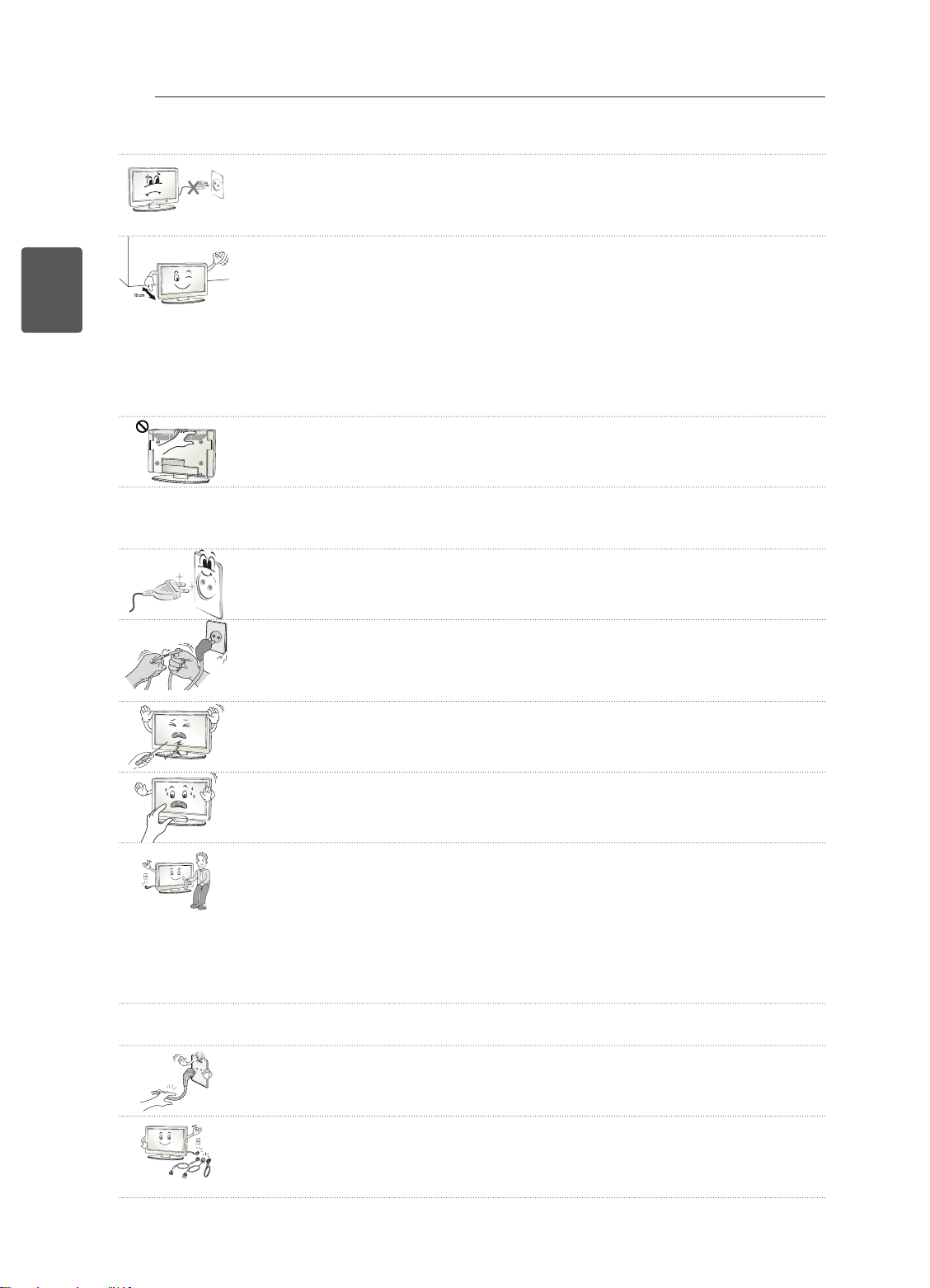
Schalten Sie das Gerät niemals ein oder aus, indem Sie den Stecker aus der
y
Steckdose ziehen. (Verwenden Sie das Stromkabel nicht als Ein- und Aus-Schalter.)
Ein mechanischer Defekt oder Stromschlag können die Folge sein.
Folgen Sie den unten stehenden Installationsanweisungen, um ein Überhitzen des
y
Gerätes zu verhindern.
- Der Abstand des Gerätes zur Wand sollte mindestens 10 cm betragen.
- Montieren Sie das Gerät nur an Orten mit ausreichender Belüftung (d. h. weder
in einem Regal oder Schrank).
- Stellen Sie es nicht auf Kissen oder Teppichen ab.
- Achten Sie darauf, dass die Belüftungsschlitze nicht durch eine Tischdecke oder
einen Vorhang verdeckt werden.
Andernfalls kann es zu einem Brand kommen.
Berühren Sie nicht die Lüftungsöffnungen, wenn das TV-Gerät über längere Zeit
y
läuft, da die Lüftungsöffnungen heiß werden können. Dies hat keinen Einfluss auf
den Betrieb oder die Leistung des Produkts.
Überprüfen Sie das Kabel an Ihrem Gerät regelmäßig. Weist es Anzeichen von Beschädigung oder
y
Abnutzung auf, trennen Sie das Stromkabel vom Netz, und verwenden Sie das Gerät nicht weiter.
Lassen Sie das Kabel durch einen autorisierten Servicepartner ersetzen.
Sorgen Sie dafür, dass die Kontaktstifte und die Steckdose frei von Staub sind.
y
Es besteht Brandgefahr.
Schützen Sie das Netzkabel vor mechanischen Beschädigungen, wie z. B. Verdre-
y
hen, Knicken, Eindrücken, Einklemmen in einer Tür oder Drauftreten. Achten Sie
besonders auf die Stecker, Steckdosen und den Bereich, an dem das Kabel aus
dem Gerät tritt.
Üben Sie keinen starken Druck mit der Hand oder einem spitzen Gegenstand wie
y
einem Nagel, Bleistift oder Kugelschreiber auf das Gerät aus. Verkratzen Sie das
Gerät nicht.
Vermeiden Sie es, den Bildschirm zu berühren oder mit den Fingern längere Zeit
y
auf den Bildschirm zu drücken. Dadurch kann es zu vorübergehenden Verzerrungseffekten auf dem Bildschirm kommen.
Ziehen Sie vor der Reinigung des Gerätes den Netzstecker, und reinigen Sie das
y
Gerät mit einem weichen Tuch. Übermäßiger Druck kann Kratzer oder Verfärbungen verursachen. Benutzen Sie weder Sprühflaschen noch nasse Tücher. Verwenden Sie vor allem keine Glasreiniger oder für Autos oder in der Industrie verwendete Reinigungsmittel, aggressive Mittel oder Wachs, Benzol, Alkohol usw. Diese
Mittel können das Gerät und seinen Bildschirm beschädigen.
Andernfalls kann es zu Bränden, Stromschlägen, Beschädigungen am Gerät (Verformung, Korrosion und Schäden) kommen.
Solange das Gerät an eine Wechselstrom-Steckdose angeschlossen ist, bleibt es auch dann mit der
y
Wechselstromquelle verbunden, wenn Sie es mit dem Schalter ausschalten.
Ziehen Sie das Netzkabel immer am Stecker aus der Steckdose.
y
Wenn die Kabel im Inneren des Netzkabels vom Stecker getrennt werden, kann
dies einen Brand verursachen.
Schalten Sie das Gerät aus, bevor Sie es bewegen. Ziehen Sie dann das Stromka-
y
bel, Antennenkabel und alle anderen Anschlusskabel.
Andernfalls kann das TV-Gerät oder das Stromkabel beschädigt werden, wodurch
es zu einem Brand oder Stromschlag kommen kann.
Page 36
SICHERHEITSHINWEISE
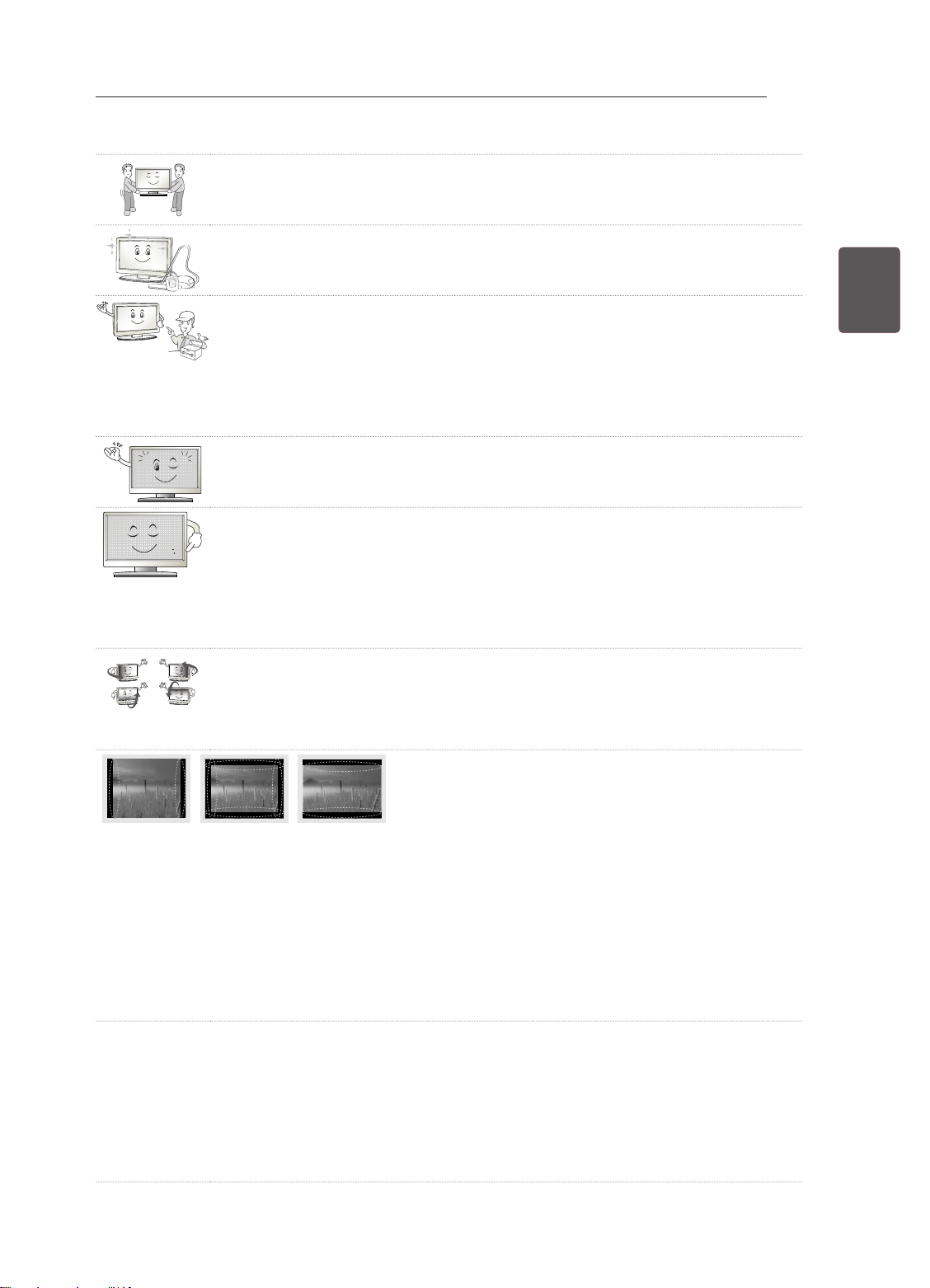
Das Gerät ist schwer und sollte stets mit zwei Personen bewegt oder ausgepackt
y
werden.
Andernfalls kann es zu Verletzungen kommen.
Wenden Sie sich einmal im Jahr an den Kundendienst, damit die innenliegenden
y
Bauteile des Produkts fachgerecht gereinigt werden.
Angesammelter Staub kann mechanische Fehler verursachen.
Wenden Sie sich bei Problemen an einen qualifizierten Kundendienstmitarbeiter.
y
Bitte setzen Sie sich mit dem Kundendienst in Verbindung, wenn das Gerät in
irgendeiner Weise beschädigt wurde, z. B. wenn das Stromkabel oder der Stecker
defekt sind, wenn Flüssigkeit über das Gerät gegossen wurde oder Gegenstände
in das Gerät gelangt sind, wenn das Gerät Regen oder Feuchtigkeit ausgesetzt
wurde, wenn das Gerät nicht ordnungsgemäß funktioniert oder wenn das Gerät
fallen gelassen wurde.
Wenn sich das Gerät kalt anfühlt, kann es beim Einschalten zu einem kurzen Flim-
y
mern kommen. Das ist normal und kein Fehler des Gerätes.
Der Bildschirm ist ein hochentwickeltes Gerät mit einer Auflösung von zwei bis
y
sechs Millionen Pixel. Unter Umständen sind winzige schwarze Punkte und/oder
bunte Punkte (rot, blau oder grün) von 1 ppm Größe auf dem Bildschirm zu sehen.
Dies deutet nicht auf eine Fehlfunktion hin und beeinträchtigt nicht die Leistung
und Zuverlässigkeit des Gerätes.
Diese Erscheinung tritt auch bei Geräten von Fremdanbietern auf und wird nicht
als Grund für Umtausch oder Rückerstattung anerkannt.
Je nach Ihrer Betrachtungsposition (von rechts, links, oben, unten) sind Helligkeit
y
und Farben auf dem Bildschirm möglicherweise unterschiedlich.
Diese Erscheinung ist auf die besonderen Eigenschaften des Bildschirms zurückzuführen. Es steht in keinem Zusammenhang mit der Leistung des Gerätes, und
es handelt sich hierbei nicht um eine Fehlfunktion.
9
DEUDEUTSCH
Durch das Anzeigen eines Standbilds (z. B. ein Programmlogo, Bildschirmmenü, Szene eines Vi-
y
deospiels) über einen längeren Zeitraum kann der Bildschirm beschädigt werden, und das Bild wird
eingebrannt. Das Einbrennen von Bildern wird bei diesem Gerät nicht von der Garantie gedeckt.
Vermeiden Sie die Anzeige von Standbildern auf dem Fernsehbildschirm über einen längeren Zeitraum (2 Stunden oder mehr bei LCD-Fernsehgeräten, 1 Stunde oder mehr bei Plasma-Fernsehgeräten).
Wird das Format über einen längeren Zeitraum auf 4:3 eingestellt, kann es an den Rändern des
Bildschirms zum Einbrennen kommen.
Diese Erscheinung tritt auch bei Geräten von Fremdanbietern auf und wird nicht als Grund für Umtausch oder Rückerstattung anerkannt.
Erzeugtes Geräusch
y
„Knacken“: Das beim Fernsehen oder Ausschalten des Gerätes zu hörende Knacken wird durch
Wärmeschrumpfung von Kunststoffen aufgrund von Temperatur und Feuchtigkeit verursacht. Dieses
Geräusch ist normal bei Geräten, bei denen die thermische Verformung erforderlich ist. Stromkreisbrummen/Bildschirmsummen: Der Hochgeschwindigkeitsschaltkreis, der eine große Menge Strom
für den Betrieb des Geräts bereitstellt, gibt ein leises Geräusch ab. Dieses Geräusch ist je nach
Gerät anders.
Es hat keinen Einfluss auf die Leistung und Zuverlässigkeit des Gerätes.
Page 37
10
<
<
DEUTSCH
DEU
INSTALLATIONSVERFAHREN
1 Öffnen Sie die Packung, und stellen Sie sicher, dass alle Zubehörteile im Lieferumfang enthalten sind.
2 Befestigen Sie den Standfuß am TV-Gerät.
3 Verbinden Sie gegebenenfalls externe Zuspielgeräte mit dem TV-Gerät.
4 Stellen Sie sicher, dass eine Netzwerkverbindung vorhanden ist.
INSTALLATIONSVERFAHREN / MONTAGE UND VORBEREITUNG
HINWEIS
yIhr TV-Gerät kann von der Abbildung möglicherweise leicht abweichen.
yDas OSD-Menü (am Bildschirm angezeigtes Menü) Ihres TV-Gerätes kann sich leicht von dem in diesem
Handbuch unterscheiden.
yDie verfügbaren Menüs und Optionen können sich je nach verwendeter Eingangsquelle bzw. je nach
Modell unterscheiden.
yKünftig können diesem TV-Gerät neue Funktionen hinzugefügt werden.
yDas TV-Gerät kann in den Standby-Modus gesetzt werden, um den Stromverbrauch zu verringern. Wenn
längere Zeit nicht ferngesehen wird, sollte das Gerät ausgeschaltet werden, um Strom zu sparen.
yDer Stromverbrauch des eingeschalteten TV-Geräts kann erheblich verringert werden, wenn die Helligkeit
des Bildes vermindert wird.
Sie können die Netzwerkfunktionen des Fernsehgeräts nur dann nutzen, wenn eine Netzwerkverbindung
hergestellt wurde. (Abhängig vom Modell)
MONTAGE UND VORBEREITUNG
Auspacken
Prüfen Sie, ob folgende Artikel in der Verpackung enthalten sind. Falls Zubehör fehlt, wenden Sie sich bitte
an den Händler, bei dem Sie das Gerät erworben haben. Die Abbildungen im Handbuch unterscheiden sich
möglicherweise von Ihrem Gerät.
VORSICHT
yUm die Sicherheit und Lebensdauer des Produkts sicherzustellen, verwenden Sie keine Fälschungen.
yDurch Fälschungen verursachte Beschädigungen sind nicht von der Garantie abgedeckt.
yBei einigen Modellen befindet sich ein dünner Film auf dem Bildschirm, der nicht entfernt werden darf.
HINWEIS
yDie im Lieferumfang enthaltenen Artikel sind modellabhängig.
yÄnderungen an den Produktspezifikationen oder am Inhalt dieses Handbuchs sind im Zuge von
Aktualisierungen der Produktfunktionen vorbehalten.
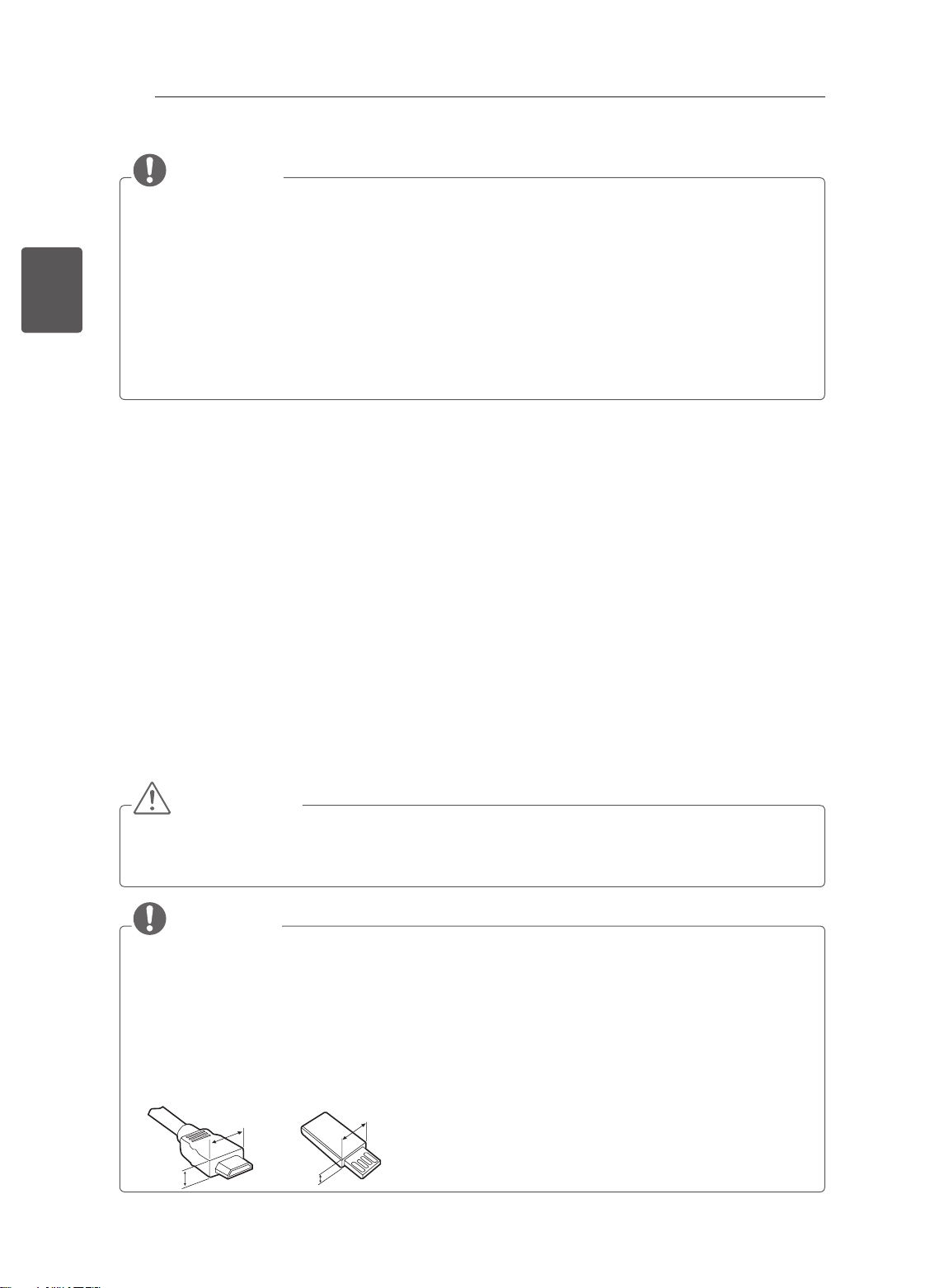
yFür eine optimale Verbindung sollte die Einfassung von HDMI-Kabeln und USB-Geräten höchstens
10 mm dick und 18 mm breit sein. Verwenden Sie ein Verlängerungskabel, das USB 2.0 unterstützt,
wenn das USB-Kabel oder der USB-Speicherstick nicht in den USB-Anschluss Ihres TV-Gerätes
passt.
B
A
B
*A
10 mm
=
*B
18 mm
A
=
Page 38
MONTAGE UND VORBEREITUNG
11
DEUDEUTSCH
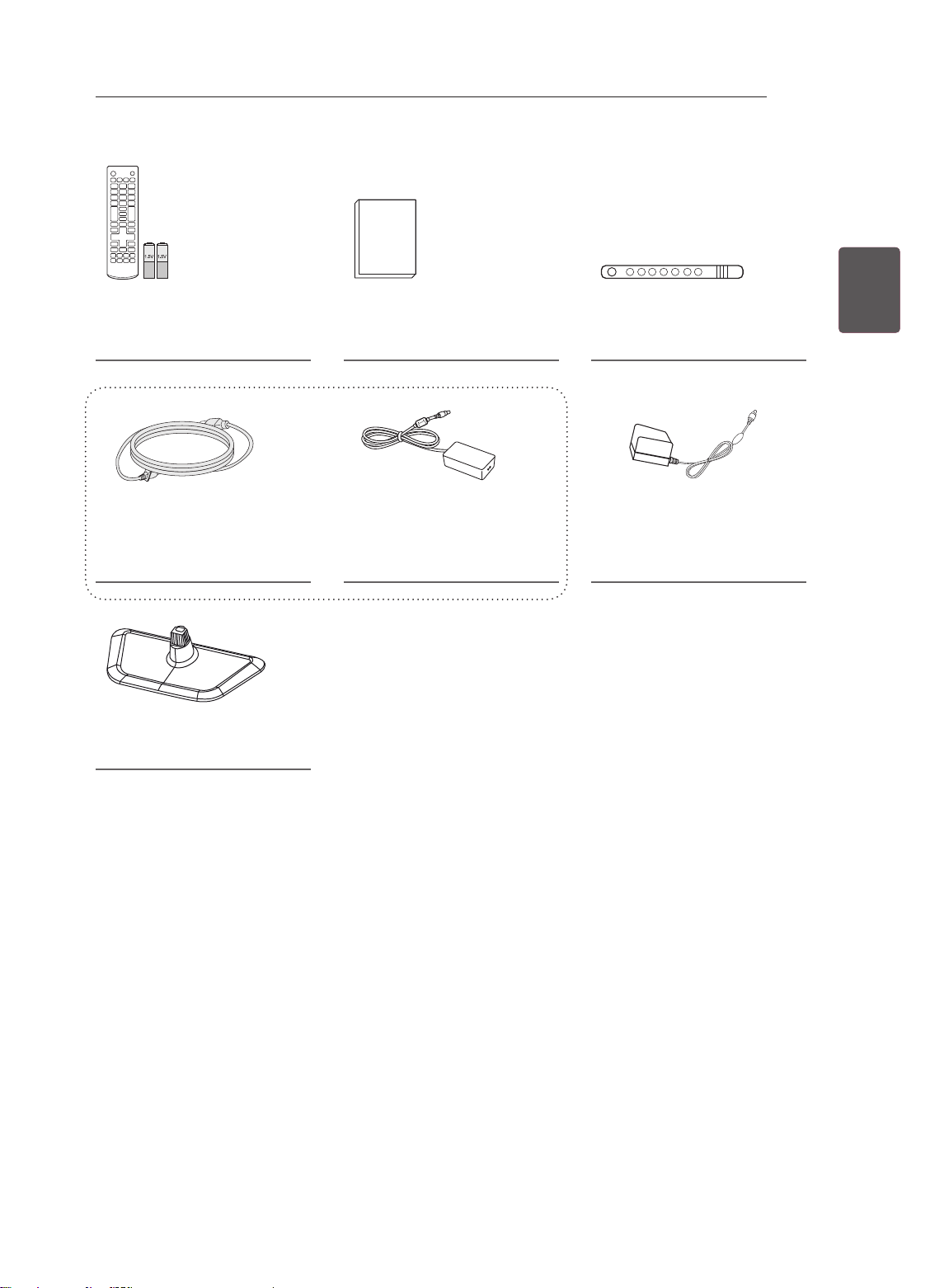
Fernbedienung / Batterien
(AAA)
(Siehe S. 17)
Stromkabel
(Abhängig von Modell und Land)
(Siehe S. B-4)
Ständerplatte
(Siehe S. A-3)
Benutzerhandbuch Kabelhalter
(Siehe S. A-4)
oder
Netzteil
(Siehe S. B-4)
Netzteil
(Abhängig vom Modell)
(Siehe S. B-4)
Page 39
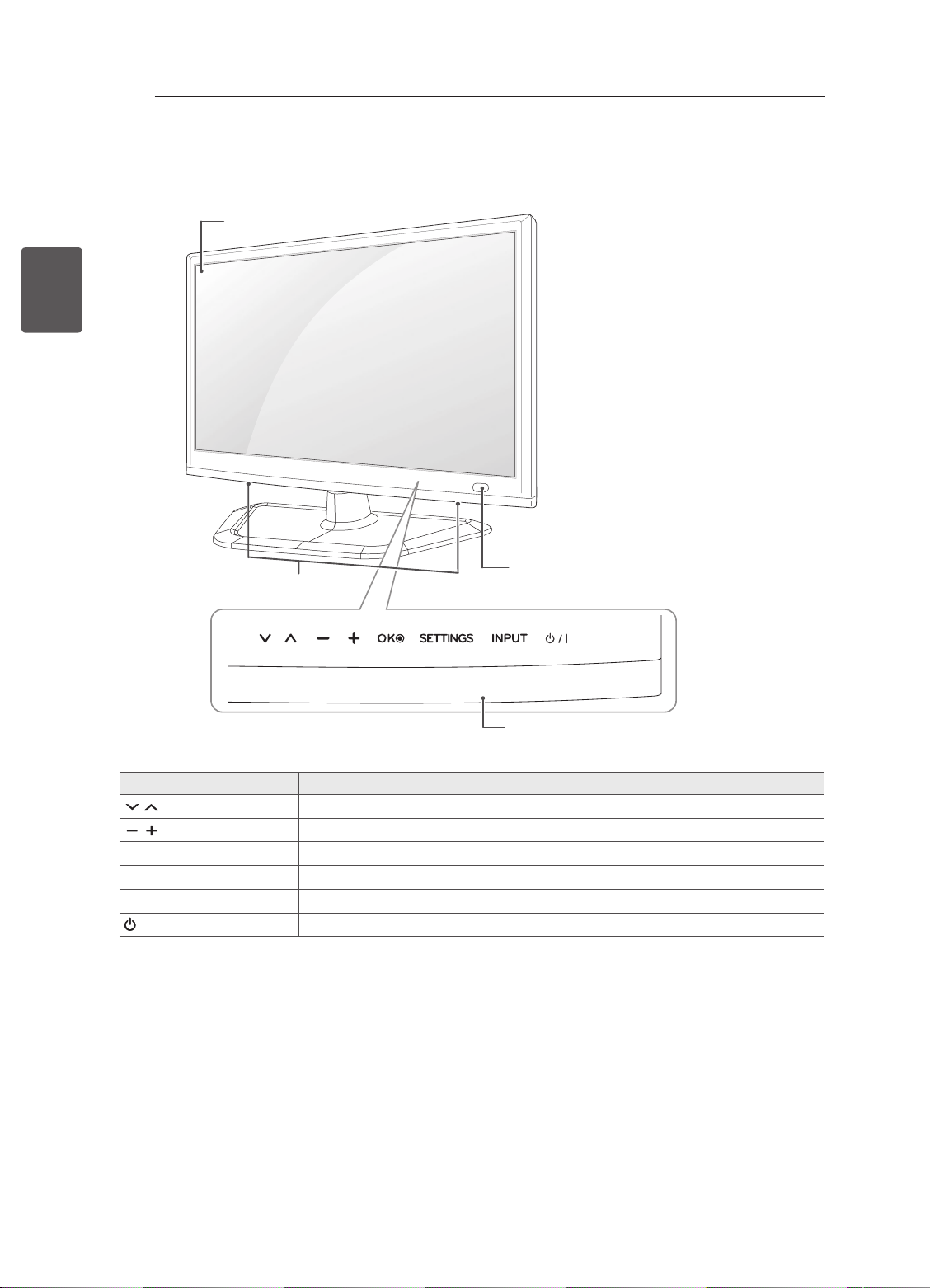
12
Gehäuse und Bedienelemente
DEUTSCH
DEU
MONTAGE UND VORBEREITUNG
Bildschirm
Lautsprecher
Drucktasten Beschreibung
Navigieren durch die gespeicherten Programme.
Regelt die Lautstärke.
ꔉ
OK
SETTINGS Öffnet und schließt die Hauptmenüs und speichert Ihre Eingaben.
INPUT Ändert die Eingangsquelle.
/ I
1 Alle Tasten lassen sich durch einfache Berührung mit dem Finger bedienen.
Wählt die markierte Menüoption aus oder bestätigt eine Eingabe.
Schaltet den Strom ein und aus.
Fernbedienungssensor
Drucktasten
1
Page 40
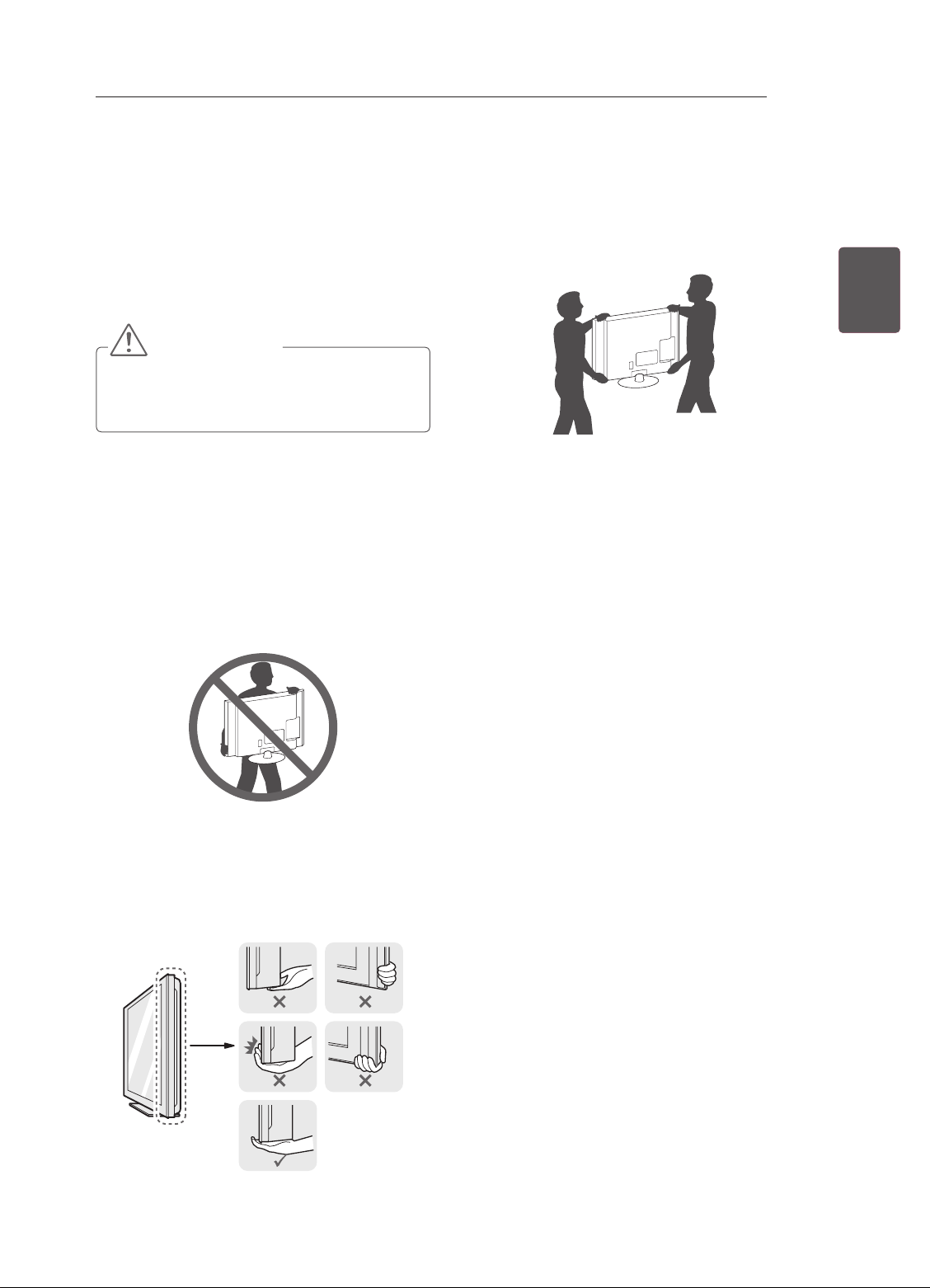
MONTAGE UND VORBEREITUNG
13
Anheben und Bewegen des
TV-Gerätes
Lesen Sie folgende Hinweise, bevor Sie das TVGerät bewegen oder anheben, um Kratzer oder
Beschädigungen am TV-Gerät zu verhindern und
um einen reibungslosen Transport unabhängig von
Typ und Größe zu gewährleisten.
VORSICHT
yBerühren Sie nach Möglichkeit nicht den
Bildschirm, da er dadurch beschädigt
werden könnte.
yEs wird empfohlen, das TV-Gerät im
Originalkarton oder in der Originalverpackung
zu bewegen bzw. zu transportieren.
yTrennen Sie das Netzkabel und alle weiteren
Kabel, bevor Sie das TV-Gerät bewegen oder
anheben.
yHalten Sie das TV-Gerät so, dass sein
Bildschirm von Ihnen abgewendet ist, um
Beschädigungen zu vermeiden.
yGroße TV-Geräte sollten stets von mindestens
2 Personen transportiert werden.
yWenn das TV-Gerät von Hand transportiert
wird, halten Sie es wie in der folgenden
Abbildung gezeigt.
DEUDEUTSCH
ySetzen Sie das TV-Gerät während des
Transports keinen ruckartigen Bewegungen
oder starken Erschütterungen aus.
yHalten Sie das TV-Gerät beim Transport
aufrecht, drehen Sie es niemals auf die Seite,
und kippen Sie es nicht nach links oder rechts.
yHalten Sie das TV-Gerät oben und unten am
Rahmen gut fest. Halten Sie ihn nicht am
transparenten Teil, am Lautsprecher oder am
Lautsprechergrill fest.
Page 41
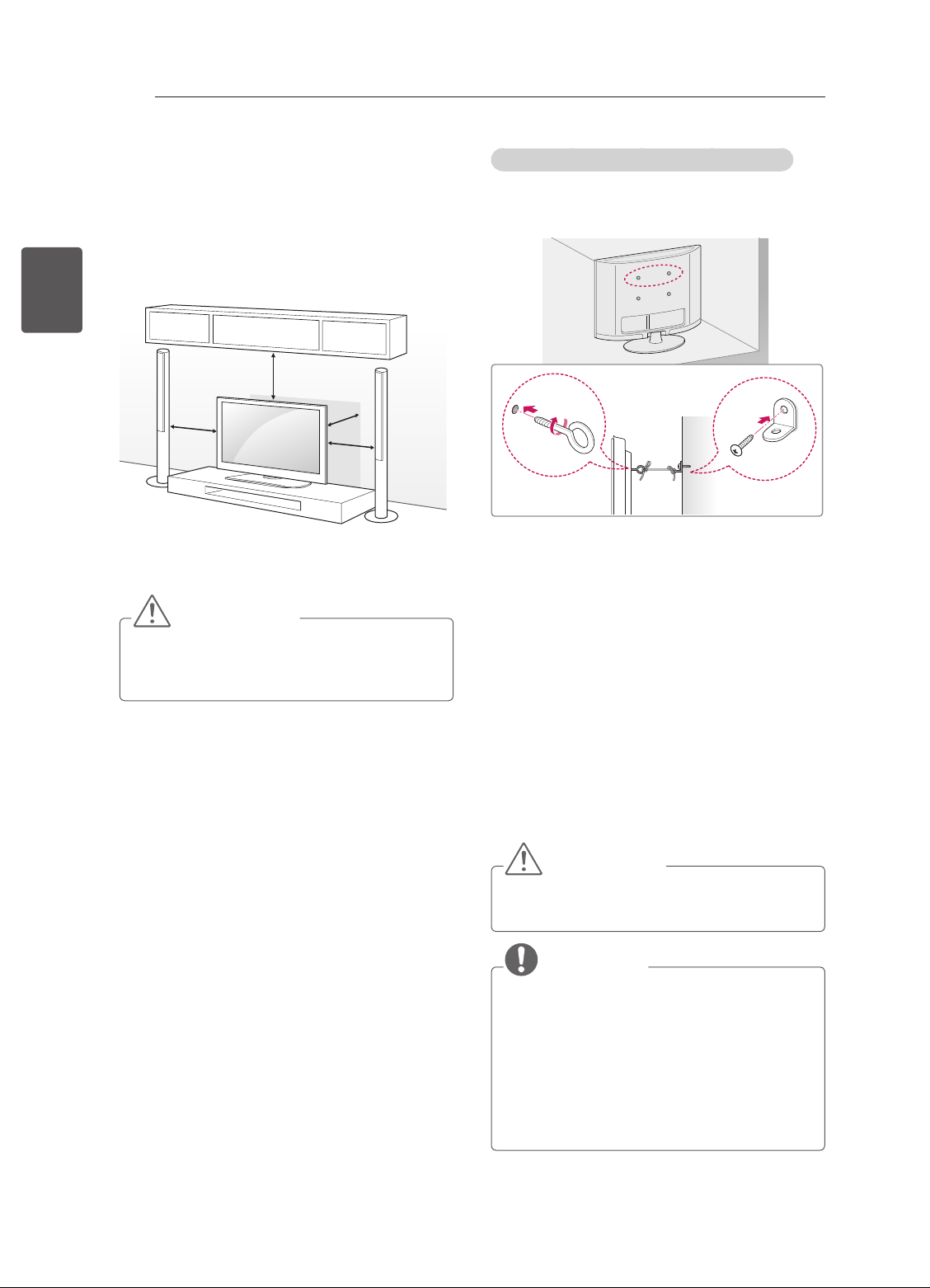
MONTAGE UND VORBEREITUNG
14
Montage auf einem Tisch
1 Heben Sie das TV-Gerät an, und kippen Sie es
DEUTSCH
DEU
2 Stecken Sie das Netzteil und das Netzkabel in
auf einem Tisch in die aufrechte Position.
- Lassen Sie (mindestens) 10 cm Platz zur
Wand, um eine gute Belüftung zu gewährleisten.
10 cm
10 cm
eine Steckdose.
10 cm
10 cm
VORSICHT
yStellen Sie das TV-Gerät nicht in die Nähe
von Wärmequellen, da dies einen Brand
oder Beschädigungen verursachen könnte.
Befestigen des TV-Gerätes an einer Wand
(Diese Funktion der Kippsicherung steht nicht bei
allen Modellen zur Verfügung.)
1 Setzen Sie die Ringschrauben oder TV-
Halterungen und Schrauben an der Rückseite
des TV-Gerätes ein, und befestigen Sie sie.
- Wenn an den Ringschraubenpositionen
Schrauben eingesetzt sind, entfernen Sie
zunächst die Schrauben.
2 Montieren Sie die Wandhalterungen mit den
Schrauben an der Wand.
Stimmen Sie die Position der Wandhalterung
auf die Ringschrauben an der Rückseite des
TV-Gerätes ab.
3 Verbinden Sie die Ringschrauben und
Wandhalterungen fest mit einem stabilen Seil.
Achten Sie darauf, dass das Seil horizontal
verläuft.
VORSICHT
yAchten Sie darauf, dass Kinder nicht auf das
TV-Gerät klettern oder sich daran hängen.
HINWEIS
yVerwenden Sie eine Haltevorrichtung oder
einen Schrank, der stabil und groß genug
ist, um das TV-Gerät sicher abzustützen.
yHalterungen, Seile und anderes
Befestigungsmaterial gehören nicht zum
Lieferumfang des Gerätes. Bitte wenden Sie
sich zum Erwerb von geeignetem Zubehör
an Ihren Fachhändler.
Page 42
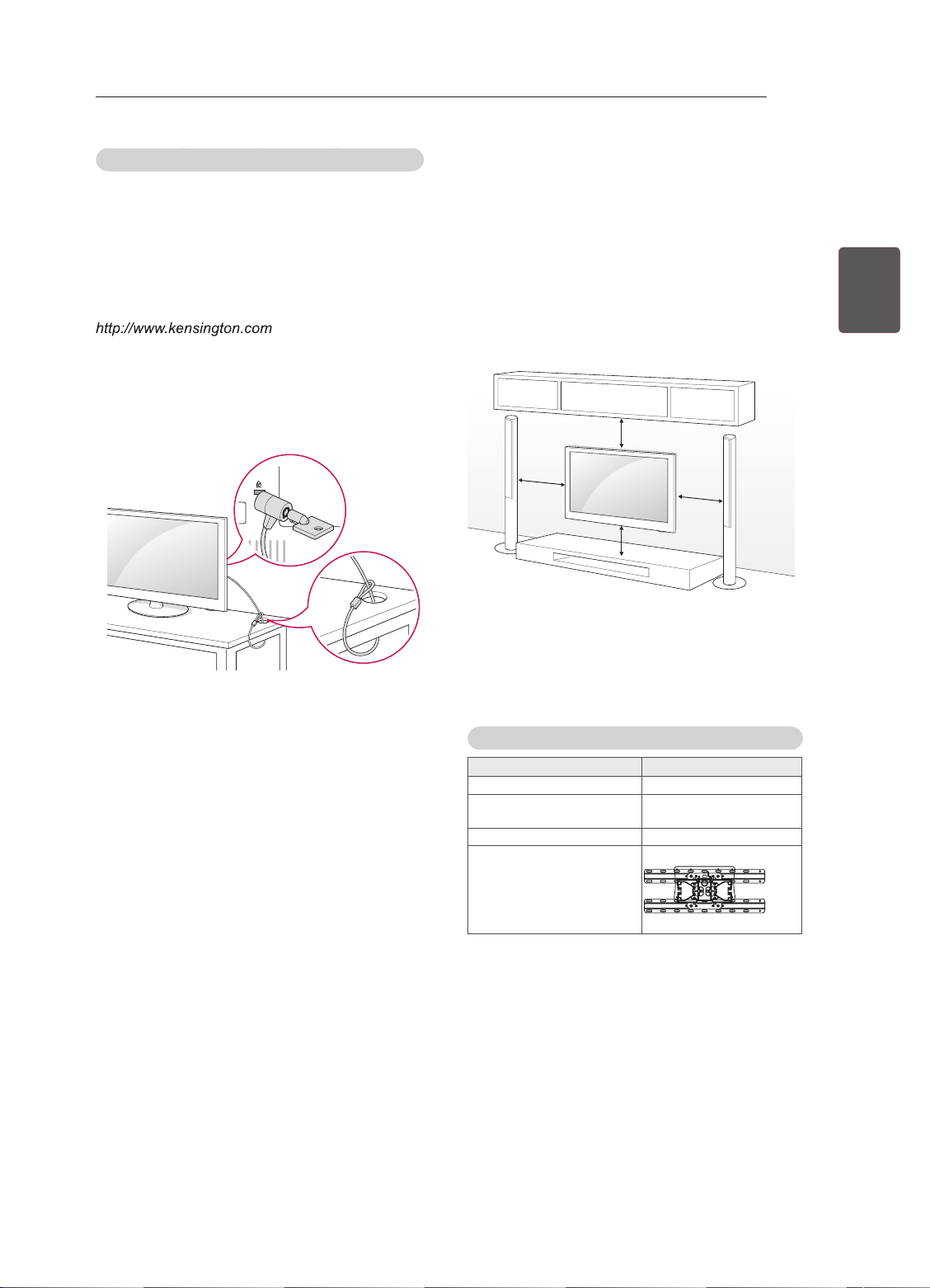
MONTAGE UND VORBEREITUNG
15
Verwendung des Kensington-Sicherheitssystems
(Abhängig vom Modell)
Der Anschluss des Kensington-Sicherheitssystems
bendet sich an der Rückseite des TV-Gerätes.
Weitere Informationen zur Installation und
Verwendung nden Sie im Handbuch, das im
Lieferumfang des Kensington-Sicherheitssystems
enthalten ist, oder auf der Website unter
.
Schließen Sie das Kabel des Kensington
Sicherheitssystems am TV-Gerät und an einem
Tisch an.
Wandmontage
Befestigen Sie an der Rückseite des TV-Gerätes
sorgfältig eine optionale Wandhalterung, und
montieren Sie die Wandhalterung an einer stabilen
Wand, die senkrecht zum Fußboden steht.
Wenn Sie das TV-Gerät an anderen Baustoffen
befestigen möchten, fragen Sie zunächst bei einer
qualizierten Fachkraft nach.
LG empehlt, dass die Wandmontage von einem
qualizierten Techniker durchgeführt wird.
10 cm
10 cm
10 cm
10 cm
Verwenden Sie unbedingt Schrauben
und Wandhalterungen, die der VESANorm entsprechen. Die Standardmaße der
Wandmontagesätze können der folgenden Tabelle
entnommen werden.
DEUDEUTSCH
Separat zu beziehen (Wandmontagehalterung)
Modell
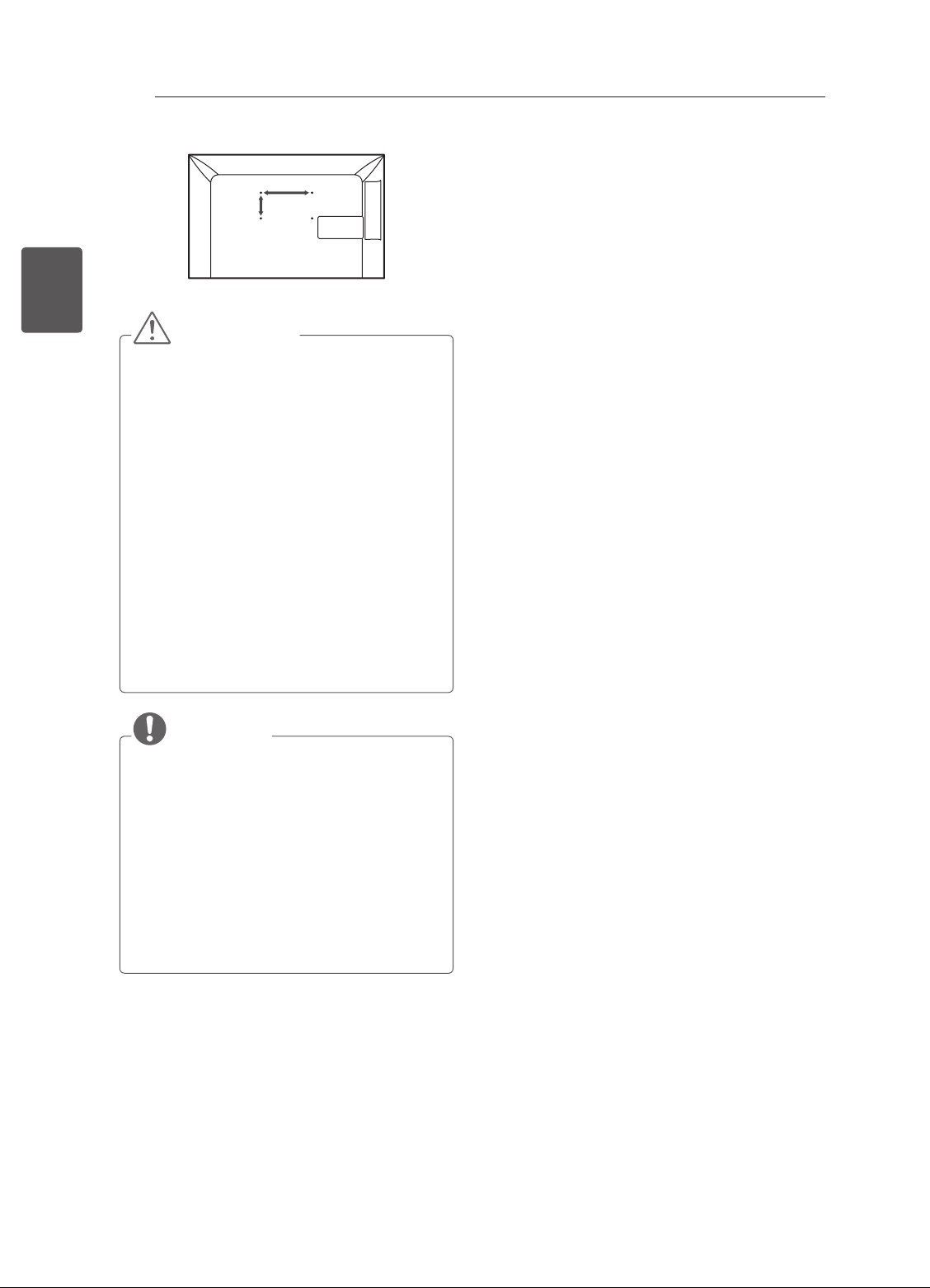
VESA (A x B) 100 x 100
Standard
schraube
Anzahl Schrauben 4
Wandmontagehalterung
22/24/26/28/29LN45
M4
LSW130B
**
Page 43
16
DEUTSCH
DEU
MONTAGE UND VORBEREITUNG
A
B
VORSICHT
yTrennen Sie erst das Netzkabel, bevor Sie das
TV-Gerät bewegen oder installieren. Ansonsten
besteht Stromschlaggefahr.
yWenn Sie das TV-Gerät an einer Decke oder
Wandschräge montieren, kann es herunterfallen
und zu schweren Verletzungen führen.
Verwenden Sie eine zugelassene Wandhalterung
von LG, und wenden Sie sich an Ihren Händler
vor Ort oder an qualifiziertes Fachpersonal.
yZiehen Sie die Schrauben nicht zu fest an, da
dies Beschädigungen am TV-Gerät hervorrufen
und zum Erlöschen Ihrer Garantie führen könnte.
yVerwenden Sie die Schrauben und
Wandhalterungen, die der VESA-Norm
entsprechen. Schäden oder Verletzungen,
die durch unsachgemäße Nutzung oder die
Verwendung von ungeeignetem Zubehör
verursacht werden, fallen nicht unter die
Garantie.
HINWEIS
yVerwenden Sie die Schrauben, die unter den
Spezifikationen der VESA-Norm aufgeführt sind.
yDer Wandmontagesatz beinhaltet eine
Installationsanleitung und die notwendigen Teile.
yDie Wandhalterung ist optional. Zusätzliches
Zubehör erhalten Sie bei Ihrem Elektrohändler.
yDie Schraubenlänge hängt von der
Wandbefestigung ab. Verwenden Sie unbedingt
Schrauben der richtigen Länge.
yWeitere Informationen können Sie dem im
Lieferumfang der Wandhalterung enthaltenen
Handbuch entnehmen.
Page 44
FERNBEDIENUNG
Die Beschreibungen in diesem Handbuch beziehen sich auf die Tasten der
Fernbedienung.
Lesen Sie dieses Handbuch bitte aufmerksam durch, und verwenden Sie das TVGerät bestimmungsgemäß.
Um die Batterien zu wechseln, öffnen Sie das Batteriefach, wechseln Sie die Batterien
(1,5 V, AAA), legen Sie die - und -Enden entsprechend der Kennzeichnung im
Fach ein, und schließen Sie das Batteriefach.
Gehen Sie zum Herausnehmen der Batterien in umgekehrter Reihenfolge vor.
VORSICHT
yVerwenden Sie niemals alte zusammen mit neuen Batterien, da dies Schäden
an der Fernbedienung hervorrufen kann.
Stellen Sie sicher, dass die Fernbedienung auf den Sensor am TV-Gerät gerichtet ist.
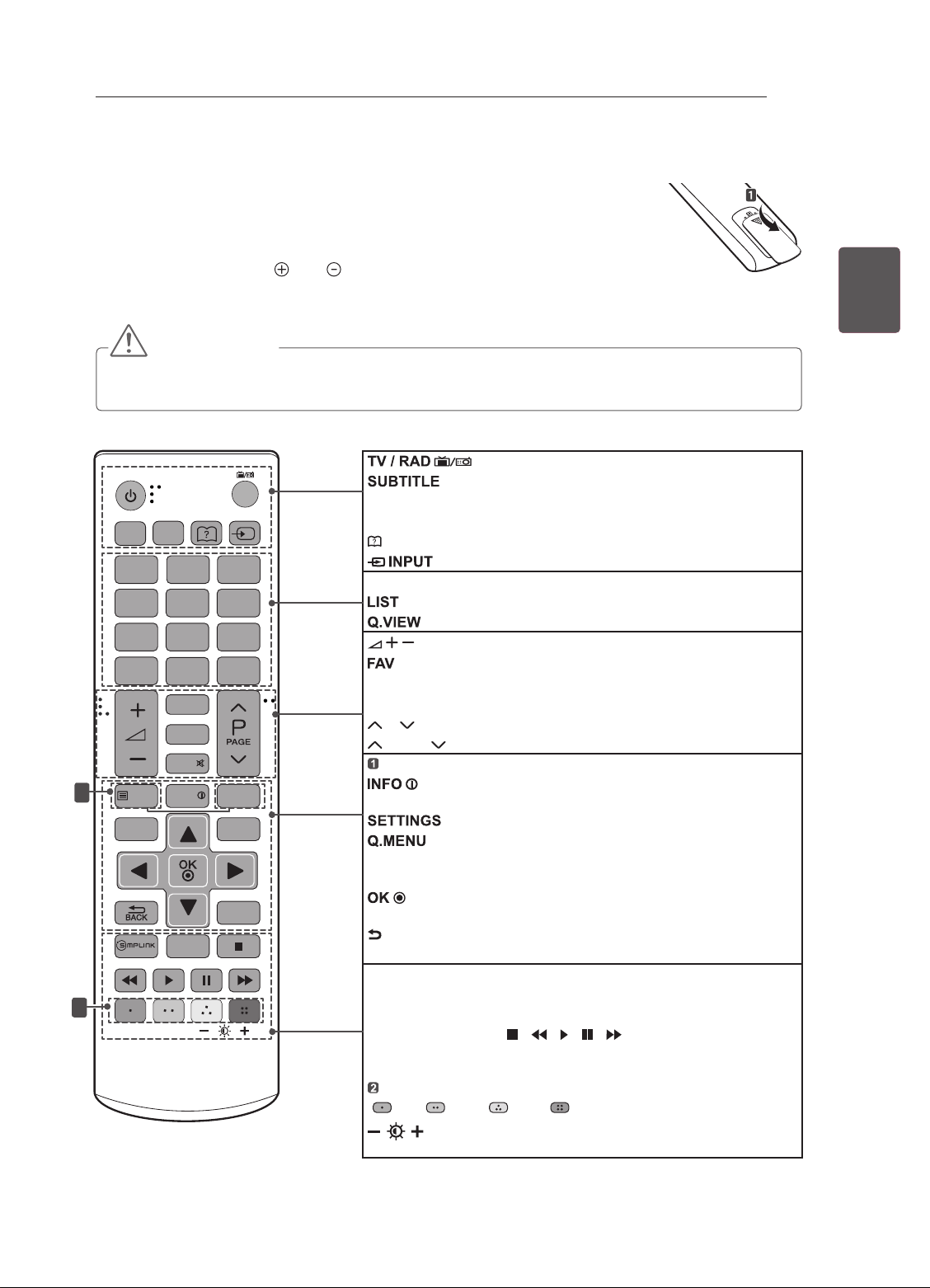
Wählt Radio-, TV- und DTV-Programme.
TV /
RAD
INPUT
SUBTITLE
1
AD/PIP
2 3
4 5 6
7 8 9
LIST
GUIDE
MUTE
1
TEXT
SETTINGS
INFO
2
0
FAV
TV/PC
Q.VIEW
T.OPT
Q.MENU
EXIT
AD/PIP
PIP: Schaltet den PIP-Modus ein oder aus.
(Benutzerhandbuch) Ruft das Benutzerhandbuch auf.
Ändert die Eingangsquelle.
Zifferntasten Zur Eingabe von Nummern.
Zum Zugriff auf die Liste der gespeicherten Programme.
Regelt die Lautstärke.
Zugriff auf die Liste der Lieblingskanäle.
GUIDE Öffnet den Programmführer.
MUTE Stellt den Ton aus.
P Navigiert durch die gespeicherten Programme oder Kanäle.
PAGE Wechselt zum vorherigen oder nächsten Bildschirm.
TELETEXT-Tasten Diese Tasten werden für Teletext verwendet.
Bildschirm.
Navigationstasten (nach oben/nach unten/nach links/nach rechts)
Navigiert durch Menüs und Einstellungen.
Wählt Menüs oder Einstellungen und speichert Ihre
Eingabe.
BACK Zurück zur vorherigen Ebene.
EXIT
SIMPLINK
über HDMI-CEC zu.
TV/PC Wählen Sie den TV- oder PC-Modus
Steuerungstasten ( ) Steuerung der Menüs
von „MEINE MEDIEN“ oder SIMPLINK-kompatibler Geräte
(USB,SIMPLINK).
Farbtasten Öffnen Sonderfunktionen in manchen Menüs.
( Rot Grün Gelb Blau)
Steuerung der Bildschirmbeleuchtung an.
Ruft den bevorzugten Untertitel im digitalen Modus auf.
AD: Schaltet die Audiobeschreibung ein oder aus. /
Kehrt zurück zum vorherigen Programm.
Anzeige von Informationen zum aktuellen Programm und
Öffnen der Hauptmenüs.
Öffnet die Schnellmenüs.
Ausblenden der Bildschirmmenüs und Zurückkehren zum TV-Bild.
Greift auf die mit HDMI-Kabel
Öffnen des SIMPLINK-Menüs.
(Beleuchtung)
Passt die Bildschirmhelligkeit durch
FERNBEDIENUNG
angeschlossenen AV-Geräte
17
DEUDEUTSCH
Page 45
NETZWERKEINRICHTUNG
18
NETZWERKEINRICHTUNG
Nur Modell LN450U (nur GB)
Ihr TV-Gerät kann von der Abbildung möglicherweise leicht abweichen.
DEUTSCH
Kabelgebundene Netzwerkverbindung
DEU
Netzwerkeinrichtung
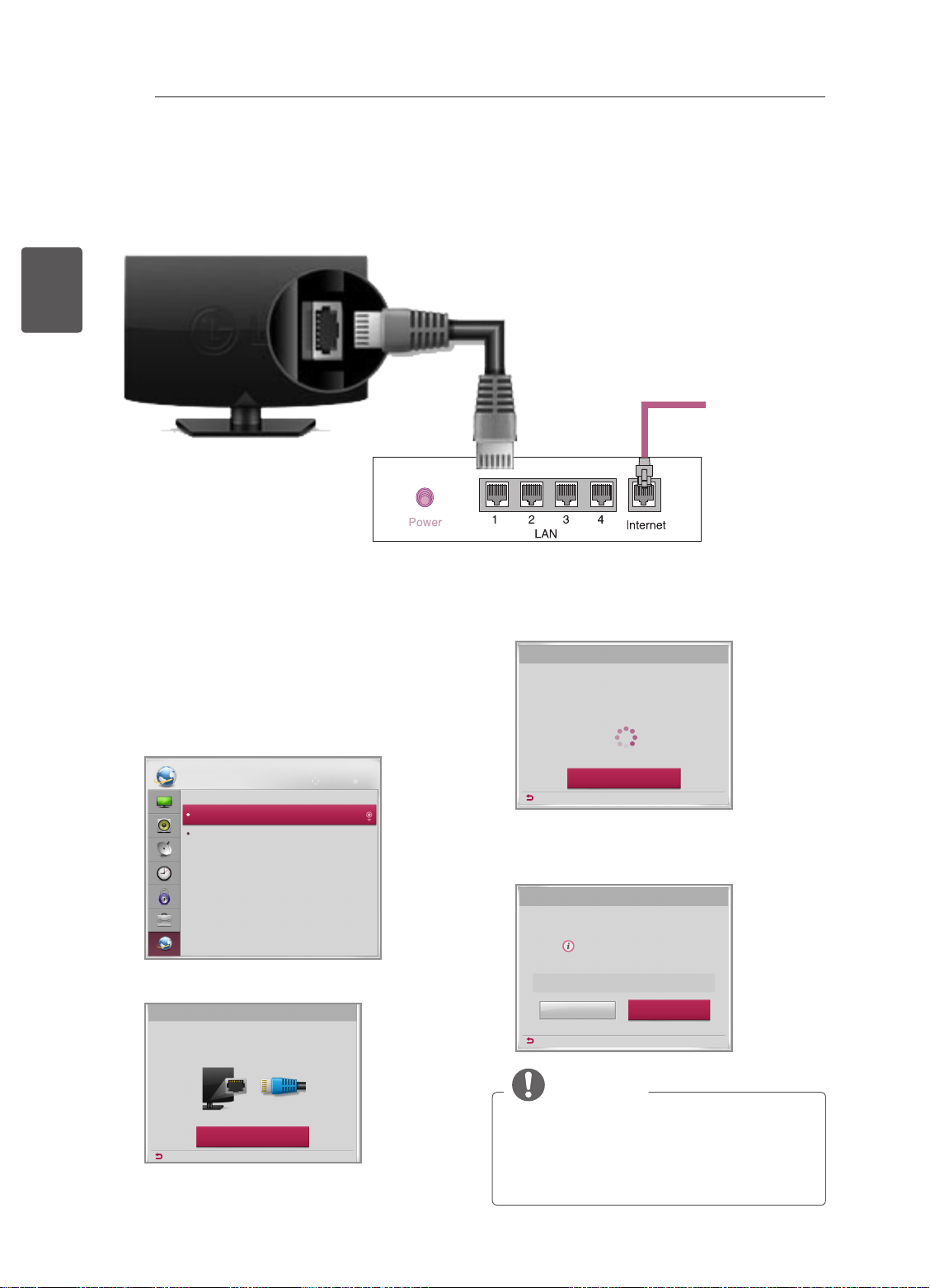
1 Drücken Sie die Taste SETTING um auf das
2 Wählen Sie das Menü NETZWERK ->
(*nicht im Lieferumfang enthalten)
Internetverbindung
Kabelgebundener Router
4 Das Gerät versucht automatisch, eine
Verbindung mit dem Netzwerk herzustellen..
Netzwerkeinrichtung
Hauptmenü zuzugreifen.
Netzwerkverbindung wird hergestellt...
Netzwerkeinrichtung.
NETZWERK
Netzwerkeinrichtung
Netzwerkstatus
Bewegen OK
3 Wählen Sie Verbindung herstellen.
Netzwerkeinrichtung
Schließen Sie ein LAN-Kabel auf der TV-Rückseite an.
Die Einstellung Ihres Netzwerkes ermöglicht Netzwerk-Features auf Ihrem
Vorherig
TV-Gerät.
Verbindung herstellen
Abbrechen
Vorherig
5 Das verbundene Netzwerk wird angezeigt.
Wählen Sie Fertig, um die Netzwerkverbindung
zu bestätigen.
Netzwerkeinrichtung
Verbindung zu kabelgebundenem
Netzwerk hergestellt.
Wählen Sie [Experteneinstellungen] aus, um detaillierte
Einstellungen vorzunehmen.
Experteneinstellungen
Vorherig
HINWEIS
Fertig
yGroßbritannien: LAN-Anschluss ist
verfügbar.(Der LAN-Anschluss wurde für HD
MHEG eingerichtet.)
yAndere Regionen: LAN-Anschluss ist nicht
verfügbar.
Page 46
DAS BENUTZERHANDBUCH VERWENDEN
DAS BENUTZERHANDBUCH VERWENDEN
Im Benutzerhandbuch erhalten Sie auf einfache Weise detaillierte Informationen zum TV-Gerät.
19
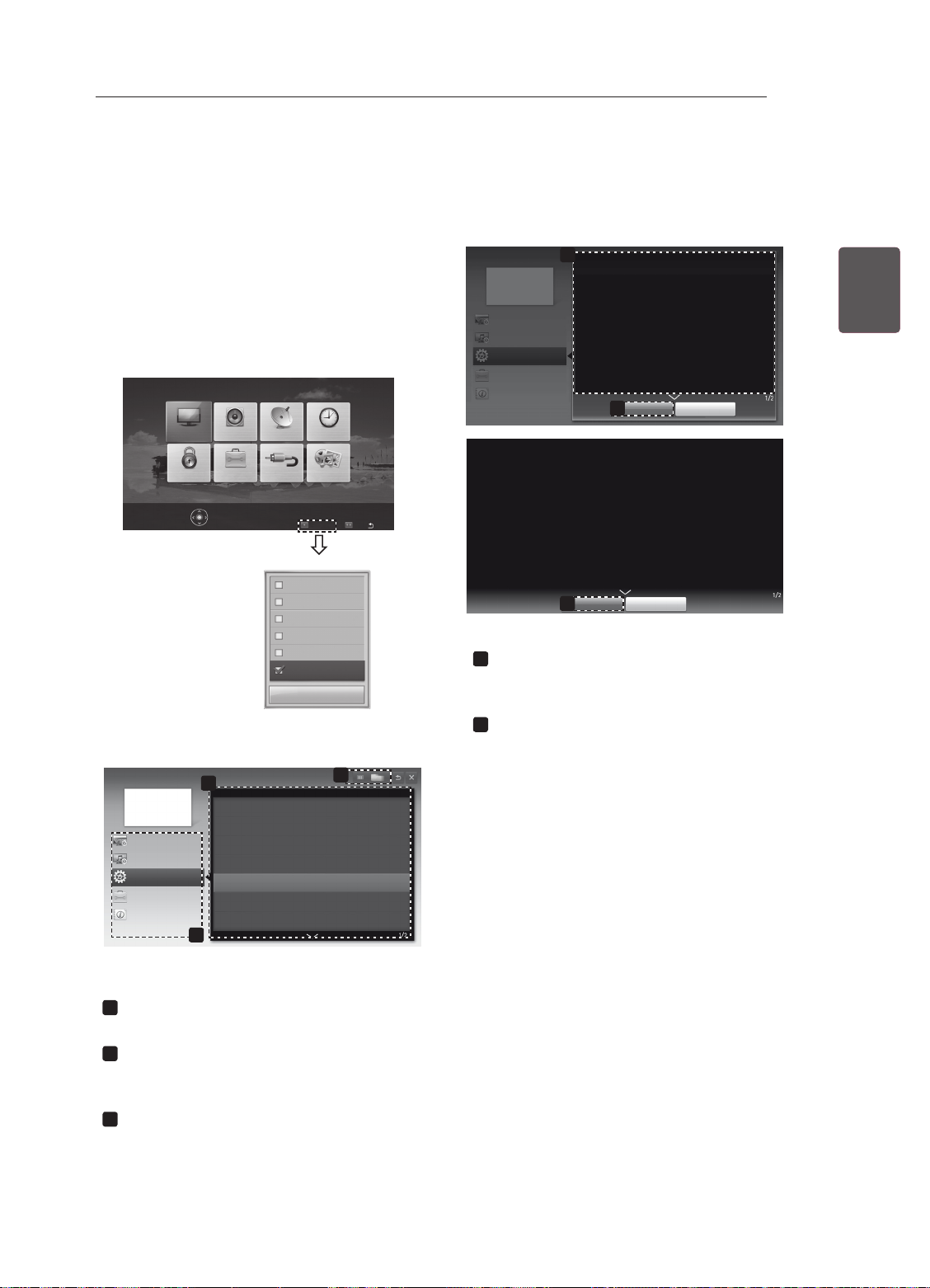
1 Öffnen Sie die Hauptmenüs mit der Taste
SETTINGS.
2 Drücken Sie die ROTE Taste, um zu den
Kundendienst-Menüs zu gelangen.
3 Drücken Sie die Navigationstasten, um zu
Benutzerhandbuch zu gelangen, und drücken
Sie OK.
BILD
AUDIO
SIGNALQUELLE
OPTIONSPERREN
Für Bildeinstellungen OK() drücken.
ZEIT
SETUP
MEINE MEDIEN
Kundendienst
Software-Aktualisierung
Bildtest
Tontest
Signaltest
Produkt-/Dienstinfo
Benutzerhandbuch
Schließen
Ausgang
FAQ
Benutzerhandbuch
Einstellung SENDER
Einstellung BILD, TON
OPTION
Erweiterte Funktion
Informationen
Zeigt die Beschreibung des ausgewählten
1
1
OPTION > So stellen Sie die Sprache ein
SETTINGS
OPTION Sprache
Sie können die Sprache des auf dem Bildschirm angezeigten
Menüs sowie die Übertragung von digitalem Ton wählen.
• Menü Sprache : Wählt eine Sprache für die Anzeige von
Text aus.
• Audiosprache [Nur im digitalen Modus] : Damit wählen Sie die
gewünschte Sprache, wenn digital übertragene Sendungen
mehrere Sprachen enthalten.
• Untertitelsprache [Nur im digitalen Modus] : Verwenden Sie die
Funktion „Untertitel“, wenn zwei oder mehr Untertitelsprachen
gesendet werden.
✎
Wenn in einer ausgewählten Sprache keine Untertiteldaten
ausgestrahlt werden, wird die Standard-Untertitelsprache.
verwendet.
Vergrößern
2
SETTINGS
Sie können die Sprache des auf dem Bildschirm angezeigten
Menüs sowie die Übertragung von digitalem Ton wählen.
• Menü Sprache : Wählt eine Sprache für die Anzeige von Text
• Audiosprache [Nur im digitalen Modus] : Damit wählen Sie die
• Untertitelsprache [Nur im digitalen Modus] : Verwenden Sie die
✎
OPTION Sprache
aus.
gewünschte Sprache, wenn digital übertragene Sendungen
mehrere Sprachen enthalten.
Funktion „Untertitel“, wenn zwei oder mehr Untertitelsprachen
gesendet werden.
Wenn in einer ausgewählten Sprache keine Untertiteldaten
ausgestrahlt werden, wird die Standard-Untertitelsprache.
Verkleinern
2
Schließen
Schließen
Menüs an.
Navigieren Sie mit ꕌ/ꕍ zwischen den Seiten.
Vergrößert oder verkleinert den Bildschirm.
2
DEUDEUTSCH
Benutzerhandbuch
Einstellung SENDER
Einstellung BILD, TON
OPTION
Erweiterte Funktion
Informationen
2
So verwenden Sie ein Eingangsgerät
Einstellen des ODC(Overdrive-Schaltkreis)_ALL
PIP (Bild im Bild) verwenden
So stellen Sie Zeitoptionen ein
So stellen Sie TV-Sperroptionen ein
So stellen Sie die Sprache ein
So stellen Sie das Land ein
1
Ihr TV-Gerät kann von der Abbildung
möglicherweise leicht abweichen.
Hier können Sie Ihre gewünschte Kategorie
1
auswählen.
Hier können Sie das gewünschte Element
2
auswählen.
Navigieren Sie mit ꕌ/ꕍ zwischen den Seiten.
Ermöglicht das Blättern durch die Beschrei-
3
bung Ihrer gewünschten Funktion aus dem
Index.
3
Page 47
WARTUNG / FEHLERBEHEBUNG
20
WARTUNG
Reinigung des TV-Gerätes
Reinigen Sie Ihr TV-Gerät regelmäßig für eine optimale Leistung und eine verlängerte Produktlebensdauer.
DEUTSCH
DEU
Bildschirm, Rahmen, Gehäuse und Standfuß
Entfernen Sie Staub oder leichte Verschmutzungen mit einem trockenen, sauberen und weichen Tuch.
Entfernen Sie größere Verschmutzungen mit einem weichen Tuch. Feuchten Sie das Tuch mit sauberem
Wasser oder einem milden Reinigungsmittel an. Wischen Sie das Gerät anschließend umgehend mit einem
trockenen Tuch trocken.
Netzkabel
VORSICHT
y Achten Sie darauf, zuvor das Gerät auszuschalten und trennen Sie das Netzkabel sowie alle anderen Kabel
vom Gerät bzw. der Steckdose.
y Wenn das TV-Gerät über einen längeren Zeitraum unbeaufsichtigt oder ungenutzt ist, ziehen Sie das Netz-
kabel aus der Steckdose und trennen Sie alle Signalzuführungen, um mögliche Schäden durch Blitzschlag
oder Spannungsspitzen zu vermeiden.
VORSICHT
y Berühren Sie nach Möglichkeit nicht den Bildschirm, da er dadurch beschädigt werden könnte.
y Die Oberfläche darf weder gedrückt, gerieben, noch mit dem Fingernagel oder einem spitzen Gegen-
stand gestoßen werden, da dies Kratzer und Bildverzerrungen verursachen kann.
y Verwenden Sie keine Chemikalien, da diese das Gerät beschädigen können.
y Sprühen Sie keine Flüssigkeit auf die Oberfläche. Wenn Wasser in das TV-Gerät eindringt, kann dies
zu Feuer, elektrischem Schlag oder Fehlfunktionen führen.
Entfernen Sie angesammelten Staub oder Schmutz regelmäßig vom Netzkabel.
FEHLERBEHEBUNG
Problem Mögliche Lösung
Das TV-Gerät reagiert
nicht auf die
Fernbedienung.
Weder Bild noch Ton wird
ausgegeben.
Das TV-Gerät schaltet
sich plötzlich ab.
Beim Anschließen an den
PC (RGB/HDMI) wird
entweder „Kein Signal“
oder „Ungültiges Format“
angezeigt.
y Prüfen Sie den Sensor der Fernbedienung, und versuchen Sie es erneut.
y Prüfen Sie, ob sich zwischen dem Produkt und der Fernbedienung ein
Hindernis befindet.
y Prüfen Sie, ob die Batterien noch geladen sind und ordnungsgemäß einges-
etzt wurden ( auf , auf ).
y Prüfen Sie, ob das Gerät eingeschaltet ist.
y Prüfen Sie, ob das Netzkabel in der Steckdose steckt.
y Prüfen Sie, ob die Steckdose ordnungsgemäß funktioniert, indem Sie andere
Geräte einstecken.
y Überprüfen Sie die Steuerungseinstellungen der Stromversorgung. Die Strom-
versorgung ist möglicherweise unterbrochen.
y Prüfen Sie, ob in den Zeiteinstellungen automatisches Abschalten aktiviert ist.
y Wenn kein Signal besteht, obwohl das TV-Gerät eingeschaltet ist, schaltet
sich das Gerät nach 15 Minuten automatisch ab.
y Schalten Sie das Fernsehgerät mit der Fernbedienung aus und dann erneut
ein.
y Schließen Sie das RGB- oder HDMI-Kabel erneut an.
y Starten Sie den PC bei eingeschaltetem Fernsehgerät erneut.
Page 48

MANUEL D'UTILISATION
Téléviseur LED
* Le téléviseur LED de LG combine un écran LCD et un rétroéclairage LED.
Veuillez lire attentivement ce manuel avant de mettre en service votre
produit et conservez-le afin de pouvoir vous y référer ultérieurement.
www.lg.com
Page 49
2
TABLE DES MATIÈRES
3 LICENCES
3 INFORMATIONS SUR LES
FRANÇAIS
FRA
3 CONFIGURATION DU
4 CONSIGNES DE SÉCURITÉ
10 PROCÉDURE D'INSTALLATION
10 ASSEMBLAGE ET PRÉPARATION
10 Déballage
12 Pièces et boutons
13 Soulever et déplacer la TV
14 Installation sur une table
15 Fixation du support mural
TABLE DES MATIÈRES
LOGICIELS LIBRES
PÉRIPHÉRIQUE DE CONTRÔLE
EXTERNE
17 TÉLÉCOMMANDE
18 DIVERTISSEMENT
18 Connexion au réseau câblé
18 Paramètre réseau
19 UTILISATION DU GUIDE DE
L'UTILISATEUR
20 ENTRETIEN
20 Nettoyage de votre TV
20 - Écran, cadre, boîtier et support
20 - Cordon d’alimentation
20 DÉPANNAGE
AVERTISSEMENT
ySi vous ignorez ces messages
d'avertissement, vous risquez d'être
gravement blessé, de provoquer un
accident ou d'entraîner la mort.
ATTENTION
ySi vous ignorez ces messages de
sécurité, vous risqueriez de vous blesser
légèrement ou d'endommager le produit.
REMARQUE
yLes remarques vous aident à comprendre
et à utiliser le produit en toute sécurité.
Veuillez lire attentivement les remarques
avant d'utiliser le produit.
Page 50
LICENCES / INFORMATIONS SUR LES LOGICIELS LIBRES / CONFIGURATION DU PÉRIPHÉRIQUE DE CONTRÔLE EXTERNE
3
LICENCES
Les licences prises en charge peuvent varier d'un modèle à l'autre. Pour plus d'informations sur les
licences, consultez le site www.lg.com.
Fabriqué sous licence de Dolby Laboratories. Le terme « Dolby » et le sigle double D
sont des marques commerciales de Dolby Laboratories.
The terms HDMI and HDMI High-Denition Multimedia Interface, and the HDMI logo
are trademarks or registered trademarks of HDMI Licensing LLC in the United States
and other countries.
À PROPOS DES VIDÉOS DIVX : DIVX® est un format de vidéo numérique créé par
DivX, LLC, liale de Rovi Corporation. Votre périphérique est ofciellement certié
par DivX (DivX Certied®), ce qui vous permet de lire des vidéos DivX. Rendez-vous
sur divx.com pour obtenir plus d'informations ainsi que des logiciels permettant de
convertir vos chiers au format DivX.
À PROPOS DE LA VIDÉO À LA DEMANDE DIVX : ce périphérique DivX Certied®
doit être enregistré pour pouvoir lire des vidéos à la demande DivX. Pour obtenir le
code d'enregistrement, accédez à la section DivX VOD (Vidéo à la demande DivX)
du menu de conguration du périphérique. Les instructions d'enregistrement sont
disponibles sur le site vod.divx.com.
FRAFRANÇAIS
« Certication DivX Certied® pour la lecture de vidéos DivX® jusqu'à 1080p en HD,
y compris le contenu Premium. »
« DivX®, DivX Certied® et leurs logos respectifs sont des marques commerciales
de Rovi Corporation ou de ses liales ; leur utilisation est régie par une licence. »
« Sous couvert d'un ou plusieurs brevets américains cités ci-dessous :
7,295,673; 7,460,668; 7,515,710; 7,519,274”
INFORMATIONS SUR LES LOGICIELS LIBRES
Pour obtenir le code source sous la licence publique générale, la licence publique générale limitée, la
licence publique Mozilla ou les autres licences libres de ce produit, rendez-vous sur http://opensource.lge.
com.
En plus du code source, tous les termes de la licence, ainsi que les exclusions de responsabilité et les
droits d'auteur, sont disponibles au téléchargement.
LG Electronics propose de vous fournir le code open source sur CD-ROM en échange des coûts couvrant
cet envoi, notamment le coût du support, des frais de port et de prise en charge, une fois la demande reçue
par LG Electronics à l'adresse suivante : [email protected]. La validité de cette offre est de trois (3)
ans à partir de la date d'achat du produit.
CONFIGURATION DU PÉRIPHÉRIQUE DE
CONTRÔLE EXTERNE
Pour obtenir plus d’informations sur la conguration du périphérique de contrôle externe, rendez-vous sur
www.lg.com.
Page 51
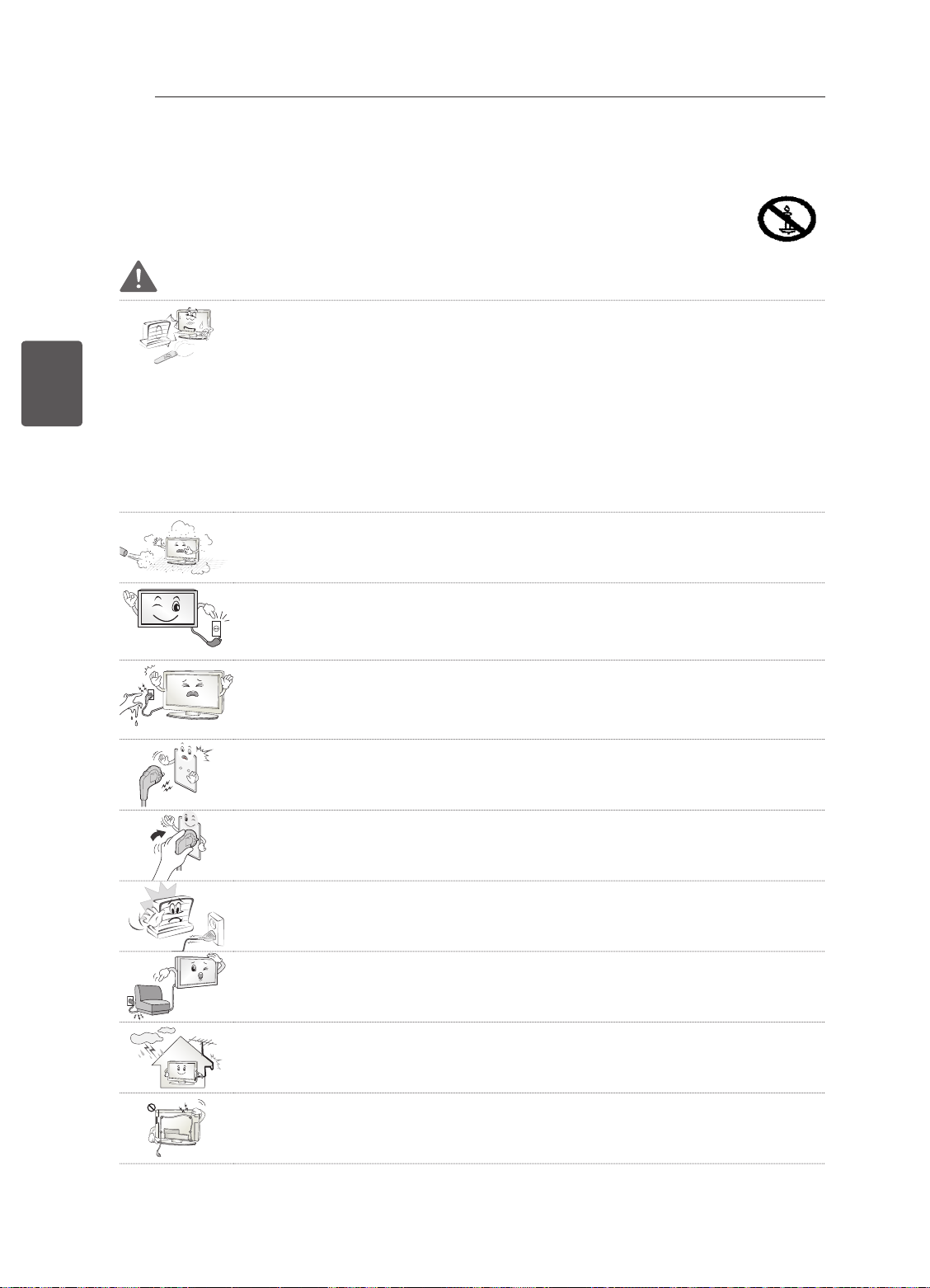
4
CONSIGNES DE SÉCURITÉ
Veuillez lire attentivement ces consignes de sécurité avant d'utiliser le produit.
FRANÇAIS
FRA
CONSIGNES DE SÉCURITÉ
AVERTISSEMENT
N'installez pas la TV et la télécommande dans les environnements suivants :
y
- Un emplacement exposé à la lumière directe du soleil ;
- Une zone fortement humide comme une salle de bain ;
- À proximité d'une source de chaleur comme une cuisinière et tout autre appareil
produisant de la chaleur ;
- À proximité d'un plan de travail de cuisine ou d'un humidificateur où elles
pourraient facilement être exposées à la vapeur ou à l'huile ;
- Une zone exposée à la pluie et au vent ;
- À proximité de conteneurs d'eau comme des vases.
Le non-respect de cette consigne peut provoquer un incendie, une électrocution,
un dysfonctionnement ou une déformation du produit.
N'installez pas le produit dans un endroit exposé à la poussière.
y
Le non-respect de cette consigne peut provoquer un incendie.
La fiche secteur est l'élément de déconnexion. La fiche doit être toujours
y
accessible.
Ne touchez pas la fiche d'alimentation avec les mains mouillées. En outre, si
y
la fiche du cordon est mouillée ou couverte de poussière, séchez ou essuyez
complètement le cordon d'alimentation.
L'humidité excessive peut provoquer des risques d'électrocution.
Veillez à raccorder le câble d'alimentation à une prise de terre. (Ne s'applique pas
y
aux appareils ne nécessitant pas une mise à la terre.)
Si ce n'est pas le cas, vous risquez d'être électrocuté ou blessé.
Fixez correctement le câble d'alimentation.
y
Si le câble d'alimentation n'est pas correctement fixé, un incendie peut se déclarer.
Assurez-vous que le cordon d'alimentation n'est pas en contact avec des objets
y
chauds comme un chauffage.
Le non-respect de cette consigne peut provoquer un incendie ou une électrocution.
Ne placez pas d'objets lourds, ou le produit lui-même, sur les câbles d'alimentation.
y
Le non-respect de cette consigne peut provoquer un incendie ou une électrocution.
Pliez le câble d'antenne entre le bâtiment intérieur et extérieur pour empêcher la
y
pluie de s'écouler à l'intérieur.
L'eau pourrait endommager le produit et provoquer une électrocution.
Lorsque vous fixez une TV au mur, veillez à ne pas l'accrocher à l'aide des câbles
y
d'alimentation ou de signal situés à l'arrière.
Cela risque de provoquer un incendie ou une électrocution.
Page 52
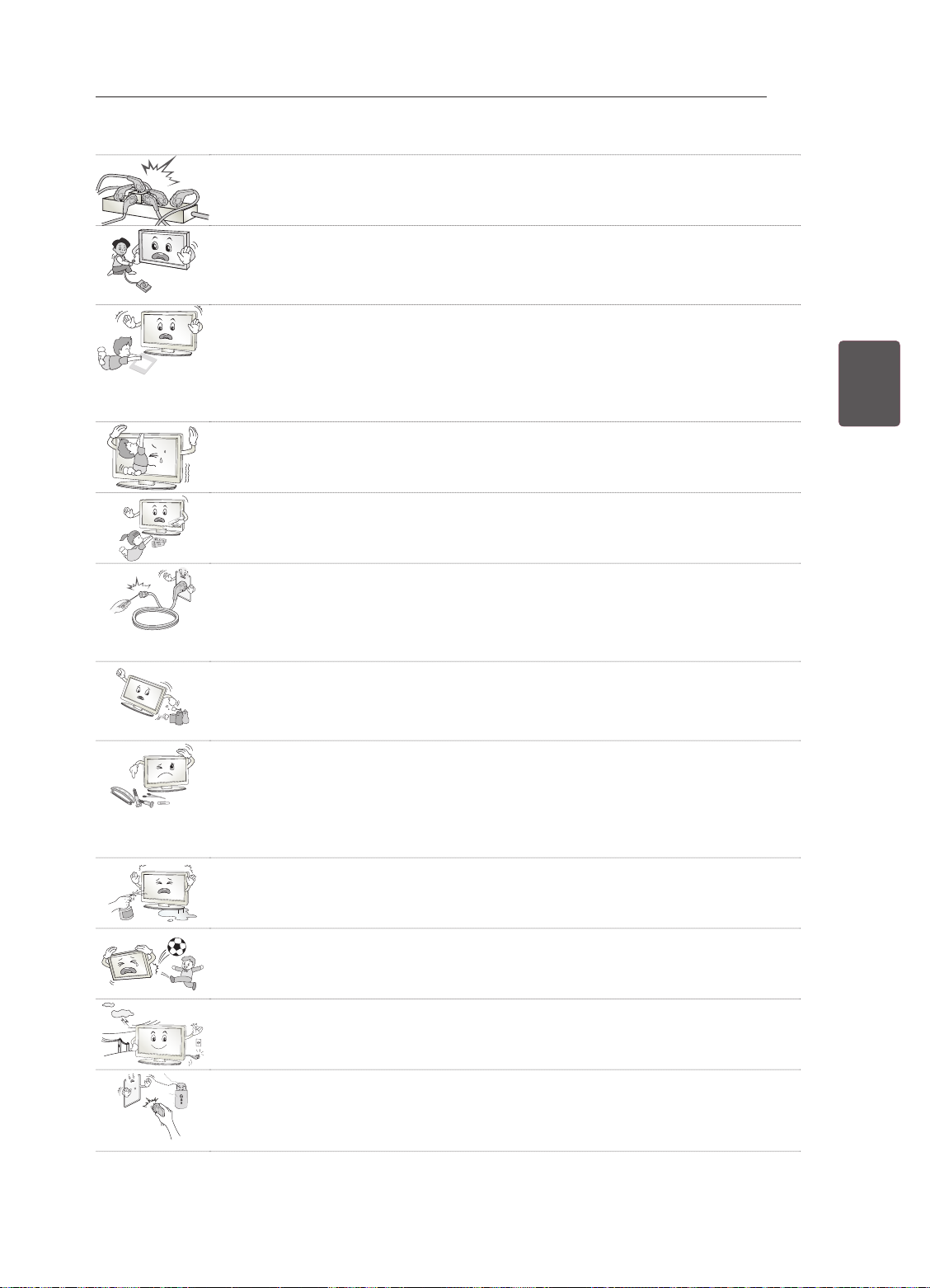
CONSIGNES DE SÉCURITÉ
Desiccant
Ne branchez pas trop d'appareils électriques sur une seule multiprise murale
y
Le non-respect de cette consigne peut provoquer un incendie résultant d'une
surchauffe.
Ne faites pas tomber le produit ou ne le laissez pas tomber lors du branchement
y
de périphériques externes.
Le non-respect de cette consigne peut entraîner des blessures ou endommager le
produit.
Conservez le matériau d'emballage anti-moisissure ou l'emballage en vinyle hors
y
de portée des enfants.
Le matériau anti-moisissure est dangereux en cas d'ingestion. En cas d'ingestion
par mégarde, faites vomir la personne et rendez-vous à l'hôpital le plus proche.
En outre, l'emballage en vinyle peut entraîner une asphyxie. Conservez-le hors de
portée des enfants.
Ne laissez pas les enfants grimper sur la TV ou s'agripper dessus.
y
Dans le cas contraire, la TV risque de tomber, ce qui peut entraîner des blessures
graves.
Respectez les règles de sécurité lors de la mise au rebut des batteries pour éviter
y
qu'un enfant ne les avale.
En cas d'ingestion, consultez immédiatement un médecin.
5
FRAFRANÇAIS
N'insérez pas de conducteur (comme une baguette métallique) dans l'une des
y
extrémités du câble d'alimentation si l'autre extrémité est reliée au terminal
d'entrée mural. En outre, ne touchez pas le câble d'alimentation juste après le
raccordement au terminal d'entrée mural.
Vous pourriez vous électrocuter. (selon le modèle)
Veillez à ne pas placer ou conserver des substances inflammables à proximité du
y
produit.
Une manipulation imprudente des substances inflammables présente un risque
d'explosion ou d'incendie.
Ne laissez pas tomber d'objets métalliques (pièces de monnaie, épingles à
y
cheveux, baguettes métalliques ou fils) ou d'objets inflammables (papier et
allumettes) dans le produit. Surveillez particulièrement les enfants.
Cela pourrait provoquer une électrocution, un incendie ou des blessures. Si un
corps étranger tombe dans le produit, débranchez le câble d'alimentation et
contactez le centre de services.
Ne vaporisez pas d'eau sur le produit ou ne le frottez pas avec une substance
y
inflammable (diluant ou benzène). Vous risqueriez de provoquer une électrocution
ou un incendie.
Évitez tout impact d'objets avec l'appareil ou toute chute d'objets sur l'appareil, et
y
ne laissez rien tomber sur l'écran.
Vous risqueriez de vous blesser ou d'endommager le produit.
Ne touchez jamais ce produit ou l'antenne en cas de tonnerre ou d'orage.
y
Vous pourriez vous électrocuter.
Ne touchez jamais la prise murale lors d'une fuite de gaz ; ouvrez les fenêtres et
y
aérez la pièce.
Le non-respect de cette consigne peut provoquer un incendie ou des brûlures
dues aux étincelles.
Page 53
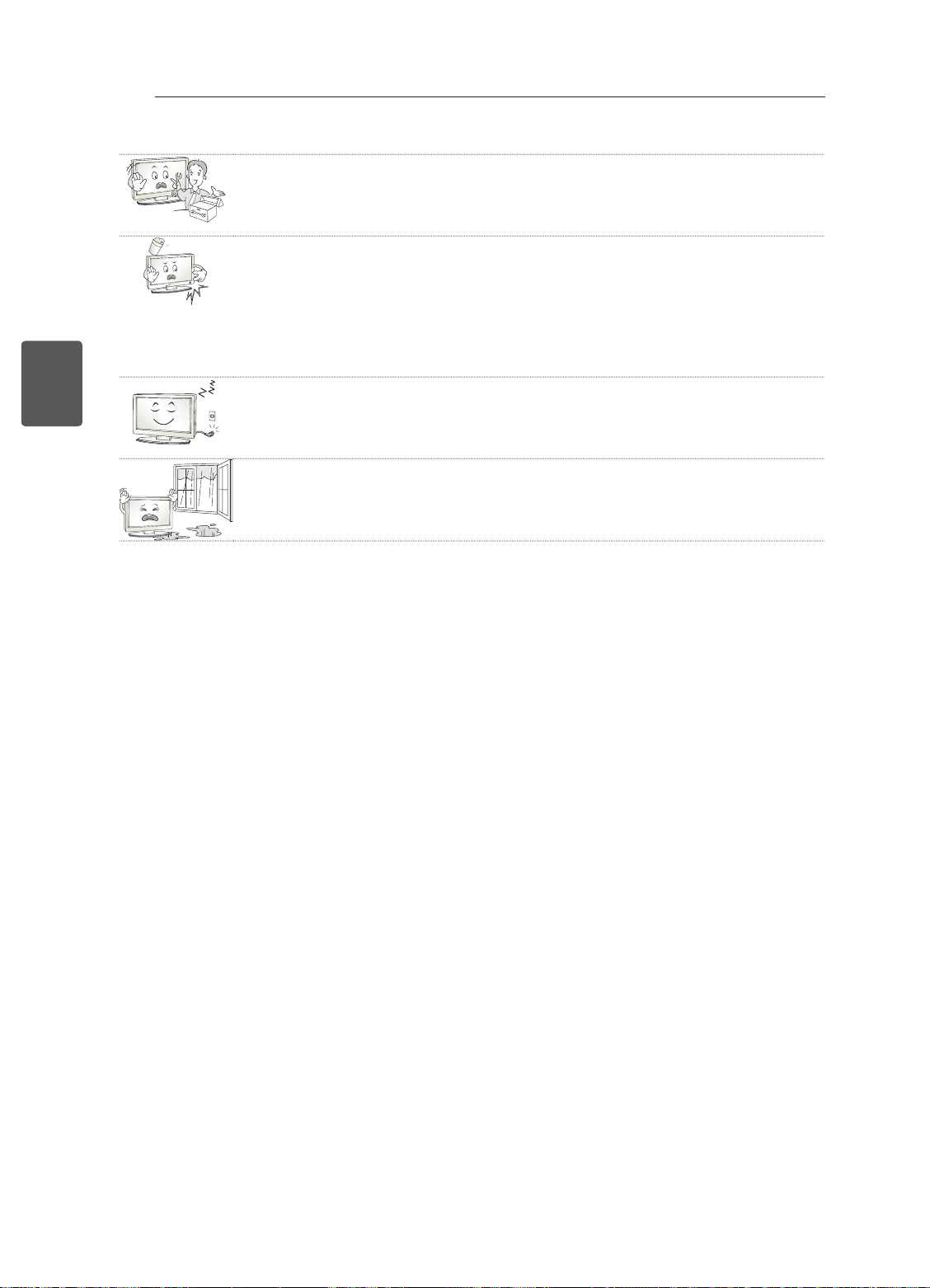
6
FRANÇAIS
FRA
CONSIGNES DE SÉCURITÉ
Ne démontez pas le produit, ne le réparez pas et n'y apportez aucune modification.
y
Vous risqueriez de provoquer une électrocution ou un incendie.
Contactez le centre de services pour les vérifications, les calibrages et les
réparations.
Si vous êtes confronté à l'une des situations suivantes, débranchez immédiatement
y
le produit et contactez votre centre de services local.
- Le produit a reçu un choc
- Le produit a été endommagé
- Des corps étrangers sont entrés dans le produit
- Le produit dégage de la fumée ou une odeur étrange
Le non-respect de cette consigne peut provoquer un incendie ou une électrocution.
Si vous n'utilisez pas le produit pendant une période prolongée, débranchez le
y
câble d'alimentation du produit.
Une couche de poussière peut provoquer un incendie ; une détérioration de
l'isolation peut provoquer une fuite électrique, une électrocution ou un incendie.
N'exposez pas l'appareil à la pluie ni aux éclaboussures. Ne placez pas d'objets
y
contenant du liquide (tels qu'un vase) sur le produit.
Page 54
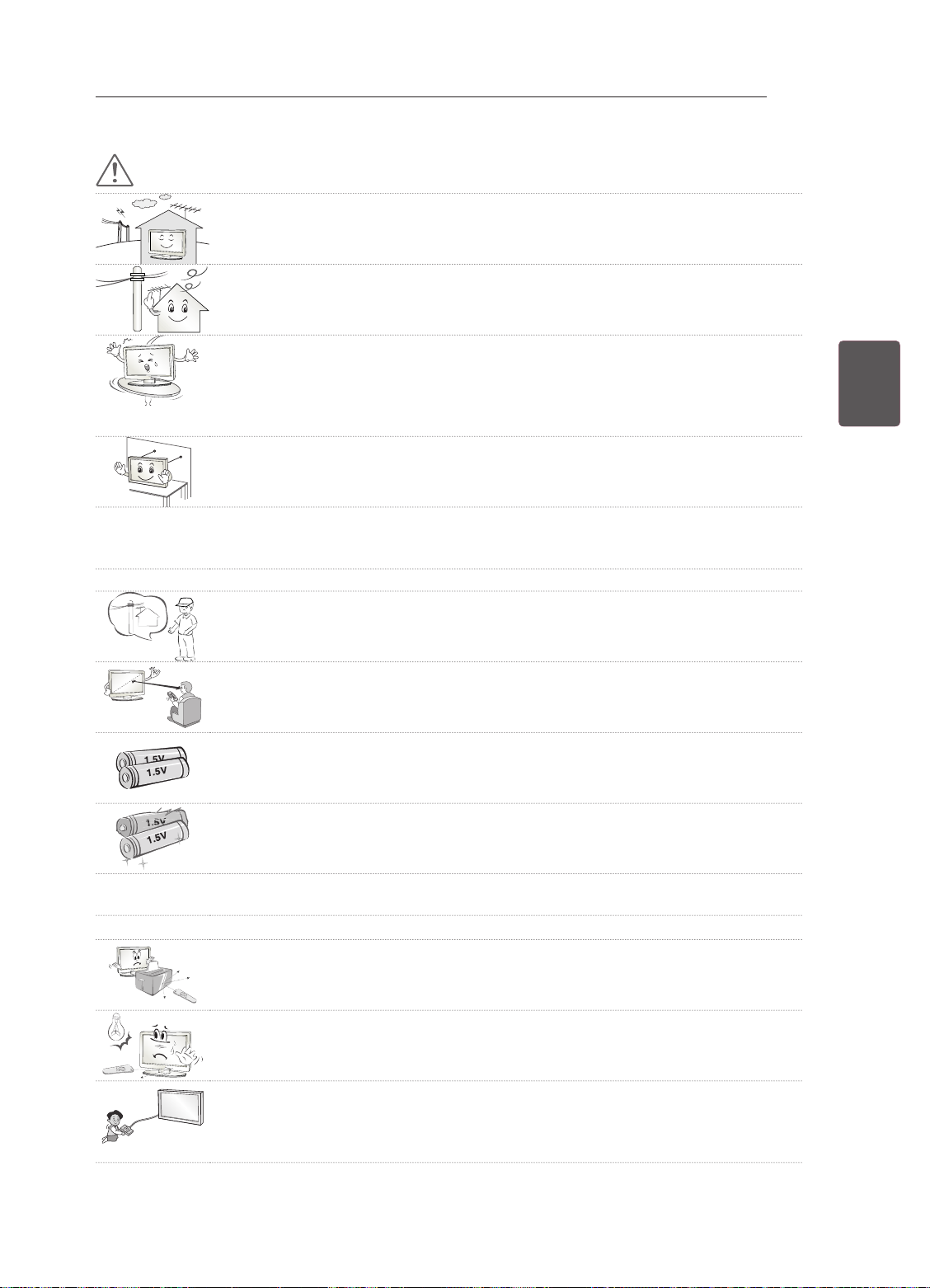
CONSIGNES DE SÉCURITÉ
ATTENTION
Installez le produit à l'écart des ondes radio.
y
La distance entre une antenne extérieure et les lignes d'alimentation doit être
y
suffisante pour éviter tout contact physique en cas de chute de l'antenne.
Le non-respect de cette consigne peut provoquer une électrocution.
N'installez pas le produit sur des étagères instables ou des surfaces inclinées.
y
Évitez également les endroits soumis à des vibrations ou ne permettant pas de
supporter correctement le produit.
Dans le cas contraire, le produit risque de tomber ou de se retourner, ce qui peut
provoquer des blessures ou endommager le produit.
Si vous installez la TV sur un support, veillez à empêcher le produit de se
y
renverser. Dans le cas contraire, le produit risque de tomber, ce qui peut entraîner
des blessures.
Si vous essayez de monter le produit sur un mur, fixez une interface de montage VESA standard
y
(pièces en option) à l'arrière du produit. Lorsque vous installez le poste à l'aide d'un support mural
(pièces en option), fixez-le solidement pour éviter qu'il ne tombe.
Utilisez uniquement des éléments de fixation/accessoires agréés par le fabricant.
y
Lors de l'installation de l'antenne, consultez un agent de maintenance qualifié.
y
Le non-respect de cette consigne peut provoquer un incendie ou une électrocution.
7
FRAFRANÇAIS
Nous vous recommandons de garder une distance comprise entre 2 à 7 fois la
y
diagonale de l'écran lorsque vous regardez la TV.
Regarder la TV de façon prolongée peut provoquer des troubles de la vue.
Utilisez uniquement le type de piles spécifié.
y
Le non-respect de cette consigne peut endommager la télécommande.
N'utilisez pas simultanément de nouvelles piles et des piles usagées.
y
Ceci pourrait provoquer la surchauffe des piles et une fuite de liquide.
N’exposez pas les piles à une température excessive (directement sous les rayons du soleil, près d’une
y
cheminée ouverte ou d’un radiateur, par exemple).
N’utilisez PAS des piles non-rechargeables dans le chargeur de l’appareil.
y
Assurez-vous qu'aucun objet n'est placé entre la télécommande et son capteur.
y
La lumière du soleil ou un éclairage puissant peut perturber le signal de la
y
télécommande. Le cas échéant, assombrissez la pièce.
Lorsque vous branchez des périphériques externes comme des consoles de jeu
y
vidéo, veillez à ce que les câbles de raccordement soient assez longs.
Dans le cas contraire, le produit risque de tomber, ce qui peut provoquer des
blessures ou endommager le produit.
Page 55
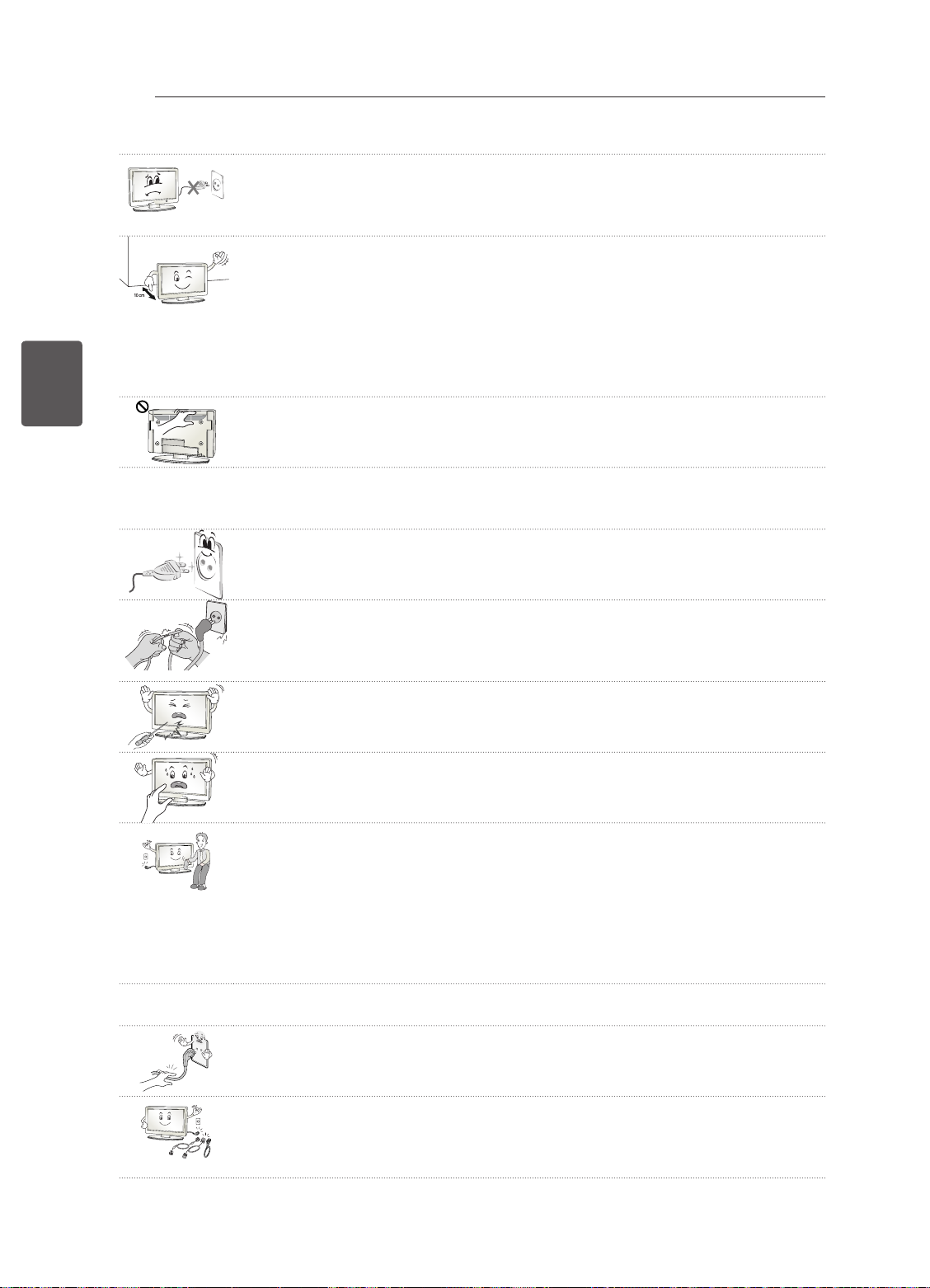
8
FRANÇAIS
FRA
CONSIGNES DE SÉCURITÉ
Ne mettez pas le produit sous/hors tension en branchant et en débranchant le
y
cordon d'alimentation de la prise. (N'utilisez pas le cordon d'alimentation en tant
qu'interrupteur.)
Vous risqueriez de provoquer une panne mécanique ou une électrocution.
Veuillez suivre les instructions d'installation ci-après pour empêcher une surchauffe
y
du produit.
- La distance entre le produit et le mur doit être d'au moins 10 cm.
- N'installez pas le produit dans un endroit non aéré (par ex., dans une
bibliothèque ou dans un placard).
- N'installez pas le produit sur un tapis ou un coussin.
- Assurez-vous que l'aération n'est pas obstruée par une nappe ou un rideau.
Le non-respect de cette consigne peut entraîner un incendie.
Évitez de toucher les ouvertures de ventilation lors de l'utilisation prolongée
y
du téléviseur car elles peuvent surchauffer. Ceci n'affecte en aucun cas le
fonctionnement ou la performance du produit.
Examinez régulièrement le cordon de votre appareil et si vous détectez des signes
y
d'endommagement ou de détérioration, débranchez-le. Cessez alors d'utiliser l'appareil et demandez
à un prestataire de services autorisé de remplacer le cordon par une pièce identique.
Évitez de laisser la poussière s'accumuler sur les tiges de la fiche d'alimentation
y
ou de la prise électrique.
Le non-respect de cette consigne peut provoquer un incendie.
Protégez le cordon d'alimentation contre les mauvais traitements physiques ou
y
mécaniques, la torsion, la pliure, le pincement, et évitez qu'il ne puisse être pris
dans une porte ou que l'on puisse marcher dessus. Vérifiez soigneusement les
fiches, les prises murales et les points de sortie du cordon de l'appareil.
N'appuyez pas avec force sur l'écran avec la main ou avec un objet pointu, tel
y
qu'un clou, un crayon ou un stylo afin d'éviter de le rayer.
Évitez de toucher l'écran ou de maintenir les doigts dessus de manière prolongée.
y
Cela peut en effet provoquer des déformations provisoires de l'image.
Lors du nettoyage du produit et de ses composants, débranchez le cordon
y
d'alimentation et essuyez-les à l'aide d'un chiffon doux. Une pression excessive
peut provoquer des rayures ou une décoloration. Ne vaporisez pas d'eau et
n'utilisez pas de chiffon mouillé. N'utilisez jamais de produit à vitre, de produit
lustrant pour voiture ou industriel, d'abrasifs ou de cire, de benzène, d'alcool, etc.,
qui risqueraient d'endommager le produit et son écran.
Le non-respect de cette consigne peut provoquer un incendie ou une électrocution,
ou endommager le produit (déformation, corrosion ou cassure).
Tant que l'unité est connectée à la prise murale de secteur, elle n'est pas déconnectée de la source
y
d'alimentation secteur, même si vous avez éteint l'unité à l'aide de l'INTERRUPTEUR.
Pour débrancher le câble, tenez-le par la fiche.
y
Si les fils dans le câble d'alimentation sont déconnectés, cela peut provoquer un
incendie.
Veillez à mettre le produit hors tension lorsque vous le déplacez. Puis, débranchez
y
les câbles d'alimentation, les câbles d'antenne et tous les câbles de raccordement.
La TV ou le cordon d'alimentation peuvent être endommagés, ce qui peut
provoquer un incendie ou une électrocution.
Page 56
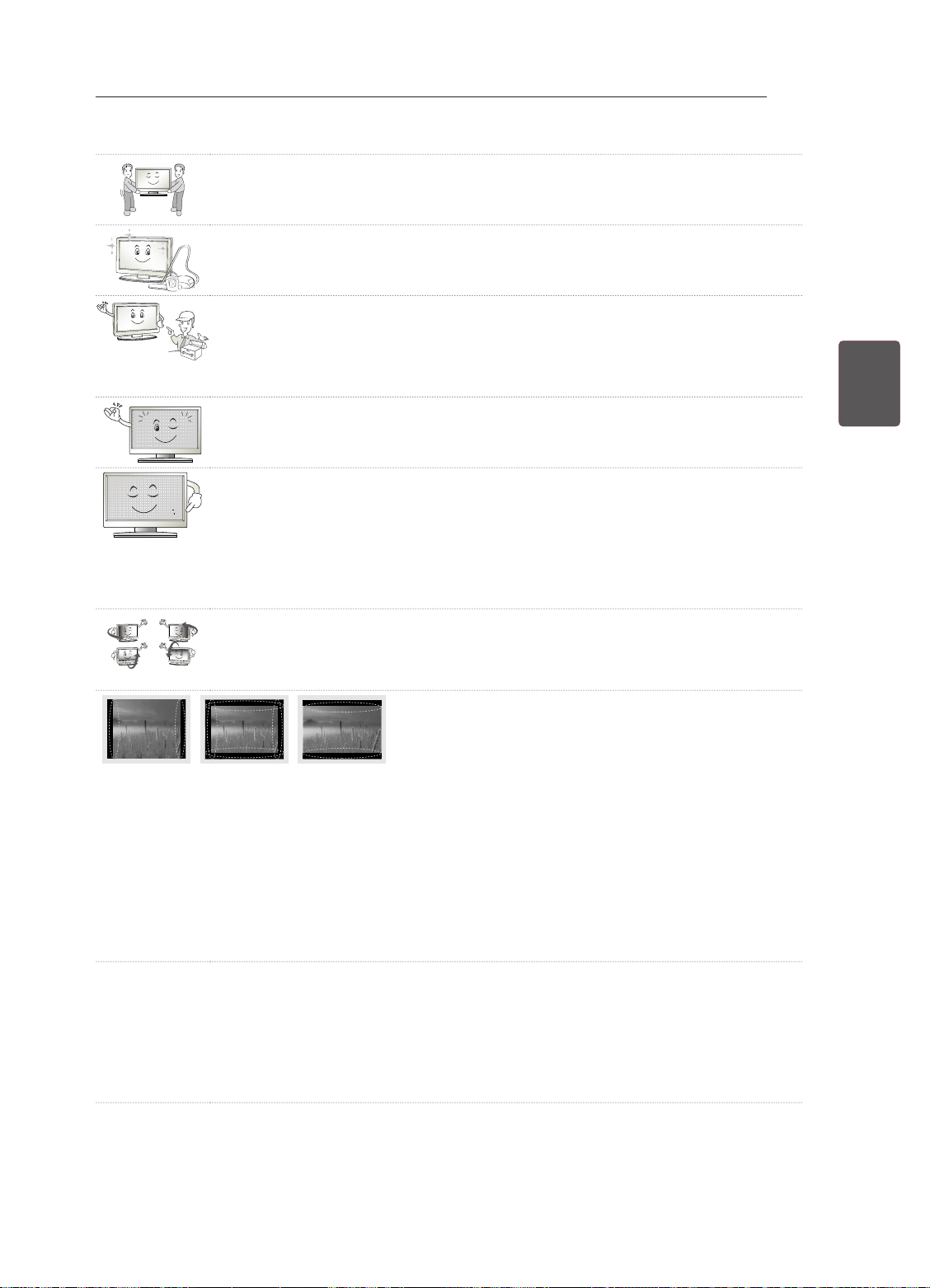
CONSIGNES DE SÉCURITÉ
Vous devez être deux pour déplacer ou déballer le produit car ce dernier est lourd.
y
Le non-respect de cette consigne peut entraîner des blessures.
Contactez le centre de services une fois par an pour nettoyer les composants
y
internes du produit.
Une accumulation de poussière peut provoquer des pannes mécaniques.
Confiez l'ensemble des réparations à du personnel qualifié. Confiez les
y
réparations à du personnel qualifié dans les cas suivants : si la fiche ou le cordon
d'alimentation secteur est endommagé, si un liquide a été renversé sur l'appareil
ou si des objets sont tombés sur l'appareil, si l'appareil a été exposé à la pluie ou à
l'humidité, si l'appareil ne fonctionne pas normalement ou s'il est tombé.
Si le produit est froid au toucher, il pourra se produire un petit « scintillement » à sa
y
mise en marche. Ce phénomène est normal et le produit n'est pas en cause.
L'écran haute technologie se caractérise par une résolution de deux millions à
y
six millions de pixels. Il est possible que de minuscules points noirs et/ou des
points lumineux (rouge, bleu ou vert) de la taille d'un ppm s'affiche à l'écran. Cela
n'indique pas un dysfonctionnement et n'affecte pas les performances et la fiabilité
du produit.
Ce phénomène survient également sur les produits tiers ; aucun échange ou
remboursement n'est possible.
Suivant votre position de visionnage (gauche/droite/haut/bas), la luminosité et la
y
couleur de l'écran peuvent varier.
Ce phénomène résulte des caractéristiques de l'écran. Il n'a aucun rapport avec
les performances du produit et n'indique pas un dysfonctionnement.
9
FRAFRANÇAIS
L'affichage d'une image fixe (logo d'un canal de diffusion, menu à l'écran, scène d'un jeu vidéo,
y
etc.) pendant une durée prolongée peut endommager l'écran et provoquer une image rémanente ;
ce phénomène s'appelle une brûlure d'écran. La garantie ne couvre pas le produit pour une brûlure
d'écran.
Évitez d'afficher une image fixe de façon prolongée sur l'écran de votre téléviseur (pas plus de
2 heures sur un écran LCD et pas plus d'une heure sur un écran plasma).
Si vous regardez votre TV de façon prolongée au format 4:3, une brûlure d'écran peut apparaître sur
le contour de l'écran.
Ce phénomène survient également sur les produits tiers ; aucun échange ou remboursement n'est
possible.
Sons générés
y
Bruit de craquement : un bruit de craquement, lorsque vous regardez ou éteignez la TV, est généré
par une contraction thermique plastique liée à la température et à l'humidité. Ce bruit est usuel sur
les produits nécessitant une déformation thermique. Bourdonnement du circuit électrique/de l'écran :
bruit faible généré par un circuit de commutation haute vitesse qui permet le fonctionnement du
produit en fournissant la majeure partie de l'alimentation. Il varie en fonction du produit.
Ce son généré n'affecte ni les performances ni la fiabilité du produit.
Page 57
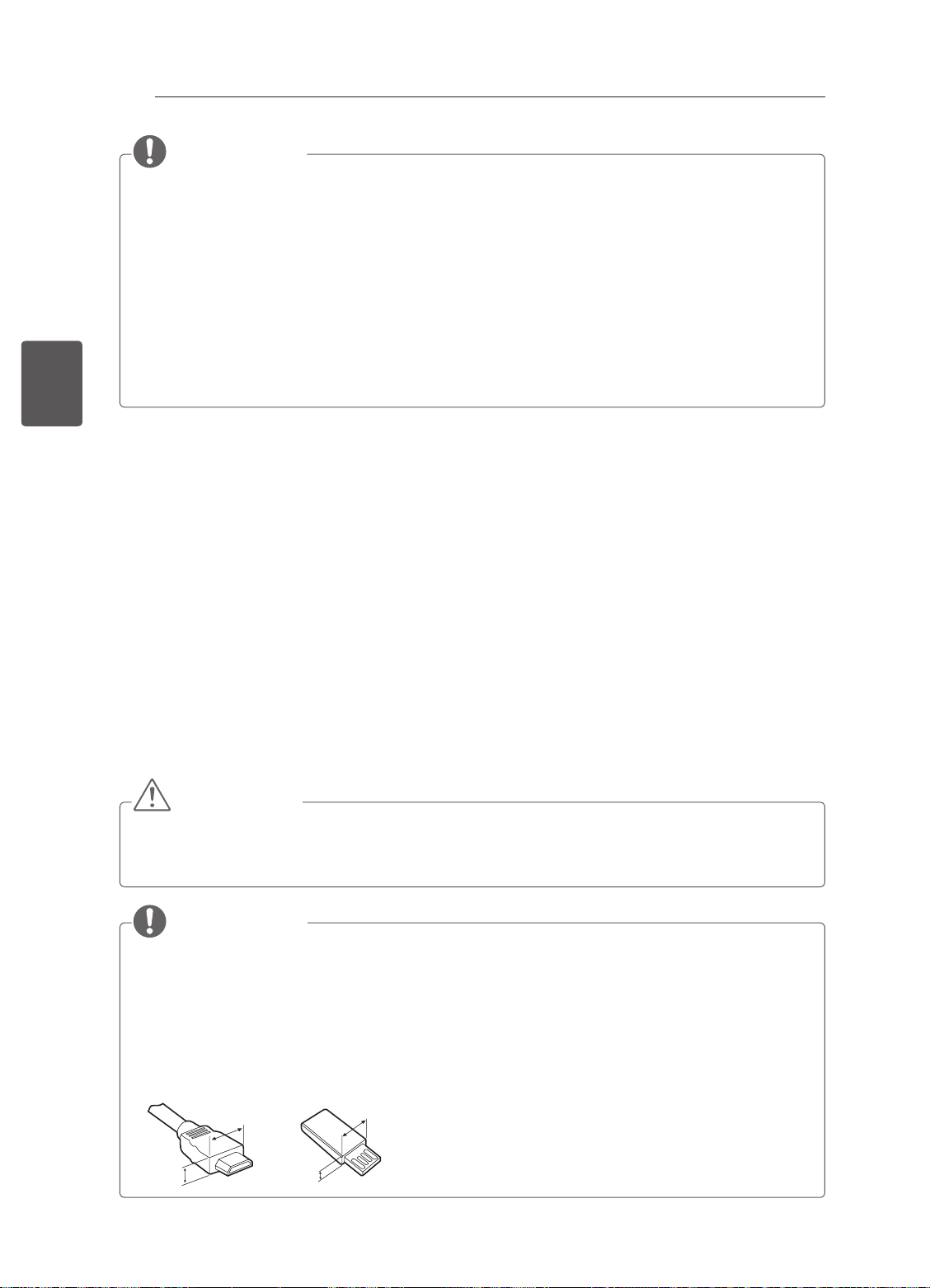
10
<
<
FRANÇAIS
FRA
PROCÉDURE D'INSTALLATION
1 Ouvrez la boîte et assurez-vous d'avoir tous les accessoires.
2 Fixez le support au moniteur.
3 Connectez un périphérique externe au moniteur.
4 Assurez-vous que la connexion réseau est disponible.
PROCÉDURE D'INSTALLATION / ASSEMBLAGE ET PRÉPARATION
REMARQUE
yL’image ci-dessous peut être différente de celle affichée sur votre téléviseur.
yL'affichage à l'écran de votre TV peut différer légèrement de celui qui est présenté dans ce manuel.
yLes menus et options disponibles peuvent être différents selon la source d'entrée ou le modèle de
produit utilisé.
yDe nouvelles fonctionnalités pourront être ajoutées ultérieurement à ce téléviseur.
yLa TV peut être mise en mode veille pour réduire la consommation d'électricité. Pour réduire la
consommation d'énergie, la TV doit être éteinte si personne ne la regarde pendant un certain temps.
yLa consommation d'énergie pendant l'utilisation peut être limitée de façon significative en réduisant
la luminosité de l'image. Cela aura pour effet de réduire le coût global de fonctionnement.
yL’appareil doit être raccordé à une prise électrique située à proximité et facilement accessible. Sur
certains appareils ne disposant pas de bouton marche/arrêt, la mise hors tension de l’appareil
s’effectue en débranchant le cordon d’alimentation.
Vous pouvez utiliser les fonctions réseau de la TV uniquement lorsque la connexion réseau est établie.
(selon le modèle)
ASSEMBLAGE ET PRÉPARATION
Déballage
Vériez que la boîte de votre moniteur contient les éléments suivants. S'il manque des accessoires,
contactez le revendeur auprès duquel vous avez acheté votre produit. L'aspect réel des produits et articles
présentés dans ce manuel peut différer des illustrations.
ATTENTION
yAfin d'optimiser la sécurité et la durée de vie du produit, n'utilisez pas d'éléments non agréés.
yLa garantie ne couvre pas les dommages ou les blessures dus à l'utilisation d'éléments non agréés.
yCertains modèles ont un film plastic fin collé sur l’écran. Il ne doit pas être enlevé.
REMARQUE
yLes éléments fournis avec votre produit diffèrent en fonction du modèle choisi.
yLes caractéristiques des produits ou le contenu de ce manuel peuvent être modifiés sans préavis en
cas de mise à jour des fonctions.
yPour une connexion optimale, les câbles HDMI et les périphériques USB doivent comporter des
connecteurs d'une épaisseur inférieure à 10 mm et d'une largeur inférieure à 18 mm. Utilisez une
rallonge prenant en charge USB 2.0 si le câble USB ou la clé USB ne s'adapte pas au port USB de
la TV.
B
A
B
*A
10 mm
=
*B
18 mm
A
=
Page 58
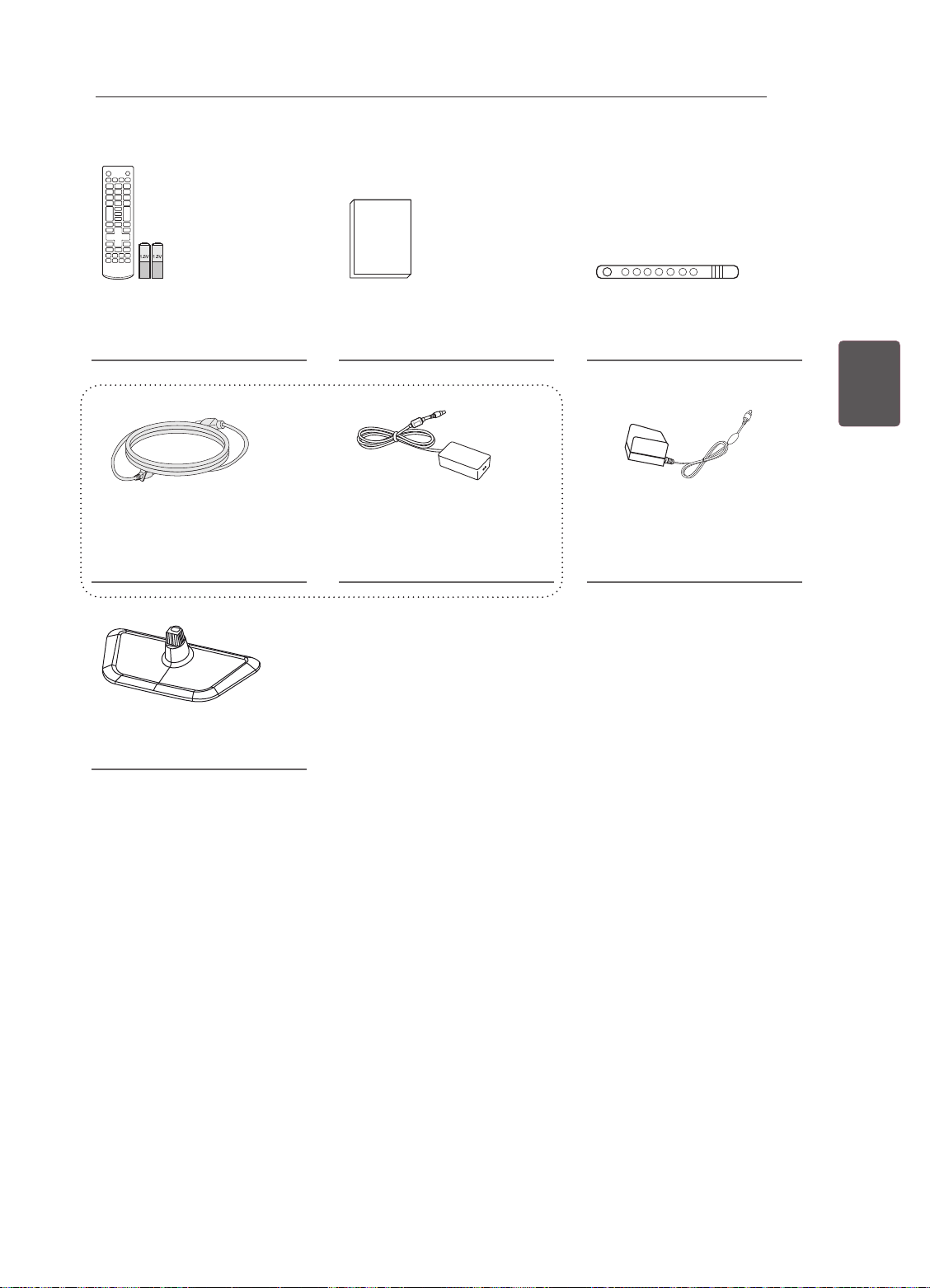
ASSEMBLAGE ET PRÉPARATION
11
Télécommande et piles
(AAA)
(voir p. 17)
Cordon d’alimentation
(Selon le modèle et le pays)
(voir p. B-4)
Base du support
(voir p. A-3)
Manuel d’utilisation Support de câble
(voir p. A-4)
ou
Adaptateur ca/cc
(voir p. B-4)
Adaptateur ca/cc
(selon le modèle)
(voir p. B-4)
FRAFRANÇAIS
Page 59
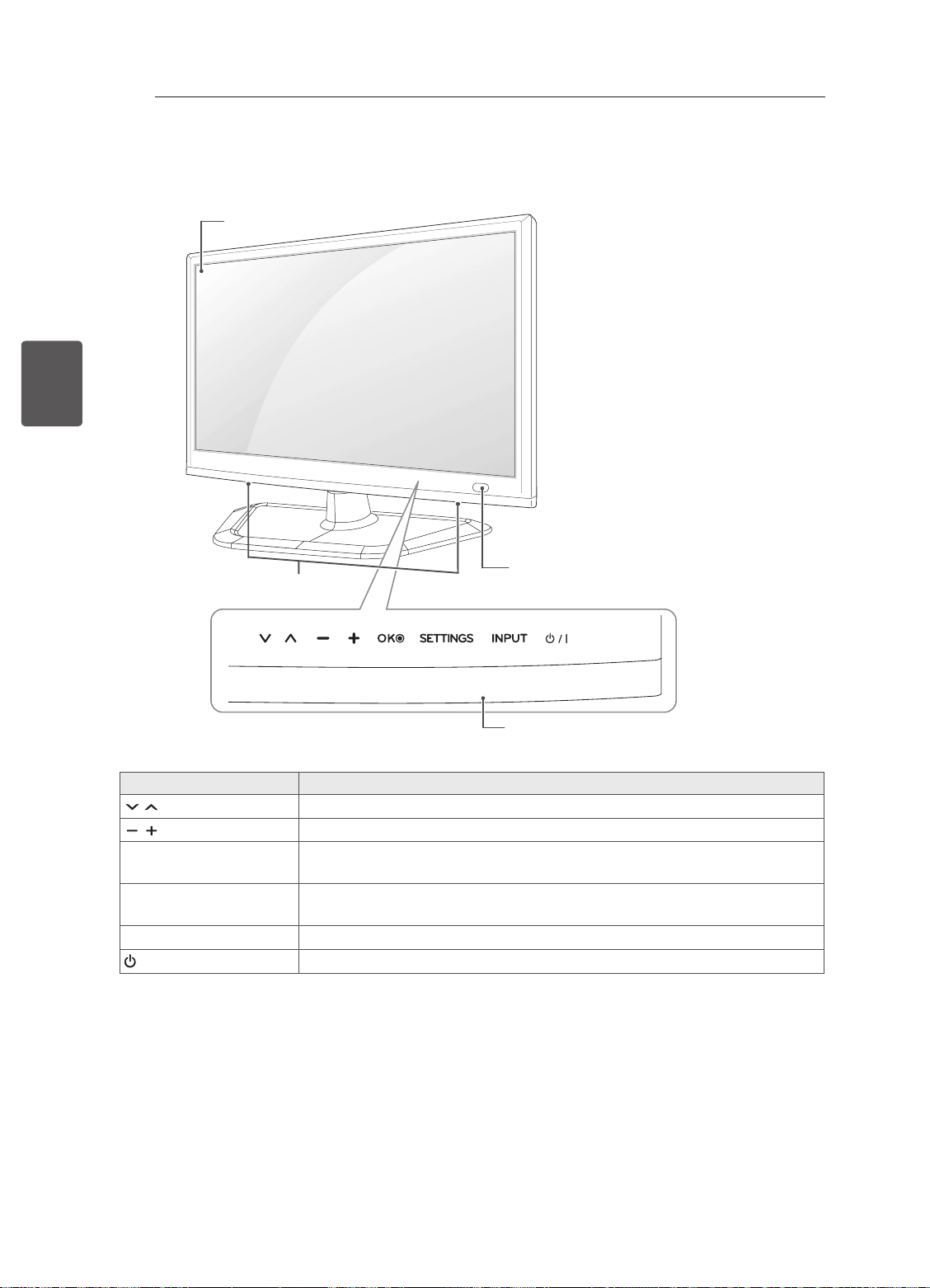
12
Pièces et boutons
FRANÇAIS
FRA
ASSEMBLAGE ET PRÉPARATION
écrans
Haut-parleurs
Boutons tactiles
Permet de parcourir les chaînes enregistrées.
Permet de régler le niveau du volume.
ꔉ
OK
SETTINGS Permet d’accéder au menu principal ou bien d’enregistrer votre entrée et de
INPUT
/ I
1 Toutes les touches sont tactiles. Il suffit d’appuyer du bout du doigt pour les sélectionner.
Permet de sélectionner l’option du menu en surbrillance ou de confirmer une
entrée.
quitter les menus.
Permet de changer la source d’entrée.
Permet de mettre le moniteur sous/hors tension.
Capteur de la télécommande
Boutons tactiles
Description
1
Page 60
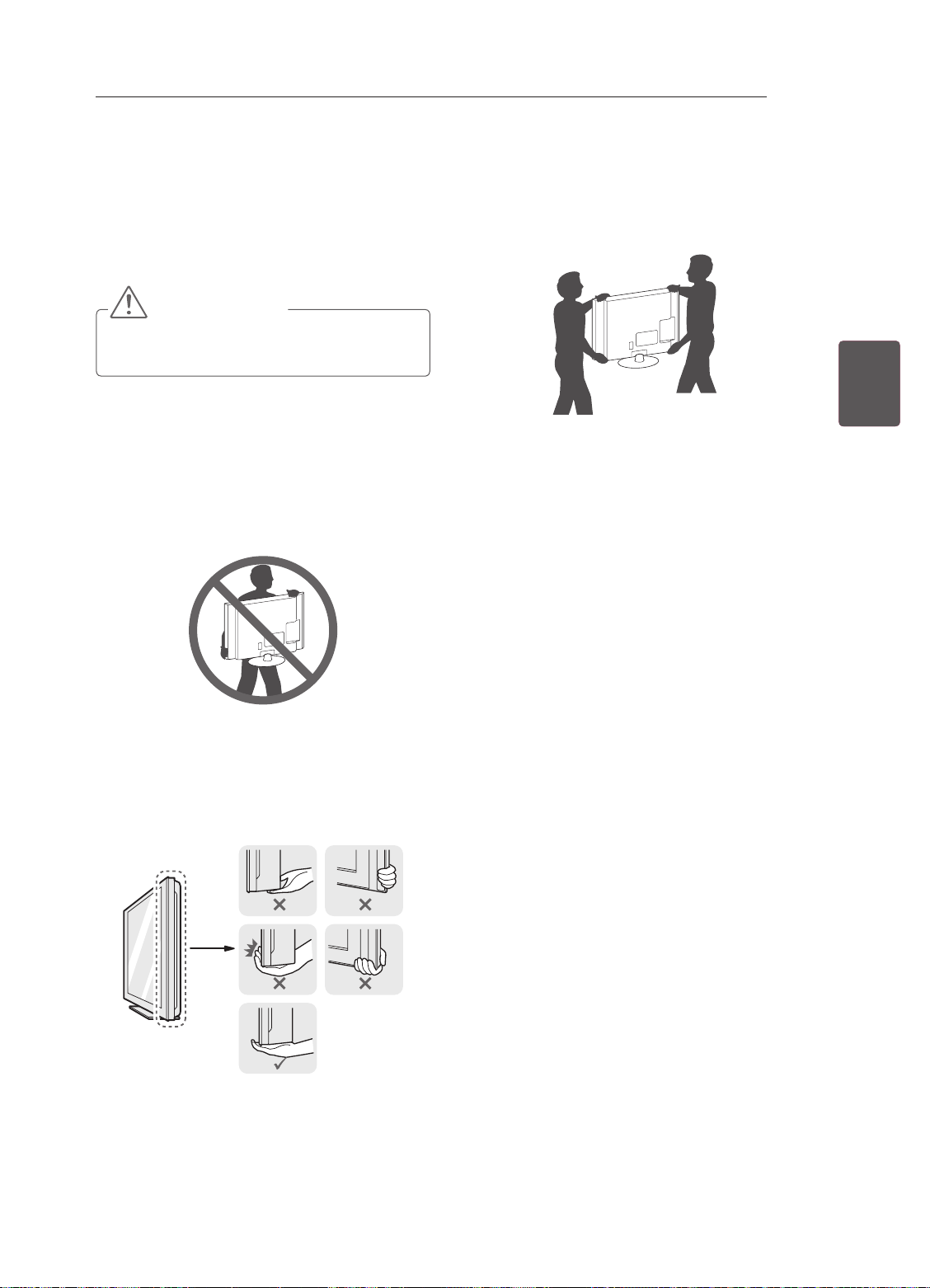
ASSEMBLAGE ET PRÉPARATION
13
Soulever et déplacer la TV
Lisez les consignes suivantes an d'éviter de rayer
ou d'endommager la TV en la déplaçant, en la
soulevant ou en la transportant, quels que soient
le type et les dimensions de l'appareil.
ATTENTION
yÉvitez toujours de toucher l'écran, car vous
risqueriez de l'endommager.
yNous vous recommandons de déplacer la TV
dans sa boîte ou son emballage d'origine.
yAvant de déplacer ou de soulever la TV,
déconnectez le cordon d'alimentation et tous
les câbles.
yLorsque vous soulevez la TV, orientez l'écran à
l'opposé de vous pour éviter de l'endommager.
ySi votre téléviseur est volumineux, faites-vous
aider par une autre personne.
yLorsque vous transportez la TV, tenez-la
comme indiqué sur l'illustration suivante.
FRAFRANÇAIS
yLorsque vous transportez la TV, ne l'exposez
pas à des secousses ou à des vibrations
excessives.
yLorsque vous transportez la TV, maintenez-
la à la verticale, sans la coucher sur le côté ni
l'incliner vers la gauche ou la droite.
yMaintenez fermement la TV par le haut et le
bas du cadre. Veillez à ne pas la tenir par la
partie transparente, le haut-parleur ou la zone
de la grille du haut-parleur.
Page 61
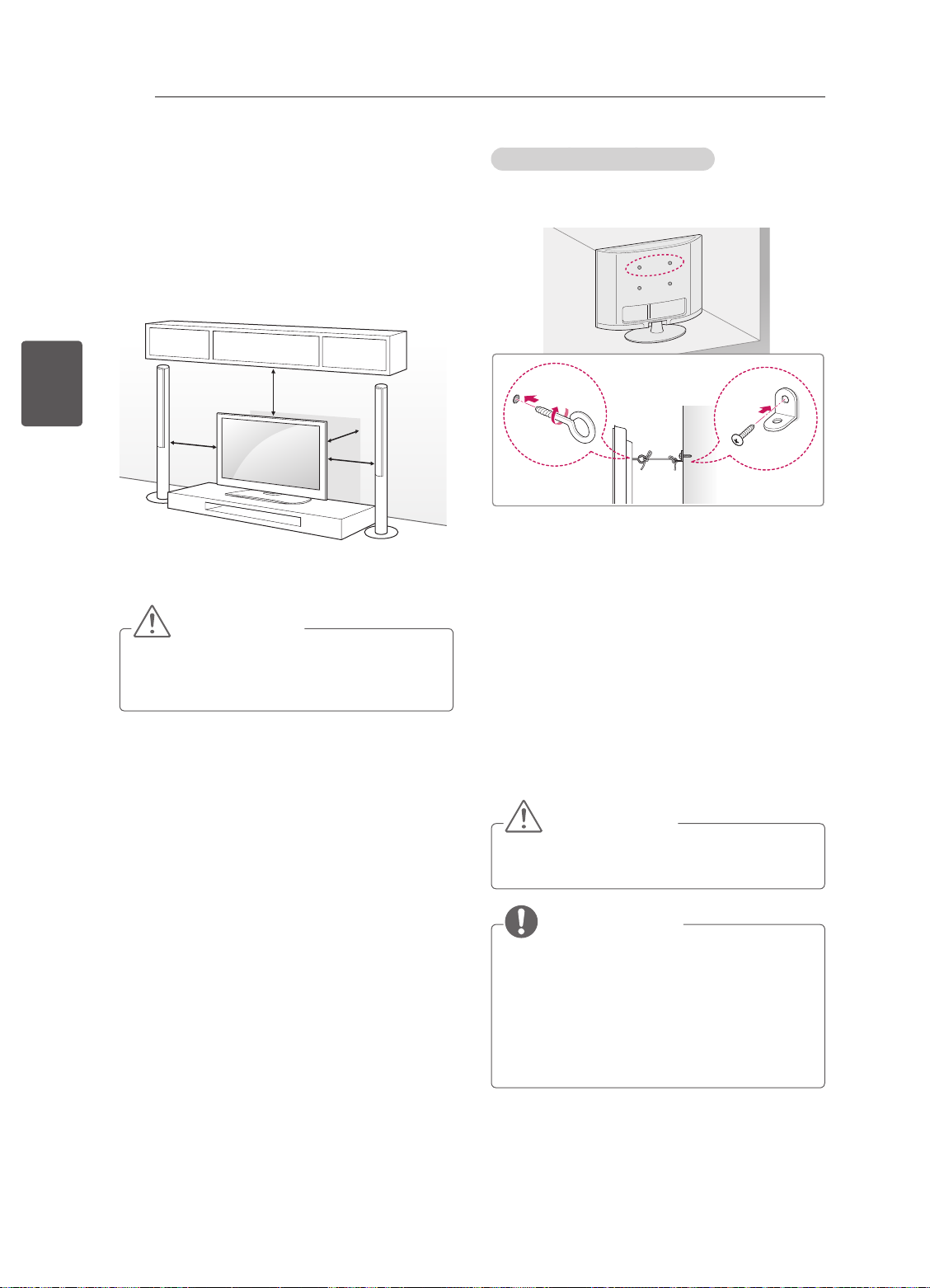
ASSEMBLAGE ET PRÉPARATION
14
Installation sur une table
1 Soulevez et positionnez la TV à la verticale sur
FRANÇAIS
FRA
2 Branchez le cordon d'alimentation sur une
une table.
- Laissez au moins 10 cm entre le mur
et le moniteur pour assurer une bonne
ventilation.
10 cm
10 cm
prise murale.
10 cm
10 cm
ATTENTION
yNe placez pas la TV à côté ou sur des
sources de chaleur. Cela pourrait provoquer
un incendie ou d'autres dommages.
Fixation fiable de la TV au mur
(Cette option n'est pas disponible sur tous les
modèles.)
1 Insérez et serrez les boulons à œil, ou les
supports et les boulons à l'arrière de la TV.
- Si des boulons sont insérés dans les trous
des boulons à œil, dévissez d'abord ces
boulons.
2 Fixez les supports muraux avec les boulons
sur le mur.
Ajustez le support mural et les boulons à œil à
l'arrière de la TV.
3 Attachez les boulons à œil et les supports
muraux avec un cordon solide.
Le cordon doit rester en position horizontale
par rapport à la surface plane.
ATTENTION
yVeillez à empêcher les enfants de grimper
sur la TV ou de s'y suspendre.
REMARQUE
yUtilisez une plate-forme ou un meuble d'une
largeur et d'une résistance suffisantes pour
soutenir en toute sécurité la TV.
yLes supports, les boulons et les cordons
ne sont pas fournis. Pour en savoir plus sur
les accessoires en option, contactez votre
revendeur.
Page 62
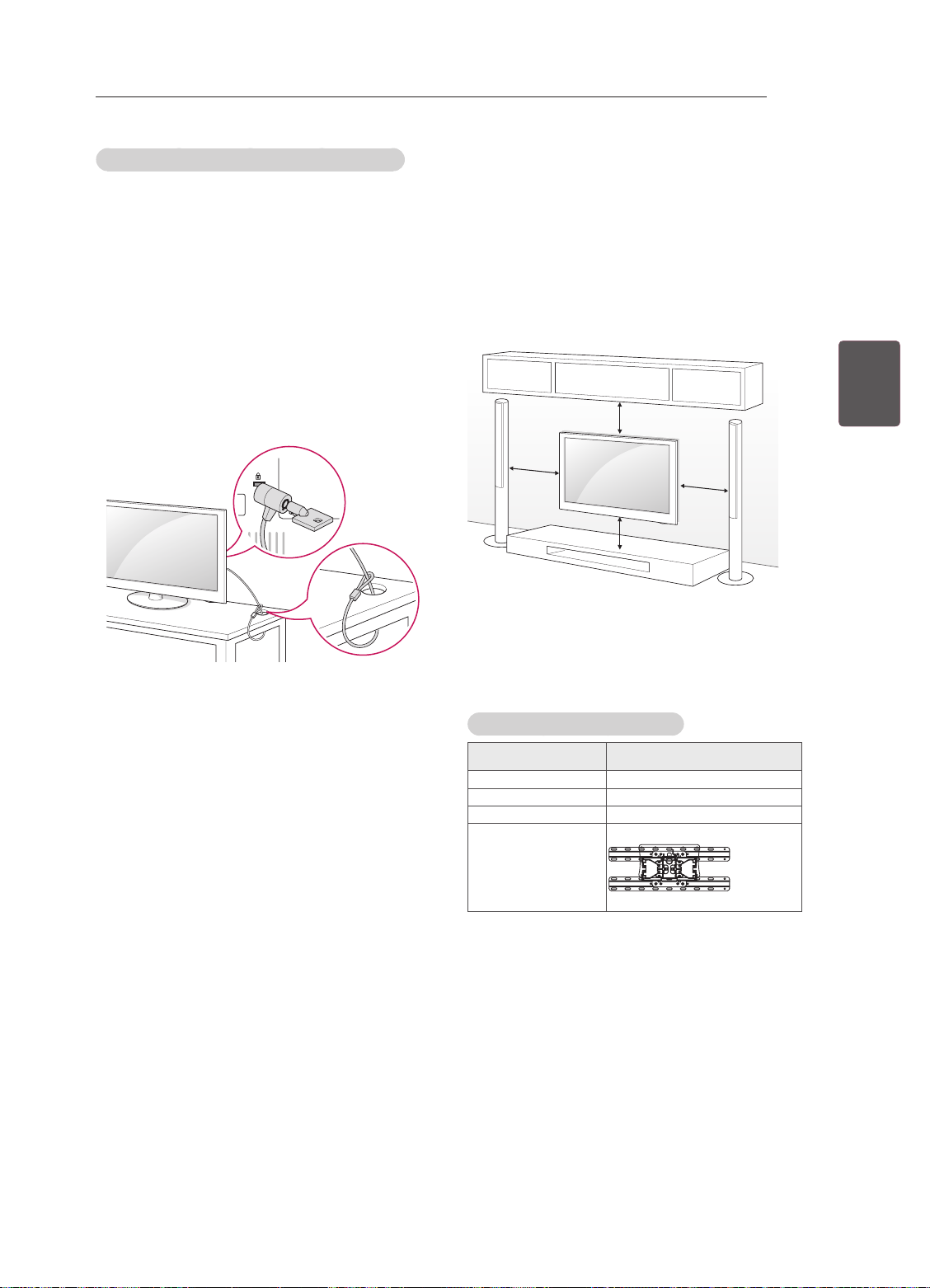
ASSEMBLAGE ET PRÉPARATION
15
Utilisation du système de sécurité Kensington
(selon le modèle)
Le connecteur du système de sécurité Kensington
est situé à l’arrière du téléviseur. Pour plus
d’informations sur l’installation et l’utilisation,
reportez-vous au manuel fourni avec le système
de sécurité Kensington ou consultez le site http://
www.kensington.com.
Reliez le câble du système de sécurité Kensington
entre le téléviseur et un meuble.
Fixation du support mural
Prenez les précautions nécessaires pour xer
le support mural en option à l'arrière de la TV.
Installez-le sur un mur solide perpendiculaire au
sol. Contactez du personnel qualié pour xer la
TV sur d'autres matériaux de construction.
Pour l'installation murale, LG recommande
l'intervention de professionnels qualiés.
FRAFRANÇAIS
10 cm
10 cm
10 cm
10 cm
Veillez à utiliser des vis et un support mural
conformes aux normes VESA. Les dimensions
standard des kits de support mural sont indiquées
dans le tableau suivant.
Achat séparé (support mural)
Modèle
VESA (A x B) 100 x 100
Vis standard M4
Nombre de vis 4
Support mural LSW130B
22/24/26/28/29LN45
**
Page 63
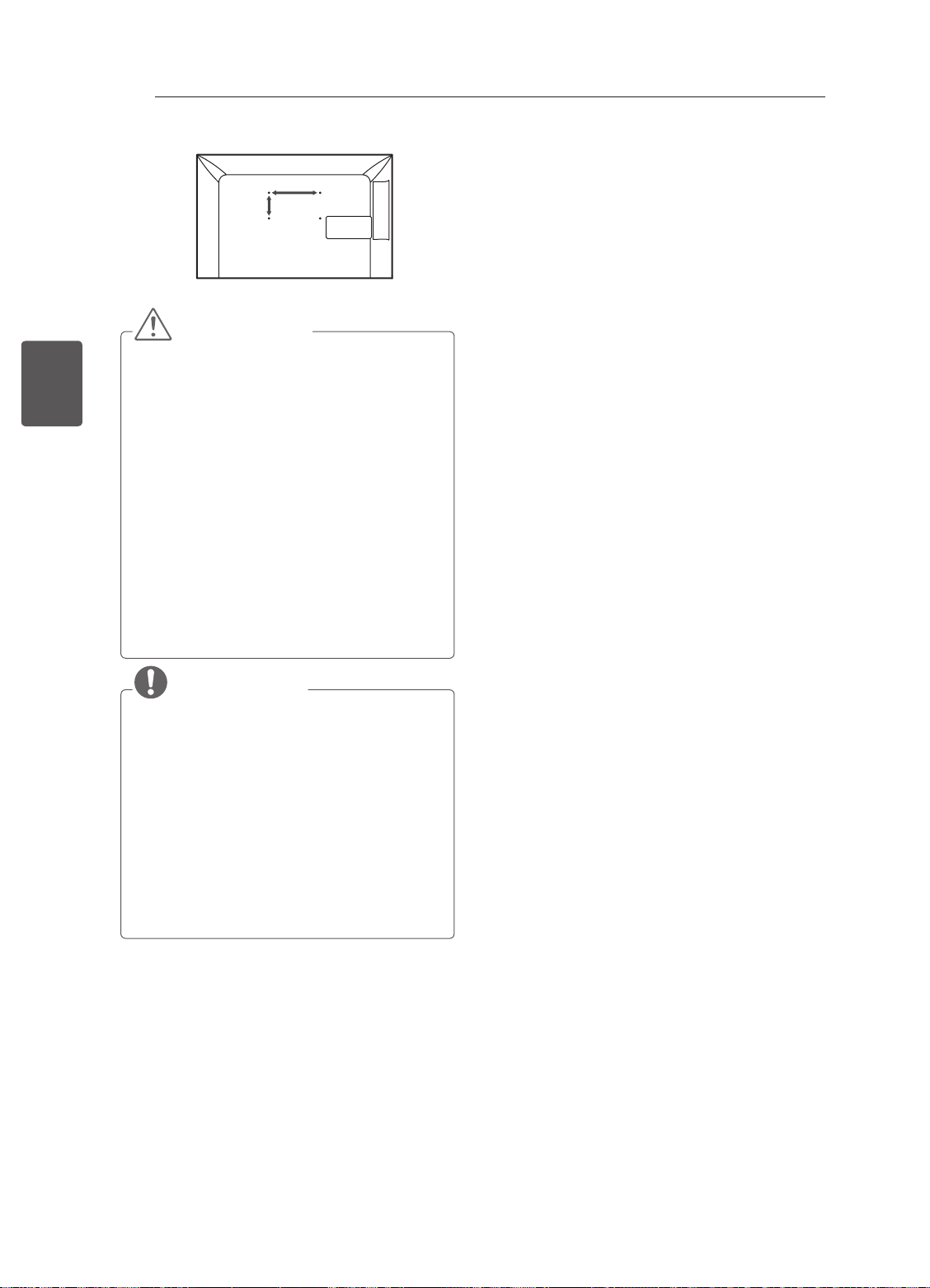
ASSEMBLAGE ET PRÉPARATION
16
A
B
FRANÇAIS
FRA
ATTENTION
yDébranchez le cordon d'alimentation avant
de déplacer ou d'installer la TV. Vous
éviterez ainsi tout risque d'électrocution.
ySi vous fixez la TV au plafond ou sur un mur
oblique, le produit risque de tomber et de
blesser quelqu'un.
Utilisez un support mural LG agréé et
contactez votre revendeur local ou une
personne qualifiée.
yNe serrez pas trop les vis. Cela pourrait
endommager la TV et entraîner l'annulation
de votre garantie.
yUtilisez des vis et supports de fixation
murale répondant aux spécifications de
la norme VESA. La garantie ne couvre
pas les dommages ou les blessures dus
à une mauvaise utilisation ou à l'utilisation
d'accessoires non agréés.
REMARQUE
yN'utilisez que des vis répondant aux
spécifications de la norme VESA.
yLe kit de support mural est fourni avec
un manuel d'installation et les pièces
nécessaires à l'installation.
yLe support mural est proposé en option.
Pour en savoir plus sur les accessoires en
option, contactez votre revendeur.
yLa longueur des vis dépend du modèle de
support mural. Vérifiez leur longueur avant
de procéder à l'installation.
yPour plus d'informations, consultez le
manuel fourni avec le support mural.
Page 64
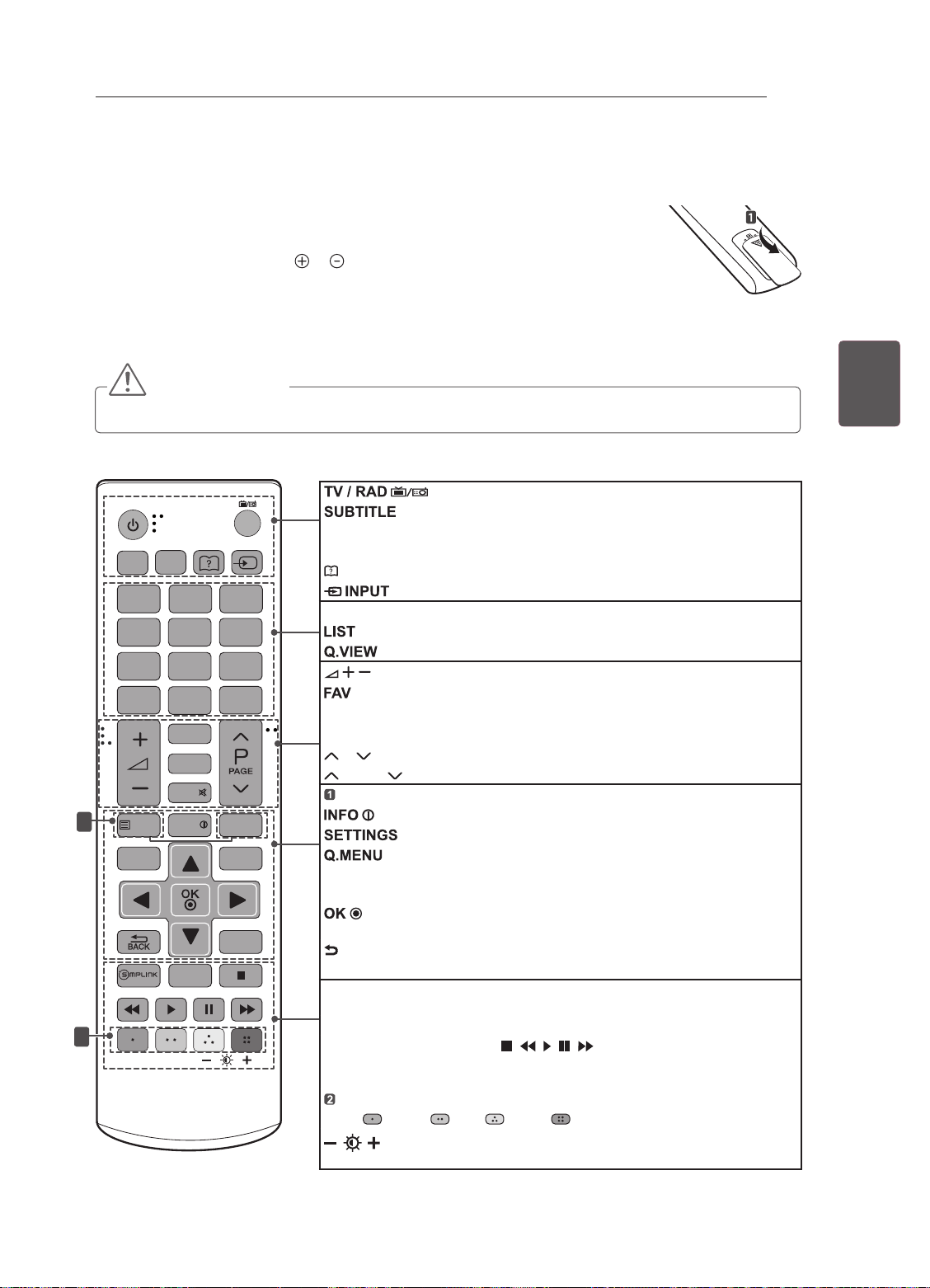
TÉLÉCOMMANDE
TÉLÉCOMMANDE
Les descriptions contenues dans ce manuel font référence aux touches de la
télécommande. Veuillez lire attentivement ce manuel et utiliser correctement la TV.
Pour changer les piles, ouvrez le couvercle et remplacez-les (modèle : 1,5 V AAA).
Faites correspondre les pôles et avec les signes sur l'étiquette placée à l'intérieur
du compartiment, puis refermez le couvercle.
Pour retirer les piles, faites l'inverse de la procédure l'installation.
Les piles et batteries internes au produit ou raccordées à celui-ci ne doivent pas
être exposées à une chaleur excessive telle que celle du soleil, d’un feu ou d’une
origine similaire.
ATTENTION
yN'associez pas des piles neuves avec des piles anciennes, car cela pourrait endommager la télécommande.
Veillez à orienter la télécommande vers le capteur situé sur la TV.
Sélectionne le programme Radio, TV et TNT
TV /
RAD
INPUT
SUBTITLE
1
AD/PIP
2 3
4 5 6
7 8 9
LIST
GUIDE
MUTE
1
TEXT
SETTINGS
INFO
2
0
FAV
TV/PC
Q.VIEW
T.OPT
Q.MENU
EXIT
AD/PIP
PIP : active ou désactive le mode PIP.
Guide de l’utilisateur Voir le guide de l’utilisateur.
Permet de changer la source d’entrée.
Touches numériques Permettent de saisir des chiffres.
Permet d’accéder à la liste des programmes.
Permet de régler le niveau du volume.
Permet d’accéder à votre liste de canaux favoris.
GUIDE Présente le guide de programmes.
MUTE
P
PAGE Passe à l’écran précédent ou suivant.
Touches du télétexte
Afche les informations liées au programme actuel et à l’écran.
Touches de navigation (haut/bas/gauche/droite)
Permettent de parcourir les menus ou options.
Permet de sélectionner les menus ou options et de conrmer votre
entrée.
BACK Permet de revenir au niveau précédent.
EXIT
SIMPLINK
au TV à l’aide d’un câble HDMI (CEC). Ouvre le menu SIMPLINK.
TV/PC Sélectionnez le modèle de téléviseur ou de PC.
Touches de commande ( ) Permettent de commander
les menus MES MÉDIAS ou les appareils compatibles SIMPLINK (USB,
SIMPLINK).
Touches de couleur Ces touches permettent d’accéder à des fonc-
tions ( rouge vert jaune bleu)
rétroéclairage.
Rappelle le sous-titrage de votre choix en mode numérique.
AD : active ou désactive la fonction de description audio. /
Revient au programme précédemment visionné.
Permet de couper tous les sons.
Permet de parcourir les chaînes ou les canaux enregistrés.
Ces touches sont utilisées pour le télétexte.
Permet d’accéder aux menus principaux.
Permet d’accéder au menu rapide.
Efface tout ce qui est afché à l’écran et revient à l’afchage TV.
Permet d’accéder à l’ensemble des périphériques AV connectés
(Rétro-éclairage)
Règle la luminosité de l’écran en contrôlant le
17
FRAFRANÇAIS
Page 65
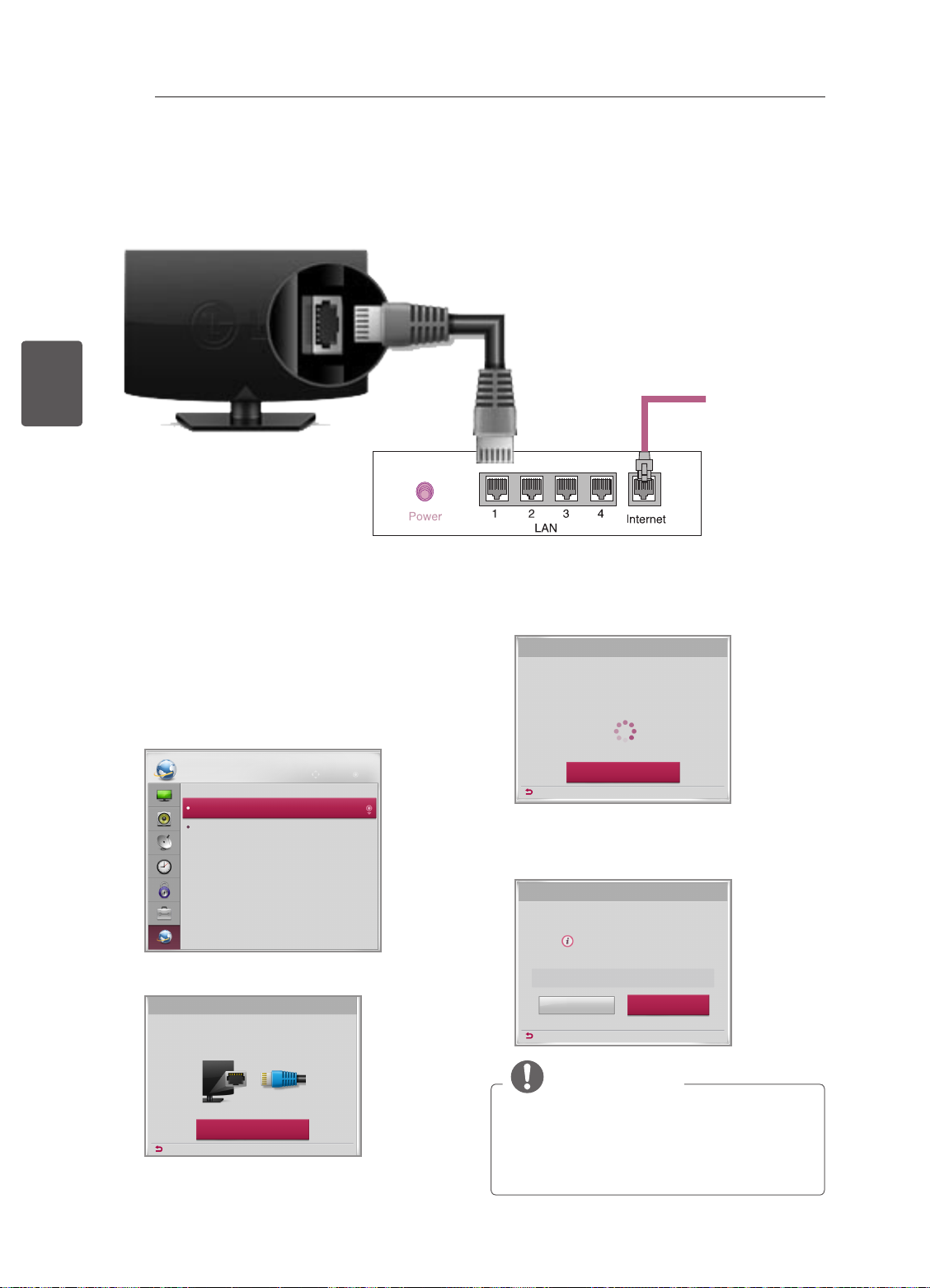
18
DIVERTISSEMENT
(Uniquement pour le modèle LN450U (uniquement au R.-U.)
L’image ci-dessous peut être différente de celle affichée sur votre téléviseur.
Connexion au réseau câblé
FRANÇAIS
FRA
DIVERTISSEMENT
(*Non fourni)
Connexion
Internet
Routeur câblé
Paramètre réseau
1 Appuyez sur SETTINGS pour accéder au
menu principal.
2 Sélectionnez RÉSEAU -> menu Paramètre
réseau.
RÉSEAU
Paramètre réseau
État du réseau
3 Sélectionnez Lancer la connexion.
Paramètre réseau
Branchez un câble LAN à l’arrière de votre téléviseur.
La conguration de réseau activera des fonctions de réseau sur la télé.
Déplacer OK
4 Le périphérique tente automatiquement de se
connecter au réseau.
Paramètre réseau
Connexion au réseau...
Annuler
Précédent
5 Le réseau auquel vous êtes connecté s’affiche.
Sélectionnez Terminé pour confirmer la
connexion au réseau.
Paramètre réseau
Connexion au réseau laire établie.
Pour accéder aux paramètres détaillés, sélectionnez
[Conguration avancée].
Conguration avancée
Précédent
Terminé
Lancer la connexion
Précédent
REMARQUE
yR.-U. : le port LAN est disponible.
(Le port LAN a été ajouté pour prendre en
charge l’option HD MHEG.)
yAutres régions : le port LAN n’est pas
disponible.
Page 66
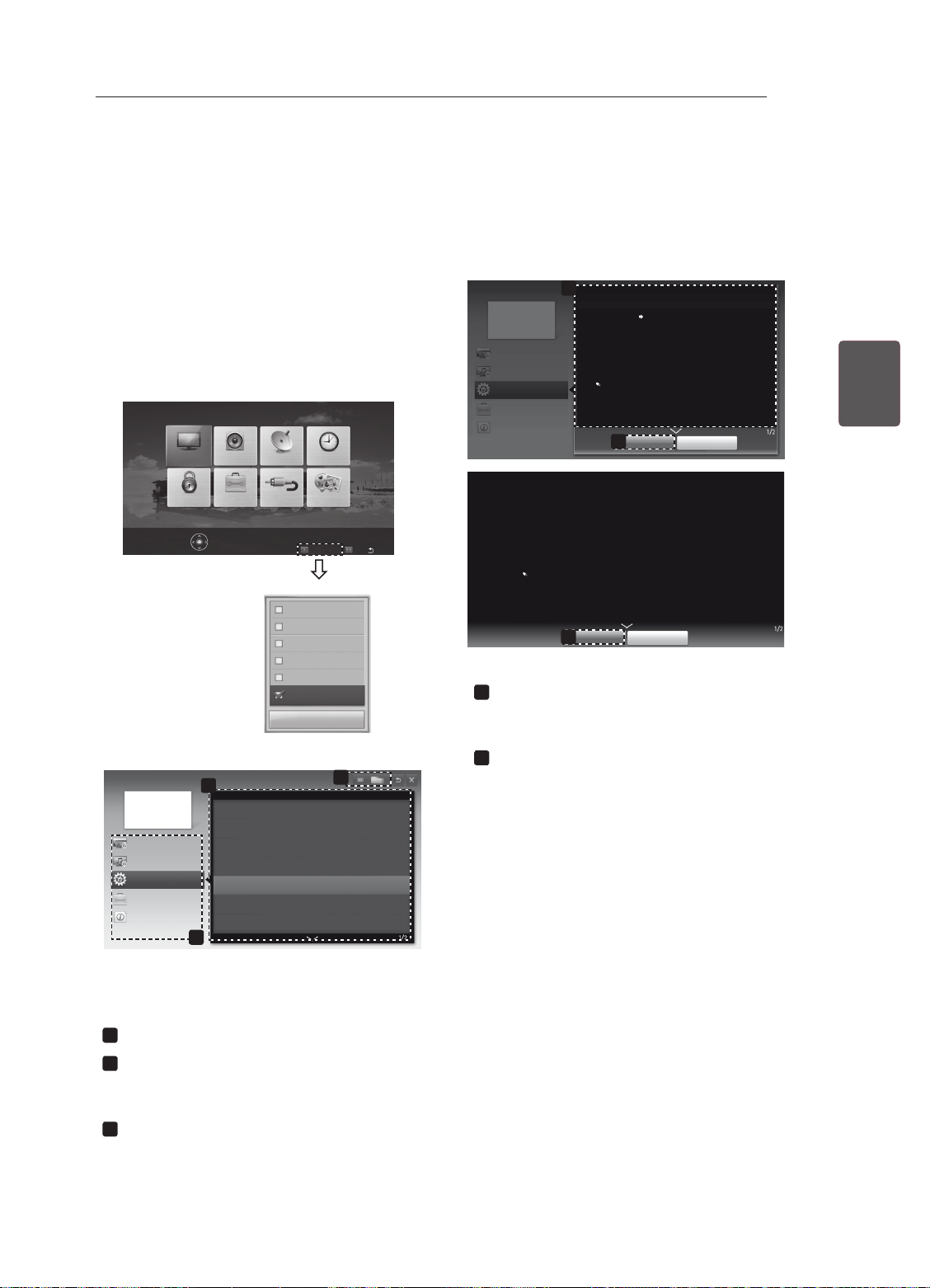
UTILISATION DU GUIDE DE L'UTILISATEUR
UTILISATION DU GUIDE DE L'UTILISATEUR
Le guide de l'utilisateur vous permet d'accéder plus facilement aux informations complètes sur la TV.
1 Appuyez sur SETTINGS pour accéder aux
menus principaux.
2 Appuyez sur la touche ROUGE pour accéder
aux menus Support technique.
3 Appuyez sur les touches de navigation pour
accéder au Guide de l’utilisateur et appuyez
sur OK.
IMAGE
Guide de l’utilisateur
Paramètre de CHAÎNE
Paramètre d’IMAGE et de SON
OPTION
Fonction Avancée
Information
SON
OPTIONVERROU
Appuyez OK() pour réglages image.
2
Utilisation de la source
Pour régler la fonction ODC (Circuit de saturation)_ALL
Pour utiliser PIP (Incrustation d’image)
Réglage des options horaires
Réglage des options de verrouillage TV
Conguration de la langue
Conguration du pays
HORLOGE
CONFIG
MES MÉDIASSOURCE
Support technique
Mise à jour auto.
Test d’image
Test audio
Test de signal
Infos produit/service
Guide de l’utilisateur
Fermer
Sortie
FAQ
3
1
Guide de l’utilisateur
Paramètre de CHAÎNE
Paramètre d’IMAGE et de SON
OPTION
Fonction Avancée
Information
SETTINGS OPTION Langue
Vous pouvez sélectionner la langue du menu afché à l’écran et celle de la
diffusion audio numérique.
y
y
y
Affiche la description du menu sélectionné.
1
1
OPTION > Conguration de la langue
SETTINGS OPTION Langue
Vous pouvez sélectionner la langue du menu afché à l’écran et celle de la
diffusion audio numérique.
y
Langue menu : Sélectionne une langue pour le texte d’afchage.
y
Langue audio [En mode numérique uniquement] : Sélectionne la
langue voulue lorsque vous regardez une diffusion numérique contenant
plusieurs langues.
y
Langue des sous-titres [En mode numérique uniquement] : Utilisez l’option
Sous-titres quand deux langues des sous-titres, ou plus, sont diffusées.
Si les données de sous-titres d’une langue sélectionnée ne sont pas
diffusées, la langue par défaut est diffusée.
Zoom avant
2
Langue menu : Sélectionne une langue pour le texte d’afchage.
Langue audio [En mode numérique uniquement] : Sélectionne la
langue voulue lorsque vous regardez une diffusion numérique contenant
plusieurs langues.
Langue des sous-titres [En mode numérique uniquement] : Utilisez l’option
Sous-titres quand deux langues des sous-titres, ou plus, sont diffusées.
Si les données de sous-titres d’une langue sélectionnée ne sont pas
diffusées, la langue par défaut est diffusée.
Zoom arrière
2
Fermer
Fermer
Vous pouvez utiliser ꕌ/ꕍ pour parcourir les
pages.
Permet d’effectuer un zoom avant ou arrière.
2
19
FRAFRANÇAIS
L’image ci-dessous peut être différente de celle
affichée sur votre téléviseur.
Affiche le canal actuel.
1
Permet de sélectionner l’article souhaité.
2
Vous pouvez utiliser ꕌ/ꕍ pour parcourir les
pages.
Permet de parcourir la description de la
3
fonction qui vous intéresse depuis l’index.
Page 67
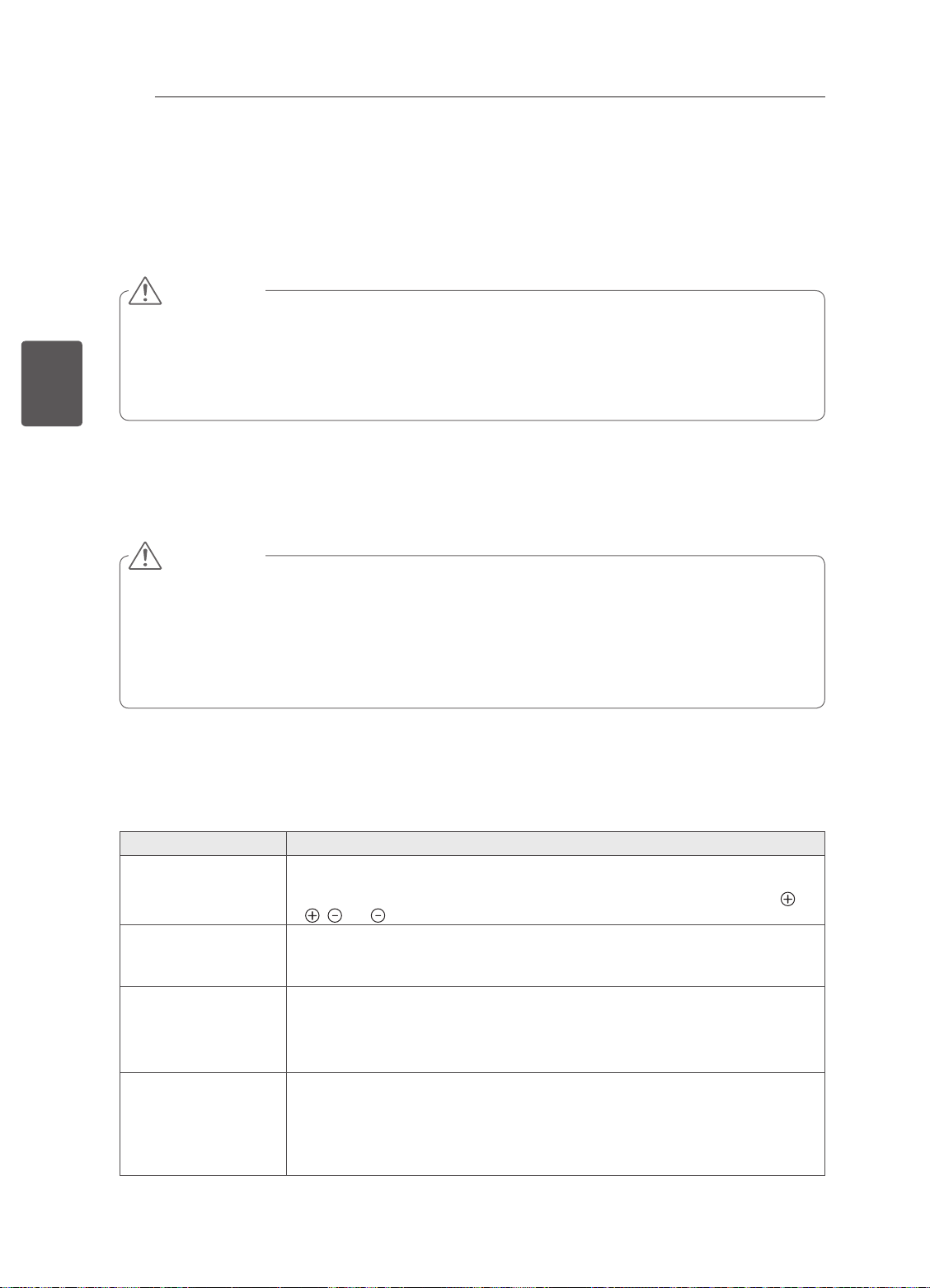
ENTRETIEN / DÉPANNAGE
20
ENTRETIEN
Nettoyage de votre TV
Nettoyez régulièrement votre TV pour conserver des performances optimales et pour allonger la durée de
vie du produit.
ATTENTION
FRANÇAIS
FRA
Écran, cadre, boîtier et support
Pour éliminer la poussière ou une saleté légère, essuyez la surface avec un chiffon doux, propre et sec.
Pour retirer des taches importantes, essuyez la surface avec un chiffon doux imbibé d’eau propre ou d’un
détergent doux dilué. Essuyez ensuite immédiatement avec un chiffon sec.
Cordon d’alimentation
Retirez régulièrement la poussière ou les saletés accumulées sur le cordon d’alimentation.
y Avant toute chose, veillez à couper l’alimentation et à débrancher le cordon d’alimentation et tous les
autres câbles.
y Lorsque vous prévoyez de ne pas utiliser le téléviseur pendant une longue période, débranchez le
cordon d’alimentation de la prise murale afin d’éviter tout endommagement dû à une étincelle ou une
surtension.
ATTENTION
y Évitez toujours de toucher l’écran, car vous risqueriez de l’endommager.
y Ne poussez pas, ne frottez pas ou ne cognez pas la surface de l’écran avec l’ongle ou un objet conton-
dant, car cela pourrait causer des rayures et des déformations de l’image.
y N’utilisez pas de produits chimiques car cela pourrait endommager le produit.
y Ne pulvérisez pas de liquide sur la surface. Si de l’eau pénètre dans la TV, cela peut provoquer un
incendie, une électrocution ou un dysfonctionnement.
DÉPANNAGE
Problème Solution
Impossible de commander la TV avec la
télécommande.
Aucune image n’est
affichée et aucun son
n’est émis.
La TV s’éteint de
manière soudaine.
Une fois que vous êtes
connecté au PC (RGB/
HDMI), le message
« Aucun signal » ou
« Format invalide »
s’affiche.
y Vérifiez le capteur de la télécommande sur la TV et essayez de nouveau.
y Vérifiez qu’aucun obstacle n’est placé entre la TV et la télécommande.
y Vérifiez si les piles fonctionnent et si elles sont correctement installées ( sur
y Vérifiez si l’appareil est allumé.
y Vérifiez si le cordon d’alimentation est raccordé à la prise murale.
y Vérifiez la prise en branchant d’autres appareils.
y Vérifiez les paramètres de contrôle de l’alimentation. Il peut y avoir une coupure
y Vérifiez si l’option Veille auto. est activée dans les réglages de l’heure.
y Si aucun signal n’est présent quand la TV est allumée, la TV s’éteint automa-
y Allumez/éteignez le téléviseur à l’aide de la télécommande.
y Reconnectez le câble RGB/HDMI.
y Redémarrez le PC une fois le téléviseur allumé.
, sur ).
de courant.
tiquement après 15 minutes d’inactivité.
Page 68

MANUALE UTENTE
TV LED
* TV LED LG include uno schermo LCD con retroilluminazione LED.
Leggere attentamente il presente manuale prima di utilizzare
l'apparecchio e conservarlo come riferimento futuro.
www.lg.com
Page 69
INDICE
2
INDICE
3 LICENZE
3 AVVISO PER IL SOFTWARE OPEN
SOURCE
3 IMPOSTAZIONE DI UN DISPOSITIVO
DI CONTROLLO ESTERNO
ITALIANO
ITA
4 ISTRUZIONI DI SICUREZZA
10 PROCEDURA DI INSTALLAZIONE
10 MONTAGGIO E PREPARAZIONE
10 Disimballaggio
12 Componenti e pulsanti
13 Sollevamento e spostamento del TV
14 Montaggio su un tavolo
15 Montaggio a parete
17 TELECOMANDO
18 INTRATTENIMENTO
18 Connessione di rete cablata
18 Impostazione rete
19 UTILIZZO DELLA GUIDA UTENTE
20 MANUTENZIONE
20 Pulizia del televisore
20 - Schermo, cornice, telaio e supporto
20 - Cavo di alimentazione
AVVISO
yIgnorando i messaggi di avviso, si corre
il rischio di subire gravi lesioni fisiche o di
provocare incidenti o danni letali.
20 RISOLUZIONE DEI PROBLEMI
21 SPECIFICHE TECNICHE
ATTENZIONE
yIgnorando i messaggi di attenzione, si corre
il rischio di subire lesioni fisiche minori o di
danneggiare il prodotto.
NOTA
yLe note forniscono chiarimenti e
informazioni su come utilizzare il prodotto in
modo sicuro. Leggere le note attentamente
prima di utilizzare il prodotto
Page 70
LICENZE / AVVISO PER IL SOFTWARE OPEN SOURCE / IMPOSTAZIONE DI UN DISPOSITIVO DI CONTROLLO ESTERNO
LICENZE
Le licenze supportate possono variare da un modello all'altro. Per ulteriori informazioni sulle licenze,
visitare il sito www.lg.com.
Prodotto su licenza dei Dolby Laboratories. “Dolby” e il simbolo della doppia D sono
marchi dei Dolby Laboratories.
The terms HDMI and HDMI High-Denition Multimedia Interface, and the HDMI logo
are trademarks or registered trademarks of HDMI Licensing LLC in the United States
and other countries.
INFORMAZIONI SU DIVX VIDEO: DivX® è un formato video digitale creato da DivX,
LLC, società controllata da Rovi Corporation. Questo è un dispositivo DivX Certied®
ufciale che riproduce video DivX. Per ulteriori informazioni e strumenti software per
convertire i le in video DivX, visitare divx.com.
INFORMAZIONI SU DIVX VIDEO-ON-DEMAND: questo dispositivo DivX Certied®
deve essere registrato per poter riprodurre i lm acquistati in formato DivX Video-on-
Demand (VOD). Per ottenere il codice di registrazione, individuare la sezione DivX
VOD nel menu di congurazione del dispositivo. Visitare il sito vod.divx.com per
ulteriori informazioni su come completare la procedura di registrazione.
3
ITAITALIANO
"DivX Certied® per riprodurre video DivX® in alta denizione no a 1080p, compresi
i contenuti premium."
"DivX®, DivX Certied® e i logo associati sono marchi di Rovi Corporation o società
da questa controllate e sono utilizzati in concessione di licenza".
"Coperto da uno o più dei seguenti brevetti degli Stati Uniti:"
7,295,673; 7,460,668; 7,515,710; 7,519,274”
AVVISO PER IL SOFTWARE OPEN SOURCE
Per ottenere il codice sorgente contenuto in questo prodotto secondo quanto consentito dalle licenze GPL,
LGPL, MPL e altre licenze Open Source, visitare http://opensource.lge.com.
In aggiunta al codice sorgente, sono disponibili per il download tutti i termini di licenza, le esclusioni di
responsabilità e le relative note di copyright.
LG Electronics fornisce anche il codice Open Source su CD-ROM a fronte del pagamento di una cifra a
copertura dei costi che tale distribuzione comporta (come il costo del supporto, di spedizione e gestione)
in seguito a richiesta inviata via e-mail a: [email protected]. Questa offerta è valida per tre (3) anni a
partire dalla data di acquisto del prodotto.
IMPOSTAZIONE DI UN DISPOSITIVO DI
CONTROLLO ESTERNO
Per informazioni sulla congurazione di un dispositivo di controllo esterno, visitare il sito Web www.lg.com
Page 71
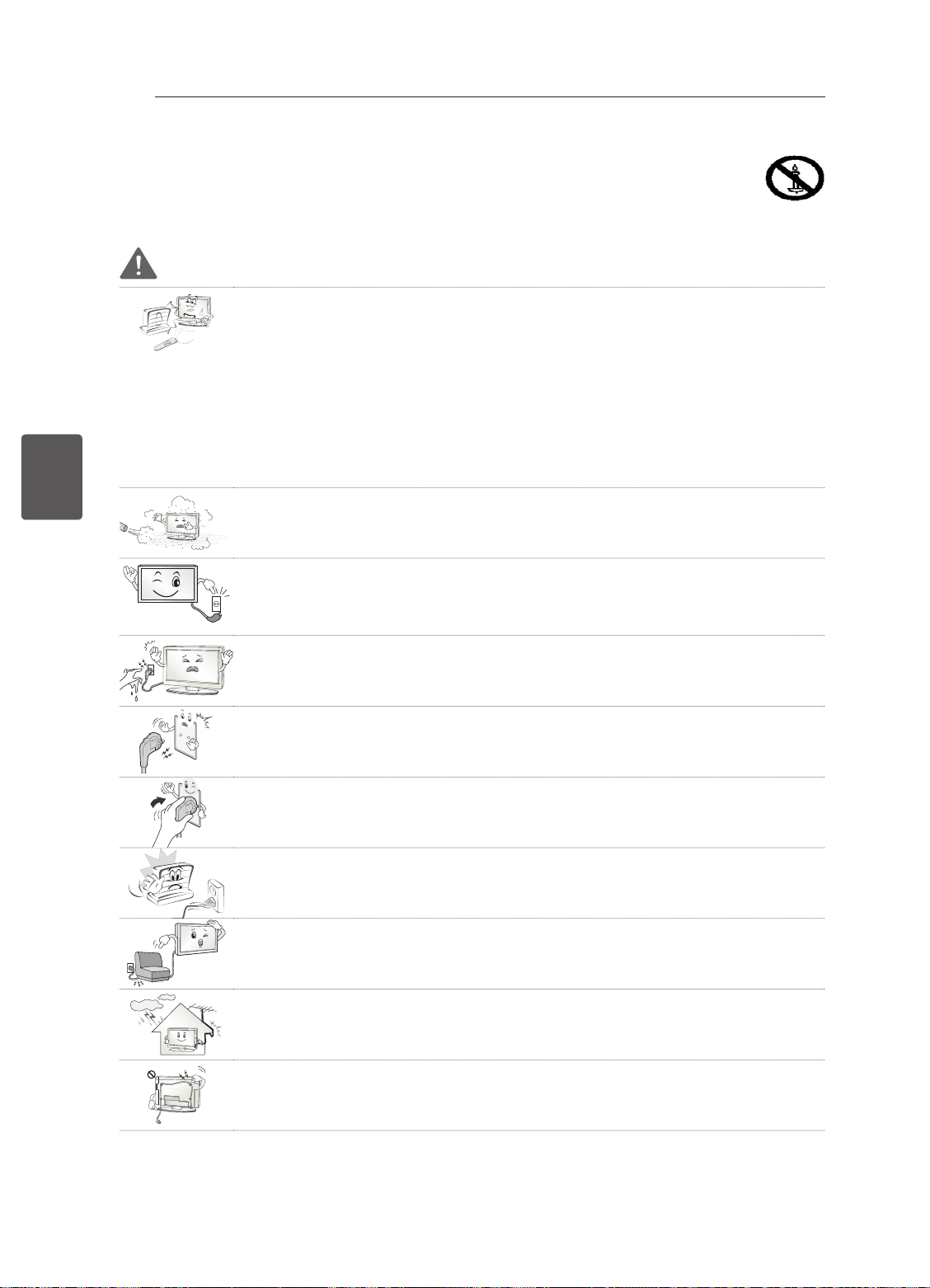
ITALIANO
ITA
ISTRUZIONI DI SICUREZZA
4
ISTRUZIONI DI SICUREZZA
Leggere attentamente queste istruzioni di sicurezza prima di utilizzare il prodotto.
AVVISO
Non collocare il televisore e il telecomando nei seguenti ambienti:
y
- In un luogo esposto alla luce diretta del sole
- In un luogo dove è presente un elevato livello di umidità, ad esempio in bagno
- Vicino a fonti di calore, ad esempio stufe o altri dispositivi che producono calore
- Vicino a piani cottura o umidificatori, dove è facilmente esposto a vapore o
schizzi di olio
- In un'area esposta alla pioggia o al vento
- Vicino a contenitori d'acqua, ad esempio vasi
Ciò potrebbe comportare il rischio di incendi, scosse elettriche, malfunzionamento
o deformazione del prodotto.
Non posizionare il prodotto in un luogo soggetto alla polvere.
y
Ciò potrebbe costituire rischio di incendio.
La presa di rete rappresenta il dispositivo di scollegamento. La presa deve essere
y
facilmente raggiungibile.
Non toccare la presa con le mani bagnate. Inoltre, se il terminale del cavo è
y
bagnato o ricoperto di polvere, asciugarlo completamente o rimuovere la polvere.
L'eccesso di umidità può provocare scosse elettriche.
Accertarsi di collegare il cavo di alimentazione alla messa a terra. (Ad eccezione
y
dei dispositivi privi di messa a terra.)
Si potrebbero subire scosse elettriche o lesioni.
Inserire completamente il cavo di alimentazione.
y
Se il cavo di alimentazione non viene inserito completamente, si potrebbe
verificare un incendio.
Accertarsi che il cavo di alimentazione non venga a contatto con oggetti caldi, ad
y
esempio un radiatore.
Ciò potrebbe costituire rischio di incendio o di scosse elettriche.
Non posizionare oggetti pesanti, o il prodotto stesso, sui cavi di alimentazione.
y
Ciò potrebbe costituire rischio di scosse elettriche o incendio.
Piegare il cavo dell'antenna tra l'interno e l'esterno dell'edificio per impedire
y
l'ingresso di gocce di pioggia.
L'acqua può danneggiare il prodotto e provocare scosse elettriche.
Quando si monta il televisore sulla parete, assicurarsi di non far passare il cavo di
y
alimentazione e quello dell'antenna dietro al televisore.
Ciò potrebbe costituire rischio di incendio o di scosse elettriche.
Page 72
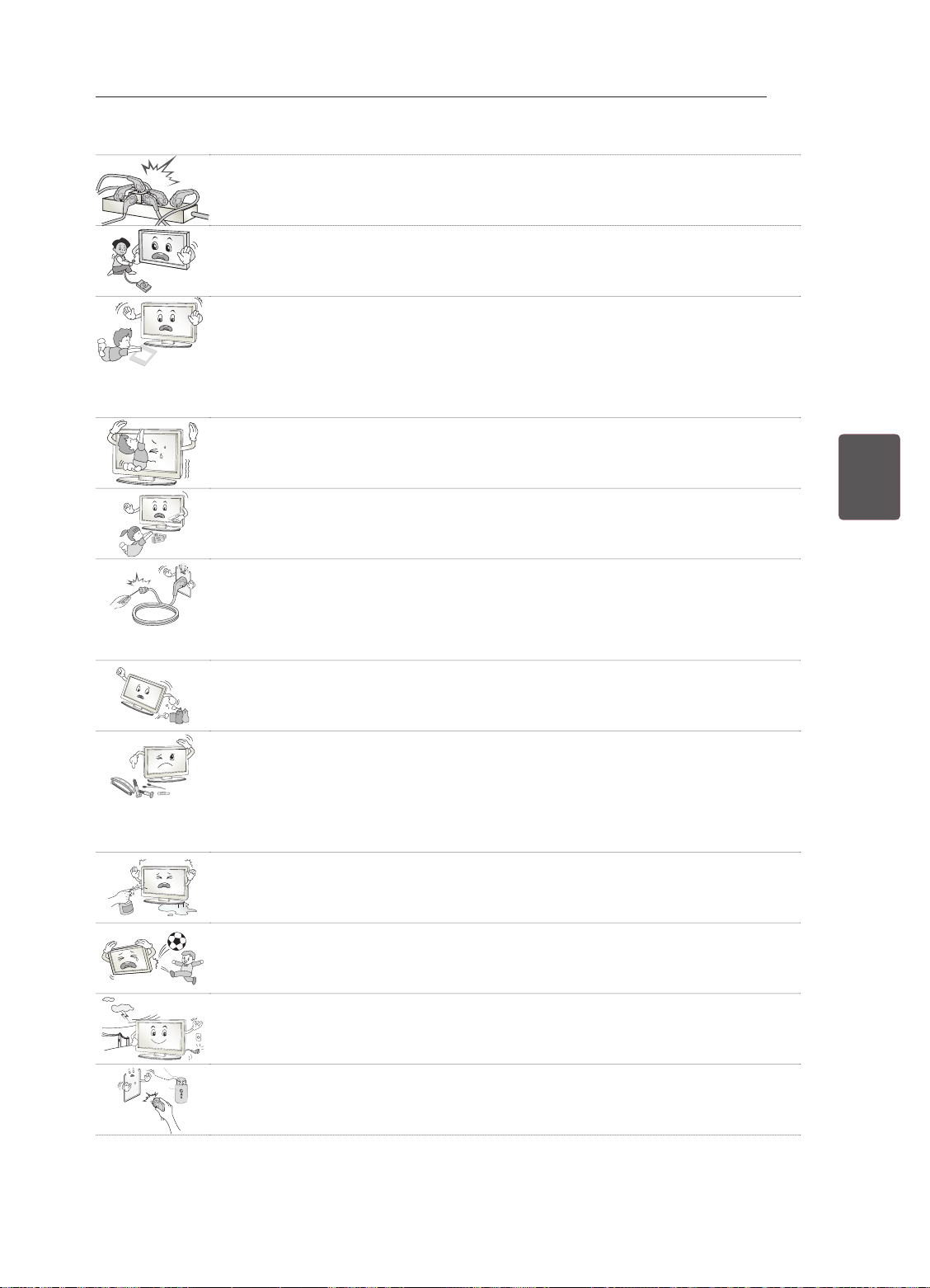
ISTRUZIONI DI SICUREZZA
Desiccant
Non collegare troppi dispositivi elettrici a una singola presa multipla.
y
Ciò potrebbe comportare il rischio di incendi dovuti a surriscaldamento.
Attenzione a non far cadere il prodotto quando si collegano dispositivi esterni.
y
Ciò potrebbe causare lesioni alle persone o danni al prodotto.
Tenere il materiale anti-umidità o vinilico dell'imballaggio fuori dalla portata dei
y
bambini.
Il materiale antiumidità è nocivo, se ingerito. Se accidentalmente ingerito, far
vomitare il paziente e portarlo al più vicino pronto soccorso. Inoltre il materiale
vinilico dell'imballaggio può provocare soffocamento. Tenerlo fuori dalla portata dei
bambini.
Impedire ai bambini di arrampicarsi o appendersi al televisore.
y
Il prodotto potrebbe cadere e provocare gravi lesioni.
Smaltire le batterie usate in modo appropriato per evitare che i bambini possano
y
ingerirle.
In caso di ingestione delle batterie, rivolgersi immediatamente a un medico.
5
ITAITALIANO
Non inserire un conduttore (ad esempio un bastoncino metallico) su una delle
y
estremità del cavo di alimentazione mentre l'altra estremità è inserita nella presa a
muro. Inoltre, non toccare il cavo di alimentazione subito dopo averlo inserito nella
presa a muro.
Si potrebbero subire scosse elettriche. (in base al modello)
Non collocare o conservare sostanze infiammabili vicino al prodotto.
y
L'incauta manipolazione di sostanze infiammabili può causare esplosioni o incendi.
Non lasciare cadere nel prodotto oggetti metallici quali monete, mollette per capelli,
y
bastoncini o fil di ferro né oggetti infiammabili quali carta e fiammiferi. Prestare
particolare attenzione ai bambini.
Possono verificarsi scosse elettriche, incendi o lesioni fisiche alle persone. Se
un oggetto cade all'interno del prodotto, scollegare il cavo di alimentazione e
contattare il centro di assistenza.
Non spruzzare acqua sul prodotto né pulirlo con prodotti infiammabili (solventi o
y
benzene). Possono verificarsi incendi o scosse elettriche.
Evitare impatti d'urto sul prodotto o di far cadere oggetti all'interno del prodotto e
y
sullo schermo.
Vi è il rischio di lesioni alle persone o danneggiamenti al prodotto stesso.
Non toccare mai il prodotto o l'antenna durante un temporale.
y
Si potrebbero subire scosse elettriche.
In caso di perdita di gas, non toccare la presa a muro, aprire le finestre e ventilare.
y
Una scintilla potrebbe provocare un incendio o ustioni.
Page 73
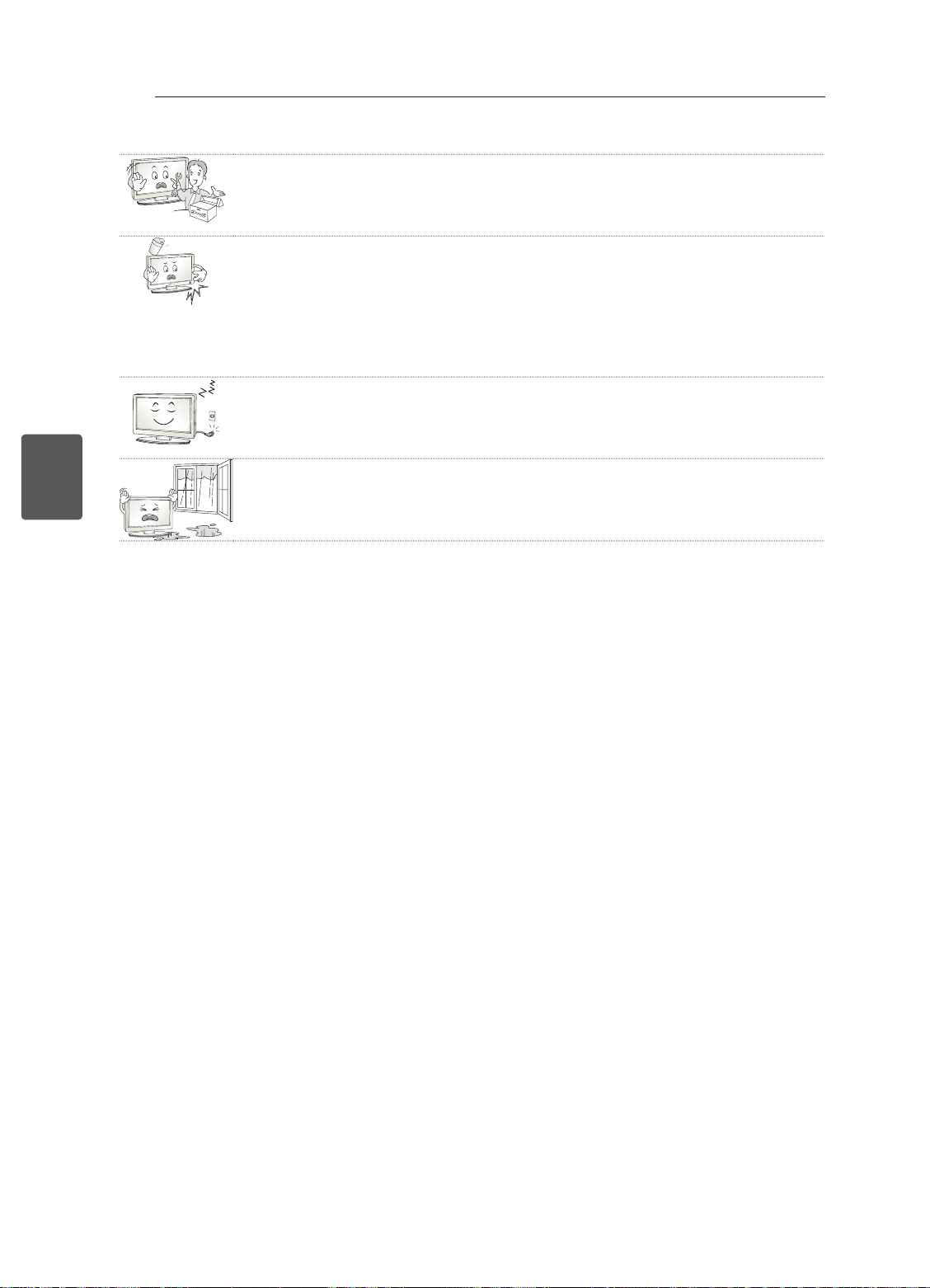
ITALIANO
ITA
ISTRUZIONI DI SICUREZZA
6
Non disassemblare, riparare o modificare il prodotto a propria discrezione.
y
Vi è il rischio di provocare incendi o scosse elettriche.
Rivolgersi al centro di assistenza per effettuare il controllo, la taratura o le
riparazioni del caso.
Se si verifica una delle seguenti circostanze, scollegare immediatamente il
y
prodotto dall'alimentazione e contattare il centro di assistenza di zona.
- Il prodotto ha subito un urto
- Il prodotto è stato danneggiato
- Oggetti estranei sono caduti dentro il prodotto
- Il prodotto produce fumo o odori strani
Vi è il rischio di scosse elettriche o incendio.
Se si prevede di non utilizzare il prodotto per un lungo periodo, scollegare il cavo
y
di alimentazione dal prodotto.
I depositi di polvere possono provocare incendi, mentre l'usura dell'isolamento può
provocare perdite di elettricità, scosse elettriche o incendi.
L'apparecchio non deve essere esposto a gocce o spruzzi di acqua; oggetti
y
contenenti liquidi, quali vasi, non devono essere posizionati sull'apparecchio.
Page 74
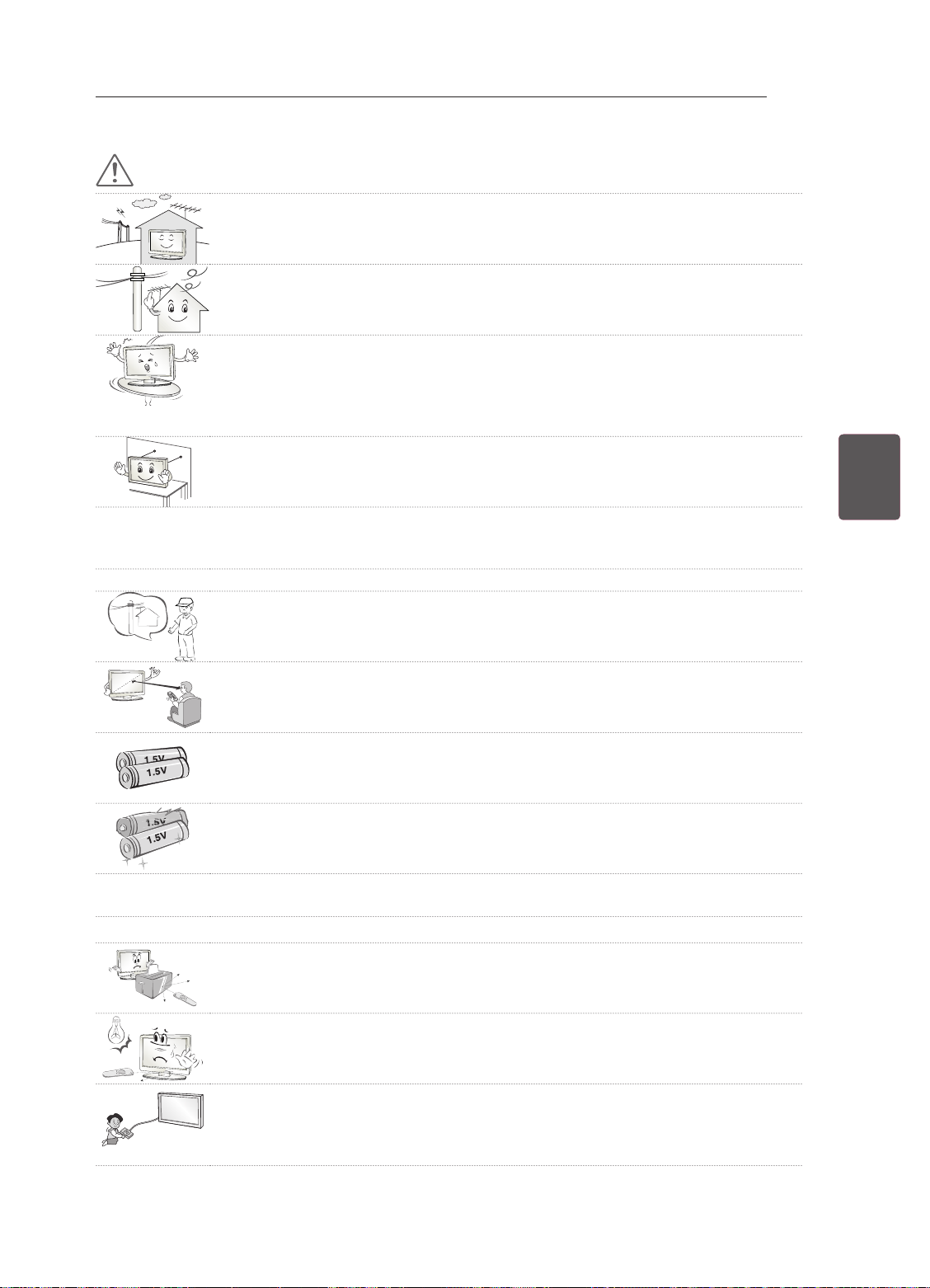
ISTRUZIONI DI SICUREZZA
ATTENZIONE
Installare il prodotto in un luogo privo di onde radio.
y
Tra un'antenna esterna e le linee elettriche deve esserci una distanza sufficiente a
y
impedire che la prima tocchi le seconde anche in caso di caduta dell'antenna
per evitare il rischio di scosse elettriche.
Non installare il prodotto in luoghi quali mensole instabili o superfici inclinate.
y
Evitare inoltre luoghi soggetti a vibrazione o in cui il prodotto non sia sostenuto
appieno.
In caso contrario il prodotto potrebbe cadere o capovolgersi, con il rischio di lesioni
gravi o danneggiamento del prodotto stesso.
Se si installa il televisore su un supporto, usare delle precauzioni per evitare che
y
possa rovesciarsi. In caso contrario, il prodotto potrebbe cadere e provocare lesioni
alle persone.
Se si intende montare il prodotto su una parete, collegare l'interfaccia di montaggio VESA standard
y
(parti opzionali) al retro del prodotto. Quando si installa il set per utilizzare la staffa per montaggio a
parete (parti opzionali), fissarlo accuratamente in modo che non possa cadere.
Utilizzare solo gli accessori specificati dal produttore.
y
Per l'installazione dell'antenna, rivolgersi a personale qualificato.
y
Tale operazione può comportare il rischio di incendio o di scosse elettriche.
7
ITAITALIANO
Quando si guarda la televisione, si raccomanda di mantenere una distanza di
y
almeno 2 - 7 volte la lunghezza della diagonale dello schermo.
Guardando la TV per periodi prolungati si può avere un effetto di visione sfocata.
Utilizzare solo il tipo di batterie indicato.
y
In caso contrario, il telecomando potrebbe subire danneggiamenti.
Non utilizzare batterie vecchie e nuove contemporaneamente.
y
Ciò potrebbe causare il surriscaldamento e la perdita di liquido dalle stesse.
Non esporre le batterie a calore eccessivo, quindi tenerle lontano dalla luce diretta del sole, camini
y
aperti e stufe elettriche.
NON inserire batterie non ricaricabili nel dispositivo di ricarica.
y
Verificare che non vi siano oggetti tra il telecomando e il sensore.
y
La luce del sole e altre fonti luminose intense possono interferire con il segnale del
y
telecomando. Se ciò si verifica, oscurare la stanza.
Quando si collegano dispositivi esterni come console per videogiochi, verificare
y
che i cavi di collegamento siano sufficientemente lunghi.
In caso contrario il prodotto potrebbe cadere con il rischio di lesioni alle persone o
danneggiamento del prodotto stesso.
Page 75
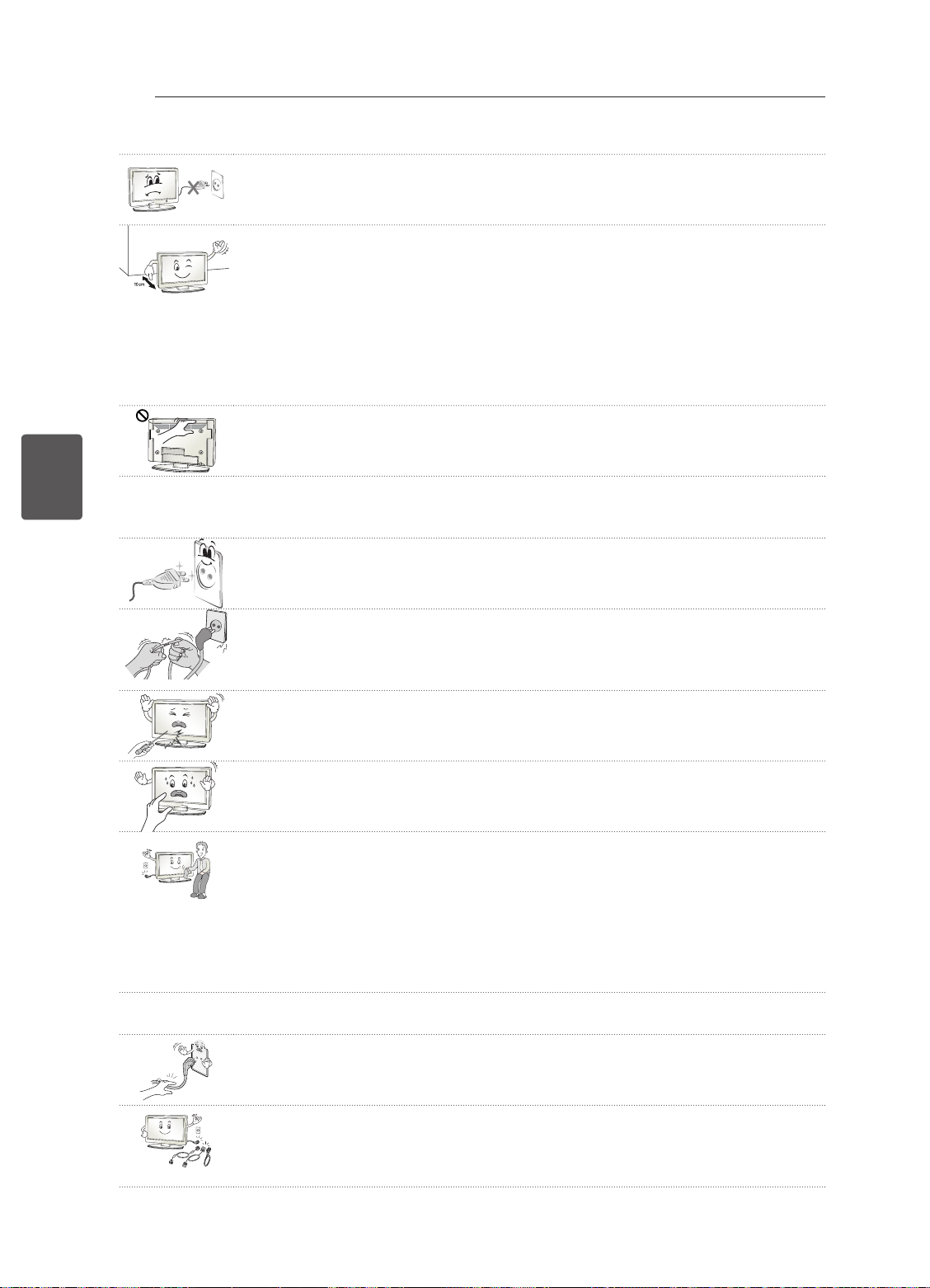
ITALIANO
ITA
ISTRUZIONI DI SICUREZZA
8
Evitare di spegnere il prodotto scollegando il cavo dalla presa a muro. (Non usare
y
la spina come interruttore.)
Potrebbero verificarsi errori meccanici o scosse elettriche.
Seguire le istruzioni di installazione riportate di seguito per evitare il
y
surriscaldamento del prodotto.
- Collocare il prodotto a una distanza minima di 10 cm dalla parete.
- Non installare il prodotto in luoghi privi di ventilazione (ad esempio su una
mensola o all'interno di un mobile).
- Non installare il prodotto su un tappeto o su un cuscino.
- Controllare che la ventola dell'aria non sia bloccata da una tovaglia o da una
tenda.
In caso contrario, si rischia un incendio.
Dopo aver guardato a lungo il televisore, evitare di toccare le aperture per la
y
ventilazione poiché potrebbero essersi surriscaldate. Questo comportamento non
influisce sul funzionamento o sulle prestazioni del prodotto.
Esaminare periodicamente il cavo dell'apparecchio e se se sono visibili danni o usura, scollegarlo,
y
interrompere l'uso dell'apparecchio e sostituire il cavo con l'esatto componente di ricambio presso
un centro servizi autorizzato.
Evitare che la polvere si depositi sui terminali del cavo di alimentazione o sulla
y
presa.
Ciò potrebbe costituire rischio di incendio.
Proteggere il cavo di alimentazione da possibili danni fisici o meccanici, evitando
y
che venga intrecciato, annodato, schiacciato, incastrato in una porta o calpestato.
Prestare particolare attenzione alle prese, alle prese a muro e al punto in cui il
cavo esce dall'apparecchio.
Non premere con forza sul pannello con la mano od oggetti affilati, ad esempio
y
unghie, matite o penne e non graffiarlo.
Evitare di toccare lo schermo o di premere su di esso con le dita troppo a lungo.
y
Questa operazione potrebbe provocare alcuni effetti temporanei di distorsione sullo
schermo.
Quando si pulisce il prodotto e i suoi componenti, scollegare prima il cavo di
y
alimentazione e utilizzare un panno morbido. Non applicare eccessiva forza per
evitare di graffiare o scolorire lo schermo. Non spruzzare acqua né utilizzare panni
bagnati. Non utilizzare mai detergenti per vetri, lucidanti per automobili o industriali,
abrasivi o cere, benzene, alcol e prodotti simili che possono danneggiare il
prodotto e il suo pannello.
Ciò potrebbe comportare il rischio di incendio, scosse elettriche o danneggiamento
del prodotto (deformazione, corrosione o rottura).
Finché l'unità è collegata alla presa a muro CA, non è scollegata dalla sorgente di alimentazione CA
y
neanche se viene spenta utilizzando l'interruttore.
Per scollegare il cavo, afferrare la spina e tirare.
y
Se si scollegano i fili all'interno del cavo di alimentazione, potrebbe svilupparsi un
incendio.
Quando si sposta il prodotto, accertarsi che sia stato spento. Quindi, scollegare i
y
cavi dell'alimentazione, dell'antenna e tutti i cavi di collegamento.
In caso contrario, vi è il rischio di danneggiare il televisore o il cavo di
alimentazione, con il rischio di incendio o scosse elettriche.
Page 76
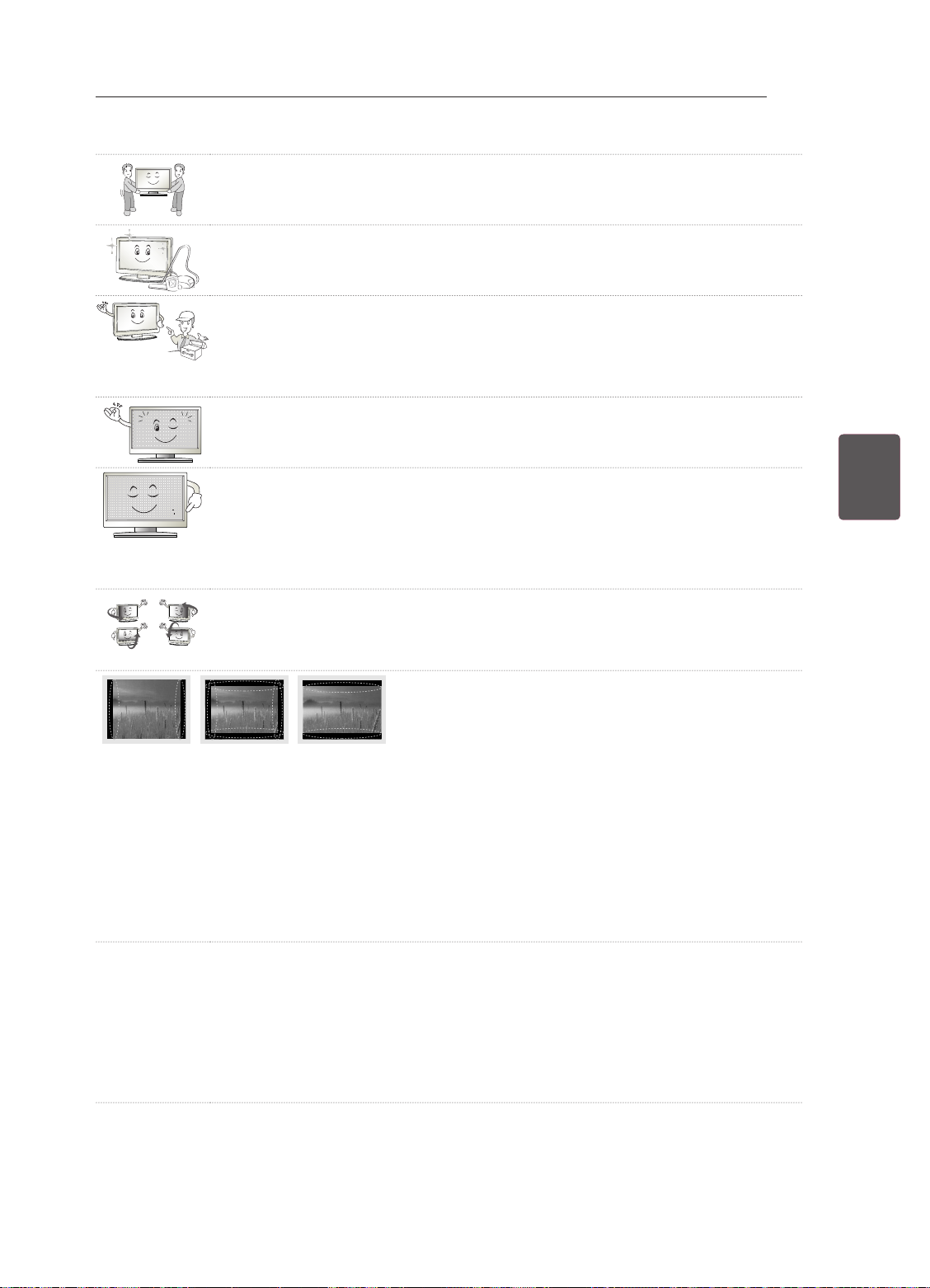
ISTRUZIONI DI SICUREZZA
A causa del peso dell'apparecchio, si raccomanda di spostarlo o rimuoverlo dal
y
suo imballaggio in due persone.
In caso contrario, si possono subire lesioni.
Contattare il centro servizi una volta l'anno per pulire le parti interne del prodotto.
y
La polvere accumulata può causare danni meccanici.
Per l'assistenza, rivolgersi a personale qualificato. È necessario rivolgersi
y
all'assistenza se l'apparecchio è in qualsiasi modo danneggiato, ad esempio in
caso di danni al cavo o alla spina di alimentazione elettrica, liquidi o oggetti caduti
accidentalmente all'interno dell'apparecchio, esposizione a pioggia o umidità,
funzionamento non regolare o cadute.
Se il prodotto risulta freddo al tatto, si potrebbe verificare un leggero "tremolio"
y
all'accensione. Si tratta di un effetto normale, che non indica un malfunzionamento
del prodotto.
Il pannello è un prodotto ad alta tecnologia con risoluzione da due a sei milioni
y
di pixel. È possibile vedere sul pannello minuscoli puntini neri e/o altri puntini dai
colori vivaci (rosso, blu o verde) delle dimensioni di 1 ppm. Ciò non indica un
malfunzionamento e non incide sulle prestazioni e l'affidabilità del prodotto.
Questo fenomeno si verifica anche in prodotti di terze parti e non dà diritto alla
sostituzione del prodotto o a risarcimenti.
La luminosità e il colore del pannello possono differire a seconda della posizione di
y
visione (sinistra/destra/alto/basso).
Il fenomeno è dovuto alle caratteristiche del pannello. Non ha nulla a che vedere
con le prestazioni del prodotto e non indica malfunzionamento.
9
ITAITALIANO
Quando un'immagine fissa (ad esempio la trasmissione del logo di un canale, di un menu a schermo
y
o della scena di un videogioco) è visualizzata per un periodo di tempo prolungato, può danneggiare
lo schermo producendo un effetto noto come "persistenza delle immagini". La garanzia non copre il
prodotto per questo tipo di danno.
Evitare di visualizzare un'immagine fissa sullo schermo del televisore per un periodo prolungato (2 o
più ore per un LCD, 1 ora o più per un televisore al plasma).
Inoltre, se si guarda a lungo il TV utilizzando il formato 4:3, può prodursi un fenomeno di persistenza
delle immagini lungo i bordi del pannello.
Questo fenomeno si verifica anche in prodotti di terze parti e non dà diritto alla sostituzione del
prodotto o a risarcimenti.
Suoni e rumori prodotti dal televisore
y
"Crack": il crack che si avverte quando si guarda o si spegne il televisore è generato dalla
contrazione termica della plastica causata dalla temperatura e dall'umidità. Questo rumore è
comune nei prodotti che prevedono la deformazione dovuta ad agenti termici. Ronzio del pannello o
dei circuiti elettrici: il circuito di commutazione ad alta velocità produce un leggero rumore dovuto al
passaggio di una grande quantità di energia elettrica necessaria per il funzionamento del prodotto. Il
rumore varia a seconda del prodotto.
Il suono generato non incide sulle prestazioni e l'affidabilità del prodotto.
Page 77
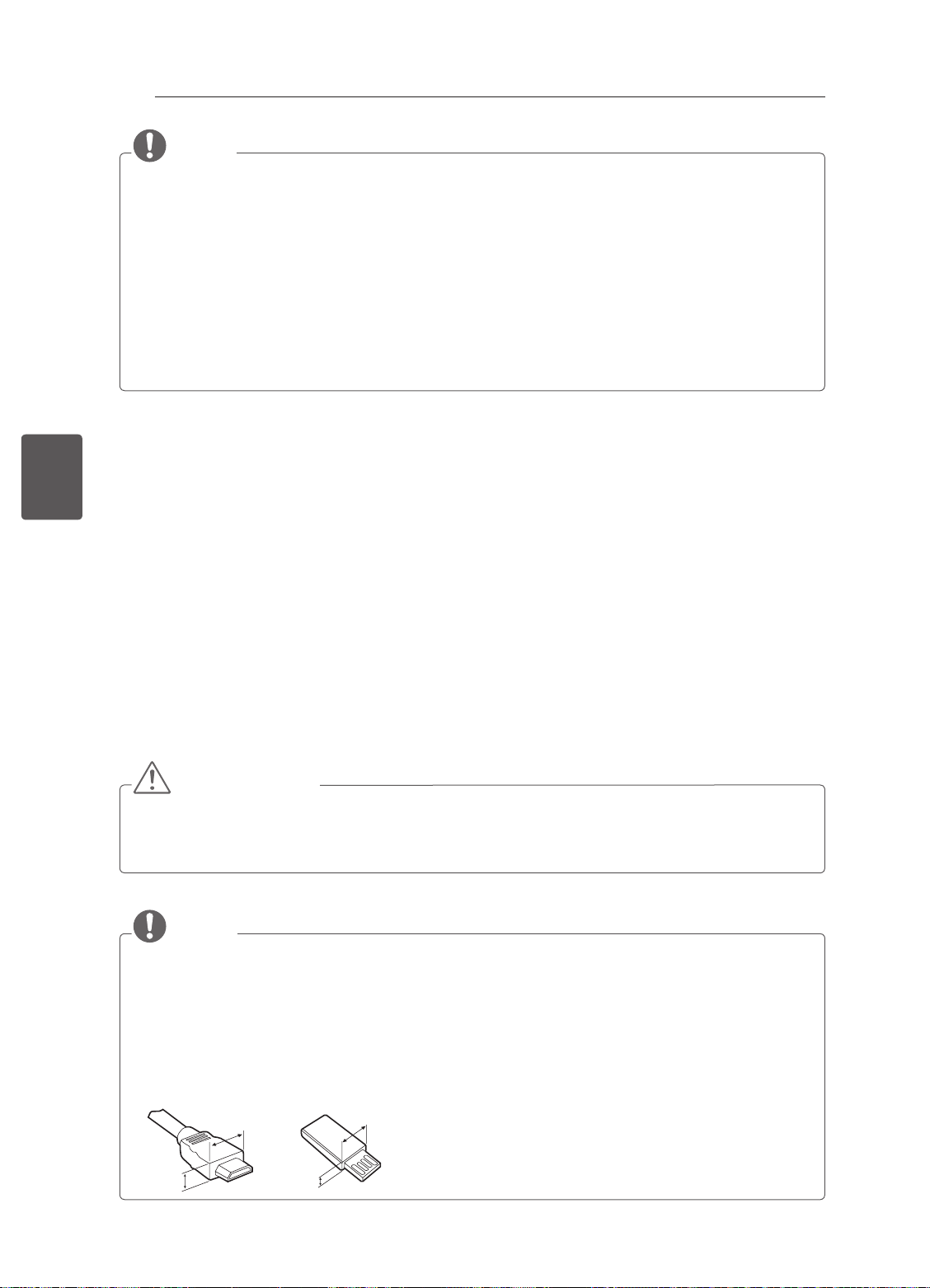
PROCEDURA DI INSTALLAZIONE / MONTAGGIO E PREPARAZIONE
<
<
10
NOTA
yIl televisore raffigurato nell'immagine può essere diverso da quello in uso.
yIl menu OSD (On Screen Display) del TV potrebbe risultare leggermente diverso da quello mostrato
in questo manuale.
yI menu e le opzioni disponibili possono essere diversi a seconda della sorgente in ingresso o del
modello del prodotto utilizzati.
yIn futuro possono essere aggiunte nuove funzioni al televisore.
yIl televisore può essere posto in modalità standby per ridurre il consumo energetico. Spegnere
il televisore se si prevede di non guardarlo per un periodo prolungato. In tal modo si risparmierà
energia elettrica.
yÈ possibile ridurre notevolmente il consumo energetico riducendo il livello di luminosità dell'immagine.
In tal modo si riducono anche i costi complessivi di funzionamento.
ITALIANO
ITA
PROCEDURA DI INSTALLAZIONE
1 Aprire la confezione e vericare che tutti gli accessori siano inclusi.
2 Collegare il supporto al televisore.
3 Collegare un dispositivo esterno al televisore
4 Vericare che la connessione di rete sia disponibile.
È possibile utilizzare le funzioni di rete TV solo quando viene stabilita la connessione di rete. (in base al
modello)
MONTAGGIO E PREPARAZIONE
Disimballaggio
Vericare che nella confezione siano presenti i seguenti elementi. Se manca qualche accessorio, contattare
il rivenditore locale presso il quale è stato effettuato l'acquisto. Le illustrazioni presenti nel manuale
possono differire dal prodotto e dall'articolo effettivi.
ATTENZIONE
yPer garantire la sicurezza e la durata del prodotto, non utilizzare prodotti pirata.
yI danni o lesioni provocati da prodotti pirata non sono coperti dalla garanzia.
yAlcuni modelli presentano una sottile pellicola sullo schermo che non deve essere rimossa.
NOTA
yGli elementi forniti con il prodotto potrebbero variare in base al modello.
yLe specifiche del prodotto o il contenuto del presente manuale possono subire modifiche senza
preavviso in caso di aggiornamento delle funzioni del prodotto.
yPer un collegamento ottimale, le periferiche USB e i cavi HDMI devono essere dotati di cornici di
spessore inferiore a 10 mm e larghezza inferiore a 18 mm. Se il cavo USB o la memory stick USB
non sono compatibili con la porta USB del televisore, usare un cavo di estensione che supporta
l'USB 2.0.
B
A
B
*A
10 mm
=
*B
18 mm
A
=
Page 78
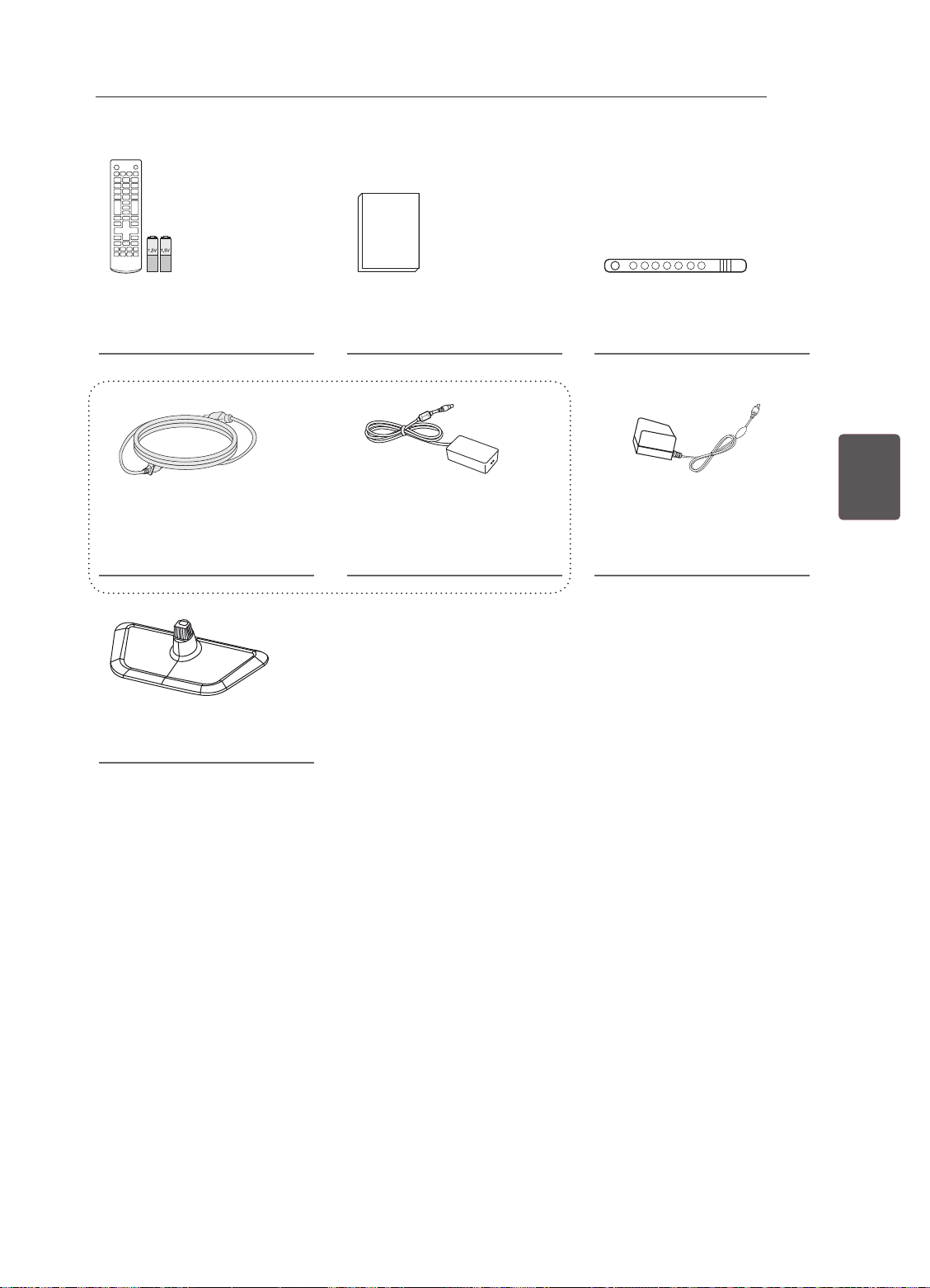
MONTAGGIO E PREPARAZIONE
11
Telecomando e batterie
(AAA)
(vedere pag.17)
Cavo di alimentazione
(Në varësi të modelit dhe shtetit)
(vedere pag. B-4)
Base del supporto
(vedere pag. A-3)
Manuale utente Supporto per cavi
(vedere pag. A-4)
o
Adattatore CA/CC
(vedere pag. B-4)
Adattatore CA/CC
(in base al modello)
(vedere pag. B-4)
ITAITALIANO
Page 79
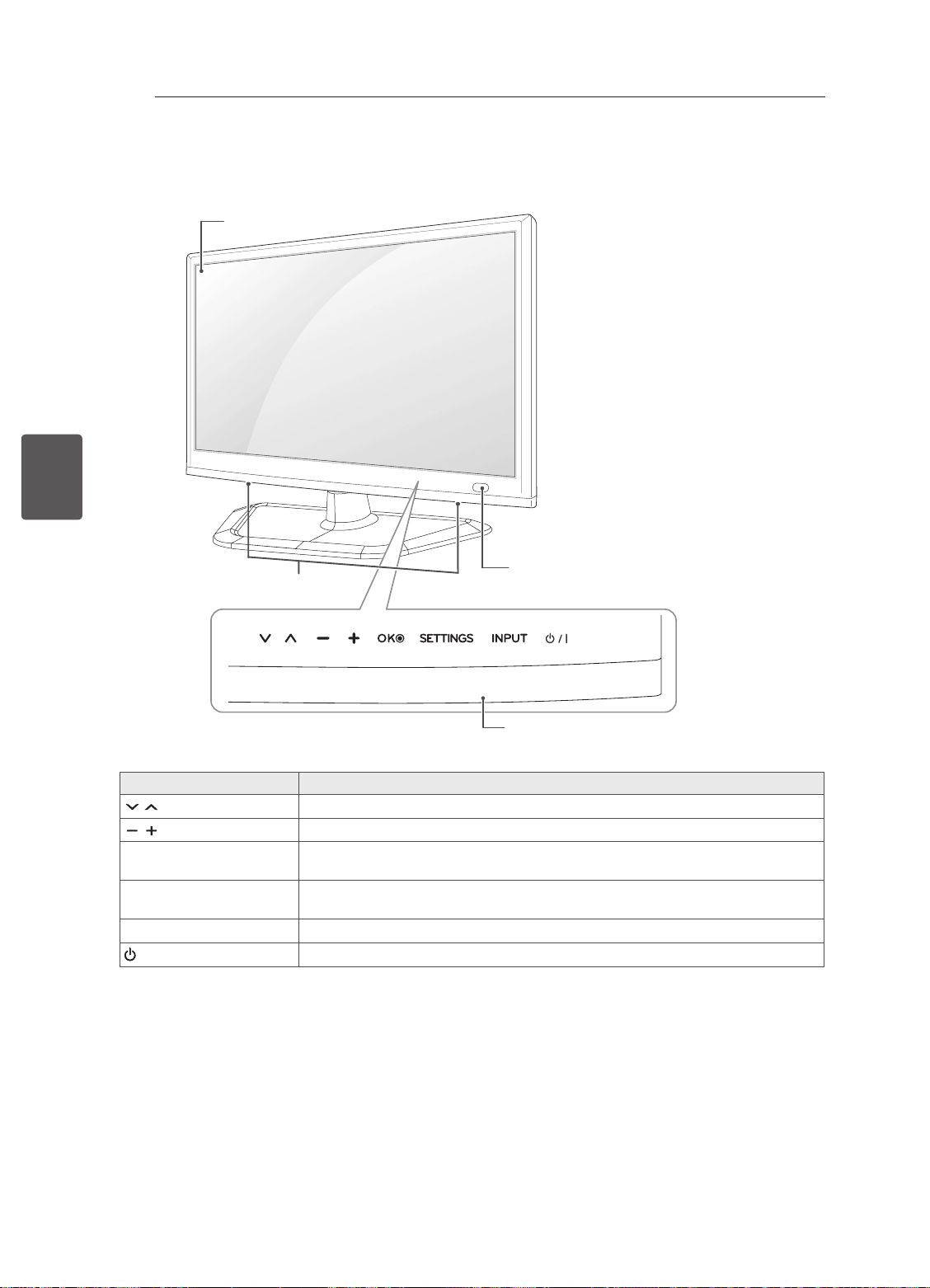
ITALIANO
ITA
MONTAGGIO E PREPARAZIONE
12
Componenti e pulsanti
Schermo
Altoparlanti
Pulsanti a soramento
Consente di scorrere tra i programmi salvati.
Consente di regolare il livello del volume.
ꔉ
OK
SETTINGS Consente di accedere al menu principale o di salvare le scelte effettuate e
INPUT Consente di modificare la sorgente in ingresso.
/ I
1 Tutti i pulsanti sono sensibili allo sfioramento e possono essere attivati semplicemente con la pressione
delle dita.
Consente di selezionare l'opzione di menu evidenziata o confermare
un'opzione.
uscire dal menu.
Consente di accendere o spegnere il dispositivo.
Sensore telecomando
Pulsanti a soramento
Descrizione
1
Page 80
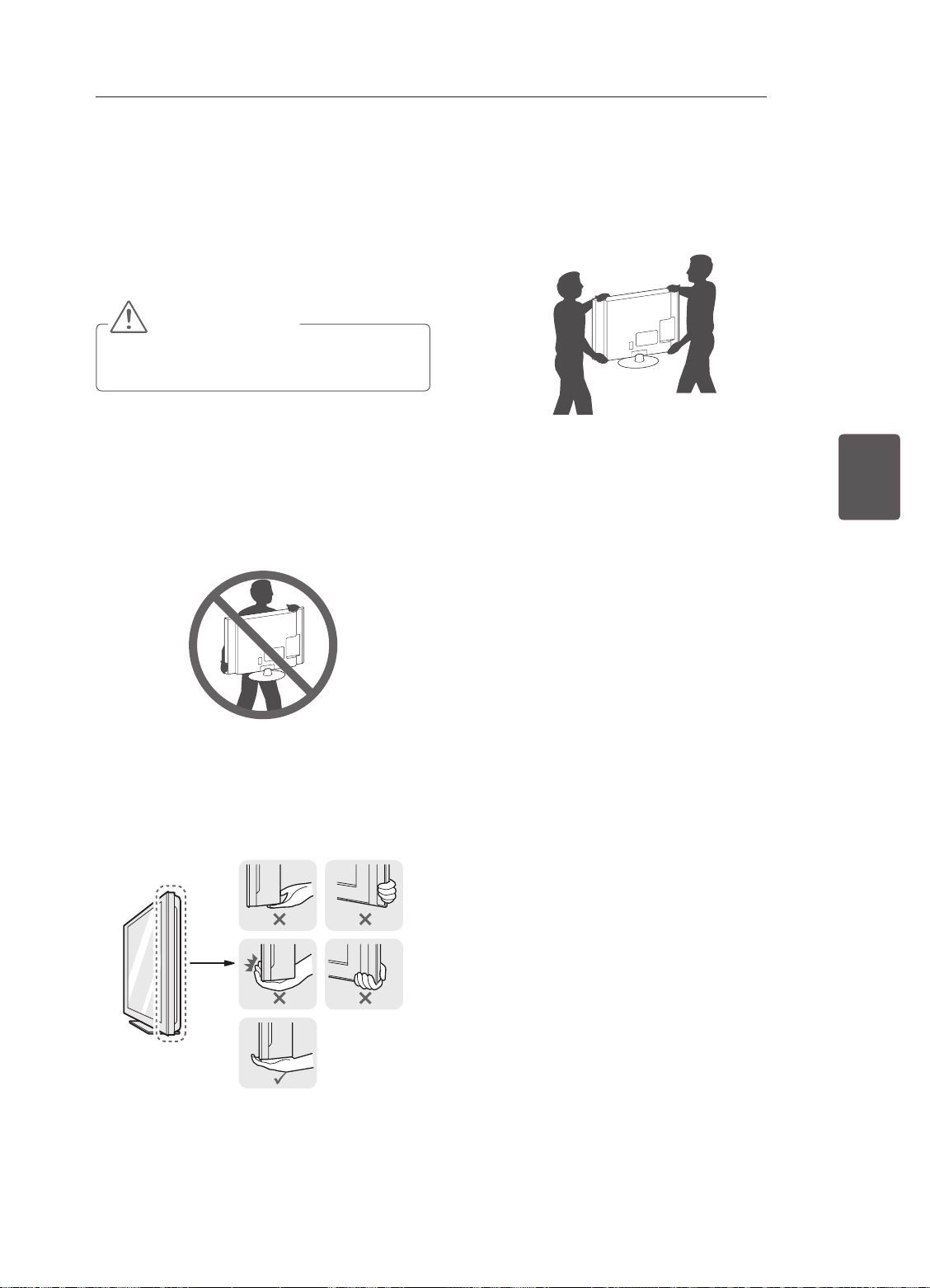
MONTAGGIO E PREPARAZIONE
13
Sollevamento e
spostamento del TV
Prima di sollevare o spostare il televisore, leggere
le seguenti indicazioni per evitare di grafare o
danneggiare l'apparecchio e per un trasporto
sicuro a prescindere dal tipo e dalle dimensioni.
ATTENZIONE
yEvitare di toccare continuamente lo schermo
per non rischiare di danneggiarlo.
ySi consiglia di spostare il televisore nella
scatola o con il materiale di imballaggio
originale.
yPrima di sollevare o spostare il televisore,
scollegare il cavo di alimentazione e tutti i cavi.
yQuando si afferra il televisore, lo schermo deve
essere rivolto dall'altro lato per evitare danni.
yPer trasportare un televisore di grandi
dimensioni occorrono 2 o 3 persone.
yDurante il trasporto, tenere il televisore come
mostrato nell'illustrazione di seguito.
yDurante il trasporto, non esporre il televisore a
oscillazioni o eccessive vibrazioni.
yDurante il trasporto, tenere il televisore diritto,
non ruotarlo su un lato o inclinarlo in avanti o
verso destra o sinistra.
ITAITALIANO
yAfferrare saldamente la parte superiore ed
inferiore della cornice del televisore. Fare
attenzione a non afferrare la parte trasparente,
l'altoparlante o la griglia dell'altoparlante.
Page 81
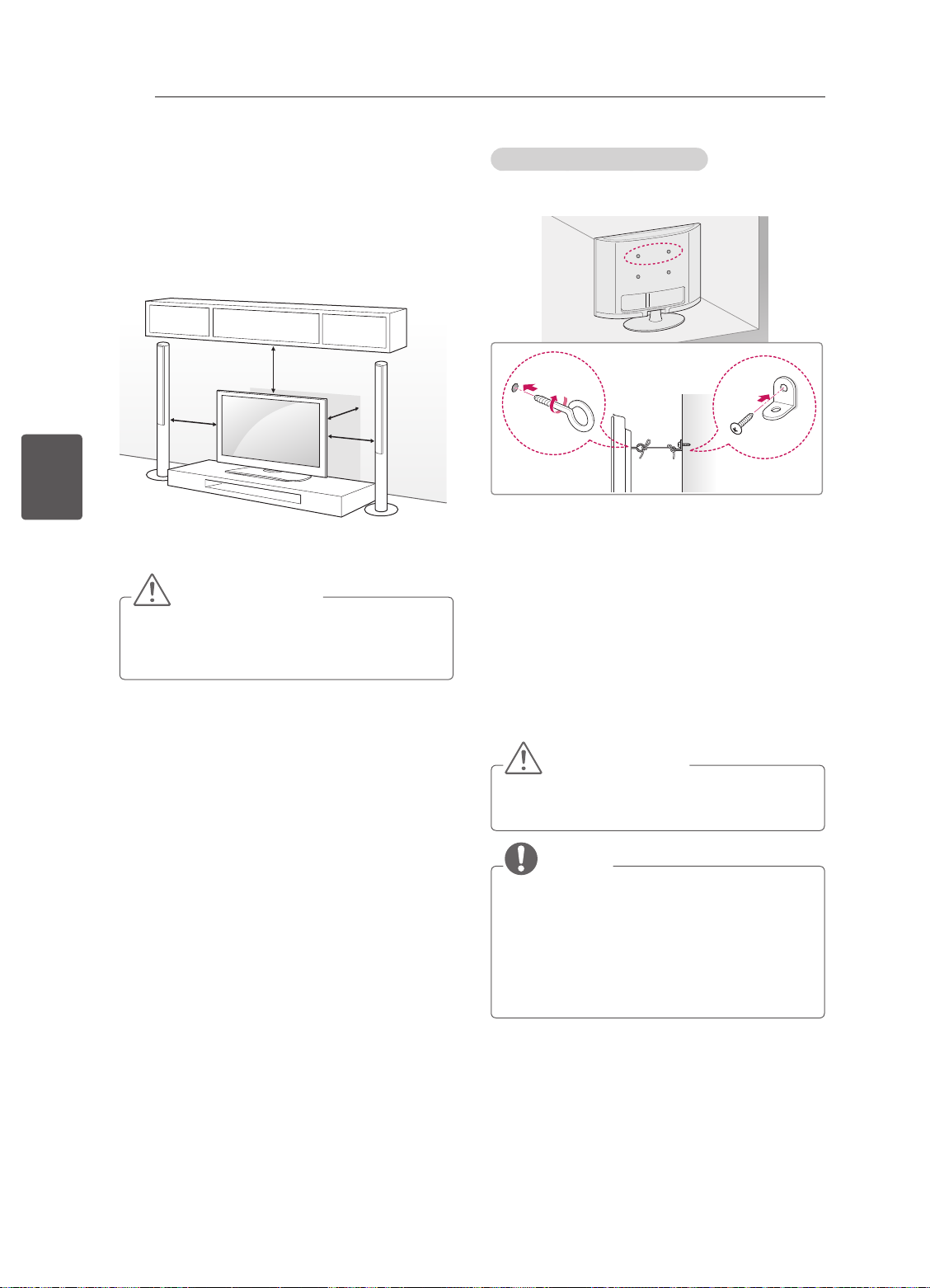
MONTAGGIO E PREPARAZIONE
14
ITALIANO
ITA
Montaggio su un tavolo
1 Sollevare ed inclinare il televisore in posizione
verticale su un tavolo.
- Lasciare uno spazio (minimo) di 10
cm dalla parete per assicurare una
ventilazione adeguata.
10 cm
10 cm
2 Collegare il cavo di alimentazione alla presa a
muro.
ATTENZIONE
yNon posizionare il televisore vicino a fonti di
calore, in quanto ciò potrebbe causare un
incendio o danni.
10 cm
10 cm
Fissaggio della TV alla parete
(Funzione non disponibile su tutti i modelli.)
1 Inserire e ssare i bulloni a occhiello o le staffe
del televisore e i bulloni sul retro del televisore.
- Se vi sono bulloni inseriti nella posizione
dei bulloni a occhiello, rimuoverli.
2 Montare le staffe con le viti sulla parete.
Far corrispondere la posizione della staffa e dei
bulloni a occhiello sul retro del televisore.
3 Legare strettamente i bulloni a occhiello alle
staffe con una corda robusta.
Assicurarsi di mantenere la corda orizzontale
con la supercie piatta.
ATTENZIONE
yImpedire ai bambini di arrampicarsi o
aggrapparsi al televisore.
NOTA
yUtilizzare un piano o un mobile
sufficientemente grandi e robusti da
sostenere correttamente il televisore.
yStaffe, bulloni e corde non sono forniti. È
possibile acquistare gli accessori opzionali
presso il rivenditore locale di fiducia.
Page 82
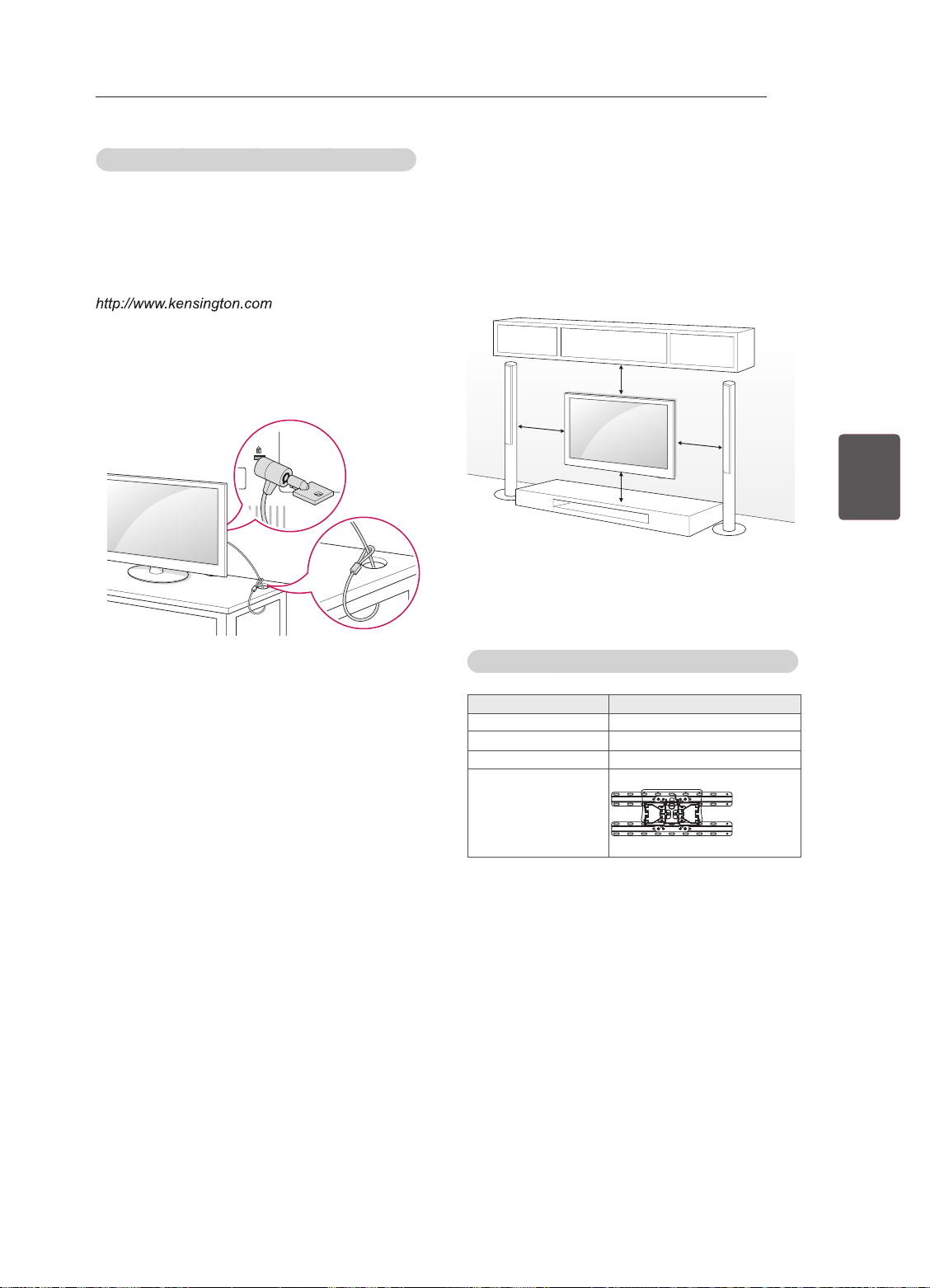
MONTAGGIO E PREPARAZIONE
15
Utilizzo del sistema di sicurezza Kensington
(in base al modello)
Il connettore del sistema di sicurezza Kensington
è situato sul retro del televisore. Per ulteriori
informazioni sull’installazione e l’utilizzo,
consultare il manuale fornito in dotazione con il
sistema di sicurezza Kensington o visitare il sito
.
Collegare il cavo del sistema di sicurezza
Kensington tra il televisore ed un tavolo.
Montaggio a parete
Montare attentamente la staffa per il montaggio a
parete opzionale sul retro del televisore e ssare
la staffa su una parete solida perpendicolare al
pavimento. Per ssare il televisore su altri materiali
da costruzione, contattare il personale qualicato.
LG consiglia di far eseguire il montaggio a parete
da un installatore qualicato esperto.
10 cm
10 cm
10 cm
ITAITALIANO
10 cm
Accertarsi di utilizzare viti e staffe per il montaggio
a parete conformi agli standard VESA. Le
dimensioni standard per i kit di montaggio a parete
sono descritti nella seguente tabella.
Acquisto separato (Staffa per montaggio a parete)
Modello
VESA (A x B) 100 x 100
Vite standard M4
Numero di viti 4
Staffa per
montaggio a parete
22/24/26/28/29LN45
LSW130B
**
Page 83
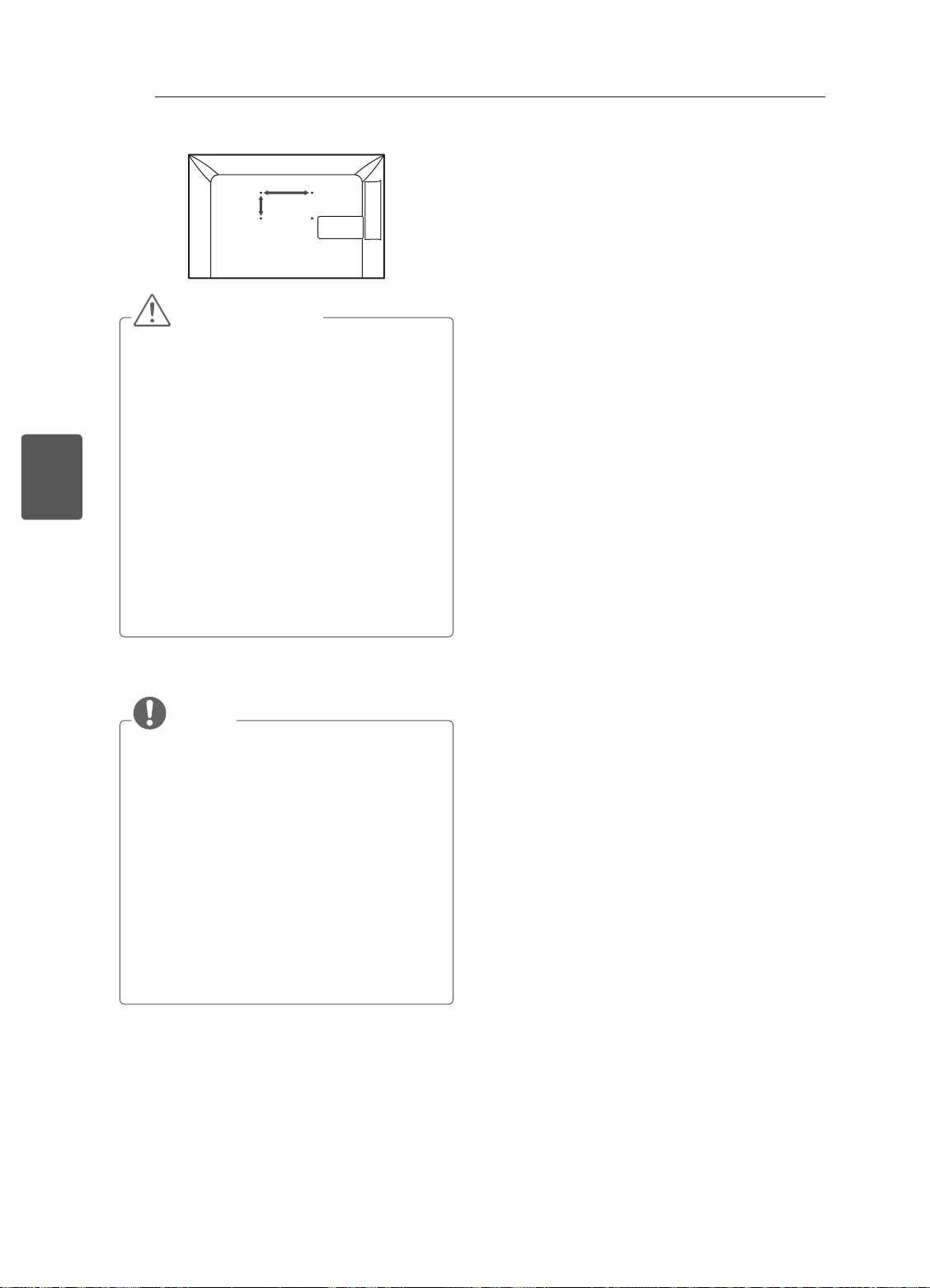
ITALIANO
ITA
MONTAGGIO E PREPARAZIONE
16
A
B
ATTENZIONE
yScollegare l'alimentazione prima di spostare
o installare il televisore. In caso contrario, si
rischiano scosse elettriche.
ySe si installa il TV al soffitto o su una a
parete inclinata, potrebbe cadere e causare
gravi lesioni.
Utilizzare un supporto per montaggio a
parete autorizzato da LG e contattare il
rivenditore locale o il personale qualificato.
yNon serrare eccessivamente le viti per
evitare danni al televisore e rendere nulla la
garanzia.
yUtilizzare le viti e i supporti a parete
conformi agli standard VESA. Gli eventuali
danni o lesioni causati dall'uso errato o
dall'utilizzo di un accessorio non compatibile
non sono coperti dalla garanzia.
NOTA
yUtilizzare le viti elencate nelle specifiche
delle viti conformi agli standard VESA.
yIl kit per il montaggio a parete include un
manuale di installazione e i componenti
necessari.
yLa staffa per montaggio a parete è un
accessorio opzionale. È possibile acquistare
gli accessori opzionali presso il rivenditore
locale di fiducia.
yLa lunghezza delle viti può variare in base
alla staffa di montaggio a parete. Accertarsi
di utilizzare la lunghezza appropriata.
yPer ulteriori informazioni, consultare il
manuale fornito con la staffa di montaggio a
parete.
Page 84
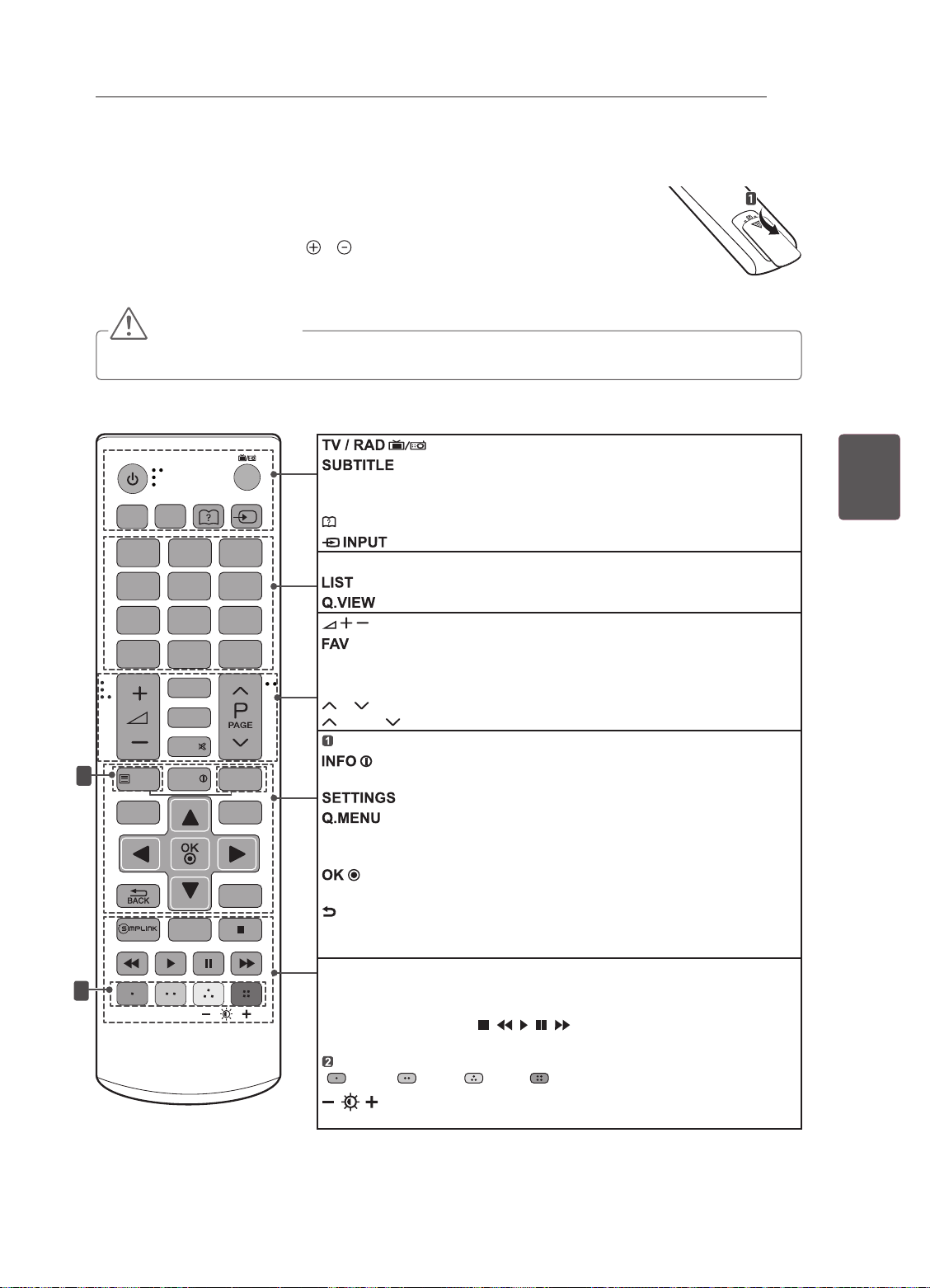
TELECOMANDO
TELECOMANDO
Le descrizioni nel presente manuale si basano sui pulsanti del telecomando.
Leggere attentamente il presente manuale e utilizzare correttamente il televisore.
Per sostituire le batterie, aprire il coperchio del vano batterie, inserire le batterie (AAA
da 1,5 V) rispettando le polarità e come indicato dall'etichetta all'interno del vano
e chiudere il coperchio.
Per rimuovere le batterie, eseguire la procedura di installazione all'inverso.
ATTENZIONE
yNon utilizzare batterie vecchie e nuove contemporaneamente; ciò potrebbe causare danni al telecomando.
Accertarsi di puntare il telecomando verso il sensore sul televisore.
17
TV /
RAD
INPUT
SUBTITLE
1
AD/PIP
2 3
4 5 6
7 8 9
LIST
GUIDE
MUTE
1
TEXT
SETTINGS
INFO
2
0
FAV
TV/PC
Q.VIEW
T.OPT
Q.MENU
EXIT
AD/PIP AD: consente di attivare e disattivare la descrizione audio. /
PIP: consente di attivare e disattivare la modalità PIP.
(Manuale dell’utente) Visualizza la Manuale dell’utente.
Consente di modicare la sorgente in ingresso.
Pulsanti numerici Consentono di inserire i numeri.
Consente di accedere all’elenco programmi salvato.
Consente di tornare al programma precedente.
Consente di regolare il livello del volume.
Consente di accedere all’elenco di canali preferiti.
GUIDE Mostra la Guida al programma.
MUTE Consente di disattivare tutti i suoni.
P Consente di scorrere i programmi salvati o i canali.
PAGE Consente di spostarsi alla schermata precedente o successiva.
TASTI TELETEXT Questi pulsanti vengono utilizzati per il teletext.
Consente di visualizzare le informazioni del programma e della
schermata correnti.
Consente di accedere ai menu rapidi.
Pulsanti di navigazione
menu e le opzioni.
Consente di selezionare menu e opzioni e confermare le scelte
effettuate.
BACK Consente di tornare al livello precedente.
EXIT Consente di eliminare dalla visualizzazione le schermate e di ripristinare
la modalità TV.
SIMPLINK
tramite HDMI-CEC. Consente di aprire il menu SIMPLINK.
TV/PC Zgjidhni modalitetin e televizorit ose kompjuterit.
Pulsanti di controllo ( ) Consente di controllare i menu
SUPPORTI o i dispositivi compatibili SIMPLINK (USB, SIMPLINK).
Pulsanti colorati
( Rosso Verde Giallo Blu)
(Retroillum) Consente di regolare la luminosità dello
schermo controllando la retroilluminazione.
Consente di selezionare il programma Radio, TV o DTV.
Consente di visualizzare i sottotitoli preferiti in modalità digitale.
Consente di accedere ai menu principali.
(su/giù/sinistra/destra) Consentono di scorrere i
Consente di accedere ai dispositivi AV collegati con un cavo HDMI
Consentono di accedere a funzioni speciali in alcuni menu.
ITAITALIANO
Page 85
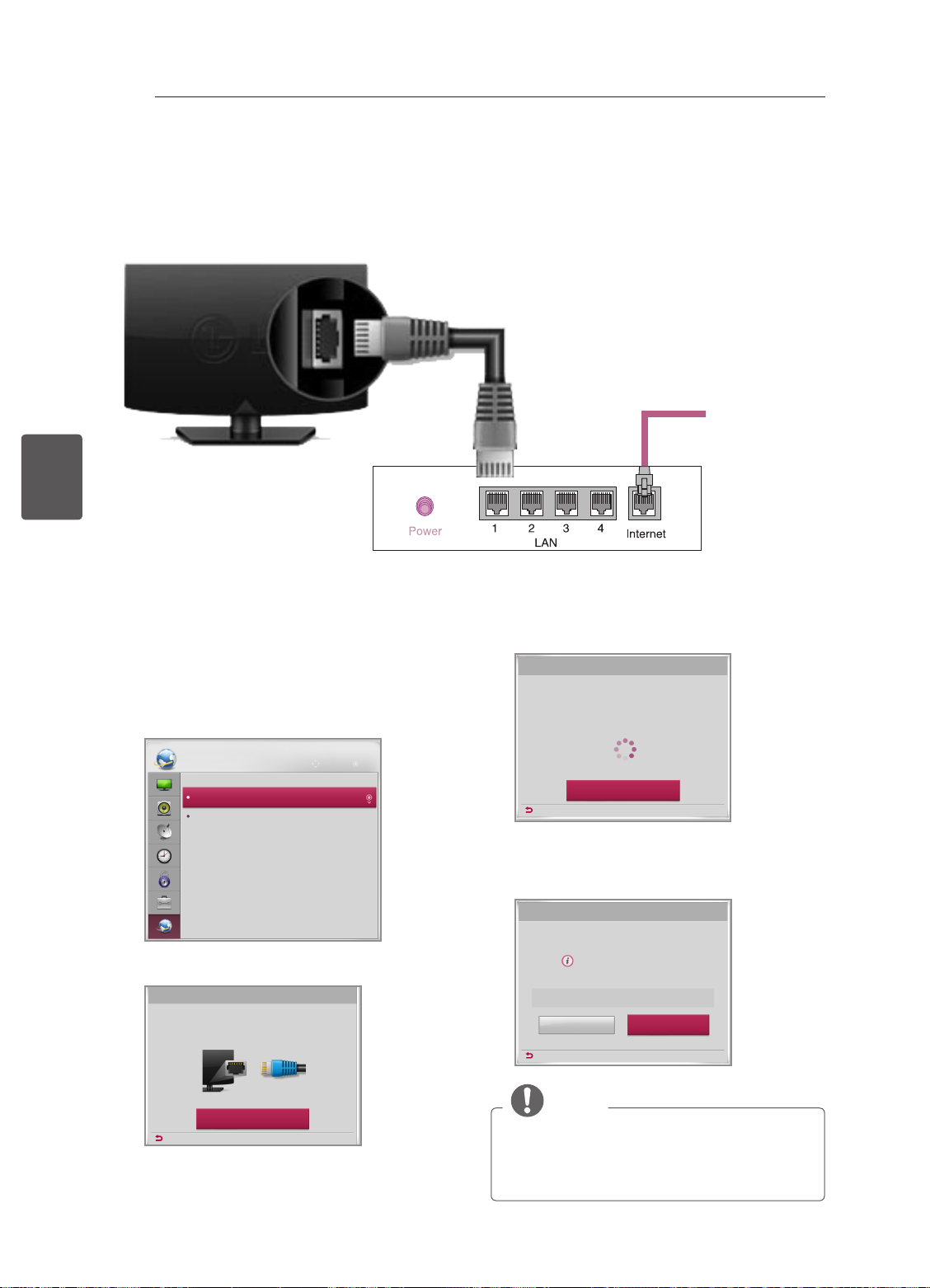
ITALIANO
ITA
INTRATTENIMENTO
18
INTRATTENIMENTO
Solo il modello LN450U (solo nel Regno Unito)
Il televisore rafgurato nell’immagine può essere diverso da quello in uso.
Connessione di rete cablata
(*non fornito)
Connessione a
Internet
Impostazione rete
1 Premere il pulsante SETTING per accedere al
menu principale.
2 Selezionare RETE -> menu Impostazione
rete.
RETE
Impostazione rete
Stato rete
3 Selezionare Avvia connessione.
Impostazione rete
Collegare un cavo LAN al retro della TV.
Congurando la rete, attiverai funzioni di rete sulla TV.
Sposta OK
Router cablato
4 Il dispositivo prova a connettersi
automaticamente alla rete.
Impostazione rete
Connessione rete in corso...
Annulla
Precedente
5 Viene visualizzata la rete a cui si è connessi.
Selezionare Completato per confermare la
connessione di rete.
Impostazione rete
Rete cablata connessa.
Per impostazioni dettagliate, selezionare
[Impostazione avanzata].
Impostazione avanzata
Precedente
Completato
Avvia connessione
Precedente
NOTA
yRegno Unito: porta LAN disponibile (la porta
LAN è stata aggiunta per supportare HD
MHEG).
yAltre aree: porta LAN non disponibile.
Page 86
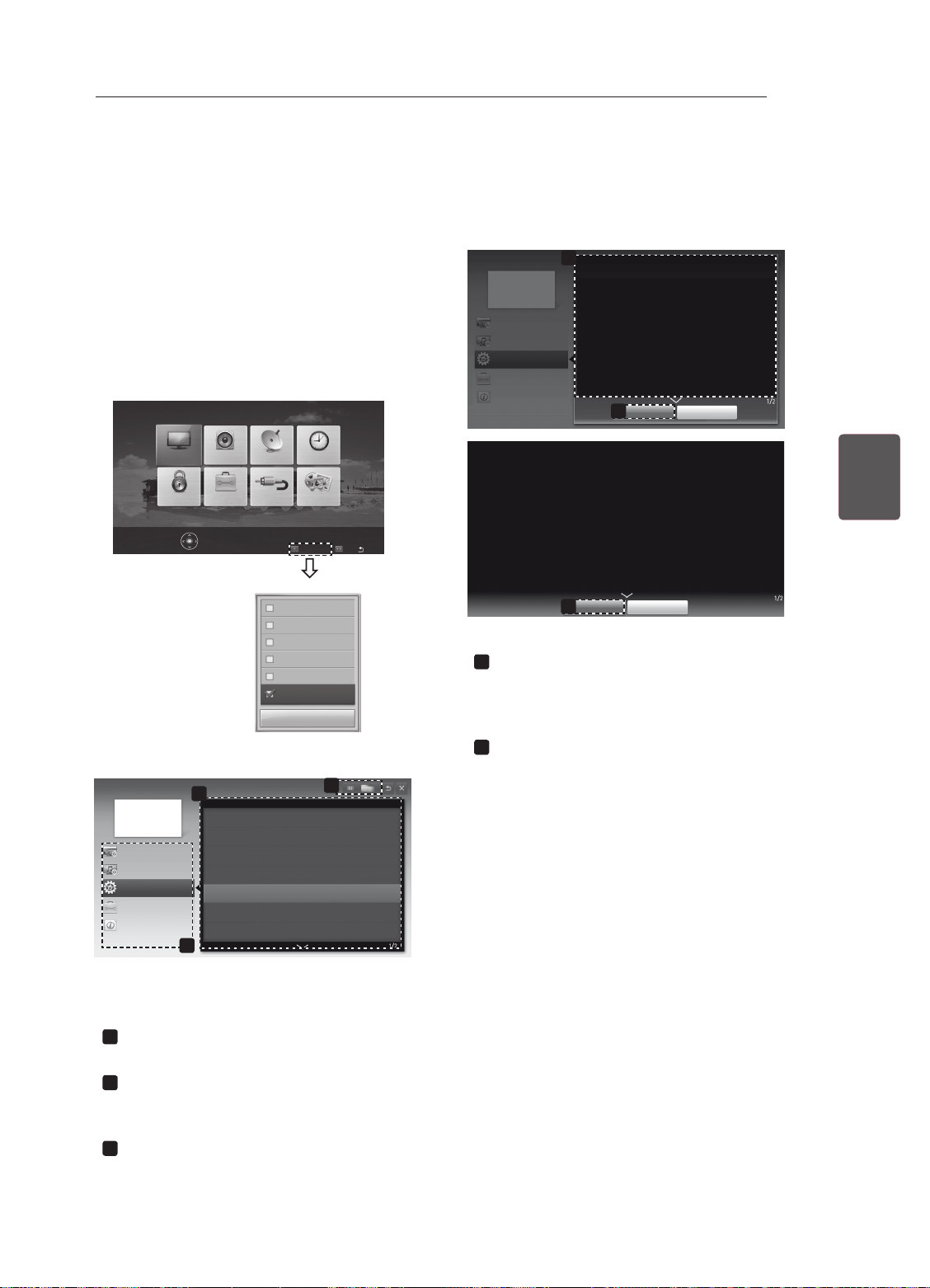
UTILIZZO DELLA GUIDA UTENTE
UTILIZZO DELLA GUIDA UTENTE
La guida utente consente di accedere più facilmente a informazioni dettagliate sul televisore.
19
1 Premere SETTINGS per accedere ai menu
principali.
2 Premere il pulsante ROSSO per accedere ai
menu Assistenza clienti.
3 Premere i pulsanti di navigazione per scorrere
no a Manuale dell’utente, quindi premere
OK.
IMMAGINE
AUDIO
IMPOSTAZIONI
OPZIONEBLOCCO
Premere OK() per conf. impost. immagini.
TEMPO
SUPPORTIINGRESSO
Assistenza clienti
FAQ
Aggiorn. software
Test immagine
Test audio
Test segnale
Info prodotto/servizio
Manuale dell’utente
Chiudi
Uscita
Manuale dell’utente
Impostazione CONFIG.
Impostazione IMMAGINE, SUONO
OPZIONE
Funzione avanzata
Informazione
Visualizza la descrizione del menu
1
1
OPZIONE > Per impostare la lingua
SETTINGS OPZIONE Lingua
È possibile selezionare la lingua del menu visualizzato sullo
schermo e dell’audio digitale.
• Lingua : Consente di selezionare una lingua per il testo
visualizzato.
• Audio Language [Solo in modalità digitale] : Consente di
selezionare la lingua desiderata durante la visualizzazione di
trasmissioni digitali che includono diverse lingue.
• Lingua sottotitoli [Solo in modalità digitale] : Utilizzare la
funzione dei sottotitoli quando sono trasmesse due o più
lingue dei sottotitoli.
✎
Se i dati dei sottotitoli nella lingua selezionata non
vengono trasmessi, vengono riprodotti i sottotitoli nella
lingua predenita.
Zoom avanti
2
SETTINGS OPZIONE Lingua
È possibile selezionare la lingua del menu visualizzato sullo
schermo e dell’audio digitale.
• Lingua : Consente di selezionare una lingua per il testo
visualizzato.
• Audio Language [Solo in modalità digitale] : Consente di
selezionare la lingua desiderata durante la visualizzazione di
trasmissioni digitali che includono diverse lingue.
• Lingua sottotitoli [Solo in modalità digitale] : Utilizzare la
funzione dei sottotitoli quando sono trasmesse due o più lingue
dei sottotitoli.
✎
Se i dati dei sottotitoli nella lingua selezionata non vengono
trasmessi, vengono riprodotti i sottotitoli nella lingua
predenita.
Zoom indietro
2
Chiudi
Chiudi
selezionato.
È possibile utilizzare i tasti ꕌ/ꕍ per spostarsi
tra le pagine.
Per ingrandire o ridurre la schermata.
2
ITAITALIANO
Manuale dell’utente
Impostazione CONFIG.
Impostazione IMMAGINE, SUONO
OPZIONE
Funzione avanzata
Informazione
2
Per utilizzare dispositivi in ingresso
Per impostare la tecnologia ODC (Circuito di sovramoltiplicazione della velocità)_ALL
Per utilizzare PIP (immagine nell’immagine)
Per impostare opzioni di tempo
Per impostare opzioni per bloccare la TV
Per impostare la lingua
Per impostare il paese
3
1
Il televisore raffigurato nell’immagine può essere
diverso da quello in uso.
Consente di selezionare la categoria
1
desiderata.
Consente di selezionare la voce desiderata.
2
È possibile utilizzare ꕌ/ꕍ per spostarsi tra le
pagine.
Consente di scegliere la descrizione della
3
funzione desiderata dall’indice.
Page 87
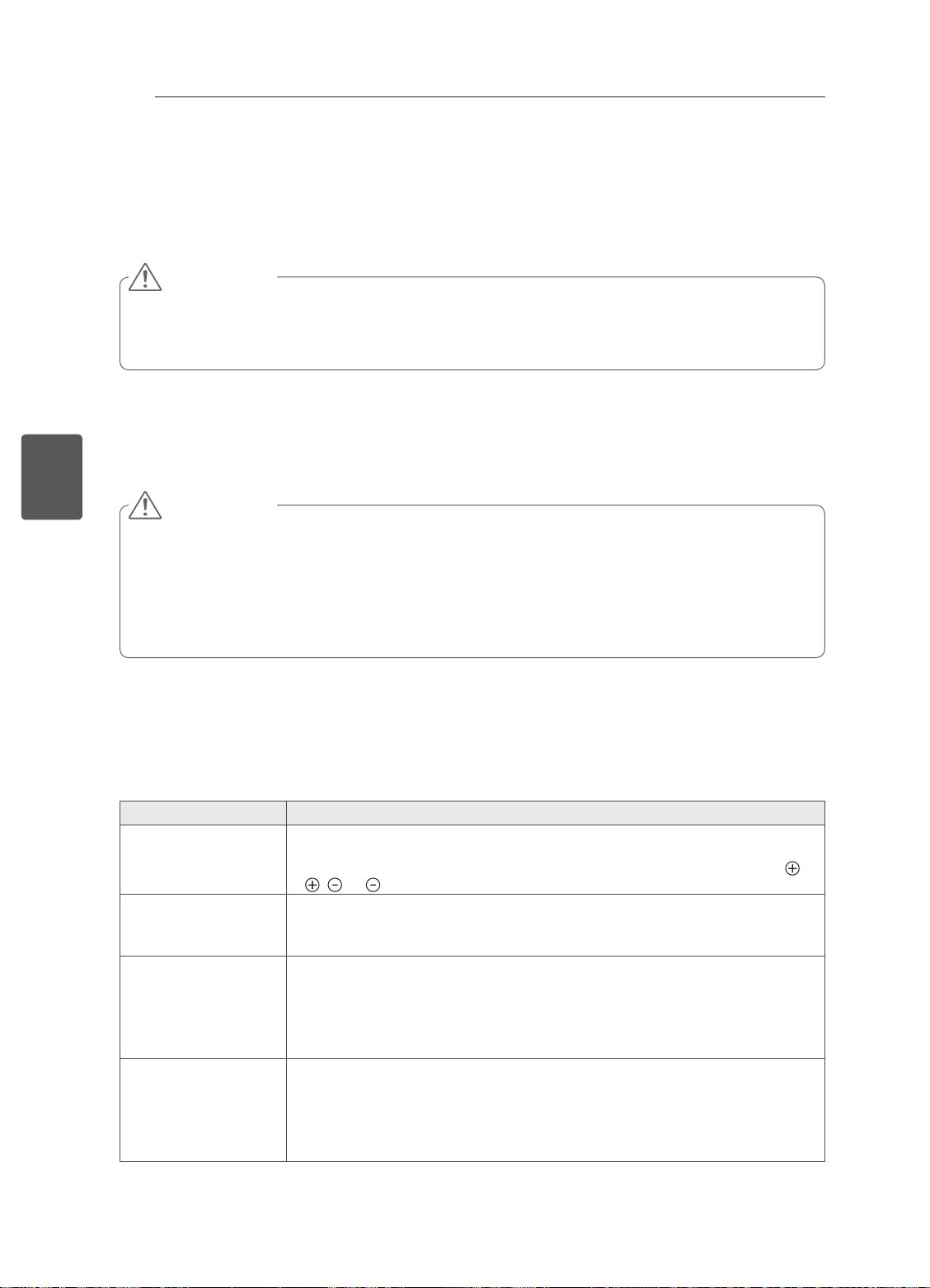
MANUTENZIONE / RISOLUZIONE DEI PROBLEMI
20
MANUTENZIONE
Pulizia del televisore
Pulire regolarmente il televisore per mantenerne le prestazioni ottimali e per estenderne la durata nel tempo.
ATTENZIONE
y Innanzitutto, accertarsi di spegnere e di scollegare il cavo di alimentazione e tutti gli altri cavi.
y Quando il televisore viene lasciato incustodito e non in uso per un lungo periodo, scollegare il cavo di
alimentazione dalla presa a muro per evitare possibili danni derivanti da fulmini e sovratensioni elettriche.
Schermo, cornice, telaio e supporto
ITALIANO
ITA
Per rimuovere la polvere o lo sporco leggero, pulire la superficie con un panno morbido, asciutto e pulito.
Per rimuovere lo sporco maggiore, pulire la superficie con un panno morbido inumidito con acqua pulita o un
detergente delicato diluito. Quindi, passare immediatamente un panno asciutto.
ATTENZIONE
y Evitare di toccare continuamente lo schermo per non danneggiarlo.
y Non premere, strofinare o colpire la superficie dello schermo con le unghie o con oggetti affilati per non graf-
fiarlo e provocare distorsioni delle immagini.
y Non utilizzare agenti chimici perché potrebbero danneggiare il prodotto.
y Non nebulizzare del liquido sulla superficie. In caso di penetrazione di acqua nel televisore, potrebbero
verificarsi incendi, scosse elettriche o malfunzionamenti.
Cavo di alimentazione
Rimuovere regolarmente la polvere o lo sporco che si accumula sul cavo di alimentazione.
RISOLUZIONE DEI PROBLEMI
Problema Soluzione
Impossibile controllare
la TV con il telecomando.
Non viene visualizzata
alcuna immagine e non
è prodotto alcun suono.
y Controllare il sensore del telecomando sul prodotto e riprovare.
y Verificare la presenza di eventuali ostacoli tra il televisore e il telecomando.
y Controllare che le batterie siano ancora cariche e correttamente inserite ( su
, su ).
y Controllare che la TV sia accesa.
y Verificare che il cavo di alimentazione sia collegato ad una presa a muro.
y Verificare se esiste un problema nella presa a muro collegando altri prodotti.
La TV si spegne
improvvisamente.
Durante il collegamento
al PC (RGB/HDMI),
viene visualizzato il
messaggio “Nessun
segnale” o “Formato
non valido”.
y Controllare le impostazioni di controllo dell’alimentazione. L’alimentazione
potrebbe essere stata interrotta.
y Verificare se la funzione Timer Spegnimento è attiva nelle impostazioni rela-
tive all’ora.
y In mancanza del segnale, il televisore si spegne automaticamente dopo 15
minuti di inattività.
y Spegnere/accendere la TV utilizzando il telecomando.
y Ricollegare il cavo RGB/HDMI.
y Riavviare il PC con la TV accesa.
Page 88
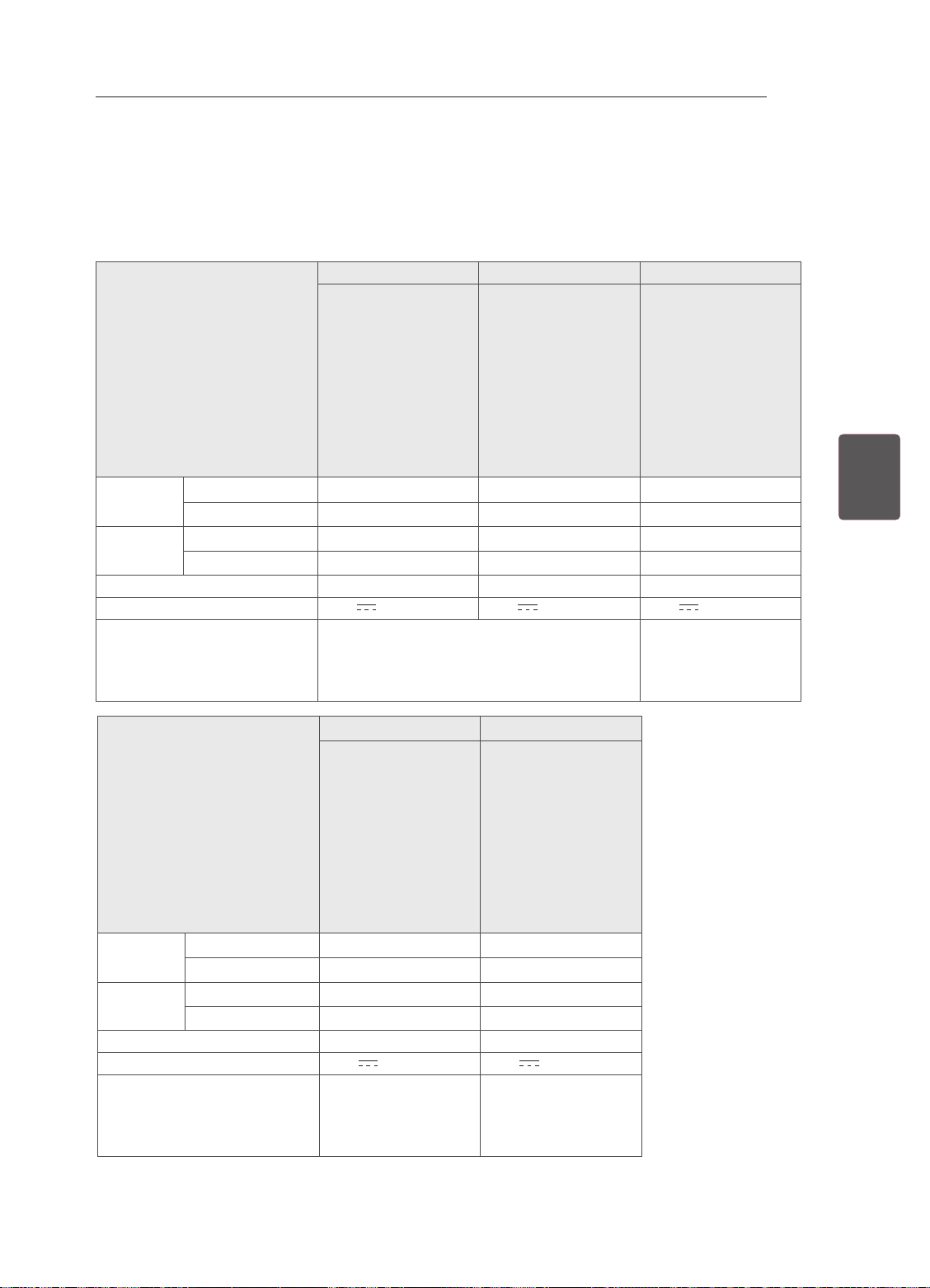
SPECIFICHE TECNICHE
SPECIFICHE TECNICHE
Le specifiche del prodotto precedentemente indicate possono subire modifiche senza preavviso in seguito
all’aggiornamento delle funzioni del prodotto.
Per l’alimentazione e il consumo di energia, consultare l’etichetta sul prodotto.
22LN45
**
24LN45
**
26LN45
**
21
22LN4500-ZA
22LN450S-ZA
22LN450V-ZA
MODELLI
Dimensioni
(L x A x P)
Peso
Consumo elettrico
Requisiti di alimentazione 19 V 19 V 19 V
Adattatore CA/CC
MODELLI
Dimensioni
(L x A x P)
Peso
Consumo elettrico
Requisiti di alimentazione 19 V 19 V
Adattatore CA/CC
Con supporto (
Senza supporto (mm)
Con supporto (
Senza supporto (kg) 3.2 3.5 4.2
Con supporto (
Senza supporto (mm)
Con supporto (
Senza supporto (kg) 5.0 5.4
22LN450U-ZB
22LN450R-ZB
22LN450B-ZB
22LN4505-ZB
22LN4503-ZB
22LN4573-ZI
mm) 513 x 362 x 140
513 x 320 x 63.0 557 x 348 x 62.3 621 x 386 x 72.9
kg) 3.4
30 W 33 W 38 W
Produttore : Lienchang
Modello : LCAP16B-E, LCAP25B
Produttore : LG Innotek
Modello : PSAB-L204B, PSAB-L205B
28LN45
28LN4500-ZA
28LN450S-ZA
28LN450V-ZA
28LN450U-ZB
28LN450R-ZB
28LN450B-ZB
28LN4505-ZB
28LN4503-ZB
28LN4573-ZI
mm) 650 x 440 x 170 668 x 456 x 182
650 x 400 x 62.3 686 x 410 x 81.9
kg) 5.4 5.8
39 W 40 W
Produttore : LG Innotek
Modello : PSAB-L101A
Produttore : Lite-On
Modello : PA-1650-64
**
24LN4500-ZA
24LN450S-ZA
24LN450V-ZA
24LN450U-ZB
24LN450R-ZB
24LN450B-ZB
24LN4505-ZB
24LN4503-ZB
24LN4573-ZI
557 x 390 x 140 621 x 431 x 162
3.7 4.5
29LN45
29LN4500-ZA
29LN450S-ZA
29LN450V-ZA
29LN450U-ZB
29LN450R-ZB
29LN450B-ZB
29LN4505-ZB
29LN4503-ZB
29LN4573-ZI
Produttore : LG Innotek
Modello : PSAB-L206A
**
26LN4500-ZA
26LN450S-ZA
26LN450V-ZA
26LN450U-ZB
26LN450R-ZB
26LN450B-ZB
26LN4505-ZB
26LN4503-ZB
26LN4573-ZI
Produttore : LG Innotek
Modello : PSAB-L101A
Produttore : Lite-On
Modello : PA-1650-64
ITAITALIANO
Page 89
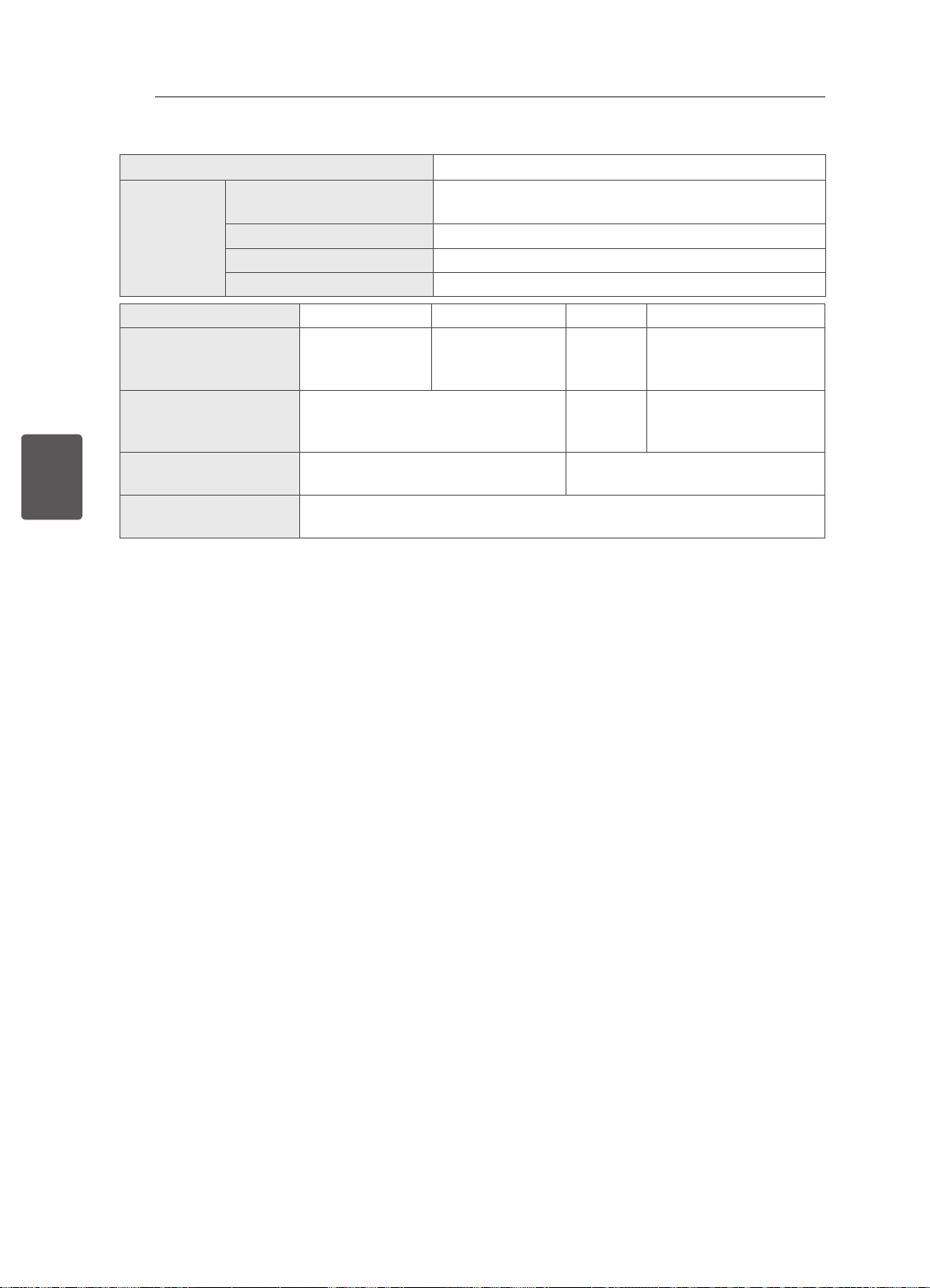
SPECIFICHE TECNICHE
22
ITALIANO
ITA
Dimensione modulo CI (L x A x P)
Temperatura di funzionamento
Condizioni
ambientali
Umidità operativa Inferiore all'80%
Temperatura di stoccaggio Da -20 °C a 60 °C
100,0 mm x 55,0 mm x 5,0 mm
Da 0 °C a 40 °C
Umidità di stoccaggio Inferiore all’85%
Satellite Digital TV1Satellite Digital TV2Digital TV Analogue TV
Sistema televisivo DVB-T
DVB-C
DVB-S/S2
Copertura programma VHF, UHF
C-Band, Ku-Band
DVB-T/T2
DVB-C
DVB-S/S2
DVB-T
DVB-C
VHF, UHF
PAL/SECAM B/G/D/K
PAL-I/I’, SECAM L/L’
3
VHF: E2 to E12, UHF :
E21 to E69, CATV: S1 to
S20, HYPER: S21 to S47
Numero massimo di
6,000 1,500
programmi memorizzabili
Impedenza antenna
75 Ω
esterna
1 Solo modelli satellitari
2 Solo modelli che supportano DVB-T2
3 Ad eccezione dei modelli che supportano DVB-T2
Dichiarazione di conformità
La società LG Electronics Italia S.p.A. dichiara che il televisore a colori LG
22LN4500-ZA/22LN450S-ZA/22LN450V-ZA/22LN450U-ZB/22LN450R-ZB/22LN450B-ZB/22LN4505-ZB
22LN4503-ZB/22LN4573-ZI/24LN4500-ZA/24LN450S-ZA/24LN450V-ZA/24LN450U-ZB/24LN450R-ZB
24LN450B-ZB/24LN4505-ZB/24LN4503-ZB/24LN4573-ZI/26LN4500-ZA/26LN450S-ZA/26LN450V-ZA
26LN450U-ZB/26LN450R-ZB/26LN450B-ZB/26LN4505-ZB/26LN4503-ZB/26LN4573-ZI/28LN4500-ZA
28LN450S-ZA/28LN450V-ZA/28LN450U-ZB/28LN450R-ZB/28LN450B-ZB/28LN4505-ZB/28LN4503-ZB
28LN4573-ZI/29LN4500-ZA/29LN450S-ZA/29LN450V-ZA/29LN450U-ZB/29LN450R-ZB/29LN450B-ZB
29LN4505-ZB/29LN4503-ZB/29LN4573-ZI
è fabbricato in conformità alle prescrizioni del D.M. n°548 del 28/08/95, pubblicato sulla G.U.
n°301 del 28/12/95 ed in particolare è conforme a quanto indicato nell’art. 2, comma 1 dello stesso decreto.
Questo apparecchio è fabbricato nella C.E.E nel rispetto delle disposizioni di cui al D.M. 26/03/92ed in
particolare è conforme alle prescrizioni del Art. 1 dello stesso decreto ministeriale.
Page 90
;WDO0
'LDJUDPPL DEORFFKL 6/57&6
$79
6,
'79
0
R
Q
WDJH
)(B76>@6<1&9$/,'
&/.(5525
78B&9%6
;
,)
6(5,$/)/$6+
,&0ELW
/9'6
)+'+]
))&)+'3
63,
+'0,'9,
R WDJH
6,)
70'6
''5*E
,&
r
[iXnX][]nTijrW
0;/(0,*
''5$GG
''5'DWD
''5*ELW
,&
r
[iXnX][]nTijrW
5*%3&
&RPSRQHQW$9
&20021
/
5
&9%6<3E3U/5
5*%+9
1$1')/$6+
,&*ELW
r
`mXnW_|WkTzjiW
3&0 $> @
,&.ELW
5(;%6$6$
,&
$
3&'9,$XGL,Q
63',)
5HD
U
ͷΆͽͽ΄ʹͲ΅
6&B&9%6B,1
6&B5*%
)(B9287
3&0
B
$>
@
&,6ORW
,&%XIIHU
7&/&;)7
76B'$7$>@
3&0B'$7$>@
)(B76B'$7$>@
3&0B$>@
6LGH
$
,&
63',)
63',)
73715351
(7+(51(7
&21752/
΄ͶͿ΄
΄ͷ΅΅Άʹ
ΐ΄ʹͽ΄͵Ͳ
ͼͶΊ
+3287
86%
'3'0
6LGH
70'6
62)7728&+
7$&76:,7&+
ͽͶ͵ΐ
ͼͶΊ
ͺ
$XGLR$03
67$%:
63./5
,6
Diagrammi a blocchi [LD31A] DVB-T/C(2D)
CI Slot
SPK L/R
FPC(30P)
SER IAL FLASH
IC100 (8M bit )
SPI
AIF, DIF
LVDS
(HD/50Hz)
24M
X-tal
IC1202
DDR3 1Gb
H5TQ1G63EFR-PBC
TC74LCX244FT
IC103
EEPR OM 256Kbi t
IC1201
DDR3 2Gb
W25Q80BVSS IG
DDR3 Add.
DDR3 Data
SIF
AT24C2 56C-SS HL-T
NAND FLASH
IC102 (1Gbit )
H27U1G8F2CTR-BC
H5TQ2G63DFR-PBC
I2C
PCM_A[0:7]
S7LR-M1
(LGE2121-
FE_ VOU T
CVBS, Y/Pb/Pr, L/R
Buff er
MS10)
SC1_CVBS_IN
PCM_DATA[0:7]
PCM_A[8:14]
IC101
SC1_R/G/B
TS_DATA[0:7]
FE_TS_DATA[0:7]
TMDS
NTP7513
Audio AMP
(TOUCH)
CONTROL
IR & LED /
ͺ
ͽͶ͵ΐ
ͼͶΊ
ͼͶΊ
AUD_MASTER_CLK,
AUD_LRCH,
USB
AUD_LRCK, AUD_SCK
H/P L/R
H/P
Audio in
DP/DM
TDSS-
(LGIT)
AIR/Cab le
G501D(B)
F-SCART
Component1
Side
R ear
HDMI1(MHL)
Page 91

Page 92

MANUAL DE USUARIO
TV LED
* La TV LED de LG aplica una pantalla LCD con iluminación posterior LED.
Antes de utilizar el equipo, lea este manual con atención y consérvelo
para consultarlo cuando lo necesite.
www.lg.com
Page 93
CONTENIDO
2
CONTENIDO
3 LICENCIAS
3 AVISO DE SOFTWARE DE CÓDIGO
ABIERTO
3 CONFIGURACIÓN DEL DISPOSITIVO
DE CONTROL EXTERNO
4 INSTRUCCIONES DE SEGURIDAD
10 PROCEDIMIENTO DE INSTALACIÓN
ESPAÑOL
ESP
10 MONTAJE Y PREPARACIÓN
10 Desembalaje
12 Piezas y botones
13 Elevación y desplazamiento de la TV
14 Montaje en una mesa
15 Montaje en una pared
17 MANDO A DISTANCIA
18 ENTRETENIMIENTO
18 Conexión de red cableada
18 Configuración de red
19 USO DE LA GUÍA DEL USUARIO
20 MANTENIMIENTO
20 Limpieza de la TV
20 - Pantalla, marco, carcasa y soporte
20 - Cable de alimentación
20 SOLUCIÓN DE PROBLEMAS
ADVERTENCIA
ySi ignora los mensajes de advertencia,
podría provocar daños personales graves o
incluso la muerte.
PRECAUCIÓN
ySi ignora los mensajes de precaución,
podría sufrir daños personales leves o
dañar el producto.
NOTA
yLas notas le ayudarán a entender y a
utilizar el producto adecuadamente. Lea
estas notas atentamente antes de utilizar el
producto.
Page 94
LICENCIAS / AVISO DE SOFTWARE DE CÓDIGO ABIERTO / CONFIGURACIÓN DEL DISPOSITIVO DE CONTROL EXTERNO
LICENCIAS
Las licencias admitidas pueden diferir según el modelo. Para obtener más información acerca de las
licencias, visite www.lg.com.
Fabricado bajo licencia de Dolby Laboratories. "Dolby" y el símbolo de la doble D
son marcas comerciales de Dolby Laboratories.
The terms HDMI and HDMI High-Denition Multimedia Interface, and the HDMI logo
are trademarks or registered trademarks of HDMI Licensing LLC in the United States
and other countries.
ACERCA DE DIVX VIDEO: DivX® es un formato de vídeo digital creado por DivX,
LLC, empresa subsidiaria de Rovi Corporation. Este dispositivo cuenta con la
certicación ocial DivX Certied® para reproducir vídeo DivX. Visite divx.com para
obtener más información y herramientas de software para convertir sus archivos a
vídeo DivX.
ACERCA DE DIVX VIDEO-ON-DEMAND: este dispositivo DivX Certied®
deberá registrarse para poder reproducir películas DivX Video-on-Demand (VOD)
compradas. Para obtener el código de registro, localice la sección DivX VOD en
el menú de conguración del dispositivo. Visite vod.divx.com para obtener más
información sobre cómo realizar el registro.
3
ESPESPAÑOL
"Con DivX Certied® puede reproducir vídeo DivX® hasta HD 1080p, incluido el
contenido premium".
"DivX®, DivX Certied® y los logotipos asociados son marcas comerciales de Rovi
Corporation o sus empresas subsidiarias y se utilizan con licencia.”
"Protegidos por una o más de las siguientes patentes de los EE.UU.:
7,295,673; 7,460,668; 7,515,710; 7,519,274”
AVISO DE SOFTWARE DE CÓDIGO ABIERTO
Para obtener el código fuente correspondiente GPL, LGPL, MPL y otras licencias de código abierto que
contiene este producto, visite http://opensource.lge.com.
Además del código fuente, podrá descargar las condiciones de las licencias, exención de responsabilidad
de la garantía y avisos de copyright.
LG Electronics también le proporcionará código abierto en CD-ROM por un importe que cubre los gastos
de su distribución (como el soporte, el envío y la manipulación) previa solicitud por correo electrónico a
[email protected]. Esta oferta es válida durante tres (3) años a partir de la fecha de adquisición del
producto.
CONFIGURACIÓN DEL DISPOSITIVO DE
CONTROL EXTERNO
Para obtener más información sobre la conguración del dispositivo de control externo, visite www.lg.com
Page 95
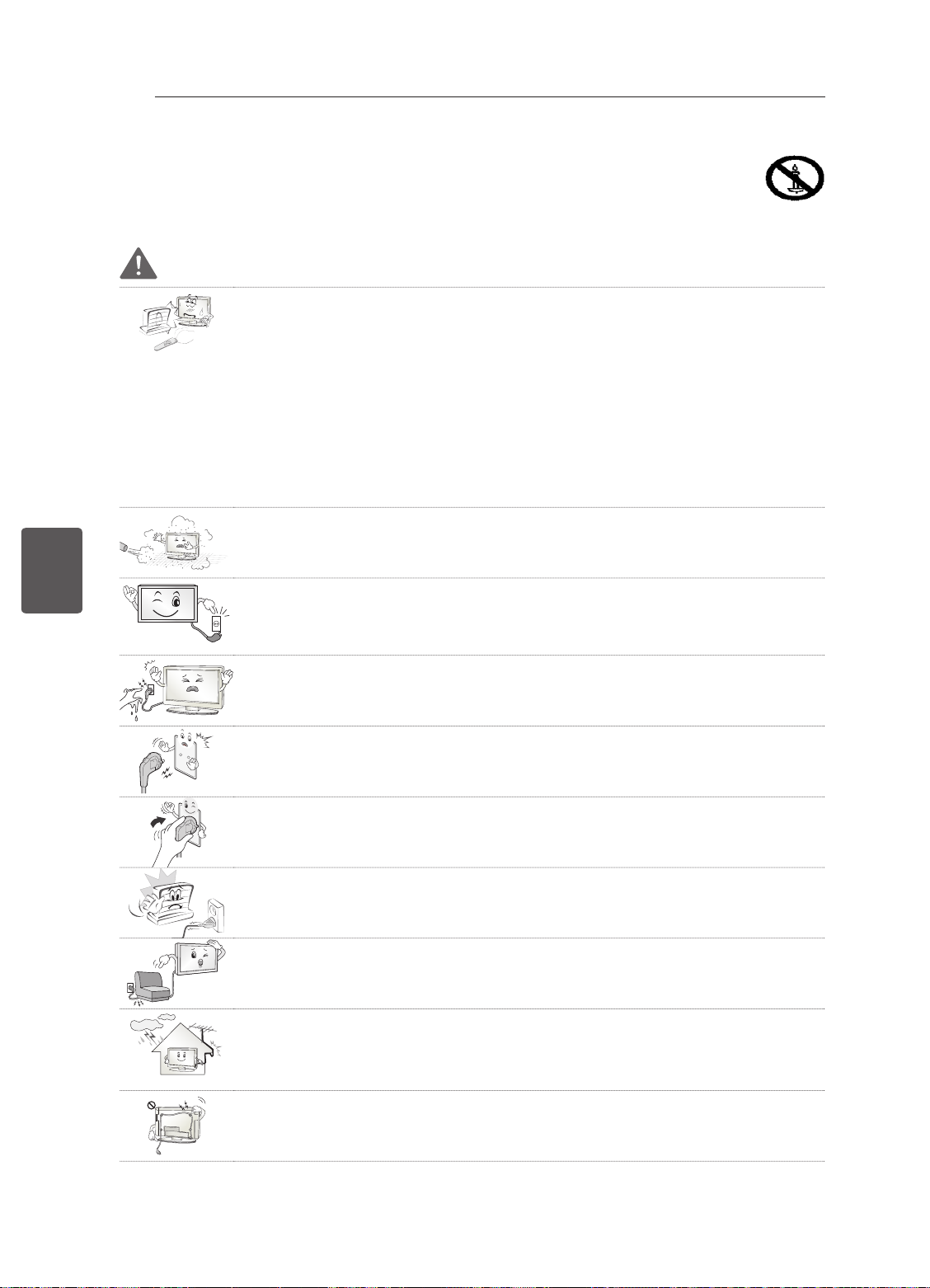
ESPAÑOL
ESP
INSTRUCCIONES DE SEGURIDAD
4
INSTRUCCIONES DE SEGURIDAD
Lea detenidamente estas instrucciones de seguridad antes de utilizar el producto.
ADVERTENCIA
No coloque la TV ni el mando a distancia en los siguientes entornos:
y
- Una ubicación expuesta a luz solar directa
- Un área con mucha humedad, como un cuarto de baño
- Cerca de cualquier fuente de calor, como hornos u otros dispositivos que emitan
calor
- Cerca de la encimera de la cocina o de un humidificador, donde puede estar
expuesta a vapor o aceite
- Un área expuesta a la lluvia o al viento
- Cerca de recipientes que contengan agua, como floreros
De lo contrario, podrían producirse incendios, descargas eléctricas, averías o
deformaciones en el producto.
No coloque el producto donde pueda verse expuesto al polvo.
y
Esto supone un riesgo de incendio.
El enchufe de la toma de corriente es el dispositivo de desconexión. Debe poder
y
acceder en todo momento a dicho enchufe.
No toque el enchufe de alimentación con las manos húmedas. Si las clavijas están
y
húmedas o cubiertas de polvo, séquelas o límpielas.
Si hay un exceso de humedad, podría sufrir una descarga.
Asegúrese de conectar el cable de alimentación a una toma de corriente con toma
y
de tierra. (Excepto para dispositivos sin toma a tierra).
Podría electrocutarse o sufrir daños personales.
Asegúrese de enchufar el cable de alimentación hasta el final.
y
Si el cable de alimentación no está completamente conectado, puede provocar un
incendio.
Asegúrese de que el cable de alimentación no entra en contacto con objetos
y
calientes, como una estufa.
Esto puede suponer un riesgo de incendio o de descarga eléctrica.
No coloque objetos pesados, ni el propio producto, sobre los cables de
y
alimentación.
De lo contrario, podría provocar incendios o descargas eléctricas.
Pliegue el cable de antena que conecta la TV con la antena externa del edificio
y
para evitar que se moje con la lluvia.
El agua podría dañar el interior del producto y podrían producirse descargas
eléctricas.
Cuando monte la TV en la pared, asegúrese de no hacerlo dejando los cables de
y
señal y de alimentación colgando por la parte trasera.
Podría causar un incendio o producir una descarga eléctrica.
Page 96
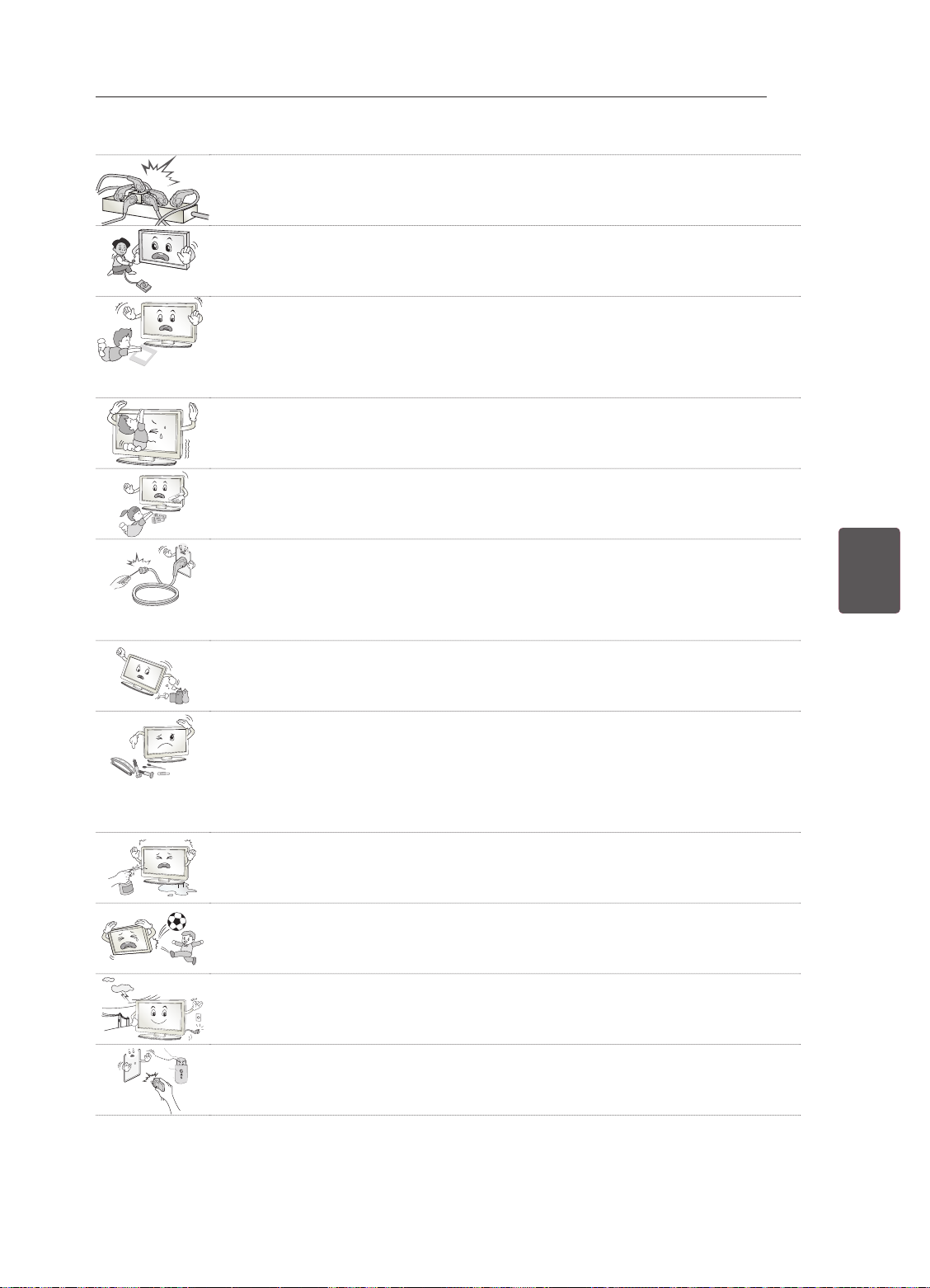
INSTRUCCIONES DE SEGURIDAD
Desiccant
No enchufe demasiados dispositivos eléctricos a una misma toma de alimentación
y
eléctrica múltiple.
De lo contrario, podría producirse un incendio por exceso de calentamiento.
No golpee ni deje caer el producto cuando lo conecta a dispositivos externos.
y
De lo contrario, podrían producirse lesiones personales o daños en el producto.
Mantenga el embalaje de vinilo o de material aislante lejos del alcance de los
y
niños.
El material aislante es nocivo si se ingiere. En caso de ingestión por error,
provoque el vómito del paciente y acuda al hospital más cercano. El embalaje de
vinilo también puede provocar asfixia. Manténgalo fuera del alcance de los niños.
No permita que los niños se suban ni se agarren a la TV.
y
De lo contrario, la TV podría caerse y ocasionar daños personales.
Deseche adecuadamente las pilas usadas para evitar que los niños las ingieran.
y
En caso de que esto suceda, consulte con un médico inmediatamente.
No introduzca materiales conductores (como una varilla de metal) en un extremo
y
del cable de alimentación mientras el otro extremo está enchufado a la toma de
corriente de pared. Tampoco toque el cable de alimentación una vez enchufado a
la toma de corriente.
Podría electrocutarse. (En función del modelo)
No coloque ni almacene sustancias inflamables cerca del producto.
y
Una manipulación imprudente de estas sustancias podría provocar una explosión
o un incendio.
5
ESPESPAÑOL
No introduzca objetos metálicos (como monedas, horquillas, varillas o alambres)
y
ni inflamables (como papel o cerillas) dentro del producto. Debe prestarse una
atención especial a los niños.
Pueden producirse descargas eléctricas, incendios o daños personales. Si se
introduce un objeto extraño en el producto, desconecte el cable de alimentación y
póngase en contacto con el centro de atención al cliente.
No pulverice agua sobre el producto ni frote con ninguna sustancia inflamable
y
(como disolvente o benceno). Puede causar un incendio o una descarga eléctrica.
No deje que el producto sufra impactos o que caigan objetos sobre él o sobre la
y
pantalla.
Podría electrocutarse y el producto podría sufrir daños.
No toque el producto o la antena durante una tormenta eléctrica.
y
Podría electrocutarse.
No toque la toma de corriente cuando se produzca una fuga de gas. Abra las
y
ventanas y ventile la habitación.
Una chispa podría provocar un incendio o causarle quemaduras.
Page 97
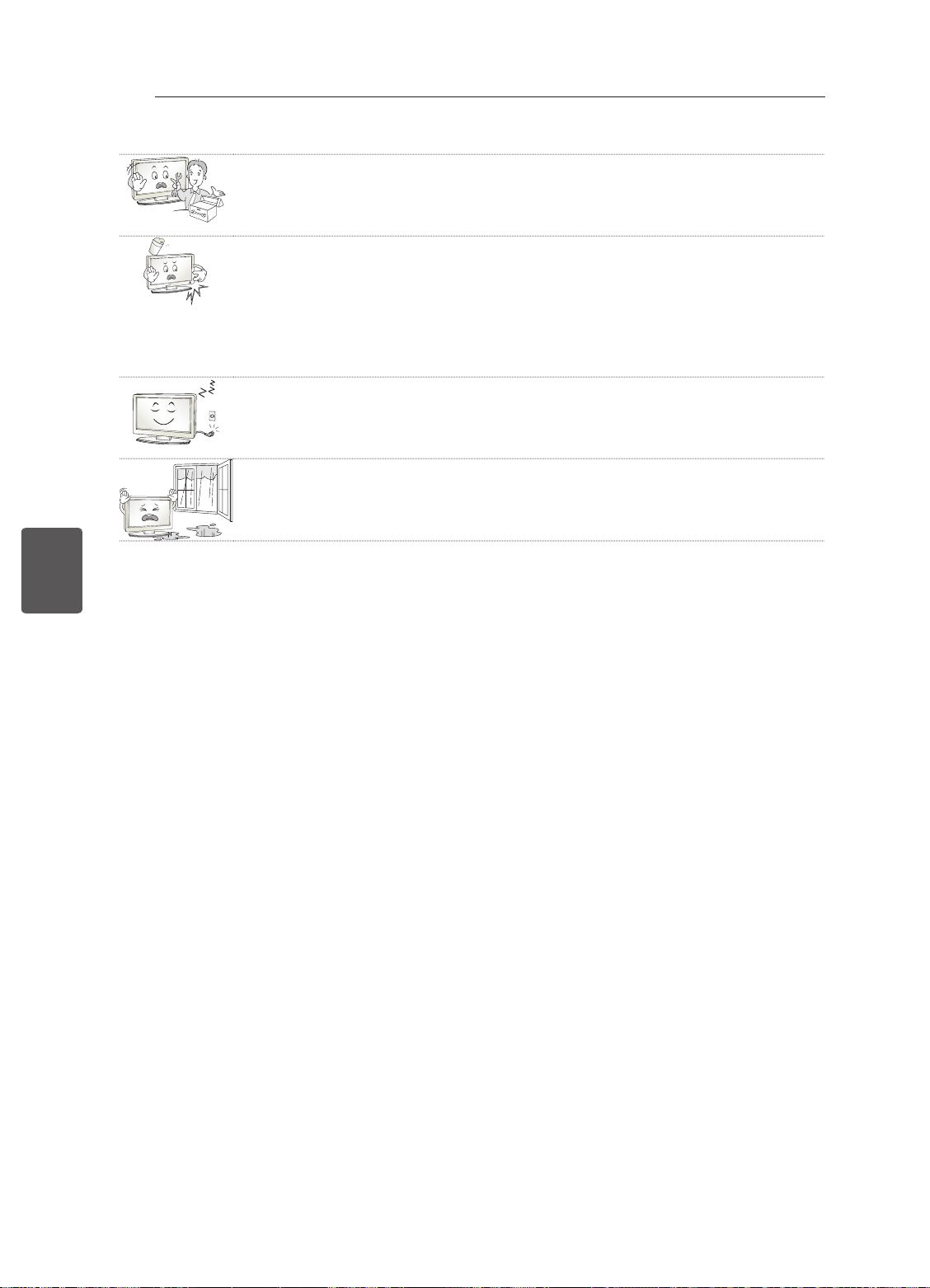
ESPAÑOL
ESP
INSTRUCCIONES DE SEGURIDAD
6
No desmonte, repare ni modifique el producto según su criterio.
y
Puede causar un incendio o una descarga eléctrica.
Póngase en contacto con el centro de atención al cliente para cualquier
comprobación, calibración o reparación.
Si ocurre algo de lo indicado a continuación, desenchufe inmediatamente el
y
producto y póngase en contacto con su centro de servicio local.
- El producto ha sufrido un impacto
- Se ha dañado el producto
- Se han introducido objetos extraños en el producto
- El producto emitió humo o un olor extraño
Esto podría provocar incendios o descargas eléctricas.
Si no tiene previsto utilizar el producto durante mucho tiempo, desenchufe el cable
y
de alimentación.
La acumulación de polvo puede provocar incendios, mientras que el deterioro del
revestimiento aislante puede provocar fugas eléctricas, descargas o incendios.
El aparato no debe quedar expuesto a goteras ni salpicaduras. Tampoco deberá
y
colocar encima objetos con contenido líquido, como floreros.
Page 98
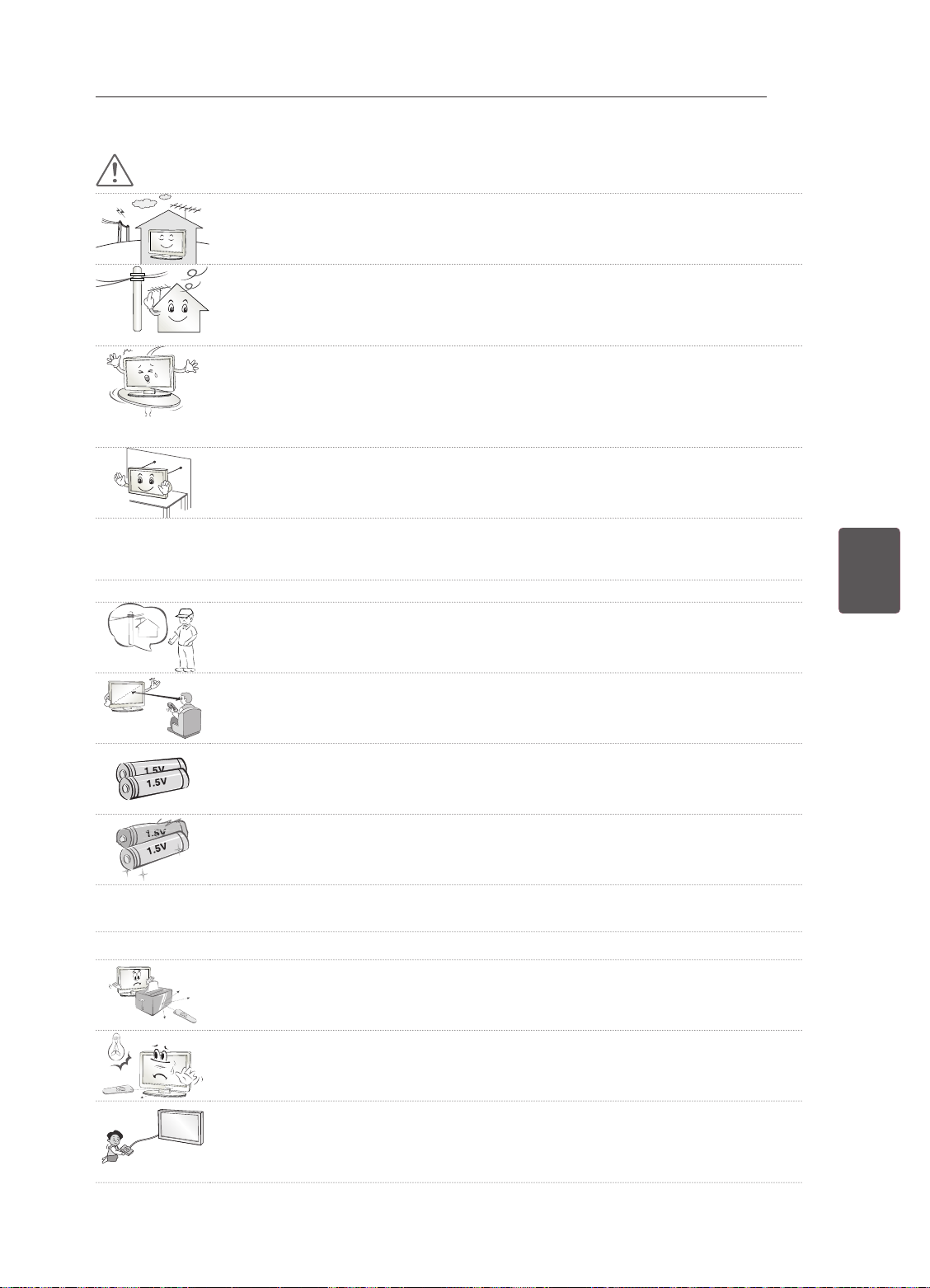
INSTRUCCIONES DE SEGURIDAD
PRECAUCIÓN
Instale el producto en un lugar alejado de ondas de radio.
y
Entre la antena exterior y las líneas de alimentación debe dejarse una distancia
y
suficiente como para evitar que se entren en contacto, incluso en caso de caída de
la antena.
Podría producirse una descarga eléctrica.
No instale el producto en lugares como un estante poco estable o una superficie
y
inclinada. Evite también los lugares donde haya vibraciones o en los que no se
pueda sostener totalmente.
De lo contrario, el producto podría caerse o darse la vuelta, lo cual podría producir
daños personales o daños en el producto.
Si instala la TV en un soporte, es necesario que tome medidas para evitar que el
y
producto vuelque. De lo contrario, el producto podría darse la vuelta, lo cual podría
producir daños personales.
Si tiene intención de montar el producto en la pared, fije la interfaz de montaje estándar VESA (piezas
y
opcionales) a la parte posterior del producto. Cuando instale el equipo de forma que vaya a utilizar
el soporte de pared (piezas opcionales), fíjelo cuidadosamente para que no se caiga.
Utilice únicamente los elementos adjuntos/accesorios especificados por el fabricante.
y
Cuando instale la antena, consulte con un técnico cualificado.
y
De lo contrario, corre riesgo de incendio o de descarga eléctrica.
7
ESPESPAÑOL
Le recomendamos que mantenga una distancia de 2 a 7 veces la longitud diagonal
y
de la pantalla cuando vea la TV.
Si ve la TV durante un largo período de tiempo, es posible que vea borroso.
Utilice solamente el tipo especificado de pila.
y
De lo contrario, podrían producirse daños en el mando a distancia.
No mezcle pilas nuevas y antiguas.
y
De lo contrario, podrían sobrecalentarse las pilas y presentar fugas.
No exponga las baterías a temperaturas muy elevadas y manténgalas alejadas de la luz solar directa,
y
el fuego y emisores de calor eléctricos.
NO coloque baterías no recargables en el dispositivo mientras se esté cargando.
y
Asegúrese de que no hay objetos entre el mando a distancia y el sensor.
y
La señal del mando a distancia puede verse afectada por la luz del sol por otra luz
y
fuerte. En este caso, oscurezca la habitación.
Cuando conecte dispositivos externos como videoconsolas, asegúrese de que los
y
cables que se conectan sean lo suficientemente largos.
De lo contrario, el producto podría darse la vuelta, lo cual podría producir daños
personales o daños en el producto.
Page 99
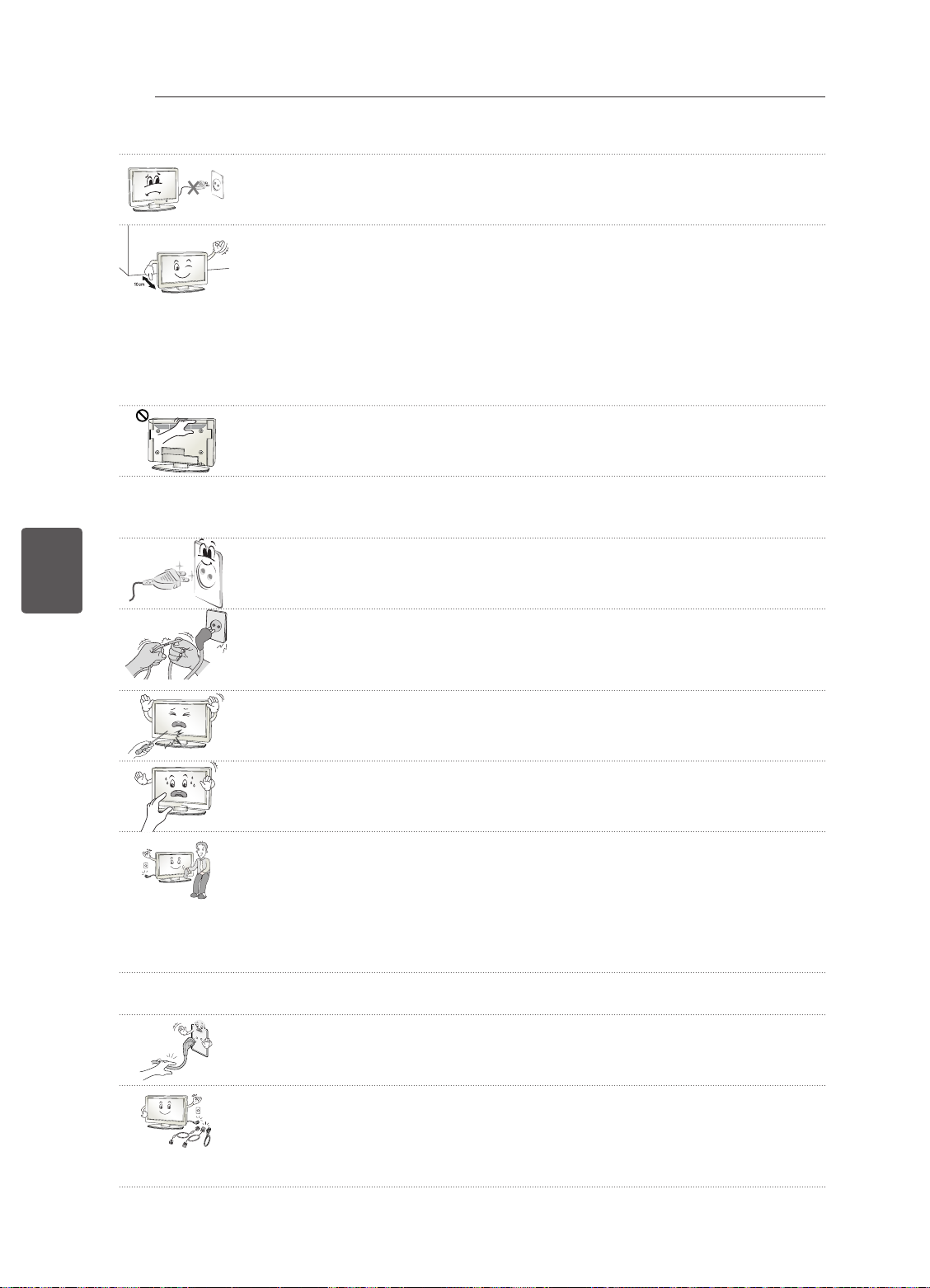
ESPAÑOL
ESP
INSTRUCCIONES DE SEGURIDAD
8
No encienda ni apague el producto enchufando y desenchufando la clavija a la
y
toma de pared. (No utilice la clavija para como un interruptor).
Puede provocar un fallo mecánico o una descarga eléctrica.
Siga las instrucciones de instalación que se indican a continuación para evitar que
y
el producto se sobrecaliente.
- La distancia entre el producto y la pared ha de ser de al menos 10 cm.
- No instale el producto en un lugar sin ventilación (p. ej., en un estante o en un
armario).
- No instale el producto en una alfombra o un cojín.
- Asegúrese de que la rejilla de ventilación no está bloqueada por manteles o
cortinas.
De lo contrario, se pueden producir incendios.
Procure no tocar las aberturas de ventilación cuando la TV haya estado
y
funcionando durante largos períodos de tiempo, ya que pueden calentarse. Esto
no afecta al funcionamiento ni al rendimiento del producto.
Revise periódicamente el cable del aparato, y si su aspecto indica daños o deterioro, desenchúfelo,
y
deje de utilizarlo y haga que un profesional de servicio autorizado lo sustituya por una pieza de
repuesto idéntica.
Evite que el polvo se acumule en las clavijas del enchufe de alimentación o en la
y
toma.
Esto supone un riesgo de incendio.
Proteja el cable de alimentación de un mal uso físico o mecánico: no lo retuerza,
y
no lo doble ni lo punce y evite que se cierre ninguna puerta sobre él. No camine
sobre el cable. Preste especial atención a los enchufes, las tomas de pared y el
punto de salida del cable en el aparato.
No presione el panel con fuerza usando la mano ni ningún objeto afilado como un
y
clavo, lápiz o bolígrafo, ni tampoco lo raye.
Evite tocar la pantalla o colocar los dedos sobre ella durante un tiempo prolongado.
y
Si lo hace, podría provocar una distorsión temporal en la pantalla.
Cuando limpie el producto y sus componentes, desconecte la corriente primero
y
y límpielo con un paño suave. Una fuerza excesiva podría producir arañazos o
decoloración. No pulverice agua ni limpie el producto con un paño húmedo. No
utilice nunca limpiacristales, productos industriales o para vehículos, abrasivos o
cera, benceno, alcohol, etc., ya que pueden dañar el producto y el panel.
De lo contrario, podrían producirse incendios, descargas eléctricas o daños en el
producto (deformación, corrosión o roturas).
Siempre que la unidad esté conectada a la toma de corriente, no estará desconectada de la fuente
y
de alimentación aunque el INTERRUPTOR de la unidad esté apagado.
Cuando desconecte el cable, agárrelo por el enchufe y desenchúfelo.
y
Si los cables que se encuentran en el interior del cordón alimentación se
desconectan, puede producirse un incendio.
Cuando mueva el producto, asegúrese de apagarlo primero. A continuación,
y
desenchufe los cables de alimentación, los cables de antena y los demás cables
de conexión.
Puede que el equipo de la TV o el cable de alimentación estén dañados, lo que
puede provocar un incendio o una descarga eléctrica.
Page 100
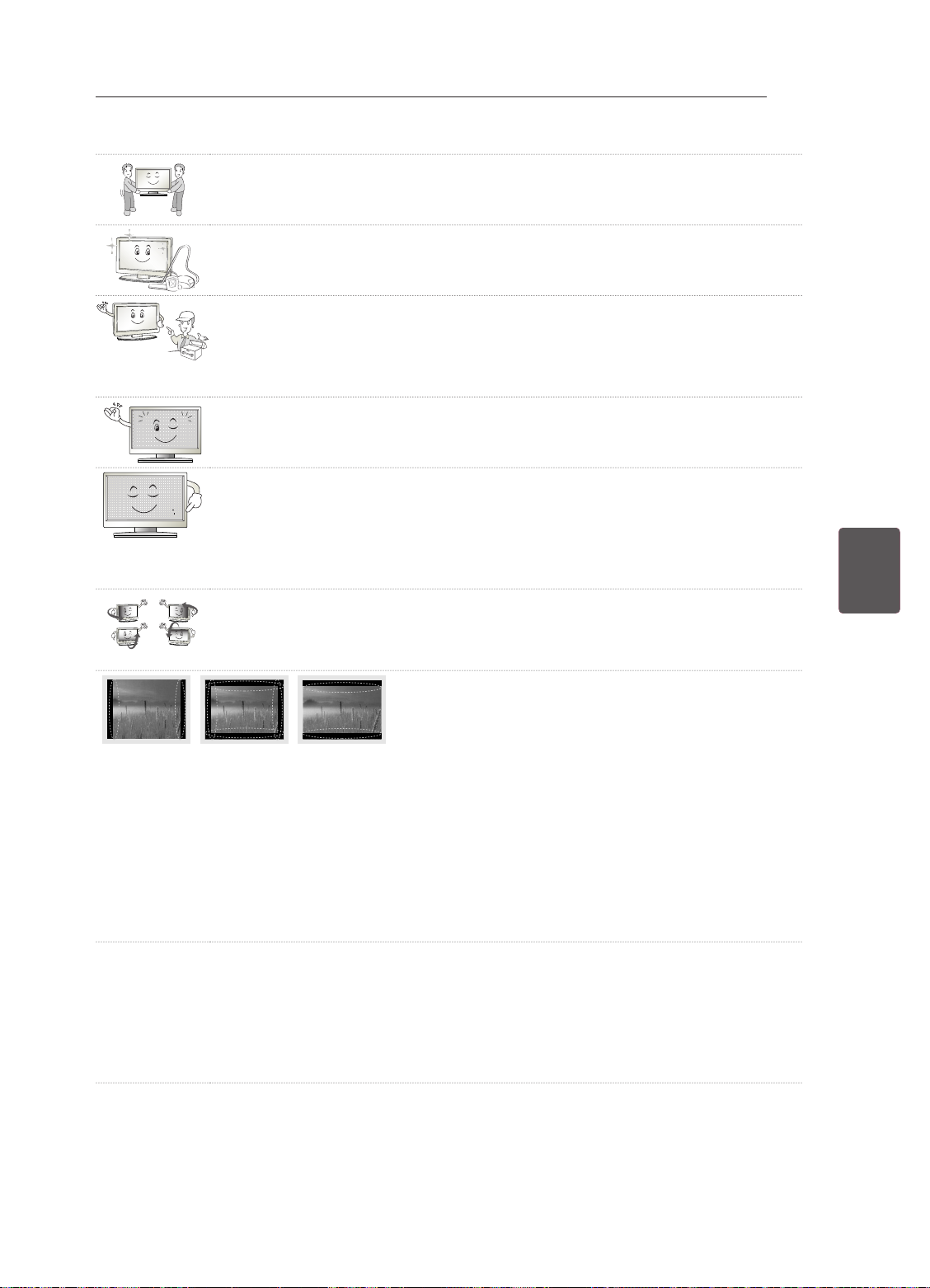
INSTRUCCIONES DE SEGURIDAD
Dado el elevado peso del producto, muévalo o desembálelo siempre con la ayuda
y
de alguien.
De lo contrario, se pueden producir daños personales.
Póngase en contacto con el centro de atención al cliente para limpiar las piezas
y
internas del producto una vez al año.
El polvo acumulado podría producir un fallo mecánico.
Solicite cualquier reparación necesaria al personal cualificado. Las reparaciones
y
son necesarias cuando el aparato sufre cualquier tipo de daños, como daños en el
cable de alimentación o el enchufe, vertido de líquidos o caída de objetos sobre el
aparato, exposición del aparato a la lluvia o la humedad, o cuando no funciona con
normalidad o ha sufrido una caída.
Si toca el producto y está frío, podría producirse un pequeño «parpadeo» al
y
encenderlo. Esto es normal; el producto no tiene ningún problema.
El panel es un producto de alta tecnología con una resolución de dos a seis
y
millones de píxeles. Puede que vea pequeños puntos negros o puntos de colores
brillantes (rojo, azul o verde) de 1 ppm en el panel. Esto no significa que haya una
avería y no afecta al rendimiento ni a la fiabilidad del producto.
Este fenómeno también ocurre en productos de otros fabricantes y no está sujeto
a cambios ni reembolsos.
Podría ver una luminosidad y un color diferentes en el panel según su posición de
y
visualización (izquierda/derecha/arriba/abajo).
Este fenómeno ocurre debido a las propias características del panel. No está
relacionado con el rendimiento del producto y no es una avería.
9
ESPESPAÑOL
Si visualiza una imagen congelada (p. ej., el logotipo del canal de emisión, una escena de un
y
videojuego) durante un largo período de tiempo la pantalla podría dañarse, lo cual haría que la
imagen quedase impresa, lo que se conoce como adherencia de imágenes. La garantía no cubre la
adherencia de imágenes en el producto.
Evite que se muestre una imagen fija en la pantalla de la televisión durante un tiempo prolongado (2
o más horas en pantallas LCD, 1 hora o más para TV de plasma).
Además, si se ve la TV en formato 4:3 durante mucho tiempo, se puede producir adherencia de
imagen en los bordes del panel.
Este fenómeno también ocurre en productos de otros fabricantes y no está sujeto a cambios ni
reembolsos.
Sonido generado
y
“Crujido”: el sonido que se produce cuando se ve o cuando se apaga la TV está generado por la
contracción térmica del plástico debido a la temperatura y a la humedad. Este ruido es común en
los productos para los que se requiere deformación térmica. Zumbido del circuito eléctrico/panel: un
circuito de conmutación de alta velocidad, que suministra una gran cantidad de energía para hacer
funcionar un producto, genera un ruido de nivel bajo. Varía según el producto.
Este sonido generado no afecta al rendimiento ni a la fiabilidad del producto.
 Loading...