

Page 1

Strona główna » LEXON » LEXON LR155 Ray Clock Budzik Złoty Instrukcja
użytkownika
zawartość
1 LEXON LR155 Ray Clock Budzik Złoty
2 Wprowadzenie do produktu
3 ŁADOWANIE
4 SPECYFIKACJE PRODUKTU
5 Dokumenty/zasoby
5.1 Odniesienia
6 Powiązanych Postów
Instrukcje+
⚙
Page 2
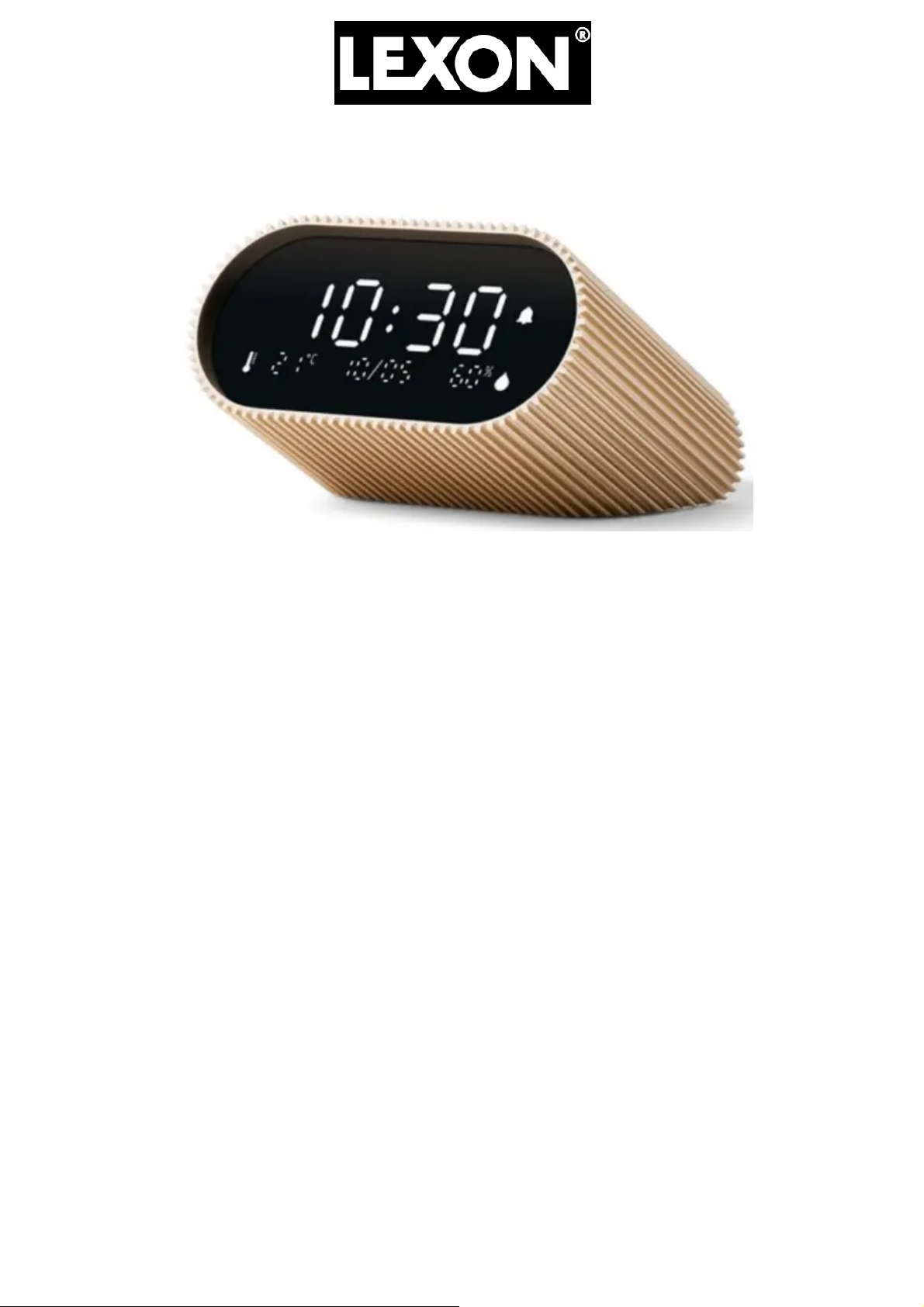
LEXON LR155 Ray Clock Budzik Złoty
Wprowadzenie do produktu
⚙
Page 3
W PUDEŁKU
⚙
Page 4

1x Zegar Ray
1x kabel ładujący USB-C
1x Instrukcja obsługi
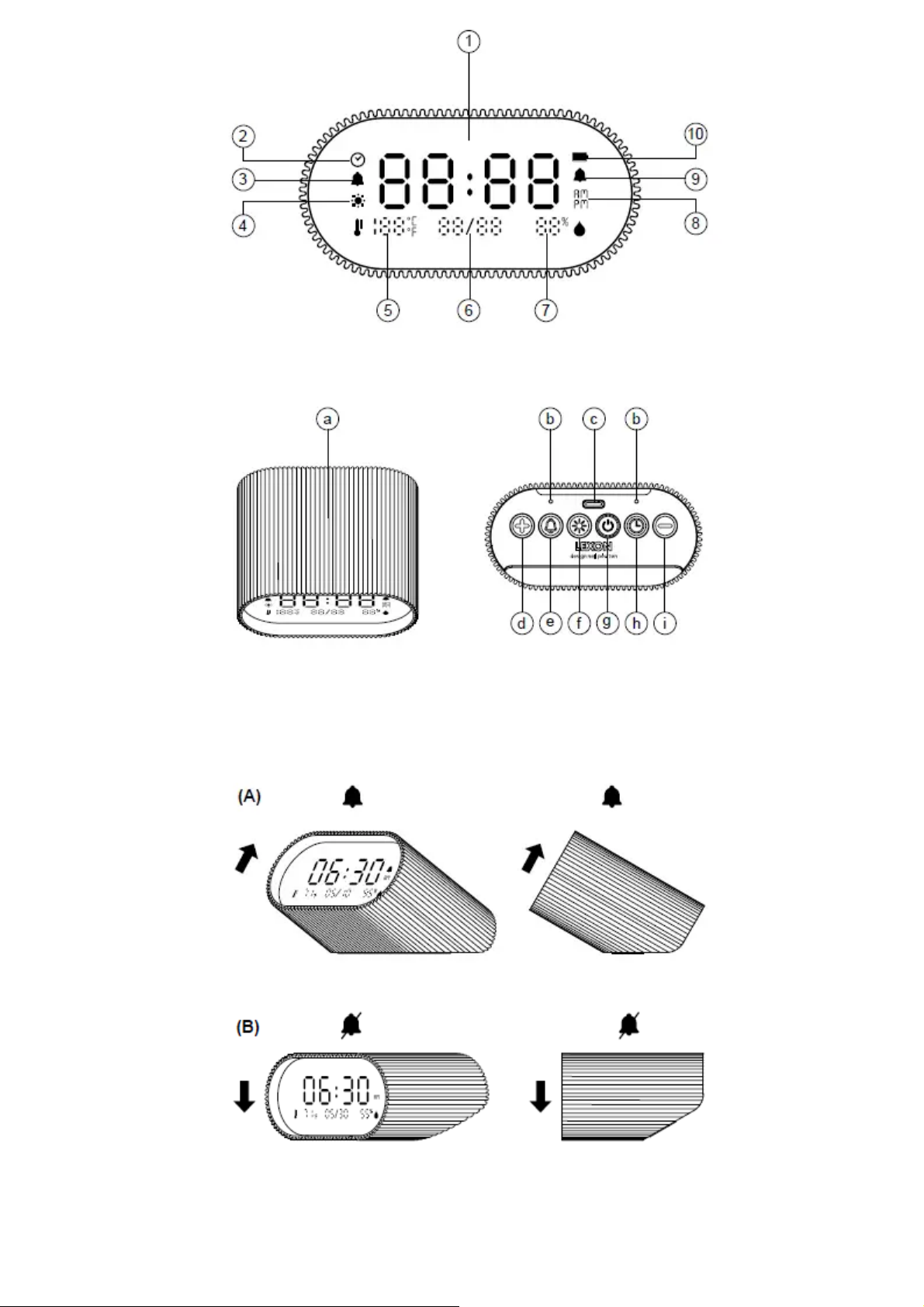
PRZEGLĄD
Wyświetlacz (A)
1. Czas
2. Tryb ustawiania czasu
3. Tryb ustawiania alarmu
4. Tryb ustawiania jasności / tryb nocny
5. Temperatura w °C/°F
6. Data
7. Wilgotność względna
8. AM/PM (format 12-godzinny)
9. Alarm WŁĄCZONY
10. Ładowanie i stan baterii
Urządzenie (B)
a. Powierzchnia dotykowa
b. Otwory wentylacyjne
c. Port USB-C
d. + klawisz
e. Klawisz ustawiania alarmu
f. Klawisz ustawienia jasności
g. Przycisk włączania/wyłączania zasilania
h. Klawisz ustawiania czasu
ja – klucz
ŁADOWANIE
Ładowanie za pomocą kabla USB-C
1. Podłącz dołączony kabel USB typu C do portu ładowania Ray Clock.
⚙
Page 5
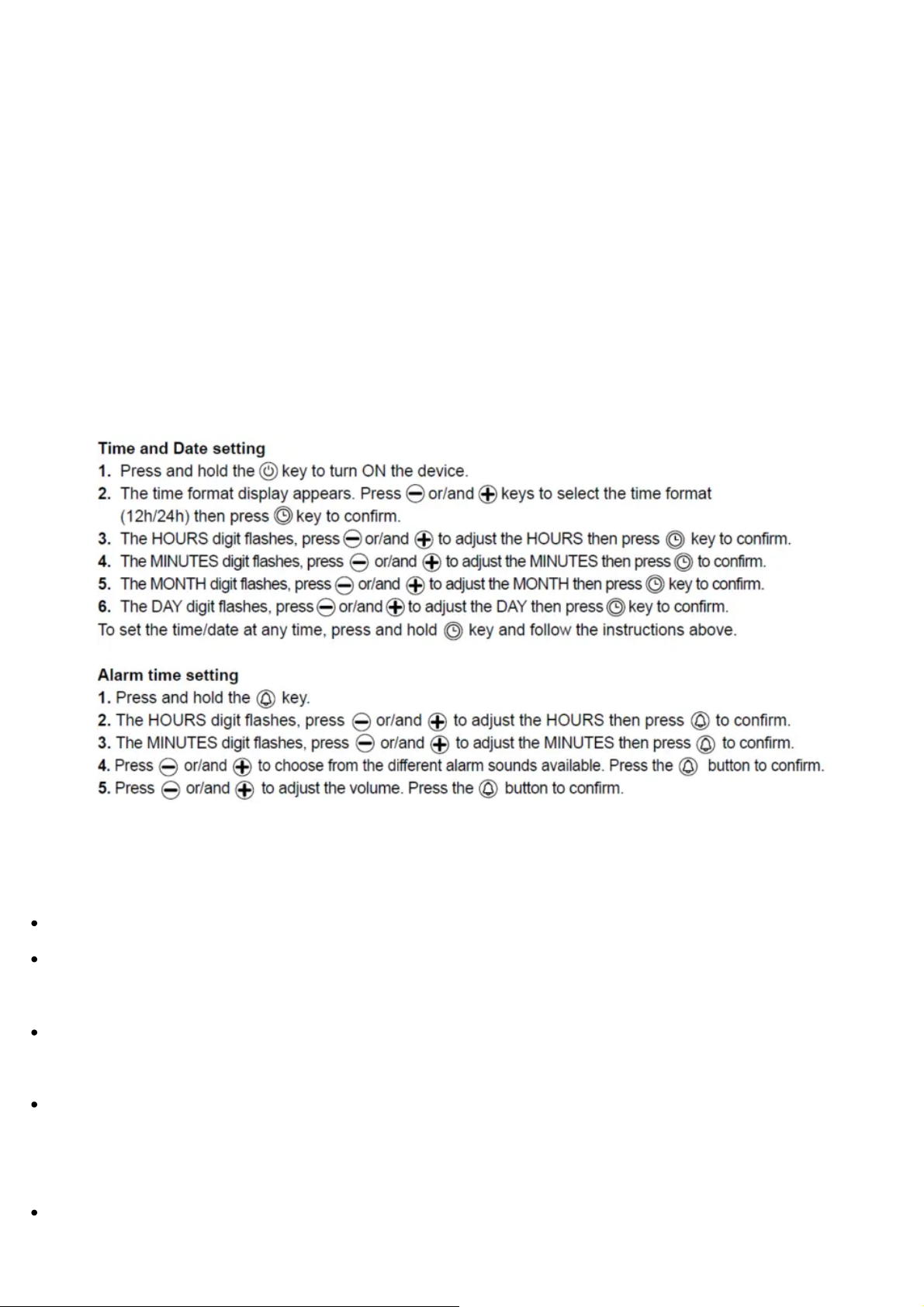
2. Podłącz koniec kabla USB do dowolnego komputera lub ładowarki DC 5 V.
3. Podczas ładowania na ekranie LCD wyświetli się ikona ładowania.
Pełne naładowanie trwa około 4 godzin.
Uwaga : Gdy bateria jest słaba (urządzenie odłączone od źródła zasilania), ikona baterii będzie
migać, aż do całkowitego rozładowania urządzenia.
OPERACJE
Ważna uwaga: Ray Clock ma wbudowaną baterię, która pozwala mu działać bez ciągłego
podłączania do prądu. Gdy nie jest podłączony, wyświetlacz LED automatycznie włącza się po
dotknięciu górnej powierzchni. Podświetlenie LED pozostaje włączone przez 5 sekund, a następnie
przygasa na 15 sekund przed przejściem w tryb czuwania. Ray Clock można na stałe podłączyć za
pomocą zasilacza USB 5 V. Po podłączeniu wyświetlacz LED pozostaje włączony na stałe.
Włącz alarm (A): Przechyl budzik do góry
Zatrzymaj alarm (B): Przechyl budzik w dół lub naciśnij dowolny przycisk z tyłu.
Sprawdź godzinę alarmu: Naciśnij przycisk „Ustawienia alarmu”, aby w dowolnym momencie
sprawdzić godzinę alarmu.
Drzemka: Gdy zabrzmi alarm, delikatnie dotknij górnej powierzchni Ray Clock raz, aby
aktywować drzemkę. Alarm zabrzmi ponownie po 6 minutach.
Wyłącz alarm na stałe: Aby całkowicie wyłączyć alarm (niezależnie od jego położenia) i używać
Ray Clock jako prostego zegara, naciśnij przycisk trzy razy. Powtórz tę samą operację, aby go
ponownie aktywować.
Ważna uwaga: Za każdym razem, gdy alarm zostanie aktywowany (budzik zostanie ponownie
przechylony do góry), ustawiona godzina alarmu pojawi się na wyświetlaczu na 10 sekund, po
⚙
Page 6

czym powróci do wyświetlania godziny.
Inne funkcje/operacje
Podświetlenie: W nocy dotknij górnej powierzchni, aby podświetlić ekran.
Night mode: Only works when the alarm clock is plugged in. To enable or disable the night
mode, press key once. When the night mode is enabled, the brightness icon remains on screen.
The alarm clock enters night mode from 10:00 pm to 8:00 am, facilitating a more comfortable
sleeping environment.
Brightness adjustment: Press and hold the key. Press or/and keys to adjust the brightness level
then press key to confirm.
Temperature unit: Press or/and keys to change the temperature unit.
Display mode: By default, temperature and humidity data are displayed on the screen. Press
key to hide or unhide indoor temperature and hygrometry data.
Reset: Press and hold and key until you hear a bip to reset the device.
SAFETY INFORMATION
Retain Instructions: The safety and operating instructions should be retained for future
reference.
Power Sources: The device should be connected to a power supply only of the type described in
the operating instructions or as marked on the appliance.
Ventilation holes: Do not obstruct the 2 holes on the back of the product.
Water and Moisture: The device should not be used near water.
Heat: The device should be placed away from heat sources such as radiators, heat registers,
stoves, or other appliances that produce heat.
PRODUCT SPECIFICATIONS
Dimensions: 3.54 x 1.73 x 2.9″ / 9 x 4.4 x 7.4 cm
Weight: 0.51″ / 230 g
Material: Aluminum / ABS / Silicone
Battery capacity: 2000 mAh
Battery voltage: 3.6V
Battery life: Up to 6 months
⚙
Page 7

Charging time: 4h
Charging system: USB Type-C
Input: 5V
Frequency band: 32.786 kHz
International warranty: 1 year
EUROPEAN UNION
CE DIRECTIVE
LEXON hereby declares that this device is in compliance with the essential requirements and
other relevant provisions of the directives 2014/30/EU & 2011/65/EU. The original EU
declaration of conformity may be found at: https://www.lexon-
design.com/assets/certifications-ce-rayclock.pdf
UK CONFORMITY ASSESSMENT
The object of the declaration described above is in conformity with the relevant Union
harmonization legislation.
The original UK declaration of conformity may be found at: https://www.lexon-
design.com/assets/certifications-ukca-rayclock.pdf
DISPOSAL AND RECYCLING INFORMATION
After the implementation of the European Directive 2012/19/EU in the national legal system, the
following applies: electrical and electronic devices may not be dis-posed of with domestic waste.
Consumers are obliged by law to return electrical and electronic device at the end of their service
lives to the public collecting points set up for this purpose or point of sale. Details to this are
defined by the national law of the respective country. This symbol on the product, the instruction
manual or the package indicates that a product is subject to these regulations. By recycling,
reusing the materials or other forms of utilizing old devices, you are making an important
contribution to protecting our environment.
125, Avenue des Champs-Elysees – 75008 Paryż – FRANCJA
Wszystkie znaki towarowe, loga i nazwy marek są własnością ich właścicieli.
Zdjęcia i specyfikacje nie są umowne. Zmontowano w Chinach.
lexon-design.com
@lexondesign
⚙
Page 8
Dokumenty / Zasoby
LEXON LR155 Ray Clock Budzik Złoty
[
pdf
] Instrukcja obsługi
LR155, LR155 Ray Clock Budzik Złoty, LR155, Ray Clock Budzik Złoty, Budzik Złot
y, Zegar Złoty
Odniesienia
Instrukcja obsługi
Ta strona internetowa jest niezależną publikacją i nie jest ani powiązana, ani popierana przez żadnego z właścicieli znaków towarowych. Znak słowny „Bluetooth®” i logo są
zarejestrowanymi znakami towarowymi należącymi do Bluetooth SIG, Inc. Znak słowny „Wi-Fi®” i logo są zarejestrowanymi znakami towarowymi należącymi do Wi-Fi
Alliance. Jakiekolwiek użycie tych znaków na tej stronie internetowej nie oznacza żadnego powiązania ani poparcia.
⚙
 Loading...