

Page 1

5022-xxx
Media specifications
Paper and specialty media guidelines
Media guidelines
Media characteristics
The foll owing media characteristics affect print quality and reliability. Consider these characteristics when
evaluating new media stock.
Weight
The printer can automa ti cally feed media weights from 60 to 176 g/m
lighter than 60 g/m
2
90 g/m
g/m
Curl
Curl is the tendency for media to curl at its edges. Excessive curl can cause media feeding problems. Curl can
occur after the med ia passes through the printer, where it is expos ed to hi gh temperatures. Stori ng media
unwrapped in hot, hum id, cold, or dry conditions, even in the trays, can contribute to media curling prior to
printing and can cause feeding problems.
(24 lb bond) grain long medi a. Fo r media smaller than 182 x 257 mm (7.2 x 10.1 in.), we reco mmend 90
2
or heavier media .
2
(16 lb) might not be sti ff enough to feed properly, causing jams. For best performance, use
2
(16 to 47 lb bond) grain lo ng. Media
Smoothness
Media smoothne ss directly affec ts print quality. If media is too rough, toner cannot fuse to it properly. If media is
too smooth, it can cause media fee din g or print qual ity issues . Alw a ys u se media bet wee n 100 and 300 Shef fiel d
points; however, smoothness between 150 and 200 Sheffield points produces the best print quality.
Moisture content
The amount of moisture in media affects both print quality and the ability of t he prin ter to feed the media
correctly. Leave medi a in i ts original wr apper u ntil it is t ime to us e i t. Thi s limit s the e xp osur e of medi a to mo isture
changes that can degrade its performance.
Condition medi a before printing by storing it in its original wrapper in the same environment as the printer for 24
to 48 hours before printing. Extend the time several days if the storage or transportation environmen t is very
different from the printer environment. Thick media ma y also require a longer conditioning period.
Grain direction
Grain refers to the alignment of the medi a fi bers in a sheet of media. Grain is eith er grain long, running the
length of the media, or grain short, running the width of the media. For 60 to 90 g/m
use grain long fibers.
Fiber content
Most high-quality xerographic media is made from 100% chemically treated pul ped wood. This content provides
the media with a high deg re e of stabi lity re sulti ng in f e wer media f eedi ng prob lem s and bett er print qual ity. Media
containing fibers such as cotton possesses characteristics that can negatively affect media handling.
2
(16 to 24 lb bond) media,
1-6 Service M anual
Page 2

5022-xxx
Unacce p tab l e media
The foll owing media types are not recommended for use with the printer:
• Chemically treated media used to make copies without carbon paper, also known as carbonless papers,
carbonless copy paper (CCP), or no carbon required (NCR) paper
• Preprinted media with chemicals that may contaminate the printer
• Preprinted media that can be affected by the temperature in the printer fuser
• Preprinted media that requires a regis tr ation (the precise print location on the page) greater than ±2.3 mm
(±0.09 in.), such as optical character recognition (OCR) forms
In some cases, registration can be adjusted with a program to successfully print on these forms.
• Coated media (eras able bond), synthetic media, thermal media
• Rough-edged, rough, or heavily te xtured surface med ia, or curled m edia
• Recycled media containing more than 25% post-consumer waste that does not meet DIN19 309
• Media weighing l ess than 60 g/m
2
(16 lb)
• Multiple -p a rt forms or do c uments
Selecting media
Using appropriate media prevents jams and helps ensure trouble-free printing.
To help avoid jams and poor print quality:
• Always use new, undam aged media.
• Before lo ading medi a, know t he re commended print side of the media. This information is usual ly indicat ed
on the media package.
• Do not use media that has been cut or trim m ed by hand.
• Do not mix media sizes , types, or weights i n the same source; mixing result s in j am s.
• Do not use coated media unl ess they are specifical ly designed for elect rophotographi c prin ti ng.
Selecting preprinted forms and letterhead
Use these guidelines when selecting preprinted forms and letterhead:
• Use grain long papers for best results for 60 to 90 g/m
2
weights.
• Use only for m s and letterhead printed using an offset lithographic or engraved printing process.
• Av oid papers with rough or heavi ly textured surfaces.
Use papers printed with heat -resistant inks designed for use in xerographic copiers. The ink must be able to
withstand tempe ratures up to 180°C (356°F) without me lt ing or releasing hazardous emissions. Use inks that
are not affected b y the resin in toner. Inks that are o xidation-set or oil-based generally meet these requirements;
latex inks might not. When in doubt, contact the paper supplier.
Preprinted papers such as letterhead must be abl e to wi thstand temperatures up to 180°C (356°F) without
melting or releasing hazardous emissions.
General inf ormation 1-7
Page 3
5022-xxx
Using media
Using letterhead
Check with the man ufacturer or vendor to determine whether the chosen preprinted letterhead is acceptable for
laser printers.
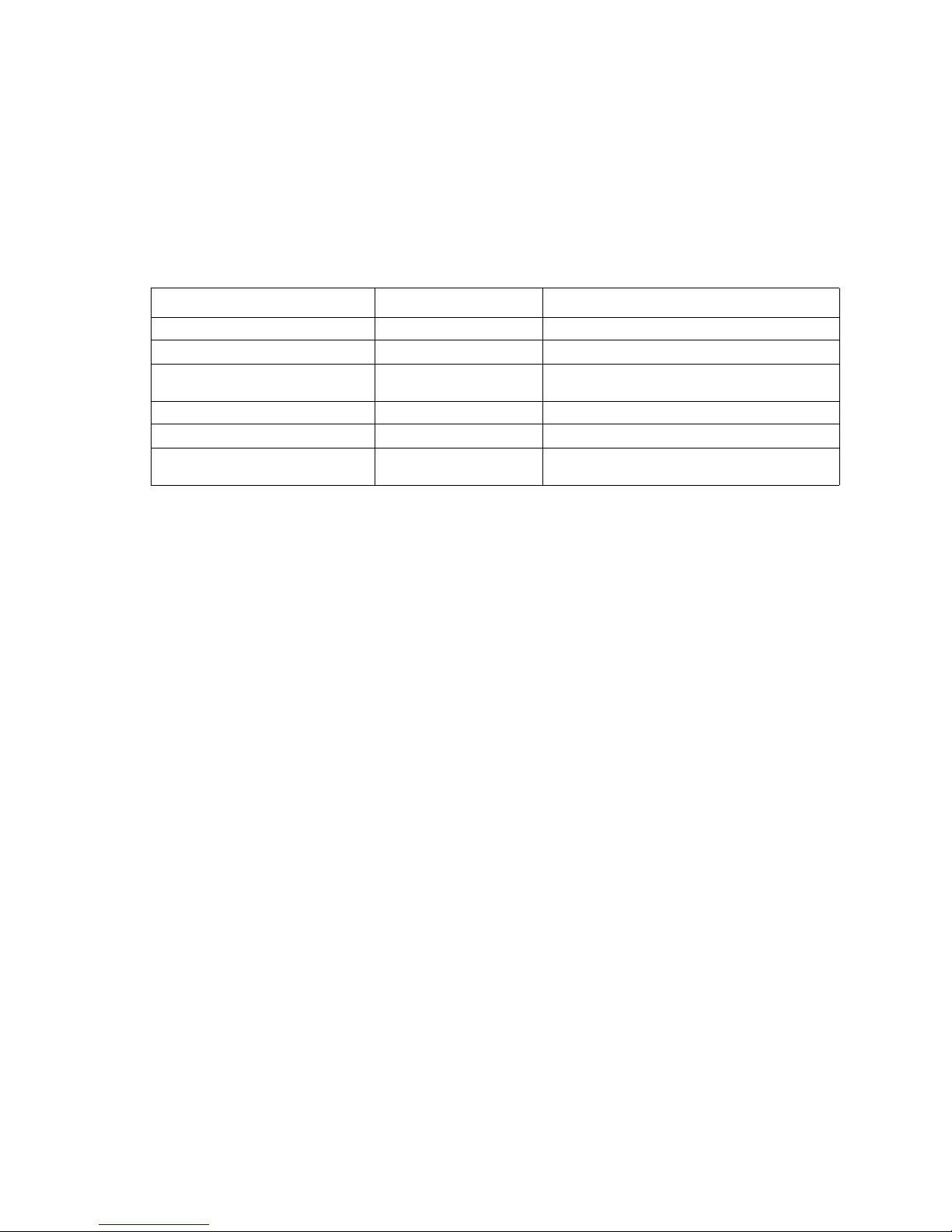
Page orientation is important when printing on letter head. Use the followi ng table for help when lo ading
letterhead.
Process or paper source Print side Top of page
Tray 1 Letterhead f aceup Letterhead goes to ward the front of the tray
Tray 2 Letterhead f aceup Letterhead goes to ward the front of the tray
Duplex (two-sided) printing from
trays 1 and 2
Multipurpose feeder Letterhead f acedown Letterhead top edge enters first
Manual feeder Letterhead f acedown Letterhead top edge enters first
Duplex (two-sided) printing from
the multipurpose feeder
Letterhead f acedown Letterhead goes to ward the rear of the tray
Letterhead f aceup Letterhead top edge enters last
Using tran sparencies
Print samples on the transparencies being considered for use before buying large quantities.
When printing on transparencies:
• Fr om MarkVisi on™ Professional , th e print er software, or the control panel, set the Pap er Type to
Transparency.
• Feed transparencies from the standard tray (Tray 1) or the multipurpose feeder.
• Use transparencies designed specifically for laser printers. Check with the manufacturer or vendor to
ensure transparencies are able to withstand temperatures up to 180°C (356°F) without melting,
discoloring, offsetting, or releasing hazardous emissions .
• Use transparencies that are 0.12–0.14 mm (4.8–5.4 mil) in thicknes s or 161–179 g/m
2
in weight.
• Print quality and dur ability depend on the transparencies used.
• To prevent print quality problems, avoid getting fingerprints on t he transparencies.
• Before loading transparencies, fan the stack to prevent sheets from sticking together.
• We recommend Lexmark part number 12A8240 for let ter-size and Lexm ark part numbe r 12A8241 for
A4-size transparencies.
Using envelopes
Print samples on the envelopes being considered for use before buying large quantities.
•
When printing on envelopes:
• Fr om the control panel, set the Paper Source based on the source in use. From the control panel, the
printer so ft ware, or Mark Vision Professional, set t he Paper Type to Envelope, and select t he envelope size.
• Use env elopes designed specific all y for laser print ers. Check with the manufacturer or vendor to ensure
the envelopes can withstand temper atures up to 180°C (356°F) without sealing, wrinkling, curling
exces sively, or rele asing hazardous emissio ns.
• For the bes t performance, us e en vel opes made from 90 g/ m
bond) weight for envelopes as long as the cotton content is 25% or le ss. All-cotton envelopes must not
exceed 90 g/m
2
(24 lb bond) weight.
2
(24 lb bond) paper. Use up to 105 g/m2 (28 lb
• Use only new envelopes.
1-8 Service M anual
Page 4

5022-xxx
• To optimize performance and minimize jams, do not use envelopes that:
– Have excessive curl or twist
– Are stuck together or damaged in any way
– Have windows, holes, perforations, cutouts, or embossing
– Have metal clasps, string ties, or folding bars
– Have an interlock ing desi g n
– Have postage stamps attached
– Have any exposed adhesive when the flap is in the sealed or closed position
– Have bent corners
– Have rough, cockle, or laid finishes
• Adjust the width guide to fit the width of the envelopes.
Note: A combination of high humidity (over 60%) and the high printing temperature may wrinkle or seal
envelopes.
Using labels
Print samples on the labels being considered for use before buying large quantities. For detailed information on
label printing, characteristics, and design, see the Card Stock & Lab el Guide availabl e on the Lexmark W eb site
at www .l exmark.com/publi cations.
Note: Vinyl labels are not supported on this product. Use only paper labels.
When printing on labels:
• From the printer software, MarkVision Professional, or the control panel, set the Paper Type to Labels.
• Use only letter-, A4-, and legal-size label sheets.
• Use labels designed specifically for laser printers. Check with the manufacturer or vendor to verify that
label adhesives, face sheet (printable stock), and topcoats can withstand temperatures up to 180°C
(356°F) and pressure up to 30 psi without delaminati ng, oozing around the edges, or releasing hazardous
fumes. Do not use vin yl labels.
• Do not use labels with slick backing material.
• Use full label sheets. Partial sheets may cause labels to peel off during printing, resulting in a jam. Partial
sheets also cont am inate the printer and the cartridge with adhesive, and could void the printer and
cartridge warranti es.
• Do not print within 1 mm (0.04 in) of the edge of the label, of the perfo rations, or between die-cuts of the
label.
• Be sure adhesive backing does not reach to the sheet edge. Zone coating of the adhesive at least 1 mm
(0.04 in) a wa y fro m edges is recommend ed. Adhesiv e mate rial contam inat es the printer and could v oi d the
warranty.
• If zone coating of the adhesive is not possi ble, remove a 3 mm (0.125 in.) strip on the leading and driv er
edge, and use a non-oozing adhesive .
• Portrai t ori entation works best, especially when printing bar codes.
• Do not use labels with exposed adhesive.
Using card stock
Card stock is heavy, single-ply p rint me dia. Many of its variab le characteristic s, such as moisture content,
thickness, and texture, can significantly impact print quality.
Print samples on the card stock being conside red for use before buying large quantities.
When printing on card stock:
• From MarkVision Professional, the printer software, or the control panel:
– Set the Paper Type to Card Stock.
– Set the Paper Weight to Card Stock Weight.
– Set the Card Stock Weight to Normal or Heavy.
General inf ormation 1-9
Page 5
5022-xxx
• Be aware that preprinting, perforation, and creasi ng may significantly affect the print qual it y and cause
jams or other paper handling problems.
• Check with the manufacturer or vendor to ensure the card stock can withstand temperatures up to 180°C
(356°F) without rel easing hazardous emissions.
• Do not use preprinted card stock manufactured with chemicals that may contaminate the printer.
Preprinting int roduces semi-liquid and volatile component s into the printer.
• Use grain long card stock when possible.
Storing media
Use these media storage guidelines to help avoid jams and uneven print quality:
• For best results, store media where the temperature is 21°C (70°F) and the relative humidity is 40%.
• Store media in cartons when possib le, on a pallet or shelf, rather than on the floor.
• Store individual packages of media on a flat surface.
• Do not store anything on top of individual media packages.
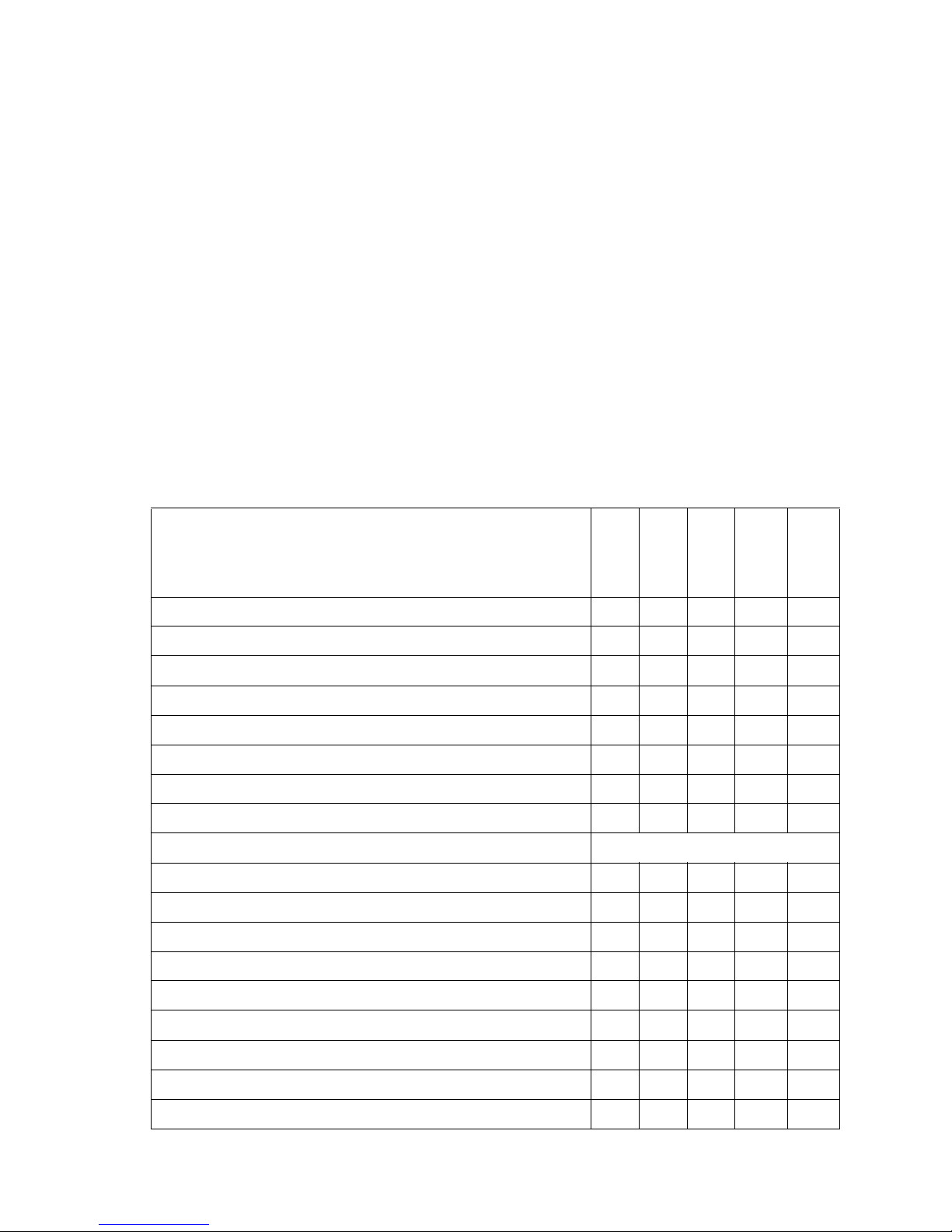
Supported sizes
The following tables provide information on standard and optional sources for both input and output trays and
bins.
Media Sizes
250 T ray
A4 210 x 297 mm ✓✓✓ ✓ ✓
A5 148 x 210 mm ✓✓✓ ✓ ✓
JIS B5 182 x 257 mm ✓✓✓ ✓ ✓
Statement
Letter 8.5 x 11 in. ✓✓✓ ✓ ✓
Folio
Legal 8.5 x 14 in. ✓✓ ✓ ✓ ✓
Executive 7.25 x 10.5 in. ✓✓✓ ✓ ✓
Universal
7 3/4
9 Envelope 3 7/8
10 Envelope 4 1/8
1
5.5 x 8.5 in. ✓✓ ✓
1
8.5 x 13 in. ✓✓✓ ✓ ✓
1
(width)
123.8 to 215.9 x 355.6 mm; 3.8 75 x 4.875 to 8.5 x 14 in. ✓
152.4 to 215.9 x 355.6 mm; 3.8 75 x 6 to 8.5 x 14 in. ✓✓
139.7 x 210 to 215.9 x 355.6 mm; 5.5 x 8.27 to 8. 5 x 14 in. ✓✓ ✓
148 x 210 to 215.9 x 355.6 mm; 5.83 x 8.27 to 8.5 x 14 in . ✓✓✓ ✓ ✓
Envelope 3 7/8 x 7 1/2 in. ✓✓
x 8 7/8 in. ✓✓
x 9 1/2 in. ✓✓
MPF
Duplex
500 T ray
Manual
Feed Slot
DL Envelope 110 x 220 mm ✓✓
C5 Envelope 162 x 229 mm ✓✓
1-10 Service Manual
Page 6
5022-xxx
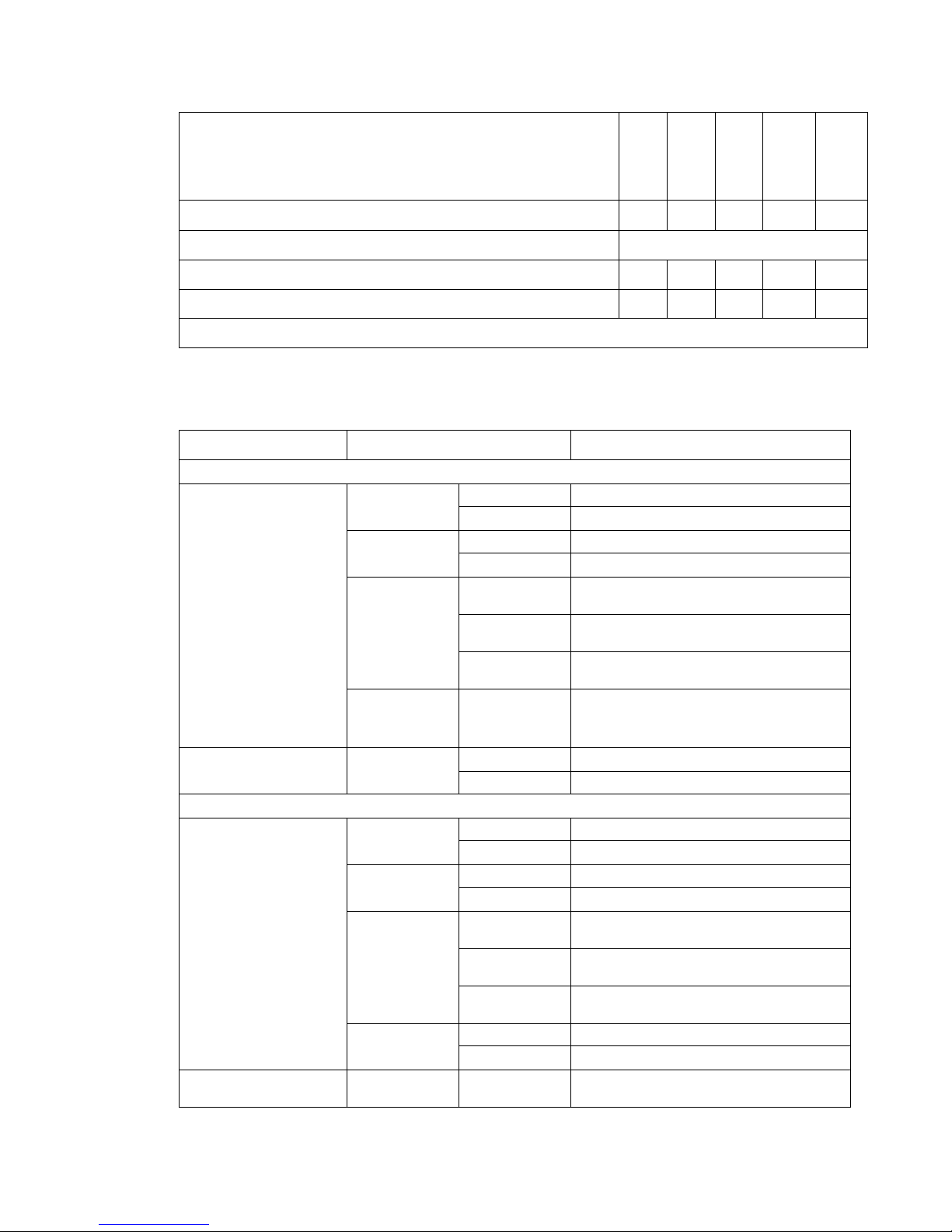
Media Sizes (continued)
B5 Envelope 176 x 250 mm ✓✓
Other Envelope
60.5 to 215.9 mm ✓✓
97.4 to 215.9 mm ✓
1
Lower feed reliability might be encountered when using non-standard media sizes.
Media weight
Primary tray and 500-sheet optional tray
Letter, Legal, A4 Xerographic
A5, B5, JIS-B5, Exec.,
Statement, Folio
Multipurpose feede r and manual feed slot
Letter, Legal, A4 Xerographic
Letter, Legal, A4
(continued)
250 Tray
MPF
Size Type Weight
Long Grain 16 to 47 lb (60 to 177 g/m
and Bonds
Short Grain 24 to 58 lb (90 to 218 g/m
Recycled Long Grain 20 to 47lb (75 to 177 g/m
Short Grain 28 to 58 lb (105 to 218g/m
Card Stock
(long and short)
Transparency 0.12 to 0.14
Cover 50 lb/65 lb
(135 g/m
Index 67 lb/90 lb
(120 g/m
Tag 74 lb/100 lb
(120 g/m
2
2
2
161 to 179 g/m
/ 176 g/m2)
/ 163 g/m2)
/ 163 g/m2)
2
mm
4.8 to 5.4 mil
Xerographic
and Bonds
Long Grain 20 to 47 lb (75 to 177 g/m2)
Short Grain 24 to 58 lb (90 to 218 g/m
Long Grain 20 to 47 lb (75 to 177 g/m
and Bonds
Short Grain 24 to 58 lb (90 to 218 g/m
Recycled Long Grain 20 to 47 lb (75 to 177 g/m
Short Grain 28 to 58 lb (105 to 218 g/m
Card Stock
(long/short)
Labels (max) Paper 35 lb (131 g/m
Cover 50 lb/ 65 lb
(135 g/m
Index 67 lb/ 90 lb
(120 g/m
Tag 74 lb/ 100 lb
(120 g/m
2
/ 176 g/m2)
2
/ 163 g/m2)
2
/163 g/m2)
2
)
Vinyl Not Supported
Transparency Thickness: 0.12
161 to 179 g/m
2
to 0.13 mm
Duplex
2
)
2
)
2
)
2
)
2
)
2
)
2
)
2
)
2
500 Tray
Manual
Feed Slot
)
General information 1-11
Page 7
5022-xxx
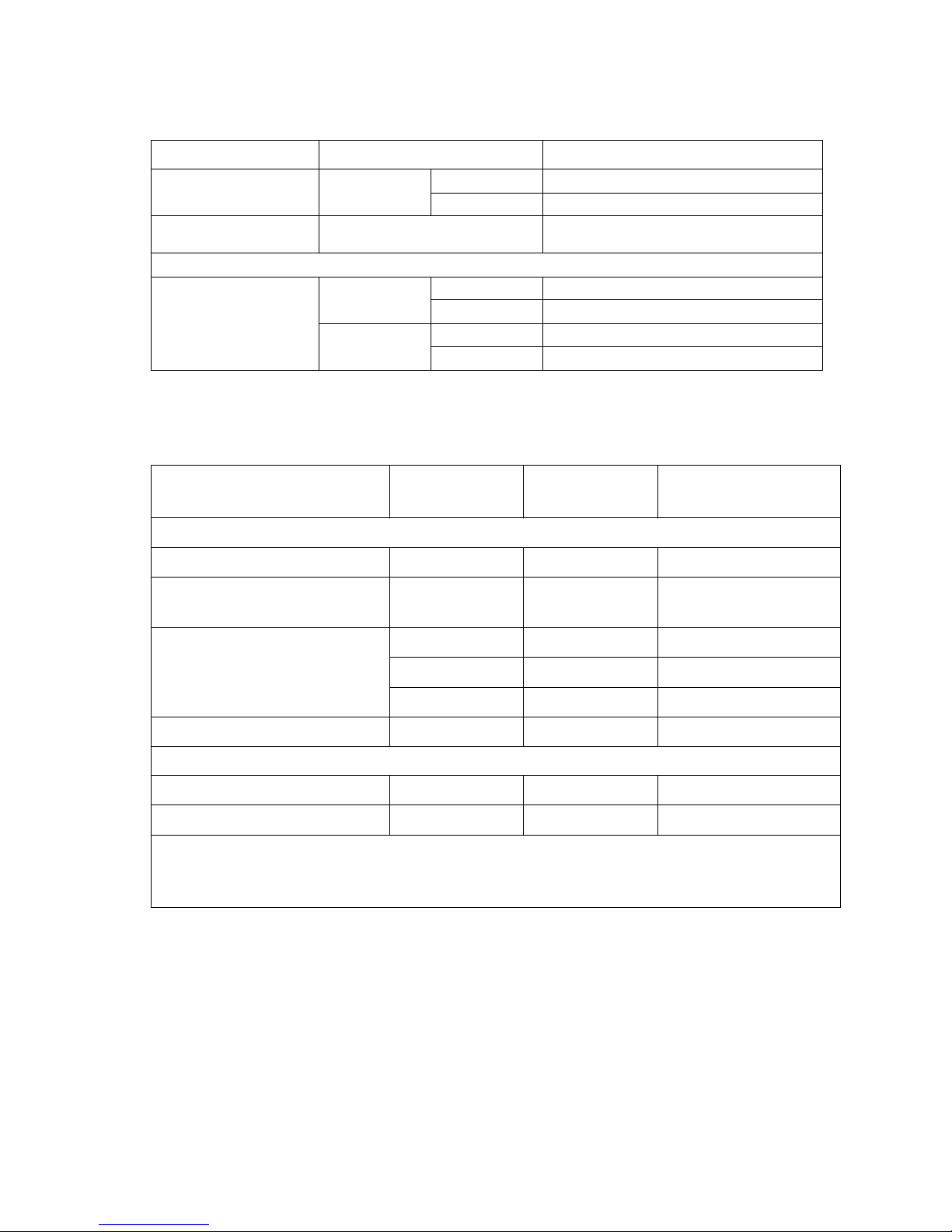
Media weight
Size Type Weight
A5, B5, JIS-B5, Exec.,
Statement, Folio
Xerographic
and Bonds
Long Grain 20 to 47 lb (75 to 177 g/m
Short Grain 24 to 58 lb (90 to 218 g/m
Envelope Monarch, 7 ¾, #9, #10, DL, B5,
16 to 28 lb (60 to 105 g/m
2
)
2
)
2
)
C5, C6-C5, C6, B6
Duplex unit
2
A5, B5, Executive,
Statement, Folio, Letter,
A4 and Legal
Xerographic
and Bonds
Long Grain 20 to 32 lb (75 to 120 g/m
Short Grain 24 to 32 lb (90 to 120 g/m
Recycled Long Grain 20 to 32 lb (75 to 120 g/m
Short Grain 28 to 32 lb (105 to 120 g/m
)
2
)
2
)
2
)
Input and output capacities
The following table outlines the input and output source capacities by media type.
Source Media
Maximum
height
Approximate reference
capacity
Input
Standard 250-sheet tray
2
Optional 500-sh eet tray (C52x) or
Optional 550-sh eet tray (C53x)
Multipurpose feeder
2
2
Plain paper
Plain paper
Plain paper 10 mm 100 sheets (75 g/m2)
1
1
54 mm 250 sheets (75 g/m2)
57.6 mm 500 sheets (80 g/m2)
550 sheets (75 g/m
Envelopes 10 envelopes (75 g/m
Other Various quantities
Manual feed slot Any media Single sheet 1 sheet
Output
Standard 250-sheet output bin
1, 2
Plain Paper 35 mm 250 sheets (75 g/m2)
Other Various quantities
1
20 lb xerographic paper at ambient en vironment
2
Capacity may vary and is subject to media specifi cations and printer oper ati ng environment.
Note: Pa per input is limited to below the input source indicator on the tr ay.
2
)
2
)
Print area
The printable area is limited to within 4.2 mm (0.167 in.) of all edges of the media. Any information placed
outside this specified printable area does not print.
1-12 Service Manual
 Loading...