

Page 1
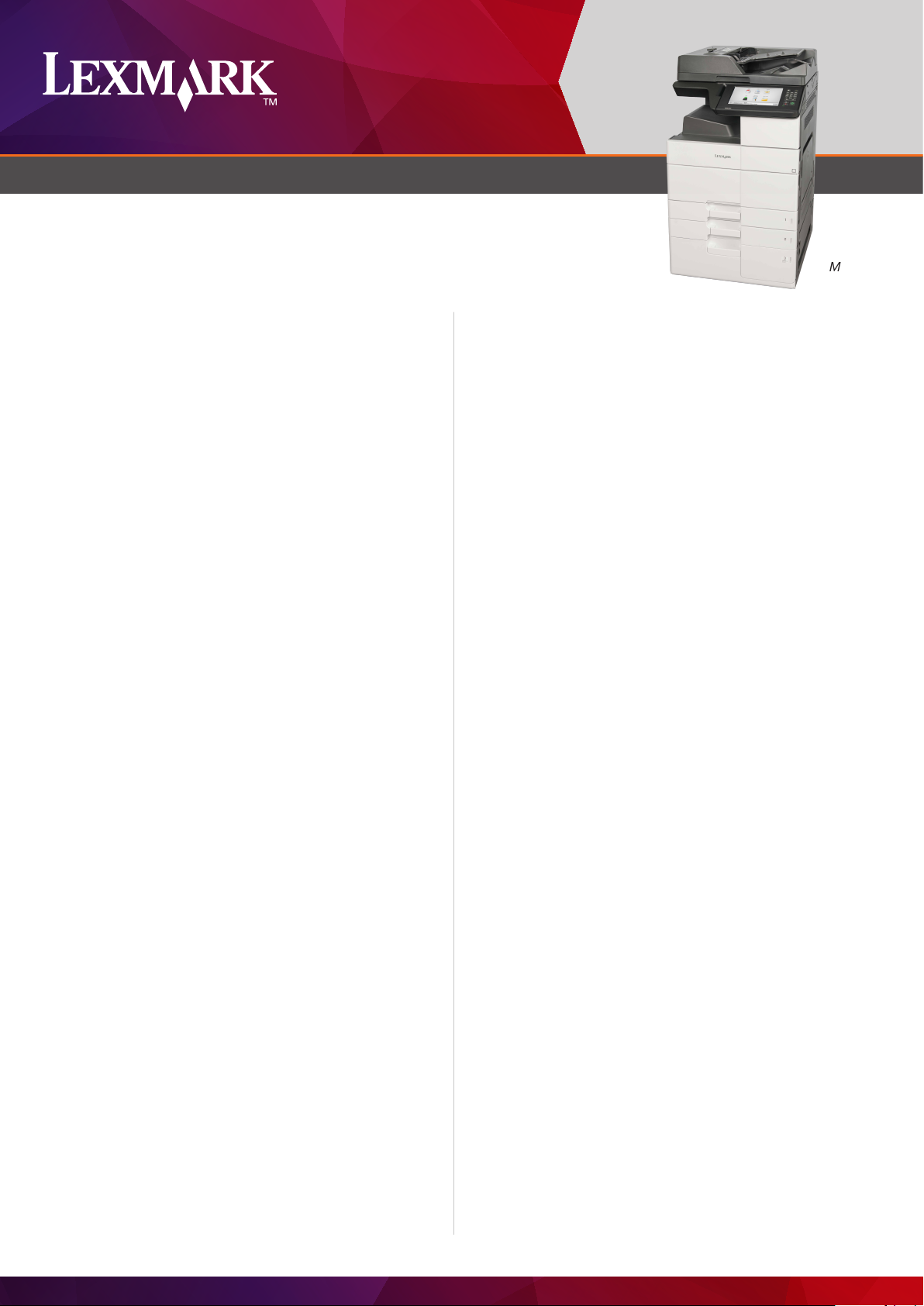
MONOCHROME LASER MULTIFUNCTION PRODUCTS
Lexmark MX910 Series
High-volume output, long-life components, solid security and
advanced finishing make the Lexmark MX910 Series the
ultimate A3-capable multi-function product from Lexmark.
Advanced features and output-size options
As a complete line of A3 monochrome multi-function products by
Lexmark, the MX910 Series brings speed, connectivity, security,
sustainable design, a user-centric interface and advanced finishing
to your business – supported by the complete Lexmark user
experience, service options and solution library.
performance, less downtime
Speedy printing: The MX910 Series takes only seconds to
produce a first page, then prints up to 65 pages per minute,
depending on the model. The fast printing mechanism is backed
by a powerful 800 MHz dual-core processor and up to 3GB of
memory, to ensure swift output and satisfied users.
Top-end input: The series starts with 1,000 pages of input
capacity between two standard 500-sheet trays, and space for
an additional 150 sheets in the multi-purpose feeder. With
additional trays and feeders, the line tops out at a massive 6,650
pages of input capacity. The trays even include indicator LEDs to
show at a glance when paper’s running low or completely out.
Top
MX910dxe
Protocols: The series supports nearly all printing protocols,
assuring seamless output from any device or application with
printing capabilities.
Mobile printing: It’s a big device that sits in one place - your users
don’t. With Lexmark Mobile Print they can print from anywhere via
smart mobile devices*, as well as traditional desktop computers.
Comprehensive security
Print release: An optional card reader lets the MX910 Series
confirm the identity of a user before releasing a print job they’ve
sent – or oers them a choice of documents printed on demand.
Remote manageability: Control device settings from any browser
(when network-connected), including security settings, device
defaults, consumable alerts and more.
Network security: A comprehensive set of enterprise-class
network security features and protocols are built in to protect
your device, your information and your network—including SNMPv3
and IPSEC.
Secure storage: The standard encrypted hard disk features
advanced functions like automatic disk wiping and manual “out of
service” disk wiping to ensure confidential information doesn’t end
up in the wrong place.
High-volume output: Meet demanding output requirements for
both standard and A3 print jobs with the MX910 Series’
300,000-page maximum monthly duty cycle.
Scanning: With the ability to process up to 140 images per
minute through the duplexing automatic document feeder, your
sta can digitise hard copy originals faster, freeing them, and the
MFP, sooner for more productivity.
Long-life components: The photoconductor unit is rated for up
to 125,000 pages, while the fuser can reach up to 720,000
pages. Replacing fewer components over the life of the product
not only saves resources, but means less maintenance and more
uninterrupted availability.
Connected and capable
Connectivity: Gigabit Ethernet instantly connects the MX910
Series to standard networks, while multiple USB 2.0 and
optional parallel ports link to local platforms. Optional wireless
(802.11n) connectivity supports flexible printer placement on
wireless networks.
Sustainable design
Energy-saving sleep modes: When not in use, the MX910 Series
goes into a sleep mode that consumes less than four watts of
power— as little as a traditional night light.
Duplexing: Integrated two-sided printing, a user-selectable option,
saves paper and doesn’t slow you down, printing individual sheet
sides (images) at up to each device’s rated speed.
Certifications: EPEAT Silver and 2014+ Energy Star certifications
confirm the series’ energy eciency.
*For more information on Lexmark Mobile Solutions, see lexmark.com/mobile.
Page 2
LEXMARK MX910 SERIES
Portal to productivity
The MX910 Series’ tilting, 25 cm (10-inch) class colour touchscreen
keeps users informed of device status and error messages, while
visually guiding them through tasks like clearing paper jams.
The large, vivid display is also ideal for print and scan preview, and
has magnification and reverse image options to assist users with
visual impairments.
And Lexmark’s innovative e-Task user interface makes it easy to
take advantage of pre-installed solutions like:
Forms and Favourites: Instantly access required online forms from
any Lexmark printer or multi-function product (MFP) to help
simplify and streamline work processes.
Multi Send: Scan a paper document once and route the digital
image file to multiple destinations simultaneously.
My Shortcuts: Save time and improve eciency by creating
shortcuts for your most frequent copy, fax and email tasks.
Card Copy: Scan both sides of a wallet-sized card and print them
on one page, email them as a file or save them to a shared
network folder.
Scan to Network (Basic): Capture the image of a document and
route it to one of 30 predefined personal or public network folders.
Additional available solutions include:
Lexmark Print Management: Improve the eciency of your output
environment by helping to reduce unnecessary printing and gain
valuable insight into how your output infrastructure is utilised.
Lexmark Smart Card Authentication: A comprehensive collection
of apps enables secure smart card authentication on Lexmark
printing and imaging devices.
Advanced finishing options
Simple finishing: Optional staple finisher has the ability to single-
position-staple up to 50 sheets or oset the print job without
increasing the footprint of the multi-function product (not
compatible with the MX912).
Staple and hole punch finishing: Optional floor-standing finisher
oset stacks, multi-position-staples and hole-punches in popular
configurations. The floor-standing finishers can staple or holepunch at up to the device’s maximum rated print speed for
complete eciency.
Booklet finishing: Automated folding functionality in optional
finisher lets you create tri-fold documents or booklet-style ones
with saddle-stitched binding, plus all the options of the staple hole
punch finisher.
The Lexmark user experience
Your users will appreciate the consistent user interface of Lexmark
devices. And every Lexmark device is right at home as part of the
worldwide Lexmark service network that backs up the MX910
Series for maximum uptime and fewer service worries.
Page 3
LEXMARK MX910 SERIES
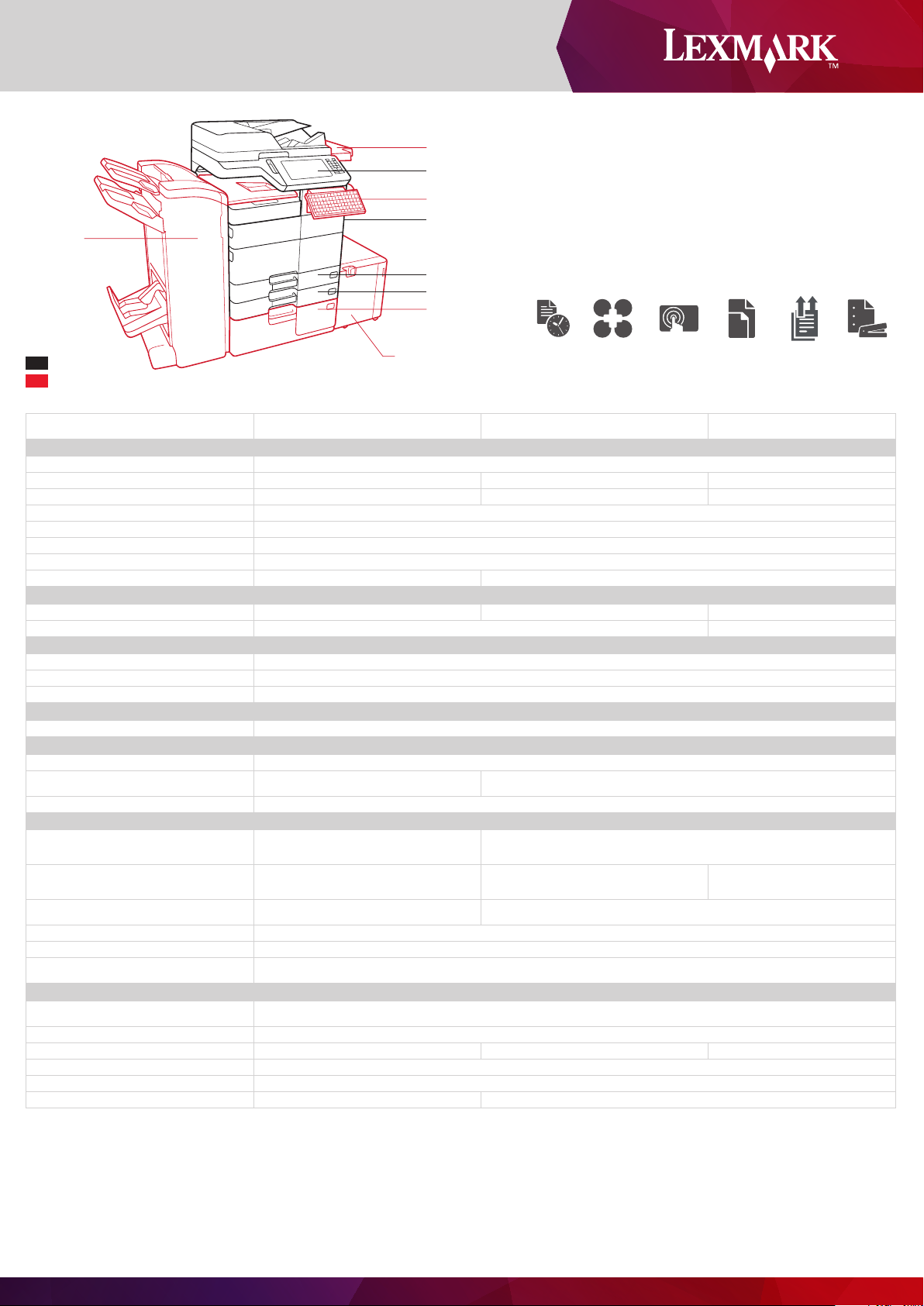
Booklet Finisher
or Stapl e Punch
Finisher
Working Table
25 cm (10-inch) Class Touchscreen
Keyboard Kit
150-Sheet Multi-Purpose Feeder
500-Sheet Input
500-Sheet Input
2,500-Sheet Tandem Tray
or 2 x 500-S heet Tray
MX910 Series MFP Features
Standard
Optional
3,000-Sheet Tray
ppm
SolutionsUp to 65
25 cm
(10-inch) Class
Touchscreen
SRA3
12X18
Duplex
ADF
Single-pass
Product specifications Lexmark MX910dxe Lexmark MX911de Lexmark MX912de
Printing
Display
Print Speed: Up to²
Time to First Page: As fast as
Print Resolution
Memory / Processor
Hard Disk
Recommended Monthly Page Volume⁴
Maximum Monthly Duty Cycle: Up to³
Copying
Copy Speed: Up to²
Time to First Copy: As fast as
Scanning
Scanner Type / ADF Scan
Duplex Scan Speed: Up to
Simplex Scan Speed: Up to
Faxing
Modem Speed
Supplies
Laser Cartridge Yields
Photoconductor Estimated Yield: Up to
Cartridge(s) Shipping with Product
Paper Handling
Included Paper Handling
Optional Paper Handling
Paper Input Capacity: Up to
Paper Output Capacity: Up to
Media Types Supported
Media Sizes Supported
General Information
Standard Ports
Optional Network Ports / Optional Local Ports
Noise Level: Operating
Specified Operating Environment
Product Guarantee
Size (mm - H x W x D) / Weight
Black: 45 ppm Black: 55 ppm Black: 65 ppm
Black: < 5.6 seconds Black: < 5.5 seconds Black: < 5.2 seconds
200,000 pages per month 300,000 pages per month
Black: 45 cpm Black: 55 cpm Black: 65 cpm
125,000 pages, based on 3 average letter/A4-size
Standard: 3,650 pages 75 gsm bond / Maximum:
10 Envelope, 7 3/4 Envelope, 9 Envelope, A3, A4, A5, B5 Envelope, C5 Envelope, DL Envelope, Executive, Folio, JIS-B4, JIS-B5, Ledger, Legal, Letter,
One Internal Card Slot, USB 2.0 Specification Hi-Speed Certified (Type B), Gigabit Ethernet (10/100/1000), Front USB 2.0 Specification Hi-Speed Certified port
Print: 52 dBA / Copy: 53 dBA / Scan: 57 dBA Print: 53 dBA / Copy: 54 dBA / Scan: 56 dBA Print: 55 dBA / Copy: 55 dBA / Scan: 56 dBA
pages per print job
250-Sheet Output Bin, 150-Sheet
Multipurpose Feeder, 2 x 500-Sheet
Input, 2,500-Sheet Tandem Tray
Staple Punch Finisher, Inline Stapler,
3,000-Sheet Tray, Booklet Finisher
6,650 pages 75 gsm bond
Card Stock, Envelopes, Labels, Plain Paper, Transparencies, Refer to the Card Stock & Label Guide.
Internal MarkNet N8350 802.11b/g/n Wireless / Internal RS-232C serial, Parallel 1284-B Interface Card
Altitude: 0 - 2500 Meters (8,200 Feet), Humidity: 15 to 85% Relative Humidity, Temperature: 10 to 30°C (50 to 86°F)
1152 x 615 x 697 mm / 120 kg 909 x 615 x 697 mm / 95 kg
Lexmark e-Task 25 cm (10-inch) class colour touch screen
Black: 1200 Image Quality, 1200 x 1200 dpi, 2400 Image Quality, 600 x 600 dpi
standard: 1024 MB / maximum: 3072 MB / Dual Core, 800 MHz
as standard
15,000 - 50,000 Pages
black: 5.8 seconds black: 5.6 seconds
Flatbed scanner with ADF / DADF (single pass Duplex)
Mono: 140 sides per minute / Colour: 140 sides per minute
Mono: 80 sides per minute / Colour: 80 sides per minute
ITU T.30, V.34 Half-Duplex, 33.6 Kbps
32,500¹-page High Yield Cartridge
125,000 pages, based on 3 average letter/A4-size pages per print job
21,000¹-page Starter Toner Cartridge
250-Sheet Output Bin, 150-Sheet Multipurpose Feeder, 2 x 500-Sheet Input
Staple Punch Finisher, Inline Stapler,
2,500-Sheet Tandem Tray, 3,000-Sheet Tray,
Booklet Finisher, 2 x 500-Sheet Tray
Standard: 1,150 pages 75 gsm bond / Maximum: 6,650 pages 75 gsm bond
Standard: 250 pages 75 gsm bond / Maximum: 3,500 pages 75 gsm bond
Statement, Universal, Super Tabloid (305 x 457 mm), Oficio, A6, SRA3
(Type A), Two Rear USB 2.0 Specification Hi-Speed Certified ports (Type A)
1-Year Onsite Service
Staple Punch Finisher, 2,500-Sheet
Tandem Tray, 3,000-Sheet Tray,
Booklet Finisher, 2 x 500-Sheet Tray
Finishing
Function
*MX910de model is also available.
¹ Average standard page yield value declared in accordance with ISO/IEC 19752. ² Print and copy speeds measured in accordance with ISO/IEC 24734 and ISO/IEC 24735 respectively (ESAT). For more information see: www.lexmark.com/ISOspeeds. ³ "Maximum
Monthly Duty Cycle" is defined as the maximum number of pages a device could deliver in a month using a multishift operation. This metric provides a comparison of robustness in relation to other Lexmark printers and MFPs. ⁴ "Recommended Monthly Page
Volume" is a range of pages that helps customers evaluate Lexmark’s product oerings based on the average number of pages customers plan to print on the device each month. Lexmark recommends that the number of pages per month be within the stated
range for optimum device performance, based on factors including: supplies replacement intervals, paper loading intervals, speed, and typical customer usage.
Page 4
www.lexmark.co.uk
Lexmark, Lexmark with diamond design, AccessVia and Unison are trademarks of
Lexmark International, Inc. or its subsidiaries, registered in the United States and/or other
countries. ENERGY STAR® is a US registered mark. All other trademarks are the property
of their respective owners. © 2014 Lexmark International, Inc. 740 W. New Circle Rd.
Lexington, KY 40550. Information in this document is subject to change without notice.
AirPrint and the AirPrint logo are trademarks of Apple Inc.
 Loading...