

Page 1

Lexmark X950 Colour MFP Series
Powerful colour performance
for your workgroup.
Lexmark X950 Series
Power up your office and increase productivity with the Lexmark X950 Series,
featuring high-performance A3 colour functionality, flexible features, easy-to-use
workflow solutions and advanced security.
Colour Touch screen Copy Scan Fax Solutions
Duplex Up to 55 ppm Network32 x 122 cm
(12.6 x 48 inch)
Page 2

Lexmark X950 Series Key Features
2
1
6
3
4
5
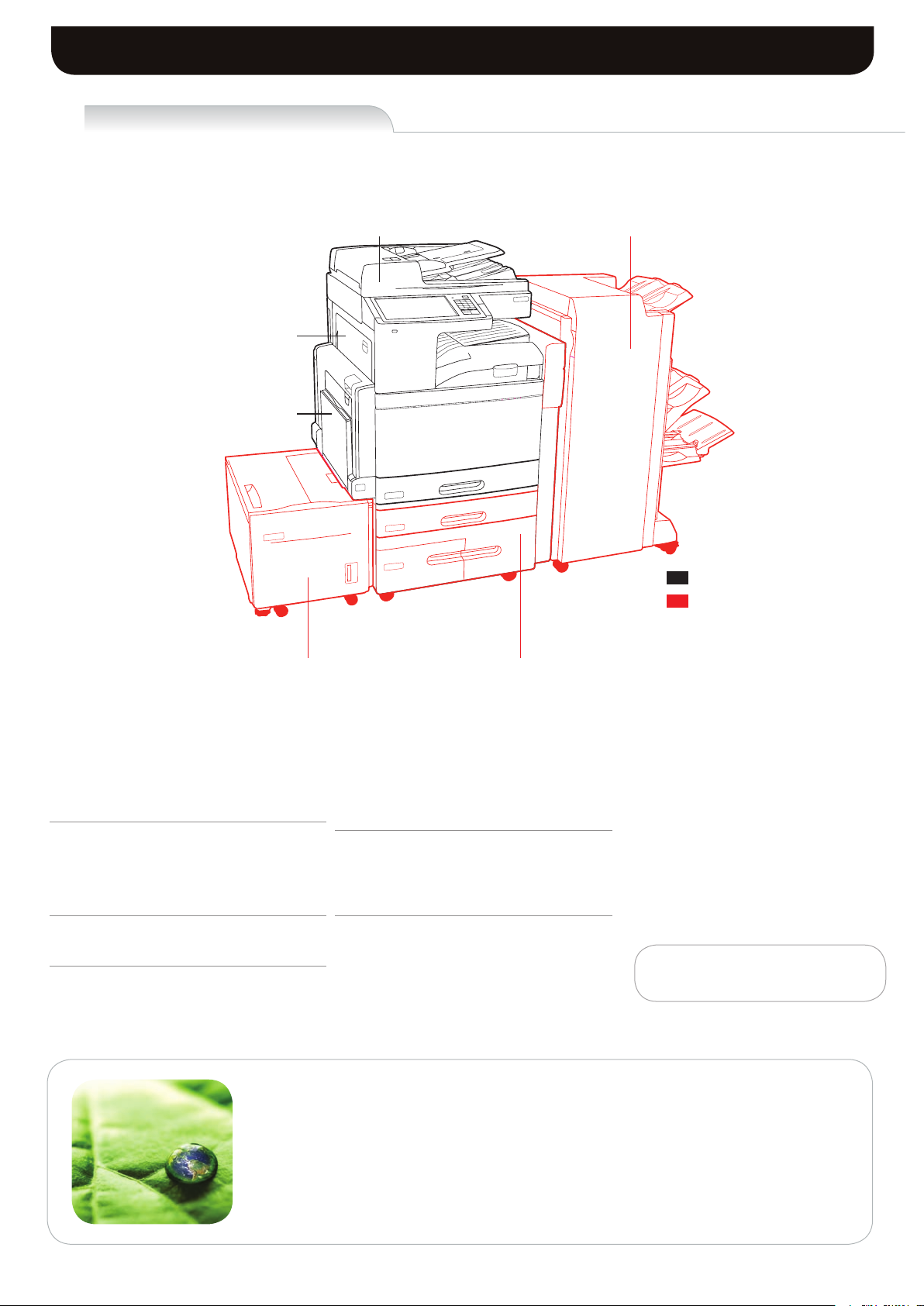
Lexmark X950de colour MFP shown with optional
2,520-Sheet Tandem Tray Module, Booklet Finisher and
2,000-Sheet High Capacity Feeder.
Features to optimise your work
1) Intuitive colour touch screen
The extra large 25.9-cm (10.2-inch) colour touch
screen allows you to operate your MFP with ease
through intuitive navigation and easy access to
workflow solutions and shortcuts.
4) Flexible input capacity
Choose the configuration that best fits your needs,
up to a maximum of 5,140 sheets.
2) Lexmark solutions
Reduce unnecessary printing and simplify work
processes through solutions applications preloaded
on your device. Choose additional Lexmark
solutions to fit your unique workflow needs.
5) Exceptional media handling
Ultra-reliable paper feeding lets you load up to six
different types of media, including sizes up to 32
x 122 cm (12.6 x 48 inch) and weights up to 300
gsm.
3) Direct USB
The front USB port allows for convenient walk-up
preview, printing and scanning, and is compatible
with most printable image file formats.
6) Advanced finishing options
Easily create professional output in-house with
flexible finishing options, including multi-position
stapling, hole punch, expanded output stacking
and booklet capability.
Page 3

Lexmark X950 Series Overview
Outstanding Colour Output
Make a lasting impression on your customers and do more printing in-house with
vibrant, professional-quality output on a wide variety of media. With the advanced
technology of the X950 Series, you’ll get high-performance A3 (tabloid) multifunction
capability that produces consistent colour from the first page to the last.
l
1200 x 1200 print resolution for rich vibrant colours and crisp black text.
l
PANTONE® calibration for consistent colour tones.
l
Named Colour Replacement for easy colour matching.
l
Lexmark Colour Care Technology to manage colour use and control costs.
l
Create professional collateral materials ranging from saddle stitch booklets to folded
brochures on media up to A3 (tabloid).
Productive and Intuitive
The Lexmark X950 Series combines high-performance printing, copying, scanning and
faxing with time-saving workflow applications designed to boost your productivity.
l
Print and copy at speeds up to 55 ppm black and 50 ppm colour, and scan at
speeds up to 70 images per minute; time to first print as quick as 5.2 seconds.
l
Extra large, easy to navigate 25.9 cm (10.2-inch) colour touch screen provides
audible and tactile feedback to make completing tasks intuitive.
l
Preloaded applications help you drive greater efficiency in your workflow.
l
Scan to multiple destinations, including scan to email, scan to FTP, scan to fax, scan
to network, scan to USB drive and more.
l
Print Preview and Post Process Job Changes allow you to duplex, add finishing or
select individual pages for printing.
l
Advanced copy functions let you interrupt long print runs to make a quick copy or
proof the first copy set before completing your copy job.
Built for Business
The Lexmark X950 Series features a robust print engine designed to handle the most
demanding workloads with the advanced features and flexibility you need to run your
business.
l
Robust connectivity makes it easy to integrate into almost any network environment.
l
Simplify device monitoring and administration through the embedded web server,
Lexmark Universal Print Driver and Lexmark MarkVision Enterprise.
l
High-capacity hard disk, 1.2 GHz processor and up to 2GB RAM.
l
Inner Tray 2 is standard, allowing you to separate print, copy or fax output into two
bins.
l
Choose from multiple input options to expand capacity up to 5,140 sheets.
l
Easy-to-replace aftermarket cartridges provide yields of up to 38,000² pages black
and up to 24,000² pages colour.
True. Image. Always.
Lexmark is dedicated to designing and manufacturing products that deliver
exceptional quality and reliability. Maximise the return on your investment, optimise
the performance of your Lexmark printing equipment and make a lasting impression
by always insisting on Lexmark Genuine Supplies, Service and Parts. The X950 Series
is backed by Lexmark’s 1-Year Limited Warranty; extended warranty plans are also
available.
Page 4
Lexmark X950 Series Productivity Made Easy
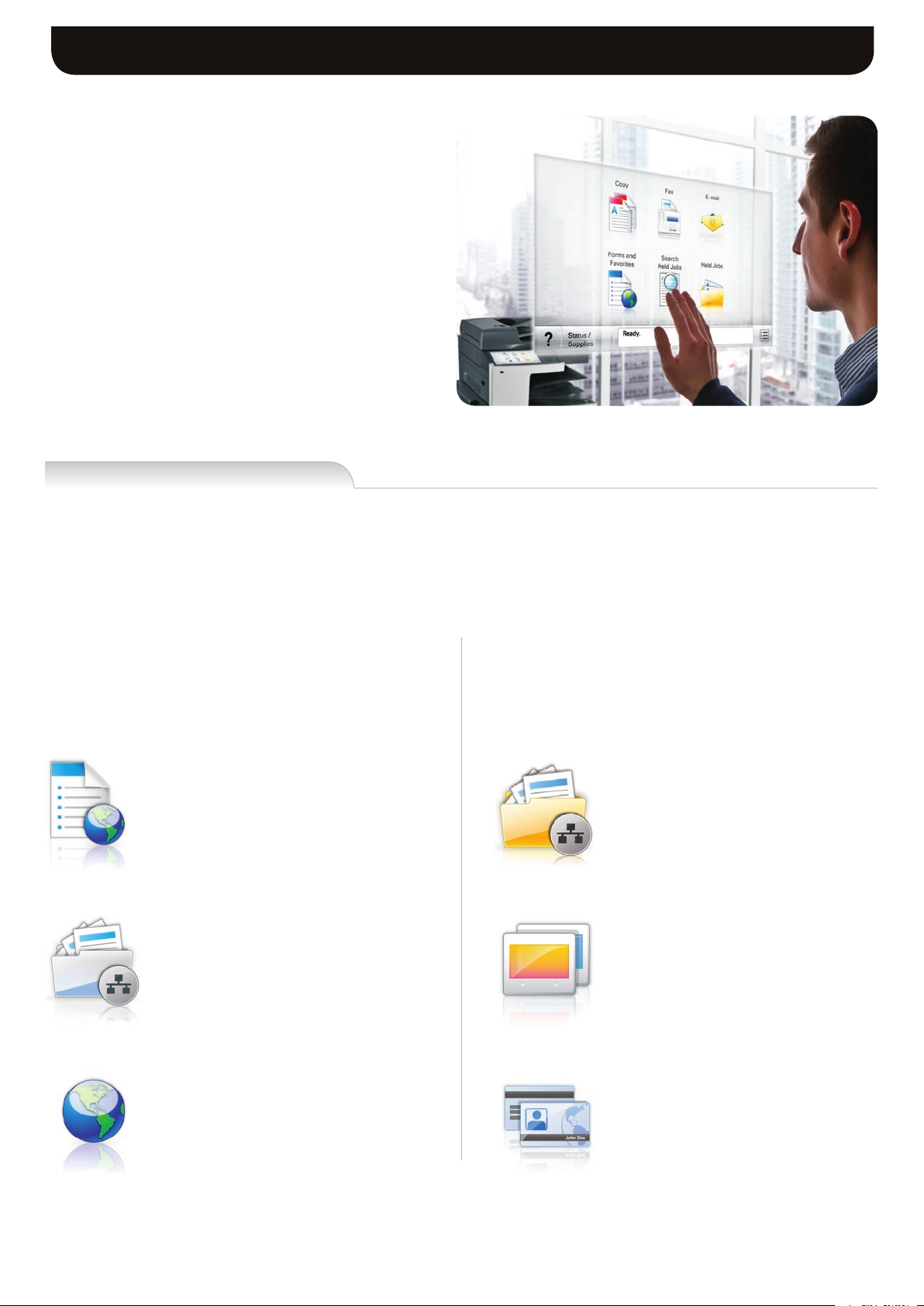
The right touch
The Lexmark e-Task colour touch screen is a key access
point to your MFP. The extra large customisable 25.9
cm (10.2-inch) interface gives you the ability to preview
thumbnails of documents prior to printing, as well as to
change print jobs at the device. You can even view, select
and print specific pages within a document directly from the
touch screen. Easy-to-use, intuitive navigation provides fast
access to the functions, shortcuts and workflows you use
most. New interactive sensory features provide both tactile
and audible feedback, helping to guide you through each
operation, confirming a touch has registered and indicating
an action is transpiring.
Solutions
4
Save time and money through solutions
The Lexmark X950 Series features the Lexmark Embedded Solutions Framework, our platform that enables you to add a wide range
of software applications directly onto the device. Solutions are designed with your productivity in mind, helping you streamline—or
even eliminate—paper intensive business processes.
The following solutions are preloaded on the X950
Series:
Forms and Favourites
Eliminate waste and inefficiencies associated with preprinted forms. Store frequently printed forms, marketing
materials or other documents online, then print them
on demand.
Scan to Network
Scan a hardcopy document and route the image to
one of 30 predefined personal or public shared network
folders.
The following are just a few examples of solutions
available to you through Lexmark authorised partners
and dealers, or through a Lexmark Professional
Services engagement:
Scan to Network Premium
This enhanced version of Scan to Network offers
advanced functionality to preview, modify, enhance and
index scanned documents before routing them to a
shared network folder.
Showroom
Display a customisable, scrolling slideshow on the
colour touch screen to promote your business or
products, or to communicate important messages to
your customers or employees.
Change Language³
Easily switch the language displayed on the touch
screen – 18 languages are supported.
Card Copy
Save time and effort in copying identification cards,
licences and insurance cards by automatically
scanning, enlarging and printing both sides of a twosided card on to one side of a sheet of paper.
Page 5

Lexmark X950 Series Highlights
Print Less. Save More.
Print less? This may seem like a surprising
message for a company dedicated solely
to printing. But when you consider that
businesses spend, on average, up to
6% of their turnover on printing, and that
active print management can cut office
print costs by up to 30%¹, it makes a lot
of sense. Lexmark products, solutions
and services provide innovative ways
to save you time, drive down costs and
reduce your impact on the environment.
We are committed to helping you print
less and save more.
Desired colour
PANTONE 346 C
Without
Named Colour
With Named Colour
Replacement
Consistent colour, every time
Produce professional documents confidently in-house knowing that the named
colours of your company’s brand and logo will print accurately and consistently every
time. Through Lexmark Named Colour Replacement, included standard with your
device, users can enter specific colour values for easy colour matching, including
PANTONE® Colour and colours in the DIC Colour Guide.
Easy device management
Manage your output environment effectively with Lexmark MarkVision Enterprise. This
free browser-based software gives you complete visibility into your entire fleet of network
printers and MFPs regardless of manufacturer. MarkVision Enterprise makes it easy
for administrators to configure, track, view, troubleshoot and proactively manage your
devices throughout their lifecycle, from the moment you connect them to the network
until the day you retire them.
Protecting your information
From the data travelling through your network to the pages being printed, multilayered
security features and built-in capabilities help you protect your devices, documents, data
and network.
l
Supports a variety of user authentication and authorisation controls.
l
Card reader option allows users to authenticate with proximity or swipe cards.
l
Advanced hard disk encryption protects sensitive data on the MFP’s disk drive.
l
Automatic, scheduled or manual disk wiping removes latent data.
l
IPSec, SNMPv3 and 802.1x network security are supported.
l
Security-audit logging tracks and identifies security risks.
Page 6
Lexmark X950 Series Ordering Information
Lexmark X950de
110-Sheet Automatic Document Feeder
Integrated Duplex
100-Sheet Multipurpose
Feeder
Booklet Finisher
Standard
Optional
Feeder
Compatible on the complete X950 Series
Part # Laser Toner/Print Cartri dge
X950X2KG X950, X952, X954 Black Extra H igh Yield Toner Cartridge ( 38K)
X950X2CG X950, X952, X954 Cyan Extra Hi gh Yield Toner Cartridge (2 4K)
X950X2MG X950, X952, X954 Ma genta Extra High Yield Toner Cartridge (24 K)
X950X2YG X950, X952, X954 Yellow Extra High Yield Toner Cartrid ge (24K)
C950X71G C950, X950/2/4 Photoconducto r Unit 1-Pack
C950X73G C950, X950/2/4 Photoconducto r Unit 3-Pack
C950X76G C950, X950/2/4 Waste Toner Bottle
25A0013 Staple Cartr idges (3 pack)
21Z0357 Saddle St aple Cartridges (4 pack )
Part # Memory Opti ons
1025041 256MB DDR2- DRAM
1025042 512MB DDR2- DRAM
1025043 1024MB DDR2 -DRAM
14F0245 256MB F lash Card
Part # Application S olutions
22Z0186 X950, X952, X954 Card for IPDS
22Z0187 X950, X952, X954 Card for PRESCRIBE Emul ation
22Z0185 X950, X952, X954 Forms and Bar Code Card
57X9000 Lexmark Pri ntCryption Card
Part # Connectivity
27X0030 MarkNet N82 50 802.11b/g/n Wireless Pri nt Server
14F0037 MarkNet N8120 Gigabit Ethernet Print Server
14F0042 MarkNet N8130 Fiber Ethernet 100B aseFX, 10BaseFL Print Serv er
14T0220 MarkNet N 7020e Gigabit Ethernet P rint Server
1021294 USB (2 Mete r) Cable
14F0000 Parallel 1284-B Interface Card
1021231 Parallel (10 ’) Cable
14F0100 RS-232C Serial Interface Card
Part # User Replacea ble Parts
40X7569 C950, X95x Fus er Maintenance Kit, 320K, 220-24 0V
40X7540 C950, X95x 160 K Maintenance Kit
40X7530 X95x ADF Maint enance Kit
Eco-responsible printing
2,520-Sheet Tandem Tray Module2,000-Sheet High Capacity
Part # Available M odels:
22Z0092 Lexmark X950 de
22Z0093 Lexmark X952 de
22Z0094 Lexmark X954 de
The X950 Series makes it easy for you to print responsibly. Features include duplex to save
paper, Eco-Mode to reduce paper and toner consumption and a Sleep Button with hibernate
mode to save energy. The X950 Series also helps you save energy through its instant warm-up
fuser and specially designed toner, which fuses at a low temperature.
Page 7
Lexmark X950 Series Ordering Information
Lexmark X950de
Part # Model
22Z0092 Lexmark X 950de
Part # Paper Handlin g
22Z0014 C950, X95x 25 20-Sheet Tandem Tray Module
22Z0013 C950, X95x 3x 520-Sheet Drawer Stand
22Z0012 C950, X95x 52 0-Sheet Drawer Stand
22Z0015 C950, X95x 20 00-Sheet High Capacity Feeder
22Z0175 C950, X95x 35 00-Sheet Finisher (4-Hole )
22Z0176 C950, X95x Bo oklet Finisher (4-Hole)
Part # Extended Warranties
2354235P X950 2-Years Total Onsite Servi ce, Next Busi ness Day
2354236P X950 3-Years Total Onsite Servi ce, Next Busi ness Day
2354237P X950 4-Years Total Onsite Servi ce, Next Busi ness Day
Lexmark X952de
Part # Model
22Z0093 Lexmark X 952de
Part # Paper Handlin g
22Z0014 C950, X95x 25 20-Sheet Tandem Tray Module
22Z0013 C950, X95x 3x 520-Sheet Drawer Stand
22Z0012 C950, X95x 52 0-Sheet Drawer Stand
22Z0015 C950, X95x 20 00-Sheet High Capacity Feeder
22Z0175 C950, X95x 35 00-Sheet Finisher (4-Hole )
22Z0176 C950, X95x Bo oklet Finisher (4-Hole)
Part # Extended Warranties
2354263P X952 2-Years Total Onsite Servi ce, Next Busi ness Day
2354264P X952 3-Years Total Onsite Servi ce, Next Busi ness Day
2354265P X952 4-Years Total Onsite Servi ce, Next Busi ness Day
2354239P X950 1-Year Onsite Ser vice Renewal, Next Busines s Day
Part # NC
2354242 X950 Instal lation Service
2354267P X952 1-Year Onsite Ser vice Renewal, Next Busines s Day
Part # NC
2354270 X952 Instal lation Service
Other availab le models:
Lexmark X952 de: Includes: 32 x 4 8 cm (12.6 x 19
inch) media support and print speed u p to 50 ppm,
Part #22Z009 3
Lexmark X954 de: Includes: 32 x 4 8 cm (12.6 x 19
inch) media support, print s peed up to 55 ppm and
2GB RAM stan dard, Part #22Z0 094
In the box
Lexmark X950 de colour mu ltifunction p rinter, Up to
12,000*-pag e colour (CMY ) toner cart ridges, Up to
19,000*-pag e black toner cartridge, Blac k, cyan,
magenta,and yellow Imag ing units, Softw are and
Documentati on CD, Power Cord(s), RJ-11 Phone
cable or ad apter (country dependen t), Setup Guides
(network and local attac hment), Statemen t of limited
guarantee, Lexmark Cartridge Collection Program
information
*Average cont inuous black or continuou s composite
CMY declared cartridge y ield up to th is number of
standard pa ges in accord ance with IS O/IEC 19798.
Other availab le models:
Lexmark X950 de: Includes: 32 x 4 8 cm (12.6 x 19
inch) media support and print speed u p to 45 ppm,
Part #22Z009 2
Lexmark X954 de: Includes: 32 x 4 8 cm (12.6 x 19
inch) media support, print s peed up to 55 ppm and
2GB RAM stan dard, Part #22Z0 094
In the box
Lexmark X952 de colour mu ltifunction p rinter, Up to
12,000*-pag e colour (CMY ) toner cart ridges, Up to
19,000*-pag e black toner cartridge, Blac k, cyan,
magenta,and yellow Imag ing units, Softw are and
Documentati on CD, Power Cord(s), RJ-11 Phone
cable or ad apter (country dependen t), Setup Guides
(network and local attac hment), Statemen t of limited
guarantee, Lexmark Cartridge Collection Program
information
*Average cont inuous black or continuou s composite
CMY declared cartridge y ield up to th is number of
standard pa ges in accord ance with IS O/IEC 19798.
Lexmark X954de
Part # Model
22Z0094 Lexmark X 954de
Part # Paper Handlin g
22Z0014 C950, X95x 25 20-Sheet Tandem Tray Module
22Z0013 C950, X95x 3x 520-Sheet Drawer Stand
22Z0012 C950, X95x 52 0-Sheet Drawer Stand
22Z0015 C950, X95x 20 00-Sheet High Capacity Feeder
22Z0175 C950, X95x 35 00-Sheet Finisher (4-Hole )
22Z0176 C950, X95x Bo oklet Finisher (4-Hole)
Part # Extended Warranties
2354291P X954 2-Years Total Onsite Servi ce, Next Busi ness Day
2354292P X954 3-Years Total Onsite Servi ce, Next Busi ness Day
2354293P X954 4-Years Total Onsite Servi ce, Next Busi ness Day
2354295P X954 1-Year Onsite Ser vice Renewal, Next Busines s Day
Part # NC
2354298 X954 Instal lation Service
Other availab le models:
Lexmark X950 de: Includes: 32 x 4 8 cm (12.6 x 19
inch) media support and print speed u p to 45 ppm,
Part #22Z009 2
Lexmark X952 de: Includes: 32 x 4 8 cm (12.6 x 19
inch) media support and print speed u p to 50 ppm,
Part #22Z009 3
In the box
Lexmark X954 de colour mu ltifunction p rinter, Up to
12,000*-pag e colour (CMY ) toner cart ridges, Up to
19,000*-pag e black toner cartridge, Blac k, cyan,
magenta,and yellow Imag ing units, Softw are and
Documentati on CD, Power Cord(s), RJ-11 Phone
cable or ad apter (country dependen t), Setup Guides
(network and local attac hment), Statemen t of limited
guarantee, Lexmark Cartridge Collection Program
information
*Average cont inuous black or continuou s composite
CMY declared cartridge y ield up to th is number of
standard pa ges in accord ance with IS O/IEC 19798.
Page 8
Lexmark X950 Series Product Specifications
Lexmark X950de Lexmark X952de Lexmark X954de
Printing
Print Technology
Print Speed (A4 mono): Up to
Print Speed (A4 colour): Up to
Time to First Page (Black)
Time to First Page (Colour)
Print Resolution, Black
Print Resolution, Colour
Memory, standard
Memory, maximum
Hard Disk
Print Noise Level, Operating
Noise Level, Idle
Maximum Monthly Duty Cycle: Up to
Recommended Monthly Page Volume
Supplies
Supplies Yield
Copying
Copy Speed (A4, Black): Up to
Copy Speed (A4, Colour): Up to
Scanning
ADF Scan
Scanning Resolution
Reduce / Enlarge Range
Faxing
Modem Speed
Paper Handling
Paper Handling Standard
Paper Handling Optional
Paper Input Capacity, Standard: Up to
Paper Input Capacity, Maximum: Up to
ADF Paper Input Capacity : Up to
Media Types Supported
General
Function
Product Guarantee
Product Certifications
Size (mm - H x W x D)
Weight (kg)
Specified Operating Environment
45 ppm 50 ppm 55 ppm
40 ppm 45 ppm 50 ppm
As fast as 5.5 seconds As fast as 5.2 seconds As fast as 5.0 seconds
as fast as 7.7 seconds as fast as 7.7 seconds as fast as 7.2 seconds
1200 x 1200 dpi, 2400 Image Quality
1200 x 1200 dpi, 2400 Image Quality
1024 MB 1024 MB 2048 MB
52 dBA 52 dBA 53 dBA
200000 pages per month 225000 pages per month 250000 pages per month
Average continuous black or continuous composite CMY declared cartridge yield up to this number of standard pages in accordance with ISO/IEC 19798., 24,000*-page
Colour (CMY) Toner Cartridges, 38,000*-page Black Toner Cartridge
45 cpm 50 cpm 55 cpm
40 cpm 45 cpm 50 cpm
500-Sheet Output Bin, Integrated Duplex, 100-Sheet Multipurpose Feeder, 520-Sheet Input Tray
2,000-Sheet High Capacity Feeder, 3,500-Sheet Finisher, 3 x 520-Sheet Drawer Stand, Booklet Finisher, 2,520-Sheet Tandem Tray Module, 520-Sheet Drawer Stand
Card Stock, Envelopes, Glossy paper, Labels, Plain Paper, Transparencies, Refer to the Card Stock & Label Guide
Colour Copying, Colour Faxing, Colour Printing, Colour Scanning, Colour Network Scanning
1-Year Onsite Service, Next Business Day
Temperature: 10 to 32°C (50 to 90°F), Humidity: 20 to 80% Relative Humidity, Altitude: 0 - 2300 Meters (7,545 Feet)
Colour LED
2048 MB
as standard
24 dBA
5000 - 33000 Pages
RADF (reversing Duplex)
600 x 600 dpi
25 - 400 %
33.6 Kbps
620 pages 75 gsm bond
5140 pages 75 gsm bond
110 pages 75 gsm bond
www.lexmark.co.uk
762 x 640 x 685 mm
116.0 kg
Recommended Monthly Page Volume
«Recommended Monthly Page Volume» is a range of pages that helps customers evaluate Lexmark’s product
offerings based on the average number of pages customers plan to print on the device each month. Lexmark
recommends that the number of pages per month be within the stated range for optimum device performance,
based on factors including: supplies replacement intervals, paper loading intervals, speed, and typical customer
usage.
Maximum Monthly Duty Cycle
«Maximum Monthly Duty Cycle» is defined as the maximum number of pages a device could deliver in a month
using a multishift operation. This metric provides a comparison of robustness in relation to other Lexmark
printers and MFPs.
Footnotes
1
Source: InfoTrends/CapVentures., «Network Document Solutions Forecast 2007-2012, Network Document
Solutions Consulting Service», August, 2008
2
Average continuous black or continuous composite CMY declared cartridge yield in accordance with
ISO/IEC 19798.
3
Change Language is an option during installation.
4
Illustration shows enlarged description of touch screen.
Print Less. Save More.
ww w.lexmar k.co .uk
Trademarks
Lexmark and Lexmark with the diamond design are trademarks of Lexmark International, Inc., registered in the
United States and/or other countries. All other trademarks are the property of their respective owners. ENERGY
STAR® is a U.S. registered mark. Information in this document is subject to change without notice. PANTONE®
is a registered trademark of Pantone, Inc. This product features Adobe® Flash® technology. For further information, visit http://www.adobe.com/software/flash/about/
 Loading...