

Page 1
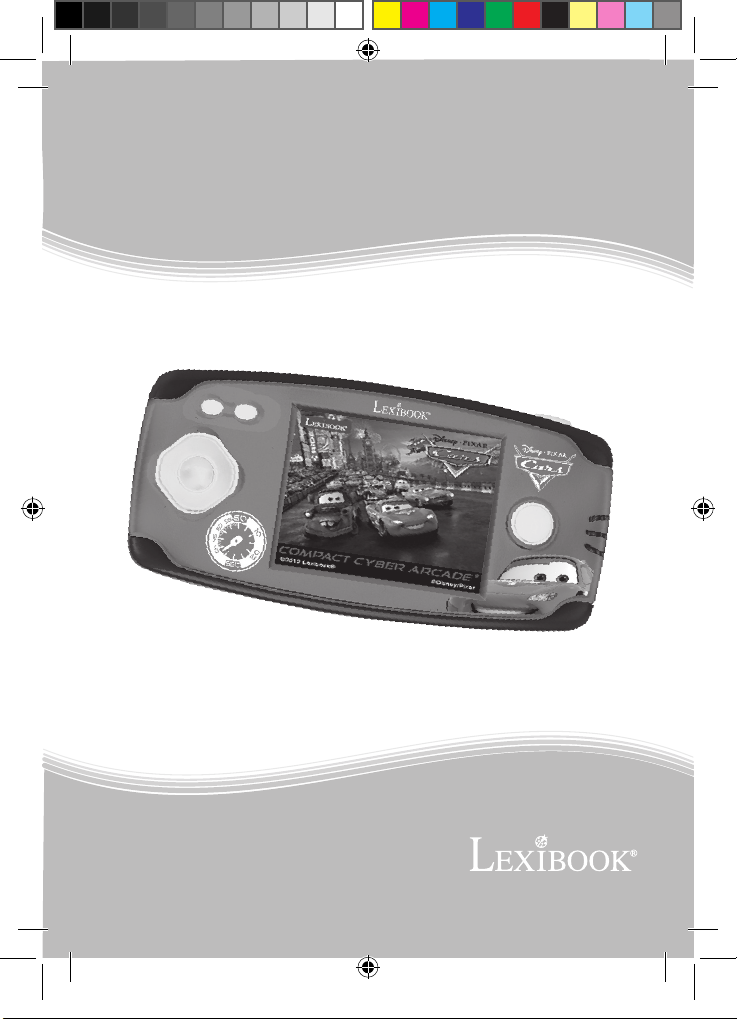
Compact Cyber
Arcade
®
e
l
.
w
w
w
v
M
O
D
E
D
M
’
I
N
M
A
JL2360DCIM1172_27Apri_V01.indd 1 27/04/2012 10:45 AM
E
S
T
R
U
C
T
N
U
A
L
D
I
O
L
P
A
M
N
I
O
T
S
N
I
E
L
A
U
N
C
U
R
S
E
N
O
I
C
i
x
b
o
o
k
.
c
o
JL2360DC
m
Page 2
JL2360DCIM1172_27Apri_V01.indd 2 27/04/2012 10:45 AM
Page 3
1
2
3
FRANÇAIS
4
CONTENU DE L’EMBALLAGE
Lors du déballage, assure-toi que les pièces suivantes soient incluses :
- Une console de jeu
- Un mode d’emploi
ATTENTION : Les éléments d’emballage tels que lms plastiques, rubans adhésifs,
étiquettes et rubans de xation métalliques ne font pas partie de ce jouet et doivent être
enlevés par raison de sécurité avant toute utilisation par un enfant.
INFORMATIONS SUR LES PILES
Ta console de jeu fonctionne avec 3 piles alcalines AAA/LR03 de 1,5 V (non
fournies).
Demande à un adulte de t’aider pour trouver et installer les piles correctes. N’utilise que
les piles spéciées pour ce produit.
1. A l’aide d’un tournevis, ouvrir la la porte du compartiment des
piles situé au dos de l’appareil.
2. Installer les 3 piles alcalines AAA/LR03 en respectant la
polarité indiquée au fond du compartiment des piles et selon le
schéma ci-contre.
3. Refermer le compartiment des piles et resserrer la vis.
NOTES :
- Si le son faiblit ou si le jeu ne répond plus correctement aux commandes, penser à
changer les piles.
-
An d’assurer un fonctionnement optimal, il est recommandé d’utiliser des piles alcalines.
Ne pas recharger les piles non rechargeables. Retirer les accumulateurs du jeu avant de
les recharger. Ne charger les accumulateurs que sous la surveillance d’un adulte. Ne pas
mélanger différents types de piles ou accumulateurs, ou des piles et accumulateurs neufs
et usagés. Les piles et accumulateurs doivent être mis en place en respectant la polarité.
Les piles et accumulateurs usagés doivent être enlevés du jouet. Les bornes d’une pile ou
d’un accumulateur ne doivent pas être mises en court-circuit. Ne pas jeter les piles au feu.
Retirer les piles en cas de non utilisation prolongée.
3
5
JL2360DCIM1172_27Apri_V01.indd 3 27/04/2012 10:45 AM
Page 4

FRANÇAIS
5
ATTENTION : D’importantes interférences électromagnétiques ou des décharges
électrostatiques peuvent provoquer un dysfonctionnement ou une perte de données. Si
l’appareil ne fonctionne pas correctement, enlevez puis remettez les piles.
PRÉSENTATION DU PRODUIT
NOTE : Avant de démarrer, enlever la pellicule antistatique de l’écran LCD.
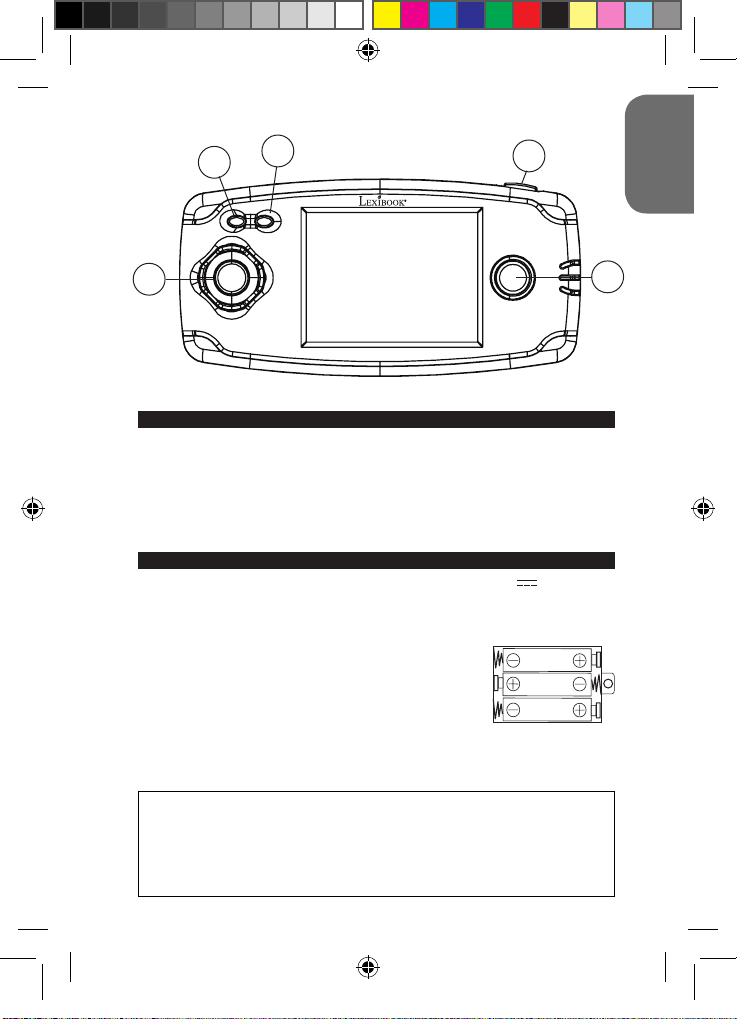
1. Touche Marche/Arrêt/Reset (ON/OFF/RESET) :
- Appuyer sur cette touche pour allumer la console de jeux. La page d’ouverture, puis la liste
des jeux, s’afchent alors à l’écran. Parcourir la liste à l’aide des touches directionnelles
(Gauche/Droite/Haut/Bas), puis sélectionner le jeu souhaité à l’aide du bouton B.
- Maintenir appuyée cette touche quelques secondes, puis relâcher-la pour éteindre la console
de jeux. La console s’éteindra automatiquement après 3 minutes d’inactivité.
- Appuyer sur cette touche pour revenir à la liste des jeux ou pour réinitialiser l’appareil en cas
de disfonctionnement.
2. Touche de réglage du volume. Il y a 3 niveaux de volume disponibles : silencieux (pas
de son), moyen et fort. Au démarrage de la console, le volume est au niveau moyen.
Appuyer une fois sur cette touche pour passer d’un niveau à l’autre.
3. Bouton A
4. Touches directionnelles (Gauche/Droite/Haut/Bas)
5. Bouton B
LISTE DES JEUX
Pour en savoir plus sur les jeux de la console, consultez le site internet de
Lexibook www.lexibook.com, rubrique « Mode d’emploi ».
1
2
4
4
5
6
7
8
9
10
11
12
13
14
15
16
17
18
19
20
21
22
23
24
Build up roads
Road Star
Gear Race
Mater’s tires
Mission Guido
Money Go!
Darts
Fruit Slash
Lucky Draw
Take A Smile
Dodgeman
Bubble Master
Bird on the Hunt
Ghost
Fruit Fall
Stack them up
Monkey N Fox
Flame Beetles
Pop Ball
Space Castle
Hard Win
Mystic Totem
Push the Box
North Salvation
25
26
27
28
29
30
31
32
33
34
35
36
37
38
39
40
41
42
43
44
45
46
47
48
4
Fireghter Bros
Ball Clash
Imp and Cubes
Morra
Fish Adventure
Win or Lose
Farm Pinball
Garden Weeder
Happy Farm
Mister Easter
Mr. Runner
Smart Frog
Homeland Defence
Bounce
Right Spot
Secret Bottle
Dart Champion
Climbing Challenge
Fossick Underground
Golden Arrow
Winning Lines
Sudoku
Happy Mice
Ball Mania
JL2360DCIM1172_27Apri_V01.indd 4 27/04/2012 10:45 AM
Page 5

49
50
51
52
53
54
55
56
57
58
59
60
61
62
63
64
65
66
67
68
69
70
71
72
73
74
75
76
77
78
79
80
81
82
83
84
Little Plane
Final Escape
Pinball Track
Go Soccer
Build up Road
Puzzle Quest
Blox World
Puzzle Park
Ogreish Flower
Ball Slide
Magic Ball
Fantastic Farm
Babies’ nursery
Down to 100
Mini Golf
Code Eagle
Rabbit Quiz
Finding Rabbit
Bubble Shooter
Garden Maze
Move Fun
Flying
Dangerous Zone
Happy Diamond
City Swing
Sprouts Adventure
Quick Move
Escape
Let’s Go
Spring Bro.
Vs. Football
Paint Master
Jewel Master
Closed Shell
Worm Catch
Juggle
85
86
87
88
89
90
91
92
93
94
95
96
97
98
99
100
101
102
103
104
105
106
107
108
109
110
111
112
113
114
115
116
117
118
119
120
Pair up
Fire Fighter
Puzzle Pop
Delivery Man
Driving challenge
Tryst
Catch Copy
Firecrackers
Soccer Arkanoid
Glass
Monster Jump
Motorboat
Apex Gun
Push Gem
Blue Jacket
Run After Sheep
Skate Board
Ski
Soccer Boy
Squirrel and Love
Star War
Strong Man
Table Soccer
Tiger Man
X-Ball
Bug Fight
Blow the Bubbles
Image Match
Rabbit
Football
Ping Pong
Tennis
Picking
Line
Pull the Car
Boating Adventure
AVERTISSEMENT SUR L’ÉPILEPSIE
À lire avant toute utilisation d’un jeu vidéo par vous-même ou votre enfant. Certaines
personnes sont susceptibles de faire des crises d’épilepsie ou d’avoir des pertes de
conscience à la vue de certains types de lumières clignotantes ou d’éléments fréquents
dans notre environnement quotidien. Ces personnes s’exposent à des crises lorsqu’elles
regardent certaines images télévisées ou lorsqu’elles jouent à certains jeux vidéo. Ces
5
FRANÇAIS
JL2360DCIM1172_27Apri_V01.indd 5 27/04/2012 10:45 AM
Page 6
FRANÇAIS
phénomènes peuvent apparaître alors même que le sujet n’a pas d’antécédent médical
ou n’a jamais été confronté à une crise d’épilepsie. Si vous-même ou un membre
de votre famille avez déjà présenté des symptômes liés à l’épilepsie (crise ou perte
de conscience) en présence de stimulations « lumineuses », veuillez consulter votre
médecin avant toute utilisation. Nous conseillons aux parents d’être attentifs à leurs
enfants lorsqu’ils jouent avec des jeux vidéo. Si vous-même ou votre enfant présentez les
symptômes suivants : vertige, trouble de la vision, contraction des yeux ou des muscles,
perte de conscience, trouble de l’orientation, mouvement involontaire ou convulsion,
veuillez immédiatement cesser de jouer et consulter un médecin.
Précautions à prendre dans tous les cas pour l’utilisation d’un jeu vidéo :
• Ne vous tenez pas trop près de l’écran. Jouez à bonne distance de l’écran de télévision
et aussi loin que le permet le cordon de raccordement.
• Utilisez de préférence les jeux vidéo sur un écran de petite taille. Évitez de jouer si vous
êtes fatigué ou si vous manquez de sommeil.
• Assurez-vous que vous jouez dans une pièce bien éclairée.
• En cours d’utilisation, faites des pauses de dix à quinze minutes toutes les heures.
ENTRETIEN ET GARANTIE
Protéger le jouet de l’humidité. S’il est mouillé, l’essuyer immédiatement. Ne pas le
laisser en plein soleil, ne pas l’exposer à une source de chaleur. Ne pas le laisser tomber.
Ne pas tenter de le démonter. Pour le nettoyer, utiliser un chiffon légèrement imbibé
d’eau à l’exclusion de tout produit détergent. En cas de mauvais fonctionnement, essayer
d’abord de changer les piles. Si le problème persiste, relire attentivement la notice an de
vérier que rien n’a été omis.
NOTE : veuillez garder ce mode d’emploi, il contient d’importantes informations.
Ce produit est couvert par notre garantie de deux ans. Pour toute mise en œuvre de
la garantie ou du service après-vente, vous devez vous adresser à votre revendeur
muni d’une preuve d’achat. Notre garantie couvre les vices de matériel ou de montage
imputables au constructeur à l’exclusion de toute détérioration provenant du non-respect
de la notice d’utilisation ou toute intervention intempestive sur l’article (telle que le
démontage, exposition à la chaleur ou à l’humidité…).
Il est recommandé de conserver l’emballage pour toute référence ultérieure.
Dans un souci constant d’amélioration, nous pouvons être amenés à modier les
couleurs et les détails du produit présenté sur l’emballage.
ATTENTION! Ne convient pas aux enfants de moins de 3 ans. Risque de suffocation en
raison des petites pièces.
Référence : JL2360DC
Conçu et développé en Europe – Fabriqué en Chine
©2012 LEXIBOOK®
©Disney/Pixar
Lexibook S.A.
2, avenue de Scandinavie
91953 Courtaboeuf Cedex
France
Service consommateurs : 0892 23 27 26 (0.34€ TTC/min)
www.lexibook.com
Informations sur la protection de l’environnement
Tout appareil électrique usé est une matière recyclable et ne devrait pas
faire partie des ordures ménagères ! Nous vous demandons de bien
vouloir nous soutenir en contribuant activement au ménagement des
ressources et à la protection de l’environnement en déposant cet appareil
dans des sites de collectes (si existants).
6
JL2360DCIM1172_27Apri_V01.indd 6 27/04/2012 10:45 AM
Page 7
1
2
3
4
CONTENT OF THE PACKAGING
When unpacking, ensure the following elements are included:
1 x game console
1 x instruction manual
WARNING: All packaging materials, such as tape, plastic sheets, wire ties and tags are
not part of this toy and should be discarded for child’s safety.
BATTERY INFORMATION
The game console operates with 3 X 1.5V AAA/LR03 type batteries (not included).
Ask an adult to help you to nd and install the correct batteries. Only the specied
batteries must be used with this product.
1. Use a screwdriver to open the battery compartment cover
located on the back of the unit.
2. Install the 3 x LR03/AAA batteries according to the polarity
indicated at the bottom of the battery compartment, and as per
the diagram shown opposite.
3. Close back the battery compartment and tighten the screw.
NOTES:
- When the sound is weak or when the game does not react correctly, please think about
changing the batteries.
- For better performance, alkaline batteries are recommended.
Non-rechargeable batteries are not to be recharged. Rechargeable batteries are to be
removed from the toy before being charged. Rechargeable batteries are only to be charged
under adult supervision. Different types of batteries or new and used batteries are not to
be mixed. Only batteries of the same or equivalent type as recommended are to be used.
Batteries are to be inserted with the correct polarity. Exhausted batteries are to be removed
from the toy. The supply terminals are not to be short circuited. Do not throw batteries into a
re. Remove the batteries if you are not going to use the game for a long period of time.
5
ENGLISH
7
JL2360DCIM1172_27Apri_V01.indd 7 27/04/2012 10:45 AM
Page 8
9
WARNING: Mal-function or loss of memory may be caused by strong frequency
interference or electrostatic discharge. Should any abnormal function occur, remove the
batteries and insert them again.
KEY GUIDE
NOTE: Before starting up the game, remove the plastic lm on the LCD screen display.
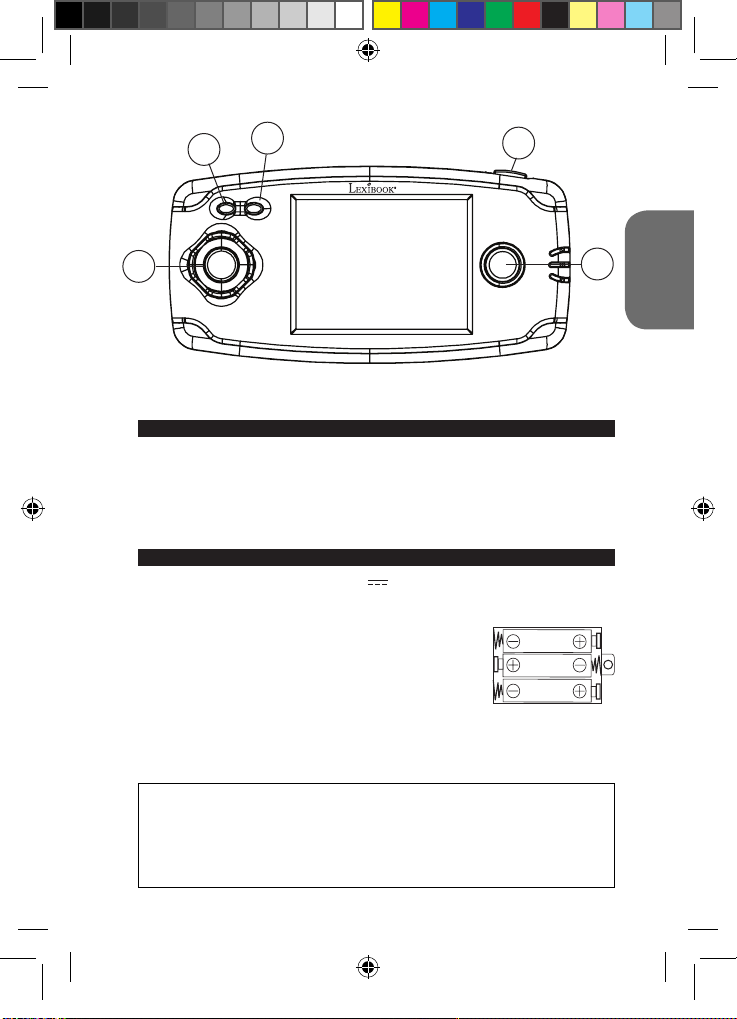
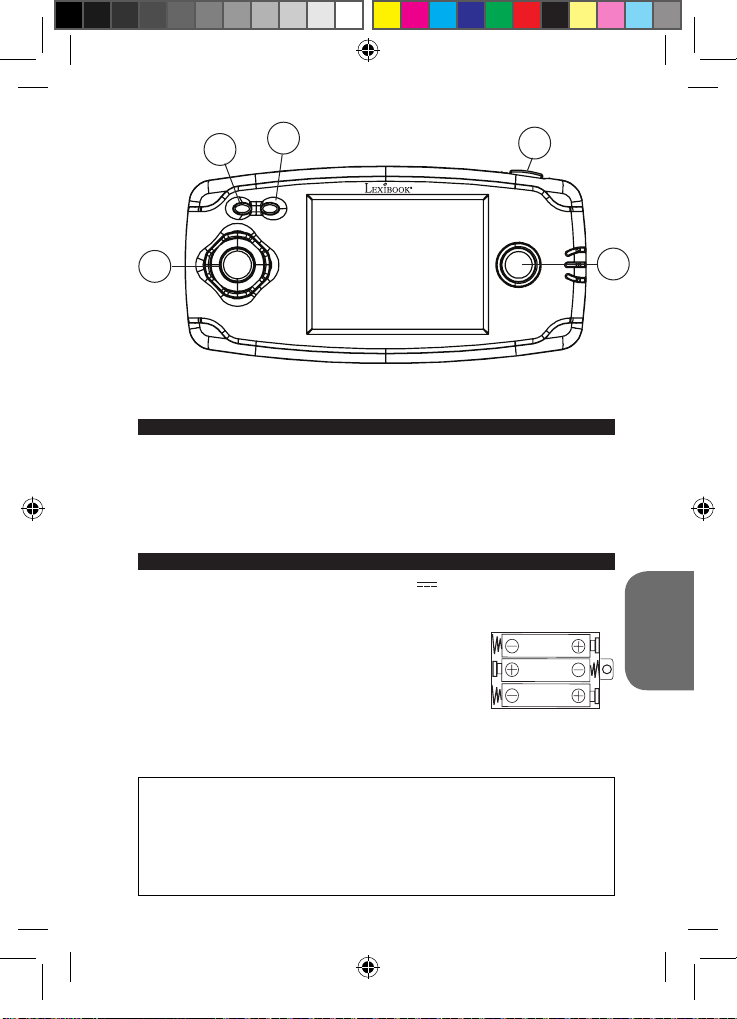
1. ON/OFF/RESET Button:
- Press this button to turn on the game console. Then the opening page and the games list
ENGLISH
appear on the screen. Use the arrow keys (Left/Right/Up/Down) to go through the list, and
select the desired game pressing Button B.
- Hold this button down for a few seconds, and then release it to turn off the game console.
The console will automatically turn itself off after 3 minutes of inactivity.
- Press this button to return to the game selection screen or to restart the device in the event
of a malfunction.
2. Volume setting button. There are 3 available volume levels: mute, medium and loud.
When turning the console on, volume is set on medium level. Press this button to go
from one volume level to the other.
3. Button A
4. Arrow keys (Left/Right/Up/Down)
5. Button B
GAME LIST
To nd out more about the console games, check out the Lexibook website:
www.lexibook.com, in the section: “User Manual”.
1
2
4
4
5
6
7
8
9
10
11
12
13
14
15
16
17
18
19
20
21
22
23
24
Build up roads
Road Star
Gear Race
Mater’s tires
Mission Guido
Money Go!
Darts
Fruit Slash
Lucky Draw
Take A Smile
Dodgeman
Bubble Master
Bird on the Hunt
Ghost
Fruit Fall
Stack them up
Monkey N Fox
Flame Beetles
Pop Ball
Space Castle
Hard Win
Mystic Totem
Push the Box
North Salvation
25
26
27
28
29
30
31
32
33
34
35
36
37
38
39
40
41
42
43
44
45
46
47
48
8
Fireghter Bros
Ball Clash
Imp and Cubes
Morra
Fish Adventure
Win or Lose
Farm Pinball
Garden Weeder
Happy Farm
Mister Easter
Mr. Runner
Smart Frog
Homeland Defence
Bounce
Right Spot
Secret Bottle
Dart Champion
Climbing Challenge
Fossick Underground
Golden Arrow
Winning Lines
Sudoku
Happy Mice
Ball Mania
JL2360DCIM1172_27Apri_V01.indd 8 27/04/2012 10:45 AM
Page 9

49
50
51
52
53
54
55
56
57
58
59
60
61
62
63
64
65
66
67
68
69
70
71
72
73
74
75
76
77
78
79
80
81
82
83
84
Little Plane
Final Escape
Pinball Track
Go Soccer
Build up Road
Puzzle Quest
Blox World
Puzzle Park
Ogreish Flower
Ball Slide
Magic Ball
Fantastic Farm
Babies’ nursery
Down to 100
Mini Golf
Code Eagle
Rabbit Quiz
Finding Rabbit
Bubble Shooter
Garden Maze
Move Fun
Flying
Dangerous Zone
Happy Diamond
City Swing
Sprouts Adventure
Quick Move
Escape
Let’s Go
Spring Bro.
Vs. Football
Paint Master
Jewel Master
Closed Shell
Worm Catch
Juggle
85
86
87
88
89
90
91
92
93
94
95
96
97
98
99
100
101
102
103
104
105
106
107
108
109
110
111
112
113
114
115
116
117
118
119
120
Pair up
Fire Fighter
Puzzle Pop
Delivery Man
Driving challenge
Tryst
Catch Copy
Firecrackers
Soccer Arkanoid
Glass
Monster Jump
Motorboat
Apex Gun
Push Gem
Blue Jacket
Run After Sheep
Skate Board
Ski
Soccer Boy
Squirrel and Love
Star War
Strong Man
Table Soccer
Tiger Man
X-Ball
Bug Fight
Blow the Bubbles
Image Match
Rabbit
Football
Ping Pong
Tennis
Picking
Line
Pull the Car
Boating Adventure
ENGLISH
9
JL2360DCIM1172_27Apri_V01.indd 9 27/04/2012 10:45 AM
Page 10
EPILEPSY WARNING
Read before you or your children use video games. Some people are prone to epileptic
seizures or losses of consciousness as a result of seeing certain ickering lights or
objects often present in daily life. These people are at risk from seizures when they watch
certain television images or play certain video games. Such incidents can happen even if
the person has no previous medical history of epilepsy. If you or a member of your family
has ever displayed symptoms linked with epilepsy (seizures or loss of consciousness)
ENGLISH
while watching ickering lights or images, consult your doctor before use.
Parents are advised to supervise their children while playing video games. If you or your
child shows any of the following symptoms: dizziness, vision problems, eye or muscle
tenseness, loss of consciousness, involuntary movements or seizures, cease playing
immediately and consult your doctor.
Precautions to take in any case while using a video game:
• When you use a video game which can be connected to a TV screen, stand or sit relatively
far from the TV screen and as far as the connection cable allows it.
• Use preferably video games which have a small screen. Avoid playing video games if you are
tired or lack some sleep.
• Make sure to play in room which is well lit.
• While playing video games, take 10 to 15 minute breaks every hour.
MAINTENANCE AND WARRANTY
Only use a soft, slightly damp cloth to clean the unit. Do not use detergent. Do not to
expose the unit to direct sunlight or any other heat source. Do not immerse the unit in
water. Do not dismantle or drop the unit. Do not try to twist or bend the unit.
NOTE: please keep this instruction manual, it contains important information.
This product is covered by our 2-year warranty. For any claim under the warranty or after
sale service, please contact your distributor and present a valid proof of purchase. Our
warranty covers any manufacturing material and workmanship defect, with the exception
of any deterioration arising from the non-observance of the instruction manual or from any
careless action implemented on this item (such as dismantling, exposition to heat and
humidity, etc.). It is recommended to keep the packaging for any further reference.
In a bid to keep improving our services, we could implement modication on the colours
and the details of the product shown on the packaging.
WARNING! Not suitable for children under 3 years. Choking Hazard – Small parts.
Reference: JL2360DC
Designed and developed in Europe – Made in China
©2012 LEXIBOOK®
©Disney/Pixar
United Kingdom & Ireland
For any further information, please call 0808 1003015.
www.lexibook.com
Environmental Protection
Unwanted electrical appliances can be recycled and should not be
discarded along with regular household waste! Please actively support
the conservation of resources and help protect the environment by
returning this appliance to a collection centre (if available).
10
JL2360DCIM1172_27Apri_V01.indd 10 27/04/2012 10:45 AM
Page 11
1
2
3
4
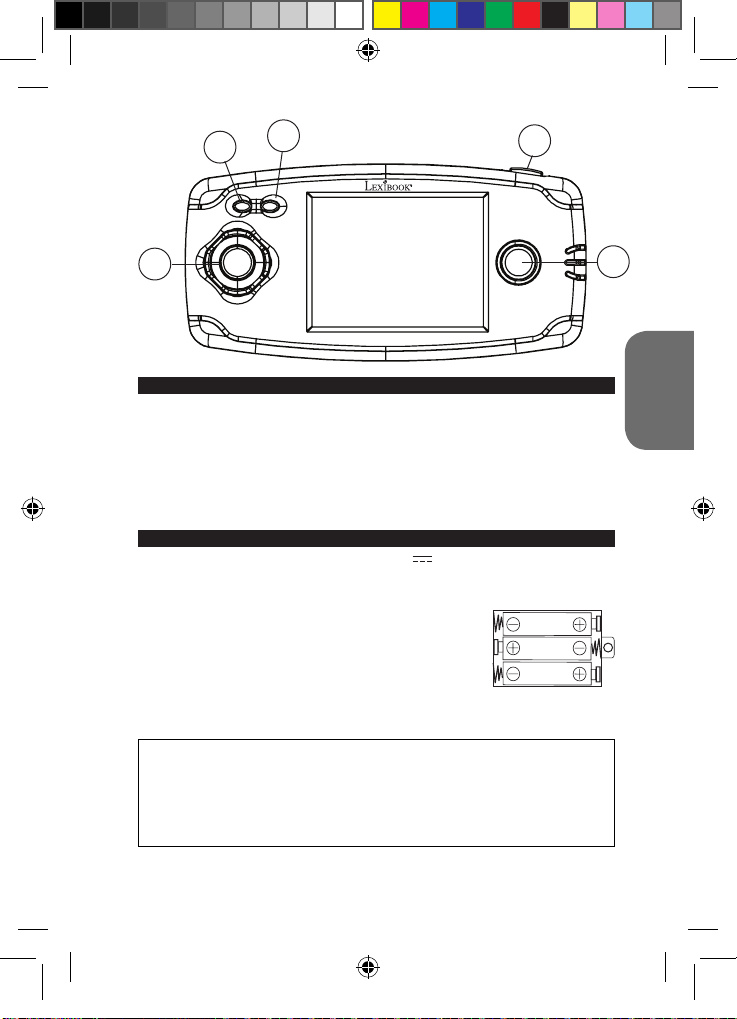
CONTENIDO DEL EMBALAJE
Cuando desembale el aparato, asegúrese de que los siguientes elementos están
presentes en el paquete:
1 x consola de juegos
1 x manual de instrucciones
¡ADVERTENCIA! Los elementos utilizados para el embalaje, tales como recubrimientos
de plástico, cintas adhesivas, etiquetas y ataduras metálicas, no forman parte de este
juguete y deberán retirarse del mismo por razones de seguridad antes de que se permita
al niño utilizar el juguete.
INFORMACIÓN SOBRE LAS PILAS
La consola de juegos funciona con 3 pilas de 1,5 V de tipo AAA/LR03 (no incluidas).
Pide ayuda a un adulto para encontrar e instalar las pilas correctas. Solo deben utilizarse
en este producto las pilas especicadas.
1. Utilice un destornillador para abrir la tapa del compartimento de las pilas situado en la
parte posterior del aparato.
2. Instale las 3 pilas de tipo LR03/AAA observando la polaridad
correcta indicada en el fondo del compartimento de las pilas y
conforme se indica en el diagrama mostrado aquí al lado.
3. Cierre el compartimento de las pilas y apriete el tornillo.
NOTAS:
- Si el sonido parece perder potencia o el juego no responde como es debido, vaya
pensando en sustituir las pilas.
- Para que el producto funcione de manera óptima, se recomienda la utilización de pilas alcalinas.
No intente nunca recargar pilas no recargables. Para cargar las pilas recargables, antes retírelas
del juguete. Las pilas recargables deben recargarse siempre bajo la supervisión de un adulto.
No mezcle pilas de distinto tipo, o pilas nuevas con pilas usadas. Utilice únicamente pilas del tipo
recomendado o equivalentes. Colocar siempre las pilas en la posición correcta, de acuerdo con
la polaridad indicada en el compartimento. Retire del juguete las pilas gastadas. No permita que
entren en contacto eléctrico los terminales de la alimentación. Si prevé que el juguete no va a
utilizarse durante un periodo largo de tiempo, retire las pilas. Cuando el sonido se hace débil o el
juego no responde adecuadamente es señal de que debe sustituir las pilas.
¡ADVERTENCIA! Interferencias fuertes de señales de radio o descargas electrostáticas
pueden provocar un mal funcionamiento de la unidad o que se pierda el contenido de
la memoria. En caso de que se produzca un funcionamiento anormal, retire y vuelva a
colocar las pilas.
11
5
ESPAÑOL
JL2360DCIM1172_27Apri_V01.indd 11 27/04/2012 10:45 AM
Page 12
13
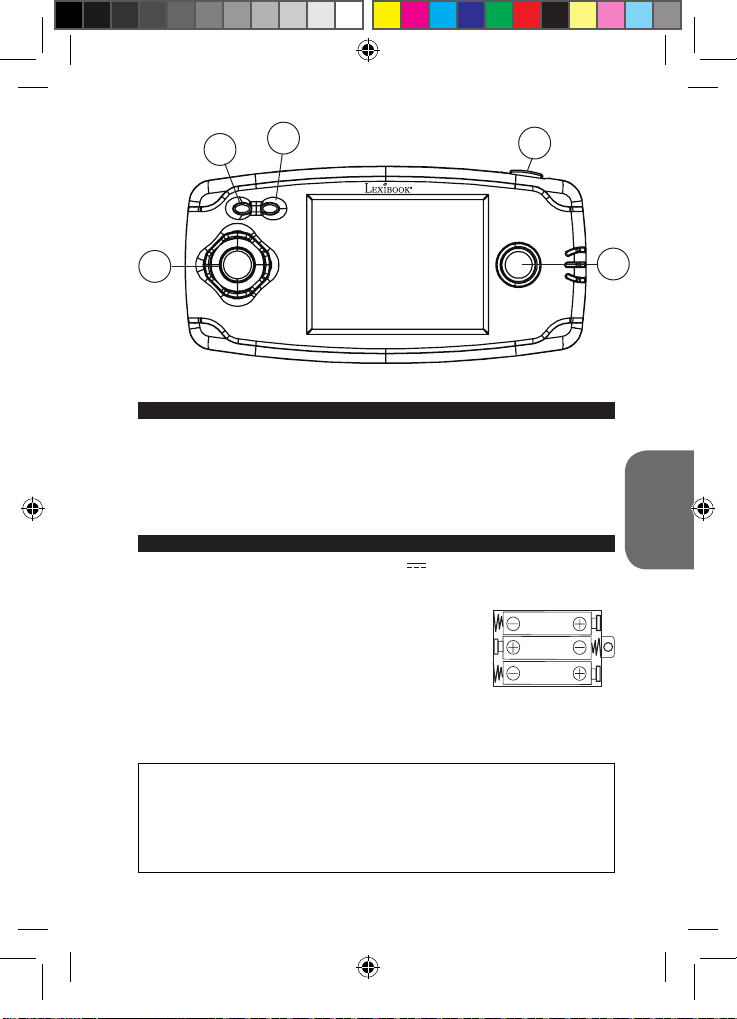
DESCRIPCIÓN DE LAS TECLAS Y BOTONES
NOTA: Antes de encender por primera vez la consola de juegos, retire la película plástica
adhesiva de protección de la pantalla LCD.
1. Tecla de encendido/apagado/reinicio (ON/OFF/RESET):
- Pulse esta tecla para encender la consola de juegos. Seguidamente, la pantalla mostrará
la página de inicio y la lista de juegos. Utilice las echas de desplazamiento direccional
(Izquierda/Derecha/Ascendente/Descendente) para recorrer la lista y seleccione el juego
deseado pulsando el botón B.
- Mantenga pulsada la tecla durante unos segundos y, a continuación, suéltela para apagar
la consola de juegos. El aparato se apagará automáticamente al cabo de 3 minutos si no se
detecta actividad alguna por parte del usuario.
- Pulse esta tecla para volver a la pantalla de selección de juegos o reiniciar el aparato en
caso de funcionamiento anormal.
2. Botón de conguración del volumen. Hay 3 niveles de volumen disponibles:
desactivado, medio y alto. Al encender la consola, el volumen estará ajustado a su
nivel medio. Pulse este botón para alternar entre los diferentes niveles de volumen.
ESPAÑOL
3. Tecla A
4. Teclas de desplazamiento direccional
5. Tecla B
LISTA DE JUEGOS
Para saber más sobre los juegos de la consola, consulta la página web de
Lexibook, www.lexibook.com, sección « Modo de empleo ».
1
2
4
4
5
6
7
8
9
10
11
12
13
14
15
16
17
18
19
20
21
22
23
24
Build up roads
Road Star
Gear Race
Mater’s tires
Mission Guido
Money Go!
Darts
Fruit Slash
Lucky Draw
Take A Smile
Dodgeman
Bubble Master
Bird on the Hunt
Ghost
Fruit Fall
Stack them up
Monkey N Fox
Flame Beetles
Pop Ball
Space Castle
Hard Win
Mystic Totem
Push the Box
North Salvation
25
26
27
28
29
30
31
32
33
34
35
36
37
38
39
40
41
42
43
44
45
46
47
48
12
Fireghter Bros
Ball Clash
Imp and Cubes
Morra
Fish Adventure
Win or Lose
Farm Pinball
Garden Weeder
Happy Farm
Mister Easter
Mr. Runner
Smart Frog
Homeland Defence
Bounce
Right Spot
Secret Bottle
Dart Champion
Climbing Challenge
Fossick Underground
Golden Arrow
Winning Lines
Sudoku
Happy Mice
Ball Mania
JL2360DCIM1172_27Apri_V01.indd 12 27/04/2012 10:45 AM
Page 13

49
50
51
52
53
54
55
56
57
58
59
60
61
62
63
64
65
66
67
68
69
70
71
72
73
74
75
76
77
78
79
80
81
82
83
84
Little Plane
Final Escape
Pinball Track
Go Soccer
Build up Road
Puzzle Quest
Blox World
Puzzle Park
Ogreish Flower
Ball Slide
Magic Ball
Fantastic Farm
Babies’ nursery
Down to 100
Mini Golf
Code Eagle
Rabbit Quiz
Finding Rabbit
Bubble Shooter
Garden Maze
Move Fun
Flying
Dangerous Zone
Happy Diamond
City Swing
Sprouts Adventure
Quick Move
Escape
Let’s Go
Spring Bro.
Vs. Football
Paint Master
Jewel Master
Closed Shell
Worm Catch
Juggle
85
86
87
88
89
90
91
92
93
94
95
96
97
98
99
100
101
102
103
104
105
106
107
108
109
110
111
112
113
114
115
116
117
118
119
120
Pair up
Fire Fighter
Puzzle Pop
Delivery Man
Driving challenge
Tryst
Catch Copy
Firecrackers
Soccer Arkanoid
Glass
Monster Jump
Motorboat
Apex Gun
Push Gem
Blue Jacket
Run After Sheep
Skate Board
Ski
Soccer Boy
Squirrel and Love
Star War
Strong Man
Table Soccer
Tiger Man
X-Ball
Bug Fight
Blow the Bubbles
Image Match
Rabbit
Football
Ping Pong
Tennis
Picking
Line
Pull the Car
Boating Adventure
AVISO RELACIONADO CON LA EPILEPSIA
Léase antes de utilizar cualquier videojuego, ya sea por usted o por sus hijos. Algunas
personas son susceptibles de padecer ataques epilépticos o desmayos al contemplar
ciertos tipos de luces parpadeantes o elementos encontrados frecuentemente en nuestro
entorno cotidiano. Estas personas están expuestas a ataques epilépticos cuando
contemplan ciertas imágenes de televisión o al jugar con ciertos videojuegos. Estos
13
ESPAÑOL
JL2360DCIM1172_27Apri_V01.indd 13 27/04/2012 10:45 AM
Page 14
fenómenos pueden aparecer incluso si el individuo no tiene antecedentes médicos que
puedan denotar la enfermedad o aunque nunca haya sufrido un ataque epiléptico con
anterioridad. Si usted o algún miembro de su familia ya ha experimentado síntomas
relacionados con la epilepsia (ataques o desmayos) ante estímulos “luminosos”, consulte
a su médico antes de proceder a utilizar este aparato.
Aconsejamos a los padres que vigilen a sus hijos mientras que estos juegan con
videojuegos. Si usted o alguno de sus hijos experimenta algunos de los siguientes
síntomas: mareos, alteración de la visión, contracciones oculares o musculares, pérdida
de conocimiento, desorientación, movimientos involuntarios o convulsiones, interrumpa
inmediatamente el juego y consulte a su médico.
Precauciones a tomar siempre que se esté usando un vídeo juego
• Cuando esté usando un video juego que se conecta al aparato de TV, permanezca de pie o
siéntese relativamente alejado de la pantalla de TV y tan lejos como el cable le permita.
• Use, de preferencia, vídeo juegos que posean pantallas pequeñas. Evite jugar a vídeo
juegos si se encuentra cansado o ha dormido poco.
• Asegúrese de que juega en una habitación bien iluminada.
• Cuando juegue a vídeo juegos tómese de 10 a 15 minutos de descanso por cada hora de
ESPAÑOL
juego.
MANTENIMIENTO Y GARANTÍA
Para limpiar el juguete, utilice únicamente un paño suave humedecido en agua. No utilice
ningún producto detergente. No exponga el juguete a la acción directa de los rayos del
sol ni a ninguna otra fuente de calor. No mojar el juguete. No desmonte o deje caer el
juguete. Retire las pilas del juguete si no va utilizarlo durante largos periodos de tiempo.
NOTA: Conserve este manual de instrucciones ya que contiene informaciones de
importancia. Este producto está cubierto por nuestra garantía de 2 años. Para cualquier
reclamación bajo la garantía o petición de servicio post venta deberá dirigirse a su
revendedor y presentar su comprobante de compra. Nuestra garantía cubre los defectos
de material o montaje que sean imputables al fabricante, con la excepción de todo aquel
deterioro que sea consecuencia de la no observación de las indicaciones indicadas
en el manual de instrucciones o de toda intervención improcedente sobre este aparato
(como por ejemplo el desmontaje, exposición al calor o a la humedad…). Se recomienda
conservar el embalaje para cualquier referencia futura. En nuestro constante afán de
superación, podemos proceder a la modicación de los colores y detalles del producto
mostrado en el embalaje. ¡ADVERTENCIA! No apto para niños menores de 3 años.
Peligro de atragantamiento – Piezas pequeñas.
Referencia: JL2360DC
Diseñado y desarrollado en Europa – Fabricado en China
©2012 LEXIBOOK®
©Disney/Pixar
España
CEFA TOYS
Servicio atención al consumidor: 976144606
[email protected]
www.lexibook.com
Advertencia para la protección del medio ambiente
¡Los aparatos eléctricos desechados son reciclables y no deben ser
eliminados en la basura doméstica! Por ello pedimos que nos ayude a
contribuir activamente en el ahorro de recursos y en la protección del medio
ambiente entregando este aparato en los centros de colección (si existen).
14
JL2360DCIM1172_27Apri_V01.indd 14 27/04/2012 10:45 AM
Page 15
1
2
3
4
CONTEÚDO DA EMBALAGEM
Quando retirar o aparelho da caixa, certique-se de que se encontram incluídos os
seguintes elementos:
1 x consola de jogos
1 x manual de instruções
ATENÇÃO: As peças da embalagem, como os revestimentos de plástico, elásticos,
etiquetas e os de xação de metal não fazem parte do brinquedo e devem ser deitados
fora, por razões de segurança, antes de entregar o brinquedo a uma criança.
INFORMAÇÃO ACERCA DAS PILHAS
A consola de jogos funciona com 3 pilhas de 1,5V AAA/LR03 (não incluídas).
Peça a um adulto para o ajudar a encontrar e a colocar as pilhas correctas. Só deve usar
as pilhas especicadas com este produto.
1. Com uma chave de fendas, abra o compartimento das pilhas,
na parte traseira da unidade.
2. Insira 3 pilhas AAA/LR03, tendo em conta a polaridade
indicada no fundo do compartimento das pilhas e de acordo
com a imagem apresentada ao lado.
3. Feche o compartimento das pilhas e aperte o parafuso.
NOTAS:
- Quando o som estiver fraco ou quando o jogo não reagir correctamente, pense em mudar
as pilhas.
- Para um melhor desempenho, recomendamos a utilização de pilhas alcalinas.
As pilhas não recarregáveis não deverão ser recarregadas. As pilhas recarregáveis deverão
ser retiradas do brinquedo antes de serem recarregadas e só deverão ser recarregadas sob
a supervisão de um adulto. Não misture diferentes tipos de pilhas ou pilhas novas com pilhas
usadas. Só deverá utilizar pilhas do mesmo tipo ou de um tipo equivalente às recomendadas.
As pilhas deverão ser colocadas com a polaridade correcta. Deverá retirar as pilhas gastas do
brinquedo. Não coloque os terminais em curto-circuito. Não atire as pilhas para o fogo. Retire
as pilhas caso não utilize a unidade durante um longo período de tempo. Quando o som car
fraco ou o jogo não responder, pense em substituir as pilhas.
5
PORTUGUÊS
15
JL2360DCIM1172_27Apri_V01.indd 15 27/04/2012 10:45 AM
Page 16
17
AVISO: Uma descarga electrostática ou frequências fortes podem dar origem a um mau
funcionamento ou perda de memória. Caso ocorra algum funcionamento anormal, retire
e volte a colocar as pilhas.
GUIA DOS BOTÕES
NOTA: Antes de ligar o jogo, retire a película de plástico do ecrã LCD.
1. Botão de ligar/desligar/reiniciar (ON/OFF/RESET):
- Prima este botão para ligar a consola de jogos. Depois, aparece o ecrã inicial e a lista de
jogos. Usa as setas (esquerda/direita/cima/baixo) para correres a lista e escolhe o jogo desejado, premindo o botão B.
- Mantenha premido este botão durante alguns segundos e depois liberte-o para desligar a
consola de jogos. A consola desliga-se automaticamente passados 3 minutos de inactividade.
- Prima este botão para voltar ao ecrã de selecção dos jogos ou para reiniciar o aparelho no
caso de mau funcionamento.
2. Botão do volume. Existem 3 níveis de volume disponíveis: Sem som, médio e alto.
Quando ligares a consola, o volume está médio. Prime este botão para mudares o
volume.
3. Botão A
4. Botões direccionais (para a esquerda/direita/cima/baixo).
5. Botão B
LISTA DE JOGOS
Para saber mais acerca dos jogos da consola, consulte o website da
Lexibook em www.lexibook.com, na secção “Manual de utilização”.
1
PORTUGUÊS
2
4
4
5
6
7
8
9
10
11
12
13
14
15
16
17
18
19
20
21
22
23
24
Build up roads
Road Star
Gear Race
Mater’s tires
Mission Guido
Money Go!
Darts
Fruit Slash
Lucky Draw
Take A Smile
Dodgeman
Bubble Master
Bird on the Hunt
Ghost
Fruit Fall
Stack them up
Monkey N Fox
Flame Beetles
Pop Ball
Space Castle
Hard Win
Mystic Totem
Push the Box
North Salvation
25
26
27
28
29
30
31
32
33
34
35
36
37
38
39
40
41
42
43
44
45
46
47
48
16
Fireghter Bros
Ball Clash
Imp and Cubes
Morra
Fish Adventure
Win or Lose
Farm Pinball
Garden Weeder
Happy Farm
Mister Easter
Mr. Runner
Smart Frog
Homeland Defence
Bounce
Right Spot
Secret Bottle
Dart Champion
Climbing Challenge
Fossick Underground
Golden Arrow
Winning Lines
Sudoku
Happy Mice
Ball Mania
JL2360DCIM1172_27Apri_V01.indd 16 27/04/2012 10:45 AM
Page 17

49
50
51
52
53
54
55
56
57
58
59
60
61
62
63
64
65
66
67
68
69
70
71
72
73
74
75
76
77
78
79
80
81
82
83
84
Little Plane
Final Escape
Pinball Track
Go Soccer
Build up Road
Puzzle Quest
Blox World
Puzzle Park
Ogreish Flower
Ball Slide
Magic Ball
Fantastic Farm
Babies’ nursery
Down to 100
Mini Golf
Code Eagle
Rabbit Quiz
Finding Rabbit
Bubble Shooter
Garden Maze
Move Fun
Flying
Dangerous Zone
Happy Diamond
City Swing
Sprouts Adventure
Quick Move
Escape
Let’s Go
Spring Bro.
Vs. Football
Paint Master
Jewel Master
Closed Shell
Worm Catch
Juggle
85
86
87
88
89
90
91
92
93
94
95
96
97
98
99
100
101
102
103
104
105
106
107
108
109
110
111
112
113
114
115
116
117
118
119
120
Pair up
Fire Fighter
Puzzle Pop
Delivery Man
Driving challenge
Tryst
Catch Copy
Firecrackers
Soccer Arkanoid
Glass
Monster Jump
Motorboat
Apex Gun
Push Gem
Blue Jacket
Run After Sheep
Skate Board
Ski
Soccer Boy
Squirrel and Love
Star War
Strong Man
Table Soccer
Tiger Man
X-Ball
Bug Fight
Blow the Bubbles
Image Match
Rabbit
Football
Ping Pong
Tennis
Picking
Line
Pull the Car
Boating Adventure
ADVERTÊNCIA SOBRE A EPILEPSIA
Ler antes de qualquer utilização de um jogo de vídeo por si próprio ou pelo seu lho.
Certas pessoas estão susceptíveis de ter crises de epilepsia ou de ter perdas de
consciência quando expostas a certo tipo de luzes que piscam ou de elementos
frequentes no nosso ambiente quotidiano. Essas pessoas expõem-se a crises quando
vêem certas imagens televisivas ou quando jogam a certos jogos de vídeo. Estes
17
PORTUGUÊS
JL2360DCIM1172_27Apri_V01.indd 17 27/04/2012 10:45 AM
Page 18
fenómenos podem aparecer mesmo que o sujeito não tenha antecedentes médicos ou
que nunca tenha sido confrontado com uma crise de epilepsia.
Se você ou algum membro da sua família já apresentou alguma vez alguns sintomas
ligados à epilepsia (crise ou perda de consciência) em presença de estímulos
“ luminosos “, deve consultar o seu médico antes de qualquer utilização.
Nós aconselhamos os pais a estarem atentos aos seus lhos quando eles jogam com
jogos de vídeo. Se você ou o seu lho apresentar os sintomas seguintes: vertigens,
problemas de visão, contracção dos olhos ou dos músculos, perda de consciência,
problemas de orientação, movimento involuntário ou convulsões, pare imediatamente de
jogar e consulte um médico.
Precauções a ter em conta sempre que estiver a utilizar um videojogo
• Quando estiver a utilizar um videojogo que pode ser conectado ao aparelho de TV, que em
pé ou sente relativamente longe do ecrã da TV, e tão longe quanto o o lhe permitir.
• Utilize de preferência videojogos com um ecrã pequeno. Evite jogar videojogos se estiver
cansado ou com falta de sono.
• Jogue sempre em um quarto bem iluminado.
• Quando estiver a jogar videojogos descanse 10 ou 15 minutos por cada hora de jogo.
MANUTENÇÃO E GARANTIA
Para limpar o jogo, utilize apenas um pano suave ligeiramente humedecido e sem
qualquer tipo de detergente. Não exponha o jogo à luz directa do sol nem a qualquer
outra fonte de calor. Não molhe a unidade. Não desmonte nem deixe cair a unidade.
Retire as pilhas caso o produto não seja utilizado durante um longo período de tempo.
PORTUGUÊS
NOTA: Por favor guarde este manual, pois contém informações importantes. Este
produto está coberto pela nossa garantia de 2 anos. Para a utilização da garantia
ou do serviço pós-venda, deverá dirigir-se ao seu revendedor, levando consigo o
talão da compra. A nossa garantia cobre defeitos de material ou de montagem da
responsabilidade do fabricante, excluindo qualquer deterioração proveniente do não
cumprimento do modo de utilização ou de qualquer intervenção inoportuna sobre a
unidade (como a desmontagem, exposição ao calor ou à humidade…). Recomenda-se
que guarde a caixa para uma futura referência. Na procura de uma constante melhoria,
poderemos modicar as cores ou características do produto apresentadas na caixa.
ATENÇÃO! Não é adequado para crianças de idade inferior a 3 anos. Perigo de
engasgamento – peças pequenas.
Referência: JL2360DC
Criado e desenvolvido na Europa – Fabricado na China
©2012 LEXIBOOK®
©Disney/Pixar
Portugal
AJ Aguiar – Comércio Geral, Lda.
Avenida Principal, 4300
4535-013 Lourosa - PORTUGAL
Tel. +(351) 220 824 521
[email protected]
www.lexibook.com
Indicações para a protecção do meio ambiente
Aparelhos eléctricos antigos são materiais que não pertencem ao lixo doméstico! Por isso
pedimos para que nos apoie, contribuindo activamente na poupança de recursos e na
protecção do ambiente ao entregar este aparelho nos pontos de recolha, caso existam.
18
JL2360DCIM1172_27Apri_V01.indd 18 27/04/2012 10:45 AM
Page 19
1
2
3
4
CONTENUTO DELLA CONFEZIONE
Quando si apre la confezione, vericare che siano presenti i seguenti elementi:
1 x console da gioco
1 x manuale di istruzioni
ATTENZIONE: I componenti dell’imballo, quali pellicole in plastica, nastro adesivo, nastri
di ssaggio metallici non fanno parte del giocattolo e devono essere eliminati per motivi di
sicurezza prima dell’utilizzo dei bambini.
INFORMAZIONI SULLE BATTERIE
La console da gioco funziona con 3 batterie da 1,5V AAA/LR03 (non incluse).
Chiedi a un adulto di aiutarti a trovare e ad installare le batterie adeguate. Con questo
prodotto è possibile utilizzare unicamente il tipo di batterie specicato.
1. Utilizzare un cacciavite per aprire il vano batterie sul retro del
dispositivo.
2. Inserire le 3 batterie LR03/AAA secondo la polarità indicata sul
fondo del vano, riprodotta nel disegno accanto.
3. Chiudere il vano batterie e stringere la vite.
NOTE:
- Quando il suono è debole o quando la console non reagisce correttamente, provvedere
a cambiare le batterie.
- Per un migliore risultato, si consiglia l’uso di batterie alcaline.
Le batterie non ricaricabili non devono essere ricaricate; le batterie ricaricabili devono
essere tolte dal giocattolo prima di essere ricaricate; le batterie ricaricabili devono essere
caricate unicamente con la supervisione di un adulto; non mischiare differenti tipi di
batterie o batterie nuove e usate; utilizzare unicamente batterie del tipo raccomandato
o equivalenti; inserire le batterie rispettando le polarità; rimuovere le batterie esaurite
dal giocattolo; non cortocircuitare i terminali di alimentazione. Non buttare le batterie nel
fuoco. Rimuovere le batterie se non si usa il gioco per molto tempo. Sostituire le batterie
quando il suono diventa debole o il gioco non funziona.
19
5
ITALIANO
JL2360DCIM1172_27Apri_V01.indd 19 27/04/2012 10:45 AM
Page 20
21
AVVERTENZA: Una forte interferenza di frequenza o scariche elettrostatiche possono
causare malfunzionamenti o perdite di memoria. Se si dovessero vericare funzionamenti
anormali, togliere e reinserire le batterie.
GUIDA AI TASTI
NOTA: Prima di avviare la console, togliere l’etichetta in plastica sullo schermo LCD.
1. Tasto Acceso/Spento/Reimposta (ON/OFF/RESET):
- Premere questo tasto per accendere la console di gioco. Apparirà la pagina di benvenuto
con l’elenco di giochi. Utilizzare le frecce direzionali (sinistra/destra/su/giù) per navigare
nell’elenco, per selezionare il gioco desiderato premere il tasto B.
- Tenere premuto questo tasto per qualche secondo, quindi rilasciarlo per spegnere la console
di gioco. La console si spegne automaticamente dopo 3 minuti di inattività.
- Premere questo tasto per ritornare allo schermo di selezione dei giochi oppure per
reinizializzare l’apparecchio in caso di malfunzionamento.
2. Tasto volume. Ci sono 3 livelli disponibili di volume: muto, medio e alto. All’accensione
dell’apparecchio il volume è impostato su Medio. Premere questo pulsante per
passare da un livello all’altro.
3. Pulsante A
4. Tasti di direzione (Sinistra/Destra/Su/Giù)
5. Pulsante B
LISTA DEI GIOCHI
Per saperne di più sui giochi per questa console, consultare il sito Internet
Lexibook www.lexibook.com/it, sezione « Manuali di istruzione ».
1
ITALIANO
2
4
4
5
6
7
8
9
10
11
12
13
14
15
16
17
18
19
20
21
22
23
24
Build up roads
Road Star
Gear Race
Mater’s tires
Mission Guido
Money Go!
Darts
Fruit Slash
Lucky Draw
Take A Smile
Dodgeman
Bubble Master
Bird on the Hunt
Ghost
Fruit Fall
Stack them up
Monkey N Fox
Flame Beetles
Pop Ball
Space Castle
Hard Win
Mystic Totem
Push the Box
North Salvation
25
26
27
28
29
30
31
32
33
34
35
36
37
38
39
40
41
42
43
44
45
46
47
48
20
Fireghter Bros
Ball Clash
Imp and Cubes
Morra
Fish Adventure
Win or Lose
Farm Pinball
Garden Weeder
Happy Farm
Mister Easter
Mr. Runner
Smart Frog
Homeland Defence
Bounce
Right Spot
Secret Bottle
Dart Champion
Climbing Challenge
Fossick Underground
Golden Arrow
Winning Lines
Sudoku
Happy Mice
Ball Mania
JL2360DCIM1172_27Apri_V01.indd 20 27/04/2012 10:45 AM
Page 21

49
50
51
52
53
54
55
56
57
58
59
60
61
62
63
64
65
66
67
68
69
70
71
72
73
74
75
76
77
78
79
80
81
82
83
84
Little Plane
Final Escape
Pinball Track
Go Soccer
Build up Road
Puzzle Quest
Blox World
Puzzle Park
Ogreish Flower
Ball Slide
Magic Ball
Fantastic Farm
Babies’ nursery
Down to 100
Mini Golf
Code Eagle
Rabbit Quiz
Finding Rabbit
Bubble Shooter
Garden Maze
Move Fun
Flying
Dangerous Zone
Happy Diamond
City Swing
Sprouts Adventure
Quick Move
Escape
Let’s Go
Spring Bro.
Vs. Football
Paint Master
Jewel Master
Closed Shell
Worm Catch
Juggle
85
86
87
88
89
90
91
92
93
94
95
96
97
98
99
100
101
102
103
104
105
106
107
108
109
110
111
112
113
114
115
116
117
118
119
120
Pair up
Fire Fighter
Puzzle Pop
Delivery Man
Driving challenge
Tryst
Catch Copy
Firecrackers
Soccer Arkanoid
Glass
Monster Jump
Motorboat
Apex Gun
Push Gem
Blue Jacket
Run After Sheep
Skate Board
Ski
Soccer Boy
Squirrel and Love
Star War
Strong Man
Table Soccer
Tiger Man
X-Ball
Bug Fight
Blow the Bubbles
Image Match
Rabbit
Football
Ping Pong
Tennis
Picking
Line
Pull the Car
Boating Adventure
AVVERTENZE SULL’EPILESSIA
Leggere prima di un qualsiasi utilizzo di un videogioco da parte vostra o del vostro
bambino.
Determinate persone possono essere soggette a crisi epilettiche o a perdite di
coscienza alla vista di determinati tipi di luci lampeggianti o di elementi frequenti
presenti nell’ambiente quotidiano. Queste persone sono soggette a crisi guardando
21
ITALIANO
JL2360DCIM1172_27Apri_V01.indd 21 27/04/2012 10:45 AM
Page 22
determinate immagini televisive o durante l’uso di videogiochi. Questi fenomeni possono
apparire nonostante il soggetto non abbia dei precedenti o non sia mai stato colpito da
crisi epilettiche. Nel caso in cui voi o un qualsiasi membro della vostra famiglia abbia
presentato in passato sintomi legati all’epilessia (crisi o perdita di coscienza) in presenza
di stimoli “luminosi” consultare un medico prima di utilizzare il giocattolo. Consigliamo
ai genitori di prestare la massima attenzione durante l’uso dei videogiochi da parte dei
bambini.
Nel caso in cui voi o i vostri bambini presentiate i seguenti sintomi: vertigini, turbe della
vista, contrazioni oculari o muscolari, perdita di coscienza, turbe dell’orientamento,
movimento involontario o convulsioni, interrompere immediatamente il gioco e consultare
un medico.
Precauzioni da rispettare quando si utilizzano videogiochi
• Quando si usa un videogioco che può essere collegato ad uno schermo TV, restare, in
piedi o seduti, ad una certa distanza dallo schermo, almeno per quanto consentito dal
cavo di collegamento.
• Usare preferibilmente videogiochi che hanno uno schermo piccolo. Evitare di giocare se si è
stanchi o si è dormito poco.
• Assicurarsi che la stanza in cui si gioca sia ben illuminata.
• Quando si gioca, fare degli intervalli di 10-15 minuti ogni ora.
MANUTENZIONE E GARANZIA
Per pulire il giocattolo, servirsi unicamente di un panno morbido leggermente inumidito
con acqua, evitando qualsiasi prodotto detergente. Non esporre il giocattolo alla luce
diretta del sole né ad altre sorgenti di calore. Non bagnare. Non smontare il giocattolo e
non lasciarlo cadere. Estrarre le batterie in caso di mancato utilizzo per un lungo periodo
di tempo.
NOTA: conservare il presente libretto d’istruzioni in quanto contiene informazioni
importanti. Questo prodotto è coperto dalla nostra garanzia di 2 anni. Per servirsi della
garanzia o del servizio di assistenza post vendita, rivolgersi al negoziante muniti di
prova d’acquisto. La nostra garanzia copre i vizi di materiale o di montaggio imputabili al
costruttore a esclusione di qualsiasi deterioramento causato dal mancato rispetto delle
istruzioni d’uso o di qualsiasi intervento inadeguato sul prodotto (smontaggio, esposizione
al calore o all’umidità…). Si raccomanda di conservare la confezione per qualsiasi
riferimento futuro. Nel nostro impegno costante volto al miglioramento dei nostri prodotti,
ITALIANO
è possibile che i colori e i dettagli dei prodotti illustrati sulla confezione differiscano dal
prodotto effettivo. ATTENZIONE! Articolo non adatto a bambini di età inferiore ai 3 anni.
Rischio di soffocamento – Presenza di piccole parti.
Riferimento: JL2360DC
Progettato e sviluppato in Europa – Fabbricato in Cina
©2012 LEXIBOOK®
©Disney/Pixar
www.lexibook.com
Avvertenze per la tutela dell’ambiente
Gli apparecchi elettrici vecchi sono materiali pregiati, non rientrano nei
normali riuti domestici! Preghiamo quindi i gentili clienti di contribuire
alla salvaguardia dell’ambiente e delle risorse e di consegnare il presente
apparecchio ai centri di raccolta competenti, qualora siano presenti sul
territorio.
22
JL2360DCIM1172_27Apri_V01.indd 22 27/04/2012 10:45 AM
Page 23
1
2
3
4
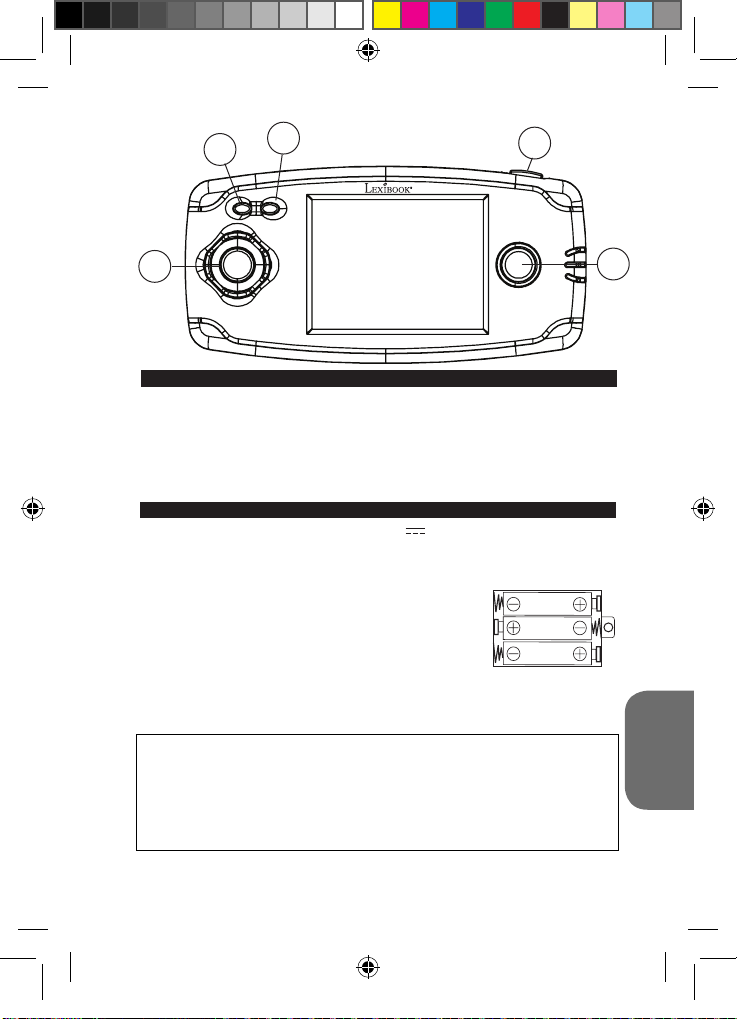
Stelle beim Auspacken sicher, dass die folgenden Bestandteile enthalten sind:
1 x Spielekonsole
1 x Bedienungsanleitung
WARNUNG: Entfernen Sie das Verpackungsmaterial, wie Plastikfolien, Klebebänder,
Etiketten und Befestigungsbänder aus Metall. Diese sind nicht Bestandteil des Spiels und
müssen aus Sicherheitsgründen entfernt werden, bevor Ihr Kind das Spiel benutzt.
Die Spielekonsole benötigt zum Betrieb 3 X 1,5 V AAA/LR03 Batterien (nicht
inbegriffen).
Bitte einen Erwachsenen dir zu helfen, die richtigen Batterien zu nden und einzulegen.
Nur die vorgeschriebenen Batterien dürfen in diesem Produkt benutzt werden.
1. Öffnen Sie mit einem Schraubenzieher das Batteriefach auf
der Rückseite des Gerätes.
2. Lege 3 x LR03/AAA Batterien gemäß der auf dem Boden
des Batteriefachs und in dem Schaubild nebenan gezeigten
Polarität ein.
3. Schließe das Batteriefach wieder und ziehe die Schraube an.
ANMERKUNGEN:
- Wenn der Ton schwach ist oder das Spiel nicht korrekt reagiert, denke bitte daran, die
Batterien auszuwechseln.
- Für eine bessere Leistung werden Alkalibatterien empfohlen.
Nicht wieder auadbare Batterien können nicht aufgeladen werden. Auadbare Batterien müssen vor der
Auadung aus dem Spielzeug genommen werden. Batterien dürfen nur unter Aufsicht eines Erwachsenen
aufgeladen werden. Unterschiedliche Batterietypen bzw. alte und neue Batterien dürfen nicht gemischt
werden. Es dürfen nur solche Batterien verwendet werden, die gleichwertig zum empfohlenen Batterietyp
sind. Die Batterien müssen korrekt entsprechend der Polaritätsmarkierungen eingelegt werden. Leere
Batterien müssen aus dem Spielzeug genommen werden. Die Anschlüsse dürfen nicht kurz geschlossen
werden. Batterien niemals ins Feuer werfen. Entfernen Sie die Batterien, wenn Sie das Spielzeug für
längere Zeit nicht benutzen. Wenn der Sound schwächer wird oder das Spielzeug anfängt, nicht mehr
direkt zu reagieren, deutet dieses ebenfalls darauf hin, dass es Zeit wird, neue Batterien einzusetzen.
WARNUNG: Funktionsstörungen oder Speicherverlust können möglicherweise durch
starke Frequenzstörungen oder elektrostatische Entladung verursacht werden. Sollte
es zu unnormalen Funktionen kommen, entfernen Sie die Batterien und legen Sie die
Batterien wieder ein.
VERPACKUNGSINHALT
BATTERIEHINWEISE
23
5
DEUTSCH
JL2360DCIM1172_27Apri_V01.indd 23 27/04/2012 10:45 AM
Page 24

25
ANMERKUNG:
Display.
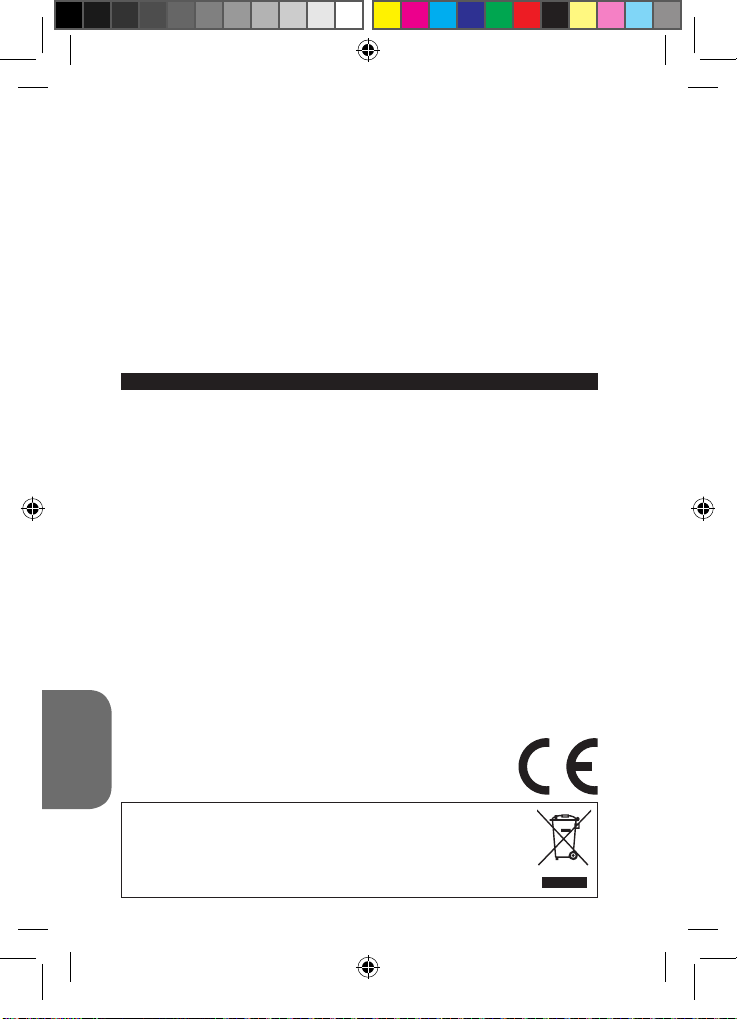
1. Start/Stopp/Zurücksetzen-Taste (ON/OFF/RESET):
- Diese Taste drücken, um die Spielekonsole einzuschalten. Die Startseite und die Spieleliste
werden dann auf dem Bildschirm erscheinen. Benutzen Sie die Pfeiltasten (Links/Rechts/
Nach oben/Nach unten), um aus der Liste das gewünschte Spiel durch Drücken der Taste B
auszusuchen.
- Diese Taste für einige Sekunden gedrückt halten und dann loslassen, um die Spielkonsole
auszuschalten. Die Konsole schaltet sich automatisch aus, wenn für 3 Minuten keine Taste
betätigt wird.
- Diese Taste drücken, um zum Spielauswahl-Menü zurückzukehren oder um das Gerät im
Falle von Fehlfunktionen zurückzusetzen.
2. Lautstärke-Einstellung. Es gibt 3 Lautstärke-Einstellungen: Stumm, Mittel und Laut.
Bei Anschalten der Konsole ist die Lautstärke auf Mittel eingestellt. Drücken Sie auf
diese Taste, um zwischen den verschiedenen Einstellungen hin- und herzuschalten.
3. Taste A
4. Navigationstasten (Links/Rechts/Oben/Unten)
5. Taste B
Entferne vor dem Einschalten des Spiels das Plastiketikett auf dem LC-
SPIELELISTE
Um mehr über die Spiele der Konsole zu erfahren, sehen Sie bitte die Website von
Lexibook www.lexibook.com, Bereich „Bedienungsanleitung“.
1
TASTENBESCHREIBUNG
2
4
4
5
6
7
8
9
10
11
12
13
14
DEUTSCH
15
16
17
18
19
20
21
22
23
24
Build up roads
Road Star
Gear Race
Mater’s tires
Mission Guido
Money Go!
Darts
Fruit Slash
Lucky Draw
Take A Smile
Dodgeman
Bubble Master
Bird on the Hunt
Ghost
Fruit Fall
Stack them up
Monkey N Fox
Flame Beetles
Pop Ball
Space Castle
Hard Win
Mystic Totem
Push the Box
North Salvation
25
26
27
28
29
30
31
32
33
34
35
36
37
38
39
40
41
42
43
44
45
46
47
48
24
Fireghter Bros
Ball Clash
Imp and Cubes
Morra
Fish Adventure
Win or Lose
Farm Pinball
Garden Weeder
Happy Farm
Mister Easter
Mr. Runner
Smart Frog
Homeland Defence
Bounce
Right Spot
Secret Bottle
Dart Champion
Climbing Challenge
Fossick Underground
Golden Arrow
Winning Lines
Sudoku
Happy Mice
Ball Mania
JL2360DCIM1172_27Apri_V01.indd 24 27/04/2012 10:45 AM
Page 25

49
50
51
52
53
54
55
56
57
58
59
60
61
62
63
64
65
66
67
68
69
70
71
72
73
74
75
76
77
78
79
80
81
82
83
84
Little Plane
Final Escape
Pinball Track
Go Soccer
Build up Road
Puzzle Quest
Blox World
Puzzle Park
Ogreish Flower
Ball Slide
Magic Ball
Fantastic Farm
Babies’ nursery
Down to 100
Mini Golf
Code Eagle
Rabbit Quiz
Finding Rabbit
Bubble Shooter
Garden Maze
Move Fun
Flying
Dangerous Zone
Happy Diamond
City Swing
Sprouts Adventure
Quick Move
Escape
Let’s Go
Spring Bro.
Vs. Football
Paint Master
Jewel Master
Closed Shell
Worm Catch
Juggle
85
86
87
88
89
90
91
92
93
94
95
96
97
98
99
100
101
102
103
104
105
106
107
108
109
110
111
112
113
114
115
116
117
118
119
120
Pair up
Fire Fighter
Puzzle Pop
Delivery Man
Driving challenge
Tryst
Catch Copy
Firecrackers
Soccer Arkanoid
Glass
Monster Jump
Motorboat
Apex Gun
Push Gem
Blue Jacket
Run After Sheep
Skate Board
Ski
Soccer Boy
Squirrel and Love
Star War
Strong Man
Table Soccer
Tiger Man
X-Ball
Bug Fight
Blow the Bubbles
Image Match
Rabbit
Football
Ping Pong
Tennis
Picking
Line
Pull the Car
Boating Adventure
EPILEPSIE-HINWEIS
Bitte sorgfältig lesen, bevor Sie oder Ihr Kind ein Videospiel beginnen. Bei einem
kleinen Prozentsatz der Bevölkerung können während des Betrachtens von blinkenden
Lichtern oder Mustern, die in unserer Umgebung täglich vorkommen, epileptische
Erscheinungsformen auftreten. Diese Zustände können bei den betroffenen Personen
durch das Betrachten bestimmter Fernsehbilder oder beim Spielen bestimmter
25
DEUTSCH
JL2360DCIM1172_27Apri_V01.indd 25 27/04/2012 10:45 AM
Page 26
Videospiele hervorgerufen werden. Auch bei Spielern, die bislang nicht mit epileptischen
Symptomen auf Lichtreize reagiert haben, ist eine bisher unentdeckte epileptische
Veranlagung nicht ausgeschlossen. Befragen Sie daher einen Arzt, bevor Sie ein
Videospiel benutzen oder wenn bei einem Mitglied Ihrer Familie Epilepsie vorliegt. Wir
empfehlen allen Eltern, ihre Kinder beim Spielen von Videospielen zu beobachten.
Sollten bei Ihnen oder Ihrem Kind folgende Symptome auftreten, unterbrechen Sie
augenblicklich das Spiel: verändertes Sehvermögen, Augen- und Muskelzuckungen,
unwillkürliche Bewegungen, Desorientierung, Wahrnehmungsverlust der Umgebung,
geistige Verwirrung, Schwindelgefühle und/oder Krämpfe. Befragen Sie Ihren Arzt.
Vorkehrungen, die bei Videospielen in jedem Fall zu treffen sind :
• Wenn Sie eine Spielkonsole benutzen, die an den Bildschirm Ihres Fernsehgerätes
angeschlossen werden kann, setzen oder stellen Sie sich bitte relativ weit vom Bildschirm
entfernt, und zwar so weit, wie es die Länge des Kabels erlaubt.
• Machen Sie vorrangig solche Videospiele, die an einem kleinen Bildschirm gespielt werden
können. Verzichten Sie auf Videospiele, wenn Sie müde sind oder Ihnen Schlaf fehlt.
• Stellen Sie bitte sicher, dass Sie in einem Raum spielen, der hell oder gut ausgeleuchtet ist.
• Wenn Sie Videospiele machen, sollten Sie jede Stunde eine Pause von 10 bis 15 Minuten
einlegen.
PFLEGE UND WARTUNG / GARANTIE
Verwenden Sie zur Reinigung des Spielzeugs nur ein weiches, leicht angefeuchtetes
Tuch und niemals Reinigungsmittel. Setzen Sie das Spielzeug nicht direkter
Sonnenbestrahlung oder anderen Hitzequellen aus. Bringen Sie es auf keinen Fall mit
Nässe in Berührung. Nehmen Sie es nicht auseinander und lassen Sie es nicht fallen.
Entnehmen Sie die Batterien, falls das Spielzeug über einen längeren Zeitraum hinweg
nicht in Gebrauch ist.
ANMERKUNG: Bitte bewahren Sie diese Bedienungsanleitung auf, da sie wichtige
Hinweise enthält. Dieses Produkt hat 2 Jahre Garantie.
Für jede Inanspruchnahme der Garantie oder des Kundendienstes, kontaktieren Sie
bitte Ihren Einzelhändler unter Vorlage der Einkaufsquittung. Unsere Garantie deckt
Materialschäden oder Installationsfehler, die auf den Hersteller zurückzuführen sind.
Nicht eingeschlossen sind Schäden, die durch Missachtung der Bedienungsanleitung
oder auf unsachgemäße Behandlung (wie z. B. unbefugtes Öffnen, Aussetzen von
Hitze oder Feuchtigkeit, usw.) zurückzuführen sind. Wir empfehlen, die Verpackung
für spätere Konsultationen aufzubewahren. Bedingt durch unser ständiges Bemühen
nach Verbesserung, kann das Produkt möglicherweise in Farben und Details von der
Verpackungsabbildung abweichen. ACHTUNG! Nicht für Kinder unter 3 Jahren geeignet.
Erstickungsgefahr – Kleinteile.
Referenznummer: JL2360DC
Design und Entwicklung in Europa - Hergestellt in China
©2012 LEXIBOOK®
©Disney/Pixar
DEUTSCH
Deutschland & Österreich
Service-Hotline: 01805 010931 (0.14€ TTC/Minute)
E-Mail: [email protected]
www.lexibook.com
Hinweise zum Umweltschutz
Alt-Elektrogeräte sind Wertstoffe, sie gehören daher nicht in den Hausmüll!
Wir möchten Sie daher bitten, uns mit Ihrem aktiven Beitrag bei der
Ressourcenschonung und beim Umweltschutz zu unterstützen und
dieses Gerät bei den (falls vorhanden) eingerichteten Rücknahmestellen
abzugeben.
26
JL2360DCIM1172_27Apri_V01.indd 26 27/04/2012 10:45 AM
Page 27
1
2
3
4
INHOUD VAN DE VERPAKKING
Controleer tijdens het uitpakken of de volgende onderdelen aanwezig zijn:
1 x spelconsole
1 x gebruiksaanwijzing
OPGELET: De verpakkingsdelen, zoals plastic folie, plakband, etiketten en metalen
hechtingsbanden, maken geen deel uit van dit speelgoed en moeten voor alle veiligheid
worden verwijderd vooraleer het speelgoed door een kind kan en mag worden gebruikt.
BATTERIJINFORMATIE
De spelconsole werkt op 3 X 1,5V AAA/LR03 type batterijen (niet meegeleverd).
Vraag hulp aan een volwassene om de juiste batterijen te vinden en te installeren. Enkel
de aangegeven batterijen mogen met dit product gebruikt worden.
1. Open het batterijdeksel achteraan het apparaat, met behulp
van een schroevendraaier.
2. Installeer de 3 x LR03/AAA batterijen volgens de juiste
polariteit zoals aangegeven onderaan het batterijvak en in de
afbeelding hiernaast.
3. Sluit opnieuw het batterijvak en draai de schroef vast.
OPMERKINGEN:
- Vervang de batterijen als het geluid afneemt of het spel niet langer correct reageert.
- Voor betere prestaties zijn alkaline batterijen aanbevolen.
Niet-heroplaadbare batterijen kunnen niet worden heropgeladen; oplaadbare batterijen moeten
uit het speelgoed worden verwijderd alvorens deze op te laden; heroplaadbare batterijen mogen
alleen onder toezicht van een volwassene worden opgeladen; verschillende types batterijen of
nieuwe en oude batterijen mogen niet onderling gebruikt worden; gebruik alleen batterijen van
hetzelfde of equivalente type zoals aangeraden door de fabrikant; batterijen moeten volgens de
juiste polariteit worden ingestoken; lege batterijen moeten uit het speelgoed worden verwijderd;
de toevoerterminals mogen geen kortsluiting ondervinden. Gelieve de verpakking te bewaren als
referentie voor later daar het belangrijke informatie bevat. Gooi batterijen nooit in open vuur. Indien
je het spel voor langere tijd niet zal gebruiken, neem de batterijen uit het spel. Wanneer het geluid
verzwakt of het spel niet reageert, vervang dan de batterijen.
27
5
NEDERLANDS
JL2360DCIM1172_27Apri_V01.indd 27 27/04/2012 10:45 AM
Page 28

29
WAARSCHUWING: Een storing of geheugenverlies kan veroorzaakt worden door
een sterke frequentie-interferentie of een elektrostatische ontlading. Indien er zich een
abnormale functie voordoet, verwijder en verbindt opnieuw de batterijen.
TOETSENGIDS
OPMERKING: Alvorens het spel te starten, haal het plastic label van het LCD-scherm af.
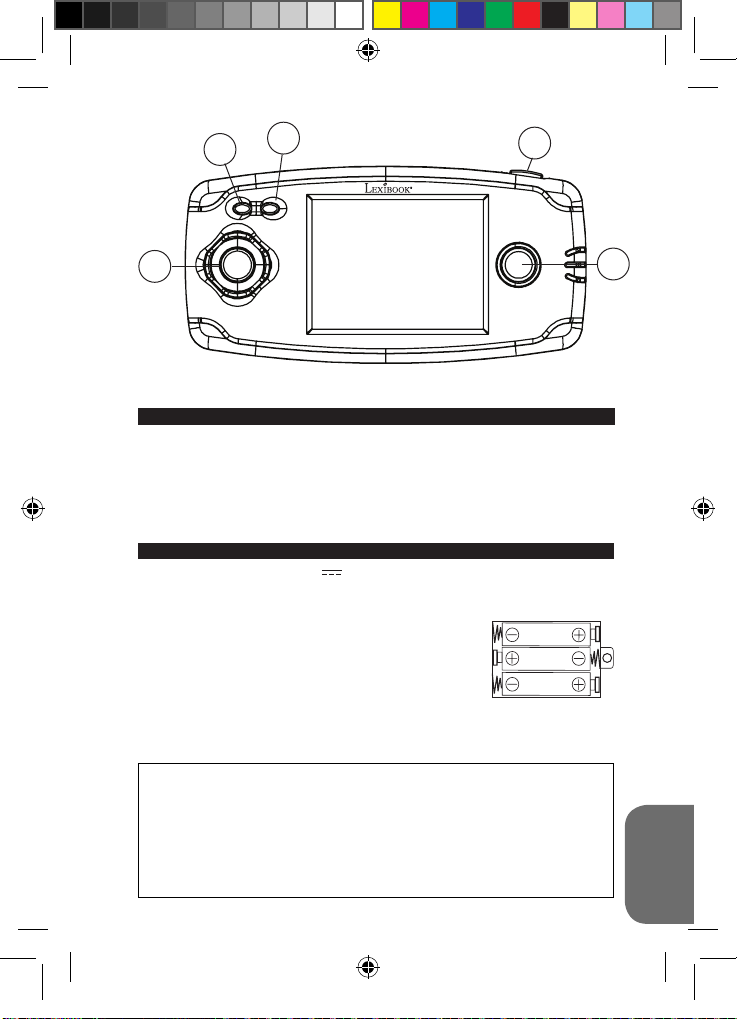
1. Aan/Uit/Reset-toets (ON/OFF/RESET):
- Druk op deze toets om de spelconsole in te schakelen. De startpagina en lijst met spellen
worden vervolgens op het scherm weergegeven. Gebruik de pijltoetsen (Links/Rechts/Omhoog/Omlaag) om de lijst te doorlopen en kies het gewenste spel door op knop B te drukken.
- Houd deze toets gedurende enkele seconden ingedrukt en laat vervolgens los om de
spelconsole uit te schakelen. De console wordt automatisch na 3 minuten van inactiviteit
uitgeschakeld.
- Druk op deze toets om naar het spelkeuzescherm terug te keren of om het apparaat in geval
van storing te resetten.
2. Volumeknop. Er zijn 3 beschikbare volumeniveaus: demping, medium en luid. Bij het
inschakelen van de console wordt het volume op het medium niveau ingesteld. Druk
op deze knop om de volume-instelling te wijzigen.
3. A-knop
4. Richtingstoetsen (Links/Rechts/Omhoog/Omlaag)
5. B-knop
SPELLENLIJST
Om meer te weten te komen over de consolespellen, ga naar de website van
Lexibook www.lexibook.com, rubriek “Gebruiksaanwijzing “.
1
2
4
4
5
6
7
8
9
10
11
12
13
14
15
16
17
18
19
NEDERLANDS
20
21
22
23
24
Build up roads
Road Star
Gear Race
Mater’s tires
Mission Guido
Money Go!
Darts
Fruit Slash
Lucky Draw
Take A Smile
Dodgeman
Bubble Master
Bird on the Hunt
Ghost
Fruit Fall
Stack them up
Monkey N Fox
Flame Beetles
Pop Ball
Space Castle
Hard Win
Mystic Totem
Push the Box
North Salvation
25
Fireghter Bros
26
Ball Clash
27
Imp and Cubes
28
Morra
29
Fish Adventure
30
Win or Lose
31
Farm Pinball
32
Garden Weeder
33
Happy Farm
34
Mister Easter
35
Mr. Runner
36
Smart Frog
37
Homeland Defence
38
Bounce
39
Right Spot
40
Secret Bottle
41
Dart Champion
42
Climbing Challenge
43
Fossick Underground
44
Golden Arrow
45
Winning Lines
46
Sudoku
47
Happy Mice
48
28
Ball Mania
JL2360DCIM1172_27Apri_V01.indd 28 27/04/2012 10:45 AM
Page 29

49
50
51
52
53
54
55
56
57
58
59
60
61
62
63
64
65
66
67
68
69
70
71
72
73
74
75
76
77
78
79
80
81
82
83
84
Little Plane
Final Escape
Pinball Track
Go Soccer
Build up Road
Puzzle Quest
Blox World
Puzzle Park
Ogreish Flower
Ball Slide
Magic Ball
Fantastic Farm
Babies’ nursery
Down to 100
Mini Golf
Code Eagle
Rabbit Quiz
Finding Rabbit
Bubble Shooter
Garden Maze
Move Fun
Flying
Dangerous Zone
Happy Diamond
City Swing
Sprouts Adventure
Quick Move
Escape
Let’s Go
Spring Bro.
Vs. Football
Paint Master
Jewel Master
Closed Shell
Worm Catch
Juggle
85
86
87
88
89
90
91
92
93
94
95
96
97
98
99
100
101
102
103
104
105
106
107
108
109
110
111
112
113
114
115
116
117
118
119
120
Pair up
Fire Fighter
Puzzle Pop
Delivery Man
Driving challenge
Tryst
Catch Copy
Firecrackers
Soccer Arkanoid
Glass
Monster Jump
Motorboat
Apex Gun
Push Gem
Blue Jacket
Run After Sheep
Skate Board
Ski
Soccer Boy
Squirrel and Love
Star War
Strong Man
Table Soccer
Tiger Man
X-Ball
Bug Fight
Blow the Bubbles
Image Match
Rabbit
Football
Ping Pong
Tennis
Picking
Line
Pull the Car
Boating Adventure
29
JL2360DCIM1172_27Apri_V01.indd 29 27/04/2012 10:45 AM
NEDERLANDS
Page 30
Moet door jou of jouw kind gelezen worden alvorens een videospel te gebruiken.
Sommige mensen kunnen aanvallen van epilepsie krijgen of het bewustzijn verliezen
bij het zien van bepaalde itsende lichten of frequente bewegingen in onze dagelijkse
omgeving. Deze mensen stellen zich bloot aan dergelijke aanvallen bij het bekijken van
bepaalde televisiebeelden of bij het spelen van bepaalde videospelen. Dit fenomeen
kan ook plaatsvinden zonder voorafgaande medische verschijning of zonder enige
voorafgaande aanval van epilepsie. Indien jezelf of iemand van je familie reeds
symptomen van epilepsie (aanval of bewustzijnsverlies) heeft ervaren bij het zien van
“licht”stimulaties, gelieve uw dokter te raadplegen alvorens dit spel te gebruiken.
Wij raden de ouders aan om aandachtig hun kinderen te observeren tijdens het
spelen van een videospel. Indien jijzelf of je kind de volgende symptomen vertonen:
duiziligheid, problemen van het zicht, oog- of spiersamentrekkingen, orientatieproblemen,
ongecontroleerde bewegingen of stuiptrekkingen, gelieve onmiddellijk het spel te stoppen
en uw dokter te raadplegen.
Voorzorgsmaatregelen die je bij het gebruik van video games altijd in acht moet
nemen
• Wanneer je een video game speelt met een TV-scherm kan verbonden worden, ga altijd op
een relatieve verre afstand van het scherm zitten of staan en zo ver als de verbindingsdraad
het toelaat.
• Gebruik het liefst video games met een klein scherm. Speel geen video games wanneer je
moe bent of niet lang hebt geslapen.
• Zorg ervoor dat de ruimte waarin je speelt voldoende verlicht is.
• Wanneer je video games speelt, neem elke 10 tot 15 minuten een onderbreking.
ONDERHOUD EN GARANTIE
Om het speelgoed te reinigen, gebruik je alleen een zachte, licht vochtige doek. Alle
detergenten zijn verboden. Stel het spel niet bloot aan direct zonlicht of eender welke
hittebron. Maak het spel niet nat. Haal het niet uit elkaar en laat het niet vallen. Indien je
het spel voor langere tijd niet gebruikt, haal de batterijen eruit.
OPMERKING: gelieve deze handleiding te bewaren aangezien het belangrijke informatie
bevat. Het product is gedekt door onze 2 jaar garantie.
Voor alle herstellingen tijdens de garantie of naverkoopsdienst, moet je je richten
tot de verkoper met een aankoopbewijs. Onze garantie geldt voor al het materiaal
en de montage van de fabrikant, exclusief alle schade veroorzaakt door het niet
repsecteren van onze gebruiksaanwijzing ( zoals uit elkaar halen, blootstellen
aan hitte of vochtigheid….). Wij raden aan de verpakking te bewaren voor enige
referentie in de toekomst. In onze poging voor constante verbetering, is het mogelijk
dat kleuren en details van dit product lichtjes verschillen van deze op de verpakking.
WAARSCHUWING! Niet geschikt voor kinderen jonger dan 3 jaar. Verstikkingsgevaar kleine onderdelen.
Referentie : JL2360DC
Ontworpen en ontwikkeld in Europa - Gemaakt in China
©2012 LEXIBOOK®
©Disney/Pixar
www.lexibook.com
NEDERLANDS
Richtlijnen voor milieubescherming
Gebruikte elektronische apparaten horen niet thuis in het huisafval! Wij
vragen u daarom een bijdrage aan de bescherming van ons milieu te
leveren en dit apparaat op de voorziene verzamelplaatsen af te geven.
WAARSCHUWING VOOR EPILEPSIE
30
IM Code: JL2360DCIM1172
JL2360DCIM1172_27Apri_V01.indd 30 27/04/2012 10:45 AM
Page 31
City/V ille :
FRANCE
LEXIBO OK S.A ,
Mon av is com pte
91953 Courta boeuf Cedex
2, ave nue de Scand inavie ,
Averag e/Moye n
JL2360DC
YOUR OPINION MATTERS / VOTRE AVIS COMPTE
produi ts enc ore me illeur s! Mer ci de bien v ouloir rempl ir ce coupon en fr ançais ou en angla is et de nou s le r etourn er à l ’adres se sui vante :
Help u s make produ cts be tter t han ev er! Pl ease f ill ou t the follow ing fo rm in Englis h or i n Fren ch, an d retu rn it to / Aidez- nous à rendr e nos
Refere nce of produ ct / Ré férenc e du p roduit
Name o f prod uct / Nom du produi t:
JL2360DCIM1172_27Apri_V01.indd 31 27/04/2012 10:45 AM
First name/P rénom : Last n ame/No m de f amille :
Addres s/Adre sse :
Zip co de/Cod e Post al : Country/Pays :
Store / Ense igne :
Birth Date o f the user / Date d e nais sance de l’ut ilisat eur de ce pr oduit : ____/ _____/ _____
Date o f purc hase / Date de l’ac hat : ____/_ ____/_ ____
Phone/ Téléph one : Email :
What i s your overa ll imp ressio n of t he pro duct? / Vous trouv ez le produi t glob alemen t :
Very satisfactory/Très satisfaisant Satisf actory /Satis faisan t
Please feel free to leave your comments here / Vous pouvez à présent utiliser l’espace suivant pour nous donner vos remarques :
Disapp ointin g/Déc evant Very d isappo inting /Très décev ant
Find a ll our new p roducts / Ret rouvez toute notre actual ité: h ttp:// www.le xibook. com
Conformément aux articles 34 et suivants de la loi « Informatique et Libertés » du 6 janvier 1978, vous disposez d'un droit d'accès, de modification,
de rectification et de suppression des données qui vous concernent. Vous pouvez l'exercer sur simple demande à notre adresse. Si vous ne souhaitez
pas que ces données soient utilisées à des fins de prospection commerciale, veuillez cocher ici :
Page 32
FRANCE
91953 Courtaboeuf Cedex
2, avenue de Scandinavie
Mon avis compte
LEXIBOOK S.A
Affranchir
ici
JL2360DCIM1172_27Apri_V01.indd 32 27/04/2012 10:45 AM
 Loading...