

Page 1
ai1716968399341_JC598i17series_IM2224_365_V06.pdf 1 29/5/2024 3:39 PM
Educational bilingual laptop
Edukacyjny laptop dwujęzyczny
LCD SCREEN
KEYBOARD
Instrukcja obsługi • Intruction Manual
ON/OFF
MOUSE
JC598i17series
ENGLISH
UNPACKING
When unpacking, ensure that the following elements are included:
1 x educational laptop 1 x mouse 1 x instruction manual
WARNING: All packaging materials, such as tape, plastic sheets, wire ties and tags are not part of this toy and should be discarded for your child’s safety.
POWER SUPPLY
Your educational laptop computer is powered by 2 x 1.5V AA/LR6 batteries (included).
Installing batteries:
1.Using a screwdriver, open the battery door located under the device.
2.Insert 2 x 1.5V AA/LR6 batteries observing the polarity markings inside the battery compartment.
3.Close the battery compartment and tighten the screw.
Non-rechargeable batteries are not to be recharged. Rechargeable batteries are to be removed from the toy before being charged. Rechargeable batteries are only to be
charged under adult supervision. Different types of batteries or new and used batteries are not to be mixed. Only batteries of the same or equivalent type as recommended are
to be used. Batteries are to be inserted with the correct polarity. Exhausted batteries are to be removed from the toy. The supply terminals are not to be short circuited. Do not
throw batteries into a fire. Remove the batteries if you are not going to use the game for a long period of time. Battery shall not be exposed to excessive heat such as sunshine,
fire or the like.
WARNING: Mal-function or loss of memory may be caused by strong frequency interference or electrostatic discharge. Should any abnormal function occur, remove the
batteries and insert them again.
Correct disposal of batteries in this product
(Applicable in countries with separate collection systems) This symbol means that the product contains a battery covered by European Directive 2013/56/EU which cannot be disposed of with normal household waste.All batteries should
be disposed separately from the municipal waste stream via designated collection facilities appointed by the government or the local authorities. The correct disposal of your old batteries will help to prevent potential negative consequenc-
es for the environment, animal and human health. Inform yourself about the local separate collection system for electrical and electronic products and batteries. Follow local rules and never dispose of the product and batteries with normal
household waste. For more detailed information about disposal of your old batteries, please contact your city office or waste disposal service center.
1.5V AA OR LR6
1.5V AA OR LR6
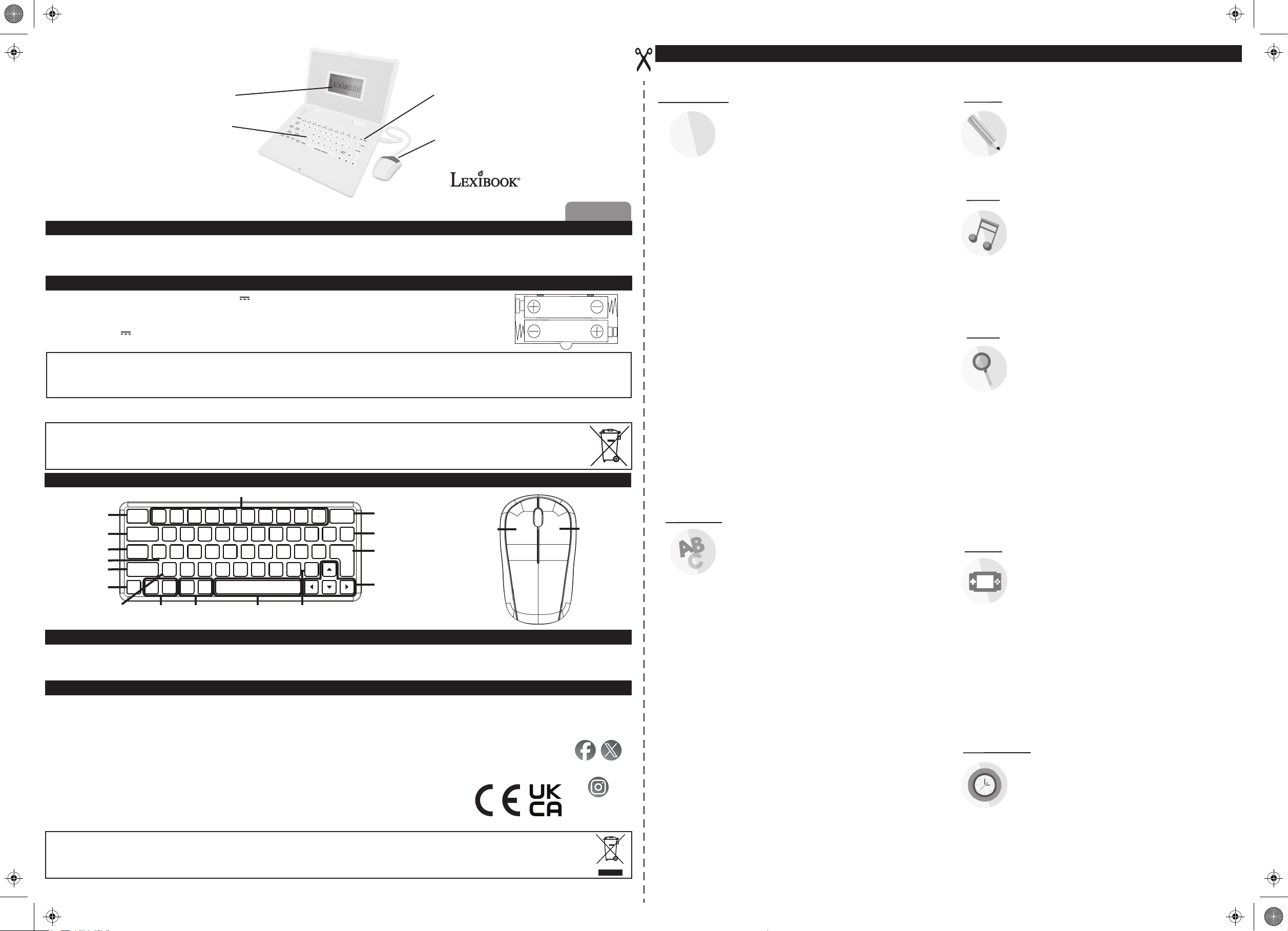
DESCRIPTION OF FUNCTION KEYS
ACTIVITIES - Back
to game selection Interface.
HELP - See the correct
answer to current question.
MUSIC - Shortcut key
NOTES
LANGUAGE - Shift
English/Polish
CLOCK - Shortcut key
LEVEL - Shift
to another test
level difficulty.
NUMBER KEYS/MUSIC NOTES
1 2 3 4 5 6 7 8 9 0
AKTYWNOŚCI
ACTIVITIES
MUZYKA
ZEGAR
CLOCK
Ą
La
POMOC
HELP
UWAGI
NOTES
MUSIC
JĘZYK
POZIOM
LANGUAGE
LEVEL
GŁOŚNOŚĆ
GŁOŚNOŚĆ
VOLUME
VOLUME - Sound
volume adjustment keys.
Si
Do Ę Re Ł Mi Ń Fa Ó Sol Ś La Ż Si ŹĆ
A B C D E F G H I J
K L M N O P Q R S
T U V W X Y Z
KONTRAST
VOLUME
KONTRAST
CONTRAST
CONTRAST
+ -+ -
CONTRAST - LCD
contrast adjustment keys.
POWTÓRZ / REPEAT
repeat the previous
pronunciation or repeat
the question.
ON / OFF
Do
DELETE
ENTER
PISANIE
WRITE
WRITEREPEAT- Use it to
ON/OFF - Power Key.
Note: The laptop will switch
off automatically in 3 minutes
in the absence of any key
operation.
DELETE - Use it to delete
character(s) entered.
ENTER - Confirming key.
DIRECTIONAL KEYS
LEFT - Approve / Enter RIGHT - Back / Delete
CARE SECTION
1. Do not collide with hard item.
2. Do not drop unit.
3. Do not dismantle the unit.
4. Do not leave unit in bright sunlight or any other direct source of heat.
5. Do not get the unit wet.
6. Clean unit with a soft damp cloth.
7. Do not use chemical solvents to clean unit.
8. Remove the batteries when not using unit for long periods of time.
9. Children must be accompanied by an adult to use this unit.
10. Don’t throw the toys in fire for the batteries might be blasted.
MAINTENANCE AND WARRANTY
Protect the toy from humidity. Should it become wet, wipe it immediately. Do not expose it to direct sunlight, nor to a heat source. Do not allow it to fall. Do not attempt to disassemble it. To clean it, use a
slightly damp cloth, avoiding the use of any detergent product. In the event of malfunction, first try to change the batteries. If the problem persists, carefully read again the manual in order to verify that no
step has been omitted.
Note: Please keep this instruction manual, it contains important information.
This product is covered by our 2-year warranty for the European Union. For all warranty claims or after-sales service, you must contact your retailer, providing proof of purchase.
Our warranty covers defects in materials or workmanship attributable to the manufacturer, to the exclusion of any damage arising from the failure to observe the provisions contained
in the user’s manual or any improper intervention with respect to the item (such as disassembly, exposure to heat or humidity…).
We recommend keeping the packaging for future reference. In a bid to continually improve our products, we reserve the right to change the colors and details of the product
presented on the packaging.
WARNING! Not suitable for children under 3 years. Choking Hazard - Small parts.
Reference: JC598i17series
Designed and developed in Europe – Made in China
© Lexibook®
United Kingdom & Ireland
For after-sales service, please contact us at [email protected]
www.lexibook.com
Lexibook UK
PO Box 423
UMBERLEIGH
EX32 2JW
United Kingdom
Suivez-nous / Follow us
@LexibookCom
lexibook_en
www.lexibook.com
©Lexibook®
MATHEMATICS:
1
3
2
LANGUAGE:
01. LEARNING NUMBERS >
The device pronounces it and an animation is displayed.
02. WRITING NUMBERS >
The screen displays how to form the number.
03. NUMBER SPELLING >
The device teaches the spelling.
04. NUMBER TEST >
and the device pronounces it. Find and press the matching number
on the keyboard.
05. COUNTING NUMBERS >
on the screen then starts to count. Press enter when the matching number
is displayed on the screen.
06. NUMBER ORDERING >
the screen. Put them in ascending order thanks to the keyboard.
07. NUMBER COMPARISON >
on the screen. Press enter when the correct sign appears (either =, > or <).
08. ICON ADDITION >
the screen, and then press enter when the matching number of
icons appears below the operation line.
09. ICON SUBTRACTION >
of the screen, and then press enter when the matching number of icons
appears below the operation line.
10. ADDITION TEST >
11. SUBTRACTION TEST >
the keyboard.
12. MULTIPLICATION TEST >
using the keyboard.
13. DIVISION TEST >
the keyboard.
14. EQUATION COMPLETION (+-) >
in the equation thanks to the keyboard.
15. EQUATION COMPLETION (*/) >
equation thanks to the keyboard.
16. OPERATIONAL SIGN >
with which the equation is correct.
17. MIXED OPERATION (+-) >
(mixing additions and subtractions) with the numbers on the keyboard.
18. MIXED OPERATION (*/) >
(mixing multiplications and divisions) with the numbers on the keyboard.
19. MIXED OPERATION (+-*/) >
(mixing the 4 operations) with the numbers on the keyboard.
20. COUNTING GRAPHS >
select the number of graphs in the animation and press enter.
21. LETTERS LEARNING >
The device pronounces the letter.
22. LETTERS WRITING >
The screen displays how to form the letter.
23. SMALL-CAPITAL LETTER >
the screen. Press Enter when the matching small letter appears.
24. LETTER TEST >
and the device pronounces it. Find and press the matching letter
on the keyboard.
25. LETTER COMPLETION >
26. LETTER ORDERING >
27. WORDS LEARNING >
The device gives an example of a word starting with this letter.
28. WORD SPELLING >
The device gives an example of a word starting with this letter
and teaches the spelling.
29. FIND THE WORD >
the beginning of the activity.
30. FIND THE FLASH >
at the beginning of the activity.
31. INITIAL LETTER FILLING >
the screen. Find the first letter of this word.
32. MISSING LETTER >
Find the missing letter of this word.
33. FIND THE 2 MISSING LETTER >
on the screen. Find the 2 missing letters of this word.
34. WORD ORDERING >
Put back the letters in the correct order.
35. WORD CORRECTION >
word are displayed on the screen. Find the wrong letter and correct it
thanks to the keyboard.
36. WORD TEST >
and the device names it. Type the word with the keyboard.
An animation is displayed on the screen
Press any number on the keyboard.
Press any number on the keyboard.
Press any number on the keyboard.
A number is displayed on the screen
The device displays a number of shapes
The device displays 2 numbers on
The device displays 2 numbers
Add the icons displayed on the top of
Subtract the icons displayed on the top
Write the addition result by using the keyboard.
Write the subtraction result by using
Write the multiplication result by
Write the multiplication result by using
Type the missing number
Type the missing number in the
Select the operational sign (either +, -, * or /)
Type the result of the operation
Type the result of the operation
Type the result of the operation
Use the directional keys to
Press any letter on the keyboard.
Press any letter on the keyboard.
A capital letter is shown at the left of
A letter is displayed on the screen
Find the alphabetical suite.
Order the letters in the alphabetical order.
Press any letter on the keyboard.
Press any letter on the keyboard.
Find the word matching the picture shown at
Find the picture matching the word shown
An animation is displayed on
An animation is displayed on the screen.
An animation is displayed
An animation is displayed on the screen.
An animation then the matching
ACTIVITIES
TYPING:
MUSIC:
LOGIC:
GAMES:
CLOCK &TIME:
37. TYPING GAME 1 >
on the screen. You have 7 seconds to do this in level 1, and 5 seconds
in level 2.
38. TYPING GAME 2 >
on the screen. You need to type them before they disappear to score as
many points as possible.
39. PIANO >
(1 = La, 2 = Si, 3 = Do and so on).
40. MUSICAL NOTE TEST >
Use the numbers keys to give the matching note
(1 = La, 2 = Si, 3 = Do and so on).
41. PLAY BY MUSIC >
displayed on screen to play a melody.
42. MUSIC BOX >
randomly.
43. PLAY RANDOMLY >
44. NUMBER MEMORY GAME >
displayed on the screen. Memorize them before they disappear then
use the keyboard to answer. You have 3 digits to remember in level
1, and 4 digits in level 2.
45. GRAPH MEMORY GAME 1 >
screen. Memorize them before they disappear then use the directional
keys to answer.
46. GRAPH MEMORY GAME 2 >
Memorize it before it disappears then use the directional keys to answer.
47. NUMBER MATCHING >
Memorize them before they disappear then use the directional keys
to reveal the matching pairs of numbers.
48. GRAPH MATCHING >
them before they disappear then use the directional keys to reveal pairs
of matching icons.
Use the numbers keys to play the piano.
49. SERIES FILL UP >
50. COMPLEMENTARY GRAPH >
screen. Press enter when the matching graph appears on the right.
51. FIND THE OTHER HALF >
the screen. Press enter when the matching half appears on the right.
52. PAINTING BOARD >
draw on the screen.
53. CATCHING OBJECT >
cup to catch falling objects.
54. MASTER ARCHER >
55. LABYRINTH >
56. WALKING PLANK ROAD >
icon can follow the path.
57. AIRPLANE LANDING >
on the base and to avoid obstacles.
58. GREEDY SNAKE >
he can eat as many objects as possible. The more he eats, the longer it becomes.
59. FIGHTING AIRPLANE >
Press enter to shoot and destroy opponents.
60. GOPHER BEATING >
K L M N for the second row to beat the gophers when they appear on screen.
61. STOPWATCH >
62. CLOCK >
Use the keyboard to type the letter displayed
Use the keyboard to type the letters flashing
The device plays a musical note.
Type the same numbers as
Press any key to listen to one of the 8 melodies
Press the keys randomly to play the melody.
A succession of numbers is
Three icons are displayed on
A picture is displayed on screen.
Numbers are displayed on screen.
Icons are displayed on screen. Memorize
Use the numbers keys to fill the blank case in the series.
A graph is displayed on the left of the
Half a picture is displayed on the left of
Use the directional keys and the enter key to
Use the directional keys to move steer the
Press enter to throw an arrow to burst the balloons.
Use the directional keys to steer the icon out of the labyrinth.
Use the directional keys so the moving
Use the directional keys to land the plane
Use the directional keys to steer the snake so
Use the directional keys to steer the plane.
Use the keys A B C D for the first row and
Press enter to start the chronometer.
Use enter then the directional keys to adjust the clock.
Environmental protection
Unwanted electrical appliances can be recycled and should not be discarded along with regular household waste! Please actively support the conservation of
resources and help protect the environment by returning this appliance to a collection centre (if available).
A3; Double sided
Page 2
ai1716968399341_JC598i17series_IM2224_365_V06.pdf 2 29/5/2024 3:39 PM
AKTYWNOŚCI
MATEMATYKA:
01. NAUKA LICZB >
1
2
Urządzenie wymówi ją i wyświetlona zostanie animacja.
02. PISANIE LICZB >
Na ekranie pokazane zostanie jak tę liczbę zapisać.
3
03. PISOWNIA LICZB >
Urządzenie uczy pisowni.
04. TEST Z LICZB >
jak ją wymówić. Należy odszukać i nacisnąć odpowiednią liczbę na klawiaturze.
05. LICZENIE LICZB >
i zaczyna liczyć. Gdy na ekranie wyświetlana będzie właściwa liczba, należy nacisnąć
klawisz Enter.
06. PORZĄDKOWANIE LICZB >
Korzystając z klawiatury, należy je ustawić w kolejności rosnącej.
07. PORÓWNYWANIE LICZB >
na ekranie. Gdy na ekranie wyświetlony zostanie właściwy znak (=, > lub <),
należy nacisnąć klawisz Enter.
08. DODAWANIE IKON >
ekranu, a potem nacisnąć klawisz Enter, gdy poniżej wiersza działania pojawi się
odpowiednia liczba ikon.
09. ODEJMOWANIE IKON >
ekranu, a potem nacisnąć klawisz Enter, gdy poniżej wiersza działania pojawi się
odpowiednia liczba ikon.
10. TEST Z DODAWANIA >
11. TEST Z ODEJMOWANIA >
12. TEST Z MNOŻENIA >
13. TEST Z DZIELENIA >
14. UZUPEŁNIANIE RÓWNANIA (+-) >
w równaniu liczbę.
15. UZUPEŁNIANIE RÓWNANIA (*/) >
w równaniu liczbę.
16. ZNAK DZIAŁANIA >
z którym będzie zachodziła równość.
17. DZIAŁANIA MIESZANE (+-) >
(dodawania lub odejmowania) liczb występujących na klawiaturze.
18. DZIAŁANIA MIESZANE (*/) >
(mnożenia lub dzielenia) liczb występujących na klawiaturze.
19. DZIAŁANIA MIESZANE (+-*/) >
(wszystkie 4 działania razem) liczb występujących na klawiaturze.
20. LICZENIE ELEMENTÓW GRAFICZNYCH >
należy wybrać liczbę elementów graficznych w animacji i nacisnąć klawisz Enter.
JĘZYK:
21. NAUKA LITER >
Urządzenie poda jak tę literę wymawiać.
22. PISANIE LITER >
Na ekranie pokazane zostanie jak tę literę zapisać.
23. MAŁE I DUŻE LITERY >
Gdy pojawi się odpowiadająca jej mała litera, należy nacisnąć klawisz Enter.
24. TEST Z LITER >
jak ją wymówić. Należy odszukać i nacisnąć odpowiednią liczbę na klawiaturze.
25. CIĄG ALFABETYCZNY >
Zadaniem grającego jest uzupełnić ciąg w porządku alfabetycznym.
26. PORZĄDKOWANIE LITER >
27. NAUKA WYRAZÓW >
Urządzenie poda przykład wyrazu zaczynającego się na tę właśnie literę.
28. PISOWNIA WYRAZÓW >
Urządzenie poda przykład wyrazu zaczynającego się na tę właśnie literę i nauczy
grającego pisowni.
29. ZNAJDŹ WYRAZ >
początku aktywności.
30. ZNAJDŹ DOPASOWANIE >
podanego na początku aktywności.
31. WPISYWANIE PIERWSZEJ LITERY >
Należy znaleźć pierwszą literę tego wyrazu.
32. BRAKUJĄCA LITERA >
Należy znaleźć brakującą literę tego wyrazu.
33. ZNAJDŹ 2 BRAKUJĄCE LITERY >
Należy znaleźć 2 brakujące litery tego wyrazu.
34. PORZĄDKOWANIE LITER >
Należy ustawić litery z powrotem we właściwej kolejności.
35. POPRAWIANIE WYRAZÓW >
a potem pasujący do niej wyraz. Należy znaleźć niewłaściwą literę i poprawić ją z klawiatury.
36. TEST Z WYRAZÓW >
Należy napisać wyraz na klawiaturze.
Należy nacisnąć dowolną liczbę na klawiaturze.
Należy nacisnąć dowolną liczbę na klawiaturze.
Należy nacisnąć dowolną liczbę na klawiaturze.
Na ekranie wyświetlana jest liczba, a urządzenie pokazuje,
Urządzenie wyświetla na ekranie pewną liczbę kształtów
Urządzenie wyświetla na ekranie 2 liczby.
Urządzenie wyświetla 2 liczby
Należy dodać do siebie ikony wyświetlane u góry
Należy odjąć od siebie ikony wyświetlane u góry
Należy wpisać z klawiatury wynik dodawania.
Należy wpisać z klawiatury wynik odejmowania.
Należy wpisać z klawiatury wynik mnożenia.
Należy wpisać z klawiatury wynik dzielenia.
Należy wpisać z klawiatury brakującą
Należy wpisać z klawiatury brakującą
Należy wybrać znak działania (+, -, * lub /),
Należy wpisać wynik działania
Należy wpisać wynik działania
Należy wpisać wynik działania
Używając klawiszy kierunkowych,
Należy wpisać z klawiatury dowolną literę.
Należy wpisać z klawiatury dowolną literę.
W lewej części ekranu wyświetlana jest duża litera.
Na ekranie wyświetlana jest litera, a urządzenie pokazuje,
Laptop podaje losowy ciąg liczb (z brakującą jedną literą).
Należy ustawić litery w porządku alfabetycznym.
Należy nacisnąć dowolną literę na klawiaturze.
Należy nacisnąć dowolną literę na klawiaturze.
Należy znaleźć wyraz pasujący do obrazka pokazanego na
Należy znaleźć obrazek pasujący do wyrazu
Na ekranie wyświetlona zostanie animacja.
Na ekranie wyświetlona zostanie animacja.
Na ekranie wyświetlona zostanie animacja.
Na ekranie wyświetlona zostanie animacja.
Na ekranie wyświetlana jest najpierw animacja,
Na ekranie wyświetlana jest animacja, a urządzenie nazywa ją.
PISANIE NA KLAWIATURZE:
37. PISANIE NA KLAWIATURZE – GRA 1 >
wyświetlaną na ekranie. Na poziomie 1 mamy na to 7 sekund, a na poziomie 2 – 5 sekund.
38. PISANIE NA KLAWIATURZE – GRA 2 >
migające na ekranie. Należy je wpisywać zanim znikną z ekranu i w ten sposób zdobywać
jak najwięcej punktów.
MUZYKA:
39. FORTEPIAN >
(1 = La, 2 = Si, 3 = Do i tak dalej).
40. TEST Z NUT >
wskazać jaka to nuta (1 = La, 2 = Si, 3 = Do i tak dalej).
41. GRA DO MUZYKI >
na ekranie.
42. POZYTYWKA >
odsłuchać jednej z 8 melodii, wybranej losowo.
43. GRANIE LOSOWE >
Gra na pianinie z użyciem klawiszy liczb.
Urządzenie gra jakąś nutę. Za pomocą klawiszy liczb należy
Należy nacisnąć dowolny klawisz, po czym można będzie
LOGIKA:
44. GRA W ZAPAMIĘTYWANIE LICZB >
Należy zapamiętać je zanim znikną, a potem w celu podania odpowiedzi użyć klawiatury.
Do zapamiętania są 3 cyfry na poziomie 1 i 4 cyfry na poziomie 2.
45. GRA W ZAPAMIĘTYWANIE ELEMENTÓW GRAFICZNYCH 1 >
Na ekranie wyświetlane są 3 ikony. Należy zapamiętać je zanim znikną, a potem w celu
podania odpowiedzi użyć klawiszy kierunkowych.
46. GRA W ZAPAMIĘTYWANIE ELEMENTÓW GRAFICZNYCH 2 >
Na ekranie wyświetlany jest obraz. Należy go zapamiętać zanim zniknie, a potem w celu
podania odpowiedzi użyć klawiszy kierunkowych.
47. DOPASOWYWANIE LICZB >
Należy zapamiętać je zanim znikną, a potem użyć klawiszy kierunkowych, aby wskazać
pasujące do siebie pary liczb.
48. DOPASOWYWANIE ELEMENTÓW GRAFICZNYCH >
Na ekranie wyświetlane są ikony. Należy zapamiętać je zanim znikną, a potem użyć
klawiszy kierunkowych, aby wskazać pasujące do siebie pary ikon.
49. UZUPEŁNIANIE CIĄGÓW >
aby uzupełnić puste pole w ciągu.
50. DOPEŁNIAJĄCY ELEMENT GRAFICZNY >
wyświetlany jest element graficzny. Gdy po prawej stronie pojawi się pasujący do niego
element graficzny, należy nacisnąć klawisz Enter.
51. ZNAJDŹ DRUGĄ POŁÓWKĘ >
jakiegoś obrazu. Gdy po prawej stronie pojawi się pasująca połówka, należy nacisnąć
klawisz Enter.
GRY:
52. TABLICA DO MALOWANIA >
Enter można tu rysować na ekranie.
53. ŁAPANIE PRZEDMIOTÓW >
poruszać kubkiem, aby złapać do niego spadające przedmioty.
54. MISTRZ ŁUCZNICTWA >
którą można zestrzelić baloniki.
55. LABIRYNT >
wyjścia z labiryntu.
56. SPACER PO DESKACH >
ikoną w taki sposób, aby przesuwać ją po ścieżce.
57. LĄDOWANIE SAMOLOTU >
wylądować samolotem w bazie i omijać wszystkie przeszkody.
58. ŁAKOMY WĄŻ >
aby mógł zjeść jak najwięcej przedmiotów. Im więcej zje, tym robi się dłuższy.
59. MYŚLIWIEC >
Wciśnięcie klawisza Enter powoduje strzelanie i pozwala niszczyć wrogów.
60. ZBIJANIE SUSŁÓW >
K L M N w drugim rzędzie należy zbijać susły pojawiające się na ekranie.
Za pomocą klawiszy kierunkowych należy pokierować ikonę do
Za pomocą klawiszy kierunkowych należy sterować wężem tak,
Za pomocą klawiszy kierunkowych należy sterować samolotem.
ZEGAR I CZAS:
61. STOPER >
62. ZEGAR >
godzinę na zegarze.
Naciśnięcie klawisza Enter włącza chronometr.
Za pomocą klawisza Enter i klawiszy kierunkowych można tu ustawić
Należy wpisać z klawiatury literę
Należy wpisywać z klawiatury litery
Aby zagrać melodię, należy wpisywać liczby wyświetlane
Aby zagrać melodię, należy losowo wciskać klawisze.
Na ekranie wyświetlany jest ciąg liczb.
Na ekranie wyświetlane są liczby.
Należy użyć klawiszy kierunkowych,
W lewej części ekranu
W lewej części ekranu wyświetlana jest połówka
Za pomocą klawiszy kierunkowych i klawisza
Za pomocą klawiszy kierunkowych należy tak
Naciśnięcie klawisza Enter wypuszcza strzałę,
Za pomocą klawiszy kierunkowych należy poruszać
Za pomocą klawiszy kierunkowych należy
Za pomocą klawiszy A B C D w pierwszym rzędzie i
EKRAN LCD
ON/OFF
KLAWIATURA
MYSZ
POLSKI
ZAWARTOŚĆ OPAKOWANIA
Po otwarciu opakowania należy upewnić się, że znajdują się w nim następujące elementy:
1 x Laptop Edukacyjny, 1 x Mysz, 1 x Instrukcja Obsługi
OSTRZEŻENIE: Dla bezpieczeństwa Państwa dziecka wszystkie elementy opakowania takie jak taśma, folie plastikowe, druty mocujące i torebki należy usunąć – nie są one
częścią zabawki.
INSTALACJA LUB WYMIANA BATERII
Laptop edukacyjny jest zasilany 2 bateriami AA/LR6 1,5 V (w komplecie).
1. Odkręć śrubokrętem i otwórz drzwiczki baterii znajdujące się w spodniej ściance urządzenia.
2. Włóż 2 baterie AA/LR6 1,5 V zgodnie z oznaczeniami biegunów w komorze na baterie.
3. Zamknij komorę na baterie i dokręć śrubę.
Nie należy ładować baterii jednorazowych. Przed ładowaniem baterie akumulatorowe należy wyjąć z zabawki. Baterie akumulatorowe należy ładować tylko pod nadzorem osoby dorosłej. Nie należy mieszać
ze sobą różnych rodzajów baterii, ani baterii nowych i już używanych. Należy używać wyłącznie baterii identycznych z zalecanymi lub równoważnego rodzaju. Baterie należy zakładać zgodnie z
oznaczeniami biegunów. Zużyte baterie należy wyjąć z zabawki. Nie należy dopuszczać do zwarcia wyprowadzeń. Nie wrzucać baterii do ognia. Jeżeli zabawka nie będzie przez dłuższy czas używana,
należy wyjąć z niej baterie. Baterię należy chronić przed nadmiernym ciepłem, np. promieniami słonecznymi, ogniem, itp.
OSTRZEŻENIE: Silne zakłócenia elektromagnetyczne lub wyładowania elektrostatyczne mogą powodować niewłaściwe działanie urządzenia lub utratę danych zapisanych w
pamięci. W przypadku wystąpienia nietypowego działania, należy wyjąć i ponownie założyć baterie.
Baterii i akumulatorów nie wolno wyrzucać do odpadów domowych!
Każdy konsument jest prawnie zobowiązany do oddawania wszystkich baterii i akumulatorów – bez względu na to, czy zawierają one substancje szkodliwe* – do odpowiednich punktów zbiórki
zorganizowanych przez gminę/dzielnicę lub sklep, aby zapewnić ich utylizację przyjazną dla środowiska. Baterie i akumulatory, które nie są zamontowane w urządzeniu na stałe, należy przed
utylizacją wyjąć i zutylizować oddzielnie. Baterie i akumulatory należy oddawać do publicznych punktów zbiorczych wyłącznie w wyładowanym stanie! *oznaczone: Cd = kadm,
Hg = rtęć, Pb = ołów
1.5V AA OR LR6
1.5V AA OR LR6
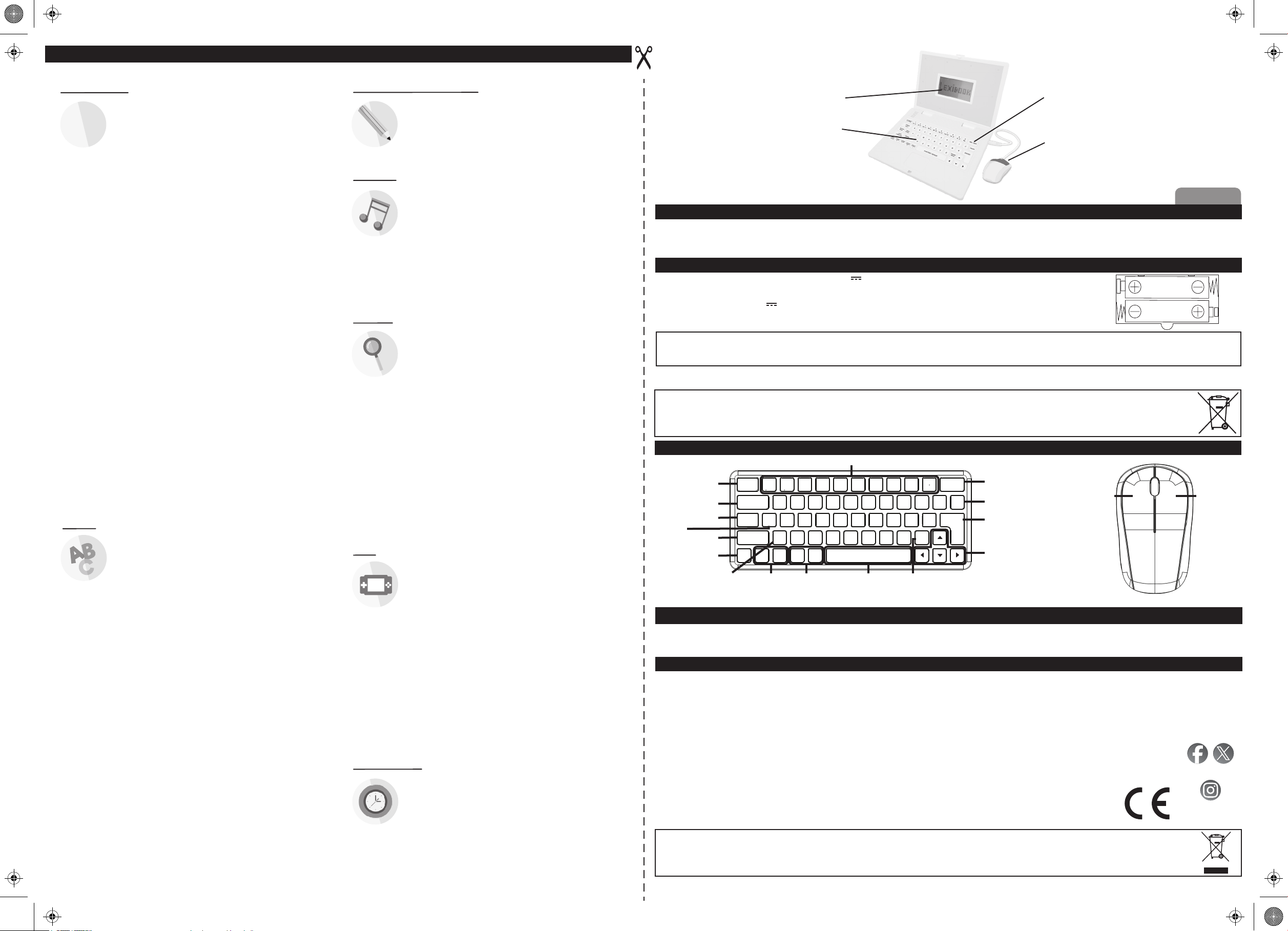
OPIS KLAWISZY FUNKCYJNYCH
KLAWISZE LICZB / NUTY MUZYCZNE
ON/OFF - Klawisz zasilania.
AKTYWNOŚCI -
Powrót do interfejsu wyboru gry.
POMOC - Zobacz
poprawną odpowiedź na
bieżące pytanie.
MUZYKA - Klawisz
skrótu
UWAGI
JĘZYK - Przełączanie:
angielski/polski
ZEGAR - Klawisz skrótu
POZIOM - Przełączanie
na inny poziom trudności testu.
1 2 3 4 5 6 7 8 9 0
AKTYWNOŚCI
ACTIVITIES
MUZYKA
ZEGAR
CLOCK
La
POMOC
HELP
UWAGI
NOTES
MUSIC
JĘZYK
LANGUAGE
GŁOŚNOŚĆ
VOLUME
GŁOŚNOŚĆ -
Klawisze regulacji
głośności.
Ą
Si
Do Ę Re Ł Mi Ń Fa Ó Sol Ś La Ż Si ŹĆ
A B C D E F G H I J
K L M N O P Q R S
POZIOM
T U V W X Y Z
LEVEL
GŁOŚNOŚĆ
KONTRAST
VOLUME
KONTRAST
CONTRAST
CONTRAST
+ -+ -
KONTRAST -
Klawisze regulacji
kontrastu LCD.
POWTÓRZ / REPEAT
Tego klawisza należy używać,
aby powtórzyć wymowę lub
pytanie.
ON / OFF
Do
DELETE
ENTER
PISANIE
WRITE
PISANIEPOWTÓRZ -
Uwaga: W przypadku nieużywania
klawiszy przez 3 minuty laptop wyłączy
się automatycznie.
DELETE - Tego klawisza należy
używać do kasowania wprowadzonych
znaków.
ENTER - Klawisz potwierdzający.
KLAWISZE KIERUNKOWE
ENTER
DELETE
UTRZYMANIE
Zabawkę należy chronić przed wilgocią. Jeśli zamoczy się, należy ją natychmiast wytrzeć. Chronić przed bezpośrednim nasłonecznieniem i wszelkimi źródłami ciepła. Nie pozwalać, aby
spadła. Nie próbować jej rozmontowywać. Do czyszczenia należy używać lekko wilgotnej szmatki, unikać używania jakichkolwiek produktów zawierających detergenty. W przypadku
niewłaściwego działania, najpierw należy spróbować wymienić baterie. Jeżeli problem będzie się powtarzał, należy uważnie ponownie przeczytać instrukcję, aby sprawdzić, czy nie został
pominięty jakiś krok.
GWARANCJA
Produkt jest objęty 2-letnią gwarancją. W przypadku jakichkolwiek roszczeń w trakcie trwania gwarancji lub posprzedażowych należy skontaktować się ze sprzedawcą i
przedstawić ważny dowód zakupu. Nasza gwarancja obejmuje wszelkie wady materiałowe oraz fabryczne, za wyjątkiem szkód powstałych na skutek nieprzestrzegania
instrukcji obsługi lub nieostrożnych działań na urządzeniu (np. demontaż, narażenie na wysokie temperatury lub wilgotność, itp.).
Zaleca się zachowania opakowania na przyszłość. W trosce o polepszenie naszych usług możemy wprowadzić zmiany w kolorach lub szczegółach produktu na opakowaniu.
Uwaga: Należy zachować niniejszą instrukcję obsługi, gdyż zawiera ważne informacje.
OSTRZEŻENIE! Nie nadaje się dla dzieci w wieku poniżej 3 lat. Ryzyko zadławienia – Małe części.
Oznaczenie produktu: JC598i17series
Zaprojektowano i opracowano w Europie – Wyprodukowano w Chinach
© Lexibook®
W kwestiach dotyczących obsługi posprzedażnej prosimy o kontakt na adres
www.lexibook.com
Lexibook S.A.
6 avenue des Andes
Bâtiment 11
91940 Les Ulis
Francja
Suivez-nous / Follow us
@LexibookCom
lexibook_en
www.lexibook.com
©Lexibook®
Ochrona środowiska:
Zbędny sprzęt elektryczny można utylizować, natomiast nie wolno go wyrzucać razem ze zwykłymi odpadami gospodarstwa domowego! Prosimy o aktywne wspieranie
ochrony zasobów i pomoc w ochronie środowiska – w tym celu prosimy oddać urządzenie do punktu zbiórki (jeśli jest to możliwe).ubstancji, mieszanin oraz części składowych.
JC598i17series_IM2224
 Loading...