

Page 1

Personal HEPA Air Purifier
Model No.: LV-H126
Questions or Concerns?
Please contact us Monday - Friday 9:00 am - 5:00 pm PT
at [email protected] or at (888) 726-8520.
Page 2

THANK YOU FOR PURCHASING
THE LVH126 PERSONAL HEPA
AIR PURIFIER BY LEVOIT!
Should you have any questions or concerns regarding your new
product, feel free to reach out to us at [email protected].
We hope you enjoy your new product!
SHARE THE LEVOIT LOVE
Find @LevoitLifestyle on social media for wellness + style
inspiration. We make every space mindful and chic.
@LevoitLifestyle
#LevoitLove • #LevoitLifestyle
2
Page 3
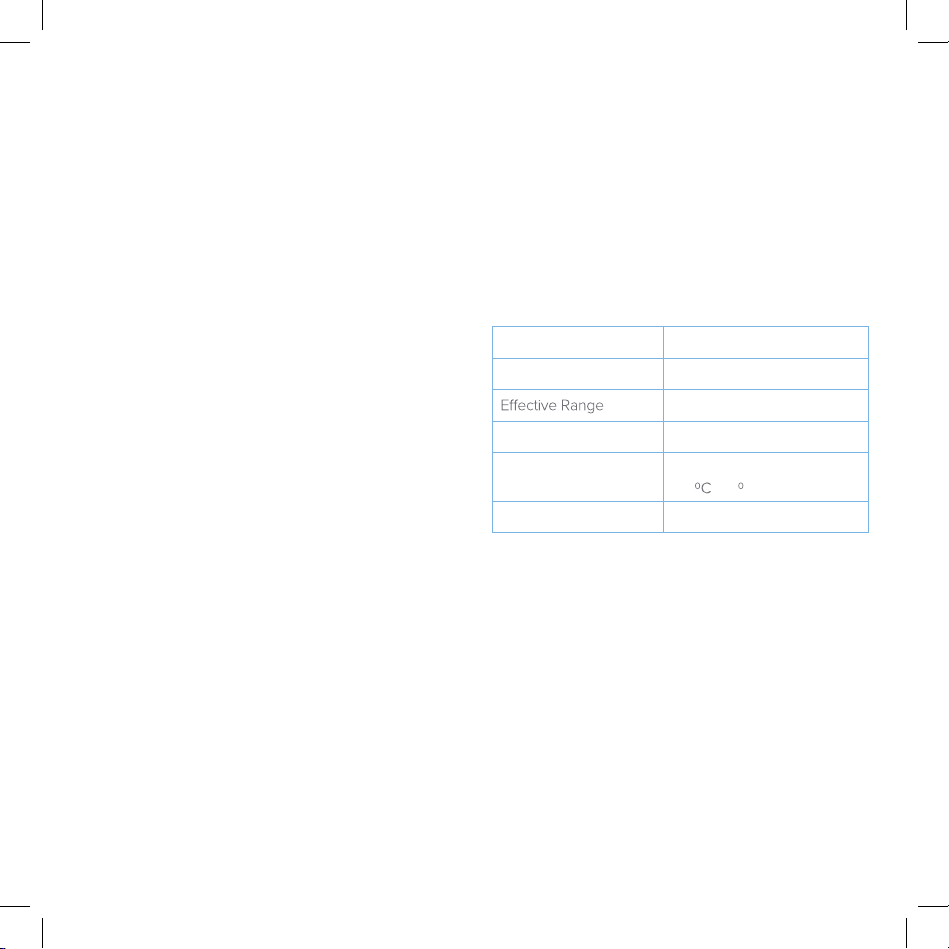
TABLE OF CONTENTS
PACKAGE CONTENTS
Package Contents
Specifications
Safety Information
Getting to Know Your Air Purifier
· Filters
Getting Started
How to Use Your Air Purifier
Keeping Things Clean
· General Cleaning
· When Should I Replace the Filters?
· Purchasing New Filters
· Replacing the Filters
· Filter Reminder Wheel
Troubleshooting
Warranty Information
Customer Support
3
3
4
5
5
6
7
7
7
7
8
8
8
9
11
11
1 x LV-H126 Personal HEPA Air Purifier
1 x Filter Set (Pre-Installed)
2 x Extra Activated Carbon Pre-Filter
1 x User Manual
SPECIFICATIONS
Power Supply AC 120V / 60Hz
Rated Power
Weight 4.8 lb (2.2 kg)
Operating Conditions Temperature: 14°F~104°F
Noise Level ≤ 54dB
35W
161 ft² (15 m²)
~40 C)
(-10
3
Page 4
SAFETY INFORMATION
IMPORTANT
To reduce the risk of fire, electric shock, or injury, always follow the instructions and safety
guidelines in this manual.
General Safety
• Only use your air purifier as described in this manual.
• Do not use your air purifier outdoors.
• Do not use your air purifier near water. Never place your
air purifier in water or liquid.
• Always supervise children when they are near the air
purifier.
• Do not place any object into any opening on the air
purifier.
• Do not use your air purifier if it is damaged or not working
correctly (for example: if the motor fan will not rotate, if
the housing is broken, or if the cord or plug is damaged).
Do not try to repair it yourself. Doing so will void your
warranty. Please contact Customer Support
(page 11) immediately.
Polarized Plug Safety
• Your air purifier has a polarized plug (one blade is wider
than the other), which fits into a polarized outlet only one
way. If the plug does not fit, reverse the plug. If it still does
not fit, do not use the plug in that outlet.
• Do not alter the plug in any way.
Power Cord Safety
• Plug your air purifier into a 120V AC electrical outlet.
• Never place the cord near a source of heat (such as a
heater, stove, or radiator).
• Keep the cord out of areas where people walk often.
Place the cord where it will not be tripped over.
• Do not cover up the cord with a rug, carpet, or other
covering. Do not place the cord under furniture or another
appliance.
• Do not use your air purifier if the cord or plug is damaged.
• Do not use an extension cord unless the air purifier plug
can be fully inserted into the extension cord.
SAVE THESE INSTRUCTIONS
4
Page 5
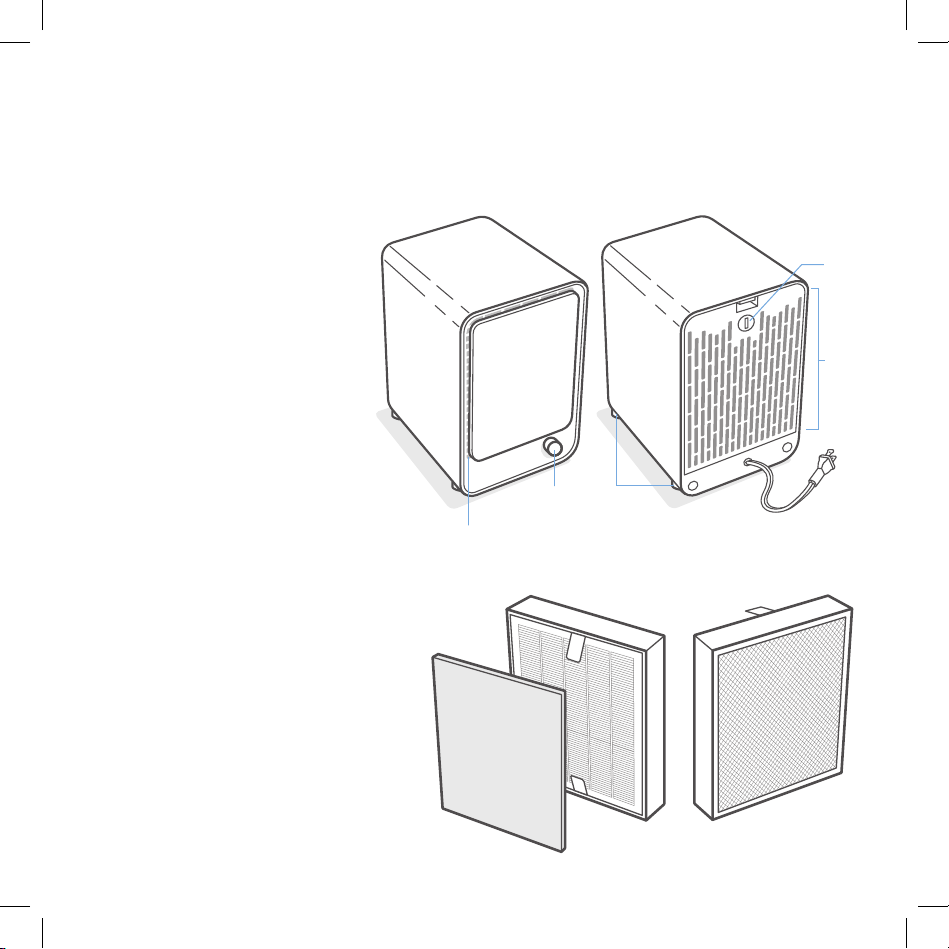
GETTING TO KNOW YOUR AIR PURIFIER
1. Housing
2. Front Cover
3. Air Outlet
4. Control Dial
5. Filter Reminder Wheel
6. Rear Cover / Air Inlet
7. Anti-Skid Pads
8. Power Cord
Filters
Your Levoit Personal HEPA Air Purifier
uses a 3-stage air filtration system.
1. Activated Carbon Pre-Filter
2. Advanced HEPA Filter
3. High-Eciency
Activated Carbon Filter
4. Pull Tabs (for easy removal)
Front
1
2
4
7
3
2
1
Back
5
6
8
4
3
Front
Back
5
Page 6
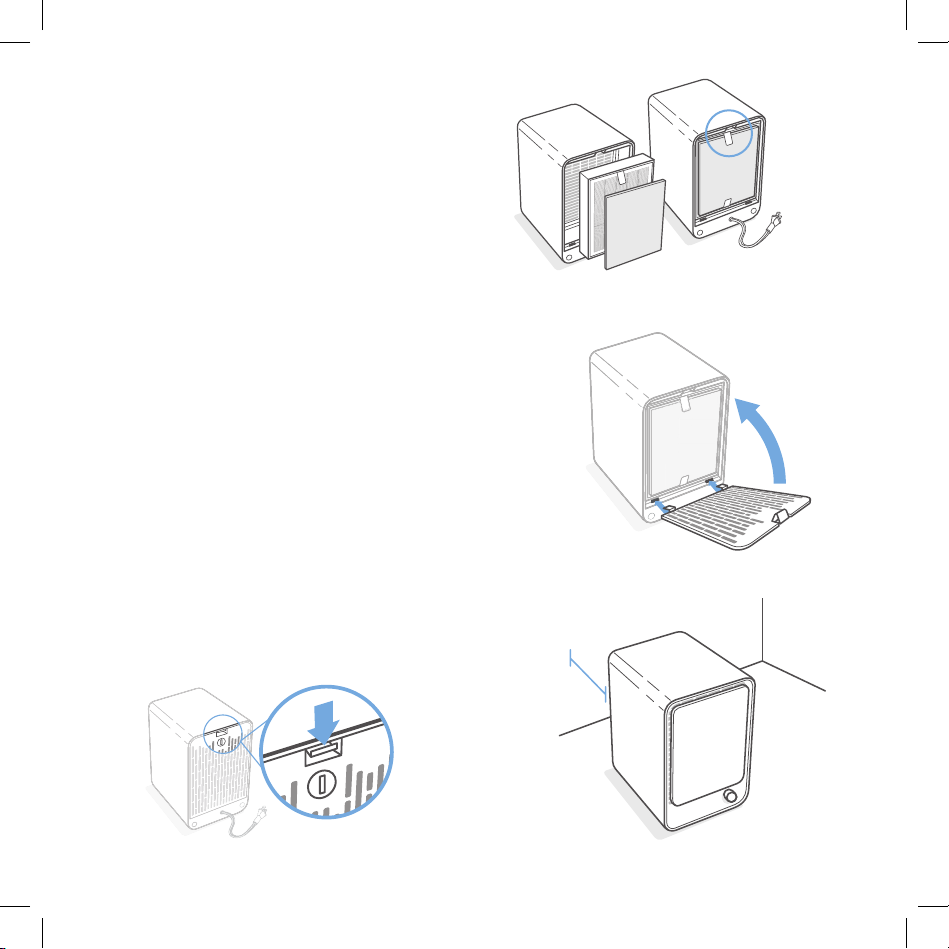
GETTING STARTED
1. Carefully remove your air purifier from the box and
bag.
2. Remove the rear cover by pressing the top tab
down. [Figure 1.1] Then, lift o the rear cover.
3. Take the filters out of the purifier. Remove the
filters from their plastic packaging.
4. Place the black pre-filter on top of the white HEPA
filter. Make sure the white pull tabs are folded over
the pre-filter.
5. Place the filters back into the air purifier. The
pre-filter and pull tabs should be facing out.
[Figure 1.2]
6. Replace the rear cover.
a. Make sure the side with the filter reminder
wheel is facing out.
b. Insert the cover’s feet into the matching
slots in the back of the air purifier.
[Figure 1.3]
c. Press the rear cover into the housing until
the latch clicks.
7. Place your air purifier on a flat, stable surface, such
as a table.
NOTE:
• We recommend allowing 15 inches (38 cm) of clearance
on all sides of the purifier. [Figure 1.4]
• Do not place anything on top of your air purifier.
pull tabs
facing out
Figure 1.2
Figure 1.3
38 cm
Figure 1.1
6
Figure 1.4
Page 7
H O W TO U S E Y O U R
AIR PURIF I E R
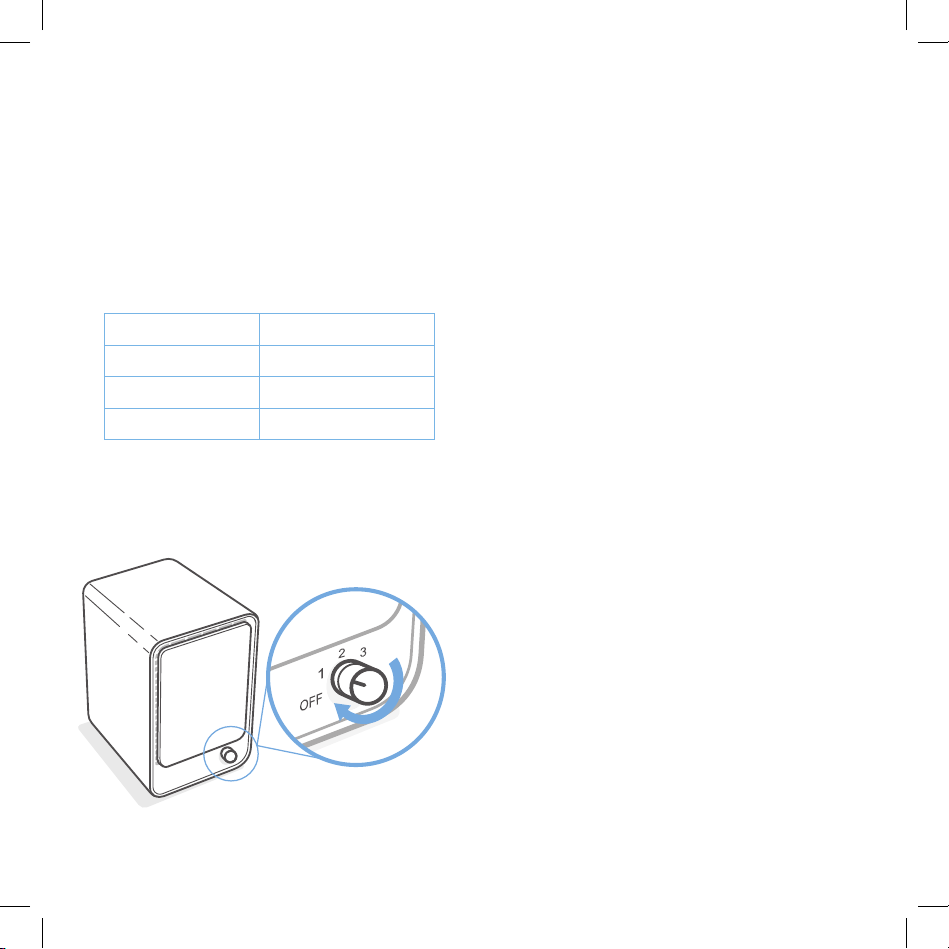
1. Plug the power cord into a powered electrical
outlet.
2. Turn on your air purifier by turning the control dial.
[Figure 2.1]
Turn o your purifier by turning the control dial to
3.
“OFF”.
K EEPING THINGS C L E A N
General Cleaning
Wipe the surface of the air purifier with a clean, dry,
soft cloth.
NOTE: Some cleaning products will damage the air purifier.
Do not use alcohol or harsh cleaners.
Mode
1
2
3
NOTE: Do not use your air purifier with a dimmer switch (or
any other solid-state speed control device). This increases the
risk of fire and electric shock.
Figure 2.1
Speed
Low
Medium
High
When Should I Replace the Filters?
Activated Carbon Filter
The activated carbon pre-filter should be replaced
about every 2-3 months. Your air purifier comes with 2
extra pre-filter.
HEPA Filter
The HEPA filter (the main filter) should be replaced
every 6-8 months.
You may need to change your filters sooner or later
depending on how often you use your air purifier.
Using your air purifier in an environment with relatively
high pollution may mean you will need to change the
filters more often.
Watch out for the signs of expired filters:
• Increased noise when the air purifier is on.
• Decreased airflow.
• Unusual odors coming from the air purifier.
• Clogged filters. If the white HEPA filter has turned
gray, then the filters should be replaced.
NOTE: Do not wash and reuse filters. The filters cannot be
cleaned, only replaced.
7
Page 8
KEEPING THINGS CL EAN ( co nt .)
Filter Reminder WheelPurchasing New Filters
To maintain your health and
product performance, please only
filters. You can purchase new
air filters from Amazon.com by
searching for “ B07DVTR1H7 ”.
You can also scan the QR code.
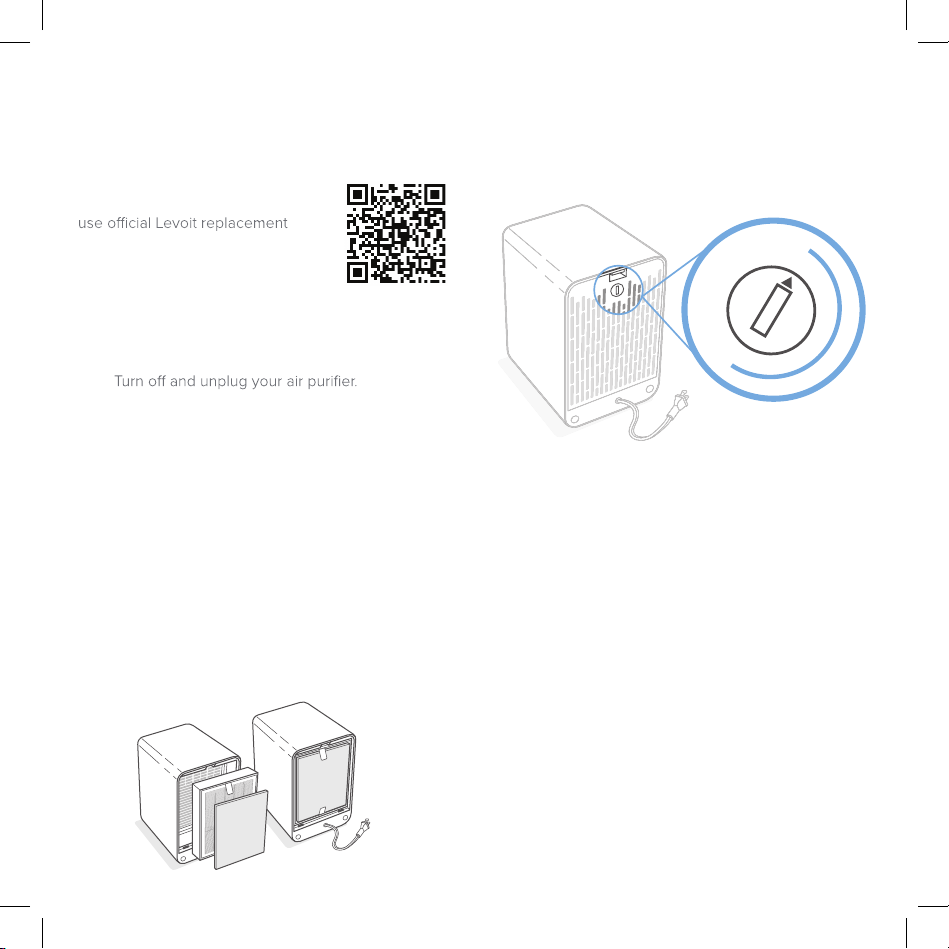
Replacing the Filters
1.
2. Remove the rear cover (see Getting Started,
page 6).
3. Use the white pull tabs to take the old filters out
of the purifier.
4. (Optional) Clean out any dust or hair inside the
purifier using a vacuum hose (or a handheld
vacuum). Do not use water or other liquids to
clean the purifier.
5. Remove the new filters from their packaging and
place them into the purifier, with the pull tabs
facing out. The pre-filter and pull tabs should be
facing out. [Figure 3.1]
6. Replace the rear cover.
7. (Optional) Use the filter reminder wheel to track
your filter change.
Figure 3.1
8
12
11
1
10
8
7
2
39
4
5
6
6 month
reminder
You can use the filter reminder wheel to track when
you need to change your filters. Use a tool (such as
a small screwdriver) to turn the wheel. The wheel is
marked with the numbers 1-12.
2 Ways to Use the Filter Reminder Wheel:
• Method 1:
When you start using the air purifier, turn the
wheel to the number of the current month
(January is “1”, December is “12”), so you can track
how long the filter is used.
• Method 2:
When you start using the air purifier, turn the
wheel 6 months ahead as a reminder. Example: If
you replace the filters in February (the 2nd month
on the calendar), you can turn the wheel to “8” to
remind you to replace your filters again in August
(the 8th month).
Page 9

TROUBLESHOOTING
Problem Possible Solution
Air purifier does not turn on, or shuts o
unexpectedly.
Airflow is reduced significantly. Make sure the filters are removed from their packaging.
Air purifier makes an unusual noise while
turned on.
Make sure the purifier is plugged into a powered electrical outlet.
Make sure the power outlet is working. Try plugging the cord into
another outlet.
Unplug the power cord, and check the cord to see if it is damaged.
If you find damage, immediately stop using the purifier and contact
Customer Support (page 11).
If the problem continues, stop using the purifier and contact
Customer Support (page 11).
The fan speed may be too low. Turn the control dial to the 2 or 3
setting.
The filters may be dirty. Check to see if the filters need to be
replaced (see When Should I Replace the Filters?, page 7).
Make sure there is at least 15 inches (38 cm) of clearance on all sides
of the purifier.
If the airflow is still too low, contact Customer Support (page 11).
Make sure the filters are properly in place (see Getting Started,
page 6).
The purifier may be defective or damaged. Immediately stop using
the air purifier and contact Customer Support (page 11).
DO NOT try to open the purifier housing.
9
Page 10
TROUBLESHOOTING (cont.)
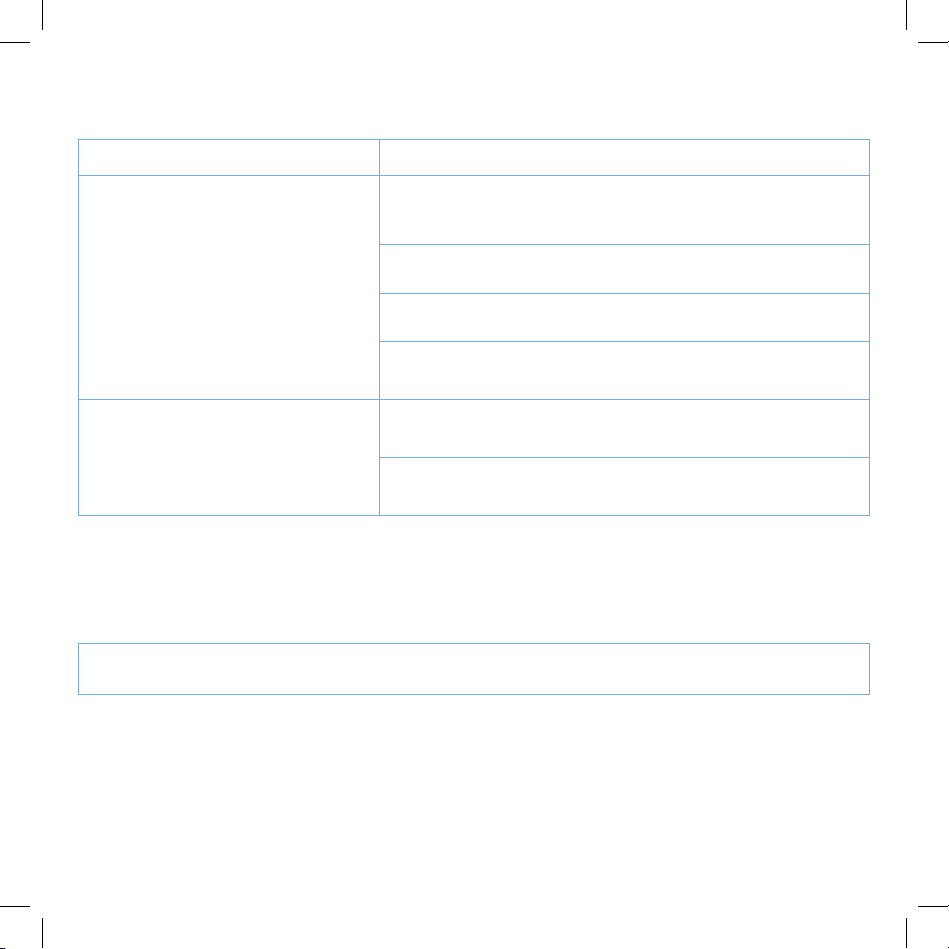
Problem Possible Solution
Poor air purification quality. Make sure no objects are blocking the purifier’s inlet or outlet (front
and back screens). Make sure there is at least 15 inches (38 cm) of
clearance on all sides of the purifier.
The room may be too large for the purifier. Make sure the room is
smaller than 161 ft² (15 m²).
The filters may be dirty. Check to see if the filters need to be
replaced (see When Should I Replace the Filters?, page 7).
If air purification quality is still too low, contact Customer Support
(page 11).
An unpleasant smell is coming from the
air purifier.
If your problem is not listed, please contact Customer Support (page 11).
10
The filters may be dirty. Check to see if the filters need to be
replaced (see When Should I Replace the Filters?, page 7).
If the problem continues, contact Customer Support (page 11).
Page 11
WARRANTY INFORMATION
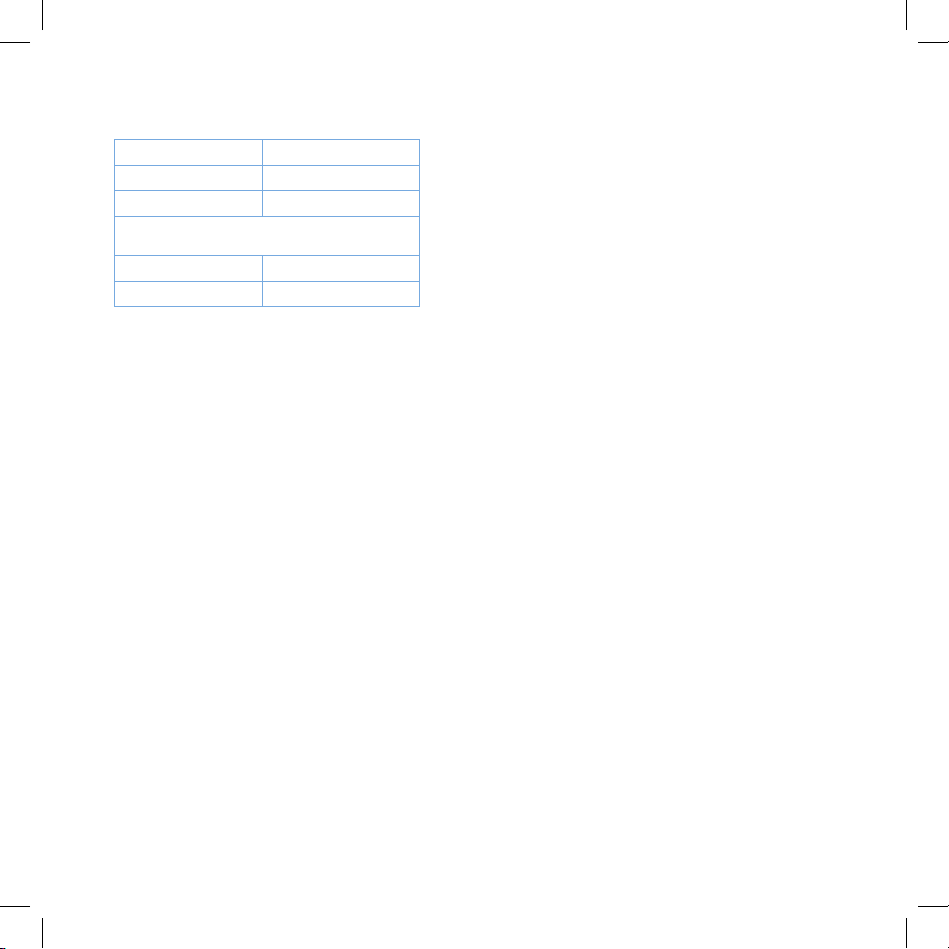
Product Name Personal HEPA Air Purifier
Model Number LV-H126
Default Warranty Period 1 year
For your own reference, we strongly recommend that
you record your order number and date of purchase.
Date of Purchase
Order Number
TERMS & POLICY
Levoit warrants all products to be of the highest quality in
material, craftsmanship, and service, eective from the date of
purchase to the end of the warranty period.
Levoit will replace any product found to be defective due to
manufacturer flaws based on eligibility. Refunds are available
within the first 30 days of purchase. Refunds are only available
to the original purchaser of the product. This warranty extends
only to personal use and does not extend to any product that
has been used for commercial, rental, or any other use in which
the product is not intended for. There are no warranties other
than the warranties expressly set forth with each product.
This warranty is non-transferrable. Levoit is not responsible in
any way for any damages, losses, or inconveniences caused
by equipment failure by user negligence, abuse, or use
noncompliant with the user manual or any additional safety, use,
or warnings included in the product packaging and manual.
This warranty does not apply to the following:
• Damage due to abuse, accident, alteration, misuse,
tampering, or vandalism.
• Improper or inadequate maintenance.
• Damage in return transit.
• Unsupervised use by children under 18 years of age.
Levoit and its subsidiaries assume no liability for damage
caused by the use of the product other than for its intended
use or as instructed in the user manual. Some states do not
allow this exclusion or limitation of incidental or consequential
losses so the foregoing disclaimer may not apply to you. This
warranty gives you specific legal rights and you may also have
other rights which may vary from state to state.
ALL EXPRESSED AND IMPLIED WARRANTIES, INCLUDING
THE WARRANTY OF MERCHANTABILITY, ARE LIMITED TO
THE PERIOD OF THE LIMITED WARRANTY.
Additional 1-Year Warranty
You can extend your 1-year warranty by an additional year. Log
onto
www.levoit.com/warranty
(for example, from Amazon or Houzz) within the first 14 days
of your purchase to register your new product for the extended
warranty.
If you are unable to provide the order number for your
product, please type a short note in the order number field
along with the date you received your product.
Defective Products & Returns
Should your product prove defective within the specified
warranty period, please contact Customer Support via
[email protected] with your order number. DO NOT
dispose of your product before contacting us. Once our
Customer Support Team has approved your request, please
return the unit with a copy of the invoice and your order number.
and enter your order number
CUSTOMER SUPPORT
Should you encounter any issues or have any questions
regarding your new product, feel free to contact our helpful
Customer Support Team. Your satisfaction is our goal!
Customer Support
Arovast Corporation
1202 N. Miller St., Suite A
Anaheim, CA 92806
*Please have your order invoice and order number ready
before contacting Customer Support.
Support Hours
Monday - Friday:
9:00 am - 5:00 pm PT
Email: [email protected]
Toll-Free: (888) 726-8520
11
Page 12
12
Levoit.com
Connect with us @LevoitLifestyle
 Loading...