

Page 1

Desktop USB Fan & Nightlight
Questions or Concerns?
Please contact us Mon-Fri 9:00AM-6:00PM PST
at (888) 726-8520 or email [email protected]
Model: LV130UF-I
Page 2

Thank you for purchasing the Desktop USB Fan & Nightlight by Levoit.
Keep yourself cool and illuminate your spaces with this multifunctional
desktop fan. This versatile fan can either be powered by a standard
AC outlet or USB outlet, so you can plug it into your laptop and enjoy a
nice breeze wherever you go. A built-in LED lamp featuring adjustable
dimmer levels makes this a perfect nightlight. Convenient, user-friendly,
and multifunctional, the Levoit LV130UF-I is the ideal cooling and
lighting solution for your bedroom, living room or traveling.
Page 3
Safety Information
IMPORTANT: Please read, understand, and comply with all of the
instructions provided in this manual before using the device. Failure
to comply with the instructions given in this manual and/or using the
device in ways other than the ones mentioned in this manual may result
in serious injury and/or damage to the product.
Safety Use & Care
• Extra caution is necessary when any fan is used near children, pets
and people with disabilities. To reduce the risk of personal injury
and electric shock, keep the fan out of reach of children, pets and
disabled people.
• DO NOT pull on the power cord to disconnect the fan from an
electrical outlet; pull directly on the plug.
• Unplug the power cord when not in use, during transit, or prior to
cleaning.
• DO NOT use this product with any solid-state speed control device.
• DO NOT immerse the fan, power cord or plug in water or other
liquids.
• DO NOT place the fan in or near an open window, as precipitation
may enter the product and cause electrical short circuiting.
• DO NOT insert fingers or any other object through the fan grill,
3
Page 4

blades or any other opening in the product.
• Place the fan on a stable and level surface to prevent it from tipping
or being knocked over.
• DO NOT operate the fan directly adjacent to curtains, plants, window
covers, etc. to avoid accidental entanglement or fire hazard.
• DO NOT cover the fan with clothing, paper goods or other flammable
material during operation. Allow 12 inches of clearance around the
fan during operation to avoid obstructing the intake or exhaust.
• Keep the cord away from areas with heavy foot trac. To avoid fire
hazard, NEVER place the cord under rugs, radiators or stoves.
• DO NOT remove, repair or tamper with the factory supplied plug.
• If using an extension cord with this fan, ensure that the extension is
compatible with the fan plug.
• DO NOT operate the fan if it has a damaged power cord or plug,
exposed wires, or if it has been dropped, damaged, immersed in
water or shows visible and/or audible signs of malfunction. This
product doesn’t have any user-serviceable parts. Do not attempt to
examine or repair this product yourself as this will void your warranty.
• Connect the power plug to an easily accessible outlet so the fan can
be unplugged immediately in the event of an emergency.
• Make sure your hands are dry when connecting or disconnecting the
AC adapter to the wall outlet.
• Keep fan away from heated surfaces or open flames.
• DO NOT operate in a room where flammable or explosive fumes are
present.
• This fan is designed for household use only, not for industrial or
4
Page 5

commercial applications.
• When the fan is not in use, store it in a cool, dry area away from direct
sunlight, humidity or high temperature areas.
5
Page 6
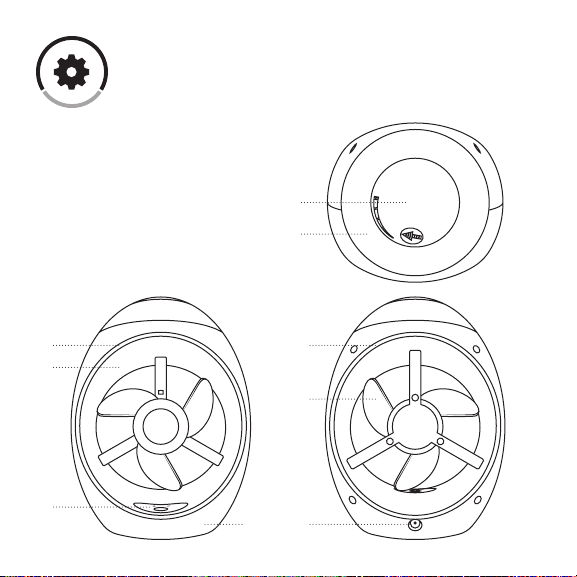
Main Functions
1. Dimmer control switch
2. Nightlight
3. Fan housing
4. Intake vent
5. Exhaust vent
6. Fan blades
7. Power/Speed Select
8. USB inlet
9. Fan base
5 4
3
1
2
6
7
6
89
Page 7
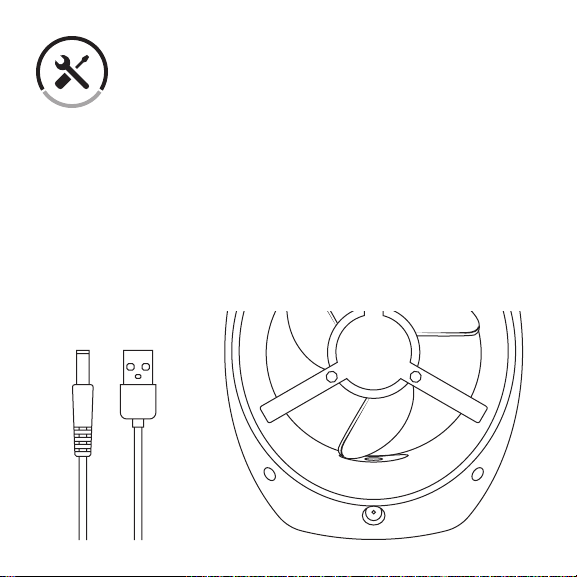
Set-Up
1. Completely uncoil the USB power cord and connect the power cable
to the fan’s power input, located on the backside of the fan.
2. Plug the USB connector into the AC power adapter to plug into a 120
Volt, grounded AC electrical outlet or plug the USB connector into a
standard powered USB outlet.
NOTE: Ensure that the plug fits tightly into the electrical outlet. A loose
fit can cause overheating and damage to the plug.
7
Page 8
Operation
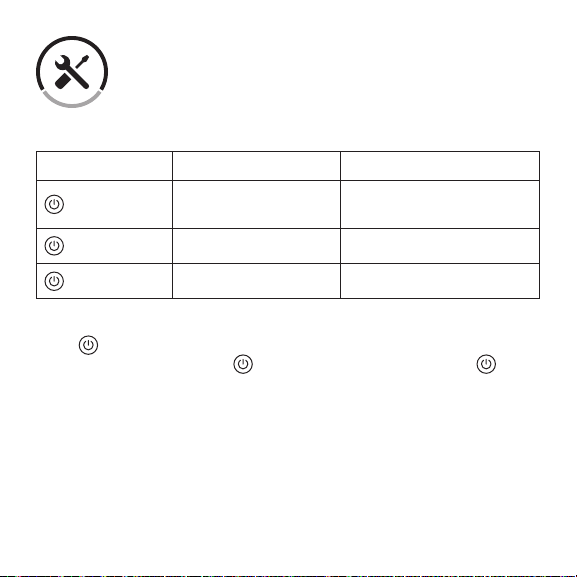
Desktop Fan
Action Function Power Button Indication
x 1
x 2
x 3
Press once to turn the fan on to its lowest speed setting. If you’d like
to increase its airflow, press again. To turn o the fan, press once
more.
8
Turn fan on . Low
speed
High speed ‘+’ illuminates green
Turn fan o No light
‘-’ illuminates green
Page 9
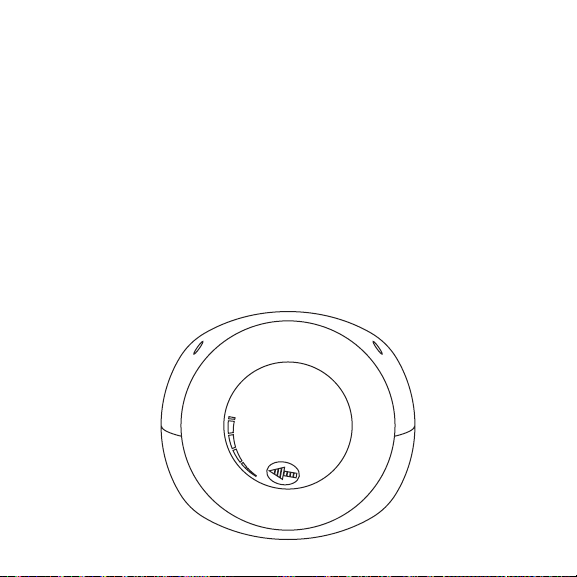
Adjustable LED Nightlight
NOTE: The desktop fan function does not have to be turned on to use
the adjustable nightlight feature.
To use the fan’s built-in adjustable nightlight, rotate the dimmer control
switch clockwise until it clicks on. To increase its brightness, gradually
rotate the dimmer control switch clockwise to desired level.
To decrease the brightness, gradually rotate the dimmer control switch
counter-clockwise to desired level. To turn o the nightlight, simply
rotate the dimmer control switch counter-clockwise until it clicks o.
9
Page 10
Care & Maintenance
Clean regularly to extend product lifespan. Make sure that the
button is in the ‘OFF’ position and is completely unplugged from any
power supply before cleaning.
WARNING: Do not expose any electrical parts or switches to water,
cleaning liquids or other chemicals, as fire, electrical shock, personal
injury and property damage can occur.
CAUTION: Do not use gasoline, benzene, or thinner to clean your fan,
as these chemicals can cause surface damage.
1. Use a vacuum cleaner with a crevice tool to remove dust from the
interior of your fan.
2. Use a clean, soft and lightly damp cloth to gently wipe the surface of
the enclosure.
3. Wipe the enclosure completely dry prior to operating the fan.
10
Page 11
Specifications
Fan Speed Settings: Low / High / O
Fan Speed RPMs: Low- 1750 RPM; High- 2050 RPM
Speed Indication Light: Green LED
LED Nightlight Control: Adjustable dimmer switch
Max Power: 3W
Operation Voltage: DC 5V
Adapter Input Voltage: AC 100-240V 50/60Hz
Material: ABS (body); EVA (blades)
Dimensions: 160 x 127 x 208mm
Package Contents
1 x Desktop USB Fan & Nightlight
1 x AC Power Adapter
1 x USB Power Cord
1 x User Manual
11
Page 12

Customer Support
Should you encounter any issues or have any questions regarding your
new product, feel free to contact our helpful Customer Support Team.
We’re here for you.
Levoit Corporation
1202 N Miller Street, Suite A
Anaheim, CA 92806
Support Hours
Monday - Friday: 9:00am - 6:00pm PST
*Please have your order number ready before contacting customer
support.
12
Page 13

Warranty Information
Terms & Policy
Levoit warrants all products to be of the highest quality in material,
craftsmanship and service for a minimum of 1 year, eective from
the date of purchase. Warranty lengths may vary between product
categories. For specific warranty terms, please refer to your product
listing page or product operation manual.
Under the limited warranty, Levoit will replace or refund any products
found to be defective due to manufacturer flaws. If eligible, this warranty
extends only to personal use and does not extend to any product that
has been used for commercial use, rental use, or any other use in which
the product is not intended for. There are no warranties other than that
expressly set forth with each product.
This warranty is non-transferrable. Levoit is not responsible in any way
for any damages, losses or inconveniences caused by equipment failure
or by user negligence, abuse, or use noncompliant with the user manual
or any additional safety, use, or warnings included in the product
packaging and manual.
Levoit and its subsidiaries assume no liability for damage caused by the
13
Page 14

use of the product other than for its intended use or as instructed above
and within the user manual. Some states do not allow this exclusion
or limitation of incidental or consequential losses so the foregoing
disclaimer may not apply to you. This warranty gives you specific legal
rights and you may also have other rights which may vary from state to
state.
Should your product prove defective within the specified warranty
period, simply return the defective part or unit in its original packaging
with the following:
• An original copy of invoice
• Order confirmation number
ALL EXPRESS AND IMPLIED WARRANTIES, INCLUDING THE
WARRANTY OF MERCHANTABILITY, ARE LIMITED TO THE PERIOD OF
THE LIMITED WARRANTY.
Exceptions & Exclusions
• Damage due to abuse, accident, alteration, misuse, tampering or
vandalism.
• Improper or inadequate maintenance.
• Damage in return transit.
• Unsupervised use by children under 18 years of age.
14
Page 15

Date of Purchase: ____________________
Place of Purchase: ____________________
Order Number: ____________________
To register your warranty or to make a claim, please contact our helpful
customer support team at (888) 726-8520 or email [email protected]
*Please have your order number ready before contacting customer
support.
15
Page 16

www.levoit.com
 Loading...