

Page 1
Questions or Concerns?
at (888)726-8520 or email [email protected]
Please contact us Mon-Fri 9:00AM-6:00PM PST
Page 2

Page 3

Thank You.
Thank you for purchasing the Ultrasonic Aroma Diuser by Levoit.
Relax and remove daily stress with the therapeutic diusion of scented oils.
Equipped with several light color options, the ultrasonic diuser brings a
soothing accent to any room. Easy to clean and easy to use, this diuser
will put you in the perfect state of mind to relax, revive, and rejuvenate.
Page 4

Table of Contents
Safety Information
Main Functions
Set-Up
Operation
Care & Maintenance
Troubleshooting
Specifications
Customer Support
Warranty Information
3
5
6
8
9
10
11
12
13
Page 5

Safety Information
IMPORTANT: Please read, understand, and comply with all of the instructions provided in this
manual before using the device. Failure to comply with the instructions given in this manual
and/or using the device in ways other than the ones mentioned in this manual may result in
serious injury and/or damage to the product.
• Mist eect and aroma coverage may vary depending on room temperature, water quality
and amount of oil added.
• This device is designed for gentle aroma diusion. This device is not meant to be
compared to medical humidifiers.
• DO NOT remove the tank lid or refill the diuser while using the mist function.
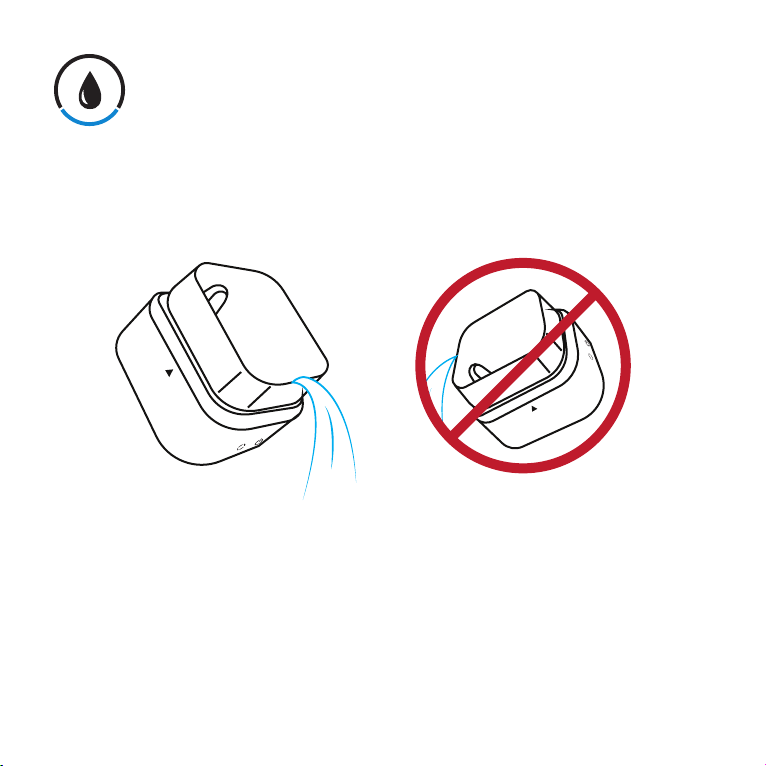
• DO NOT lean or tilt the diuser if there is any remaining liquid inside.
• Keep out of reach of children.
• DO NOT cover the unit or block the mist outlet or air inlet.
• DO NOT expose to extreme temperatures, vibration or shock.
• Keep the diuser away from dust, dirt, and moisture.
• DO NOT soak the diuser in water or operate in a humid or moist environment.
• DO NOT place the diuser on an unstable surface or move during operation.
• DO NOT disassemble, alter or attempt to repair the inner components of the diuser. Doing
so will void any warranty.
• DO NOT twist, puncture or stretch the power cord or place under hot items or heavy
pressure that may bend or damage the cord.
• DO NOT use the diuser if the power lead has been damaged or the socket is loose.
• DO NOT keep the diuser power connected during maintenance or while adding water.
• DO NOT use the diuser when there is an abnormal odor or noise coming from the unit or
if the unit is overheating abnormally.
• Make sure your hands are dry when connecting or disconnecting the AC adapter to the
wall outlet.
Continued on page 4
3
Page 6

• Plugging in the diuser does not turn on the device. To turn on, press the mist button while
the diuser is properly plugged into a power outlet.
• DO NOT use medical thinner benzene-ethanol, chlorine, acidic or enzyme-based
detergents to clean the diuser; doing so may damage the diuser. Only use mild, diluted
detergent.
• If the diuser is not in use for an extended period of time, drain and clean out the remaining
water and store the diuser in a cool and dry environment.
• DO NOT pick up the diuser from the tank lid. Always hold the diuser by the tank body.
4
Page 7
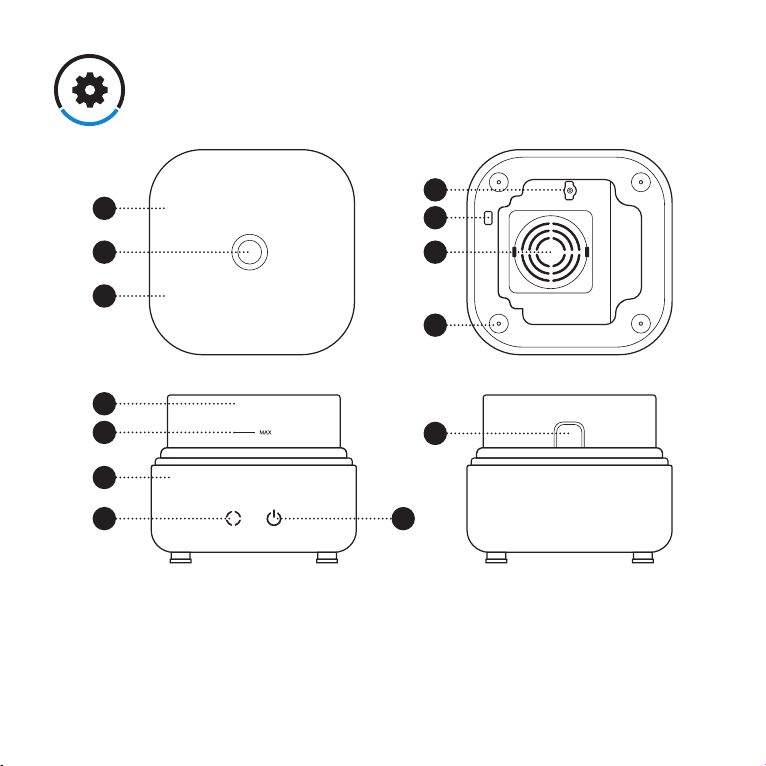
Main Functions
Top
1
2 10
7
Front
5
4
3
8 9
1. Tank Cover
2. Mist Outlet
3. Main Body
4. Max Water Level
5. Water Tank
6. Air Outlet
7. Color Display Area
Bottom
11
13
12
Back
6
8. Color Display Touch Control
9. Mist Touch Control / Power
10. Air Vent
11. DC Socket
12. Antiskid Padding
13. Cord Clamp
5
Page 8
Set-Up
NOTE: Do not add water while the diuser is on. For best results, please use 100% pure hydrosoluble
essential oil. To avoid damaging the diuser, do not use water-insoluble oils.
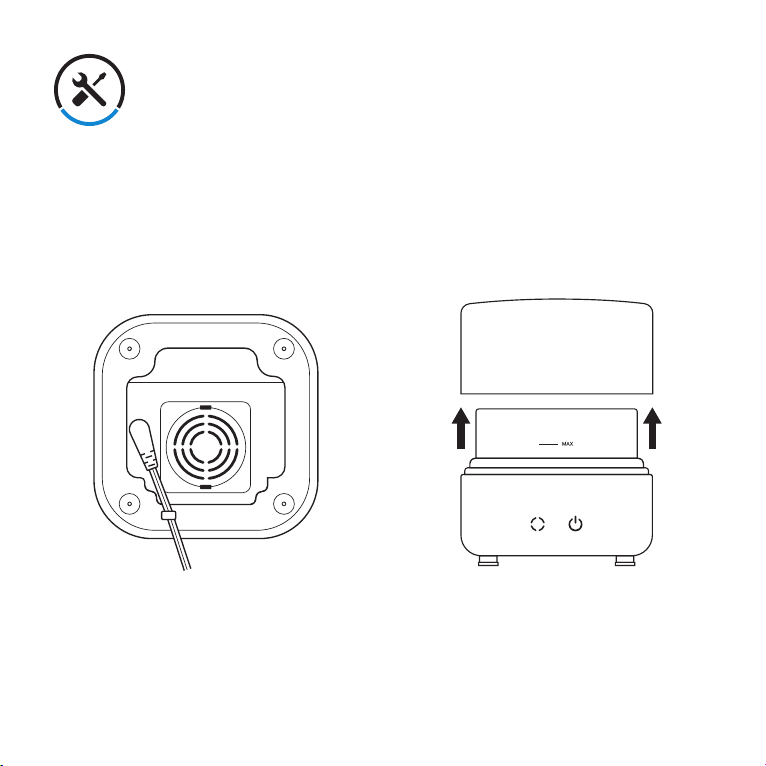
1. Connect the power cord into the DC
socket of the diuser. Run the cord
through the cord clamp for level
placement.
2. Place the diuser on a flat, level surface
and remove the tank cover.
6
Page 9
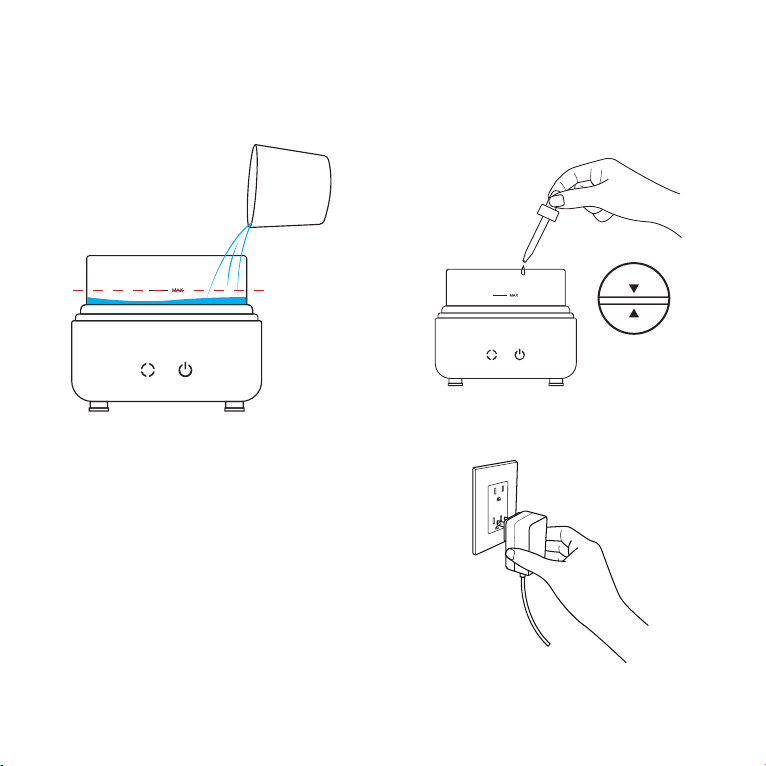
3. Carefully pour water into the tank,
making sure not to exceed the marked
maximum capacity (120 ml).
NOTE: Do not use water exceeding 105.8°F.
4. Add 1 - 3 drops of essential oil to the
water and place the lid back onto the
tank, making sure to align the marked
arrows on the cover and the diuser.
5. Plug the diuser into a powered outlet.
NOTE: Do not pick up the diuser from the tank lid. Always hold the diuser by the tank body.
7
Page 10

Operation
Mist Diuser
Press the button to turn on the mist function of the diuser. The diuser will beep once
to indicate activation. Press the button once more to turn o the mist function, and the
diuser will beep once to indicate it has powered o.
NOTE: The diuser will automatically shut o when the water tank runs empty.
Color Light
Press the button to turn on the diuser colored light. The diuser will activate with color
cycle mode (all colors). If you wish to select any one of the transition colors, press once
more to pause the color cycle at any point. Continue to press the color display touch control
to cycle through the light colors in the following order: purple, blue, cyan, green, yellow,
orange, red, o.
8
Page 11
Care & Maintenance
Clean after every 5 - 6 uses. Make sure the diuser is completely unplugged from any power
supply when cleaning.
NOTE: To avoid damaging internal components when pouring water out of the diuser tank, pour away
from the air outlet.
1. Clean the water tank with a soft cloth.
2. Rinse and dry out the water tank of the diuser.
3. Use a cotton swab to clean the air outlet located in the center of the diuser tank.
4. Fill the tank with 100 ml of water and allow the diuser to operate for 30 minutes without
any essential oil added.
5. Unplug the power cord and pour out the excess water and dry the water tank with a clean
cloth.
6. Keep the water tank empty and dry if left unused for an extended period of time.
9
Page 12
Troubleshooting
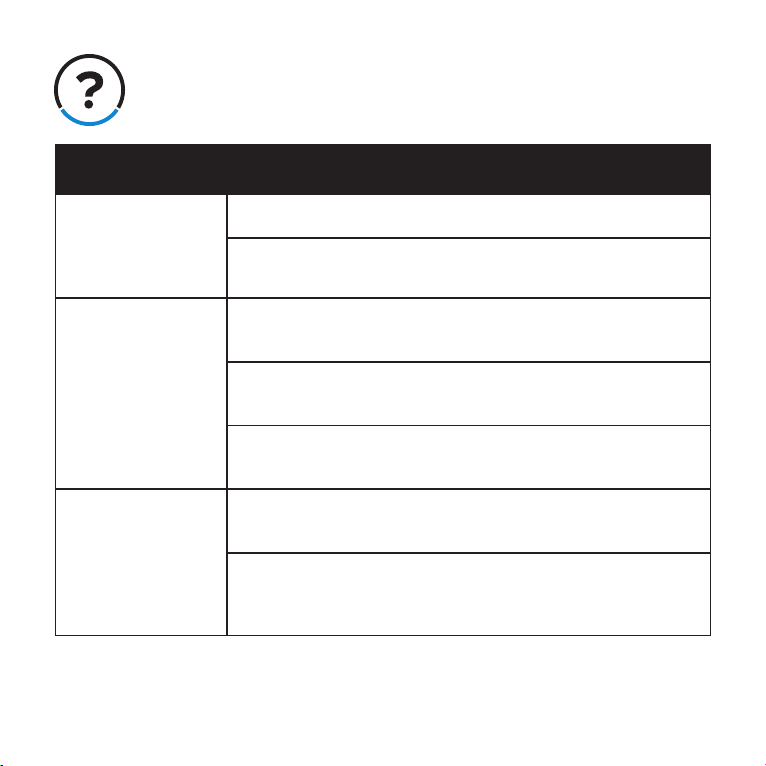
Symptom Solution
The diuser does
not turn on.
The diuser won’t
mist.
The mist is weaker
than usual.
Check if the DC plug is securely plugged into the DC jack.
Check if the AC plug of AC / DC adapter is securely connected
to the power outlet.
Check if the water level in the water tank is too low or higher
than the max capacity.
Check to see if the mist outlet is clogged. Tap the outlet gently if
water is blocking mist flow.
Use a cotton swab to clean the ultrasonic diuser located in the
center of the diuser tank.
If the scent is too faint, add more drops of essential oil to preference. Do not exceed 10 drops.
Make sure the oil you’re using is water-soluble, if not please
change it immediately. The long-term use of oil soluble essential
oil also will damage the device.
10
Page 13

Specifications
Color Modes: Color Cycle / Custom Color / Purple / Blue / Cyan / Green / Yellow /
Orange / Red / O
Input: AC 100 ~ 240V 50/60 Hz
Output: DC 24V 0.5A
Mist Capacity: 27 ml / hr
Water Capacity: 120 ml
Touch Key Control: Light / Mist
Light Modes: Cycle colors / One color
LED light: 3 pcs
Make: Wood / Glass / Plastic
Dimensions: 108 x 108 x 104 mm
Package Contents
1 x Ultrasonic Aroma Diuser
1 x AC Power Cable
1 x Water Cup
1 x User Manual
11
Page 14

Customer Support
Should you encounter any issues or have any questions regarding your new product, feel free to
contact our helpful Customer Support Team.
We’re here for you.
Levoit Corporation
1202 N Miller Street, Suite A
Anaheim, CA 92806
Support Hours
Monday - Friday: 9:00am - 6:00pm PST
*Please have your order number ready before contacting customer support.
12
Page 15

Warranty
Information
Terms and Policy
Levoit warrants all products to be of the
highest quality in material, craftsmanship and
service for a minimum of 1 year, eective from
the date of purchase. Warranty lengths may
vary between product categories. For specific
warranty terms, please refer to your product
listing page or product operation manual.
Under the limited warranty, Levoit will replace
or refund products found to be defective
due to manufacturer flaws. This warranty
extends only to personal use and does not
extend to any product that has been used for
commercial use, rental use, or any other use
in which the product is not intended for. There
are no warranties other than that expressly
set forth with each product.
This warranty is non-transferrable. Levoit
is not responsible in any way for any
damages, losses or inconveniences caused
by equipment failure or by user negligence,
abuse, or use noncompliant with the user
manual or any additional safety, use, or
warnings included in the product packaging
and manual.
product other than for its intended use or
as instructed above and in the user manual.
Some states do not allow this exclusion or
limitation of incidental or consequential losses
so the foregoing disclaimer may not apply to
you. This warranty gives you specific legal
rights and you may also have other rights
which may vary from state to state.
Should your product prove defective within
the specified warranty period, simply return
the defective part or unit in its original
packaging with the following:
• An original copy of invoice
• Order confirmation
ALL EXPRESS AND IMPLIED WARRANTIES,
INCLUDING THE WARRANTY OF
MERCHANTABILITY, ARE LIMITED TO THE
PERIOD OF THE LIMITED WARRANTY.
Exceptions & Exclusions
• Damage due to abuse, accident, alteration,
misuse, tampering or vandalism.
• Improper or inadequate maintenance.
• Damage in return transit.
• Unsupervised use by children under 18
years of age.
Levoit and its subsidiaries assume no
liability for damage caused by the use of the
Continued on page 14
13
Page 16

Date of Purchase:
____________________
Place of Purchase:
____________________
Order Confirmation Number:
____________________
To register your warranty or to make a
claim, please contact our helpful customer
support team at (888) 726-8520 or email
[email protected]
*Please have your order number ready
before contacting customer support.
14
Page 17

Page 18

www.levoit.com
 Loading...