

Page 1
Core™ 200S Series
Models: Core 200S, LAP-C201S-AUSR
USER MANUAL
Smart True HEPA Air Purifier
Questions or Concerns?
Please contact us Mon–Fri, 9:00 am–5:00 pm PST/PDT
at [email protected] or at (888) 726-8520.
Page 2
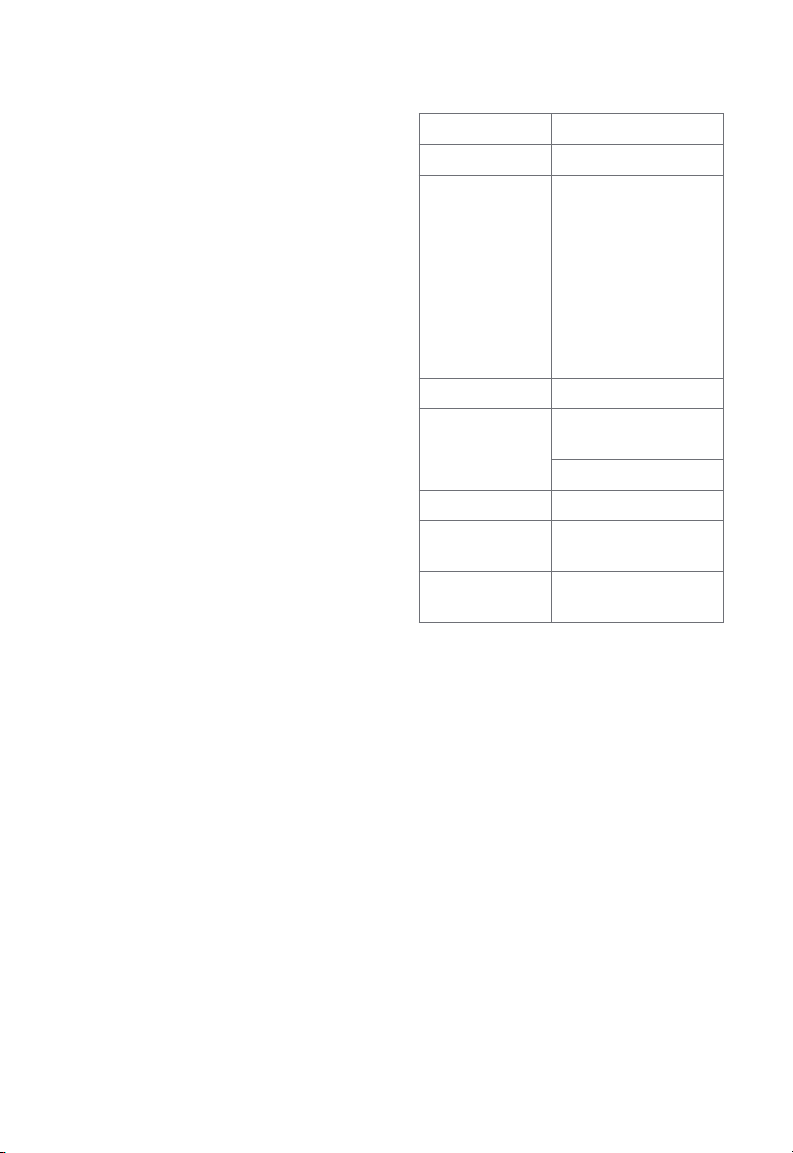
Table of Contents
Specifications
Package Contents
Specifications
Safety Information
Getting to Know Your Smart
Air Purifier
Controls
Getting Started
VeSync App Setup
Using Your Smart Air Purifier
VeSync App Functions
About the Filter
Care & Maintenance
Troubleshooting
VeSync App Troubleshooting
FCC Statement
Warranty Information
Customer Support
Package Contents
1 x Smart Air Purifier
1 x True HEPA Filter (Pre-Installed)
1 x User Manual
1 x Quick Start Guide
10
12
14
16
18
18
19
2
2
3
4
5
6
7
8
9
Power Supply AC 120V, 60Hz
Rated Power 37W
Ideal Room Size 183 ft² / 17 m²
Note:
• Eective for
larger rooms, but
purification will
take longer.
• Ideal Room Size
is based on 5 air
changes per hour
(ACH).
CADR 118 CFM / 200.6 m³/h
Operating
Conditions
Noise Level 24–48dB
Air Purifier
Dimensions
Air Purifier
Weight
Note: To access additional smart functions,
download the free VeSync app (see page 7).
Temperature:
14°–104°F / -10°–40°C
Humidity: < 85% RH
8.1 x 8.1 x 12.6 in /
20.5 x 20.5 x 32 cm
6.6 lb / 3 kg
2
Page 3

READ AND SAVE THESE
INSTRUCTIONS
SAFETY INFORMATION
To reduce the risk of fire, electric shock, or other injury, follow all instructions and
safety guidelines.
General Safety
• Only use your air purifier as described in this
manual.
• Do not use without removing the plastic wrap
from the filter. The air purifier will not filter air,
and may overheat, causing a fire hazard.
• Do not use the air purifier outdoors.
• Keep the air purifier away from water, and wet
or damp areas. Never place in water or liquid.
• Do not use in excessively humid areas.
• Keep the air purifier away from heat sources.
• Do not use where combustible gases, vapors,
metallic dust, aerosol (spray) products, or fumes
from industrial oil are present.
• Keep 5 ft / 1.5 m away from where oxygen is
being administered.
• Supervise children when they are near the air
purifier.
• Do not place anything into any opening on the
air purifier.
• Do not sit or place heavy objects on the air
purifier.
• Keep the inside of the air purifier dry. To
prevent moisture buildup, avoid placing in
rooms with major temperature changes or
underneath air conditioners.
• Always unplug the air purifier before servicing
(such as changing the filter).
• Do not use the air purifier if it is damaged or
not working correctly, or if the cord or plug
is damaged. Do not try to repair it yourself.
Contact Customer Support (see page 19).
• WARNING: To reduce the risk of fire or electric
shock, do not use this air purifier with any solid-
state speed controls (such as a dimmer switch).
• Not for commercial use. Household use only.
Power & Cord
• Keep the air purifier near the outlet it is
plugged into.
• Never place the cord near any heat source.
• Do not cover the cord with a rug, carpet, or
other covering. Do not place the cord under
furniture or appliances.
• Keep the cord out of areas where people
walk often. Place the cord where it will not be
tripped over.
• This appliance has a polarized plug (one
blade is wider than the other). To reduce the
risk of electric shock, this plug is intended to
fit in a polarized outlet only one way. If the
plug does not fit fully in the outlet, reverse the
plug. If it still does not fit, contact a qualified
electrician. Do not attempt to defeat this
safety feature.
• This air purifier uses standard US 120V, 60Hz
outlets. If using outside the US, check for
compatibility.
Electromagnetic Fields (EMF)
Your Levoit air purifier complies with all
standards regarding electromagnetic fields
(EMF). If handled properly and according to the
instructions in this user manual, the appliance
is safe to use based on scientific evidence
available today.
3
Page 4
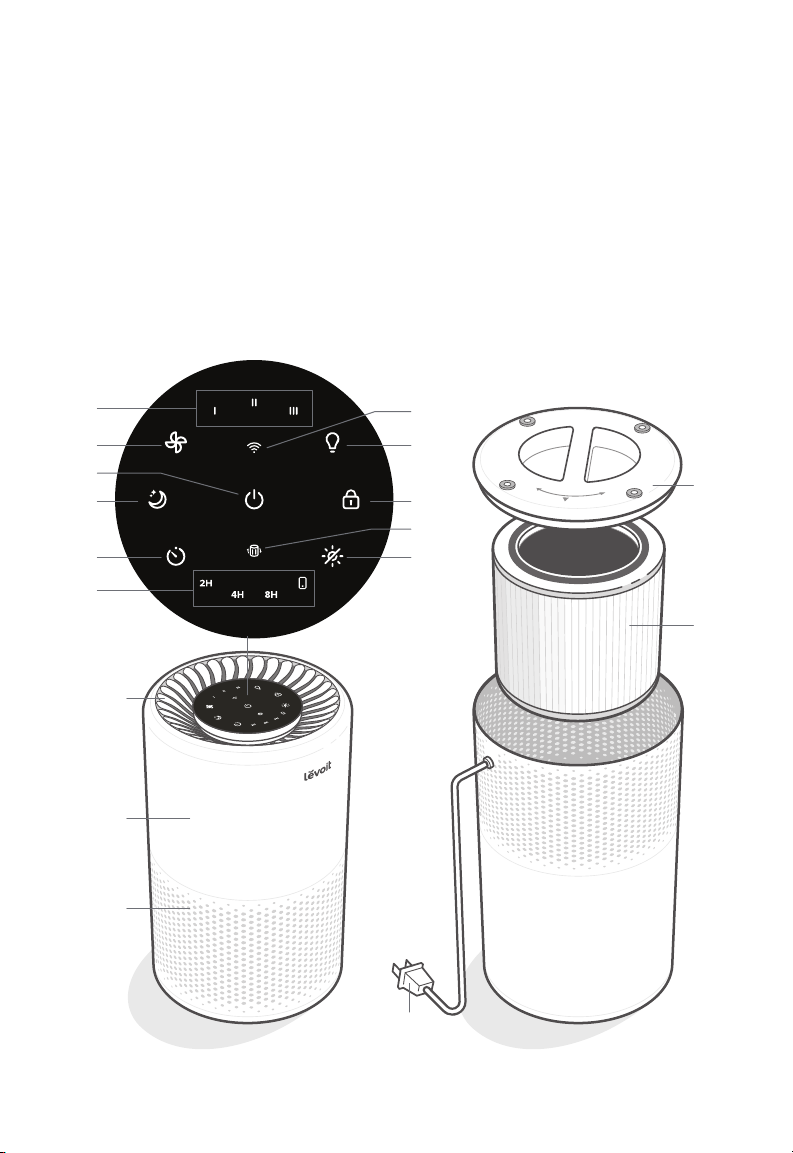
GETTING TO KNOW YOUR SMART
AIR PURIFIER
A. Fan Speed Indicators
B. Fan Speed Button
C. On/O Button
D. Sleep Mode Button
E. Timer Button
F. Timer Indicators
G. WiFi® Indicator
A
B
C
D
E
F
L
H. Night Light Button
I. Display Lock Button
J. Check Filter Indicator
K. Display O Button
L. Air Outlet
M. Housing
N. Air Inlet
G
H
I
J
K
O. Power Cord
P. Filter Cover
Q. True HEPA Filter
P
Q
M
N
O
Back, upside downFront
4
Page 5
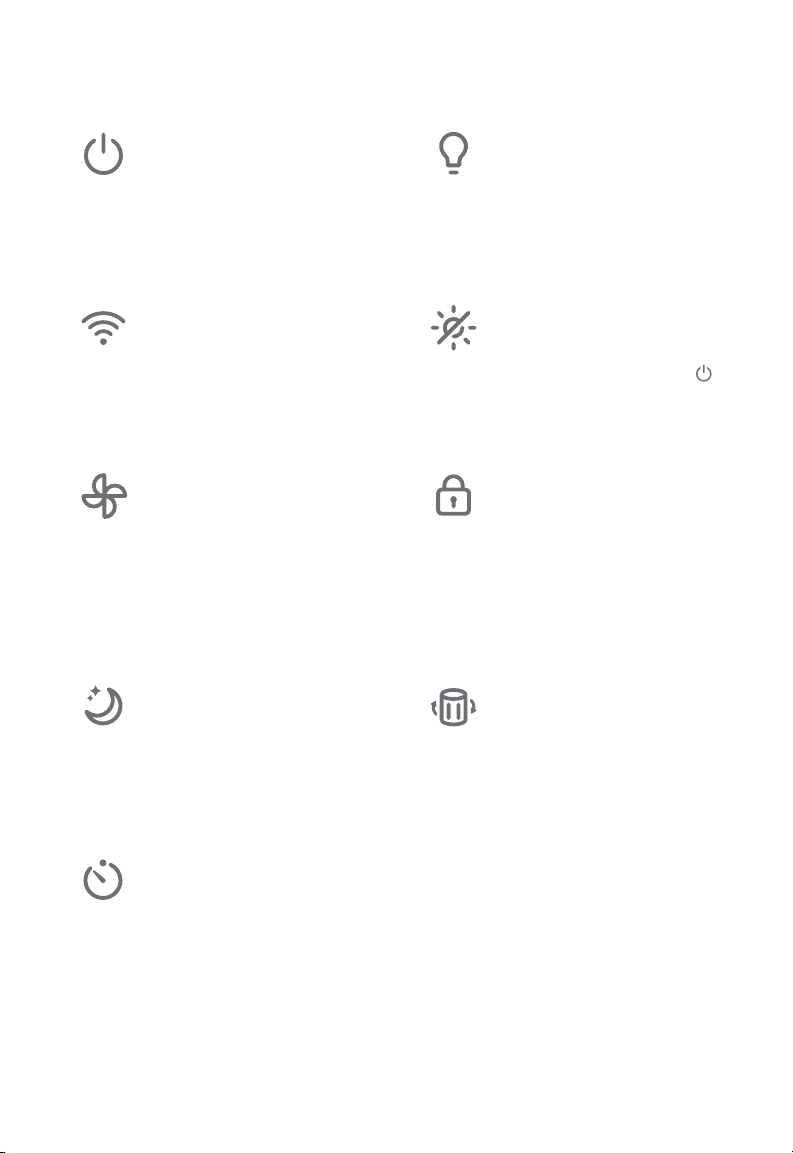
CONTROLS
On/O Button
• Turns the air purifier on/o.
• Press and hold to configure
the air purifier. See the
VeSync in-app instructions
for more information.
WiFi Indicator
• Turns on, o, or blinks
to indicate configuration
status. See the VeSync
in-app instructions for more
information.
Fan Speed Button
• Cycles through fan speeds:
I (low), II (medium), and
III (high).
• Tapping the Fan Speed
Button while the air purifier
is in Sleep Mode will exit
Sleep Mode.
Sleep Mode Button
• Turns Sleep Mode on (see
page 8).
• Press and hold for 3
seconds to reset the Check
Filter Indicator.
Timer Button
• Cycles through timer
options (see page 8).
Night Light Button
• Turns the night light on/o
(see page 9).
Display O Button
• Turns the display o (not
including the night light).
• Tap any button (except )
to turn the display back on.
Display Lock Button
• Prevents current settings
from being changed (see
page 9).
• Blinks when any other
button is tapped to indicate
that Display Lock is on.
Check Filter Indicator
• Lights up when the filter
should be checked (see
Check Filter Indicator,
page 12).
• Reset the Check Filter
Indicator light by pressing
and holding the Sleep
Mode button for 3 seconds.
5
Page 6
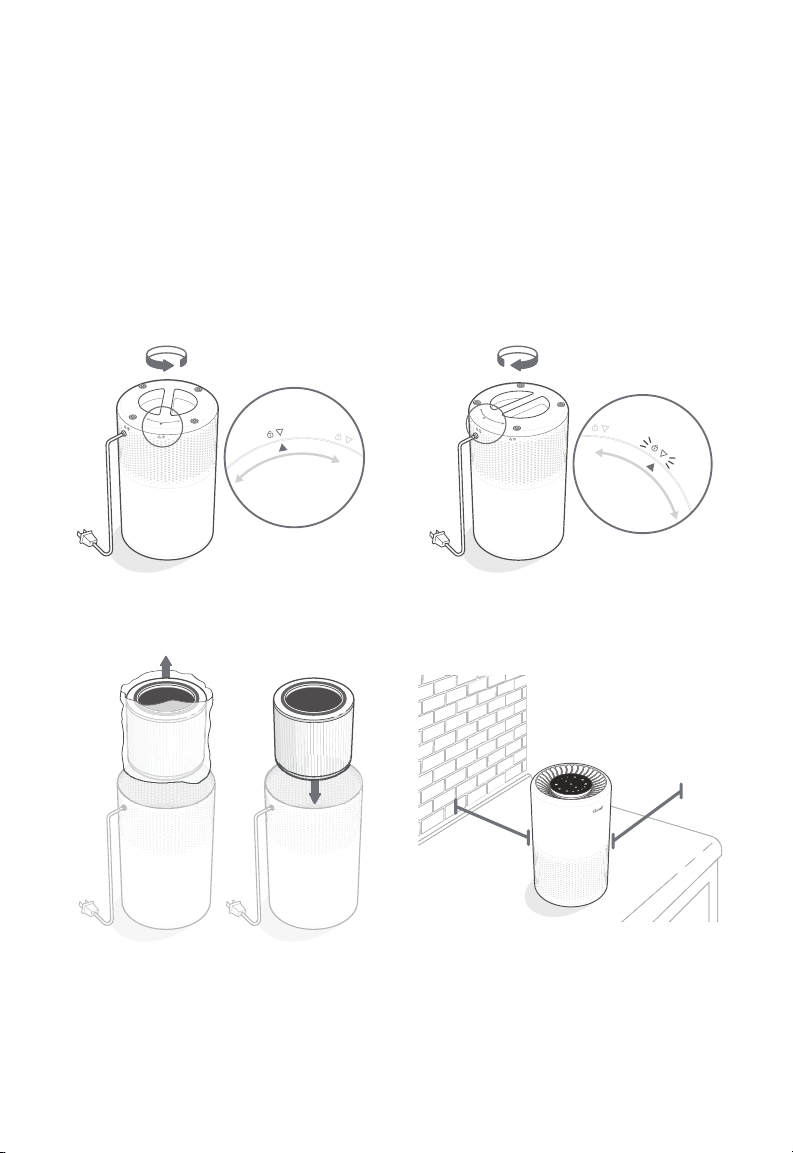
GETTING STARTED
1. Flip the air purifier over. Twist the filter
cover counterclockwise and remove it.
[Figure 1.1]
2. Remove the filter from its plastic
packaging and place the filter back into
the air purifier. [Figure 1.2]
3. Replace the filter cover and twist
clockwise to lock. [Figure 1.3]
Figure 1.1
4. Place the air purifier on a flat, stable
surface with the display facing up. Allow
at least 15 in / 38 cm of clearance on all
sides of the air purifier. Keep away from
anything that would block airflow, such as
curtains. [Figure 1.4]
cover should
snap shut
Figure 1.3
15 in /
38 cm
15 in /
38 cm
Figure 1.4
Figure 1.2
6
Page 7
VESYNC APP SETUP
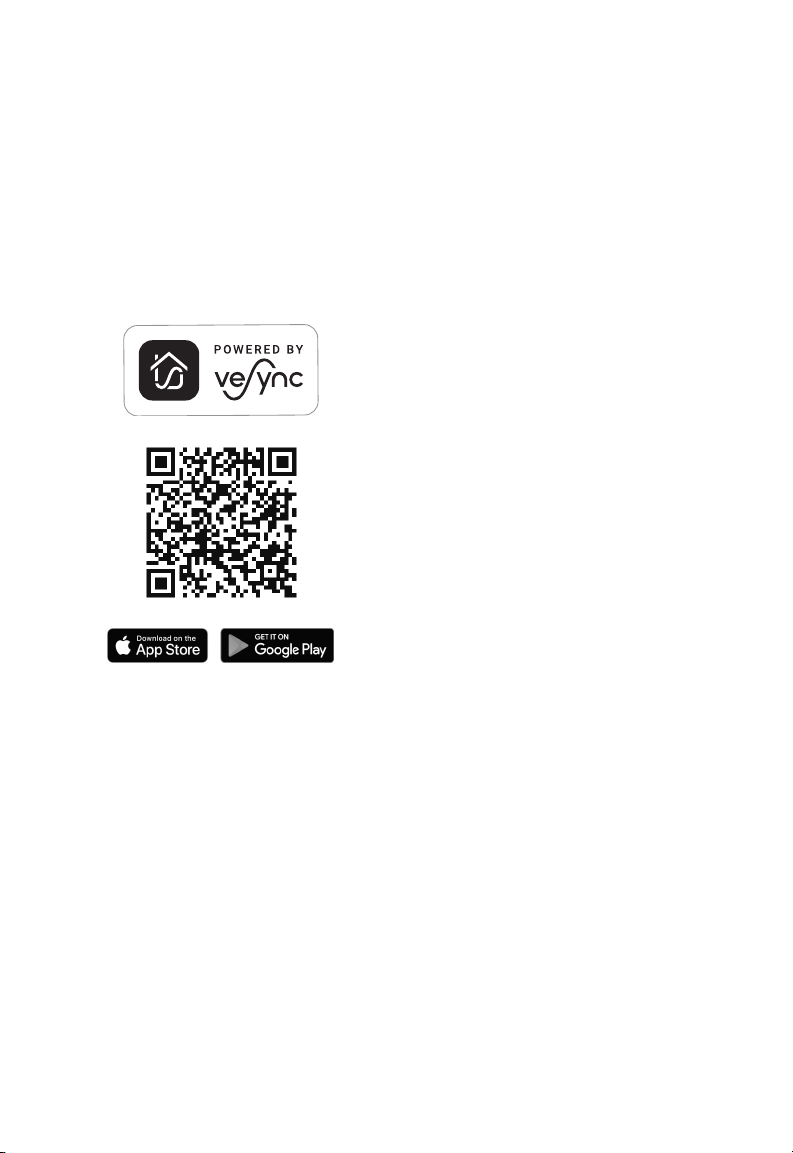
1. To download the VeSync app, scan
the QR code or search “VeSync” in the
Apple App Store® or Google Play Store.
2. Open the VeSync app. Log In or
Sign Up.
3. Follow the in-app instructions to set up
your smart air purifier.
CONNECT WITH
AMAZON ALEXA OR
GOOGLE ASSISTANT™
You can use the VeSync app to connect
your smart air purifier to Amazon Alexa or
Google Assistant™. Please follow the in-app
instructions to set up your voice assistant.
Note: You must create your own VeSync
account to access voice assistants.
7
Page 8
USING YOUR SMART AIR PURIFIER
Note: Using the VeSync app allows you to control
your air purifier remotely and access additional
functions and features.
General Operation
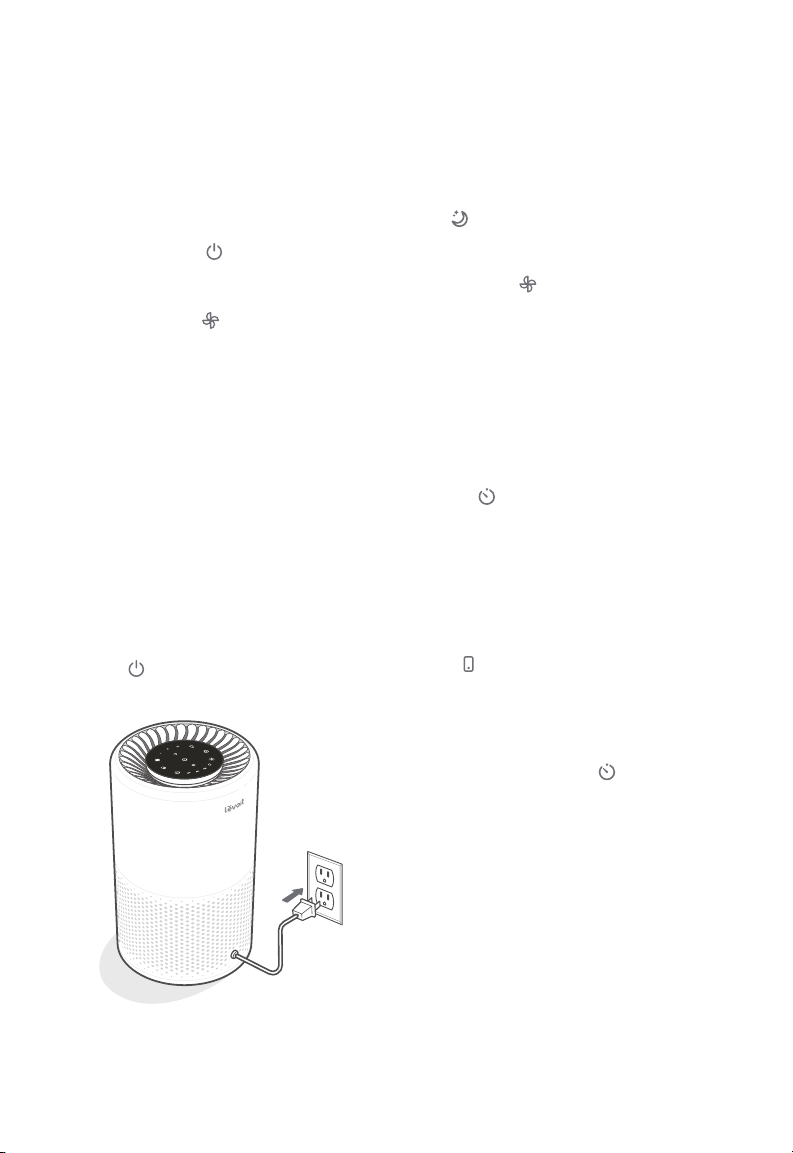
1. Plug in and tap to turn on the air
purifier. The fan will start on level I.
[Figure 2.1]
2. Optionally, tap to change fan speed
between I, II, and III.
Note:
• The indicators are not buttons and cannot
be used to change the fan speed.
• The fan speed indicators will light up when
active.
• Fan speed III is the loudest, but cleans air
the quickest.
• For best results, or to address a specific
air quality issue such as smoke, run the air
purifier at high speed (level III) for 15–20
minutes before using a lower speed.
• To eectively clean air, keep windows and
doors closed while the air purifier is on.
3. Tap to turn o the air purifier.
Sleep Mode
Sleep Mode dims all icons to half brightness
and operates quietly by using a fan speed
lower than fan speed I.
Tap to turn Sleep Mode on.
Note:
• Tapping will exit Sleep Mode.
• You can still adjust the night light while the
air purifier is in Sleep Mode.
Timer
You can manually set a timer for 2, 4, or 8
hours using the display buttons. You can
also set a timer for 1 to 24 hours through the
VeSync app.
1. Tap repeatedly to select a time. The
timer will start automatically.
Note:
• The indicators are not buttons and cannot
be used to select a time.
• The timer indicators will light up blue when
active.
• indicator lights up when a timer is set
up through the app.
2. Once the timer has finished, the air
purifier will turn o.
3. To cancel a timer, tap until all timer
indicators are o.
Note:
• You can change the fan speed at any time
while the timer is on.
• The timer will restart if the time is changed.
Figure 2.1
8
Page 9

Night Light
You can choose between 2 night light
brightness levels, even when the air purifier
is turned o (as long as it is still plugged in).
1. Tap once to turn on the light.
2. Tap a second time to dim the brightness
to half.
3. Tap a third time to turn o the light.
Note: Turning o the display will not turn o
the night light.
VESYNC APP
FUNCTIONS
The VeSync app allows you to access
additional smart air purifier functions,
including those listed below. As the app
develops, more features may become
available.
Remote Control
• Change any air purifier settings through
the app, even while the Display Lock is on.
Display Lock
Locking the display prevents settings from
being accidentally changed. Buttons will not
respond to being tapped.
1. Press and hold for 3 seconds to
lock/unlock the display.
2. While the display is locked, will light
up. If other buttons are tapped, will
blink 3 times.
Memory Function
Even while turned o, as long as the air
purifier is plugged in, it will remember
its previous fan speed, Sleep Mode, and
Display Lock settings.
When unplugged, the air purifier will
remember the fan speed and Sleep Mode,
but not Display Lock or Display O.
Note: The memory function does not work
with timers or night light settings.
Schedules
• Create and customize schedules for your
air purifier to match your routines.
Timer Function
• Set a timer setting between 1 and 24
hours.
Filter Replacement Info
• Keep tabs on remaining filter life by
checking the filter life percentage in
the app.
• Shop for replacement filters.
9
Page 10
ABOUT THE FILTER
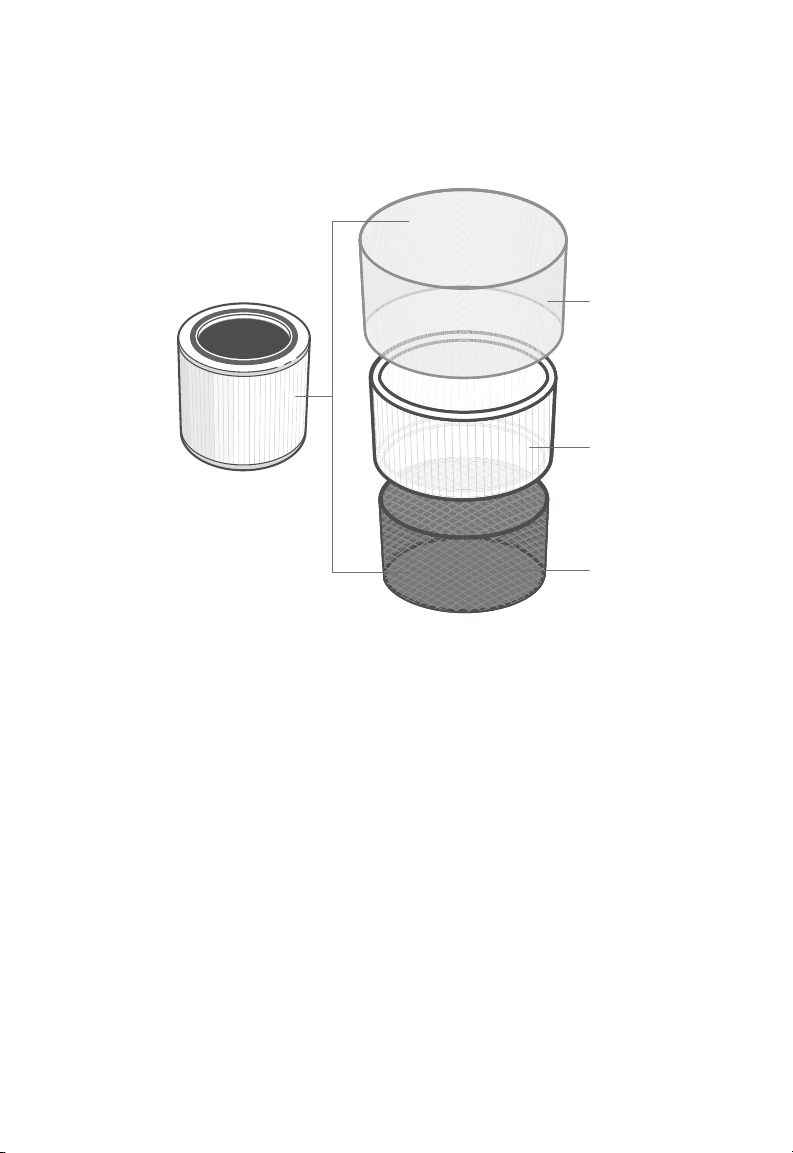
The air purifier uses a 3-stage filtration system to purify air.
A
B
C
A. Nylon Pre-Filter
• Captures large particles such as
dust, lint, fibers, hair, and pet fur.
• Maximizes the filter’s life by
protecting it.
B. H13 True HEPA Filter
• Captures at least 99.97% of airborne
particles 0.3 microns (µm) in size.
• Filters small particles such as fine
dust, smoke particles, and allergens
such as pollen and pet dander.
10
C. High-Eciency Activated
Carbon Filter
• Physically adsorbs smoke, odors,
and fumes.
• Filters compounds such as
formaldehyde, benzene, ammonia,
hydrogen sulfide and volatile
organic compounds (VOCs).
Note: Levoit air purifiers filter airborne
particles 0.3 microns in size. Arovast
Corporation makes no claims that this air
purifier helps reduce the COVID-19 virus.
Page 11

ABOUT THE FILTER (CONT.)
Clean Air Delivery Rate
This air purifier has a Clean Air Delivery
Rate of 118 cubic feet per minute (CFM), or
200.6 m³/h.
Clean Air Delivery Rate (CADR) measures
the eciency of an air purifier by indicating
the volume of clean air that it produces per
minute. This is based on removal of dust,
pollen, and smoke, which are the 3 most
common indoor air pollutants. The higher
the CADR, the more particles the air purifier
will remove and the larger the area it can
clean. The rating is measured at the air
purifier’s highest speed.
Air Change per Hour
The air change rate is how many times
all of the air in a room can be purified (or
“changed”) by the air purifier in 1 hour. Air
changes per hour are calculated on the
recommended room size, assuming 8 ft
/ 2.4 m ceilings. For smaller rooms, the
air change per hour will increase. This air
purifier has an air change per hour of 5,
which means it can change air 5 times
per hour at the max speed in a single,
closed room up to 183 ft² / 17 m². The air
purifier is eective for larger rooms, but
air purification will take longer, with fewer
air changes per hour.
Humidity
Moisture may damage the filters. This air
purifier should be used in an area with a
humidity level below 85% RH. If you use the
air purifier in excessively humid areas, the
surface of the filter will become moldy.
Note: Water or moisture will allow mold to
grow. To solve a mold problem, get rid of the
source of the moisture and clean up the mold.
Essential Oils
Do not add essential oils to the air purifier
or filter. The filter will become damaged
by the oil and will eventually release an
unpleasant smell. Do not use diusers near
the air purifier.
Note: To eectively clean air, keep windows
and doors closed while the air purifier is on.
11
Page 12
CARE & MAINTENANCE
Cleaning the Smart Air Purifier
• Unplug before cleaning.
• Wipe the outside of the air purifier with
a soft, dry cloth. If necessary, wipe
the housing with a damp cloth, then
immediately dry.
• Vacuum the inside of the air purifier.
• Do not clean with abrasive chemicals or
flammable cleaning agents.
Check Filter Indicator
will light up as a reminder to check the
filter. Depending on how often you use the
air purifier, the indicator should turn on within
6–8 months. You may not need to replace
your filter yet, but you should check it when
turns on.
Cleaning the Filter
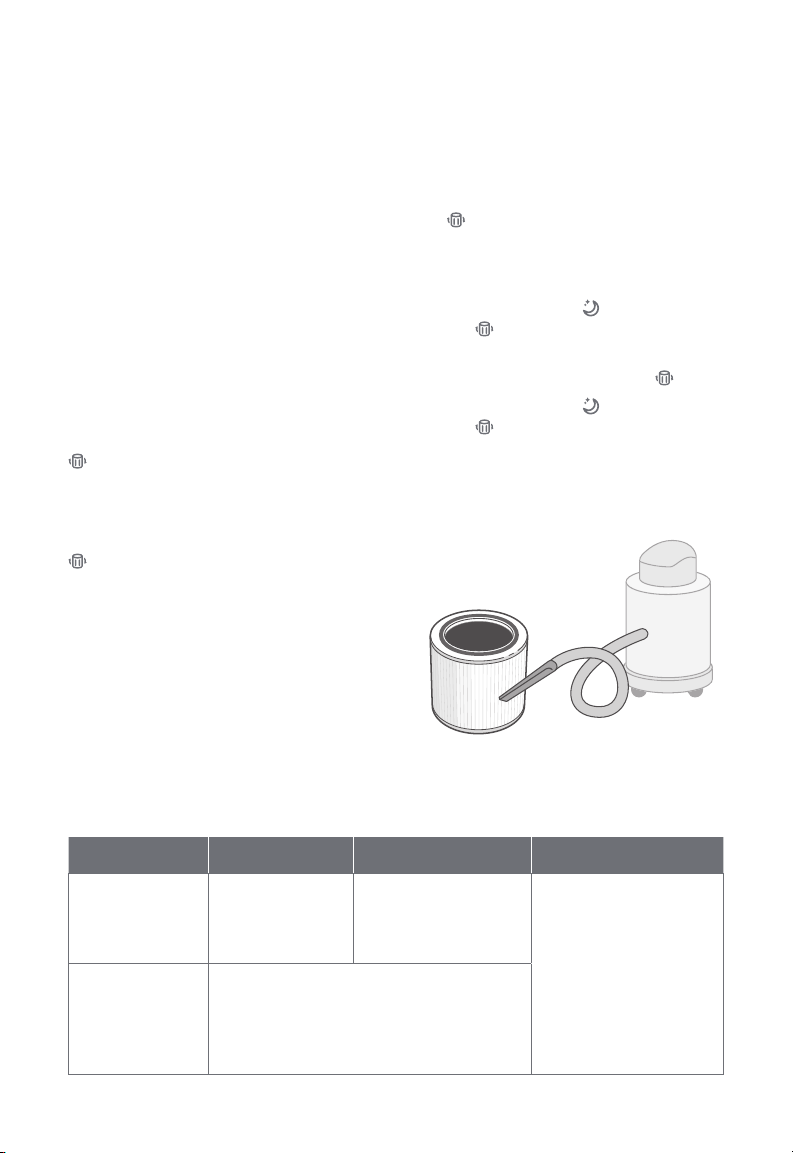
The outer pre-filter should be cleaned
every 2–4 weeks to increase eciency
and extend the life of your filter. Clean the
pre-filter using a soft brush or vacuum hose
to remove hair, dust, and large particles.
Do not clean the filter with water or other
liquids. [Figure 3.1]
Resetting the Check Filter
Indicator
Reset the Check Filter Indicator when:
A. lights up red.
1. Replace the filter (see page 13).
2. Turn on the air purifier.
3. Press and hold for 3 seconds.
will blink 3 times and turn o
once successfully reset.
B. The filter was changed before lit up.
3. Press and hold for 3 seconds.
will blink 3 times and turn o
once successfully reset.
Note: You can also reset the Check Filter
Indicator in the VeSync app.
Figure 3.1
12
Filter When to Clean How to Clean When to Replace
Nylon
Pre-Filter
True HEPA &
High-Eciency
Activated
Carbon Filters
Every
2–4 weeks
Use a soft brush or
vacuum hose
[Figure 3.1]
6–8 months
Do not clean
Page 13
CARE & MAINTENANCE (CONT.)
When Should I Replace the
Filter?
Check the VeSync app to see your
remaining filter life.
The filter should be replaced every
6–8 months. You may need to replace
your filter sooner or later depending
on how often you use your air purifier.
Using your air purifier in an environment
with relatively high pollution may mean
you will need to replace the filter more
often, even if is o.
You may need to replace your filter if
you notice:
• Increased noise when the air
purifier is on
• Decreased airflow
• Unusual odors
• A visibly clogged filter
Note:
• To maintain the performance of your air
purifier, only use ocial Levoit filters.
To buy replacement filters, visit Levoit’s
online store. Go to levoit.com for more
information.
• Remember to reset after changing
the filter (see page 12).
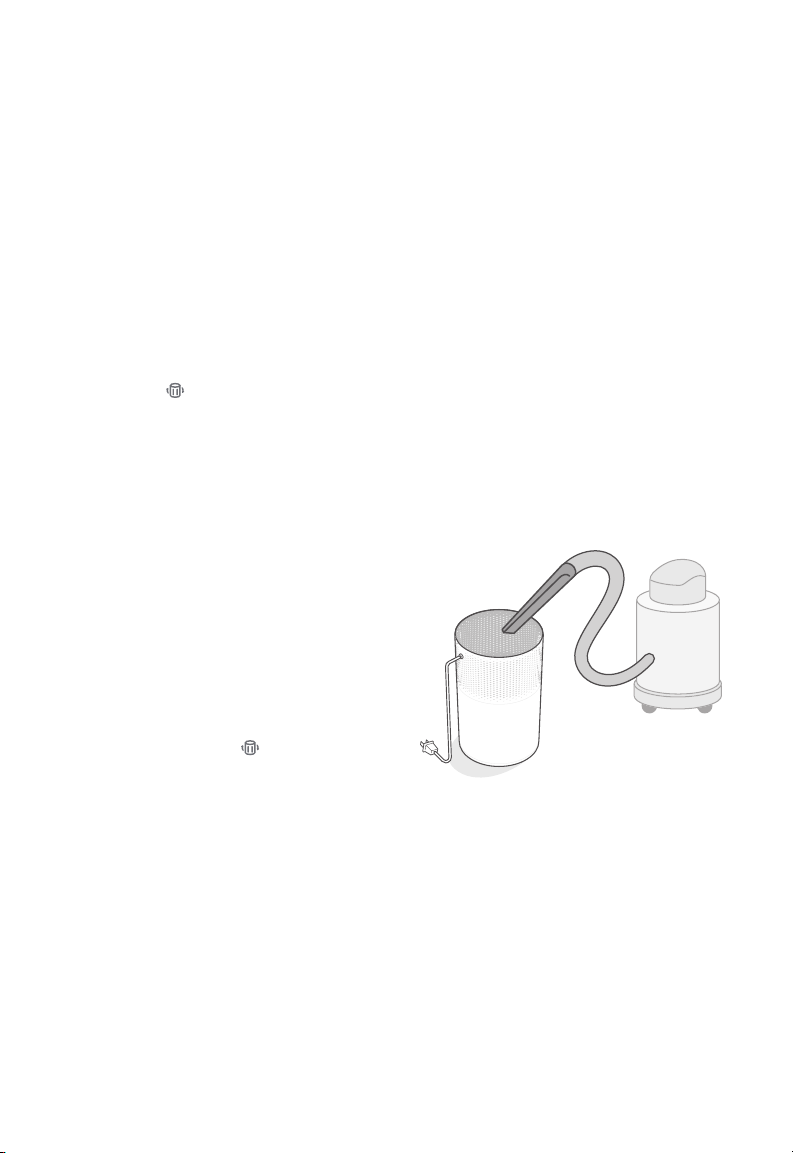
Replacing the Filter
1. Unplug the air purifier. Flip the air purifier
over and remove the filter cover (see
Getting Started, page 6).
2. Remove the old filter.
3. Clean out any remaining dust or hair
inside the air purifier using a vacuum
hose. Do not use water or liquids to
clean the air purifier. [Figure 3.2]
4. Unwrap the new filter and place it into
the housing (see Getting Started,
page 6).
5. Replace the cover. Plug in the air purifier.
6. Reset the Check Filter Indicator (see
page 12).
Figure 3.2
Storage
If not using the air purifier for an extended
period of time, wrap both the air purifier and
the filter in plastic packaging and store in a
dry place to avoid moisture damage.
13
Page 14
TROUBLESHOOTING
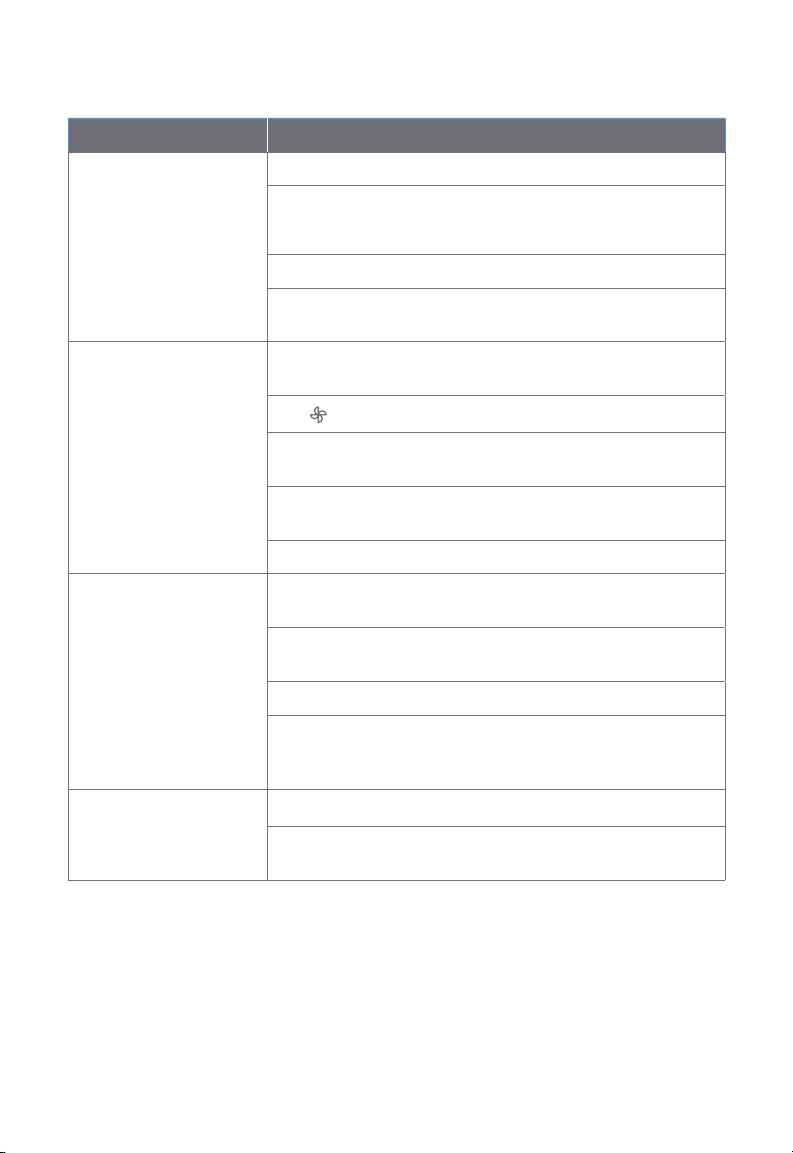
Problem Possible Solution
Plug in the air purifier.
Air purifier will not turn
on or respond to button
controls.
Airflow is significantly
reduced.
Air purifier makes an
unusual noise while the
fan is on.
Check to see if the power cord is damaged. If so, stop using the
air purifier and contact Customer Support (see page 19).
Plug the air purifier into a dierent outlet.
The air purifier may be malfunctioning. Contact Customer
Support (see page 19).
Make sure the filter is removed from its packaging and properly
in place (see page 6).
Tap to increase the fan speed.
Make sure there are at least 15 in / 38 cm of clearance on all
sides of the air purifier.
The pre-filter may be clogged by large particles, such as hair or
lint, blocking air flow. Clean the pre-filter (see page 12).
Replace the filter (see page 13).
Make sure the filter is properly in place with plastic packaging
removed (see page 6).
Make sure the air purifier is operating on a hard, flat, level
surface.
Replace the filter (see page 13).
The air purifier may be damaged, or a foreign object may be
inside. Stop using the air purifier and contact Customer Support
(see page 19). Do not try to repair the air purifier.
Strange smell coming
from the purifier.
14
Clean the filter or replace if necessary.
Make sure not to use your air purifier in an area with high
humidity or while diusing essential oils.
Page 15
TROUBLESHOOTING (CONT.)
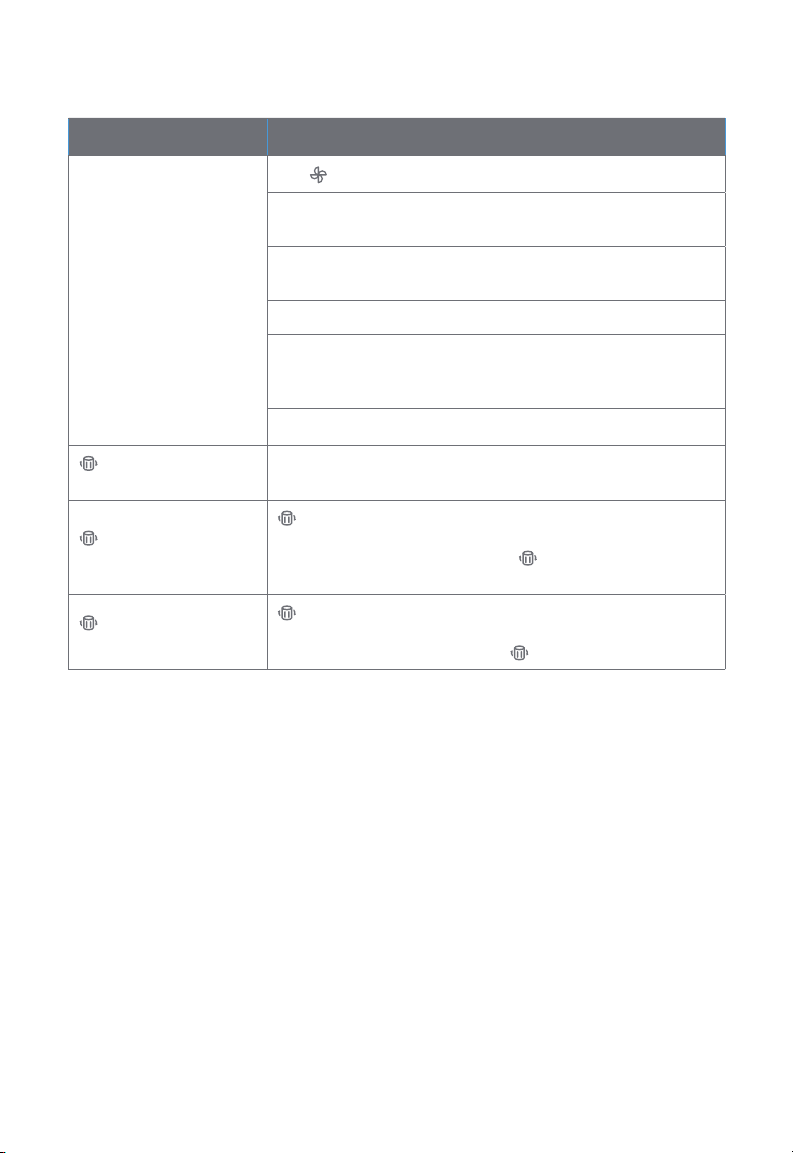
Problem Possible Solution
Tap to increase the fan speed.
Make sure no objects are blocking the sides or top of the air
purifier (the inlet or outlet).
Make sure the filter is removed from its packaging and properly
Poor air purification
quality.
in place (see page 6).
Close doors and windows while using the air purifier.
If the room is larger than 183 ft² / 17 m², air purification will take
longer. The air purifier may not be as eective in significantly
larger rooms.
Replace the filter (see page 13).
is still on after
replacing the filter.
has not turned on
within 8 months.
turned on before 6
months.
Reset the Check Filter Indicator (see page 12).
is a reminder for you to check the filter and will light up based
on how long the air purifier has been used (see page 12). If
you don’t use your air purifier often, will take longer to turn
on.
is a reminder for you to check the filter and will light up based
on how long the air purifier has been used (see page 12). If
you run your air purifier frequently, will turn on sooner.
If your problem is not listed, please contact Customer Support (see page 19).
15
Page 16

VESYNC APP TROUBLESHOOTING
My smart air purifier isn’t connecting to the VeSync app.
• Make sure your phone has Bluetooth® turned on and is not currently connected to another
Bluetooth device.
• During the setup process, you must be on a secure 2.4GHz WiFi network. Confirm that the
network is working correctly.
• Make sure the WiFi password you entered is correct.
◦ There should be no spaces at the beginning or end of the password.
◦ Test the password by connecting a dierent electronic device to the router.
◦ If you’re manually typing in the SSID and password, double check that both are entered
correctly.
• Try moving your air purifier closer to the router. Your phone should be as close as possible to
your air purifier.
• Your router may need to be at a higher location, away from obstructions.
• Make sure your air purifier and router are away from appliances (such as microwave ovens,
refrigerators, electronic devices, etc.) to avoid signal interference.
• If you’re using a VPN, make sure it’s turned o while setting up your air purifier.
• Disable portal authentication for your WiFi network. If portal authentication is enabled, the air
purifier will not be able to access your WiFi network, and setup will fail.
Note: Portal authentication means that you need to sign in to your WiFi network through a
web page before you can use the Internet.
My air purifier is oine.
• Make sure the air purifier is plugged in and has power, then refresh the VeSync menu by
swiping down on the screen.
• Make sure your router is connected to the internet and your phone’s network connection is
working.
• Delete the oine air purifier from the VeSync app. Swipe left (iOS®) or press and hold
(Android™), then tap Delete.
• Reconfigure the air purifier with the VeSync app.
Note: Power outages, internet outages, or changing WiFi routers may cause the air purifier to
go oine.
If your problem is not listed, please contact Customer Support (see page 19).
16
Page 17

FEDERAL COMMUNICATION COMMISSION
INTERFERENCE STATEMENT FCC STATEMENT
This device complies with Part 15 of the FCC Rules. Operation is subject to the following two
conditions:
1. This device may not cause harmful interference, and
2. This device must accept any interference received, including interference that may cause
undesired operation.
NOTE: This equipment has been tested and found to comply with the limits for a Class B digital
device, pursuant to Part 15 of the FCC Rules. These limits are designed to provide reasonable
protection against harmful interference in a residential installation. This equipment generates,
uses and can radiate radio frequency energy and, if not installed and used in accordance with
the instructions, may cause harmful interference to radio communications. However, there is no
guarantee that interference will not occur in a particular installation. If this equipment does cause
harmful interference to radio or television reception, which can be determined by turning the
equipment off and on, the user is encouraged to try to correct the interference by one or more of
the following measures:
• Reorient or relocate the receiving antenna.
• Increase the separation between the equipment and receiver.
• Connect the equipment into an outlet on a circuit dierent from that to which the receiver
is connected.
• Consult the dealer or an experienced radio/TV technician for help.
FCC Caution: Any changes or modifications not expressly approved by the party responsible for
compliance could void the user’s authority to operate this equipment.
FCC RADIATION EXPOSURE STATEMENT
This equipment complies with FCC radiation exposure limits set forth for an uncontrolled
environment. End users must follow the specific operating instructions for satisfying RF exposure
compliance. To maintain compliance with FCC RF exposure compliance requirements, please
follow operation instructions as documented in this manual. This transmitter must not be colocated or operating in conjunction with any other antenna or transmitter. This equipment should
be installed and operated with a minimum distance of 20 cm between the radiator and your
body. The availability of some specific channels and/or operational frequency bands are country
dependent and are firmware programmed at the factory to match the intended destination. The
firmware setting is not accessible by the end user.
17
Page 18

WARRANTY INFORMATION
Product Name Smart True HEPA Air Purifier
Core 200S,
Models
LAPC201S-AUSR
For your own reference, we strongly recommend
that you record your order ID and date of purchase.
Date of Purchase
Order ID
Terms & Policy
Arovast Corporation (“Arovast”) warrants this
product to the original purchaser to be free
from defects in material and workmanship,
under normal use and conditions, for a period
of 1 year from the date of original purchase.
Arovast agrees, at our option during the
warranty period, to repair any defect in material
or workmanship or furnish an equal product in
exchange without charge, subject to verification
of the defect or malfunction and proof of the
date of purchase.
There is no other express warranty. This
warranty does not apply:
• If the product has been modified from its
original condition;
• If the product has not been used in
accordance with directions and instructions
in the user manual;
• To damages or defects caused by accident,
abuse, misuse or improper or inadequate
maintenance;
• To damages or defects caused by service
or repair of the product performed by an
unauthorized service provider or by anyone
other than Arovast;
• To damages or defects occurring during
commercial use, rental use, or any use for
which the product is not intended;
• To damages or defects exceeding the cost
of the product.
Arovast will not be liable for indirect, incidental,
or consequential damages in connection with
the use of the product covered by this warranty.
This warranty extends only to the original consumer
purchaser of the product and is not transferable to
any subsequent owner of the product regardless
of whether the product is transferred during the
specified term of the warranty.
This warranty does not extend to products
purchased from unauthorized sellers. Arovast’s
warranty extends only to products purchased
from authorized sellers that are subject to
Arovast’s quality controls and have agreed to
follow its quality controls.
All implied warranties are limited to the period of
this limited warranty.
This warranty gives you specific legal rights
and you may also have other rights which
vary from state to state. Some states do not
allow the exclusion or limitation of incidental or
consequential damages, so the above limitation
or exclusion may not apply to you.
If you discover that your product is defective within
the specified warranty period, please contact
Customer Support via [email protected].
DO NOT dispose of your product before
contacting us. Once our Customer Support Team
has approved your request, please return the
product with a copy of the invoice and order ID.
Extend Your Warranty by 1 Year
Register your product within 14 days of purchase
at www.levoit.com/warranty to extend your 1-year
warranty by an additional year.
This warranty is made by:
Arovast Corporation
1202 N. Miller St. Suite A
Anaheim, CA 92806
18
Page 19

CUSTOMER SUPPORT
If you have any questions or concerns about
your new product, please contact our helpful
Customer Support Team.
Distributed by Arovast Corporation
1202 N. Miller St., Suite A
Anaheim, CA 92806
Email: [email protected]
Toll-Free: (888) 726-8520
Support Hours
Mon–Fri, 9:00 am–5:00 pm PST/PDT
*Please have your order invoice and order ID
ready before contacting Customer Support.
Trademark Information
Amazon, Alexa, and all related logos are trademarks of Amazon.com, Inc. or its aliates.
Google, Android, and Google Play are trademarks of Google LLC.
Apple App Store is a trademark of Apple Inc.
Wi-Fi® is a registered trademark of Wi-Fi Alliance®.
The Bluetooth® word mark and logos are registered trademarks owned by Bluetooth SIG, Inc. and any
use of such marks by Arovast Corporation is under license. Other trademarks and trade names are
those of their respective owners.
iOS is a registered trademark of Cisco Systems, Inc. and/or its aliates in the United States and certain
other countries.
The energy eciency of this ENERGY STAR certified model is
measured based on a ratio between the model’s CADR for
Smoke and the electrical energy it consumes, or CADR/Watt.
19
Page 20
/LEVOITLIFESTYLE
/LEVOIT
/LEVOIT
/LEVOIT
LEVOIT.COM
JD010621CW-M1_1220LAP-C201S-AUSR_gray
 Loading...