

Page 1
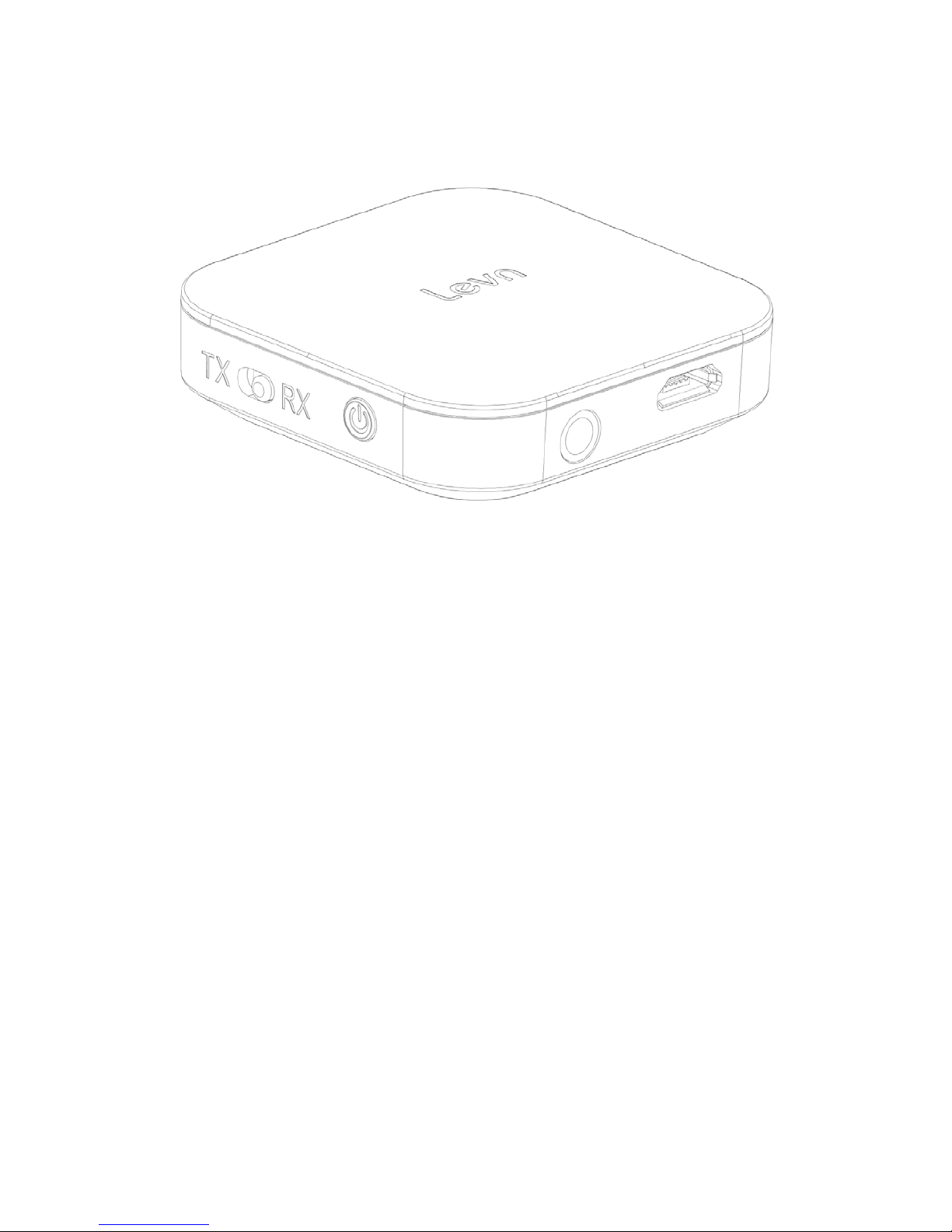
BTI-020V Bluetooth transmitter and receiver all in one
user manual
Welcome to use Bluetooth transmitter/ receiver BTI-020V.
Introduction
BTI -020V is a Bluetooth transmitter and re cei ver all in one function adapter ,when used as a Bluetooth
transmitter, it can transfer the music on your mobile ,Walkman,TV,computer ,e tc to your Bluetooth
re cei ve r,Stere o Blue too th headp hone,and Blue tooth s peakers ,ect ,through wireless technology. When used as a
Bl uetoot h rece iver, it can been a stere o Blue too th hea dphone (b y plug ging headph one audio cable i nto 3.5m m
port),or connecting wi th speaker to re ceive audio signal through wireless.
Please read the user man ual careful l y before use the uni t .
Overview :
Page 2
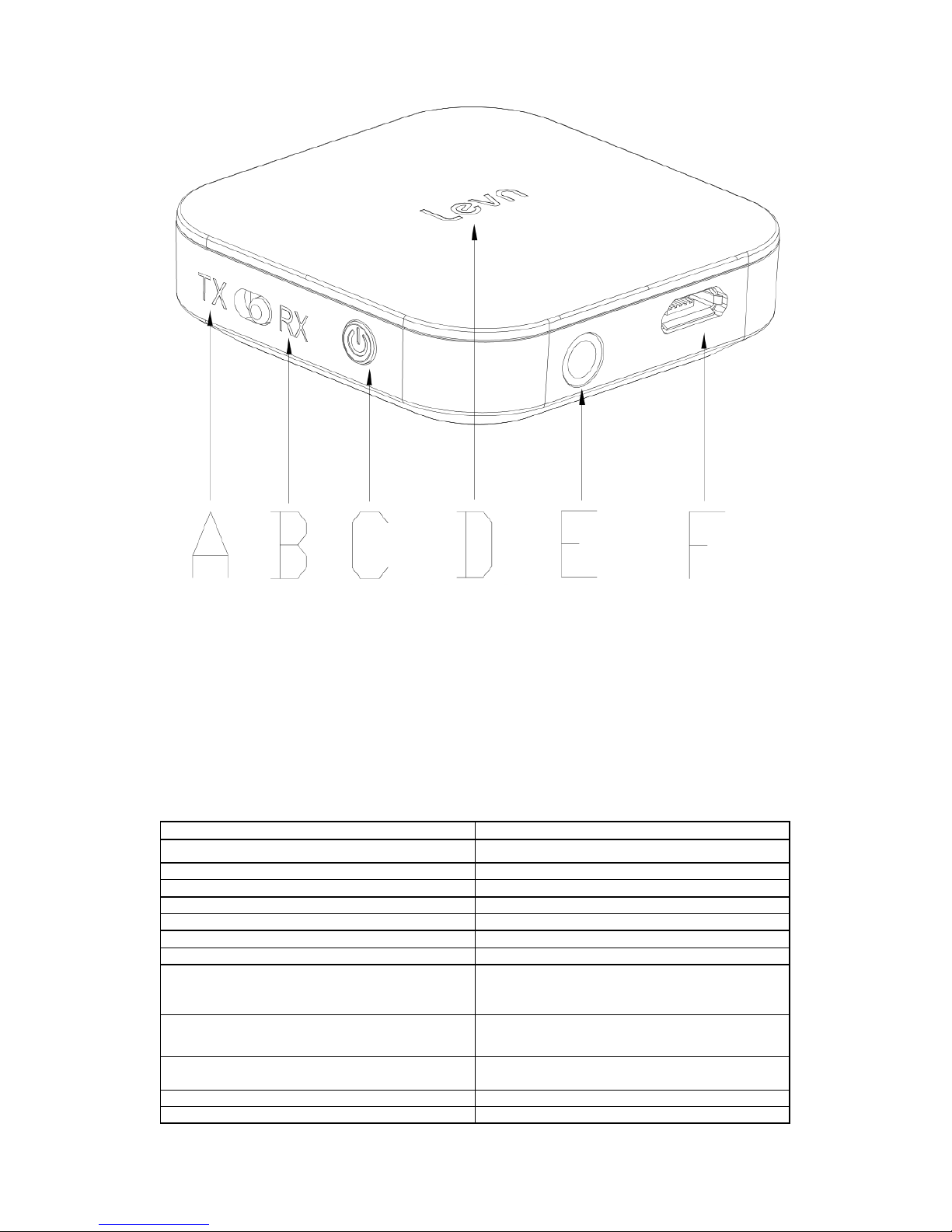
A, Bluetooth transmitter side
B, Bluetooth receiver side
C, Mul ti -function button
D, LED i ndica to r
E, 3.5MM audio po rt (AUX)
F, Micro USB charging port
Specification:
Model
BTI -020V
Bl ue tooth ve rsion
V4.1,ClassⅡ
Chi pset
CSR B C8670
Frequency
2.402GHz-2.480GHz
Bluetooth receiver working time
Approx. 12 hours
Bl ue too t h tra ns mi tte r wo rki n g ti me
Approx. 13 hours
Full charging ti me
Approx. 2 hours
Bluetooth p rofile
A2DP
Supp o rts (in Blue too th trans mitte r mode)
If the Blue too th device support the same CODEC, the
transmitter could conne ct two Bluetooth spea ke rs or
two Bluetooth headse ts simul taneousl y
Supp ort dual conne ction i n recei ve r mode
Supp o rt conne ctin g with two mobile phone
Pas s code for suppo rted Blueto oth hea dse t, Blue too th
receiver, Bluetooth speaker etc.
0000,1111,1234,8888
COD EC
Prio ri ty APT-X, Se cond SBC
APT-X ti ps
COD EC Single conne ction, pri ory s upport APT-X LL
Page 3

48k HZ CODEC (hea dse t or speake r mus t als o suppo rt
APT-X );
Two connections, it will switch to SBC CODEC
automatically
Ba tte ry
250mAH rechargeable lithium battery
Cha rging suppl y
5VDC,100-240V AC adapter,≥300MA
Working temperature
-10—55℃
Net weight
App rox. 18g
Di mension
43.8*43.8*12.4mm
Preparati on bef ore using
1, Before going to use BTI-020V, please full charge BTI-020V ,Walkman , mobi le, TV, Compute r ,ect whi ch s upport
3.5MM AU X de vi ces .
Opera tio n
1, BTI-020V charging:
For the f irs t using, plea se full y charg ed the model BTI-020V.
Please charge w hen in l ow batte ry:
When the de vi ce is in working mode , if the RED LED flashes th ree times con tinuousl y (not in clude Red LED
fla sh es on ce fo r su ccessfull y conne ction ), means the unit is wo rking in low vol tage , pleas e charge the uni t.
A, Pleas e conne ct the charging cable to the adap ter ( USD ou tpu t port) or compu ter
B, Then using Mi cro USB charging cable connecting with BTI-020V
C, In charging mode, Red LED on, will off when full charging
D, The entire charging time around 2 hours
Work ed as a B luetooth t ransmitter
Function opti on for BTI-020V
Cha nge di fferent wo rking mode through the Slide option bu tton .
When the unit in off sta te , please s lide the button to “TX” side, then press MFB to powe r on the uni t, all the
paired devi ce information in RX mode will be deleted after power on.
Please d on’t swi tch TX o r RX mode i mmediatel y in 3 s econds after uni t turn o ff , be cause the uni t is s till
ha vi ng powe r, if swi tching to TX o r R X mode i mmedi ately, i t will ente r in to the p re vi ous p ower of f mode to
re-turn on .
• No te : when wo rke d as the Blue tooth transmi tter, i t onl y could s ta y 4 de vi ce re co rds and these devi ces
will be taken ove r by the lates t pai red de vi ce .(Be cause the u nit s uppo rts “automaticall y
• Re -conne ctio n “ function,if staying too much devices record, the re-pairing time will be lasting longer ).
BTI -020V automaticall y Re-conne ctio n time :
In 7 seconds for the unit has 1 paire d reco rd
In 12 seconds fo r the unit has 2 paired records
In 17 seconds fo r the unit has 3 paired records
In 22 seconds fo r the unit has 4 paired records
Page 4

Basic opera tion
1. po wer on :
In off s tate , press MFB a round 3 s econds , Blue LED flashes twice, BTI-020V is powe re d on . (If BTI-020V did not
co nnect with any devi ce, it could ente r in to pa irin g mode qui ckl y with Blue LED fla shes a fte r powe r on)
2. Power off :
In on s tate , press MFB a round 3 s econds , Red LED fla shes twice ( if release after Red LED immediately, Red LED
ma y onl y flas hes on ce) , BTI -020V power off. Please re-powe r on the uni t a fter po wer o ff the unit 3 se conds la te r
since the voltage of the chipse t may not disappea r totally.
3. Pai ring mode :
Power on the uni t, doubl e cli ck the MFB, the Blue LED flashes qui ckl y to ente r pairin g mode , i t will be in
co nnecti ve s tandb y mode if no conne ctions in 2 minu tes .
4. Clear up the pairing list :
Power off with the current working mode(TX or RX), 3 seconds late r, swi tch to the othe r worki ng mode , then
power on, the pairing informati on for the former mode will be cleare d up.
5. Co nne ct with all the connected de vice :
Power on the uni t ( usin g two connections simultaneously ), short press MFB to connect all the conne cted de vi ce
au tomati cal ly, but i t onl y suppo rt two devices connection s imul taneo usly, p ri ori tize the l ates t two connec ted
devi ces , successfull y conne cted , BTI-020V is solid blue. I f BTI-020V coul d no t conne ct wi th an y de vi ce in 22
seconds (This is up to how man y pa ire d de vi ce BTI -020V stored), it will enter into pai ring mode. When used as
Bluetooth tra nsmi tte r, it support two conne cted devi ces transfe r Audio simul taneousl y.
6. Power off automatically
The B TI -020V will power off automaticall y when the ba tte ry vol ta ge s lo we r tha n 3 . 1V.
7. LED indi cator in transmitter mode :
Power on
Blue LED flashes twice quickly
Pairing
Blue LED flashes quickl y
Un connected s tandby
mode
Blue LED flashes once every second
Conne cted s tand by
mode
Solid Blue LED
Low voltage
Re d LED fl ashes qui ckl y
Cha rging
Solid Red
Ful l y charged
Re d LED turns off
BTI-020V Working as a Bluetooth receiver
Switch the TX or R X button t o chose the u nit in Bluet oot h transm itter mode ,or in Bluetooth receiver
mode.
When in power off state,switch the butt on t o RX si de, then long press MF B button to turn on it, a ll the
paired devices record will be cleared. Please don’t switch TX or RX mode im mediately in 3 seconds after unit
Page 5

turn off , becaus e t he uni t is still having power, if switching to TX or RX mode immediately, it will enter into the
prev ious pow er of f m ode to re-t urn on
BTI-020V worked as B luetooth Receiv er can stay 8 pai red devices record , the latest paire d recor ds will
take over the over paired records.
1. P owe r on :
In off s tate, long press MFB around 3 seconds, after Blue LED flashes twice, BTI-020V is powered on. (If
BTI -020V did n ot connect with any device, i t could directl y enter into pairi ng mode automatically after powe r on)
2. Power off:
In on state, long p ress MFB a round 3 seconds, Red LED flashes twi ce ( i f release a fter Red LED o n
immedia tel y, Red LED ma y only flashes once), BTI-020V i s powered off. Please do n’t re -po we r on the
unit immedia tel y in 3 se co nds a fter po wer o ff the uni t , be cause the voltage of the chipset ma y not
disappear totally.
3. Pai ring mode:
Power on the uni t, doubl e cli ck the MFB, Blue & Red LED flashes al terna tely, the unit enter in to pairing
mode, it will power off automa tically if no connections in 6 mi nu te s .
4. Pla y /pause :
In music playing, short press MFB to pause, press again to pla y continuall y
5. Clear up the pairing list :
Power of f with the current working mode, 3 se conds la ter, change to the other wo rking mode, then
power on , the pai ring informati on for the former mode will be cleared up
6. Conne ct with all the conne cted device:
Powe r on the uni t, BTI-020V will connect to all the connected de vi ce automatically, but it only support two
connections simul taneo usl y, priori tize the la test two conne cted de vi ces , after two connections successful , BTI020V will be Blue LED light on. (working as Bluetooth reciever, it only could receive audio from the first working
device ,If you want to receive signal from the other device, the first worki ng de vi ce must ha ve to be pause or
turn off . (Bluetooth receiver two in one function).
7. Power off automatically :
The B TI -020V will power off automa ticall y when the battery voltages lowe r than 3. 1V or n o c onnecti ons a round 5
mi nu tes .
8. Usin g while charging :
When you want to use BTI-020V con tinuous l y, howe ve r the limi ted battery ca pa city, yo u could use the uni t while
cha r gi ng .( D C 5 V ≥300Ma , if the batte ry vol tage i s t oo low , or the powe r su pple r is po or, i t ma y ha ve cu rrent
noise.)
Please conne ct the unit to the power sup pl y fi rstl y, then power on the BTI -020V.(The chipset will rese t
mo men taril y whe n conne ctin g with power su ppl y, this also could wo rk when the uni t is dead) . Do not use the
unit while cha rging becaus e i t may s ho rten the bat tery’s life ti me.
9. LED indi cator in Recei ver mode :
Page 6

Power on
Blue LED flashes twice quickly
Pairing
Blue and Red LED flashes alternately
Un connected s tandby mode
Blue LED flashes twice every three seconds
Conne cted s tand by mode
Solid Blue LED
Low voltage Re d LED fl ashes qui ckl y
Cha rging Solid Red
Ful l y charged
Re d LED turns off
How to use it as a Bluetooth transmitter
BTI-020V and s tereo Bl ueto oth headpho ne or Bluetooth speaker (A2DP e nabled) work on the TV
A, Make the Blue tooth s peake r o r Bl uetoo th headse t in pairin g mode.
B. Pre ss MFB a round 3 se conds until Blue L ED fla shes qui ckly to enter in to sea ring mode , i f BTI -020V does not
enter into pairin g mode , press MFB 2 Seconds then dou ble press MFB ( keep the op e ra tio n co nsisten tl y ) to en te r
into pai ring mode.
C. Put the BTI-020V and Blue too th speake r or Bluetoo th hea dset toge ther, a round 30s seconds la te r, B TI-020V
will connect with Bluetooth speaker or Bluetooth headset automatically
D. Connect the B TI-020V and TV with 3.5mm audio cable. (Plug one side of the audio cable to the audio output
ja ck of the TV, the side to B TI-020V)
E. It could he ar the sound comi ng f rom TV in the Blue too th headse t o r Blue too th s peake r. I f no s ound in t he
Bl uetoot h speake r o r Blue tooth headse t, pl ease check the au x ou tp ut se ttin g on TV is b y the he adse t out put, the
vol ume of the TV is lo ud enough , the cabl e conne cts right or not. Use your finger to touch the DC pa rt of the
audio cable tha t conne cted wi th BTI-020V to check if the audio s ource ha s probl ems. When the conne ction is
su cces sful and the volume of he adse t or spea ke r is bi g e nough, you will hea r a “zi ,zi ” sound , it means BTI-020V
and Blue tooth s pea ke r o r Blue tooth headphone a nd cables a re ok, the probl em ma y be on the audi o so urce
(TV).
BTI-020V and B luetooth hea dset or B luetooth s peaker which must sup por t A2DP work together on t he
compute r.
A. Make the Blue tooth s peake r o r Bl uetoo th headse t in pairin g mode .
B. Press MFB around 3 seconds until Blue LED flashes qui ckly to en ter into pairi ng mode, if BTI-020V does
not e nte r into pai ri ng mode , press MFB 2 Se conds then double p ress MFB ( keep the action consis tentl y )) to
enter into pairin g mode.
C. Put the BTI-020V and Blue too th speake r or Bluetoo th hea dphone toge the r, a round 30 se conds late r, B TI-
020V will connect with Bluetooth speaker or Bluetooth headphone automati cally.
D. Connect the B TI-020V and compu te r with 3.5mm audio ca ble.
E. I t co ul d hea r the s ound coming fro m compute r in the Bluetooth headse t o r Blue tooth s peake r. If no sound
in the Blue too th speake r or Bluetooth heads e t, please check the aux output se ttin g on computer is by the
heads et ou tput, the volume of the compu te r is l oud enough, the cable conne cts right or no t. Use your hands to
to uch the plug of the au dio ca ble fo r BTI-020V to che ck if the audio source has problems. When the conne cti on is
Page 7

su cces sful and the volume of he adse t or spea ke r is bi g e nough, you will hea r a “zi ,zi” sound , it means BTI-020V
and Blue tooth spea ker or Blue tooth headphone an d cables are ok, the problem may be on the computer.
Note: Passcode fo r supporte d Blueto oth headset, Bl uet oot h receiv er, Blueto oth speaker etc.
is ”0000”,”1234”,”1111”,”8888”
BTI -020V and Bluetoo th hea dset o r Blue tooth spea ke r tha t su pporte d A2D P wo rked on othe r audi o de vi ce
whi ch s uppo rts headset profile) . B TI-02 0V an d Blue too th headse t o r Blue tooth s peake r coul d repl ace a
wire d earphone from wired conne cti on to wi reless conne ction , remove the wire limite d, brin g more fun for
you.
BTI-020V connect with two de vice s imultaneousl y w hile work ing as a Bluetoot h transm itter
This unit coul d con nect with tw o stereo Bluet ooth speaker or Bluet oot h hea dset t o play music
simultaneous ly
A. Na med the two Bluetooth headse ts o r two Blue tooth spea kers as A and B.
B. Select the TR mode for the device BTI-020V
C. Follow the abo ve pai ring s teps i n workin g as a Bluetooth trans mitter to conne ct de vice A a nd B TI-020V
D. When the conne ction is successful , po wer off the device A, and pai rin g the Device B wi th B TI-020V
(following the same paring steps )
E. Afte r successf ull y conne ctin g wi th devi ce B, then powe r of f BTI -020V.
F. Power on the device A (do not enter into pairing mode, but if it enters into pairi ng mode , i t’s ok) , arou nd
10-20 seconds later (in this case, most of the Bluetooth speaker is for automaticall y connection, please wait a
m o men t)
Then power on the BTI-020V (no need to enter into pairing mode), it will search and connect with device A
and B automatically, the pairin g time will ta ke around 30 seconds. Then connect to audio resource to check
if the two de vi ces could pl ay sim ultane ousl y. If n ot, pl ease powe r off BTI -020V, and reopen BTI-020V to
co nnect with devi ce A a nd B.
If reopen BTI-020V does no t wo rk, pl ease re work the steps fo r two conne ctio ns si multane ousl y.
The compatibility testing rep ort for BTI-020V worked as B luetooth trans mitter to connect w ith two device
simultaneous ly
1. D ue to diffe rent Blue too th chipset has diffe rent functio n fi rmware se tting and di ffe ren t opera tio ns so
so me Blue too th speaker or Blue too th hea dset may ha ve compa tible proble ms with BTI-020V. Whe n one of the
de vi ces has no s ound or dis contin uous pla yi ng, pleas e re-pa i r th e two de vi ce s two or th ree ti mes to c he ck if
the re has same s itua tion , the n we could have a resul t if it is wrong in compa tibi lity
2. The re s o man y Blue too th spea ke r, Blue tooth head phone wi th di ffere nt Blue tooth chipset on the ma rke t.
We tes ted the diffe ren t Bluetooth chipse t compatibility with B TI-020V:
Bluetooth tra nsmi tte r
Chi pset for device A
Chi pst for devi ce B
result
BTI -020V
CSR 8635
CSR 8635
pass
BTI -020V
CSR 8635
CSR 8645
pass
BTI -020V
CSR 8635
CSR 8610
pass
BTI -020V
CSR B C57E687C
CSR 8635
pass
BTI -020V
CSR B C57F687A05
CSR 8635
pass
BTI -020V
CSR 8635
CSR 8640
pass
BTI -020V
CSR 8635
ISSC1681S
pass
BTI -020V
CSR 8635
WS9623
pass
BTI -020V
CSR 8635
BK 8006
pass
Page 8

BTI -020V
CSR 8645
CSR 8645
pass
BTI -020V
CSR 8610
CSR 8645
pass
BTI -020V
CSR B C57F687A05
CSR 8645
pass
BTI -020V
CSR 8645
CSR 8640
pass
BTI -020V
ISSC1681S
CSR B C8645
pass
BTI -020V
CSR B C57E687C
CSR 8645
pass
BTI -020V
CSR B C8635
CSR 8645
pass
BTI -020V
WS9623
CSR 8645
pass
BTI -020V
CSR 8645
BK 8006
pass
BTI -020V
CSR 8610
CSR 8610
pass
BTI -020V
CSR B C57E687C
CSR 8610
pass
BTI -020V
CSR 8640
CSR 8610
pass
BTI -020V
ISSC1681S
CSR 8610
pass
BTI -020V
BC57F687A05
CSR 8610
pass
BTI -020V
WS9623
CSR 8610
pass
BTI -020V
BK 8006
CSR 8610
pass
BTI -020V
CSR B C57E687C
CSR 8640
pass
BTI -020V
CSR 8640
CSR 8640
pass
BTI -020V
CSR B C57F687A05
CSR 8640
pass
BTI -020V
WS9623
CSR 8640
pass
BTI -020V
ISSC1681S
CSR 8640
pass
BTI -020V
BK 8006
CSR 8640
pass
BTI -020V
CSR B C57F687A05
CSR B C57F687A05
pass
BTI -020V
CSR B C57F687A05
CSR B C57E687C
pass
BTI -020V
CSR B C57F687A05
ISSC1681S
pass
BTI -020V
CSR B C57F687A05
WS9623
pass
BTI -020V
CSR B C57F687A05
BK 8006
pass
BTI -020V
ISSC1681S
WS9623
pass
BTI -020V
ISSC1681S
ISSC1681S
pass
BTI -020V
ISSC1681S
BK 8006
pass
BTI -020V
BK 8006
BK 8006
pass
BTI -020V
CSR B C57E687C
CSR B C57E687C
pass
BTI -020V
CSR B C57E687C
WS9623
pass
Page 9

BTI -020V
CSR B C57E687C
ISSC1681S
pass
BTI -020V
CSR B C57E687C
BK 8006
pass
BTI -020V
WS9623
WS9623
pass
BTI -020V
WS9623
BK 8006
pass
BTI-020V connect with two de vice s imultaneousl y w hile work ing as a Bluetoot h receiver
BTI-020V could co nnect with tw o mobi le p ho ne simultaneously (but coul d not play music from two
mobile ph one at the sam e time. you could cho ose any mobil e ph one t o pla y m usi c, but it need to pause
or end t he m usic from other mobile ph one )
A. Na med the two mo bile phone as A and B.
B. Following the pairin g steps to connect A with BTI -020 V, af ter su ccess ful connection, plea se s witch off the
Bluetooth of the mobile A. Double cli ck MFB of BTI-020V t o en te r into pai ri ng mode .
C. Connect mobi le B with BTI-02 0V. After s uccess full y conne ction, power off BTI-020V. Switch on the
Bl ue tooth of mobile A ,and the powe r on BTI-020V, around 30 seconds BTI-020V an d the two mobile phones will
connect automa tically.
Packaging list
BTI -020V
1PC
Audio cable
1PC
USB charging cable
1PC
Use r manua l
1PC
Tips for pairing:
1. Put the Blue too th he adse t or Blue tooth s peake r in to pai rin g mode . Then powe r on B TI -020V will
co nnect to BTI -020V qui ckl y again ,if the Bl uetoo th heads et or Blue tooth spea ke r conne cted with BTI-020V
before. No need to make the BTI-020V en ter i nto pai ring mode.
2. If BTI-020V did n ot connect with the Blue too th he adse t or spea ke r mo re than 1 minutes. Please try
to clea r up the pairing list of the B TI -020V. If the Bluetooth heads e t or Bluetooth spea ker conne cted with
BTI -020V befo re, please reopen the BTI-020V after clea r up the pai ring list.
Ba t te ry i n fo rma ti on
Your devi ce is powered by a recha rgeable ba tte ry .The full perf ormance of a new ba tte ry is achie ved only
after two of three comple te cha rge and di scha rge cycles .The battery can be cha rged and discha rged hundreds of
times, but i t will eventually wear out. Do not leave a fully cha rged ba ttery connected to a charge r since
overcharging may shorten battery lifetime . If left unused, a fully charged batte ry will lose power with time pas t.
Leaving the devi ce in hot or cold places , such as in closed ca r in summer or winter co nditions , will reduce the
capa city and life time of the ba ttery .Shoul d always try to keep the batte ry be tween 15 ℃and 25 ℃. Battery
performance is parti cularly limited in temperatures well below free zing .D o not dispose o f batteries in a fi re as
they may explode .Battery may also explode if dama ged .
Safe ty ins tru ction
Your devi ce is excellent produce in design and craft, should be used with caution. The following suggestions
will help you effectively use warranty service.
Page 10

1. Keep the unit a wa y from children .
2. Maintain equipment dry, rai n, mois tu re and all kinds of liquids or moisture can contain minerals,
co rrode ele ctroni c ci rcuit.
3. If the devi ce is wet, please make i t completely dry.
4. Do no t use o r put the devi ces in dus t o r di rt s tora ge , it will damage the deta chable pa rts a nd el ectroni c
components.
5. Do not use e quipment s tored in o ve rhea ting, high tempe ra tu re wi ll sh orten the se rvi ce life of ele ctroni c
devices, damage batteries, make some plastic parts deformation or melt.
6. Do no t use equipment stored in a cold place, or when the de vi ce tempe rature to roo m tempe rature, its
internal will form the moisture, it will destroy ci rcuit boa rd.
7. Do no t a ttempt to disassemble the equipment.
8. Do not throw , bea t or vib ra tio n equi pmen t, rough trea tmen t equip ment can da mage the inte rnal
ci rcuit boa rd and sophis ti cated s tructure .
9. Do no t use s tron g chemi cals, detergent or dete rgent to clean the de vice .
10. Do not use pigmen t daub eq uipme n t, daub will blo ck sundries in the removable compo nents a nd thus
affect the normal operation.
Environmentally friendl y disposal
Old ele ctri cal a ppliances mus t no t be dispose d o f to ge ther wi th the resi dual
was te, but have to be disposed of sepa rately. The dispos al a t the communal colle ctin g point via pri vate pe rsons is
for free. The owner of old appliances is responsible to bring the appliances to these collecting points or to similar
collection points. With this little personal effort, you contri bute to recycle valuable raw materials and the
trea tment o f to xic substances .
Caution
Risk of explosion if battery is replaced by an incorrect type.
Dis pose o f used ba tte ries acco rding to the ins truc ti ons.
Changes or modifications not expressly approved by the party responsible for compliance
could void the user’s authority to operate the equipment.
This device complies with Part 15 of the FCC Rules. Operation is subject to the following
two conditions: (1) this device may not cause harmful interference, and (2) this device must
accept any interference received, including interference that may cause undesired operation.
Page 11

This equipment has been tested and found to comply with the limits for a Class B digital
device, pursuant to Part 15 of the FCC Rules. These limits are designed to provide
reasonable protection against harmful interference in a residential installation. This
equipment generates, uses and can radiate radio frequency energy and, if not installed and
used in accordance with the instructions, may cause harmful interference to radio
communications. However, there is no guarantee that interference will not occur in a
particular installation.
If this equipment does cause harmful interference to radio or television reception, which
can be determined by turning the equipment off and on, the user is encouraged to try to
correct the interference by one or more of the following measures:
-- Reorient or relocate the receiving antenna.
-- Increase the separation between the equipment and receiver.
-- Connect the equipment into an outlet on a circuit different from that to which the
receiver is connected.
-- Consult the dealer or an experienced radio/TV technician for help.
 Loading...