

Page 1
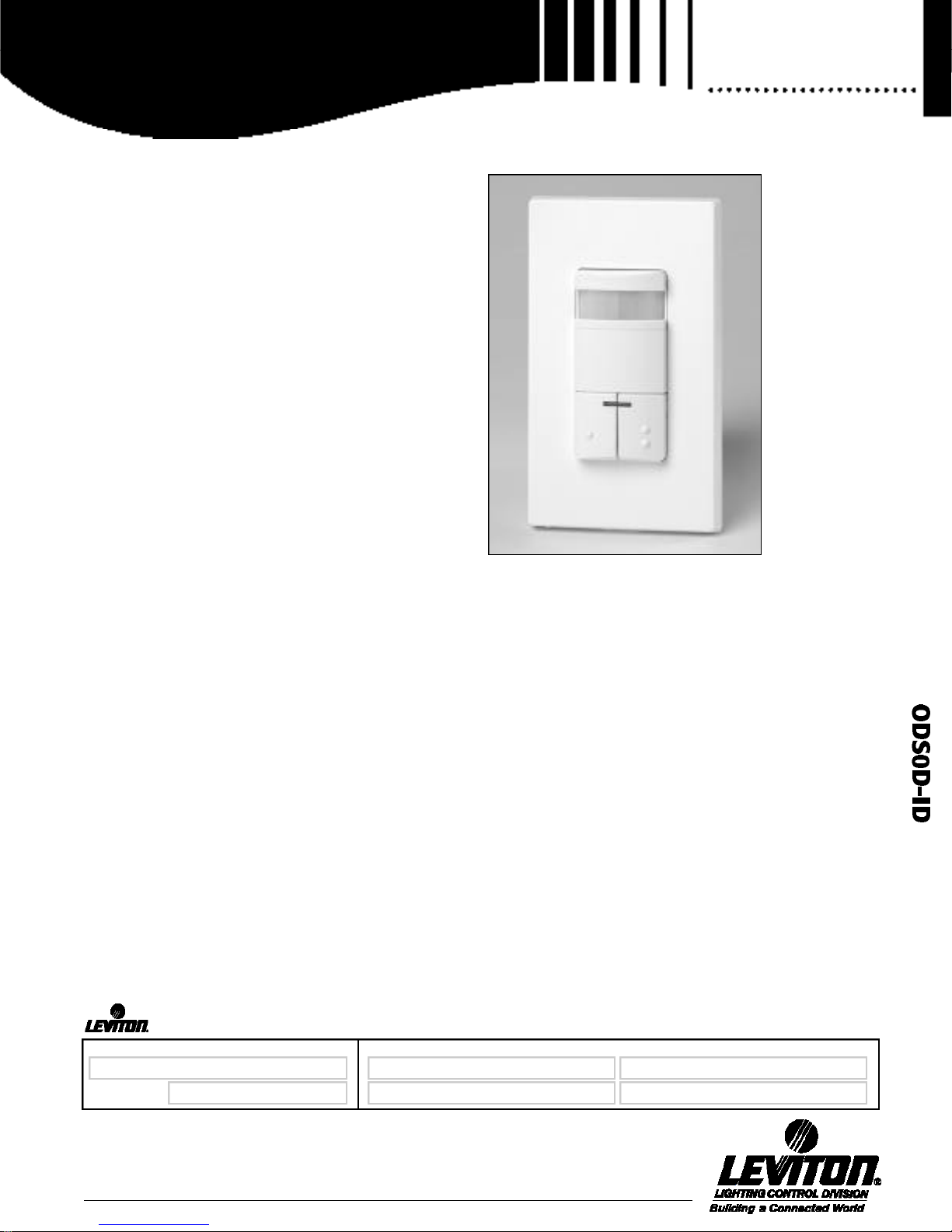
D u a l - R e l a y Decora Wall Sw i t c h
Occupancy Sensor
The OD S 0 D - ID Occupancy Sensor—
• Controls two separate lighting loads from a
single unit
• Features new self-adjusting occupancy sensor
technology with automatic “walk-through”
s e n s i n g
• Choice of “Conference Room” or “Class Room”
modes for maximum performance in a variety
of installations
A PPL IC AT ION
Leviton’s Cat. No. ODS0D- ID Dual-Relay Decora Wall Switch
Passive Infrared (PIR) Occupancy Sensor is used to provide
automatic lighting control for energy savings and convenience in
a variety of commercial applications, including:
• Class rooms • Conference rooms • Offices
• Multimedia rooms • Day care centers • Lounges
The ODS0D- ID provides automatic switching of two separate
lighting loads from a single unit. It is compatible with incandescent, fluorescent and low-voltage lighting. The unit features dual
manual-override switches that can be used to toggle the
O N / O FF status of each lighting load while an area is occupied.
The ODS0D- ID can be installed in place of two single-pole wall
switches and fits in a standard single-gang wall box. The unit
requires a ground connection for proper operation.
B A SIC OPERAT ION
The ODS0D- ID uses passive infrared (PIR) detection technology
to monitor a room for occupancy through a segmented Fr e s n e l
lens. This specialized lens divides the field of view into sensor
zones. When a person passes into or out of a sensor zone, the
sensor detects motion and switches two separate lighting loads
ON. The lights will remain ON as long as there is an occupant
moving through the sensor zones.
A delayed-O FF time adjustment prevents the lights from switching OFF when the space is occupied. In order to keep the lights
ON, a person must pass through a sensor zone at least once
during the selected delayed-O FF time interval. A s e l f - a d j u s t i n g
d e l a y e d -OFF time feature compensates for real-time occupancy patterns to prevent unnecessary ON/OFF switching. An
LED indicator blinks each time the unit detects activity in the
sensor zones. When the space being monitored by the sensor is
unoccupied for the length of the delayed-O FF time interval, the
unit will beep 3 times. Ten seconds after the last warning beep,
the unit will switch the lights OFF.
To ensure longer service life and compatibility with electronic
ballasts, the device carefully times the primary relay switching
contact opening and closing with the zero crossing point of the
AC power curve. This minimizes contact wear caused by in-rush
currents from electronic ballasts.
An exclusive walk-through feature addresses the typical situation
where personnel may only enter a room momentarily. The walkthrough feature provides increased energy savings by preventing
the lights from remaining ON for an extended period after only
momentary occupancy.
The walk-through feature operates as follows: The
O D S 0 D- ID will switch lights ON when it detects a person
entering the area it monitors. However, if there is no occupant
activity detected during the 2-1/2 minutes immediately following the initial entry, the unit recognizes that a person was just
“walking through” the area. It will then automatically time out.
After the initial 2-1/2 minute time interval expires, the unit will
beep 3 times and then wait 10 seconds before switching the
lights OFF.
N OTE: The Self-Adjusting De l a y e d -O F F Time and the Wa l k -Through
features are factory-preset features in the ODS0D - ID. These features
can be disabled if required—See “Non-Adaptive Mode.”
ODSOD-ID
Cat. No. OD S 0 D - ID
SPECIFICATION SUBMITTAL
JOB NAME:
JOB NUMBER:
Leviton Mfg. Co., Inc.
59-25 Little Neck Pkwy • Little Neck, NY 11362-2591 • Tech Line: 1-800-824-3005 • Fax: 1-800-832-9538
Visit our Website at: www.leviton.com
CATALOG NUMBERS:
1
Page 2

Product
Specifications
Ambient Light Override
To maximize energy savings, the Ambient Light Override feature
prevents the ODS0D- ID from switching lights ON when there is
ample natural sunlight in the room, regardless of occupancy. Th e
push-button can be used to turn lights ON at any time, regardless of
the override setting. Refer to Conference Room and ClassRoom
Mode sections for further explanation of this feature.
Push-button Manual Override Control
For manual control of primary and secondary lighting loads, the
O D S 0 D- ID features dual push-button switches that will “toggle” the
O N / O FF status of each load. Push-button 1 controls the
primary relay, and push-button 2 controls the secondary relay. If the
lights are OFF, pressing either button 1 or 2 will turn the respective
lighting loads ON and keep them ON for as long as the room is
occupied. The lights will be turned OFF once the room is vacant,
after the delayed-O FF time expires.
The dual manual-override switches provide a viewing mode
f e a t u r e : If the lights are ON, pressing the push buttons will turn
lights OFF and keep them OFF even if the room is occupied. Th i s
feature is particularly useful for viewing slide or film presentations.
The lights can be turned back ON as needed by simply pressing the
buttons. The lights will remain OFF when the room becomes
vacant. After the delayed-O FF time expires, the unit will resume
motion detection operation. Refer to Conference Room and
ClassRoom Mode sections for further explanation of this feature.
OPERAT ION MODE S
Conference Room Mode (factory default setting)—In the
Conference Room Mode, the ODS0D- ID responds to personnel
entering a room by switching the primary and secondary loads back
to their status during the last period of occupancy, before the
d e l a y e d -O FF time expired. In other words, whenever the unit
detects occupancy after the last time-out, it remembers the previous ON/OFF condition of each load and switches back to that condition. The exception to this is when both the primary and
secondary loads were manually switched OFF for a viewing mode.
In this case, the primary load only will automatically turn ON the
next time occupancy is detected. This avoids the condition of personnel entering a fully darkened room under any
c i r c u m s t a n c e .
The Conference Room Mode is ideal for maximizing energy savings
in areas where lighting is only required when natural
illumination is inadequate. Both relays in the Conference Room
Mode respond to the Ambient Light Override. Therefore, if the
Ambient Light Override has been adjusted to keep lights OFF during
periods of ample sunlight, both the primary and secondary relays
will not switch their loads ON during these periods, regardless of
the last state before the delayed-O FF time expired.
The Conference Room Mode Chart No. 1— Provides a complete summary of how the ODS0D- ID performs in this mode.
For Example, No. 3 in the chart is a typical conference room
situation where the secondary load is switched OFF with the manual override button. The primary load only provides the desired
ODS0D-ID
.........................
lighting level. The room becomes vacant after the meeting and the
d e l a y e d -O FF time expires. The primary lighting load will turn OFF
(the secondary load was already OFF). When
personnel re-enter the conference room, the lights automatically
switch back to the last condition before the time-out: Primary ON,
Secondary OFF. Note that the Ambient Light Override has not been
set in No. 3.
Number 4 shows the same lighting condition during occupancy as
in No. 3 (Primary ON, Secondary OFF). However, the Ambient Light
Override has been set so that the lights will not turn ON if there is
adequate natural lighting. When personnel re-enter the conference
room and there is a sufficient level of natural light, the Primary Relay
will not switch lights ON, even though this was the last condition
before the delayed-O FF time expired.
Number 7 is typical of the viewing mode where both the primary
and secondary lighting loads are switched OFF. The room becomes
vacant after the presentation and the delayed-O FF time expires.
Both lighting loads remain OFF. When personnel re-enter the conference room, the primary lighting load automatically turns ON,
even though it was not ON during the last period of occupancy. Th i s
feature prevents personnel from entering a fully darkened room.
Note that the Ambient Light Override has not been set in No. 7.
Number 8 is exactly the same condition as No. 7 (both primary and
secondary lighting turned OFF for viewing mode), except the
Ambient Light Override has been set. When personnel re-enter the
conference room and there is an adequate level of natural lighting,
the Primary Relay will not switch ON. However, if the natural lighting
is not adequate, the Primary relay will switch ON just as it does in
example 7.
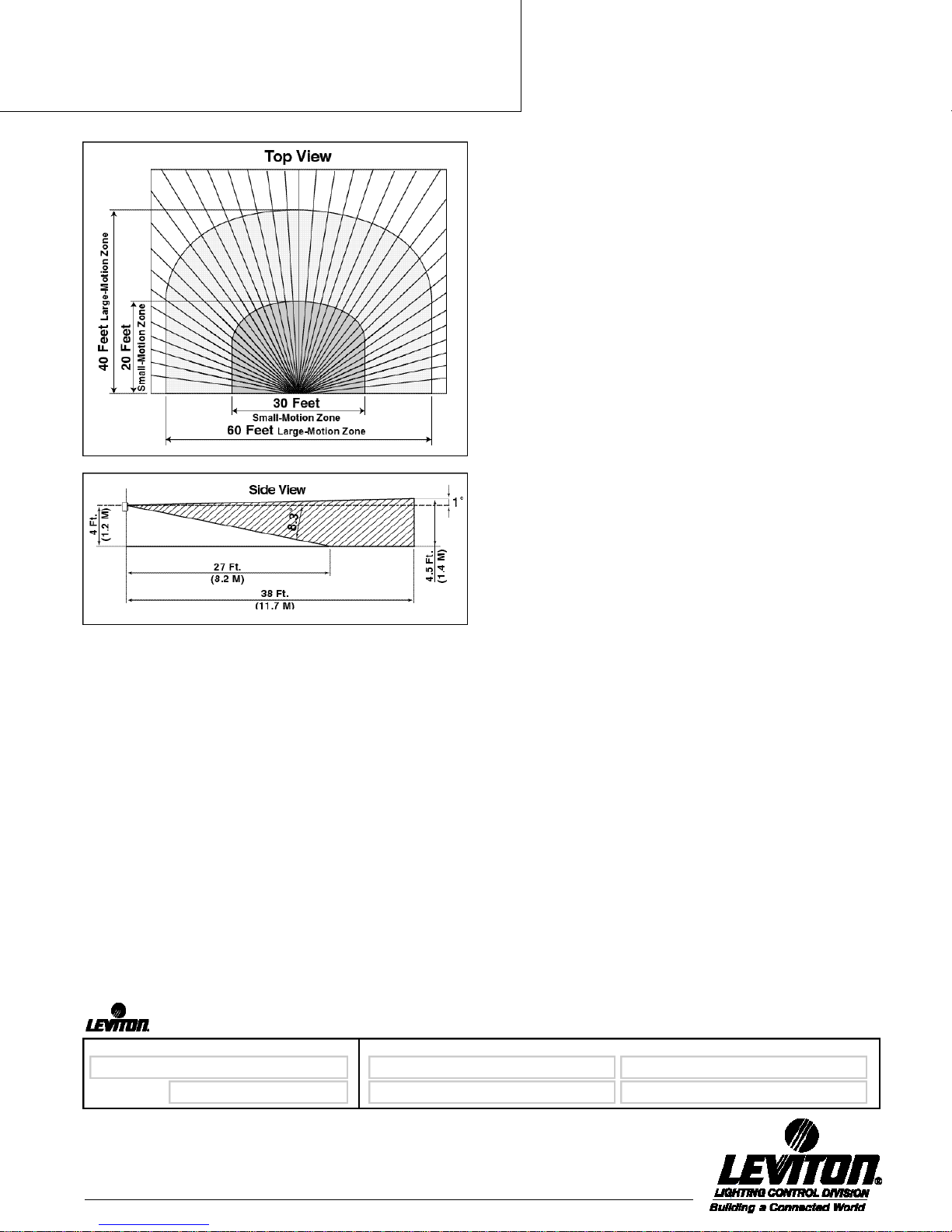
FIELD OF VIE W
The ODS0D- ID provides a 180° field of view with a maximum
coverage area of approximately 2100 square feet. The max i m u m
sensing distance in front of the sensor is 40 feet, and at each side is
30 feet. A “small-motion” zone detects relatively small body movements and allows the lights to stay ON even though a person may
not be moving or walking around the room. The remainder of the
field of view, the “large-motion” zone, exhibits a lesser degree of
sensitivity and requires larger movements.
ENH A NCED ADJUST MENT OP T IONS
The ODS0D- ID is factory preset to deliver optimum performance in a
wide variety of commercial applications. Factory settings are:
Conference Room mode, 10-minute delayed-O FF time with selfadjusting delayed-O FF feature, 2-1/2 minute walk-through feature, no
Ambient Light Override in effect, maximum range, and blinders open.
To meet specific installation requirements, the Cat. No. ODS0D- ID
provides enhanced adjustment options for sensitivity, Ambient Light
Override, delayed-O FF time, field-of-view, ClassRoom mode, and
Non-Adaptive mode. To avoid tampering, all adjustments can only
be accessed by removing the control panel cover. A small flat-head
screwdriver can be used to adjust the control knobs, and the fieldof-view blinders are finger-tip operated.
SPECIFICATION SUBMITTAL
JOB NAME:
JOB NUMBER:
Leviton Mfg. Co., Inc.
59-25 Little Neck Pkwy • Little Neck, NY 11362-2591 • Tech Line: 1-800-824-3005 • Fax: 1-800-832-9538
2
Visit our Website at: www.leviton.com
CATALOG NUMBERS:
Page 3
Product
Specifications
Conference Room/Class Room Modes— To change between
Conference Room and ClassRoom Modes, wait one minute after
unit is powered up. Adjust “TIME” wheel fully counterclockwise.
Press both push-buttons simultaneously. When unit beeps once, it
is in the ClassRoom mode; two beeps indicate Conference Room
mode. After choosing the desired mode, restore TIME wheel to
o r i ginal setting.
B l i n d e r s— I n t e gral sliding blinders on each side of the lens may be
used to restrict the 180° field of view down to 32°. This will prevent
unwanted detection in areas such as hallways.
T i m e— The delayed-O FF time is preset at 10 minutes. A choice of
four delayed-O FF time settings is available: 30-seconds (for walking
test purposes only), 5 minutes, 10 minutes, and 20 minutes. Unit
will beep when adjusting knob is set to the indicated time value.
S e l f - Adjusting Delayed-OFF Time—Provides convenience and
e n e r gy savings by preventing unnecessary ON/OFF light switching.
During periods of occupancy where there is little activity and infrequent motion detection, the delayed-O FF time setting is automatically increased, up to a maximum of 30 minutes. During periods of
occupancy where there's more activity and frequent motion detection, the delayed-O FF time setting will automatically be decreased.
ODS0D-ID
.........................
The decreased delayed-O FF time setting will be in effect after the
unit has timed out and the next period of occupancy begins. Th e
d e l a y e d -O FF time will not be reduced beyond the preset 10 - m i n u t e
interval or the custom-selected time interval.
N o n - Adaptive Mode—Both the Self-Adjusting Delayed-O FF Ti m e
and Wa l k - Through Features can be disabled for installations where
they are not required. Refer to Instruction Sheet enclosed with unit.
R a n g e—Reducing the coverage range of the sensor allows the unit
to ignore motion at the far end of its range and avoid unnecessarily
switching lights ON. The range can be adjusted from 100% to 36 %
of the total coverage area.
L i g h t— To maximize energy savings, the Ambient Light Override
feature will prevent the unit from switching lights ON when there is
ample natural sunlight, regardless of occupancy. The Ambient Light
Override adjustment should be made during a period where the
ambient light in the room being monitored is at a level where no
a rtificial light is needed. The push-button can be used to turn lights
ON at any time, regardless of the override setting. (Reminder: In the
Conference Room Mode, both primary and secondary loads are
effected by the Ambient Light Override. In the ClassRoom Mode,
only the secondary load is effected by the Ambient Light Override.)
S e l f - Adjusting Ambient Light Override Feature—After the
Ambient Light Override level has been set, the ODS0D- ID can
compensate for changes in lighting requirements. When the pushbutton is used to cancel the Ambient Light Override and turn the
lights ON, the Ambient Light Override is automatically reset based
on the natural light level at that time. To return the Ambient Light
Override back to the original setting, press and hold the push button down for approximately three seconds until the unit beeps,
indicating the original level is restored. N OT E : Either push button 1
or 2 can be used to reset the Ambient Light Override level.
SPE CIFIC AT IONS
The device listed herein shall be Leviton Commercial Specification
Grade Dual Relay Decora Wall Switch Occupancy Sensor, capable of
detecting infrared emissions from human presence and responding by
switching ON two separate loads of incandescent, low-voltage, or
fluorescent lighting. If this unit does not detect movement after a preset
period of time, it will respond by switching both its assigned load off.
The primary relay in the unit shall switch at the zero crossing point of
the AC power curve to ensure maximum relay contact life and compatibility with electronic ballasts.
Dual Relay Wall Switch Occupancy Sensor shall be equipped with dual
push-buttons to provide manual on/off switching for each load. Unit
shall provide a walk-through feature to prevent lights from remaining on
for extended periods after momentary occupancy in the area being
monitored. Leviton Dual Relay Decora Wall Switch Occupancy Sensor
shall feature self-adjusting delayed-O FF time and Ambient Light
Override capabilities. Non-adaptive mode shall be provided so that
walk-through and self-adjusting delayed-O FF time features can be
disabled. Wall Switch Occupancy Sensor shall also provide sensitivity
SPECIFICATION SUBMITTAL
JOB NAME:
JOB NUMBER:
Leviton Mfg. Co., Inc.
59-25 Little Neck Pkwy • Little Neck, NY 11362-2591 • Tech Line: 1-800-824-3005 • Fax: 1-800-832-9538
Visit our Website at: www.leviton.com
CATALOG NUMBERS:
3
Page 4
Product
Specifications
adjustment and integral sliding blinders to customize the horizontal field
of view. Unit shall be capable of providing optional manual-on/automatic-off operation.
FE AT URES AND BENEFI TS
• Provides automatic switching for two separate banks of fluorescent,
incandescent, or low-voltage lighting from a single unit. Ideal for classrooms, day care centers, offices, multimedia areas, conference rooms,
lounges and other commercial areas.
• Convenient dual push-buttons provide manual ON/OFF light switching
of each load at any time.
• Conference Room Mode—Primary and secondary relays switch lighting
to last ON/OFF status when personnel enter room, providing a consistent lighting level from one occupancy period to the next. Both relays
respond to Ambient Light Override, preventing lights from turning ON
automatically during periods of ample natural light, for increased
e n e r gy savings.
• Class Room Mode—Both primary and secondary relays always switch
lighting ON when personnel enter room, regardless of their ON/OFF
status during last period of occupancy. Secondary relay only responds
to Ambient Light Override—primary does not, ensuring that students
and personnel never enter a darkened room.
• Viewing Mode feature for slide or film presentations allows push buttons to turn lights OFF and keep them OFF even if room is occupied.
• Self-adjusting delayed-O FF time interval compensates for real-time
occupancy patterns, preventing unnecessary ON/OFF switching.
• Exclusive Wa l k -Through feature provides increased energy savings by
not leaving the lights ON for an extended period after only momentary
o c c u p a n c y.
• Non-Adaptive Mode disables Self-Adjusting Delayed-O FF Time and
Wa l k -Through Feature in applications where these feature are not
d e s i r e d .
• N e w , low-profile design eliminates obtrusive “scanning-device” look.
Elegant Decora styling complements any interior; uses Decora
wallplates and coordinates with Leviton’s popular line of Decora wiring
d e v i c e s .
ODS0D-ID
.........................
• 180° field-of-view provides approximately 2100 square feet of
coverage, suitable for a variety of commercial areas.
• Segmented Fresnel lens provides optimum sensitivity and perf o r mance. Designed with an extensive “small motion” area where even
slight body movements will be detected.
• Horizontal field of view may be adjusted between 180° and 32° arc
by using integral blinders located on either side of the lens.
• Optional manual adjustment for delayed-O FF time settings of 30
seconds (for walking test), 5 minutes, 10 minutes and 20 minutes.
Allows customized adjustments to maximize energy savings.
• Adjustable Ambient Light Override ranges from approximately 2
foot-candles (2 lux) to 500+ foot-candles (500+ lux).
• Self-Adjusting Ambient Light Override compensates for changes in
lighting requirements after override level has been set.
• M a n u a l -O N / A u t o m a t i c -O FF mode for installations where manual ON
switching is required but automatic OFF switching is still desired for
e n e r gy savings.
• LED indicator light flashes when sensor detects motion to verify
detection is active.
• Unit beeps 3 times after delayed-O FF time expires, then waits 10
seconds before turning lights OFF.
• One unit can be used for either 120V or 277V lighting. Compatible
with both electronic and magnetic ballasts.
• Primary relay switches at the zero crossing point of the AC power
curve to ensure longer contact life and compatibility with electronic
ballasts.
• Unit fits in standard single-gang wallbox and replaces two single-pole
wall switches; ground connection required. Gangable with other
d e v i c e s .
• C UL / US Certified, complies with California Title 24 Energy Code and
F CC Regulations.
• Limited Five-Year Wa r r a n t y
JOB NAME:
JOB NUMBER:
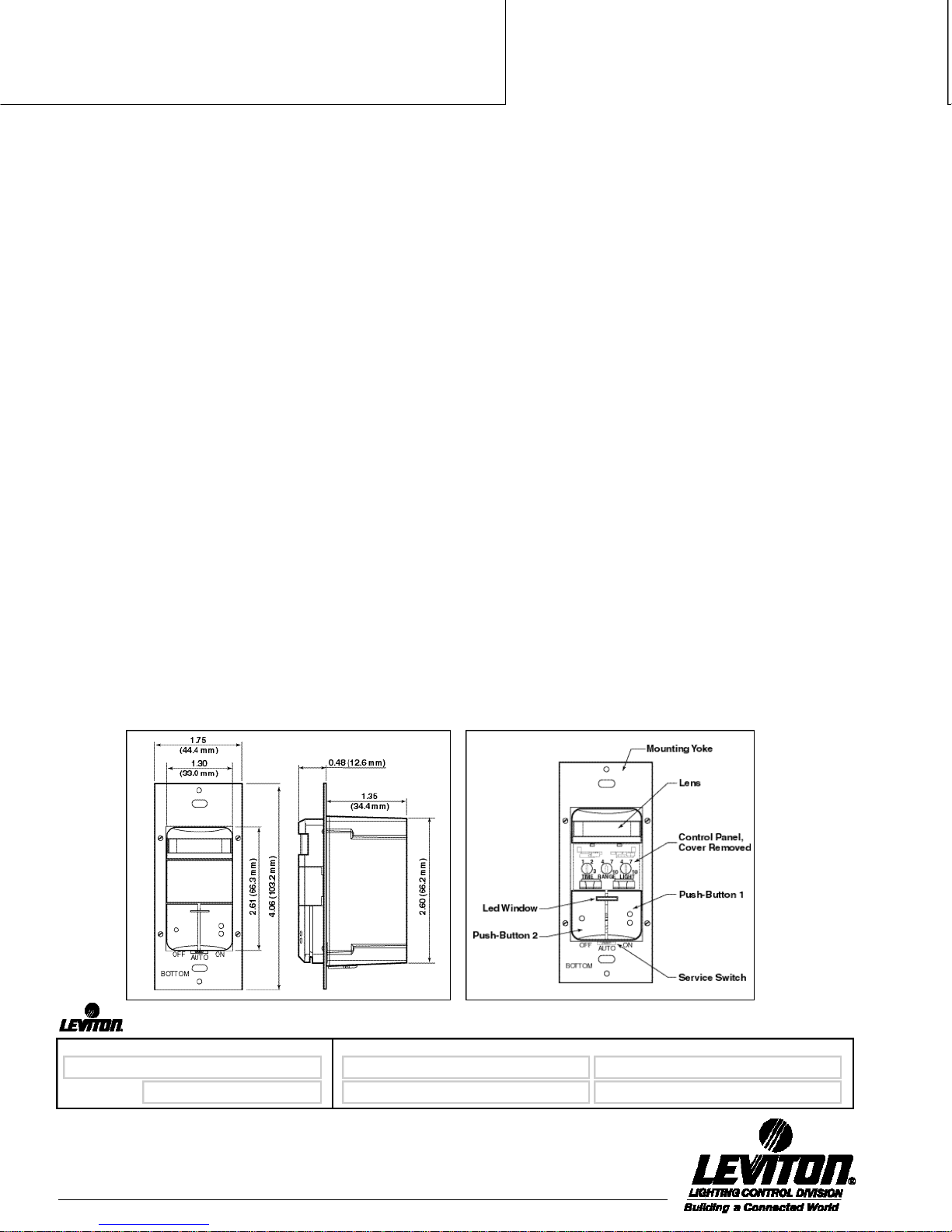
DIMENSIONAL DI A GRA MS
SPECIFICATION SUBMITTAL
CATALOG NUMBERS:
Leviton Mfg. Co., Inc.
59-25 Little Neck Pkwy • Little Neck, NY 11362-2591 • Tech Line: 1-800-824-3005 • Fax: 1-800-832-9538
4
Visit our Website at: www.leviton.com
Page 5

Product
Specifications
ODS0D-ID
.........................
CH A RT NO . 1 — OPERAT ION IN CONFERENCE ROOM MODE
Lighting status Ambient Light Room vacant, delayed-OFF Room vacant, delayed-OFF
during occupancy O v e r r i d e time expires. time expires.
1 Primary: ON Not Set Primary: ON Primary: ON
Secondary: ON Secondary: ON Secondary: ON
2 Primary: ON S e t Primary: ON Primary and Secondary remain OFF
Secondary: ON Secondary: ON due to light override
3 Primary: ON Not Set Primary: ON Primary: ON
Secondary: OFF Secondary: OFF Secondary: OFF
4 Primary: ON S e t Primary: ON Primary and Secondary remain OFF
Secondary: OFF Secondary: OFF due to light override
5 Primary: OFF Not Set Primary: OFF Primary: OFF
Secondary: ON Secondary: ON Secondary: ON
6 Primary: OFF S e t Primary: OFF Primary and Secondary remain OFF
Secondary: ON Secondary: ON due to light override
7 Both Primary and Not Set Primary: ON Primary: ON
Secondary turned Secondary: OFF Secondary: OFF
O FF for viewing
m o d e
8 Both Primary and S e t Primary: ON Primary and Secondary remain OFF
Secondary turned Secondary: OFF due to light override
O FF for viewing mode
Lighting status when personnel Lighting status when personnel
r e - e n ter darkened room r e - e n ter room with ample
natural lighting
Class Room Mode (Optional Setting)—In the ClassRoom Mode, the
O D S 0 D- ID does not switch the primary and secondary loads based on their
status before the last delayed-O FF time expired. In this mode, the Primary
Load ALWAYS switches ON, and the Secondary Load is controlled by the
Ambient Light Override. The ClassRoom Mode is intended for applications
where ambient light control of the Secondary Load only is desired.
This mode is ideal for classrooms, day care centers and other areas where
the primary lighting load should always be switched ON for the safety of
children and other personnel entering a room. In these applications, the
Primary Lighting Load provides sufficient lighting along with the natural
lighting in the room. The secondary relay remains OFF to generate energy
savings. If natural lighting is not sufficient, the secondary relay will also
switch ON.
The ClassRoom Mode Chart No. 2—Provides a complete summary of
how the ODS0D- ID performs in this mode.
In the ClassRoom Mode, the lighting status during the last period of
occupancy is not a factor. The Primary Relay will always turn ON when
personnel re-enter after the delayed-O FF time has expired, as shown in both
Numbers 1 and 2. Number 1 shows how the unit responds when the
Ambient Light Override has not been set: Both the Primary and Secondary
Loads turn ON when personnel re-enter after the delayed-O FF time has
e x p i r e d .
Number 2 shows how the unit responds when the Ambient Light Override
has been set, which is typically how the ClassRoom Mode is used. Wh e n
personnel re-enter the room and there is a sufficient level of natural lighting,
the Primary Relay will always switch ON, while the Secondary Relay
responds to the Ambient Light Override and remains OFF.
CH A RT NO. 2 — OPERAT ION IN CLASS ROOM MODE
Lighting status Ambient Light Room vacant, delayed-OFF Room vacant, delayed-OFF
during occupancy. O v e r r i d e time expires. time expires.
N OTE: Previous Lighting status when personnel Lighting status when personnel
status does not r e - e n ter darkened room r e - e n ter room with ample
in Class Room Mode natural lighting
1 Not applicable Not Set Primary: ON Primary: ON
2 * Not applicable S e t Primary: ON Primary: ON
*Example Number 2, with the Ambient Light Override set, is more typical of the ClassRoom Mode.
Secondary: ON Secondary: ON
Secondary: ON Secondary: OFF (Secondary responds
to light override
SPECIFICATION SUBMITTAL
JOB NAME:
JOB NUMBER:
Leviton Mfg. Co., Inc.
59-25 Little Neck Pkwy • Little Neck, NY 11362-2591 • Tech Line: 1-800-824-3005 • Fax: 1-800-832-9538
Visit our Website at: www.leviton.com
CATALOG NUMBERS:
5
Page 6
Product
Specifications
N o n - Adaptive Mode: In some installations, the Self-Adjusting
D e l a y e d -O FF Time and the 2-1/2 minute Wa l k -Through features may
not be required. For example, shelving or office dividers may part i a l l y
block the ODS0D- ID’s line of sight to personnel in the cer tain areas.
In this case, a longer delayed-O FF time would always be required
and the Wa l k -Through feature would not be appropriate. Setting the
unit for the “Non-Adaptive Mode” can disable these two features.
Refer to the Instruction Sheet enclosed with the ODS0D- ID to set the
device in the Non-Adaptive Mode.
M a n u a l -O N / A u t o -OFF Switching Mode: In this mode, lights will
never turn ON automatically when motion is detected. Lights can
only be turned ON manually by pressing the push-buttons. The lights
will remain ON as long as the unit detects activity in the sensor
zones.
The unit will shut lights OFF automatically after the space becomes
unoccupied and the delayed-O FF time expires. Lights can also be
turned OFF manually at any time by pressing the push-button. Th i s
mode is ideal for any area where manual ON switching is required
but automatic OFF switching is desired for energy savings. Note that
the Manual ON/Auto-O FF Switching Mode is used when the ODS0DID is in the Conference Room Mode only.
ODS0D-ID
.........................
INSTA L LAT ION :
The ODS0D- ID is designed to control two separate lighting loads (inner
and outer banks of fluorescent lighting or separate banks of incandescent
lighting) in the area it is monitoring. The photocell-controlled Ambient
Light Override is an important energy-saving feature that also distinguishes the functioning of the Conference Room and ClassRoom modes
(see “Operation Modes”). The Ambient Light Override should always be
adjusted during the time of day when the ambient light is at a level
where no additional lighting is required. Exclusive self-adjusting operating
features will automatically compensate for real-time occupancy patterns
to provide maximum convenience and energy savings.
The Cat. No. ODS0D- ID mounts in a standard single-gang wallbox and
will replace two single-pole wall switches that control two separate lighting loads. The unit must be properly grounded in order to operate. Th e
unit’s integral blinders may be used to restrict the field of view to prevent
unwanted detection of hallway traffic.
The ODS0D- ID should be positioned at least 4 feet away from HVAC
r e gisters. The switch located under the push-button provides three
operational setting: “ON” turns the lighting load ON indefinitely (motion
detection not active), “OFF” disconnects the lighting load from the
power for relamping purposes, and “A U TO” activates automatic motion
detection. Note that whenever the unit is powered up, it will take
approximately 1 minute to begin normal operation.
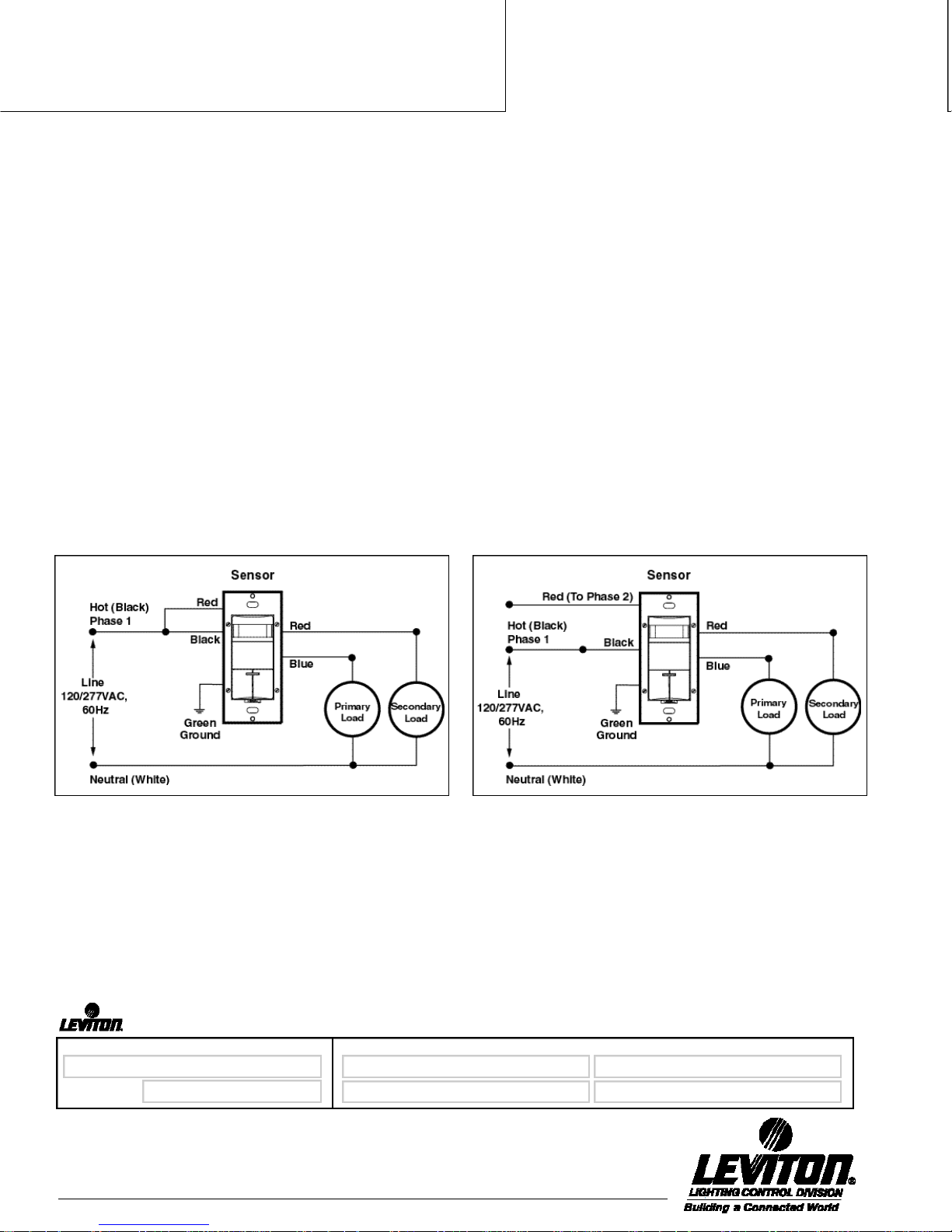
W IRING DI A GRA MS
Diagram 1
Cat. No. ODS0D- ID Wiring Diagram for Single Pole Application—Single Phase
Diagram 2
Cat. No. ODS0D- ID Wiring Diagram for Single Pole Application—2 Phase
SPECIFICATION SUBMITTAL
JOB NAME:
JOB NUMBER:
Leviton Mfg. Co., Inc.
59-25 Little Neck Pkwy • Little Neck, NY 11362-2591 • Tech Line: 1-800-824-3005 • Fax: 1-800-832-9538
6
Visit our Website at: www.leviton.com
CATALOG NUMBERS:
Page 7
Product
Specifications
PH YSICAL SPE CIFIC AT IONS
Operating Temperature Range . . . . 0°C to 50 ° C
Storage Temperature Range. . . . . . - 10°C to 85°C
Relative Humidity . . . . . . . . . . . . . . 20% to 90%
n o n - c o n d e n s i n g
A GENCY APPR O VA LS
C UL / US Cert i f i e d
Complies with California Title 24 Energy Code
Complies with FCC Regulations
ORDERING INFORM AT ION
Cat. No. Cat. No. Cat. No. Cat. No. D e s c r i p t i o n
I v o r y Wh i t e G r a y A l m o n d
O D S 0 D- ID I O D S 0 D- IDW O D S 0 D- ID G O D S 0 D- IDA Dual-Relay Decora
EL E CT RICAL RER QUIREMEN T S
Line Vo l t a g e 120 / 277 VAC
Operational Fr e q u e n c y 6 0 H z
Wire Designation Primary Relay— Secondary Relay—
No. 16 AWG leads: N0. 18 AWG isolated contact leads:
L i n e — B l a c k (2) Red
L o a d — B l u e
G r o u n d — G r e e n
Load Rating Primary Relay— Secondary Relay—
F l u o r e s c e n t : F l u o r e s c e n t :
120 0 VA @ 120 V 8 0 0 VA @ 120 V
270 0 VA @ 277 V 120 0 VA @ 277 V
I n c a n d e s c e n t : I n c a n d e s c e n t :
800W @ 120 V 800W @ 120 V
60Hz AC only 60Hz AC only
Wall Switch Occupancy
Sensor for 120 / 277 VAC
a p p l i c a t i o n s
ODS0D-ID
.........................
SPECIFICATION SUBMITTAL
JOB NAME:
JOB NUMBER:
Leviton Mfg. Co., Inc.
59-25 Little Neck Pkwy • Little Neck, NY 11362-2591 • Tech Line: 1-800-824-3005 • Fax: 1-800-832-9538
Visit our Website at: www.leviton.com
CATALOG NUMBERS:
7
Page 8

Product
Specifications
ODS0D-ID
.........................
SPECIFICATION SUBMITTAL
JOB NAME:
JOB NUMBER:
Leviton Mfg. Co., Inc.
59-25 Little Neck Pkwy • Little Neck, NY 11362-2591 • Tech Line: 1-800-824-3005 • Fax: 1-800-832-9538
8
Visit our Website at: www.leviton.com
CATALOG NUMBERS:
G-5520H/J2-eg
 Loading...