

Page 1
PRODUCT DATA
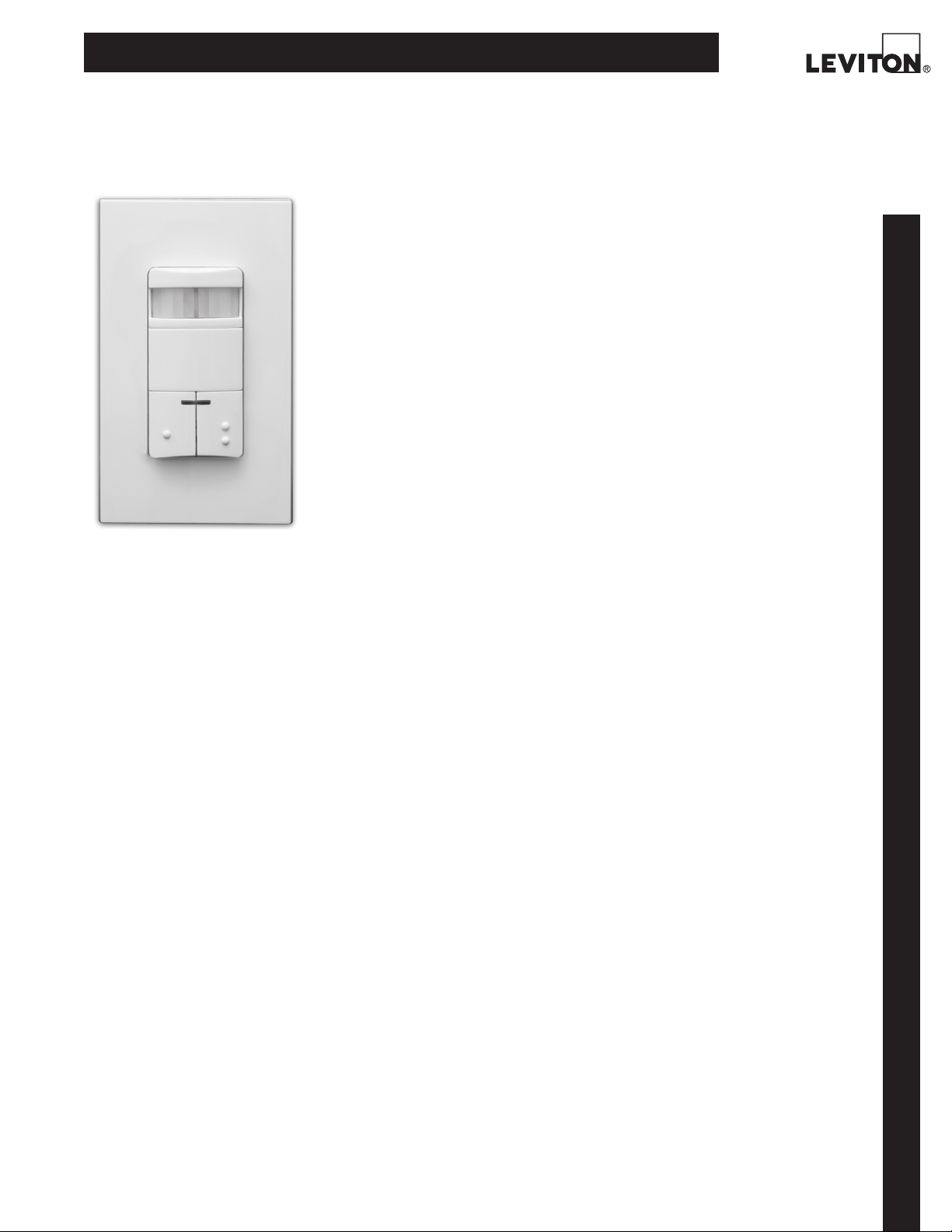
Dual-Relay Decora® Wall Switch
PIR Occupancy Sensor
FEATURES
• Provides automatic switching for two separate banks
of fluorescent, incandescent, or low-voltage lighting
from a single unit.
• Convenient dual pushbuttons provide manual-ON/
OFF light switching of each load at any time.
• ODSOD-ID Conference Room Mode—primary and secondary relays switch lighting to last ON/OFF status
when personnel enter room, providing a consistent
lighting level from one occupancy period to the next.
Both relays respond to Ambient Light Override, preventing lights from turning ON automatically during
periods of ample natural light, for increased energy
savings.
• ODS0D-ID Classroom Mode—both primary and secondary relays always switch lighting ON when per-
sonnel enter room, regardless of their ON/OFF status
during last period of occupancy. Secondary relay only
responds to Ambient Light Override—primary does
ODS0D-ID-TD
BASIC OPERATION
The ODS0D uses passive infrared (PIR) technology to
monitor a room for occupancy through a segmented
Fresnel lens. This specialized lens divides the field-ofview into sensor zones. When a person passes into or
out of a sensor zone, the sensor detects motion and
switches two separate lighting loads ON. The lights
will remain ON as long as there is an occupant moving
through the sensor zones.
The ODS0D-TD has an adjustable 30 minute time delay
setting for the first and second relay to comply with
CEC Title 24. The second relay is manual-ON only.
APPLICATIONS
Leviton’s ODS0D Dual-Relay Decora Wall Switch
Passive Infrared (PIR) Occupancy Sensor is used to
provide automatic lighting control for energy savings
and convenience in a variety of commercial applications, including:
• Classrooms • Conference rooms • Offices
• Multimedia rooms • Day care centers • Lounges
• Daylight harvesting
The ODS0D provides automatic switching of two separate lighting loads from a single unit. It is compatible
with incandescent, fluorescent and low-voltage lighting. The unit features dual manual-override switches
that can be used to toggle the ON/OFF status of each
lighting load while an area is occupied. The ODS0D can
be installed in place of two single-pole wall switches
and fits in a standard single-gang wall box. The unit
requires a ground connection for proper operation.
• Bi-level or A/B switching
not, ensuring that students and personnel never
enter a darkened room.
• Presentation Mode feature for slide or film presentations allows push buttons to turn lights OFF and keep
them OFF while the room is occupied.
• Auto adapting delayed-OFF time interval compensates for real-time occupancy patterns, preventing
unnecessary ON/OFF switching.
• Exclusive Walk-Through feature provides increased
energy savings by not leaving the lights ON for an
extended period after only momentary occupancy.
• Non-Adaptive Mode disables Self-Adjusting DelayedOFF Time and Walk-Through feature in applications
where these features are not desired.
• Daylight harvesting light sensor measures the ambient light in the room when it first detects motion. It
leaves the lights OFF if there is enough light in the
room or turns the lights connected to the first relay
ON if there is not enough light in the room.
• Low-profile design eliminates obtrusive “scanningdevice” look. Elegant Decora wallplates complement
any interior for sleek aesthetics; uses Decora wall-
plates and coordinates with Leviton’s popular line of
Decora wiring devices.
• 180° field-of-view provides approximately 2100
square feet of coverage, suitable for a variety of
commercial areas.
• Segmented Fresnel lens provides optimum sensitivity and performance. Designed with an extensive
“minor motion” area where even slight body movements will be detected.
• Patented blinders: horizontal field-of-view may be
adjusted between 180° and 60° arc by using integral
blinders located on either side of the lens. No mask-
ODS0D
continued …
Leviton Mfg. Co., Inc. Lighting & Energy Solutions
201 N. Service Rd. Melville, NY 11747-3138 Tech Line: 1-800-824-3005 Fax: 1-800-832-9538 www.leviton.com/les
© 2011 Leviton Manufacturing Co., Inc. All rights reserved. Subject to change without notice.
1
Page 2

PRODUCT DATA
ing tape required.
• Time delay adjustment for delayed-OFF time settings of
30 seconds, 5, 10, and 30 minutes. Allows customized
adjustments to maximize energy savings.
• Vandal resistant PIR lens.
• False detection circuitry.
• Light Sensor adjustable Ambient Light Override ranges
from approximately 2FC (20 LUX) to 500+FC (5000+ LUX).
• Manual-ON/auto-OFF mode for installations where manual-
ON switching is required but auto-OFF switching is still
desired for CEC Title T24 energy savings.
• To comply with CEC Title 24, red LED indicator light flashes
expires, then waits 10 seconds before turning lights OFF.
• One unit can be used for 120V through 277V lighting.
Compatible with both electronic and magnetic ballasts.
• Primary relay switches at the zero crossing point of the
AC power curve to ensure longer contact life and com-
patibility with electronic ballasts.
• Unit fits in standard single-gang wallbox and replaces
single-pole wall switches; ground connection required.
Gangable with other devices.
• Exclusive Leviton H.I.S. Circuitry. Specifically designed to
handle today’s high inrush electronic ballast loads and
offer unmatched durability and service.
when PIR sensor detects motion to verify detection is
active.
• Beep warn - unit beeps 3 times after delayed-OFF time
OPERATION IN CONFERENCE ROOM MODE (ODS0D-ID)
Lighting status Ambient Light Room vacant, delayed-OFF Room vacant, delayed-OFF
during occupancy Override time expires. time expires.
Lighting status when personnel Lighting status when personnel
re-enter darkened room re-enter room with ample
natural lighting
1 Primary: ON Not Set Primary: ON Primary: ON
Secondary: ON Secondary: ON Secondary: ON
2 Primary: ON Set Primary: ON Primary and Secondary remain OFF
Secondary: ON Secondary: ON due to light override
3 Primary: ON Not Set Primary: ON Primary: ON
Secondary: OFF Secondary: OFF Secondary: OFF
4 Primary: ON Set Primary: ON Primary and Secondary remain OFF
Secondary: OFF Secondary: OFF due to light override
5 Primary: OFF Not Set Primary: OFF Primary: OFF
Secondary: ON Secondary: ON Secondary: ON
6 Primary: OFF Set Primary: OFF Primary and Secondary remain OFF
Secondary: ON Secondary: ON due to light override
7 Both Primary and Not Set Primary: ON Primary: ON
Secondary turned Secondary: OFF Secondary: OFF
OFF for viewing
ODS0D
mode
8 Both Primary and Set Primary: ON Primary and Secondary remain OFF
Secondary turned Secondary: OFF due to light override
OFF for viewing mode
two
OPERATION IN CLASSROOM MODE (ODS0D-ID)
Lighting status Ambient Light Room vacant, delayed-OFF Room vacant, delayed-OFF
during occupancy. Override time expires. time expires.
NOTE: Previous Lighting status when personnel Lighting status when personnel
status does not re-enter darkened room re-enter room with ample
in Class Room Mode natural lighting
1 Not applicable Not Set Primary: ON Primary: ON
Secondary: ON Secondary: ON
2* Not applicable Set Primary: ON Primary: ON
Secondary: ON Secondary: OFF (Secondary responds
to light override
*Example Number 2, with the Ambient Light Override set, is more typical of the Classroom Mode.
Page 3
Hot (Black)
Phase 1
Neutra l (White)
ODS0D
Black
Green
Ground
Blue
Red
Red
Primary
Load
Secondary
Load
Note: Ground must be connected
Hot (Black)
Phase 1
Neutra l (White)
ODS0D
Black
Green
Ground
Blue
Red
Red
Primary
Load
Secondary
Load
Note: Ground must be connected
FIELD-OF-VIEW
TO P VIEW
SIDE VIEW
15 40
0
0
15
15
30
30
40
40
4
Minor Motion, IR
Major Motion, IR
5
0
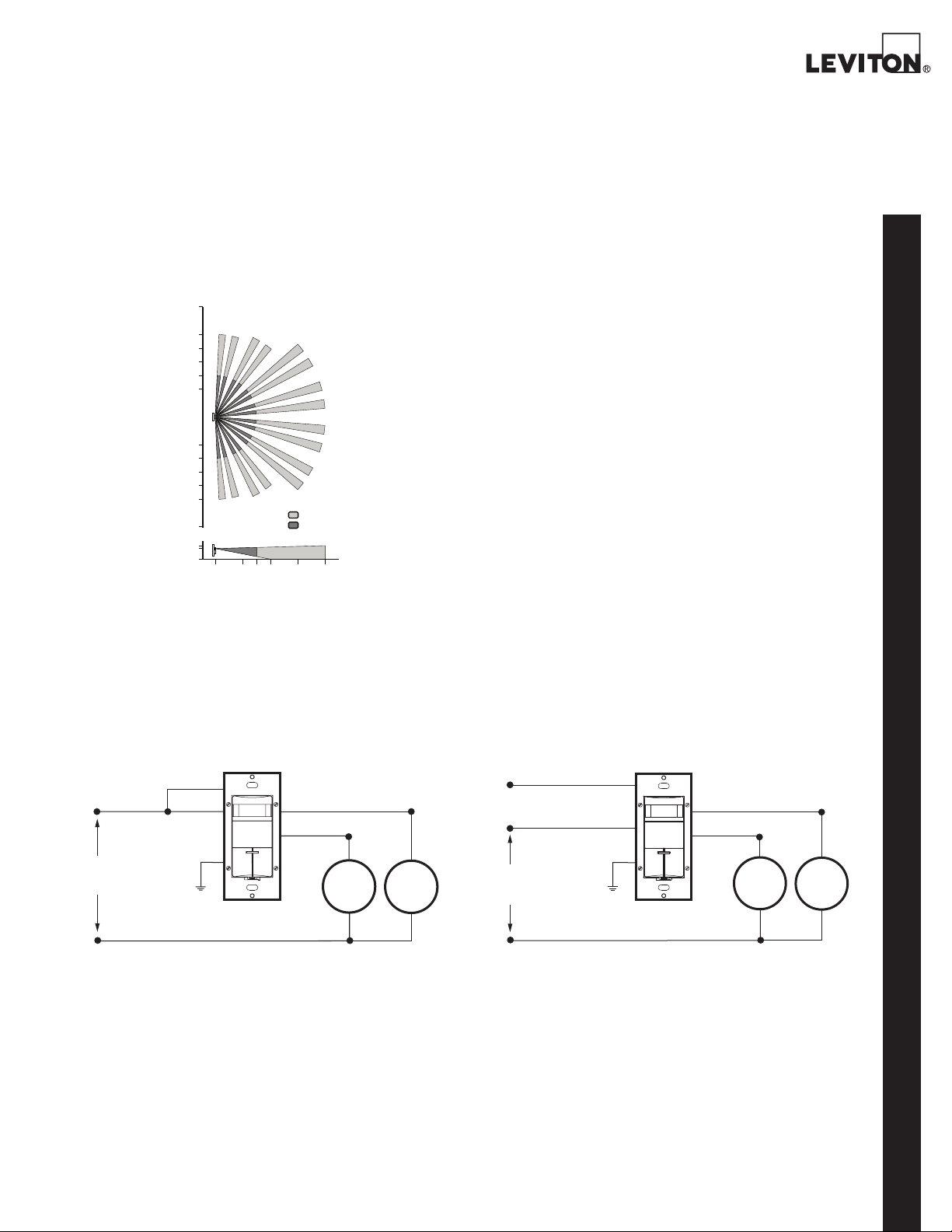
The ODS0D provides a 180° field-of-view with a maximum coverage area of approximately 2100 square
feet. The maximum sensing distance in front of the
sensor is 40 feet, and at each side is 30 feet. The
“minor motion” zone detects relatively small body
movements and allows the lights to stay ON even
though a person may not be moving or walking around
the room. The remainder of the field-of-view, the
“major motion” zone, exhibits a lesser degree of sensitivity and requires larger movements.
INSTALLATION
The ODS0D is designed to control two separate light-
ing loads for bi-level or A/B switching (inner and outer
banks of fluorescent lighting or separate banks of
incandescent lighting) in the area it is monitoring. The
light sensor Ambient Light Override is an important
energy-saving, daylight harvesting feature that also
distinguishes the functioning of the Conference Room
and Classroom modes (see “Operation Modes”). The
Ambient Light Override should always be adjusted
during the time of day when the ambient light is at a
level where no additional lighting is required. Exclusive
auto-adapting operating features will automatically
compensate for real-time occupancy patterns to provide maximum convenience and energy savings.
The ODS0D mounts in a standard single-gang wallbox
and will replace two single-pole wall switches that
control two separate lighting loads. The unit must
be properly grounded in order to operate. The unit’s
patented integral blinders may be used to restrict the
field of view to prevent unwanted detection of hallway
traffic. No masking tape required.
WIRING DIAGRAMS
Hot (Black)
Phase 1
Line
120-230-277VAC ,
60H z
Field-of-View (in feet)
ODS0D
Red
Black
Green
Ground
ODS0D-ID/-TD
Red
Blue
Major Motion, IR
Minor Motion, IR
Primary
Load
Secondary
Load
The ODS0D should be positioned at least 6 feet away
from HVAC registers. The switch located under the
push-button provides three operational settings: “ON”
turns the lighting load ON indefinitely (motion detec-
tion not active), “OFF” disconnects the lighting load
from the power for relamping purposes, and “AUTO”
activates automatic motion detection. Note that
whenever the unit is powered up, it will take approximately 1 minute to begin normal operation.
ODS0D
Red (To Phase 2)
Hot (Black)
Phase 1
Line
120-230-277VAC,
50/60Hz
Black
Green
Ground
Red
Blue
Primary
Load
Secondary
Load
ODS0D
Neutra l (White)
ODS0D-ID Wiring Diagram for Single Pole Application—Single Phase
Leviton Mfg. Co., Inc. Lighting & Energy Solutions
201 N. Service Rd. Melville, NY 11747-3138 Tech Line: 1-800-824-3005 Fax: 1-800-832-9538 www.leviton.com/les
© 2011 Leviton Manufacturing Co., Inc. All rights reserved. Subject to change without notice.
Neutral (White)
ODS0D-ID Wiring Diagram for Single Pole Application—2 Phase
3
Page 4
PRODUCT DATA
SPECIFICATIONS
ELECTRICAL
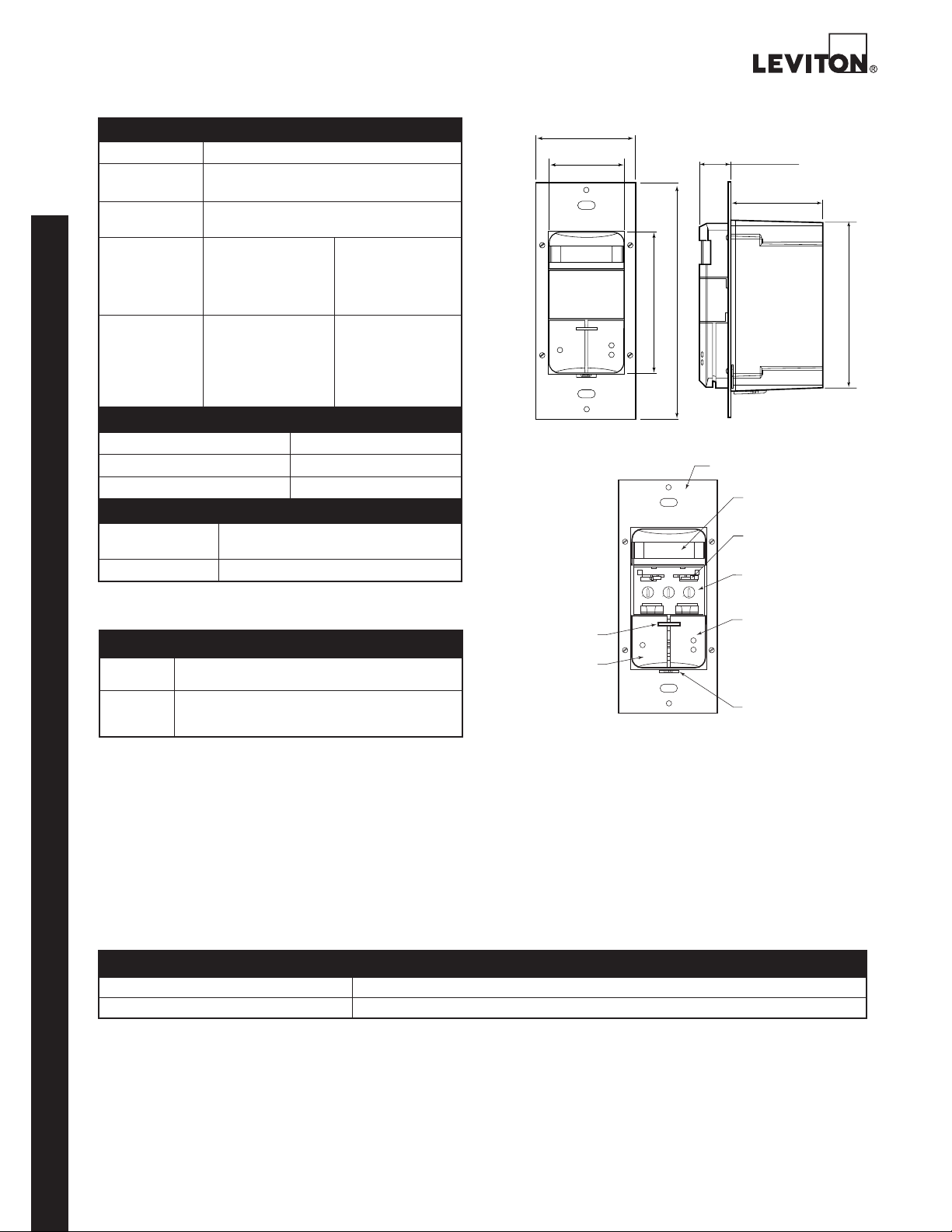
Line Voltage 120-230-277 VAC
Power
Consumption
Operational
120V - 110mW
277V - 270mW
50/60Hz
Frequency
Wire
Designation
Primary Relay—
No. 16 AWG leads:
Line—Black
Load—Blue
Secondary Relay—
N0. 18 AWG isolated
contact leads: (2)
Red
Ground—Green
Load Rating Primary Relay—
Fluorescent:
1200VA @ 120V
2700VA @ 277V
Incandescent:
800W @ 120V
Secondary Relay—
Fluorescent:
800VA @ 120V
1200VA @ 277V
Incandescent:
800W @ 120V
ENVIRONMENTAL
Operating Temperature Range 32°F to 122°F (0°C to 50°C)
Storage Temperature Range
-50°F to 185°F (-10°C to 85°C)
Relative Humidity 20% to 90% non-condensing
OTHER
Listings CUL/US Certified, CEC Title 24 Compliant
Warranty Limited Five-Year Warranty
FCC Compliant
ORDERING INFORMATION
CAT. NO.* DESCRIPTION
ODS0D-ID Dual-Relay Decora Wall Switch Occupancy Sensor
ODS0D-TD CEC Title 24 Compliant
* To indicate color, add suffix to the end of the catalog number.
ODS0D
White (-W), Ivory (-I), Light Almond (-T), Gray (-G), Ebony (-E), and Red (-R)
NAFTA and Made in USA models available.
for 120/277 VAC applications
Dual-Relay Decora Wall Switch Occupancy Sensor
for 120/277 VAC applications
DIMENSIONAL DIAGRAMS
1.75
(44.4 mm)
1.30
(33.0 mm)
2.61 (66.3 mm)
4.06 (103.2 mm)
OFF ON
AUTO
BOTTOM
4 7 4 7
1 2
3
TIME
RANGE
LED Window
& Light Sensor
Pushbutton 1
OFF
BOTTOM
AUTO
10 10
LIGHT
ON
0.48 (12.6 mm)
(34.4 mm)
Mounting Yoke
Vandal Resistant
PIR Lens
Patented Blinders
Control Panel,
Cover Removed
Pushbutton 2
Service Switch
1.35
2.60 (66.2 mm)
SPECIFICATION SUBMITTAL
JOB NAME: CATALOG NUMBERS:
JOB NUMBER:
Leviton Manufacturing Co., Inc. Lighting & Energy Solutions
201 N. Service Rd. Melville, NY 11747-3138 Tech Line: 1-800-824-3005 Fax: 1-800-832-9538 www.leviton.com/les
Leviton Manufacturing of Canada, Ltd.
165 Hymus Boulevard, Pointe Claire, Quebec H9R 1E9 • Telephone: 1-800-469-7890 • FAX: 1-800-563-1853
Leviton S. de R.L. de C.V.
Lago Tana 43, Mexico DF, Mexico CP 11290 • Tel. (+52) 55-5082-1040 • FAX: (+52) 5386-1797 • www.leviton.com.mx
Visit our Website at: www.leviton.com/les
© 2011 Leviton Manufacturing Co., Inc. All rights reserved. Subject to change without notice.
G-8318A/K11-tb
REV NOV 2011
 Loading...