

Page 1
EXT-100-Main
Fast Ethernet and PoE+ (Up to 30 W) over UTP
EXT-100-Main
• Paired with EXT-100-Remote
• Up to 30 W PoE
• Local power option
• IEEE compliant
EXT-100-Main Extender Applications
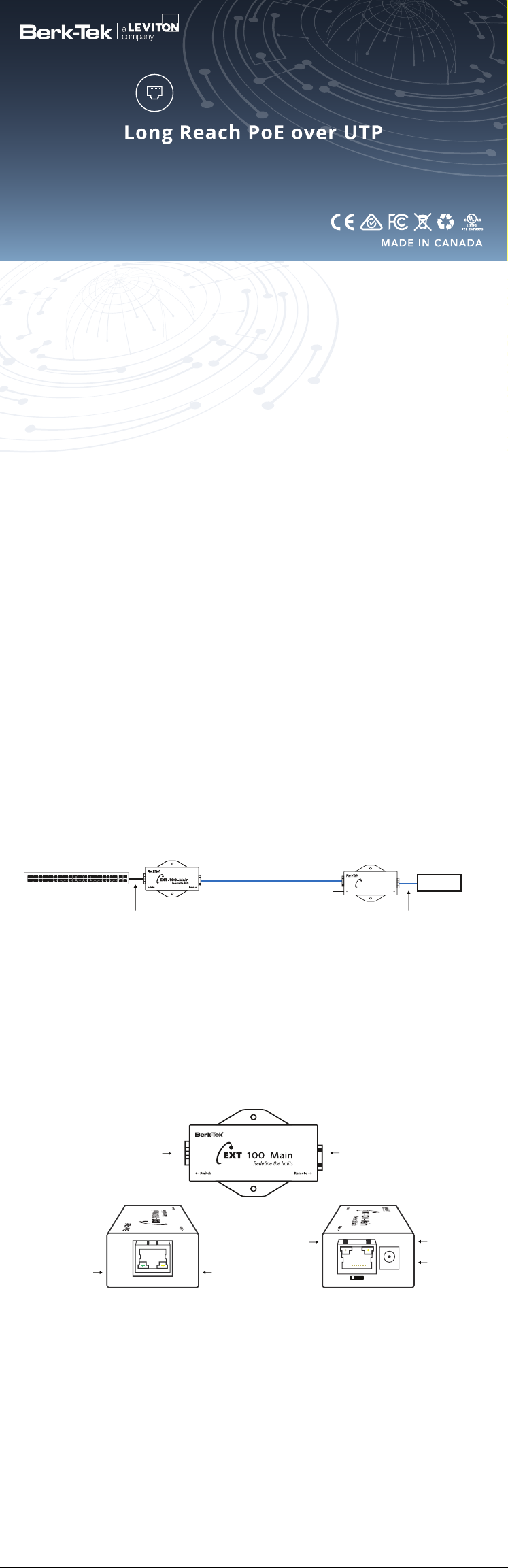
The EXT-100-Main Extender Solution is designed to supercharge the downlink ports of a
standard Ethernet switch delivering 10/100 Mbps symmetrical (full duplex) and PoE over
four-pair UTP infrastructure with distances up to 2,000 ft (610 m). The EXT-100 offering is
designed specifically to enable easy deployment over UTP for reaches beyond that of
standard Ethernet eliminating the costs and disruption associated with IDF closet
requirements.
10/100 Mbps (full duplex, symmetrical) & PoE+ over UTP with 2,000 ft (610 m) reach.
*
Four-Pair UTP Cable
up to 2,000 ft (610 m)
Local Power Option
EXT-100-Remote
EXT-100-Remote
Redene the limits
Main Device
The max length supported
between the EXT-100-Remote
and the Device is 328 ft
(100 m)
DEVICE
Standard PoE Switch
SFP 1
SFP+1
3519117151713212319272925333531394137454743
SFP+2
SFP 2
32404238464844
462101281618142224202830263436
EXT-100-Main
The max length supported
between the EXT-100-Main
and the PoE Switch is 328 ft
(100 m)
EXT-100 max. power 30 W
*EXT-100-Main can be powered locally for use with non-PoE switches.
EXT-100-Main Quick Install Guide
To Switch
Link/Speed
Green:
100Mbps
Link Activity
ACTLNK
TO SWITCH
Orange:
10Mbps
1. Remove the EXT-100-Main from its packaging.
2. Must ensure cable is properly terminated before connecting any EXT-100 product.
3. Remove all legacy equipment from the UTP cable infrastructure.
NOTE: In order to avoid damage to devices, it is important that only IP devices are connected when you
connect the EXT-100-Main.
4. Connect EXT-100-Main (Switch side) to downlink port on switch.
5. Connect the Network Infrastructure cable from the EXT-100-Main (Remote side) to EXT-100-Remote (Main
side)
6. Using Cat 5e or higher category cable, connect the device to the EXT-100-Remote (Device side).
NOTE: Berk-Tek recommends using LANmark IP (22AWG) or higher for indoor applications; LANmark-6 OSP,
LANmark-1000 OSP, or LANmark-10G OSP should be used for outdoor applications.
The EXT-100-Remote must be installed either indoors or in a NEMA rated box appropriate for the installation
environment.
Installations must be compliant with the requirements of the local authority having jurisdiction.
1-800-BERK-TEK (1-800-237-5835) | +1-717-354-6200
www.leviton.com/ns
To Remote
(EXT-100-Remote)
LNK
100 GR
ACT
37-55V
10 GR
TO REMOTE
SPD
Copyright 2019 Berk-Tek LLC.
Activity
37-55V
DC IN
445-0028-A
Page 2

Technical Specifications
Model EXT-100-Main
Part Number EXT-100-Main
Dimensions
Weight 3.74 oz. (106 g)
Interface:
Network
Infrastructure
side (LRE)
Interface: IEEE
Side (IP Device)
Power Supply
Power
Consumption
• 3.46” x 1.97” x 0.98” (LxWxH);
• 8.8 cm x 5.0 cm x 2.5 cm (LxWxH)
1 RJ45 port: UTP/FTP four-pair cable
(For General/PoE Switch) 1 RJ45 port:
supports negotiation with IEEE 802.3 af/at
switches
PoE from standard PoE switch or external
power supp
1.5 W
ly; max
imum 30 W
Humidity 10% to 95% (non-condensing) at 35°C
Optional (sold separately)
48-56 VDC via an external AC/DC Power
Adapter (IEC Class II isolated only)
DC IN
Operating
temperature
Mean Time
Before
Failure
(MTBF)
NOTE 1: Local power supply used must have
its output isolated from Earth potential.
NOTE 2: If voltage of local power supply is
lower than the power voltage provided from
the PoE switch, then power on the PoE switch
should be turned off
0ºF to +158ºF (-40ºC to +70ºC)
-4
Tests conducted against international
safety standard at maximum ambient
temperature of 60ºC at 30 W
20+ years
Note the following:
All of the above instructions provide basic installation information necessary for the proper and safe
functioning of this equipment. Persons installing or maintaining this product must read all of the safety
instructions, which are applicable to the system being maintained. Only trained, qualified service
personnel shall install or maintain this product.
WARNING: FAILURE TO FOLLOW ALL INSTRUCTIONS MAY RESULT IN IMPROPER EQUIPMENT OPERATION
AND/OR RISK OF ELECTRICAL SHOCK.
WARNING: ANY CONNECTION TO AN OUTSIDE PLANT LEAD, AN OFF-PREMISE APPLICATION, OR ANY OTHER
EXPOSED PLANT APPLICATION MAY RESULT IN A FIRE OR SHOCK HAZARD, AND/OR DEFECTIVE OPERATION,
AND/OR EQUIPMENT DAMAGE.
• Keep these instructions with the equipment.
• Do not attempt to install or service this equipment unless you are skilled in the installation and
maintenance of electronic telecommunications equipment and have successfully completed specific
training for this equipment.
Safety Warnings, Precautions, Compliance and Environmental Information
• CAUTION, Hot surface
• ATTENTION, Surface chaude
• VORSICHT, Heiße Oberfläche
• PRECAUCIÓN, Superficie caliente
• VAROITUS, Kuuma pinta
• VOORZICHTIGHEID, Heet oppervlakte
• VARNING, Varm yta
• ADVARSEL, Varm overflade
All safety warnings and precautions in addition to compliance and environmental information is
available on our website www.leviton.com/ns.
• ΠΡΟΣΟΧΗ, Καυτή επιφάνεια
• ATTENZIONE, Superficie calda
• CUIDADO, Superfície quente
• ATTENZJONI, Wiċċ sħun
• ETTEVAATUST, Kuum pind
• VIGYÁZAT, Forró felület
• PREVIDNOST, Vroča površina
• POZOR, Horký povrch
• ATSARGIAI, Karštas paviršius
• UZMANĪBU, Karstā virsma
• POZOR, Horúci povrch
• VARÚÐ, Heitt yfirborð
• PRZESTROGA, Gorąca powierzchnia
• FORSIKTIG, Varm overflate
• PRUDENȚĂ, Suprafata fierbinte
Power & Distance
PoE Level Max Supported Distance between the Main and Remote
IEEE 802.3af (PoE) 2000 ft (610 m)
IEEE 802.3at (PoE+) 1250 ft (380 m)
Distances assumes a
4-Pair category cable between the main and remote at 20°C. From the
remote, a full 100 meters to the device. For other installation configurations, please go to
www.leviton.com/ns.
Support and Warranty
Technical Support
The Berk-Tek TEK Support group is available to assist you with product installation,
configuration, monitoring, and troubleshooting procedures. Should you experience
trouble with this equipment or need repair/warranty information, please contact TEK
Support at 1-800-BERK-TEK or directly through email at berktek.support@leviton.com.
Warranty: The EXT-100 adapters are backed by Berk-Tek's customer support and a three
(3) year warranty.
1-800-BERK-TEK (1-800-237-5835) | +1-717-354-6200
www.leviton.com/ns
Copyright 2019 Berk-Tek LLC.
445-0028-A
 Loading...