

Page 1
VPT24
Programming Guide
Pro Mode provides up to 50 ON/OFF events for any day or combination of days, M-Su, M-F, or Sa-Su at
desired fixed times or self adjusting Sunup and Sundown times. In this mode self adjusting Daylight
Savings Time and random modes are also available.
Do you have a California-exclusive model VPT24?
If you're unsure, press 3 times until RND displays, then press . '6 Hr' will display on California-exclusive models.
To exit programming at any time press override button -
MENU
To program your device:
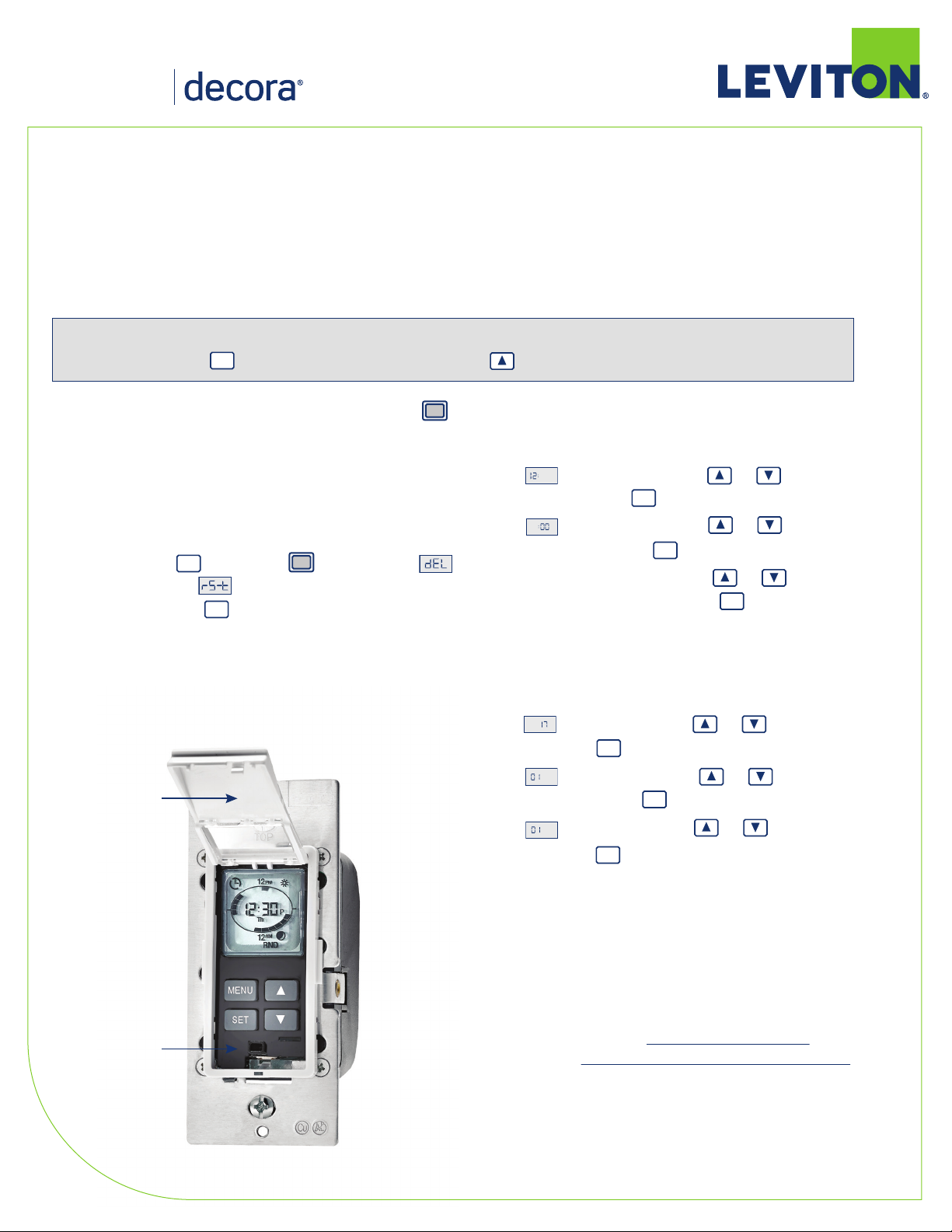
a) Perform a System Reset by gently lifting the VPT24 door
from the bottom of the push pad until an audible click is
heard. The door will stay open while you are
programming the device:
b) Press and hold followed by (Override) until
SET
stops flashing and flashes (approximately
10 seconds). Press to confirm device Reset.
SET
c) Product will go through a brief self test.
Door held open
1. Setting up the Time and the Date:
A
a) will be flashing. Press or to select the
hour and press to confirm your choice.
A
b) will be flashing. Press or to select the
minutes and press to confirm your choice.
SET
SET
c) A or P will be flashing. Press or to select A
for AM or P for PM and press to confirm your choice.
SET
NOTE: Daylight Savings Time shall start at 2am on the
second Sunday of March (add one hour) and end at 2am
on the first Sunday of November (subtract one hour).
d) will be flashing. Use or to choose the year
and press to confirm your choice.
e) will be flashing. Use or to choose the
month and press to confirm your choice
f) will be flashing. Use or to choose the date
and press to confirm your choice. The day of week
will automatically adjust.
SET
SET
SET
Override button
2. Programming your Timer Options:
a) Setting Sunup, Sundown, desired Oset Time and
Time Zone: Sunup and Sundown are automatically
adjusted using the latitude and longitude
coordinates of your location. To obtain these
coordinates go to www.leviton.com/VPT24 and
click on Longitude/Latitude Coordinates Lookup...
Type in your home address and press enter. Your
latitude (N) and longitude (W) coordinates will be
shown on the screen. Write down only the 2 or 3
digit number. Disregard a negative symbol (–) if it
precedes the number.
Page 2
The time zones are limited to the North American Continent. The options
you are presented are determined via your longitude in the chart below:
Longitude
60° – 80°
81° – 95°
96° – 110°
111° – 135°
136°-143°
144°+
- On your timer press 4 times until SUN appears at the
bottom right of the screen and press to confirm your choice.
- Use or to choose your latitude (N) and press to
TIME ZONE CALCULATIONS
Time Zone
Eastern
Eastern, Centra l
Central, Mountain
Mountain, Pacific, Alaskan
Pacific, Alaskan, Hawaii-Aleutian
Alaskan, Hawaii-Aleutian
MENU
SET
SET
confirm your choice.
- Use or to choose your longitude (W) and press
SET
to confirm your choice.
- will be flashing to represent the oset time.
Choose the amount of time, if any, to turn the load ON/OFF
before or after Sunup and Sundown by pressing to add
time to the Sunup/Sundown time and use to subtract
time from the Sunup/Sundown time. Press to confirm your
SET
choice (up to 3 hours and 59 minutes).
- will appear. The time zone closest to the coordinates you
entered will flash. Press if this is correct. If this is not
SET
correct use or to choose your time zone and press
to confirm your choice.
12
PM
Event
MTWThFSaSu
AM
12
- All days of the week will be flashing. Press to choose
SET
all days of the week or use or to scroll through
M-F, Sa-Su, any single day or combination of days.
NOTE: To choose a combination of days press after
SET
each day you want and then move on to the next day by
pressing or . Continue to scroll using until PRG
flashes.
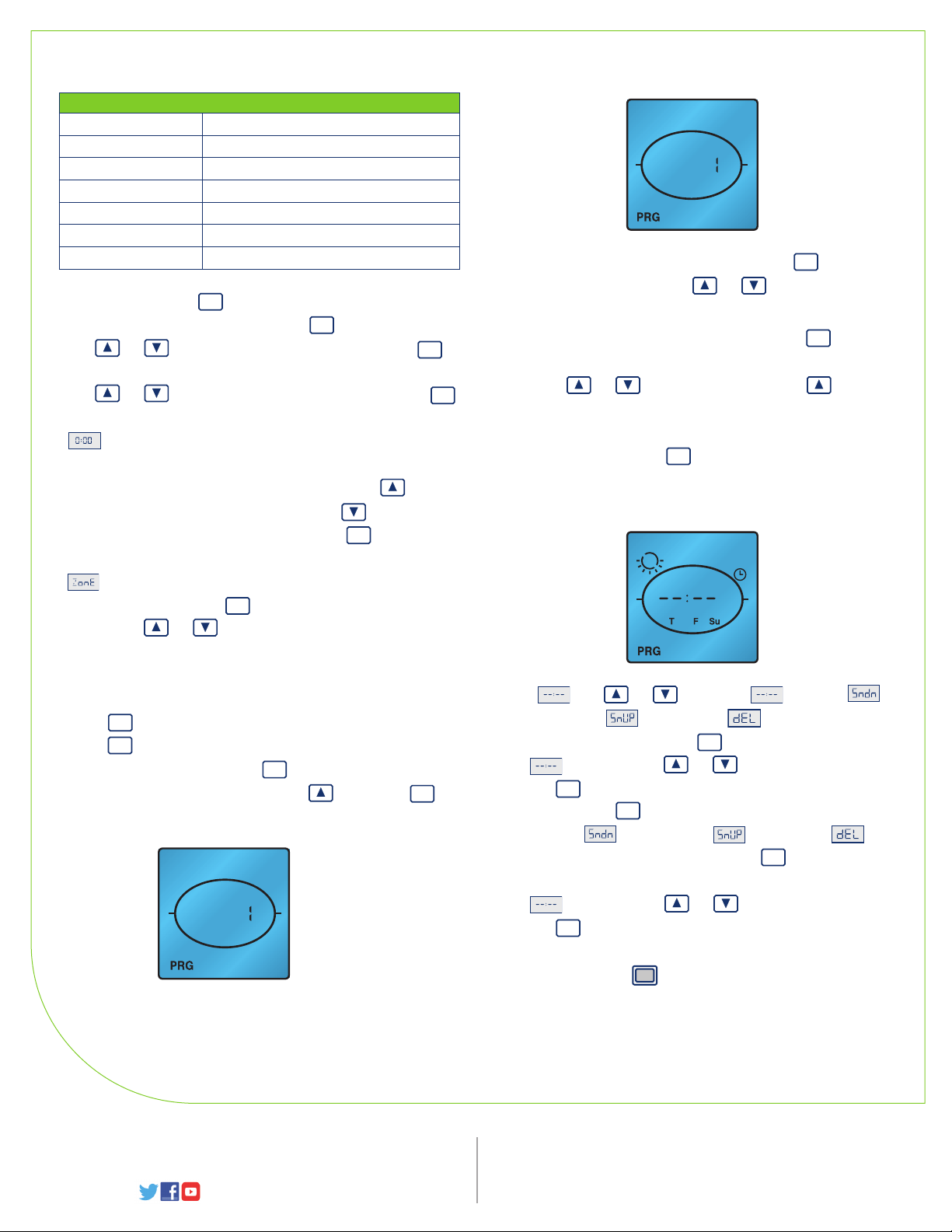
- When done choosing the desired days PRG in the lower left
corner will flash. Press to confirm the chosen
SET
days and continue on to choosing the event TURN ON TIME.
12
PM
Event
AM
12
Setting ON/OFF Events:
- Press until PRG is in the lower left corner.
Press to enter the programming mode.
- Event 1 will be flashing. Press to choose this event or use
to move to the next event and press to confirm
MENU
SET
SET
SET
your event number choice.
12
PM
Event
AM
12
Visit our Website at: www.leviton.com
© 2017 Leviton Manufacturing Co., Inc. All rights reserved.
All trademarks are the property of their respective owners.
- At use or to choose for time,
for Sundown, for Sunup or to delete an
existing program and press to confirm your choice.
SET
- If is chosen, use or to choose the hour and
press to confirm your choice. Do the same for minutes.
- At 6:00P press to choose a TURN OFF TIME or use or
SET
SET
to choose for Sundown, for Sunup or to
delete an existing program and press to confirm your
SET
choice.
- If is chosen, use or to choose the hour and
press to confirm your choice. Do the same for minutes.
SET
- Continue to set desired events in the same manner. When
this is done press to escape out of programming. If no
buttons are pressed after approximately 30 seconds the
device will automatically exit out of programming mode.
Leviton Manufacturing Co., Inc. World Headquarters
201 North Service Road, Melville, NY 11747-3138
Telephone: 1-800-323-8920 FAX: 1-800-832-9538
Tech Line (8:30AM-7:00PM E.T. Monday-Friday): 1-800-824-3005
 Loading...