

Page 1
Getting Started Guide
WEB VERSION
ANYWHERE DIMMER COMPANION
Wire-free multi-location control
Cat. No. DAWDC
Easy Wi-Fi lighting
control for the
whole home
See the complete line of My LevitonTM app compatible
dimmers, switches, plug-ins, and controllers at
leviton.com/decorasmart
Welcome
The Decora Smart Anywhere
Dimmer Companion pairs directly
with your Decora Smart Wi-Fi 2nd
Generation Dimmer or Mini Plug-In
Dimmer to provide additional
lighting control wherever you need
it. Mount it directly on your wall
surface or at an existing wall box—
no wiring required.
The Anywhere Dimmer Companion
looks right at home with your other
Decora Smart Wi-Fi devices and
features familiar on/off and dim/
bright controls.
Anywhere Companion devices do
not require Wi-Fi or an app
for setup.
We are here to help
ONLINE
decorasmartsupport.leviton.com
EMAIL
CHAT
www.leviton.com/contact
CALL
1-8 00- 824 -30 05 ( USA )
1-800-405-5320 (Canada)
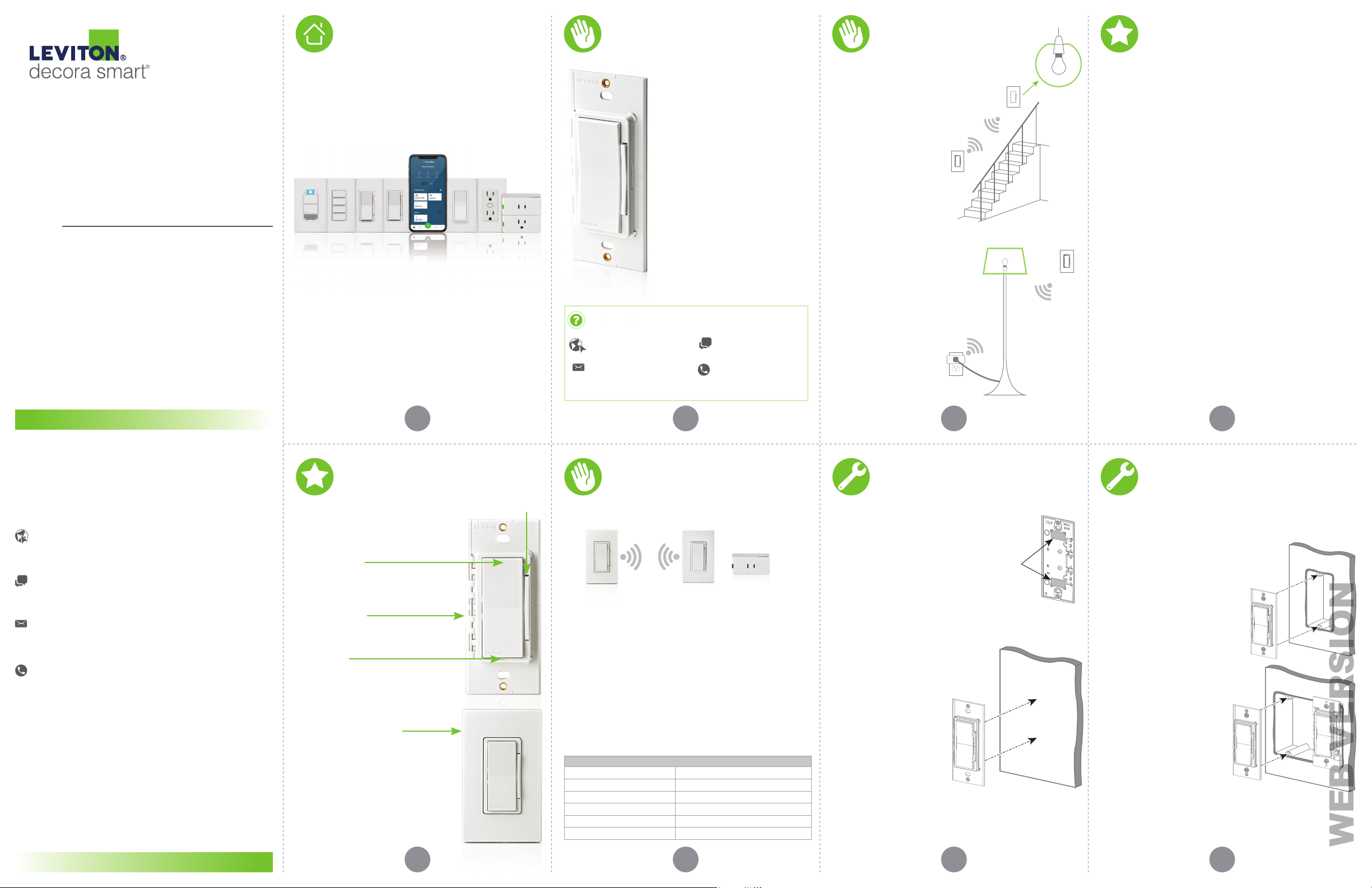
Ease of use
• Pair the Anywhere Dimmer
Companion with a Decora
Smart D26HD Dimmer for
additional on/off and dim/
bright control where you need
it most like at the base of a
staircase or end of a hallway.
DAWDC
• Pair the Anywhere Dimmer
Companion with a Decora Smart
D23LP Mini Plug-In Dimmer to add
on/off and dim/bright control of
floor lamps to any indoor
wall surface.
Quick tip: Up to three Decora
Smart Anywhere Companions
can be paired to a Decora
Smart Wi-Fi 2nd Gen device.
D23LP
D26HD
TO LIGHT
DAWDC
Features
• Place it anywhere you need additional
lighting control:
• Create 3-way/multi-way control with
no wiring.
• Mount directly to your wall surface or
install at an existing wall box where a
traveler wire may not be present.
• Classic Decora style.
• No Wi-Fi or app required for setup.
• Fits Leviton Decora standard and screwless
wallplates (single and multi-gang).
• 5 year battery life. Replaceable CR2025
batteries included.
• Pair up to three Anywhere Companions with
a Decora Smart Wi-Fi 2
For more information and features visit:
leviton.com/decorasmart
nd
Gen device.
If you need help...
ONLINE
decorasmartsupport.leviton.com
CHAT
www.leviton.com/contact
EMAIL
CALL
1-800-824-3005 (USA)
1-800-405-5320 (Canada)
Leviton Manufacturing Co., Inc.
201 North Service Road, Melville, NY 11747
© 2021 Leviton Manufacturing Co., Inc. All rights reserved.
Specifications subject to change at any time without notice.
DI-000-DAWDC-02A
1 2 3 4
At a glance
Dim/bright bar
Tap to manually adjust light levels.
Decora Rocker
• Press the top to turn the light ON.
• Press the bottom to turn the light OFF.
• Double press the top to turn ON at
max brightness.
Mounting Base
• Easily mount to the wall surface or
install in a single or multi-gang
wall box.
Status LED
• Shows pairing and
connectivity status.
• Off during normal operation.
Matching Decora style
• Shallow product depth matches
your in-wall Decora devices
when installed for a
seamless look.
• Fits Leviton Decora standard
and screwless wallplates.
Your Anywhere Dimmer
Companion works with:
• Decora Smart Wi-Fi 2nd Generation devices:
DAWDC
Anywhere Dimmer
Companion
• Visit Leviton.com/decorasmart for product
compatibility updates.
NOTE:
• Anywhere Companion devices are battery powered and
pair with Wi-Fi 2nd Generation devices using wireless RF
technology for communication.
• Anywhere Companions do not connect directly to the
load/lights. A line powered primary Wi-Fi 2nd Gen Device or
Mini Plug-in is required (sold separately).
• Do not use with metal wallplates.
• For indoor use only.
SPECIFICATIONS
Operating Temp 0°C - 40°C (32°F - 104°F)
ating Humidity 0 - 90% non-condensing
Oper
Storage Temperature Range -10°C - 85°C
Batteries CR2025 (2)
Network 2.4GHz
Range 50 ft.
D26HD
Dimmer
D23LP
Mini Plug-In
Dimmer
Installation
Mounting on a wall surface:
1. Select a clear wall surface within a 50 ft.
range of the primary Decora Smart Wi-Fi
2nd Gen device.
2. Place included adhesive tape on the reverse
side of the Anywhere Companion; align the
top and bottom pieces of tape with the
corner markings molded into the base.
Back View
3. Take note of the TOP and WALL
SIDE markings on the back of
the device and gently affix the
Anywhere Companion to the
wall surface using the adhesive
tape. Make sure the
device is securely held
in place and level.
Front View
If at any time you are unsure about the installation
process, contact Leviton technical support or
consult an electrician.
Installation
WARNING: TO AVOID FIRE, SHOCK OR DEATH,
turn off power at the circuit breaker.
Installing at the wall box:
To install in a standard NEMA electrical box in
single-gang or multi-gang installations:
1. Take note of the TOP marking on the
reverse side of the Anywhere Companion.
2. Turn off power at the circuit
breaker during installation.
Line up the Anywhere
Companion with the screw holes
in the desired location at the
wall box. Make sure the location
is within a 50 ft. range of the
primary Decora Smart Wi-Fi
nd
2
Gen device.
3. Screw in the Anywhere
Companion to the wall box
via the innermost screw
holes using the included
wall box screws. Tighten the
screws until snug. Do not
overtighten screws.
NOTE: Installation in a metal wall box can weaken the RF
signal and reduce wireless range.
If at any time you are unsure about the installation
process, contact Leviton technical support or
consult an electrician.
65 7 8
Page 2
Powering up
WEB VERSION
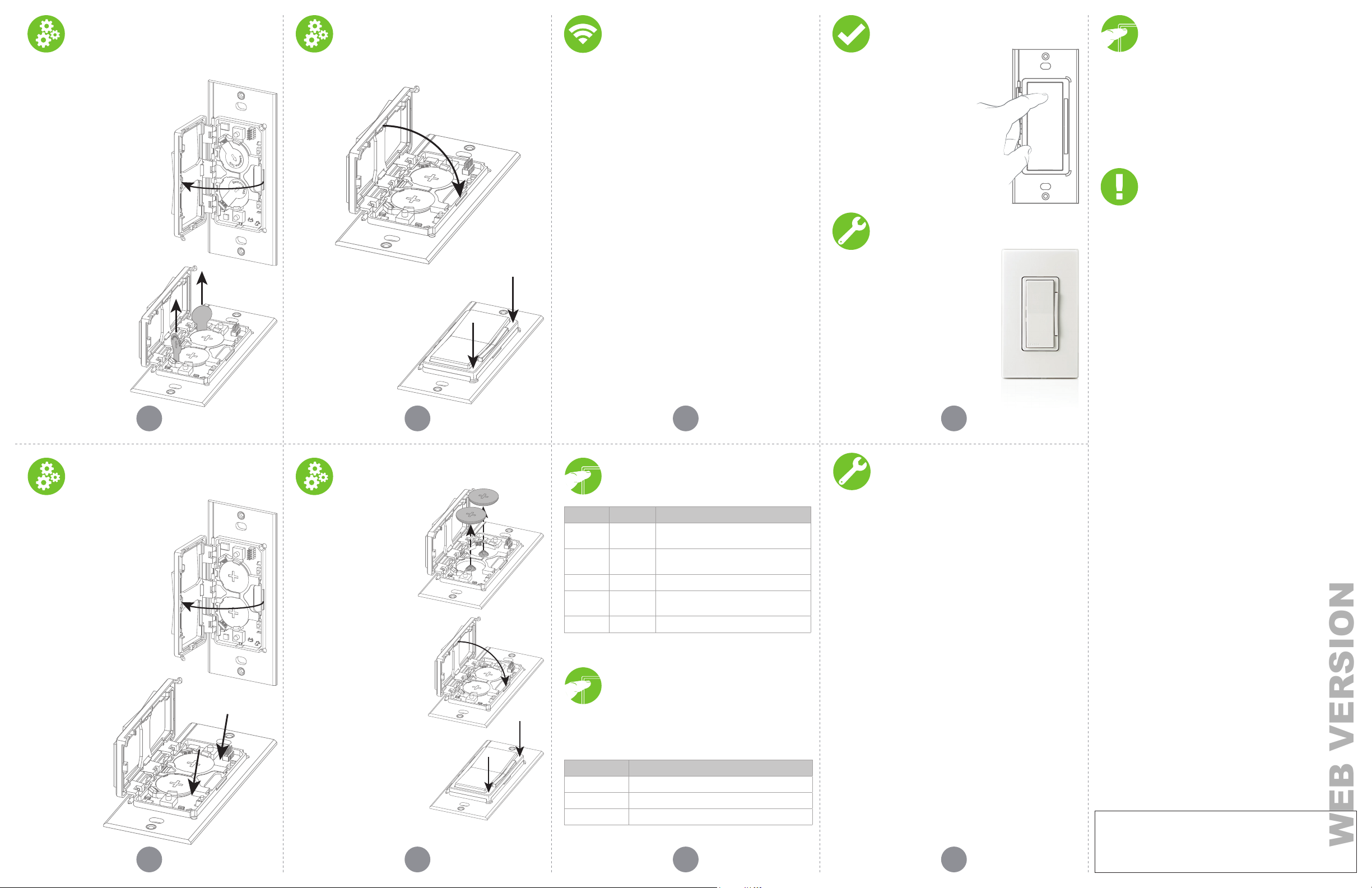
Powering up
(continued)
Pairing
Test control
Factory default reset
The Anywhere Companion comes with
two CR2025 batteries already installed.
1. To power up the Anywhere
Companion, place your finger
on the indent in the base.
2. Open the device by rotating
the frame gently to the left
using the hinge.
3. Grasp each pull tab
by the circular portion
and pull up to remove.
Remove both pull tabs
(each battery). This will
activate power and put
the Anywhere Companion
into Pairing Mode.
The Status LED will
begin flashing GREEN.
4. Close the device by rotating the frame gently to the right
using the hinge.
5. Press down firmly in the corners
until the device snaps closed.
Follow the below steps to pair the Anywhere Companion with
its primary Decora Smart Wi-Fi 2nd Gen device.
Activate and pair one Anywhere Companion at a time.
1. Make sure the Anywhere Companion is in pairing mode
and its Status LED is blinking green.
NOTE: If not paired after 10 minutes, the Anywhere
Companion will enter a standby state to preserve battery life.
To place it back into pairing mode, single press the top rocker
5 times. The Status LED will begin flashing GREEN.
nd
2. Place the primary Decora Smart Wi-Fi 2
Gen Device into
Pairing Mode:
• For in-wall devices press the top rocker 5 times.
• For plug-in devices press the control button 5 times.
• The Status LED will flash green/amber when in
pairing mode.
nd
3. The Decora Smart Wi-Fi 2
Gen device will automatically
pair to the Anywhere Companion in pairing mode in
wireless RF range. Once paired, the Anywhere Companion’s
Status LED will briefly turn solid GREEN to show a
successful connection.
NOTES:
• The primary Decora Smart Wi-Fi 2
nd
Gen device pairs
one Anywhere Companion at a time. To pair up to three
Anywhere Companions, place the primary Decora Smart
Wi-Fi 2nd Gen device back into Pairing Mode and restart the
process with the next Anywhere Companion.
Once the Anywhere Companion
device has been installed and
successfully paired to its primary
Decora Smart Wi-Fi 2nd Gen
device, test control by pressing the
Anywhere Companion’s rocker ON
and OFF to toggle the load.
Attach the wallplate
1. Attach the screwless wallplate
mounting bracket by screwing into
the outermost screw holes.
Tighten screws until snug—do
not overtighten.
2. Snap on the Decora screwless
wallplate.
NOTE: Anywhere Companions are
compatible with Leviton Decora
standard and screwless wallplates in
single and multi gang configurations.
Congratulations! You have successfully setup
your Anywhere Dimmer Companion!
1. Hold the top of the Decora Rocker for 14 seconds.
2. After the first 7 seconds the status light will turn AMBER.
Continue to hold.
3. After 7 more seconds, the status light will quickly flash
RED/AMBER.
4. Release the top of the Decora Rocker and the device will
reset. This will remove all pairing associations.
Safety first
WAR NINGS :
• Thi s product is to be inst alled and/or used i n accordance w ith electr ical
codes and regulations.
• For indoor use only.
• If you are unsure abou t any part of th ese instructions, consult an elec trician.
CAUTIONS:
• Save t his instruction sheet. It contains important tech nical data along
with testi ng and trouble shooting information which will be us eful after
installation is complete.
• Lev iton Decora Smart Anywh ere Companions rely on w ireless
communicat ion.
RF
• De cora Smart Anywhere Companion devic es use 2 CR2025 coin cell
atter ies ONLY. Do not use a re chargeable bat tery. Use of an improper
b
battery may cause damage to t he device.
9 10 11 12
Changing the batteries
1. Remove the wallplate (if
using a screwless wallplate,
the mounting bracket does
not need to be removed).
2. Find the indent in the base
and use your finger to open
the device by rotating the
frame gently to the left
using the hinge.
3. Place finger in gap as
marked by arrows.
Changing the batteries
(continued)
4. Gently lift batteries out of
holder. While lifting batteries,
press out on battery holder
tabs as needed to
release batteries.
5. Replace with CR2025
batteries only.
6. Close the device by rotating the
frame gently to the right using
the hinge.
7. Press down firmly in the corners
until the device snaps closed.
8. Snap on the wallplate.
If at any time you are unsure or need help contact
Leviton support or visit leviton.com/decorasmart
1413 15 16
Status LED
COLOR ACTIVITY STATUS
Not lit N/A Normal Operation.
een Solid
Gr
Green Fast Blink Device is in Pairing Mode.
Amber Slow Blink
Red Slow Blink Low battery warning.
Button has been pressed (normal
feedback) or device pairing confirmation.
Device has lost connection to its primary
Decora Smart Wi-Fi 2
nd
Gen Device.
Diagnostic LED
If the Anywhere Companion is not functioning as expec ted the
Status LED can be used as a diagnostic tool. Press the top rocker
for at least 2 seconds but less than 7 seconds, then release.
The device should blink a diagnostic code for two seconds,
CO L O R STAT U S
Green Normal operation; connected to a primary device.
Amber
Red Low battery warning.
Not connected to a primary device.
What to do if...
If your Anywhere Companion is not performing as expected,
visit leviton.com/decorasmar t or contact Leviton’s technical
services team.
The Anywhere Companion will not pair to the primary Decora
Smart Wi-Fi device:
• Make sure you are pairing to a Decora Smart Wi-Fi 2
that both the Anywhere Companion and primary are in range and in
pairing mode.
How do I know if I have a primary Decora Smart Wi-Fi 2
device?
• Make sure your 5 digit part number starts with D2. To locate the part
number: For an in-wall device, remove the wall plate and find the 5
digit part number in the upper right hand corner of the strap. For a
plug-in, the 5 digit part number is on the reverse side of the device.
The Anywhere Companion has an intermittent connection to its
primary Decora Smart Wi-Fi
nd
Gen device:
2
• Make sure the Anywhere Companion is within a 50 ft. range of the
primary device.
• This product is not designed to transmit through exterior surfaces.
Environmental factors can impact wireless range. Before installing,
consider materials such as concrete or steel reinforced floors,
ceilings, walls, masonry, cinderblock, and reinforced materials such
as plaster and stucco that may interfere with range.
• Check to make sure you do not have a low battery; see page 15 for
how to check the battery level using the Diagnostic LED.
Can I control multiple Decora Smart Wi-Fi 2
single Anywhere Companion?
• No, however up to three Anywhere Companions can be paired to a
Decora Smart Wi-Fi 2
How do I clean my device?
• To clean use a damp cloth with mild soap. DO NOT use disinfecting
products, including foggers, sprays or other types of atomized
cleaning agents.
nd
Gen device.
Additional self-help resources can be found at
leviton.com/decorasmart
nd
Gen device and
nd
Gen
nd
gen devices with a
Limited 2 Year Warranty &
Exclusions
For Levit on’s limited pro duct warra nty, go to www.leviton.com. For a pri nted copy of the
warra nty, call 1-800-824-3005.
FOR CANADA ONLY
For warr anty inform ation and/or prod uct return s, residents o f Canada should c ontact
Levito n in writing a t Leviton Manu facturin g of Canada ULC to th e attention o f the Quality
Assur ance Depar tment, 165 Hym us Blvd, Pointe -Claire (Queb ec), Canada H9R 1E9 or by
teleph one at 1 800 405-5320.
FCC COMPL IANCE STATEMENT
The enc losed devic e complies wit h Part 15 of the FCC R ules. Operat ion is subjec t to the
follow ing two cond itions: (i.) Thi s device may not c ause harmf ul interferen ce (ii.) This
devic e must accept a ny interferen ce received, i ncluding in terference t hat may cause
undes ired operat ion. Any chang es or modificat ions not expre ssly approve d by Leviton
could voi d the user’s au thority to o perate this e quipment . This equipm ent has been te sted
and foun d to comply wit h the limits fo r a Class B dig ital device, p ursuant to pa rt 15 of the
FCC Rules . These limit s are design ed to provide rea sonable pro tection ag ainst harmf ul
inter ference in a res idential in stallati on. This equi pment generat es uses and ca n radiate
radio fre quency ene rgy and, if not i nstalled an d used in accor dance with t he instru ctions,
may caus e harmful int erference to r adio communic ations. How ever, there is no gua rantee
that in terference w ill not occu r in a partic ular insta llation. If th is equipme nt does cause
harmf ul interfere nce to radio or tel evision rec eption, whic h can be deter mined by turn ing
the equ ipment off a nd on, the use r is encourag ed to try to cor rect the int erference by o ne
or more of t he followin g measures:
• Reori ent or relocate t he receivi ng antenna.
• Increa se the sepa ration betwe en the equi pment and rece iver.
• C onnect the e quipment i nto an outlet on a c ircuit dif ferent from tha t to which the
eceiver is connected.
r
• C onsult the dea ler or an exper ienced radio/ TV technic ian for help.
C CAUTIO N
FC
Any cha nges or modific ations not exp ressly approv ed by Leviton Man ufacturi ng Co., Inc.,
could voi d the user’s au thority to o perate the eq uipment.
FCC SUPPL IER’S DECL ARATION OF CONFO RMITY
Model DAWDC – A nywhere Di mmer Compa nion is manufa ctured by Lev iton Manufac turing
Co., Inc. 201 N. S ervice Road , Melville, NY 11747. www.lev iton.com Thi s device comp lies
with p art 15 of the FCC Rul es. Operatio n is subject t o the followi ng two condit ions: (1)
This de vice may not cau se harmful in terferenc e, and (2) this devic e must accept a ny
inter ference recei ved, includi ng interfer ence that may ca use undesir ed operatio n.
IC S TATEM ENT
This de vice complie s with Indus try Canada l icense-exem pt RSS standa rd(s). Opera tion is
subjec t to the follow ing two cond itions: (1) this de vice may not ca use interfe rence, and (2)
this d evice must ac cept any inte rference, in cluding in terferenc e that may caus e undesired
operat ion of the dev ice.
RF EXP OSURE AND CO -LOCATION
To comply wit h FCC OET Bullet in 65 and ISED RF ex posure limit s for general po pulation
and unc ontrolled ex posure, thi s device shal l be installe d and operated w ith a minim um
dist ance of 7.9 inches (20 cm) betw een the radiat or and your bod y. Also, m ust not be colocate d or operated i n conjunct ion with any ot her antenna o r transmitt er.
Copyright and Trademark Information
Decora and Decora Smart are the registered trademarks of Leviton Manufacturing Co., Inc.,
registered in the U.S., Canada, Mexico and China.
Use herein of other third party trademarks, service marks, trade names, brand names and/or
product names are for informational purposes only, are/may be the trademarks of their respective
owners; such use is not meant to imply affiliation, sponsorship, or endorsement. No part of this
document may be reproduced, transmitted or transcribed without the express written permission
of Leviton Manufacturing Co., Inc.
Copyright 2021 Leviton Mfg. Co., Inc.
 Loading...