

Page 1
WEB VERSION
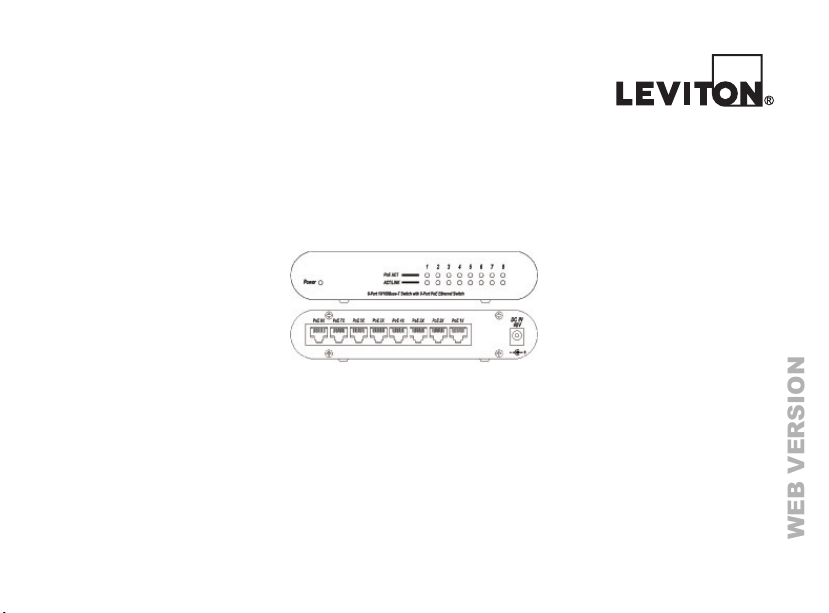
8-Port PoE Network Switch
User’s Guide
Page 2

WARNINGS AND CAUTIONS
WEB VERSION
• Read and understand all instructions. Follow all warnings and instructions marked on the product.
Do not use this product near water - e.g., near a tub, wash basin, kitchen sink or laundry tub, in a wet basement, or near a swimming pool.
•
• Never push objects of any kind into this product through openings, as they may touch dangerous voltages.
• Never install communications wiring or components during a lightning storm.
• Never install communications components in wet locations unless the components are designed specically for use in wet locations.
• Never touch uninsulated wires or terminals unless the wiring has been disconnected at the network interface.
• Use caution when installing or modifying communications wiring or components.
• SAVE THESE INSTRUCTIONS.
FCC Compliance
This equipment has been tested and found to comply with the limits for a Class B digital device, pursuant to part 15 of the FCC Rules.
These limits are designed to provide reasonable protection against harmful interference in a residential installation. This equipment
generates, uses and can radiate radio frequency energy and, if not installed and used in accordance with the instructions, may cause
harmful interference to radio communications. However, there is no guarantee that interference will not occur in a particular installation.
If this equipment does cause harmful interference to radio or television reception, which can be determined by turning the equipment off
and on, the user is encouraged to try to correct the interference by one or more of the following measures:
- Reorient or relocate the receiving antenna.
- Increase the separation between the equipment and receiver.
- Connect the equipment into an outlet on a circuit different from that to which the receiver is connected.
- Consult the dealer or an experienced radio/TV technician for help.
CE Mark Warning:
This is a Class B product. In a domestic environment, this product may cause radio interference, in which case the user may be
required to take adequate measures.
UL Warning:
1) Elevated Operating Ambient Temperature - If installed in a closed or multi-unit rack assembly, the operating ambient temperature of
the rack environment may be greater then room ambient. Therefore, consideration should be given to installing the equipment in an
environment compatible with manufacturer’s maximum rated ambient temperature.
2) Reduced Air ow - installation of equipment in a rack should be such that the amount of air ow required for safe operation of the
equipment is not compromised.
3) Mechanical Loading - mounting of the equipment in the rack should be such that hazardous conditions are not achieved due to
uneven mechanical loading.
Page 3

Table of contents
WEB VERSION
• Introduction …………………………………………………………………………….....page 4
• Power Over Ethernet (PoE) ………………………………………………...………......page 5
• Installation ……………………………………………………………………………......page 6
• Connecting Network Cables ………………………………………………………........page 7
• Rear Panel Ports …………………………………………………………………….......page 8
• Rear Panel Power Jack ……………………………………………………………........page 9
• Front Panel LED Indicators ……………………………….………………………......page 10
• Technical Specication ……………………………………….......………………...page 11,12
Page 4

Introduction
WEB VERSION
The 91A00-1 combines a small, high efciency 8-Port 10/100Mbps Ethernet switch
with IEEE 802.3af Power over Ethernet (PoE) capability on all 8 ports. It can be used
to provide power to up to 7 Leviton OmniTouch 5.7e Touchscreens (one port must be
connected to the network).
The 91A00-1 is a Power Source Equipment (PSE) device that is fully compatible with
Powered Devices (PD) that comply with the IEEE 802.3af standard. The PoE ports on
the 91A00-1 can also be used to power other Powered Devices (PD), such as the Leviton
Home Theater Extender, PoE IP cameras, PoE Wireless Access Points, PoE Printer, etc.)
without requiring additional power on the network. Each of the PoE ports can provide
15.4 Watts of power as well as 10/100M data transmission through the traditional UTP
cable to the Powered Device.
The 91A00-1 is supplied with an external 48VDC power adaptor. No conguration is
required and installation is quick and easy. Support for automatic MDI / MDI-X on all of
the ports eliminates the need for a crossover connection to another switch or hub. Autonegotiation on each port senses the link speed (100 Mbps or 10 Mbps) of a network
device and intelligently adjusts for compatibility and optimal performance.
NOTE: This device is designed for indoor use. Do not use outdoors.
Page 5

Power over Ethernet (PoE)
WEB VERSION
Power over Ethernet (PoE):
Power over Ethernet (PoE) integrates 48V power and data onto one single cable,
eliminating the need to have power available at all equipment locations. Power and
data are integrated onto the same cable, up to 100 meters (328 feet).
Features:
• 8 x 10/100Mbps Auto-negotiation Ethernet RJ-45 ports with PoE on all 8 ports
• Compliant with IEEE 802.3af specication
• Supports PoE power, up to 112W total, for all 8 ports
• Supports PoE IEEE802.3af compliant Powered Device (PD)
• Each port supports automatic MDI/MDIX, so there is no need to use crossover cables
• Full/half duplex transfer mode for each port
• Wire speed reception and transmission
• Up to 1000 unicast address entities per device, self-learning, and table aging
• 64K Byte packet buffer
Page 6

Installation
WEB VERSION
Unpacking
Open the shipping cartons of the 91A00-1 and carefully unpack its contents:
• 91A00-1 8-Port PoE Network Switch
• AC power adaptor
• User’s Guide
Installation:
Install the 91A00-1 as follows:
• The surface must support at least 4.4 lb and a power outlet should be within 6 feet
of the switch
• Visually inspect the DC power jack and make sure that is fully secured to the
power adaptor
• Make sure that there is proper heat dissipation from and adequate ventilation
around the switch
NOTE: Do not place heavy objects on the switch.
Page 7

Connecting Network Cables
WEB VERSION
Connecting Network Cables
The 91A00-1 has 8 10/100Mbps Ethernet ports. Each port incorporates 10/100Mbps
support using traditional UTP cables. Each of the 8 PoE ports will automatically activate
when a compatible device is identied. The 91A00-1 will supply power through the port to
the connected PoE device (PD).
Legacy devices that are not compatible will not be supplied power. This feature allows
users to freely and safely mix legacy and PoE compatible devices connected to switch.
This Switch supports 10Mbps Ethernet or 100Mbps Ethernet and runs both in half and
full duplex mode using two pairs of cable.
All ports are automatic MDI type ports. The switch can auto negotiate to MDI or
MDI-X type, so you can connect either a standard network or crossover cable.
When connecting an OmniTouch 5.7e to the network, a Cat-5 (4-pair) cable is required for
operation. Run the Cat-5 cable between the location of the 91A00-1 and the location of
the OmniTouch 5.7e.
Page 8
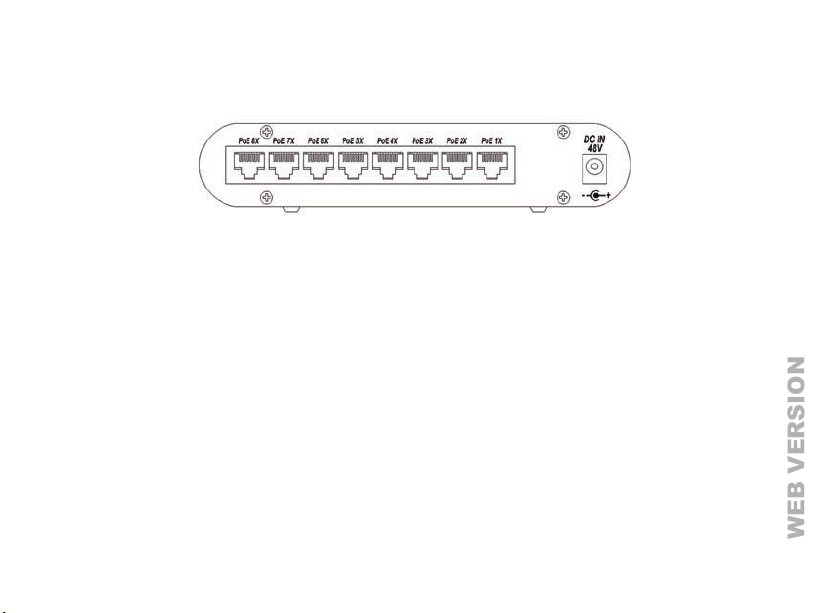
Rear Panel
WEB VERSION
There are 8 RJ-45 ports and one DC power jack on the rear panel of the 91A00-1.
Ports:
PoE Ports: PoE1X to PoE8X
• All ports are 10/100Mbps as well as 802.3af PoE enabled ports.
• All ports will automatically activate when a compatible PoE device is identied. The
91A00-1 will supply power through the Ethernet port to the connected PoE device (PD).
• The 91A00-1 also supports legacy devices that are not PoE compatible. In this case,
the PoE ports will not supply power to those devices. This feature allows users to freely
and safely connect legacy and PoE compatible devices to the switch.
DC Power Jack:
The DC power jack is located on the right side of the rear panel of the 91A00-1.
Use only the supplied AC power adaptor. The use of any incompatible adaptor may cause
damage to the equipment and void the warranty.
The 91A00-1 does not include a power switch. Plugging its power adaptor into a power
outlet will immediately power it on.
Page 9
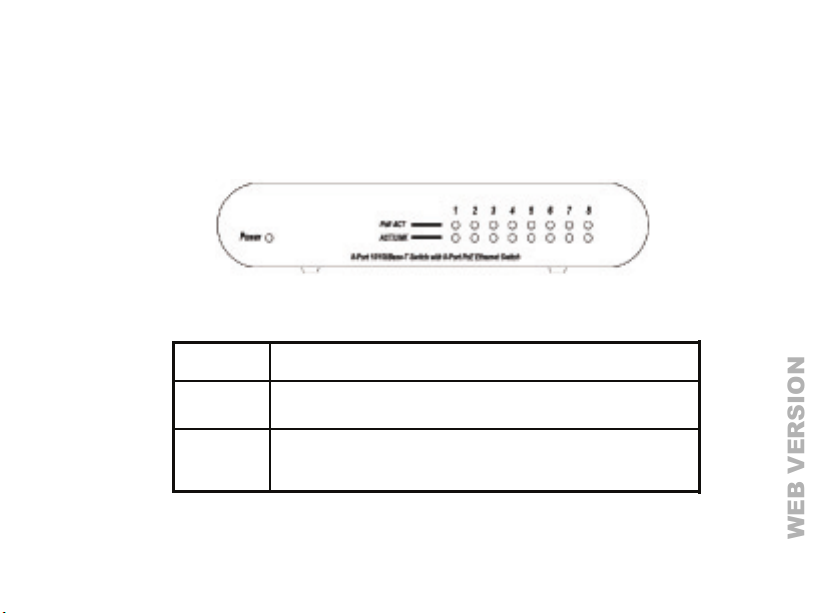
Front Panel
WEB VERSION
LED Indicators:
The LED indicators provide instant status and helps you monitor and troubleshoot when
required.
Power LED LED on: Power ON / LED off: Power off.
LINK/ACT LED on: this port is Linked and Active
PoE (1x - 8x) LED on: The PoE power device (PD) is connected and the port is supplying
LED off: this port is not correct Link or inactive
power.
LED off: no PoE power device (PD) connected
Page 10

Technical Specification
WEB VERSION
Standards IEEE 802.3 10BASE-T Ethernet
IEEE 802.3u 100BASE-TX Fast Ethernet
IEEE 802.3x Full Duplex Flow Control
IEEE 802.3af Power over Ethernet
Protocol CSMA/CD
Data Transfer Rate Ethernet: 10Mbps (half-duplex), 20Mbps (full-duplex)
Fast Ethernet: 100Mbps (half-duplex), 200Mbps (full-duplex)
Network Cables 10BASE-T: 2-pair UTP Cat 3, 4, 5 up to 100 meters
100BASE-Tx: 2-pair UTP Cat 5, 5e up to 100 meters
Number of Ports 8 x 10/100Mbps RJ-45 ports with 8 PoE enabled ports
PoE power on RJ-45 Power + : pin 3 & pin 6 : Power – : pin 1 & pin 2
AC power adaptor Input: 110V ~ 220VAC, 50Hz - 60Hz
Output: 48VDC, 2.5A (8 PoE port)
Page 11
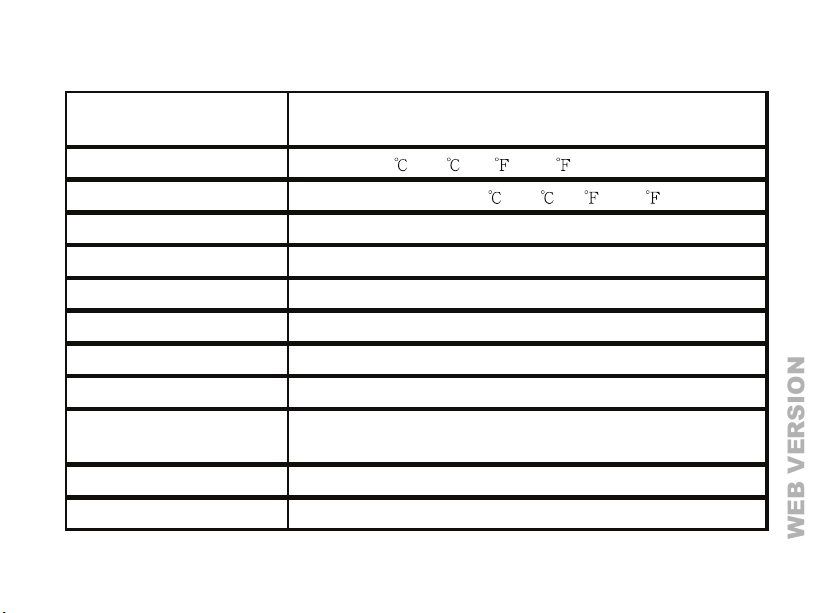
Technical Specification (continued)
WEB VERSION
Power Consumption 6.4 watts, maximum (with no Powered Devices connected)
112 watts (8 PoE ports fully load)
Temperature Operation: 0
Storage Temperature: -10
Humidity Relative Humidity: 5% - 95%
Dimensions 16cm W x 9.4cm D x 2.1cm H
EMI FCC Class B, CE Mark Class B
Safety 48VDC Power Adaptor UL listed
RAM buffer 64K bytes per device
Filtering Address Table 1000 entries per device
Packet
Filtering/ Forwarding Rate
MAC Address Automatic update
Transmission Method Store – and - forwarder
10Mbps Ethernet: 14,880/pps
10Mbps Ethernet: 148,800/pps
- 40 (32 - 104 )
- 70 (14 - 158 )
Page 12

FOR CANADA ONLY
WEB VERSION
For warranty information and/or product returns, residents of Canada should contact Leviton in writing at Leviton Manufacturing of
Canada Ltd to the attention of the Quality Assurance Department, 165 Hymus Blvd, Pointe-Claire (Quebec), Canada H9R 1E9 or
by telephone at 1 800 405-5320.
Leviton warrants to the original consumer purchaser and not for the benet of anyone else that products manufactured by Leviton
under the Leviton brand name (“Product”) will be free from defects in material and workmanship for the time periods indicated
below, whichever is shorter: • OmniPro II and Lumina Pro: three (3) years from installation or 42 months from manufacture
date. • OmniLT, Omni IIe, and Lumina: two (2) years from installation or 30 months from manufacture date. • Thermostats,
Accessories: two (2) years from installation or 30 months from manufacture date. • Batteries: Rechargeable batteries in products
are warranted for ninety (90) days from date of purchase. Note: Primar y (non-rechargeable) batteries shipped in products are not
warranted. Products with Windows® Operating Systems: During the warranty period, Leviton will restore corrupted operating
systems to factory default at no charge, provided that the product has been used as originally intended. Installation of non-Leviton
software or modication of the operating system voids this warranty. Leviton’s obligation under this Limited Warranty is limited
to the repair or replacement, at Leviton’s option, of Product that fails due to defect in material or workmanship. Leviton reserves
the right to replace product under this Limited Warranty with new or remanufactured product. Leviton will not be responsible
for labor costs of removal or reinstallation of Product. The repaired or replaced product is then warranted under the terms of
this Limited Warranty for the remainder of the Limited Warranty time period or ninety (90) days, whichever is longer. This Limited
Warranty does not cover PC-based software products. Leviton is not responsible for conditions or applications beyond
Leviton’s control. Leviton is not responsible for issues related to improper installation, including failure to follow written
Installation and operation instructions, normal wear and tear, catastrophe, fault or negligence of the user or other problems
external to the Product. To view complete warranty and instructions for returning product, please visit us at www.leviton.com.
COPYRIGHT AND TRADEMARK INFORMATION
This document and all its contents herein are subject to and protected by international copyright and other intellectual property rights
and are the property of Leviton Manufacturing Co., Inc, its subsidiaries, afliates and/or licensors. © 2013 Leviton Manufacturing Co.,
Inc. All rights reserved.
Use herein of third party trademarks, service marks, trade names, brand names and/or product names are for informational purposes
only, are/may be the trademarks of their respective owners; such use is not meant to imply afliation, sponsorship, or endorsement.
No part of this document may be reproduced, transmitted or transcribed without the express written permission of Leviton
Manufacturing Co., Inc.
For Technical Assistance Call: 800-824-3005 - www.leviton.com
LEVITON LIMITED WARRANTY
PK-93482-10-00-5AAR2253 (91I00-1)
 Loading...