

Page 1
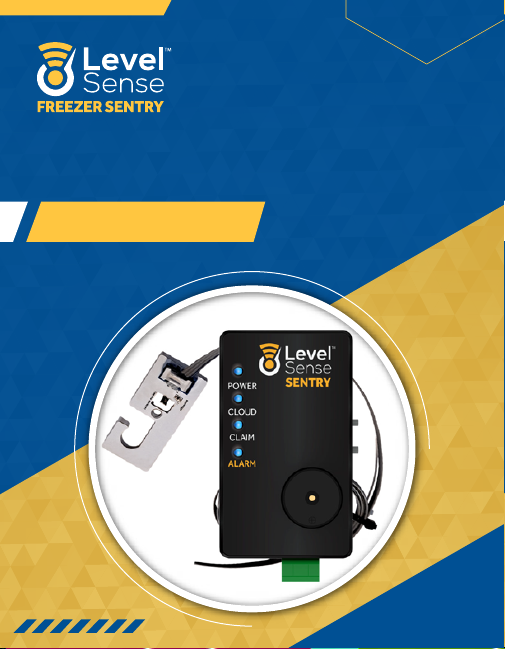
FREEZER SENTRY
User Manual
www.Level-Sense.com
Page 2
TABLE OF CONTENTS
FREEZER SENTRY USER MANUAL
Section 1:
Section 2:
Section 3:
Section 4:
Section 5:
Section 6:
Section 7:
Section 8:
Section 9:
Section 10:
Section 11:
Section 12:
Section 13:
Section 14:
Section 15:
About Freezer Sentry.................................................................................
Specifications...................................................................................................
Requirements...................................................................................................
In the box...............................................................................................................
Account Creation..........................................................................................
Status LEDs........................................................................................................
Installation...........................................................................................................
Connect to Wi-Fi............................................................................................
Claim Device......................................................................................................
Contact Information...................................................................................
Notification Settings..................................................................................
Viewing Data......................................................................................................
Wi-Fi Password Reset................................................................................
Service Disclaimer........................................................................................
Warranty................................................................................................................
02
02
03
03
04
06
07
10
13
13
14
16
16
17
17
WWW.LEVEL-SENSE.COM
01
Page 3
SECTION 1: ABOUT FREEZER SENTRY
Freezer Sentry is a Wi-Fi based refrigerator/freezer monitor. Freezer sentry
SECTION 2: SPECIFICATIONS
FREEZER SENTRY USER MANUAL
monitors three critical elements of your freezer as alarm inputs:
• Temperature
• Humidity
• Power Loss/Wi-Fi Status
• Optional Sensor Inputs for Leak Sensor & Float Switch
Each of the above-mentioned alarm inputs can be configured individually as alarm
triggers based on their state. There are three alarm outputs of the Freezer Sentry
• SMS (Text Message)
• E-Mail
• Audible Siren
Level Sense Freezer Sentry Specifications
Accuracy of Temp Sensor
Accuracy of Humidity Sensor
Temp/Hum Rec. Operating Cond.
Power Supply
Siren
Head Unit Size
Head Unit Max Operating Temp
+/- 0.2C
+/- 2%
-20C to 125C
12VDC
90 dB
87x21x50mm
100F
WWW.LEVEL-SENSE.COM
02
Page 4
SECTION 3: REQUIREMENTS
• 120/240 VAC (50 or 60 Hz) Power Outlet
SECTION 4: IN THE BOX
FREEZER SENTRY USER MANUAL
• 2.4 Ghz Wi-Fi internet within range of Freezer Sentry
• Wi-Fi enabled device with Web browsing
• Flat head screwdriver #3 or #4 (if optional leak or float sensors are used)
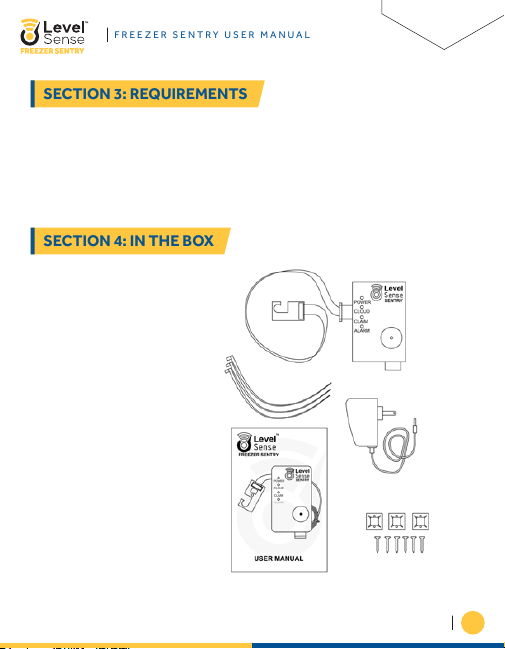
1. Head Unit
2. Temp/Hum Sensor
3. Zip Ties
4. Various Mounting Hardware
5. Instruction Sheet
WWW.LEVEL-SENSE.COM
03
Page 5
SECTION 5: ACCOUNT CREATION
1. Level Sense Account Creation:
a. Smartphone/Tablet
FREEZER SENTRY USER MANUAL
Thank you for your Level Sense Freezer Sentry purchase. The first step in getting
your Freezer Sentry device online is to create your Level Sense Account. This can
be done with either a computer, or a smartphone/tablet.
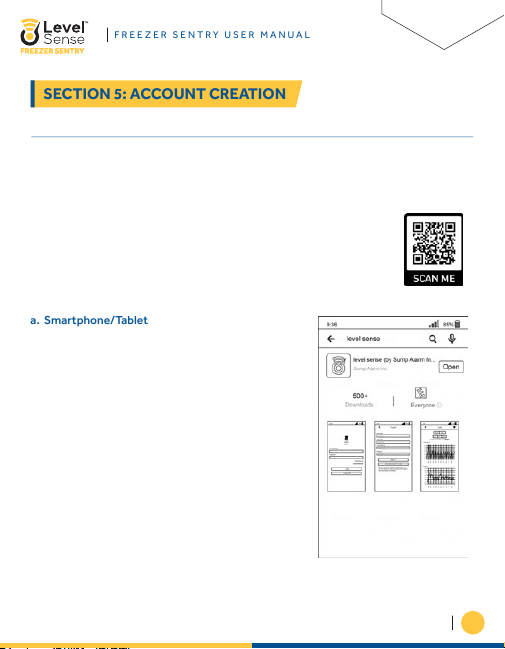
If you prefer video instructions over written, please scan the QR code.
This video will walk you through sections 5 and 8–11.
a. On your smartphone proceed to either the iOS
app store, or the Android Play store
b. Type into the search bar “Level Sense”, and
download the application
WWW.LEVEL-SENSE.COM
04
Page 6
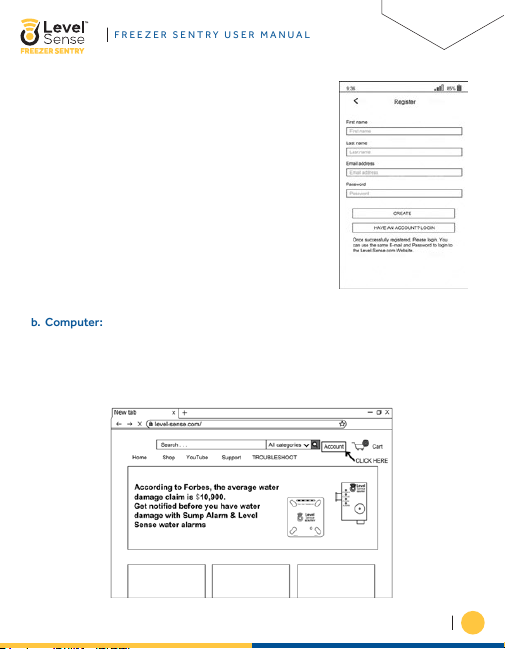
c. Next click on the register button and enter in your
b. Computer:
FREEZER SENTRY USER MANUAL
personal information into the register page, and
lastly click the create button. Congratulations,
your Level Sense account has been created.
The Username and Password that are used for
your account are the same for both the mobile
application and the website.
a. Begin by opening an internet browser like Google Chrome or Safari.
b. In the address bar type in: Level-Sense.com
i. Click on the text labeled “Account”
WWW.LEVEL-SENSE.COM
05
Page 7
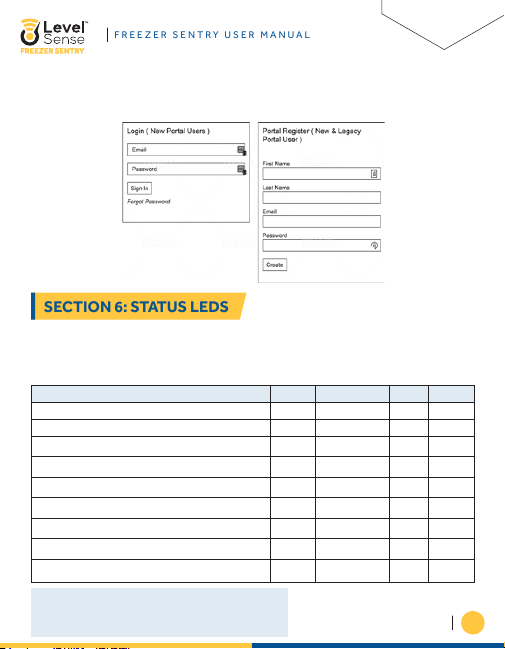
ii. Next enter in your First name, Last name, email address, and password. Click
SECTION 6: STATUS LEDS
FREEZER SENTRY USER MANUAL
the submit button and your Level Sense account has successfully been
created.
The status LEDs on the Freezer Sentry provides a visual indication of the state of
the Freezer Sentry. The below table is a system status guide. PLEASE NOTE that if
the four LEDs are flashing in unison, then this is a CLAIM CODE. If you have a claim
code, reference Section 9.
Device State
No Alarm(s) BlueBlue
Access Point (Waiting for Wireless Connection) Pulsing White
Wi-Fi Connection in Progress
Loss of Wi-Fi Signal
Temperature Above Upper Setpoint
Temperature in Setpoint
Temperature Below Lower Setpoint
Alarm Present
Firmware Upgrade / Server Maintenance Purple
*As the temperature moves towards the upper set point, the Temp LED
will transition towards true RED. As the temperature moves towards the
midpoint between the upper and lower set point, the Temp LED will
become true GREEN in color. Lastly, as the temperature moves towards
the lower setpoint, the Temp LED will transition towards true BLUE.
Power Cloud Temp Alarm
------------
Yellow
Red
Red*
Green*
Blue*
------------
WWW.LEVEL-SENSE.COM
Blue
Red
06
Page 8
SECTION 7: INSTALLATION
1. Head Unit Installation:
FREEZER SENTRY USER MANUAL
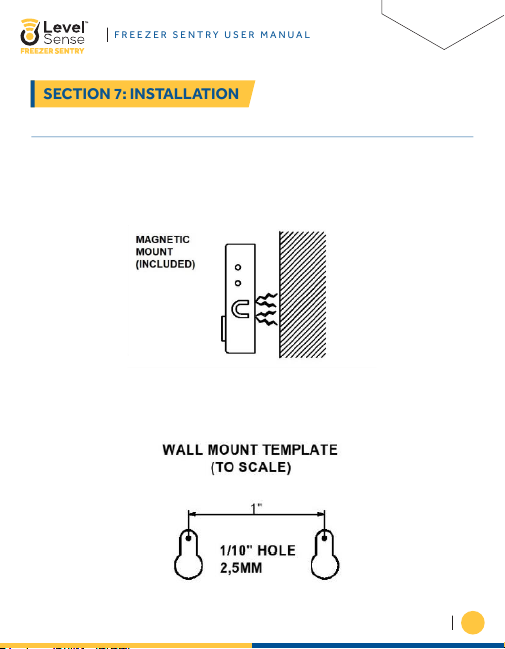
a. The head Unit can be mounted in one of three ways.
i. Magnetically: Magnets are mounted inside of the Freezer Sentry enclosure.
Place the back of the enclosure onto the side of the refrigerator/freezer, and
the head unit will stay in place thanks to the magnets.
ii. Wall Mount: The template shown below can be used to mount the device
directly to a wall via the mounting screws.
WWW.LEVEL-SENSE.COM
07
Page 9
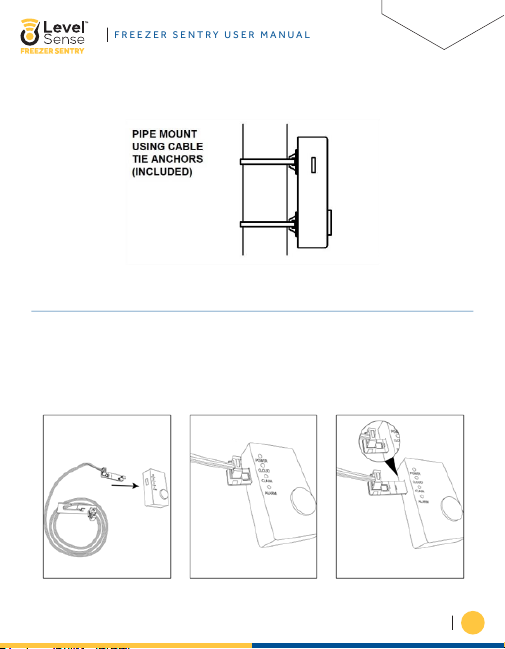
iii. Cable tie Mount: The two sticky pad anchors and zip ties can be used to
FREEZER SENTRY USER MANUAL
mount the head unit.
2. Temperature Sensor Install:
a. If not already done, the temperature sensor can be inserted gently into the Level
Sense (LS) Freezer Sentry head unit as shown below. Follow the labels on the
printed circuit board which will assist with inserting the sensor. There is a Green
LED that will light up on both ends of the temperature sensor when the board is
inserted correctly, and when power is applied.
WWW.LEVEL-SENSE.COM
08
Page 10
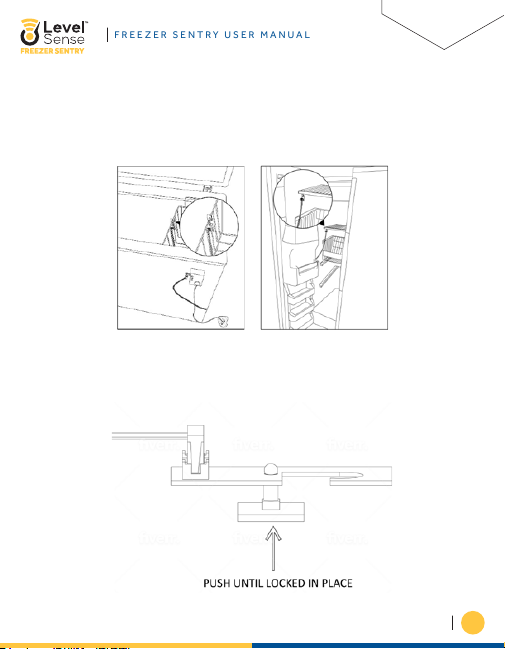
b. The Temperature sensor can be installed in the refigerator/freezer one of three
FREEZER SENTRY USER MANUAL
ways.
i. 1. The integrated hook can be used to mount the sensor on a wire rack as
shown on a standard freezer, or on a deep freeze.
ii. The snap lock adhesive support can be inserted into the hole on the hook
sensor. Remove the covering for the adhesive and firmly push the snap lock
support onto the refrigerator/freezer wall.
WWW.LEVEL-SENSE.COM
09
Page 11
SECTION 8: CONNECT TO WI-FI
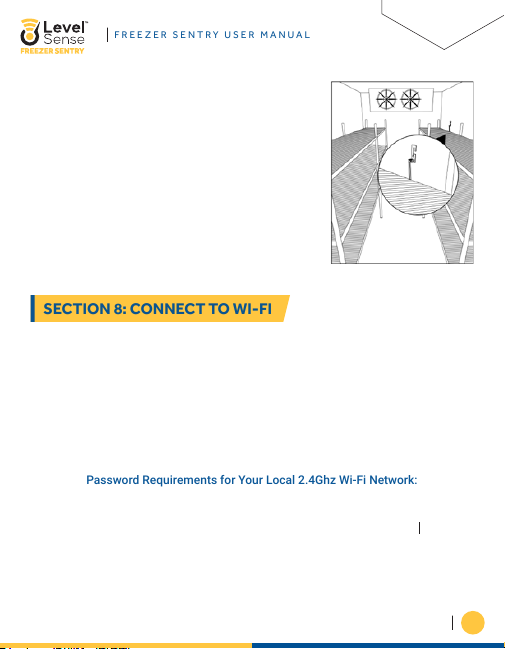
iii. To mount with the included screw, insert the
FREEZER SENTRY USER MANUAL
screw into the hole on the hook sensor, and
carefully tighten the screw to the printed
circuit board.
The Freezer Sentry device is immediately ready to join your 2.4 Ghz Wi-Fi network
after power up. When the Freezer Sentry has not been configured to a Wi-Fi network
the Cloud LED will display as WHITE, and the access point is active (the unit will
broadcast its Level Sense Wireless Network. Refer to section 6).
There are a series of articles on more advanced troubleshooting for WI-FI
connections under the Troubleshoot section which is found on the upper banner of
the website.
Password Requirements for Your Local 2.4Ghz Wi-Fi Network:
SSID (Local Network Name) and Password are Case Sensitive You must have a
password 8 - 48 Characters in Length. The following Characters are not supported
in Wi-Fi Passwords or network names at the moment: <> \ ^ ' { } “ %
THIS APPLIES TO CONNECTING WITH WPS OR CONNECTING WITH HOTSPOT!
WWW.LEVEL-SENSE.COM
10
Page 12
1. Hotspot Method:
FREEZER SENTRY USER MANUAL
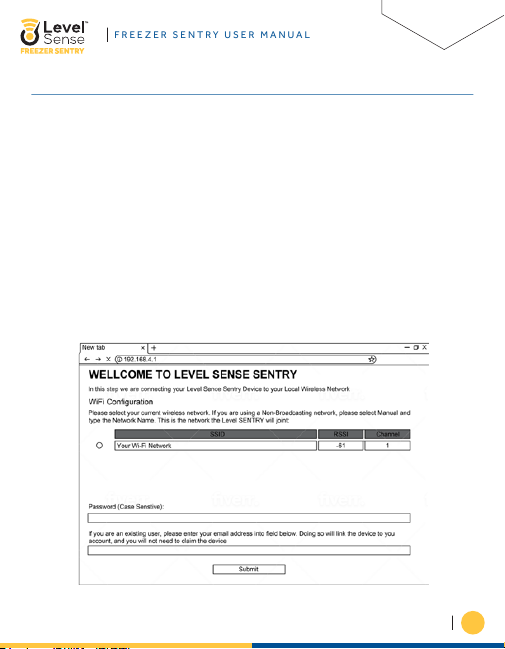
a. To connect your Freezer Sentry to your Wi-Fi network via the hotspot mode, you
will need a Wi-Fi enabled device like a smartphone or laptop. The Cloud LED of
the Freezer Sentry should be white which indicates the device is broadcasting a
Wi-Fi hotspot. Use your Wi-Fi device (phone, tablet, or computer) to connect to
the Level Sense network (the last four digits of the Level Sense network is the
last 4 digits of the device’s MAC address). Your phone may indicate that this
network has no internet connection. This is normal.
b. Once connected to the Level Sense network, a Wi-Fi configuration page will
automatically appear. If this page does not appear automatically, then open a
web browser and enter the device’s IP address into the address bar: 192.168.4.1
c. On the webpage, you will select the bubble of YOUR HOME 2.4 Ghz Wi-Fi
network. Next you will enter the PASSWORD of YOUR HOME network. Note that
this field is case sensitive.
WWW.LEVEL-SENSE.COM
11
Page 13
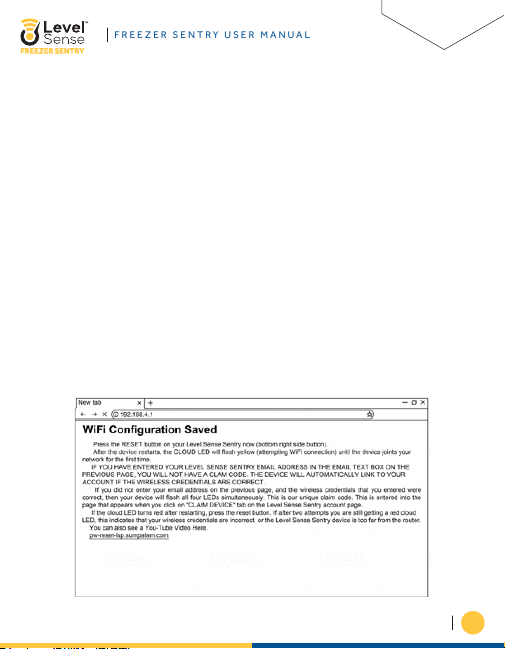
d. Once complete, you can enter your Level Sense account email address into the
FREEZER SENTRY USER MANUAL
email address field (If you do this, the device will automatically link to your
account, and you will NOT be presented with a claim code). Lastly, press the
submit button.
e. The webpage then instructs you to click the RESET button on the Freezer Sentry.
After restarting, the Cloud LED will pulse yellow until it connects to your Wi-Fi.
Upon successful connection the device will either…
i. Present a claim code (all four LEDS on the device will blink in unison (Proceed
to Section 9)
ii. The Cloud LED will change to pulsing blue, followed by blue on the other 3
LEDs (Proceed to Section 10). This indicates that the device has been
successfully linked to your account, and no claim code is needed.
iii. The Cloud LED changes to red (No local internet connection). This can be
caused by an incorrect password for the Wi-Fi network, or the network is out
of range. If this happens, press the RESET button to try again. If it does not
connect on subsequent attempts, please reference Section 13 for instructions
on how to perform a password reset.
WWW.LEVEL-SENSE.COM
12
Page 14
SECTION 9: CLAIM DEVICE
If you typed in your E-Mail address on the Wi-Fi configuration page (as seen in the
SECTION 10: CONTACT INFORMATION
FREEZER SENTRY USER MANUAL
previous Section), then your device will be claimed automatically, and it will be in
your account upon login in the portal (if you do not see the device, refresh your
screen). If you did not enter your E-Mail address on the Wi-Fi configuration page, it
will be necessary to claim the device. Once the Freezer Sentry is connected to your
wireless network, the Freezer Sentry will flash all four LEDs in unison. This is a
claim code. After logging into the portal via the website or the mobile application
click on the “Claim” button. Follow the directions on screen and enter the unique
claim code.
Once you are logged into your account on the Level Sense website, or in the mobile
application, click on the “Contacts” tab or if you are using the mobile application
click the “Notification” tab. Click on the plus button next to the default contact and
enter your phone number, cell phone service provider, etc. Do not forget to enable
both email and text options. It is a good idea to TEST both the email and text
feature currently as well. Lastly, you must save and submit the contact.
WWW.LEVEL-SENSE.COM
13
Page 15
SECTION 11: NOTIFICATION SETTINGS
This section will guide you on how to enable and disable sensor inputs to suit your
FREEZER SENTRY USER MANUAL
application. On the website, you can edit the notification settings by clicking on the
bell icon, which is underneath the “Alarm Settings” column. If you are on the mobile
application, you will need to click on the device name, and then an action bar will
show up at the bottom of the screen, click on the bell icon.
1. The first input is for the Temperature Sensor. The left side of the screen has the
lower set point, and the right side is the upper set point. Any temperature below
the lower setpoint will put the device into alarm state. Also, a temperature above
the upper setpoint will put the device into alarm state. A reading that is in
between the upper and lower setpoint will not cause an alarm.
a. Delay of Temperature Alarms: This is the time for the delay of a Temperature
alarm. From the time that the temperature reading is out of range, the device
will not go into alarm state until the delay time is met. We recommend using a
delay of 5 minutes for this sensor. If you do not use a delay, then you will get
an alarm immediately if the temperature goes out of range. You may get
temperature alarms when the refrigerator/freezer are opened. This is most
likely not useful for most people.
b. Temperature Offset: The Offset feature is used to calibrate your temperature
sensor. In the first text box enter the number that you want to adjust the
temperature by. For example, if your current temperature reading from the
Freezer Sentry device is 34F, and the actual temperature in the freezer is 32F,
then you will enter 2.00 into the first text box and select the minus sign into
the operation text box to adjust the temperature reading to the correct
temperature value. Please note that it can take up to five minutes for the
offset value to take effect. Refresh your screen and refer to the Offset
Equation above to verify if the offset is applied as intended.
WWW.LEVEL-SENSE.COM
14
Page 16
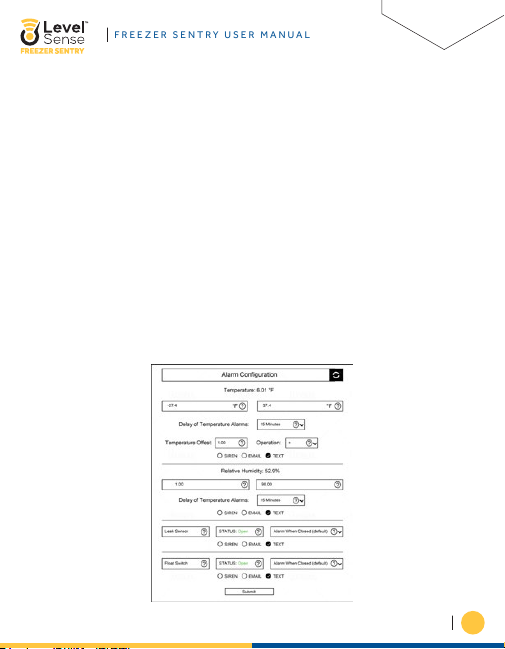
2. The second input listed is the humidity sensor. The left side of the screen has
FREEZER SENTRY USER MANUAL
the lower set point, and the right side is the upper set point. A humidity reading
below the lower setpoint will put the device into alarm state. A humidity reading
above the upper setpoint will also put the device into alarm state. Note that the
humidity sensor does not have an offset function.
3. The third and fourth inputs on the screen are for a float and leak sensor. Freezer
Sentry does not come with these sensors, but they can be added at any time. A
leak sensor is an especially good idea as you can monitor your refrigerator/
freezer for leaks.
Lastly, you can enable and disable email, text, and the siren feature for any of the
inputs by clicking on the text bubble. Do not forget to click the submit button if you
have made any changes on this screen.
Alarms can be temporarily disabled by pressing the silence button on the Freezer
Sentry. If an alarm cannot be quickly resolved, it will be necessary to disable the
siren checkbox for the given sensor in the portal or application.
WWW.LEVEL-SENSE.COM
15
Page 17
FREEZER SENTRY USER MANUAL
SECTION 12: VIEWING DATA
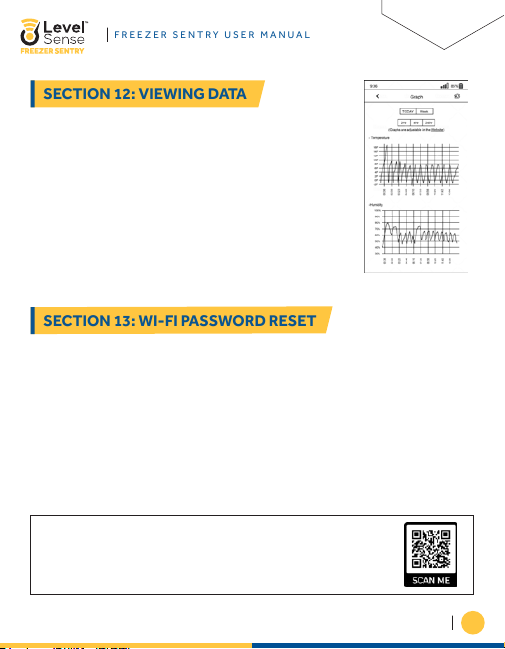
Once you are logged into your account, click on the view
SECTION 13: WI-FI PASSWORD RESET
charts button on the website. If you are using the mobile
application, first click on the device name, and then click the
graph icon under the “Action Items” tab at the bottom of your
screen.
To clear the Wi-Fi credentials from the Freezer Sentry, complete the following steps:
• Press and hold the SILENCE button until all four LEDs appear as RED.
• Let go of the SILENCE button, and then click the SILENEC button two times, two
LEDS will remain lit.
• Wait until the two remaining red LEDs go out, and then press the RESET button.
The password reset is complete. Proceed to Section 8 for guidance on how to get
your device back online.
• The Cloud LED should be white following the password reset steps.
If you would like to see a vedio tutorial on how to perform the
password reset, scan this code.
WWW.LEVEL-SENSE.COM
16
Page 18
SECTION 14: SERVICE DISCLAIMER
Level Sense includes a minimum cloud monitoring service (“Portal”) period of one
SECTION 15: WARRANTY
FREEZER SENTRY USER MANUAL
year from the date of manufacture. Continued service may be offered monthly or
annually for a fee or gratis. Level Sense reserves the right to alter, amend or change
information, services, and pricing at any time. Level Sense also reserves the right to
modify or discontinue services at any time after the first year.
2 year limited warranty
Please read this warranty carefully before using the product.
This limited warranty contains the standard terms and conditions (“toc”) of level
sense. Where permitted by the applicable law, by keeping your level sense product
beyond thirty (30) days after the date of delivery, you fully accept the terms and
conditions set forth in this limited warranty.
In addition, where permitted by the applicable law, your installation and/or use of
the product constitutes full acceptance of the terms and conditions of this limited
warranty (hereinafter referred to as “limited warranty or warranty”). If you do not
agree to the terms and conditions of this warranty, including any limitations of
warranty, indemnification terms or limitation of liability, then you should not use the
product and should return it to the seller for a refund of the purchase price. The law
may vary by jurisdiction as to the applicability of your installation or use actually
constituting acceptance of the terms and conditions herein and as to the
applicability of any limitation of warranty, indemnification terms or limitations of
liability.
WWW.LEVEL-SENSE.COM
17
Page 19

1. Warrantor: in this warranty, warrantor shall mean “dealer, distributor, and/or
FREEZER SENTRY USER MANUAL
manufacturer.”
2. Elements of warranty: this product is warranted to be free from defects in
materials and craftsmanship with only the limitations and exclusions set out
below.
3. Warranty and remedy: two-year warranty — in the event that the product does
not conform to this warranty at any time during the time of two year from
original purchase, warrantor will repair the defect and return it to you at no
charge.
This warranty shall terminate and be of no further effect at the time the product is:
(1) damaged by external causes such as fire, water, lightning, etc. Or not
maintained as reasonable and necessary; or (2) modified; or (3) improperly
installed; or (4) misused; or (5) repaired or serviced by someone other than
warrantors’ authorized personnel or someone expressly authorized by warrantors
to make such service or repairs; (6) used in a manner or purpose for which the
product was not intended; or (7) sold by original purchaser.
Limited warranty, limitation of damages and disclaimer of liability for damages: the
warrantor’s obligation under this warranty is limited to repair or replacement of the
product, at the warrantor’s option as to repair or replacement. In no event shall
warrantors be liable or responsible for payment of any incidental, consequential,
special and/or punitive damages of any kind, including but not limited to any labor
costs, product costs, lost revenue, business interruption losses, lost profits, loss of
business, loss of data or information, or financial loss, for claims of any nature,
including but not limited to claims in contract, breach of warranty or tort, and
whether or not caused by warrantors’ negligence. In the event that it is determined
in any adjudication that the limited warranties of repair or replacement are
inapplicable, then the purchaser’s sole remedy shall be payment to the purchaser of
the original cost of the product, and in no event shall warrantors be liable or
responsible for payment of any incidental, consequential, special and/or punitive
damages of any kind, including but not limited to any lost revenue, business
WWW.LEVEL-SENSE.COM
18
Page 20

interruption losses, lost profits, loss of business, loss of data or information, or
FREEZER SENTRY USER MANUAL
financial loss, for claims of any nature, including but not limited to claims in
contract, breach of warranty or tort, and whether or not caused by warrantors’
negligence.
Without waiving any provision in this limited warranty, if a circumstance arises
where warrantors are found to be liable for any loss or damage arising out of
mistakes, negligence, omissions, interruptions, delays, errors or defects in
warrantors’ products or services, such liability shall not exceed the total amount
paid by the customer for warrantors’ product and services or $150.00, whichever is
greater. You hereby release warrantors from any and all obligations, liabilities and
claims in excess of this limitation.
Indemnification and covenant not to sue: you will indemnify, defend and hold
harmless warrantors, their owners, directors, officers, employees, agents, suppliers
or affiliated companies, against any and all claims, demands or actions based upon
any losses, liabilities, damages or costs, including but not limited to damages that
are direct or indirect, incidental, special or consequential, and including attorney’s
fees and legal costs, that may result from the installation, operation, use of, or
inability to use warrantors’ products and services, or from the failure of the
warrantors’ system to report a given event or condition, whether or not caused by
warrantors’ negligence.
You agree to release, waive, discharge and covenant not to sue warrantors, their
owners, directors, officers, employees, agents, suppliers or affiliated companies, for
any and all liabilities potentially arising from any claim, demand or action based
upon any losses, liabilities, damages or costs, including but not limited to damages
that are direct or indirect, incidental, special or consequential, and including
attorney’s fees and legal costs, that may result from the installation, operation, use
of, or inability to use warrantors’ products and services, or from the failure of the
warrantors’ system to report a given event or condition, whether or not caused by
warrantors’ negligence, except as necessary to enforce the express terms of this
limited warranty.
WWW.LEVEL-SENSE.COM
19
Page 21

Exclusive warranty: the limited warranty or warranties described herein constitute
FREEZER SENTRY USER MANUAL
the sole warranty or warranties to the purchaser. All implied warranties are
expressly disclaimed, including: the warranty of merchantability and the warranty of
fitness for a particular use and the warranty of fitness for a particular purpose and
the warranty of non-infringement and/or any warranty arising from a course of
dealing, usage, or trade practice.
It must be clear that the warrantors are not ensuring your premises or business or
guaranteeing that there will not be damage to your person or property or business if
you use this product. You should maintain insurance coverage sufficient to provide
compensation for any loss, damage, or expense that may arise in connection with
the use of products or services, even if caused by warrantors’ negligence. The
warrantors assume no liability for installation of the product and/or interruptions of
the service due to strikes, riots, floods, fire, and/or any cause beyond seller’s
control, further subject to the limitations expressed in any license agreement or
other agreement provided by warrantors to purchaser.
The agreement between the warrantors and the purchaser, including but not limited
to the terms and conditions herein shall not be governed by the convention for the
international sale of goods. Where applicable, the uniform commercial code as
adopted by the state of Delaware shall apply.
4. Procedure for obtaining performance of warranty: in the event that the
product does not conform to this warranty, the product should be shipped or
delivered freight prepaid to a warrantor with evidence of original purchase.
5. Legal remedies and disclaimer: some jurisdictions may not allow, or may
place limits upon, the exclusion and/or limitation of implied warranties,
incidental damages and/or consequential damages for some types of goods
or products sold to consumers and/or the use of indemnification terms. Thus,
the exclusions, indemnification terms and limitations set out above may not
apply, or may be limited in their application, to you. If the implied warranties
cannot be excluded, and the applicable law permits limiting the duration of
implied warranties, then the implied warranties herein are to be limited to the
WWW.LEVEL-SENSE.COM
20
Page 22

same duration as the applicable written warranty or warranties herein. The warranty
FREEZER SENTRY USER MANUAL
or warranties herein may give you specific legal rights that will depend upon the
applicable law. You may also have other legal rights depending upon the law in your
jurisdiction.
6. Choice of forum and choice of law: In the event that a dispute arises out of or
in connection with this limited warranty, then any claims or suits of any kind
concerning such disputes shall only and exclusively be brought in either the
eastern district court of Missouri or the United States district court for the
eastern district of Missouri.
Regardless of the place of contracting or performance, this limited warranty and all
questions relating to its validity, interpretation, performance and enforcement shall
be governed by and construed in accordance with the laws of the state of Missouri,
without regard to the principles of conflicts of law.
WWW.LEVEL-SENSE.COM
21
Page 23

Effective date 06/08/2022
Sump Alarm, Inc. d.b.a. Level Sense
Phone: 314-787-8059
www.Level-Sense.com
 Loading...