

Page 1

LevelOne
FSW-2205TX
FSW-2208TX
5/8Port 10/100Mbps
Internal Power SOHO Switch
User's Manual
(Version 1.0)
Page 2

2
TABLE OF C ONTENTS
Overview...................................................................................3
Features....................................................................................3
User Guide................................................................................5
HARDWARE DESCRIPTION..........................................................5
The Top View .................................................................................5
The Rear View .............................................................................6
HARDWARE INSTALLATION.........................................................7
Basic Installation ............................................................................7
NWAY Process...............................................................................7
Sample Application................................................................9
Technical Specifications....................................................10
Page 3

3
Overview
Thanks for choosing LevelOne FSW-2205/2208TX 5/8Port
10/100Mbps Internal Power SOHO Switch. It is the smallest switch
with internal power supply around the world. The switches are
designed to be suitable for integrating both 10BASE-T and
100BASE-TX networking circumstance with cabling UTP (Unshielded
Twisted-Pair) connection in Small/Medium Business (SMB) and Small
Office/Home Office (SOHO) environment. Simple plug in the
networking cable and the switches will automatically detect the
maximum speed of networking connection to offer smooth network
migrations and easy upgrades to network capacity. In addition, built-in
power supply eliminates the hassle of power adapter allocation and
increase users’ convenience. For easy recognition of network status
and trouble-shooting, it provides a set of diagnostic LEDs, including
10Mbps, 100Mbps, Link/Activity and FDX/Col.
Features
Ø Single chip with highest level of silicon integration for the 5/8-port
10/100 Fast Ethernet switch device, embedded on -chip memory
used for packet buffer and MAC address
Ø Support auto-crossover (auto MDI/MDI-X) on every 10/100M
RJ-45 port
Ø Designed with internal power supply. Palm-sized, plastic case
together with internal power design, convenient for the
Page 4

4
placement and power cord arrangement
Ø Each port with non-blocking wire speed forwarding performance.
Ø Each port support flow control and back-pressure.
Ø Small size and Plug-and-Play solution for SOHO application
Ø FCC Part15 Class B, CE EN55022 Class B, VCCI Class B
Page 5
5
User Guide
HARDWARE DESCRIPTION
A. The Top View
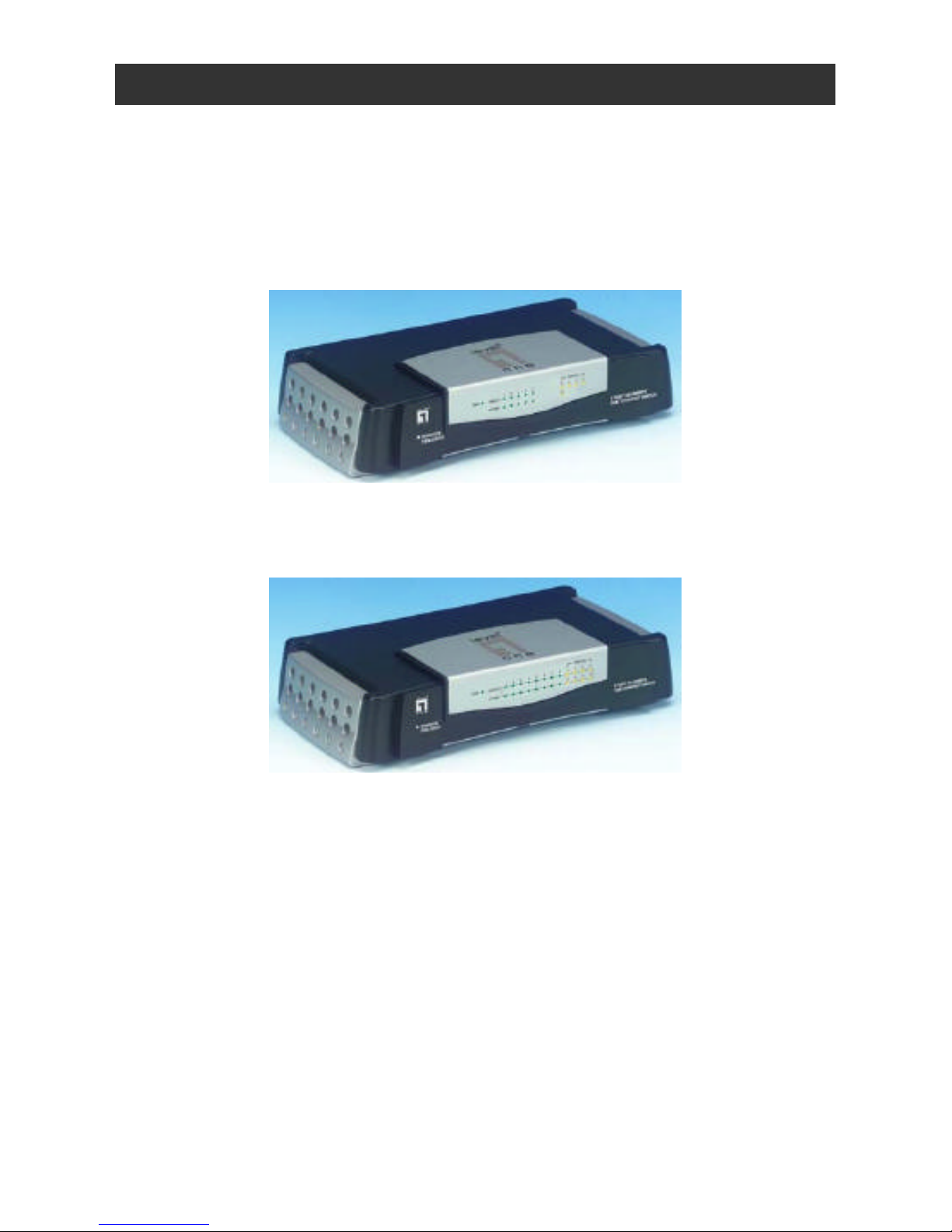
n LevelOne FSW-2205 5Port 10/100Mbps
Internal Power SOHO Switch
n LevelOne FSW-2208TX 8Port 10/100Mbps
Internal Power SOHO Switch
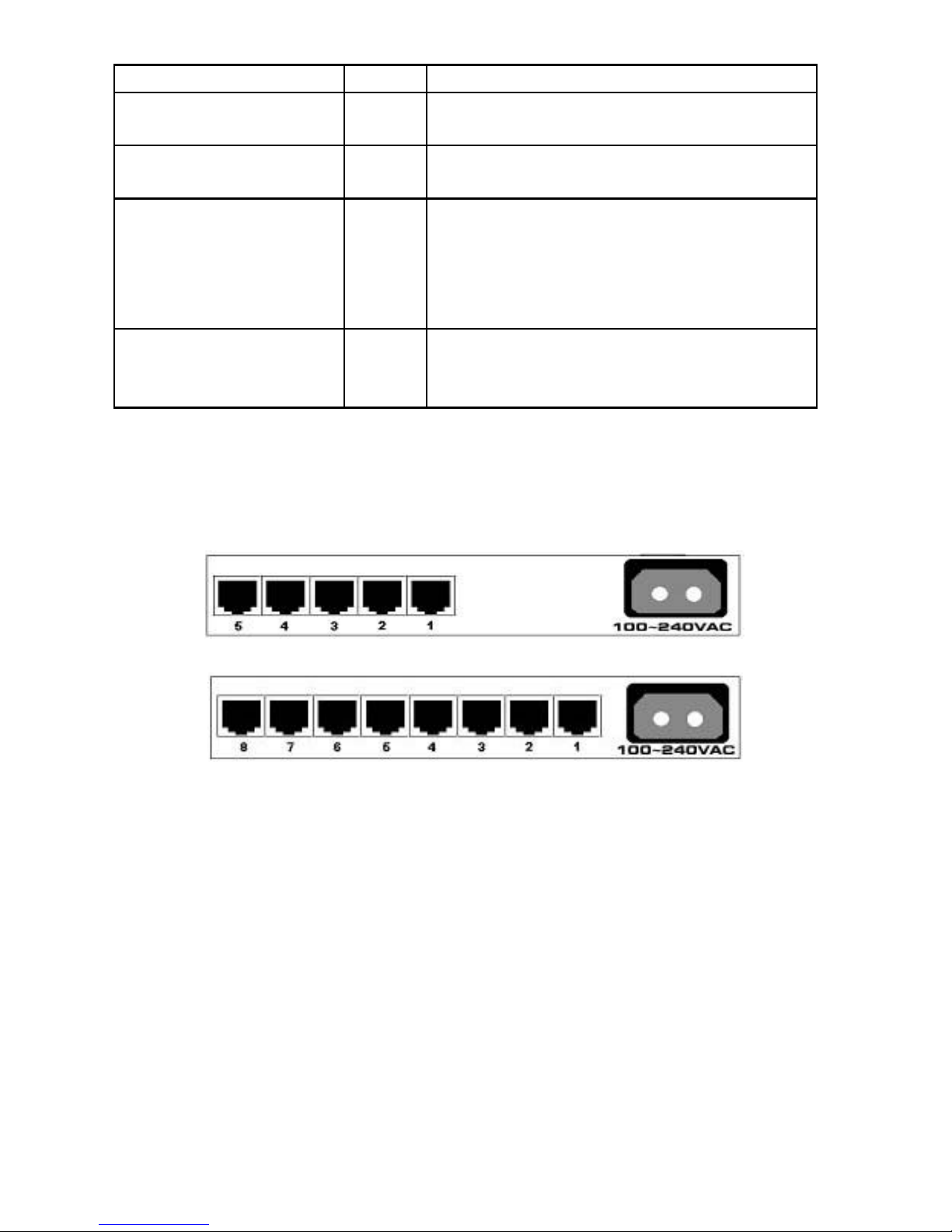
The LED indicators will help you monitor the status of each port and
connected segment. The functions of the LEDs indicators are
described as follows.
Page 6
6
LED Indicators Color Description
Power Green ON: Power On
OFF: Power Off
10/100M Speed Green ON: Link at 100Mbps
OFF: Link at 10Mbps or no link
Link/Activity Green
ON: Good link on the port
Blinking: The port is
receiving/transmitting data
OFF: No Link is occurring on the port
Full-Duplex/Collision Amber ON: Full-duplex mode
OFF: Half-duplex mode
Blinking: Data collision
B. The Rear View
The rear panel contains 5/8-port 10/100Mbps RJ-45 and a power core
socket.
Page 7

7
HARDWARE INSTALLATION
A. Basic Installation
1. Place LevelOne 5/8Port 10/100Mbps Internal Power SOHO
Switch on a smooth surface.
2. Connect the power cord to the LevelOne 5/8Port 10/100Mbps
Internal Power SOHO Switch.
3. Connect server, workstation or PC to your 5-port/8-port Switch
using standard RJ-45 Ethernet cable.
4. Connect another workstation or PC to your LevelOne 5/8Port
10/100Mbps Internal Power SOHO Switch by following the same
process as described in Step 3.
5. If necessary, another hub/switch also can be connected to any
port of LevelOne 5/8Port 10/100Mbps Internal Power SOHO
Switch using standard RJ-45 Ethernet cable for more flexible
application.
6. Ensure that each device is connected properly. Plug power cord
into the power outlet.
B. NWAY Process
“Auto-Negotiation” (NWAY) mode automat ically sets the best possible
bandwidth when connection is established with another network
device.
The Auto -Negotiation priorities:
A. 100Base-TX Full Duplex (200Mbps)
B. 100Base-Tx Half Duplex (100Mbps)
Page 8

8
C. 10Base-T Full Duplex (20Mbps)
D. 10base-T Half Duplex (10Mbps)
Each port with NWAY capability, support Half/Full Duplex function.
? Attention:
1. The cable distance between the LevelOne FSW-2205/2208TX
5/8Port 10/100Mbps Internal Power SOHO Switch and hub/server
should not exceed 100 meters.
2. Make sure the wiring is correct. In 10Mbps operation, Category
3/4/5 cable can be used for connection. To reliably operate your
network at 100Mbps, you must use Category 5 cable, or better
Data Grade cabling.
Page 9
9
Sample Application
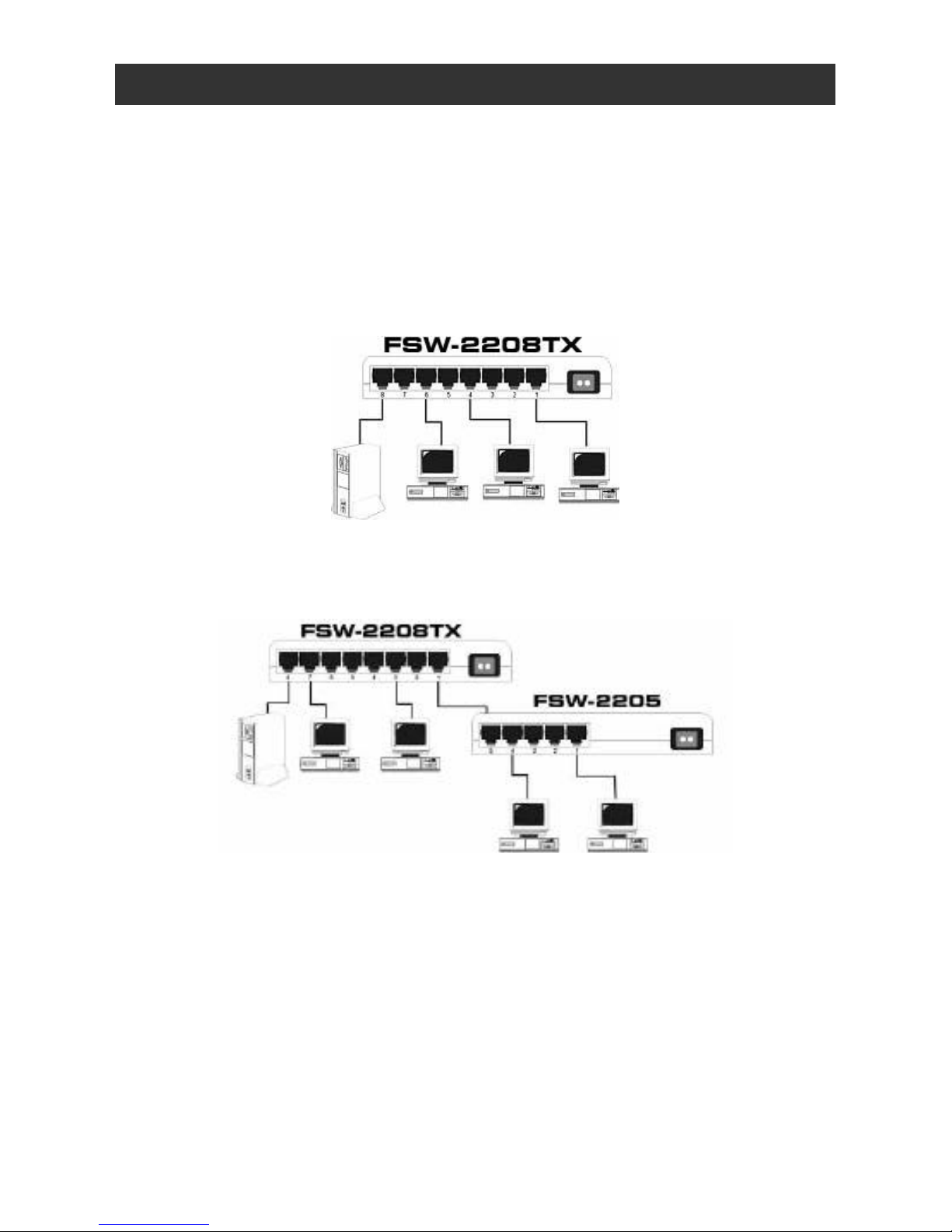
The optimal application for the LevelOne 5/8Port 10/100Mbps Internal
Power SOHO Switch is as a “bridge” joining 100Mbps and 10Mbps
network segments. The following figure illustrates the application.
Scenario I:
Scenario II:
Note:
LevelOne FSW-2205/2208TX 5/8Port 10/100Mbps Internal Power
SOHO Switch supports auto-crossover (auto MDI/MDI-X) function.
Every port can be connected directly to another hub/switch for more
flexible application. The user doesn’t need to use special crossover
cable for uplink.
Page 10
10
Technical Specifications
Standard IEEE802.3(Ethernt)
IEEE 802.3u (Fast Ethernet)
IEEE 802.3x (flow control)
Full Duplex 200Mbps (for 100BASE-TX),
20Mbps (for
10Base-T)
Max.
Bandwidth
Half Duplex
100Mbps (for 100BaseTX), 10Mbps (for
10BaseT)
Media Interface Five/Eight 10/100Mbps RJ45 ports
10BASE-T 2-
pair UTP/STP Cat. 3 or
higher, Up to 100m (328 ft)
Cabling
100BASE-TX 2-
pair UTP/STP Cat. 5 or
higher. Up to 100m (328 ft)
Packet Forwarding Rate 10Mbps:14880pps 100Mbps:148810pps
FSW-2205TX
2K entries
MAC Address
FSW-2208TX
4K entries
FSW-2205TX
Built-in 128 Kbytes
Packet Buffer memory
FSW-2208TX
Built-in 256 Kbytes
Modes Half and Full Duplex, auto-negotiation
Forwarding Mode Store and Forward
Non-blocking Yes
Flow Control
(IEEE802.3x)
Half: backpressure Full: pause frame
Auto Crossover Yes for each port
Diagnostic LEDs Speed, Link/Active, FDX/Col
Operating Temperature 0? to 45? (32? to 113? )
Operating Humidity 10% to 90% (Non-Condensing)
Input Power Requirement 100-240VAC,Auto-Sensing
Certification
FCC Class B, CE EN55022 Class B,
VCCI Class B
 Loading...