

Page 1

LevelOne
FSW-1620TX
FSW-2420TX
16/24-Port 10/100Mbps 11" Fast Ethernet Switch
User’s Guide
Version: 1.0
Page 2

TABLE OF CONTENTS
1
UNPACKING INFORMATION ................................................................................ 3
2 PRODUCT INTRODUCTION..................................................................................4
2.1 MODELS.................................................................................................................4
2.2 KEY FEATURES ......................................................................................................4
2.3 FRONT PANEL ........................................................................................................ 4
2.3.1 10/100Mbps TP Ports....................................................................................4
2.3.2 Cabling..........................................................................................................4
2.3.3 Status LEDs...................................................................................................4
2.4 REAR PANEL ..........................................................................................................5
2.4.1 Power Socket................................................................................................. 5
3 INSTALLATION ........................................................................................................ 6
3.1 TO LOCATE THE SWITCH ON A DESKTOP ..................................................................6
3.2 RACKMOUNT PLACEMENT......................................................................................6
4 HELPFUL SUGGESTIONS ......................................................................................7
4.1 PRIOR TO INSTALLATION ........................................................................................7
4.2 HALF- AND FULL-DUPLEX .....................................................................................7
4.3 FAST ETHERNET .....................................................................................................7
4.4 AUTO-NEGOTIATION ..............................................................................................7
4.5 MAC ADDRESS TABLE...........................................................................................8
4.6 BROADCAST STORM CONTROL (ONLY FOR FSW-1620TX) ....................................8
5 SAMPLE APPLICATION..........................................................................................9
6 PRODUCT SPECIFICATIONS ..............................................................................10
2
Page 3
1 UNPACKING INFORMATION
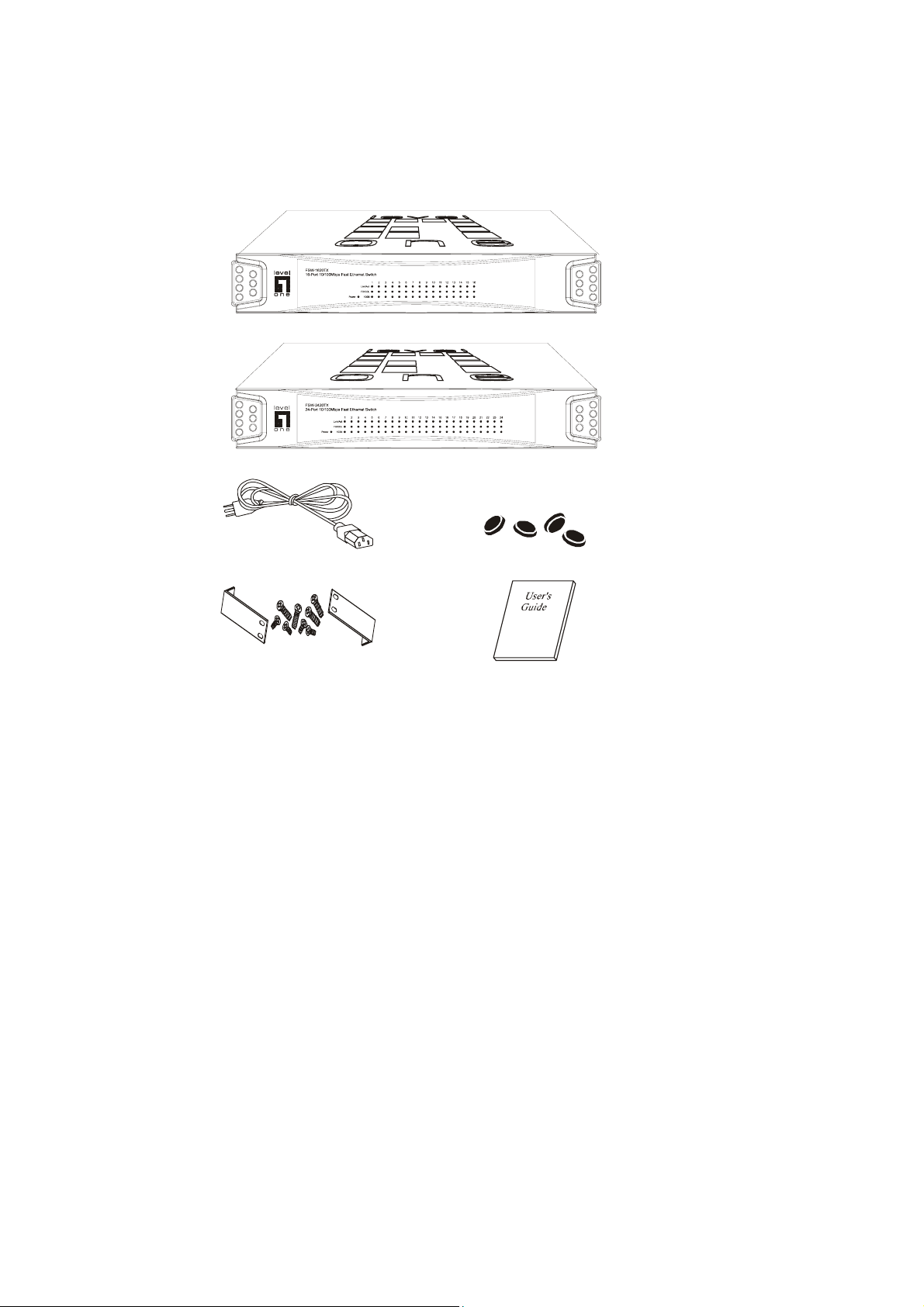
Thank you for purchasing LevelOne 11" Fast Ethernet Switch. Before continuing, please check
the contents of the product package. This product package should contain the following items:
One (1) Switch
One (1) Power Cord
Four (4) Rubber Feet
Rackmount Kit
This User’s Guide
If anything is missing, please contact your place of purchase.
16-Port 100BASE-TX Fast Ethernet Switch
24-Port 100BASE-TX Fast Ethernet Switch
Power Cord Rubber Feet
Rackmount Kit User’s Guide
3
Page 4
2 PRODUCT INTRODUCTION
2.1 Models
These LevelOne 11" Fast Ethernet Switches are multi-speed, versatile network devices
combining both standard and "Big-Pipe" ports under the same hood. The Switches are
Twenty-Four (24) ports and Sixteen (16) ports Fast Ethernet Switches.
2.2 Key Features
For FSW-1620TX
Support 16-port 10/100M wire speed Ethernet
Store-and-Forward technology filtering/forwarding is used to eliminate bad packets.
Back-Pressure Flow-Control support for Half-Duplex operation.
IEEE802.3x Flow-Control support for Full-Duplex operation.
All TP ports support Auto-MDI/MDIX, and Auto-Negotiation function.
For FSW-2420TX
Store-and-Forward technology filtering/forwarding is used to eliminate bad packets.
Back-Pressure Flow-Control support for Half-Duplex operation.
IEEE802.3x Flow-Control support for Full-Duplex operation.
All TP ports support Auto-MDI/MDIX, and Auto-Negotiation function.
2.3 Front Panel
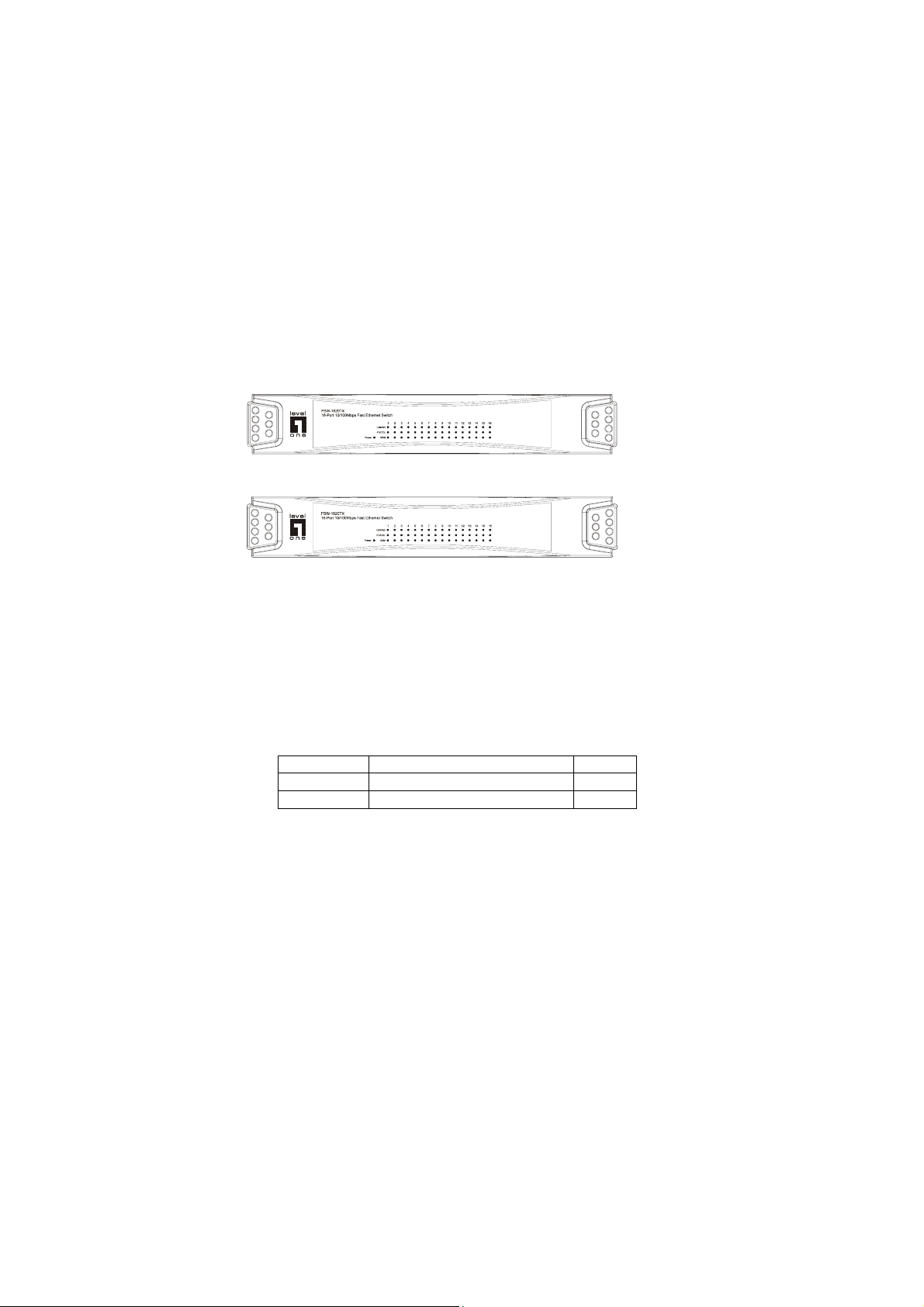
16-Port 100BASE-TX Fast Ethernet Switch
24-Port 100BASE-TX Fast Ethernet Switch
2.3.1 10/100Mbps TP Ports
Each 10/100Mbps TP port provides an Auto-Negotiation function that senses for the attached
device's maximum operating speed and automatically sets the Switch to operate at that speed.
Users only need to connect a network device into any TP port. Auto-MDIX is also supported on all
TP ports which allows uplinking to another Switch free of cross-over or straight cable selection
hassle.
2.3.2 Cabling
10Mbps -When transmitting at 10Mbps Category 3, 4 or 5 TP cabling with RJ-45 sockets can be
100Mbps -To transmit at 100Mbps requires Category 5 TP cabling.
Note: Category 5 TP cable is recommended whenever installing new cabling.
2.3.3 Status LEDs
The Switches come with a complete range of LEDs. The table below lists each LEDs name, color
used.
Port Type Cable Type Connector
10BASE-T Category 3, 4 or 5 TP RJ-45
100BASE-TX Cat.5 TP RJ-45
4
Page 5
and a brief description of its function.
Name Color Function
Pwr Green Lit: Power "On"
LINK/ACT Green Lit: When the port has a valid physical connection with another device.
FD/COL Green Lit: When the port is set to Full-Duplex mode.
Speed Green Lit: When the port is operating at 100Mbps.
2.4 Rear Panel
Blinks: When the port is sending or receiving data (Activity).
Blinks: When a collision is detected, when the port is in Half-Duplex
mode.
Off: When the port is operating at 10Mbps.
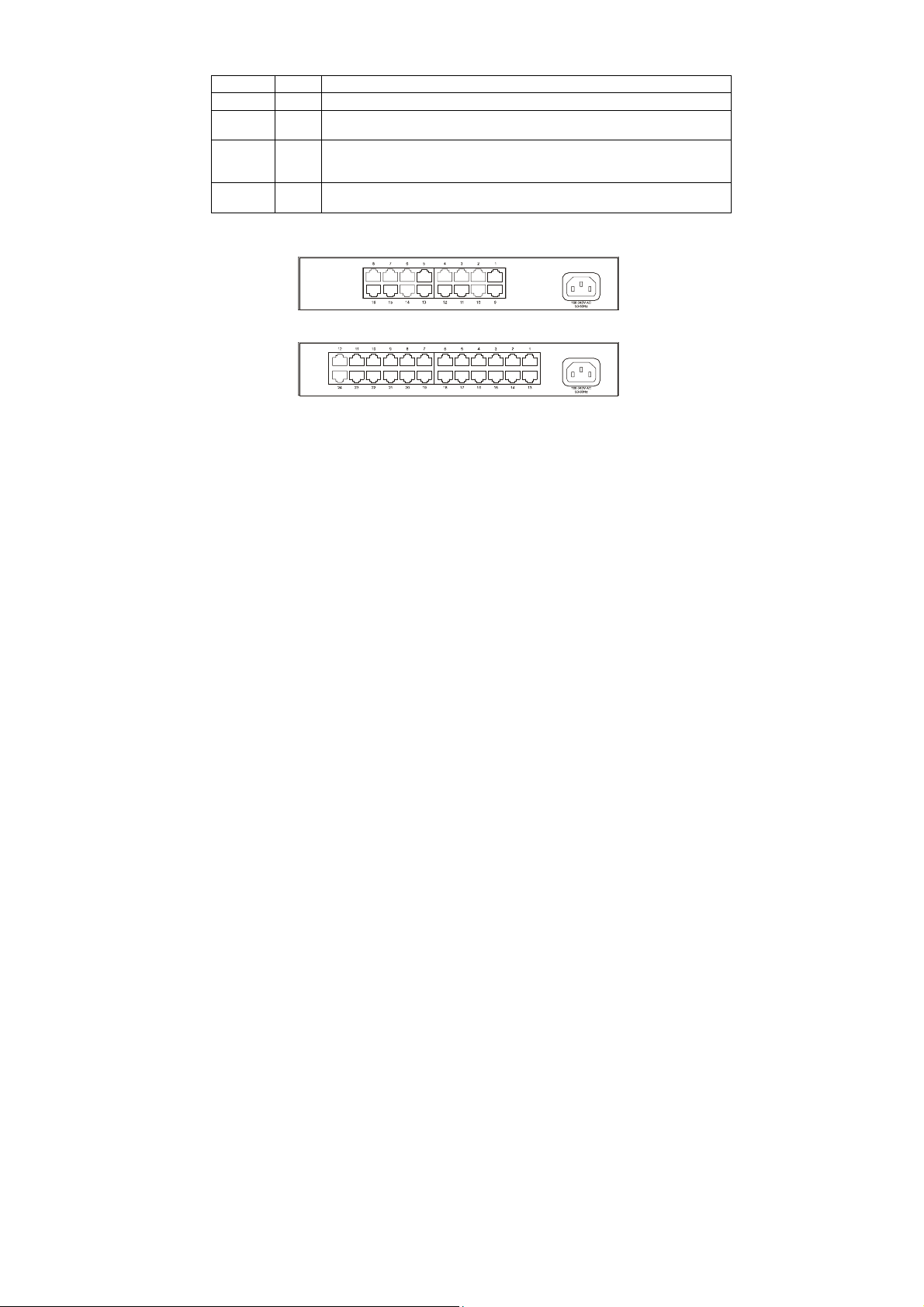
16-Port 100BASE-TX Fast Ethernet Switch
24-Port 100BASE-TX Fast Ethernet Switch
2.4.1 Power Socket
The Power Socket is designed to be used with the power cord included in the product package.
Attach the female end of the cord to the power connector on the back panel.
Attach the male end of the cord to a grounded power outlet.
5
Page 6
3 INSTALLATION
The LevelOne 11" Fast Ethernet Switch is "Plug-&-Play". It does not require software
configuration. Users can immediately use any of the features of this product simply by attaching
the cables and turning on the power.
If user need advanced smart functions to manage LAN network more effectively, we provide
software and cable for easy configuration of the Switch. Please see section 5 and 6 for further
details.
3.1 To locate the switch on a desktop
Attach the Four (4) rubber feet included in the product package to the bottom of the Switch, one
in each corner.
Place the Switch on a clean, flat desk or tabletop close to a power outlet.
Plug in all network connections and the power cord.
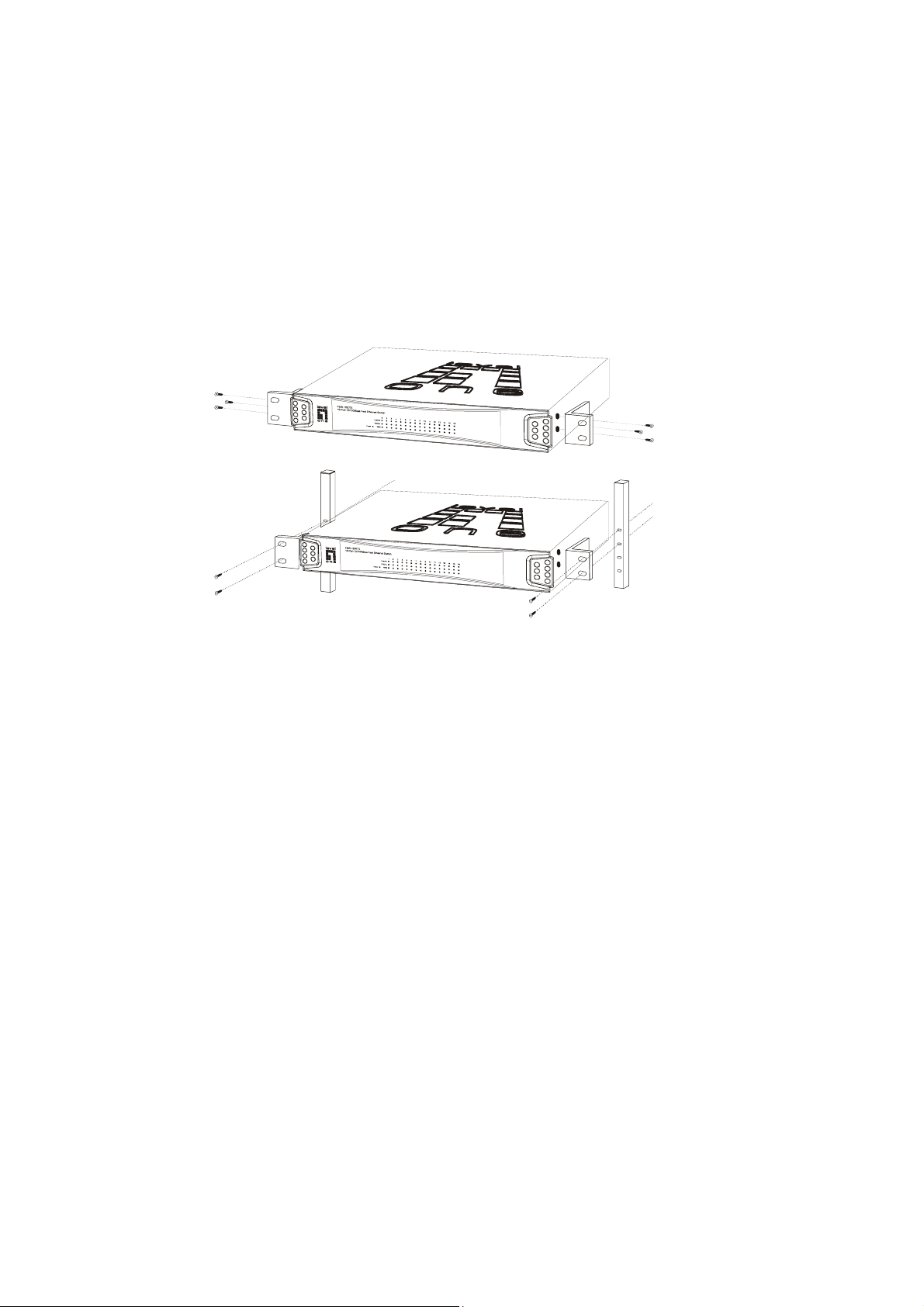
3.2 Rackmount placement
Attach One (1) rackmounting bracket on each side of the Switch front panel and secure each
bracket with the provided screws.
Use the other provided screws to secure each Switch to the rack.
6
Page 7
4 HELPFUL SUGGESTIONS
4.1 Prior to Installation
Before installing the Switch and connecting network devices, it is important to plan the network's
layout. Things you should consider include:
Dedicated Bandwidth: File servers and other high-traffic hardware improve their performance if
they have their own dedicated 10Mbps or 100Mbps bandwidth.
Full-Duplex: Determine which devices support Full-Duplex connections.
Fast Ethernet: Make sure rules for cable lengths and categories are followed.
Auto-Negotiation: Devices with different speeds may be easily swapped when the other end
of the cable is fixed to a port with Auto-Negotiation.
4.2 Half- and Full-Duplex
The Switch supports both Half- and Full-Duplex modes for 10BASE-T and 100BASE-TX.
In Half-Duplex mode: Data cannot be transmitted and received at the same time. Attached
devices must finish transmitting data before they can receive data.
In Full-Duplex mode: Data can be transmitted and received at the same time.
However:
Full-Duplex transmission is only possible between two devices with a dedicated link (ex:
Switch-Switch, Switch-PC)
Both devices must have Full-Duplex capability
Both devices must be set to Full-Duplex (ex: Auto-Negotiation – Auto-Negotiation,
Non-Auto-Negotiation to Non-Auto-Negotiation)
The 100BASE-TX/10BASE-T ports on the Switch detect and set the line's operating mode by
using their Auto-Negotiation function.
4.3 Fast Ethernet
100BASE-TX is called "Fast Ethernet". In Fast Ethernet data travels ten times faster (100Mbps)
than in traditional Ethernet (10Mbps).
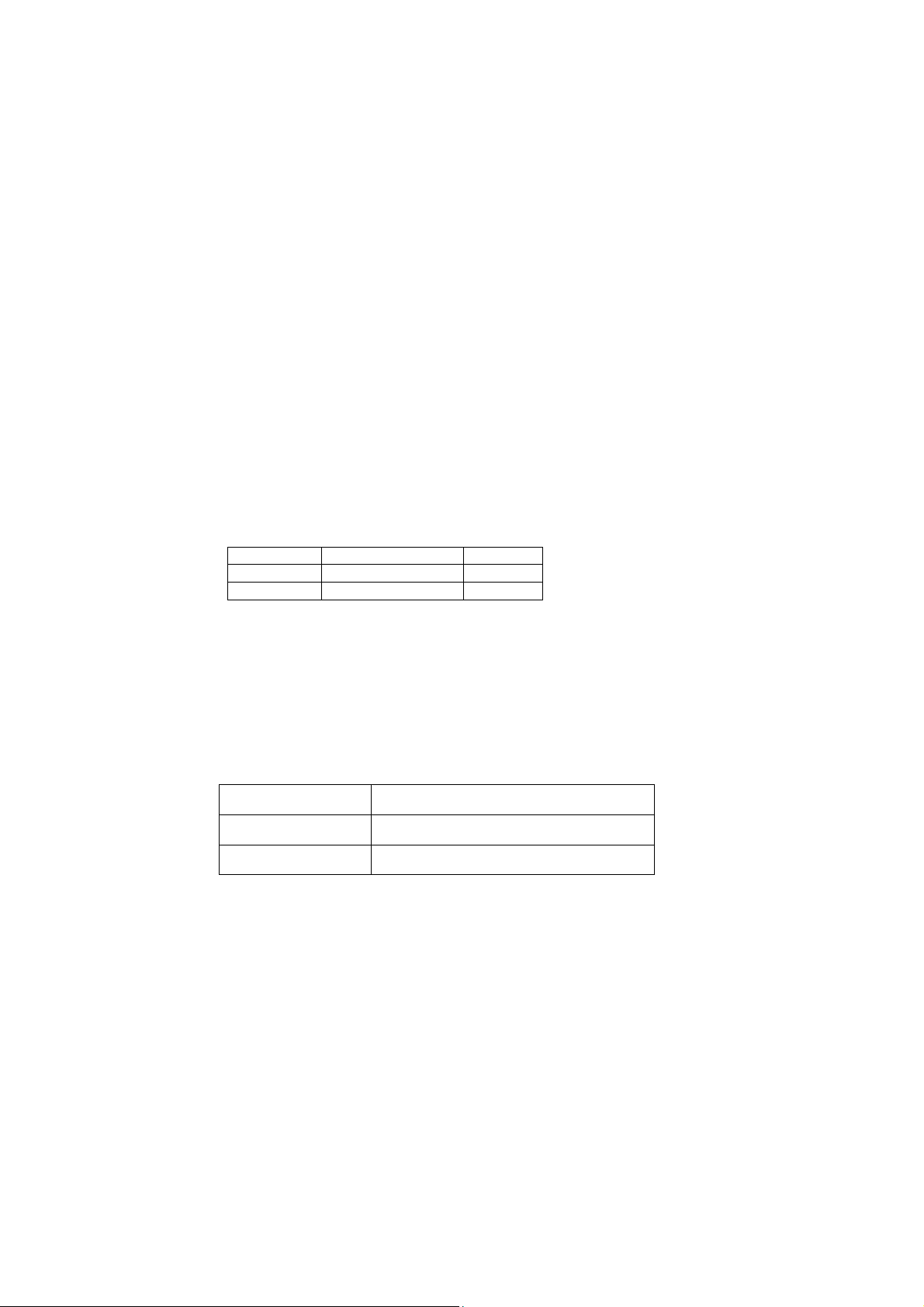
Below is a list of the cable types and connectors supported by the Switch for 10BASE-T and
100BASE-TX networks.
Port Type Cable Type Connector
10BASE-T Category 3, 4 or 5 TP RJ-45
100BASE-TX Cat. 5 TP RJ-45
Note: If your 10BASE-T network currently uses Category 5 TP cabling, you can instantly upgrade
the network to a 100BASE-TX network by changing network devices.
4.4 Auto-Negotiation
Every 10/100Mbps dual speed port on the Switch has a Built-In "Auto-Negotiation" function. This
technology automatically sets the best possible bandwidth as soon as a connection is established
with another network device. (Usually at Power “On” or Reset.) This capability is achieved via the
Switch’s Auto-Negotiation function that automatically detects the modes and speeds the second
(attached) device is capable of.
Evaluating Auto-Negotiation Capability:
If attached device is: The Switch will automatically set its TP ports to
100Mbps
no Auto-Negotiation
100Mbps
with Auto-Negotiation
operate at:
100Mbps (100BASE-TX, Half-Duplex)
200Mbps (100BASE-TX, Full-Duplex)
7
Page 8

10Mbps
no Auto-Negotiation
10Mbps
with Auto-Negotiation
Note: If the attached device is set to a fixed mode (ex: Forced Full-Duplex) it will not operate as
an Auto-Negotiation device.
4.5 MAC Address Table
Every Ethernet data packet includes both source and destination addresses. This Six (6)-bytes ID
is called the MAC (Media Access Control) Address.
The Switch can automatically learn and store MAC addresses. However, the MAC address table
is volatile: it disappears when the Switch is powered “Off” or reset.
Note: When the network needs reconfiguration, we recommend turning off the power first. After
all nodes have been moved, turn the Switch back "On" to rebuild the internal MAC address table.
4.6 Broadcast Storm Control (only for FSW-1620TX)
The Broadcast Storm Control discards broadcast frames when the number of cumulated
non-unicast frames is over the threshold, in order to prevent Network Traffic congestion bringing
the Network to a halt. In this Switch, each port will drop broadcast packets (Destination MAC ID is
ff ff ff ff ff ff) after receiving continuous 64 broadcast packets. The counter will be reset to 0 every
800ms or when receiving any non-broadcast packets. (Destination MAC ID is not ff ff ff ff ff ff)
10Mbps (10BASE-T, Half-Duplex)
20Mbps (10BASE-T, Full-Duplex)
8
Page 9
5 Sample Application
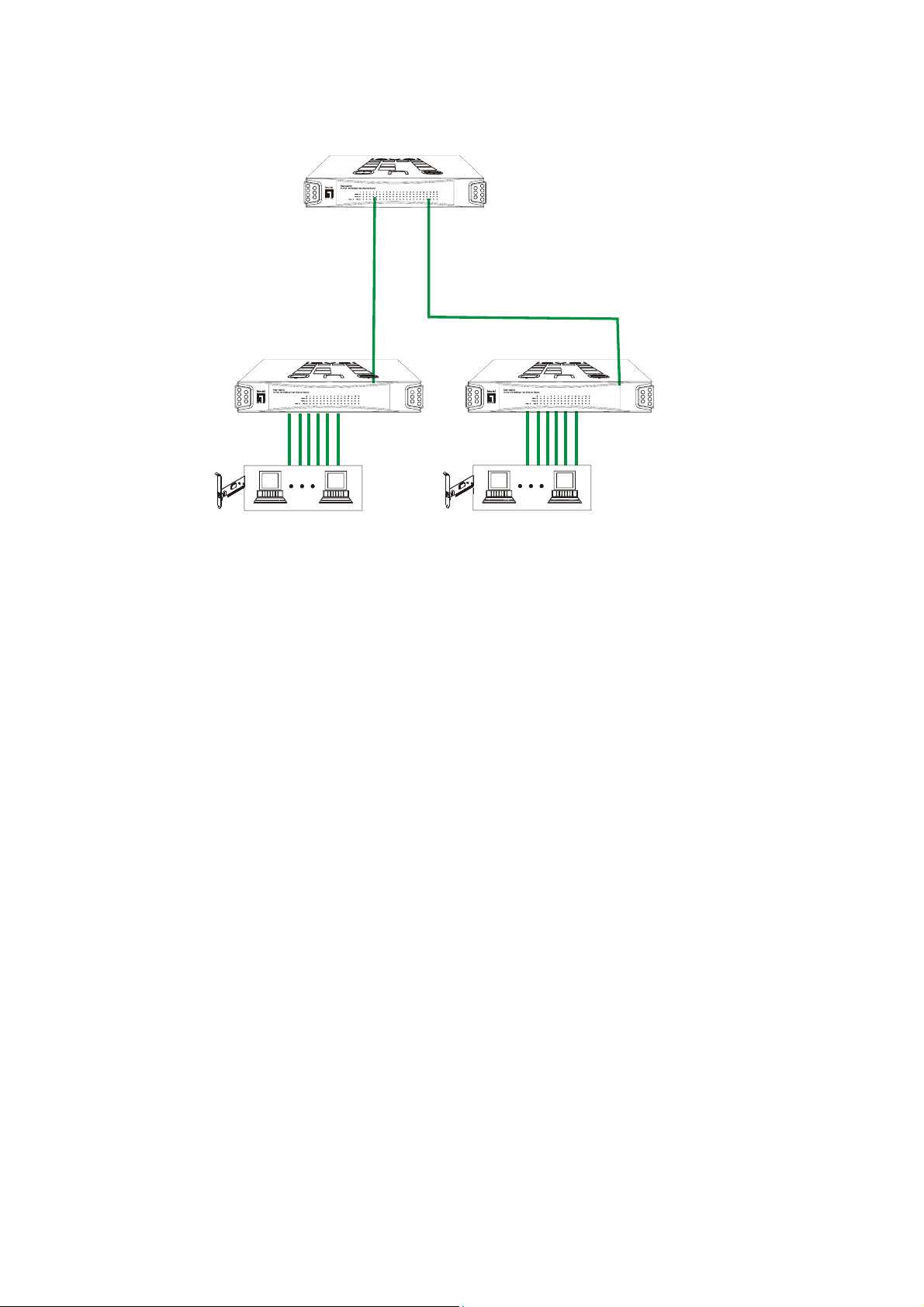
The optimal application for the Switch is as a "big pipe" backbone interconnecting file servers
with bandwidth-hungry workgroups, departments, and offices.
FSW-2420TX
100BASE-TX
FSW-1620TX
Workstation with 10/100Mbps
Fast Ethernet Adapter
Workstation with 10/100Mbps
Fast Ethernet Adapter
9
Page 10
6 PRODUCT SPECIFICATIONS
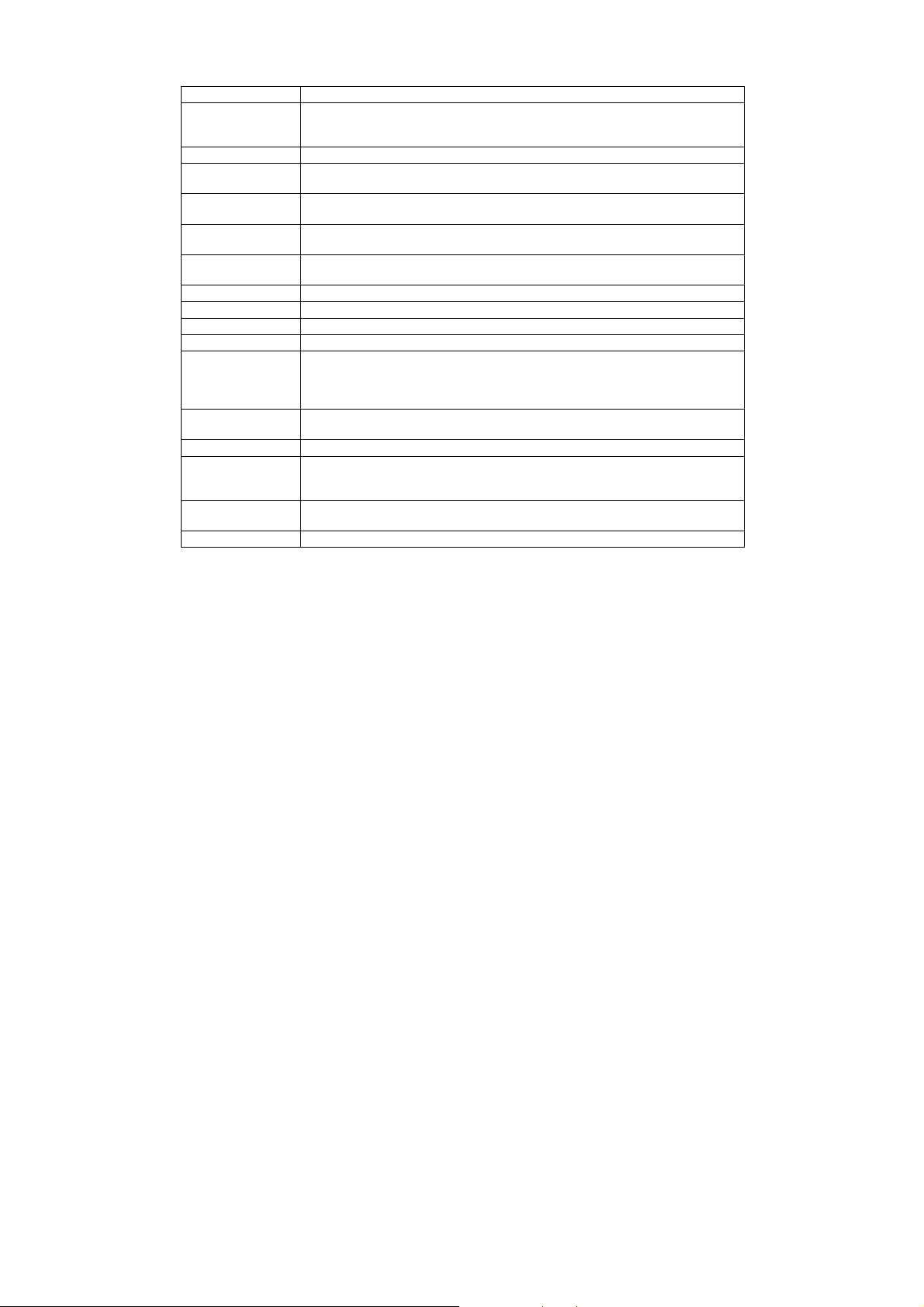
Model FSW-1620TX
Standards IEEE 802.3: 10BASE-T
Ports Sixteen (16) 100BASE-TX (Copper)
Media Support 10BASE-T: Category 3, 4 or 5 TP
Bandwidth 100BASE-TX: 200/100Mbps
Forwarding/Filtering
Rate
Latency 8.5 µsec @100Mbps, minimum
MAC Addresses 8K Six (6)-bytes entries maximum, Self-Learning
Buffer Memory 512K Bytes Packet Memory
Duplex Modes TP ports have 10/100Mbps Full/Half-Duplex Auto-Negotiation function
Crossover All the TP ports support Auto-MDIX function
LED Indicators One (1) for Power
Power Supply Full range Auto-Switching
Power Consumption 9.9 watt maximum
Environment Operating Temperature: 0° ~ 45°C (32° ~ 113°F)
Certifications FCC Class A
Dimensions 265x185x44mm (10.4x7.3x1.7inches)
IEEE 802.3u: 100BASE-TX
EEE 802.3x: Flow-Control for Full-Duplex operation
100BASE-TX: Category 5 TP
10BASE-T: 20/10Mbps
148810 packets/second per port @ 100Mbps, maximum
14881 packets/second per port @ 10Mbps, maximum
67 µsec @ 10Mbps, minimum
One (1) per port for Link/ACT
One (1) per port for Full-Duplex/Collision
One (1) per port for Speed
Input voltage: 100 ~ 240 +/-10% VAC/ 50 ~ 60 Hz
Storage Temperature: -20° ~ 70°C (-4° ~ 158°F)
Humidity: 10% ~ 90% Non-Condensing
CE Mark
10
Page 11
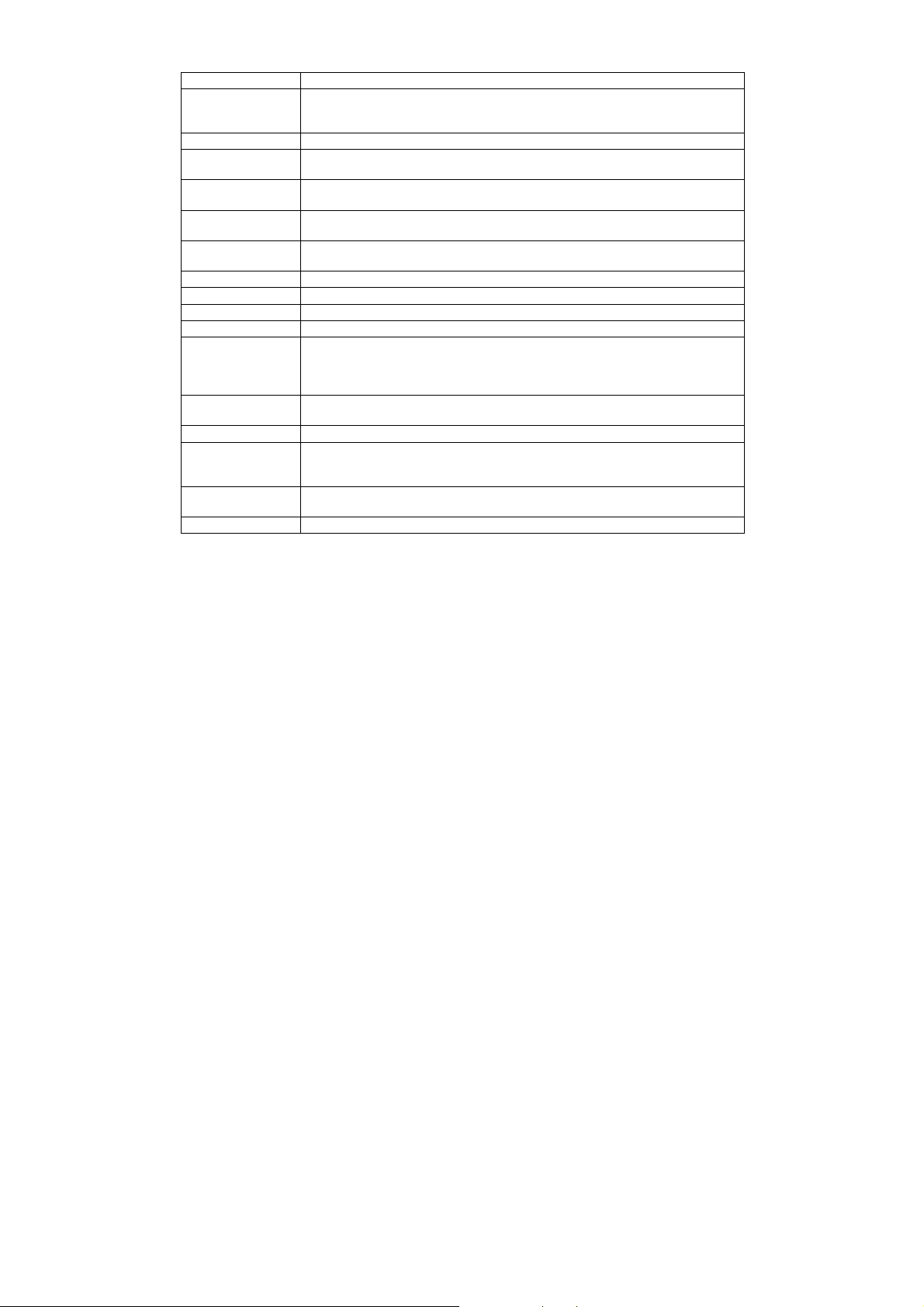
Model FSW-2420TX
Standards IEEE 802.3: 10BASE-T
Ports Twenty-Four (24) 100BASE-TX (Copper)
Media Support 10BASE-T: Category 3, 4 or 5 TP
Bandwidth 100BASE-TX: 200/100Mbps
Forwarding/Filtering
Rate
Latency 8 µsec @100Mbps, minimum
MAC Addresses 8K Six (6)-bytes entries maximum, Self-Learning
Buffer Memory 320K Bytes packet memory
Duplex Modes TP ports have 10/100Mbps Full/Half-Duplex Auto-Negotiation function
Crossover All the TP ports support Auto-MDIX function
LED Indicators One (1) for Power
Power Supply Full range Auto-Switching
Power Consumption 16.5 watt maximum
Environment Operating Temperature: 0° ~ 45°C (32° ~ 113°F)
Certifications FCC Class A
Dimensions 265x185x44mm (10.4x7.3x1.7inches)
IEEE 802.3u: 100BASE-TX
EEE 802.3x: Flow-Control for Full-Duplex operation
100BASE-TX: Category 5 TP
10BASE-T: 20/10Mbps
148810 packets/second per port @ 100Mbps, maximum
14881 packets/second per port @ 10Mbps, maximum
75 µsec @ 10Mbps, minimum
One (1) per port for Link/ACT
One (1) per port for Full-Duplex/Collision
One (1) per port for Speed
Input voltage: 100 ~ 240 +/-10% VAC/ 50 ~ 60 Hz
Storage Temperature: -20° ~ 70°C (-4° ~ 158°F)
Humidity: 10% ~ 90% Non-Condensing
CE Mark
11
Page 12

This equipment has been tested and found to comply with the limits for a Class A computing device pursuant to
Part 15 of FCC Rules, which are designed to provide reasonable protection against electromagnetic interference in
a commercial environment.
Changes or modifications to the equipment not expressly approved by the party responsible for compliance could
void the user's authority to operate the equipment.
This is a Class A product. In a domestic environment this product may cause radio interference in which case the
user may be required to take adequate measures.
FCC WARNING
CE MARK WARNING
12
 Loading...