

Page 1

LevelOne
FSW-1611TX
16Port 10/100Mbps 13” Fast Ethernet Switch
USER'S GUIDE
Page 2

FCC WARNING
This equipment has been tested and found to comply
with the limits for a Class A computing device
pursuant to Part 15 of FCC Rules, which are
designed to provide reasonable protection against
electromagnetic interference in a commercial
environment.
Changes or modifications to the equipment not
expressly approved by the party responsible for
compliance could void the user's authority to operate
the equipment.
CE MARK WARNING
THIS IS A CLASS A PRODUCT. IN A DOMESTIC
ENVIRONMENT THIS PRODUCT MAY CAUSE RADIO
INTERFERENCE IN WHICH CASE THE USER MAY BE
REQUIRED TO TAKE ADEQUATE MEASURES.
2
Page 3

T ABLE OF CONTENTS
UNPACKING INFORMATION-----------------------------------4
PRODUCT INTRODUCTION -------------------------------------5
FAST ETHERNET TECHNOLOGY-------------------------------------------- 5
SWITCHING TECHNOLOGY----------------------------------------------------5
FEATURES---------------------------------------------------------------------------6
THE FRONT PANEL---------------------------------------------------------------8
CABLING------------------------------------------------------------------------------8
STATUS LEDS ----------------------------------------------------------------------9
THE REAR PANEL-----------------------------------------------------------------9
INSTALLATION-----------------------------------------------------------11
TO LOCATE THE SWITCH ON A DESKTOP-----------------------------11
TO STACK YOUR SWITCH----------------------------------------------------11
RACKMOUNT PLACEMENT-------------------------------------------------- 11
HELPFUL SUGGESTIONS--------------------------------------13
Prior to Installation----------------------------------------------------------------13
Half- and Full-Duplex------------------------------------------------------------ 13
Auto-Negotiation-------------------------------------------------------------------14
MAC Address Table--------------------------------------------------------------15
Sample Application---------------------------------------------------------------15
Troubleshooting--------------------------------------------------------16
PRODUCT SPECIFICATIONS--------------------------------17
3
Page 4

A. UNPACKING INFORMATION
Thank you for purchasing LevelOne FSW-1611TX 16Port 10/100Mbps
13” Fast Ethernet Switch. Before continuing, please check the
contents of the product package. This product package should contain
the following items:
Ø One LevelOne FSW-1611TX 16Port 10/100Mbps 13” Fast Ethernet
Switch
Ø One Power Cord
Ø Four Rubber Feet (for desktop placement)
Ø One Rackmount Kit
Ø Four Stackable stand
Ø User’s Guide
If anything is missing, please contact your place of purchase.
4
Page 5

B. PRODUCT INTRODUCTION
This chapter describes the features of the Switch and some background
information about Ethernet/Fast Ethernet switching technology.
Fast Ethernet Technology
The growing importance of LANs and the increasing complexity of
desktop computing applications are fueling the need for high
performance networks. A number of high-speed LAN technologies have
been proposed to provide greater bandwidth and improve client/server
response times. Among them, 100BASE-T (Fast Ethernet) provides a
non-disruptive, smooth evolution from the current 10BASE-T technology.
The non-disruptive and smooth evolution nature, and the dominating
potential market base, virtually guarantee cost effective and high
performance Fast Ethernet solutions in the years to come.
100Mbps Fast Ethernet is a new standard specified by the IEEE 802.3
LAN committee. It is an extension of the 10Mbps Ethernet standard
with the ability to transmit and receive data at 100Mbps, while
maintaining the CSMA/CD Ethernet protocol. Since the 100Mbps Fast
Ethernet is compatible with all other 10Mbps Ethernet environments, it
provides a straightforward upgrade and takes advantage of the existing
investment in hardware, software, and personnel training.
Switching Technology
Another approach to pushing beyond the limits of Ethernet technology
is the development of switching technology. A switch bridge Ethernet
packets at the MAC address level of the Ethernet protocol transmitting
among connected Ethernet or Fast Ethernet LAN segments.
Switching is a cost-effective way of increasing the total network
capacity available to users on a local area network. A switch increases
capacity and decreases network loading by dividing a local area network
into different segments, which don’t compete with each other for
network transmission capacity.
The switch acts as a high-speed selective bridge between the individual
5
Page 6

segments. The switch, without interfering with any other segments,
automatically forwards traffic that needs to go from one segment to
another. By doing this the total network capacity is multiplied, while
still maintaining the same network cabling and adapter cards.
For Fast Ethernet networks, a switch is an effective way of eliminating
problems of chaining hubs beyond the “two-repeater limit.” A switch can
be used to split parts of the network into different collision domains,
making it possible to expand your Fast Ethernet network beyond the
205-meter network diameter limit for 100BASE-TX networks. Switches
supporting both traditional 10Mbps Ethernet and 100Mbps Fast
Ethernet are also ideal for bridging between the existing 10Mbps
networks and the new 100Mbps networks.
Switching LAN technology is a marked improvement over the previous
generation of network bridges, which were characterized by higher
latencies. Routers have also been used to segment local area networks,
but the cost of a router, the setup and maintenance required make
routers relatively impractical. Today switches are an ideal solution to
most kinds of local area network congestion problems.
Features
The Switches were designed for easy installation and high performance
in an environment where traffic on the network and the number of user
increase continuously.
These Switches provide immediate access to a rapidly growing network
through a wide range of user-reliable functions.
The Switches are ideal for deployment with multiple high-speed servers
for shared bandwidth 10Mbps or 100Mbps workgroups. With the highest
bandwidth 200Mbps (100Mbps full-duplex mode), any port can provide
workstations with a congestion-free data pipe for simultaneous access
to the server.
The Switches are expandable by cascading two or more switches
together. As all ports support 200Mbps, the Switches can be cascaded
from any port and to any number of switches.
6
Page 7

The Switches are a perfect choice for site planning to upgrade to Fast
Ethernet in the future. Ethernet workgroups can connect to the
Switches now, and change adapters and hubs anytime later without
needing to change the Switches or reconfigure the network.
The Switches combine dynamic memory allocation with store-andforward switching to ensure that the buffer is effectively allocated for
each port, while controlling the data flow between the transmit and
receive nodes to guarantee against all possible packet los s.
The LevelOne FSW-1611TX 16Port 10/100Mbps 13” Fast Ethernet
Switch are an unmanaged 10/100 Fast Ethernet Switch that offers
solutions in accelerating small Ethernet workgroup bandwidth. Other
key features are:
• Independent bandwidth for each port
• 100/10Mbps TP ports with Auto-Negotiation support
• Bridging capability for 100Mbps and 10Mbps segments
• Store and Forward technology
• Built-in Crossover port
• IEEE 802.3x flow control support for Full-Duplex operation
• Back-pressure support for Half-Duplex operation
• Three QoS levels checked via IP Header and 802.1Q VLAN Tag and
selectable on per port basis.
• 512K Byte Buffer Memory
• 16K MAC Address Table
• Desktop size with rack mounting capability
7
Page 8
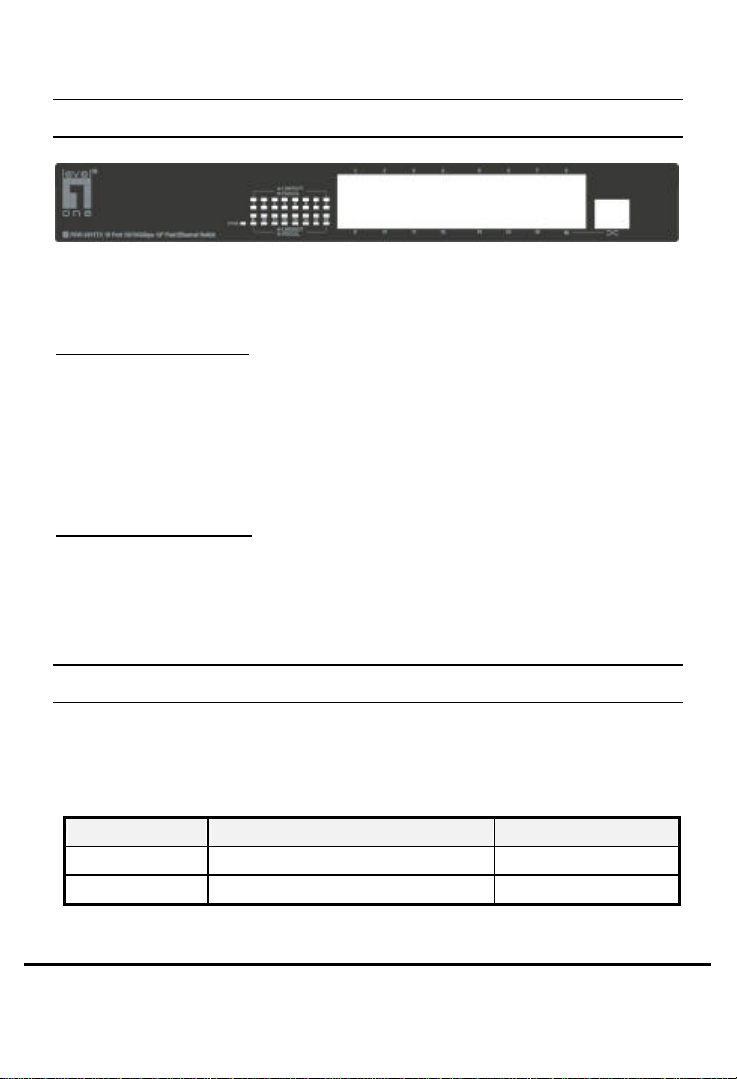
The Front Panel
LevelOne 16Port 10/100Mbps 13” Fast Ethernet Switch
Port Speeds
100/10Mbps TP Ports
Each 100/10Mbps TP port provides an Auto-Negotiation function that
senses for the attached device's maximum operating speed and
automatically sets the Switch to operate at that speed. Each TP port
uses RJ-45 connector that allows network TP cables to be easily
attached or removed. Users only need to connect a network device into
any TP port and the Switch will do the rest.
Crossover Connector
The last TP port in this model supports a Crossover function. The
Crossover function is used for Uplinking to a standard port on another
Switch using normal TP cable.
F Warning: You cannot use the last TP port’s regular port when you
are using the Crossover port.
Cabling
10Mbps – Category 3, 4, or 5 TP cabling can be used for transmitting
data at 10Mbps or 20Mbps bandwidth on 10BASE-T networks.
100Mbps – Only Category 5 TP cabling can be used for transmitting
data at 100Mbps or 200Mbps bandwidth on 100BASE-TX networks.
Port Type Cable Type Connector
10BASE -T Category 3, 4 or 5 TP RJ-45
100BASE -TX Category 5 TP RJ-45
Note: Category 5 TP cable should be used whenever installing new TP
8
Page 9
cabling.
ical connection (Link)
Blinks: When the port is sending or receiving data
Status LEDs
This LevelOne 16Port 10/100Mbps 13” Fast Ethernet Switch comes with a
complete range of LEDs. The table below lists each LED’s name, color
and a brief description of its function.
• One for power On/Off
• One per port for Link/Activity
• One per port for Full-Duplex/Collision
NAME COLOR FUNCTION
PWR Green • Lit: Power "On"
LINK/ACT Green • Lit: When the port has a valid phys
with another device.
•
(Activity).
FD/COL Amber • Lit: When the port is set to Full-Duplex mode.
• Blinks: When a collision is detected,in Half-Duplex mode.
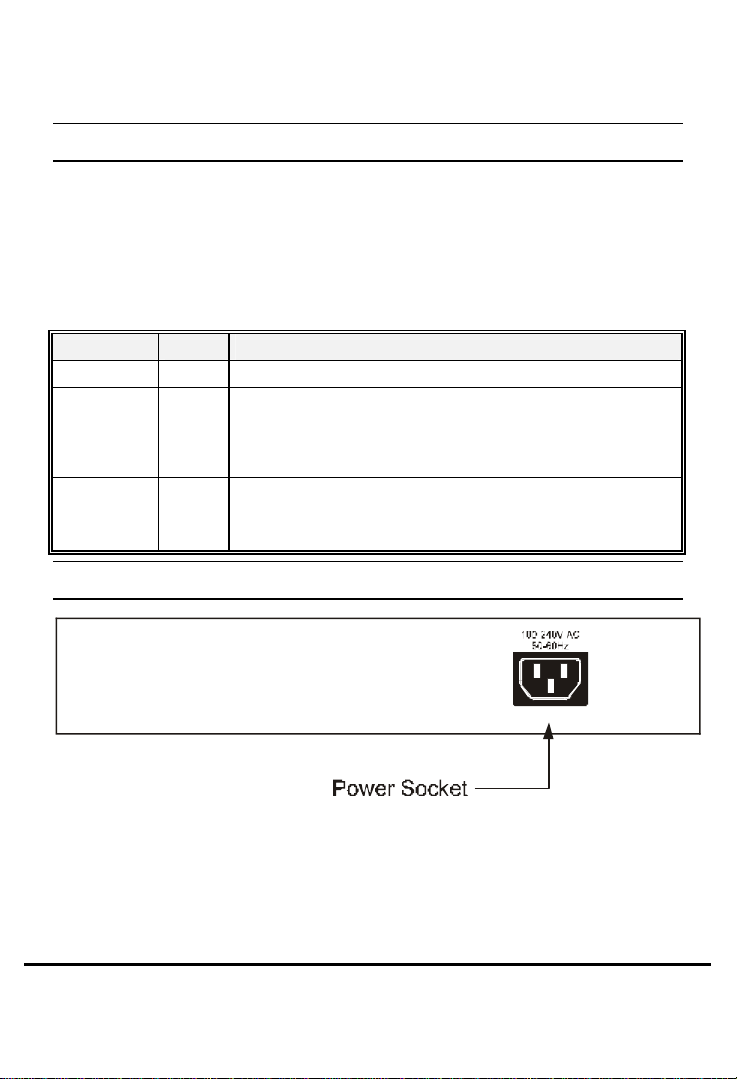
The Rear Panel
Power Socket
The Power Socket is designed to be used with the power cord included
in the product package.
a) Attach the female end of the cord to the power connector on the
back panel.
b) Attatch the male end of the cord to a grounded power outlet.
9
Page 10

Note: To reset the switch, Remove the power cord and re-attach it .
a) The switch must be reset when the MAC Address table needs to be
rebuilt.
b) The switch must be reset when the fiber port Full/Half – Duplex
modes are changed.
10
Page 11
C. INSTALLATION
This LevelOne 16Port 10/100Mbps 13” Fast Ethernet Switch is "Plug &
Play." They do NOT require software configuration. Users can
immediately use any of the features of this product simply by attaching
the cables and turning on the power.
TO LOCATE THE Switch ON A DESKTOP
a) Attach the four rubber feet included in the product package to the
bottom of the Switch, one in each corner.
b) Place the Switch on a clean, flat desk or table top close to a power
outlet.
C) Plug in all network connections and the power cord
To stack your Switch
a) Attach the four stackable stand included in the product package to
the bottom of the Switch, one in each corner.
b) Now , you can can use the switch to stack with other switch with
stackable stand.
C) Plug in all network connections and the power cord
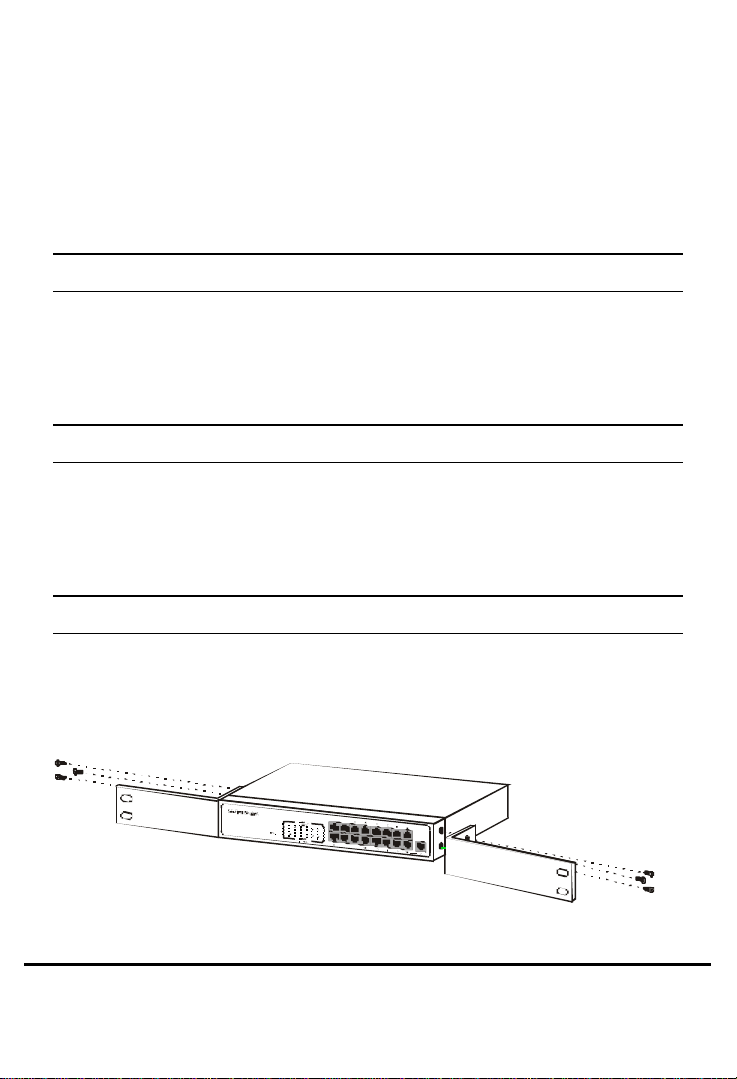
RACKMOUNT PLACEMENT
This LevelOne 16Port 10/100Mbps 13” Fast Ethernet Switch can be
mounted in an EIA standard-sized 19-inch rack.
1. Attach one (1) rackmounting bracket on each side of the Switch’s
front panel with the provided screws.
11
Page 12
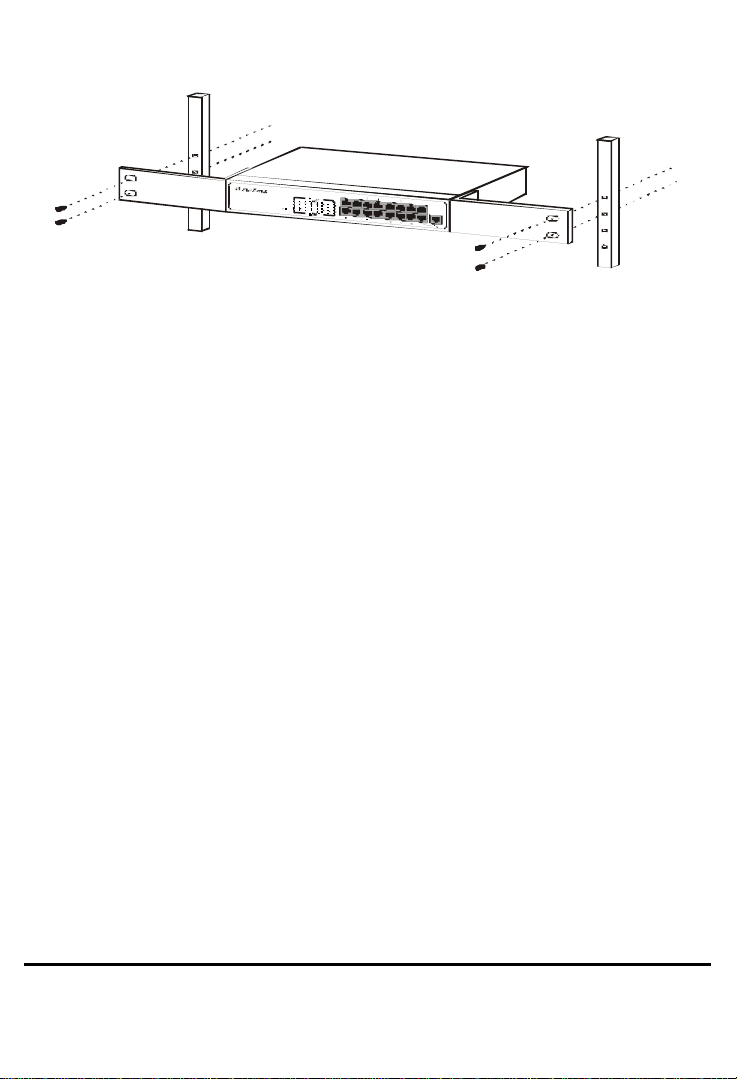
2. Use the other provided screws to secure the Switch to the rack.
12
Page 13

D. HELPFUL SUGGESTIONS
Prior to Installation
Before installing this LevelOne FSW-1611TX 16Port 10/100Mbps 13”
Fast Ethernet Switch and connecting it to network devices, it is
important to plan the network's layout. Things you should consider
include:
? Dedicated Bandwidth: File servers and other high-traffic
hardware improve their performance if they have their own
dedicated 10Mbps or 100Mbps bandwidth.
? Full-Duplex: Determine which devices support Full-Duplex
connections.
? Fast Ethernet: Make sure rules for cable lengths and categories
are followed.
? Auto-Negotiation: Devices with different speeds may be easily
swapped when the other end of the cable is fixed to a port with
Auto-Negotiation.
? Crossover Uplink: This LevelOne 16Port 10/100Mbps 13” Fast
Ethernet Switch can be Uplinked to another Switch using the
Crossover function located on the last TP port.
F Remember - If you are using the last TP port’s Crossover port, you
cannot use the last TP port’s regular port. ` If you use both of the last
port's ports at the same time your Switch will not operate properly.
Half- and Full-Duplex
This Switch supports both Half- and Full-Duplex modes for 10BASE-T
and 100BASE-TX.
• In Half-Duplex mode data cannot be transmitted and received at the
same time. Attached devices must finish transmitting data before
13
Page 14
they can receive data.
This Switch Will Automatically Set Its
• In Full-Duplex mode data can be transmitted and received at the
same time.
However:
a) Full-Duplex transmission is only possible between two devices
with a dedicated link (e.g., Switch-Switch, Switch-PC)
b) Both devices must have Full-Duplex capability
c) Both devices must be set to Full-Duplex (e.g. Auto-
Negotiation – Auto-Negotiation, Non-Auto-Negotiation to Non-
Auto-Negotiation)
• The 100BASE-TX/10BASE-T ports on the Switch detec t and set the
line's operating mode by using their Auto-Negotiation function.
Auto-Negotiation
Every 100/10Mbps dual speed port on this LevelOne FSW-1611TX
10/100Mbps Fast Ethernet Switch has a built-in "Auto-Negotiation"
function. This technology automatically sets the best possible
bandwidth as soon as a connection is established with another network
device (usually at Power “On” or Reset). This capability is achieved via
the Switch’s Auto-Negotiation function that automatically detects the
modes and speeds the second (attached) device is capable of.
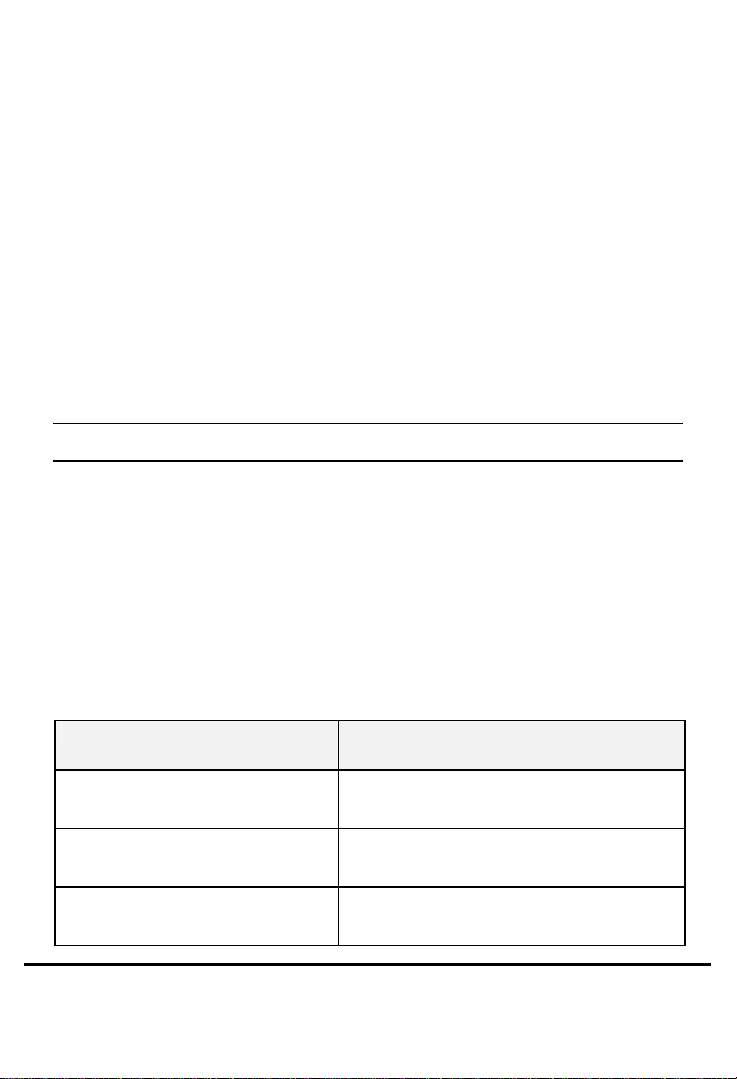
Evaluating Auto-Negotiation Capability:
If the attached device is:
100Mbps, no Auto-Negotiation 100Mbps Bandwidth
100Mbps, with Auto-Negotiation 200Mbps Bandwidth
10Mbps, no Auto-Negotiation 10Mbps Bandwidth
TP Ports to Operate At:
(100BASE-TX, Half -Duplex)
(100BASE-TX, Full-Duplex)
(10BASE-T, Half -Duplex)
14
Page 15

10Mbps, with Auto-Negotiation 20Mbps Bandwidth
(10BASE-T, Full-Duplex)
F Helpful Warning: If the attached device is set to a fixed mode (ex:
Forced Full-Duplex) it will not operate as an Auto-Negotiation device.
MAC Address Table
Every Ethernet data packet includes both source and destination
addresses. This 6-byte ID is called the MAC (Media Access Control)
Address.
The Switch can automatically learn and store MAC addresses.
However, the MAC address table is volatile: it disappears when the
Switch is powered “Off” or reset.
Note: When the network needs reconfiguration, we recommend
to restart switch first. After all nodes have been moved, Remove
the power cord and re-attach it on the back panel to rebuild the
internal MAC address table.
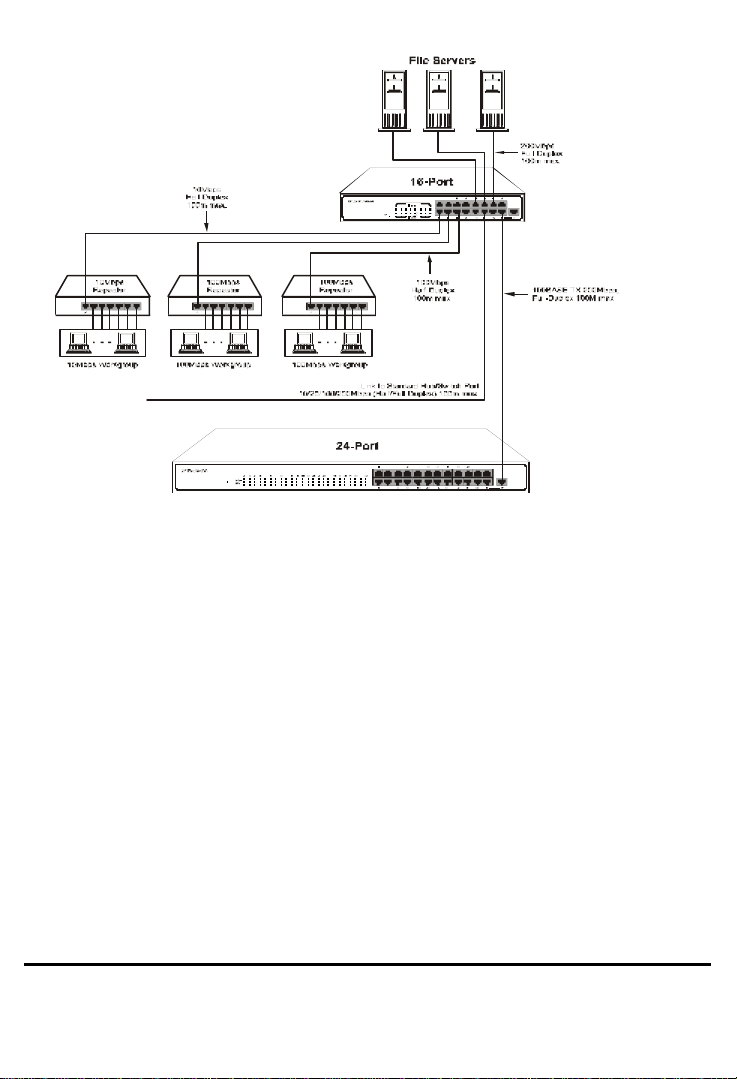
Sample Application
The optimal application for this Switch is to interconnect file servers
with other bandwidth-hungry workgroups, departments, and offices all
with dedicated bandwidths.
15
Page 16
E. Troubleshooting
I. Link LED does not lit after cable is connected to the port.
Ø Verify that the other end of the cable is connected to a
device that is powered on and on-line.
Ø For TP cable connection to another Switch or Hub, verify
that only one end of the cable is connected to a
“Crossover” port.
II. 100BASE-TX port Link LED is lit, Collision LED is blinking, but
traffic is irregular.
Ø Check that the attached device is not set to dedicated
Full-Duplex. (Some devices use a physical or software
switch to change Duplex modes. Auto-Negotiation may
not recognize this type of Full-Duplex setting).
16
Page 17

ALWAYS CHECK THAT:
Ø CABLE AND LINK DISTANCES ARE WITHIN THE NETWORK'S
SPECIFICATIONS
Ø OVERALL NETWORK DIAMETERS ARE WITHIN THE
NETWORK'S SPECIFICATIONS
17
Page 18
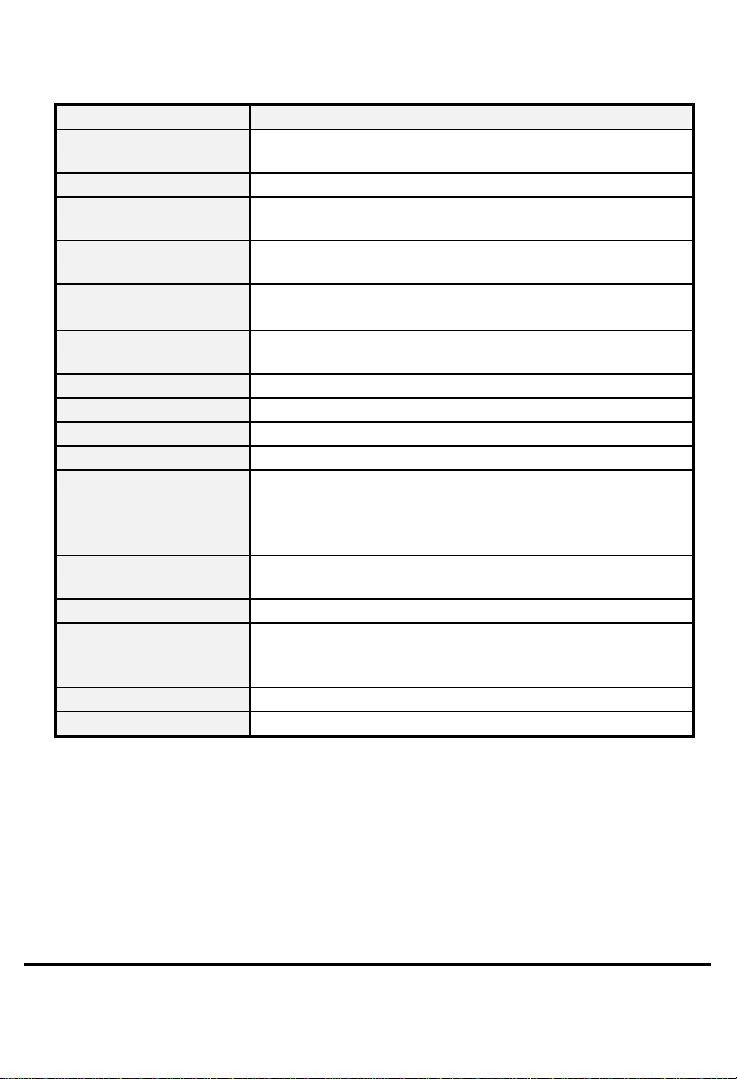
F. PRODUCT SPECIFICATIONS
Models FSW-1611TX
Standards
Ports
Media Support
Bandwidth
Forwarding/Filtering
Rate
Latency
MAC Addresses
Buffer Memory
Duplex Modes
Crossover
LED Indicators
Power Supply
Power Consumption
Environment
Certification
Dimensions
• 100BASE -TX IEEE 802.3u
• 10BASE -T IEEE 802.3
• Sixteen (16) 100BASE -TX/10BASE -T
• 100BASE-TX Category 5 TP
• 10BASE-T Category 3, 4 or 5 TP
• 100BASE -TX - 200/100Mbps via Auto-Negotiation
• 10BASE -T - 20/10Mbps via Auto-Negotiation
• 148,800 packets/second per port @ 100Mbps, max.
• 14,880 packets/second per port @ 10Mbps, max.
• 10 µsec @100Mbps, minimum
• 72 µsec @ 10Mbps, minimum
• 16K six-byte entries maximum, self-learning
• 512 Kbyte
• Auto-Negotiation
• Port 16 has an extra port for Crossover function
• One for Power
• One per port for Link/ACT
• One per port for Full-Duplex or Collision
(100Base-TX / 10Base-T)
• Internal full range switching power supply
• Input voltage: 100 ~ 240 VAC +/-10%, 50/60 Hz
• 16.5 watt max.
• Operating Temp: 0° ~ 45°C (32° ~ 113°F)
• Storage Temp : -20° ~ 70°C (-4° ~ 158°F)
• Humidity : 10% ~ 90% non-condensing
• FCC Class A, CE Mark
• 250 x 150 x 43 mm (9.8 x 5.9 x 1.7 inches)
18
 Loading...