

Page 1
Alix™
Audio Baby Monitor / Moniteur audio bébé /
Monitor de sonido para bebé
User Manual / Manuel de l’utilisateur / Manual del usuario
WARNING
Strangulation
Hazard!
Children have
STRANGLED in
cords. Keep this
cord out of the
reach of children
(more than 3 ft
[0.9 m] away).
•
MISE EN GARDE
Risque de
Strangulation !
Enfants ont
étranglé dans les
cordons. Gardez
ce cordon
d'alimentation
hors de portée
des enfants (plus
de 3 pieds [0,9 m]
de distance).
•
ADVERTENCIA
Peligro de
Estrangulación !
Los niños tienen
ESTRANGULADO
en cuerdas.
Mantener este
cordón fuera del
alcance de niños
(más de 3 pies
[0,9 metros] de
distancia).
Page 2

SAFETY WARNINGS
CAUTION: Keep small parts away
from children.
Strangulation Hazard: Children can become
entangled in cords. Power cords should be
kept more than 3 feet away from the crib and
baby’s reach at all times. Baby monitors with
power cords should never be hung on or near
the crib.
This product is not a toy and should be kept
out of children’s reach.
This product contains small parts. Exercise
care when unpacking and assembling
the product.
Read and Keep Instructions: All the safety and
operating instructions should be read before
the baby monitor is operated.
Water and Moisture: This product is designed for indoor use only. The unit should not be exposed to rain,
moisture, dripping or splashing. No objects filled with liquid should be placed on top of, or beside the
product, such as a glass or vase. This item should not be used near water.
Non-Use Periods: Always unplug the AC adapters from the wall outlets during long periods of non-use.
Ventilation: This baby monitor should not be used on a bed, sofa, rug or similar surface that may block the
ventilation openings, or be placed in an enclosed area, such as a bookcase or drawer that may impede
air flow.
Keep Away from Sources of Heat: This unit should not be exposed to direct heat sources such as a candle,
fireplace, radiator, heat register, stove or other appliance that emits heat. The unit should not be left in
direct sunlight.
Power Source: This unit should only be used with the power adapters included in this package
(rated 5V ~ 600mA)
Damage Requiring Service: This unit should be serviced by qualified personnel only when:
This product cannot replace responsible adult
supervision.
Use only with provided power supply.
The socket-outlet shall be installed near the
equipment and shall be easily accessible.
RISK OF EXPLOSION IF BATTERY IS
REPLACED BY AN INCORRECT TYPE!
Dispose of used batteries according to the
instructions.
Use only batteries/power supplies listed in the
user manual.
a. Objects have fallen or liquid has been spilled into the product
b. The units have been exposed to rain
c. The units do not appear to operate normally or exhibits a distinct change in performance
d. The units have been dropped or the enclosure damaged
IC STATEMENT / DÉCLARATION IC / CAN ICES-3 (B)/NMB-3(B):
Operation is subject to the following two conditions: (1) This device may not cause interference, and
(2) This device must accept any interference, including interference that may cause undesired
operation of the device.
Son fonctionnement est soumis aux deux conditions suivantes:
(1) Cet équipement ne doit pas causer d’interférences, et
(2) Cet équipement doit accepter toute interférence, y compris les interférences capables de
causer un mauvais fonctionnement de l’appareil
Changes or modifications not expressly approved by the party responsible for compliance could void the
user’s authority to operate the equipment.
2
Page 3

This device complies with part 15 of the FCC Rules. Operation is subject to the
following two conditions:
(1) This device may not cause harmful interference.
(2) This device must accept any interference received, including interference that
may cause undesired operation.
FCC WARNING
This equipment has been tested and found to comply with the limits for a Class B digital device, pursuant
to Part 15 of the FCC Rules. These limits are designed to provide reasonable protection against harmful
interference in a residential installation.
This equipment generates, uses and can radiate radio frequency energy and, if not installed and used in
accordance with the instructions, may cause harmful inerference to radio communications. However,
there is no guarantee that interference will not occur in a particular installation. If this equipment does
cause harmful interference to radio or television reception, which can be determined by turning the
equipment o and on, the user is encouraged to try to correct the interference by one or more of the
following measures:
• Reorient or relocate the receiving antenna.
• Increase the separation between the equipment and the receiver.
• Connect the equipment into an outlet dierent from that to which the receiver is connected.
• Consult the dealer or an experienced radio/TV technician for help.
This marking indicates that this product should not be disposed with other household
wastes throughout North America. To prevent possible harm to the environment or
human health from uncontrolled waste disposal, recycle it responsibly to promote
the sustainable reuse of material resources. To return your used device, please use the
return and collection systems or contact the retailer where the product was purchased.
They can take this product for environmental safe recycling.
3
Page 4

WARRANTY INFORMATION
Please visit our website at www.mylevana.com for information about your
product’s warranty
We take quality very seriously. This is why all of our products come with a one-year
warranty from the original purchase date against defects in workmanship and materials.
If you have warranty or support issues please contact us using any of the following
methods:
Web: www.mylevana.com Support: www.mylevana.com/support
LEVANA Canada LEVANA USA
4080 Montrose Road 60 Industrial Parkway #Z64
Niagara Falls, ON Cheektowaga NY
Canada L2H 1J9 USA 14227
Warranty Terms
1. LEVANA® products are guaranteed for a period of one year from the date of purchase
against defects in workmanship and materials. This warranty is limited to the repair,
replacement or refund of the purchase price at LEVANA’s option.
2. This warranty becomes void if the product shows evidence of having been misused,
mishandled or tampered with contrary to the applicable instruction manual.
3. Routine cleaning, normal cosmetic and mechanical wear and tear are not covered
under the terms of this warranty.
4. The warranty expressly provided for herein is the sole warranty provided in
connection with the product itself and no other warranty, expressed or implied is
provided. LEVANA assumes no responsibilities for any other claims not specifically
mentioned in this warranty.
5. This warranty does not cover the shipping cost, insurance or any other incidental
charges.
6. You MUST contact LEVANA at www.mylevana.com/support before sending any
product back for repair. You will be sent a Return Authorization form with return
instructions. When returning the product for warranty service, please pack it
carefully in the original box with all supplied accessories, and enclose your original
receipt or copy, and a brief explanation of the problem (include RA #).
7. This warranty is valid only in Canada and the continental U.S.
8. This warranty cannot be re-issued.
4
Page 5

TABLE OF CONTENTS
Safety Warnings ................................................................................................................................ 2
FCC Statement .................................................................................................................................. 3
Warranty ............................................................................................................................................. 4
What’s Included ................................................................................................................................ 5
Disclaimers ......................................................................................................................................... 5
Buttons and Connections ............................................................................................................... 6
Setup ................................................................................................................................................... 8
Battery installation - monitor ............................................................................................. 8
Connecting the Power Adapters ....................................................................................... 8
Turn the Monitor ON / OFF .................................................................................................9
Mounting the Child Unit on a Tabletop Safely ................................................................ 9
Placement of the Monitor ................................................................................................. 10
Power-Saving PEEP Mode .................................................................................................10
Maintenance .................................................................................................................................... 10
Troubleshooting ...............................................................................................................................11
Specifications ...................................................................................................................................11
SPECIFICATIONS ..............................................................................................................................11
WHAT’S INCLUDED
• Baby Audio Monitor
• 2 Power Adapters
• Rechargeable Battery
• Quick Start Guide
• 1 year warranty
• Lifetime Customer Support
DISCLAIMERS
Strangulation Hazard: Children can become entangled in cords. Power cords should be kept more than 3 feet away from
the crib and baby’s reach at all times. Baby monitors/cameras with power cords should never be hung on or near the
crib. This product is not a toy.
This product contains small parts. Exercise care when unpacking and assembling the product.
Optimum range is 200 feet when signal is passing through walls or floors. Microwave ovens (when in use) may cause
signal disruption at close range. Buildings with metal frames may also cause signal disruption. Maximum transmission
range is 1000 feet.
Battery life of 8 hours based on full duration testing. Battery life may vary depending on usage.
This product does not replace responsible adult supervision. Check on your child at regular intervals and make sure your
monitor is always adequately charged.
We reserve the right to change models, configuration, or specifications without notice or liability. Product may not be
exactly as shown.
©2014 LEVANA®. All rights reserved. LEVANA®, the LEVANA® logo, Alix™ and other LEVANA® marks may be registered.
All other Trademarks are the property of their respective owners.
5
Page 6
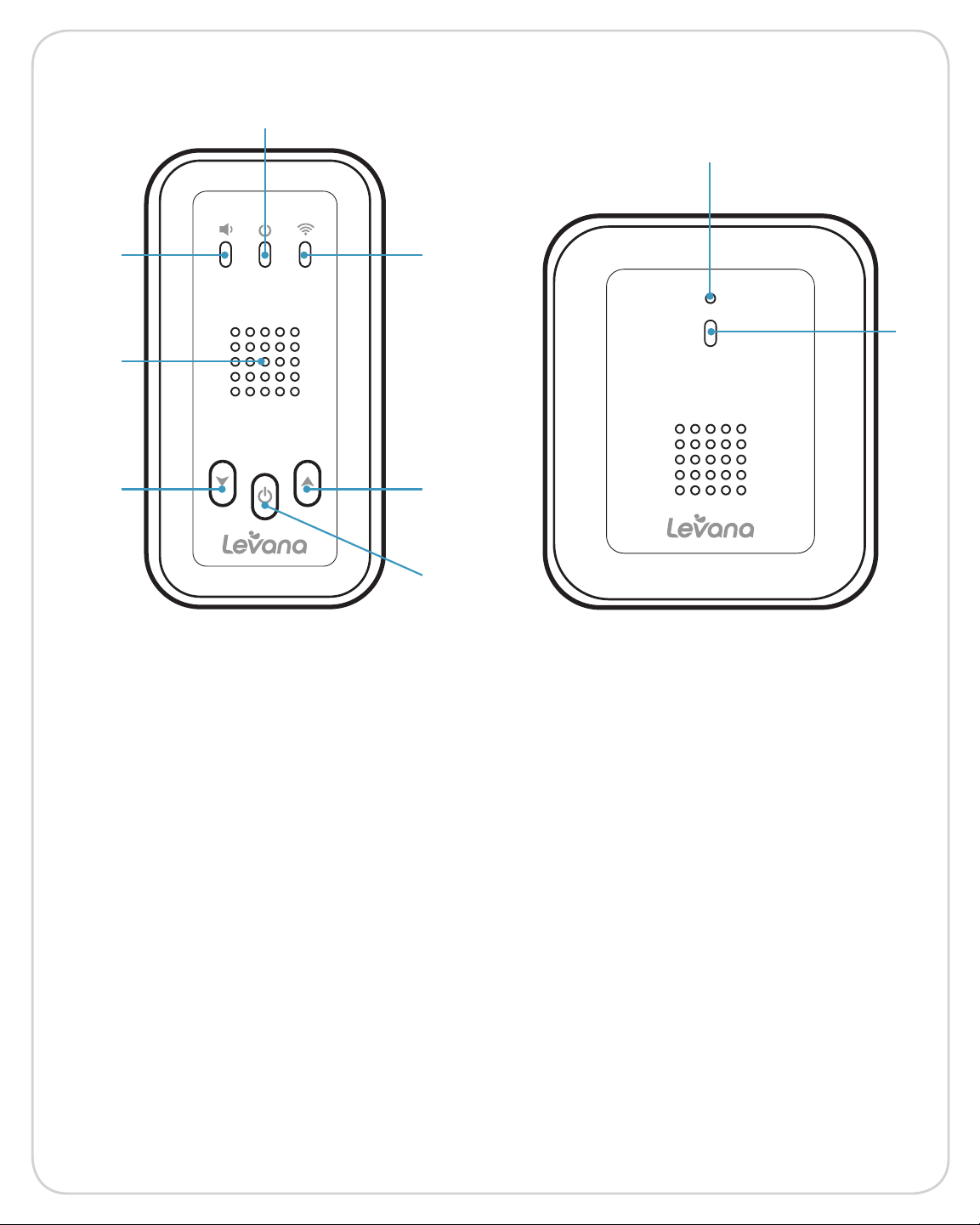
BUTTONS AND CONNECTIONS
1
2 3
4
5 6
8
9
Parent Unit-Front
1 Operating Indicator
2 Noise Indicator
3 Reception Indicator
4 Speaker
5 Reduce the Volume
7
Child Unit-Front
6 Increase the Volume
7 On/O
8 Microphone
9 Operating Indicator
6
Page 7
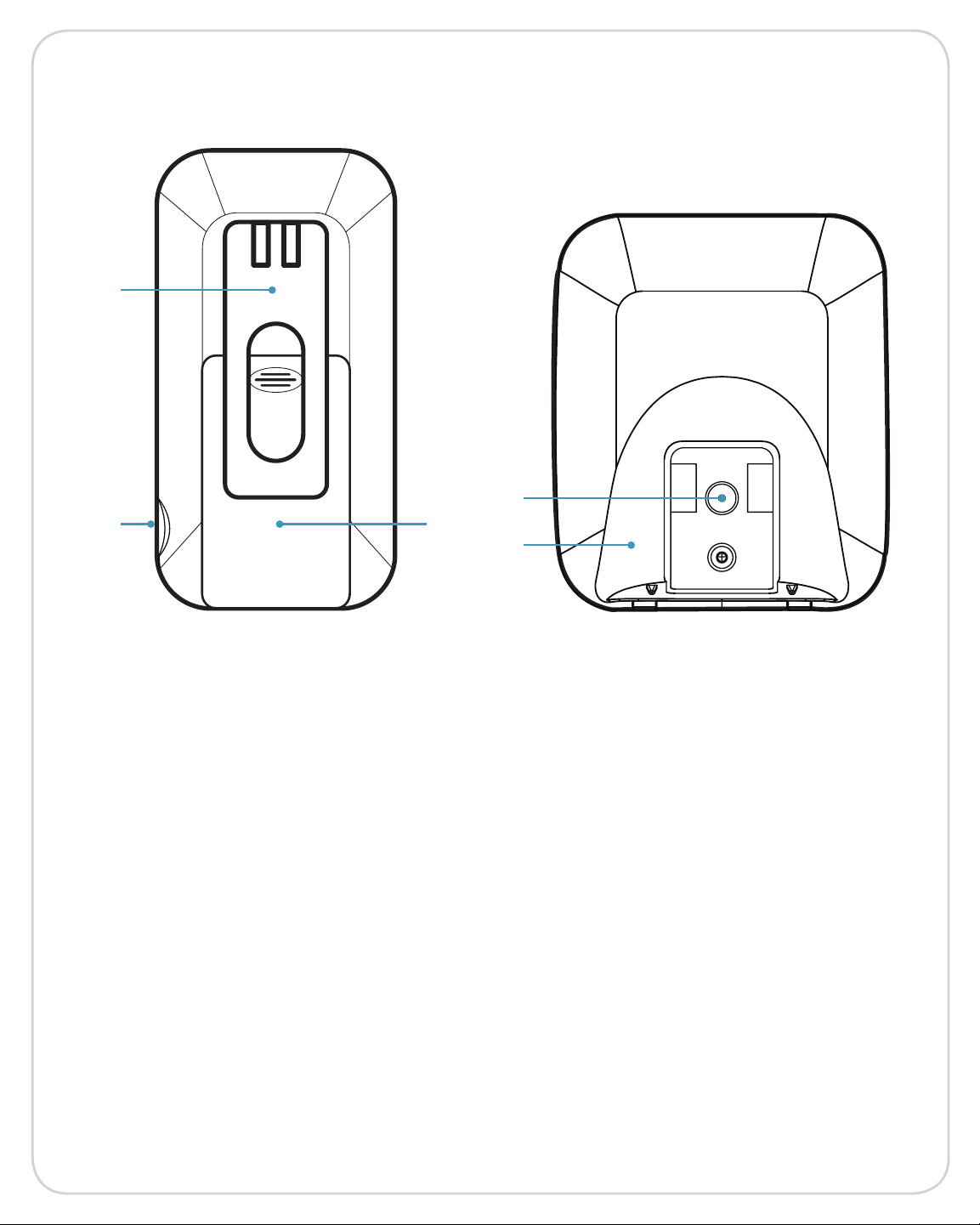
BUTTONS AND CONNECTIONS
1
2 3
4
5
Parent Unit-Back Child Unit-Back
1 Removable Belt Clip
2 Power Input
3 Battery Compartment
4 Power Input
5 Stand
7
Page 8
SETUP
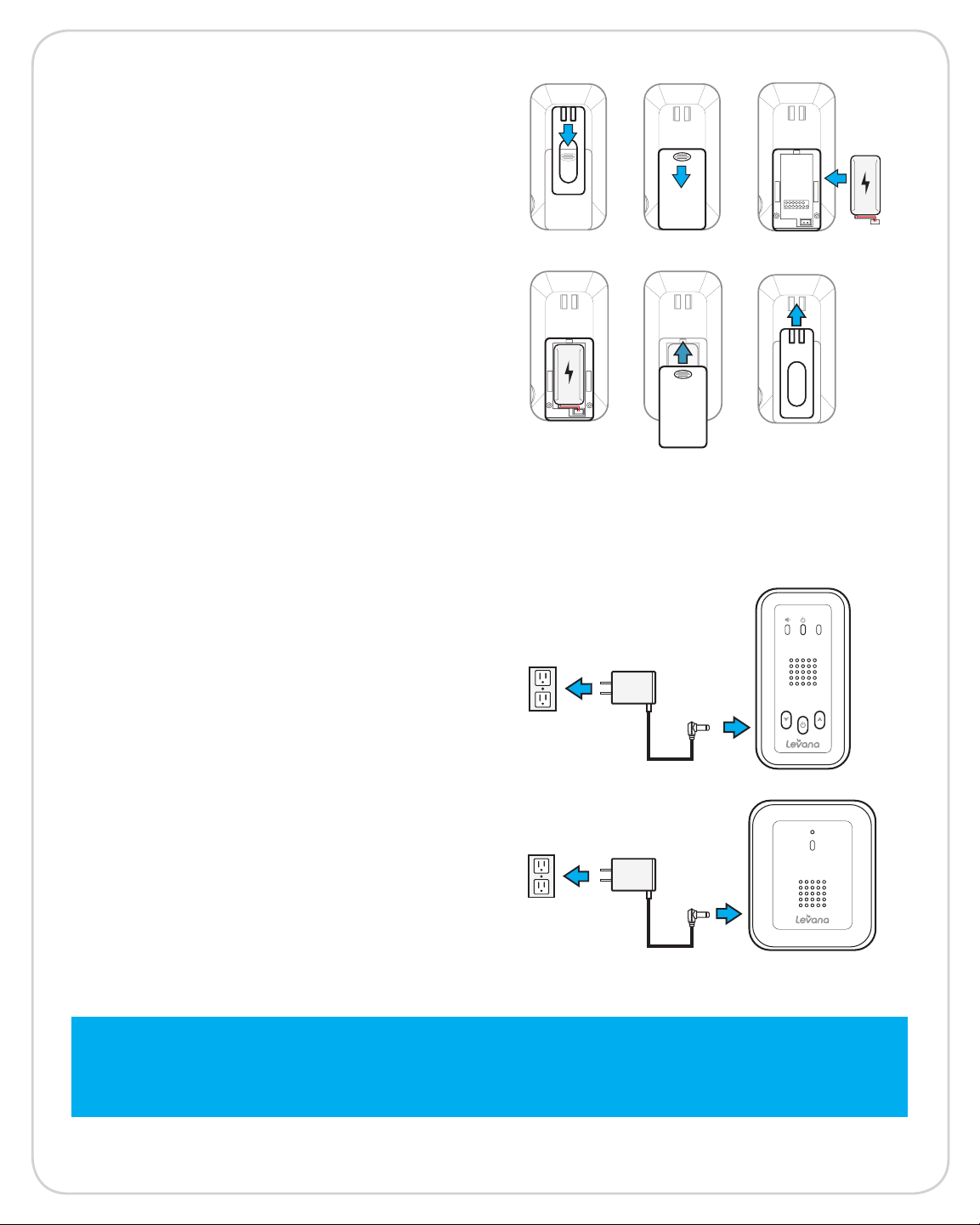
Battery Installation - Monitor
1. Slide the Removable Belt Clip down to
allow access to the Battery Cover.
2. Slide Battery Cover down to remove.
3. Insert the included rechargeable battery
4. Plug the battery cord into the small
jack on the inside of the battery
compartment.
5. Slide the Battery Cover back into place.
6. Slide the Removable Belt Clip back
into place.
• For extended periods of non-use, please
remove the battery from the Parent Unit.
Connecting the Power Adapters
1. Connect the Power Adapter to the
Power Input on the side of the Parent
Unit. Power LED will flash red.
2. Connect the Power Adapter to the
Power Input on the back of the Child
Unit. Power LED will be a solid red.
Note: Baby monitors with power cords should never be hung on or near the crib
as it is a strangulation hazard. Power cords should be kept no less than 3 feet
away from the crib and the baby’s reach at all times.
8
Page 9
SETUP
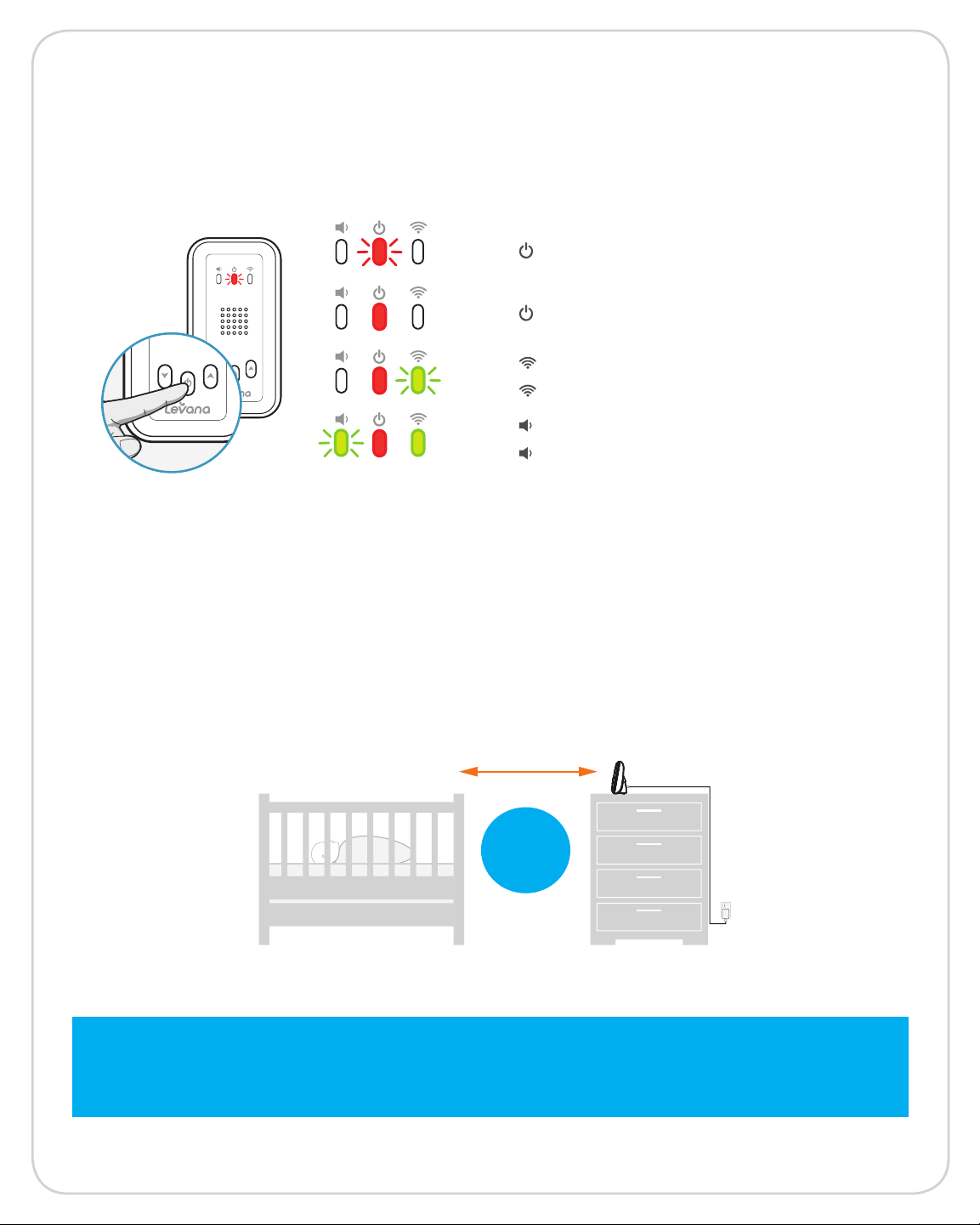
Turn the Monitor On/O
1. Press and hold the On/O Button.
• Flashing Red = Parent Unit Charging
• Solid Red = Battery Fully Charged
• Flashing Green = Searching for Signal
• Solid Green = Strong Signal
• Flashing Green = Sound detected
• Light o = No sound detected
Mounting the Child Unit on a Tabletop Safely
1. Place the Child Unit on a tabletop no less than 3 feet away from your baby’s crib.
2. Feed the power cord down the back of the table or use wall clips (not included) to
secure the cord away so the baby cannot reach it.
3. Plug in the power cord, check the monitor to ensure that you can hear your child.
3 ft
away
Note: Baby monitors with power cords should never be hung on or near the crib
as it is a strangulation hazard. Power cords should be kept no less than 3 feet
away from the crib and the baby’s reach at all times.
9
Page 10
SETUP
Placement of the Monitor
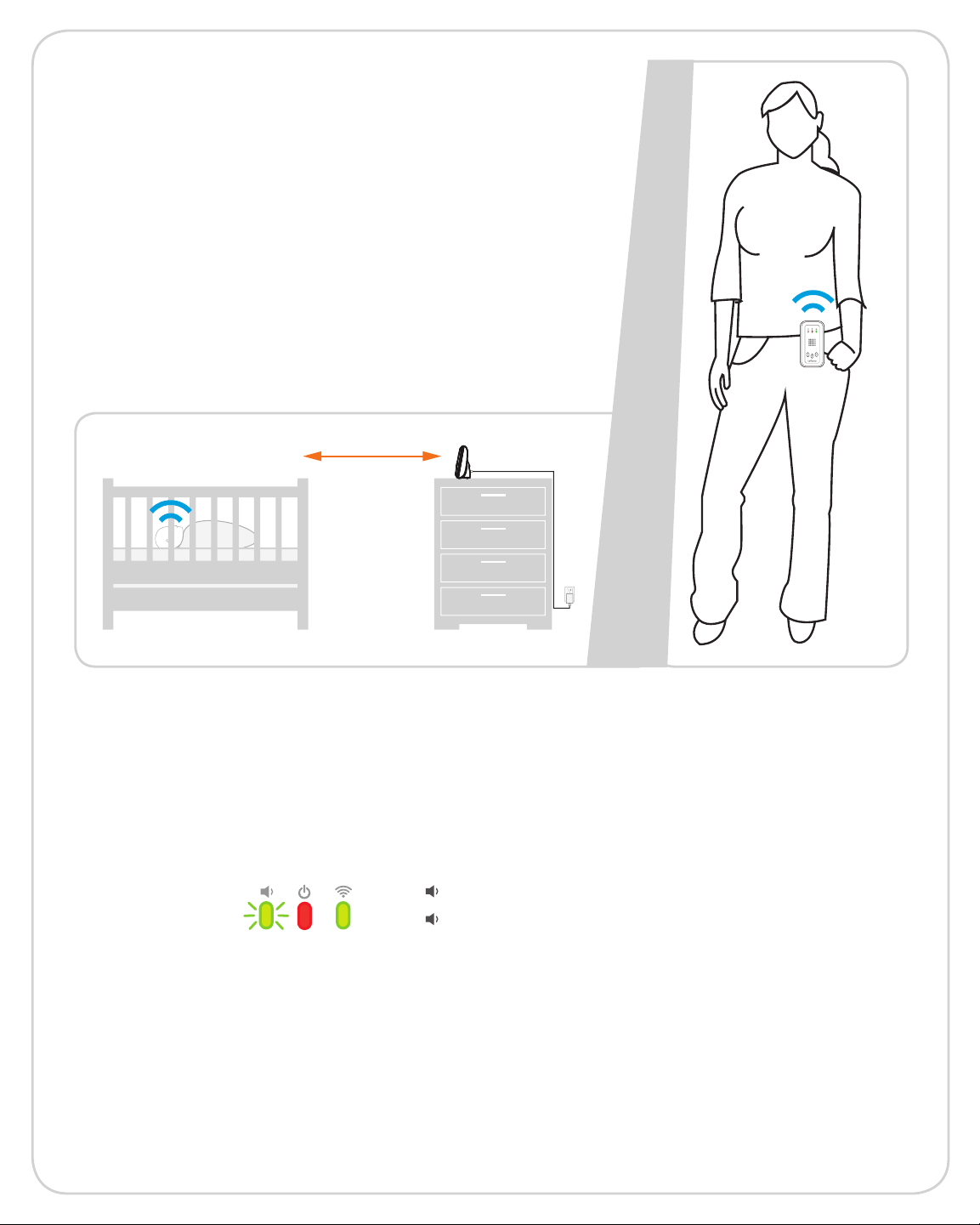
The monitor can be used two dierent
ways; attached to your belt or mounted on
the wall.
• Carry the monitor on your belt by sliding
the clip over your belt.
• Hang the monitor from a screw on the
wall using the screw mounting hole in
the belt clip.
Power-saving PEEP mode
Voice activated technology helps conserve battery life by putting the system into
hibernation mode when sounds are not detected for 30 seconds. If your child starts to
cry or make noise, the unit will automatically detect it and the Noise Indicator on the
Parent Unit will flash. The preset noise level is preset to a level comparable to a
casual conversation.
• Flashing Green = Sound detected
• Light o = No sound detected
MAINTENANCE
Mounting the Camera on a Tabletop Safely
• Clean the surfaces of the Parent and Child units with a soft, flu-free cloth.
• If the units become dirty, use a lightly damp cloth to wipe surfaces, taking care to not
allow water into any openings.
• Never use cleaning agents or solvents.
10
Page 11
TROUBLESHOOTING
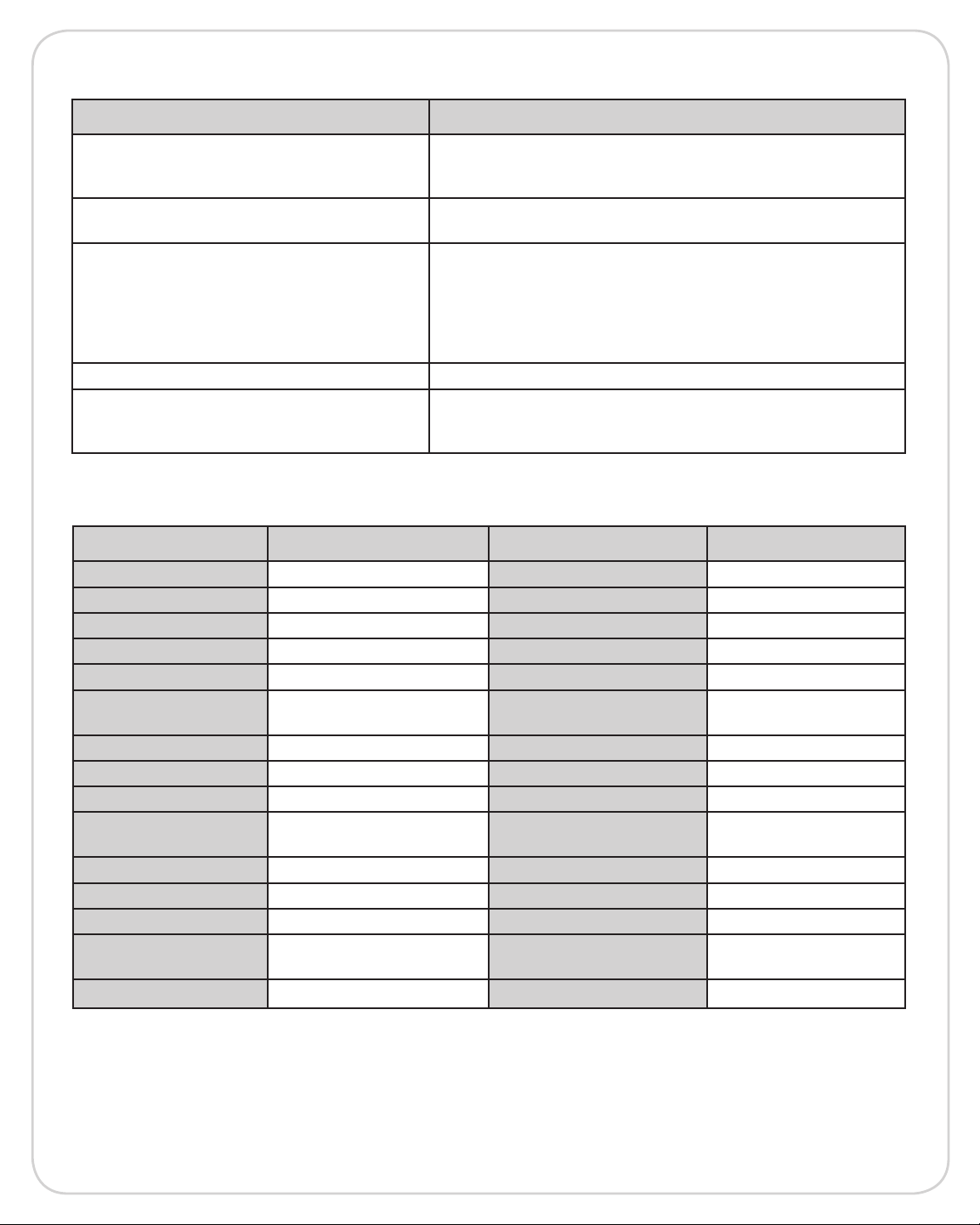
ISSUE POSSIBLE SOLUTION
• Confirm that the Parent and Child units are ON
Equipment does not function
• The battery may be depleted; charge battery
• The power adapter(s) may not be properly connected
No reception
• Camera and monitor may not be properly paired;
move the Parent and Child units closer together
• The Parent and Child units may be too far apart
• The battery power may be too low
Reception Interference (static)
• Other electronic devices may be interfering with the
signal
• The Parent and/or Child unit may be placed too close
to many metal objects
Noise (static, beeping) • Battery power may be too low
• The power adapter may not be connected
The rechargeable battery will not charge
• Battery pack may not be properly connected inside the
battery compartment
SPECIFICATIONS
PARENT UNIT CHILD UNIT
Wireless Frequency Digital Maximum Wireless Range 1000 ft
Channel Frequencies 2.4 GHz Optimum Wireless Range 200 ft
Speaker Yes Speaker No
Microphone No Microphone Yes
Battery Operable Yes, Rechargeable Battery Operable No
Battery Type
Battery Life 8 Hrs Housing Material ABS Plastic
Charging Time 8 Hrs Housing Color White/Gray
PEEP Mode Yes Power Adapter 5V ~ 600mA
Operating Temperature
Housing Material ABS Plastic Weight 0.1 lbs
Housing Color White/Gray
Power Adapter 5V ~ 600mA
Dimensions
Weight
NiMH
32°F to 104°F
(0°C to 40°C)
4.25 x 2.25 x 1.25 in
10.79 x 5.71 x 3.17 cm
0.15 lbs
Operating Temperature
Dimensions
32°F to 104°F
(0°C to 40°C)
3.54 x 2.75 x 1.5 in
8.99 x 6.98 x 3.81 cm
11
Page 12

NOTES
12
 Loading...