

Page 1

User Manual
T2
Wireless Earbuds T2
FR
Ways to contact us:
Facebook: m.me/LesoomTech/
Asia:
Japan: [email protected]
North America Europe
Email:
Page 2

Content
1.Important safety instruction..............................................1
2.Wireless Headphone instruction...................................2-5
3.How to use your earphone ................................................6
4.Frequently asked question................................................7
5.Technical data.................................................................8
6.Notice.............................................................................9
To avoid hearing damage, limit the time you use the earphone at
high volume and set the volume to a safe level. The louder the
volume, the shorter the safe listening time is.
1.Important safety instructions
Danger
Listen at reasonable volumes for reasonable periods of time.
Be careful not to adjust the volume continuously upwards as your
hearing ada pts.
Do not turn up the volume so high that you can't hear what's
around you.
You s h o u l d use caution or t e m p o r a r i l y disco n t i n u e use in
potentially hazardous situations.
Excessive sound pressure from earphones and earphone can
cause hearing loss.
Using the earphone with both ears covered while driving is not
recommended and maybe illegal in some areas while driving.
For your safety, avoid distractions from music or phone calls while
in traffic or othe r potentially dangerous environments.
Be sure to o bserve the fo llowing gui delines whe n
using yo ur earphone .
Cautio n
Do not expose the earphone to excessive heat.
Do not drop your earphone.
Do not allow your earphone to be submerged in water.
Do not use any cleaning agents containing alcohol, ammonia,
benzene, or abrasives.
- 1 -
English
Page 3

If cleaning is required use a soft cloth, if necessary dampened with
a minimum amount of water or diluted mild soap, to clean the
product.
The integrate d battery shall not be exposed to excessive heat such
as sunshine, fire or the like.
2.Wireless Headphone instruction
Congratulations on your purchase, and welcome to Lesoom! To fully
benefit from the support that Les oom offers, register your product at
www.lesoom .com.
With this Lesoom wireless in-ear headphones,
you can:
enjoy convenient wireless handsfree calls;
enjoy and control wireless music
switch between calls and music
What's i n the package
1
3 54
1. T2 lesoom truly wireless headphone
2. 12 Ear caps
3. User manual
4. USB charging cable
5. USB portable charging box.
Other de vice
A mobile phone or device wh ich supports BT and is compatible to
the headphones (e.g. notebook, PDA, BT adapters, MP3 players
etc) (see 'Technical data' on 5).
The Char ging
Contac t Point
LED Indi cator/M ic
Button
- 2 -
Functions(Stereo mode/Single Mode)
- 3 -
User Manual
T2
Wireless Earb uds T2
FR
English
2
Page 4
- 4 - - 5 -
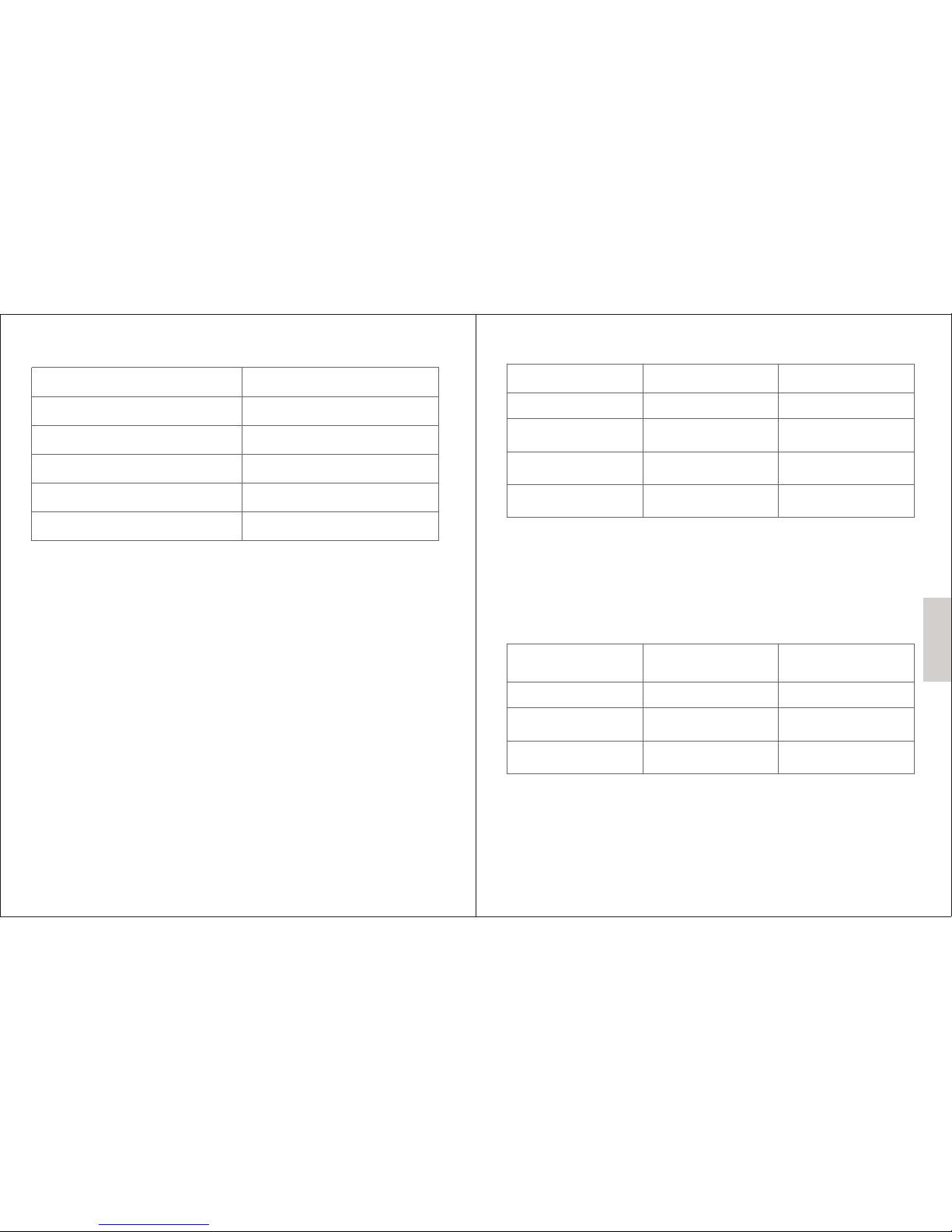
Chargi ng /pairing I nstructio n
Operat ion:
The left earphone marked with L, the right earphone marked w ith R
1.Po wer on
Press and hold the power button for 4 second until it flash blue
light for 3 times
2.Po wer off
Press and hold the power button for 4 second until it flash red
light for 3 times
Music Co ntrol
Task Butt on
Oper ation
Play or pause music
Lef t ear but ton
Pre ss once
Skip forward
Skip backward
Volume control
(circle volume)
Lef t ear but ton
Rig ht ear bu tton
Rig ht ear bu tton
Pre ss twic e, you wi ll hear
the p rompt
Pre ss twic e, you wi ll hear
the p rompt
Pre ss once , you wil l hear
the p rompt
Tips: When the sound reac hes its maximum value, press the button
(Right ear button) again to cycle to the minimum value and increase
volume agai n.
Call Con trol
Task
Button( left ear button
as the main button)
Oper ation
Pick up a phone
Lef t ear but ton
Pre ss once
Hang up a phone
Reject a phone
Lef t ear but ton
Lef t ear but ton
Pre ss twic e
Pre ss twic e
Task
Description
Box was charged
Box's power full
headphones were charging
headphone finished charging
Paring headsets
Flash the red light
Flash the blue light
Flash the blue light and then red
The lights is off
Flash blue and red light
English
Page 5
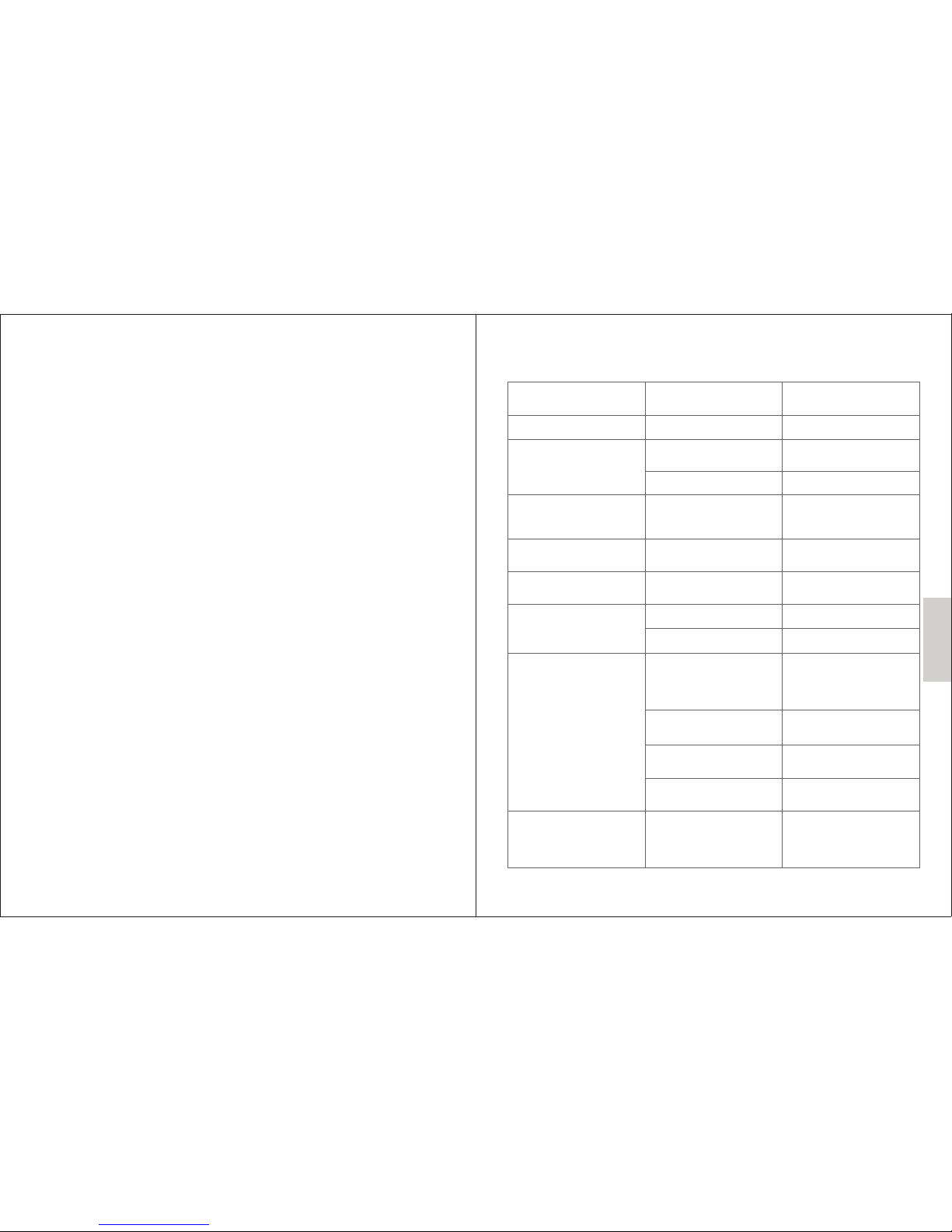
Prob lem Reas on
Solu tion
Earphone cannot be turned on
Low b atter y level
Cha rge the h eadph ones
No au dio sig nal
1.H eadph one did n't sho w
on yo ur phon e.
2.T he volu me is too l ow
Che ck for co nnect ions, a nd
rec onnec t them if n ecess ary.
Inc rease t he volu me.
No vo ice mes sage, o nly
con rmat ion sou nds can
be he ard
Voic e messa ges hav e been
dis abled .
Act ivate v oice me ssage i n
you r BT device.
Ear phone f uncti on is
int erfer ence
Res tore th e earph one to
fac tory se tting s
Any b utton c an't wo rk
May be your B T device
can 't work
You can try to co nnect
ano ther BT device
Nee d more ti me to con nect
A earp hone ha s a sound ,
ano ther is s ilent
1.L ow batt ery lev el
2.D idn't p air suc cessf ully
Cha rge the h eadph one
Rep air or re set
Ear phone c an't be
cha rged
1.T he char ging bo x is
not t ight
Thi s produ ct adop ts extr uded
cha rging . pleas e ensur e that
the c hargi ng box re mains
clo sed.
2.B atter y is dama ged
Ple ase con tact us f or
rep lacem ent
3.C hargi ng box/ earph one is
dam aged
Ple ase con tact us f or
rep lacem ent
4.C hargi ng cabl e is dama ge
Ple ase con tact us f or
rep lacem ent
Ear phone w ithou t voice
(ta lk/mu sic)
BT setting is wrong
Ple ase mak e sure yo u have
ope ned “ca ll audi o” and
“me dia aud io” fun ction o n
you r BT devices
4. Frequently asked question
- 6 - - 7 -
1. Connect them on the phone directly.
2. Unable to display device if you do not delete previous BT information
that you have repaired.
3. How to use your earphone
Pairin g for the first ti me:
Note : Make sure the earphone is fully charged before using it for the
first time!
Press and hold the power button until flash red and blue light s ,then
wait for 1 minu te to stabilize and only flash blue light. Finally you can
pair them on the phone.
Note : If th ey still flashing red and blue li ghts, maybe connected only
one headset when you paring your cell phone ( and you will never
paring the two headsets in the future)
Reset yo ur headset:
At the second start, pr ess and hol d t he power button until flash the
red and blue lights, then restore the default (such as the first
pairing).
If your cel l phone have paired this BT headsets before , please follow
the below operations:
English
Page 6
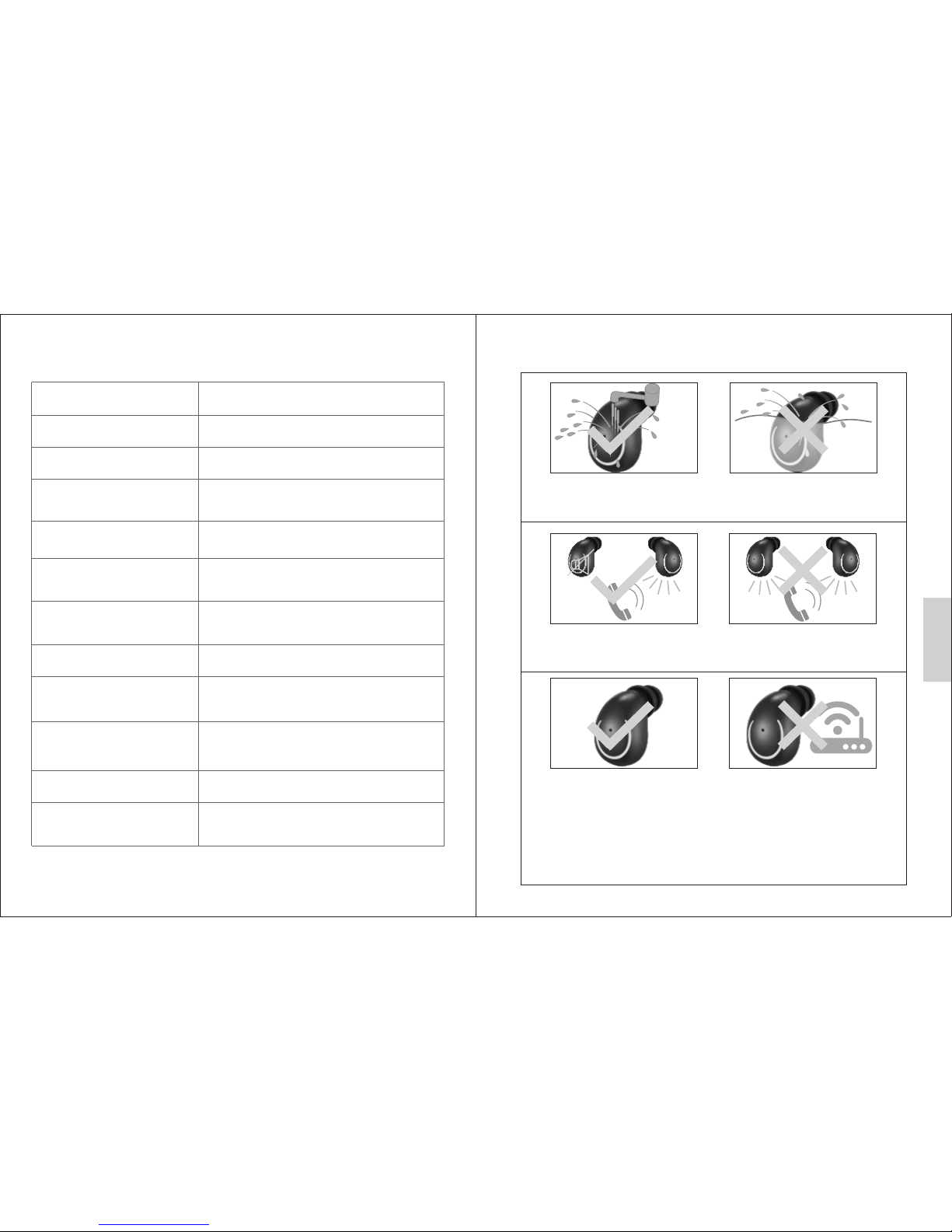
This product has IPX5 w aterpro of fun ction, but p lease don't
immerse th em into water f or a long time
The call soun ds only fro m one earb ud ( stereo mode) , you
will find all o f the Wireles s headpho nes have this i ssue
If t he sounds is not v ery stable( always in and o ut), pl ease
try to kee p it where is no signal interfere nce and sta y away
from t he wifi router an d other BT devices to avoi d other
devi ce that use 2.4 GH Z signa ls to int erfere wit h this
product. Because t he main e arbud nee ds to receive an d
transmit s ignals at the s ame time, so it easy to be dis turbed
( all the true w ireless hea dphones w ill have this i ssues)
Weight: 4.2g(Hea dphones) / 46 .6g(Cha rging Box)
Charging b ox:
Music time :
Calling ti me:
Normal time for a full charge:
Recharge able lithium
polymer ba ttery
Version
BT mono suppor t
BT stereo supp ort
Operatin g range:
Other feat ures:
2.5 – 3.5 hour s
3 hours
30 Min(Hea dphones)
/ 2 hours(Ch arging Box)
45mAh(He adphone)
/ 300mAh(C harging Box )
BT 4.1 + EDR
Headset Pr ofile - HSP,
Hands-Fr ee Profile - HFP
Advanced Audio Distribution Profile - A2DP
Audio Video Remote Control Profile - AVRCP
Up to 10 meter s (33 feet)
Digital ec ho & noise reduction
Auto power o ff
5. Technical data
- 8 - - 9 -
6. Notice
English
Standby ti me:
50 hours
DC5V/1A
Page 7

FCC Caution:
This device complies with part 15 of the FCC Rules. Operation is subject to the
following two conditions: (1) This device may not cause harmful interference, and (2)
this device must accept any interference received, including interference that may
cause undesired operation.
Any Changes or modifications not expressly approved by the party responsible for
compliance could void the user's authority to operate the equipment.
Note: This equipment has been tested and found to comply with the limits for a Class
B digital device, pursuant to part 15 of the FCC Rules. These limits are designed to
provide reasonable protection against harmful interference in a residential installation.
This equipment generates uses and can radiate radio frequency energy and, if not
installed and used in accordance with the instructions, may cause harmful interference
to radio communications. However, there is no guarantee that interference will not
occur in a particular installation. If this equipment does cause harmful interference to
radio or television reception, which can be determined by turning the equipment off
and on, the user is encouraged to try to correct the interference by one or more of the
following measures:
-Reorient or relocate the receiving antenna.
-Increase the separation between the equipment and receiver.
-Connect the equipment into an outlet on a circuit different from that to which the
receiver is connected.
-Consult the dealer or an experienced radio/TV technician for help.
 Loading...