

Leopard Imaging LI-USB30-V034, LI-USB30-M021, LI-USB30-M034WDR, LI-USB30-AR0330ICP, LI-USB30-P031 User Manual
...Page 1
USB 3.0 Camera User’s Guide
Rev 1.0
Leopard Imaging Inc.
June, 2013
Page 2

USB 3.0 Camera User’s Guide
2
Preface
Congratulations on your purchase of this product. Read this manual carefully and
keep it in a safe place for any future reference.
About this manual
This user manual has been designed to help you make the most of your IP camera
and its many features and functions. Information in this document has been
carefully checked for accuracy; however, no guarantee is given to the correctness
of the contents. The information in this document is subject to change without
notice.
Copyright © Copyright 2011
This manual contains proprietary information, protected by copyright. All rights
reserved.
Contact Information
Leopard Imaging Inc.
1130 Cadillac CT
Milpitas, CA 95035
Phone: (408) 263-0988
Fax: (408) 217-1960
Email: [email protected]
Technical Support: [email protected]
Web site: www.leopardimaging.com
Page 3

USB 3.0 Camera User’s Guide
3
Contents
Introduction ................................................................................................................................... 4
Package contents ........................................................................................................................... 4
1. Product Introduction ............................................................................................................ 5
1.1 Product outline .................................................................................................................. 5
1.2 Key features ....................................................................................................................... 5
1.3 Applications ....................................................................................................................... 6
1.4 Device Requirements ........................................................................................................ 6
1.5 Temperature and Humidity ............................................................................................. 6
2. Product Views ........................................................................................................................ 7
2.1 Main Board ........................................................................................................................ 7
2.2 Sensor Boards .................................................................................................................... 7
2.3 Product Dimensions ........................................................................................................ 11
3. System Installation ............................................................................................................... 12
3.1 Install Camera USB 3.0 Demo Software ....................................................................... 12
3.2 Install Driver ................................................................................................................... 14
4. Run Camera ........................................................................................................................ 14
4.1 Camera USB 3.0 Demo Software ................................................................................... 14
4.2 GraphEdit ........................................................................................................................ 16
Page 4

USB 3.0 Camera User’s Guide
4
Introduction
This section covers unpacking your new USB 3.0 camera, its key features,
Applications and basic technical information about the Sensor boards. Refer to
later chapters for information on setting up and configuring the product in more
detail.
Package contents
The package should contain all the following contents. If anything is missing or
appears damaged, contact your dealer immediately.
1. USB 3.0 Camera (1)
2. User’s Guide (1)
3. Certificate and Warranty Card (1)
Page 5

USB 3.0 Camera User’s Guide
5
1. Product Introduction
1.1 Product outline
Leopard Imaging USB 3.0 camera is new generation supper speed USB
Video camera which supports more than 3G video bandwidth to stream
1080p 30fps video without compression, it provides sharper and high quality
images for scientific and medical industries, Global shutter camera can
support high speed conveyor line for machine vision application, lossless
image quality and low latency streaming is great for video conference
camera industry.
1.2 Key features
USB 3.0 Supper Speed support
Support Wide range of sensors:
o M9V024 sensor: Stereo camera for 3-D camera
o MT9V034 sensor: WVGA Global Shutter RAW data camera
o MT9M031 sensor: 1280x720 HD Global Shutter RAW data
camera
o MT9M034 sensor: 720p HD WDR camera (YUV with ISP)
o AR0330 sensor: 1080p30fps camera (YUV with ISP)
o MT9P031 sensor: 5M RAW data camera
o Sony ICX285 CCD sensor: CCD Monochrome Camera
YUV or RAW data output without compression
UVC compliance
USB 2.0 backwards compatible
Support either CS or M12 lens
Provide customization services
USB +5VDC powered device
Compact Size: 26mmx26mm
2 Boards are stacked
Page 6
6
1.3 Applications
Computer
With USB 3.0 Port. The port can be realized via a
mainboard-based host adapter or via a separately
installed host adapter card
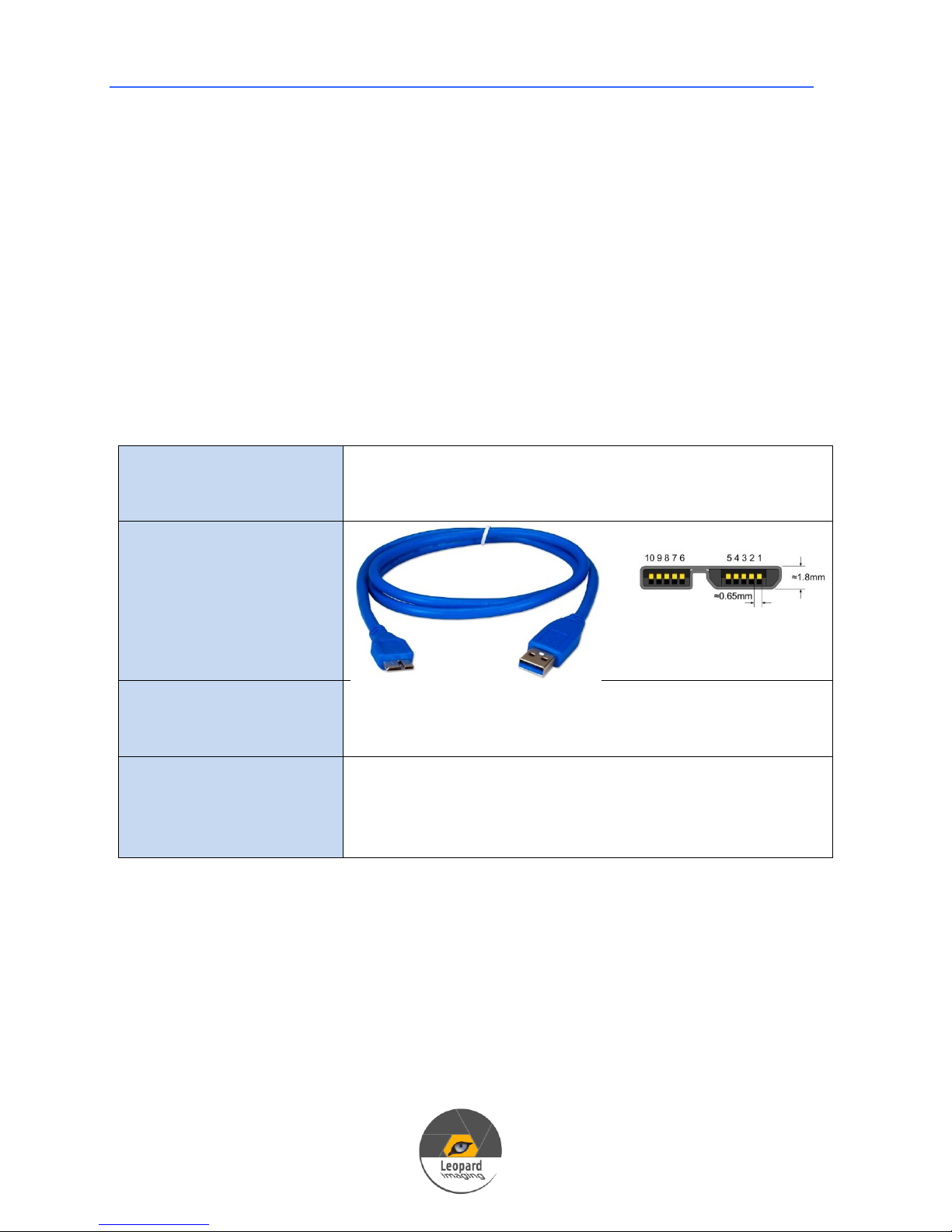
USB cable for USB 3.0
Micro-B Port
Operation System
32 bit / 64 bit Microsoft Windows XP SP3
32 bit / 64 bit Microsoft Windows 7
32 bit / 64 bit Microsoft Windows 8
Software
Leopard Imaging Camera USB3.0 Demo Software
GraphEdit
AMcap
Other video capture softwate
Machine Vision
Video Conference Camera
Medical Camera
Scientific Camera
3-D Gesture camera
1.4 Device Requirements
USB 3.0 Camera User’s Guide
1.5 Temperature and Humidity
Housing temperature during operation: 0 °C ~ 50 °C (32 °F~ 122 °F)
Humidity during operation: 20 % ~80 %, relative, non-condensing
Storage temperature: -20 °C ~80 °C (-4 °F~176 °F)
Storage humidity: 20 %~ 80 %, relative, non-condensing
Page 7
USB 3.0 Camera User’s Guide
7
LI-USB30-V034
Sensor
Aptina MT9V034 Global Shutter WVGA Sensor
Active Pixels
752H x 480V
Frame rate
60fps
Optical format
1/3"
2. Product Views
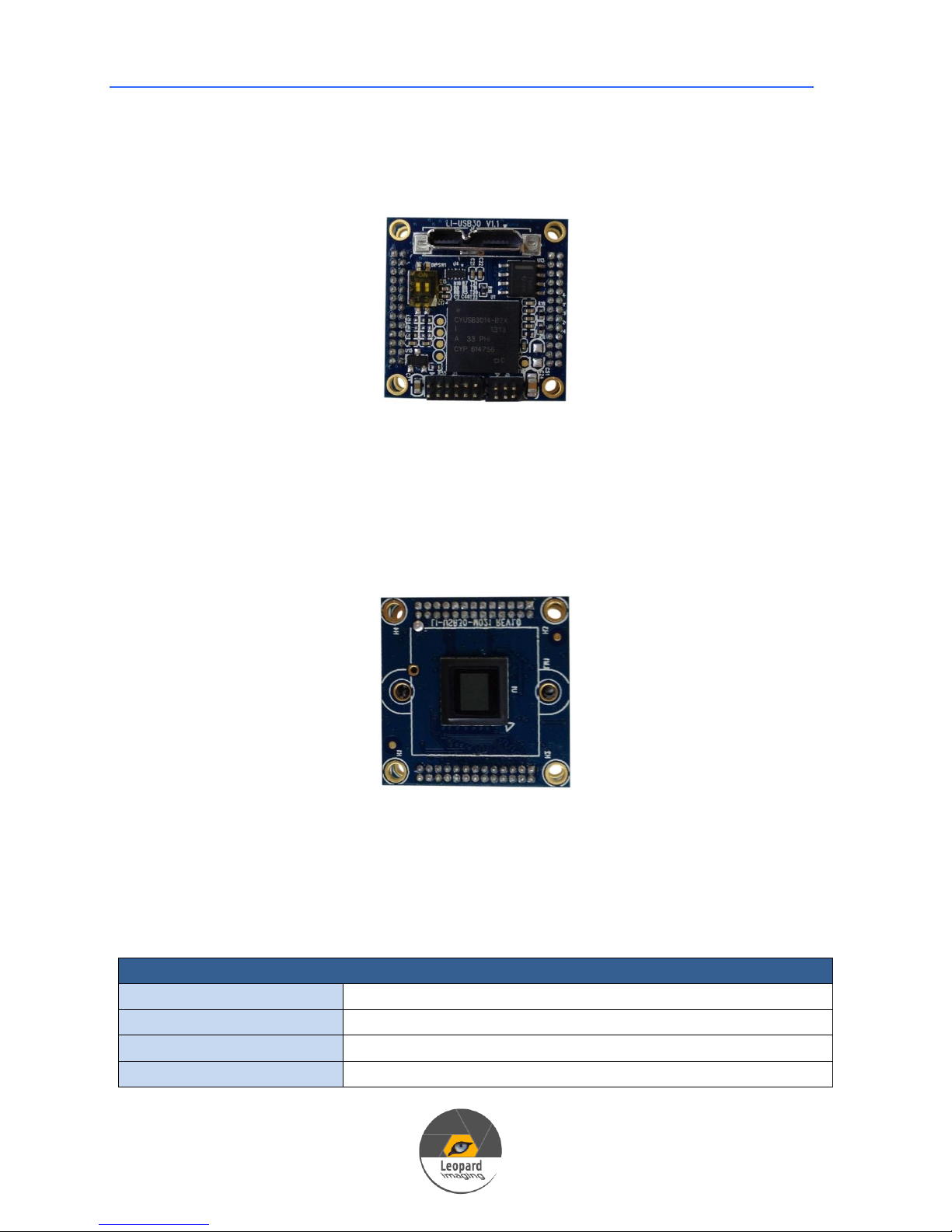
2.1 Main Board
Figure 1: Main Board
Main board mainly includes FX3 USB 3.0 Controller, Power Management, USB
3.0 connector interface, Dual 26-PIN 1.27mm socket for Sensor board interface.
2.2 Sensor Boards
Figure 2: Sensor Board
Leopard Imaging USB 3.0 Camera supports different sensor boards from different
manufacturers.
Technical Specs:
Page 8

USB 3.0 Camera User’s Guide
8
Pixel size
6.0x6.0um
Global Shutter
For high speed application
Color
Monochrome
Data type
RAW data USB 3.0 real time streaming
Lens
CS / M12 lens mount support (Default: M12 lens)
Interface
USB 3.0 interface
Power
USB 3.0 +5VDC power source
Compact size
26mmx26mm
Part#
LI-USB30-V034
Application
Machine Vision
Medical Camera
Scientific Camera
LI-USB30-M021
Sensor
Aptina MT9M021 Global Shutter 720p HD Sensor
Active pixel
1280H x 960V
Frame Rate
60fps
Optical format
1/3"
Pixel size
3.75x3.75um
Global Shutter
For high speed application
Data type
RAW data USB 3.0 real time streaming
Lens
CS / M12 lens mount support (Default: M12 lens)
Interface
USB 3.0 interface
Power
USB 3.0 +5VDC power source
Compact size
26mmx26mm
Part#
LI-USB30-M021
Application
Machine Vision
Medical Camera
Scientific Camera
LI-USB30-M034WDR
Sensor
Aptina MT9M034 720p HD Sensor
Active pixel
1280H x 960V
Frame Rate
30fps
Optical format
1/3"
Pixel size
3.75x3.75um
WDR
Support WDR (Wide Dynamic Range)
Data type
Tuned YUV data USB 3.0 real time streaming
Lens
CS / M12 lens mount support (Default: M12 lens)
Interface
USB 3.0 interface
Page 9

USB 3.0 Camera User’s Guide
9
Power
USB 3.0 +5VDC power source
Compact size
26mmx26mm
Part#
LI-USB30-M034WDR
Application
Machine Vision
Medical Camera
Video Conference
Scientific Camera
LI-USB30-AR0330ICP
Sensor
Aptina AR0330 3Mega-pixel Sensor
Active pixel
2304H x 1536V
Frame rate
30fps
Optical format
1/3"
Pixel size
2.2x2.2um
Streaming
Support 1080p30fps video streaming
Data type
Tuned YUV data USB 3.0 real time streaming
Lens
CS / M12 lens mount support (Default: M12 lens)
Interface
USB 3.0 interface
Power
USB 3.0 +5VDC power source
Compact size
26mmx26mm
Part#
LI-USB30-AR0330ICP
Application
Machine Vision
Medical Camera
Video Conference
Scientific Camera
LI-USB30-P031
Sensor
Aptina MT9P031 5M pixels Sensor
Active pixel
2592H x 1944V
Frame rate
30fps
Optical format
1/2.5"
Pixel size
2.2x2.2um
Data type
RAW data USB 3.0 real time streaming
Lens
CS / M12 lens mount support (Default: M12 lens)
Interface
USB 3.0 interface
Power
USB 3.0 +5VDC power source
Compact size
26mmx26mm
Part#
LI-USB30-P031
Page 10

USB 3.0 Camera User’s Guide
10
Application
Machine Vision
Medical Camera
Scientific Camera
LI-USB30-V034STEREO
Sensor
Aptina MT9V034 Global Shutter WVGA Sensor
Active Pixels
752H x 480V
Frame rate
60fps stereo output
Optical format
1/3"
Pixel size
6.0x6.0um
Global Shutter
For high speed application
Color
Monochrome
Data type
RAW data USB 3.0 real time streaming
Lens
CS / M12 lens mount support (Default: M12 lens)
Interface
USB 3.0 interface
Power
USB 3.0 +5VDC power source
Compact size
26mmx80mm, Sensor distance: 50 mm
Part#
LI-USB30-V034STEREO
Application
Machine Vision
Medical Camera
Scientific Camera
3-D Gesture camera
Page 11
USB 3.0 Camera User’s Guide
11
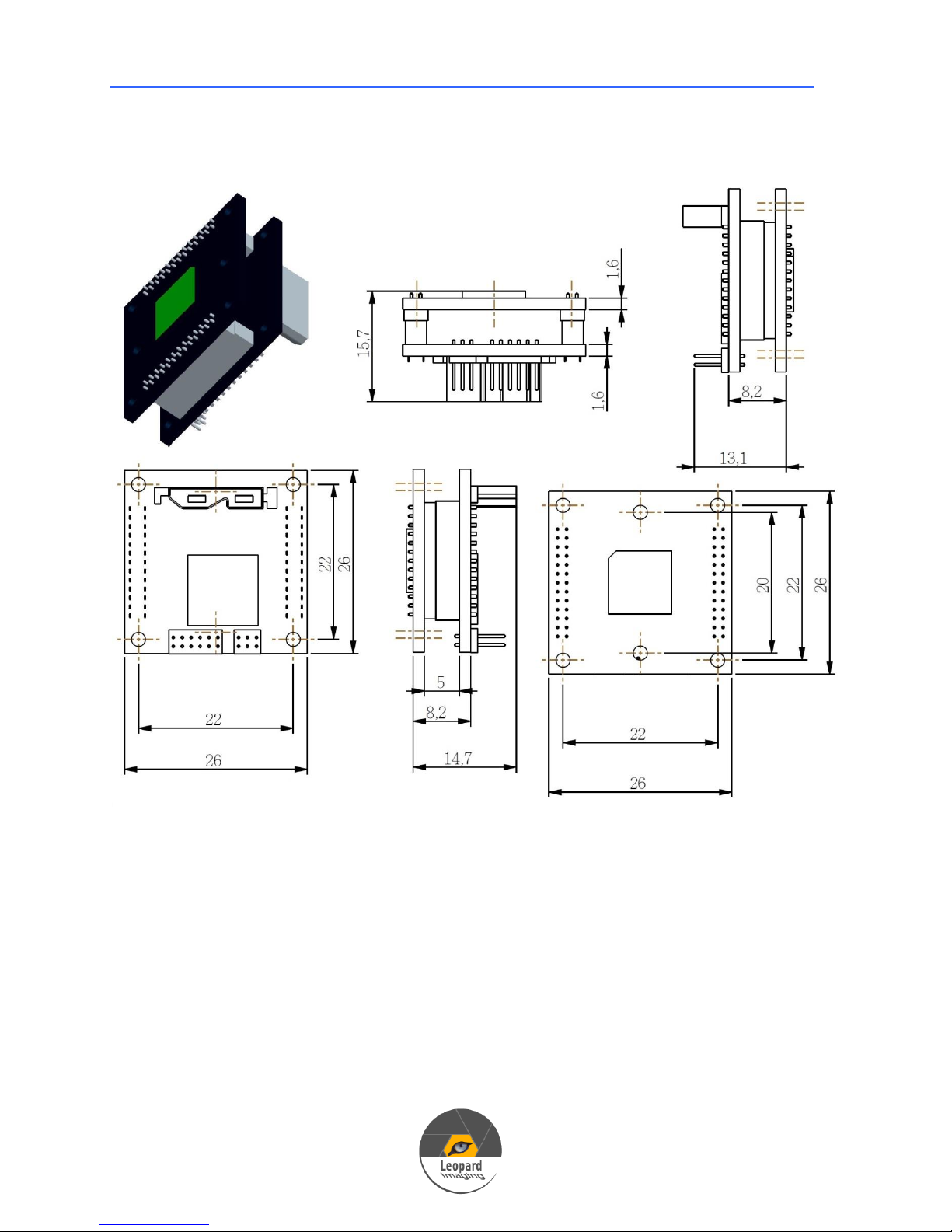
2.3 Product Dimensions (mm)
Page 12
USB 3.0 Camera User’s Guide
12
3. System Installation
3.1 Install USB 3.0 Demo Software
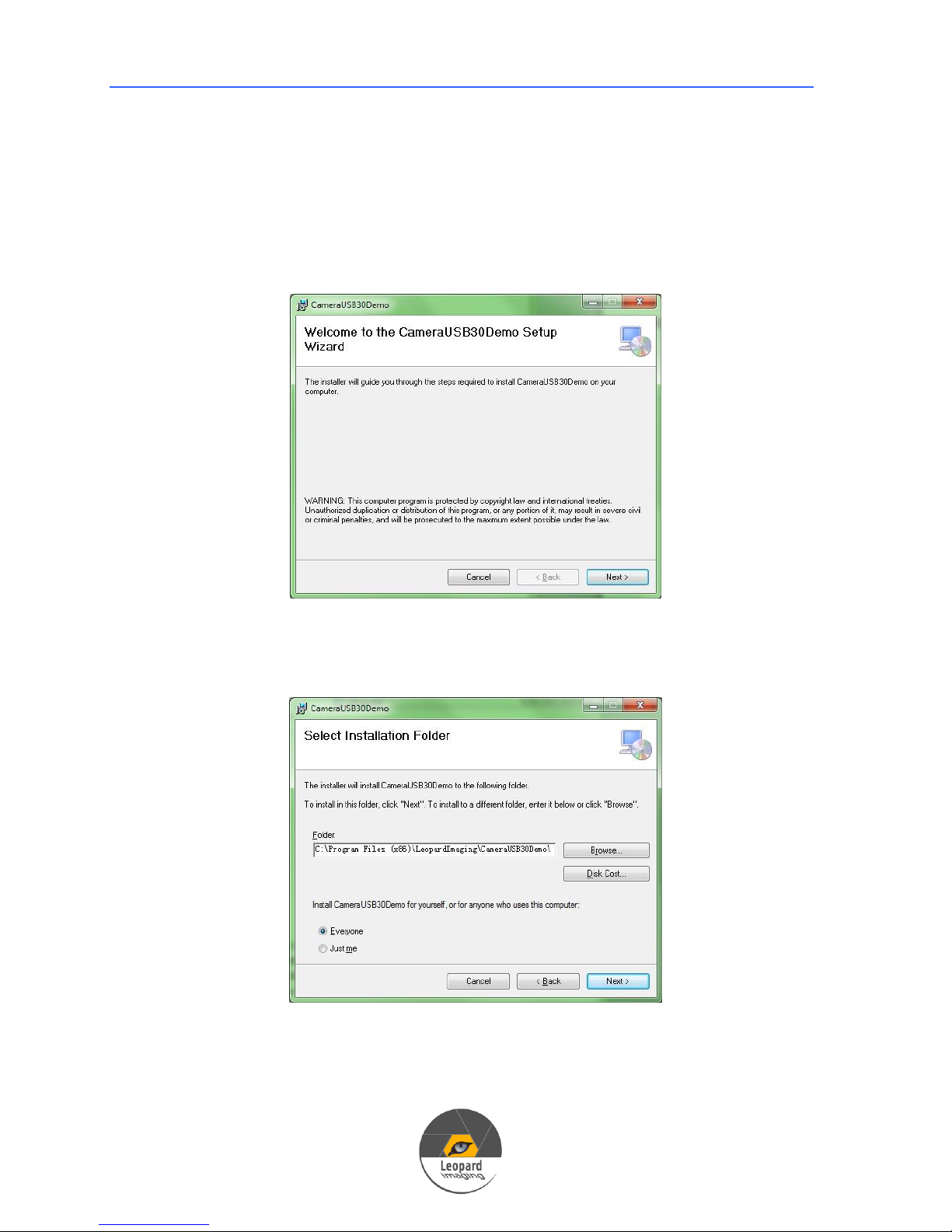
1) Download CameraUSB30Demo software from LeopardImaging Website.
2) Click Setup.exe, then click Next.
3) In next window, choose the folder to which you want to install the
software, then click Next.
4) In next window, click Next again.
Page 13
USB 3.0 Camera User’s Guide
13
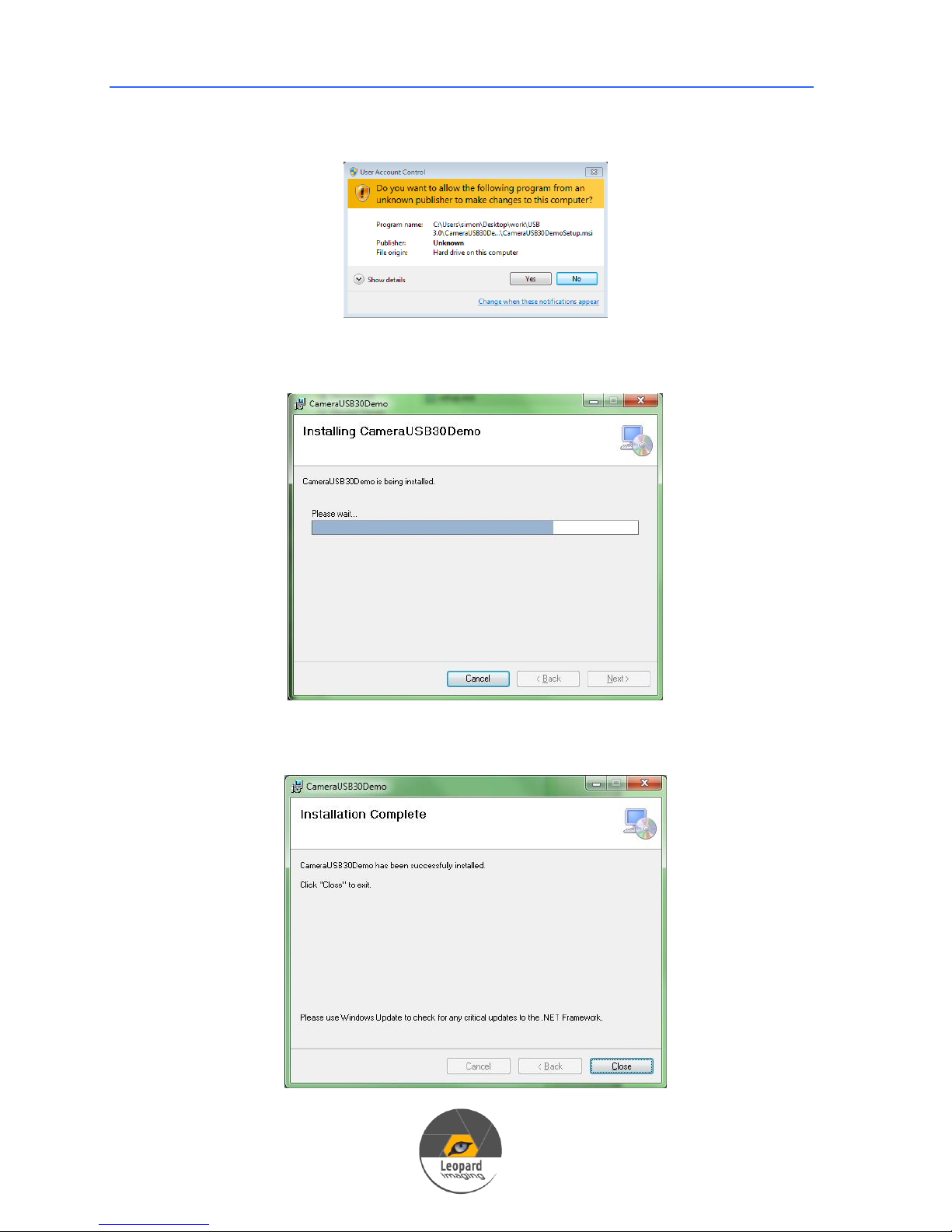
5) If there is a User Account Control pop up window, click Yes.
6) The software will be installed to your PC.
7) After Installation completes, click Close to close the window.
Page 14
USB 3.0 Camera User’s Guide
14
3.2 Install Driver
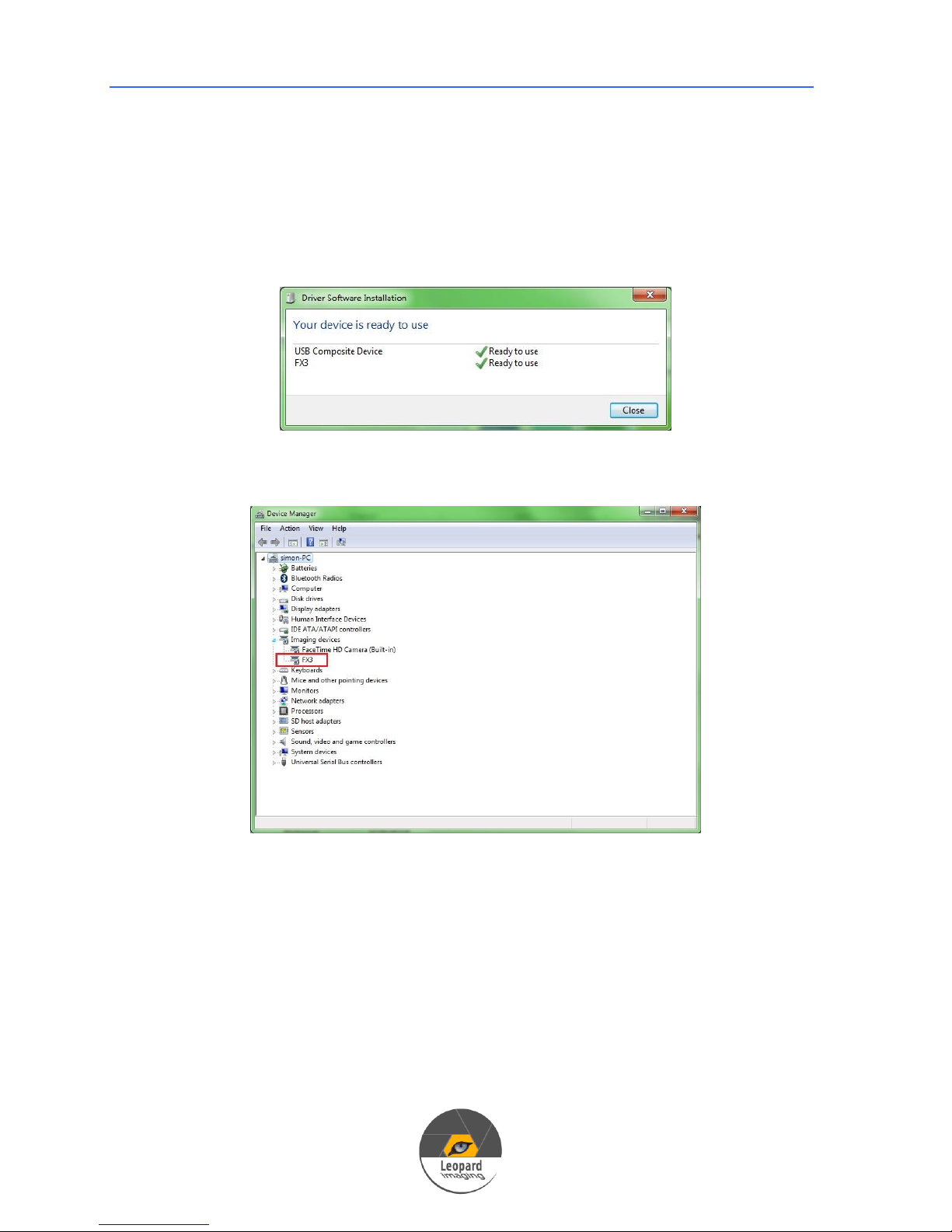
1) Connect the USB 3.0 cable to camera.
2) Plug the USB into USB 3.0 port on PC.
3) PC will search and install driver automatically.
4) After install the driver, you can find it in Device Manager.
4. Run Camera
4.1 Camera USB 3.0 Demo Software
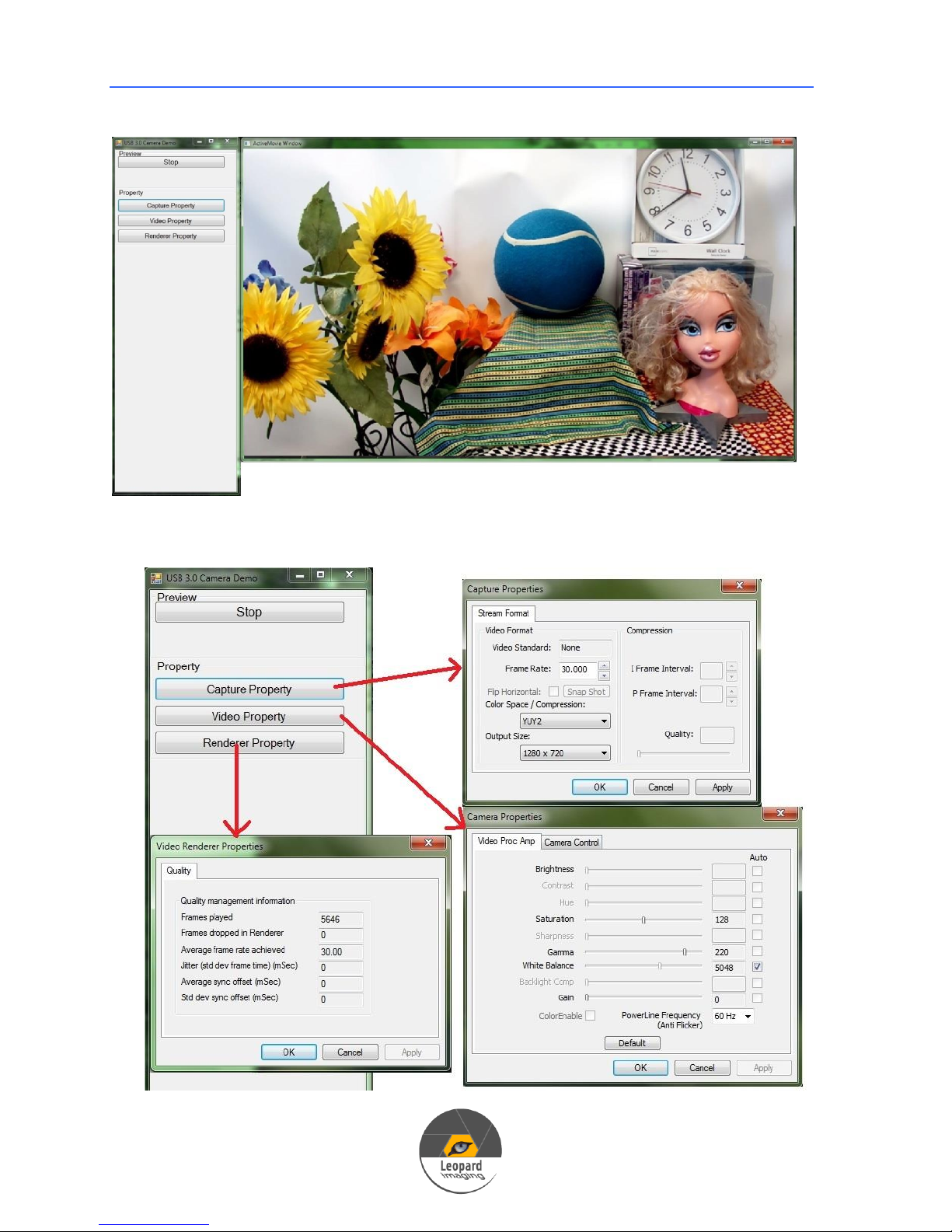
1) Open software
Page 15
USB 3.0 Camera User’s Guide
15
2) Properties
Page 16
USB 3.0 Camera User’s Guide
16
4.2 GraphEdit
4.2.1 M034WDR and AR0330ICP
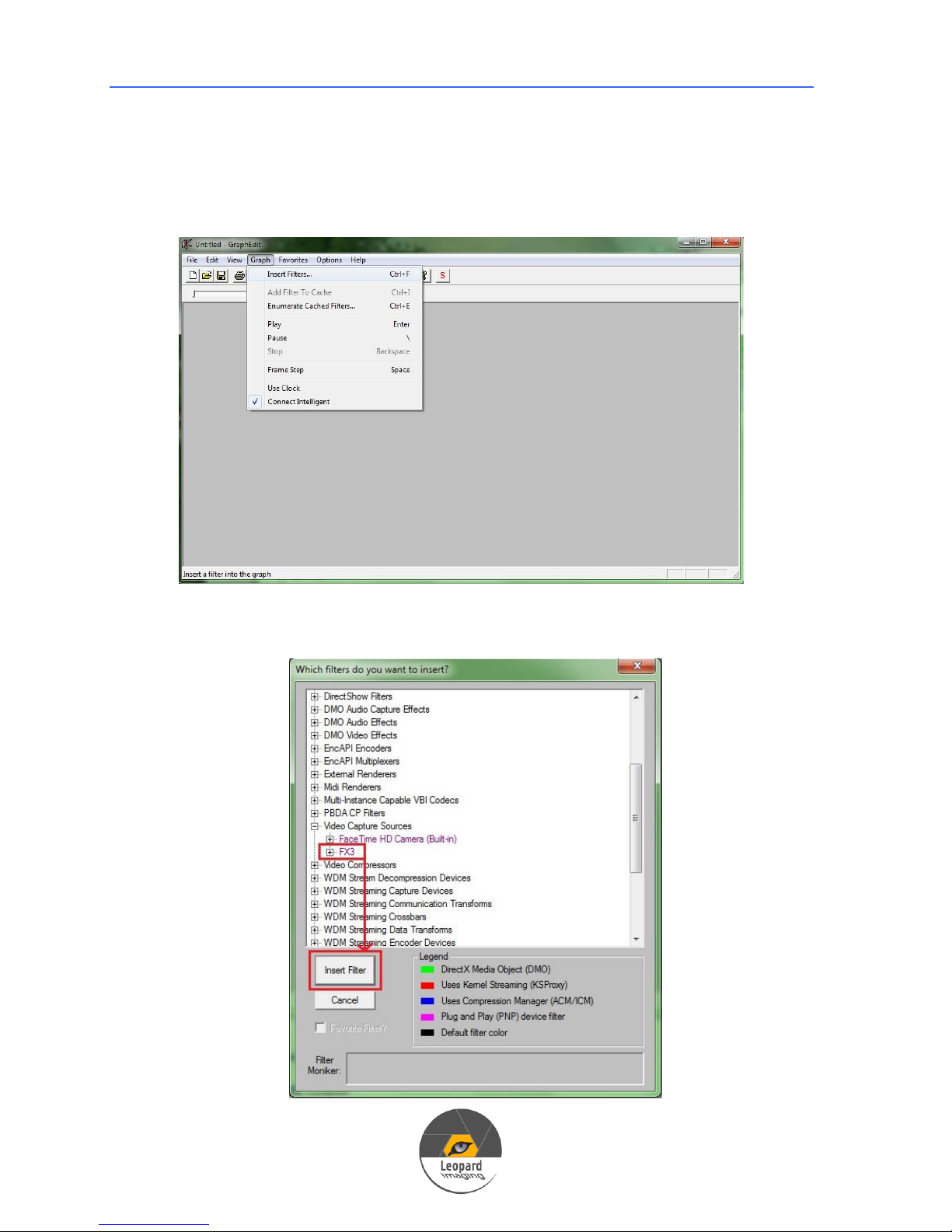
1) Open GraphEdit. Go to GraphInsert Filters.
2) Click Video Capture SourcesFX3, then click Insert Filter.
Page 17
USB 3.0 Camera User’s Guide
17
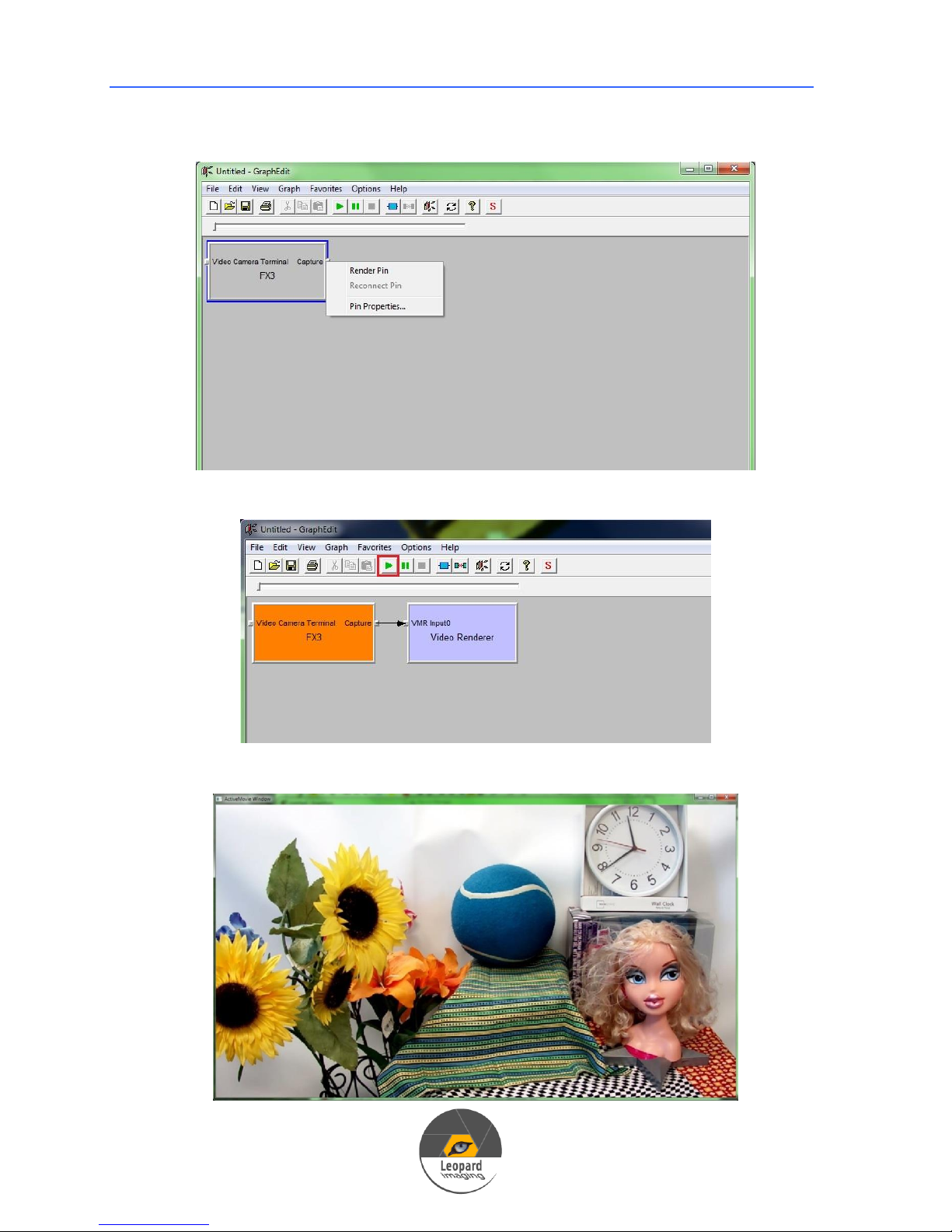
3) Click Close to close above window.
4) In the GraphEdit interface , right click Capture, then click Render Pin.
5) Click the Play icon.
6) You will get the Video.
Page 18
18
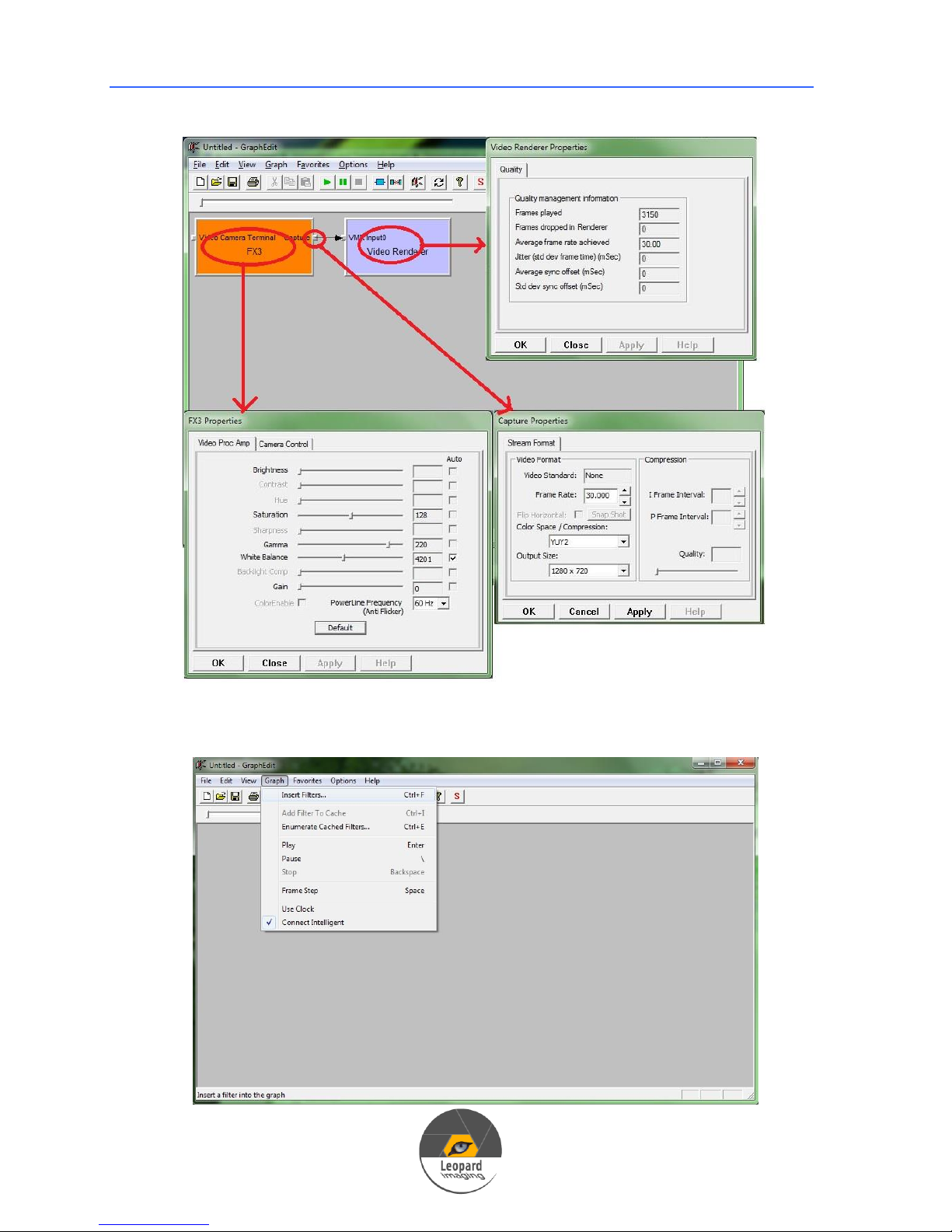
7) Properties
USB 3.0 Camera User’s Guide
4.2.2 V034, M021 and P031
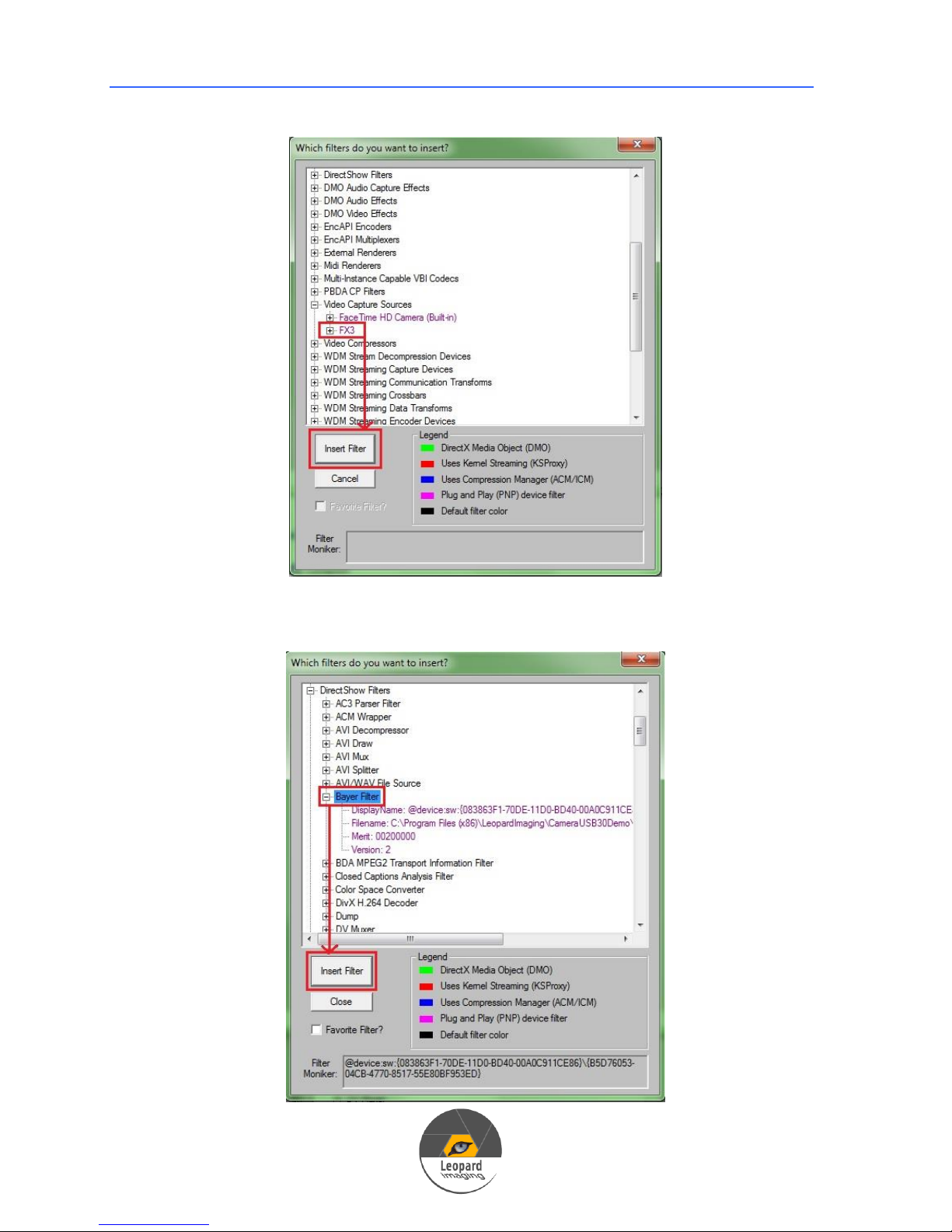
1) Open GraphEdit. Go to GraphInsert Filters.
Page 19
USB 3.0 Camera User’s Guide
19
2) Click Video Capture SourcesFX3, then click Insert Filter.
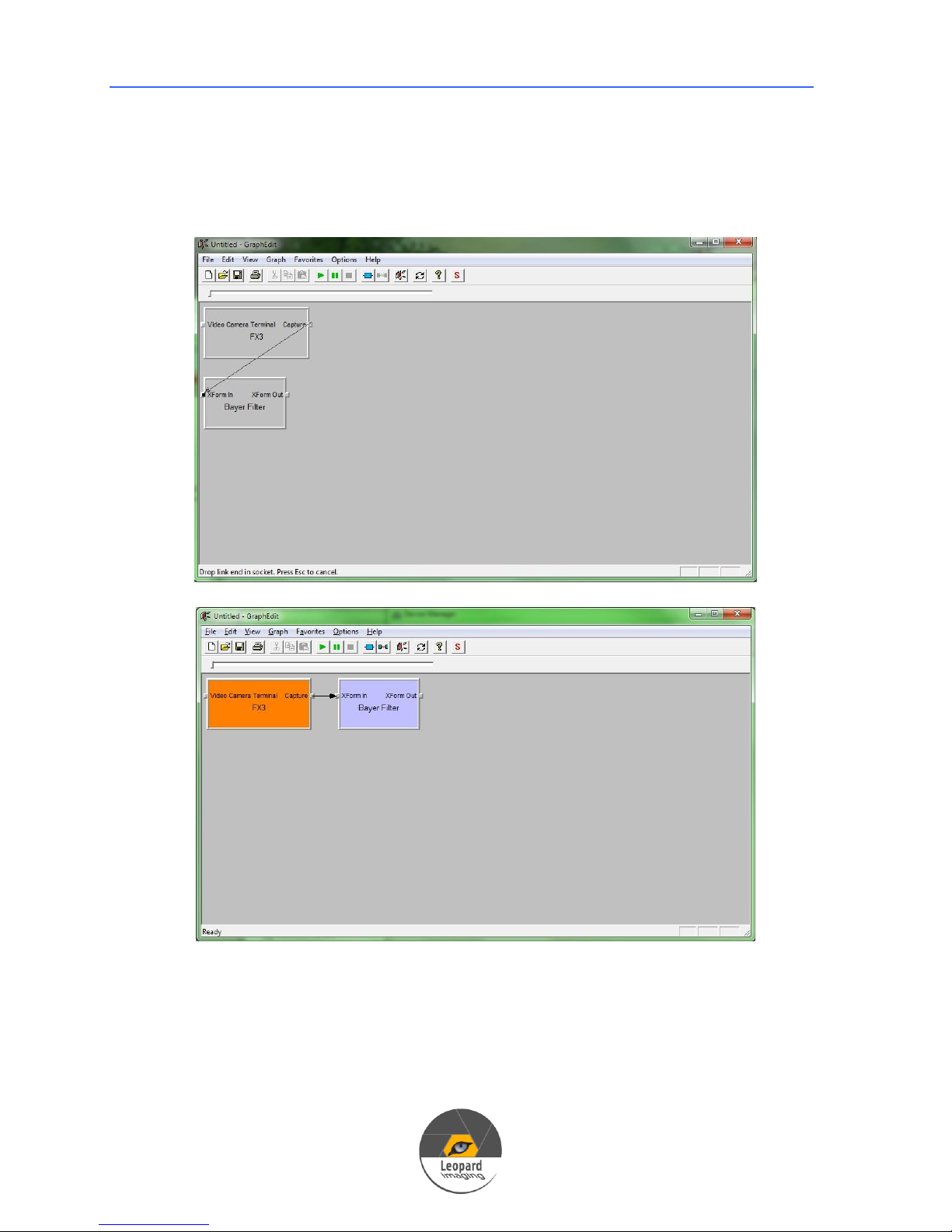
3) In the same window, click Direct Show FiltersBayer Filter, then click
Insert Filter.
Page 20
USB 3.0 Camera User’s Guide
20
4) Click Close to close above window.
5) In the GraphEdit main interface, connect Caputer and XForm In.
Page 21
USB 3.0 Camera User’s Guide
21
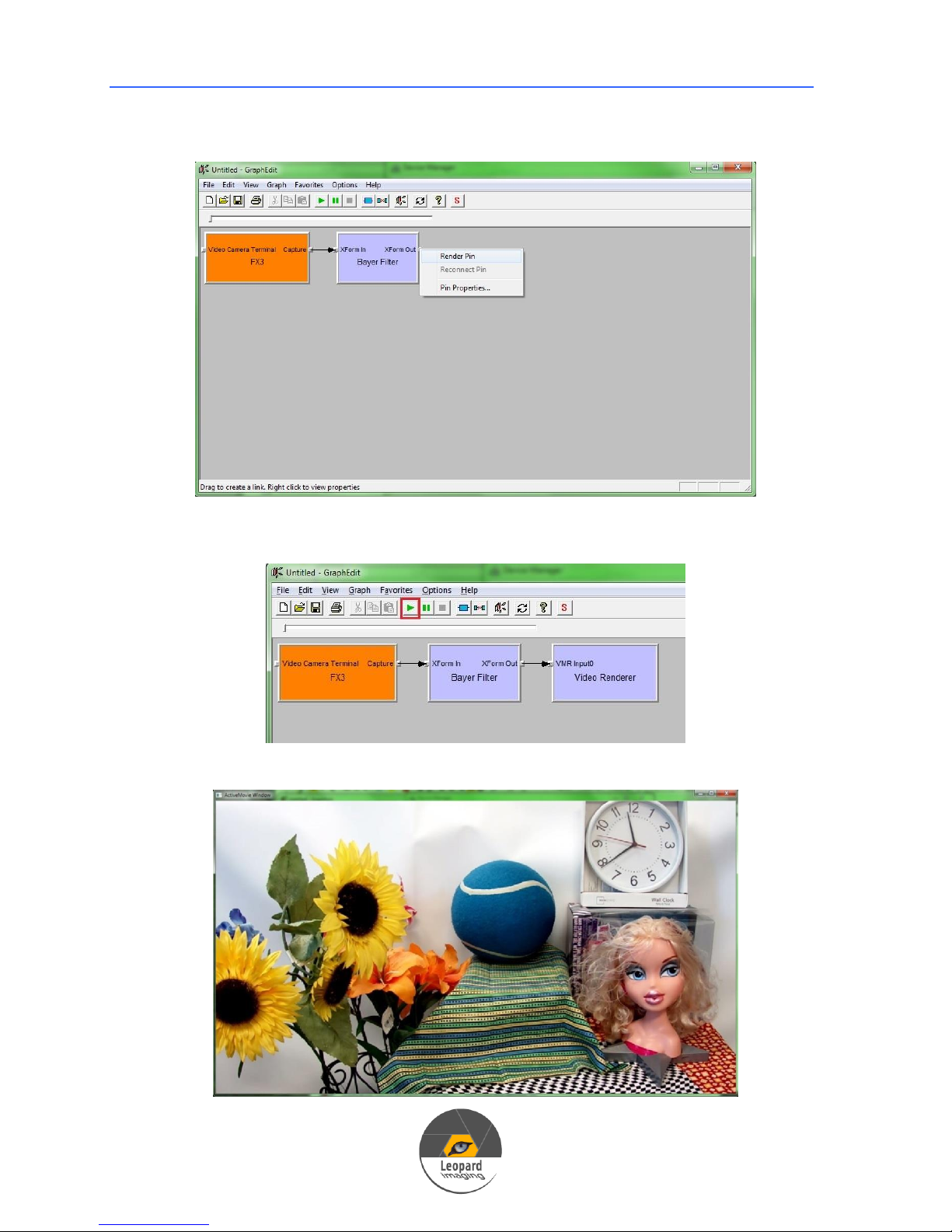
6) Right click XForm Out, then click Render Pin.
7) Click the Play icon.
8) You will get the Video.
Page 22
22
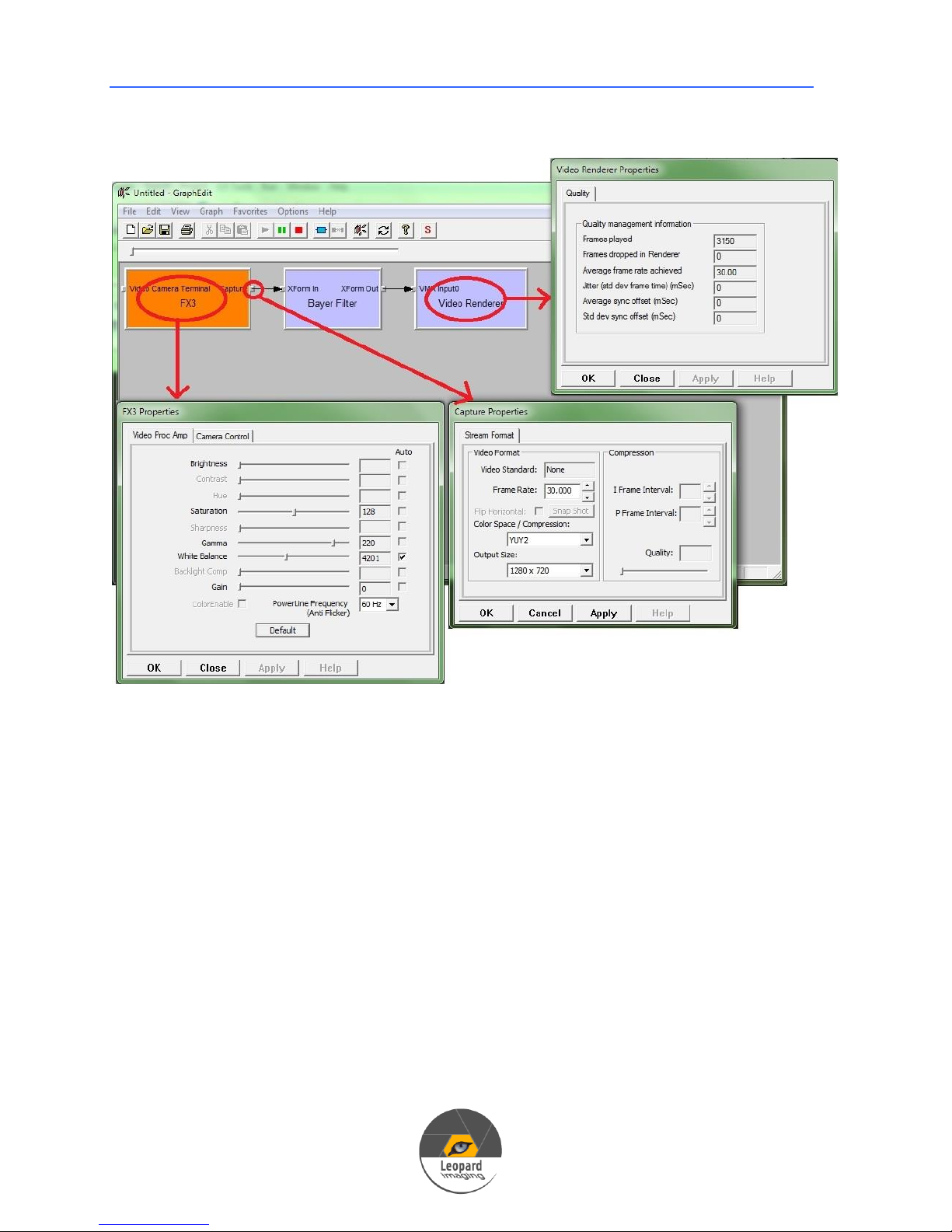
9) Properties
USB 3.0 Camera User’s Guide
 Loading...