

Page 1

-
1
-
GSM
GSM
GSM
GSM Home/Business
Home/Business
Home/Business
Home/Business Alarm
Alarm
Alarm
Alarm System
System
System
System
User
User
User
User Manual
Manual
Manual
Manual
(LS-GSM-006)
(LS-GSM-006)
(LS-GSM-006)
(LS-GSM-006)
Profile
Profile
Profile
Profile
For a better understanding of this product, please read this user manual thoroughly before using it.
Page 2

-
2
-
Catalogue
Catalogue
Catalogue
Catalogue :
:
:
:
Function Introduction 3
SMS Number Setting
14
Alarm Host Diagram 4
Delete SMS Receiving Number
15
Functions Set tings 5
Defense Zone Programming
15
Initialization
5
Home Arm Defense Zone Setting
16
Enter Settings
6
Artificial
Voice
Recording
17
Exit S ettings
6
Siren Setting
17
Factory Reset
7 Operation Instructions 18
Cod ing of Remote Controller
7
System Status
18
Delete Remote Controller
8
Remote Controller Operat ion
18
Cod ing of Defense Zone
8
Out Arm
19
Delete Defense Zone
9
Home Arm
19
Change Password
9
Disarm
20
Change Operation Password
9
Answer Alarming Call
20
Change Program Password
10
Remote Control
21
Clock Setting
10
Emergency Help
22
Timing Settings
11
System Dialing Function
22
Timely Arm
11
Alarming Record Checking
22
Timely Disarm
12
Maint enance
23
Timing Control
12
System Checking
23
Alarm Number Setting
13
Notes
24
Page 3

-
3
-
Delete Phone Number
13
Technical Parameters
25
Function
Function
Function
Function Instruction:
Instruction:
Instruction:
Instruction:
7 wired and 99 wireless defense zones;
L C D screen with time clock display;
Voice
prompt for all operations;
3 groups of timely arm and disarm;
Can store 6 phone numbers : when alarming, system will make alarm call to these
numbers automatically;
Can store 3 SMS numbers : when alarming, system will send alarming SMS
automatically;
10 -s econd automatic message recording;
Built-in artificial intelligent digital voice announcer ;
Built-in artificial intelligent English message;
Users can make call s by using keypad on alarm panel, just like a telephone;
One-key-control function : Out Arm , Home Arm , Remote Arm ;
SOS , fire , gas , door , hall , window , balcony , and perimeter places alarm;
Real-time , d elay , 24 hours , bypass defense zones programming function;
Wireless c od ing: easy to add additional wireless accessories ;
R emote control A rm, D isarm, Monitor , and I ntercom by phone;
Built-in AAA NI-H I rechargeable batter y: make alarm when power off;
Comply with CCC safety standard and GB12663-2001 national standard.
Page 4

-
4
-
Alarm
Alarm
Alarm
Alarm Host
Host
Host
Host Diagram
Diagram
Diagram
Diagram
In order to make the main unit get the wireless signal well for all wireless accessories,
please put the alarm host at the central place of your defense area. Make sure it’s away from
large metal objects and household appliances which may cause high frequency interference ,
as well as barriers such as r einforced concrete wall or fire door , etc.
Alarm
Alarm
Alarm
Alarm Panel
Panel
Panel
Panel front
front
front
front s
s
s
s chematic
chematic
chematic
chematic diagram
diagram
diagram
diagram :
:
:
:
Alarm
Alarm
Alarm
Alarm Panel
Panel
Panel
Panel back
back
back
back s
s
s
s chematic
chematic
chematic
chematic diagram:
diagram:
diagram:
diagram:
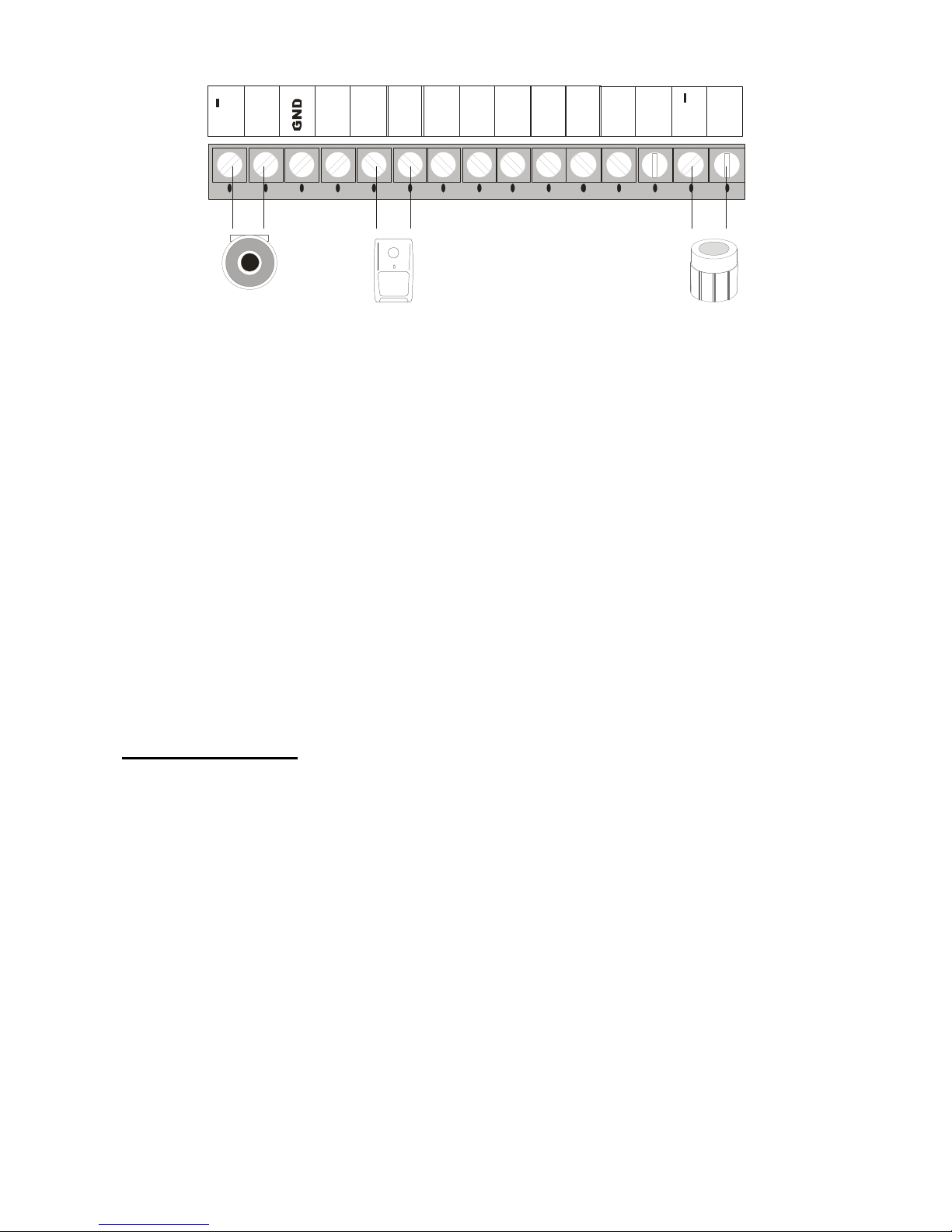
Wired
Wired
Wired
Wired terminal
terminal
terminal
terminal block
block
block
block :
:
:
:
Page 5
-
5
-
Z 1
Z 2
S P +
+-
S P
L B +
L B
G N D
G N D
Z 3
Z 4
Z 5
Z 6
G N D
Z 7
LCD
LCD
LCD
LCD display:
display:
display:
display:
Function
Function
Function
Function Set
Set
Set
Set tings
tings
tings
tings
Initialization
Please insert SIM card and plug in power adaptor, and then power on the system, all
the LED lights will be on for 2 seconds and you will hear a long beep ; the system
comes into initialization . After the time clock displays on the LCD screen, the [ SGM
SGM
SGM
SGM ]
starts flashing and the main unit starts to detect the GSM network until a long beep .
T hen the [ SGM
SGM
SGM
SGM ] indicator goes out indicating the system comes into disarm statu s.
Page 6

-
6
-
Finally, turn on the backup battery switch.
Enter Set tings
In the state of disarm, input 4 -digit password by the keypad on the main unit and press
[ #
#
#
# ] button to confirm .
You
will hear a voice prompt: please enter instruction. A t the
same time, [ SET
SET
SET
SET ] indicator is on without flashing and [0000] displays on the screen,
indicating the system enters setting status .
You
can perform different settings
repeatedly as long as the system keeps in setting status . The s ystem will exit setting
mode and return to disarm status if you don ’ t press any keypad button for 40 seconds.
Note
Note
Note
Note : In
In
In
In setting
setting
setting
setting stat
stat
stat
stat us
us
us
us , press
press
press
press can
can
can
can delete
delete
delete
delete the
the
the
the numbers
numbers
numbers
numbers input
input
input
input .
The
The
The
The system default password is [8888].
Operating method : [ XXXX
XXXX
XXXX
XXXX ] [ #
#
#
# ]
X
X
X
X indicates the new 4-digit password .
LCD display:
Exit Set tings
Press [ *
*
*
* ] and [ #
#
#
# ] buttons, the main unit emits a long beep and exits set tings. The [ SET
SET
SET
SET ]
indicator goes out and the system returns to disarm state.
Operating method : 【 * 】 【 #
#
#
# 】
Page 7
-
7
-
Factory Reset
In disarm status, use keypad to input [ 95175308246
95175308246
95175308246
95175308246 ] and press [ #
#
#
# ] to confirm, all the
LED indicators will be on for 2 seconds and you will hear a long beep. The main unit
gets all its settings cleared and restores to its factory settings successfully.
Operating method : [ 95175308246
95175308246
95175308246
95175308246 ] + [ #
#
#
# ]
Cod ing of Remote Controller
The
The
The
The remote
remote
remote
remote controller
controller
controller
controller has
has
has
has to
to
to
to be
be
be
be code
code
code
code to
to
to
to the
the
the
the alarm
alarm
alarm
alarm host
host
host
host in
in
in
in order
order
order
order to
to
to
to
perform
perform
perform
perform normally.
normally.
normally.
normally.
In setup state , use keypad to input [ 20
20
20
20 ], input the remote controller number [ 1~8
1~8
1~8
1~8 ],
and then press [ #
#
#
# ] to confirm . The main unit emits a long beep and you will hear
“ trigger remote controller ” . T he [ ] indicator is on without flashing; press any
button on the wireless remote controller, the main unit make s a long beep and you
will hear “ coding finished ” , [ ] indicator goes out, indicating the remote
controller succeeds in coding.
Operating method : [ 20
20
20
20 ] [ A
A
A
A ] [ #
#
#
# ]
A
A
A
A indicates : 1~8 remote controllers number .
You
can add maximum 8 remote
controllers.
LCD display:
Page 8
-
8
-
Delete Remote Controller
The
The
The
The remote
remote
remote
remote controller
controller
controller
controller can
can
can
can
’
’
’
’
t
t
t
t control
control
control
control the
the
the
the main
main
main
main unit
unit
unit
unit after
after
after
after it
it
it
it
’
’
’
’
s
s
s
s deleted
deleted
deleted
deleted
.
In setup state , use keypad to input [ 21
21
21
21 ], then input the remote controller number [ 1-8
1-8
1-8
1-8 ],
and then press [ #
#
#
# ] to confirm . The main unit emits a long beep and the [ Signal
Signal
Signal
Signal ]
indicator flickers once .
You
will hear a voice prompt “ delete finished ” .
Operating method : [ 21
21
21
21 ] [ A
A
A
A ] [ #
#
#
# ]
A
A
A
A indicates : 1~8 remote controllers number.
Coding
Coding
Coding
Coding of
of
of
of Defense
Defense
Defense
Defense Zone
Zone
Zone
Zone
Wireless
Wireless
Wireless
Wireless detectors
detectors
detectors
detectors have
have
have
have to
to
to
to be
be
be
be coded
coded
coded
coded to
to
to
to the
the
the
the main
main
main
main unit
unit
unit
unit in
in
in
in order
order
order
order to
to
to
to trigger
trigger
trigger
trigger it
it
it
it alarm.
alarm.
alarm.
alarm.
In setup state , use keypad to input [ 23
23
23
23 ], input the defense zone number you want to
code [ 01~
01~
01~
01~ 99
99
99
99 ], and then input [ #
#
#
# ] to confirm. The main unit emits a long beep and the
corresponding defense zone is displayed on the screen.
Y
ou will hear a voice prompt
“ trigger detector ” . Then trigger a wireless detector to emit a wireless signal; after
receiving the signal, the main unit make s a long beep, and you will hear “ coding
finished ” , the [ ] indicator goes out at the same time.
Operating method : [ 23
23
23
23 ] [ XX
XX
XX
XX ] [ #
#
#
# ]
XX
XX
XX
XX indicate
indicate
indicate
indicate s:
s:
s:
s: 01
01
01
01 ~
~
~
~ 99
99
99
99 defense
defense
defense
defense zones
zones
zones
zones number
number
number
number
LCD display:
Delete Defense Zone
Page 9

-
9
-
The
The
The
The wireless
wireless
wireless
wireless detector
detector
detector
detector can
can
can
can
’
’
’
’
t
t
t
t control
control
control
control the
the
the
the main
main
main
main unit
unit
unit
unit after
after
after
after it
it
it
it
’
’
’
’
s
s
s
s deleted
deleted
deleted
deleted
.
In setup state , use keypad to input [ 24
24
24
24 ], then input the defense zone number you want
to delete [ 01~
01~
01~
01~ 99
99
99
99 ], and then input [ #
#
#
# ] to confirm. The main unit emits a long beep and
the defense zone indicator flickers once .You will hear a voice prompt “ delete
finished ” .
Operating method : [ 24
24
24
24 ] [ XX
XX
XX
XX ] [ #
#
#
# ]
XX
XX
XX
XX indicates :
:
:
: 01
01
01
01 ~
~
~
~ 99
99
99
99 defense
defense
defense
defense zones
zones
zones
zones number
number
number
number
�
�
�
�
Change Password
1 Change Operation Password
Operation
Operation
Operation
Operation password
password
password
password is
is
is
is the
the
the
the password
password
password
password used
used
used
used to
to
to
to disarm
disarm
disarm
disarm or
or
or
or remote
remote
remote
remote
control.
control.
control.
control.
In setup status, use keypad to input [ 3
3
3
3 0
0
0
0 ], then input the 4-digit new password, and
then press [ #
#
#
# ] to confirm. T he main unit will make a long beep and you will hear a
voice prompt “ password changed ” .
Operating method : [ 3
3
3
3 0
0
0
0 ] [ XXXX
XXXX
XXXX
XXXX ] [ #
#
#
# ]
XXXX
XXXX
XXXX
XXXX indicates: the new 4 - digit password
For example : change the system password to 1012
Operating method : [ 3
3
3
3 0
0
0
0 ] [ 1012
1012
1012
1012 ] [ #
#
#
# ]
LCD display :
Page 10

-
10
-
2 Change Program Password
Program
Program
Program
Program password
password
password
password is
is
is
is the
the
the
the password
password
password
password you
you
you
you should
should
should
should input
input
input
input in
in
in
in order
order
order
order to
to
to
to
setup
setup
setup
setup the
the
the
the system.
system.
system.
system.
In setup status, use keypad to input [ 3
3
3
3 1
1
1
1 ], then input the 4-digit new password, and
then press [ #
#
#
# ] to confirm. T he main unit will make a long beep and you will hear a
voice prompt “ password changed ” .
Operating method : [ 3
3
3
3 1
1
1
1 ] [ XXXX
XXXX
XXXX
XXXX ] [ #
#
#
# ]
XXXX
XXXX
XXXX
XXXX indicates: the new 4 - digit password
For example : change the system password to 2846
Operating method : [ 31
31
31
31 ] [ 2846
2846
2846
2846 ] [ #
#
#
# ]
LCD display :
Note
Note
Note
Note : the
the
the
the operation
operation
operation
operation password
password
password
password and
and
and
and the
the
the
the programming
programming
programming
programming password
password
password
password
can
can
can
can not
not
not
not be
be
be
be set
set
set
set as
as
as
as the
the
the
the same
same
same
same number
number
number
number .
.
.
.
Clock Setting
In setup status, use keypad to input [ 3
3
3
3 2
2
2
2 ], then input the last 2 digits [AA] of the
present year, the two digits [BB] of the month, the two digits [CC] of the date, the two
digits [DD] of the hour (24-hour system), the two digits [EE] of the minute, the two
digits [FF] of the second, and finally enter [#] to confirm.You will hear a long beep
Page 11

-
11
-
and a voice prompt “ setting finished ” .
Operating method : [ 32 ] [ AA
AA
AA
AA ] [ BB
BB
BB
BB ] [ CC
CC
CC
CC ] [ DD
DD
DD
DD ] [ EE
EE
EE
EE ] [ FF
FF
FF
FF ] [ #
#
#
# ]
AA indicates: the last 2 digits of the present year
BB indicates: the 2 digits of the present month
CC indicates: the 2 digits of the present date
DD indicates: the 2 digits of the present hour
EE indicates: the 2 digits of the present minute
FF indicates: the 2 digits of the present second
For example : set the time as 15:35:40, Oct. 1st, 2009
Operating method : [ 32 ] [ 09
09
09
09 ] [ 10
10
10
10 ] [ 01
01
01
01 ] [ 15
15
15
15 ] [ 35
35
35
35 ] [ 40
40
40
40 ] [ #
#
#
# ]
Timing Settings
1) Timely Arm
In setup status, use keypad to input [33~35], then input the hour [AA] and minute [BB]
of the time you want to set to arm, and finally input [#] to confirm.You will hear a
long beep and a voice prompt “ setting finished ” .
Operating method : [ XX ] [ AA
AA
AA
AA ] [ BB
BB
BB
BB ] [ #
#
#
# ]
XX indicates: the address code 33, 34, 35 of the timely arming
AA indicates: the hour of the setting time
BB indicates: the minute of the setting time
For example : set the arm time as 45
’
10pm
Page 12

-
12
-
Operating method : [ 33 ] [ 22
22
22
22 ] [ 45
45
45
45 ] [ #
#
#
# ]
LCD display :
2) Timely Disarm
In setup status, use keypad to input [36~38], then input the hour [AA] and minute [BB]
of the time you want to set to disarm, and finally input [#] to confirm.You will hear a
long beep and a voice prompt “ setting finished ” .
Operating method : [ XX ] [ AA
AA
AA
AA ] [ BB
BB
BB
BB ] [ #
#
#
# ]
XX indicates: the address code 36, 37, 38 of the timely disarming
AA indicates: the hour of the setting time
BB indicates: the minute of the setting time
For example : set the arm time as 55
’
7pm
Operating method : [ 33 ] [ 22
22
22
22 ] [ 45
45
45
45 ] [ #
#
#
# ]
LCD display :
3) Timing Control
In setup status, use keypad to input [39], then input the number indicating turning on
timely arm/ disarm [1/0], and then input [#] to confirm.You will hear a long beep and
a voice prompt “ setting finished ” . T he factory default is off.
Page 13

-
13
-
Operating method : [ 39 ] [ 0/1
0/1
0/1
0/1 ] [ #
#
#
# ]
0: turn off the function of timely arm/ disarm
1: turn on the function of timely arm/ disarm
For example : turn on the function of timely arm/ disarm
Operating method : [ 39 ] [ 1
1
1
1 ] [ #
#
#
# ]
Alarm Number Setting
In setup state , input [ 51
51
51
51 ] ~ [ 56
56
56
56 ], then input the voice alarm-receiving number (mobile
number or telephone number), and then press [ #
#
#
# ] to confirm. T he main unit will make
a long beep , the [ Signal
Signal
Signal
Signal ] indicator will flicker once, and you will hear “ setting
finished ” , which indicate voice alarm-receiving number is set successfully.
Operating method : [ XX
XX
XX
XX ] [ YY
YY
YY
YY …
…
…
… YY
YY
YY
YY ] [ #
#
#
# ]
XX
XX
XX
XX indicates :
:
:
: the 1- 6 alarming user number [ 51
51
51
51 ] ~ [ 56
56
56
56 ]
YY
YY
YY
YY …
…
…
… YY
YY
YY
YY indicates : voice alarm-receiving phone number
For example : set 13811111111 as the first voice call number
Operating method : [ 51
51
51
51 ] [
13811111111
13811111111
13811111111
13811111111
] [ #
#
#
# ]
LCD display :
Delete Phone Number
In setup state , input [ 51
51
51
51 ] ~ [ 56
56
56
56 ], and then press [ #
#
#
# ] to confirm the main unit will make
a long beep and the [ Signal
Signal
Signal
Signal ] indicator will flicker once and you will hear “ delete
Page 14

-
14
-
finished ” , which indicate the alarming user number is delete d successfully.
Operating method : [ XX
XX
XX
XX ] [ #
#
#
# ]
XX
XX
XX
XX indicates :
:
:
: the 1- 6 alarming user number [ 51
51
51
51 ] ~ [ 56
56
56
56 ]
For example : Delete the third alarming user number from the system.
Operating method : [ 53
53
53
53 ] [ #
#
#
# ]
LCD display :
SMS Receiving Number Setting
SMS Receiving number means when system is alarming, it will only send SMS to
this mobile number.
You
can set maximum 3 SMS numbers.
In setup state , input [ 57
57
57
57 ] ~ [ 59
59
59
59 ], then input the SMS receiving number, and then press
[ #
#
#
# ] button to confirm. The main unit will make a beep , the [ Signal
Signal
Signal
Signal ] indicator will
flicker once and you will hear “ setting finished ” , which indicate setup successfully.
Operating method : [ XX
XX
XX
XX ] [ YY
YY
YY
YY …
…
…
… YY
YY
YY
YY ] [ #
#
#
# ]
XX
XX
XX
XX indicates : address codes of message-receiving numbers from the first group to
the third group [ 57
57
57
57 ] ~ [ 59
59
59
59 ]
YY
YY
YY
YY …
…
…
… YY
YY
YY
YY indicates : the SMS receiving number
For example : setup 13822222222 as the first SMS r eceiving number
Operating method : [ 57
57
57
57 ] [ 138222222
138222222
138222222
138222222 ] [ #
#
#
# ]
Page 15

-
15
-
Delete SMS Receiving Number
In setup state , use keypad to input [ 57
57
57
57 ] ~ [ 59
59
59
59 ], and then press [ #
#
#
# ] button to confirm.
T he main unit will make a beep , the [ Signal
Signal
Signal
Signal ] indicator will flicker once and you will
hear “ delete finished ” , which indicate SMS number is deleted successfully.
Operating method : [ XX
XX
XX
XX ] [ #
#
#
# ]
XX
XX
XX
XX indicates : address codes of message-receiving numbers from the first group to the
third group [ 57
57
57
57 ] ~ [ 59
59
59
59 ]
For example : delete the first SMS user number from the system
Operating method : [ 57
57
57
57 ] [ #
#
#
# ]
Defense Zone Programming
If you want to change the alarm attribute of defense zone, such as turn off the siren
when system alarm s , you can do it by defense zone programming. In setup state , first
input [ 60
60
60
60 ] , then the defense zone number [ 01~
01~
01~
01~ 99
99
99
99 ] , then input defense zone type [ 1~
1~
1~
1~ 4
4
4
4 ],
then input defense zone location number [ 1~8
1~8
1~8
1~8 ], and then select siren on/off [ 0/1
0/1
0/1
0/1 ], at
last press [ #
#
#
# ] to confirm.You will hear the main unit emit a long beep and a voice
prompt “ setting finished ” .
Operating method : [ 60
60
60
60 ] [ AA
AA
AA
AA ] [ B
B
B
B ] [ C
C
C
C ] [ D
D
D
D ] [ #
#
#
# ]
AA:
AA:
AA:
AA: defense zone number [ 0
0
0
0 1~
1~
1~
1~ 99
99
99
99 ] means zone 1 to zone 99 ;
B:
B:
B:
B: defense zone type
[ 1
1
1
1 ]: real-time defense zone [ 2
2
2
2 ]: 40 seconds delay defense zone
[ 3
3
3
3 ]: 24 hours defense zone [ 4
4
4
4 ]: b ypass defense zone
Page 16

-
16
-
C:
C:
C:
C: defense zone location
[ 1
1
1
1 ] SOS Alarm [ 2
2
2
2 ] Fire Alarm [ 3
3
3
3 ] Gas Leak Alarm
[ 4
4
4
4 ] Door Alarm [ 5
5
5
5 ] Hall Alarm [ 6
6
6
6 ] Window Alarm
[ 7
7
7
7 ] Balcony Alarm [ 8
8
8
8 ] Perimeter Alarm
D:
D:
D:
D: siren ON/OFF: [ 0
0
0
0 ] OFF, [ 1
1
1
1 ] ON
For example : set defense zone 12 to be 24 - hour, fire alarm and siren on
Operating method : [ 60
60
60
60 ] [ 12
12
12
12 ] [ 3
3
3
3 ] [ 2
2
2
2 ] [ 1
1
1
1 ] [ #
#
#
# ]
Home Arm Defense Zone Setting
If you want some detectors work and some do not, you can use [ Home
Home
Home
Home Arm
Arm
Arm
Arm ]
function.
In setup state , use keypad to input [ 61
61
61
61 ], then cho o se the corresponding defense zone
number [ 01~
01~
01~
01~ 99
99
99
99 ], then cho o se [ Home
Home
Home
Home Arm
Arm
Arm
Arm ], and then cho o se whether alarm [ 0/1
0/1
0/1
0/1 ]
button, and finally press [ #
#
#
# ] to confirm. T he main unit will make a long beep and a
voice prompt “ setting finished ” .
Operating method : [ 61
61
61
61 ] [ XX
XX
XX
XX ] [ A
A
A
A ] [ #
#
#
# ]
XX
XX
XX
XX indicates
indicates
indicates
indicates :
:
:
: [ 01~
01~
01~
01~ 99
99
99
99 ] is defense zone 1 to defense zone 99
A
A
A
A
indicates
indicates
indicates
indicates :
:
:
: [0]
[0]
[0]
[0] Home arm but not alarm
[1]
[1]
[1]
[1] Home arm and alarm
For example : set defense zone 11 to be Home arm and alarm
Operating method : [ 61
61
61
61 ] [ 11
11
11
11 ] [ 1
1
1
1 ] [ #
#
#
# ]
For example : set defense zone 12 as Home arm but not alarm
Page 17

-
17
-
Operating method : [ 61
61
61
61 ] [ 12
12
12
12 ] [ 0
0
0
0 ] [ #
#
#
# ]
Artificial
Voice
Record ing
In setup state , use keypad to input [ 701
701
701
701 ], and then press [ #
#
#
# ] to confirm. T he main unit
will emit a beep and the [ ] indicator is on, and after 10 seconds countdown,
record ing starts: record at 30cm away from the main unit with moderate tone; 10
seconds later, the main unit will make a beep indicating the recording stops and the
recorded voice will replay .
Operating method : [ 701
701
701
701 ] [ #
#
#
# ]
LCD display :
Siren Setting
In setup state , use keypad to input [ 75
75
75
75 ] ; in the operation of arm/ disa rm by remote
control , select if the siren sounds or not by [ 0/1
0/1
0/1
0/1 ] button , and then press [ #
#
#
# ] to confirm.
T he main unit will emit a long beep and a voice prompt “ setting finished ” .
Operating method : [ 75
75
75
75 ] [ A
A
A
A ] [ #
#
#
# ]
A
A
A
A
indicates: [ 0
0
0
0 ] Siren off ; [ 1
1
1
1 ] Siren on ; System default: [ 0
0
0
0 ] Siren off
For example : set siren on when arm/ disarm
Operating method : [ 75
75
75
75 ] [ 1
1
1
1 ] [ #
#
#
# ]
LCD display :
Page 18

-
18
-
Operat
Operat
Operat
Operat ion
ion
ion
ion Instructions
Instructions
Instructions
Instructions
System status
There are 4 status as following:
Arm: defense zone 1~ 99 will alarm when detector s are triggered
Home Arm: in arm status , the defense zone which is set as [Home Arm] will alarm
when detector s are triggered.
Disarm: defense zone 1~ 99 will not alarm when detector triggered (except 24 hours
defense zone)
System setup status : In this status, all defense zones will not alarm when detector s
are triggered.
Remote Controller Operation
Users can use remote controller to set system as Out Arm, Home Arm, Emergency
Alarm, Real-time Disarm and etc.
Out Arm: Press button
Disarm : Press button
Home Arm: Press button
Page 19

-
19
-
Emergency Alarm: P ress butto n, system will alarm at once.
Out Arm
It means to guard all around your house while everyone is going out; all the detectors
of the host are always working; when the detector is triggered by detecting source
(anti-theft, fire prevention, gas leak, etc.), the alarm system will sound the alarm.
Press [ Out
Out
Out
Out Home
Home
Home
Home ] button on keypad, system will make a beep per second and
totally 100 beeps. The [OUT
[OUT
[OUT
[OUT ARM
ARM
ARM
ARM ]
]
]
] indicator will be on without flashing. It means
Out Arm is set successfully.
Arm Operation : Press [ Out
Out
Out
Out Home
Home
Home
Home ] button
LCD display :
Home Arm
It means, for the safety, while somebody is at home, you need to enable the peripheral
door, window, balcony and perimeter detectors of the alarm system while prevent
from triggering the indoor detectors, which may cause improper warning; then, you
shall select Arm at Home, let just part of the detectors work and disable the other
parts.
Main Unit Operation : Press [ At
At
At
At Home
Home
Home
Home ] button on keypad
Remote Control Operation : Press [ ] button on remote controller.
Page 20
-
20
-
LCD display :
Disarm
It means to stop the alarm when the main unit sounds the alarm or make the alarm
system in the state of non-warning. After dis arming, even if you trigger the detector ,
the main unit would not sound alarm (excluding 24-hour defense areas).
Use keypad to input system password, then press [ #
#
#
# ] button. [ Out
Out
Out
Out Home
Home
Home
Home ] or [ At
At
At
At
Home
Home
Home
Home ] lights will be off. It means set system disarm successfully.
Remote Control Operation : Press [ ] button on remote controller
Main Unit Operation : input system password + [ #
#
#
# ]
LCD display :
Answer Alarming Call
When the main unit sounds alarm, it will dial the preset numbers . If no one answers
the call, the system will call the next user number automatically. T he s ystem will call
each preset numbers for 3 times in order .
If you answer the call, you will hear the pre-record voice.
You
can set system via your
telephone or mobile phone keypad .
Page 21

-
21
-
If you han g -up directly without answering the call, the system will call each preset
number for 3 times circularly.
Press [*] : Read the alarm information .
Press [1] : Main unit stop s alarming and Arm ; it stop s calling users.
Press [2] : Main unit stop s alarming and Disarm ; it stop s calling users.
Press [3] : Siren off and monitors the scene for 30 seconds ; for continued monitoring,
press [3] again to monitor for another 30 seconds.
Press [4] : Main unit starts a 30 - second two-way intercom. During this time, the main
unit cannot be controlled by the mobile until 30 seconds later.
Remote Control
Dial the number associated to the alarm main unit by phone (mobile phone), and after
one ringing cycle, you can hear a voice prompt “ Please enter password ” . If the
password is right, you will here “ P ress 1 to arm , P ress 2 to disarm , P ress 3 to Monitor ,
and Press 4 to I ntercom ” . If the password is wrong, you will hear a prompt voice to
ask you to input the password again.
Press [1] : arm, if finished successfully, you will hear a voice prompt “ System armed ” .
Press [2] : disarm, if finished successfully, you will hear a voice prompt “ System
disarmed ” .
Press [3] : monitoring for 30 seconds, to continue monitoring, press [3] again to
monitor for another 30 seconds.
Page 22

-
22
-
Press [4] : two-way intercom for 30 seconds.
You
can ’ t operate the main unit during
this time.
Emergency Help
Press [Emergency ] button on keypad, or [ ] button on remote controller or
wireless panic button, the main unit will alarm and make call to the preset user
numbers.
System Dialing Function
In disarm status; you can use the main unit to make any call just like a land-line
telephone. Dial telephone number on keypad, press [ ] button, the main unit will
make a beep and the [ Signal
Signal
Signal
Signal ] indicator will be flashing. After the call, press [ ]
button again , the main unit will be in disarm status.
Alarming
Alarming
Alarming
Alarming Record
Record
Record
Record Checking
Checking
Checking
Checking
In disarm state, input [*0#], then the main unit will make a long beep and enters the state of
alarm record checking. After displaying the alarm and defense zone number indicator, the
LCD screen will display the exact alarming time of this defense zone. Press 2, you can
upturn to check the previous alarming record; press 8, downturn to check; and press [*#] to
exit checking.
Page 23

-
23
-
For example : the 51st defense zone; the 7th alarming; alarming time: 12:10, August 1st,
2008. LCE display for one second, and then display the alarming time:
GSM
GSM
GSM
GSM Signal
Signal
Signal
Signal Checking
Checking
Checking
Checking
B efore installing the main unit, you should check the signal of the installing place in order
to ensure the unit can perform well. I n setup state, input [81] #, the main unit will make a
long beep and display 00+XX (XX indicates the intensity of the signal). And the intensity
should be within the range of 07-31; if it’s less than 07, you should change place.
For example : if the signal intensity is 12, it will display as:
Maintenance
Maintenance
Maintenance
Maintenance
System Checking
Although the alarm system is used everyday, periodical maintenance and test are
required to assure that it can run stably, reliably and safely. Usually thorough test must
be performed on the alarm main unit every three months.
You
’ d better check the
Page 24

-
24
-
detector once a month; if not permitted by condition, you should check it at least
every three months.
Check the main unit :
1. Whether it can arm/ disarm normally.
2. Whether it can dial the number for alarm normally.
3. W hether it can receive wireless detectors’signal normally
4. Whether the back-up battery can work normally.
Check the wireless detector s :
1. Trigger wireless detector s to see if system can alarm normally.
2. Check all detectors’batter ies to see if it’s in low voltage.
3. Check whether wireless detector s can send signal to the main unit normally.
Notes:
Please do not disassemble, repair and alter the products without permission, or it may
cause accidents and faults.
Do not drop this product on the ground or on hard objects, as it may lead to massive
impact to cause faults and damages.
Without approval and consent of relevant authorities, please do not set “ 110 ” , “ 119 ”
or the alarm phone number of police station for this main unit.
Technical
Technical
Technical
Technical Parameters
Parameters
Parameters
Parameters
Page 25
-
25
-
List 1:
Input V oltage DC12V/1A
Standby Current <55mA
Alarming Current <450mA
Wireless Frequency 433 MHz , 2262/4.7M Ω
GSM Frequency 900/ 1800/ 1900MHz
Back-up Battery NI-HI AAA*6 DC7.2V
Siren V olume 110dB
List 2:
Defense
Zone
Arm Home Arm Type
Alarm
Information
Siren
Zone 1 effective invalid real-time Door alarm
yes
Zone 2 effective invalid real-time Hall alarm
yes
Zone 3 effective effective real-time Window alarm
yes
Zone 4 effective effective real-time Balcony alarm
yes
Zone 5 effective effective 24 hours Fire alarm
yes
Zone 6 effective effective 24 hours Gas alarm
yes
Emergency
button
effective effective 24 hours Emergency
alarm
no
Page 26

-
26
-
Zone 7- 99 effective invalid real-time Emergency
alarm
yes
Wired
defense zone
(
9 6-99
)
effective invalid r eal-time Emergency
alarm
yes
Operation Password 8888 Remote control On
Remote control Password 1234 Siren Off
Siren sound time 180 sec. Home Appliance Optional
 Loading...