

Lenovo ThinkServer RD330, ThinkServer RD430, ThinkServer RD530, ThinkServer RD630, ThinkServer RD^30 User Manual
Page 1
ThinkServerManagementModule
UserGuide
ThinkServerRD330,RD430,RD530,andRD630
Page 2

Note:
Beforeusingtheinformationandtheproductitsupports,ensurethatyoureadandunderstandthefollowing:
•“Safetyinformation”onpage1
•AppendixB“Notices”onpage31
FirstEdition(August2012)
©CopyrightLenovo2012.
LIMITEDANDRESTRICTEDRIGHTSNOTICE:IfdataorsoftwareisdeliveredpursuantaGeneralServicesAdministration
“GSA”contract,use,reproduction,ordisclosureissubjecttorestrictionssetforthinContractNo.GS-35F-05925.
Page 3

Contents
Chapter1.Introduction........1
Terminology................1
Safetyinformation.............1
Chapter2.OverviewoftheLenovo
ThinkServerManagementModule..3
FeaturesoftheThinkServerRemoteManagement
Module.................3
Chapter3.Congurationofthe
ThinkServerRemoteManagement
Module................5
Chapter4.ThinkServerRemote
ManagementModuleQuickStart..7
Prestart.................7
Log-on..................10
Navigation................11
Log-out.................12
Chapter5.Remoteconsole(KVM)
operation...............13
Starttheredirectionconsole.........13
Mainwindowoftheremoteconsole......13
Menubaroftheremoteconsole........13
Viewmenuoftheremoteconsole.....13
Macrosmenuoftheremoteconsole....14
Toolsmenuoftheremoteconsole.....14
Powermenuoftheremoteconsole.....14
Chapter6.ThinkServerRemote
ManagementModuleWebconsole
options................15
Properties................15
Viewingproperties...........15
Serverinformation.............16
Viewingsensorreadings.........16
ViewingtheSystemEventLog........16
Eventmanagement.............17
PlatformEvents............17
TrapSettings(SNMP)..........18
EmailSettings(SMTP)..........18
SerialOverLAN............18
Remotecontrol..............19
Remotemanagement..........19
Virtualmedia.............20
Powercontrol.............21
Conguration...............22
Network...............22
Networksecurity............23
Security...............23
Users................23
Service................24
IPMI.................24
Session................25
LDAP................26
Update................26
Utilities................27
Languages................28
AppendixA.Frequentlyasked
questions...............29
AppendixB.Notices..........31
Trademarks................32
©CopyrightLenovo2012
i
Page 4

iiThinkServerManagementModuleUserGuide
Page 5

Chapter1.Introduction
ThankyoufororderingandusingtheLenovo
®
ThinkServer
®
ManagementModule(TMM),hereinafter
referredtoasRemoteManagementModule.
TheUserGuidedescribeshowtousetheRemoteManagementModule,theoverviewofthemodule
features,andhowtosetupandoperatethemodule.
TheUserGuideisforsystemadministratorsresponsibleforinstallation,troubleshooting,upgradeand
maintenanceoftheRemoteManagementModule.Asasystemadministrator,onceyouarefamiliarwiththe
UserGuide,youcanuseRemoteManagementModuletoaccessremotelyfromanylocationtorespondfor
emergency.
Terminology
Thefollowingtableliststhetermsusedinthisdocumentanditscorrespondingdescriptions.
AbbreviationDenition
BMCSystemboardManagementController
DHCPDynamicHostCongurationProtocol
IPMI
IntelligentPlatformManagementInterface
KVMKeyboard,Video,andMouse
MACMediaAccessController
TCP/IPTransferControlProtocol/InternetProtocol
Safetyinformation
WARNING
WithreferencetoeithertheGuideorotherdocuments,youshouldalwayspayparticularattention
tosafetyinformationbeforeoperatingtheThinkServer.T oensurefullcompliancewiththeexisting
certicationandlicensing,youmustfollowtheinstallationinstructionsintheGuide.
Poweron/off:thepowerbuttoncannotcutoffsystempowerorRemoteManagementModulepower.
TocutoffthepowerofRemoteManagementModule,youmustdisconnecttheacpowercordfromthe
poweroutlet.Whenopeningthechassistoinstallorremovetheparts,youshouldmakesuretheacpower
cordhasbeendisconnected.
©CopyrightLenovo2012
1
Page 6

Dangeroussituations,equipmentandcables:power,telephones,andsignalcablesmayhavethedanger
ofelectricshock.Beforeopeningthedevice,shutdowntheserver,disconnectedthepowercord,the
communicationsystem,networkandmodemconnectedtotheserver.Otherwise,itmayresultinpersonal
injuryorequipmentdamage.
ElectrostaticDischarge(ESD)andESDprotection:ElectrostaticDischarge(ESD)candamagedisk
drivers,systemboardandothercomponents.WerecommendthatyoucompleteallthestepsinthisSection
onlyintheESDprotectiveworkstations.IfESDworkstationisunavailable,pleasewearanti-staticwriststrap
whileholdingpartsandconnectthewriststraptothegroundwire(thatis,anyunpaintedmetalsurface)
oftheserverchassistoprovideESDprotection.
ESDandholdingsystemboards:becarefulwhenholdingthesystemboard.Theyareextremelysensitive
toESD.Onlytouchtheedgewhenholdingthesystemboard.Laythesystemboardwithcomponentsside
facingupwardsaftertakingthesystemboardoutoftheprotectionbagorthesever.Usetheconductive
foampad(ifany)ratherthanthesystemboardpackage.Donotslidethesystemboardonanysurface.
Installingorremovingjumper:jumperisasmallplasticconductorbetweentwojumperpins.Somejumpers
haveasmallwingonthetopforyoutousengertipsorneneedleforcepstoclipit.Ifthejumperhasno
suchwing,becarefulwheninstallingorremovingitwithneedleforceps,andclipthejumper'snarrowface
insteadofthewideone.Clippingthewidefacewilldamagethecontactsinsidethejumper,whichwillleadto
intermittentfaultstosomefunctionscontrolledbythejumper.Clipthejumpercarefullywithpliersorother
toolsanddonotsqueezewhenremovingit.Otherwise,pinsonthesystemboardmaybebentorbroken.
2ThinkServerManagementModuleUserGuide
Page 7

Chapter2.OverviewoftheLenovoThinkServerManagement
Module
ThistopicdescribesthefeaturesoftheRemoteManagementModule.
TheRemoteManagementModulerunsontheserversystemasanintegratedsolutionandintegrates
theembeddedoperatingsystem.Independentoftheserveroperatingsystem,theembeddedoperating
systemcanprovideawholesetofcomplete,stableandeffectivesolutionfortheserver.Asasystem
administrator,youcanrespondanytimeandanywheretoemergencyfailureandtakeremotecontrolon
theserverthroughthenetwork.
FeaturesoftheThinkServerRemoteManagementModule
TheThinkServerRemoteManagementModuleiseasilyaccessiblebyremoteKVMandcontrollableviaLAN
orInternet.Itwilldigitizeandcompressthecollectedvideosignal,keyboard,mousesignalsandthen
sendtotheremoteconsole.Embeddedwithremoteaccessandrelatedcontrolsoftware,themodule
alsoallowsintegratedremotepowermanagementviaIPMI.KeyfeaturesoftheRemoteManagement
Moduleareasfollows:
•EmbeddedWebUI-Remotepoweron/off,systemhealth,systeminformation,alertnoticationand
eventlog.
•USB2.0mediaredirection-bootfromremotemedia
•Security-opensourceSSL
•CompatiblewithIPMIV2.0
•KVM-allowremoteviewingandconguringinthePOSTandBIOSsetuputility
©CopyrightLenovo2012
3
Page 8

4ThinkServerManagementModuleUserGuide
Page 9

Chapter3.CongurationoftheThinkServerRemote
ManagementModule
ThistopicdescribeshowtousetheservercongurationutilitytochangetheRemoteManagementModule
fromtheun-conguredstatustotherunningstatus.Whenrstinstalled,theRemoteManagementModule
bydefaultwillsearchDHCPserveronthenetworktoautomaticallyassignIPaddress,subnetmaskand
gateway.ItisrecommendedthatusersmanuallysetaxedIPaddressintheBIOS.
TosetanIPaddress,dothefollowing:
1.PressF1assoonasyouseethelogoscreen.
2.FromtheBIOSsetupmenu,selectServerManagement➙BMCNetworkConguration➙
CongurationAddressSource.
3.FromtheCongurationoption,youcanchooseSTATICorDHCPtosetIPaddress.
4.Whenyounishtheconguration,savethesettings.
Table1.IPMI2.0Congurationsubmenu
STA TICStaticIPconguration.IPandthesubnetmaskcanbesetmanually. Conguration
Address
Source
DHCP
DynamicIPconguration.ThesystemcanobtainIPautomatically.
©CopyrightLenovo2012
5
Page 10

6ThinkServerManagementModuleUserGuide
Page 11

Chapter4.ThinkServerRemoteManagementModuleQuick
Start
ThistopicdescribeshowtoquicklyacquaintwithrelatedoperationsoftheRemoteManagementModule.In
addition,italsodescribestheadvancedfeaturesofhowtologonthemoduleandoptionsavailablewhile
browsing,andhowtologout.
Prestart
TheRemoteManagementModulehasanembeddedWebserverandanapplicationwithmultiplestandard
interfaces.Thistopicdescribestheseinterfacesandtheirusages.Y oucanusetheTCP/IPprotocolto
accesstheseinterfaces.
Note:Asthesupportedfunctionsoftheproductvarywithcongurations,refertotheactualproduct
description.
Formoreinformationabouttheinitialsettings,seeChapter3“CongurationoftheThinkServerRemote
ManagementModule”onpage5
.Theusernameinthistopicis“lenovo”.Besides“lenovo”,otheruser
namesandpasswordsarealsoaccepted.Thedefaultusernameandpasswordareasfollows:
•Username=lenovo
•Password=lenovo
TheRemoteManagementModuleisaccessiblethroughthestandardJava-enabledWebbrowserwith
HTTPandHTTPS.
HTTP/HTTPS:TheembeddedWebserverprovidesfullaccesspermission.Y oucanaccesstheRemote
ManagementModuleviaencryptedHTTPSprotocolorHTTPprotocol.WhenaccessingthroughtheHTTP
protocol,notethefollowing:
1.WithaccesstoThinkServerRemoteManagementModuleviatheHTTPSprotocol,thebrowsermay
promptyoutotrustandinstallthesecuritydigitalcertication,andyoujustfollowthepromptsto
importandconrmthecertication.
2.IntheInternetExplorer
®
6WebbrowserontheMicrosoft
®
WindowsServer
®
2003operatingsystem,
ifusingHTTPSprotocoltoaccesstheRemoteManagementModule,youneedtocheckInternet
ExplorerEnhancedSecurityCongurationitemintheControlPanel➙Add/RemoveWindows
Components.
3.InIE7ontheMicrosoft
®
WindowsServer
®
2008operatingsystem,ifusingHTTPSprotocoltoaccess
theRemoteManagementModule,youneedtodothefollowingamendmentstotheCongureIEESC
itemofthesecurityinformationoftheservermanager,asshowninthefollowinggures:
©CopyrightLenovo2012
7
Page 12
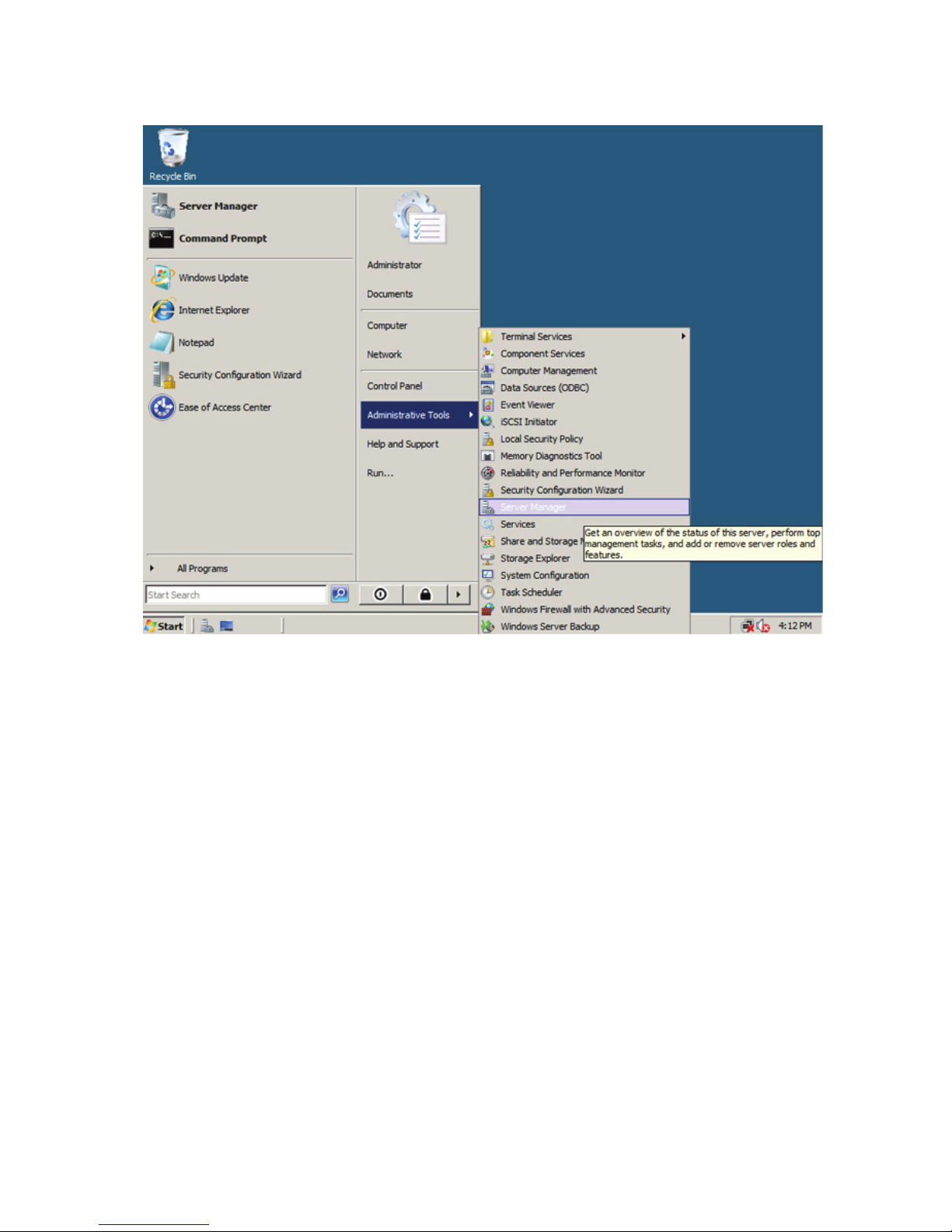
Figure1.ConguringIEESC-setp1
8ThinkServerManagementModuleUserGuide
Page 13
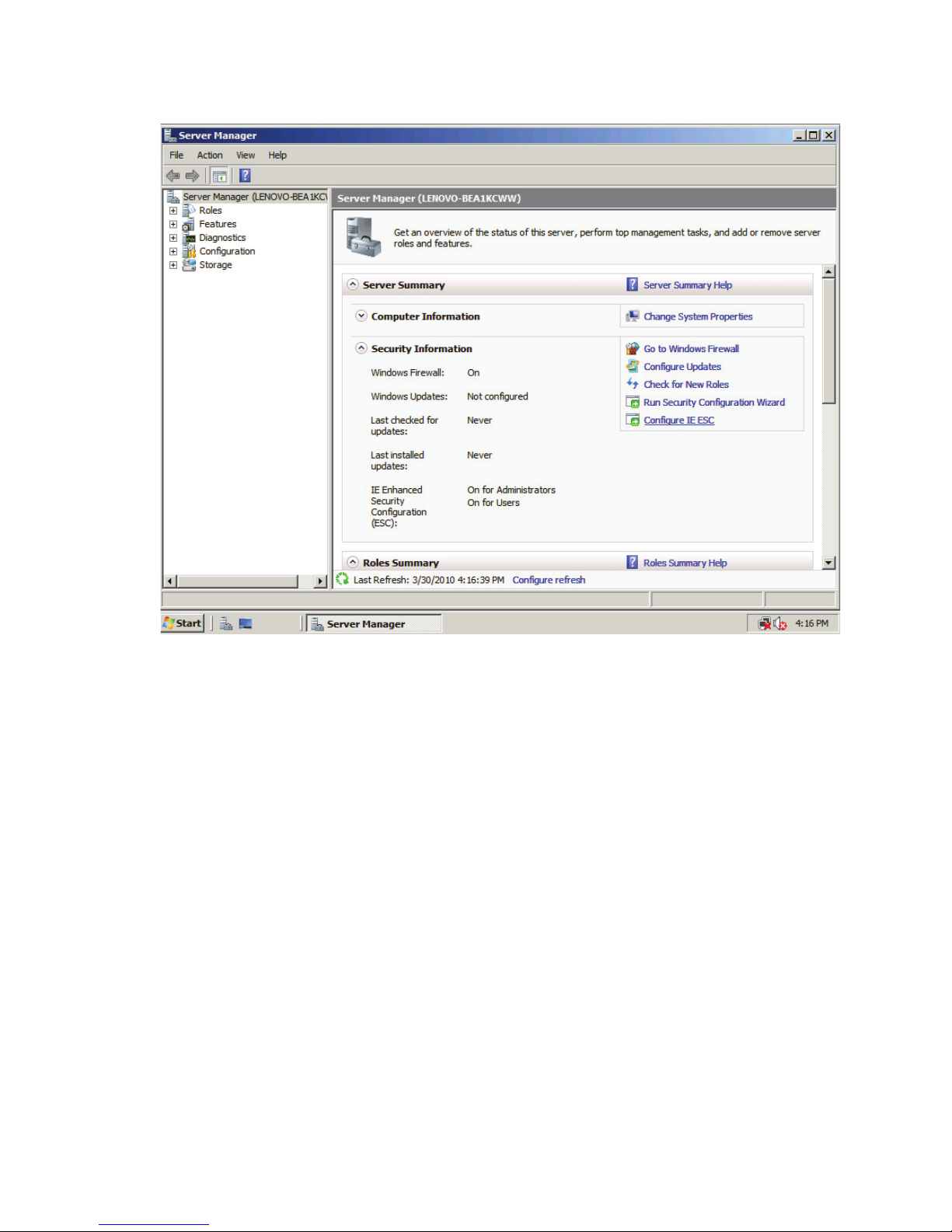
Figure2.ConguringIEESC-setp2
Chapter4.ThinkServerRemoteManagementModuleQuickStart9
Page 14
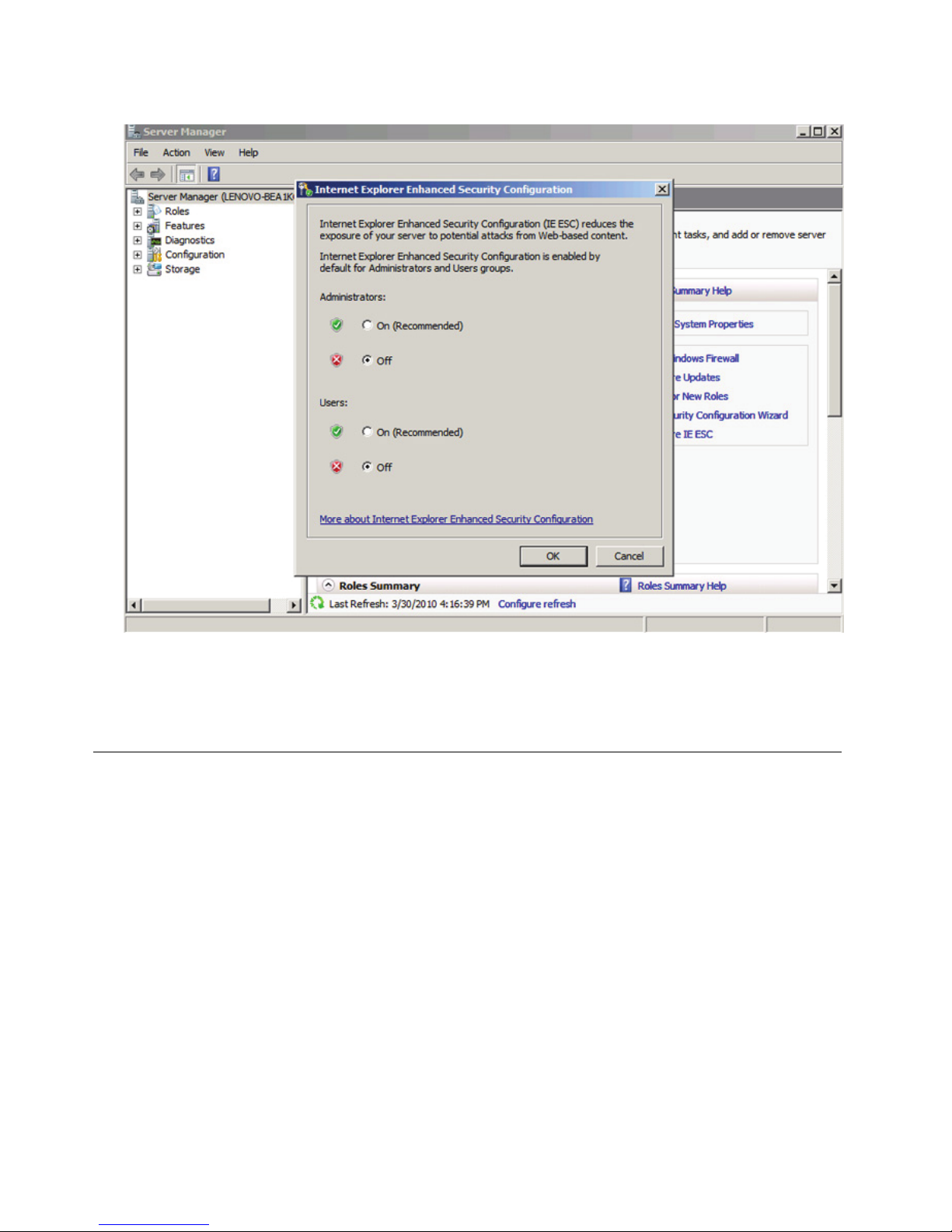
Figure3.ConguringIEESC-setp3
Formakingtheremoteconsole(KVM)windowofthemanagedserverworks,youmustinstallJavaruntime
environment(JRE)V6.0Update24orlater.
Log-on
TologontotheThinkServerRemoteManagementModule,dothefollowing:
1.EntertheIPaddressassignedbytheThinkServerRemoteManagementModuleintotheWebbrowser.
Forexample:
http://10.223.131.36/
Forsecureconnection,refertothefollowingexample:
https://10.223.131.36/
TheWebbrowserwillthenbedirectedtothelogonpageoftheRemoteManagementModule.
2.OnthelogonpageoftheRemoteManagementModule,entertheusernameandpassword.For
example:
•Username=lenovo
•Password=lenovo
3.ClickOKtoviewthehomepageoftheRemoteManagementModule.
Afterasuccessfulinitiallogon,thesystemadministratorcancreatenewusersandhasfullpermissionof
RemoteManagementModule.
10ThinkServerManagementModuleUserGuide
Page 15

Navigation
WhentheThinkServerRemoteManagementModuleissuccessfullyloggedon,theThinkServerRemote
ManagementModulehomepageisdisplayed.
ThereareseveraltabsontheverticaltoolbarwhichisontheleftpaneoftheThinkServerRemote
ManagementModulehomepage.Byclickingthesetabs,youcangetthespecicsysteminformationand
taketherelevanttaskslistedinthefollowingtable:
Table2.TabsontheThinkServerRemoteManagementModulehomepage
Tab
Comments
Properties
SysteminformationisshownonthePropertiespage.
Conguration
Thistabcontainsthefollowingsubmenus:
•Network
•NetworkSecurity
•Security
•Users
•Services
•IPMI
•Sessions
•LDAP
•Update
•Utilities
Server
Information
Thistabcontainsthefollowingsubmenus:
•Power
•Thermal
SystemEvent
Log
Clickthistabtoviewthesystemeventlog(SEL).
Event
Management
Thistabcontainsthefollowingsubmenus:
•PlatformEvents
•TrapSettings
•EmailSettings
•SerialOverLAN
Therealsoaretabsonthetopofthehomepage:
Table3.T absonthetopoftheThinkServerRemoteManagementModulehomepage
Tab
Comments
Support
Viewthecontactinformationaboutthecompanyofthisproduct.
Help
Viewthebriefdescriptionaboutthecurrentpageontherightpaneofthebrowser.Byclicking
the“X”onthetoprightofthepane,youcanclosetheHelpwindow.
About
Viewtheversionofthesoftware.
Logout
TerminatethecurrentWebConsolesession.
Note:Iftheremoteconsole(KVM)windowisactive,itwillcloseautomaticallywhenyouare
loggingout.Afterlogout,theWebconsolewillbacktologonscreen.
Chapter4.ThinkServerRemoteManagementModuleQuickStart11
Page 16

ThereisaRefreshbuttonontherightpane.Clickthisbuttontorefreshthecurrentpage.
Log-out
TologouttheThinkServerRemoteManagementModuleandturnbacktothelogonpage,clickLogouton
therighttopoftheprogramhomepage.
Note:AutomaticTimeout:IftheWebconsoledetectsnouseractivitywithinfteenminutes,thecurrent
sessionwillbeautomaticallyterminated.IftheuserhasopenedtheKVMremoteconsolewindow,thenthe
Websessionwillnotautomaticallytimeout.Whentheautomatictimeouthappens,thesystemwillinformthe
usertologonagainiftheuserwantstoaccesstheWebconsoletotakeoperations.
12ThinkServerManagementModuleUserGuide
Page 17

Chapter5.Remoteconsole(KVM)operation
Theremoteconsoleistheredirectionscreen,keyboard,andmouseoftheremotehostsystemwitha
ThinkServerRemoteManagementModuleinstalled.Ifthereisaneedtousetheremoteconsoleofthe
managedhostsystem,ensurethattheserverhasJava*runtimeenvironmentplug-in.
Whentheremoteconsoleisstartup,anewwindowwillbeopened,showingthescreenofthehostsystem.
Operatingtheremoteconsoleisjustlikeanadministratorissittinginfrontofthescreenoftheremote
system.Thismeansthattheusercanusethekeyboardandmouseasheorsheusuallydoes.
Starttheredirectionconsole
Theremoteconsoleistheredirectionkeyboard,video,andmouseoftheremotehostsystemwitha
ThinkServerRemoteManagementModuleinstalled.
TostarttheredirectionwindowforremoteconsoleKVM,logontothehomepageoftheThinkServerRemote
ManagementModule.Ontheleftpaneofthehomepage,underSerialOverLAN➙vKVM&vMedia,click
Launch,theVirtualKVMandMediaLaunchwindowisdisplayedontherightpaneofthehomepage.
Then,clickLaunchJavaKVMClientintheVirtualKVMandMediaLaunchwindowtostarttheredirection
consoleandcarryoutremotemanagementforserver.
AfterclickingLaunchJavaKVMClient,youwillbepromptedtorunanddownloadJavanetworkboot
protocolJviewer.jnlpdocument.
Notes:
•BeforetheJNLPdocumentisbooted,JavaRuntimeEnvironment(JRE)V6.0Update24oralaterversion
mustbesetupontheclient.
•Theclientbrowsermustallowthepop-upwindowsfromtheIPaddressoftheThinkServerRemote
ManagementModule.
Mainwindowoftheremoteconsole
Whenyoustarttheremoteconsole,themainwindowoftheremoteconsoleisdisplayed.
Theremoteconsolemainwindowshowsthescreenoftheremoteserver.Operatingtheremoteconsoleis
justlikeyouareinfrontoftheremoteserver.Theresponsespeedmaybealittledelay,dependingonthe
bandwidthandthedelaybetweentheThinkServerRemoteManagementModuleandtheremoteconsole.
Menubaroftheremoteconsole
Thereisamenubaronthetopoftheremoteconsolemainwindow.Y oucanviewthestatusoftheremote
consoleandcongurethesetupforlocalremoteconsolethroughtheitemsonthemenubar.
Viewmenuoftheremoteconsole
ByclickingtheViewoptiononthemenubaroftheremoteconsole,youcantakethefollowingoperations:
•HideStatusBar:HidetheKVMstatusatthebottomofthescreen.
•Refresh:Refreshthescreen.
•FullScreen:Switchbetweenthewindowmodeandfullscreenoftheremoteconsole.
©CopyrightLenovo2012
13
Page 18

•Fit:Fitthewindowmode.
Macrosmenuoftheremoteconsole
ByclickingtheMacrosoptiononthemenubaroftheremoteconsole,youcantakethefollowingoperations:
•HoldCtrl/Alt/Windowskeys:Allowsimulatingtopressthesespecialkeysontheremotekeyboard.On
thelocalkeyboard,thesespecialkeyswillbecarriedoutthroughlocaloperatingsystem,ratherthan
transfertotheremoteoperationsystem.
•Alt+Ctrl+Del:IssueAlt+Ctrl+Delcommandtotheremoteoperationsystem.
Toolsmenuoftheremoteconsole
ByclickingtheToolsoptiononthemenubaroftheremoteconsole,youcantakethefollowingoperations:
•Sessionoptions:Setthemousemodeandthevideoquality.
•Sessionuserlist:Viewthecurrentusers.
•SingleCursor:Setcursorindifferentstates.
•States:Viewthecurrentstateoftheremoteredirection.
Powermenuoftheremoteconsole
ByclickingthePoweroptiononthemenubaroftheremoteconsole,youcancontrolthepoweraction.
14ThinkServerManagementModuleUserGuide
Page 19
Chapter6.ThinkServerRemoteManagementModuleWeb
consoleoptions
ThistopicdescribeseverypageoftheWebconsoleandeachpageisdividedintoseveralparts
correspondingseparatelytotheseveraltabsattheleftsideofthepane.Ineachpart,therearedetailed
illustrationsandintroductionsforeachmenuoptionintheleftofthepane.
Notes:
•Therstmenuitemofeachtabisthedefaultpagewhichwillautomaticallyappearwhenselecting
thecorrespondingtab.
•ClicktheHelpbuttonontherighthorizontaltoolbar,andtheWebconsolewillshowtherelevant
informationabouteachpage.
Properties
Bydefault,thehomepageoftheThinkServerRemoteManagementModuleshowsthePropertiespage,
includinggeneralinformationabouttheserver.Formoredetails,readtheinformationinthistopic.
Viewingproperties
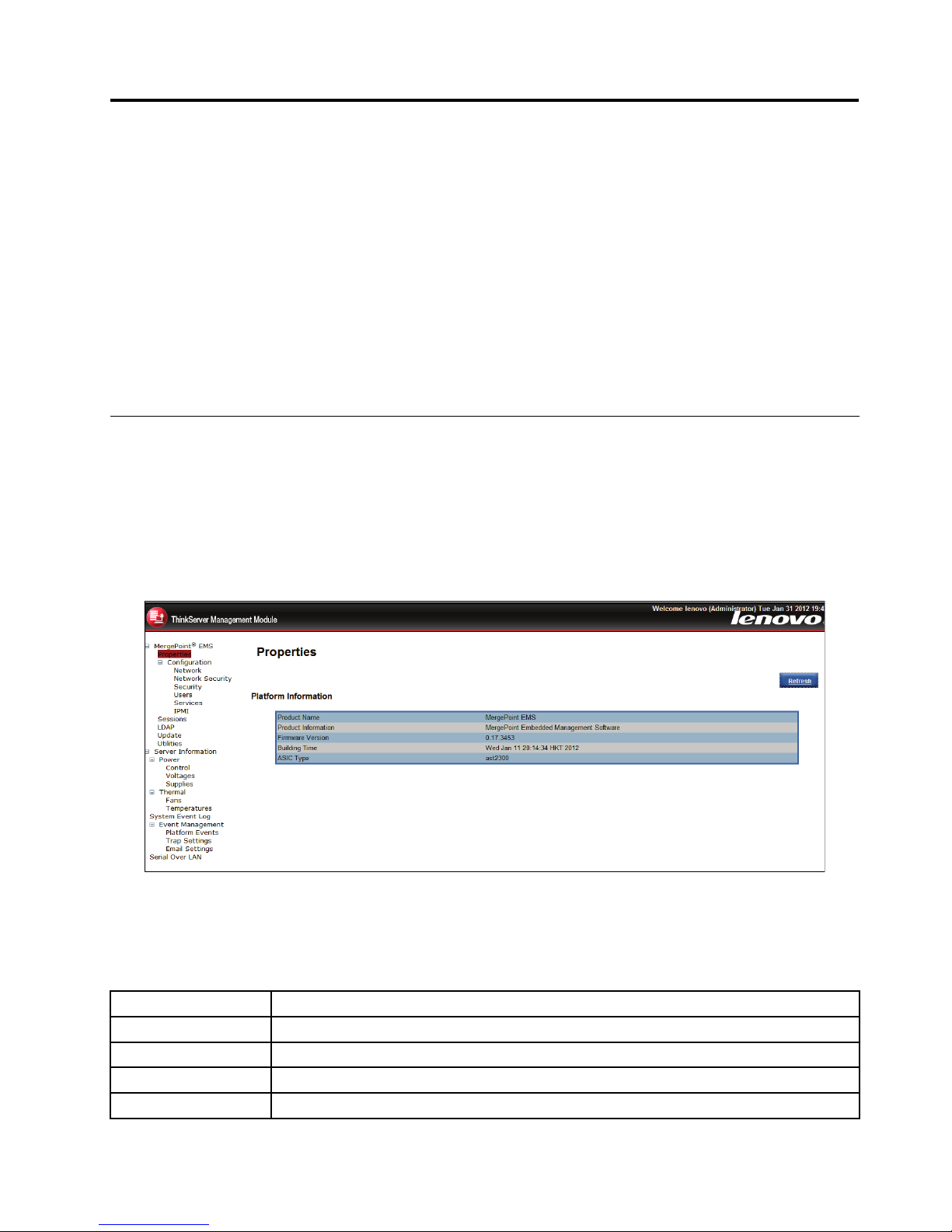
ThePlatformInformationpageshowsthesummaryofthegeneralinformation.
Figure4.Firmwareinformation
Theabovepageprovidesthefollowingserverinformation:
Table4.Platforminformationpage
ProductName
Customizableproductname.
ProductInformation
Customizableproductdescription.
FirmwareVersion
Firmwareversioninformation.
BuildingTime
DateandtimeofbuildingtheBMCrmware
ASICT ype
Theplatformoftheserver.
©CopyrightLenovo2012
15
Page 20
Serverinformation
TheServerInformationpageshowsthedatarelatedtotheserverhealth,suchassensorreadingsandevent
logs.ClicktheServerInformationtabontheleftpanetoshowthispage.
Viewingsensorreadings
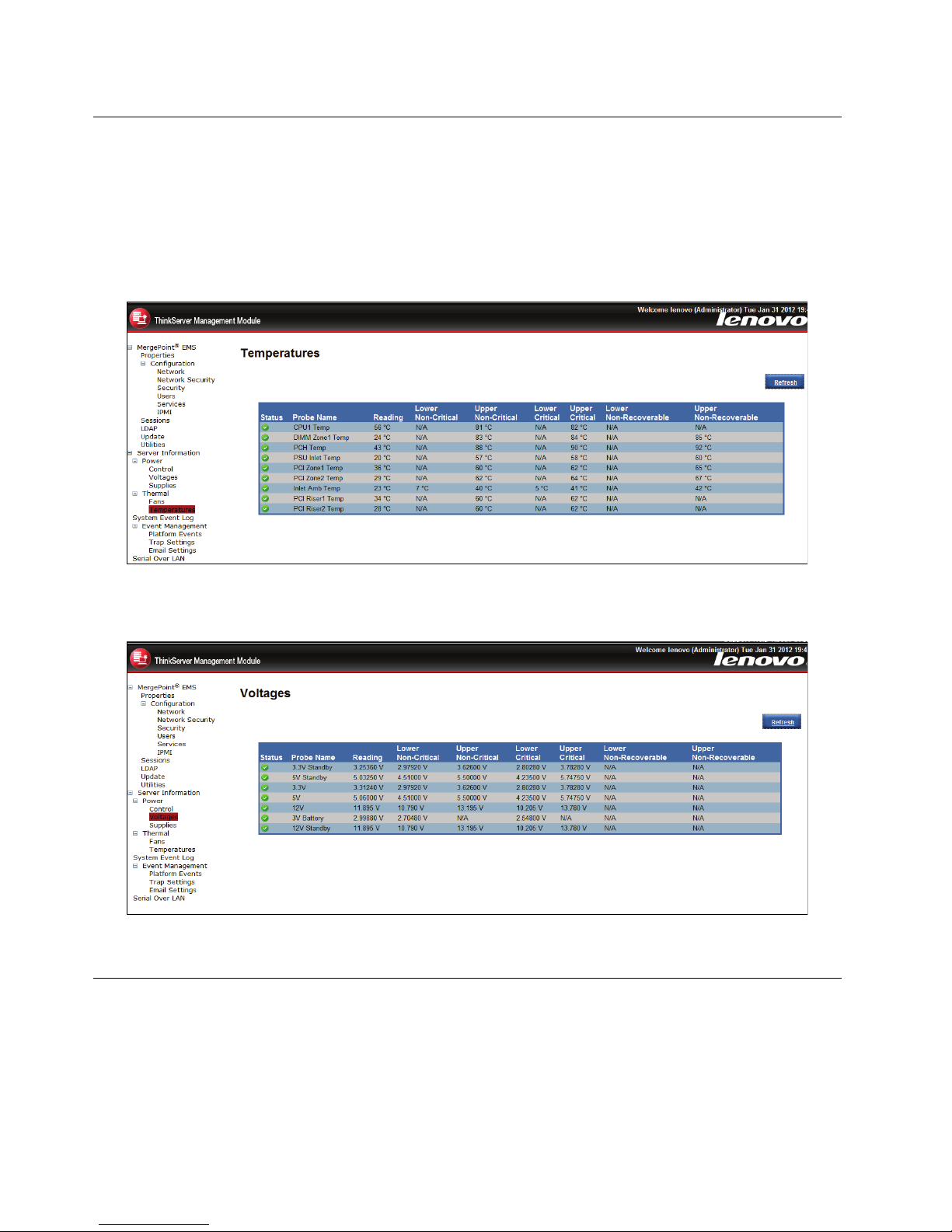
TheT emperaturesandVoltagespagesshowthesystemsensorinformation,includingreadingsandstatus.
Figure5.SensorreadingsontheT emperaturespage
Figure6.SensorreadingsontheVoltagespage
ViewingtheSystemEventLog
TheSystemEventLogpageshowstheeventlogs.
•T oclearthelogbuffer,clickClearLog.
•T oupdatetheloglist,clickRefresh.
16ThinkServerManagementModuleUserGuide
Page 21
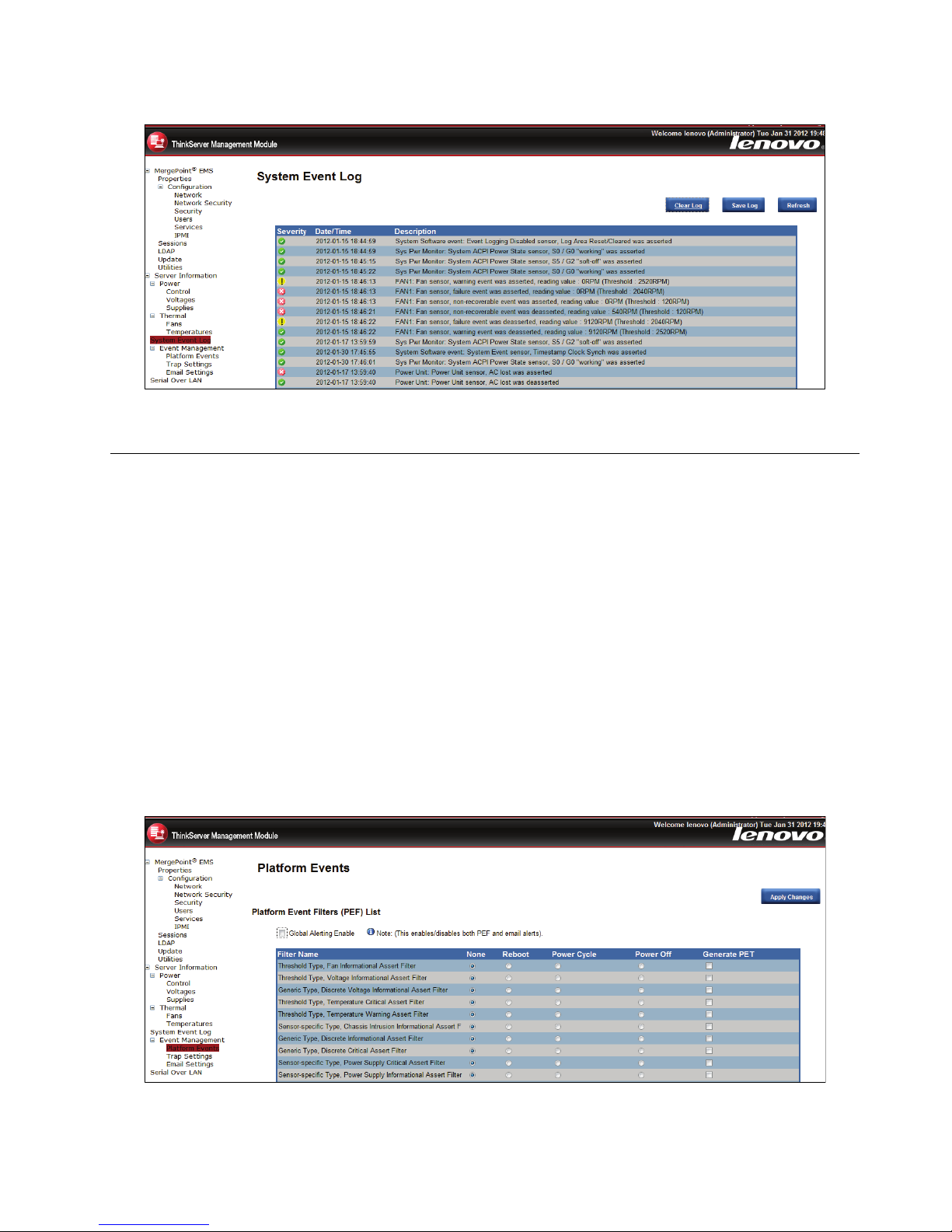
Figure7.SystemEventLog
Eventmanagement
TheEventManagementtabisusedtocongurealerts.Thefollowingservermanagementoptionsare
included:
•PlatformEvents
•TrapSettings
•EmailSettings
•SerialOverLAN
PlatformEvents
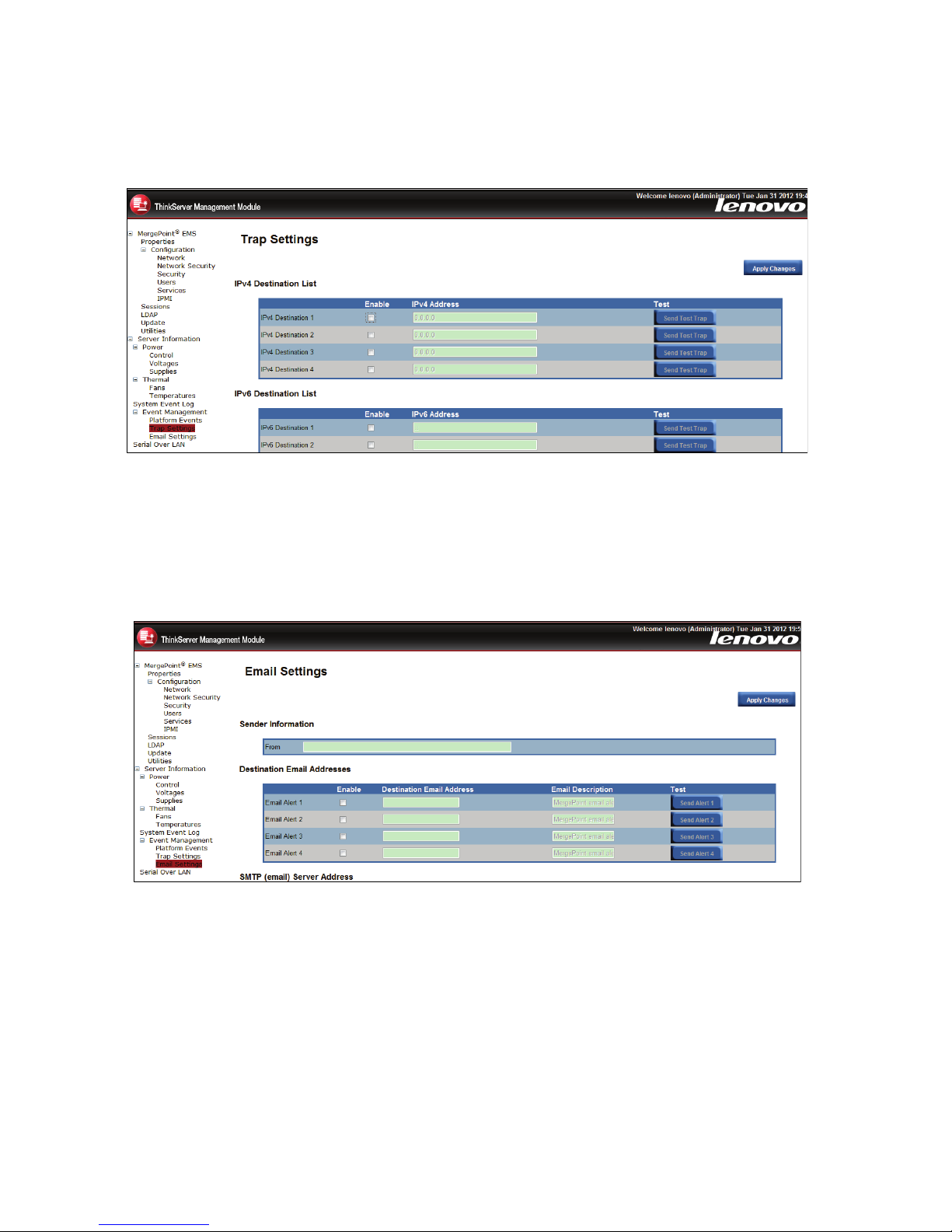
Youcanusethisfunctiontomodifyordeletethealertsettings,orsendatestalerttothedestination.
Thealertspagelistsallthealertsaction,includingreboot,powercycle,poweroff,andgeneratePEF .
Ifyouneedtomodifythealertsettings,youcanselectanalertactionandclicktheApplyChanges
buttontocongureit.
Figure8.Alertlist
Chapter6.ThinkServerRemoteManagementModuleWebconsoleoptions17
Page 22
TrapSettings(SNMP)
ClickT rapSettingsontheleftpaneofthehomepagetosetthedestinationIPaddress.
Figure9.TrapSettings
EmailSettings(SMTP)
TheEmailSettingspageisusedtocongurethealert.UserscanreceiveanalertbyE-mailwhenevents
occur.
Figure10.EmailSettings
SerialOverLAN
TheSerialOverLANpageprovidesthefollowingsettings:
18ThinkServerManagementModuleUserGuide
Page 23
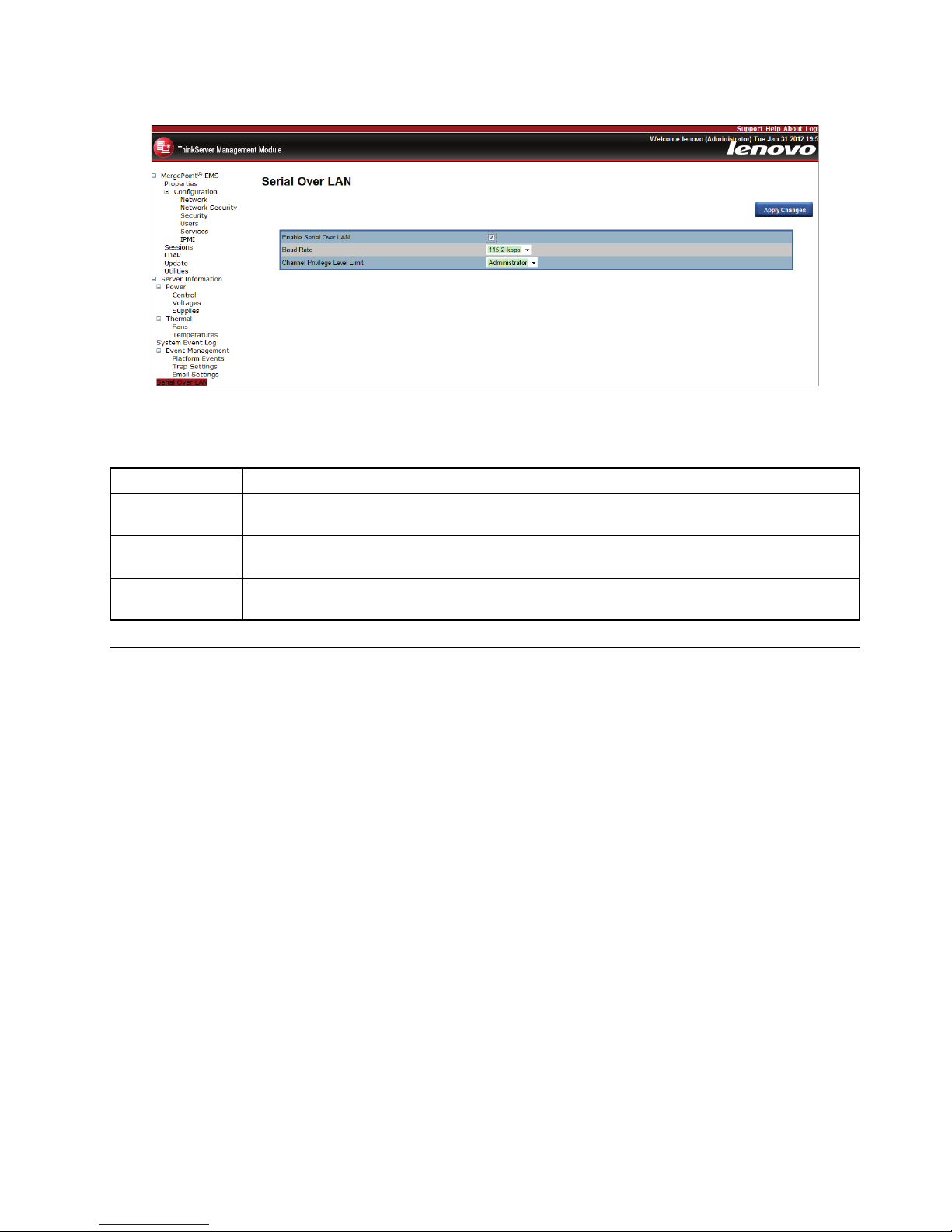
Figure11.SerialOverLAN
Table5.SerialOverLANsettings
OptionComments
EnableSerial
OverLAN
EnablestheSerialOverLANfunctionwhenthecheckboxischecked.
BaudRate
SetstheSerialOverLANbaudratefromadrop-downlist(19.2kbps,38.4kbps,57.6kbps,
or115.2kbps).
ChannelPrivilege
LevelLimit
Setsthechannelprivilegelevelfromadrop-downlist(Administrator,Operator,orUser).
Remotecontrol
TheRemoteConsolepageenablesyoutoexecutethefollowingremoteoperationsontheserver:
•Remotemanagement
•Serverpowercontrol
Remotemanagement
TheRemoteManagementModulepagewillautomaticallyselecttheRemoteConsoleoptionbydefault.
YoucanopentheremoteconsoleKVMredirectionwindowfromthispage.
Chapter6.ThinkServerRemoteManagementModuleWebconsoleoptions19
Page 24
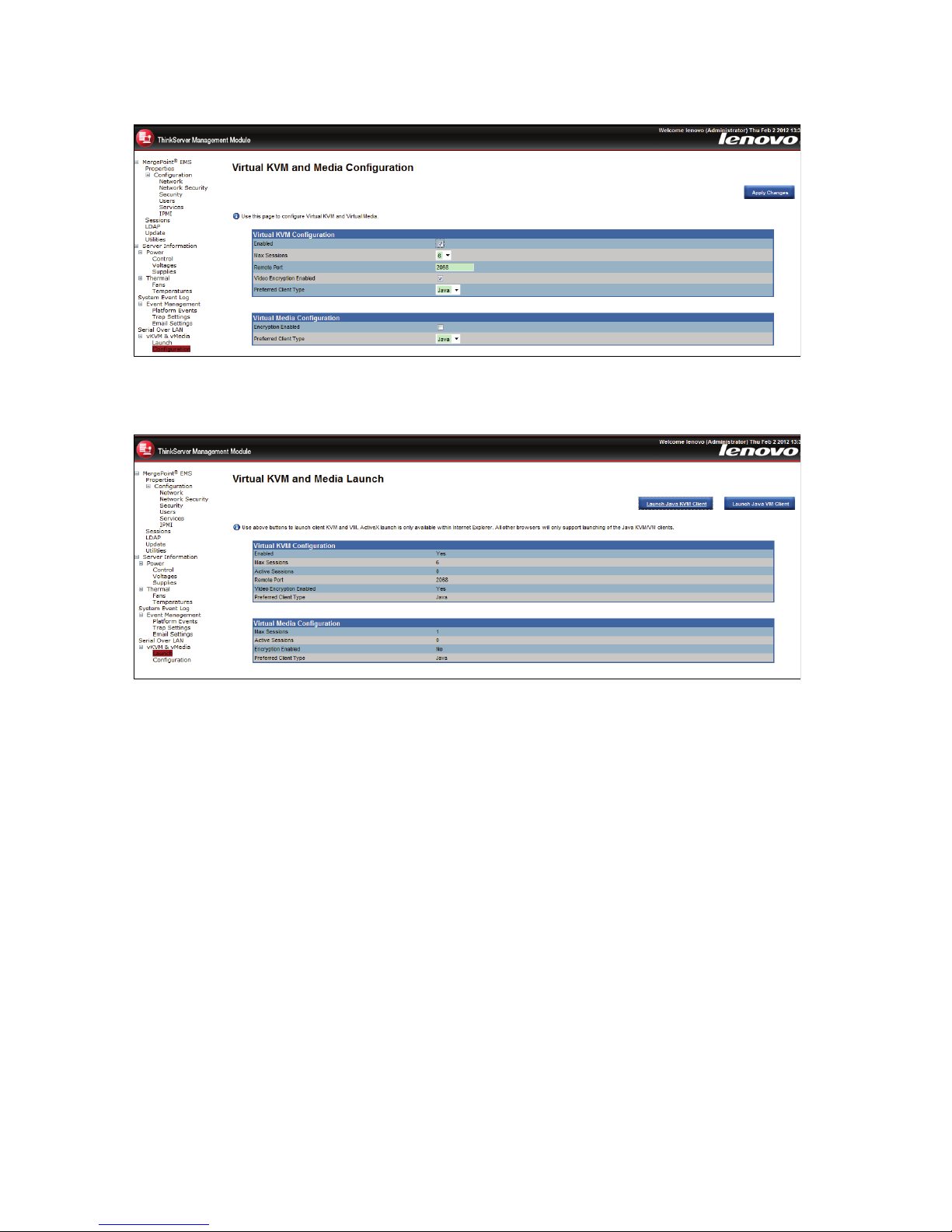
Figure12.Remotemanagementconguration
Figure13.Remotemanagementlaunch
ClicktheLaunchJavaKVMClientbuttontostarttheredirectionconsoleandremotelymanagetheserver.
Note:BeforeyoustarttheJNLPle,theclientmustbeinstalledwithJavaRuntimeEnvironment(JRE)
V6.0Update24orlater.
Virtualmedia
ClicktheLaunchJavaVMClientbuttontoallowthelocaldeviceredirection.Thisfeatureallowsstartingor
stoppingtheremotemediaredirection.
20ThinkServerManagementModuleUserGuide
Page 25
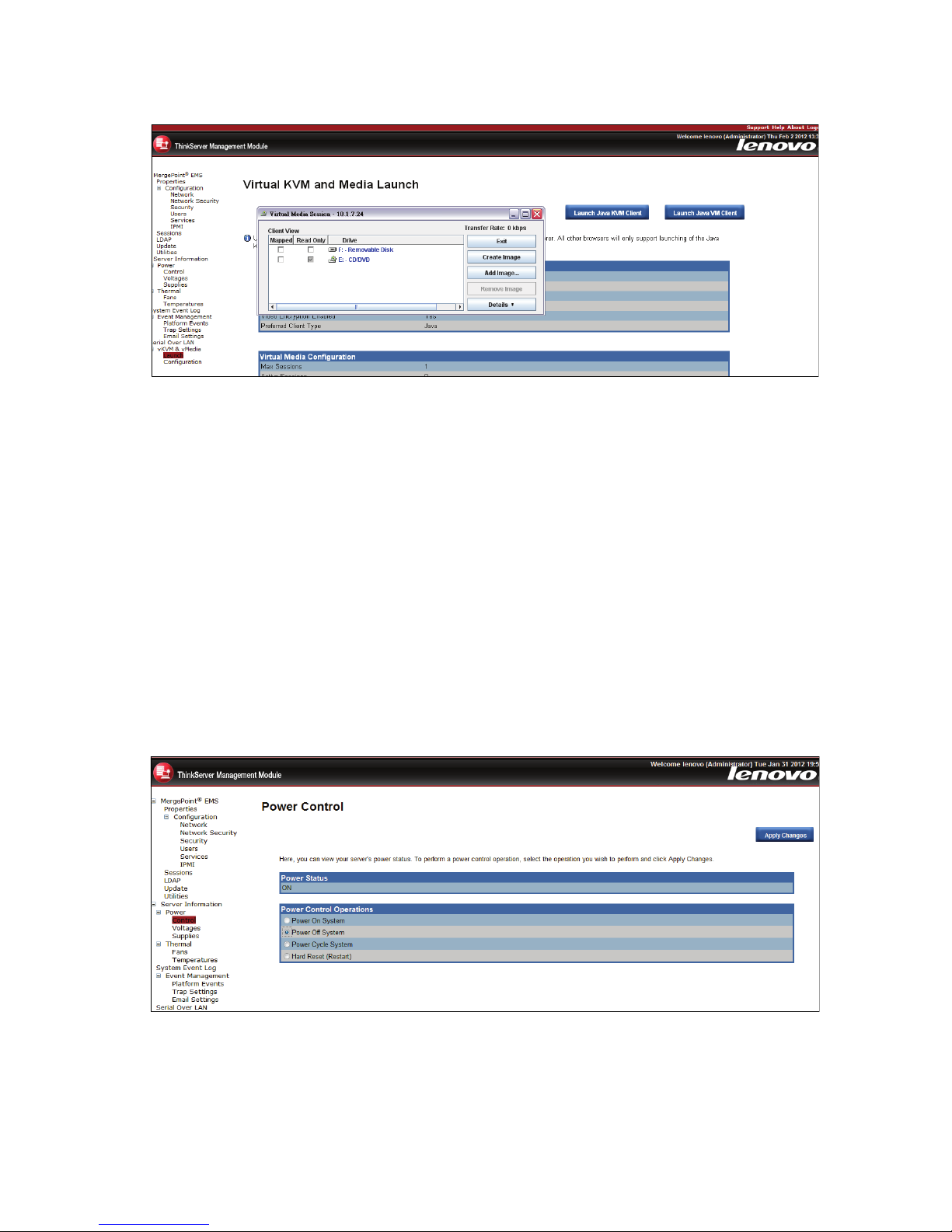
Figure14.Redirectingvirtualdevice
•RedirectCDROM/RedirectISO:EnablesyoutoredirectthelocalCD-ROM/DVDdriversorISOimages
inthelesystemoflocalclienttovirtualCD-ROMdevicesintheremotesystems.
•RedirectFloppy/USBKey/RedirectFloppy/USBKeyImage:Enablesyoutoredirectthelocaloppy
device,localUSBkeydevice,ortheIMGlesforoppydisktothevirtualoppydevicesintheremote
system.
Thesevirtualdevicescanread,write(providingthepropertyisnotreadonly),andboot,whicharesimilar
withanyotherCD-ROMsoroppiesintheremotesystem.Butonlywhencertainmediaredirectionsare
active,thesevirtualdevicesareavailableintheremoteoperatingsystemorBIOSsettingmenu.Thesetting
isvalidafterremotesystemresetoritispower-onorpower-off.Thesedeviceswillnotdisappearfromthe
remotesystemuntiltherelevantcheckboxesintheremoteconsolewindowarecleared.
Powercontrol
ThePowerControlpageshowstheserverpowerstatus.
Figure15.Powercontrol
Youcanperformthefollowingpowercontroloperations:
Chapter6.ThinkServerRemoteManagementModuleWebconsoleoptions21
Page 26
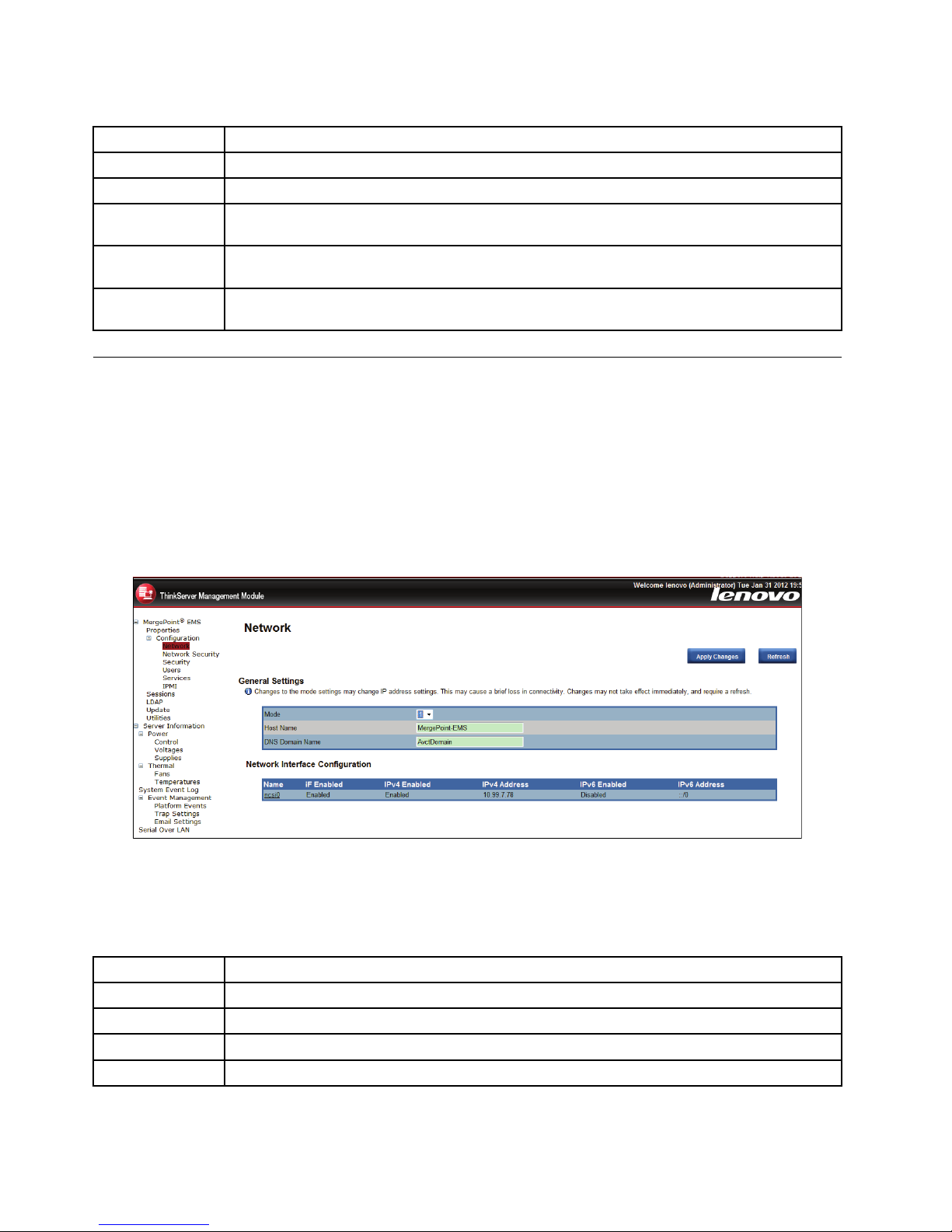
Table6.Powercontrol
OptionComments
PowerStatusShowsthecurrentstatusofthepowercontrol(OFForON).
PowerOnSystem
Turnsonthesystemwhenitisintheoffstate.
PowerOff
System
Turnsoffthesystemwhenitisintheonstate.
PowerCycle
System
Turnsoff,thenrebootsthesystem(coldboot).
HardReset
(Restart)
Restartsthesystemwithoutturningitoff(warmboot).
Conguration
TheCongurationpageisusedtocongureNetworksettings,usersettings,updates,andsoon.
Network
TheNetworkpageisusedtoconguretheNetworksettings.Itincludesthefollowingoptions:
•Automatic(ObtainanIPaddressautomatically):AutomaticallyobtainanIPaddress(useDHCP).
•Manual(UsethefollowingIPaddresses):ManuallycongureIPaddresses.
Figure16.Networksettings
YoucanconguretheNetworksettingsbyclickncsi0item.
Table7.Networksettings
OptionComments
MACAddressTheMACaddressofthedevice(ReadOnly).
IPv4Settings
IfyouwanttoconguretheIPbyIPv4protocol,enabletheIPv4andthensettheIPaddress.
IPv6Settings
IfyouwanttoconguretheIPbyIPv6protocol,enabletheIPv6andthensettheIPaddress.
VLANSettings
WhenyouenablevirtualLAN,youhavetosettheVLANIDandPriority.
22ThinkServerManagementModuleUserGuide
Page 27
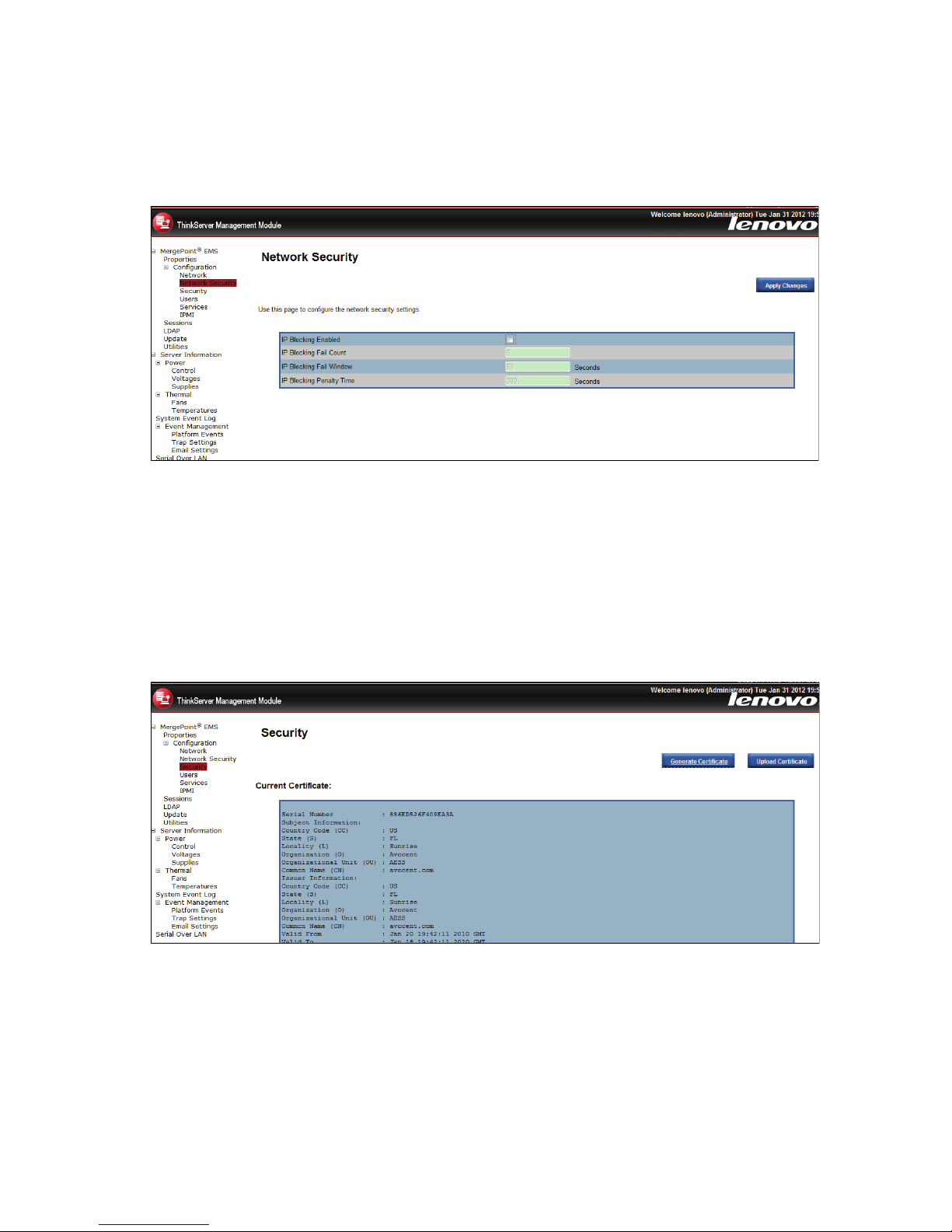
Networksecurity
Thenewvaluesareavailabletotherewallimmediately,butmaynotbeutilizeduntilthenextsecurity
eventoccurs.
Figure17.Networksecuritysettings
Security
ThispagecanbeusedtouploadSSLcerticateandprivatekeyinordertogetaccesstothedevicein
safemode.
•T ogenerateanSSLCerticate,clickGenerateCerticate.
•T ouploadanSSLCerticate,clickUploadCerticate.
Figure18.Securitysettings
Users
TheUserspagelistsallusersincludingconguredusers,withnetworkpermission.
TheoptionsincludedinthispageareusedtoconguretheIPMIusersforserversandtheirpermissions.T o
addanewuser,youcanselectablankrowandclicktheUserID.Ifyouwouldliketomodifyordeletea
user,selecttheUserIDinthelistandclickApplyChangesorDelete.
Chapter6.ThinkServerRemoteManagementModuleWebconsoleoptions23
Page 28
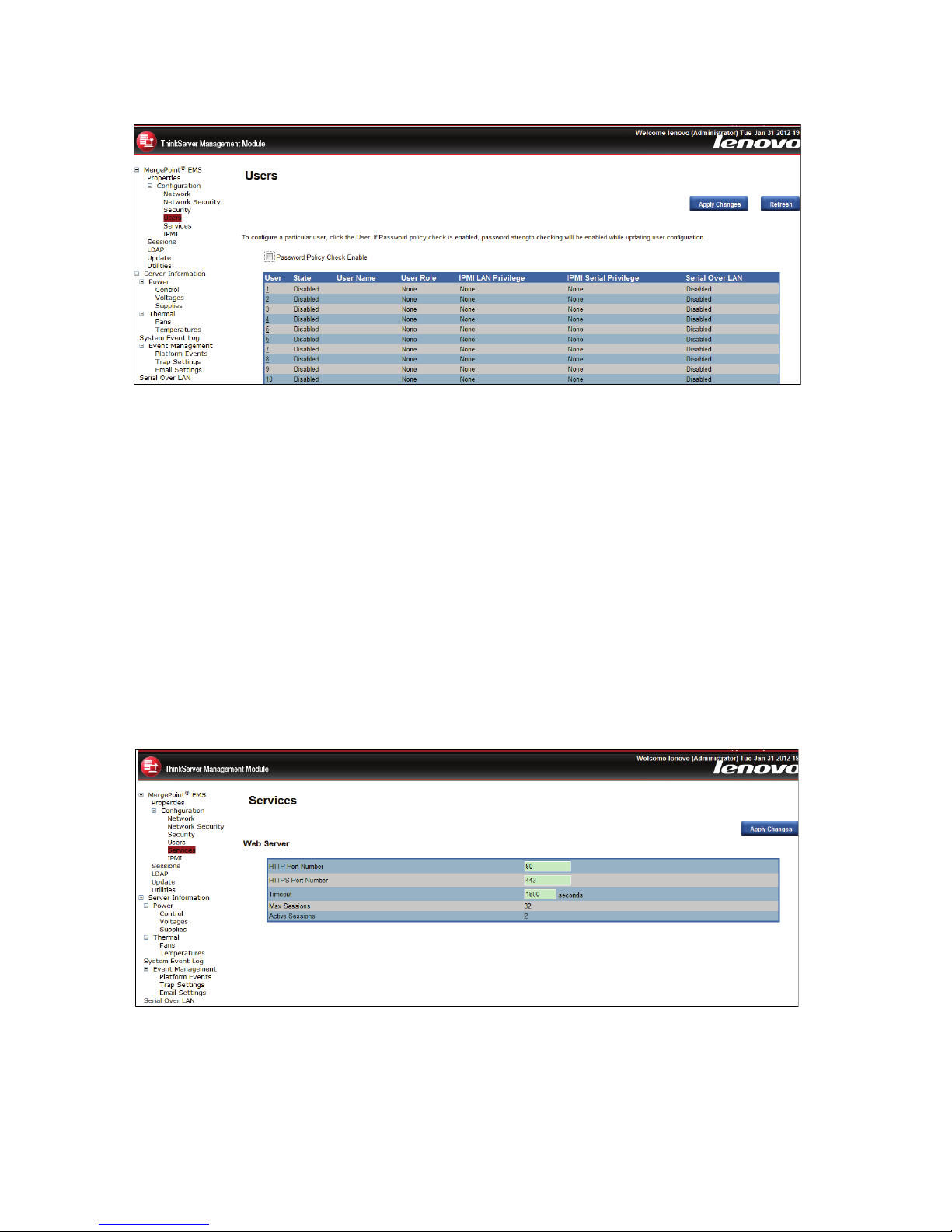
Figure19.Userssetting
Notes:
•Theuserlenovoandthreecannotbemodiedordeleted.
•T oaddanewuser,selectablankrowfromthelistandclickUserID.
•T omodifyauser,selectthisuserIDfromthelistandmodifyusertotherelevantsettings,thenclick
ApplyChanges.
•T odeleteauser,selectthisuserIDfromthelistandclickDeleteUser.
Service
Youcancongurethewebserverparameters(suchasHTTPPortNumber,HTTPSPortNumber,and
Timeout)onaremotecomputer.Bydefault,thetimeoutis1800seconds;5fortheMaxSessions.
Whenyounishtheconguration,clickApplyChanges.
Figure20.Servicesetting
IPMI
ThisscreencontainsIPMISerialandIPMISettings.
24ThinkServerManagementModuleUserGuide
Page 29
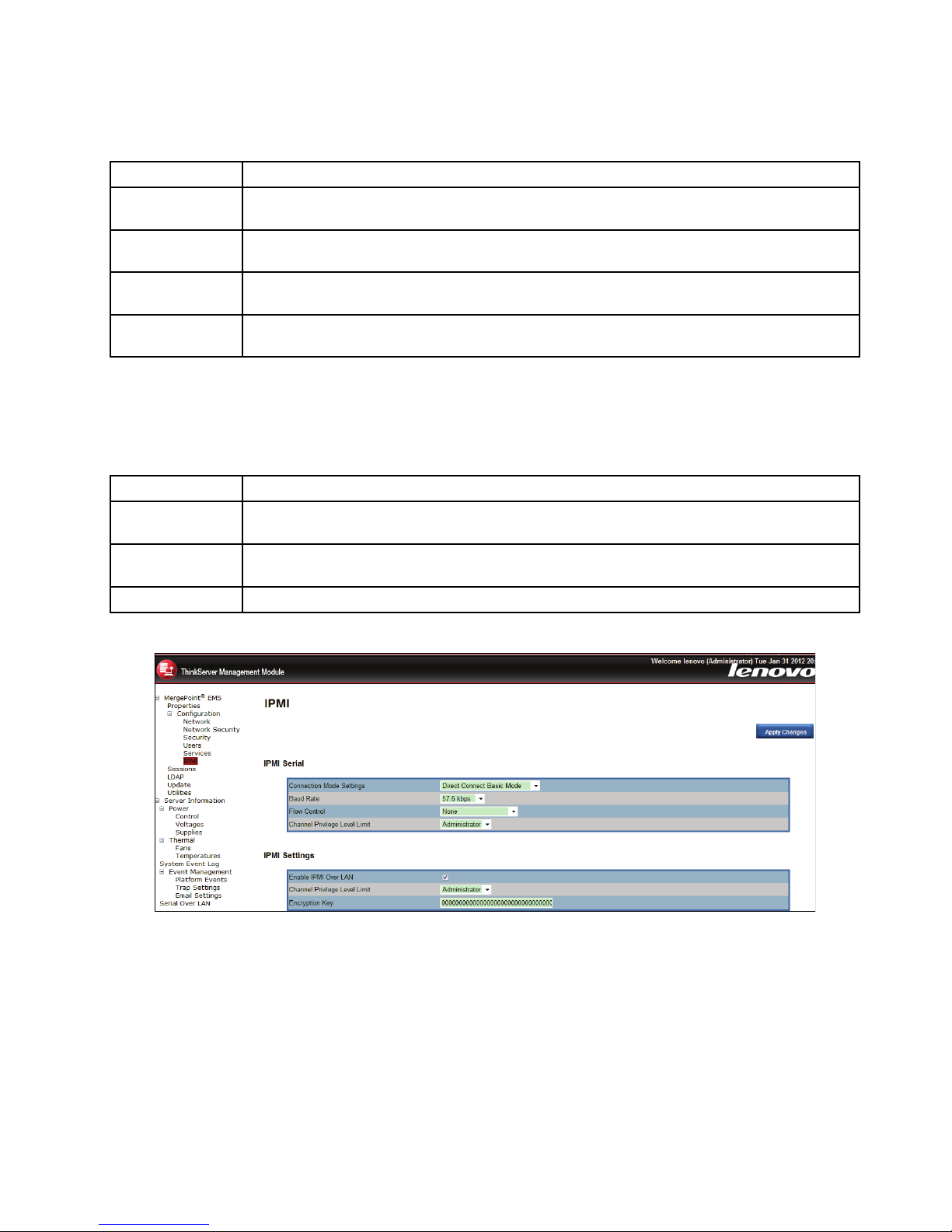
TheIPMISerialcontainsthefollowingoptions:
Table8.IPMISerial
OptionComments
Connection
ModeSettings
SetstheIPMIserialconnectionmodefromadrop-downlist.AvailablevaluesareDirectConnect
BasicModeandDirectConnectT erminalMode.
BaudRate
SetstheIPMIserialbaudrate(dataspeed)fromadrop-downlist.Availablevaluesare9600bps,
19.2kbps,38.4kbps,57.6kbps,and115.2kbps.
FlowControlSetstheFlowcontrolvaluefromadrop-downlist.AvailablevaluesareNoneandRTS/CTS
FlowControl.
ChannelPrivilege
LevelLimit
Setsthechannelprivilegelevelfromadrop-downlist.AvailablelevelsareAdministrator,
Operator,andUser.
TheIPMISettingsprovidesremotecongurationoverLAN.T oactivateIPMIremotecongurationby
LAN,checktheEnableIPMIOverLANoption,denetheChannelPrivilegeLevelLimit,andenterthe
EncryptionKey.Whenyounishtheconguration,clickApplyChanges.
Table9.IPMISettings
OptionComments
EnableIPMIOver
LAN
EnablestheIPMIOverLANwhenthecheckboxischecked.
ChannelPrivilege
LevelLimit
SetsthemaximumprivilegelevelthatcanbeacceptedontheLANchannel.Availablelevelsare
Administrator,Operator,andUser.
EncryptionKey
Setstheencryptionkey.Thiseldallowsfrom0to20two-digitHexcharactersandnospaces.
Figure21.IPMISerialandIPMISettings
Session
ThispagedisplaystheinformationaboutActiveSessions.Additionally,thetrashiconprovidesthedelete
functionforprivilegedusers.ClickRefreshtorefreshthesessionsstatus.
Chapter6.ThinkServerRemoteManagementModuleWebconsoleoptions25
Page 30
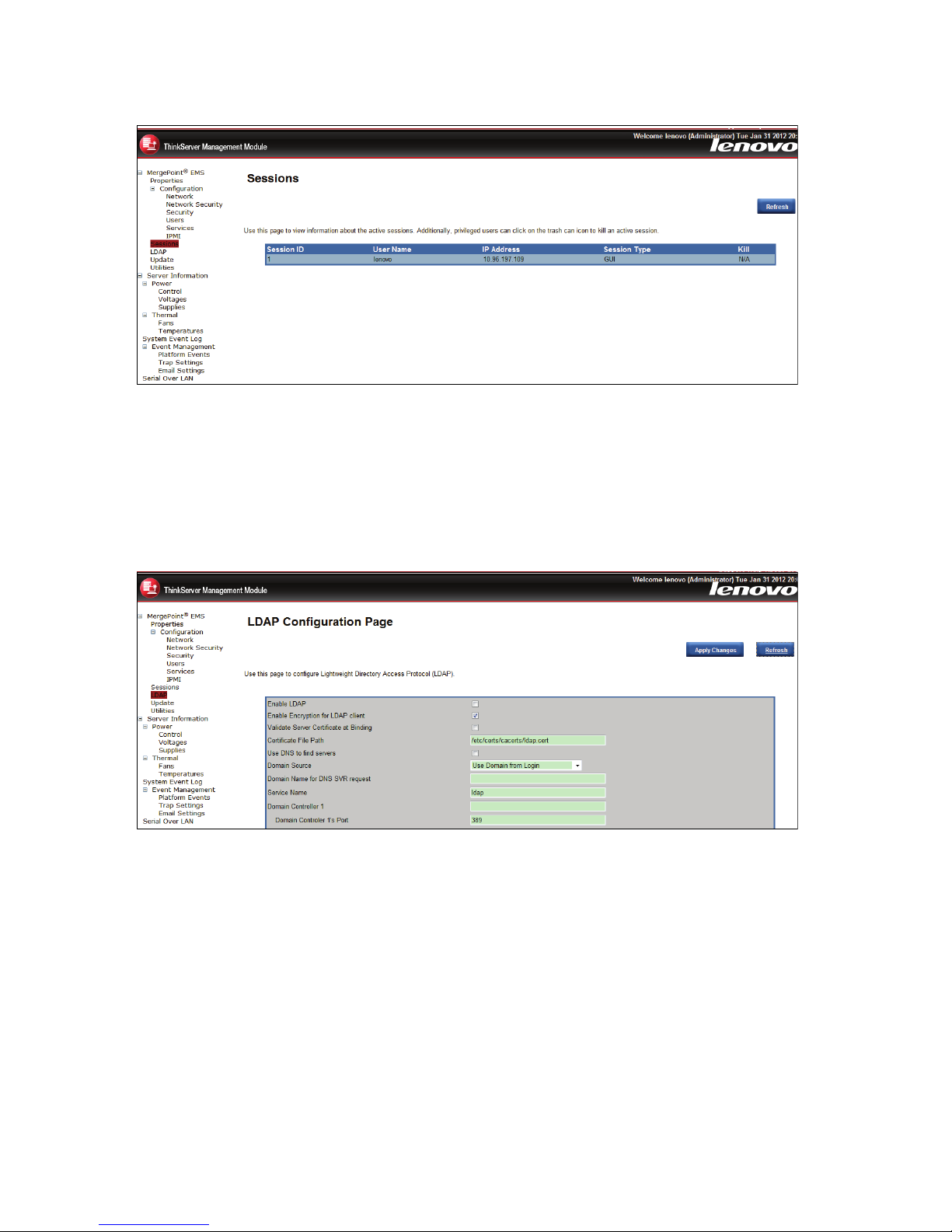
Figure22.Sessionsettings
LDAP
TheLightweightDirectoryAccessProtocol(LDAP)isanapplicationprotocolforreadingandediting
directoriesoveranIPnetwork.Adirectoryisanorganizedsetofrecords.LDAPdirectoriesoftenuseDomain
NameSystem(DNS)namesforthehighestlevels.
Figure23.LDAPsettings
Update
Selectanimageandclickupload.TheuploadprocesswillterminateallothersessionsincludingvKVM.
26ThinkServerManagementModuleUserGuide
Page 31
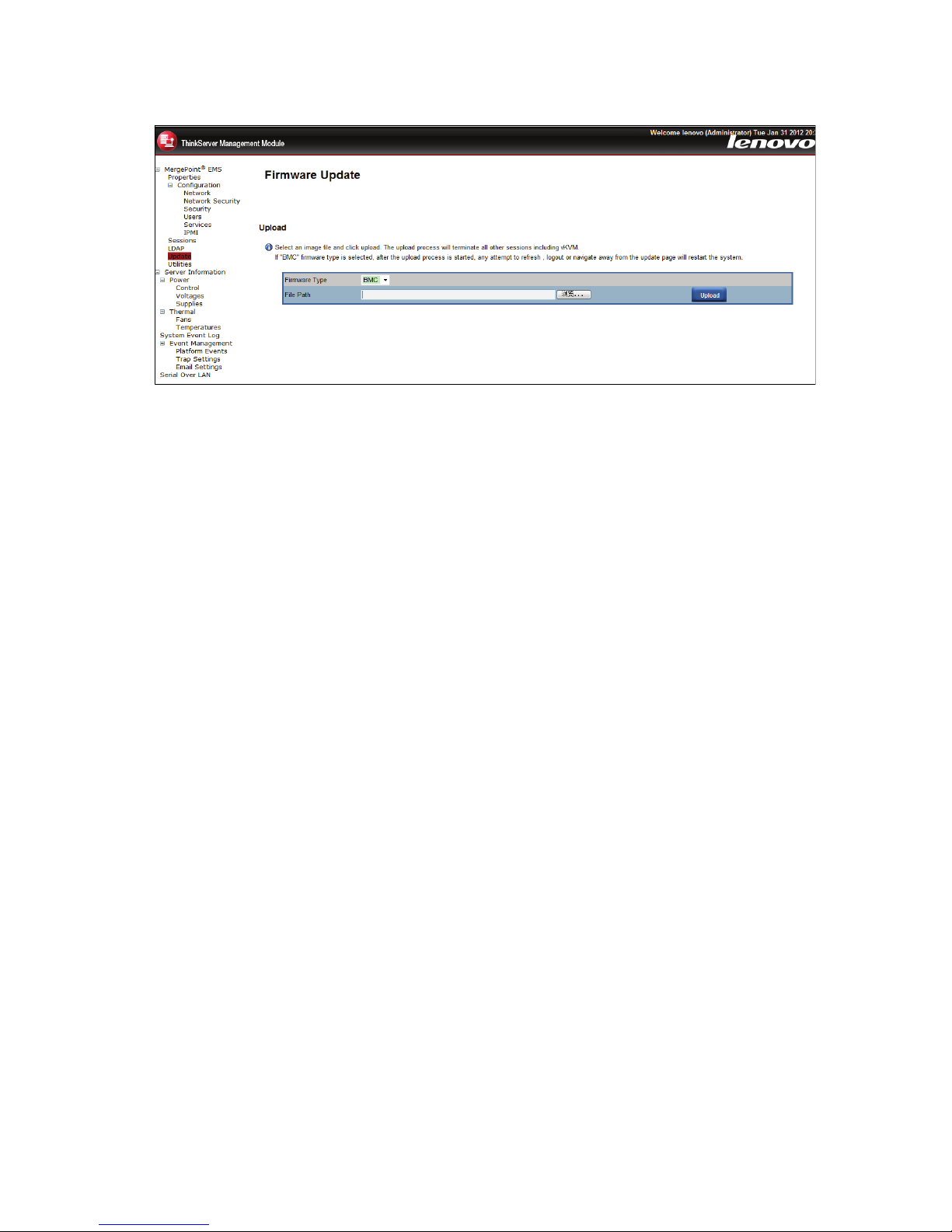
Figure24.Firmwareupdate
Firmwareupdatesteps:
1.Browsetoorenterthepathwherethermwareimageleresides.
2.Selectupdatetype.
3.ClicktheUploadbutton.Iftheleisavalidle,allothersessionswillbeterminatedandtheimage
uploadwillbegin.
4.Forasuccessfulupload,thecurrentrmwareversionandtheversionofthenewlewillbedisplayed,as
wellasthePreserveCongurationcheckbox,Updatebutton,andCancelbutton.
5.ClicktheUpdatebuttontobeginthermwareupdateprocessandviewtheupdatestatus.Whenthe
updateiscompleted,theembeddedsoftwarewillrebootautomatically.IfyouclicktheCancelbutton,
theprocesswillbeterminatedandtheembeddedsoftwarewillreboot.
6.Waitforaminuteafterthermwareisupdated,reopenthebrowserlogonpage,entertheusername
andpasswordtologonagain.
Utilities
UtilitiesprovideBMCrebootandfactorydefaultrestorefunctions.
•T oreboottheremotemanagementserver,clickReboot.
•T oresetthesettingvaluestothefactorydefaultvalues,clickFactoryDefault.
Chapter6.ThinkServerRemoteManagementModuleWebconsoleoptions27
Page 32
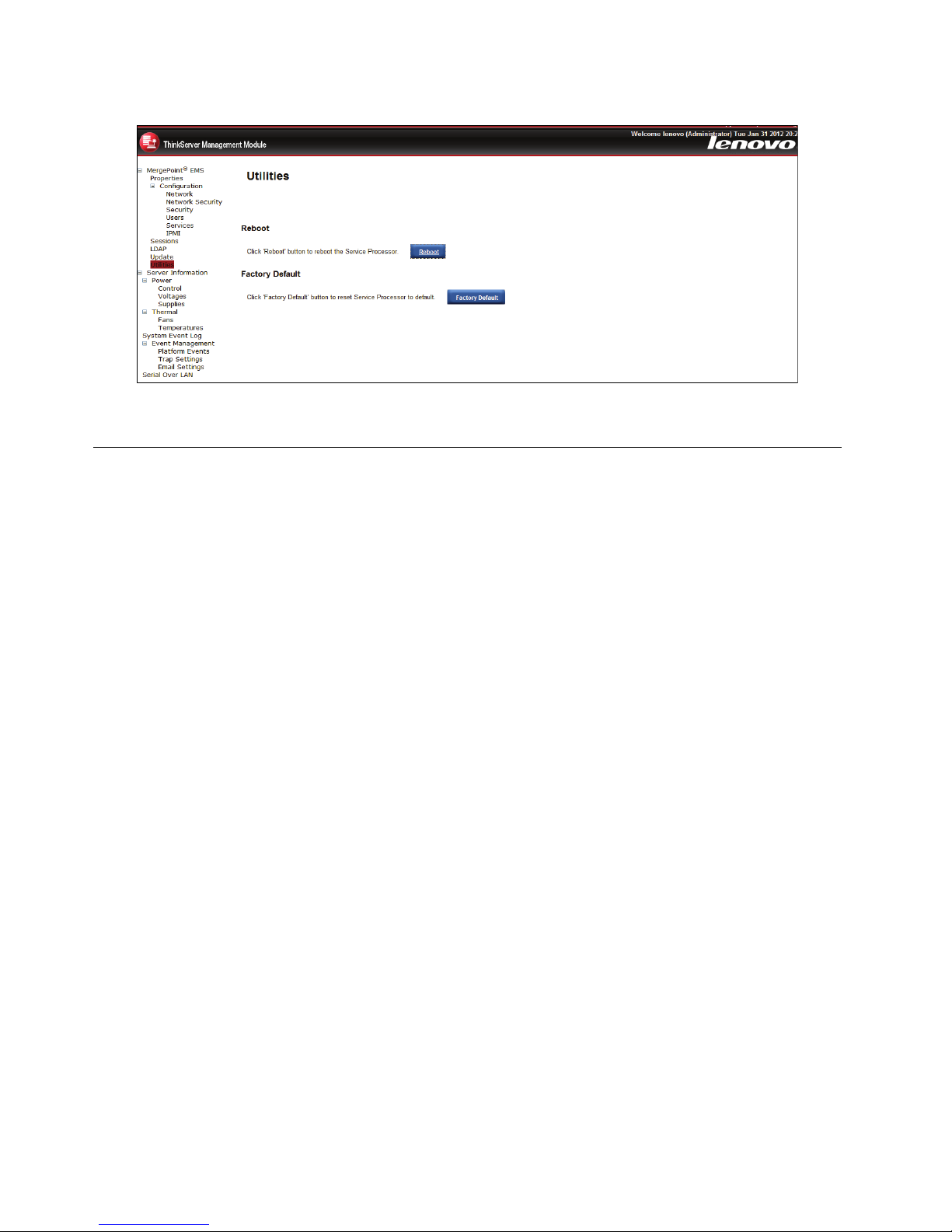
Figure25.Utilities
Languages
TheWebUI’sdisplaywillaccordingtothebrowser’slanguagetodecidewhichlanguagetouseinWebUI.
ThelanguagescurrentlyofferedareChineseandEnglish.
28ThinkServerManagementModuleUserGuide
Page 33

AppendixA.Frequentlyaskedquestions
Thistopicliststhefrequentlyaskedquestions.
•Question:LogonRemoteManagementModulefailed.
Answer:Checkyourusernameandpassword.
•Question:RemoteManagementModulecannotbeconnected.
Answer:Checkthehardware
–WhetherthehostonwhichtheRemoteManagementModuleresidentsiscorrectlyconnectedtoa
powersupplyornot.
–Checkyournetworkconguration(IPaddress,router,andsoon).
©CopyrightLenovo2012
29
Page 34

30ThinkServerManagementModuleUserGuide
Page 35

AppendixB.Notices
Lenovomaynotoffertheproducts,services,orfeaturesdiscussedinthisdocumentinallcountries.Consult
yourlocalLenovorepresentativeforinformationontheproductsandservicescurrentlyavailableinyour
area.AnyreferencetoaLenovoproduct,program,orserviceisnotintendedtostateorimplythatonlythat
Lenovoproduct,program,orservicemaybeused.Anyfunctionallyequivalentproduct,program,orservice
thatdoesnotinfringeanyLenovointellectualpropertyrightmaybeusedinstead.However,itistheuser's
responsibilitytoevaluateandverifytheoperationofanyotherproduct,program,orservice.
Lenovomayhavepatentsorpendingpatentapplicationscoveringsubjectmatterdescribedinthis
document.Thefurnishingofthisdocumentdoesnotgiveyouanylicensetothesepatents.Y oucansend
licenseinquiries,inwriting,to:
Lenovo(UnitedStates),Inc.
1009ThinkPlace-BuildingOne
Morrisville,NC27560
U.S.A.
Attention:LenovoDirectorofLicensing
LENOVOPROVIDESTHISPUBLICA TION“ASIS”WITHOUTWARRANTYOFANYKIND,EITHEREXPRESS
ORIMPLIED,INCLUDING,BUTNOTLIMITEDTO,THEIMPLIEDWARRANTIESOFNON-INFRINGEMENT ,
MERCHANTABILITYORFITNESSFORAPARTICULARPURPOSE.Somejurisdictionsdonotallow
disclaimerofexpressorimpliedwarrantiesincertaintransactions,therefore,thisstatementmaynotapply
toyou.
Thisinformationcouldincludetechnicalinaccuraciesortypographicalerrors.Changesareperiodically
madetotheinformationherein;thesechangeswillbeincorporatedinneweditionsofthepublication.
Lenovomaymakeimprovementsand/orchangesintheproduct(s)and/ortheprogram(s)describedinthis
publicationatanytimewithoutnotice.
Theproductsdescribedinthisdocumentarenotintendedforuseinimplantationorotherlifesupport
applicationswheremalfunctionmayresultininjuryordeathtopersons.Theinformationcontainedinthis
documentdoesnotaffectorchangeLenovoproductspecicationsorwarranties.Nothinginthisdocument
shalloperateasanexpressorimpliedlicenseorindemnityundertheintellectualpropertyrightsofLenovo
orthirdparties.Allinformationcontainedinthisdocumentwasobtainedinspecicenvironmentsandis
presentedasanillustration.Theresultobtainedinotheroperatingenvironmentsmayvary.
Lenovomayuseordistributeanyoftheinformationyousupplyinanywayitbelievesappropriatewithout
incurringanyobligationtoyou.
Anyreferencesinthispublicationtonon-LenovoWebsitesareprovidedforconvenienceonlyanddonotin
anymannerserveasanendorsementofthoseWebsites.ThematerialsatthoseWebsitesarenotpartof
thematerialsforthisLenovoproduct,anduseofthoseWebsitesisatyourownrisk.
Anyperformancedatacontainedhereinwasdeterminedinacontrolledenvironment.Therefore,theresult
obtainedinotheroperatingenvironmentsmayvarysignicantly.Somemeasurementsmayhavebeen
madeondevelopment-levelsystemsandthereisnoguaranteethatthesemeasurementswillbethesame
ongenerallyavailablesystems.Furthermore,somemeasurementsmayhavebeenestimatedthrough
extrapolation.Actualresultsmayvary.Usersofthisdocumentshouldverifytheapplicabledatafortheir
specicenvironment.
©CopyrightLenovo2012
31
Page 36

Trademarks
Lenovo,theLenovologo,andThinkServeraretrademarksofLenovointheUnitedStates,othercountries,or
both.
InternetExplorer,Microsoft,Windows,andWindowsServeraretrademarksoftheMicrosoftgroupof
companies.
Othercompany,product,orservicenamesmaybetrademarksorservicemarksofothers.
32ThinkServerManagementModuleUserGuide
Page 37

Page 38

 Loading...