

Lenovo ThinkPad T41, ThinkPad T41p, ThinkPad R50, ThinkPad R50p, Active Protection System User Manual
Page 1

IBM Active P rot ection System Whitepaper
Page 2

©
US
First Edition (October 2003)
Copyright International Business Machines Corporation 2003. All rights reserved.
Government Users Restricted Rights – Use, duplication or disclosure restricted by GSA ADP Schedule Contract
with IBM Corp.
Page 3

to
XP or
in
©
IBM Hard Drive Active Protection System
The IBM
drive when the shock sensor inside your ThinkPad
®
Hard Drive Active Protection System helps to protect your hard disk
®
computer is enabled and
detects some situations that could potentially cause damage to your hard disk
drive. Difficulty with the hard disk drive often results from physical shock to the
hard disk drive. One type of physical shock, called operating shock, occurs when
the disk is in operation. During operation, the drive head is typically over the
drive platters reading and writing data. When a physical shock to the drive occurs
during operation, the head and the platters can come into contact causing both
components to be damaged. The second type of shock, called non-operating shock,
occurs when the head is in the unloaded position, or not positioned over the
platters. When a physical shock occurs in the non-operating state, the head can
contact the ramp it is positioned over and damage the ability of the head to read
and write data to the hard disk drive. IBM has focused on two rating values for
the amount of shock and vibration generally required to cause damage in each of
these situations. The value for operating shock is 200G/2ms and the value for
non-operating shock is 800G/1ms for a typical 2.5″ hard disk drive. These values
suggest that by using this technology the hard disk drive is four times better able
withstand a shock, and hence more durable if the head is unloaded prior to
receiving an excessive shock. The following information describes the design and
implementation of this technology.
Note: The IBM Hard Drive Active Protection System protects only the primary
hard disk drive on select ThinkPad computers using Microsoft
®
Windows
®
Windows 2000. The protection system does not support protection of any
secondary hard disk drives, including those installed in an UltraBay drive bay. The
active protection system functions only with the 2.5″ hard disk drive provided by
IBM due to special customization.
IBM Active Protection System Design
The active protection system works to minimize the risk that your hard drive
could be damaged by moving the read/write heads of the hard disk drive to areas
that do not contain data when the shock sensor detects computer tilt, vibration, or
shock. There are two types of hard disk drives. The first spins down the motor
after unloading the head. The second does not spin down the motor, but does
unload the head. The hard disk drive is less vulnerable to damage when it is not
operation. Since the hard disk drive cannot be accessed while the head is
unloaded, it may seem to the user that the drive has stopped. In reality, the disk
access request has been temporarily suspended at the disk driver position so that
the disk head can remain unloaded until a stable situation is detected. The
suspended disk access request is then released and passed to the disk and the hard
disk drive resumes normal operation.
The active protection system uses a combination of hardware and software
components. The hardware component is a motion detector, or accelerometer,
embedded in the motherboard which continually senses system orientation and
movement. The software component receives and interprets signals from the
accelerometer, differentiates between potentially harmful movements and repetitive
motion, and signals the hard drive to stop when a potentially damaging event is
predicted. The software component also includes a system tray icon and properties
window.
Copyright IBM Corp. 2003
1
Page 4

As a
In
by
to
2
Head unloading for increased hard disk drive shock tolerance
result of extensive testing with the computer lid both open and closed, IBM
has found that in typical drop accidents either from the knee or a desk to a
concrete floor, the internal hard disk drive is protected by the durable ThinkPad
shell so that the received shock level to the hard disk drive generally does not
exceed 800G or 800 times the force of gravity. Since 800G is the maximum rating of
shock tolerance of the hard disk drive with the head unloaded, the hard disk drive
can be better protected during most of these common accidents in typical usage if
the disk head is unloaded prior to receiving the shock impact. Head unloading can
take 300 to 500ms, and the average duration after detecting a free-fall situation is
300ms. Therefore, it is too late to start head unloading after detecting the free-fall
situation. This makes it necessary to concentrate on the behavior of the machine
prior to a drop. The initial behavior acts as a prediction of the impending accident.
general, the duration of the predicting event is much longer than the actual
free-fall. This enables the active protection system to respond to the impending
accident prior to receiving the shock. The machine posture or system orientation is
constantly checked by monitoring acceleration and using a prediction algorithm to
statistically analyze recent behavior in typical usage. Head unloading is initiated
degrees of tilt, acceleration, or shock. The degrees at which head unloading
occurs are adjusted and fine-tuned every time a proper prediction is applied for
the current motion. The disk drive head remains unloaded until detecting a stable
environment for approximately one to four seconds depending upon the amount of
excessive acceleration at the beginning of the current shock or posture change.
Use of Prediction Algorithm
The active protection system employs a heuristic learning algorithm to track
system orientation. The Shock Manager, a system thread created by the
Shockprf.sys of a kernel mode device driver, analyzes the variations in acceleration
and collects system orientation data into the Shock History Database. The collected
data is then used to tune sensitivity and predict excessive shocks. This tuning is
important in minimizing the disk performance penalty caused by prediction
failures. Once the Shock Manager detects a certain variation which may be
equivalent to one usually seen just before receiving an excessive shock, the Shock
Manager acts immediately to stop the hard disk drive.
The sensitivity to predict a shock varies depending on usage conditions. In general,
the more stable the ThinkPad computer stays, the more sensitively the Shock
Manager behaves. The Shock Manager focuses its attention on the current
acceleration variation and the weighted average in the recent past. The log is used
minimize intrusive operation during normal usage of the computer. If the hard
disk drive head is unloaded after detecting a potentially harmful situation, the user
can shorten the current head-unloading period up to 1 second on the condition
that a calm state, stable enough to remove the risk of a drop, continues for at least
one second and at the same time mouse movement activity for more than 200ms is
detected thereby informing the active protection system that this is not a drop
situation.
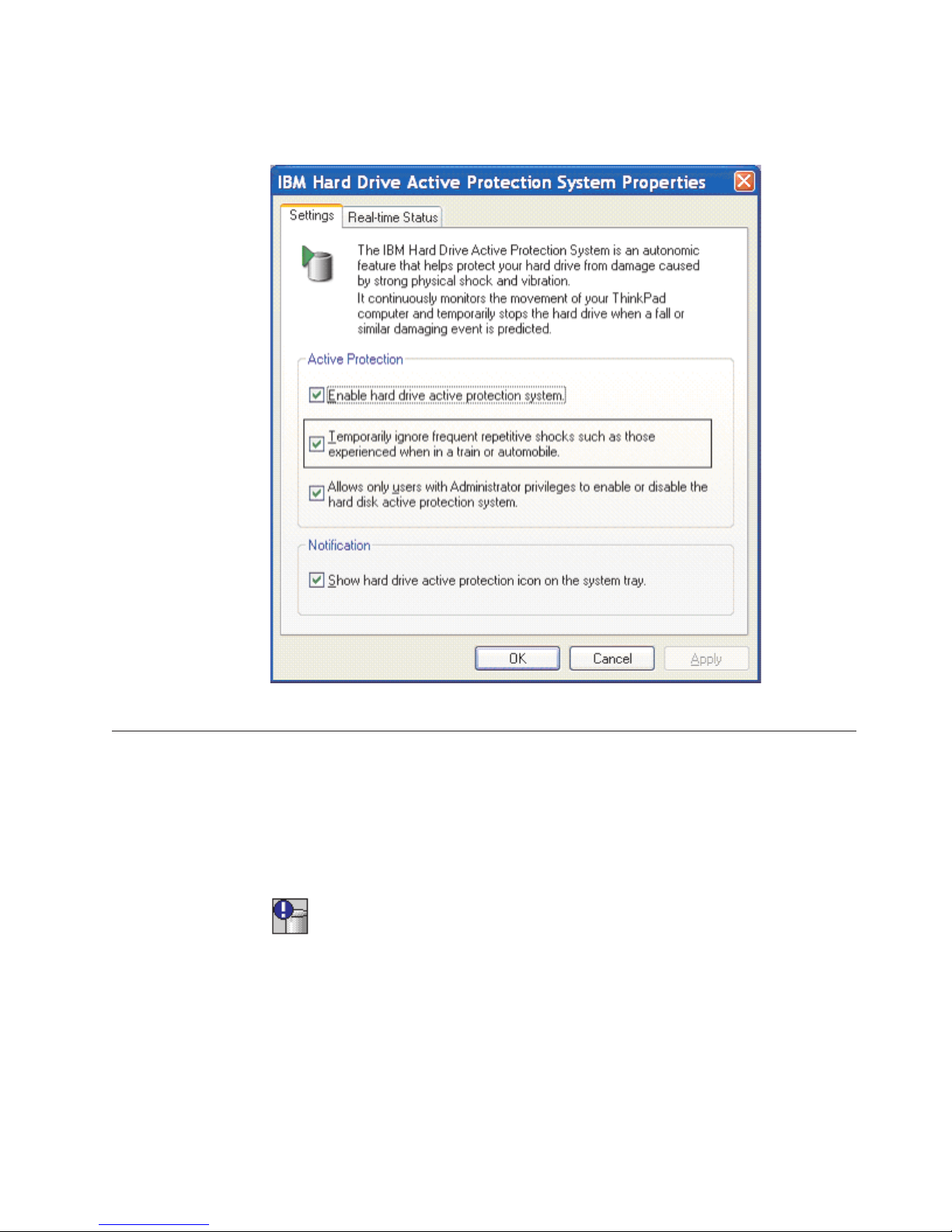
The design of the active protection system allows for certain shocks or vibrations
that fall within a span of accepted or normal motion and does not repeatedly stop
the hard drive when this level of motion is detected. You can select a checkbox in
the properties window to temporarily disable hard drive protection while
repetitive motion or vibration is detected. This feature is particularly useful when
IBM Active Protection System Whitepaper
Page 5
v
v
the ThinkPad computer is used on a plane or train and repetitive vibration is
expected.
Figure 1. IBM Hard Drive Active Protection System Properties
Application function overview
The APS software monitors the accelerometer sensor information and displays the
sensor status in the system task tray. The following four states of system status are
illustrated using the system tray icon:
Shock sensor is disabled. In this state, shock sensor monitoring is not enabled
and hard drive active protection is not activated.
Figure 2.
Shock sensor is enabled, but no shock is detected. In this state, shock sensing is
enabled and monitoring the shock condition. The active protection system does
not detect any shock condition and the internal primary hard disk drive is
operating normally.
IBM Hard Drive Active Protection System
3
Page 6

v
v
v
v
v
v
v
v
v
v
4
Figure 3.
v
Shock sensor is enabled and the head of the primary hard disk drive is
unloaded due to shock condition. In this state, the computer has detected the
shock condition and the head of the primary hard disk drive is unloaded to
protect the hard disk drive from physical damage.
Figure 4.
Shock sensor is set to temporarily ignore frequent repetitive shocks such as those
experienced when in a train or automobile.
Figure 5.
User interface and task tray applet
The active protection system application program is installed as part of the IBM
Hard Drive Active Protection System driver package on Windows 2000 and
Windows XP platforms using InstallShield version 6.3. Once this package is
installed, an icon is added to the system tray in response to detecting an excessive
shock. The user can remove the system tray icon by right-clicking in the system
tray and selecting Remove Hard Drive Active Protection icon from the System
Tray or by clearing the Show hard drive active protection icon in the system tray
checkbox. InstallShield installs the following components:
ShockPrf.sys: kernel mode device driver for prediction algorithm and hard disk
drive control
Shockmgr.sys: kernel mode driver for miscellaneous operation
Sensor.dll: application interface dll
TpShCPL.cpl: control applet
TpShocks.exe: task tray application
TpShCPL.dll: bitmap resource file for this application program
TpShPrm.hta: promotion pop-up window
TpShPrm.gif: animation for promotion pop-up window
TpShPrm.jpg: banner picture for promotion pop-up window
the task tray menu to enable and disable the active protection system. Select
Use
Enable Hard Drive Active Protection on the system task tray to enable the shock
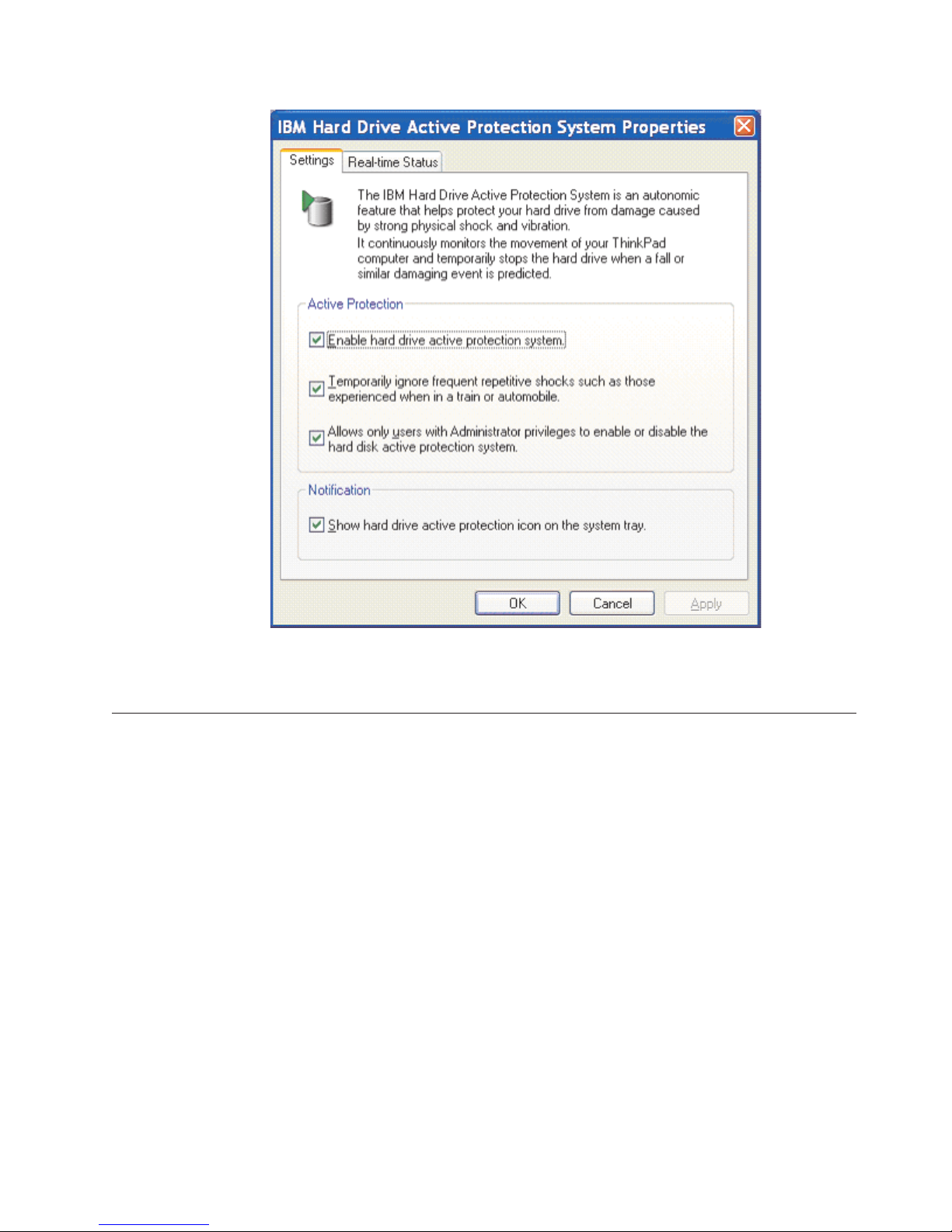
detection and protect the primary hard disk drive from damage. To see the list of
options for the protection system, double-click the icon in the system tray, click
Start --> All Programs --> Access IBM --> IBM Hard Drive Active Protection, or
open the Control Panel and double-click IBM Hard Drive Protection. The
properties window is displayed:
IBM Active Protection System Whitepaper
Page 7
v
v
so
v
Figure 6. IBM Hard Drive Active Protection System Properties
Description of active protection system options
You can use the following list of options to customize the active protection system.
Each of these options is available on the properties dialog box.
Enable hard drive active protection system checkbox: If this checkbox is selected,
the IBM Hard Drive Active Protection System is enabled. If a shock is detected,
the computer stops the hard disk drive operation to protect the drive from
physical damage. The default setting is enabled.
Temporarily ignore frequent repetitive shocks checkbox: Select this option to
avoid frequent stops of the hard drive when you use the computer in an
environment where the shock sensor is likely to detect repetitive, low-level
shocks, such as those experienced when riding on a train or airplane. If enabled,
this option functions when the ratio of the duration of stopping the hard disk
drive caused by the protection system responding to low-level shocks exceeds a
specific percentage within a certain amount of time. Once the shock sensor
detects a stable environment for an extended amount of time, this option resets
that the sensitivity for received shocks returns to normal. In all cases, the
protection system stops the hard disk when heavy shocks are detected.
Allow only users with Administrator privileges to enable or disable the hard
disk active protection system checkbox: If this checkbox is selected, you must
have Administrator privileges to enable or disable the active protection system.
IBM Hard Drive Active Protection System
5
Page 8

–
–
–
–
–
In
6
v
Show hard drive active protection icon on the system tray checkbox: If the
checkbox is selected, the icon showing the status of the shock sensor is
displayed in the system tray. The active protection system is enabled by default
whenever the computer is operating. It is automatically disabled while the
computer is:
Loading the operating system
Enter Standby or hibernation mode
Resuming normal operation after being in Standby or hibernation mode
Being shut down
Turned off
Important features of the IBM Active Protection System
Enable/Disable feature (user option via utility): User can manually enable and
disable the active protection system using the software user interface.
Automatic ignore feature: Sometimes the user is in an environment that has
associated vibration (such as in a car or airplane where the entire vehicle vibrates).
these environments, the vibration may be transmitted to the ThinkPad
computer. The Automatic Ignore feature is helpful in this situation. This feature is
enabled by default, but the user can manually change choice at any time via the
software utility.
Summary
Cancel feature for impulse-type vibration: This feature cannot be manually
controlled by the user. The Shock Manager ignores impulse-type acceleration
change so as to minimize prediction failures. An adaptive low-pass filter function
inside the Shock Manager performs this function.
Heuristic sensitivity tuning feature: This feature cannot be manually controlled by
the user. The sensitivity for shock prediction is dynamically changed depending on
body posture change with received shocks, vibrations and user input activities.
Administrative lock: This feature restricts users without Administrative system
rights from changing the Active Protection System properties.
The IBM Hard Drive Active Protection System can greatly improve overall system
reliability by providing enhanced hard drive protection from shock. Using the
latest technology to constantly monitor the movement of your ThinkPad computer,
users can feel confident that their data will be better protected in the event of a
drop or similar potentially damaging event.
IBM Active Protection System Whitepaper
Page 9

be
or
to
as an
of
in
©
Appendix. Notices
IBM may not offer the products, services, or features discussed in this document in
all countries. Consult your local IBM representative for information on the
products and services currently available in your area. Any reference to an IBM
product, program, or service is not intended to state or imply that only that IBM
product, program, or service may be used. Any functionally equivalent product,
program, or service that does not infringe any IBM intellectual property right may
used instead. However, it is the user’s responsibility to evaluate and verify the
operation of any non-IBM product, program, or service.
IBM may have patents or pending patent applications covering subject matter
described in this document. The furnishing of this document does not give you
any license to these patents. You can send license inquiries, in writing, to:
IBM Director of Licensing
IBM Corporation
North Castle Drive
Armonk, NY 10504-1785
U.S.A.
INTERNATIONAL
BUSINESS MACHINES CORPORATION PROVIDES THIS
PUBLICATION “AS IS” WITHOUT WARRANTY OF ANY KIND, EITHER
EXPRESS OR IMPLIED, INCLUDING, BUT NOT LIMITED TO, THE IMPLIED
WARRANTIES OF NON-INFRINGEMENT, MERCHANTABILITY OR FITNESS
FOR A PARTICULAR PURPOSE. Some jurisdictions do not allow disclaimer of
express or implied warranties in certain transactions, therefore, this statement may
not apply to you.
This information could include technical inaccuracies or typographical errors.
Changes are periodically made to the information herein; these changes will be
incorporated in new editions of the publication. IBM may make improvements
and/or changes in the product(s) and/or the program(s) described in this
publication at any time without notice.
The products described in this document are not intended for use in implantation
other life support applications where malfunction may result in injury or death
persons. The information contained in this document does not affect or change
IBM product specifications or warranties. Nothing in this document shall operate
express or implied license or indemnity under the intellectual property rights
IBM or third parties. All information contained in this document was obtained
specific environments and is presented as an illustration. The result obtained in
other operating environments may vary.
IBM may use or distribute any of the information you supply in any way it
believes appropriate without incurring any obligation to you.
Non-IBM Web sites
Any references in this publication to non-IBM Web sites are provided for
convenience only and do not in any manner serve as an endorsement of those Web
sites. The materials at those Web sites are not part of the materials for this IBM
product, and use of those Web sites is at your own risk.
Copyright IBM Corp. 2003
7
Page 10

in
8
Trademarks
The following terms are trademarks of International Business Machines
Corporation in the United States, other countries, or both:
IBM
ThinkPad
Microsoft, Windows, and Windows NT
®
are trademarks of Microsoft Corporation
the United States, other countries, or both.
Other company, product, or service names may be trademarks or service marks of
others.
IBM Active Protection System Whitepaper
 Loading...