

Page 1

Lenovo PHAB Plus
Safety, Warranty & Quick Start Guide
Lenovo PB1-770M
Page 2

English
Read this guide carefully before using your Lenovo PHAB Pl us.
Read before using your Lenovo PHAB Plus
Read first-Regulatory information
Device models equipped with wireless communications comply with the radio
freque ncy and s afety st andar ds of any cou ntry or r egion i n which it h as bee n
approved for wireless use. In addition, if your product contains a telecom modem, it
complies with the requirements for connection to the telephone network in your
co unt ry.
Be sure to re ad the Reg ulator y Notice fo r your cou ntry o r region b efore us ing the
wirele ss devi ces con tained i n your dev ice. To obtain a PD F versio n of the Reg ulator y
Notice, refer to the “Downloading publications” section below.
Getting support
To get support on network service and billing, contact your wireless network operator.
To learn how to us e your dev ice and vi ew its tec hnical s pecifi cation s, go to
http://support.lenovo.com.
Downloading publications
Electronic versions of your publications are available from http://support.lenovo.com.
To download the publications for your device, go to http://support.lenovo.com and
follow the instructions on the screen.
Accessing your User Guide
Your User Guide contains detailed information about your device. To access your User
Guide, go to: http://support.lenovo.com and follow the instructions on the screen.
Legal notices
Lenovo an d the Leno vo logo are t radema rks of Len ovo in the Un ited Sta tes, other
countr ies, or bo th.
Other c ompany, prod uct, or se rvic e names m ay be trade marks o r serv ice mar ks of
others.
Manufa ctured u nder li cense f rom Dolby L abora tories. D olby, Dolby At mos, and th e
double-D symbol are trademarks of Dolby Laboratories.
LIMITED A ND RESTR ICTED RIG HTS NOTICE: I f data or so ftwa re is deli vered pu rsuant
a General Services Administration “GSA” contract, use, reproduction, or disclosure is
subjec t to restri ctions s et fort h in Contr act No. GS-3 5F-05925.
Page 3

Contents
Lenovo PHAB Plus overview.............................................................1
Preparing your Lenovo PHAB Plus ...................................................2
Starting to use your Lenovo PHAB Plus............................................3
Important safety and handling information ........................................4
European Union Compliance Statement ...........................................5
RF Exposure (SAR) information.........................................................5
Service and Support information.......................................................5
Warranty information ........................................................................6
Environmental, recycling, and disposal information ...........................8
Page 4
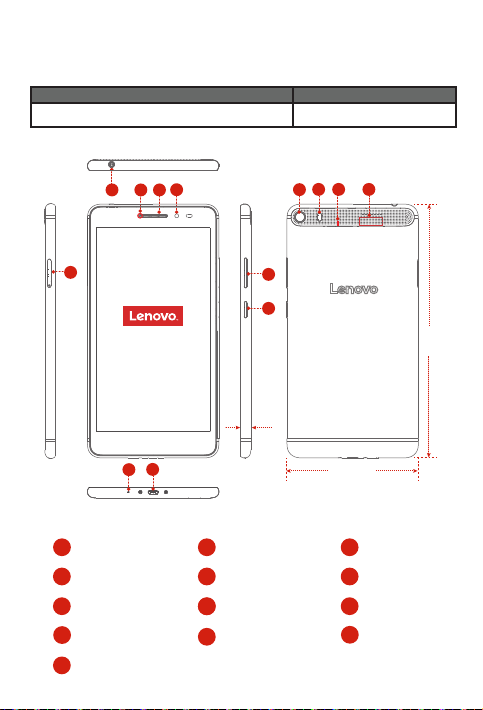
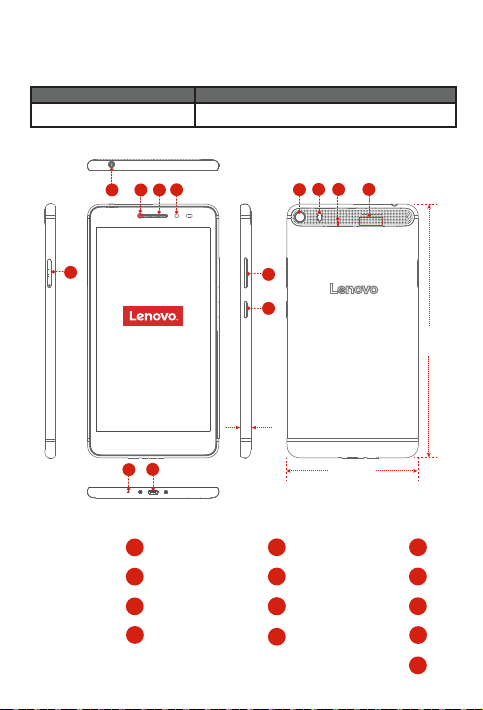
Lenovo PHAB Plus overview
Model
Lenovo PB1-7 70M
Version
LTE (Voice)
5
Front camera
1
Earphone jack
4
7
Micro USB connector
Rear camera
10
Speakers
13
1
234
7.6 mm
7
6
Receiver
2
5
Card slot
8
8
On/Off button
Flash light
11
1
11101312
9
8
186.6mm
96.6 mm
Indicator light
3
Microphone
6
Volume button
9
Anti-noise
12
microphone
Page 5

Preparing your Lenovo PHAB Plus
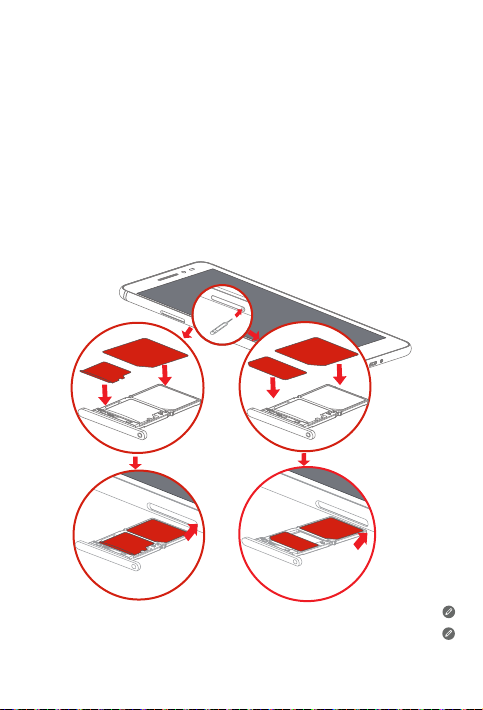
You can use cellular services by inserting the Micro SIM and Nano SIM card provided by
your carrier.
The Nano SIM card and microSD card share the card tray. You can insert either Nano SIM
or microSD card at the same time.
Install the Micro SIM card, Nano SIM card or the microSD card as shown.
Step 1.
Insert the SIM eject tool that comes with your device into the hole in the
Micro SIM & microSD card tray.
Step 2.
Pull out the Micro SIM & microSD card tray and position the Micro SIM and
Nano
Step 3.
SIM card or the microSD card into the tray in correct orientation.
Carefully insert the tray with the installed Micro SIM card,
microSD card back into the slot.
or
microSD
Micro SIM
Micro SIM
Nano SIM
microSD
Micro SIM
Nano
SIM or
microSD
Micro SIM
Nano SIM
Micro SIM
Micro SIM card and Nano SIM card work with your Lenovo PHAB Plus.
Use a standard Nano SIM card only. Inserting a modified card or a Nano SIM card
with a SIM card adapter may cause the card to not fit properly or damage the card
slot or your device.
2
Page 6

Starting to use your Lenovo PHAB Plus
Before using your device, you might need to charge the battery.
Charge the battery as shown.
Connect your device to a power outlet using the included cable and USB power
adapter.
Low battery Fully charged
Turning on/off
Turn on: Press and hold th e On/Off button u ntil the Le novo
logo appears.
Tur n off : Press and hold th e On/Off button f or a few
secon ds, then ta p Power off.
Restart:
Press an d hold the O n/Of f button f or abou t 10
seconds.
Press and hold the On/Off button for a few seconds,
then tap Restart.
Taking screenshots
Press and hold the On/Off button and the volume down button at the same time.
3
Charging
Page 7

Important safety and handling information
Plastic bag notice
DANGER: Pl astic ba gs can be d angero us. Keep p lastic b ags away fro m babie s and
childr en to avoid da nger of s uffoc ation.
Built-in rechargeable battery notice
DANGER: Do n ot attem pt to replac e the inte rnal rec harge able li thium io n batter y.
Contact Lenovo Support for factory replacement.
Polyvinyl Chloride (PVC) cable and cord notice
WARNING: Handlin g the cord on t his prod uct or co rds asso ciated wi th acce ssori es
sold wit h this prod uct wil l expose yo u to lead, a ch emica l known to th e State of
Califo rnia to cau se canc er, and bir th defec ts or other r eprodu ctive ha rm. Wash ha nds
after handling.
Prevent hearing damage
Your device has a headphone connector. Always use the headphone connector for
headphones (also called a headset) or earphones.
CAUTION: Excessive sound pressure from earphones and headphones can
cause h earin g loss. A djust ment of th e equal izer to ma ximum increa ses the
earph one and h eadph one out put volt age and t he soun d press ure leve l.
There fore, to p rotec t your hea ring, a djust t he equa lizer to a n appro priat e level.
Exces sive use of h eadph ones or e arpho nes for a lo ng peri od of time at h igh volu me
can be dangerous if the output of the headphone or earphone connectors do not
comply with specifications of EN 50332-2.
The headphone output connector of your device complies with EN 50332-2 Sub
clause 7. This sp ecific ation li mits the de vice's ma ximum w ide band t rue RMS o utput
voltag e to 150 mV. To help prote ct again st hear ing los s, ensure t hat the he adphon es or
earph ones you u se also c omply wi th EN 50332-2 (Cl ause 7 lim its) for a wi de band
charac terist ic voltag e of 75 mV. Using headp hones t hat do not co mply wi th EN
50332-2 can b e dange rous due to exc essiv e sound pr essure l evels.
If your dev ice cam e with he adphon es or ear phone s in the pac kage, as a s et, the
combination of the headphones or earphones and the device already complies with
the spec ificati ons of EN 503 32-1. If different h eadpho nes or ea rphon es are us ed,
ensure t hat they co mply wi th EN 50332-1 (Claus e 6.5 Limit ation Valu es). Using
headph ones th at do not com ply wit h EN 50332-1 can be da ngerou s due to exce ssive
sound pressure levels.
This dev ice is re stricte d to indoo r use when o perati ng in the 5.15 to 5.35 GHz
frequency band.
4
Page 8
Sound pressure warning statement
For the dev ice that i s tested in a ccorda nce wit h EN 60950 -1:
2006+A11:2009+A1:2010+A12:2011, it is mandato ry to per form audio tests f or
EN50 332.
This dev ice has b een teste d to compl y with the S ound Pre ssure Le vel requ iremen t laid
down in the a pplic able EN 50 332-1 and/or EN 50332-2 st andard s. Perma nent he aring
loss may occur if earphones or headphones are used at high volume for prolonged
perio ds of time.
Warning statement:
To prevent pos sible he aring d amage, d o not liste n at high vol ume leve ls for a lon g
perio d of time.
European Union Compliance Statement
Radio and Telecommunications Terminal Equipment Directive
0560
Lenovo de clare s that this p roduct i s in comp lianc e with:
The ess ential r equire ments an d other re levant p rovisio ns of the Rad io and
Telecommunications Terminal Equipment Directive, 1999/5/EC
All othe r relevan t EU direc tives
The Declaration of Conformity information is located in the Regulatory Notice. To
obtain a PD F versio n of the Regulatory Notice, go to http://support.lenovo.com.
RF Exposure (SAR) information:
To comply wit h SAR requ iremen ts the dev ice must b e used wi th a separ ation di stanc e
of at leas t 10mm to the hum an body.
Users ha ve to adopt a ho lster/slee ve/cover or ot her ways to ma intain t his dist ance.
Service and Support information
The following information describes the technical support that is available for your
product, during the warranty period or throughout the life of your product. Refer to the
Lenovo Li mited War ranty f or a full ex planat ion of Len ovo warra nty term s. See “Le novo
Limite d Warrant y notic e” later in th is docum ent for de tails on a ccess ing the f ull
war rant y.
5
Page 9
Online technical support
Online technical support is available during the lifetime of a product at:
http://www.lenovo.com/support
Telephone technical support
You can get help and information from the Customer Support Center by telephone.
Before contacting a Lenovo technical support representative, please have the following
inform ation avai lable: m odel an d seria l number, the ex act wordi ng of any er ror
messa ge, and a de script ion of the pr oblem.
Your technical support representative might want to walk you through the problem
while yo u are at your d evice du ring th e call.
Worldwide Lenovo Support telephone list
Important: Telepho ne numbe rs are su bject to c hange wi thout n otice. Th e most
up-to-date telephone list for the Customer Support Center is always available at:
http://www.lenovo.com/support/phone
If the tele phone n umber fo r your cou ntry or r egion is n ot listed, c ontac t your Leno vo
resell er or Len ovo market ing repr esenta tive.
Warranty information
Lenovo Limited Warranty notice
This pro duct is c overed by th e terms of th e Lenovo Li mited War ranty, ver sion
L505- 0010-02 08 /2011. Read the L enovo Lim ited Warr anty (L LW) at
http://ww w.lenovo.com /warr anty/ll w_02. You can vie w the LLW in a num ber of
langua ges fro m this Web si te. If you can not view t he LLW from th e Web site, co ntact
your loc al Lenovo o ffice o r resell er to obtai n a printe d versio n of the LLW.
Warranty period and type of Warranty service
Country or Region Purchase Warranty Period
France, Germany, Italy, Austria,
United Kingdom, Israel, Australia, New
Zealand
Guatemala, Costa Rica, Venezuela, Peru,
Uruguay, Ecuador, Colombia, Chile, Argentina,
Indonesia, Vietnam, India, Malaysia, Thailand,
Philippines, Singapore, Hong Kong, El Salvador
Parts and Labor - 1 year
Battery Pack - 1 year
Earphone - 1 year
Parts and Labor - 1 year
Battery Pack - 1 year
Earphone - 1 year
Type of Warranty
Service
1,3
1,4
6
Page 10
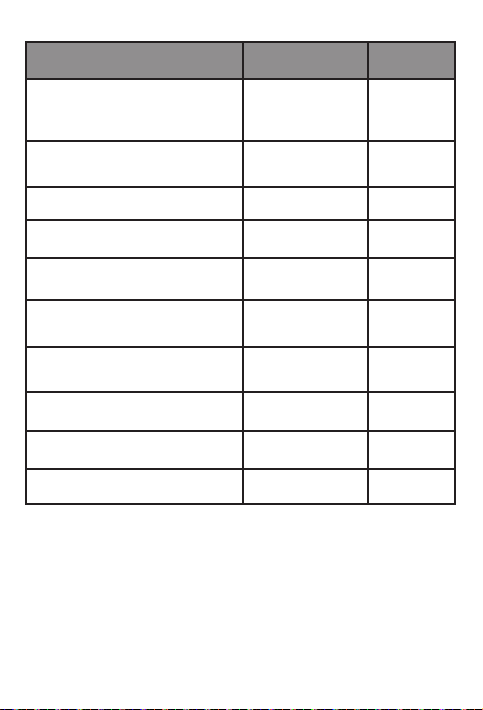
Country or Region Purchase Warranty Period
Russia, Ukraine, Egypt, Lebanon, Morocco,
South Africa, Tunisia, Mauritius, Mozambique,
United Arab Emirates, Jordan, Kenya, Nigeria,
Uganda, Ghana, Oman,Tanzania, Namibia
Poland, United States of America, Canada,
Mexico, Japan
Panama
Taiwan, South Korea
Brazil
Spain, Switzerland, Portugal, Netherlands,
Belgium, Sweden, Denmark, Norway, Finland,
Estonia, Latvia, Lithuania, Iceland
Czech Republic, Hungary, Romania, Bulgaria,
Greece, Croatia, Slovenia, Slovakia, Cyprus
Turkey
Serbia 1,4
* Excludes some components. 90-day limited warranty for power adapters, keyboards,
plasti cs and hi nges. Ea rphon e warran ty term is o nly app lied to the c ountr y that has
earphone in bundle sales with the tablet product.
Types of Warr ant y Serv ice
1. Customer Replaceable Unit (“CRU”) Service
2. On-site Se rvi ce
3. Couri er or Dep ot Serv ice
4. Customer Carry-In Service
5. Mail-in Service
6. Custome r Two-Way Mail-i n Serv ice
7. Product Exchange Service
For a full ex plana tion of the t ypes of w arrant y service, refe r to the full w arrant y. See
“Lenovo Limited Warranty notice” for details o n acces sing the f ull war ranty.
Parts and Labor - 1 year
Battery Pack - 1 year
Earphone - 1 year
Parts and Labor - 1 year
Battery Pack - 1 year
Earphone - 1 year
Parts and Labor - 1 year
Battery Pack - 1 year
Earphone - 1 year
Parts and Labor - 1 year
Battery Pack - 1 year
Earphone - 1 year
Parts and Labor - 1 year
Battery Pack - 1 year
Earphone - 1 year
Parts and Labor - 2 years
Battery Pack - 1 year
Earphone - 1 year
Parts and Labor - 2 years
- 1 year
Battery Pack
Earphone - 1 year
Parts and Labor - 2 years
Battery Pack - 2 years
Earphone - 2 years
Parts and Labor - 2 years
Battery Pack - 2 years
Earphone - 2 years
Parts and Labor - 2 years
Battery Pack - 1 year
Earphone - 1 year
7
Type of Warranty
Service
4
1,5
2,4
3,4
2,5
1,3
1,5
3,4
4 Saudi Arabia
Page 11
Environmental, recycling, and disposal information
General recycling statement
Lenovo en coura ges owne rs of infor mation t echnol ogy (IT ) equi pment to re sponsi bly
recycle t heir eq uipme nt when it i s no long er need ed. Lenovo o ffer s a variet y of
programs and services to assist equipment owners in recycling their IT products. For
information on recycling Lenovo products, go to http://www.lenovo.com/recycling.
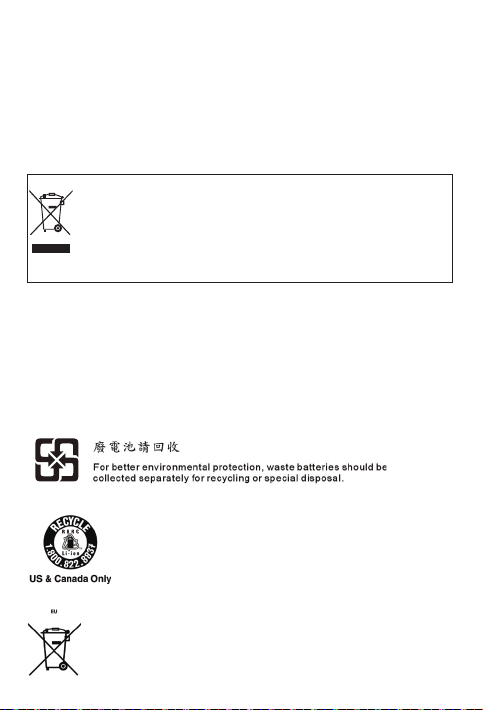
Important WEEE information
Electr ical and elec tronic equipm ent marked with th e symbol of a cross ed-out
wheel ed bin may not be disp osed as unsor ted municipa l waste. Waste of
electr ical and elec tronic equipm ent (WEEE) sh all be treated sep arately using
the collection framework available to customers for the return, recycling, and
treatme nt of WEEE.
Country-specific information is available at:
http://ww w.lenov o.com/re cycli ng
Recycling information for Japan
Recycl ing and di sposa l inform ation for J apan is ava ilabl e at:
http://ww w.lenov o.com/re cycli ng/j apan
Additional recycling statements
Additio nal info rmatio n about r ecyclin g devic e compon ents an d batter ies is in yo ur
User Guide. See “Accessing your User Guide” for details.
Battery recycling marks
Batte ry re cycling i nform ation fo r Taiwan
Batte ry re cycling i nform ation fo r the Uni ted Sta tes and C anada
Battery recycling information for the European Union
8
Page 12
Energ y effic iency m ark
Restriction of Hazardous Substances Directive (RoHS)
Tur key
The Len ovo produc t meets th e requi rement s of the Repu blic of Turkey D irecti ve on the
Restri ction of th e Use of Cer tain Hazard ous Subs tance s in Waste Ele ctric al and
Electronic Equipment (WEEE).
AEEE
AEEE
Atık Elektrikli ve
Elektronik Eşya
AEEE
Ukraine
India
RoHS com pliant a s per E-Waste ( Manag ement & Ha ndlin g) Rules, 2011.
Vietnam
Lenovo pr oducts s old in Vie tnam, on o r after Se ptembe r 23, 2011, meet th e
requir ements of t he Vietn am Circu lar 30/2011/TT-BCT (“ Vietna m RoHS”).
European Union
Lenovo pr oducts s old in the Eu ropea n Union, on o r after 3 J anuar y 2013 meet the
requir ements of D irecti ve 2011/65/EU on the restr iction o f the use of ce rtai n haza rdous
substa nces in e lectr ical an d electr onic equ ipmen t (“RoHS re cast ” or “RoHS 2” ).
For more in format ion abou t Lenovo p rogres s on RoHS, g o to:
http://www.lenovo.com/social_responsibility/us/en/RoHS_Communication.pdf
EurAsia compliance mark
9
Page 13
ﺔﻗﺎﻁﻟﺍ ﺓءﺎﻔﻛ ﺔﻣﻼﻋ
(RoHS) ﺓﺭﻁﺧ ﻟﺍ ﺩﺍﻭﻣﻟﺍ ﻡﺍﺩ ﺧ ﺗﺳﺍ ﺭ ﻅ ﺣ ﻪﻳﺟﻭﺗ
ﻲﻓ ﺓﺭﻁ ﺧﻟ ﺍ ﺩﺍﻭﻣ ﻟﺍ ﺽﻌﺑ ﻡ ﺍﺩﺧﺗ ﺳﺍ ﺭﻅﺣ ﻝﻭﺣ ﺔﻳﻛﺭﺗ ﻟﺍ ﺔ ﻳﺭﻭ ﻬﻣﺟ ﻟﺍ ﻪ ﻳﺟﻭ ﺗ ﺕﺎﺑﻠﻁ ﺗﻣ ﻊﻣ Lenovo ﺞﺗﻧﻣ ﻕﻓﺍﻭﺗﻳ
.(WEEE) ﺔﻳﻧﻭﺭﺗﻛﻟﻹﺍﻭ ﺔﻳﺋﺎﺑﺭﻬﻛﻟﺍ ﺓﺯﻬﺟﻷﺍ ﺕﺎﻳﺎﻔﻧ
AEEE
AEEE
Atık Elektrikli ve
Elektronik Eşya
AEEE
ﺓﺯﻬﺟﻷﺍ ﺕﺎﻳ ﺎﻔ ﻧ ﺔﺟﻟﺎﻌ ﻣﻭ ﺓﺭﺍﺩﺇ ﺩﻋﺍﻭﻘ ﻟ ﺎًﻘﻓﻭ (RoHS) ﺓﺭﻁﺧﻟﺍ ﺩﺍﻭﻣ ﻟﺍ ﻡﺍﺩﺧ ﺗﺳﺍ ﻰﻠ ﻋ ﺩﻭﻳﻘ ﻟﺍ ﻊ ﻣ ﻕﻓ ﺍﻭﺗﻳ
ﻡﺎﻧﺗ ﻳﻓ ﺭﻭﺷ ﻧﻣ ﺕﺎﺑﻠ ﻁﺗﻣ ﻊ ﻣ ﺩﻌﺑ ﺎ ﻣﻭ 20 11 ﺭﺑﻣﺗﺑﺳ 23 ﻲﻓ ﺎ ﻬﻌ ﻳﺑ ﻡﺗ ﻲ ﺗﻟﺍ Lenovo ﺕﺎﺟﺗﻧﻣ ﻕﻓﺍﻭﺗﺗ
.("ﻡﺎ ﻧﺗ ﻳﻓ ﻲﻓ ﺓﺭﻁ ﺧﻟ ﺍ ﺩﺍﻭﻣ ﻟﺍ ﻡﺍﺩﺧ ﺗﺳﺍ ﺭﻅ ﺣ") TT-B CT/3 0/2 011
ﻝﻳﻟﺩﻟﺍ ﺕﺎﺑﻠﻁﺗﻣﺑ ،2013 ﺭﻳﺎﻧﻳ 3 ﻝﺑ ﻗ ﻭﺃ ﻲﻓ ،ﻲ ﺑﻭﺭﻭﻷﺍ ﺩ ﺎﺣ ﺗﻻﺍ ﻲﻓ ﻉﺎ ﺑُﺗ ﻲﺗ ﻟﺍ Lenovo ﺕﺎﺟﺗ ﻧﻣ ﻲﻔ ﺗ
RoHS") ﺔﻳ ﻧﻭﺭﺗﻛ ﻟﻹﺍﻭ ﺔﻳﺑﺭ ﻬﻛﻟﺍ ﺓﺯﻬ ﺟﻷﺍ ﻲﻓ ﺓﺩﺩ ﺣﻣ ﺓﺭﻁﺧ ﺩﺍﻭﻣ ﻡﺍﺩ ﺧﺗ ﺳﺍ ﺩﻳﻘﺑ ﺹ ﺎﺧ ﻟﺍEU/2011 /6 5
.("RoHS 2" ﻭ ﺃ "ﻪﺗ ﻏﺎﻳﺻ ﺩ ﺎﻌ ﻣﻟﺍ
:ﻊﻗﻭ ﻣﻟﺍ ﺓﺭﺎﻳﺯ ﺑ ﻡﻗ ،ﺓﺭﻁﺧ ﻟﺍ ﺩﺍﻭﻣﻟﺍ ﺩﻳ ﻘﺑ ﻕﻠ ﻌﺗ ﻳ ﺎﻣﻳ ﻓ Lenovo ﻡﻳﺩﻘ ﺗ ﻥﻋ ﺕﺎﻣﻭ ﻠﻌﻣ ﻟﺍ ﻥ ﻣ ﺩﻳ ﺯﻣ ﻟ
http://www.lenovo.com/social_responsibility/us/en/RoHS_Communic ation.pdf
ﺎ ﻳ ﻛﺭﺗ
ﺎﻳﻧﺍﺭﻛﻭﺃ
ﺩﻧﻬﻟﺍ
.20 11 ،ﺔﻳﻧﻭﺭﺗﻛﻟﻹﺍ
ﻡﺎﻧﺗﻳﻓ
ﻲﺑﻭﺭﻭﻷ ﺍ ﺩﺎ ﺣﺗ ﻻﺍ
ﺎﻳ ﺳﺍﺭﻭﺃ ﻊﻣ ﻕﻓﺍﻭﺗ ﻟﺍ ﺔﻣﻼﻋ
9
Page 14
ﺕﺎﻳﺎ ﻔﻧﻟﺍ ﻥﻣ ﺹﻠﺧ ﺗﻟﺍﻭ ﺭﻳﻭﺩﺗﻟﺍ ﺓﺩﺎﻋﺇ ﺕﺎﻣﻭﻠﻌﻣﻭ ﺔﻳﺋﻳﺑﻟﺍ ﺕﺎﻣﻭﻠ ﻌ ﻣ ﻟﺍ
ﺩﻧ ﻋ ﻡﻬﺑ ﺔ ﺻﺎ ﺧﻟﺍ ﺕﺍﺩ ﻌﻣﻟﺍ ﻥ ﻣ ﺏﺳﺎ ﻧﻣ ﻝ ﻛﺷﺑ ﺹ ﻠﺧﺗ ﻟﺍ ﻰ ﻠﻋ (IT) ﺕﺎﻣﻭ ﻠﻌ ﻣﻟﺍ ﺔﻳﻧ ﻘﺗ ﺕﺍﺩﻌﻣ ﻲ ﻛﻟﺎﻣ Lenovo ﻊﺟﺷﺗ
ﺕﺎﺟﺗﻧﻣ ﺭﻳﻭﺩﺗ ﺓﺩﺎﻋﺇ ﻰﻠﻋ ﺕﺍﺩﻌﻣﻟﺍ ﻲﻛﻟﺎﻣ ﺓﺩﻋﺎﺳﻣﻟ ﺔﻋﻭﻧﺗﻣ ﺕﺎﻣﺩﺧﻭ ﺞﻣﺍﺭﺑ Lenovo ﺽﺭﻌﺗﻭ .ﺎﻬﻳﻟﺇ ﺔﺟﺎﺣﻟﺍ ﻡﺩﻋ
ﻪﺟﻭ ﺗﻟﺍ ﻰﺟﺭ ﻳ ،Lenovo ﺕﺎﺟ ﺗﻧ ﻣ ﺭﻳﻭﺩ ﺗ ﺓﺩﺎﻋﺇ ﻝﻭ ﺣ ﺕﺎ ﻣﻭﻠ ﻌﻣ ﻰﻠ ﻋ ﻝﻭﺻ ﺣﻠﻟ .ﻡ ﻬﺑ ﺔﺻﺎﺧ ﻟﺍ ﺕﺎﻣﻭﻠ ﻌﻣﻟ ﺍ ﺎﻳ ﺟﻭﻟﻭﻧ ﻛﺗ
.http://www.lenovo.com/recycling ﺏﻳﻭ ﻟﺍ ﻊﻗﻭﻣ ﻰ ﻟﺇ
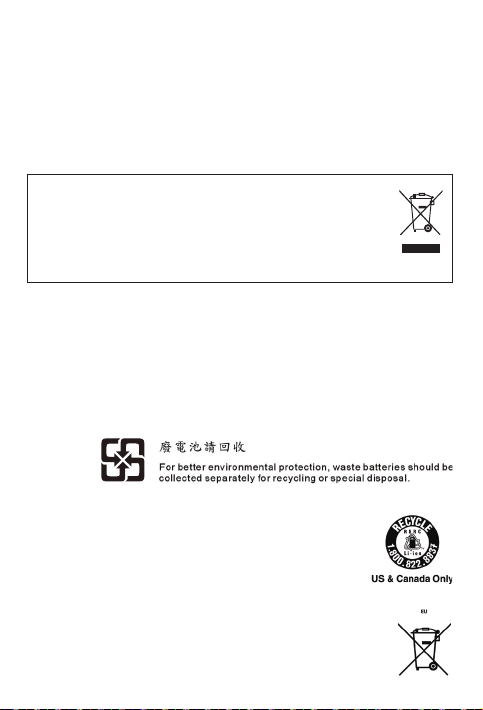
ﺔﻳ ﻧﻭﺭ ﺗ ﻛﻟﻹﺍﻭ ﺔ ﻳ ﺋﺎﺑﺭﻬ ﻛ ﻟﺍ ﺕﺍﺩﻌﻣﻟﺍ ﺕﺎ ﻳﺎﻔ ﻧ ﻥﻋ ﺔﻣﻬﻣ ﺕﺎﻣﻭﻠ ﻌﻣ
ﺕﺍﺫ ﺕﺎ ﻳﺎﻔ ﻧﻟ ﺍ ﺔﻳ ﻭﺎ ﺣ ﺯﻣﺭ ﻝﻣ ﺣﺗ ﻲﺗ ﻟﺍ ﺔﻳﻧﻭﺭ ﺗﻛﻟﻹ ﺍﻭ ﺔﻳﺑﺭﻬ ﻛﻟﺍ ﺕﺍﺩ ﻌﻣﻟﺍ ﻥﻣ ﺹ ﻠﺧﺗ ﻟﺍ ﻥ ﻛﻣ ﻳ ﻻ
ﻥﺃ ﺏﺟﻳ .ﺎﻫﺯﺭﻓ ﻡﺗﻳ ﻡﻟ ﺔﻳﻠﺣﻣ ﺕﺎﻳﺎﻔﻧ ﺎﻫﺭﺎﺑﺗﻋﺎﺑ ﻥﺎﻌﻁﺎﻘﺗﻣ ﻥﺎﻁﺧ ﺎﻬﻳﻠﻋ ﻡﻭﺳﺭﻣﻟﺍ ﺕﻼﺟﻌﻟﺍ
ﺔﻋﻭﻣﺟﻣ ﻡﺍﺩﺧﺗﺳﺎﺑ ﻝﺻﻔﻧﻣ ﻝﻛﺷﺑ (W EEE) ﺔﻳﻧﻭﺭﺗﻛﻟﻹﺍﻭ ﺔﻳﺋﺎﺑﺭﻬﻛﻟﺍ ﺕﺍّﺩﻌﻣﻟﺍ ﺕﺎﻔﻠﺧﻣ ﺞﻟﺎﻌﺗ
.ﺎﻬﺗﺟﻟﺎﻌﻣﻭ ﺎﻫﺭﻳﻭﺩﺗ ﺓﺩﺎﻋﺇﻭ WEEE ﻉﺎﺟﺭﻹ ءﻼﻣ ﻌﻠﻟ ﺓﺭﻓﻭﺗ ﻣﻟﺍ ﻝﻣﻌ ﻟﺍ ﺭﺎﻁﺇ
:ﻊﻗﻭ ﻣﻟﺍ ﻰﻠ ﻋ ﺩﻠﺑ ﻝ ﻛﺑ ﺔﺻﺎ ﺧ ﺕﺎﻣﻭﻠ ﻌﻣ ﺭﻓﻭ ﺗﺗ
http://www.lenovo.com/recycling
:ﻰﻠﻋ ﻥﺎﺑﺎﻳﻠﻟ ﺞﺗﻧﻣﻟﺍ ﻥﻣ ﺹﻠﺧﺗﻟﺍﻭ ﺭﻳﻭﺩﺗﻟﺍ ﺓﺩﺎﻋﺈﺑ ﺔﺻﺎﺧﻟﺍ ﺕﺎﻣﻭﻠﻌﻣﻟﺍ ﺭﻓﻭﺗﺗ
http://www.lenovo.com/recycling/japan
ﻝﻳ ﻟﺩ ﻰﻟﺇ ﻝﻭ ﺻﻭﻟ ﺍ" ﻊﺟﺍﺭ .ﻡﺩﺧﺗﺳﻣﻟﺍ ﻝﻳﻟﺩ ﻲﻓ ﻪﺗﺎﻳﺭﺎﻁﺑﻭ ﺯﺎﻬﺟﻟﺍ ﺕﺎﻧﻭﻛﻣ ﺭﻳﻭﺩﺗ ﺓﺩﺎﻋﺇ ﻝﻭﺣ ﺔﻳﻓﺎﺿﺇ ﺕﺎﻣﻭﻠﻌﻣ ﺩﺟﻭﺗ
ﺍﺩﻧ ﻛﻭ ﺓﺩﺣﺗ ﻣﻟﺍ ﺕﺎ ﻳﻻﻭ ﻟﺍ ﻲ ﻓ ﺔﻳﺭﺎ ﻁﺑ ﻟﺍ ﻡﺍﺩﺧ ﺗﺳﺍ ﺓﺩﺎﻋﺇ ﺕﺎ ﻣﻭﻠﻌ ﻣ
ﻲﺑ ﻭﺭﻭﻷﺍ ﺩﺎﺣ ﺗﻻﺍ ﻲﻓ ﺔﻳﺭﺎﻁﺑﻟﺍ ﻡﺍﺩﺧﺗﺳﺍ ﺓﺩﺎﻋﺇ ﺕﺎﻣﻭﻠﻌﻣ
ﻝﻣ ﺎﻌﻟﺍ ﺭﻳﻭﺩﺗ ﻟﺍ ﺓﺩﺎ ﻋﺇ ﻥﺎ ﻳﺑ
ﻥﺎﺑﺎ ﻳﻟﺍ ﻲ ﻓ ﻡﺍﺩﺧﺗ ﺳﻻﺍ ﺓﺩﺎ ﻋﺇ ﺕﺎ ﻣﻭﻠﻌﻣ
ﺔﻳ ﻓﺎﺿﺇ ﻡﺍﺩﺧﺗﺳﺍ ﺓﺩﺎﻋﺇ ﺕﺎﻧﺎﻳﺑ
.ﻝﻳﺻﺎﻔﺗﻟﺍ ﻰﻠﻋ ﻝﻭﺻﺣﻠﻟ "ﻡﺩﺧﺗﺳﻣﻟﺍ
ﺔﻳﺭﺎ ﻁ ﺑﻟﺍ ﺭ ﻳﻭﺩﺗ ﺓﺩﺎﻋﺇ ﺕﺎﻣﻼﻋ
ﻥﺍﻭﻳ ﺎﺗ ﻲﻓ ﺔ ﻳﺭﺎﻁ ﺑﻟﺍ ﻡﺍﺩ ﺧﺗﺳﺍ ﺓﺩﺎ ﻋﺇ ﺕﺎﻣﻭﻠ ﻌﻣ
8
Page 15
ﻥﺎﻣﺿﻟﺍ ﺔﻣﺩﺧ ﻉﻭﻧ
4
1,5
2,4
3,4
2,5
1,3
1,5
3,4
4
1,4
ﺔﻳﻛﻳﺗﺳﻼﺑﻟﺍ ﺩ ﺍﻭﻣ ﻟﺍﻭ ،ﺢﻳﺗﺎﻔﻣﻟﺍ ﺕﺎ ﺣﻭﻟﻭ ،ﺔﻗﺎﻁﻟﺍ ﺕﻻﻭ ﺣﻣ ﻟ ﺎًﻣﻭﻳ 90 ﺓﺩﻣﻟ ﺩﻭﺩﺣﻣ ﻥﺎﻣﺿ .ﺕﺎﻧﻭﻛﻣﻟﺍ ﺽﻌﺑ ءﺎﻧﺛﺗﺳﺎﺑ *
ﻥﺎﻣﺿ ﺭ ﺎﻁ ﺧﺇ" ﻊﺟﺍﺭ .ﻥﺎﻣ ﺿﻟﺍ ﺔﻣﺩﺧ ﻉﺍﻭﻧﻷ ﻝ ﻣﺎ ﻛ ﺡﺭﺷ ﻰﻠ ﻋ ﻝﻭ ﺻﺣﻠ ﻟ ﻝﻣﺎ ﻛﻟ ﺍ ﻥﺎ ﻣﺿ ﻟﺍ ﻰﻟﺇ ﻉﻭﺟﺭﻟﺍ ﻙﻧﻛ ﻣﻳ
ﻥﺎﻣﺿﻟﺍ ﺓﺭﺗﻓ
ﺕﺍﻭﻧﺳ 1 - ﻝﻳﻐــﺷﺗﻟﺍﻭ ﻊﻁﻘﻟﺍ
ﺩﺣﺍﻭ ﻡﺎﻋ - ﺔﻳﺭﺎﻁﺑﻟﺍ ﺔﻣﺯﺣ
ﺓﺩﺣﺍﻭ ﺔﻧﺳ - ﻥﺫﻷﺍ ﺔﻋﺎﻣﺳ
ﺕﺍﻭﻧﺳ 1 - ﻝﻳﻐــﺷﺗﻟﺍﻭ ﻊﻁﻘﻟﺍ
ﺩﺣﺍﻭ ﻡﺎﻋ - ﺔﻳﺭﺎﻁﺑﻟﺍ ﺔﻣﺯﺣ
ﺓﺩﺣﺍﻭ ﺔﻧﺳ - ﻥﺫﻷﺍ ﺔﻋﺎﻣﺳ
ﺕﺍﻭﻧﺳ 1 - ﻝﻳﻐــﺷﺗﻟﺍﻭ ﻊﻁﻘﻟﺍ
ﺩﺣﺍﻭ ﻡﺎﻋ - ﺔﻳﺭﺎﻁﺑﻟﺍ ﺔﻣﺯﺣ
ﺓﺩﺣﺍﻭ ﺔﻧﺳ - ﻥﺫﻷﺍ ﺔﻋﺎﻣﺳ
ﺕﺍﻭﻧﺳ 1 - ﻝﻳﻐــﺷﺗﻟﺍﻭ ﻊﻁﻘﻟﺍ
ﺩﺣﺍﻭ ﻡﺎﻋ - ﺔﻳﺭﺎﻁﺑﻟﺍ ﺔﻣﺯﺣ
ﺓﺩﺣﺍﻭ ﺔﻧﺳ - ﻥﺫﻷﺍ ﺔﻋﺎﻣﺳ
ﺕﺍﻭﻧﺳ 1 - ﻝﻳﻐــﺷﺗﻟﺍﻭ ﻊﻁﻘﻟﺍ
ﺩﺣﺍﻭ ﻡﺎﻋ - ﺔﻳﺭﺎﻁﺑﻟﺍ ﺔﻣﺯﺣ
ﺓﺩﺣﺍﻭ ﺔﻧﺳ - ﻥﺫﻷﺍ ﺔﻋﺎﻣﺳ
ﻥﺎﺗﻧﺳ - ﻝﻳﻐــﺷﺗﻟﺍﻭ ﻊﻁﻘﻟﺍ
ﺩﺣﺍﻭ ﻡﺎﻋ - ﺔﻳﺭﺎﻁﺑﻟﺍ ﺔﻣﺯﺣ
ﺓﺩﺣﺍﻭ ﺔﻧﺳ - ﻥﺫﻷﺍ ﺔﻋﺎﻣﺳ
ﻥﺎﺗﻧﺳ - ﻝﻳﻐــﺷﺗﻟﺍﻭ ﻊﻁﻘﻟﺍ
ﺩﺣﺍﻭ ﻡﺎﻋ - ﺔﻳﺭﺎﻁﺑﻟﺍ ﺔﻣﺯﺣ
ﺓﺩﺣﺍﻭ ﺔﻧﺳ - ﻥﺫﻷﺍ ﺔﻋﺎﻣﺳ
ﻥﺎﺗﻧﺳ - ﻝﻳﻐــﺷﺗﻟﺍﻭ ﻊﻁﻘﻟﺍ
ﻥﺎﺗﻧﺳ - ﺔﻳﺭﺎﻁﺑﻟﺍ ﺔﻣﺯﺣ
ﻥﺎﺗﻧﺳ - ﻥﺫﻷﺍ ﺔﻋﺎﻣﺳ
ﻥﺎﺗﻧﺳ - ﻝﻳﻐــﺷﺗﻟﺍﻭ ﻊﻁﻘﻟﺍ
ﻥﺎﺗﻧﺳ - ﺔﻳﺭﺎﻁﺑﻟﺍ ﺔﻣﺯﺣ
ﻥﺎﺗﻧﺳ - ﻥﺫﻷﺍ ﺔﻋﺎﻣﺳ
ﻥﺎﺗﻧﺳ - ﻝﻳﻐــﺷﺗﻟﺍﻭ ﻊﻁﻘﻟﺍ
ﺩﺣﺍﻭ ﻡﺎﻋ - ﺔﻳﺭﺎﻁﺑﻟﺍ ﺔﻣﺯﺣ
ﺓﺩﺣﺍﻭ ﺔﻧﺳ - ﻥﺫﻷﺍ ﺔﻋﺎﻣﺳ
ﺙﻳﺣ ﻥﺍﺩﻠﺑﻟﺍ ﻲﻓ ﻥﺫﻷﺍ ﺔ ﻋﺎﻣ ﺳﻟ ﻥﺎﻣﺿﻟﺍ ﺩﻧﺑ ﻕّﺑﻁﻳ .ﺕﻼﺻﻔﻣﻟﺍﻭ
("CRU") ﻝﻳ ﻣﻌﻟﺍ ﺔ ﻁﺳﺍﻭﺑ ﺭ ﻳﻳ ﻐﺗﻠ ﻟ ﺔﻠﺑﺎﻘ ﻟﺍ ﺕﺍﺩﺣﻭﻟ ﺍ ﺔﻣﺩﺧ .1
ﺡﻼﺻﻺ ﻟ ﺎﻬﻟﺎﺳﺭﻹ ﺕﺎﺟ ﺗﻧﻣ ﻟﺍ ﻊﻳﻣ ﺟﺗ ﻭﺃ ﺞﺗﻧ ﻣﻟﺍ ﻝﺎ ﺳﺭﺇ ﺔ ﻣﺩﺧ .3
ﻝﻳ ﻣﻌﻠ ﻟ ﻩﺎﺟﺗ ﻻﺍ ﺔﻳ ﺋﺎﻧ ﺛ ﺩﻳ ﺭﺑ ﻟﺎﺑ ﺯﺎ ﻬﺟﻟﺍ ﻥ ﺣﺷ ﺔﻣ ﺩﺧ .6
ﺯﺎﻬﺟﻟﺍ ءﺍﺭــﺷ ﻡﺗ ﺙﻳﺣ ﺔﻘﻁﻧﻣﻟﺍ ﻭﺃ ﺩﻠﺑﻟﺍ
ﺏﺭﻐﻣﻟﺍﻭ ﻥﺎﻧﺑﻟﻭ ﺭﺻﻣﻭ ﺎﻳﻧﺍﺭﻛﻭﺃﻭ ﺎﻳﺳﻭﺭ
ﻕﻳﺑﻣﺍﺯﻭﻣﻭ ﺱﻭﻳﺷﻳﺭﻭﻣﻭ ﺱﻧﻭﺗﻭ ﺎﻳﻘﻳﺭﻓﺃ ﺏﻭﻧﺟﻭ
ﺎﻳﺭﻳﺟﻳﻧﻭ ﺎﻳﻧﻳﻛﻭ ﻥﺩﺭﻷﺍﻭ ﺓﺩﺣﺗﻣﻟﺍ ﺔﻳﺑﺭﻌﻟﺍ ﺕﺍﺭﺎﻣﻹﺍﻭ
ﺎﻳﺑﻳﻣﺎﻧﻭ ﺎﻳﻧﺍﺯﻧﺗﻭ ﻥﺎﻣﻋﻭ ﺎﻧﺎﻏﻭ ﺍﺩﻧﻏﻭﺃﻭ
ﺍﺩﻧﻛﻭ ﺔﻳﻛﻳﺭﻣﻷﺍ ﺓﺩﺣﺗﻣﻟﺍ ﺕﺎﻳﻻﻭﻟﺍ
ﻥﺎﺑﺎﻳﻟﺍﻭ ﻙﻳﺳﻛﻣﻟﺍﻭ
ﺔﻳﺑﻭﻧﺟﻟﺍ ﺎﻳﺭﻭﻛﻭ ﻥﺍﻭــﻳﺎﺗ
ﻝﻳﺯﺍﺭﺑﻟﺍ
ﺍﺩﻧﻟﻭﻫﻭ ﻝﺎﻐﺗﺭﺑﻟﺍﻭ ﺍﺭﺳﻳﻭﺳﻭ ﺎﻳﻧﺎﺑﺳﺇ
ﺍﺩﻧﻠﻧﻓﻭ ﺝﻭﺭﻧﻟﺍﻭ ﻙﺭﺎﻣﻧﺩﻟﺍﻭ ﺩﻳﻭﺳﻟﺍﻭ ﺎﻛﻳﺟﻠﺑﻭ
ﺍﺩﻧﻠﺳﻳﺁﻭ ﺎﻳﻧﺍﻭﺗﻟﻭ ﺎﻳﻔﺗﻻﻭ ﺎﻳﻧﻭﺗﺳﺇﻭ
ﺎﻳﺭﺎﻐﻠﺑﻭ ﺎﻳﻧﺎﻣﻭﺭﻭ ﺎﻳﺭﺎﻐﻧﻫﻭ ﻙﻳــﺷﺗﻟﺍ ﺔــﻳﺭﻭﻬﻣﺟ
ﺍﺩﻧﻟﻭﺑ ﻭ ﺎﻳﻛﺎﻓﻭﻠــﺳ ﻭ ﺎﻳﻧﻳﻓﻭﻠــﺳﻭ ﺎﻳﺗﺍ ﻭﺭﻛﻭ ﻥﺎﻧﻭﻳﻟﺍﻭ
ﺎﻳﻛﺭﺗ
ﺔﻳﺩﻭﻌﺳﻟﺍ ﺔﻳﺑﺭﻌﻟﺍ ﺔﻛﻠﻣﻣﻟﺍ
ﺎﻳﺑﺭﺻ
ﻥﺎﻣﺿ ﻟﺍ ﺔﻣﺩ ﺧ ﻉﺍﻭﻧﺃ
ﻊﻗﻭ ﻣﻟ ﺍ ﻲﻓ ﺔ ﻣﺩﺧ .2
ﺞﺗ ﻧﻣﻠ ﻟ ﻝﻳ ﻣﻌﻟ ﺍ ﻝﻘ ﻧ ﺔﻣﺩﺧ .4
ﺩﻳﺭﺑ ﻟﺎﺑ ﺯﺎ ﻬﺟﻟﺍ ﻥ ﺣﺷ ﺔﻣﺩﺧ .5
ﺞﺗ ﻧﻣﻟﺍ ﻝ ﺍﺩ ﺑﺗ ﺳﺍ ﺔﻣﺩ ﺧ .7
.ﻝﻣ ﺎﻛ ﻟﺍ ﻥﺎﻣ ﺿﻟﺍ ﻰﻟ ﺇ ﻝﻭﺻﻭﻟﺍ ﻝﻭﺣ ﻝ ﻳﺻﺎﻔﺗ ﻰ ﻠﻋ ﻝﻭﺻﺣﻠ ﻟ "ﺩﻭﺩﺣﻣﻟﺍ Lenovo
ﺎﻣﻧﺑ
7
Page 16
.http://www.lenovo.com/support ﻰ ﻠﻋ ﺞﺗ ﻧﻣﻟﺍ ﻡﺍﺩﺧ ﺗﺳﺍ ﺓﺭﺗﻓ ﻝ ﺍﻭ ﻁ ﺕﻧﺭﺗﻧﻹﺍ ﺭﺑ ﻋ ﻲﻧﻘ ﺗﻟﺍ ﻡﻋﺩ ﻟﺍ ﺭﻓﻭﺗ ﻳ
ﻑﺗﺎﻬﻟﺍ ﺭﺑﻋ ﻲ ﻧﻔﻟﺍ ﻡﻋﺩ ﻟﺍ
ﺕﻧﺭﺗ ﻧﻹﺍ ﺭﺑﻋ ﻲﻧﻔ ﻟﺍ ﻡﻋﺩﻟﺍ
ﻝﺛ ﻣﻣﺑ ﻝﺎﺻ ﺗﻻﺍ ﻝﺑ ﻗ .ءﻼﻣ ﻌﻟﺍ ﻡ ﻋﺩ ﺯﻛﺭﻣ ﻝ ﻼﺧ ﻥ ﻣ ﻑﺗﺎ ﻬﻟ ﺍ ﻕﻳ ﺭﻁ ﻥ ﻋ ﺕﺎﻣﻠﻌ ﻣﻭ ﺓﺩﻋﺎﺳ ﻣ ﻰﻠﻋ ﻝﻭ ﺻﺣ ﻟﺍ ﻙﻧﻛﻣ ﻳ
ﻱﻷ ﺔﻘ ﻳﻗ ﺩﻟ ﺍ ﺕﺍﺭﺎﺑ ﻌﻟﺍﻭ ،ﻲﻠ ﺳﻠﺳ ﺗﻟ ﺍ ﻡﻗﺭﻟ ﺍﻭ ﺯﺍﺭﻁ ﻟﺍ :ﺔﻳﻟﺎ ﺗﻟﺍ ﺕﺎ ﻣﻭﻠ ﻌﻣ ﻟﺍ ﺭﻳ ﻓﻭﺗ ﻰ ﺟﺭﻳ ،Le novo ﻯﺩﻟ ﻲ ﻧﻔﻟﺍ ﻡﻋﺩ ﻟﺍ
.ﺔﻣ ﻟﺎﻛ ﻣﻟﺍ ءﺎﻧ ﺛﺃ ﺯﺎﻬ ﺟﻠﻟ ﻙ ﻣﺍﺩ ﺧﺗﺳﺍ ءﺎﻧ ﺛﺃ ﺔﻠﻛ ﺷﻣﻟ ﺍ ﻝﺣ ﺕﺍﻭﻁﺧ ﻰ ﻟﺇ ﻙﺩﺎ ﺷﺭﺇ ﻲ ﻓ ﻲﻧﻘ ﺗﻟﺍ ﻡﻋﺩﻟﺍ ﻡﺳ ﻗ ﻝﺛﻣ ﻣ ﺏﻏﺭ ﻳ ﺩﻗ
.ﺔﻠﻛﺷﻣﻠﻟ ﻑﺻﻭﻭ ،ﺄﻁﺧ ﺔﻟﺎﺳﺭ
ﻡﻟ ﺎﻌﻟﺍ ءﺎﺣﻧﺃ ﻊﻳﻣﺟ ﻲ ﻓ Lenovo ﺔﻛﺭﺷ ﻟ ﻡﻋﺩﻟﺍ ﻑﺗﺍﻭﻫ ﻡﺎ ﻗﺭﺃ ﺔﻣ ﺋﺎﻗ
:ﻰﻠ ﻋ ﺎًﻣﺋﺍ ﺩ ءﻼﻣ ﻌﻟﺍ ﻡ ﻋﺩ ﺯﻛﺭﻣ ﻑ ﺗﺍﻭﻫ ﻡﺎﻗﺭﺄ ﺑ ﺔﻣ ﺋﺎﻗ ﺙﺩ ﺣﺃ ﺭﻓﻭﺗ ﺗ .ﺭﺎﻌﺷ ﺇ ﻥﻭﺩ ﺭ ﻳﻳﻐ ﺗﻠﻟ ﺔ ﺿﺭﻋ ﻑﺗ ﺍﻭﻬﻟﺍ ﻡﺎ ﻗﺭﺃ :ﻡﻬﻣ
ﻕﻳﻭﺳ ﺗ ﻝﺛﻣ ﻣ ﻭﺃ Lenovo ﻉﺯ ﻭﻣ ﺑ ﻝﺻﺗ ﺎﻓ ،ﺔﻣ ﺋﺎﻘﻟ ﺍ ﻩﺫ ﻫ ﻲﻓ ﺎًﺟﺭﺩﻣ ﻙﺗ ﻘﻁﻧ ﻣ ﻭﺃ ﻙﺗﻟﻭﺩ ﻑﺗ ﺎﻫ ﻡ ﻗﺭ ﻥ ﻛﻳ ﻡﻟ ﺍﺫﺇ
.http://www.lenovo.com/support /phone
.ﻙﻳﺩﻟ Lenovo
ﻥﺎﻣﺿﻟﺍ ﺕﺎﻣﻭﻠﻌﻣ
ﺩﻭﺩ ﺣﻣ ﻟﺍ Lenovo ﻥﺎﻣﺿ ﺭﺎﻌﺷﺇ
ﻥﺎﻣﺿ ﺭ ﻓﻭﺗ ﻳ .L505- 0010- 02 08/2011 ﺭﺍﺩ ﺻﻹﺍ ،ﺩﻭﺩ ﺣﻣ ﻟﺍ Lenovo ﻥﺎﻣﺿ ﻁﻭﺭﺷﻟ ﺞﺗﻧﻣﻟﺍ ﺍﺫﻫ ﻊﺿﺧﻳ
ﺽﺭﻋ ﻥ ﻛﻣﻳ .http://www.lenovo.com/warranty/llw_02 ﻊﻗﻭﻣﻟﺍ ﻲﻓ (L LW) ﺩﻭﺩ ﺣﻣ ﻟﺍ Lenovo
ﻥﻣ ﺩﻭﺩ ﺣﻣﻟ ﺍ ﻥﺎ ﻣﺿ ﻟﺍ ﺽﺭﻋ ﺭﺫ ﻌﺗ ﺔﻟﺎﺣ ﻲ ﻓ .ﺍﺫﻫ ﺏﻳﻭﻟ ﺍ ﻊﻗﻭ ﻣ ﻥﻣ ﺕﺎﻐ ﻠﻟﺍ ﻥﻣ ﺩﺩ ﻌﺑ ﺩﻭﺩﺣ ﻣﻟﺍ Lenovo ﻥﺎﻣﺿ
ﻥﻣ ﺔ ﻋﻭ ﺑﻁﻣ ﺔ ﺧﺳﻧ ﻰ ﻠﻋ ﻝﻭ ﺻﺣﻠ ﻟ ﻙﺑ ﺹ ﺎﺧ ﻟﺍ ﻲﻠ ﺣﻣ ﻟﺍ Lenovo ﻉﺯﻭ ﻣ ﻭﺃ ﺏﺗﻛ ﻣﺑ ﻝﺻ ﺗﺍ ،ﺏﻳﻭ ﻟﺍ ﻊﻗﻭﻣ ﻝ ﻼﺧ
ﻥﺎﻣﺿﻟﺍ ﺔﻣﺩﺧ ﻉﻭﻧ ﻭ ﻥﺎﻣﺿﻟﺍ ﺓﺭﺗﻓ
.ﺩﻭﺩﺣﻣﻟﺍ ﻥﺎﻣﺿﻟﺍ
ﻥﺎﻣﺿﻟﺍ ﺔﻣﺩﺧ ﻉﻭﻧ
1,3
1,4
ﻥﺎﻣﺿﻟﺍ ﺓﺭﺗﻓ
ﺕﺍﻭﻧﺳ 1 - ﻝﻳﻐــﺷﺗﻟﺍﻭ ﻊﻁﻘﻟﺍ
ﺩﺣﺍﻭ ﻡﺎﻋ - ﺔﻳﺭﺎﻁﺑﻟﺍ ﺔﻣﺯﺣ
ﺓﺩﺣﺍﻭ ﺔﻧﺳ - ﻥﺫﻷﺍ ﺔﻋﺎﻣﺳ
ﺕﺍﻭﻧﺳ 1 - ﻝﻳﻐــﺷﺗﻟﺍﻭ ﻊﻁﻘﻟﺍ
ﺩﺣﺍﻭ ﻡﺎﻋ - ﺔﻳﺭﺎﻁﺑﻟﺍ ﺔﻣﺯﺣ
ﺓﺩﺣﺍﻭ ﺔﻧﺳ - ﻥﺫﻷﺍ ﺔﻋﺎﻣﺳ
ﺯﺎﻬﺟﻟﺍ ءﺍﺭــﺷ ﻡﺗ ﺙﻳﺣ ﺔﻘﻁﻧﻣﻟﺍ ﻭﺃ ﺩﻠﺑﻟﺍ
ﺎﻳﻟﺍﺭﺗﺳﺃﻭ ﺔﻳﻧﻳﻁﺳﻠﻔﻟﺍ ﺔﻁﻠﺳﻟﺍﻭ ﻝﻳﺋﺍﺭﺳﺇﻭ ﺓﺩﺣﺗﻣﻟﺍ ﺔﻛﻠﻣﻣﻟﺍﻭ
ﻥﻳﺗﻧﺟﺭﻷﺍﻭ ﻲﻠﻳﺷﺗﻭ ﺎﻳﺑﻣﻭﻟﻭﻛﻭ ﺭﻭﺩﺍﻭﻛﻹﺍﻭ ﻱﺍﻭﻏﻭﺭﻭﺃﻭ
6
ﺎﺳﻣﻧﻟﺍﻭ ﺎﻳﻟﺎﻁﻳﺇﻭ ﺎﻳﻧﺎﻣﻟﺃﻭ ﺎــﺳﻧﺭﻓ
ﻭﺭﻳﺑﻭ ﻼﻳﻭﺯﻧﻓﻭ ﺎﻛﻳﺭ ﺎﺗﺳﻭﻛﻭ ﻻﺎﻣﻳﺗﺍﻭﻏ
ﺩﻧﻼﻳﺎﺗﻭ ﺎﻳﺯﻳﻟﺎﻣﻭ ﺩﻧﻬﻟﺍﻭ ﻡﺎﻧﺗﻳﻓﻭ ﺎﻳﺳﻳﻧﻭﺩﻧﺃﻭ
ﺭﻭﺩﺎﻔﻠﺳﻟﺍﻭ ﻎﻧﻭﻛ ﻎﻧﻭﻫﻭ ﺓﺭﻭﻓﺎﻐﻧﺳﻭ ﻥﻳﺑﻠﻔﻟﺍﻭ
ﺍﺩﻧﻠﻳﺯ ﻭﻳﻧﻭ
Page 17
،EN 60950-1: 2006+A11:2009+A1:2010+A12:2011 ﺭﺎﻳﻌﻣﻟ ﺎًﻘﻓﻭ ﻩﺭﺎﺑﺗﺧﺍ ﻡﺗﻳ ﻱﺫﻟﺍ ﺯﺎﻬﺟﻠﻟ ﺔﺑﺳﻧﻟﺎﺑ
EN 5 033 2-1 ﺭﻳﻳ ﺎﻌﻣ ﻲ ﻓ ﺎﻬ ﻳﻠﻋ ﺹﻭ ﺻﻧﻣ ﻟﺍ ﺕﻭﺻﻟﺍ ﻁﻐ ﺿ ﻯﻭﺗ ﺳﻣ ﺕﺎ ﺑﻠ ﻁﺗﻣ ﻊ ﻣ ﺯﺎﻬﺟ ﻟﺍ ﺍﺫﻫ ﻕ ﻓﺍﻭﺗ ﺭ ﺎﺑ ﺗﺧﺍ ﻡﺗ
ﺔﻳ ﻟﺎﻋ ﺕﻭﺻ ﺕ ﺎﻳ ﻭﺗ ﺳﻣ ﺩﻧ ﻋ ﺱﺃﺭ ﻟﺍ ﺕﺎﻋﺎ ﻣﺳ ﻭﺃ ﻥﺫﻷﺍ ﺕ ﺎﻋﺎﻣ ﺳ ﻡﺍﺩﺧﺗﺳﺍ ﻱﺩﺅﻳ ﺩ ﻗ .ﺔﻘﺑ ﻁﻣﻟﺍ E N 50332- 2 ﻭﺃ/ﻭ
.EN50332 ـﻟ ﺔﻳ ﺗﻭﺻ ﻟﺍ ﺕﺍﺭﺎ ﺑﺗ ﺧﻻﺍ ءﺍﺭ ﺟﺇ ﻡﺯﻠﻳ
.ﺔﻣ ﺋﺍﺩ ﺔﻔ ﺻﺑ ﻊ ﻣﺳﻟ ﺍ ﺩﻘ ﻓ ﻰﻟﺇ ﺔﻠﻳﻭﻁ ﺔ ﻳﻧﻣﺯ ﺕﺍﺭﺗﻔ ﻟ
ﺕﻭﺻ ﻟﺍ ﻁ ﻐﺿ ﻥﻣ ﺭﻳﺫﺣﺗﻟﺍ ﻥﺎ ﻳﺑ
.ﺔﻠ ﻳﻭﻁ ﺕﺍﺭﺗﻔ ﻟ ﺔﻌﻔ ﺗﺭ ﻣﻟﺍ ﺕﻭﺻ ﻟﺍ ﺕﺎﻳﻭ ﺗﺳﻣ ﻰ ﻟﺇ ﻊﻣﺗﺳ ﺗ ﻻ ،ﻙﻳﺩ ﻟ ﻊﻣﺳ ﻟﺍ ﺔ ﺳﺎ ﺣﻟ ﻝ ﻣﺗﺣ ﻣﻟﺍ ﻑﻠ ﺗﻟﺍ ﺏ ﻧﺟ ﺗﻟ
ﻲﺑﻭﺭﻭﻷ ﺍ ﺩﺎ ﺣﺗ ﻻﺍ ﻊﻣ ﻕﻓﺍﻭ ﺗﻟﺍ ﻥﺎ ﻳﺑ
ﺩﻌُﺑ ﻥﻋ ﻝ ﺎﺻ ﺗﻻﺍﻭ ﺔﻳﻛ ﻠﺳﻼ ﻟﺍ ﺕﻻﺎ ﺻﺗﻼﻟ ﺔﻳ ﻓﺭ ﻁﻟ ﺍ ﺕﺍﺩ ﻌﻣﻟﺍ ﻪ ﻳﺟﻭﺗ
0560
:ﺭﻳﺫﺣﺗﻟﺍ ﻥﺎﻳﺑ
ﺔﻳﻛﻠﺳﻼﻟﺍ ﺕﻻﺎﺻﺗﻼﻟ ﺔ ﻳ ﻓﺭﻁ ﻟﺍ ﺕﺍﺩﻌﻣﻟﺍ ﻪﻳﺟﻭﺗ ﻲﻓ ﺓﺩﺭﺍﻭﻟﺍ ﺔﻠﺻﻟﺍ ﺕﺍﺫ ﻯﺭ ﺧﻷﺍ ﻡﺎﻛﺣﻷﺍﻭ ﺔﻳﺳ ﺎﺳﻷﺍ ﺕﺎﺑﻠﻁﺗﻣﻟﺍ
،ﻲﻣﻳﻅﻧﺗﻟﺍ ﺭﺎﻌﺷﻺﻟ PDF ﻕﻳﺳ ﻧﺗﺑ ﺔ ﺧﺳﻧ ﻰ ﻠﻋ ﻝﻭ ﺻﺣ ﻠﻟ .ﻲﻣﻳ ﻅﻧﺗ ﻟﺍ ﺭﺎ ﻌﺷﻹﺍ ﻲ ﻓ ﻕﻓ ﺍﻭﺗﻟﺍ ﺕﺎ ﻣﻭﻠ ﻌﻣ ﻥﺎﻳﺑ ﺭ ﻓﻭﺗ ﻳ
(SAR ﺩﺩﺣﻣﻟﺍ ﺹﺎ ﺻ ﺗﻣﻻﺍ ﻝﺩﻌ ﻣ) RF ﺔ ﻳﻛﻠﺳﻼﻟﺍ ﺕﺍﺩﺩﺭﺗ ﻠﻟ ﺽﺭﻌﺗﻟﺍ ﺕﺎ ﻣﻭﻠﻌ ﻣ
ﻥﺎﺳﻧﻹﺍ ﻡﺳ ﺟ ﻥﻣ ﻡﻣ 10 ﺩ ﻌﺑ ﻰﻠ ﻋ ﺯﺎﻬﺟﻟﺍ ﻊﺿﻭ ﺏﺟﻳ ،ﺩ ﺩﺣ ﻣﻟﺍ ﺹﺎ ﺻﺗﻣﻻﺍ ﻝ ﺩﻌ ﻣ ﺕﺎﺑ ﻠﻁ ﺗﻣ ﻊﻣ ﻕ ﻓﺍﻭﺗ ﻟﺍ ﻑﺩﻬ ﺑ
.ﺔﻓ ﺎﺳ ﻣﻟﺍ ﻩﺫ ﻫ ﻰﻠﻋ ﻅﺎ ﻔﺣﻠ ﻟ ﻯﺭﺧﺃ ﻝﺋﺎﺳﻭ ﻭﺃ ٍﻕﺍﻭ ءﺎﻁ ﻏ/ءﺎﻁﻏ/ ﺔﻅ ﻓﺎﺣ ﻥﻭ ﻛﻠﻬ ﺗﺳﻣ ﻟﺍ ﻡﺩﺧ ﺗﺳﻳ ﻥﺃ ﺏ ﺟﻳ
ﻡﺍﺩ ﺧﺗ ﺳﺍ ﺓﺭ ﺗﻓ ﻝﺍﻭﻁ ﻭﺃ ﻥﺎﻣﺿ ﻟﺍ ﺓﺭ ﺗﻓ ﻝﻼﺧ ،ﻙﺑ ﺹ ﺎﺧﻟﺍ ﺞ ﺗﻧﻣ ﻠﻟ ﺡﺎﺗ ﻣﻟﺍ ﻲﻧ ﻔﻟﺍ ﻡﻋﺩﻟ ﺍ ﺔﻳ ﻟﺎﺗ ﻟﺍ ﺕﺎ ﻣﻭﻠ ﻌﻣﻟﺍ ﺢﺿﻭ ﺗ
ﻁﻭﺭﺷ ﺑ ﺹﺎ ﺧ ﻝﻣﺎﻛ ﺡﺭﺷ ﻰ ﻠﻋ ﻝﻭﺻﺣﻠ ﻟ ﺩﻭﺩ ﺣﻣ ﻟﺍ ﻥﺎﻣ ﺿﻟﺎﺑ ﺹ ﺎﺧﻟﺍ Lenovo ﻥﺎ ﻳﺑ ﻰﻟﺇ ﻉﻭﺟﺭ ﻟﺍ ﻙﻧﻛ ﻣﻳ .ﺞﺗ ﻧﻣﻟ ﺍ
Lenovo ﻥﺎﻣ ﺿ ﺭﺎﻌﺷ ﺇ" ﻊﺟﺍﺭ ،ﻝﻣﺎ ﻛﻟ ﺍ ﻥﺎ ﻣﺿ ﻟﺍ ﻰﻟﺇ ﻝﻭ ﺻﻭﻟﺍ ﻝﻭ ﺣ ﻝﻳﺻﺎ ﻔﺗ ﻰﻠ ﻋ ﻝﻭﺻ ﺣﻠﻟ .Lenovo ﻥﺎﻣﺿ
:ﻊﻣ ﻕﻓ ﺍﻭﺗ ﻣ ﺞﺗﻧﻣﻟﺍ ﺍﺫﻫ ﻥﺃ Lenovo ﺔ ﻛﺭ ﺷ ﻥﻠﻌﺗ
.EC/1999/5 ﻡ ﻗﺭ ﺩﻌُﺑ ﻥﻋ ﻝ ﺎﺻ ﺗﻻ ﺍﻭ
ﻯﺭﺧﻷ ﺍ ﺔﻠﺻﻟﺍ ﺕﺍﺫ EU ﺕﺎﻬﻳﺟﻭﺗ ﻝﻛ
.http://support.lenovo.com ﻰﻟ ﺇ ﻝﻘﺗ ﻧﺍ
.ﻪﻣ ﺍﺩﺧﺗ ﺳﺍ ءﺎﻧﺛﺃ ﻝﻗﻷﺍ ﻰ ﻠﻋ
ﻡﻋﺩ ﻟﺍﻭ ﺔﻣﺩﺧ ﻟﺍ ﺕﺎﻣﻭﻠ ﻌ ﻣ
.ﺩﻧ ﺗﺳﻣ ﻟﺍ ﺍﺫﻫ ﻲﻓ ﺎًﻘﺣﻻ "ﺩﻭﺩ ﺣﻣﻟﺍ
5
Page 18

ﻡﺍﺩﺧﺗﺳﻻﺍﻭ ﻥﺎﻣﻷﺍ ﻥﻋ ﺔﻣﺎ ﻫ ﺕﺎﻣﻭﻠﻌﻣ
ﻊ ﺿﺭﻟ ﺍ ﻝﻭﺎﻧﺗﻣ ﻥﻋ ﺍًﺩﻳﻌﺑ ﺔﻳﻛﻳﺗﺳﻼﺑﻟﺍ ﺱﺎﻳﻛﻷﺎﺑ ﻅﻔﺗﺣﺍ .ﺭﻁﺧ ﺭﺩﺻﻣ ﺔﻳﻛﻳﺗﺳﻼﺑﻟﺍ ﺱﺎﻳ ﻛﻷﺍ ﻥﻭﻛﺗ ﻥﺃ ﻥﻛﻣﻳ :ﺭﻁﺧ
ﻥﺣ ﺷ ﻟﺍ ﺓﺩ ﺎﻋﻹ ﺔﻠ ﺑﺎﻘ ﻟﺍ ﺔﻧ ﻣ ﺿﻣﻟﺍ ﺔ ﻳﺭ ﺎﻁﺑﻟﺍ ﺭﺎ ﻌ ﺷﺇ
ﻰﻠﻋ ﻝﻭﺻﺣﻠﻟ Lenovo ﻡﻋﺩﺑ ﻝﺻﺗﺍ .ﻥﺣﺷﻟﺍ ﺓﺩﺎﻋﻹ ﺔﻠﺑﺎﻘﻟﺍ ﺔﻳﻠﺧﺍﺩﻟﺍ ﻡﻭﻳﺛﻳﻠﻟﺍ ﻥﻭﻳﺃ ﺔﻳﺭﺎﻁﺑ ﻝﺍﺩﺑﺗﺳﺍ ﻝﻭﺎﺣﺗ ﻻ :ﺭﻁﺧ
(PVC) ﻝﻳﻧ ﻳ ﻔﻟﺍ ﺩ ﻳﺭﻭ ﻠﻛ ﻥﻣ ﺔﻋﻭﻧ ﺻ ﻣ ﻟﺍ ﻙﻼﺳﻷﺍﻭ ﺕﻼ ﺑ ﻛﻟﺍ ﺭﺎﻌﺷﺇ
ﺍﺫﻫ ﻊ ﻣ ﻉﺎﺑﺗ ﻲ ﺗﻟﺍ ﺕﺎ ﻘﺣ ﻠﻣﻟ ﺎﺑ ﺔ ﺻﺎﺧ ﻟﺍ ﻙﻼ ﺳﻷﺍ ﻭﺃ ﺞﺗﻧﻣ ﻟﺍ ﺍﺫﻫ ﻲ ﻓ ﺩﻭﺟﻭ ﻣﻟﺍ ﻙﻠ ﺳﻟﺍ ﻊﻣ ﻝﻣﺎﻌ ﺗﻟﺍ ﻱﺩﺅﻳ ﺳ :ﺭﻳﺫﺣﺗ
،ﻥﺎ ﻁﺭﺳﻟ ﺎﺑ ﺔ ﺑﺎﺻﻹﺍ ﻲ ﻓ ﺎﻬ ﺑﺑﺳ ﺗﺑ ﺎﻳ ﻧﺭﻭ ﻔﻳﻟﺎﻛ ﺔ ﻳﻻﻭ ﻲ ﻓ ﺔﻓﻭﺭ ﻌﻣ ﺔﻳ ﺋﺎﻳﻣ ﻳﻛ ﺓﺩﺎ ﻣ ﻲﻫﻭ ،ﺹﺎﺻﺭﻠ ﻟ ﻙﺿﺭﻌ ﺗ ﻰﻟﺇ ﺞﺗﻧ ﻣﻟﺍ
ﺱﺃﺭﻟﺍ ﺕﺎﻋﺎﻣﺳ ﻝﺎﻣﻌﺗﺳﺍ ﺩﻧﻋ ﺱﺃﺭﻟﺍ ﺔﻋﺎﻣﺳ ﻝﺻﻭﻣ ﺎًﻣﺋﺍﺩ ﻡﺍﺩﺧﺗﺳﺍ .ﺱﺃﺭ ﺔﻋﺎﻣﺳ ﻝﺻﻭﻣ ﻙﺑ ﺹﺎﺧﻟﺍ ﺯﺎﻬﺟﻟﺍ ﻥﻣﺿﺗﻳ
ﻁﺑ ﺿ ﻱﺩﺅﻳ .ﻊﻣ ﺳﻟﺍ ﻥﺍﺩ ﻘﻓ ﻲﻓ ﺱ ﺃﺭﻟﺍ ﺕ ﺎﻋﺎ ﻣﺳﻭ ﻥﺫﻷﺍ ﺕ ﺎﻋﺎ ﻣﺳ ﻥﻣ ﺩ ﺋﺍﺯﻟﺍ ﺕﻭﺻ ﻟﺍ ﻁﻐﺿ ﺏ ﺑﺳﺗ ﻳ ﻥﺃ ﻥﻛﻣ ﻳ :ﻪﻳﺑ ﻧﺗ
.ﺕﻭﺻ ﻟﺍ ﻁﻐﺿ ﻯﻭ ﺗﺳﻣ ﻙ ﻟﺫﻛﻭ ﺱﺃﺭﻟﺍ ﺔﻋﺎ ﻣﺳﻭ ﻥﺫﻷﺍ ﺔ ﻋﺎﻣﺳ ﺝﺭ ﺧ ﺩﻬﺟ ﺓﺩ ﺎﻳﺯ ﻰﻟﺇ ﻰ ﺻﻗ ﻷﺍ ﺩﺣﻟﺍ ﻰﻠ ﻋ ﻝﺩﺎﻌ ﻣﻟﺍ
ﺍﺫﺇ ﺍًﺭﻁ ﺧ ﺔﻌﻔ ﺗﺭﻣ ﺕﻭﺻ ﺕﺎﻳﻭﺗ ﺳﻣﺑﻭ ﺔ ﻠﻳﻭ ﻁ ﺓﺭﺗﻔ ﻟ ﻥﺫﻷﺍ ﺕﺎﻋﺎ ﻣﺳ ﻭﺃ ﺱﺃﺭﻟﺍ ﺕﺎﻋﺎ ﻣﺳ ﻡﺍﺩ ﺧﺗ ﺳﺍ ﻲﻓ ﻁﺍﺭﻓﻹﺍ ﻝ ﺛﻣﻳ ﺩ ﻗ
ﻩﺫﻫ ﺩﺩﺣ ﺗﻭ .7 ﻡﻗﺭ ﻲﻋﺭﻔﻟﺍ ﺩﻧﺑﻟﺍ EN 5033 2-2
ﺔﻣﻳﻘﺑ ﺯﺎﻬﺟﻠﻟ ﻕﺎﻁﻧﻟﺍ ﺽﻳﺭﻌﻟﺍ ﻲﻠﻌﻔﻟﺍ (RMS) ﻊﺑﺭﻣ ﻟﺍ ﺭﺫﺟ ﻟﺍ ﻁﺳﻭﺗ ﻣﻟ ﺝﺭﺧﻟﺍ ﺩﻬ ﺟﻟ ﻰﺻ ﻗﻷﺍ ﺩﺣﻟﺍ ﺕﺎ ﻔﺻﺍﻭﻣ ﻟﺍ
ﺕﺎﻋﺎﻣ ﺳﻭ ﺱﺃﺭﻟﺍ ﺕﺎ ﻋﺎﻣﺳ ﻕ ﻓﺍﻭﺗ ﻥﻣ ﺩ ﻛﺄﺗ ،ﻊﻣ ﺳﻟﺍ ﻥﺍﺩ ﻘﻔﻟ ﺽﺭ ﻌﺗﻟﺍ ﻥ ﻣ ﺔﻳﺎ ﻣﺣ ﻟﺍ ﻲﻓ ﺓﺩ ﻋﺎﺳﻣ ﻠﻟ .ﺕﻟﻭﻓ ﻲ ﻠﻠﻣ 15 0
ﻕﺎﻁﻧﻟ ﻲﺋﺎﺑﺭﻬﻛﻟﺍ ﺩﻬﺟﻟﺍ ﻝﺻﻳ ﺙﻳﺣﺑ ﻙﻟﺫﻭ (7 ﺓﺭﻘ ﻔﻟﺍ ﺩﻭ ﺩﺣ ﻥ ﻣﺿ) EN 503 32-2 ﺭﺎﻳﻌﻣ ﻊﻣ ﺎﻬﻣﺩﺧﺗﺳﺗ ﻲﺗﻟﺍ ﻥﺫﻷﺍ
ﻰﻟﺇ EN 50 332-2 ﺭﻳﻳﺎﻌﻣ ﻊﻣ ﻕﻓﺍﻭﺗﺗ ﻻ ﻲﺗﻟﺍ ﺱﺃﺭﻟﺍ ﺕﺎﻋﺎﻣﺳ ﻡﺍﺩﺧﺗﺳﺍ ﻱﺩﺅﻳ ﺩﻗ .ﺕﻟﻭﻓ ﻲﻠﻠﻣ 75 ﻰﻟ ﺇ ﻊﺳﺍﻭﻟﺍ ﻯﺩ ﻣﻟ ﺍ
ﻥﺫﻷﺍ ﻭﺃ ﺱ ﺃﺭﻟﺍ ﺕﺎ ﻋﺎﻣﺳ ﺔ ﻋﻭ ﻣﺟﻣ ﻥﺈ ﻓ ،ﺓﻭﺑﻌ ﻟﺍ ﻲ ﻓ ﻥﺫﺃ ﺕ ﺎﻋﺎ ﻣﺳ ﻭﺃ ﺱﺃﺭ ﺕﺎﻋﺎﻣ ﺳﺑ ﻙﺑ ﺹﺎ ﺧﻟﺍ ﺯﺎ ﻬﺟﻟﺍ ﺩ ﻳﻭﺯﺗ ﻡ ﺗ ﺍﺫﺇ
،ﺔﻔ ﻠﺗﺧ ﻣ ﻥﺫﺃ ﺕﺎﻋﺎ ﻣﺳ ﻭﺃ ﺱﺃﺭ ﺕﺎﻋﺎ ﻣﺳ ﻡﺍﺩ ﺧﺗﺳﺍ ﻡ ﺗ ﺍﺫﺇﻭ .EN 5 03 32-1 ﺕﺎﻔﺻﺍﻭﻣ ﻊﻣ ﻝﻌﻔﻟﺎﺑ ﻕﻓﺍﻭﺗﺗ ﺯﺎﻬﺟﻟﺍﻭ
ﻊﻣ ﻕ ﻓﺍﻭﺗ ﺗ ﻻ ﻲﺗ ﻟﺍ ﺱﺃﺭﻟﺍ ﺕﺎ ﻋﺎﻣ ﺳ ﻡﺍﺩﺧﺗ ﺳﺍ ﻱﺩﺅ ﻳ ﺩﻗ .(ﺩﻭ ﺩﺣﻟ ﺍ ﻡﻳ ﻗ 6.5 ﺓﺭﻘﻔﻟﺍ) E N 50 332-1 ﻊﻣ ﺎﻬﻘﻓﺍﻭﺗ ﻥﻣ ﺩﻛﺄﺗﻓ
.ﺔﻋﺎ ﻣﺳﻟ ﺍ ﻙﻠ ﺗ ﻥﻣ ﺭﺩ ﺻﺗ ﻲ ﺗﻟﺍ ﺕﻭﺻ ﻟﺍ ﺓﺩﺷ ﻟ ﺔﺟﻳ ﺗﻧ ﻙ ﻟﺫﻭ ﺭﻁﺎ ﺧﻣ ﻟ ﺽﺭﻌﺗ ﻟﺍ ﺔﻳﻟ ﺎﻣ ﺗﺣﺍ ﻰﻟ ﺇ EN 503 32-1 ﺭﻳﻳﺎﻌﻣ
.ﺯﺗﺭﻫﺎﺟﻳﺟ 5,3 5ﻭ 5,15 ﻥﻳﺑ ﺎ ﻣ ﺡﻭﺍﺭﺗ ﻳ ﺩﺩﺭ ﺗ ﻕﺎﻁﻧ ﻥﻣ ﺿ ﻪﻠﻳ ﻐﺷﺗ ﺩ ﻧﻋ ﻝ ﺧﺍﺩﻟﺍ ﻲ ﻓ ﺯﺎﻬﺟ ﻟﺍ ﺍﺫﻫ ﻡﺍﺩﺧ ﺗﺳﺍ ﻡﺩ ﻋ ﺏﺟﻳ
.ﺞﺗ ﻧﻣﻟ ﺍ ﻊﻣ ﻝ ﻣﺎﻌﺗﻟﺍ ﺩﻌ ﺑ ﻙﻳﺩﻳ ﻝﺳ ﻏﺍ .ﻯﺭﺧﺃ ﺔﻳ ﻠﺳﺎ ﻧﺗ ﺽﺍﺭﻣﺃ ﻭﺃ ﺔﻧﺟﻷﺍ ﺕ ﺎﻫﻭﺷ ﺗ ﻭﺃ
.ﺏﺳ ﺎﻧ ﻣ ﻯﻭﺗﺳ ﻣ ﻰﻠﻋ ﺕ ﺍﻭﺻﻷﺍ ﻡﻏﺎﻧ ﺗ ﺓﺩﺣﻭ ﻁﺑ ﺿﺍ ،ﻙ ﻳﺩﻟ ﻊﻣ ﺳﻟﺍ ﺔ ﺳﺎ ﺣ ﺔﻳﺎﻣ ﺣﻟ ،ﻙﻟ ﺫﻟﻭ
.EN 5033 2-2 ﺕﺎ ﻔﺻ ﺍﻭﻣ ﻊ ﻣ ﻕﻓﺍﻭﺗﺗ ﻻ ﻥﺫﻷﺍ ﻭﺃ ﺱ ﺃﺭﻟﺍ ﺕﺎ ﻋﺎﻣﺳ ﺕﻼﺻﻭ ﻣ ﺕﺎ ﺟﺭﺧ ﻣ ﺕﻧﺎﻛ
ﺕﺎﻔﺻﺍﻭﻣ ﻊﻣ ﺯﺎﻬﺟﻟﺎﺑ ﺹﺎﺧﻟﺍ ﺱﺃﺭﻟﺍ ﺔﻋﺎﻣﺳ ﺝﺭﺧ ﻝﺻﻭﻣ ﻕﻓﺍﻭﺗﻳ
.ﺔﻋﺎ ﻣﺳﻟ ﺍ ﻙﻠ ﺗ ﻥﻣ ﺭﺩ ﺻﺗ ﻲ ﺗﻟﺍ ﺕﻭﺻ ﻟﺍ ﺓﺩﺷ ﻟ ﺔﺟﻳ ﺗﻧ ﻙ ﻟﺫﻭ ﺭﻁﺎ ﺧﻣ ﻟ ﺽﺭﻌﺗ ﻟﺍ ﺔﻳﻟ ﺎﻣ ﺗﺣﺍ
ﺔﻳ ﻛ ﻳﺗﺳﻼ ﺑﻟﺍ ﺱﺎﻳﻛﻷﺍ ﺭﺎﻌ ﺷﺇ
.ﻕﺎﻧﺗﺧﻻﺍ ﺭﻁﺎﺧﻣ ﻱﺩﺎﻔﺗﻟ ﻝﺎﻔﻁﻷﺍﻭ
.ﻊﻧ ﺻﻣﻟ ﺍ ﻝﺍﺩ ﺑﺗﺳﺍ ﺕ ﺍﺩﺎ ﺷﺭﺇ
ﻊﻣ ﺳ ﻟﺍ ﺔﺑﺎﺻﺇ ﻥﻣ ﺔﻳﺎ ﻗﻭﻟﺍ
.ﻥﺫﻷﺍ ﺕ ﺎﻋﺎ ﻣﺳ ﻭﺃ (ﺔ ﻋﺎﻣﺳ ﺎًﺿﻳﺃ ﻰﻣ ﺳﺗ)
4
Page 19
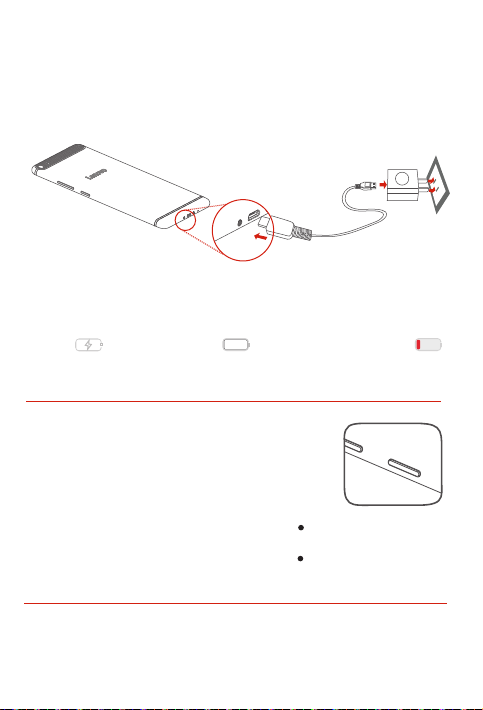
Lenovo PHAB Plus ﻡﺍﺩﺧﺗﺳﺍ ءﺩﺑ
.ﺯﺎﻬﺟﻟﺍ ﻡﺍﺩﺧﺗﺳﺍ ﻝﺑﻗ ﺔﻳﺭﺎﻁﺑﻟﺍ ﻥﺣﺷ ﻰﻟﺇ ﺝﺎﺗﺣﺗ ﺩﻗ
.ﺢﺿﻭﻣﻟﺍ ﻝﻛﺷﻟﺎﺑ ﺔﻳﺭﺎﻁﺑﻟﺍ ﻥﺣﺷﺍ
.ﻥﻳَﻧﻣﺿﻣﻟﺍ USB ﺔﻗﺎﻁ ﻝﻭﺣﻣﻭ ﻝﺑﻛﻟﺍ ﻡﺍﺩﺧﺗﺳﺎﺑ ﺔﻗﺎﻁ ﺫﺧﺄﻣﺑ ﺯﺎﻬﺟﻟﺍ ﻝﻳﺻﻭﺗﺑ ﻡﻗ
ﻥﺣﺷﻟﺍ ﺩﻳﻗ
ﻰﺗﺣ ﻝﻳﻐﺷﺗﻟﺍ ﻑﺎﻘﻳﺇ / ﻝﻳﻐﺷﺗﻟﺍ ﺭﺯ ﻰﻠﻋ ﺭﺍﺭﻣﺗﺳﺎﺑ ﻁﻐﺿﺃ ﻁﻐﺿﺍ :ﻝﻳﻐﺷﺗﻟﺍ
ﻊﺿﺑﻟ ﻝﻳﻐﺷﺗﻟﺍ ﻑﺎﻘﻳﺇ/ﻝﻳﻐﺷﺗﻟﺍ ﺭﺯ ﻰﻠﻋ ﺭﺍﺭﻣﺗﺳﺎﺑ ﻁﻐﺿﺍ :ﻝﻳﻐﺷﺗﻟﺍ ﻑﺎﻘﻳﺇ
10 ﺓﺩﻣﻟ ﻝﻳﻐﺷﺗﻟﺍ ﻑﺎﻘﻳﺇ / ﻝﻳﻐﺷﺗﻟﺍ ﺭﺯ ﻰﻠﻋ ﺭﺍﺭﻣﺗﺳﻻﺍ ﻊﻣ ﻁﻐﺿﺍ
ﻡﺛ ،ٍﻥﺍﻭﺛ ﻊﺿﺑﻟ ﻝﻳﻐﺷﺗﻟﺍ ﻑﺎﻘﻳﺇ/ﻝﻳﻐﺷﺗﻟﺍ ﺭﺯ ﻰﻠﻋ ﺭﺍﺭﻣﺗﺳﺎﺑ ﻁﻐﺿﺍ
ﻝﻣﺎﻛﻟﺎﺑ ﺔﻧﻭﺣﺷﻣ
.Lenovo ﺭﺎﻌﺷ ﺭﻬﻅﻳ
.ﻝﻳﻐﺷﺗﻟﺍ ﻑﺎﻘﻳﺇ ﻰﻠﻋ ﻁﻐﺿﺍ ﻡﺛ ،ٍﻥﺍﻭﺛ
:ﻝﻳﻐﺷﺗﻟﺍ ﺓﺩﺎﻋﺇ
.ﺎًﺑﻳﺭﻘﺗ ٍﻥﺍﻭﺛ
.ﻝﻳﻐﺷﺗﻟﺍ ﺓﺩﺎﻋﺇ ﻰﻠﻋ ﻁﻐﺿﺍ
.ﺕﻗﻭﻟﺍ ﺱﻔﻧ ﻲﻓ ﺕﻭﺻﻟﺍ ﻯﻭﺗﺳﻣ ﺽﻔﺧ ﺭﺯﻭ ﻝﻳﻐﺷﺗﻟﺍ ﻑﺎﻘﻳﺇ/ﻝﻳﻐﺷﺗﻟﺍ ﺭﺯ ﻰﻠﻋ ﺭﺍﺭﻣﺗﺳﺎﺑ ﻁﻐﺿﺍ
3
ﺽﻔﺧﻧﻣ ﺔﻳﺭﺎﻁﺑﻟﺍ ﻥﺣﺷ ﻯﻭﺗﺳﻣ
ﻝﻳﻐﺷﺗﻟﺍ ﻑﺎﻘﻳﺇ/ﻝﻳﻐﺷﺗﻟﺍ
ﺔﺷﺎﺷ ﺕﺎﻁﻘﻟ ﺫﺧﺃ
Page 20
Lenovo PHAB Plus ﺯﺎﻬﺟ ﺭﻳﺿﺣﺗ
.ﻝﻭﻣﺣﻣﻟﺍ ﺔﻣﺩﺧ ﺭّﻓﻭﻣ ﻥﻣ Nano SIMﻭ Micro SIM ﺔﻗﺎﻁﺑ ﻝﺎﺧﺩﺇ ﻕﻳﺭﻁ ﻥﻋ ﺔﻳﻭﻠﺧﻟﺍ ﺕﺎﻣﺩﺧﻟﺍ ﻡﺍﺩﺧﺗﺳﺍ ﻥﻛﻣﻳ
ﺕﻗﻭﻟﺍ ﻲﻓ microSD ﻭﺃ Nano SIM ﺔﻗﺎﻁﺑ ﻝﺎﺧﺩﺇ ﻙﻧﻛﻣﻳ .ﻪﺳﻔﻧ ﺝﺭﺩﻟﺍ microSDﻭ Nano SIM ﺎﺗﻗﺎﻁﺑ ﻙﺭﺎﺷﺗﺗ
.ﺢّﺿﻭﻣ ﻭﻫ ﺎﻣﻛ microSD ﺔﻗﺎﻁﺑ ﻭﺃ Nano SIM ﺔﻗﺎﻁﺑ ﻭﺃ Micro SIM ﺔﻗﺎﻁﺑ ﺕّﺑﺛ
ﻭ Micro SIM ﺔﻗﺎﻁﺑ ﺝﺭﺩﻟ ﺔﺣﺗﻔﻟﺍ ﻲﻓ ﺯﺎﻬﺟﻟﺍ ﻊﻣ ﺓﺭﻓﻭﺗﻣﻟﺍ SIM ﺔﻗﺎﻁﺑ ﺝﺍﺭﺧﺇ ﺓﺍﺩﺃ ﺝﺍﺭﺩﺈﺑ ﻡﻗ
ﻭﺃ Nano SIM ﻭﺃ Micro SIM ﺔﻗﺎﻁﺑ ﻊﺿﻭ microSDﻭ Micro SIM ﺔﻗﺎﻁﺑ ﺝﺭﺩ ﺏﺣﺳﺍ
.ﺢﻳﺣﺻﻟﺍ ﻩﺎﺟﺗﻻﺎﺑ ﺝﺭﺩﻟﺍ ﻲﻓ microSD
.ﺔﺣﺗﻔﻟﺍ ﻲﻓ ﺔﺗﺑﺛﻣﻟﺍ microSD ﻭﺃ Nano SIM ﻭﺃ Micro SIM ﺔﻗﺎﻁﺑ ﻊﻣ ﺔﻳﺎﻧﻌﺑ ﺝﺭﺩﻟﺍ ﻝﺎﺧﺩﺇ ﺩِﻋﺃ
ﻭﺃ
microSD
ﺓﺭﻳﻐﺻﻟﺍ SIM
microSD
ﺔﻗﺎﻁﺑ
Micro SIM
ﺔﻗﺎﻁﺑ
ﺓﺭﻳﻐﺻﻟﺍ SIM
Nano SIM
microSD
Nano SIM
ﺔﻗﺎﻁﺑ
ﺓﺭﻳﻐﺻﻟﺍ SIM
ﺓﺭﻳﻐﺻﻟﺍ SIM
ﺔﻗﺎﻁﺑ
.Lenovo PHAB Plus ﺯﺎﻬﺟ ﻊﻣ Nano SIMﻭ Micro SIM ﺔﻗﺎﻁﺑ ﻥﻣ ّﻝﻛ ﻝﻣﻌﺗ
ﺔﻗﺎﻁﺑ ﻭﺃ ﺔﻟّﺩﻌﻣ ﺔﻗﺎﻁﺑ ﺝﺍﺭﺩﺇ ﻝﺎﺣ ﻲﻓ ﺔﺣﻳﺣﺻ ﺔﻘﻳﺭﻁﺑ ﺔﻗﺎﻁﺑﻟﺍ ﻊﺳﺗ ﻻ ﺩﻗ .ﻁﻘﻓ ﺔﻳﺳﺎﻳﻗ Nano SIM ﺔﻗﺎﻁﺑ ﻡﺩﺧﺗﺳﺍ
.ﻙﺯﺎﻬﺟﺑ ﻭﺃ ﺔﻗﺎﻁﺑﻟﺍ ﺔﺣﺗﻔﺑ ﺭﺭﺿﻟﺍ ﻕﺎﺣﻟﺇ ﻰﻟﺇ ﻙﻟﺫ ﻱﺩﺅﻳ ﺩﻗﻭ ،SIM ﺔﻗﺎﻁﺑ ﻝّﻭﺣﻣ ﻊﻣ Nano SIM
.microSD
.1 ﺓﻭﻁﺧﻟﺍ
.2 ﺓﻭﻁﺧﻟﺍ
.3 ﺓﻭﻁﺧﻟﺍ
.ﻪﺳﻔﻧ
2
Page 21
ﺭﺍﺩ ﺻﻹﺍ
(ﺕﻭﺻﻟﺍ) LTE
Lenovo PHAB Plus ﻝﻭﺣ ﺔﻣﺎﻋ ﺓﺭﻅﻧ
ﺯ ﺍﺭ ﻁ ﻟ ﺍ
Lenovo PB1-770M
5
ﺭﺷﺅﻣﻟﺍ ءﻭﺿ
ﻥﻭﻓﻭﺭﻛﻳﻣﻟﺍ
ﺕﻭﺻﻟﺍ ﻯﻭﺗﺳﻣ ﻥﻳﻳﻌﺗ ﺭﺯ
ﻥﻭﻓﻭﺭﻛﻳﻣ
ءﺎﺿﻭﺿﻠﻟ ﻡﻭﺎﻘﻣ
7
6
3
6
9
12
1
234
ﻝﺎﺑﻘﺗﺳﻻﺍ ﺯﺎﻬﺟ
ﺔﻗﺎﻁﺑﻟﺍ ﺔﺣﺗﻓ
ﻝﻳﻐﺷﺗﻟﺍ ﻑﺎﻘﻳﺇ/ﻝﻳﻐﺷﺗﻟﺍ ﺭﺯ
ﺵﻼﻓ ءﻭﺿ
1
ﻡﻣ 7,6
11101312
9
8
ﻡﻣ 186,6
ﻡﻣ 96,6
2
5
8
8
11
ﺔﻳﻣﺎﻣﻷﺍ ﺍﺭﻳﻣﺎﻛﻟﺍ
ﻥﺫﻷﺍ ﺔﻋﺎﻣﺳ ﺱﺑﻘﻣ
ﺭﻳﻐﺻ USB ﻝﺻﻭﻣ
ﺔﻳﻔﻠﺧﻟﺍ ﺍﺭﻳﻣﺎﻛﻟﺍ
ﺕﻭﺻﻟﺍ ﺕﺍﺭﺑﻛﻣ
1
4
7
10
13
Page 22

ﺔﻳﺑﺭﻌﻟﺍ
.Lenovo PH AB Plus ﻡﺍﺩﺧﺗﺳﺍ ﻝﺑﻗ ﺔﻗﺩﺑ ﻝﻳﻟﺩﻟﺍ ﺍﺫﻫ ﺃﺭ ﻗ ﺍ
Lenovo PHAB Plus ﻡﺍﺩﺧﺗﺳﺍ ﻝﺑﻗ ﺕﺎﻣﻭﻠﻌﻣﻟﺍ ﺃﺭﻗﺍ
ﺎﻫﺩﺎﻣﺗﻋﺍ ﻡﺗ ﺔﻘﻁﻧﻣ ﻭﺃ ﺔﻟﻭﺩ ﻱﻷ ﺔﻣﻼﺳﻟﺍ ﺭﻳﻳﺎﻌﻣﻭ ﻲﻛﻠﺳﻼﻟﺍ ﺩﺩﺭﺗﻟﺍ ﻊﻣ ﺔﻳﻛﻠﺳﻻ ﺕﻻﺎﺻﺗﺎﺑ ﺓﺩﻭﺯﻣﻟﺍ ﺓﺯﻬﺟﻷﺍ ﺯﺭُﻁ ﻕﻓﺍﻭﺗﺗ
ﺕﺎﺑﻠﻁﺗﻣ ﻊﻣ ﻕﻓﺍﻭﺗﻳ ﻪﻧﺈﻓ ،ﺔﻳﻧﻭﻔﻳﻠﺗﻟﺍ ﺕﻻﺎﺻﺗﻼﻟ ﻡﺩﻭﻣ ﻰﻠﻋ ﻱﻭﺗﺣﻳ ﻙﺟﺗﻧﻣ ﻥﺎﻛ ﺍﺫﺇ ،ﻙﻟﺫ ﻰﻠﻋ ﺓﻭﻼﻋ .ﺎﻬﺑ ﻲﻛﻠﺳﻼﻟﺍ ﻡﺍﺩﺧﺗﺳﻼﻟ
.ﻙﺑ ﺹﺎﺧﻟﺍ ﺯﺎﻬﺟﻟﺍ ﻲﻓ ﺔﻧﻣﺿﻣﻟﺍ ﺔﻳﻛﻠﺳﻼﻟﺍ ﺓﺯﻬﺟﻷﺍ ﻡﺍﺩﺧﺗﺳﺍ ﻝﺑﻗ ﻙﺗﻘﻁﻧﻣ ﻭﺃ ﻙﺩﻠﺑﺑ ﺹﺎﺧﻟﺍ ﻲﻣﻳﻅﻧﺗﻟﺍ ﺭﺎﻌﺷﻹﺍ ﺓءﺍﺭﻗ ﻥﻣ ﺩﻛﺄﺗ
.ﻩﺎﻧﺩﺃ "ﺕﺎﻋﻭﺑﻁﻣﻟﺍ ﻝﻳﺯﻧﺗ" ﻡﺳﻘﻟﺍ ﻊﺟﺍﺭ ،ﻲﻣﻳﻅﻧﺗﻟﺍ ﺭﺎﻌﺷﻹﺍ ﻥﻣ PDF ﺔﺧﺳﻧ ﻰﻠﻋ ﻝﻭﺻﺣﻠﻟ
ﻡﺍﺩﺧﺗﺳﺍ ﺔﻳﻔﻳﻛ ﺔﻓﺭﻌﻣﻟ .ﻙﻳﺩﻟ ﺔﻳﻛﻠﺳﻼﻟﺍ ﺔﻛﺑﺷﻟﺍ ﻝﻐﺷﻣﺑ ﻝﺎﺻﺗﻻﺍ ﻰﺟﺭﻳ ،ﺭﻳﺗﺍﻭﻔﻟﺍﻭ ﺔﻛﺑﺷﻟﺍ ﺔﻣﺩﺧ ﻝﻭﺣ ﻡﻋﺩﻟﺍ ﻰﻠﻋ ﻝﻭﺻﺣﻠﻟ
.http://support.lenovo.com ﻰﻟﺇ ﻝﻘﺗﻧﺍ ،ﺔﻳﻧﻘﺗﻟﺍ ﻪﺗﺎﻔﺻﺍﻭﻣ ﺽﺭﻋﻭ ﻙﺯﺎﻬﺟ
ﻝﻘﺗﻧﺍ ،ﻙﺯﺎﻬﺟﻟ ﺕﺎﻋﻭﺑﻁﻣﻟﺍ ﻝﻳﺯﻧﺗﻟ .http://support.lenovo.com ﻊﻗﻭﻣﻟﺍ ﻰﻠﻋ ﻙﺗﺎﻋﻭﺑﻁﻣﻟ ﺔﻳﻧﻭﺭﺗﻛﻟﻹﺍ ﺕﺍﺭﺍﺩﺻﻹﺍ ﺭﻓﻭﺗﺗ
.ﺔﺷﺎﺷﻟﺍ ﻰﻠﻋ ﺭﻬﻅﺗ ﻲﺗﻟﺍ ﺕﺍﺩﺎﺷﺭﻹﺍ ﻊﺑﺗﺍﻭ http://support.lenovo.com ﻊﻗﻭﻣﻟﺍ ﻰﻟﺇ
:ﻊﻗﻭﻣﻟﺍ ﻰﻟﺇ ﻝﻘﺗﻧﺍ ،ﻡﺩﺧﺗﺳﻣﻟﺍ ﻝﻳﻟﺩ ﻰﻟﺇ ﻝﻭﺻﻭﻠﻟ .ﻙﺑ ﺹﺎﺧﻟﺍ ﺯﺎﻬﺟﻟﺍ ﻝﻭﺣ ﺔﻳﻠﻳﺻﻔﺗ ﺕﺎﻣﻭﻠﻌﻣ ﻰﻠﻋ ﻡﺩﺧﺗﺳﻣﻟﺍ ﻝﻳﻟﺩ ﻱﻭﺗﺣﻳ
.ﺔﺷﺎﺷﻟﺍ ﻰﻠﻋ ﺭﻬﻅﺗ ﻲﺗﻟﺍ ﺕﺍﺩﺎﺷﺭﻹﺍ ﻊﺑﺗﺍﻭ http://support.lenovo.com
ﻯﺭﺧﺃ ﻥﺍﺩﻠﺑ ﻭﺃ ،ﺓﺩﺣﺗﻣﻟﺍ ﺕﺎﻳﻻﻭﻟﺍ ﻲﻓ Lenovo ﺔﻛﺭﺷﻟ ﻥﺎﺗﻛﻭﻠﻣﻣ ﻥﺎﺗﻳﺭﺎﺟﺗ ﻥﺎﺗﻣﻼﻋ ﺎﻣﻫ Lenovo ﺭﺎﻌﺷﻭ Lenovo ﻥﺇ
.ﻥﻳﺭﺧﻶﻟ ﺔﻣﺩﺧ ﺕﺎﻣﻼﻋ ﻭﺃ ﺔﻳﺭﺎﺟﺗ ﺕﺎﻣﻼﻋ ﻯﺭﺧﻷﺍ ﺕﺎﻣﺩﺧﻟﺍ ﻭﺃ ﺕﺎﺟﺗﻧﻣﻟﺍ ﻭﺃ ﺕﺎﻛﺭﺷﻟﺍ ءﺎﻣﺳﺃ ﻥﻭﻛﺗ ﺩﻗ
ﺕﺎﻣﻼﻋ ﺝﻭﺩﺯﻣﻟﺍ D ﻑﺭﺣ ﺯﻣﺭﻭ ،Dolby Atmosﻭ ،Dolby ﺩﻌﺗ .Dolby Laboratories ﻥﻣ ﺹﻳﺧﺭﺗﺑ ﻊّﻧﺻﻣ
ﻭﺃ ﻡﺍﺩﺧﺗﺳﻻﺍ ﻥﺈﻓ ،"GSA" ﺔﻣﺎﻌﻟﺍ ﺕﺎﻣﺩﺧﻟﺍ ﺓﺭﺍﺩﺇ ﺩﻘﻌﻟ ﺎًﻘﻓﻭ ﺞﻣﺍﺭﺑﻟﺍ ﻭﺃ ﺕﺎﻧﺎﻳﺑﻟﺍ ﻡﻳﺩﻘﺗ ﻡﺗ ﺍﺫﺇ :ﺓﺩﻳﻘﻣﻟﺍﻭ ﺓﺩﻭﺩﺣﻣﻟﺍ ﻕﻭﻘﺣﻟﺍ ﺭﺎﻌﺷﺇ
.GS-35F-05925 ﻡﻗﺭ ﺩﻘﻌﻟﺍ ﻲﻓ ﺔﺣﺿﻭﻣﻟﺍ ﺩﻭﻳﻘﻠﻟ ﻊﺿﺧﻳ ﻑﺷﻛﻟﺍ ﻭﺃ ﺭﺷﻧﻟﺍ
ًﻻﻭﺃ ﺔﻳﻣﻳﻅﻧﺗﻟﺍ ﺕﺎﻣﻭﻠﻌﻣﻟﺍ ﺃﺭﻗﺍ
.ﻙﺗﻟﻭﺩ ﻲﻓ ﺔﻳﻧﻭﻔﻳﻠﺗﻟﺍ ﺕﺎﻛﺑﺷﻟﺎﺑ ﺔﺻﺎﺧﻟﺍ ﻝﺎﺻﺗﻻﺍ
ﻡﻋﺩﻟﺍ ﻰﻠﻋ ﻝﻭﺻﺣﻟﺍ
ﺕﺎﻋﻭﺑﻁﻣﻟﺍ ﻝﻳﺯﻧﺗ
ﻡﺩﺧﺗﺳﻣﻟﺍ ﻝﻳﻟﺩ ﻰﻟﺇ ﻝﻭﺻﻭﻟﺍ
ﺔﻳﻧﻭﻧﺎﻗ ﺕﺎﻅﺣﻼﻣ
.ﺎًﻌﻣ ﺎﻣﻬﻳﻓ ﻭﺃ
.Dolby Laboratories ﺔﻛﺭﺷﺑ ﺔﺻﺎﺧ ﺔﻳﺭﺎﺟﺗ
Page 23

ﺕﺎﻳﻭﺗﺣﻣﻟﺍ
1........................................................Lenovo PHAB Plus ﻝﻭﺣ ﺔﻣﺎﻋ ﺓﺭﻅﻧ
2...........................................................Lenovo PHAB Plus ﺯﺎﻬﺟ ﺭﻳﺿﺣﺗ
3.............................................................Lenovo PHAB Plus ﻡﺍﺩﺧﺗﺳﺍ ءﺩﺑ
4.............................................................ﻡﺍﺩﺧﺗﺳﻻﺍﻭ ﻥﺎﻣﻷﺍ ﻝﻭﺣ ﺔﻣﺎﻫ ﺕﺎﻣﻭﻠﻌﻣ
5...................................................................ﻲﺑﻭﺭﻭﻷﺍ ﺩﺎﺣﺗﻻﺍ ﻊﻣ ﻕﻓﺍﻭﺗﻟﺍ ﻥﺎﻳﺑ
5..................(SAR ﺩﺩﺣﻣﻟﺍ ﺹﺎﺻﺗﻣﻻﺍ ﻝﺩﻌﻣ) RF ﺔﻳﻛﻠﺳﻼﻟﺍ ﺕﺍﺩﺩﺭﺗﻠﻟ ﺽﺭﻌﺗﻟﺍ ﺕﺎﻣﻭﻠﻌﻣ
5..............................................................................ﻡﻋﺩﻟﺍﻭ ﺔﻣﺩﺧﻟﺍ ﺕﺎﻣﻭﻠﻌﻣ
6.....................................................................................ﻥﺎﻣﺿﻟﺍ ﺕﺎﻣﻭﻠﻌﻣ
8.................................ﺕﺎﻳﺎﻔﻧﻟﺍ ﻥﻣ ﺹﻠﺧﺗﻟﺍﻭ ﺭﻳﻭﺩﺗﻟﺍ ﺓﺩﺎﻋﺇ ﺕﺎﻣﻭﻠﻌﻣﻭ ﺔﻳﺋﻳﺑﻟﺍ ﺕﺎﻣﻭﻠﻌﻣﻟﺍ
Page 24
Lenovo PHAB Plus
ءﺩﺑﻭ ﻥﺎﻣﺿﻟﺍﻭ ﺔﻣﻼﺳﻟﺍ ﻝﻳﻟﺩ
ﻊﻳﺭﺳﻟﺍ ﻝﻳﻐﺷﺗﻟﺍ
Lenovo PB1-770M
© Copyri ght Leno vo 2015.
.Le novo 2 015 ﺔﻛﺭﺷﻟ ﺔﻅﻭ ﻔ ﺣ ﻣ © ﺭﺷﻧﻟﺍ ﻕﻭﻘﺣ
V1.0 20150610
11442688-00
Printed in China
 Loading...