

Page 1

Lenovo A6600 PLUS
Quick Start Guide
Petunjuk Singkat Penggunaan
Lenovo A6600d40
No. Tanda Pendaftaran: LENOVO1.07532.0716
Dirakit oleh:
PT Tridharma Kencana
Serang-Indonesia
Untuk PT Lenovo Indonesia
Wisma Kota BNI 46, 19 Floor, Suite 19-05
Jl. Jend Sudirman Kav.1
Jakarta Pusat 10220 Indonesia
TEL: +62-21 30021000, FAX: +62 21 30021098/99
English/Bahasa Indonesia
Page 2

English
Read this guide carefully before using your smartphone.
Reading first — regulatory information
Be sure to read the Regulatory Notice for your country or region
before using the wireless devices contained in your Lenovo Mobile
Phone. To obtain a PDF version of the Regulatory Notice, see the
“Downloading publications” section. Some regulatory information is
also available in Settings > About phone > Regulatory information
on your smartphone.
Getting support
To get support on network service and billing, contact your wireless
network operator. To learn how to use your smartphone and view its
technical specifications, go to http://support.lenovo.com.
Downloading publications
To obtain the latest smartphone manuals, go to:
http://support.lenovo.com
Accessing your User Guide
Your User Guide contains detailed information about your
smartphone. To access your User Guide, go to
http://support.lenovo.com and follow the instructions on the screen.
Legal notices
Lenovo and the Lenovo logo are trademarks of Lenovo in the United
States, other countries, or both.
Other company, product, or service names may be trademarks or
service marks of others.
Page 3

Contents
First glance......................................................................... 1
Preparing your smartphone ................................................2
Charging the battery...........................................................3
Important safety and handling information ..........................4
Service, support, and warranty information......................... 6
Recycling and environmental information ............................7
Specific Absorption Rate information ..................................9
Page 4
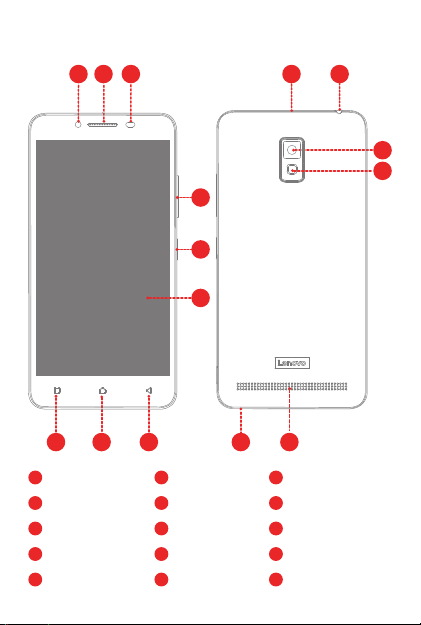
First glance
231
10 11
4
5
6
789
1
Front-facing camera Light/Proximity sensor
4
Volume buttons
7
Back button
10
Micro USB connector
13 15
Flash
2
Receiver
5
8
11
Headset connector
14
1
1415
3
Touch screenOn/Off button
6
9
Multitask buttonHome button
12
Rear-facing camera
MicrophoneSpeaker
12
13
Page 5
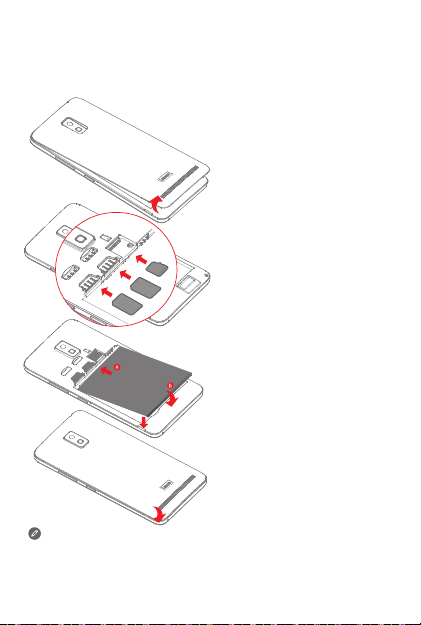
Preparing your smartphone
You must insert the Micro-SIM card provided by your carrier to use
cellular services. Set up your smartphone as shown.
Step 1. Open the back cover.
Step 2. Insert the Micro-SIM
cards and the microSD
SD
SIM2
SIM1
SIM2
SIM1
SIM2
SIM1
Always turn off your smartphone first before you insert or remove
a Micro-SIM card. Insert or remove a Micro-SIM card with your
smartphone on may damage your Micro-SIM card or smartphone
permanently.
card.
Tip: Insert the Micro-SIM card
into SIM1 slot and
Micro-SIM card into SIM2
slot.
Step 3. Install the battery.
a. Align the battery
connectors on the battery
with the pins in the battery
compartment.
b. Push the battery down
into place.
Step 4. Install the back cover.
2
Page 6
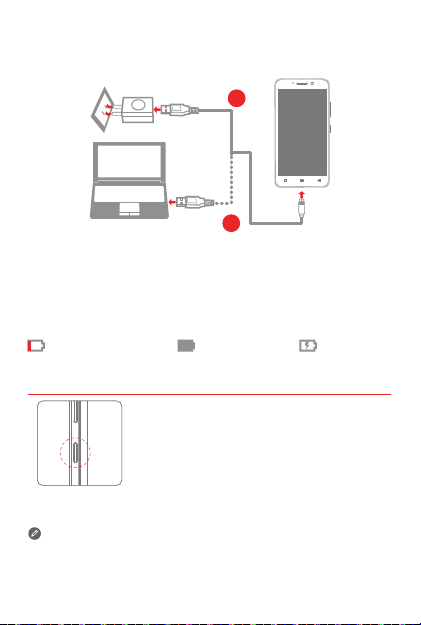
Charging the battery
Charge the battery as shown.
1
2
Method 1. Connect your smartphone to a power outlet using the
Method 2. Connect your smartphone to a computer using the cable
Turning on or turning off your smartphone
cable and USB power adapter that come with your
smartphone.
that comes with your smartphone.
Low battery power
Turn on: Press and hold the On/Off button until
the Lenovo logo appears.
Turn off: Press and hold the On/Off button for
a few seconds, then tap Power off.
Your smartphone has a rechargeable battery. For more information
about battery safety, see the “Rechargeable battery notice” section.
3
ChargingFully charged
Page 7

Important safety and handling information
This section contains important safety and handling information for
Lenovo smartphones. Additional safety and handling information is
provided in the User Guide. See the “Accessing your User Guide”
section for details.
Operating temperature
Use the Lenovo Phone only in the temperature range of -10°C (14 °F)
— 35°C (95 °F) to avoid damage.
Plastic bag notice
DANGER: Plastic bags can be dangerous. Keep plastic bags away
from babies and children to avoid danger of suffocation.
General battery notice
The original batteries supplied with your product have been tested for
compatibility and should only be replaced with approved parts. Risk of
explosion if the battery is replaced with an incorrect type. Dispose of
used batteries according to the instructions.
Rechargeable battery notice
CAUTION: Risk of explosion if the battery is replaced with an
incorrect type.
When replacing the lithium battery, use only the same or an equivalent
type that is recommended by the manufacturer. The battery contains
lithium and can explode if not properly used, handled, or disposed of.
Dispose of used batteries according to the instructions.
Do not:
● Throw or immerse into water
● Heat to more than 100°C (212 °F)
● Repair or disassemble
Built-in rechargeable battery notice
CAUTION: Do not attempt to replace the internal rechargeable
lithium ion battery. Contact Lenovo Support for factory replacement.
4
Page 8
Charging
Lenovo, and its affiliates are not responsible for the performance or
safety of products not manufactured or approved by Lenovo, or its
affiliates. Use only approved Lenovo ac adapters and batteries.
Adapter shall be installed near the equipment and shall be easily
accessible.
Preventing hearing damage
To prevent possible hearing damage when using headsets, earphones,
or earbuds with this device, do not listen at high volume levels for long
periods.
Disposing according to local laws and regulations
When the Lenovo Phone reaches the end of its useful life, do not
crush, incinerate, immerse in water, or dispose of the Lenovo Phone
in any manner contrary to local laws and regulations. Some internal
parts contain substances that can explode, leak, or have an adverse
environmental effect if disposed of incorrectly. See “Recycling and
environmental information” for additional information.
5
Page 9

Service, support, and warranty information
The following information describes the technical support that is
available for your product, during the warranty period or throughout
the life of your product. Refer to the Lenovo Limited Warranty for a full
explanation of Lenovo warranty terms.
Online technical support
Online technical support is available during the lifetime of a product at:
http://www.lenovo.com/support
Telephone technical support
Where applicable, you can get help and information from the Customer
Support Center by telephone. Before contacting a Lenovo technical
support representative, please have the following information available:
model and serial number, the exact wording of any error message,
and a description of the problem.
Your technical support representative might want to walk you through
the problem while you are at your phone during the call.
Worldwide Lenovo Support telephone list
IMPORTANT: Telephone numbers are subject to change without
notice. The most up-to-date telephone list for the Customer
Support Center is always available at:
http://support.lenovo.com/supportphonelist
The Customer Support Center phone number is subject to change.
For the latest phone number, go to the e-support website. If the
telephone number for your country or region is not listed, contact
your Lenovo reseller or Lenovo marketing representative.
Lenovo Limited Warranty (LLW) notice
Read the full LLW at http://support.lenovo.com/smartphone-llw.
You can view the LLW in a number of languages from this Web site.
If you cannot view the LLW either from the Web site or from your
phone, contact your local Lenovo office or reseller to obtain a printed
version of the full LLW.
IMPORTANT: Lenovo Smartphone Products do not have
International Warranty Services.
6
Page 10

Recycling and environmental information
General recycling statement
Lenovo encourages owners of information technology (IT) equipment
to responsibly recycle their equipment when it is no longer needed.
Lenovo offers a variety of programs and services to assist equipment
owners in recycling their IT products. For information on recycling
Lenovo products, go to http://www.lenovo.com/recycling.
Important battery and WEEE information
Batteries and electrical and electronic equipment marked
with the symbol of a crossed-out wheeled bin may not be
disposed as unsorted municipal waste. Batteries and waste
of electrical and electronic equipment (WEEE) shall be
treated separately using the collection framework available
to customers for the return, recycling, and treatment of
batteries and WEEE. When possible, remove and isolate
batteries from WEEE prior to placing WEEE in the waste
collection stream. Batteries are to be collected separately
using the framework available for the return, recycling, and
treatment of batteries and accumulators.
Country-specific information is available at:
http://www.lenovo.com/recycling
Recycling information for India
Recycling and disposal information for India is available at:
http://www.lenovo.com/social_responsibility/us/en/sustainability/ptb_india.html
Restriction of Hazardous Substances Directive (RoHS)
India
RoHS compliant as per E-Waste (Management & Handling) Rules, 2011.
Vietnam
Lenovo products sold in Vietnam, on or after September 23, 2011,
meet the requirements of the Vietnam Circular 30/2011/TT-BCT
(“Vietnam RoHS”).
7
Page 11

Ukraine
Цим підтверджуємо, що продукція Леново відповідає вимогам
нормативних актів України, які обмежують вміст небезпечних
речовин
Turkey
The Lenovo product meets the requirements of the Republic of Turkey
Directive on the Restriction of the Use of Certain Hazardous
Substances in Waste Electrical and Electronic Equipment (WEEE).
Türkiye AEEE Yönetmeliğine Uygunluk Beyanı
Bu Lenovo ürünü, T.C. Çevre ve Orman Bakanlığı’nın “Atık Elektrikli ve
Elektronik Eşya Bazı Zararlı Maddelerin Kullanımının Sınırlandırılmasına
Dair Yönetmelik (AEEE)” direktierine uygundur.
AEEE Yönetmeliğine Uygundur.
8
Page 12

Specific Absorption Rate information
This mobile device meets the government’s requirements for exposure
to radio waves. Your mobile device is a radio transmitter and receiver.
The exposure standard for mobile devices employs a unit of
measurement known as the Specific Absorption Rate, or SAR.
The SAR limit adopted by Europe is 2.0 W/kg averaged over 10 grams
of tissue. Tests for SAR are conducted using standard operating
positions with the device transmitting at its highest certified power
level in all tested frequency bands.
The highest SAR value for your Lenovo device when tested for use at
the head and body is outlined as follows:
Position The highest SAR value Regulation
Head
Body-worn
During use, the actual SAR values for this device are usually well
below the values stated above. This is because, for purposes of
system efficiency and to minimize interference on the network, the
operating power of your mobile devices is automatically decreased
when full power is not needed for the call. The lower the power output
of the device, the lower its SAR value.
To meet RF exposure guidelines during body-worn operation, the
device must be positioned at least 0.5 cm away from your body.
0.405
1.66
Europe 10g SAR Limit (2.0 W/kg)
Europe 10g SAR Limit (2.0 W/kg)
9
Page 13

Bahasa Indonesia
Baca panduan ini dengan saksama sebelum menggunakan telepon
pintar Anda.
Baca terlebih dulu — informasi peraturan
Pastikan Anda membaca Pemberitahuan Peraturan untuk negara atau
kawasan Anda sebelum menggunakan perangkat nirkabel yang ada di
Telepon Seluler Lenovo Anda. Untuk mendapatkan Pemberitahuan
Peraturan versi PDF, lihat bagian “Mengunduh publikasi”. Beberapa
informasi peraturan juga tersedia di Pengaturan > Tentang telepon >
Informasi Peraturan pada telepon pintar Anda.
Mendapatkan dukungan
Untuk mendapatkan dukungan tentang penagihan dan layanan
jaringan, hubungi operator jaringan nirkabel Anda. Untuk mempelajari
cara menggunakan telepon pintar Anda dan melihat spesifikasi
teknisnya, buka http://support.lenovo.com.
Mengunduh publikasi
Untuk mendapatkan manual telepon pintar terbaru, buka:
http://support.lenovo.com
Mengakses Panduan Pengguna Anda
Panduan Pengguna Anda berisi informasi terperinci tentang telepon
pintar Anda. Untuk mengakses Panduan Pengguna, buka
http://support.lenovo.com dan ikuti instruksi di layar.
Pemberitahuan hukum
Lenovo dan logo Lenovo adalah merek dagang dari Lenovo di
Amerika Serikat, negara lain, atau keduanya.
Perusahaan, produk, atau nama layanan lainnya bisa jadi merupakan
merek dagang atau merek layanan dari pihak lain.
Page 14

Daftar Isi
Tampilan sekilas .................................................................1
Menyiapkan telepon pintar Anda.........................................2
Mengisi daya baterai........................................................... 3
Informasi penting tentang keamanan dan penanganan .......4
Informasi servis, dukungan, dan garansi .............................6
Informasi daur ulang dan lingkungan ..................................7
Informasi Tingkat Penyerapan Spesifik................................ 9
Page 15

Tampilan sekilas
231
10 11
4
5
6
789
1
Kamera depan Sensor Cahaya/
4
Tombol volume
7
Tombol kembali
10
Konektor USB Mikro
13 15
Lampu kilat
2
Unit penerima
5
8
11
Konektor headset
14
1
1415
3
Proksimitas
Layar sentuhTombol On/Off
6
9
Tombol MultitaskTombol Home
12
Kamera belakang
MikrofonSpeaker
12
13
Page 16

Menyiapkan telepon pintar Anda
Anda harus memasukkan kartu SIM Mikro yang disediakan oleh
operator Anda untuk menggunakan layanan seluler. Siapkan telepon
pintar Anda seperti yang ditunjukkan.
Langkah 1. Buka penutup
belakang.
Langkah 2. Masukkan kartu SIM
SD
SIM2
SIM1
SIM1
SIM2
SIM1
Tips: Sisipkan kartu SIM
SIM2
Langkah 3. Pasang baterai.
a. Sejajarkan konektor
b. Tekan baterai masuk
Langkah 4. Pasang penutup
Selalu matikan telepon pintar Anda terlebih dahulu sebelum memasukkan
atau melepaskan kartu SIM Mikro. Memasukkan atau melepaskan kartu
SIM Mikro dengan telepon pintar masih menyala dapat merusak kartu
SIM Mikro atau telepon pintar secara permanen.
Mikro dan kartu
microSD.
Mikro ke dalam slot
SIM1 dan kartu SIM
Mikro ke dalam slot
SIM2.
baterai pada baterai
dengan pin di ruang
baterai.
ke tempatnya.
belakang.
2
Page 17

Mengisi daya baterai
Isi baterai seperti yang ditunjukkan pada gambar.
1
2
Metode 1. Hubungkan telepon pintar ke outlet daya menggunakan
Metode 2. Hubungkan telepon pintar ke komputer menggunakan
Menghidupkan atau mematikan telepon pintar Anda
kabel dan adaptor daya USB yang disertakan dengan
telepon pintar Anda.
kabel yang disertakan dengan telepon pintar Anda.
Daya baterai rendah Mengisi dayaTerisi penuh
Menyalakan: Tekan dan tahan tombol On/Off
hingga logo Lenovo muncul.
Mematikan: Tekan dan tahan tombol On/Off
selama beberapa detik, lalu ketuk Matikan.
Telepon pintar Anda memiliki baterai yang dapat diisi ulang. Untuk
informasi selengkapnya tentang keamanan baterai Anda, lihat bagian
“Pemberitahuan tentang baterai isi ulang”.
3
Page 18

Informasi penting tentang keamanan dan
penanganan
Bagian ini berisi informasi keamanan dan penanganan penting untuk
telepon pintar Lenovo. Informasi tambahan tentang keamanan dan
penanganan diberikan di Panduan Pengguna. Lihat “Mengakses
Panduan Pengguna” untuk detailnya.
Suhu pengoperasian
Gunakan Telepon Lenovo hanya pada kisaran suhu -10°C (14 °F) —
35°C (95 °F) untuk menghindari kerusakan.
Pemberitahuan tentang kantung plastik
BAHAYA: Kantung plastik dapat berbahaya. Jauhkan kantung plastik
dari bayi atau anak-anak untuk menghindari bahaya tercekik.
Pemberitahuan umum tentang baterai
Baterai asli yang disediakan bersama produk Anda telah melalui uji
kompatibilitas dan hanya boleh diganti dengan komponen yang telah
disetujui. Risiko ledakan jika baterai diganti dengan tipe yang tidak
benar. Buang baterai bekas sesuai dengan petunjuk.
Pemberitahuan tentang baterai isi ulang
HATI-HATI: Risiko ledakan jika baterai diganti dengan tipe yang
tidak benar.
Saat mengganti baterai litium, gunakan hanya tipe yang sama atau
setara yang direkomendasikan oleh pabrik. Baterai mengandung litium
dan dapat meledak jika digunakan, ditangani, atau dibuang dengan
tidak benar.
Buang baterai bekas sesuai dengan petunjuk.
Jangan:
● Buang atau rendam ke dalam air
● Panaskan dengan suhu lebih dari 100°C (212 °F)
● Perbaiki atau bongkar
Pemberitahuan tentang baterai isi ulang terintegrasi
HATI-HATI: Jangan coba-coba untuk mengganti baterai ion lithium
isi ulang internal. Hubungi Dukungan Lenovo untuk penggantian
oleh pabrik.
4
Page 19

Mengisi daya
Lenovo, dan afiliasinya tidak bertanggung jawab terhadap performa
atau keamanan produk yang tidak dibuat atau disetujui oleh Lenovo,
atau afiliasinya. Gunakan hanya adaptor ac dan baterai yang
direkomendasikan oleh Lenovo. Adaptor harus dipasang di dekat
peralatan dan harus mudah diakses.
Pencegahan gangguan pendengaran
Untuk mencegah kerusakan pendengaran ketika menggunakan
headset, earphone, atau earbud dengan perangkat ini, jangan
dengarkan pada level volume tinggi untuk periode waktu yang lama.
Membuang sesuai hukum dan perundang-undangan setempat
Ketika Telepon Lenovo mencapai akhir masa pakainya, jangan
menghancurkan, membakar, membenamkan dalam air, atau
membuang Telepon Lenovo tersebut dengan cara yang bertentangan
dengan undang-undang dan peraturan setempat. Beberapa bagian
internal mengandung substansi yang dapat meledak, bocor, atau
berdampak merugikan pada lingkungan jika dibuang dengan tidak
benar. Lihat “Informasi daur ulang dan lingkungan” untuk informasi
tambahan.
5
Page 20

Informasi servis, dukungan, dan garansi
Informasi berikut ini menjelaskan dukungan teknis yang tersedia untuk
produk Anda selama masa garansi atau sepanjang masa pakai
produk Anda. Untuk penjelasan lengkap mengenai ketentuan garansi
Lenovo, lihat Lenovo Limited Warranty (Garansi Terbatas Lenovo).
Dukungan teknis online
Dukungan teknis online selalu tersedia selama masa pakai produk di:
http://www.lenovo.com/support
Dukungan teknis melalui telepon
Anda dapat memperoleh bantuan dan informasi dari Pusat Dukungan
Pelanggan melalui telepon. Sebelum menghubungi staf perwakilan
dukungan teknis Lenovo, persiapkan informasi berikut ini: model dan
nomor seri, seluruh kata seperti yang ditampilkan di pesan kesalahan,
dan uraian masalah.
Staf perwakilan dukungan teknis mungkin akan memandu Anda
mengatasi masalah tersebut lewat telepon selama panggilan
berlangsung.
Daftar nomor telepon Dukungan Lenovo di seluruh dunia
PENTING: Nomor telepon dapat berubah tanpa pemberitahuan.
Daftar telepon paling terkini untuk Pusat Dukungan Pelanggan
selalu tersedia di: http://support.lenovo.com/supportphonelist
Nomor telepon Pusat Dukungan Pelanggan dapat berubah. Untuk
nomor telepon terbaru, kunjungi situs web e-dukungan. Jika tidak ada
nomor telepon untuk negara atau wilayah Anda, hubungi dealer
Lenovo atau perwakilan pemasaran Lenovo.
Pemberitahuan Garansi Terbatas Lenovo (LLW)
Bacalah Garansi Terbatas Lenovo (LLW) selengkapnya di
http://support.lenovo.com/smartphone-llw. Anda dapat melihat LLW
dalam sejumlah bahasa dari situs Web ini. Jika Anda tidak bisa
melihat LLW baik dari situs Web atau dari ponsel, hubungi kantor
Lenovo lokal atau peritel Anda untuk mendapatkan versi cetak LLW
yang lengkap.
PENTING: Produk Ponsel Cerdas Lenovo tidak memiliki Layanan
Garansi Internasional.
6
Page 21

Informasi daur ulang dan lingkungan
Pernyataan daur ulang umum Lenovo
Lenovo mendorong pemilik peralatan teknologi informasi (TI) untuk
mendaur ulang peralatan mereka secara bertanggung jawab jika
peralatan tersebut itu tidak lagi diperlukan. Lenovo menawarkan
beragam program dan layanan untuk membantu pemilik peralatan
mendaur ulang produk TI mereka. Untuk informasi tentang mendaur
ulang produk Lenovo, kunjungi http://www.lenovo.com/recycling.
Informasi penting mengenai baterai dan WEEE
Baterai dan peralatan listrik dan elektronik yang ditandai
dengan simbol tempat sampah beroda yang disilang tidak
boleh dibuang sebagai limbah rumah tangga yang tidak
disortir. Baterai dan limbah peralatan listrik dan elektronik
(WEEE) harus diperlakukan secara terpisah menggunakan
kerangka kerja pengumpulan yang tersedia bagi pelanggan
untuk pengembalian, daur ulang, dan penanganan WEEE.
Bila memungkinkan, lepaskan dan pisahkan baterai dari
WEEE sebelum menempatkan WEEE di tempat
pengumpulan limbah. Baterai akan dikumpulkan secara
terpisah menggunakan kerangka kerja yang tersedia untuk
pengembalian, daur ulang, dan penanganan baterai dan aki.
Informasi spesifik negara tersedia di:
http://www.lenovo.com/recycling
Informasi Daur Ulang untuk India
Informasi daur ulang dan pembuangan untuk India tersedia di:
http://www.lenovo.com/social_responsibility/us/en/sustainability/ptb_india.html
Petunjuk Pembatasan Bahan Berbahaya (RoHS)
India
RoHS compliant as per E-Waste (Management & Handling) Rules, 2011.
Vietnam
Produk Lenovo yang dijual di Vietnam, pada atau setelah 23
September 2011, memenuhi persyaratan dari Vietnam Circular
30/2011/TT-BCT (“Vietnam RoHS”).
7
Page 22

Ukraina
Цим підтверджуємо, що продукція Леново відповідає вимогам
нормативних актів України, які обмежують вміст небезпечних
речовин
Turki
Produk Lenovo telah memenuhi persyaratan Peraturan dari Republik
Turki tentang Batasan Penggunaan Zat Berbahaya Tertentu pada
Limbah Peralatan Listrik dan Elektronik (WEEE).
Türkiye AEEE Yönetmeliğine Uygunluk Beyanı
Bu Lenovo ürünü, T.C. Çevre ve Orman Bakanlığı’nın “Atık Elektrikli ve
Elektronik Eşya Bazı Zararlı Maddelerin Kullanımının Sınırlandırılmasına
Dair Yönetmelik (AEEE)” direktierine uygundur.
AEEE Yönetmeliğine Uygundur.
8
Page 23

Informasi Tingkat Penyerapan Spesifik
Perangkat seluler ini memenuhi persyaratan pemerintah tentang
paparan gelombang radio. Perangkat seluler Anda adalah pemancar
dan penerima radio. Standar paparan untuk perangkat seluler
memakai satuan ukuran yang disebut dengan Tingkat Penyerapan
Spesifik (Specific Absorption Rate), atau SAR.
Batas SAR yang diadopsi oleh Eropa adalah sebesar 2,0 W/kg
rata-rata terhadap 10 gram jaringan tubuh. Pengujian SAR dilakukan
menggunakan posisi pengoperasian standar dan perangkat
memancarkan tingkat daya tertinggi sesuai yang tertera dalam semua
pita frekuensi yang diuji.
Nilai SAR tertinggi untuk perangkat Lenovo ketika diuji untuk
penggunaan di kepala dan tubuh diuraikan di bawah ini:
Posisi Nilai SAR tertinggi Peraturan
Kepala
Menempel
di badan
Selama penggunaan, nilai SAR sebenarnya untuk perangkat ini
biasanya di bawah nilai yang dinyatakan di atas. Ini karena, untuk
keperluan efisiensi sistem dan meminimalkan interferensi di jaringan,
daya operasi perangkat seluler Anda otomatis dikurangi jika daya
penuh tidak diperlukan untuk panggilan. Semakin rendah output
daya perangkat, semakin rendah nilai SAR-nya.
Untuk memenuhi panduan paparan RF selama digunakan di tubuh,
perangkat harus diposisikan dengan jarak 0,5 cm dari tubuh Anda.
0,405
1,66
Batas SAR Eropa 10g (2,0 W/kg)
Batas SAR Eropa 10g (2,0 W/kg)
9
Page 24

© Copyright Lenovo 2016.
© Hak Cipta Lenovo 2016.
V1.0_20160715
70119102
 Loading...