

Page 1

Thank you for purchasing the Lencarta AtomPower
The AtomPower power pack is designed specifically for providing power to the
Atom 180 & Atom 360 high performance flash guns.
And it can do much more, it can also power, or recharge, other flashguns and
devices such as mobile phones, ipods, ipads etc
Page 2
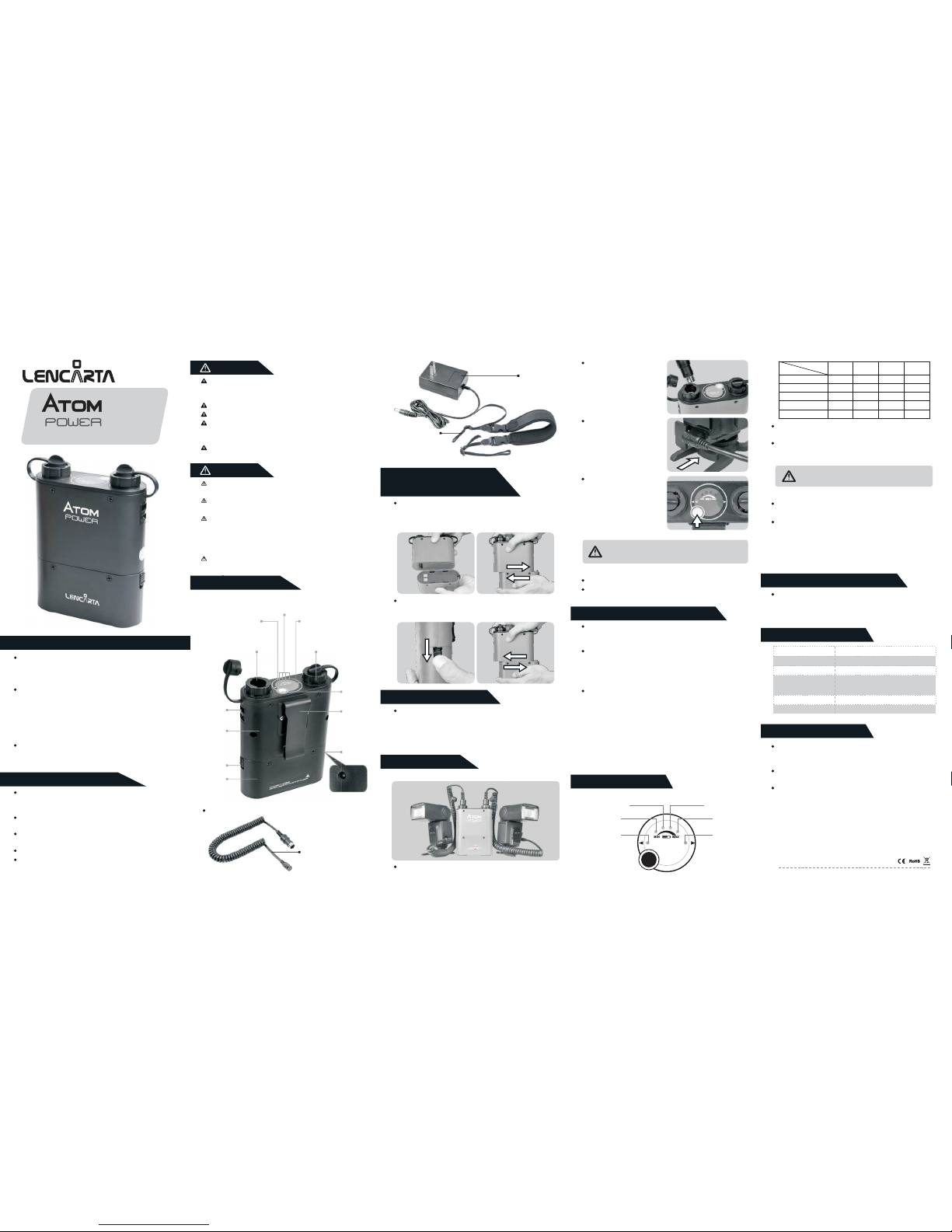
The Lencarta AtomPower Power pack is designed to power
speedlites with external power input ports, including The
Lencarta Atom and hotshoe flashes from Canon, Nikon, Sony
etc.
With LENCARTA ATOM POWER power pack, it takes just
one second to recycle flashes such as Canon 580 EX II, Nikon
SB-900, and Sony F58AM at max. power. It can provide up to
1800 full-power flashes with a Canon 580EX II or Nikon SB-
900.
These flashguns can be used on AtomPower by replacing a
plug-in connector cable. In addition, it can charge iPhone,
iPad, iPod and other products with a USB interface.
With the MCU (Micro-Controller Unit), this product integrates
software protection and hardware protection.
There are high-voltage components inside the product. Do
not carry out disassembly or maintenance by yourself. Any
necesary repairs MUST be carried out by Lencarta
Keep out of the reach of children.
Please do not touch the metal part of the plug and the socket.
Please do not use this product under flammable conditions
(such as areas containing flammable gases or liquid
chemicals), or it may result in an accident.
Make sure all plugs and sockets are reliably and firmly
connected.
This product is not water resistant. Please keep it away from
rain, snow or humidity.
Please do not leave or use this product
in a temperature of
above 40℃ (
104°F)
.
Since this product has a much higher power output than the
ordinary built-in battery of the flash, the flash may be
damaged when used at high frequency and high power.
To avoid overheating the flash, please allow a break of
about 10 minutes after 40 continuous full-power flashes.
Power off before removing or connecting a plug
When travelling by air, disconnect the battery
With the Lencarta AtomPowerwer power pack, it takes just
one second to recycle the Canon 580EX II, Nikon SB900,
Sony F58AM flashes etc.at maximum power, and provides
1800 full power flashes.
If the battery of the power pack requires replacement, please
contact Lencarta
Damage due to unauthorised disassembling of the
power pack will void the warranty.
Damage due use other than in accordance with these
instructions will void the warranty.
Select a connector cable that is compatible with your product.
Please charge the battery if indicated by the LEDs.
2.
Thank you for choosing the Lencarta AtomPower power pack
The power behind the Atom flashguns
Warning
Caution
I.Names of Parts
2.
Fitting
the battery
Loading:
1.
Grip the control unit with the battery chamber;
2. Slide the battery chamber to the left until it locks into place
with a “click”.
AC Charger
Battery pack
Battery charging time
Flash recycling time
Number of Flashes
Dimension
Weight
Lithium battery-11.1V/4500mAH
Approx. 3 hours
Approx. 1s (at full power)
Approx. 1800
(for one Canon 580EX II at full power)
159*133.5*49.2mm
540G
8.
Technical Data
7.
Working Performance
Shoulder Strap
Assembled In China
Features
High-capacity lithium battery (11.1V/4500mAH), which can
provide up to 1800 full-power flashes with a Canon 580EX II or
Nikon SB-900.
Dual outputs for powering two separate flashes without
reducing recycling time
Removable and replaceable battery module. Double your flash
capacity by purchasing a second module.
Concise LED display panel, easy and fast to control
Optimized MCU circuit design, more efficient energy conversion
and more flashes.
12
12
Removing:
1. Slide the battery chamber lock downwards;
2. Slide the battery chamber to the right.
3.
Battery Charging
Insert one end of the AC charger into an AC socket (100-
240V) and the other end into the charging port of the power
pack. If the charger indicator turns red, the battery is being
charged. If the charger indicator turns green, the battery is
fully charged. It takes about 3 hours to fully charge the battery.
Connect the power plug
of the connector cable to
either socket 1 or 2 on the
power pack.
Insert the terminal of the
connector cable into the
flash.
Press the On/Off touch
button, and the LED battery
level indicators wil light up,
indicating that the power
pack is ready to work.
Note: If this product is used for a flash, the flash must
be installed with batteries that have sufficient power.
Turn the power pack by pressing the On/Off touch button.
Turn off the power pack by directly unplugging the connector
cable from the power pack.
off
4..
Operation
(i)Start-up
(2)Power-off
5. Power Pack Status
6. .
LED Indicators
1.Battery Level Indicators: LED1, LED2, LED3, LED4
LED4
LED3
LED2
LED1
Status Indicator2
(STATUS2)
Status Indicator 1
(STATUS1)
Battery level
LED
Weak
Low
Middle
To be full
Full
Flicker
ON
ON
ON
ON
LED4LED1LED2
OFF
OFF
ON
ON
ON
LED3
OFF
OFF
OFF
ON
ON
OFF
OFF
OFF
OFF
ON
When LED1 is blinking, the batterhmust be charged before
it can be used again.
Note: Please charge the device for use if it cannot
be powered on.
Status Indicators: STATUS1, STATUS2
STATUS1/STATUS2 indicators are off during flash recycling
and will light up when the flash is fully charged.
STATUS1/STATUS2 blinks (blinking cycle: 1Hz), indicating
that the flash has been overused and is running hot. If it
becomes too hot, the overheat protection will be enabled.
Please wait for at least 10 minutes before using it again.
9.
Maintenance
Power-off status: There is no LED indication, and no power
output from socket 1 or 2. Energy consumption of the entire
unit is so low that any loss of battery power can be ignored.
Testing status: When the connector cable is not inserted into
socket 1 or 2, press the On/Off test button, and only the
battery level indicators light up, indicating that the power pack
is in the testing mode. Press the On/Off touch button again or
wait for 3 seconds to return to the power-off status.
Working status: Insert the connector cable into socket 1 or 2
and press the On/Off touch button, and the LED indicators wil
light up, indicating that the power pack is in working status.
Press the On/Off touch button again or unplug the connector
cable from socket 1 or 2 to power off.
*Automatic Power-off Function: The power pack will be
automatically powered off after working for twelve hours, in
case shutdown has been overlooked
Power Connector Cable
(sold separately)
Belt Clip
Strap
Lock
Control
Unit
(Upper)
Battery
Chamber
(Lower)
Battery Level Indicator
(LED1, LED2, LED3, LED4)
Status Indicator 2
(STATUS2), for Socket 2
On/Off
Touch
Button
Socket 2
Status Indicator 1
(STATUS1), for Socket 1
Battery
Chamber
Lock
Charging
Port
Socket 1
Accessories
 Loading...