

Page 1
ENGLISH | DEUTSCH
FRANÇAIS | NEDERLANDS | ESPAÑOL
( )
OPTIONAL
Version 1.0
USER MANUAL
LEGAMASTER SOUNDBAR LS2000
LEGAMASTER SUBWOOFER LS3000
Page 2

Page 3
USER MANUAL
Dear Customer,
Thank you for purchasing this Legamaster product.
Please read the following instructions prior to operating your unit.
Recycling Information
This product, when disposed of, is supposed to be collected and recycled according to your country‘s legislation to reduce environmental
burden. When you dispose of this product, please contact a distributor or an affiliate in your country.
Warranty information
Legamaster guarantees the repair or replacement, free of charge, of faulty LS2000 and LS3000 products and/or parts by an authorised service
partner or dealer for a warranty period of 2 years.
The warranty shall take effect on the date of purchase as stated on the receipt.
If you wish to make a claim under the warranty or you have any other service issues, please contact your dealer or Legamaster directly. For
contact information please see the Legamaster website.
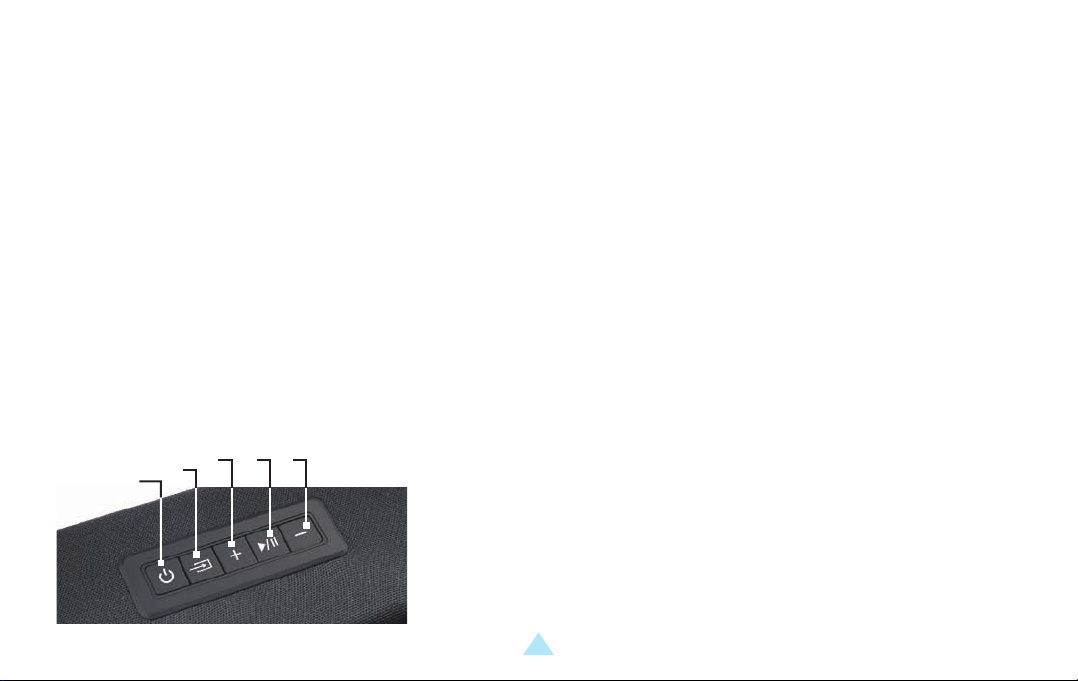
1. MAIN UNIT
3. 4. 5.
2.
1.
1. ON/OFF BUTTON
2. SOURCE SELECTION / RESET BUTTON: PRESS TO CHANGE SOURCE,
HOLD TO RESET TREBLE AND BASS TO FACTORY SETTINGS
3. VOLUME +
4. PLAY / PAUSE
5. VOLUME -
LS2000 / LS3000 – USER MANUAL – ENGLISH
1
Page 4
USER MANUAL
2.
1.
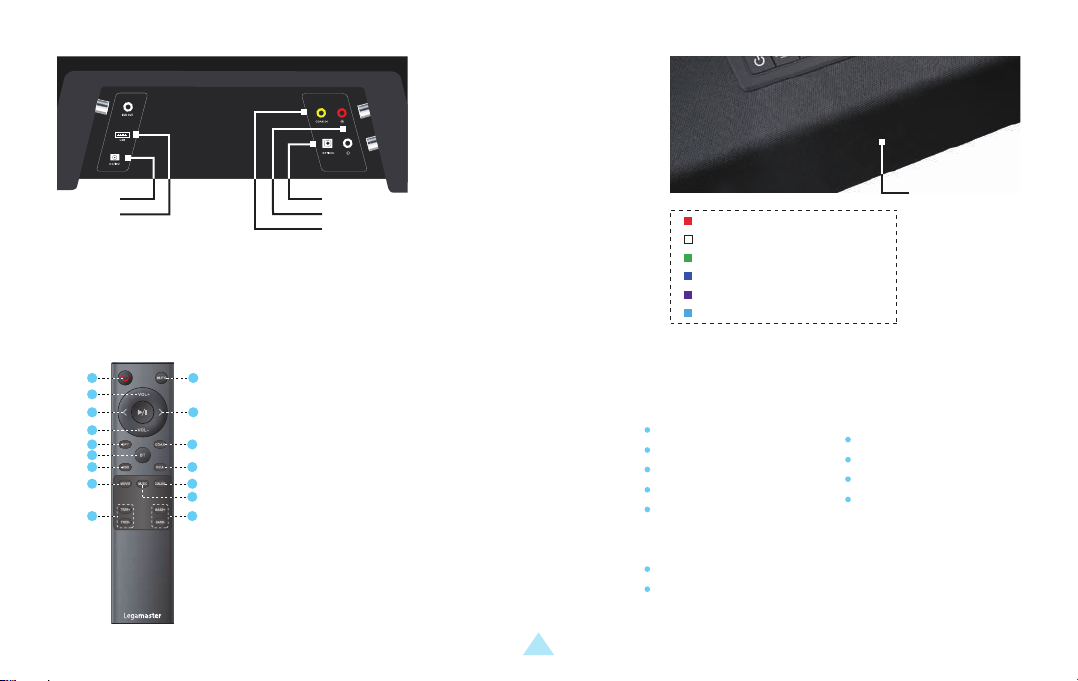
1. USB-A PORT
2. POWER PORT
3. DIGITAL COAXIAL PORT
4. AUX / STEREO RCA PORTS
5. DIGITAL OPTICAL AUDIO / TOSLINK IN
2. REMOTE CONTROL
1 2
3
4 5
6
7 8
9
10
12
15
1. POWER BUTTON
2. MUTE / UNMUTE
3. VOLUME +
11
13
4. PREVIOUS
14
5. NEXT
16
6. VOLUME -
7. OPTICAL
8. COAXIAL
5.
4.
3.
RED: STANDBY
WHITE: OPTICAL
GREEN: COAXIAL
BLUE: BLUETOOTH
PURPLE: USB
LIGHT BLUE: STEREO RCA
Indicator
Light
3. PACKAGE CONTENT
9. BLUETOOTH
( Press and hold to
desconnect BT )
10. USB
11. RCA
12. DSP SETTING: MOVIE
13. DSP SETTING: DIALOG
14. DSP SETTING: MUSIC
15. TREBLE + / -
16. BASS + / -
LS2000 / LS3000 – USER MANUAL – ENGLISH
2
Legamaster Soundbar LS2000
Soundbar
19v power adapter
Remote Control
2x AAA batteries
Digital Optical Cable
RCA / 3.5mm cable
3.5mm / RCA adapter
Wall-mounting kit
Wall-mounting template
Legamaster Subwoofer LS3000 (sold seperatly)
Subwoofer
19v power adapter
Page 5

USER MANUAL
4. OPERATING THE SOUNDBAR
POWER SUPPLY
Plug the AC power cord of the 19v adapter into a suitable AC power-outlet, and connect the other end to the power-port of the soundbar.
SOURCE
Connect a source to the soundbar using a suitable cable. Connect the cable to the RCA, AUX, Optical or USB port of the soundbar, or use
the 3.5mm/RCA adapter to connect the cable.
SOURCE SELECTION
Use the source-selection button on the soundbar, or the source-buttons on the remote control to select the proper source. The indicator-light
on the front of the soundbar will change color to show the different sources selected (see above for color-explanation).
SOUND AND VOLUME SETTINGS
Use the volume up and down buttons on soundbar or remote to adjust the volume.
Using the DSP buttons (MOVIE, MUSIC, DIALOG) on the remote, pre-set setting can be chosen that
adjust the sound settings (bass / treble) for specific scenario’s.
With the BASS- and BASS+ buttons on the remote, the bass output can be regulated to your liking.
With the TREBLE- and TREBLE+ buttons on the remote, treble can be set to your liking.
CONNECTING A BLUETOOTH DEVICE
Pairing a new device is only possible when no other devices are connected.
Using the source selection button, or the BT button on the remote, switch to Bluetooth mode. The indicator will light up blue (when a device is
already paired)
On a Bluetooth-enabled device, open the Bluetooth-settings. Make sure Bluetooth is enabled. Connect your device to by selecting LS2000
from the list of devices.
To disconnect your device, hold the BT button for a few seconds.
or will blink blue when in pairing mode.
LS2000 / LS3000 – USER MANUAL – ENGLISH
3
Page 6

USER MANUAL
NOTE:
Once paired, a device will auto-connect to the soundbar when in range and when the soundbar is not paired to another device.
The range of a Bluetooth-signal is limited. Please stay within 10 meters of the soundbar to guarantee a stable signal.
A device can be disconnected and prevented to auto-connect. Select LS2000 from the list of connected devices (sometimes called ‘my devices /
paired devices / etc.)
5. CONNECTING THE LS3000 SUBWOOFER TO THE SOUNDBAR
The Legamaster LS2000 can be upgraded by connecting the Legamaster LS3000 subwoofer to the audio-system. (LS3000 sold seperately).
To connect the LS3000 Subwoofer to the soundbar, first plug in the power adapter in a suitable power-outlet, and connect the other end to
the subwoofer.
Press the ‘connect’ button on the back of the subwoofer. Please make sure no other soundbars than the soundbar that is intended to connect
to the subwoofer are located close-by and are switched on, as the subwoofer may connect to the wrong soundbar unit.
After pressing the ‘connect’ button, the subwoofer will connect to the Legamaster LS2000 Sounbar.
6. PRECAUTIONS AND SAFETY INSTRUCTIONS
If smoke or a peculiar smell comes from the product, remove the power plug from the socket immediately.
Failure to do so may result in fire or electric shock.
If liquid is spilled or objects are dropped inside the product, remove the power plug from the socket
immediately.
Failure to do so may result in fire or electric shock.
If the powercord is damaged or becomes hot, turn off the product. Make sure the plug has cooled down and
remove the plug from the socket.
and select ‘forget device’.
LS2000 / LS3000 – USER MANUAL – ENGLISH
4
Page 7

USER MANUAL
If the product is still used in this condition, it may cause fire or an electric shock.
In all of the cases like above: contact your dealer for inspection / replacement.
To turn off the product completely, remove the plug from the socket.
7. INSTALLATION
Don’t install in a high temperature or high humidity environment.
Don’t install near any heat sources such as radiators, hot-air outlets, stoves or other devices that produce heat.
This may cause fire or electric shock.
Don’t overload sockets or cables beyond electrical capacity.
Don’t use extension leads as this may cause fire or electric shock.
Don’t insert the power plug into any socket other than 100-240V AC
This may cause fire or electric shock.
Don’t use a damaged power plug or worn socket
Don’t insert the wrong plug as it may cause fire or electric shock
Make sure the product is mounted or placed properly. Dropping or falling may cause damage to the product and/or to it‘s environment.
Information in this document is subject to change without notice.
2019 Legamaster International B.V. All rights reserved.
Reproduction in any manner whatsoever without the written permission of Legamaster International is strictly forbidden.
LS2000 / LS3000 – USER MANUAL – ENGLISH
5
Page 8
BENUTZERHANDBUCH
Sehr geehrter Kunde,
wir danken Ihnen für den Kauf dieses Legamaster-Produkts.
Bevor Sie das Produkt in Betrieb nehmen, lesen Sie bitte die folgenden Anweisungen durch.
Hinweise zum Recycling
Im Sinne einer möglichst geringen Umweltbelastung muss die Entsorgung dieses Produkts gemäß den gesetzlichen Bestimmungen Ihres
Landes erfolgen. Zur Entsorgung des Produkts wenden Sie sich bitte an einen Distributor oder eine Niederlassung in Ihrem Land.
Hinweise zur Garantie
Legamaster garantiert die kostenlose Reparatur oder den kostenlosen Austausch defekter LS2000 und LS3000 Produkte und/oder Teile durch
einen autorisierten Servicepartner oder Händler während der Garantiezeit von 2 Jahren.
Die Garantie tritt am Tag des Kaufs in Kraft, wie auf der Rechnung angegeben.
Wenn Sie einen Garantieanspruch geltend machen möchten oder andere Serviceprobleme haben, wenden Sie sich bitte direkt an Ihren
Händler oder Legamaster. Für Kontaktinformationen besuchen Sie bitte die Legamaster-Website.
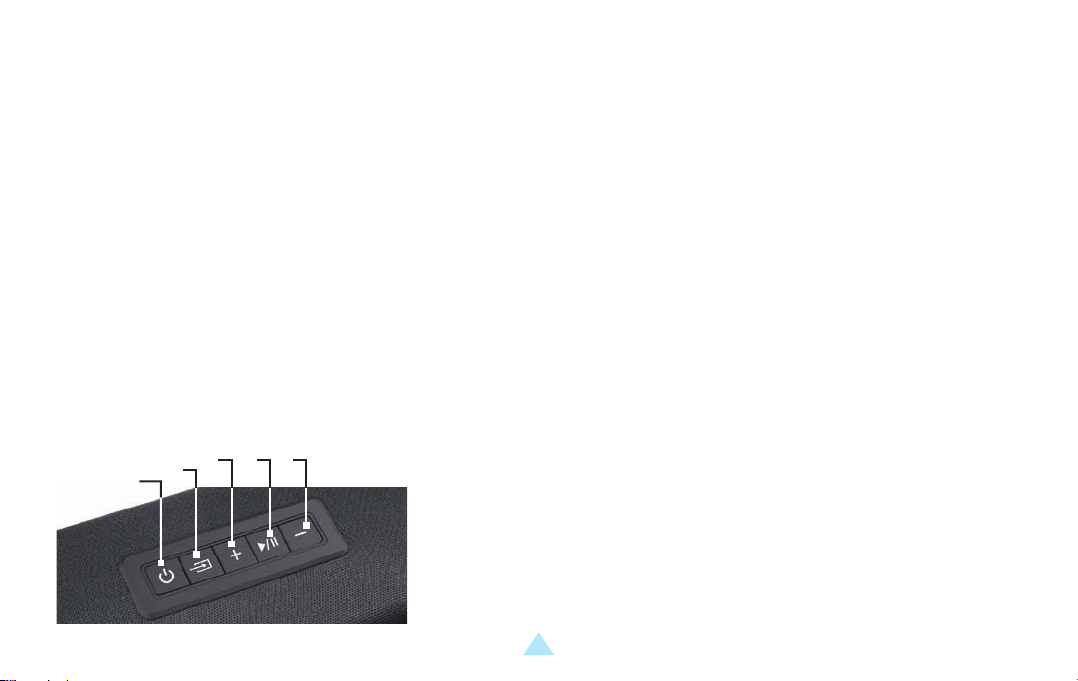
1. GERÄT
3. 4. 5.
2.
1.
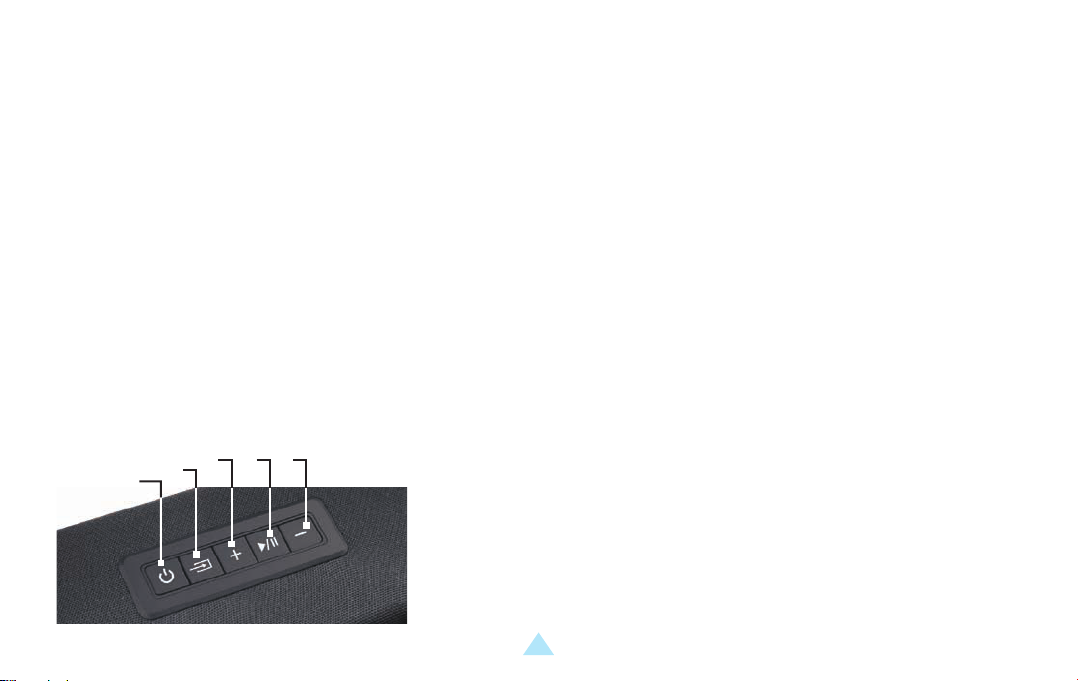
1. EIN / AUS-SCHALTER
2. QUELLENAUSWAHL/RESET-KNOPF: DRÜCKEN SIE DIESE TASTE, UM
DIE QUELLE ZU WECHSELN, HALTEN SIE SIE GEDRÜCKT, UM DIE HÖHEN
UND TIEFEN AUF DIE WERKSEINSTELLUNGEN ZURÜCKZUSETZEN.
3. VOLUME +
4. PLAY / PAUSE
5. VOLUME -
LS2000 / LS3000 – BENUTZERHANDBUCH – DEUTSCH
1
Page 9
BENUTZERHANDBUCH
2.
1.
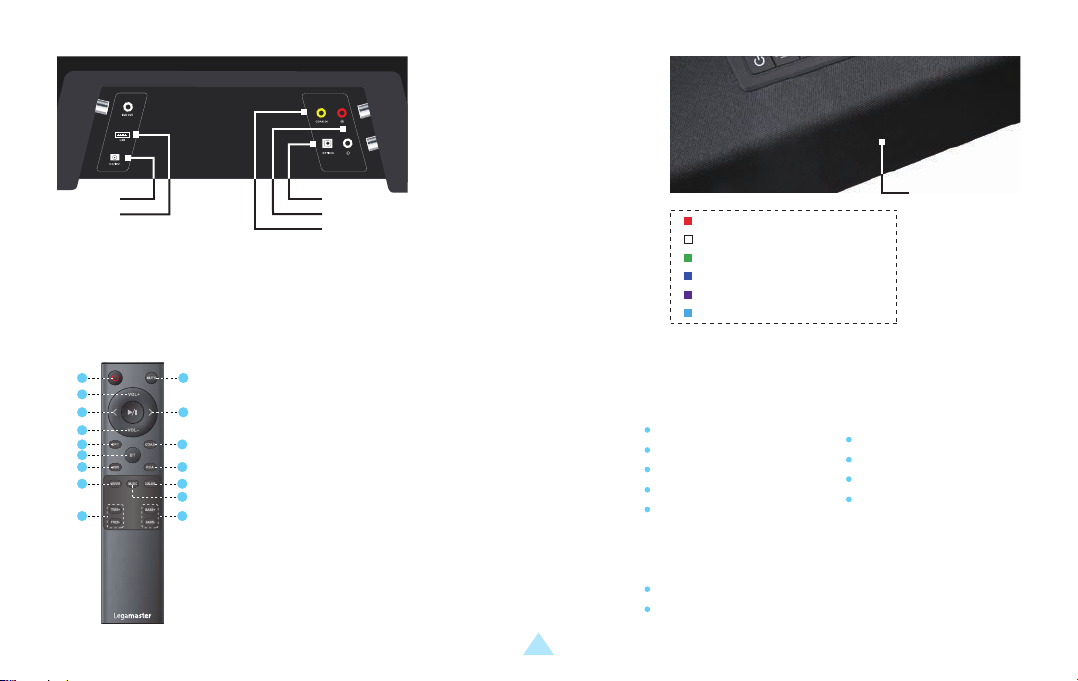
1. USB-A PORT
2. POWER PORT
3. DIGITAL COAXIAL PORT
4. AUX / STEREO RCA PORTS
5. DIGITAL OPTICAL AUDIO / TOSLINK IN
2. FERNSTEUERUNG
1 2
3
4 5
6
7 8
9
10
12
15
1. EIN / AUS-SCHALTER
2. MUTE / UNMUTE
3. VOLUME +
11
13
4. VORHERIGE
14
5. NÄCHSTE
16
6. VOLUME -
7. OPTICAL
8. COAXIAL
5.
4.
3.
ROT: STANDBY
WEISS: OPTICAL
GRÜN: COAXIAL
BLAU: BLUETOOTH
VIOLETT: USB
HELLBLAU: STEREO RCA
Indicator
Light
3. PAKETINHALT
9. BLUETOOTH
( Drücken und halten , um
die V erbindung zu trennen BT )
10. USB
11. RCA
12. DSP SETTING: MOVIE
13. DSP SETTING: DIALOG
14. DSP SETTING: MUSIC
15. TREBLE + / -
16. BASS + / -
LS2000 / LS3000 – BENUTZERHANDBUCH – DEUTSCH
2
Legamaster Soundbar LS2000
Soundbar
19v Netzteil
Fernsteuerung
2x AAA Batterien
Optisches Kabel
RCA / 3,5mm Kabel
3,5mm / RCA Adapter
Wandmontage-Set
Wall-mounting template
Legamaster Subwoofer LS3000
(Separat erhältlich)
Subwoofer
19v Netzteil
Page 10

BENUTZERHANDBUCH
4. BEDIENUNG DER SOUNDBAR
STROMVERSORGUNG
Stecken Sie das Netzkabel des 19V-Adapters in eine
geeignete Steckdose und verbinden Sie das andere Ende
mit dem Stromanschluss der Soundbar.
QUELLENAUSWAHL
Verwenden Sie die Quellenauswahltaste auf der Soundbar oder die Quellentasten auf der Fernbedienung, um die richtige Quelle auszuwählen.
Die Kontrollleuchte auf der Vorderseite der Soundbar wechselt die Farbe, um die verschiedenen ausgewählten Quellen anzuzeigen
(siehe oben für die Farberklärung).
TON- UND LAUTSTÄRKEEINSTELLUNGEN
Verwenden Sie die Auf- und Ab-Taste auf der Soundbar oder der Fernbedienung, um die Lautstärke einzustellen.
Mit den DSP-Tasten (MOVIE, MUSIC, DIALOG) auf der Fernbedienung können voreingestellte Einstellungen gewählt werden,
die die Klangeinstellungen (bass / treble) für bestimmte Szenarien anpassen.
Mit den Tasten BASS- und BASS+ auf der Fernbedienung kann der Bass-Ausgang nach Belieben eingestellt werden.
Mit den TREBLE- und TREBLE+-Tasten auf der Fernbedienung können Sie die Höhen nach Ihren Wünschen einstellen.
ANSCHLUSS EINES BLUETOOTH-GERÄTES
Das Koppeln eines neuen Gerätes ist nur möglich, wenn keine anderen Geräte angeschlossen sind.
Wechseln Sie mit der Quellenwahltaste oder der BT-Taste auf der Fernbedienung in den Bluetooth-Modus. Die Anzeige leuchtet blau
(wenn ein Gerät bereits gekoppelt ist) oder blinkt blau, wenn sich das Gerät im Kopplungsmodus befindet.
Öffnen Sie auf einem Bluetooth-fähigen Gerät die Bluetooth-Einstellungen. Vergewissern Sie sich, dass Bluetooth aktiviert ist.
Verbinden Sie Ihr Gerät mit dem LS2000, indem Sie es aus der Liste der Geräte auswählen.
Um die Verbindung zum Gerät zu trennen, halten Sie die BT-Taste einige Sekunden lang gedrückt.
QUELLE
Schließen Sie eine Quelle mit einem geeigneten Kabel an die Soundbar an.
Schließen Sie das Kabel an den RCA-, AUX-, optischen oder USB-Anschluss der
Soundbar an, oder verwenden Sie den 3,5-mm-RCA-Adapter, um das Kabel
anzuschließen.
HINWEIS:
LS2000 / LS3000 – BENUTZERHANDBUCH – DEUTSCH
3
Page 11

BENUTZERHANDBUCH
Einmal gekoppelt, verbindet sich ein Gerät automatisch mit der Soundbar, wenn es sich in Reichweite befindet und wenn die Soundbar nicht
mit einem anderen Gerät gekoppelt ist.
Die Reichweite eines Bluetooth-Signals ist begrenzt. Bitte halten Sie sich innerhalb von 10 Metern von der Soundbar entfernt, um ein stabiles
Signal zu gewährleisten.
Ein Gerät kann getrennt und die automatische Verbindung verhindert werden. Wählen Sie das LS2000 aus der Liste der angeschlossenen
Geräte (manchmal auch als „meine Geräte / gekoppelte Geräte / etc.” bezeichnet) und wählen Sie „Gerät vergessen”.
5. ANSCHLUSS DES LS3000 SUBWOOFERS AN DIE SOUNDBAR
Der Legamaster LS2000 kann durch Anschluss des Legamaster LS3000-Subwoofers an das Audiosystem aufgerüstet werden.
(LS3000 separat erhältlich).
Um den Subwoofer LS3000 an die Soundbar anzuschließen, stecken Sie zuerst das Netzteil in eine geeignete Steckdose und verbinden Sie
das andere Ende mit dem Subwoofer.
Drücken Sie die Taste „connect” auf der Rückseite des Subwoofers. Bitte stellen Sie sicher, dass sich keine anderen LS2000-Geräte als das,
das für den Anschluss an den Subwoofer vorgesehen ist, in der Nähe befinden und eingeschaltet sind, da der Subwoofer möglicherweise an
die falsche Soundbar-Einheit angeschlossen wird.
Nach dem Drücken der Taste „connect” verbindet sich der Subwoofer mit der Legamaster LS2000 Soundbar.
6. VORSICHTSMASSNAHMEN UND SICHERHEIT
Wenn Rauch oder ein ungewöhnlicher Geruch aus dem Produkt kommt, ziehen Sie sofort den Netzstecker aus
der Steckdose.
Andernfalls kann es zu Bränden oder Stromschlägen kommen.
Wenn Flüssigkeit verschüttet wird oder Gegenstände in das Produkt fallen gelassen werden, ziehen Sie sofort
den Netzstecker aus der Steckdose.
Andernfalls kann es zu Bränden oder Stromschlägen kommen.
LS2000 / LS3000 – BENUTZERHANDBUCH – DEUTSCH
4
Page 12

BENUTZERHANDBUCH
Wenn das Netzkabel beschädigt ist oder heiß wird, schalten Sie das Gerät aus. Vergewissern Sie sich, dass der
Stecker abgekühlt ist und ziehen Sie den Stecker aus der Buchse.
Wenn das Produkt in diesem Zustand noch verwendet wird, kann es zu Bränden oder einem elektrischen Schlag führen.
In allen Fällen wie oben beschrieben: Wenden Sie sich zur Inspektion/Ersatz an Ihren Händler.
Um das Gerät vollständig auszuschalten, ziehen Sie den Stecker aus der Steckdose.
7. INSTALLATION
Installieren Sie das Gerät nicht in einer Umgebung mit hohen Temperaturen oder hoher Luftfeuchtigkeit.
Installieren Sie das Gerät nicht in der Nähe von Wärmequellen wie Heizkörpern, Heißluftauslässen, Öfen oder
anderen wärmeerzeugenden Geräten.
Dies kann zu Bränden oder Stromschlägen führen.
Überlasten Sie Steckdosen oder Kabel nicht über die elektrische Kapazität hinaus.
Verwenden Sie keine Verlängerungskabel, da dies zu Bränden oder Stromschlägen führen kann.
Stecken Sie den Netzstecker nicht in eine andere Steckdose als 100-240V AC.
Dies kann zu Bränden oder Stromschlägen führen.
Verwenden Sie keinen beschädigten Netzstecker oder eine abgenutzte Steckdose.
Stecken Sie nicht den falschen Stecker ein, da dies zu Bränden oder Stromschlägen führen kann.
Vergewissern Sie sich, dass das Produkt richtig montiert oder platziert ist. Ein Herunterfallen oder Fallen kann das Produkt und/oder seine
Umgebung beschädigen.
Informationen in diesem Dokument können ohne Vorankündigung geändert werden.
2019 Legamaster International B.V. Alle Rechte vorbehalten.
Jegliche Reproduktion dieses Dokuments ohne die schriftliche Genehmigung von Legamaster International ist ausdrücklich untersagt.
LS2000 / LS3000 – BENUTZERHANDBUCH – DEUTSCH
5
Page 13
MANUEL DE L‘UTILISATEUR
Cher client,
Merci d’avoir acheté ce produit Legamaster.
Veuillez lire les instructions suivantes avant d‘utiliser votre appareil.
Informations sur le recyclage
Ce produit, une fois éliminé, est censé être collecté et recyclé conformément à la législation de votre pays pour réduire la charge
environnementale. Lorsque vous vous débarrassez de ce produit, veuillez contacter un distributeur ou une filiale dans votre pays.
Informations sur la garantie
Legamaster garantit la réparation ou le remplacement gratuit des produits et/ou pièces défectueux LS2000 et LS3000 par un partenaire de
service ou un revendeur agréé pour une période de garantie de 2 ans.
La garantie prend effet à la date d‘achat indiquée sur le reçu.
Si vous souhaitez faire une réclamation au titre de la garantie ou si vous avez d‘autres problèmes de service, veuillez contacter directement
votre revendeur ou Legamaster. Pour plus d‘informations, veuillez consulter le site Web de Legamaster.
1. APPAREIL PRINCIPAL
3. 4. 5.
2.
1.
1. BOUTON MARCHE/ARRÊT
2. TOUCHE DE SÉLECTION/RÉINITIALISATION DES SOURCES : APPUYER POUR
CHANGER DE SOURCE, MAINTENIR POUR RÉINITIALISER LES AIGUS ET LES GRAVES
AUX RÉGLAGES D’USINE
3. VOLUME +
4. PLAY / PAUSE
5. VOLUME -
LS2000 / LS3000 – MANUEL DE L‘UTILISATEUR – FRANÇAIS
1
Page 14
MANUEL DE L‘UTILISATEUR
2.
1.
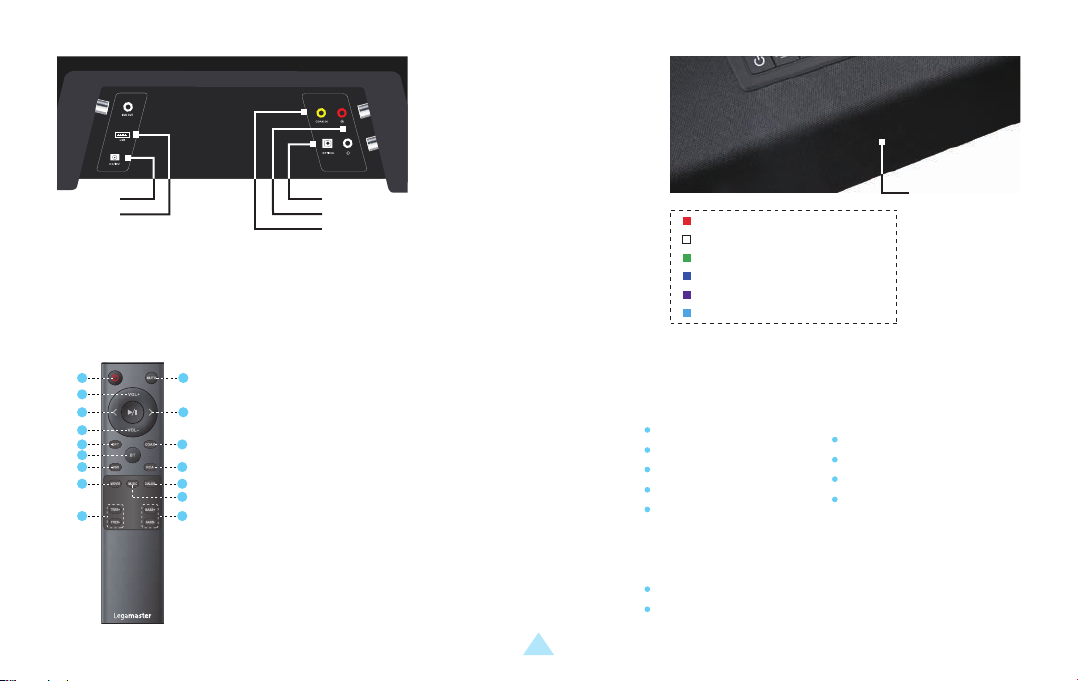
1. USB-A PORT
2. POWER PORT
2. TÉLÉCOMMANDE
1 2
3
4 5
6
7 8
9
10
12
15
1. BOUTON MARCHE
/ARRÊT
2. MUTE / UNMUTE
11
3. VOLUME +
13
4. PRÉCÉDENT
14
5. SUIVANT
16
6. VOLUME -
7. OPTICAL
8. COAXIAL
5.
4.
3.
3. DIGITAL COAXIAL PORT
4. AUX / STEREO RCA PORTS
5. DIGITAL OPTICAL AUDIO / TOSLINK IN
9. BLUETOOTH
( Appuyer et maintenir
pour déconnecter BT )
10. USB
11. RCA
12. DSP SETTING: MOVIE
13. DSP SETTING: DIALOG
14. DSP SETTING: MUSIC
15. TREBLE + / -
16. BASS + / -
LS2000 / LS3000 – MANUEL DE L‘UTILISATEUR – FRANÇAIS
Indicator
Light
ROUGE: STANDBY
BLANC: OPTICAL
VERT: COAXIAL
BLEU: BLUETOOTH
POURPRE: USB
BLEU CLAIR: STEREO RCA
3. CONTENU DU PAQUET
Legamaster Soundbar LS2000
Soundbar
Adaptateur 19v
Télécommande
2x AAA batterie
Câble optique
Legamaster Subwoofer LS3000
(Vendu séparément)
Subwoofer
Adaptateur 19v
2
RCA / 3,5mm Câble
3,5mm / RCA adaptateur
Kit de fixation murale
Gabarit de montage mural
Page 15

MANUEL DE L‘UTILISATEUR
4. UTILISATION DE LA BARRE DE SON
ALIMENTATION EN PUISSANCE
Branchez le cordon d’alimentation CA de l’adaptateur 19 V
dans une prise de courant CA appropriée et branchez l’autre
extrémité sur le port d’alimentation de la barre de son.
SÉLECTION SOURCE
Utilisez la touche de sélection de la source sur la soundbar ou les touches source de la télécommande pour sélectionner la source appropriée.
Le voyant lumineux situé à l’avant de la barre de son change de couleur pour indiquer les différentes sources sélectionnées
(voir l’explication des couleurs ci-dessus).
RÉGLAGES DU SON ET DU VOLUME
Utilisez les touches haut et bas du volume de la barre de son ou de la télécommande pour régler le volume.
En utilisant les touches DSP (MOVIE, MUSIC, DIA-LOG) de la télécommande, il est possible de choisir un réglage prédéfini qui ajuste les réglages
du son (grave / aigu) pour des scénarios spécifiques.
Avec les touches BASS- et BASS+ de la télécom-mande, la sortie des basses peut être réglée à votre convenance.
Avec les touches TREBLE- et TREBLE+ de la télécom-mande, les aigus peuvent être réglés à votre guise.
CONNEXION D’UN APPAREIL BLUETOOTH
L’appairage d’un nouvel appareil n’est possible que si aucun autre appareil n’est connecté.
Utilisez la touche de sélection de source ou la touche BT de la télécommande pour passer en mode Bluetooth. Le voyant s’allume en bleu
(lorsqu’un appareil est déjà jumelé) ou clignote en bleu en mode jumelage.
Sur un appareil compatible Bluetooth, ouvrez les paramètres Bluetooth. Assurez-vous que Bluetooth est activé.
Connectez votre appareil en sélectionnant LS2000 dans la liste des appareils.
Pour déconnecter votre appareil, maintenez le bouton BT enfoncé pendant quelques secondes.
SOURCE
Connectez une source à la soundbar à l’aide d’un câble approprié.
Connectez le câble au port RCA, AUX, optique ou USB de la barre de
son, ou utilisez l’adaptateur 3.5mm/RCA pour connecter le câble.
LS2000 / LS3000 – MANUEL DE L‘UTILISATEUR – FRANÇAIS
3
Page 16

MANUEL DE L‘UTILISATEUR
REMARQUE:
Une fois appairé, un appareil se connecte automatiquement à la barre de son lorsqu’il est à portée et lorsque la soundbar n’est pas appairée
à un autre appareil.
La portée d’un signal Bluetooth est limitée. Veuillez rester à moins de 10 mètres de la soundbar pour garantir un signal stable.
Un appareil peut être déconnecté et empêché de se connecter automatiquement. Sélectionnez LS2000 dans la liste des appareils connectés
(parfois appelé “ Mes appareils / Appareils jumelés / etc.) et sélectionnez “ Oublier appareil “.
5. CONNEXION DU BARRE DE SON LS3000 À LA BARRE DE SON
Le Legamaster LS2000 peut être mis à niveau en connectant le subwoofer Legamaster LS3000 au système audio.(LS3000 vendu séparément).
Pour connecter le subwoofer LS3000 à la soundbar, branchez d’abord l’adaptateur secteur dans une prise de courant appropriée et branchez
l’autre extrémité au subwoofer.
Appuyez sur le bouton ’connect’ à l’arrière du subwoofer. Veuillez vous assurer qu’aucune autre unité LS2000 que celle destinée à être conne-
ctée au subwoofer n’est située à proximité et qu’elle n’est allumée, car le subwoofer pourrait être connecté à la mauvaise unité de soundbar.
Après avoir appuyé sur le bouton ’connect’, le subwoofer se connecte à la barre de son Legamaster LS2000.
6. PRÉCAUTIONS ET SÉCURITÉ
Si de la fumée ou une odeur particulière provient du produit, débranchez immédiatement la fiche de la prise de
courant.
Le non-respect de cette consigne peut entraîner un incendie ou un choc électrique.
En cas de déversement de liquide ou de chute d‘objets à l‘intérieur de l‘appareil, retirez immédiatement la fiche
de la prise de courant.
Le non-respect de cette consigne peut entraîner un incendie ou un choc électrique.
LS2000 / LS3000 – MANUEL DE L‘UTILISATEUR – FRANÇAIS
4
Page 17

MANUEL DE L‘UTILISATEUR
Si le cordon d‘alimentation est endommagé ou devient chaud, éteignez l‘appareil. Assurez-vous que la fiche
est refroidie et retirez la fiche de la prise.
Si le produit est toujours utilisé dans cet état, il peut provoquer un incendie ou un choc électrique.
Dans tous les cas comme ci-dessus: contactez votre revendeur pour inspection/remplacement.
Pour éteindre complètement le produit, retirez la fiche de la prise de courant.
7. INSTALLATION
Ne pas installer dans un environnement à haute température ou à humidité élevée.
N‘installez pas l‘appareil à proximité de sources de chaleur telles que radiateurs, prises d‘air chaud, poêles ou
autres appareils qui produisent de la chaleur.
Cela pourrait provoquer un incendie ou un choc électrique.
Ne surchargez pas les prises ou les câbles au-delà de leur capacité électrique.
N‘utilisez pas de rallonges car cela pourrait provoquer un incendie ou un choc électrique.
N‘insérez pas la fiche d‘alimentation dans une prise autre que 100-240V AC.
Cela pourrait provoquer un incendie ou un choc électrique.
N‘utilisez pas une fiche d‘alimentation endommagée ou une prise usée.
N‘insérez pas la mauvaise fiche, car elle pourrait provoquer un incendie ou un choc électrique.
Assurez-vous que le produit est monté ou placé correctement. La chute ou la chute peut endommager le produit et/ou son environnement.
Les informations contenues dans le présent document peuvent être modifiées sans avis préalable.
2019 Legamaster International B.V. Tous droits réservés.
Toute reproduction, sous quelle forme que ce soit, est strictement interdite sauf autorisation écrite de Legamaster International.
LS2000 / LS3000 – MANUEL DE L‘UTILISATEUR – FRANÇAIS
5
Page 18
GEBRUIKSHANDLEIDING
Geachte klant,
Hartelijk dank voor de aanschaf van dit Legamaster product.
Lees de volgende instructies voordat u het apparaat in gebruik neemt.
Recycling informatie
Dit product wordt verondersteld te worden ingezameld en gerecycled volgens de wetgeving van uw land om de milieubelasting te
verminderen. Wanneer u dit product weggooit, neem dan contact op met een distributeur of een filiaal in uw land.
Garantie-informatie
Legamaster garandeert de kosteloze reparatie of vervanging van defecte LS2000 en LS3000 producten en/of onderdelen door een erkende
servicepartner of dealer voor een garantieperiode van 2 jaar.
De garantie gaat in op de datum van aankoop zoals vermeld op de kassabon.
Als u aanspraak wilt maken op de garantie of als u andere serviceproblemen hebt, neem dan rechtstreeks contact op met uw dealer of
Legamaster. Zie voor contactinformatie de website van Legamaster.
1. HOOFDEENHEID
3. 4. 5.
2.
1.
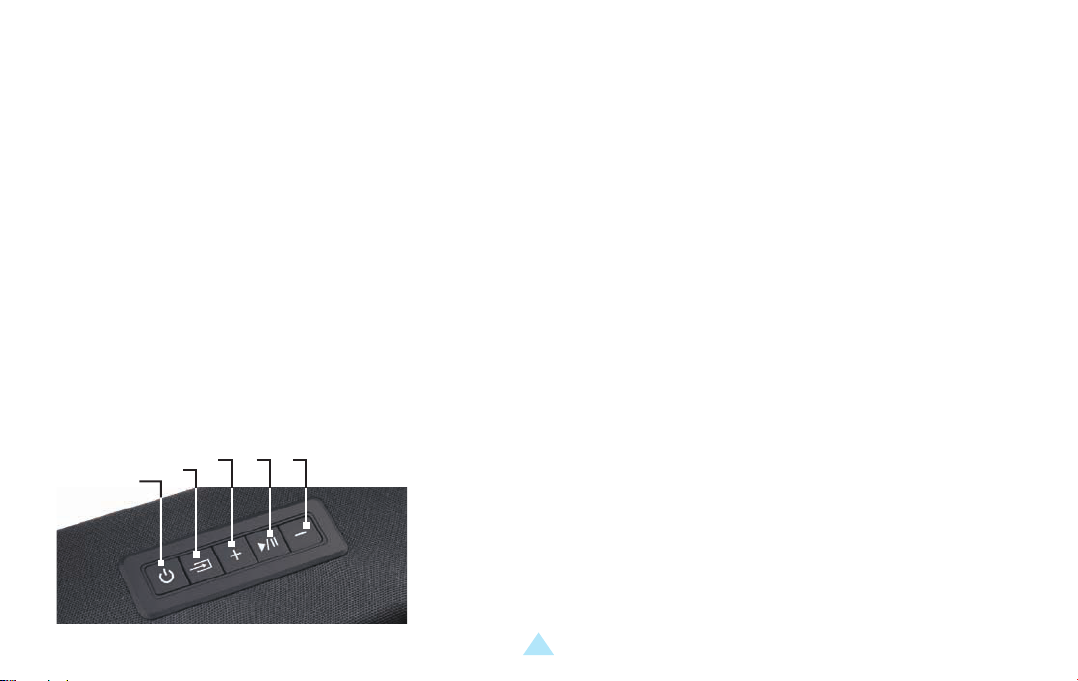
1. AAN/UIT
2. KNOP VOOR BRONKEUZE/RESET: DRUK OP DEZE KNOP OM VAN BRON TE
VERANDEREN, HOUD DEZE INGEDRUKT OM DE HOGE TONEN EN DE LAGE TONEN
TERUG TE ZETTEN NAAR DE FABRIEKSINSTELLINGEN.
3. VOLUME +
4. PLAY / PAUSE
5. VOLUME -
LS2000 / LS3000 – GEBRUIKSHANDLEIDING – NEDERLANDS
1
Page 19
GEBRUIKSHANDLEIDING
2.
1.
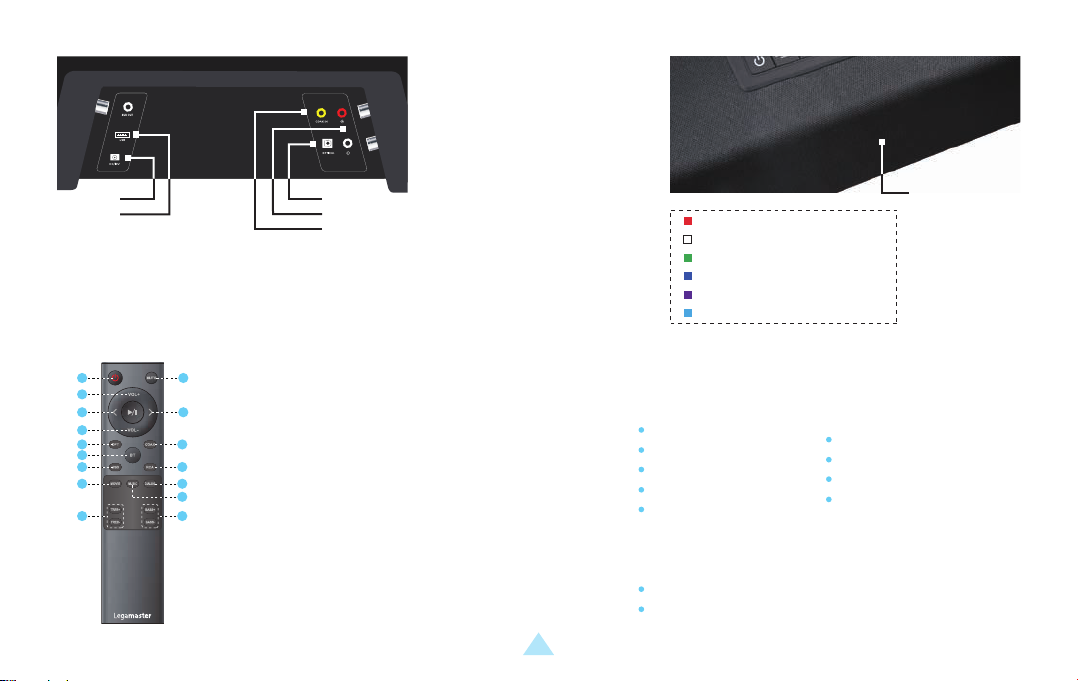
1. USB-A PORT
2. POWER PORT
3. DIGITAL COAXIAL PORT
4. AUX / STEREO RCA PORTS
5. DIGITAL OPTICAL AUDIO / TOSLINK IN
2. AFSTANDSBEDIENING
1 2
3
4 5
6
7 8
9
10
12
15
1. AAN/UIT-KNOP
2. MUTE / UNMUTE
3. VOLUME +
11
13
4. VORIGE
14
5. VOLGENDE
16
6. VOLUME -
7. OPTICAL
8. COAXIAL
5.
4.
3.
ROOD: STANDBY
WIT: OPTICAL
GROEN: COAXIAL
BLAUW: BLUETOOTH
PAARS: USB
LICHTBLAUW: STEREO RCA
Indicator
Light
3. INHOUD VAN DE VERPAKKING
9. BLUETOOTH
( Ingedrukt houden om
de Verbinding met BT te
Verbreken )
10. USB
11. RCA
12. DSP SETTING: MOVIE
13. DSP SETTING: DIALOG
14. DSP SETTING: MUSIC
15. TREBLE + / -
16. BASS + / -
LS2000 / LS3000 – GEBRUIKSHANDLEIDING – NEDERLANDS
2
Legamaster Soundbar LS2000
Soundbar
19v Adapter
Afstandsbediening
2x AAA batterij
Optische kabel
RCA / 3,5mm kabel
3,5mm / RCA adapter
Wandmontage kit
Muurbevestigingssjabloon
Legamaster Subwoofer LS3000
(Afzonderlijk verkocht)
Subwoofer
19v Adapter
Page 20

GEBRUIKSHANDLEIDING
4. BEDIENING VAN DE SOUNDBAR
STROOMVOORZIENING
Steek het netsnoer van de 19v adapter in een geschikte
wisselstroomaansluiting en sluit het andere uiteinde aan
op de voedingspoort van de soundbar.
BRONSELECTIE
Gebruik de source-knop op de soundbarof de source-knop op de afstandsbediening om de juiste bron te selecteren. Het indicatielampje aan
de voorkant van de soundbar verandert van kleur om de verschillende geselecteerde bronnen weer te geven.
(zie hierboven voor uitleg over de kleur).
GELUIDS- EN VOLUME-INSTELLINGEN
Gebruik de volumeknoppen op de soundbar of afstandsbediening om het volume aan te passen.
Met behulp van de DSP-knoppen (MOVIE, MUSIC, DIALOG) op de afstandsbediening kan een vooraf ingestelde instelling worden gekozen die de
geluidsinstellingen (bas / treble) voor specifieke scenario’s aanpast.
Met de BASS- en BASS+ knoppen op de afstandsbediening kan de basuitvoer naar wens worden geregeld.
Met de knoppen TREBLE- en TREBLE+ op de afstandsbediening kunt u de hoge tonen naar wens instellen.
HET AANSLUITEN VAN EEN BLUETOOTH-APPARAAT
Het koppelen van een nieuw apparaat is alleen mogelijk als er geen andere apparaten zijn aangesloten.
Schakel met de bronkeuzetoets of de BT-toets op de afstandsbediening over naar de Bluetooth-modus.De indicator zal blauw oplichten
(wanneer een apparaat al gekoppeld is) of blauw knipperen in de koppelingsmodus.
Open op een Bluetooth-apparaat de Bluetooth-instellingen. Zorg ervoor dat Bluetooth is ingeschakeld.
Sluit uw apparaat aan door LS2000 te selecteren uit de lijst met apparaten.
Om uw apparaat los te koppelen, houdt u de BT knop een paar seconden ingedrukt.
BRON
Sluit een bron aan op de soundbar met behulp van een geschikte kabel.
Sluit de kabel aan op de RCA-, AUX-, optische of USB-poort van de soundbar
of gebruik de 3,5 mm/RCA-adapter om de kabel aan te sluiten.
LS2000 / LS3000 – GEBRUIKSHANDLEIDING – NEDERLANDS
3
Page 21

GEBRUIKSHANDLEIDING
OPMERKING:
Eenmaal gekoppeld, zal een apparaat automatisch verbinding maken met de soundbar wanneer het zich binnen bereik bevindt en wanneer
de soundbar niet met een ander apparaat is gekoppeld.
Het bereik van een Bluetooth-signaal is beperkt. Blijf binnen 10 meter van de soundbar om een stabiel signaal te garanderen.
Een apparaat kan worden losgekoppeld en kan worden verhinderd om automatisch verbinding te maken. Selecteer LS2000 uit de lijst van
aangesloten apparaten (ook wel ‘mijn apparaten / gepaarde apparaten / etc.) en selecteer ‘apparaat vergeten’.
5. AANSLUITEN VAN DE LS3000 SUBWOOFER OP DE SOUNDBAR
De Legamaster LS2000 kan worden opgewaardeerd door de Legamaster LS3000 subwoofer aan te sluiten op het audiosysteem.
(LS3000 wordt apart verkocht).
Om de LS3000 Subwoofer aan te sluiten op de soundbar, sluit u eerst de voedingsadapter aan op een geschikt stopcontact en sluit u het
andere uiteinde aan op de subwoofer.
Druk op de ‘connect’ knop aan de achterkant van de subwoofer. Zorg ervoor dat er geen andere LS2000 units dan de LS2000 units die bedoeld
zijn om op de subwoofer aan te sluiten zich in de buurt van de subwoofer bevinden en ingeschakeld zijn, aangezien de subwoofer op de
verkeerde soundbar unit kan worden aangesloten.
Nadat u op de knop ‘connect’ hebt gedrukt, wordt de subwoofer aangesloten op de Legamaster LS2000 Soundbar.
6. VOORZORGSMAATREGELEN EN VEILIGHEID
Als er rook of een vreemde geur uit het product komt, verwijder dan onmiddellijk de stekker uit het stopcontact.
Als u dit niet doet, kan dit leiden tot brand of een elektrische schok.
Als er vloeistof wordt gemorst of voorwerpen in het product vallen, verwijder dan onmiddellijk de stekker uit het
stopcontact.
Als u dit niet doet, kan dit leiden tot brand of een elektrische schok.
LS2000 / LS3000 – GEBRUIKSHANDLEIDING – NEDERLANDS
4
Page 22

GEBRUIKSHANDLEIDING
Als het netsnoer beschadigd is of heet wordt, schakelt u het product uit. Zorg ervoor dat de stekker is afgekoeld
en haal de stekker uit het stopcontact.
Als het product nog steeds in deze toestand wordt gebruikt, kan dit brand of een elektrische schok veroorzaken.
In alle gevallen zoals hierboven: neem contact op met uw dealer voor inspectie/vervanging.
Om het product volledig uit te schakelen, haalt u de stekker uit het stopcontact.
7. INSTALLATIE
Niet installeren in een omgeving met een hoge temperatuur of hoge luchtvochtigheid.
Installeer niet in de buurt van warmtebronnen zoals radiatoren, heteluchtuitlaten, kachels of andere apparaten
die warmte produceren.
Dit kan brand of elektrische schokken veroorzaken.
Overbelast stopcontacten of kabels niet boven het elektrisch vermogen.
Gebruik geen verlengsnoeren omdat dit brand of elektrische schokken kan veroorzaken.
Steek de stekker niet in een ander stopcontact dan 100-240V AC.
Dit kan brand of elektrische schokken veroorzaken.
Gebruik geen beschadigde stekker of versleten stopcontacten.
Steek niet de verkeerde stekker in het stopcontact, want dit kan brand of elektrische schokken veroorzaken.
Zorg ervoor dat het product goed gemonteerd of geplaatst is. Het laten vallen of vallen kan schade aan het product en/of de omgeving
veroorzaken.
De informatie in dit document kan zonder vooraankondiging gewijzigd worden.
2019 Legamaster International B.V. Alle rechten voorbehouden.
Reproductie op welke wijze dan ook zonder de voorafgaande schriftelijke goedkeuring van Legamaster International is strikt verboden.
LS2000 / LS3000 – GEBRUIKSHANDLEIDING – NEDERLANDS
5
Page 23
MANUAL DEL USUARIO
Estimado cliente,
Gracias por comprar este producto Legamaster.
Por favor, lea las siguientes instrucciones antes de poner en funcionamiento su unidad.
Información sobre el reciclaje
Este producto, cuando se desecha, se supone que debe ser recogido y reciclado de acuerdo con la legislación de su país para reducir la carga
medioambiental. Cuando se deshaga de este producto, póngase en contacto con un distribuidor o un afiliado en su país.
Información sobre la garantía
Legamaster garantiza la reparación o sustitución gratuita de productos y/o piezas defectuosas de LS2000 y LS3000 por parte de un servicio
técnico o distribuidor autorizado durante un período de garantía de 2 años.
La garantía surtirá efecto en la fecha de compra tal y como se indica en el recibo.
Si desea realizar una reclamación en virtud de la garantía o si tiene algún otro problema de servicio, póngase en contacto con su distribuidor
o con Legamaster directamente. Para obtener información de contacto, consulte el sitio web de Legamaster.
1. UNIDAD PRINCIPAL
3. 4. 5.
2.
1.
1. BOTÓN DE ENCENDIDO/APAGADO
2. SELECCIÓN DE FUENTE/BOTÓN DE RESTABLECIMIENTO: PULSAR PARA CAMBIAR
LA FUENTE, MANTENERLA PULSADA PARA RESTABLECER LOS AGUDOS Y LOS
GRAVES A LOS VALORES DE FÁBRICA.
3. VOLUME +
4. PLAY / PAUSE
5. VOLUME -
LS2000 / LS3000 – MANUAL DEL USUARIO – ESPAÑOL
1
Page 24
MANUAL DEL USUARIO
2.
1.
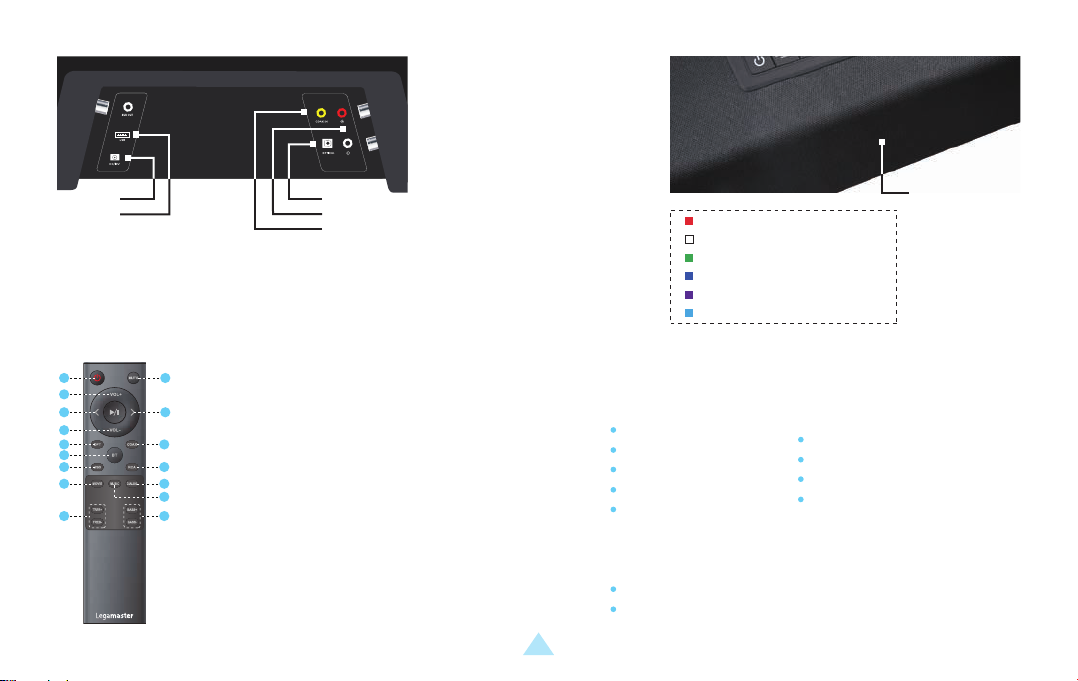
1. USB-A PORT
2. POWER PORT
3. DIGITAL COAXIAL PORT
4. AUX / STEREO RCA PORTS
5. DIGITAL OPTICAL AUDIO / TOSLINK IN
2. MANDO A DISTANCIA
1 2
3
4 5
6
7 8
9
10
12
15
1. BOTÓN DE ENCENDIDO
2. MUTE / UNMUTE
3. VOLUME +
11
13
4. ANTERIOR
14
5. SIGUIENTE
16
6. VOLUME -
7. OPTICAL
8. COAXIAL
5.
4.
3.
ROJO: STANDBY
BLANCO: OPTICAL
VERDE: COAXIAL
AZUL: BLUETOOTH
PÚRPURA: USB
AZUL CLARO: STEREO RCA
Indicator
Light
3. CONTENIDO DEL PAQUETE
9. BLUETOOTH
( Appuyer et maintenir
pour déconnecter BT )
10. USB
11. RCA
12. DSP SETTING: MOVIE
13. DSP SETTING: DIALOG
14. DSP SETTING: MUSIC
15. TREBLE + / -
16. BASS + / -
LS2000 / LS3000 – MANUAL DEL USUARIO – ESPAÑOL
2
Legamaster Soundbar LS2000
Soundbar
Adaptador 19v
Mando a distancia
2x batería AAA
Cable óptico
RCA / 3,5mm Cable
3,5mm / RCA adaptador
Kit de montaje en pared
Plantilla para montaje en pared
Legamaster Subwoofer LS3000
(Vendido por separado)
Subwoofer
Adaptador 19v
Page 25

MANUAL DEL USUARIO
4. FUNCIONAMIENTO DE LA SOUNDBAR
SUMINISTRO DE ENERGÍA
Enchufe el cable de alimentación de CA del adaptador de 19 V
en una toma de CA adecuada y conecte el otro extremo al puerto
de alimentación de la soundbar.
SELECCIÓN DE FUENTES
Utilice el botón de selección de fuente en la soundbar o los botones de fuente del mando a distancia para seleccionar la fuente adecuada. La
luz indicadora en la parte frontal de la soundbar cambiará de color para mostrar las diferentes fuentes seleccionadas (ver arriba la explicación del
color).
AJUSTES DE SONIDO Y VOLUMEN
Utilice los botones de subida y bajada de volumen de la soundbar o del mando a distancia para ajustar el volumen.
Utilizando los botones DSP (MOVIE, MUSIC, DIALOG) en el mando a distancia, se puede elegir un ajuste preestablecido que ajusta los ajustes de
sonido (graves/agudos) para escenarios específicos.
Con los botones BASS- y BASS+ del mando a distancia, la salida de graves se puede regular a su gusto.
Con los botones TREBLE- y TREBLE+ del mando a distancia, los agudos se pueden ajustar a su gusto.
CONEXIÓN DE UN DISPOSITIVO BLUETOOTH
El emparejamiento de un nuevo dispositivo sólo es posible cuando no hay otros dispositivos conectados.
Con el botón de selección de fuente o el botón BT del mando a distancia, cambie al modo Bluetooth. El indicador se iluminará de color azul
(cuando un dispositivo ya está emparejado) o parpadeará de color azul cuando se encuentre en el modo de emparejamiento.
En un dispositivo habilitado para Bluetooth, abra los ajustes de Bluetooth. Asegúrese de que Bluetooth esté activado.
Conecte su dispositivo seleccionando LS2000 de la lista de dispositivos.
Para desconectar el dispositivo, mantenga pulsado el botón BT durante unos segundos.
FUENTE
Conecte una fuente a la soundbar con un cable adecuado.
Conecte el cable al puerto RCA, AUX, óptico o USB de la soundbar,
o utilice el adaptador 3.5mm/RCA para conectar el cable.
LS2000 / LS3000 – MANUAL DEL USUARIO – ESPAÑOL
3
Page 26

MANUAL DEL USUARIO
NOTA:
Una vez emparejado, un dispositivo se conectará automáticamente a la soundbar cuando esté dentro del alcance y cuando la soundbar no
esté emparejada con otro dispositivo.
El alcance de una señal Bluetooth es limitado. Por favor, manténgase a 10 metros de la soundbar para garantizar una señal estable.
Se puede desconectar un dispositivo y evitar que se conecte automáticamente. Seleccione LS2000 de la lista de dispositivos conectados
(a veces llamados “mis dispositivos / dispositivos emparejados / etc.”) y seleccione “olvidar dispositivo”.
5. CONEXIÓN DEL SUBWOOFER LS3000 A LA SOUNDBAR
El Legamaster LS2000 se puede actualizar conectando el subwoofer Legamaster LS3000 al sistema de audio. (LS3000 se vende por separado).
Para conectar el subwoofer LS3000 a la soundbar, primero enchufe el adaptador de alimentación en un tomacorriente adecuado y conecte el
otro extremo al subwoofer.
Pulse el botón ‘connect’ en la parte posterior del subwoofer. Asegúrese de que ninguna otra unidad LS2000 que no sea la destinada a
conectarse al subwoofer se encuentre cerca y esté encendida, ya que el subwoofer puede conectarse a la unidad de soundbar equivocada.
Después de pulsar el botón ‘connect’, el subwoofer se conectará a la soundbar del Legamaster LS2000.
6. PRECAUCIONES Y SEGURIDAD
Si el producto desprende humo u olores extraños, desenchufe inmediatamente el cable de alimentación de la
toma de corriente.
De lo contrario, podría producirse un incendio o una descarga eléctrica.
Si se derrama líquido o se dejan caer objetos dentro del producto, desenchufe el cable de alimentación de la
toma de corriente inmediatamente.
De lo contrario, podría producirse un incendio o una descarga eléctrica.
LS2000 / LS3000 – MANUAL DEL USUARIO – ESPAÑOL
4
Page 27

MANUAL DEL USUARIO
Si el cable de alimentación está dañado o se calienta, apague el producto. Asegúrese de que el enchufe se ha
enfriado y desenchúfelo de la toma de corriente.
Si el producto sigue utilizándose en estas condiciones, puede provocar un incendio o una descarga eléctrica.
En todos los casos como los anteriores: póngase en contacto con su distribuidor para que le realice una
inspección/reemplazo.
Para apagar el producto por completo, retire el enchufe de la toma de corriente.
7. INSTALACIÓN
No lo instale en un ambiente de alta temperatura o humedad.
No lo instale cerca de fuentes de calor como radiadores, salidas de aire caliente, estufas u otros dispositivos
que produzcan calor.
Esto puede provocar un incendio o una descarga eléctrica.
No sobrecargue los enchufes ni los cables más allá de la capacidad eléctrica.
No utilice cables de extensión, ya que esto podría provocar un incendio o una descarga eléctrica.
No inserte el enchufe de alimentación en ningún otro enchufe que no sea de 100-240V CA.
Esto puede provocar un incendio o una descarga eléctrica.
No utilice un enchufe de alimentación dañado o un enchufe desgastado.
No inserte un enchufe incorrecto, ya que podría provocar un incendio o una descarga eléctrica.
Asegúrese de que el producto esté montado o colocado correctamente. Las caídas o caídas pueden causar daños al producto y/o a su entorno.
La información de este documento está sujeta a posibles cambios sin previo aviso.
2019 Legamaster International B.V. Todos los derechos reservados.
Está estrictamente prohibida la reproducción por cualquier tipo de medio sin el consentimiento por escrito de Legamaster International.
LS2000 / LS3000 – MANUAL DEL USUARIO – ESPAÑOL
5
Page 28

FCC warning:
Any Changes or modifications not expressly approved by the party responsible for compliance could void the user's authority to operate the
equipment.
Note:
This equipment has been tested and found to comply with the limits for a Class B digital device, pursuant to part 15 of the FCC Rules.
These limits are designed to provide reasonable protection against harmful interference in a residential installation.
This equipment generates uses and can radiate radio frequency energy and, if not installed and used in accordance with the instructions,
may cause harmful interference to radio communications. However, there is no guarantee that interference will not occur in a particular
installation. If this equipment does cause harmful interference to radio or television reception, which can be determined by turning the
equipment off and on, the user is encouraged to try to correct the interference by one or more of the following measures:
-
Reorient or relocate the receiving antenna.
-Increase the separation between the equipment and receiver.
-Connect the equipment into an outlet on a circuit different from that to which the receiver is connected.
-Consult the dealer or an experienced radio/TV technician for help.
This equipment should be installed and operated with minimum distance 20cm between the radiator & your body.
Page 29

Page 30
THANKS FOR
READING
Legamaster International B.V.
Kwinkweerd 62 • Postbus 111 • NL-7240 AC Lochem
T +31 (0)573 71 30 00 • F +31 (0)573 71 30 01
[email protected] • www.legamaster.com
Version 1.0
 Loading...