

Page 1
Lefant Smart Somato-sensory
Remote Fly mouse
Apply to PC/Smart TV device
Thank you for purchasing our product, please read
this manual carefully before using.
USER MANUAL
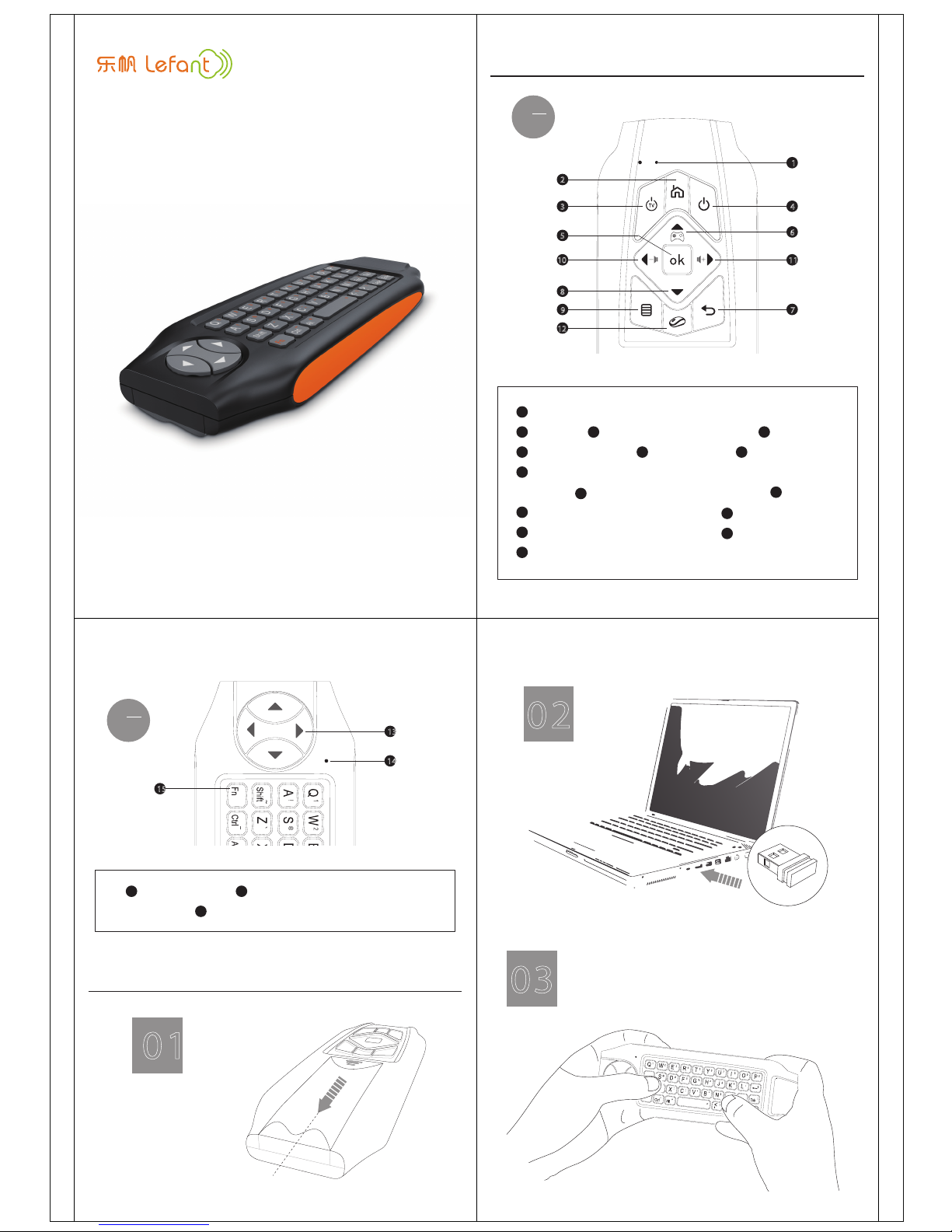
Keys Description
2
3
10
5
9
8
12
1
4
6
11
7
Wireless working LED (green LED) & IR learning LED (red LED)
1
Home
2
Enter / Mouse left
5
Somato-sensory start key, at the same time press the mouse
8
Menu
9
Volume: press the mouse power key ( ) at the same time
10
12
Volume: press the mouse power key ( ) at the same time
11
Cursor switch / Learning setting key
12
12
power key ( ) to start or exit the game mode
Direction key
6
Back / Mouse right
7
12
TV power learning button
3
Power
4
A
side
Insert the USB
receiver into device
of the USB port
press any key on the keyboard area, the green LED
keeps up, it is working properly. Now you can use
the Android Smart Somato-sensory Remote Fly mouse
( hereafter referred to as Fly mouse )
02
03
13
14
15
Along this arrow direction to unload
the battery cover
Open the battery cover,
install the batteries,
pay attention to the
direction of the battery
How to use
Fn compatibility function key
13
Direction area
13
Keyboard working LED ( green LED)
14
B
side
01
Page 2
体感游戏模式
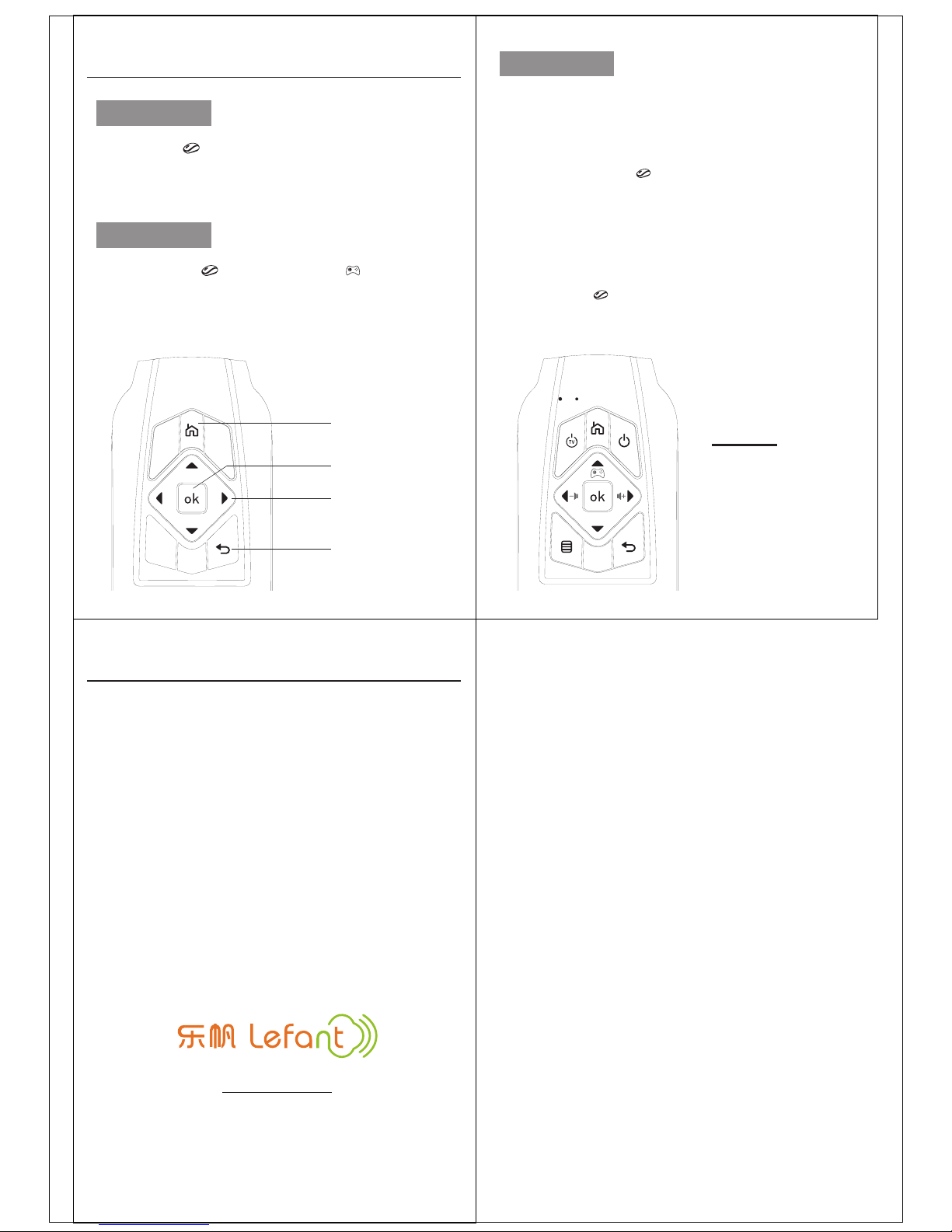
Press cursor switch ( ) and Somato-sensory ( ) at the same
time, the yellow LED keeps on , Fly mouse enters Somato-sensory
mode. Press the two keys again, exit Somato-sensory mode.
Note: some keys have no function in this mode,
other keys function will be different, as shown below:
Mouse
按下光标开关键( ),绿灯常亮,开启鼠标功能,在空中晃动飞鼠,
光标在屏幕上移动;再次按下该按键,关闭鼠标功能,光标锁定。
Working mode description
Tunk key
Direction area
Back key
Ok key
— The way of learning:
— The keys can be learned as below:
1. Long press the cursor key ( ), until the green LED lights out. And when
the red LED lights up, it enter the learning mode.
2. Press the key where you want to place the learned function and
previously learned function on this key will be deleted. The red LED flash,
it will enter a new learning state. Press the appropriate key on your
original remote that you want to copy. It starts learning. Whenthe red LED
flashes 3 times. and then the red LED keeps up, it learned successfully.
Or if the red LED flashes 5 times, then keeps up, it fail in learning.
3. Press cursor key ( ) during learning, The Red LED lights down, exit the
learning mode.
IR learning
Fly mouse has IR learning function, it can copy the ordinary IR
remote control function to the fly mouse keys, and then control
the appropriate device.
All the A side keys can
be learned except the
cursor key.
Trouble shooting:
1. Press any key, if the green LED flashes, please try to code operation as
follows. Unplug the USB receiver, press ( ok key ) and ( back key ) until the
green LED lights out ( about 3 seconds ), it enters coding connection.
Then insert the USB receiver into the USB port, and get the fly mouse close
to the USB receiver. If the green LED flashes 3 times, it connect successfully,
if it flashes 1 times, it connect fail.
2. If you feel the speed of the moving is too fast or too slow, please try to
adjust the movement speed of the cursor:Press the ( cursor switch ) and
( ok button ) for 3 seconds until the green LED flashes, The times of the
flash shows the current speed.
3. If the red LED flashes when press any keys, it shows low-battery. Please
replace the batteries.
If you encounter other problems, please try to replace the
batteries, and if the problem still exists, please contact the
dealeror call ourservice hot-line to get help.
Tel:400-686-3358 WWW:lefant.tmall.com
Fax:86-0755-89312305
Add:1#, Tianan Cyber Park, Longgang district, Shenzhen
Lohas Technology CO. Ltd
 Loading...