

Page 1
Page 2
Page 3
www.ledxon.com
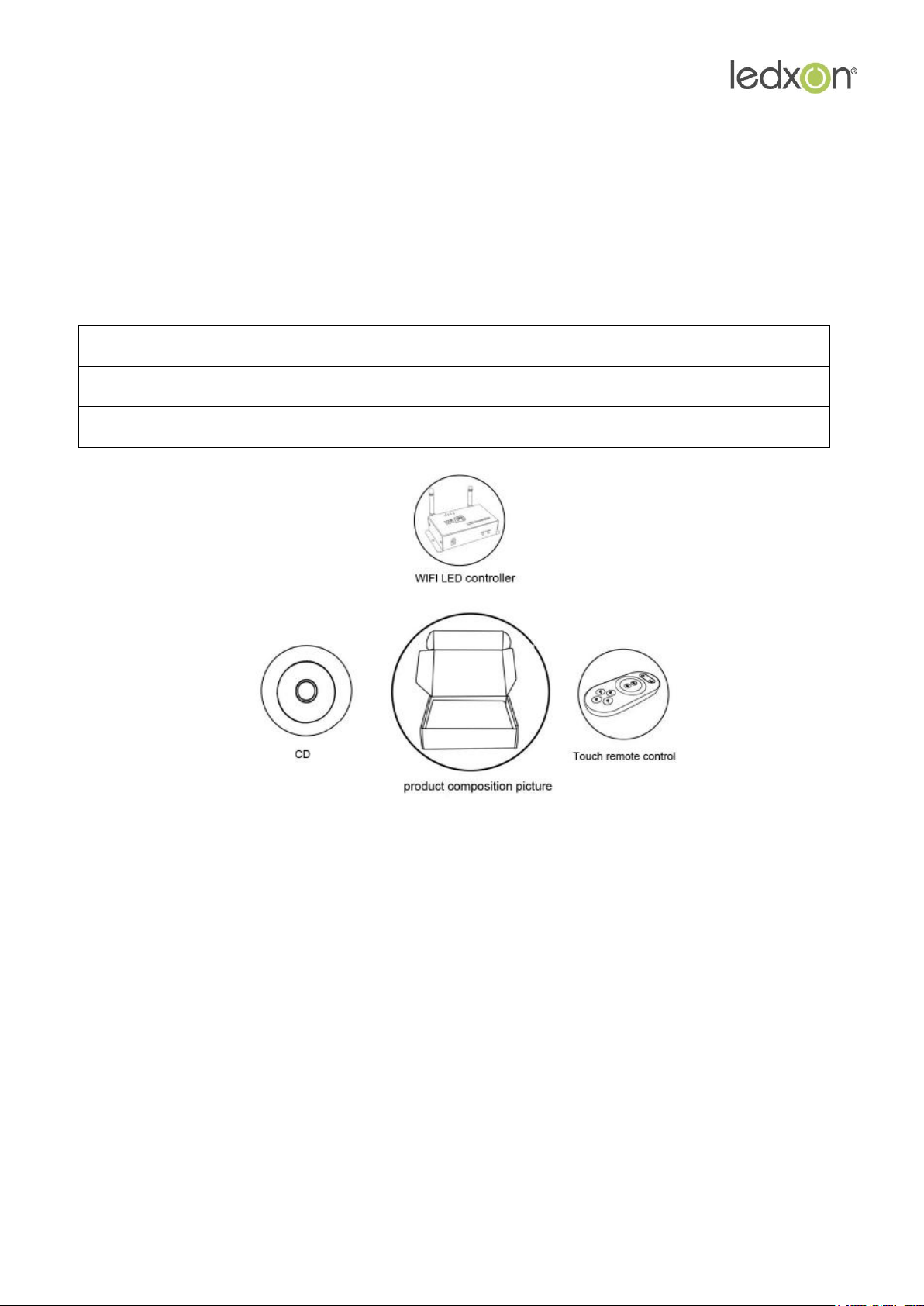
1. LED-WiFi Controller
It is the core of product, responsible for receive control
signal and control LED equipment.
2. Wireless remote controller
In the condition of not use the mobile phone as remote
control, you can choose RF remote control to control LED.
3. CD
Include IOS operating system and Android operating
system mobile soft.
I. Product Summarize
1. Product constitute
2. Product summarize
LED-WiFi controller is following the traditional with infrared, RF technology controller foundation,
it is birth of market and customer's demand, it is one type controller which integration the
newest wifi technical in the market. It makes the LED control more convenience, more
hommization. We can use an Android system or IOS system mobile phone to install control
software, then it can control LED, this is the wishes of every customer.
Use WiFi technology can make our control range more wider, can get rid of narrow space
constraint, in building can control more than 50m, in outdoor can control more than 100m.
In the condition of not use the mobile software, also can use the remote control to control,
very convenience, bring many choices for you.
3
Page 4

www.ledxon.com
II. Technical Parameters
1. Remote control technical parameters
1:Working temperature:-20-60° C
2:Power supply method:AAA*3
3:Supply voltage:1.5V*3
4:Standby power:0.015mW
5:Standby current:3uA
6:Working current:200uA
7:Emission current:10mA
8:Remote control distance:about 20m
9:Standby time:6 month
2. Software technical parameters
1:Name:Magic Color 1.0
2:Runtime platform:Android version support Android system(better one can support
Samsung, HTC), IOS version support IOS system, equipment must have WiFi function.
3:Byte: Android version(622K)、IOS version(581K).
4:Language: English
5:Category: communications
6:Free, green, no plug-ins
4
Page 5
www.ledxon.com
3. Controller technical parameters
1:Working voltage: DC5--24V
2:Output control: can flexible control 3 channel, 2 channel, 1 channel LED lamps.
3:Output current: 4A*3
4:Connect mode: common anode
5:Packing dimension: L215*W165*H55(mm)
6:External dimension: L107*W65*H30(mm)
7:Net weight: 340g
8:Gross weight: 480g
9:Receiving sensitivity: 802.11b DSSS(-5dBm),802.11b CCK (-10dBm),802.11g
OFDM (-15dBm)
III. Magic Color Instruction
1. Magic Color install course
1) This software have Android version and IOS version, according to your mobile phone to
choose to install, below respectively introduce Android version and IOS version install and use
method: Android version install as below:
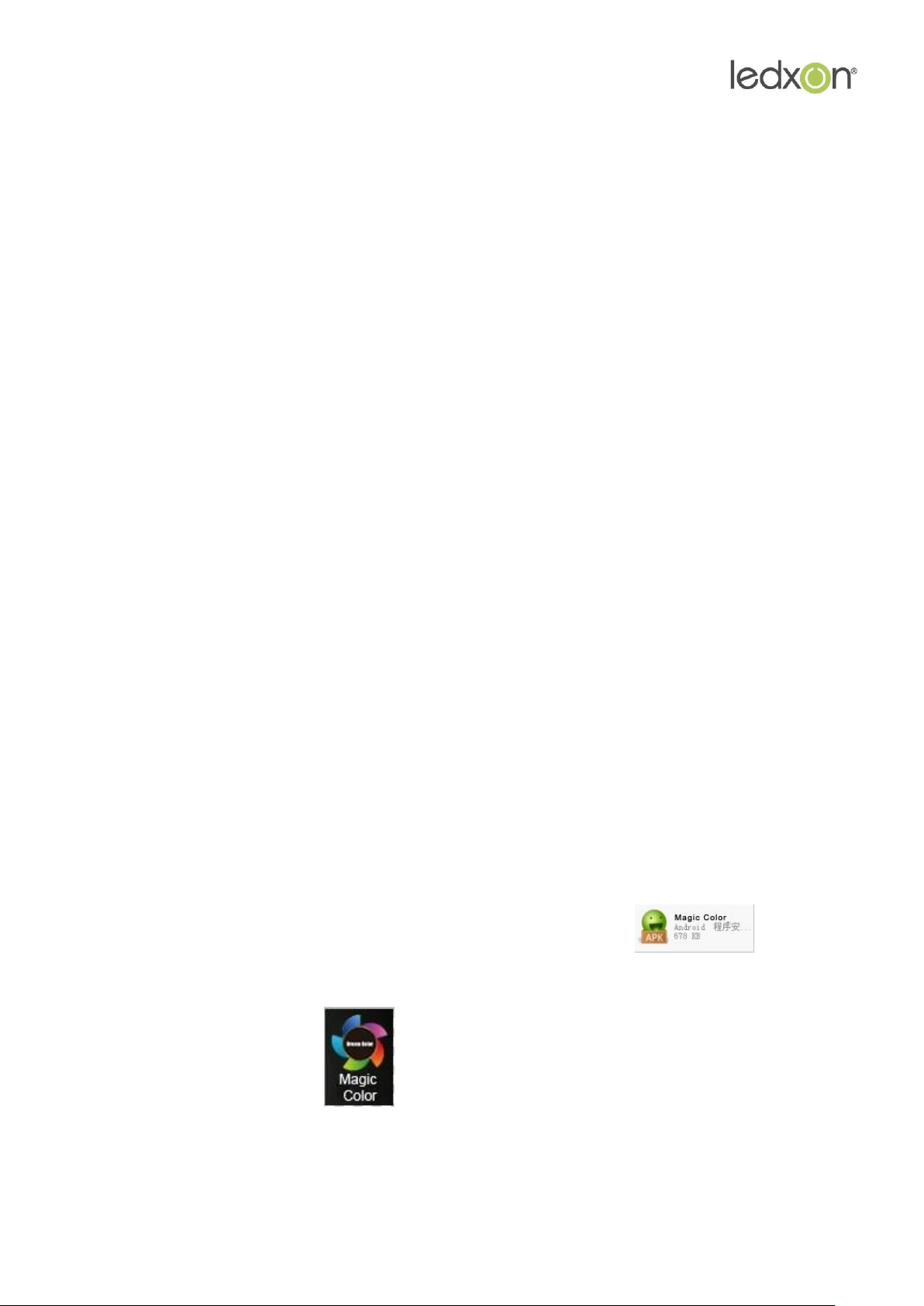
2) Open the optical disk can see the Magic Color erection Sequence
3) Click Magic Color 10.apk to install
4) Installation complete click .
5
Page 6
www.ledxon.com
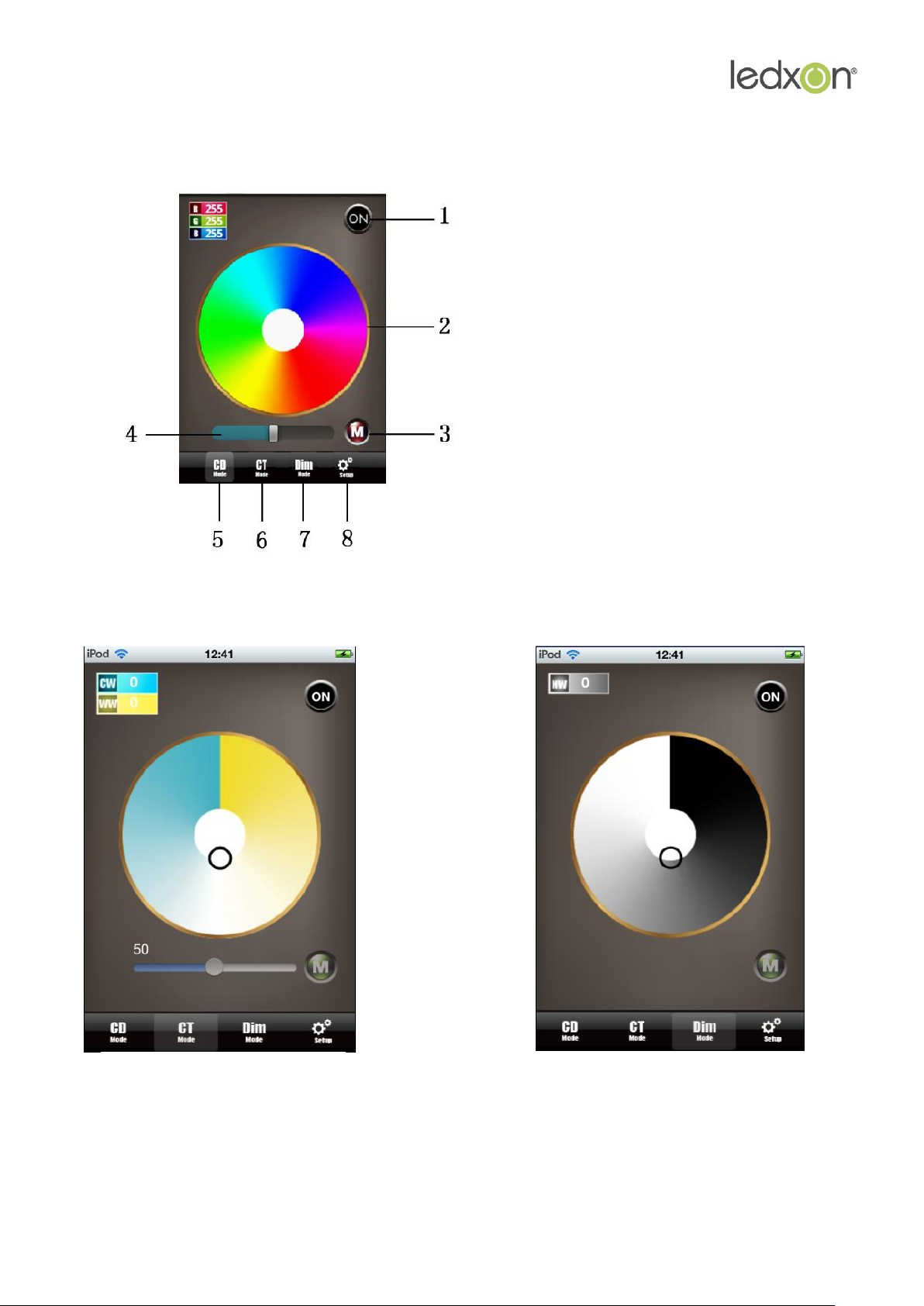
1. On Off key
2. color disk
3. mode key
4. speed/brightness bar
5. RGB mode LED control window
6. Cold white and warm white mode LED
control window
7. Dimmer mode LED control brightness window
8. Magic Color software setting window
CT mode page
(cold warm white mixed mode)
DIM mode page
(dimmer mode)
5) Open application
Following is control color temperature and brightness two mode page:
6
Page 7
www.ledxon.com
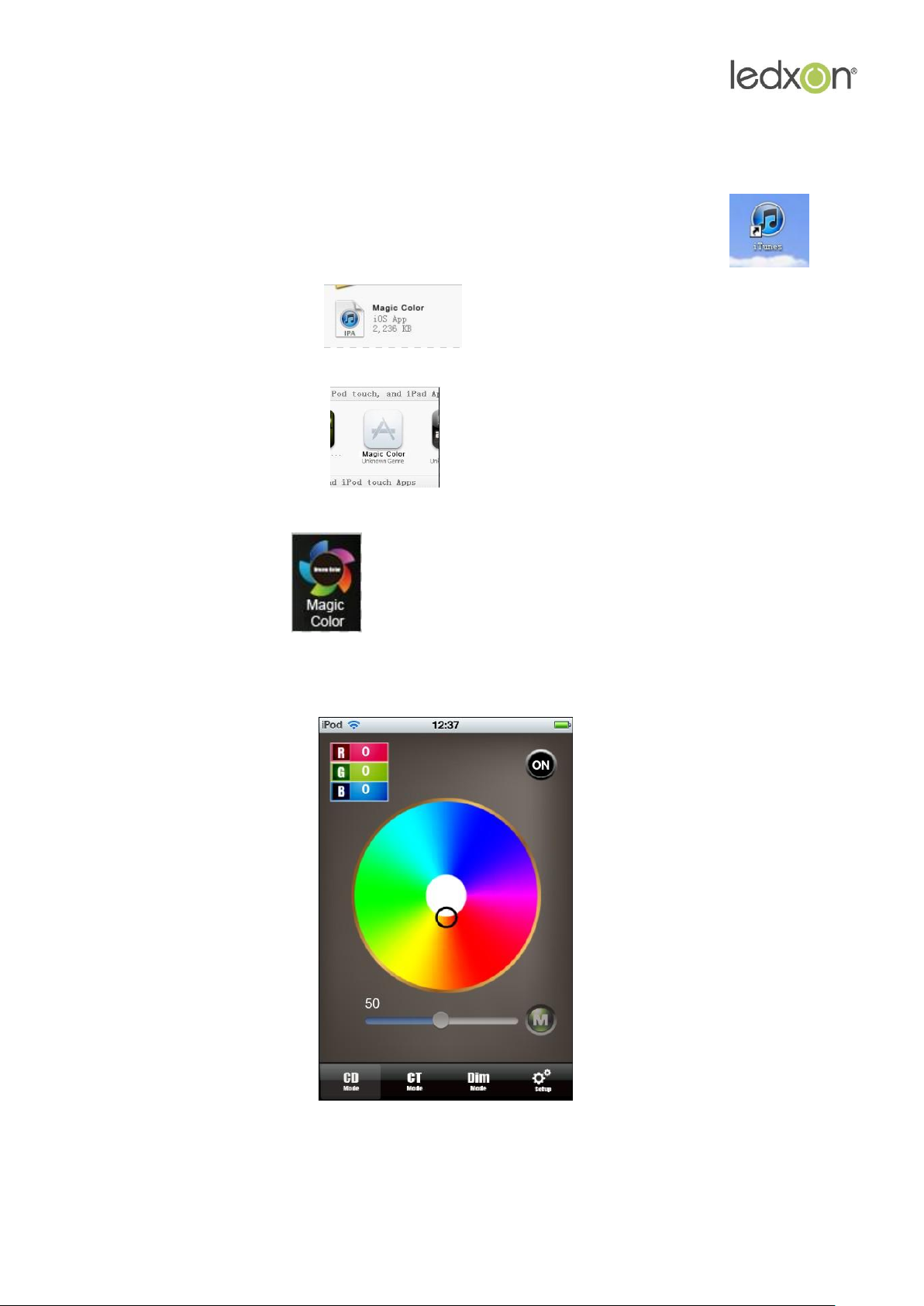
1. IOS version install method: (not escape or escape all can suit) can enter "app store" search
Magic Color.
Then it can find our software (below scheme just limit after escape) or open itunes,
make our installation package
Dragged into itunes, as picture click to install.
Installation complete click , open application (same with Android version).
7
Page 8
www.ledxon.com
2. Connect WiFi network
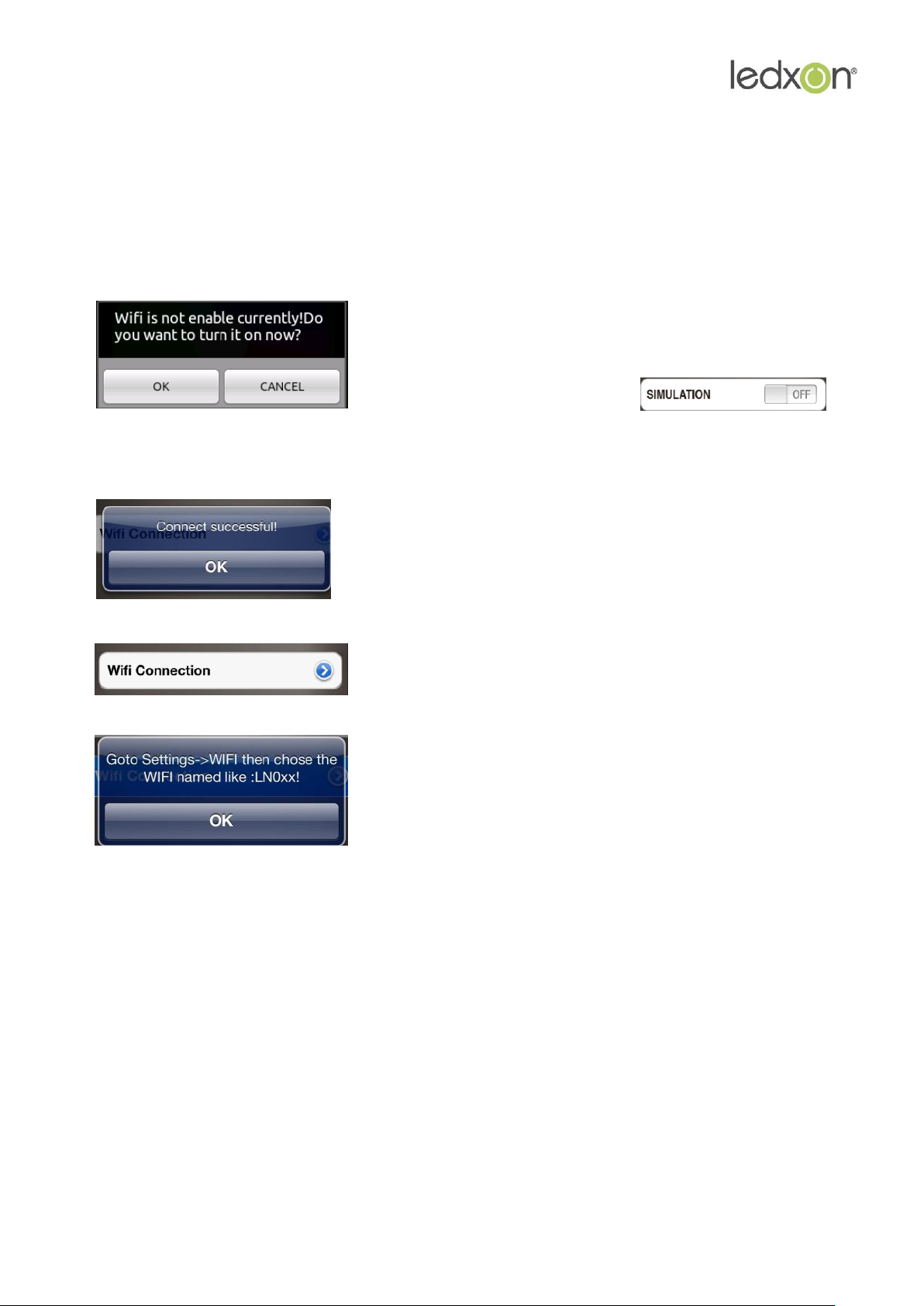
If you open Magic Color 1.0 show like below picture: prompt to choose "OK", jump to WiFi
setting interface connect WiFi LED controller. Or choose "cancel" don't jump,then setting
SIMULATION is ON, it will change to do not connect controller node, diagram form as below:
choose proceed wifi setting window
Finished setting, if popup below window:
indicate connect succeed
open wifi connect setting
prompt connect correct wifi equipment
3. ON/OFF Key
ON/OFF, before control LED, open on/off key. Click OFF close LED equipment.
4. Mode Key Function
Mode key under 3 mode page is entirely different, under CD mode page to control LED
dynamic work mode, under CT mode page to control 11 kinds of special color temperature
state, under DIM mode page to control 11 kinds of special brightness state.
8
Page 9

www.ledxon.com
5. Color disk instruction
Color disk under 3 mode page, the function is entirely different: under CD mode page is used
for adjust color, under CT mode page is used for adjust color temperature, under DIM mode
page is used for adjust brightness.
6. CD mode page control function
CD mode page is used for control LED product which consist of red, green, blue, under this
mode page, every time after touch the mode key "M", the lighten way will change."M" is used
for setting LED dynamic effect. Color disk touch point change will make the LED color
changed.
7. CT mode page control function
This mode page is used for control LED product which consist of warm white and cold white.
Brightness bar is used for setting the LED brightness, color disk adjust LED color temperature,
mode key is used for choose some kinds of default special color temperature value.
8. DIM mode page control function
DIM mode page is used for control LED product which consist of single color, color disk is used
for adjust LED brightness, mode key "M" is switch some special brightness state(for example: 25%
brightness, 50% brightness, 75% brightness, 100% brightness)
9. Speed/brightness bar instruction
Speed/brightness bar under different mode page is different: under CD mode page, different
situation separately control brightness and speed, under CT mode page, it is control brightness.
10. Setup mode function
The last is Setup touch key, it have SIMULATION、SOUND and WiFi CONNECTION 3 options,
SIMULATION is mainly used for set software imitate and actually connect LED-WiFi controller to
choose, if choose ON state, do not need to connect LED-WiFi controller, it can used for
software demonstrate, imitate demonstrate ect. Practical application need to set OFF(actually,
when you connect WiFi, the software have automatic set to OFF), SOUND is the prompt tone of
click the software switch,WiFi CONNECTION is used for jump to wifi network setting interface
proceed wifi connection.
9
Page 10
www.ledxon.com
IV. LED-WiFi Controller Function Instruction
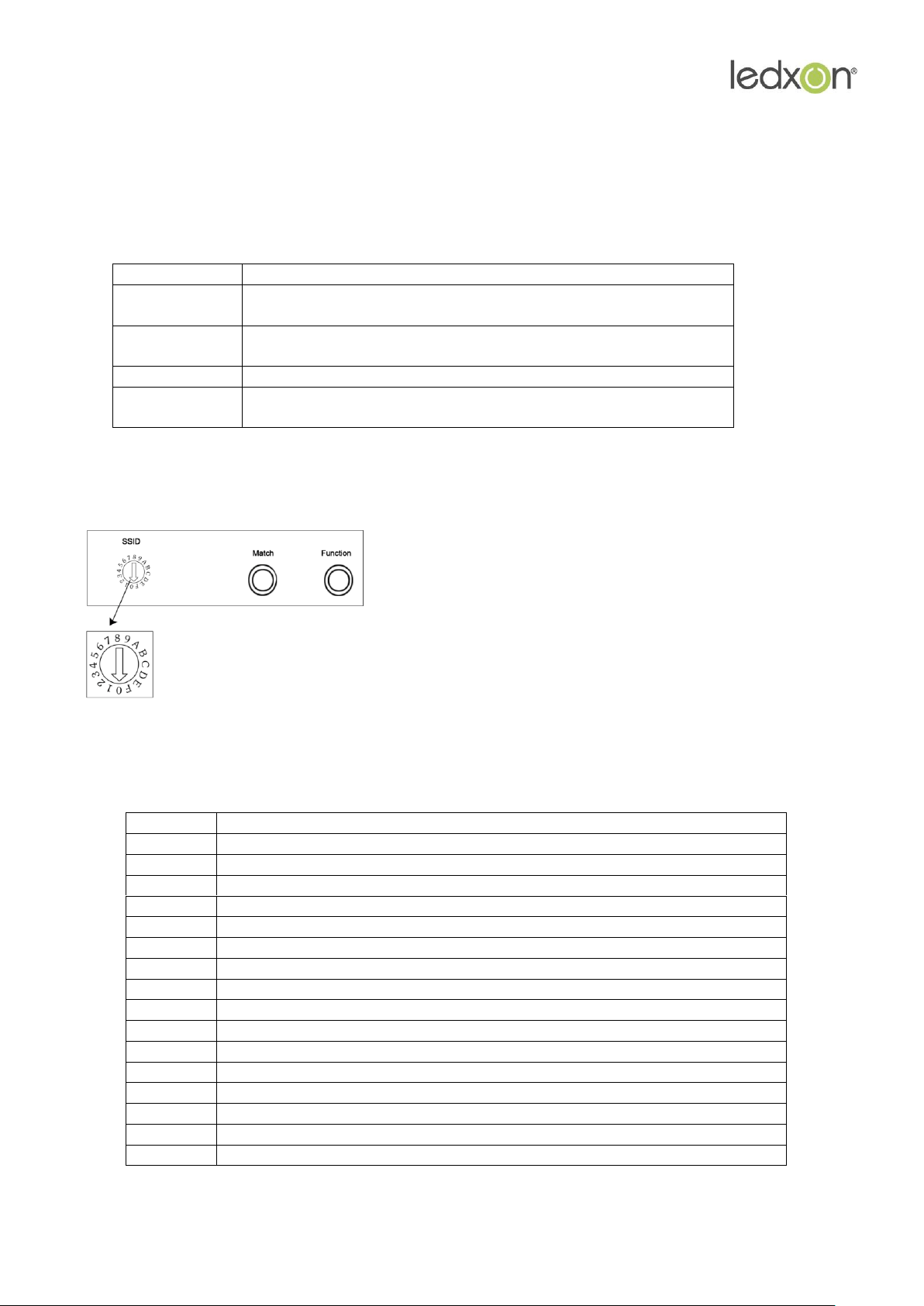
Indicator light
Function table
Power
Power indicator light, long-time bright shows power supply
normally
Wifi
Free time long-time bright, have wifi data enter flicker,
configuration wifi Ssid off
Link
Receive the date, become flicker
RF
Have correct wifi date enter flicker, free time die out, have
remote then control flicker
code
SSID
0
LN001
1
LN002
2
LN003
3
LN004
4
LN005
5
LN006
6
LN007
7
LN008
8
LN009
9
LN010
A
LN011
B
LN012
C
LN013
D
LN014
E
LN015
F
LN016
The dial code is used for setting LED-WiFi controller
Ssid number, corresponding table as below. Form 0
to 15, have 16 code in total, so our Ssid number
fasten to LN001 to LN016. That means use our
product in same small area can set 16 mutual isolation
LAN, once the dial code changed after switch was dialed,
Ssid number immediately be modified, so you need
to note that it need to search and connect again.
1. Working state instruction
2. Setting SSID number
10
Page 11
www.ledxon.com
3. Connect LED, Power supply port
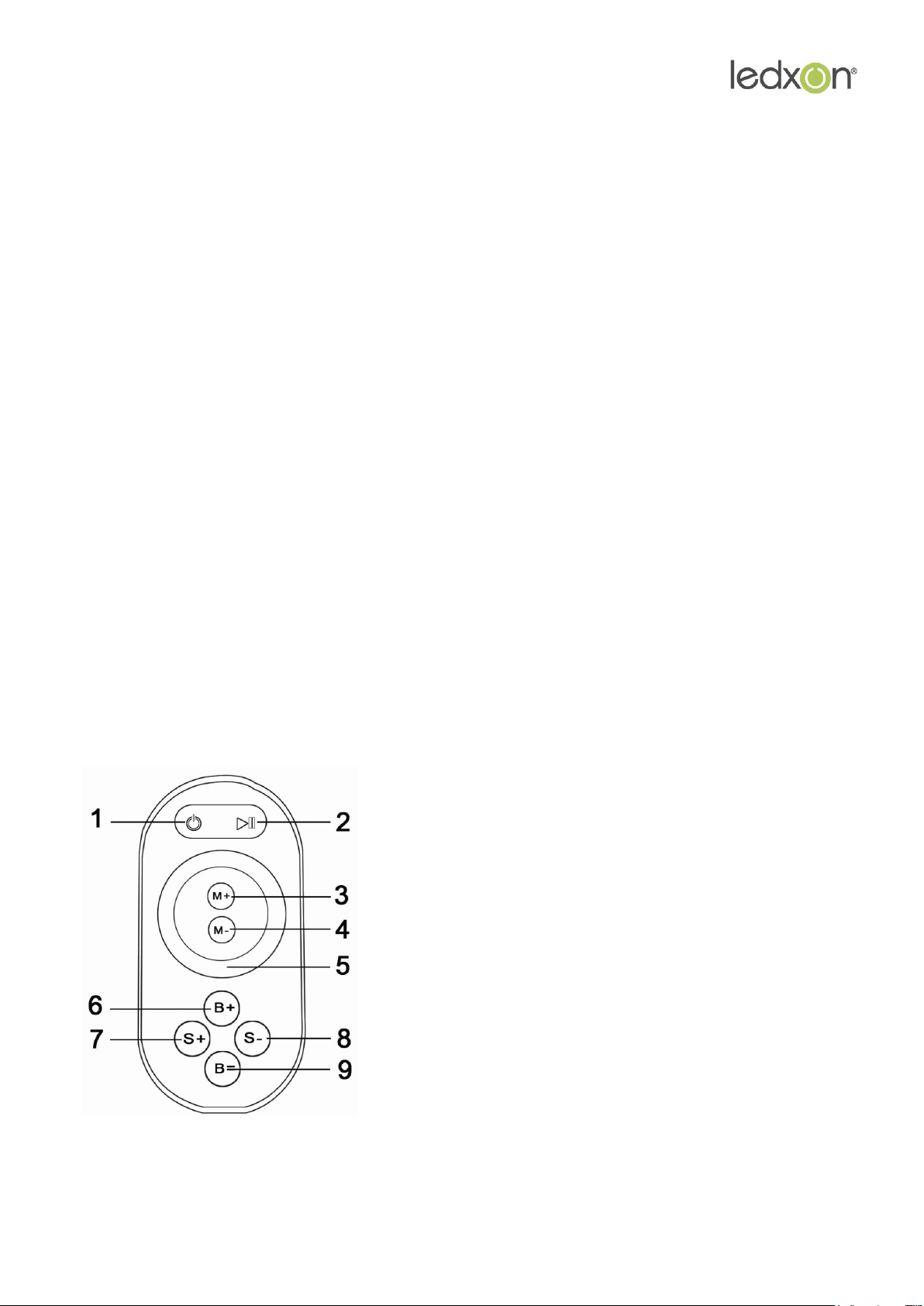
1. on/off key
2. pause key
3. mode+
4. mode-
5. Color pulley key
6. brightness+
7. brightness-
8. speed+
9. speed-
LED port under CD mode page need to connect RGB 3 channel LED equipment, under CT
mode page need to connect cold white and warm white 2 channel LED equipment group,
under DIM mode page need to connect single color LED equipment.
4. Match Key function
The first time use the controller and remote control, maybe because the controller address and
remote control address is not match, it will cause the remote control can not control, at this
time, it need to use this button to make this 2 address matched.
Use method: first, press the controller "Match" key, at the same time press any key of the
remote control, more than 2s, now the remote control indicator light RF will flicker 3 times,
release "Match" key, then finished.
5. Function key function
“Function” key is a composite button, it have switch and mode change function.
Function instruction: long-time(more than 2s): on off;
Short press(less than 1s): mode change.
6. Remote control function instruction
11
Page 12

www.ledxon.com
Touch remote panel have 64 touch button (point), each button function as below:
1、on/off key, any state, can turn on or turn off controller output;
2、pause key, under dynamic mode, can make the controller stop current state;
3、this key have 2 function:
①mode add key, so when the current control mode is pulley
mode(color), if it need to realize the mode(color) in controller, can
press this button.
②mode switch key, so when the current control mode is M key mode,
can switch the regulation mode(color) in M+ key mode table.
4、This key have 2 function:
①mode minus key, so when the current control mode is pulley
mode(color), if it need to realize the mode(color) in controller, can
press this button.
②mode switch key, so when the current control mode is M key mode,
can switch the regulation mode(color) in M- key mode table.
5、output brightness control key, every time you press this button, the brightness
series add 1, altogether 100 levels;
6、output brightness control key, every time you press this button, the brightness
series minus 1, altogether 100 levels;
7、output speed control key, every time you press this button, the speed series add
1, altogether 100 levels;
8、output speed control key, every time you press this button, the speed series
minus 1, altogether 100 levels;
9、Color pulley touch button, static mode choose key, up to 55 touch point.
12
Page 13
www.ledxon.com
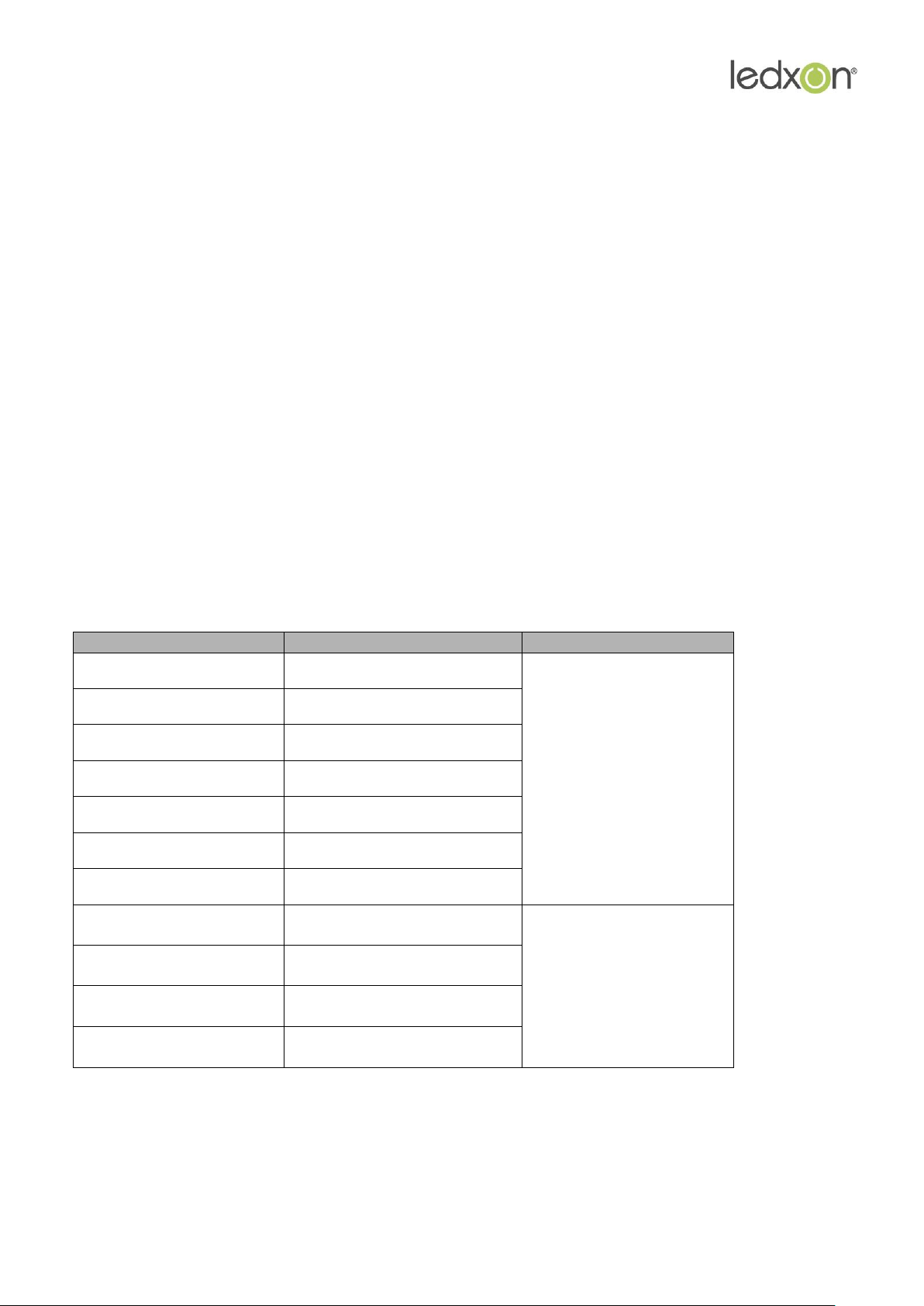
This key have 2 function:
Mode number
function
remark
1
Static red
Brightness is
adjustable,Speed is
unadjustable
2
Static green
3
Static blue
4
Static yellow
5
Static purple
6
Static cyan
7
Static white
8
Three-color jumpy
changing
Speed is
adjustable, Brightness is
unadjustable
9
Seven-color jumpy
changing
10
Three-color
gradualchanging
11
Seven-color gradual
changing
① pulley static color choose button, so when the current control mode is M key mode(color), if
need to realize the static color on pulley, can press this button.
② pulley color switch key: can switch from 55 static color (pulley shows color).
Power management: Stop using remote control more than 20 s, remote control will
automatically into standby mode(the state can not touch),to extend the battery life for use;
shake the remote mildly remote return to work station(the state can touch).
Remark: This remoter just apply to RGB model.
7. Built-in mode form of controller
1. The mode form of RGB Control:
13
Page 14
www.ledxon.com
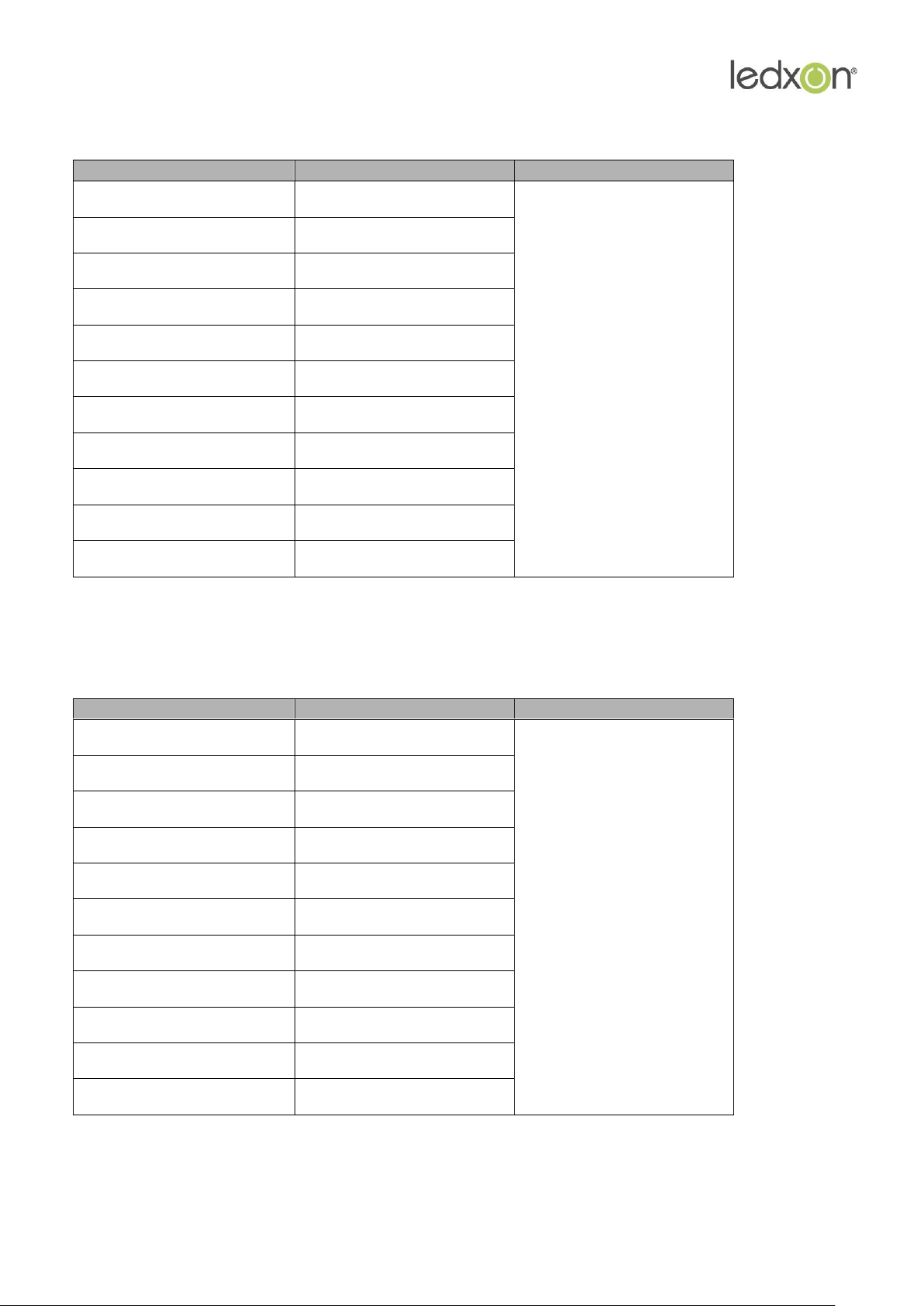
2. The mode form of color temperature control:
Mode number
function
remark
1
CW
Brightness adjustable
2
80%CW
3
60%CW
4
40%CW
5
20%CW
6
PW(pure white)
7
20%WW
8
40%WW
9
60%WW
10
80%WW
11
WW
Mode number
function
remark
1
1%
Brightness proportion
2
10%
3
20%
4
30%
5
40%
6
50%
7
60%
8
70%
9
80%
10
90%
11
100%
3. The mode form of dimming Control:
14
Page 15
www.ledxon.com
V. Explain installed hardware
1. Install ANT
ANT's installation drawing: clockwise install WIFI antenna and anticlockwise take down the
antenna.
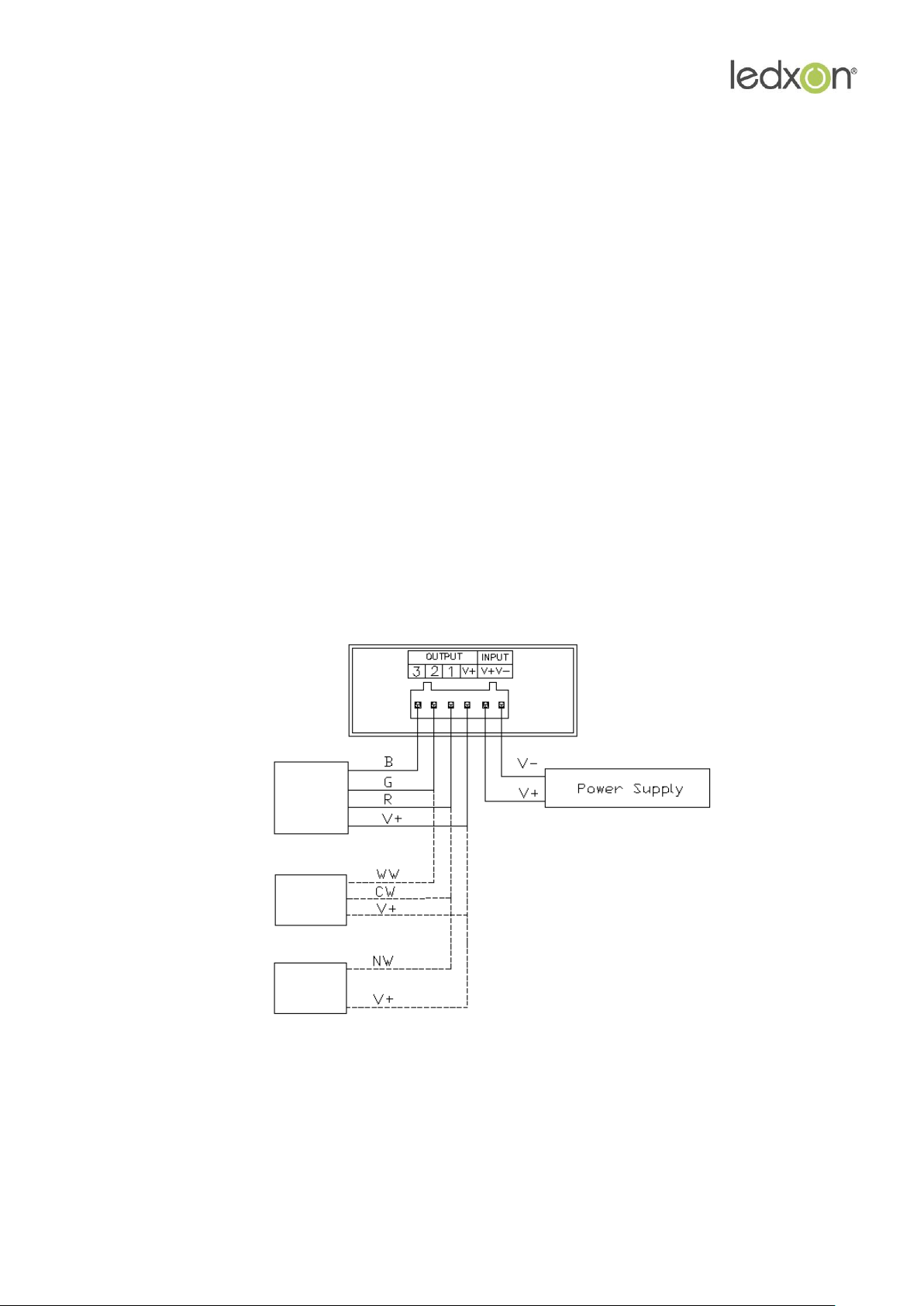
2. Install power supply and LED equipment
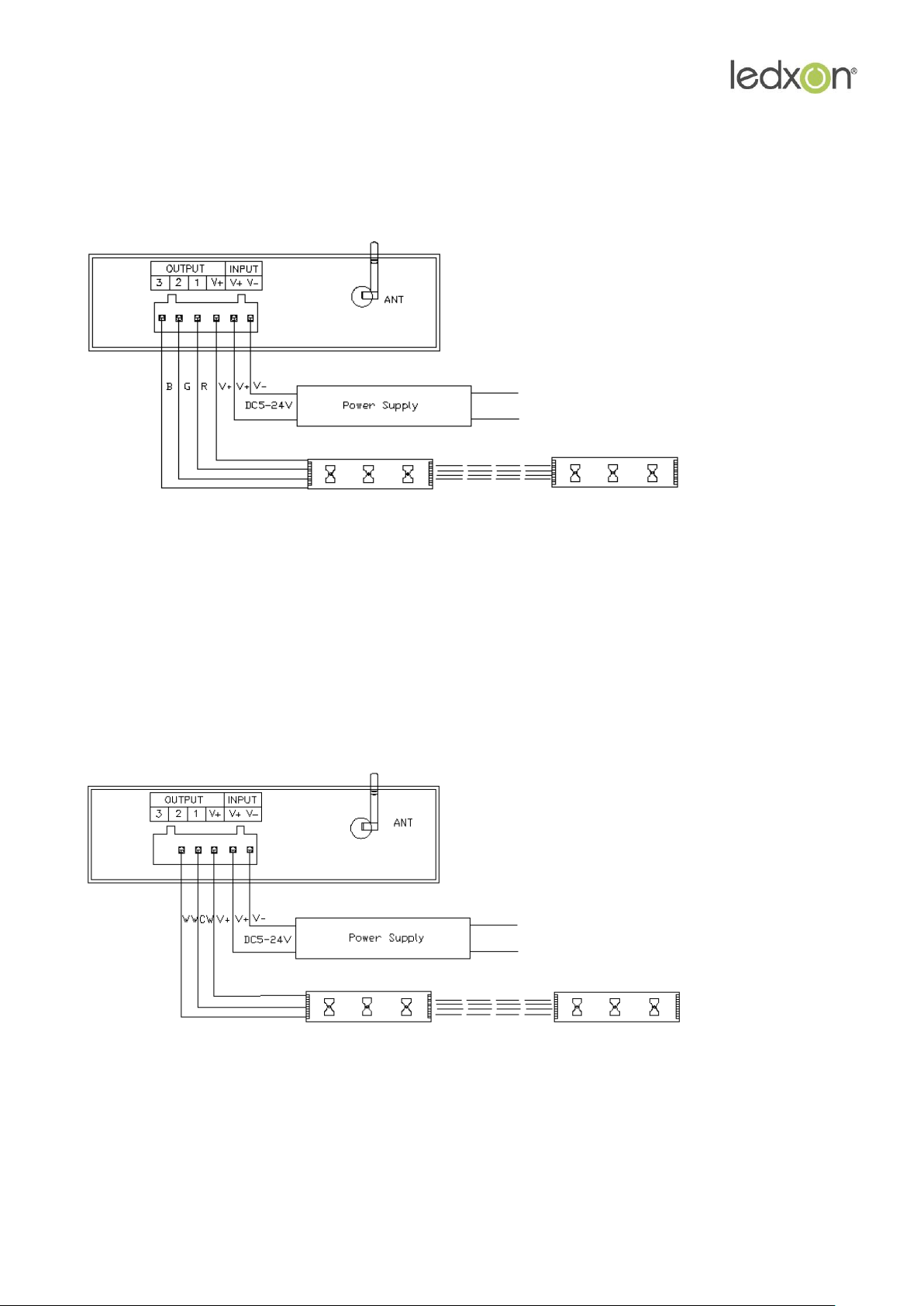
This connector structure belong to drawer structure, the device interface of power supply and
LED is together, four interface one the left side (3、2、1、V+)is connect led equipment, the
fifth interface is connect the anode V+ of power supply, the sixth interface is connect the
cathode V_ of power supply. According to the rated voltage of led lamp, we supply power to
controller, and the rated voltage of controller is 24V. As follows:
15
Page 16
www.ledxon.com
3. Connect three channels LED instruction
When connect three channels LED, you should put the Dream Color software switch to CD
mode to use,only under this mode,you can control the LED's color,brightness and speed. Color
disk adjust the color(Adjust process can be seen in the upper left corner R, G, B numerical with
change),speed/brightness item adjust speed and bright("M"set the LED dynamic
effect,"M"adjust the LED dynamic change.
4. Connect two channels LED instruction
When connect three channels LED, you should put the Dream Color software switch to CD
mode to use, only under this mode, you can control the LED's color temperature, brightness
and color temperature shortcut key settings. Color disk adjust the color temperature
(meanwhile top left CW,WW numerical with change),brightness item adjust bright, "M" key set
the special color temperature state.
16
Page 17
www.ledxon.com
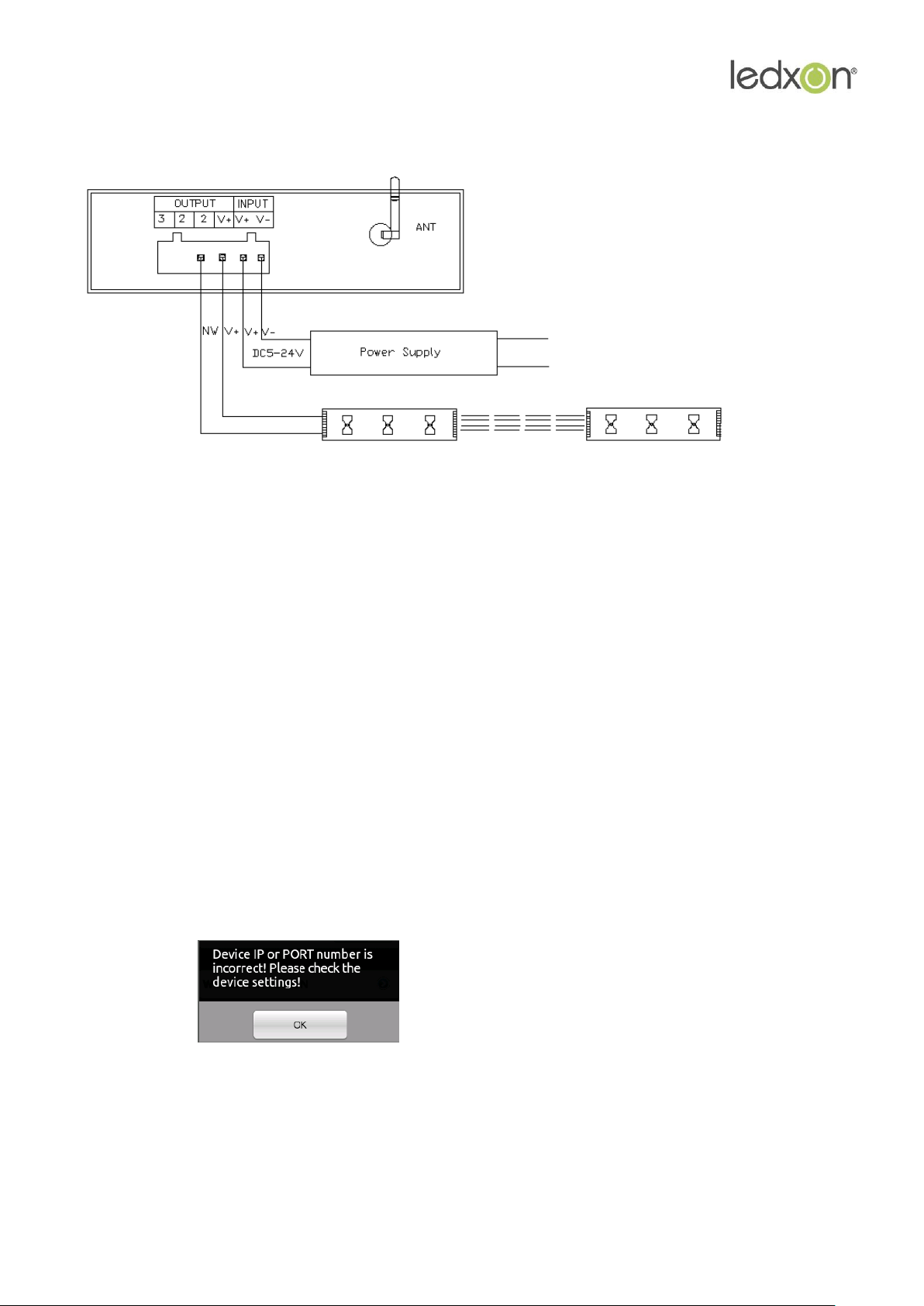
5. Connect one channel LED instruction
When connect three channels LED, you should put the Dream Color software switch to CD
mode to use,under this mode,use color disk control the LED's brightness,Adjust process can be
seen in the upper left corner NM numerical with change.
VI. FAQ
1. Magic Color can`t open (error and breakdown), how to do?
Answer: If it is happened, just need to open again then you can solve. If it is still not open,that
maybe the compatibility of software to this phone is not very good,so you need to install the
software to other phone to use.
2. Magic Color can not control LED?
Answer: It maybe happen of wifi connection unsteadily.
1. you can try shorten the distance of phone and controller.
2. you can enter SETUP reconnection(reinstall simulation to OFF),
if appear this ,if the network of you connect is LN0XX form, that is
maybe phone and wifi connection unsteadily, so retry several times, if it is still not useful, so you
need to change the phone.
3. close the software and open again. One of above three ways can solve this problem, but if
there can not get the data , you must be ensure the distance is not too far.
17
 Loading...