

Page 1
FCC Information to Users
This equipment has been tested and found to comply with the
limits for a class B digital device, pursuant to Part 15 of the FCC
Rules. These limits are designed to provide reasonable
protection against harmful interference in a residential
installation. This equipment generates, uses, and can radiate
radio frequency energy and, if not installed and used in
accordance with the instruction manual, may cause harmful
interference to radio communications However, there is no
guarantee that the interference will not occur in a particular
installation. If this equipment does cause harmful interference to
radio or television reception, which can be determined by turning
the equipment off and on, the user is encouraged to try to
correct the interference by one or more of the following
measures:
Reorientate or relocate the receiving antenna.
Increase the separation between the equipment and
receiver.
Connect the equipment into an outlet on a circuit
different from that to which the receiver is connected.
Consult the dealer or an experienced radio/TV
technician for help.
Quick Start
Manual
To get your game up and
running quickly with
for more comprehensive
Warning: Changes or modifications not expressly approved by
Lectronic Kaddy Corporation could void the user's authority to
operate the equipment.
instructions refer to your
owners manual
Page 2

Connect battery and ensure that the plug is
securely inserted into the socket.
Press "On" button to power up the ‘Kaddy.
From the main control panel:-
Data Panel
illustration
Manual Operation
Here
Pressing the green bar ("Start") will start
the ‘Kaddy moving.
Pressing the red bar ("Dynamic Brake") will
stop the kaddy by applying the brakes.
For moving short distances, depress and
hold the manual push button located under
the hand grip, release to stop.
For more functions, refer to the instruction manual.
Page 3

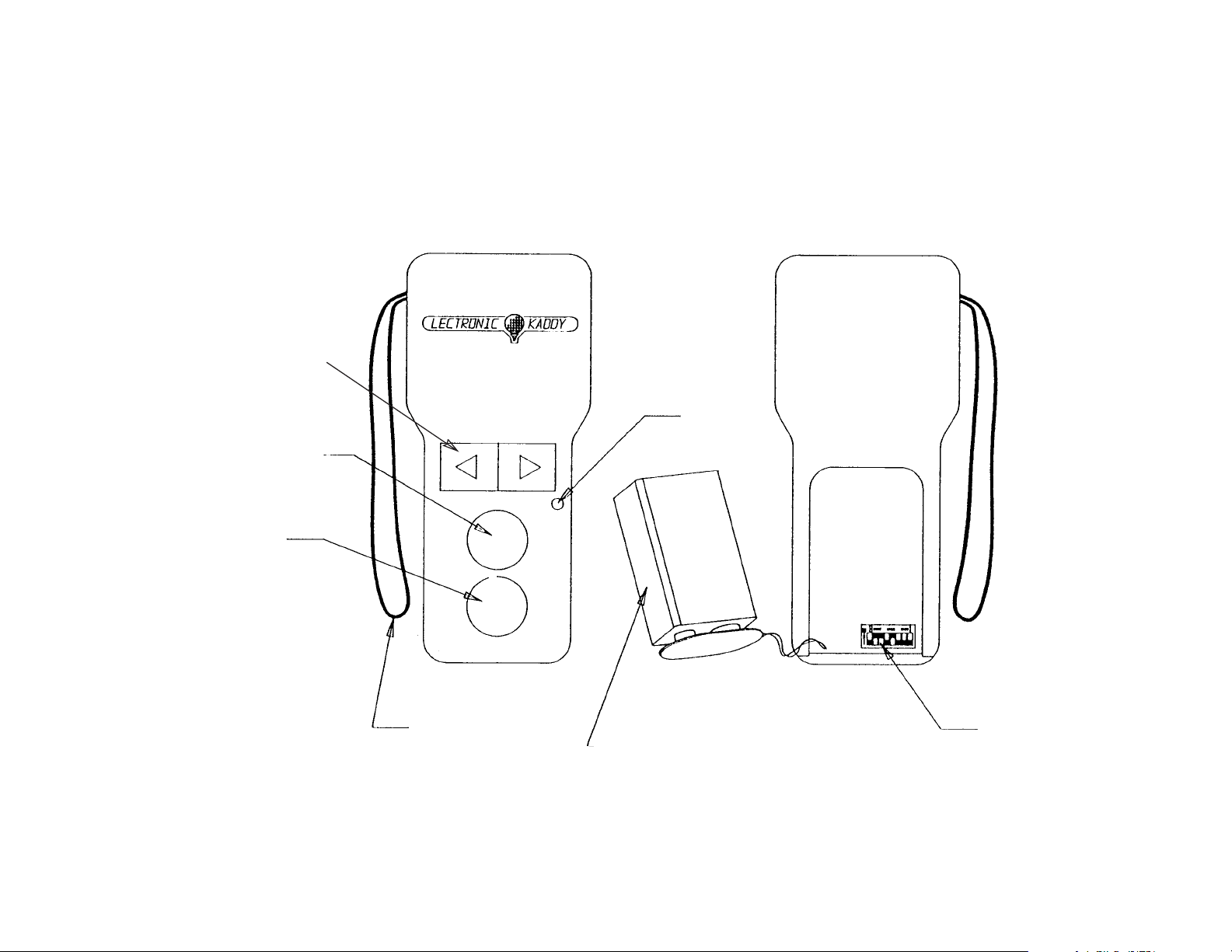
To start the ‘Kaddy using your remote control, hand held, transmitter, simply
press the centre round button.(see illustration) Holding down this button will
gradually increase the speed of the ‘Kaddy. Release the button when the
desired speed has been reached, the ‘Kaddy will then maintain this speed.
To stop the ‘Kaddy, press the lower round button once. This will disengage
power to the motors. Continuing to hold down this button, or pressing a second
time, will cause the brakes to activate.
To initiate a turn, press, and hold down, the toggle switch either to the right, to
initiate a right turn, or to the left for a left turn.
Initiating the turn when the ‘Kaddy is already in motion, will result in gentle
turning or course correction. If a more aggressive turn is required, then first
stop the ‘Kaddy then press and hold the toggle switch either left or right.
Release the toggle switch to allow the ‘Kaddy to revert to a straight path.
If turning was initiated after stopping the ‘Kaddy, then, upon releasing the turn
command, the ‘Kaddy speed will revert to the lowest setting and it will be
necessary to increase speed by pressing the centre round button as described
Remote Operation
in the starting procedure.
Page 4

When traveling down hill, the ‘Kaddy will not turn as effectively. This
ensures that the ‘Kaddy will remain stable at all times. To effect turns in
these circumstances, first stop the ‘Kaddy prior to activating the turn, as
described above.
When traveling up hill, the ‘Kaddy will be more responsive when
turning. Take care when maneuvering in these circumstances, especially
when near hazzards. If in doubt, revert to manual control.
The effective range of transmission can be effected by environmental
conditions. If the ‘Kaddy becomes "out of range", raising the transmitter
above your head and activating the stop button will bring the ‘Kaddy to
rest.
If you park the ‘Kaddy and leave it unattended, switch off the power
at the ‘Kaddy's Control Panel. Other ‘Kaddy users with the same user code
setting and/or inadvertent operation of the transmitter buttons when out of
sight of your ‘Kaddy, can cause the ‘Kaddy to be set in motion.
If the LED light on the transmitter appears as a solid light, instead of
flashing rapidly, when a button is pressed, then the 9 volt battery in the
transmitter needs to be replaced immediately. Failure to do so may result in
Operating Tips
your losing control of the ‘Kaddy.
Page 5
Tu r n
Start/Speed
Stop/Brake
Front
Strap
Back
L.E.D.
User Code
9V Battery
Transmitter Illustr.
Page 6

Replace Battery
Open the transmitter case by sliding the battery cover to expose the battery. Remove the
battery and disengage the polarized connector. Do not stress the wires by dangling the
battery while still connected. Replace the battery with the specified alkaline battery.
Replace the cover.
Setting User Code
The user code has already been set for your unit and, therefore, does not require
adjustment. However should it become necessary to change or reset the code, the
following should be observed.
The transmitter and receiver must have the identical User Code to communicate. The User
Code is a numerical representation of the switch settings. e.g. "123" indicates that switches
#1, #2, & #3 are in the "on" position, all other switches being "off". To set the transmitter
code, remove the battery to expose the switches.(see illustration) Using a pointed tool, or
even a golf tee, switch the appropriate switches to the "on" position.
To change the receiver code, to avoid conflict with another user for instance, the receiver
must be removed from the ‘Kaddy, opened to expose the set of switches and the switch
positions modified as described for the transmitter. Mark the new code on the receiver
enclosure for future reference. Reset the transmitter code as described above.
Page 7
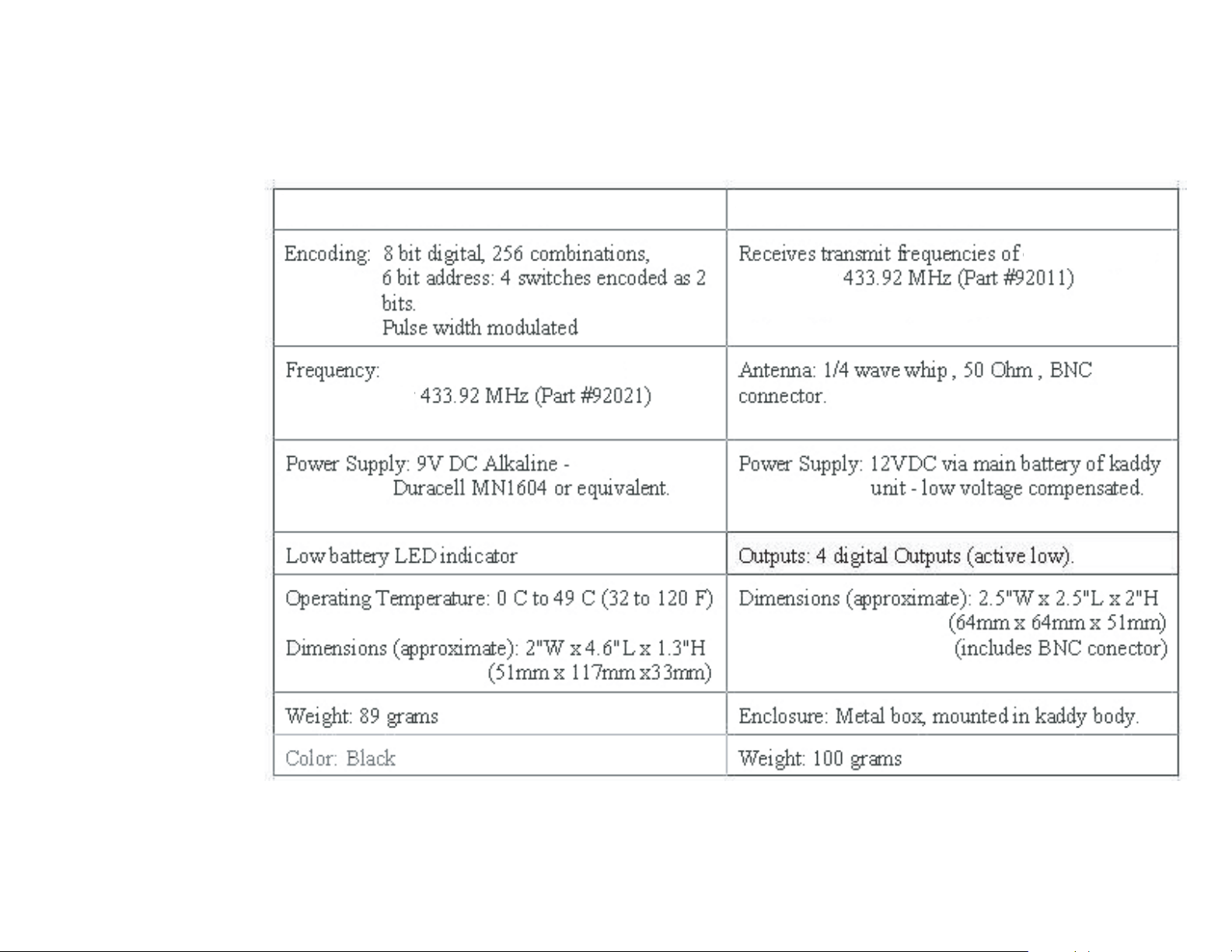
Transmitter Specification
Receiver Specification
:-
Remote Spec.
 Loading...