

Page 1
This guide contains important information. Please keep it for future reference.
™
91-003685-000-000
Parent’s Guide
US
Page 2
INTRODUCTION
Thank you for purchasing the Learn & Groove® Dancing PandaTM.
Dance along to Panda’s cool moves and learn many dierent
preschool skills. Press the four bright light-up instrument
buttons to learn about colors and instruments. Jam along with
Panda to four learning songs and a variety of dancing tunes.
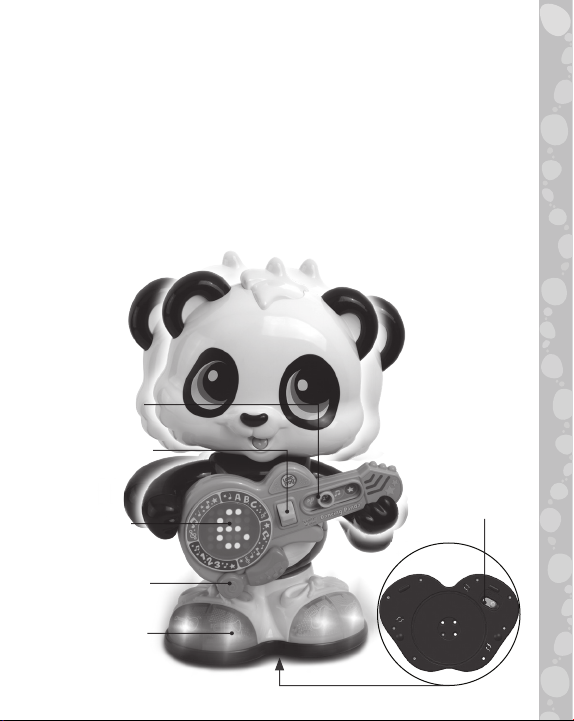
Press the yellow Bridge switch to see and hear letter names,
letter sounds and numbers. The LED display on Panda’s guitar
shows animations to teach numbers, letters and shapes.
Mode Switch
Bridge Switch
On/O/
LED Screen
Music Button
4 Instrument
Buttons
Volume Switch
2
Page 3
INCLUDED IN THIS PACKAGE
• One Learn & Groove® Dancing Panda™
• One parent’s guide
WARNING:
All packing materials, such as tape, plastic sheets, packaging
locks and tags are not part of this toy, and should be discarded
for your child’s safety.
NOTE:
Please keep this parent’s guide as it contains important
information.
ATTENTION :
Pour la sécurité de votre enfant, débarrassez-vous de tous
les produits d’emballage tels que rubans adhésifs, feuilles de
plastique, attaches, étiquettes et vis d’emballage. Ils ne font
pas partie du jouet.
NOTE :
Il est conseillé de conserver ce guide des parents car il comporte
des informations importantes.
NOTE :
This product emits flashinglights at 3-60 cycles per second.
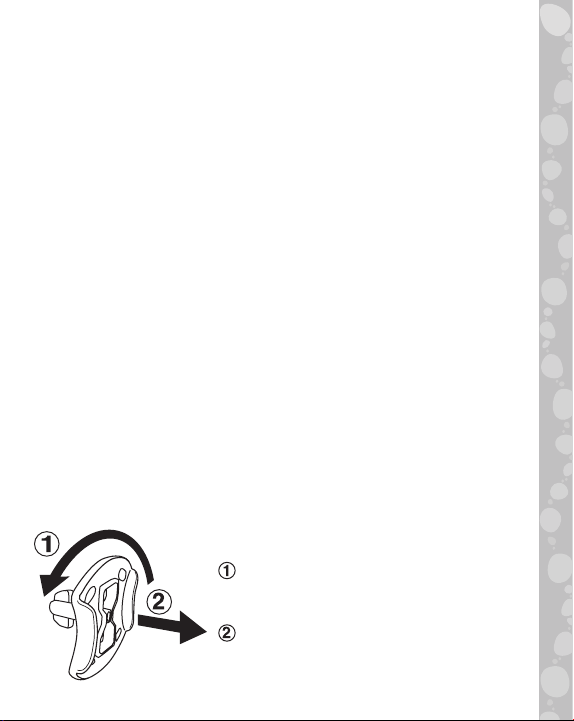
Unlock the packaging locks:
Rotate the packaging lock 90
degrees counterclockwise.
Pull out the packaging lock.
3
Page 4
ACTIVATE NORMAL PLAY MODE
This product is in try-me mode in the
packaging. To activate normal play mode,
please complete the following steps:
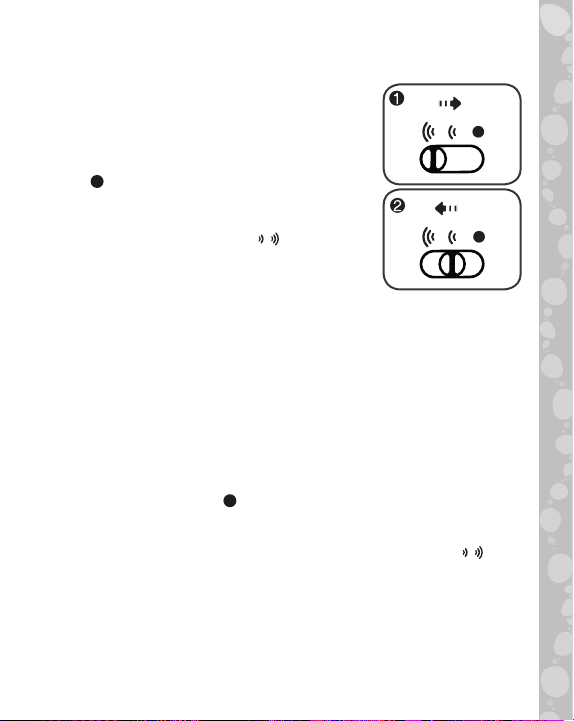
1. Slide the On/Off/Volume Switch to the
Off position.
2. Slide the On/Off/Volume Switch to
the Low or High Volume / position to
activate normal play mode.
ACTIVATION DU MODE DE
JEU NORMAL
Ce produit est en mode Démonstration dans son emballage.
Pour activer le mode de jeu Normal, merci d’effectuer les étapes
ci-dessous :
1. Glisser le Curseur Marche/Arrêt/Réglage du volume sonore
sur la position Arrêt
2. Ensuite, glisser le Curseur Marche/Arrêt/Réglage du volume
sonore sur la position Volume faible ou Volume fort / pour
activer le mode de jeu Normal.
.
4
Page 5
GETTING STARTED
BATTERY INSTALLATION
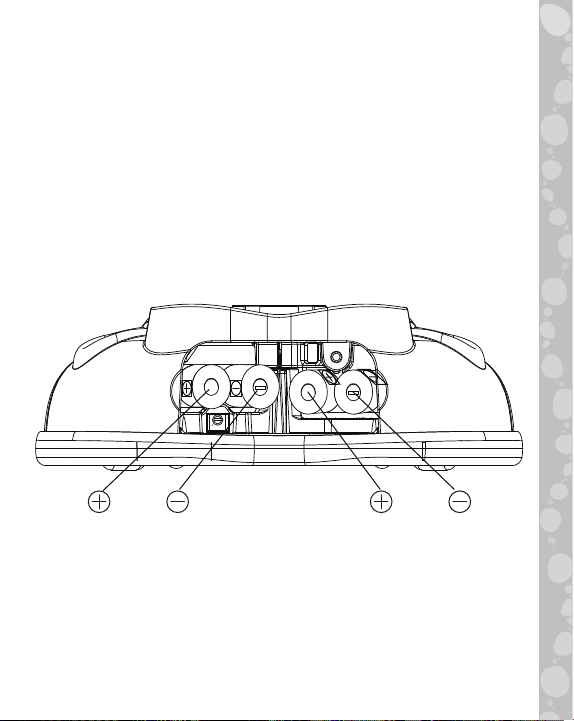
1. Make sure the unit is turned Off.
2. Locate the battery cover on the bottom of the unit.
3. Use a screwdriver to loosen the screw and open the battery
cover.
4. Install 4 new AA (AM-3/LR6) batteries into the battery
box as illustrated. (The use of new alkaline batteries is
recommended for maximum performance.)
5. Replace the battery cover and tighten the screw to secure.
Low Battery
When the batteries are exhausted, the Learn & Groove® Dancing
Panda™ may shut o or restart suddenly. Please replace the
batteries with a full set of new batteries before further use.
5
Page 6

BATTERY NOTICE
• Use new alkaline batteries for maximum performance.
• Use only batteries of the same or equivalent type as
recommended.
• Do not mix dierent types of batteries: alkaline, standard
(carbon-zinc) or rechargeable, or new and used batteries.
• Do not use damaged batteries.
• Insert batteries with the correct polarity.
• Do not short-circuit the battery terminals.
• Remove exhausted batteries from the toy.
• Remove batteries during long periods of non-use.
• Do not dispose of batteries in fire.
• Do not charge non-rechargeable batteries.
• Remove rechargeable batteries from the toy before charging
(if removable).
• Rechargeable batteries are only to be charged under adult
supervision.
MISE EN GARDE
• Utiliser des piles alcalines neuves pour des performances
maximales.
• Seules des piles du type recommandé doivent être utilisées.
• Ne pas mélanger diérents types de piles ou d’accumulateurs,
ne pas mélanger des piles ou des accumulateurs neufs avec
des usagés.
• Ne pas utiliser des piles ou des accumulateurs endommagés.
• Mettre en place les piles ou les accumulateurs en respectant
les polarités + et –.
• Ne pas mettre les bornes d’une pile ou d’un accumulateur
en court-circuit (en reliant directement le + et le –).
• Enlever les piles ou les accumulateurs usagés du jouet.
• Retirer les piles ou les accumulateurs en cas de nonutilisation prolongée.
• Ne les jeter ni au feu ni dans la nature.
• Ne pas tenter de recharger des piles non rechargeables.
• Enlever les accumulateurs du jouet pour les recharger.
• Les accumulateurs ne doivent être chargés que sous la
surveillance d’un adulte.
6
Page 7
PRODUCT FEATURES
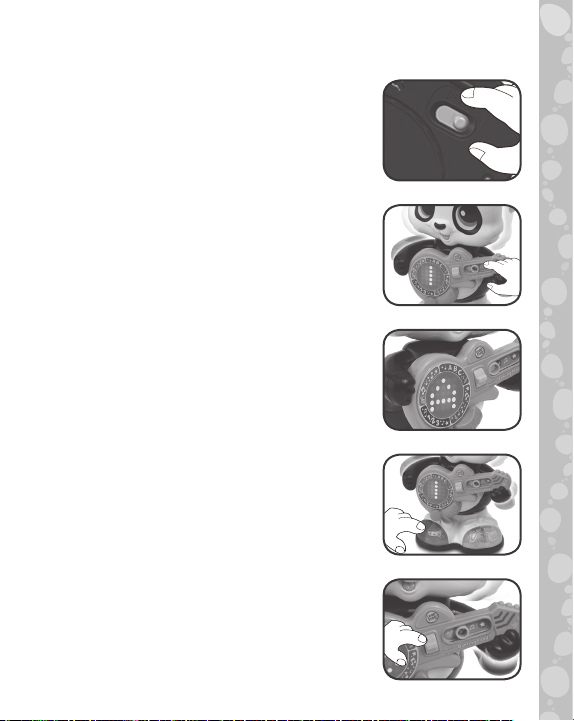
1.
On/Off/Volume Switch
To turn the unit On, slide the On/Off/
Volume switch on the bottom of Panda’s
shoe to the Low Volume or High Volume
position. To turn the unit Off, slide the Low
Volume or High Volume position to the Off
position.
2. Mode Switch
Slide the Mode switch to any position
to play one of four modes: Letter mode,
Number mode, Music mode or Game mode.
3. LED Screen
See numbers, letters, shapes and fun
designs on the LED Screen. Curricular
images change to match the song lyrics to
help reinforce the learning.
4. Instrument Buttons
Four Instrument buttons on Panda’s shoes
light up and teach colors, musical instrument
names and sounds, plus beginning letter
sounds such as G is for Guitar!
5. Bridge Switch
In Letter and Number modes, press the
yellow Bridge switch up and down to scroll
through letters and numbers to learn letters,
letter sounds and counting. Press the Bridge
switch in Music mode to play Panda’s guitar!
7
Page 8
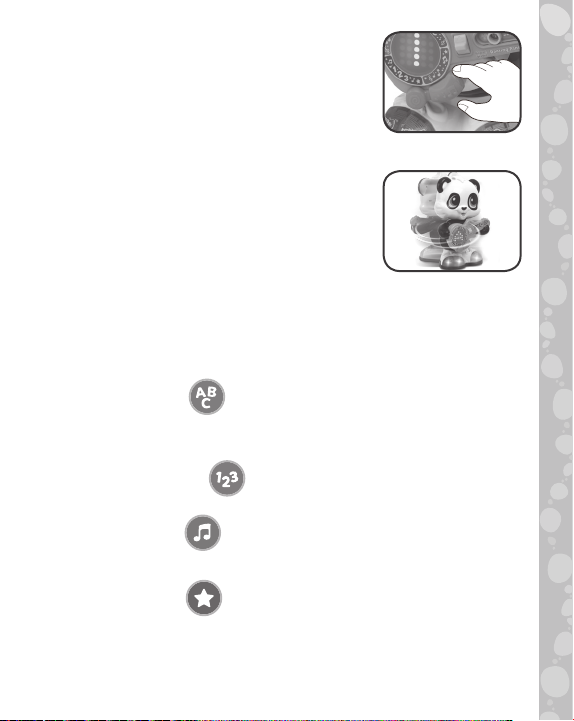
6. Music Button
Press the orange music button to hear
five learning songs and dozens of dance
tunes. Dance along to learn about shapes,
instruments, colors, numbers and letters.
7. Dancing and Spinning Motion
Panda dances to the beat and performs
360-degree spins while he sings learning
songs and plays his guitar.
ACTIVITIES:
1. Letter Mode
Learn letters A-Z as toddlers see and hear the letters and
letter sounds.
2. Number Mode
Learn numbers 1-10 as toddlers see and hear the numbers.
3. Music Mode
Dance along with Panda to dozens of dierent tunes.
4. Game Mode
Play freeze dance and guess the number, letter, or shape
shown when the music stops.
8
Page 9

CARE & MAINTENANCE
1. Keep the unit clean by wiping it with a slightly damp cloth.
2. Keep the unit out of direct sunlight and away from any direct
heat sources.
3. Remove the batteries when the unit is not in use for an
extended period of time.
4. Do not drop the unit on a hard surface and do not expose
the unit to excess moisture.
TROUBLESHOOTING
If for some reason the program/activity stops working, please
follow these steps:
1. Turn the unit OFF.
2. Interrupt the power supply by removing the batteries.
3. Let the unit stand for a few minutes, then replace the
batteries.
4. Turn the unit back ON. The unit will now be ready to play
again.
5. If the unit still does not work, replace with an entire set of
new batteries.
Environmental Phenomena
The unit may malfunction if subjected to radio-frequency
interference. It should revert to normal operation when the
interference stops. If not, it may become necessary to turn the
power OFF and back ON, or remove and reinstall the batteries.
In the unlikely event of an electrostatic discharge, the unit may
malfunction and lose memory, requiring the user to reset the
device by removing and reinstalling the batteries.
9
Page 10

Impact de l’environnement
Une défaillance de fonctionnement de l’appareil peut
survenir s’il est sujet à des interférences avec les fréquences
radioélectriques. Le fonctionnement normal de l’appareil devrait
reprendre avec l’arrêt des interférences. Si ce n’est pas le cas, il
peut s’avérer nécessaire d’éteindre et rallumer l’appareil ou de
retirer et réinstaller les piles. Dans l’éventualité peu probable
d’une décharge électrostatique, un mauvais fonctionnement
et une perte de mémoire de l’appareil peuvent se produire.
L’utilisateur doit alors retirer et réinstaller les piles pour
réinitialiser l’appareil.
IMPORTANT NOTE:
If the problem persists, please call our Consumer
Services Department at 1-800-701-5327 in the U.S. or
email [email protected]. Creating and developing
LeapFrog® products is accompanied by a responsibility
that we take very seriously. We make every effort to ensure
the accuracy of the information, which forms the value
of our products. However, errors sometimes can occur.
It is important for you to know that we stand behind
our products and encourage you to contact us with any
problems and/or suggestions you might have. A service
representative will be happy to help you.
NOTE:
This equipment has been tested and found to comply with
the limits for a Class B digital device, pursuant to Part 15
of the FCC Rules. These limits are designed to provide
reasonable protection against harmful interference in a
residential installation. This equipment generates, uses and
can radiate radio frequency energy and, if not installed and
used in accordance with the instructions, may cause harmful
interference to radio communications. However, there is no
guarantee that interference will not occur in a particular
installation. If this equipment does cause harmful interference
10
Page 11

to radio or television reception, which can be determined by
turning the equipment o and on, the user is encouraged to
try to correct the interference by one or more of the following
measures:
• Reorient or relocate the receiving antenna.
• Increase the separation between the equipment and receiver.
• Connect the equipment into an outlet on a circuit dierent
from that to which the receiver is connected.
• Consult the dealer or an experienced radio/TV technician
for help.
Supplier’s Declaration of Conformity
Trade Name: LeapFrog®
Model: 6082
Product name:
Learn & Groove® Dancing Panda
TM
Responsible Party: LeapFrog Enterprises, Inc.
Address: 6401 Hollis Street, Suite 100,
Emeryville, CA 94608
Website: leapfrog.com
THIS DEVICE COMPLIES WITH PART 15 OF THE FCC RULES.
OPERATION IS SUBJECT TO THE FOLLOWING TWO CONDITIONS:
(1) THIS DEVICE MAY NOT CAUSE HARMFUL INTERFERENCE, AND
(2) THIS DEVICE MUST ACCEPT ANY INTERFERENCE RECEIVED,
INCLUDING INTERFERENCE THAT MAY CAUSE UNDESIRED
OPERATION
CAN ICES-3 (B)/NMB-3(B)
Caution: Changes or modifications not expressly approved
by the party responsible for compliance could void the user’s
authority to operate the equipment.
11
Page 12
12
Page 13

Visit our website for more
information about our products,
downloads, resources and more.
leapfrog.com
Read our complete warranty policy online
at leapfrog.com/warranty
A subsidiary of VTech Holdings Limited.
TM & © 2019 LeapFrog Enterprises, Inc.
LeapFrog Enterprises, Inc.,
All rights reserved.
91-003685-000-000
US
 Loading...