

Page 1

-1-
GPS Personal Tracker
(GPS+GSM+SMS/GPRS)
LDW-TKW19G
Version 1.6
Quick Start Guide
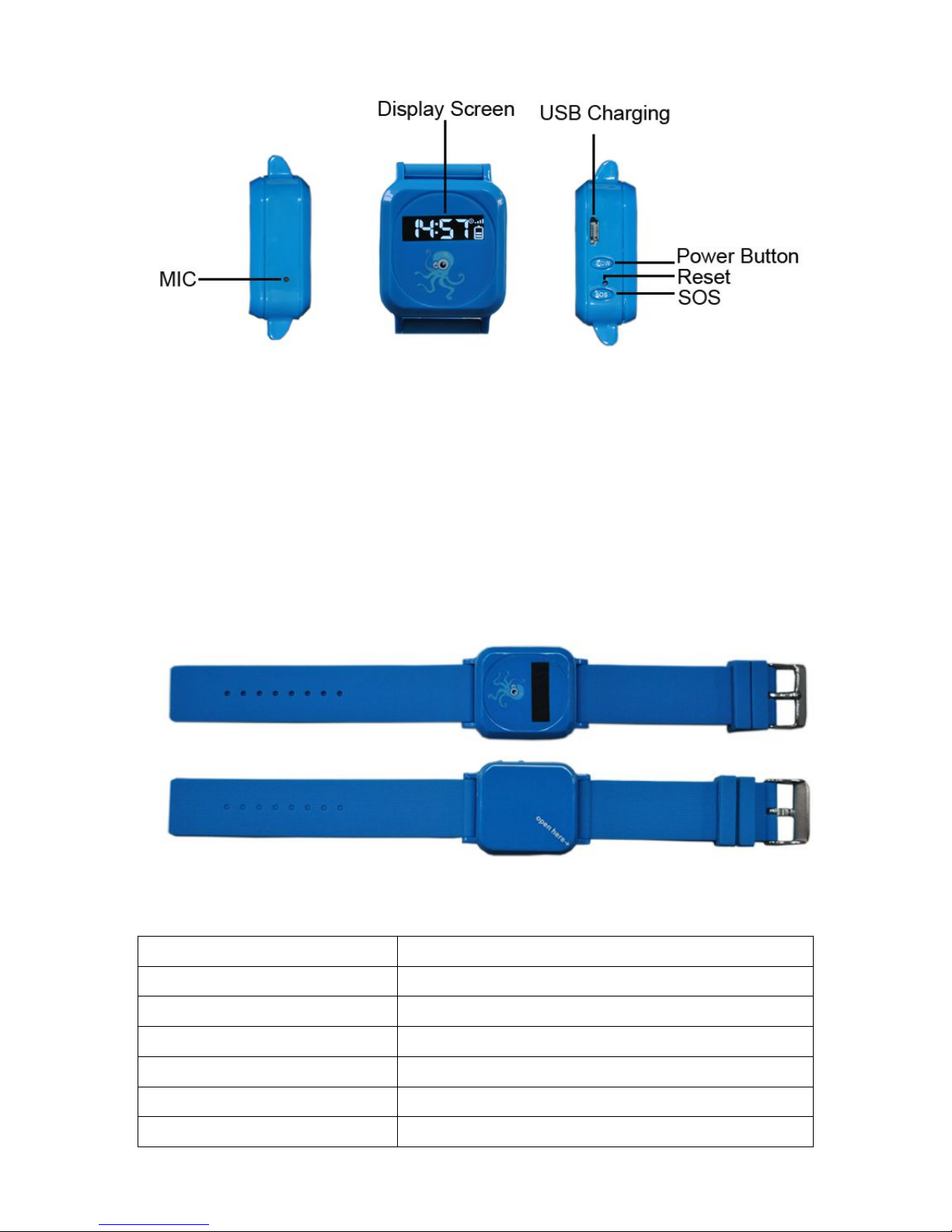
1. KEY/BUTTON pictures
Page 2
-2-
Product Features
*GSM Quad-band global using worldwide
*GPS continuous locating, GPRS report regularly
*Support SMS query location information
*Three SOS specific number can be set up for remote monitoring and alarm
*Can realize remote voice monitoring function
*Low battery alarm function
3. Appearance of the Tracker
4. Technical parameters
GSM Frequency 850/900/1800/1900MHZ
GSM/GPS MTK6252/MTK3326
GPRS Class 12,TCP/IP build in GSM MODULE
GPS sensitivity -159dBm
GPS location accuracy 5-25m
LBS location accuracy 50-200m
Speed accuracy 0.1m/Second
Page 3
-3-
GPS cold start <38 second
GPS warm start <32 second
GPS hot start <2 second
Maximum Elev 18,000m
battery capacity 3.7V 450mA
maximum speed 515m/second
external dimension 38.0(L)x35.0(W)x15.0(H)mm
Weight 15g
Working temperature - 20°C - +70°C
Working humidity 20%~80%RH
voltage 4.2V
Average standby current <10mA
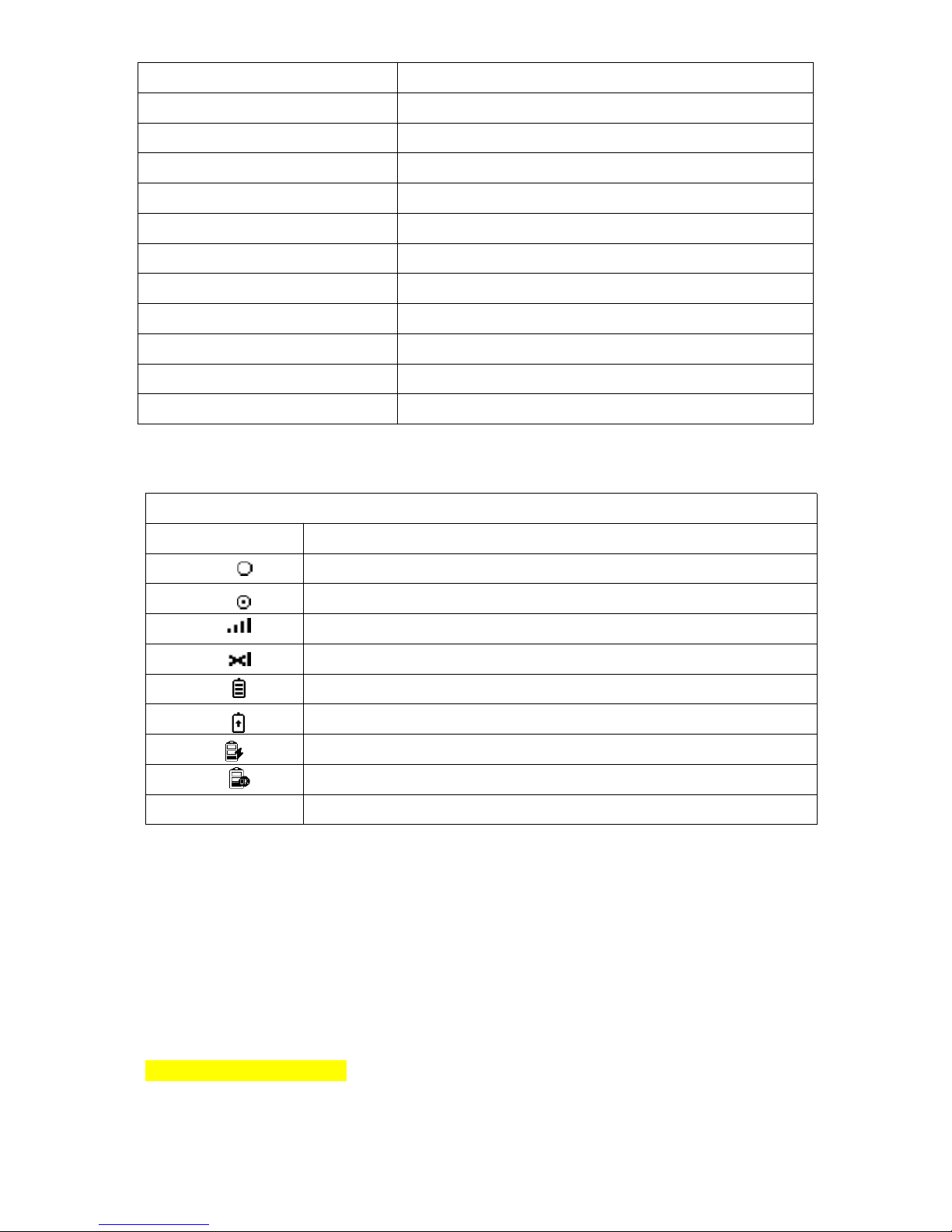
LED Screen Icon Instructions:
Display Screen Icon Instructions
Icon Instructions
GPS mould opened,but doesn’t get gps signal
GPS mould opened also get gps signal well
GSM signal strength volume
No GSM sim card
Battery volume
Battery in charging under working status
Battery in charging under off-working status
Battery fully
SOS Status of SOS
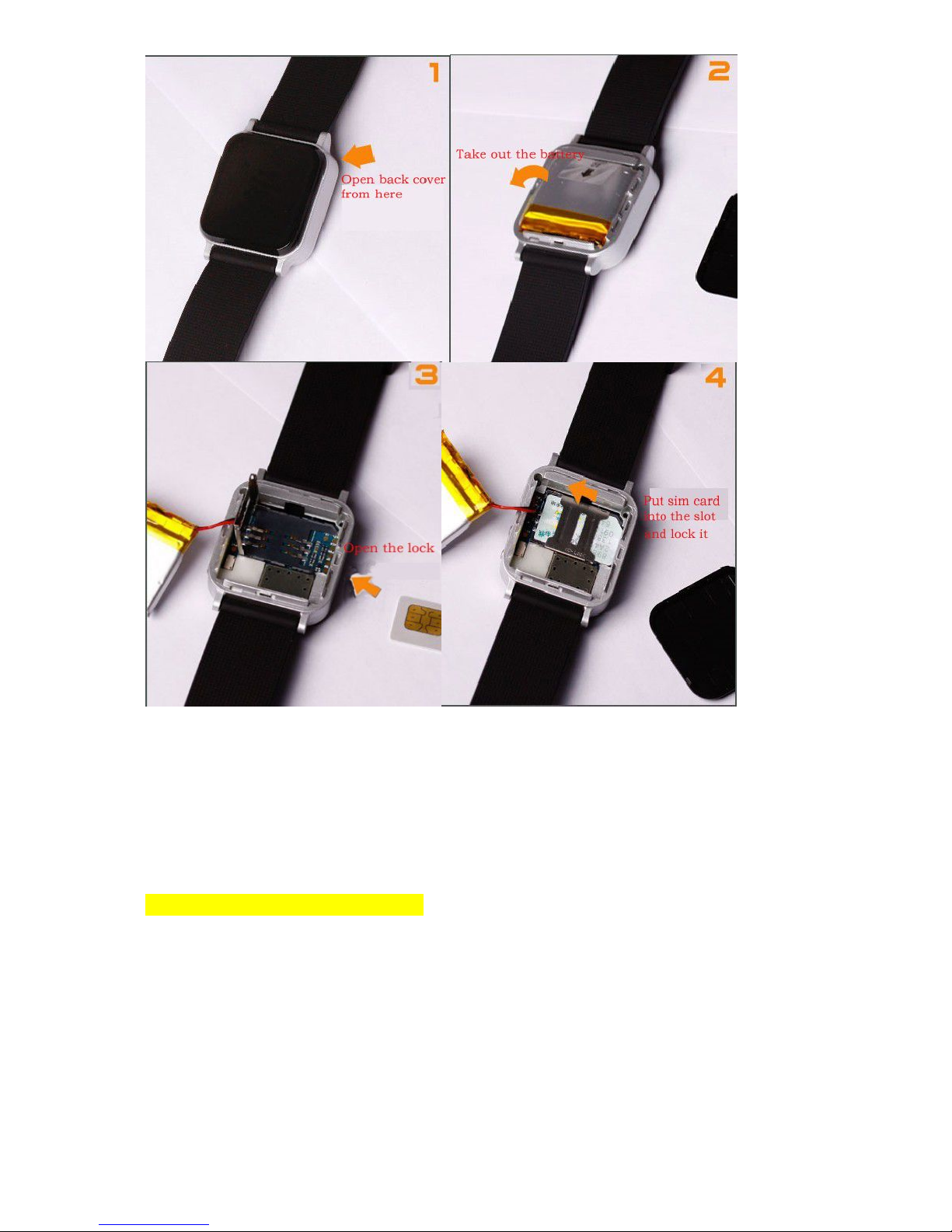
5. Get ready for the use
5.1 The tracker needs to insert a GSM SIM card
Notice:
Please use GSM Network SIM Card;
Please power off before install or remove the SIM card;
Tracker SIM card need to open the GPRS function;
Tracker SIM card need to open the Caller Identification function.
5.2 Insert the GSM card:
Page 4
-4-
6. Message Setup
All the following function command need setup by lowercase. And every command
has reply. If the parametric command setup is right, it will reply message: “ set
successfully”. If not, need setup again. If send query command, your mobile phone
will reply corresponding information.
7.1 Center Number Setup(Necessary)
You need setup center no. first since the device only accept message command sent
from center no..
You can setup your phone no.as the central no. In order to ensure the safe using, the
setup needs password, and the default password is 123456. Password can be
changed.
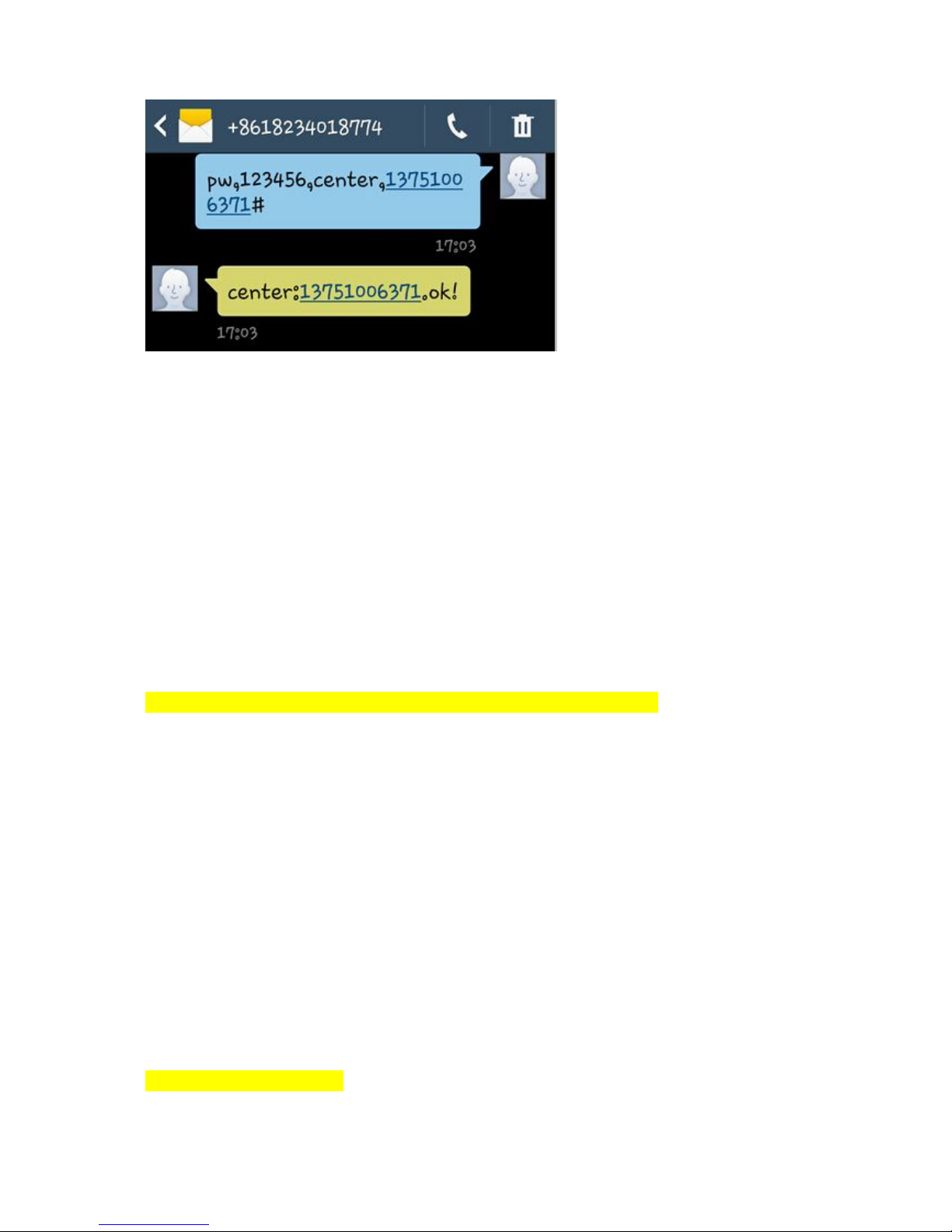
Format: pw,123456,center,your phone NO.# (Note: No space in any words.)
If the setup is successful, there will be a reply “Center number set successfully!”
Remark: Only 1 center NO. is allowed.
Page 5
-5-
Example:
7.2 APN Setup
Create the SMS “APN,APN name,,#”and send it to the terminal; after executing this
command, the terminal will automatically start and connect to GPRS with APN set.
Format: APN,APN name,,# (No space between“,”).
Example: apn,cmwap, ,# (“cmwap” is the apn name for China mobile)
If the setup is successful, there will be a reply“APN set successfully!
”
7.3 Server connection setting
(only set this when you have your own server and tracking platform)
Command: ip,***.***.***.***,port,****#
Example: ip,59.188.20.67 ,port,7018#
If the command is set successful, the device will reply“IP and port Settings OK
”
7.4 Changing Password
The initial password of user name is “123456” and you can also change it. The
password need be 6 words. The command as below:
Format: pw,123456#
Example: pw,888888#
If the setup is successful, the setting mobile phone will receive message “Password
set successfully! PW:888888.”
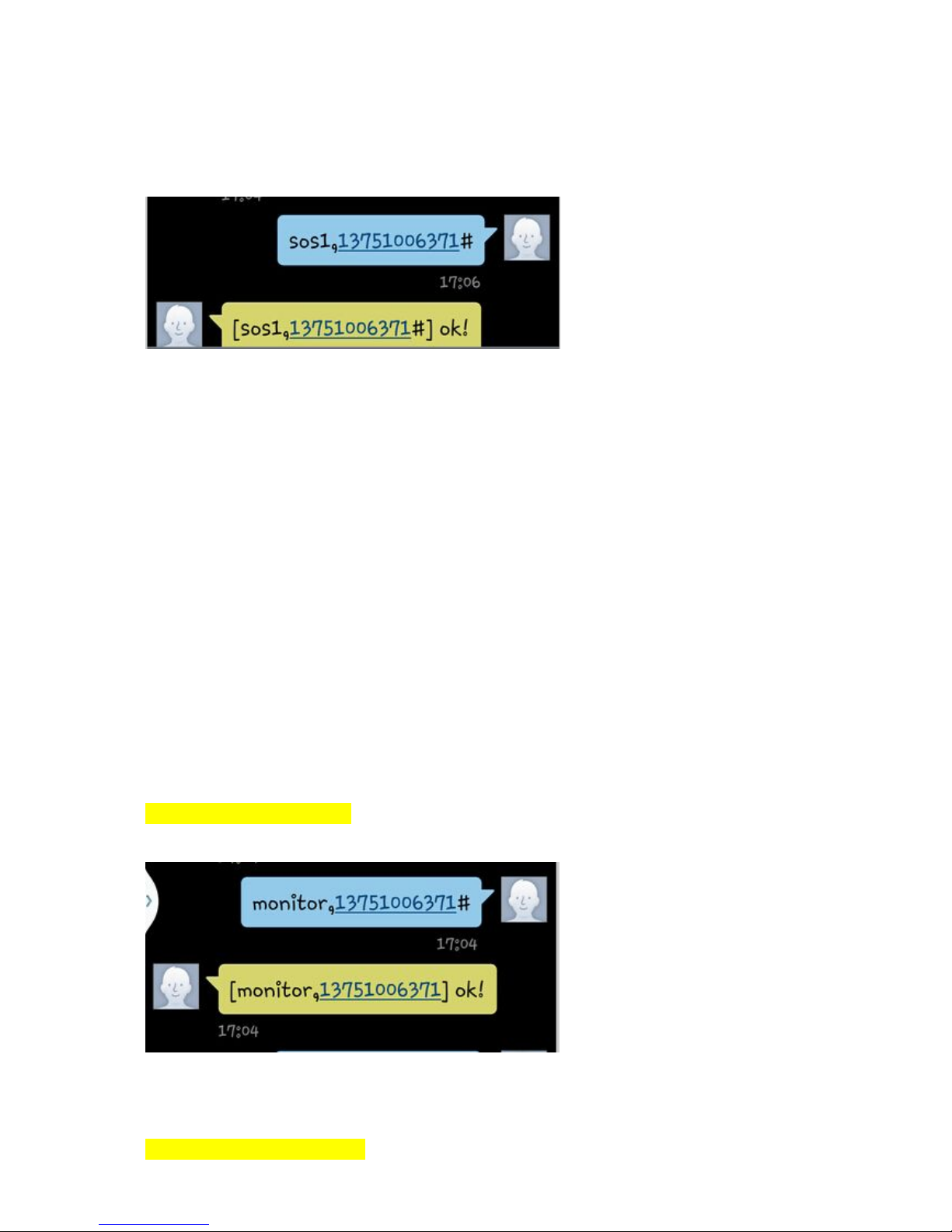
7.5 SOS call number setup
Setup SOS call number by sending the command in form of SMS through center
mobile phone NO. to the terminal.
Can set three SOS number, Command:
Page 6
-6-
sos1,11111111111#
sos2,22222222222#
sos3,33333333333#
If the setting is successful, then reply "SOS set success!".
Example:
In case of emergency, please press SOS button, and the device will call the three
SOS NO. you have set in sequence. If no one answer SOS call, the device will stop
call after twice.
Notice: The SOS alarm can only call the SOS NO. you have setup.
7.7 Cancel SOS call number
If you want to cancel SOS call number and don’t remember the serial number you set
before, you can send query parameter condition message first to get the
corresponding serial number. Secondly, you send cancel SOS call number to the
device. command in form of SMS through center mobile phone NO. to the terminal.
Format: sos1 #
sos2 #
sos3 #
If the setup is successful, there will be a reply“SOS number delete successfully!”.
7.8 Monitor number setting
Format:monitor,monitor no.#
When monitor no. call the device., it will start monitor automatically.
The caller will hear the voice from the device.
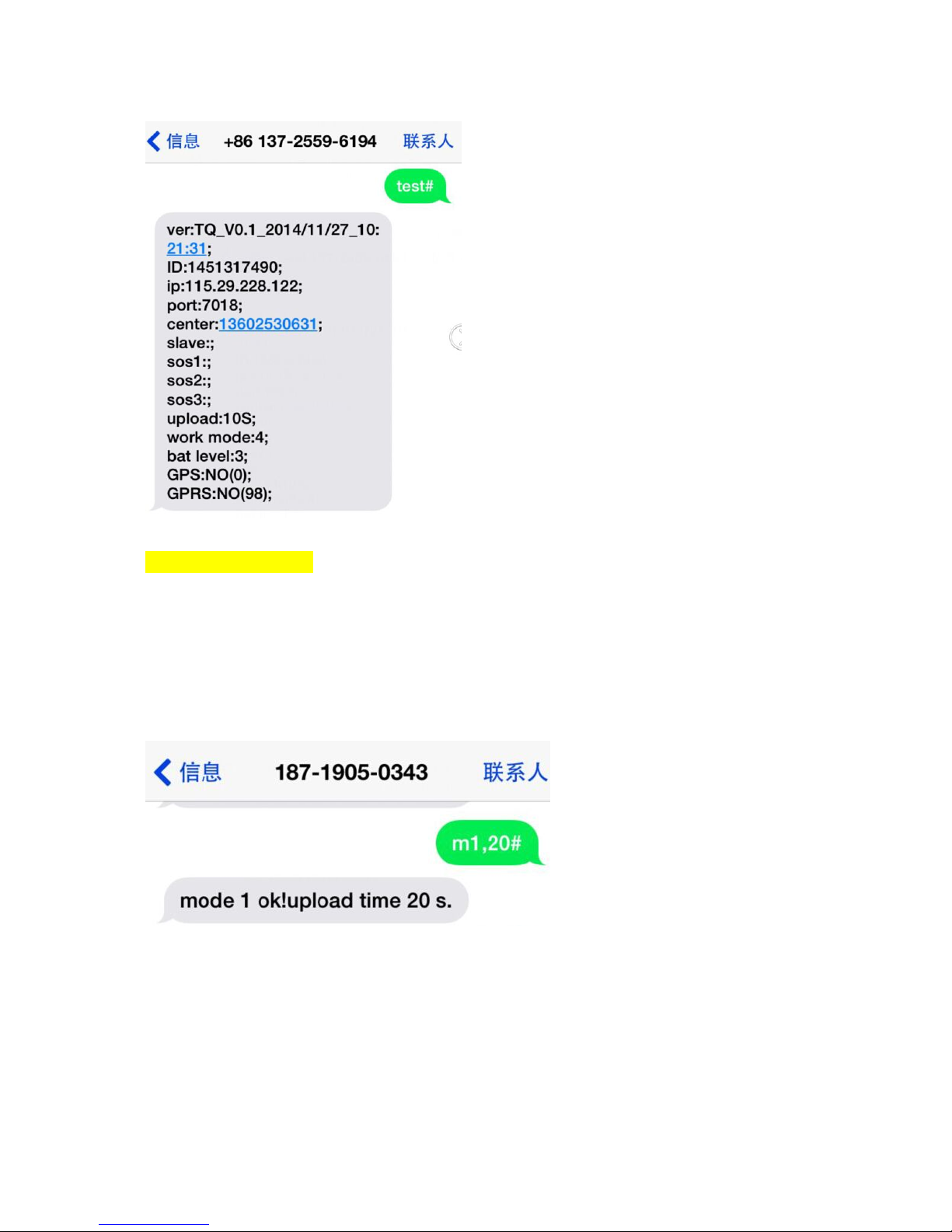
7.9 Inquire parameter setting
Page 7
-7-
Command: test#
Example:
7.9 Work mode setup
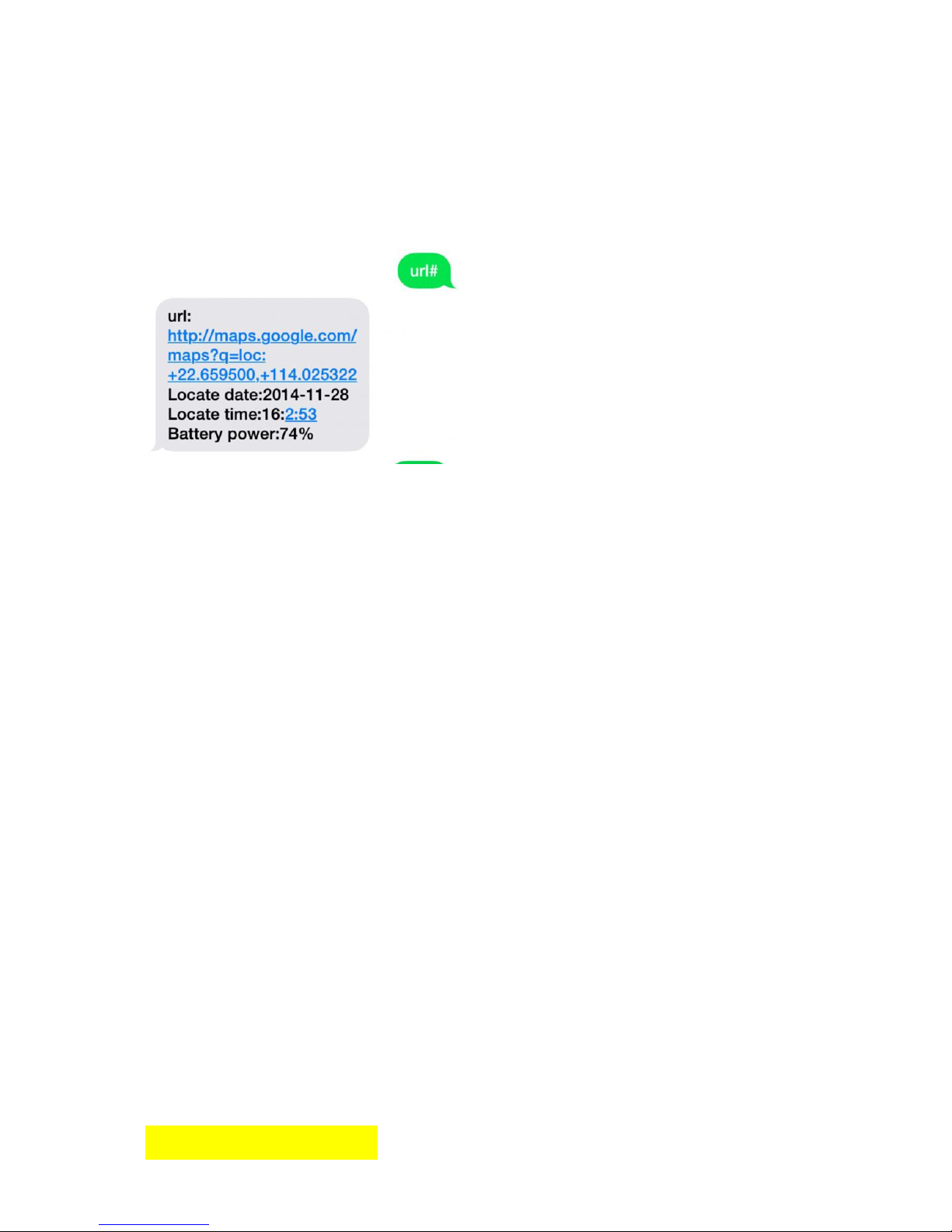
Command: m1,20# or m2, 600# or m3,20# or m4#
The default working mode is mode 1,
GSM and GSP always working, every X seconds send GPS data to server. (Range:
10~65535S, default 60S)
For example:m1,20#
mode 2, power saving mode,
every X seconds turn on GPS, and send GPS data to server once, then enter sleep.
(Range: 300~65535S)
For example:m2,600#
mode 3,GSM mode
GPS not work, every X seconds send GSM’s cell ID to server, some commands can
Page 8
-8-
wakeup GPS once. (Range: 10~65535S)
For example:m3,20#:
mode 4, SMS mode(the most battery saving mode)
no server, always sleeps, only wakeup by SMS or call, can get google map link by
SMS(url#).
For example:m4#
7.10 Language and time zone setting
The device provide two kinds of language, Chinese and the English. The different
areas use different time zone setting.
Command: lang,x,zone,n#
Language options x: 0 is English, 1 is Chinese, the default language x=1.
Time zone n: East eight area for 8, west three areas for -3, the default time zone
n=+8.
For example:lang,0,zone,-3#
7.11 Restart the device
When the GPRS cannot link normally, such as that all setup is successful, but the
device still not on line, you can send message to the device. The device will restart
and then the device can work as usual.
Format: reset#
If the setup is successful, the device will restart after 1min and no reply.
7.12 Restore factory setup
When sending incorrect command cause the device can’t work as normal, you can
setup restore factory message to the device.
Format: factory#
If the setup is successful, the device will restore to be the default.
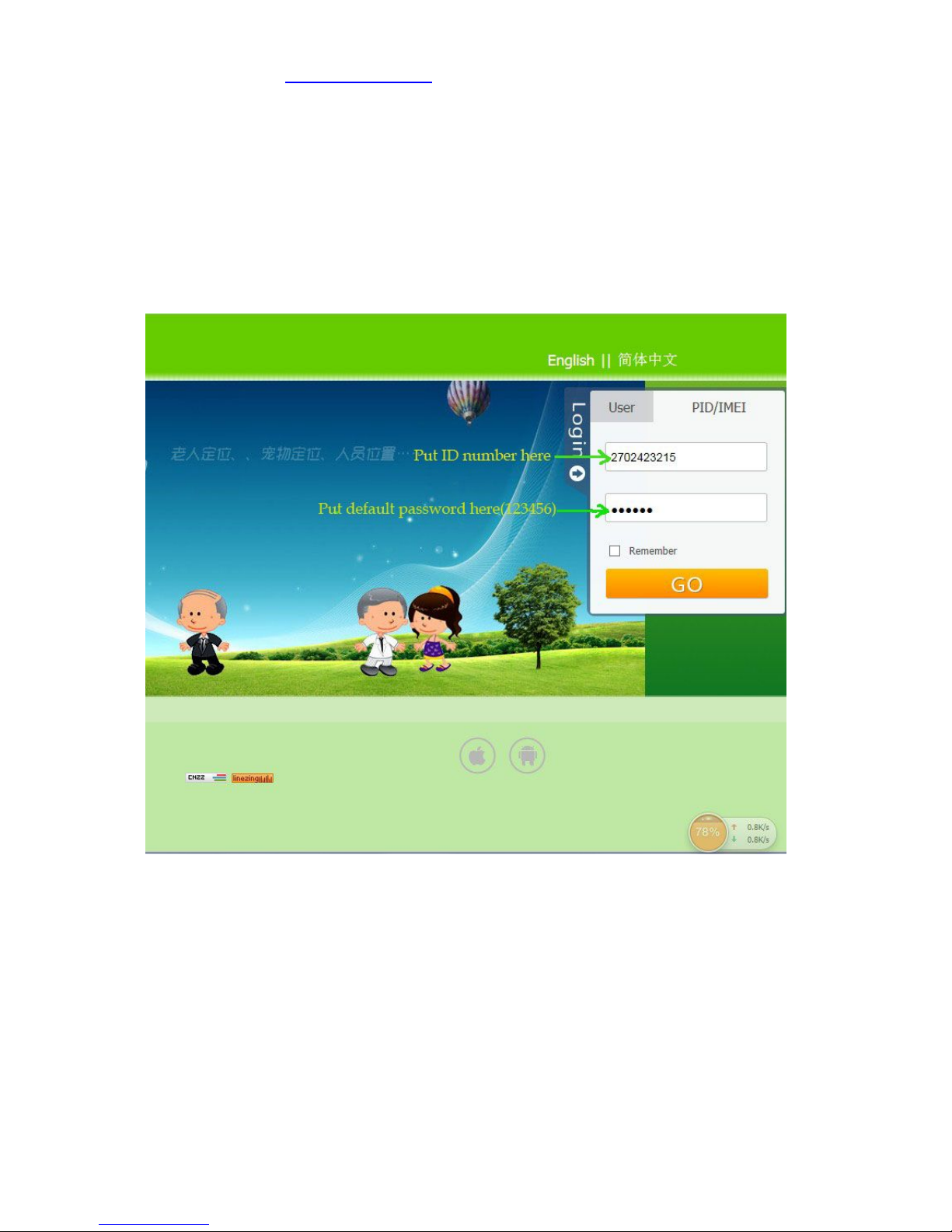
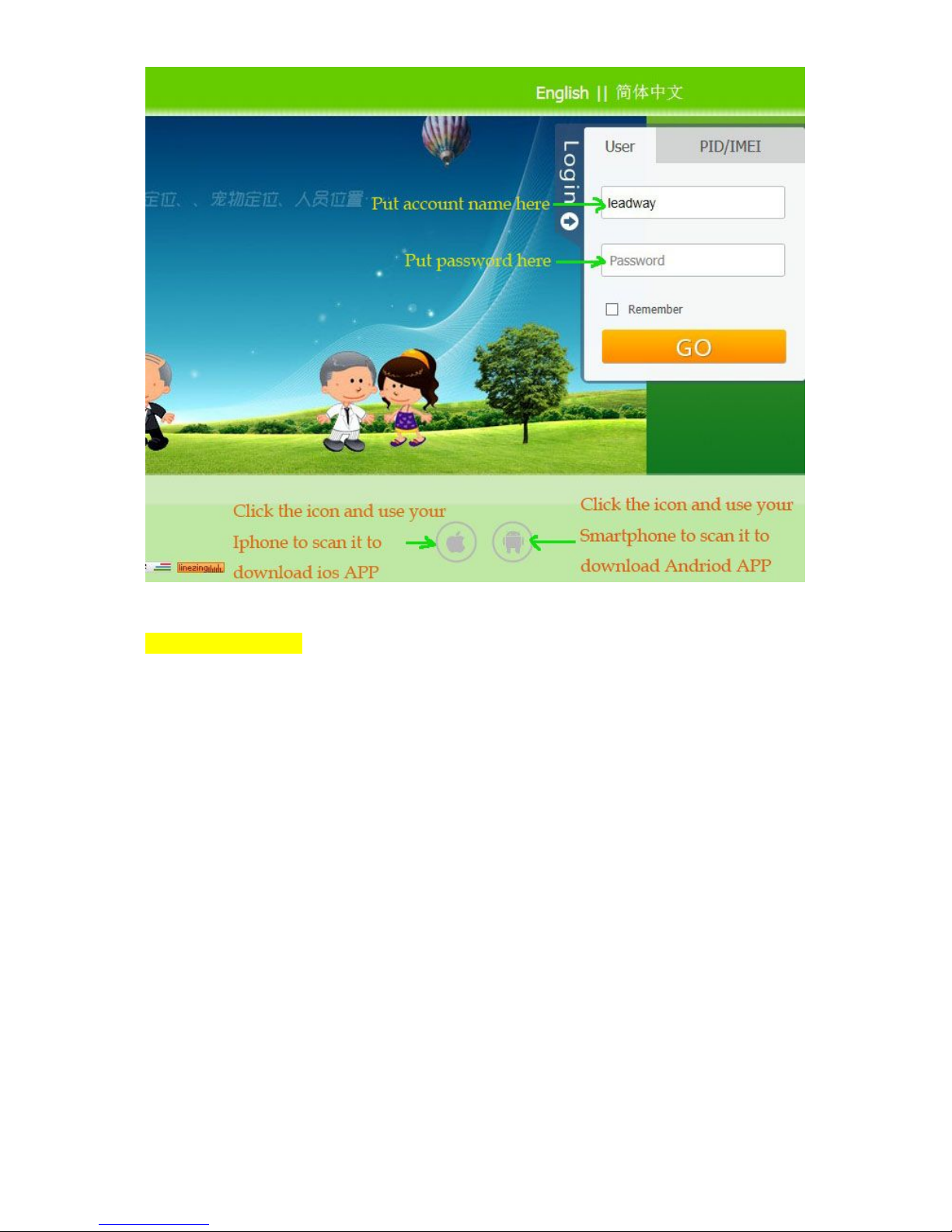
8. Login tracking platform
Page 9
-9-
Platform website: www.track188.com
If you have account name, login in with account name and password.
If not, login in with ID and password. The default password is 123456
You will find the ID under the battery of the watch
and in our box packing, there is a case mark showing IMEI code which contains ID
(and the rule is ××××ID×)
1..ID Login:
2.Management account Login:
Page 10
-10-
9. Troubleshooting
1, The Tracker for the first time boot unable to connect to the server, server show
offline. Please check:
1) If the SIM card is properly installed, please refer to installation instructions.
2)Check the LED indicator light condition, when it’s normal,GSM status indicator
bright every 0.1 seconds and go out for 2 seconds, GPS status indicator bright every
0.1 seconds and go out for 2 seconds.
3)Check if the GPS is located successful or not, if not please go to the outdoor at
open air place to locate for the first time.
2, If the Tracker show offline on server
First observation if the 2 indicator lights of the equipment is normal, first check the
status of a card, the steps are as follows:
1) The SIM card is overdue bills
2) Whether GPRS business was canceled (at the end of each month date offline).
3) Check the parameter setting of the device. Check the equipment serial number,
GPRS transmission time interval is correct or not.
 Loading...