

Page 1
1
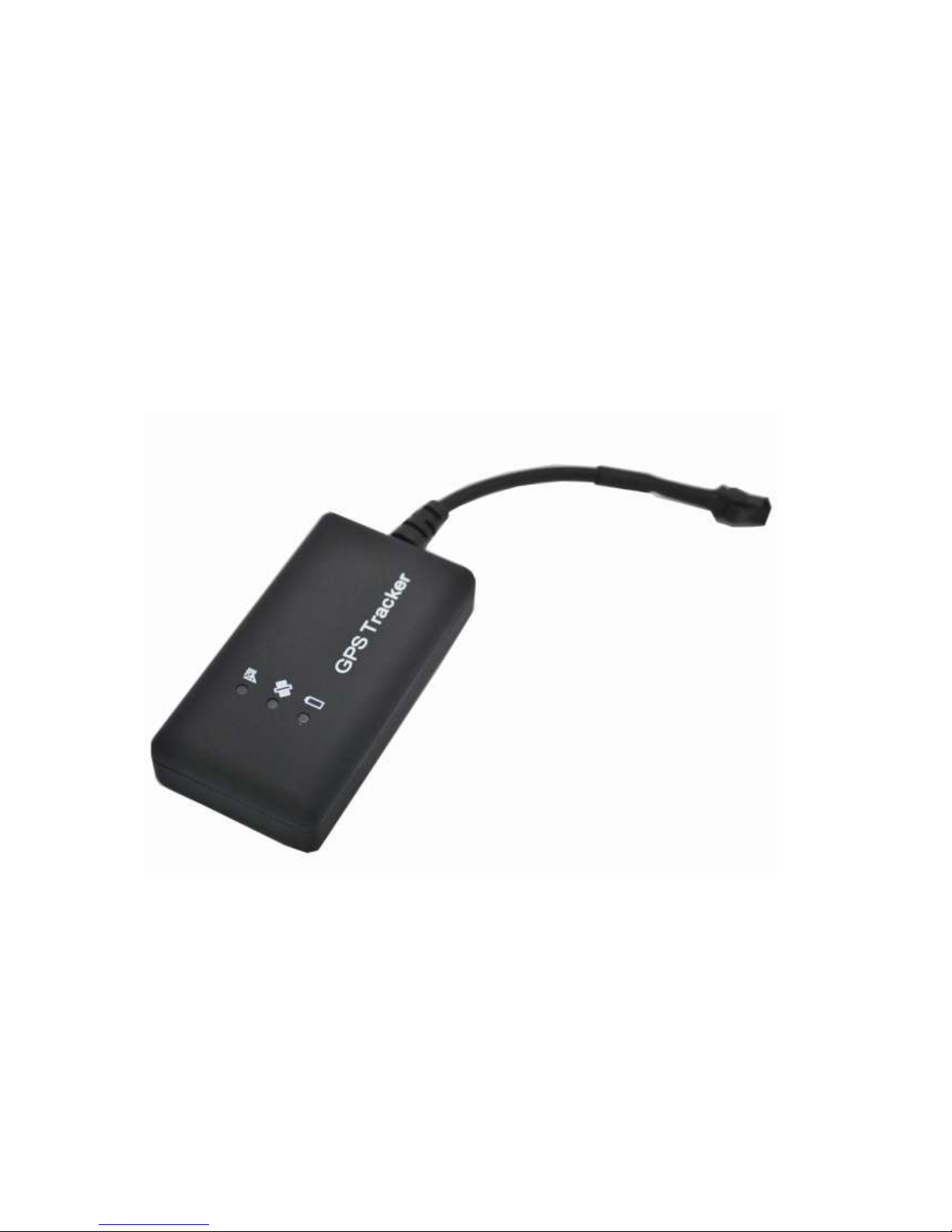
GSM/GPRS/GPS Tracker
(LDW-TKV103B)
User Manual
Version 1.8
Page 2

2
Please read this manual carefully before attempting installation and online activation.
Pictures are for indication and illustration purposes only.
Chapter I Preface
1. 1 General
LDW-TKV103B represents the perfect combination of GSM, GPRS and GPS
technologies. This model, with precise dimensions and compact appearance, expresses the
advanced workmanship in the GSM and GPS field and is the typical design combing
communication products and GPS services. As a professional security and positioning
company, we will provide you with more and better products and services. Before use, please
spend several minutes reading this user’s manual in order to understand operation details and
obtain better services.
Chapter II About the Device
2.1 Product Features
● Individual or fleet GPS polling
● Worldwide use
● Supports GSM frequencies 850/900/1800/1900MHz
● High-sensitivity, latest technology and the most advanced GPS chip
● Can accurately position even if with weak signal
● Can work effectively in limited space such as the remote and narrow places;
● compact size, easy for hiding
●Low energy consumption
●Remote oil cutoff
● Fast signal capturing
● supports two modes: text message polling and GPRS trace tracking
● Alarm function
● Vibration alarm
2.4 Product Specifications
2.4.1 Technical specifications
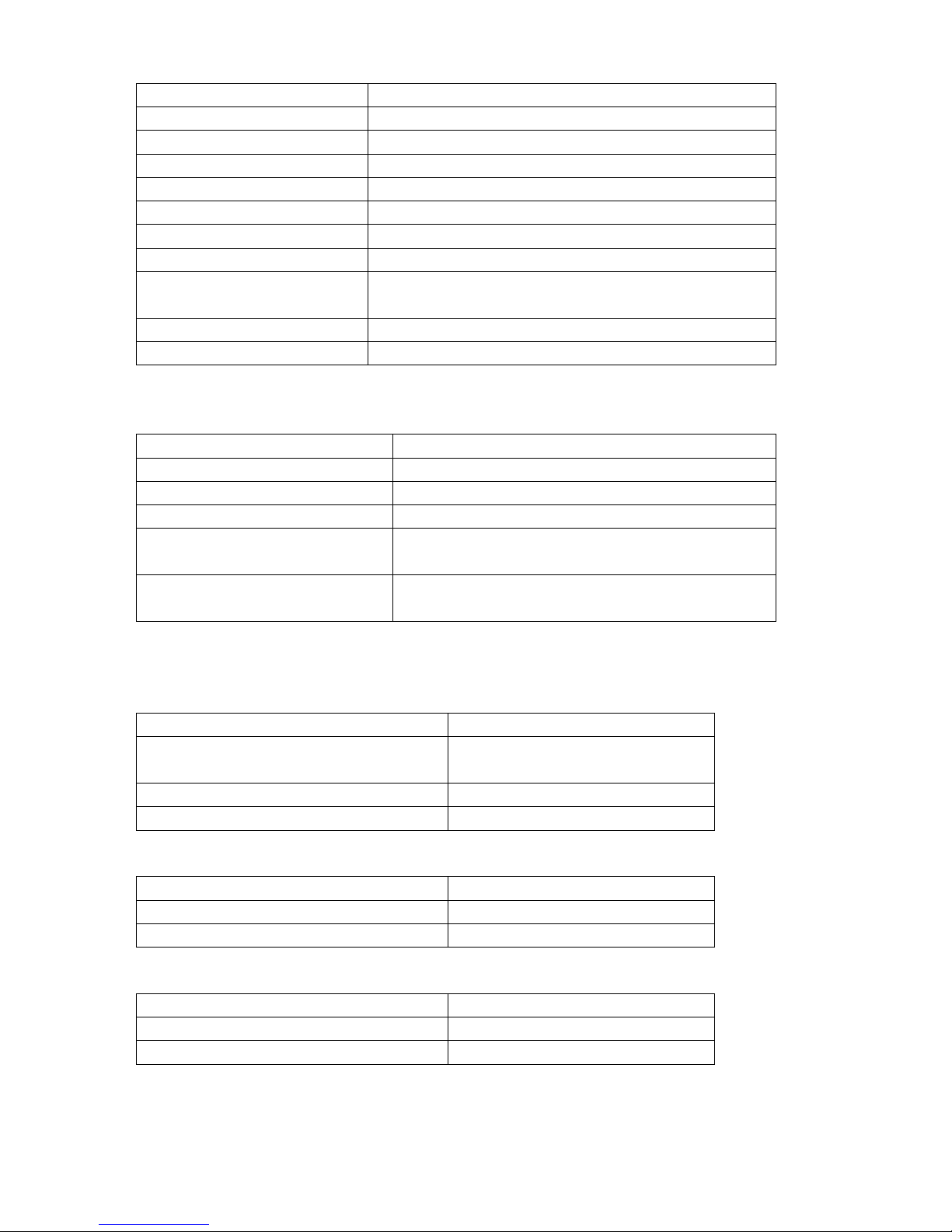
GSM FREQUENCY
850/900/1800/1900MHz
GPS CHIPS
SIRF 4/U-blox
GPRS
Class 12, TCP/IP build in GSM MODULE
GPS SENSITIVITY
-163dBm
Page 3
3
GPS ACCURACY
10m (2D RM)
GSM ACCURACY
50-200m
SPEED ACCURACY
0.1m/s
COLD STATUS
-38s
WARM STATUS
-32s
HOT STATUS
-2s
MAXIMUM ALTITUDE
18000m
HIGHEST SPEED
515m/s
ACCELERATION OF
GRAVITY
<4g
SIZE
72.00(L) x 38.0(W) x17.0(H) mm
WEIGHT
50g
2.4.2 Others
WORKING TEMPERATURE
-20--+70℃
HUMIDITY
20%---80%RH
VOLTAGE
7—30v DC
CURRENT
~60mA(12v DC) ~35mA(24v DC)
STANDARD AVERAGE
CURRENT
<80MA
LED
LED indicate GPS、GSM working status or other
condition
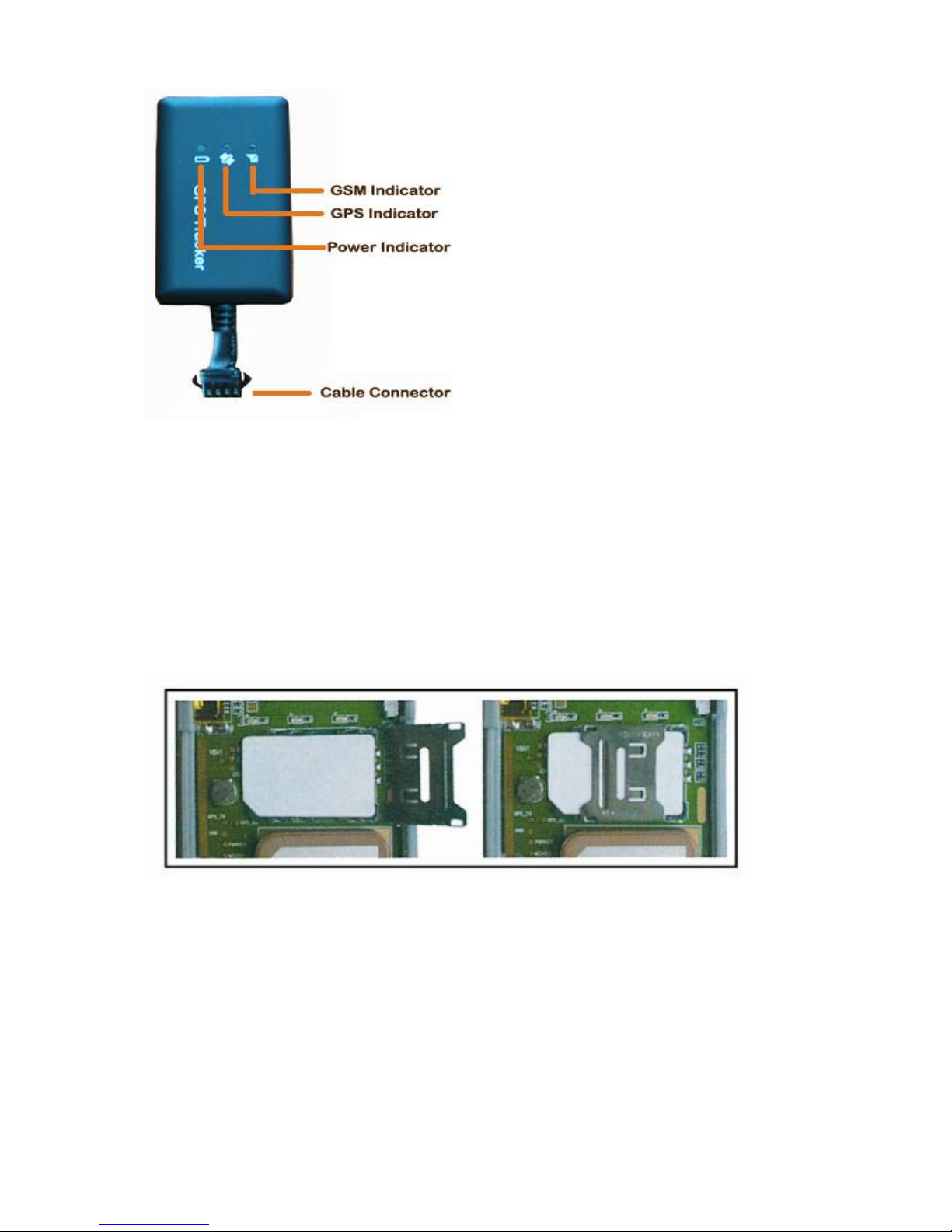
2.4.3 The indication of the terminal state
Red LED------Power/Running-state
The state of the light
Meaning
Always light
Indicate the power supply, normal
working state
Flash
Abnormal working state
No light
Out of power or internal fault
Green LED------GPS Signal
The state of the light
Meaning
Blinking
GPS signal received normally
Always light
No GPS signal
Blue LED------GSM Signal
The state of the light
Meaning
Blinking
GSM signal OK/Call coming
Always light
No GSM signal
Page 4
4
2.5 Installation
2.5.1 Preparation
1.Check the product: open the package, and check the terminal model and fittings.If
there is something wrong, please contact the distributor.
2 Select the SIM card: it must insult a GSM SIM card, and the selection of SIM card
must follow the distributor's suggestion.
3 Install the SIM card. Firstly, open the cover of the terminal, remove the cover on the
slot for SIM card; secondly, insult the card into the slot with the metal side in the bottom;
thirdly, fasten the slot(do as the following instruction); finally, recover the terminal and lock
the shell tightly with three screws.
Tips :
Don't insult the terminal SIM card up-side-down.
You must open the GPRS function provided by the terminal SIM;
If your SIM card has been setup, but it requires you to input SIM PIN, please close the
SIM PIN function under the instruction written in the user manual.
Make sure the sufficient money to pay for the terminal SIM card charge
Check the GPRS network connection with your mobile phone.
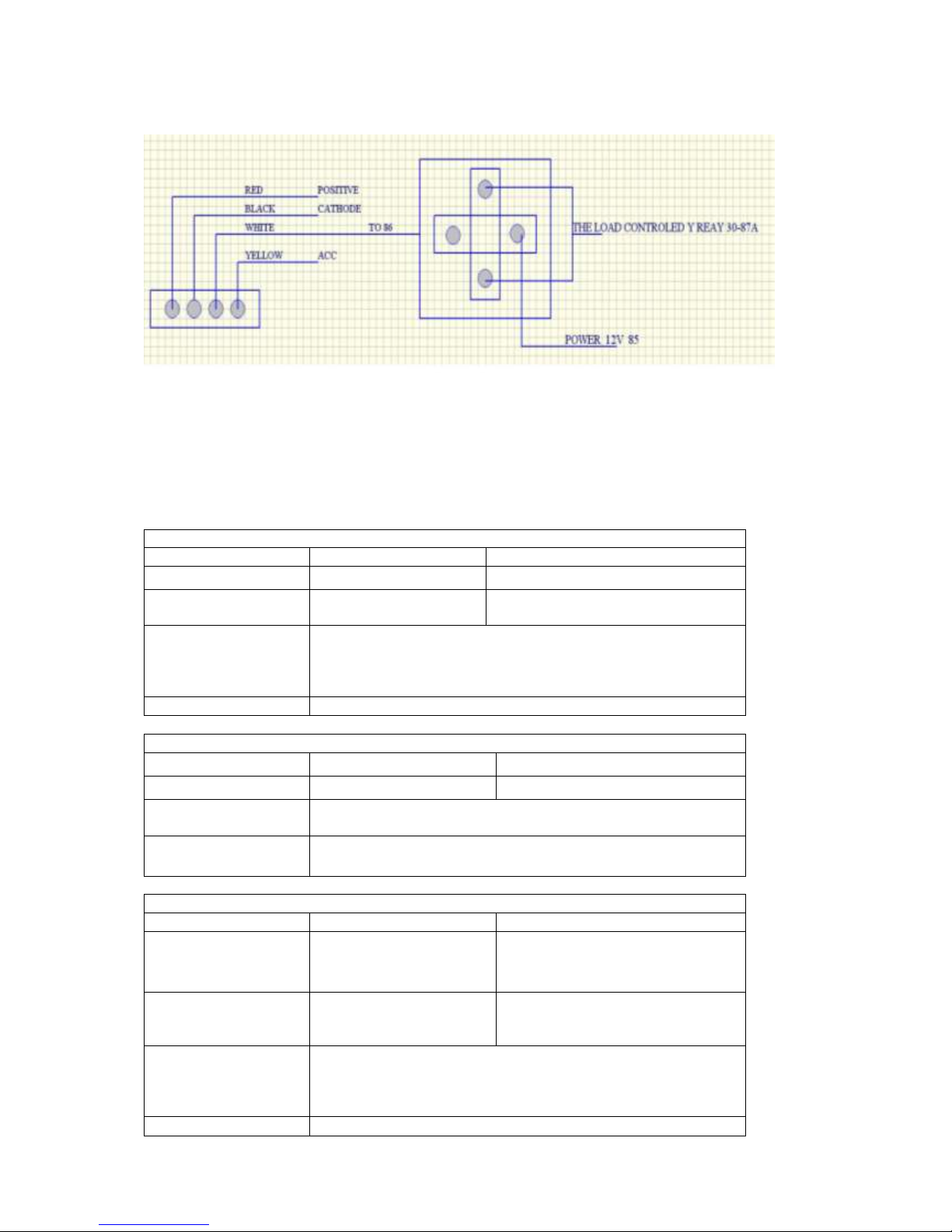
2.5.1.2 AS for the open installation, at first it should glue the soft robber magnet (in the
fitting picture ) on the decoration below the front windshield; then put the terminal on
the magnet and fix it.
Page 5
5
Attention:
If you have no soft robber magnet, please purchase after connect with the distributor.
Chapter III SMS command format
Command list for configing(Note: All the setup below can be only made by Center admini number
and authorization number .)
1) Center admini number setup
Command
Format
Example
Center number setup
710#Mobile number#
710#13800138000#
Delete Center number
D01#
D02#
D01#
D02#
Command notes
1)Cut off oil by Center number.
2)only can setup 2 mobile numbers as center number
3)you should delete the former center before you change the center
number
SMS feedback
Center number setup success/Delete success
1) Center admini number inquiry
Command
Format
Example
Center number inquiry
901#
901#
Command notes
This command use for check the center number
SMS feedback
Admin1:mobile number
Admin2:mobile number
3)Authorization number setup
Command
Format
Example
authorization number
set
101#mobile number#
102#mobile number#
103#mobile number#
1:101#13800138000#
2:102#12345678912#
3:103#12345678912#
Delete authorization
number
D11#
D12#
D13#
D11#
D12#
D13#
Command notes
1)Authorization can cut off oil.
2)only can set 3 numbers as authorization number
3)you should delete the former number before you change the
authorization number
SMS feedback
Authorization number set success/Delete success
Page 6

6
4)Authorization number inquiry
Command
Format
Example
Inquiry command
C10#
C10#
Command notes
The command use for checking authorization number
SMS feedback
Authorization 1:Authorization 2:Authorization 3:
5)APN setup
Command
Format
Example
APN setup command
802#apn name#user#password#
1:802#intenet#123#123#
2:802#cmnet#
Command notes
When APN need user and password,pls see eg-1,No need user and
password pls see eg-2
SMS feedback
APN 0K!
6) Setup IP connection/Inquiry Ip and Port number
Command
Format
Example
IP connection setup
803#IP address#port number#
1) 803#115.29.228.122#7018#
IP and port inquiry
CIP#
1)CIP#
Command notes
Its use for setup IP connection and inquiry.
SMS feedback
Config success!
7)Cut off oil
Command
Format
Example
Cut off oil
222#
222# cut off oil
Restore oil
333#
333# Restore oil
Command notes
1)control the oil for cut off and restore
2)Only center admini number and authorization number can do it
3)the command only will be founction when the speed of vehicle
less than 20km/h.
SMS feedback
Cut off oil success!
8)Vehicle defense setup/Close vehicle defense
Command
Format
Example
Open vehicle defense
911#
1)911#
Close vehicle defense
910#
1)910#
Command notes
The command use for setup defence or close defense(it’s for
vehicle movement in illegal and virbation alarm)
SMS feedback
Config success!
9)Set virbation alarm
Command
Format
Example
Set virbation alarm
123#class#mode#
1) 123#2#3#
Alarm starting time
V123#2#
1) V123#2#
2) V123#1#
Cancel virbation alarm
456#
456#
Command notes
Class: from 1 to 5, its for the virbation alarm class, 1 is the highest
sensitive, and 5 is the lower sensitive class. Mode : from 1 to
3.,it’s for the way of getting alarm,1 is SMS, 2 is Pone call, 3
is SMS and phone call both ways.
Alarm starting time setup: Starting time from 1 to 10miniutes.
Default time is 5miniutes.;
Cancel virbation alarm: when you cancel the alarm and want to
open it again. Then you should set it again
SMS feedback
Config success! Or starting time is or Cancel alarm sucess
Page 7
7
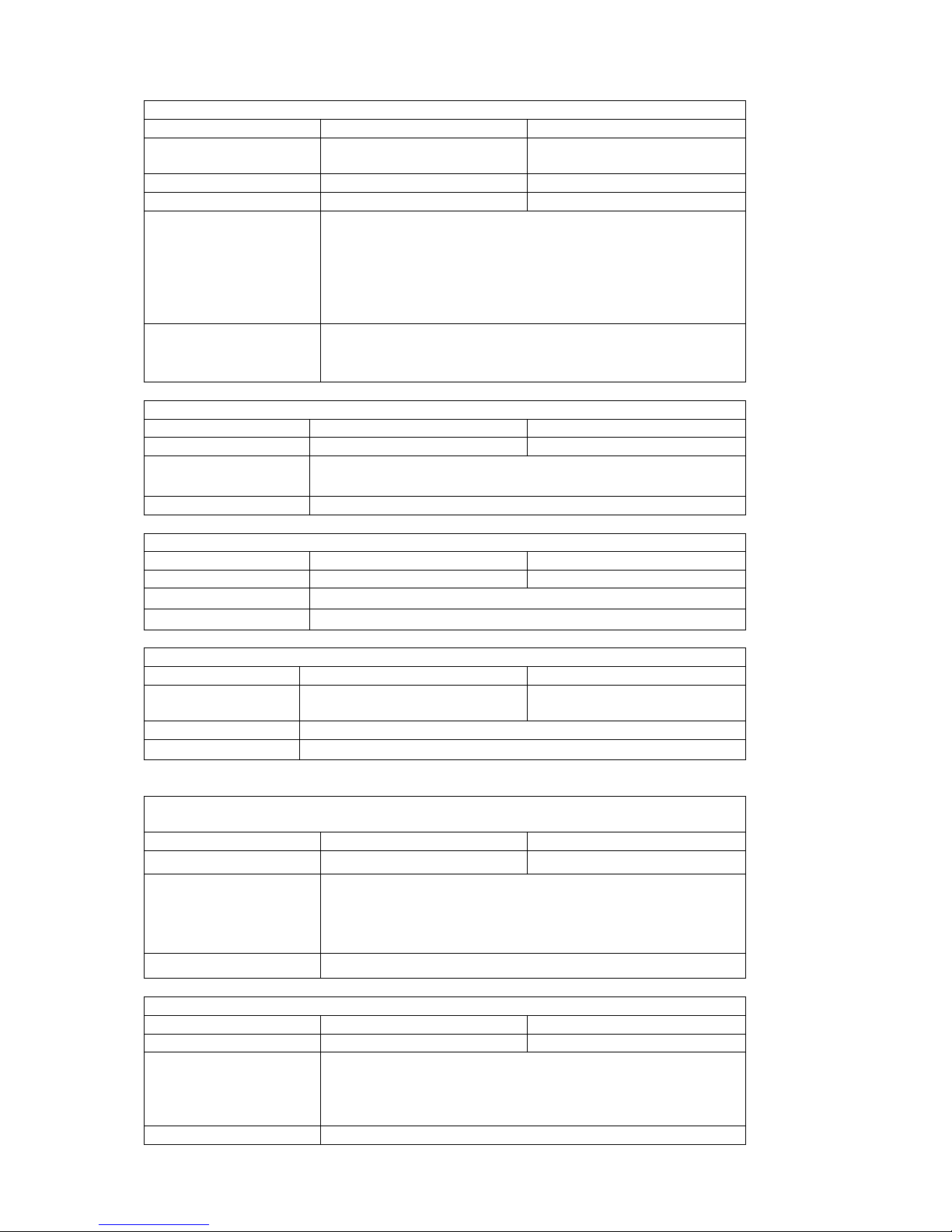
10)Over speed alarm setup
Command
Format
Example
Set over speed alarm
SSA#120#mode#
1) SSA#120#
2) SSA#150#3#
Cancel alarm
CSA#
CSA#
Setup alram interval time
STIME#time#
STIME#5#
Command notes
The speed in 60~220,Default is close. Mode: from 1 to 3.
1 is SMS, 2 is phone call, 3 is sms and phone call both ways.
When you cancel the over speed alarm and you want to open it
again and you should set it again.
Alarm interval time:Default time is 5miniutes, range: 1~60
miniutes, it’s mean every 5 mins will upload one alarm
SMS feedback
Over speed alarm sertup sucess!alarm mode is sms or phone call
Over speed alarm interval time setup success.
Cancel over speed alarm sucess!
11)Timezone setup
Command
Format
Example
Set timezone
801#timezone#
801#E8#
Command notes
E is East timezone,W is west timezone,E8 it’s mean East
timezone 8,W8 it’s mean West timezone 8.
Command feedback
Timezone setup success!
12)Restart
Command
Format
Example
Restart the device
930#
930#
Command notes
It’s use for restart the device
SMS feedback
The device will be restart soon!
13)Language setup
Command
Foramt
Example
Setup language
LANG number#
1) LANG1#
2) LANG0#
Command notes
1 is Chinese, and 0 is english. Default language is Chinese.
SMS feedback
Language setup success!
14)Set interval time under movement
Command
Format
Example
Interval time setup
730#time#
730#20#
Command notes
This command use for set the inerval time when the vehicle is
moving.
time:in the range of 10~60s
default time is 15s
SMS feedback
Movement interval time setup success!
15)Set interval time under static
Command
Format
Example
Static interval time setup
SUP#time#
SUP#5#
Command notes
This command use for set the inerval time when the vehicle is
static.
Time:in 1~60miniutes
Default time is 5 miniutes
SMS feedback
Static interval time setup success!
Page 8

8
16)Cancel upload data
Command
Format
Example
Cancel upload data
NUP#
NUP#
Command notes
This command use for cancel the device upload the data to the
server.
If need restore the data upload and should set movement
intervaltime or static interval time again.
SMS feedback
Config success!
17)Restore to factory setting
Command
Format
Example
Factory setting
940#
940#
Command notes
This command use for restore to factory setting, it’s only can be
sent by admini number
SMS feedback
Restore to factory setting!
18)Check version information
Command
Format
Example
Check version number
V00#
V00#
Command notes
This command use for check the version number and IMEI
number etc.
SMS feedback
Version number, IMEI number, Status etc..
19) Location inquiry
Command
Format
Example
Location inquiry
988#
988#
123
123
Command notes
This command use for inquiry the current address
SMS feedback
Current real time address.
20)Latitude & longitude inquiry
Command
Format
Example
Latitude&longitude
inquiry
666#
666#
URL#
URL#
Command notes
This command for inqiry current postion with longitude,
latitude ,speed,time and date etc..
SMS feedback
Longitude,latitude,speed,IMEI number,time and date etc..
21)Check the configuration parameters
Command
Format
Example
Configuration parameter
902#
902#
Command notes
This command for checking the status of the device
SMS feedback
Tracker:
IMEI:XXXXXXXXXXXXXXX
Base information:
Version number: XXXXXXXXXXXXXXX
Signal intensity:XXX
APN:XXXXXX
Server IP:XX.XX.XX.XXX
Port:XXXX
Protocol:TCP/IP
GPS information:
GPS interval time:XX s
GPS satellite numbers XX
Page 9
9
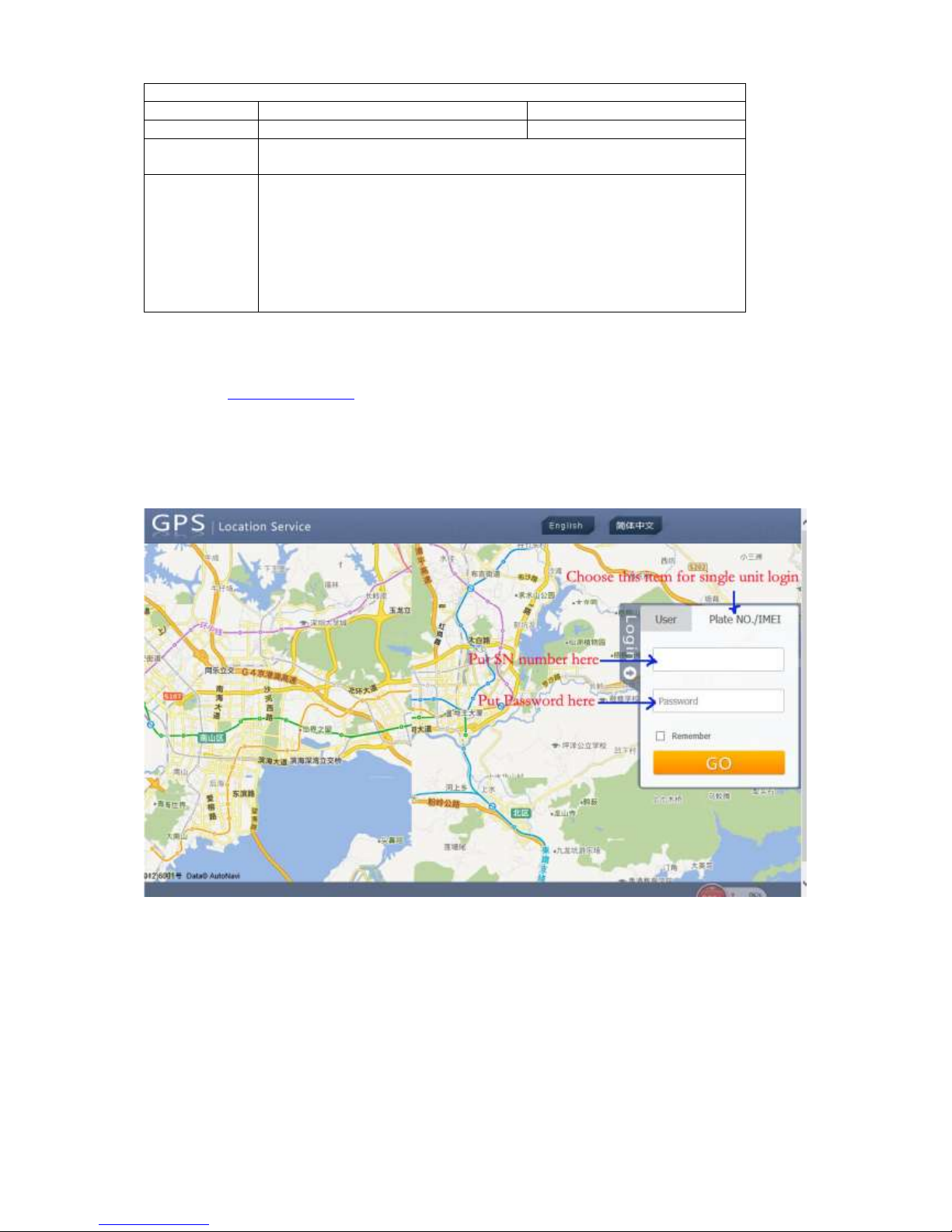
22)Status inquiry
Command
Format
Example
Status inquiry
886#
886#
Command
notes
This command use for check the current status of the device
SMS feedback
IMEI:3533270XXXXXXXX
APN:uninet
Server IP:XX.XX.XX.XXX
Port:XXXX
Language:Chinese
Timezone:E8
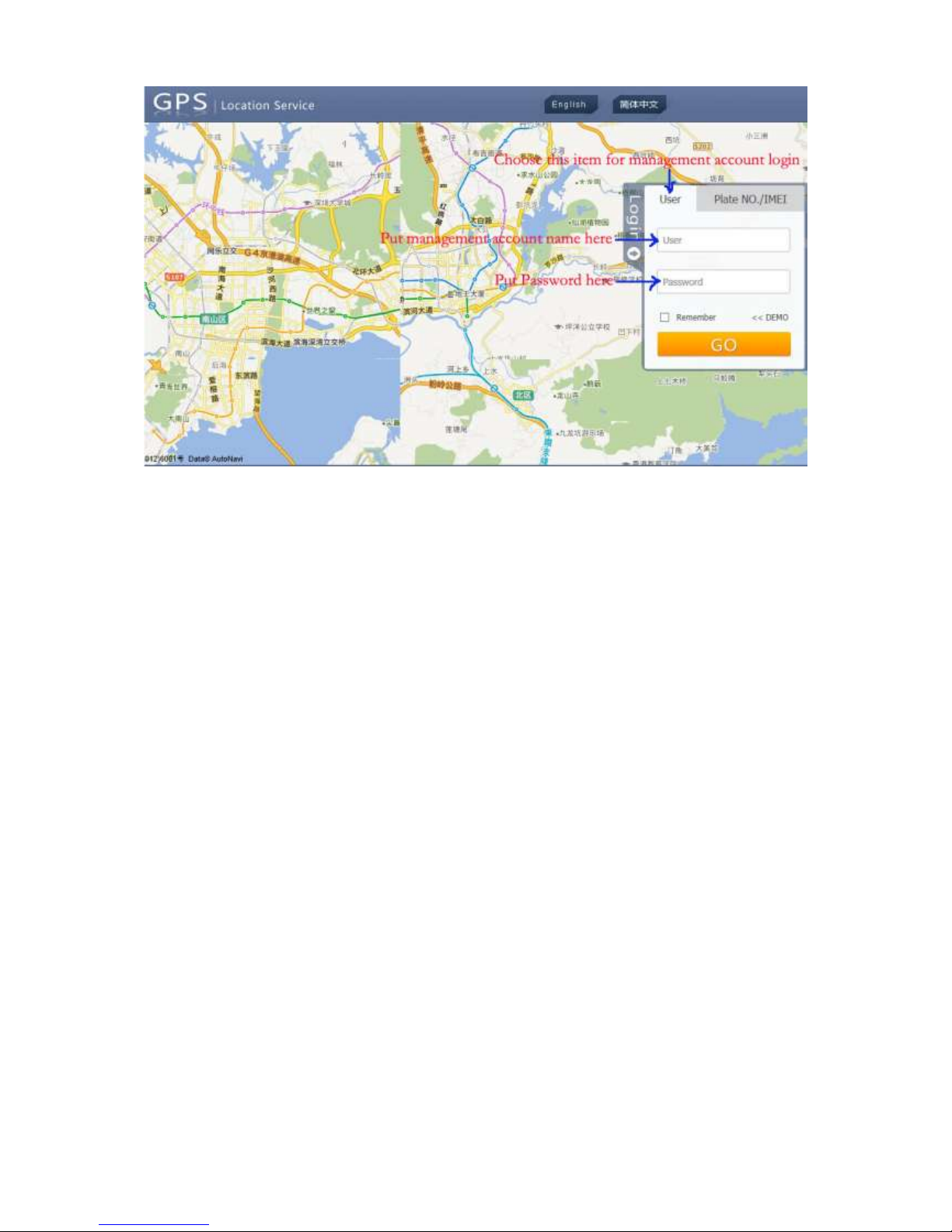
4.2 Tracking on platform
Please visit www.gps288.com for online real-time tracking and fleet management.
For details, please refer to our tracking system user manual.
4.2.1 Single unit login:
4.2.2 Management account login:
Page 10
10
Notes
1. This non-waterproof equipment, please be sure to have waterproof bag.
2. This equipment has to work with GSM network.
3. Please ensure that there are enough expenses in SIM card in order to avoid
the inconvenience of using.
4. This equipment cannot work in the power failure state and outside the service
areas, even if the registered users.
5. This equipment supports GPS and GSM/GPRS double positioning, regarding
as the same with the GPS positioning results.
6. Please use this equipment in the legal areas. The consequences of any
violation of the law will be undertaken by the users themselves.
 Loading...