

Page 1
DJ220 PNP
Manual
User manual and video please visit:WWW.LDARC.COM
PRODUCE>>MULTIROTOR>>HD CINE MULTIROTOR>>DJ220
DJ220 manual
DJI FPV Digital RunCam 4K
191217
Page 2
Configuration
Description
Wheelbase:219mm
Drone weight:369.1g(DJ220-Digital)
347.1g(DJ220-4K)
316.7g(DJ220)
Package size:275*205*90mm
Package weight:842g(DJ220-Digital)
795.4g(DJ220-4K)
765g(DJ220)
Plate thick:up plate 2.5mm,down plate 2.5mm,
arm frame 5mm,bottom plate 3mm
Camera angle:15-50
。
Mounting size:Flytower 30.5*30.5mm,
motor Φ16 M3*8 , camera 19mm/20mm
KK tower new name
KKT16 mounting size 16*16mm
KKT20 mounting size 20*20mm
KKT30 mounting size 30.5*30.5mm
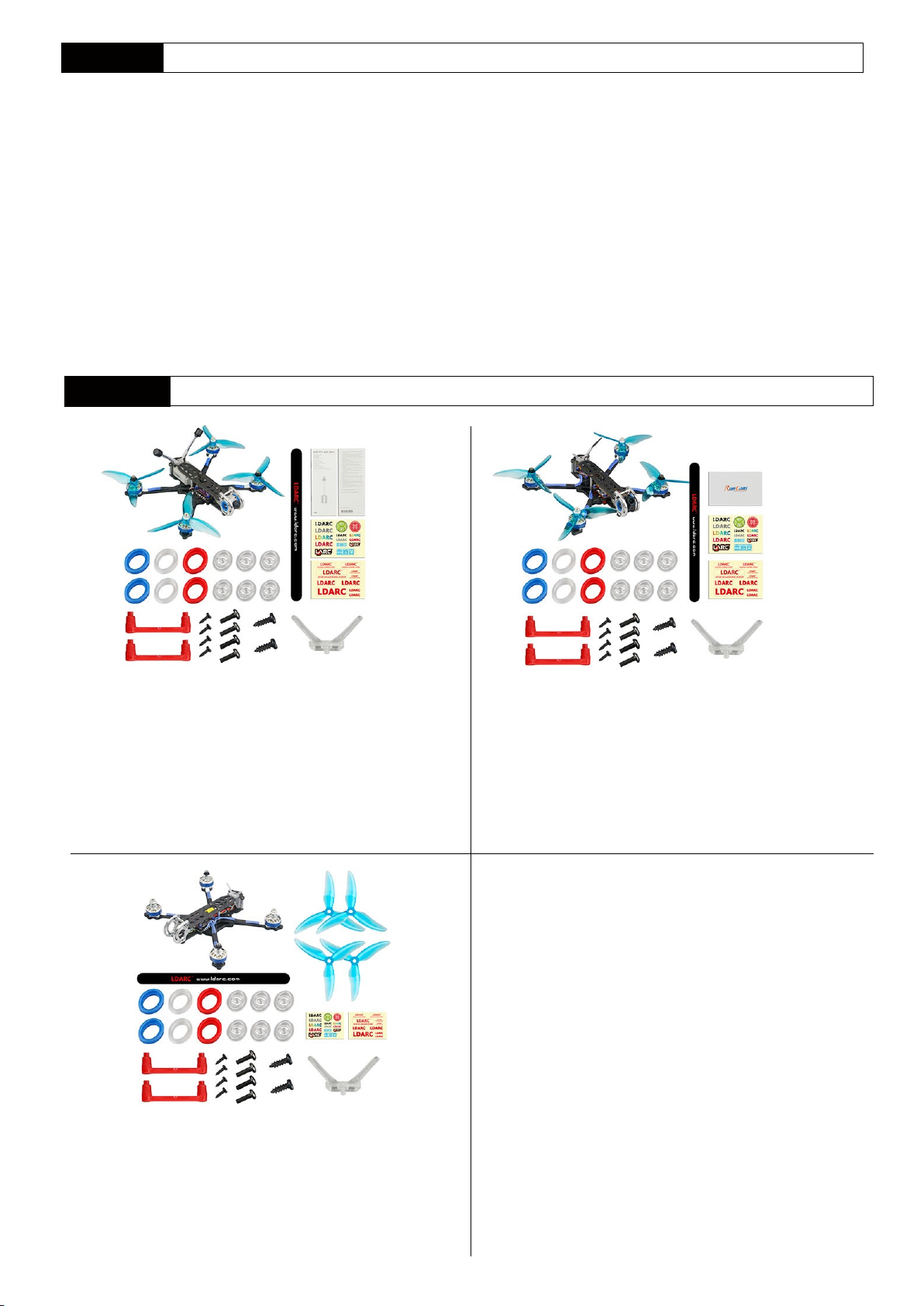
Package list
Configuration
FC:KKT30-F4D Old name:F4+VTX
ESC:KKT30-E40A Old name:ESC 40A(KK supper part)
DJ220-Digital : DJI FPV Digital+Camera
DJ220-4K:RunCam 4K KKT30-V600
DJ220 : NO CAM+VTX
Motor:XT2306-2500KV
Prop:51499-3blade
Recommend battery:14.8V 1300-1800mAh
Receiver:DJ220-Digital(Include DJI RX,it canable to use DJI transmitter),
FC can use AC2000,XM+ etc. receiver,it can use Frsky ,
Futaba transmitter
DJ220-Digital
DJ220-Digital PNP*1(include prop)
DJ FPV manual*2
Sticker*2
battery strap*1
Fixed seat*6
Damping*6(blue,red clear both 2pcs)
Antenna rack*1
ST2*6*2
Video rack*2
ST1.2*4*4
M2*6*4
DJ220
DJ220 PNP*1
51499-3blade*2pairs
Sticker*2
battery strap*1
Fixed seat*6
Damping*6(blue,red clear both 2pcs)
Antenna rack*1
ST2*6*2
Video rack*2
ST1.2*4*4
M2*6*4
DJ220-4K
DJ220-4K PNP*1(include prop)
RunCam 4K manual card*1
Sticker*2
battery strap*1
Fixed seat*6
Damping*6(blue,red clear both 2pcs)
Antenna rack*1
ST2*6*2
Video rack*2
ST1.2*4*4
M2*6*4
-1-
Page 3
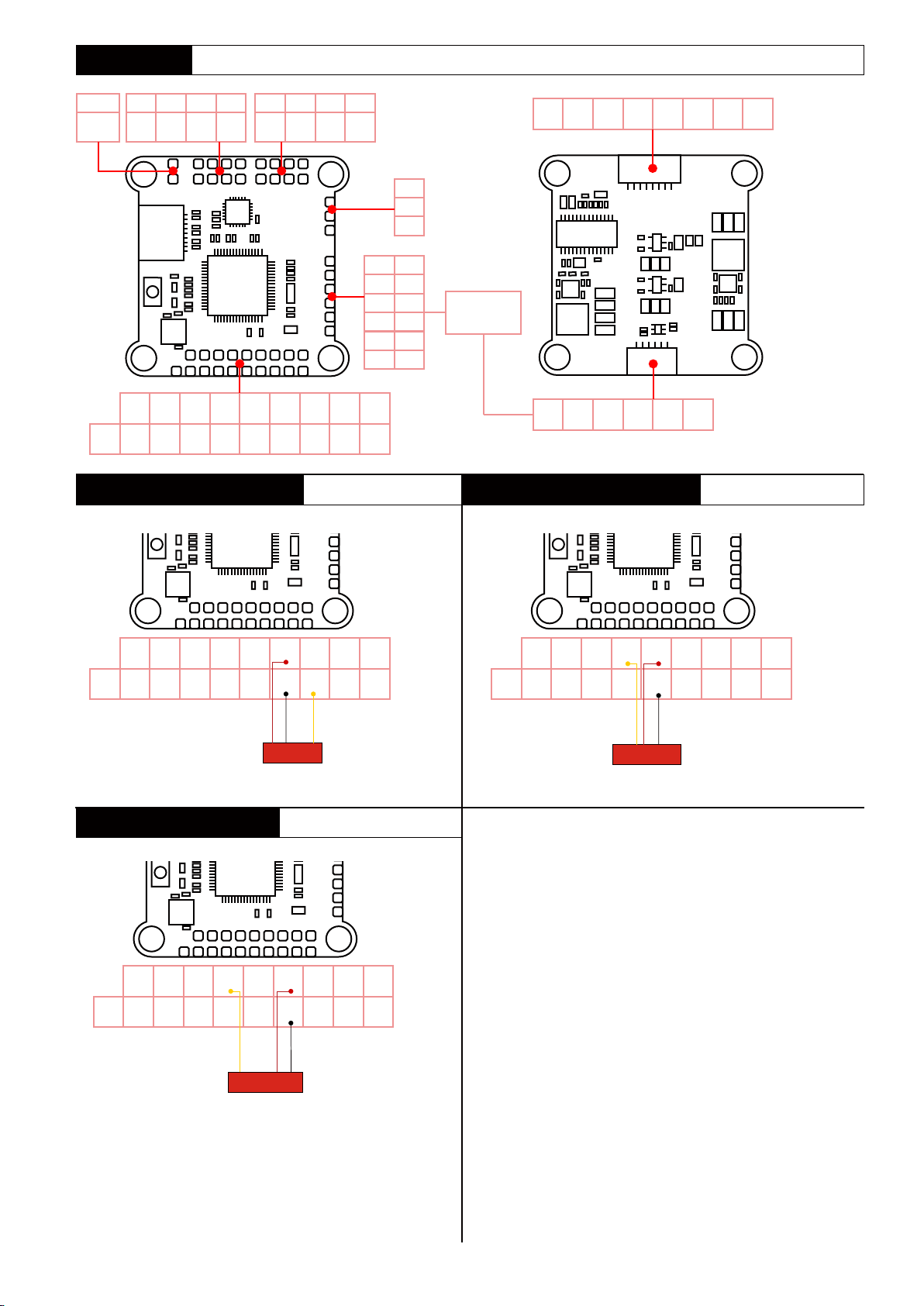
FC pin definition
G G CUR M4 M2
LED 5V B AT PPM
R6 +5V
PPM
T6 GND
/B08
S.BUS和PPM接收机连接方式
S.BUS and PPM receiver connection DSM2 and DSMX receiver connection
M3 M1 T1
B08
R3/
SDA
T3/
SCL
R2 3V3 +5V nT2
T2 GND GND nR2 GNE BAT-
VI +5V G
TM
VO
BAT G
G
5V
TM
10V
R
G
BL
T
W
R1
G
G
BR
nR2
Y
LED BAT+
Supply voltage is 5V
PPM or invert RX2 signal input
GND BAT M1 M2 M3 M4 CUR
DJI FPV
Digital
nR2 GND R1 T1 GND 10V
DSM2和DSMX接收机连接方式
PPM
B08
Supply voltage is 3.3V
NOT invert RX2 signal input
R6 +5V
PPM
T6 GND
/B08
iBUS receiver connection
R6 +5V R3 R2 3V3 +5V nT2
PPM
T6 GND T3 T2 GND GND nR2 GNE BAT-
B08
R3/
R2 3V3 +5V nT2
SDA
T3/
T2 GND GND nR2 GNE BAT-
SCL
SBUS/PPM
Supply voltage is 5V
NOT invert RX2 signal input
IBUS etc.
LED BAT+
LED BAT+
R6 +5V R3 R2 3V3 +5V nT2
PPM
T6 GND T3 T2 GND GND nR2 GNE BAT-
B08
DSM2/DSMX
LED BAT+
-2-
Page 4
VTX(IRC-Tramp)
描述
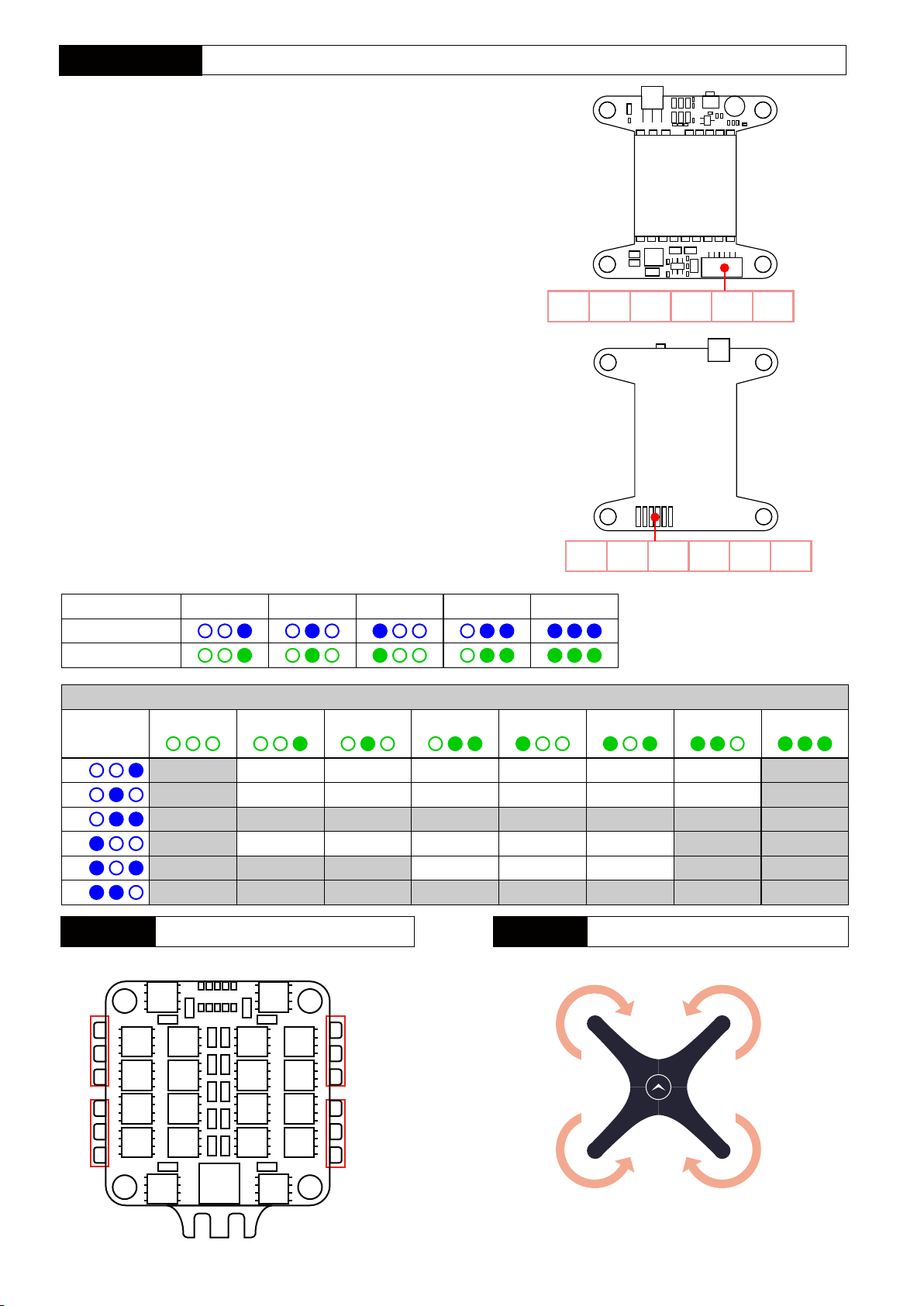
- Wide input voltage and low power consumption 7-24V
- 5V@1A high load output
- Up to 600mW of output power
- 48CH , With self-test output power function
- 30.5*30.5mm mounting size
- IRC-Tramp
Frequency and power control
- Button frequency control:shot press once to switch CH(CH1-CH8)
long press for 2s and then short press to switch frequency group FR(A-L)
- Button power control : Long press for 6s and then short press to
switch power level 25/100/200/400/600mW
Note:
- Make sure output terminal is installed antenna before power on
- Pay attention to static electricity protection during transportation and installation
Video GND 5V out RX GND 7-24V
FR
CH
Frequency table(Mhz)
CH/Band
A
B
E
F
R
L
CH1 CH2 CH3 CH4 CH5 CH6 CH7 CH8
5865 5845 5825 5805 5785 5765 5745 5725
5733 5752 5771 5790 5809 5828 5847 5866
5705 5685 5665 5645 5885 5905 5925 5945
5740
5658
5362
C G G G B
4 3 2 1 B
25mWPower switching 100mW 200mW 400mW 600mW
5760
5695
5399
5780
5732
5436
5800
5769
5473
5820
5806
5510
MotorESC
M4(CW) M2(CCW)
5840
5843
5547
5860
5880
5584
VideoGND 5V outRX GNDVCC
5880
5917
5621
M4
M3
+ -
2~4S
M2
M1
M3(CCW) M1(CW)
Note:pay attention to the direction of rotation
of the motor when installing the prop
-3-
Page 5
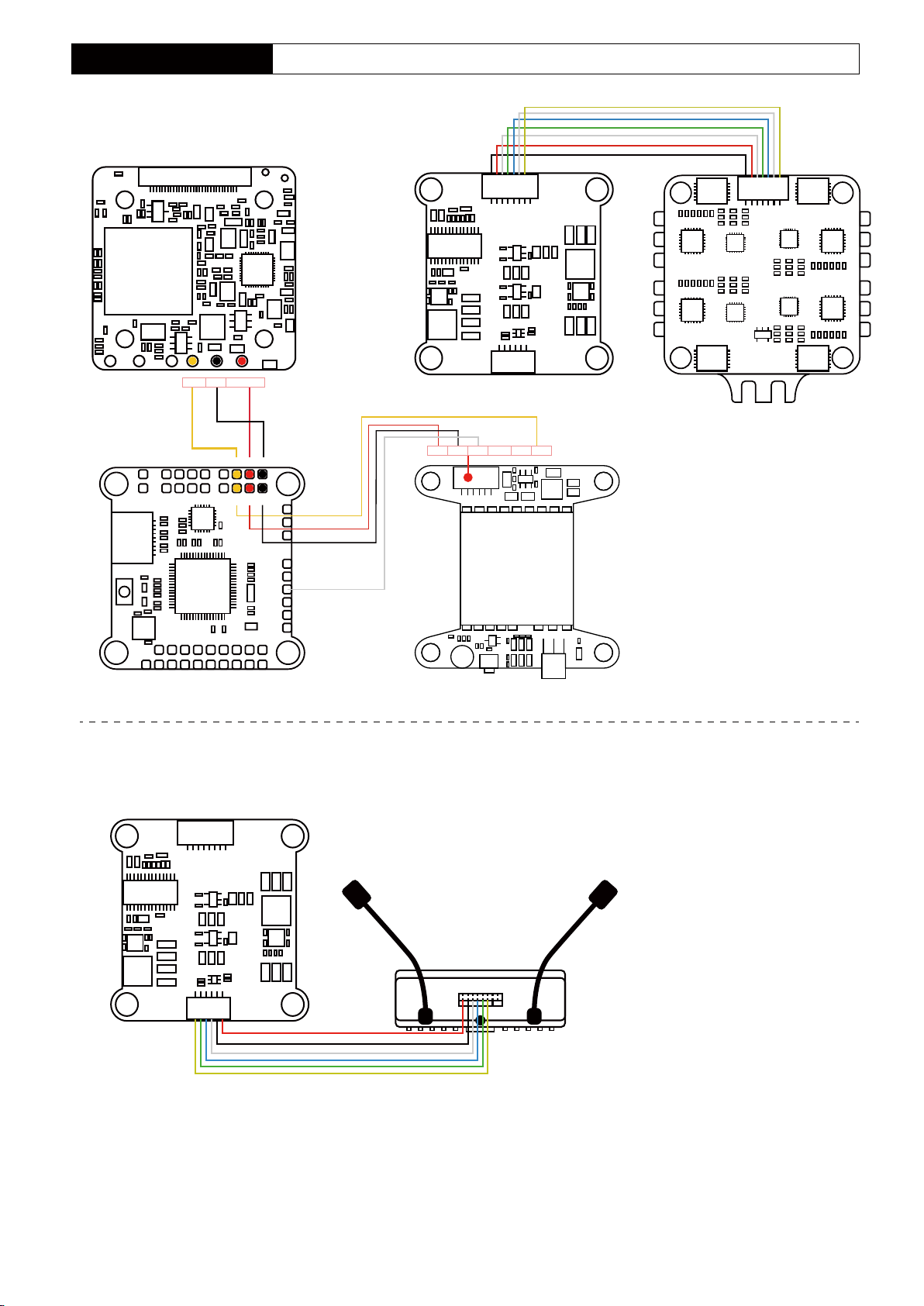
DJ220(NO CAM+VTX)
DJI220-4K pin definition
RunCam 4K
GND VCC(5-20V)Video
+5VG
FC
FC
G
GBATVO
7-24 GND RX
5V out
GND Video
ESC
VTX
DJI220-Digital
DJI FPV Digital
-4-
Page 6
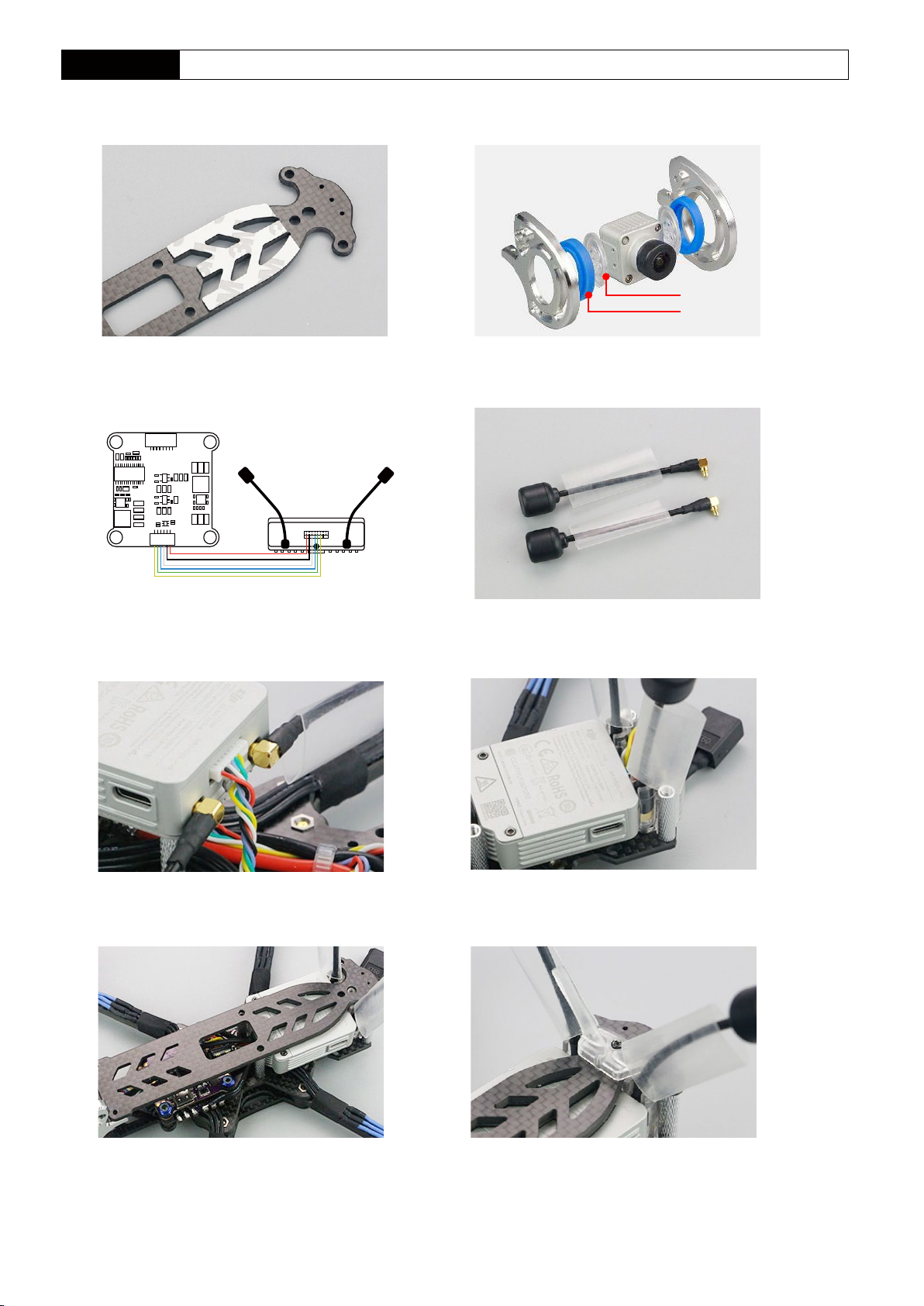
DJI FPV Install
1.Remove the upper plate, and then stick the EVA
on the upper plate
2.Remove the aluminum parts, then refer the picture to
install the camera
20#fixed seat
TPE(40HA)
3. Connect the FC and DJI FPV Digital well 4.The antenna is pre-installed with heat shrink tube
DJI FPV Digital
5. Install antenna and connect DJI FPV Digital 6.Install DJI FPV Digital
7.Install DJI FPV upper plate 8.Install antenna fixed seat
-5-
Page 7
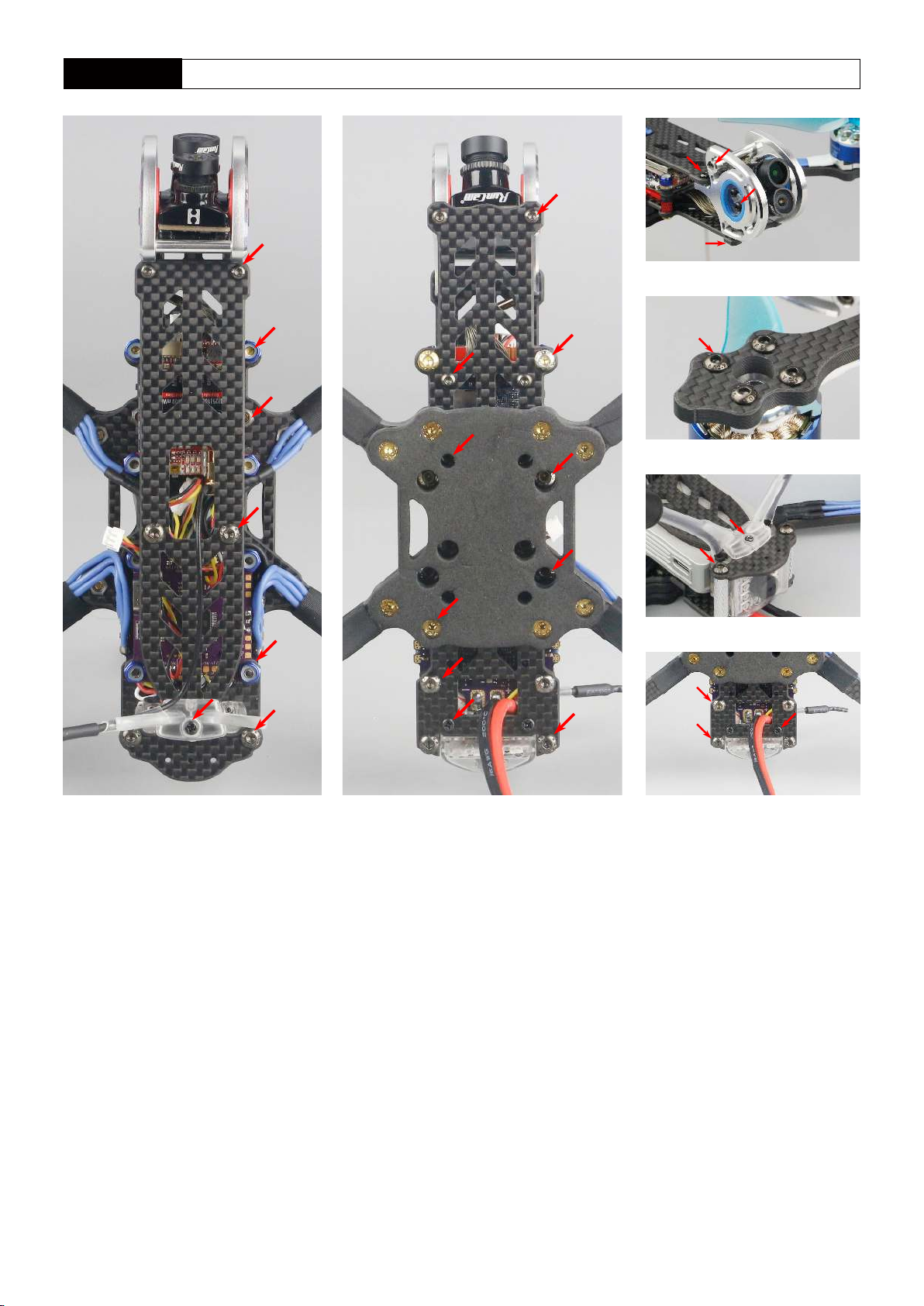
Mounting screw
M2*6
M3
M3
M3*8
M2*6
M2*6
M3*10
M2*6
M3*20
M3*20
M3*20
M2*6
M2*6
M3*6
M3*6
M2*6
M2*6
ST2*6
ST2*6
M3
M3*8
M3*20
ST2*6
M3*8
M3*20
M3*6
ST2*6
-6-
Page 8
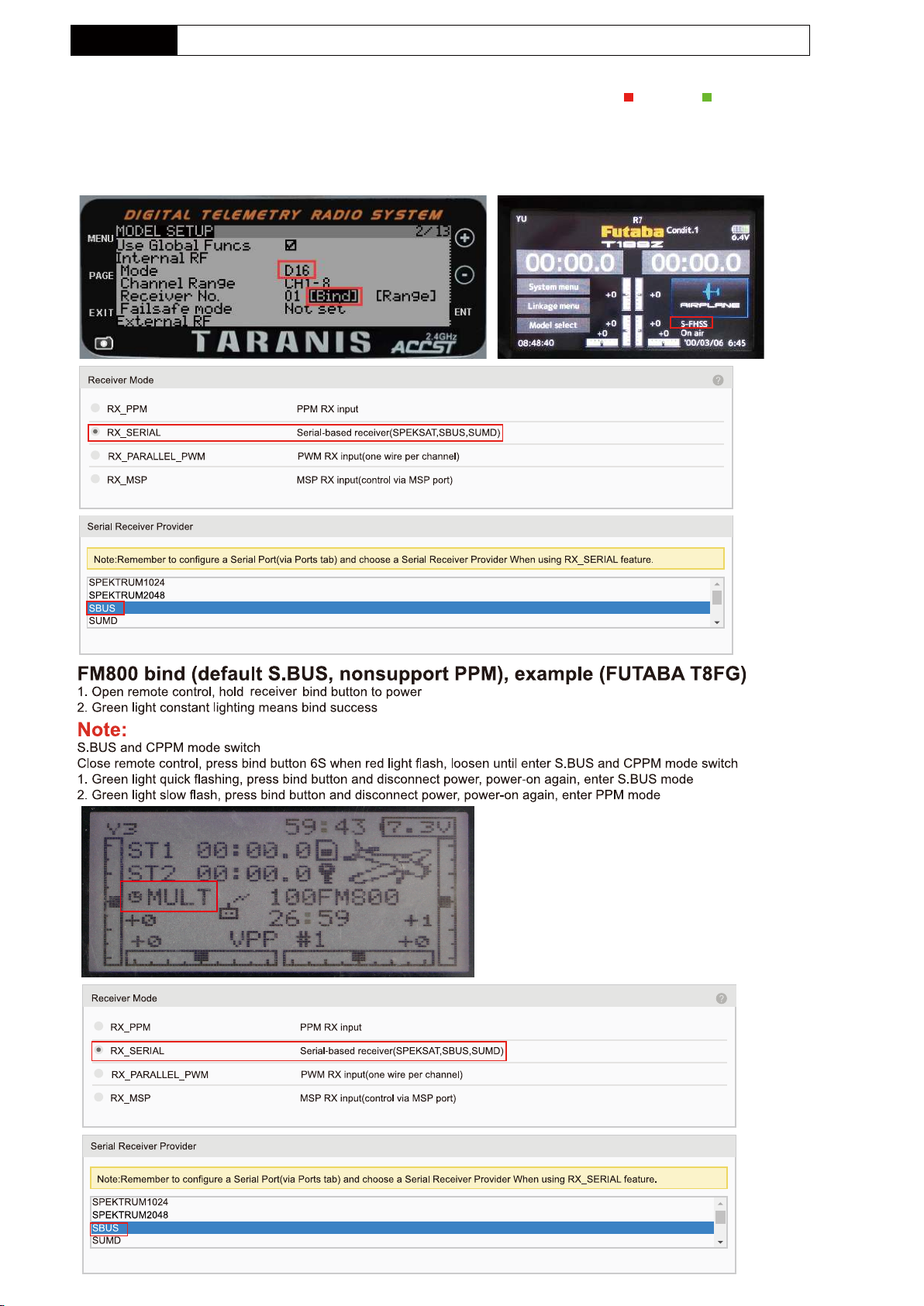
Receiver bind
AC900(S-FHSS+D16) bind,transmitter(FRSKY X9D/Futaba T18SZ)
Bind:Check receiver mode before bind,the first blink after power on indicate the setting, is S-FHSS, is D16
FUTABA S-FHSS BIND:Turn on the TX then power on AC900 while pressing the key, green LED fast blink meaning already in bind
mode, user can release the key. Bind procedure is completed and the receiver is working normally when green LED is solid
FRSKY D16(NO Telemetry) BIND:Power on AC900 while pressing the key, green LED fast blink meaning already in bind mode,
user can release the key, then set your TX into D16 bind mode. red LED solid meaning bind finished, exit TX from bind mode,
receiver’s green LED solid meaning working normally
-7-
Page 9
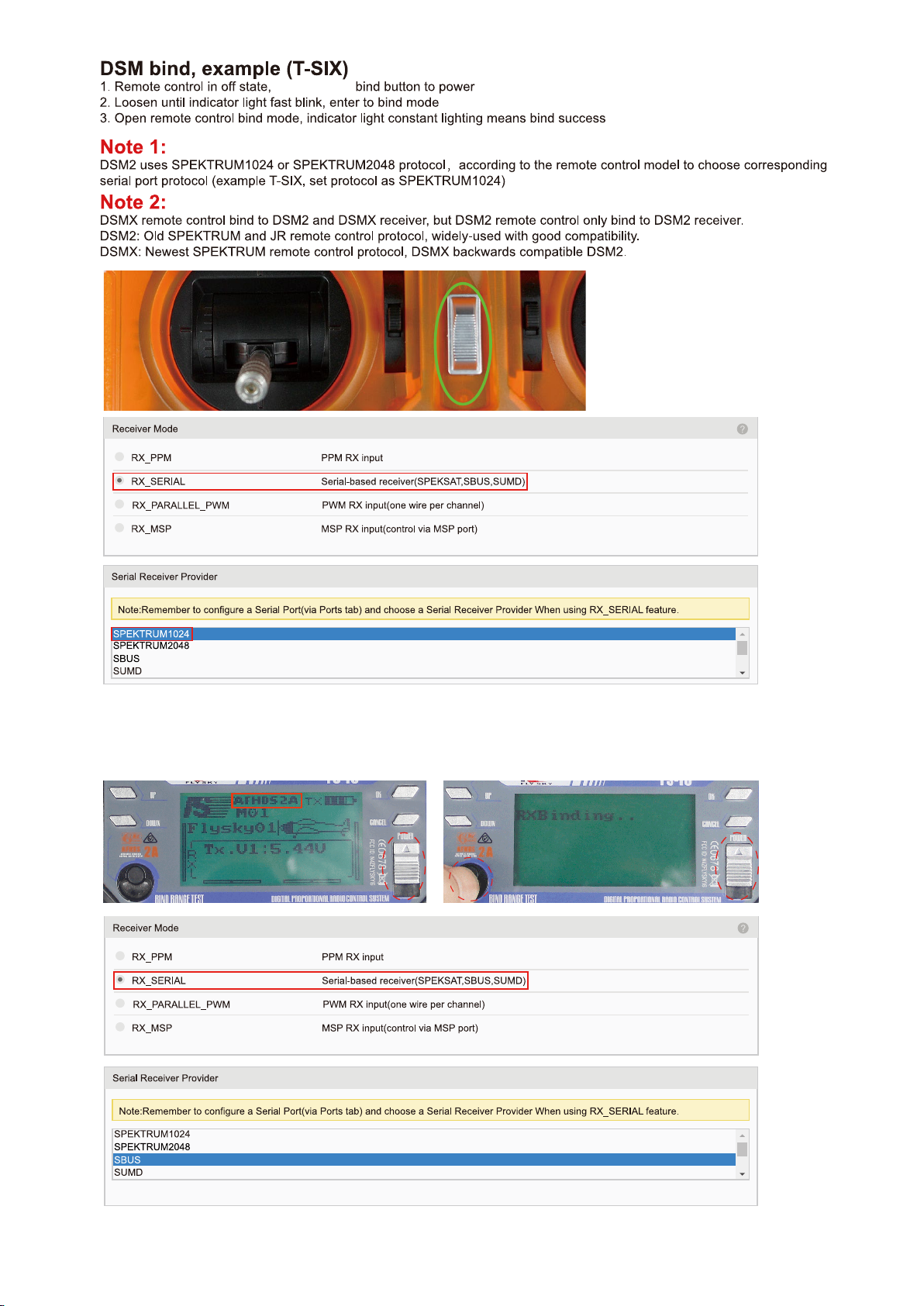
RX2A PRO Bind(S.BUS),transmitter(FLYSKY FS-i6)
BIND:Power on the receiver while pressing the key,green LED fast blink meaning already in bind mode,
user can release the key,then set your TX into bind mode.Green LED turn off and red LED solid mean bind finished,
exit TX from bind mode,receiver’sgreen LED solid mean working normally.
-8-
Page 10
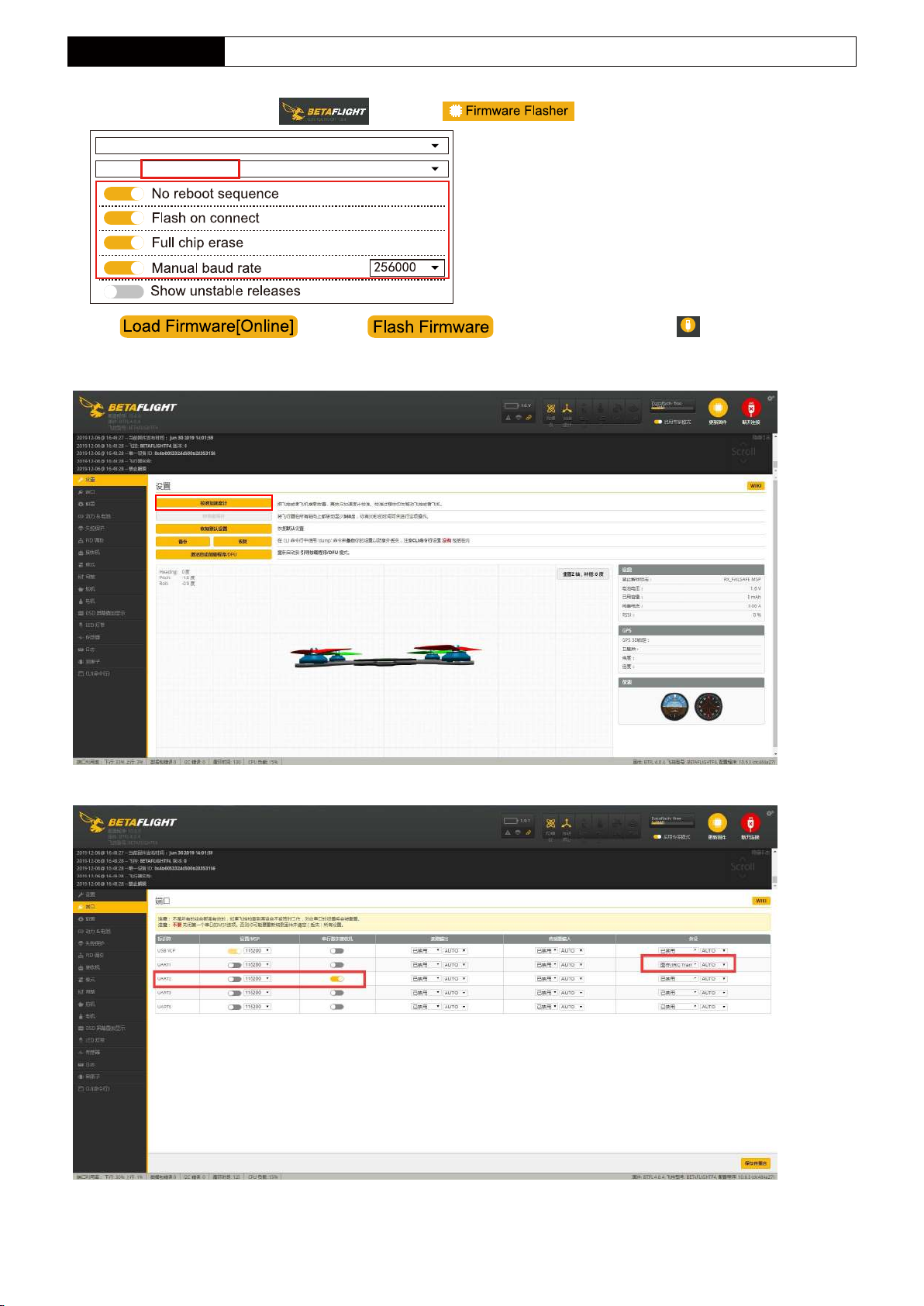
Firmware Update
BETAFLIGHT firmware allready flash before leave the factory,user just need connect PC to adjust the parameter
1.Open betaflight configuration ,then click ,select FW version
BETAFLIGHTF4
4.0.4- BETAFLIGHTF4 -01-07-2019 20:36(stable)
2.Click ,then click to download FW to FC, click after FW
Connect
updating finish into setting menu
3.Calibration“Calibrate Accelerometer”
4.Port,open UART2 switch
-9-
Page 11
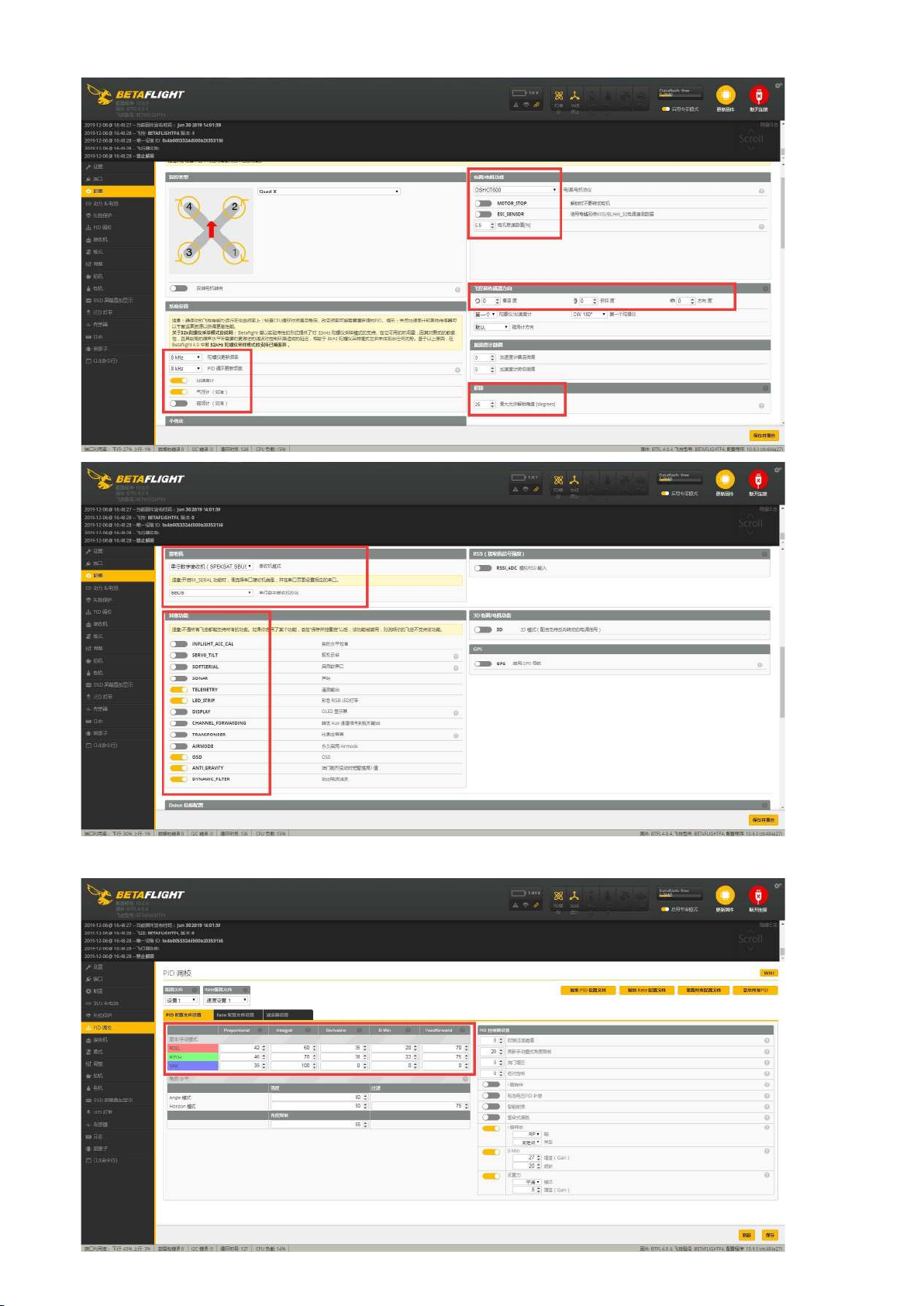
5.Select ESC protocol is DSHOT600,then follow the steps to set up
6.PID setting
-10-
Page 12
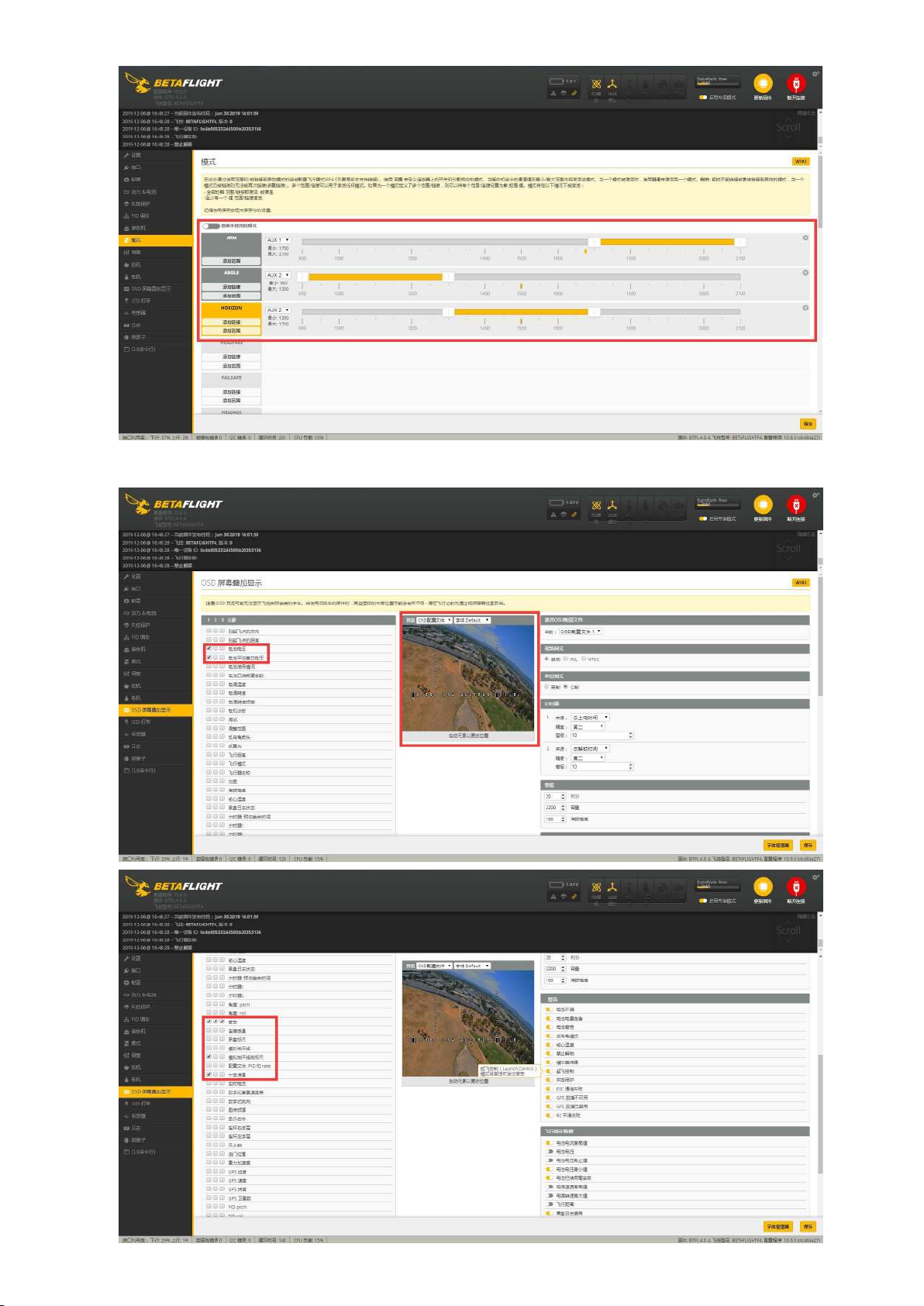
7.Mode setting
8.OSD setting
-11-
Page 13
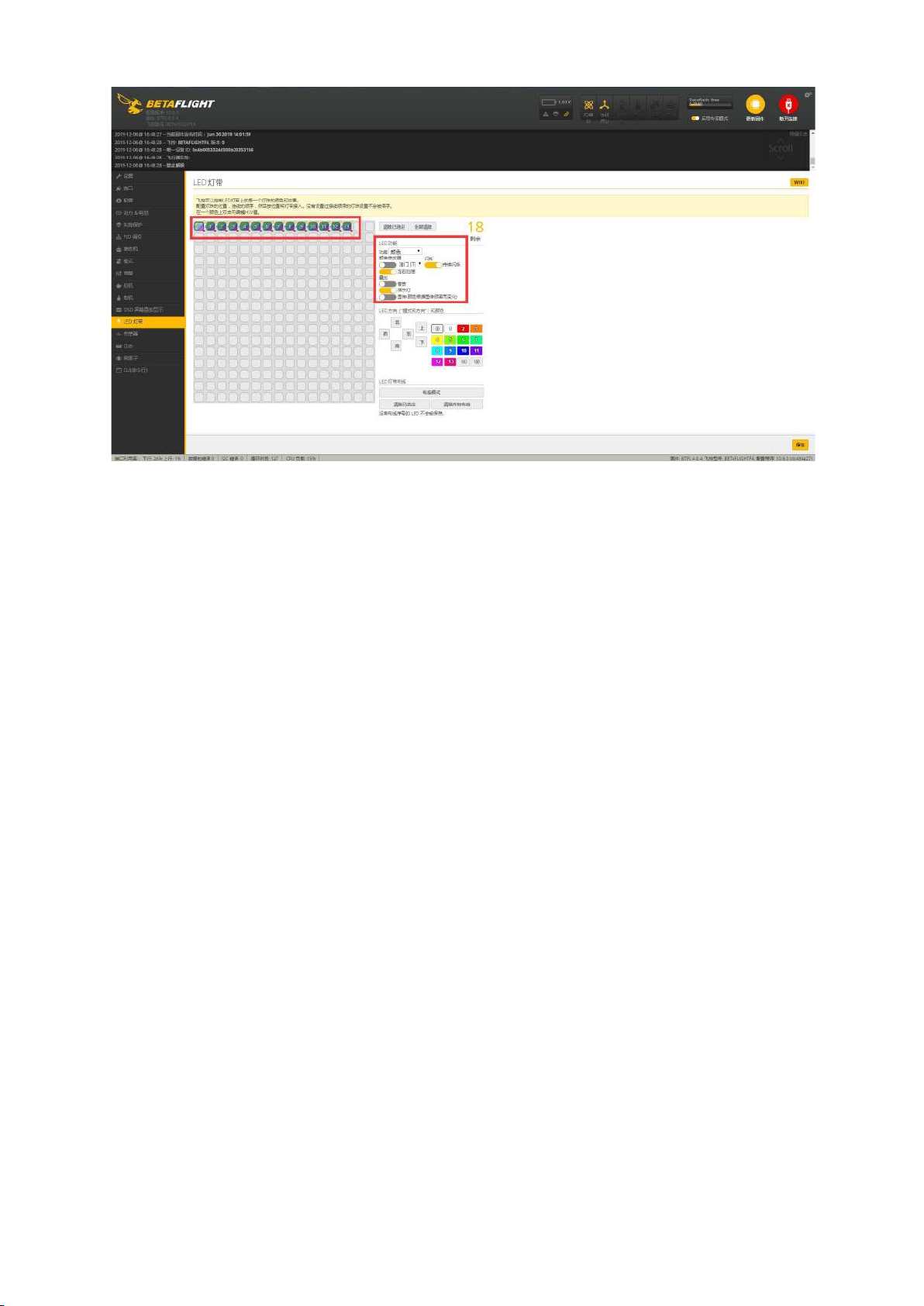
9.LED setting
-12-
Page 14
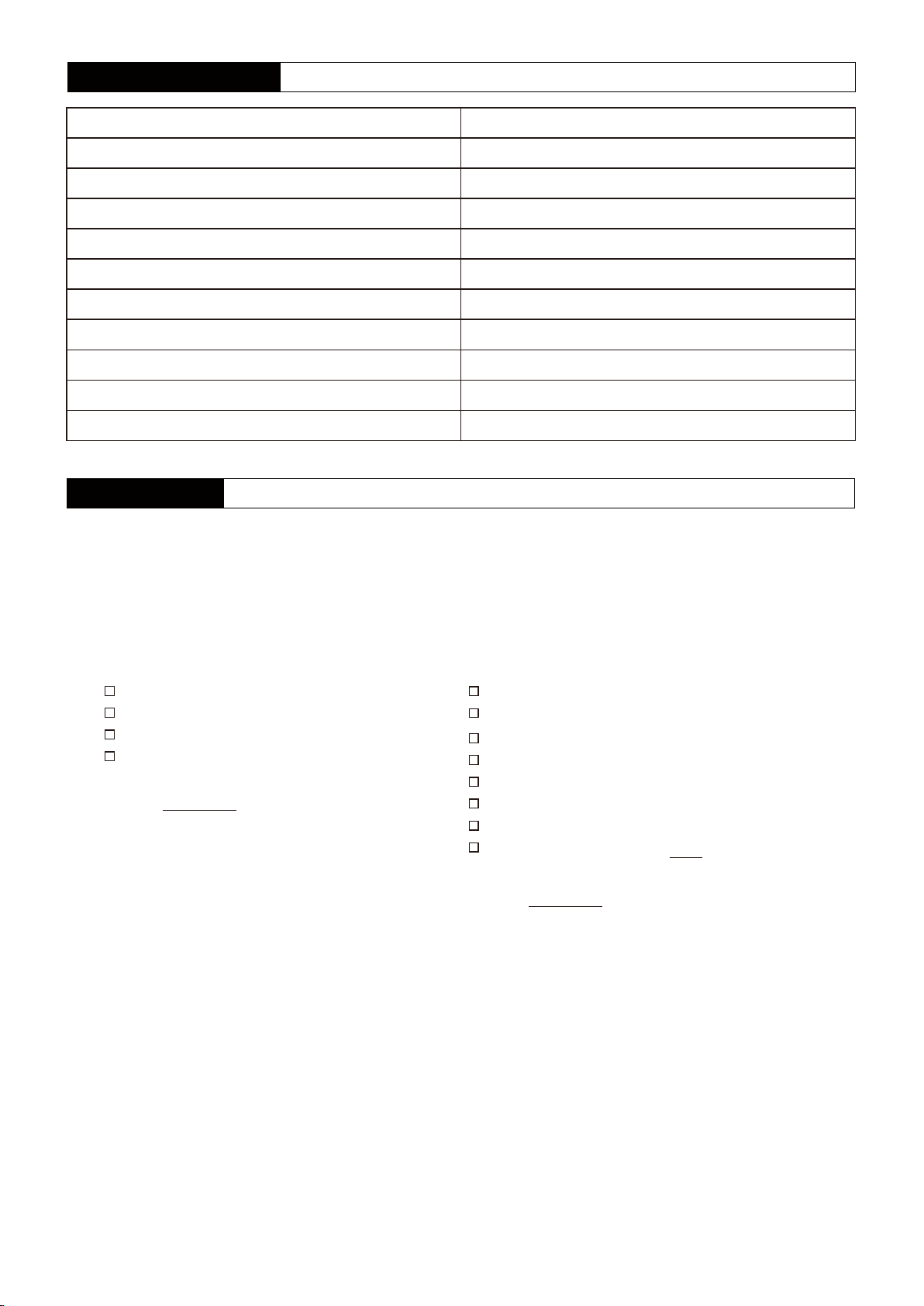
Product and Factory Code
Name
DJ220-Digital
DJ220-4K NO RX
DJ220
DJ220 KIT
DJ220 arm frame
XT2306-2500KV
KKT30-C2
KKT30-F4D
KKT30-E40A
KKT30-V600
Factory Code
PNP.DJ220-DIGITAL
PNP.DJ220-4K NO RX
PNP.DJ220
KIT.DJ220
PART.DJ220 ARM FRAME
MOTOR.XT2306-2500KV
FLYTOWER.KKT30-C2
FC.KKT30-F4D
ESC.KKT30-E40A
VTX.KKT30-V600
After Sale Service
1.Provide free reparation service when find the product defect after purchase.
2.Provide pay-needed reparation service when product damage because improper operation.
3.China customers please contact with the after-sales service,overseas client please contact the dealer.
PNP/RTF Test report ID :
Flight test
Transmitter functions properly
Flying in good condition
Camera OK
VTX OK
QC:
Package check
PNP
RTF
Frame
Transmitter
ID is the same
All parts of the installation
Insulating sleeves have been installed manual
Complete accessories,total packages
QC:
-13-
 Loading...