

Page 1
User's Manual
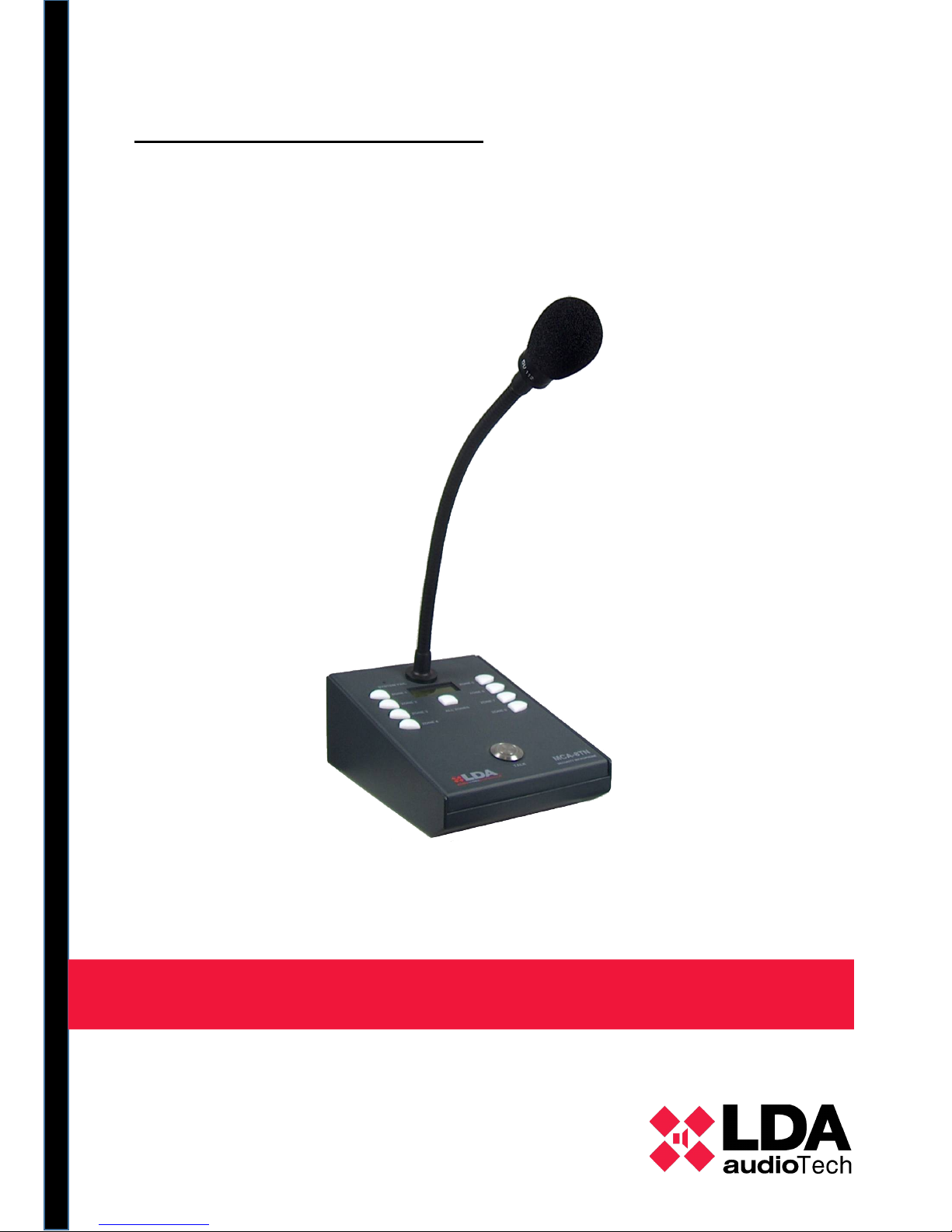
SECURITY DESK MICROPHONE
Model: LDAMCA8NS01
Page 2

Page 3

Index
1. TECHNICAL DESCRIPTION:....................................................................... 3
2. OPERATION DESCRIPTION....................................................................... 3
2.1 OPERATION WITH SERVER........................................................................... 3
2.2 OPERATION WITH THE AUXILIARY SYSTEM.............................................. 2
2.3 STATUS MONITOR ......................................................................................... 2
2.4 CONNECTION AND CONFIGURATION.......................................................... 3
2.5 DESCRIPTION OF FRONT PANEL:................................................................ 4
3. TECHNICAL SPECIFICATIONS.................................................................. 5
Index of Charts
Tabla 1: Tecnical specifications.........................................................................................................................5
Illustration index
Ilustration 1: Main board..................................................................................................................................3
Ilustration 2: Front panel.................................................................................................................................. 4
WARNING:
This device can't be exposed to drippings or water projections and it must be
situated far of objects containing fluids.
The alternating current supply cables are the main devices to disconnect this
product and should be easily accessible at all times.
Page 4

1 TECHNICAL DESCRIPTION:
The MCA-1/8N is a desk microphone with advanced features for professional PA
systems that comply with the EN-60849 standard.
The microphone includes control via Ethernet for remote control and monitoring.
The MCA-1/8N allows broadcasting messages in multizone mode, with up to 8
configurable zones (model 8N). In addition, the capsule is under constant supervision, so
that any error is directly notified.
It includes “general call” functions, with busy line and floor granted signals shown
through LED and display screen. Furthermore, a system failure light and sound indicator
warn of any malfunction of the system.
Likewise, the microphone also works automatically with the auxiliary LDA system,
and in the display it indicates when this work mode is activated.
Special attention has been given to sound processing in order to achieve top quality
results with regard to distortion, sensibility, band width and noise/signal ratio. For this
reason the MCA-1/8N includes a top quality dynamic capsule.
The exterior quality is based on the desk’s resistance, since it is made of iron, which
provides superior stability and protection in case it is knocked. All the push buttons are
designed for intensive use and the main push button is made of stainless steel,
contributing to the microphone’s overall robustness.
2 OPERATION DESCRIPTION
The MCA-1/8N security microphone operates as a microphone for eight zones
totally configurable by the control server. Each zone can be selected independently and
the light indicators show the zone’s current status.
2.1 OPERATION WITH SERVER
When the system server is in operation, the MCA-8N operates as a multizone
microphone for which priority is configurable, just like the zones assigned to each button.
1 LDA Audio Tech - Severo Ochoa Nº 31- 29590 MÁLAGA, ESPAÑA. Tlf: +34 952028805
Page 5

MANUAL DE USUARIO – AMC8N
On selecting a zone, the light indicator will turn green. In order to talk, the TALK
button is pushed and the server will handle the request. In case the command is granted,
the TALK button will turn green, together with the other buttons. The message “PALABRA
CONCEDIDA [WORD GRANTED]” will appear on the display.
When one of the zones assigned to the zone buttons is busy, the button will be red
indicating its status. In such case, there are two possibilities if a command is
requested: if the microphone has greater priority that the one using the line, the command
will be granted; otherwise the microphone will indicate “LINE BUSY” and the occupied
zones will flash red (8N).
In order to speak through several microphones at the same time, it is essential that
none of the zones occupied with one microphone are selected by the others.
2.2 OPERATION WITH THE AUXILIARY SYSTEM
When the auxiliary system is activated through the ASC-82N, this is detected by the
microphone and is indicated on the display.
At that moment the available option is to make a general call to all of the system’s
zones or to the part of the system that depends on the ASC-82N used.
The TALK button is used to make the petition, and it will light up green together with
the other buttons to indicate that the command has been granted. In case the line remains
busy, all the buttons will be red. In addition, these status will be displayed in text on the
screen.
In case the microphone has been assigned with maximum priority, it will show
command granted even if the line was previously busy.
2.3 STATUS MONITOR
This equipment is designed to comply with the EN-60849 standard in respect to
voice evacuation systems.
The MCA-8N includes several test and monitoring systems, which are described
below:
Capsule Supervision – The microphone’s capsule, as well as its connection to the
gooseneck, are constantly checked. The connection to the central server is also
monitored. When a failure is detected, the microphone reproduces a sound warning and
turns on the system failure indicator, indicating the problem detected on the display.
LDA Audio Tech - Severo Ochoa Nº 31- 29590 MÁLAGA, ESPAÑA. Tlf: +34 952028805 2
Page 6
In addition, when the MCA-8N is at rest, it generates a pilot tone in a cyclical
manner in order to verify the audio path to the next device of the critical path.
2.4 CONNECTION AND CONFIGURATION
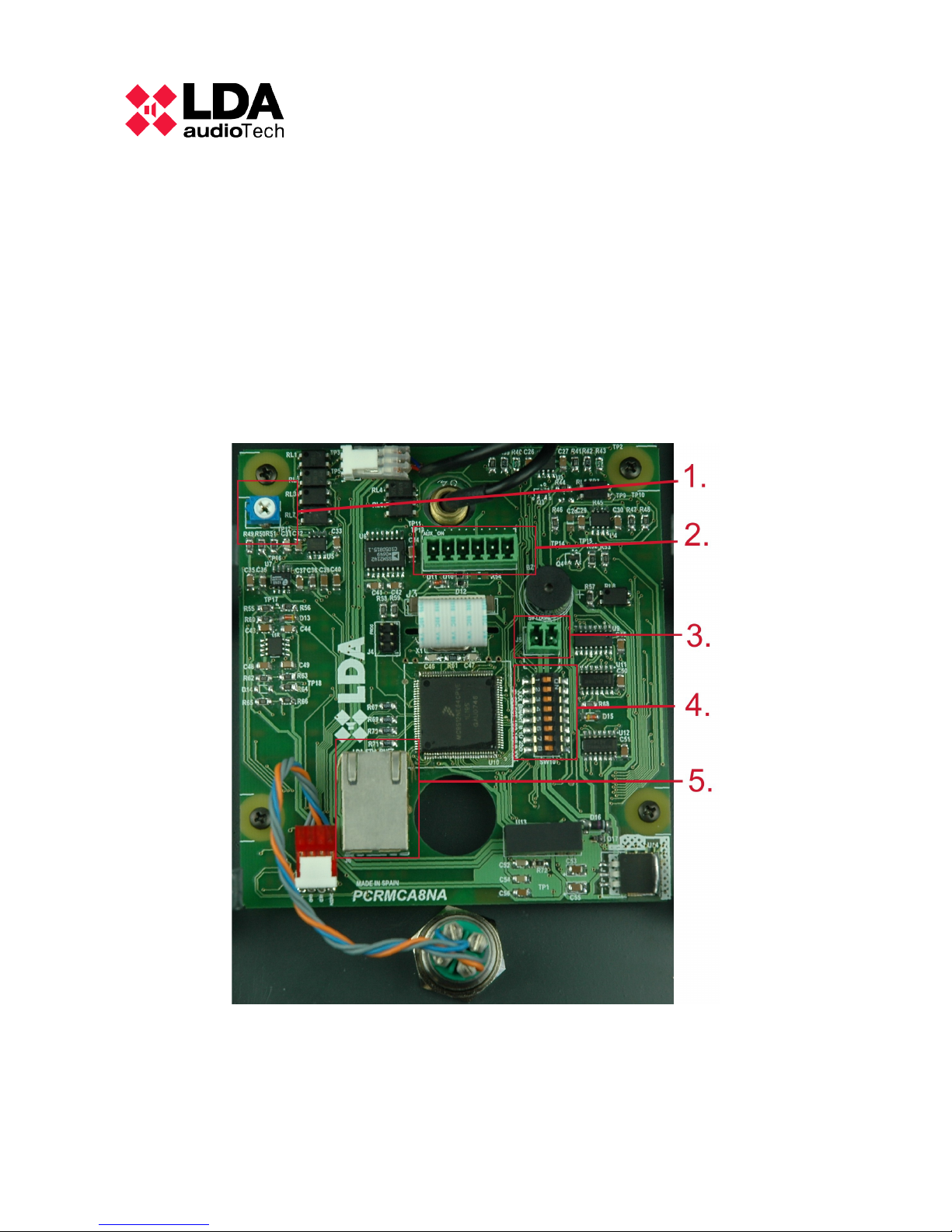
In order to connect the device, the lower cover is opened to access to the main
board shown in the picture.
Ilustration 1: Main board
Description of elements:
1. Gain control - This potentiometer is used to adjust the microphone’s output gain
3 LDA Audio Tech - Severo Ochoa Nº 31- 29590 MÁLAGA, ESPAÑA. Tlf: +34 952028805
Page 7

MANUAL DE USUARIO – AMC8N
2. Audio connection - Audio output and auxiliary system connector. The pin
configuration corresponds to the ASC-82N:
*In the picture, Pin 1 is the one on the right.
1. Audio –
2. Audio +
3. GND
4. Control (Active at 0)
5. Line busy (Active at 0)
6. Aux On. Indicator of active auxiliary system (Active at 0)
3. Supply connector – 5 VDC
4. IP address Configuration – The device’s IP address is configured using the
number of the last binary group. Switch number 1 corresponds to the most
significant bit.
The complete address is 192.168.0.XXX.
5. Ethernet connector – It is connected to the Ethernet network 10/100Mbps.
For cable output, there are three openings on the back panel, the size of which
corresponds to the size of each cable.
2.5 DESCRIPTION OF FRONT PANEL:
The top part of the microphone has all the elements needed for its normal
operation. They appear numbered in the following picture.
LDA Audio Tech - Severo Ochoa Nº 31- 29590 MÁLAGA, ESPAÑA. Tlf: +34 952028805 4
Page 8
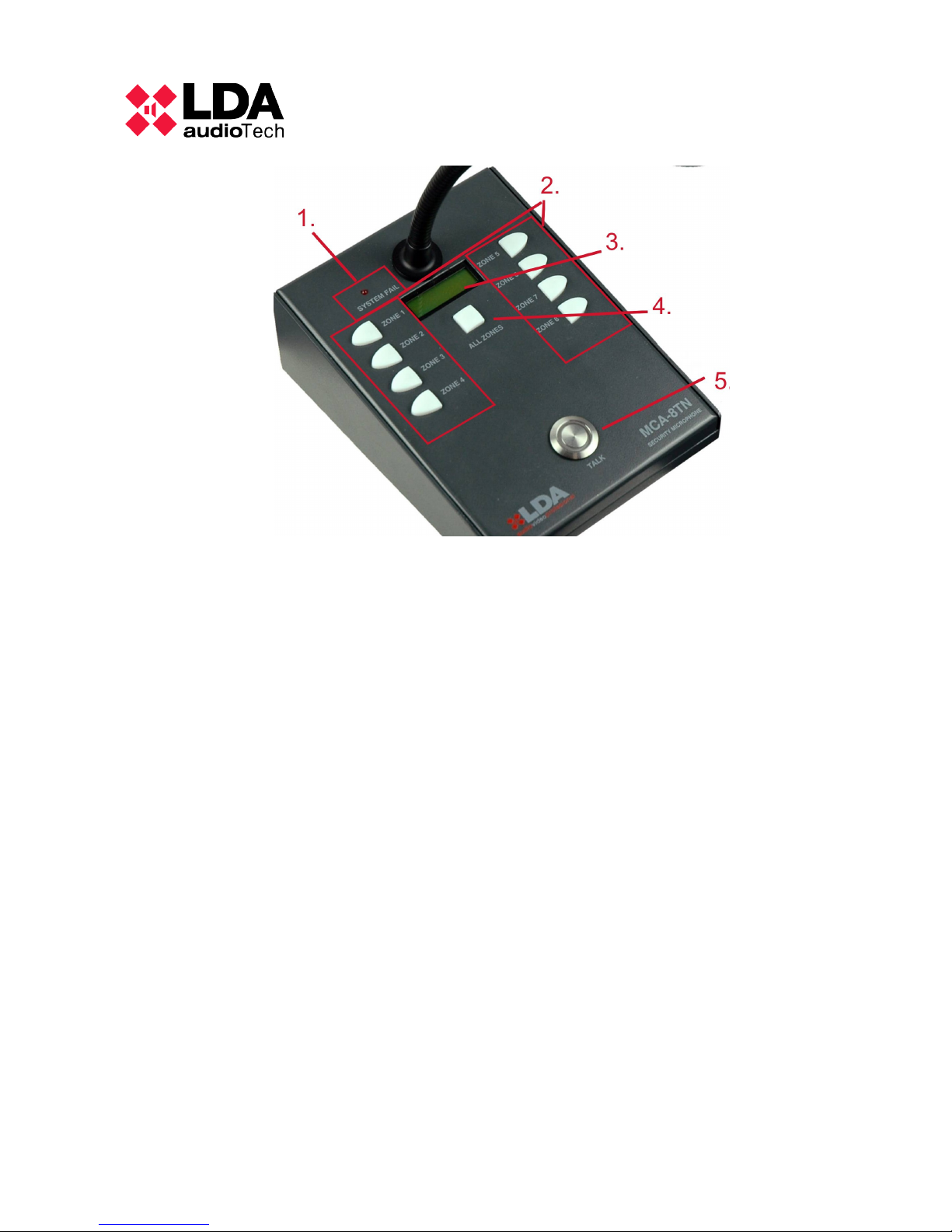
Ilustration 2: Front panel
1. LED indicating system failure
2. Push buttons for zone selection. In addition to selecting a zone, these buttons
light up in two colours to indicate selected and/or busy zones.
3. Display – Alphanumeric display to show microphone status and failure warnings
5 LDA Audio Tech - Severo Ochoa Nº 31- 29590 MÁLAGA, ESPAÑA. Tlf: +34 952028805
Page 9

MANUAL DE USUARIO – AMC8N
3 TECHNICAL SPECIFICATIONS
Power supply: 5Vdc, 500mA
Frequency response 200-15000Hz
Audio output 750mV 600Ω balanced
Sensitivity 0 dBm
Noise/signal ration 100dB (A-weighted)
Directionality Axial, with hypercardioid type polar diagram
Type of transducer Dynamic with moving coil
Length of gooseneck 250mm
Size 131x60x173 mm (width x height x depth)
Power consumption 2.5W
Chart 1: Tecnical specifications
LDA Audio Tech - Severo Ochoa Nº 31- 29590 MÁLAGA, ESPAÑA. Tlf: +34 952028805 6
Page 10

NOTAS
7 LDA Audio Tech - Severo Ochoa Nº 31- 29590 MÁLAGA, ESPAÑA. Tlf: +34 952028805
Page 11

MANUAL DE USUARIO – AMC8N
LDA Audio Tech - Severo Ochoa Nº 31- 29590 MÁLAGA, ESPAÑA. Tlf: +34 952028805 8
Page 12

LDA Audio Tech - Severo Ochoa Nº 31- 29590 MÁLAGA, ESPAÑA. Tlf: +34 952028805
 Loading...