

Page 1
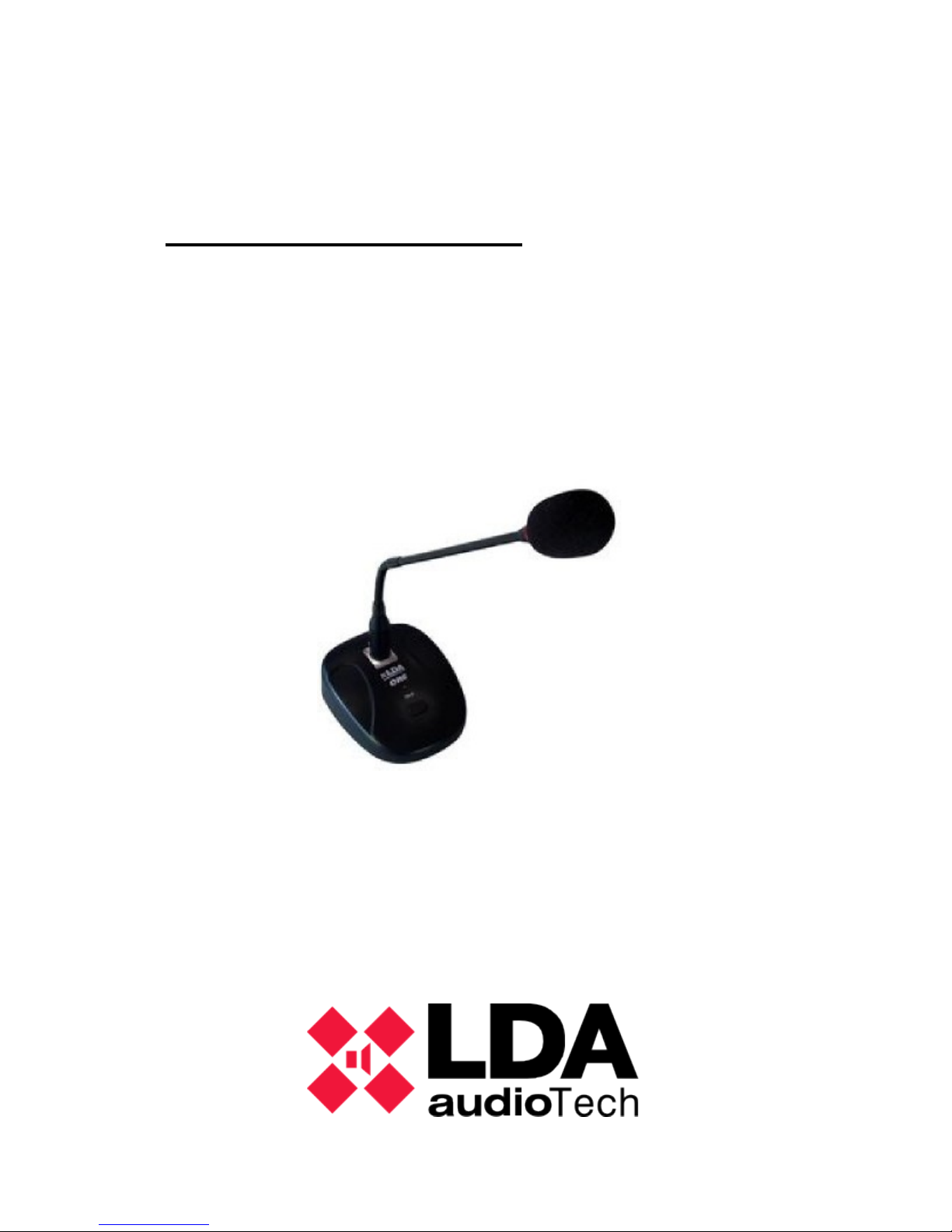
User’s Manual
LDA A-1 S02
Paging Microphone
Page 2

LDA A-1 S02 USER'S MANUAL
2 LDA Audio Tech – 31st Severo Ochoa St.- 29590 MÁLAGA, SPAIN.Tel: +34 952028805.
www.lda-audiotech.com
Page 3

LDA A-1 S02 USER'S MANUAL
Content:
1 TECHNICAL DESCRIPTION.................................................. 3
2 Package content.................................................................... 4
3 FUNCTIONING DESCRIPTION:............................................5
4 CONNECTION AND CONFIGURATION...............................6
5 Frontal Description............................................................... 8
6 TECHNICAL SPECIFICATIONS:........................................... 8
WARNING:
This piece of equipment must not be exposed to dripping or splashing
and no objects filled with liquids, such as vases, shall be placed over it.
3 LDA Audio Tech – 31st Severo Ochoa St.- 29590 MÁLAGA, SPAIN.Tel: +34 952028805.
www.lda-audiotech.com
Page 4

LDA A-1 S02 USER'S MANUAL
1 TECHNICAL DESCRIPTION
The A-1 is an advanced paging microphone for professional PA
installations.
The microphone features control by logical digital signals, or RS-485
communications protocol (optional)
It features functions of “all-call”, signalling floor given and occuppied line
by led lights.
The sound processing has been adapted to achive high quality results, in
terms of quality, distortion, sensitivity, broadband and S/N ratio. That is why the
A-1 includes a high quality dynamic capsule.
The A-1 has different modes of configuration, in order to be easily
integrated in any type of installation. Additionally, it features pre-amp to provide
a balanced output and preserve the audio quality in long distances.
As an option, it is possible to configure a chime tone before and after a
paging.
4 LDA Audio Tech – 31st Severo Ochoa St.- 29590 MÁLAGA, SPAIN.Tel: +34 952028805.
www.lda-audiotech.com
Page 5
LDA A-1 S02 USER'S MANUAL
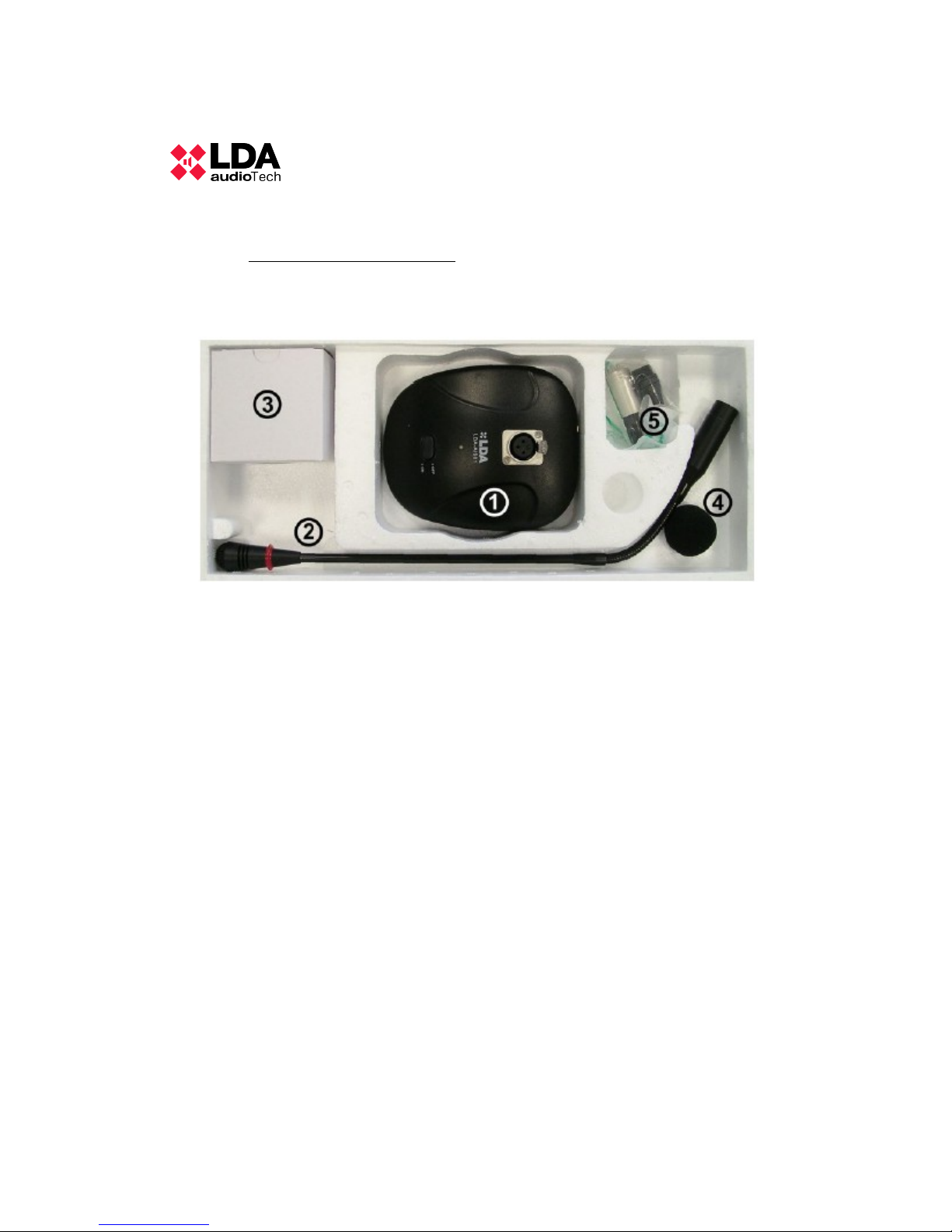
2 PACKAGE CONTENT
1. A-1 Microphone
2. Gooseneck
3. 5 V DC Power supply
4. Anti-pop filter
5. XLR-5 female connector
6. User's manual
5 LDA Audio Tech – 31st Severo Ochoa St.- 29590 MÁLAGA, SPAIN.Tel: +34 952028805.
www.lda-audiotech.com
Page 6

LDA A-1 S02 USER'S MANUAL
3 FUNCTIONING DESCRIPTION:
The microphone A-1 functions as an “all-call” , press to talk, single button
microphone. It features light indicators to signal the state of the line/zone where
the page will be broadcasted.
Functioning modes:
Depending on the mode that has been selected internally, the
microphone could perform different behaviors.
• PTT/LATCH Mode: Throughout the microphone selector, the behavior
will be different. When its position is OFF, the microphone will work in
PUSH TO TALK (PTT) mode, that is, the button should be pressed in
order to make a page. In the position ON, with the first push of the button
the microphone will be fixed on the “floor granted” to the user, and it will
cease emitting once pushed again.
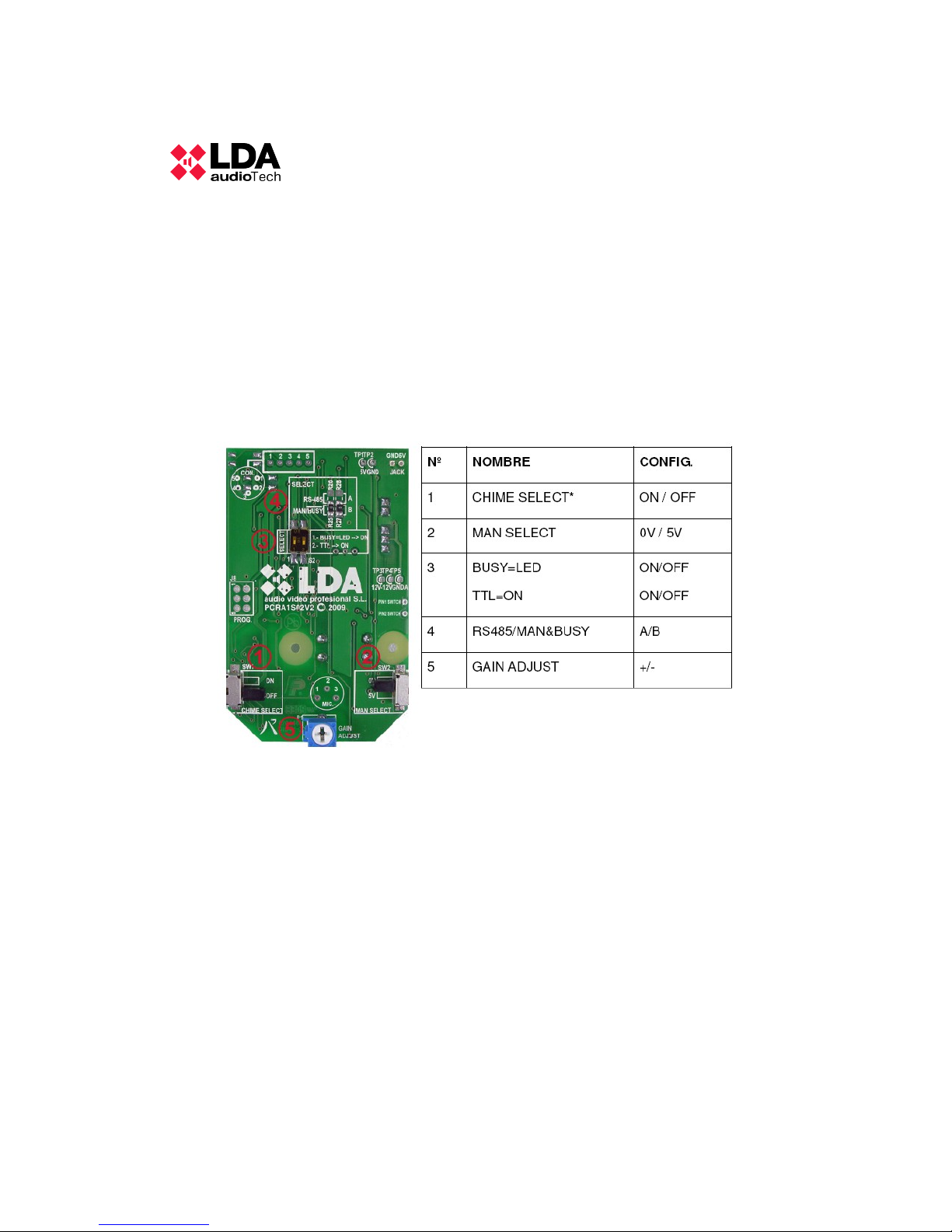
• 0V/5V Mode: Using the operation selector, it is possible to configure the
TTL output line signal, to indicate the use of the audio line in the system.
0V is low level signal and 5V is high level signal.
• Chime ON/OFF: This position indicates if the chime tone is ON or OFF.
• TTL/RS-485 Mode: As a default, the functioning mode is TTL. Optionally,
the A-1 can use the RS-485 protocol to communicate with LDA
compatible units. In that case, this option should be active and the
“jumpers” situated in the correct position. This option will always be
activated by the technical team because a wrong configuration could
severely damage the A-1.
• BUSY=LED Mode: This selector configures the operating mode against a
busy line signal. On the one hand, if it is in the OFF position, the
microphone will not send audio or operation signals while the “BUSY
LINE” signal is active. On the other hand, in the ON position, the
microphone will only operate over the corresponding light indicator,
sending signals of petition and audio. This mode requires normally a
microphone signal process.
6 LDA Audio Tech – 31st Severo Ochoa St.- 29590 MÁLAGA, SPAIN.Tel: +34 952028805.
www.lda-audiotech.com
Page 7
LDA A-1 S02 USER'S MANUAL
4 CONNECTION AND CONFIGURATION
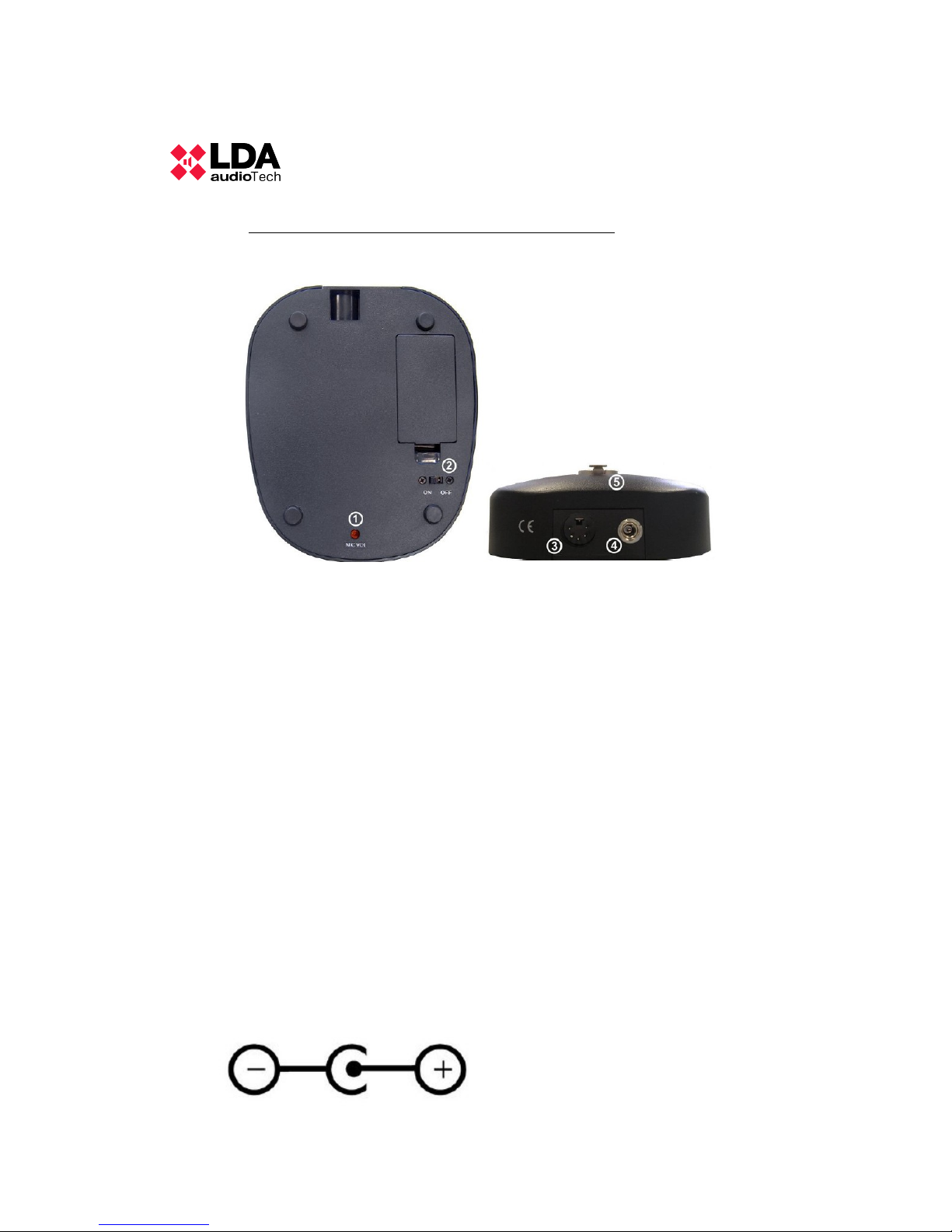
EXTERNAL CONFIGURATION:
1. Gain control: The potentiometer adjust the audio output gain.
2. PTT/LATCH selector
3. Audio+Control connector XLR 5 pole male.
• Pinout:
1. GND
2. Audio -
3. Audio +
4. Operation output 0/5 V
5. BUSY input, active at 0V.
4. Power supply: 5V DC
7 LDA Audio Tech – 31st Severo Ochoa St.- 29590 MÁLAGA, SPAIN.Tel: +34 952028805.
www.lda-audiotech.com
Page 8
LDA A-1 S02 USER'S MANUAL
5. XLR-3 female connector for gooseneck.
1. GND
2. Audio+Power supply to the capsule
3. LED
INTERNAL CONFIGURATION:
8 LDA Audio Tech – 31st Severo Ochoa St.- 29590 MÁLAGA, SPAIN.Tel: +34 952028805.
www.lda-audiotech.com
Page 9
LDA A-1 S02 USER'S MANUAL
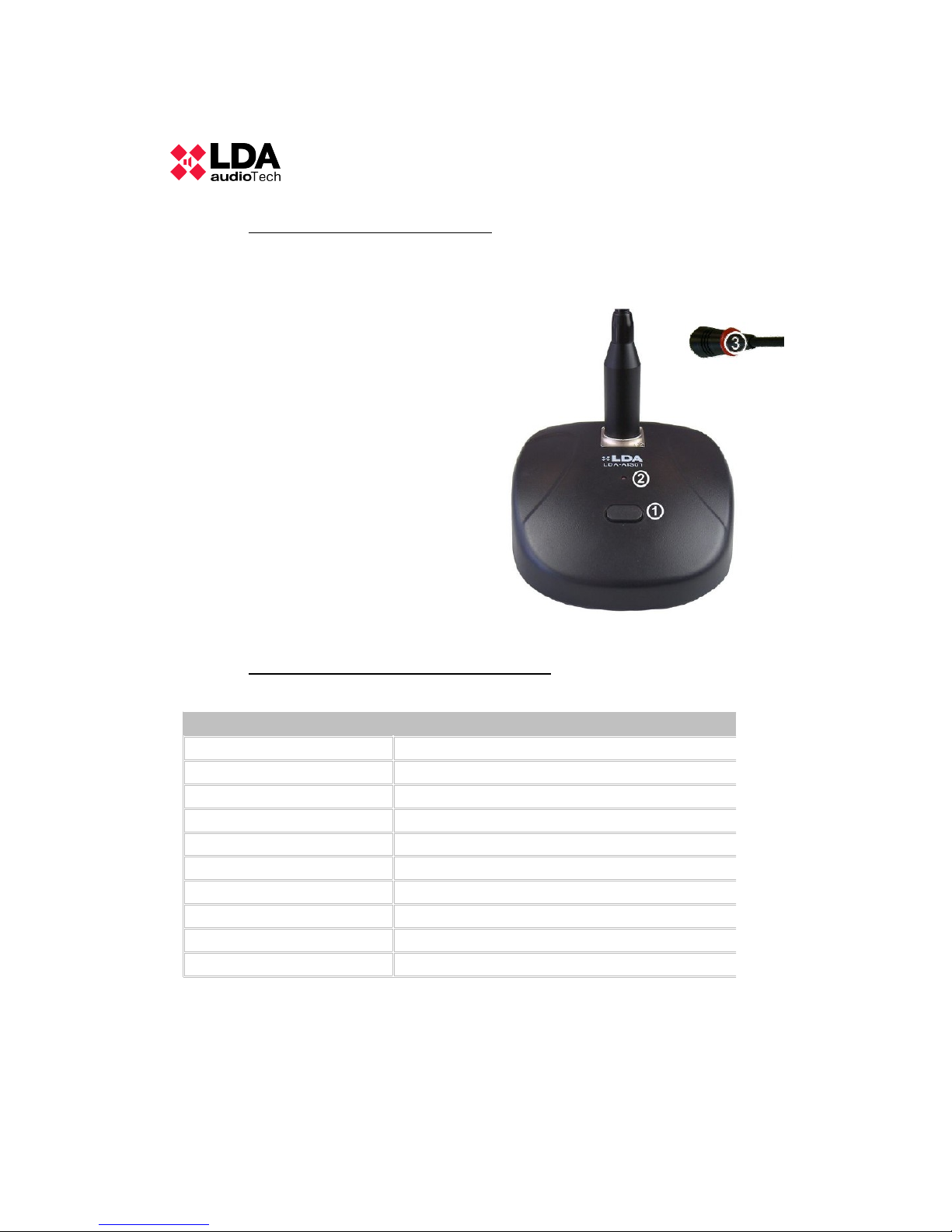
5 FRONTAL DESCRIPTION
In the frontal part of the microphone is where there are all the elements
necessary to its operation.
1. TALK button
2. Indicator of busy line,
permission to talk.
3. Light indicator to signal that
the capsule is active and
ready to page.
6 TECHNICAL SPECIFICATIONS :
9 LDA Audio Tech – 31st Severo Ochoa St.- 29590 MÁLAGA, SPAIN.Tel: +34 952028805.
www.lda-audiotech.com
Model CC-1000
5V DC, 200 mA
Frequency response 200-15000 Hz
Output signal 750mV 600 ohms balanced
Sensitivity -43 dB. At 1KHz
S/N ratio 100 dB (A weighted)
Direction Axial
Transducer type Dynamic with movile inductor
Gooseneck length 350mm
Dimensions 125x45x150mm (w x h x d)
Consumption 1 W
Page 10

LDA A-1 S02 USER'S MANUAL
10 LDA Audio Tech – 31st Severo Ochoa St.- 29590 MÁLAGA, SPAIN.Tel: +34 952028805.
www.lda-audiotech.com
Page 11

LDA A-1 S02 USER'S MANUAL
11 LDA Audio Tech – 31st Severo Ochoa St.- 29590 MÁLAGA, SPAIN.Tel: +34 952028805.
www.lda-audiotech.com
Page 12
LDA A-1 S02 USER'S MANUAL
12 LDA Audio Tech – 31st Severo Ochoa St.- 29590 MÁLAGA, SPAIN.Tel: +34 952028805.
www.lda-audiotech.com
 Loading...