

Page 1
Quick Start Guide LC-USB-422-485
Isolated USB to RS-422/485 Converter
Introduction
LC-USB-422-485 is a USB to one port RS-422/485 converter. Supporting 2-wire RS-485 or 4-wire RS-422/485 communications, it is perfect for applications requiring long range or multi-drop capabilities. It
uses a pluggable terminal block on the RS-422/485 side. Two LEDs indicate data transmit or receive. LC-USB-422-485 includes circuitry with 2000 Volts isolation protection against ground loops and voltage
spikes. It draws power from the USB port, so n o power supply is required. Download and in stall th e drivers and plug the c onvert er into an available USB p ort on your compute r or USB hub. The device
shows up as an additional COM port in the Windows Device Manager, and is compatible with Windows applications. No special software is required to control the RS-485 receiver or transmit line driver.
The driver i s automatically enabled during each by te trans mitte d in RS-485 mode. T he transmitter i s always enab led in RS-422 mode. T he receiver is tri- state d during each byte transmit ted in the echo- off
mode. The r eceive r is always ena bled in the echo- on mode. T here are 4.7k Ohm pull-up/pull- down resistors on the RDA and RDB lines . A terminat ion resistor may be added to R16 if needed.
Features
• 2000 V RMS optical isolation
• 15KV ESD surge protection
• Adds a COM port to your PC
• LEDs for transmit and receive lines
• USB 1.0, 1.1 and 2.0 compatible (12 Mbps)
Installation
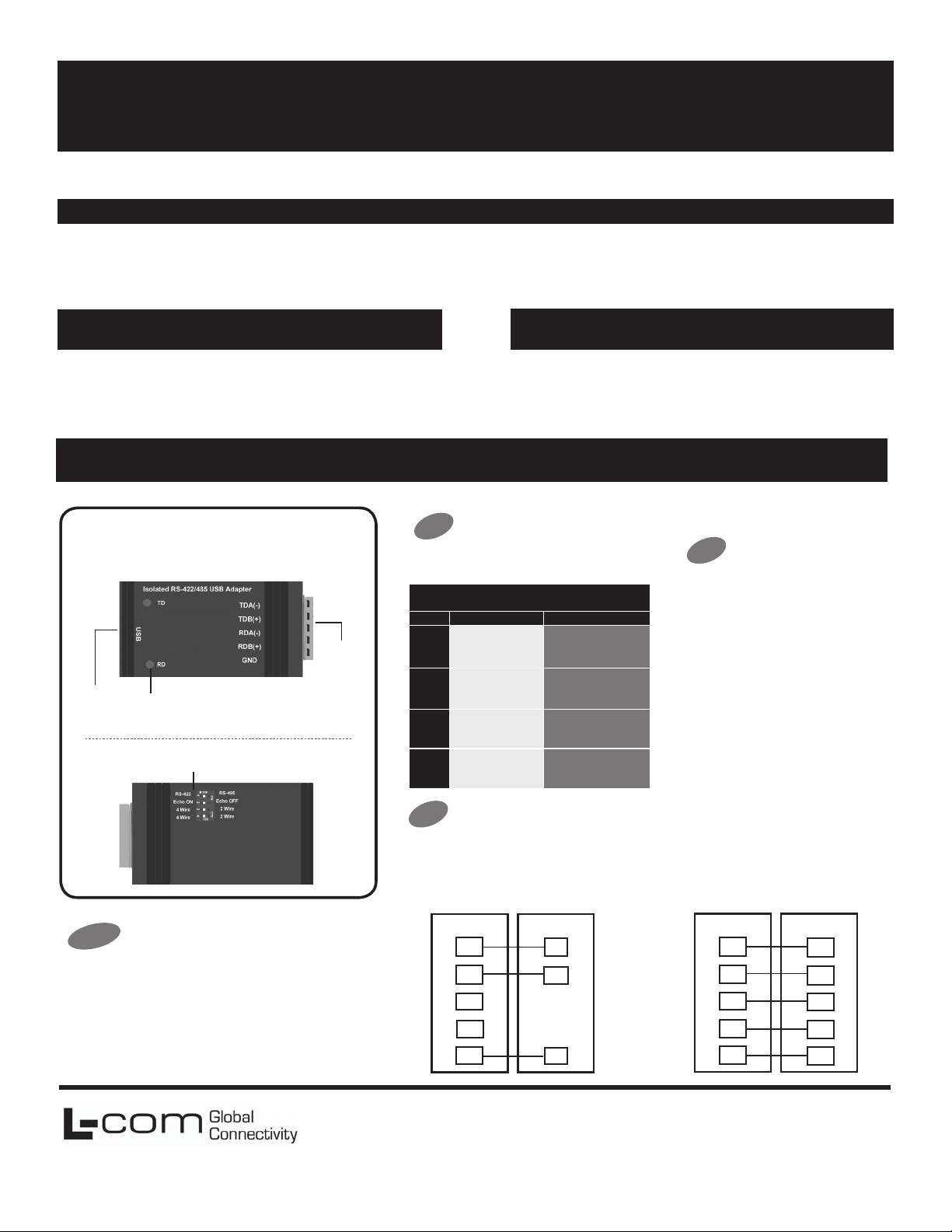
Product Overview
Front View
USB
Back View
LED
Indicators
DIP Switches
• Automatic conguration on
Windows 2000, XP, Vista.
7 (32/64 bit), 8 (32/64 bit),
Windows 10
• No power supply required
(powered from USB bus)
Serial
Connector
Package Contents
• LC-USB-422-485
• One Meter USB Cable
Set DIP Switches
2
OFF=left ON=right
DIP Switch Position
Switch OFF ON
TD always enabled
1
(TD 422)
RD always enabled
2
(ECHO ON)
4-wire mode (4-Wire) 2-wire mode (2-Wire)
3
4-wire mode (4-Wire) 2-wire mode (2-Wire)
4
TD only enabled during
data transmission (TD 485)
RD disabled during data
transmission (ECHO OFF)
Check LEDs
4
When ever ythin g is installed and connected the LEDs will
blink to let you know that data traf c is passing through the
converter
1
Your system will detec t the LC-USB-422-485 when you plug it in. If you are
attac hed to the Internet yo u can get th e drivers via Windows U pdate. This
may take a few minutes.
After connecting the device you can check Device Manager to learn which
Com port number was assigned (Control Panel/System/Hardware/Device
Manager/Ports LPT & COM).
You can re-assign COM numbers by clicking the Advanced Settings button
on the Port Settings screen.
Install Drivers
L-com Global Connectivity
50 High Street
West Mill 3rd oor, Suite #30
North Andover, MA 01845 USA
Wire the Converter
3
2-Wire RS-485 • All DIP Switches = ON
2 Wire Set-up
RS-485LC-USB-422- 485
TDA (-)
TDB (+)
RDA (-)
RDB (+)
GND
NEG
POS
GND
4-Wire RS-422/485
• RS-422 = All DIP Switches off
• RS-485 = DIP 1 ON, DIP 2, 3 and 4 OFF
4 Wire Set-up
RS-422 /485LC-USB-422- 485
TDA (-)
TDB (+)
RDA (-)
RDB (+)
GND
RDA (-)
RDB (+)
TDA (-)
TDB (+)
GND
Toll Free: 800-341-5266
PH: 978-682-6936
Fax: 978-689-9484
 Loading...