

Page 1

ARES II - QUICK START & ROAD MAP
ARES II - QUICK START & ROAD MAP
Performing ACCESS
to Logbook and Jump Info
-------- hold button down-------
Press and release
Press Release
Logbook and Jump
Info window
Performing ACCESS
to Settings
Perform ACCESS to
Logbook and Jump Info
Release
Settings
Window
Press
--- hold for 5 seconds---
Quick Buttons
Press and hold button for 5 seconds
ARES II is OFF ARE II is ON
Altitude Offset
Performing ACCESS
to Logbook and Jump Info
REV I #1.15
Turn ARES II ON
Daily Jump Counter
Backlight ON / OFF
Press and release
Perform ACCESS to
Logbook and Jump Info
Press Release
-------- hold button down-------
Performing ACCESS
to Settings
Press
--- hold for 5 seconds---
Release
Logbook and Jump
Info window
Settings
Window
Page 2
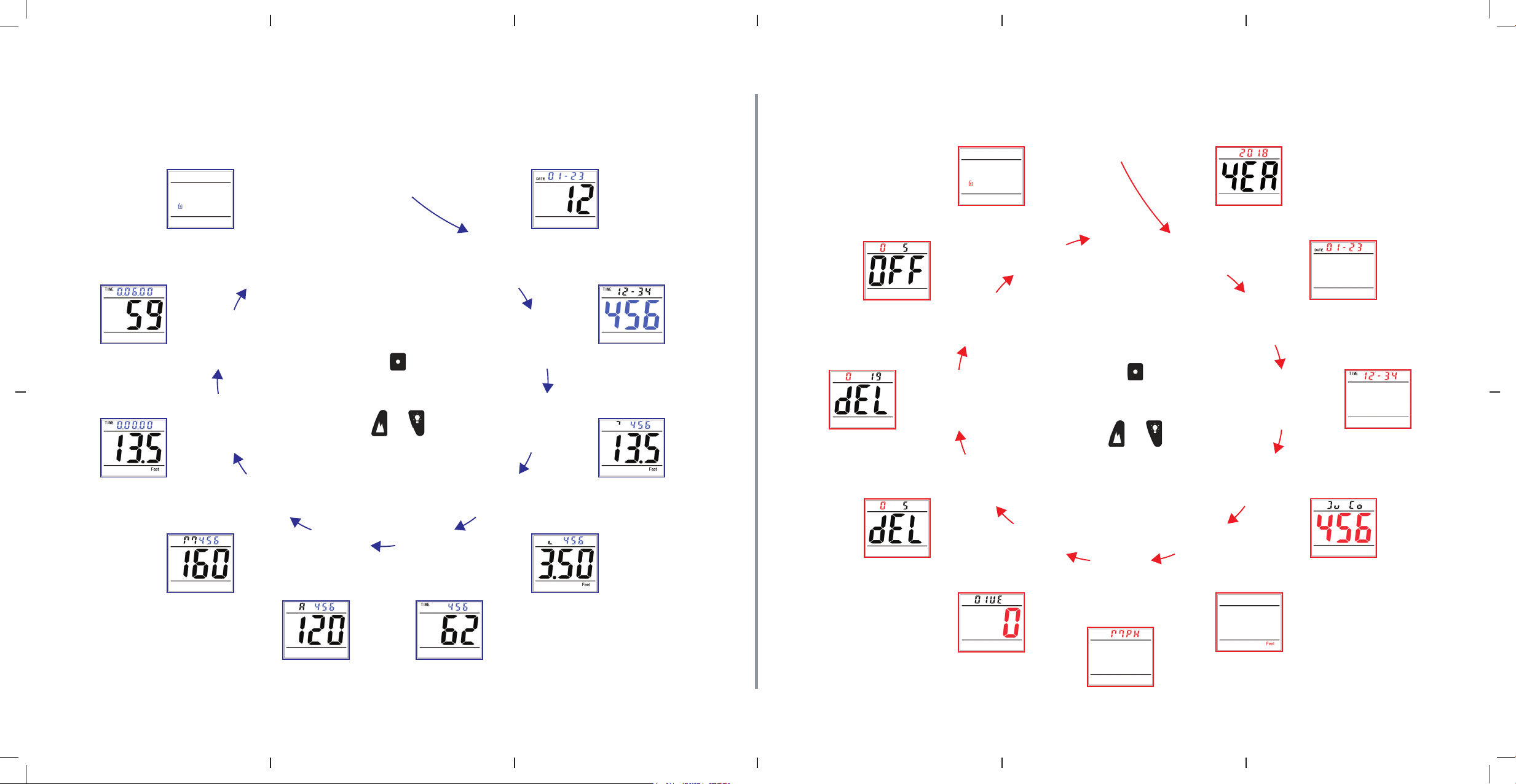
ARES II - QUICK START & ROAD MAP
Exit
ACCESS to
Settings
Year
Date
Time
Jump
Counter
Speed
Units
Dive
Type
Delete
Last
Jump
Delete
Logbook
Turn
OFF
Exit
Settings
Altitude
Units
SETTINGS
Press
to rotate selection or confirm
Press or
to change settings
Logbook
ACCESS
Daily Jump
Counter
ARES II - QUICK START & ROAD MAP
Exit
Settings
ACCESS to
Settings
Year
Speed Profile
Last Jump
Altitude Profile
Last Jump
Maximum
Freefall
Speed
LOGBOOK and
JUMP INFO
Press
to rotate selection
Press or
for information
Average
Freefall
Speed
Freefall
Time
Opening
Altitude
Total
Jumps
Exit
Altitude
Turn
OFF
Delete
Logbook
Delete
Last
Jump
Dive
Type
SETTINGS
Press
to rotate selection or confirm
Press or
to change settings
Altitude
Speed
Units
Units
Date
Time
Jump
Counter
 Loading...