

Page 1

User
Manual
ANALOGUE SMARTWATCH
Contents
Overview ...............................................................4
Use ..........................................................................5
Product contents/device parts ............................6
QR code ..................................................................7
General information .............................................9
Reading and storing the
instruction manual .................................................9
Explanation of symbols ....................................... 10
Safety ................................................................... 13
Proper use .............................................................. 13
Safety notes ........................................................... 14
Checking the Smartwatch
and product contents .........................................24
Start-up ...............................................................25
Charging the rechargeable
batter y of the Smartwatch ..................................25
The Crane Connect app .......................................29
Compatibility ........................................................ 30
Downloading and installing the app ................ 31
Connecting the Smartwatch with the
smartphone/tablet .............................................33
Setting the time ..................................................35
Messages .............................................................36
Confi guring notifi cations ................................... 36
Receiving notifi cations ....................................... 38
Locating the Smartwatch ................................... 42
Confi guring alarms .............................................. 43
Daily goals .......................................................... 44
Setting daily goals ............................................... 46
Viewing your daily progress ............................... 47
Sleep mode ........................................................... 51
Remote trigger ....................................................54
Locating a smartphone or tablet .......................55
Disconnecting the Smartwatch from
the smartphone/tablet ......................................56
Symbol table ...................................................... 58
Watertightness ................................................... 60
Cleaning ...............................................................62
Storage ................................................................63
Troubleshooting ................................................ 64
Declaration of conformity ..................................67
Technical data .................................................... 68
Disposal .............................................................. 69
Disposing of the packaging ............................... 69
Disposing of the Smartwatch ............................ 70
Warranty Card ........................................................ 73
Warranty conditions ............................................. 75
Warranty card ......................................................73
Warranty conditions ...........................................75
Customer service .................................................78
Dok./Rev.-Nr. 93154_2015 0805
Page 2

4
GB IRE
Overview
GB IRE
GB
5
6
GB IRE
IRE
A
1
B
2
C
3
4
5
Product contents⁄device parts
1
Smartwatch
2
Charger
3
Button for the status indicator
4
Button for triggering the c amera (for locating the smartphone/tablet)
5
Button for the goal indicator
Page 3

7
AFTER SALES SUPPORT
IRE
QR code
QR codes get you results fast and without the
hassle
Regardless whether you need product information, spare parts or accessories, are
looking for information about manufacturer warranties or service points or would like
to watch a convenient instructional video, our QR codes will help you to easily get the
information you are looking for.
What are QR codes?
QR codes (QR= Quick Response) are graphical codes that can be read with a
smartphone camera and, for example, contain a link to a website or contact data.
Your benefit: No need to type in bothersome web addresses or contact data!
GB
IRE
00800/52323000
GB
Page 4
AFTER SALES SUPPORT
8
GB
IRE
QR code
How it works:
To scan the QR code, all you need is a smartphone with a QR code reader installed on it
and an Internet connection.* Generally, you can find a free QR code reader in the App
store for your smartphone.
Try now
Just scan the QR code below with your smartphone to learn more about
the Hofer product you purchased.*
* When running the QR code reader, costs for the Internet connection may
be incurred depending on your rate.
GB
IRE
00800/52323000
Page 5

General information
9
AFTER SALES SUPPORT
IRE
General information
Reading and storing the instruction manual
This instruction manual accompanies this analogue Smartwatch. It
contains important information about operation and care. For improved
readability, the “analogue Smartwatch” will be referred to only as the
“Smartwatch” below.
Before using the Smartwatch, read the instruction manual carefully. This
particularly applies to the safety notes. Failure to comply with the instruction manual may result in damage to the Smartwatch.
GB
IRE
00800/52323000
GB
Page 6

General information
AFTER SALES SUPPORT
10
GB
IRE
The instruction manual is based on the standards and rules in force in the
European Union. When abroad, you must also observe country-specific
guidelines and laws.
Store the instruction manual for future use.
If you pass the Smartwatch on to third parties, please be absolutely sure to
include this instruction manual.
Explanation of symbols
The following symbols and signal words are used in this instruction manual, on the
Smartwatch or on the packaging.
GB
IRE
00800/52323000
Page 7

General information
11
AFTER SALES SUPPORT
IRE
WARNING!
CAUTION!
GB
This signal symbol/word designates a hazard with
moderate degree of risk which may lead to death
or severe injury if not avoided.
This signal symbol/word designates a hazard with
low risk that, if not avoided, may result in minor or
moderate injury.
NOTICE!
This signal word warns against potential damages
to property.
GB
IRE
00800/52323000
Page 8
General information
12
IRE
GB
This symbol provides you with useful supplementary information on assembly or operation.
Declaration of conformity (see chapter “Declaration of
conformity”): Products marked with this symbol meet all applicable Community regulations for the European Economic Area.
Google Play™ and Android™ are trademarks of Google Inc. Apple, the Apple logo, iPad
and iPhone are registered trademarks in the USA and other countries by Apple Inc. App
Store is a service mark of Apple Inc. The Bluetooth® word mark and logos are registered
trademarks of Bluetooth SIG, Inc. and are used under licence by Krippl Watches. Further
trademarks and trademark names are the property of their respective owners.
GB
IRE
00800/52323000
AFTER SALES SUPPORT
Page 9
Safety
13
AFTER SALES SUPPORT
IRE
Safety
Proper use
The Smartwatch is only designed for displaying the time, exchanging data with smartphones and tablets as well as measuring physical activities. It is designed for collecting
data which you can analyse with the Crane Connect app.
The Smartwatch is only intended for private use and is not suitable for commercial,
therapeutic or medical applications. It is not a children’s toy or a medical device.
Only use the Smartwatch as described in this instruction manual.
Any other use is deemed improper and may result in damage to property or even
personal injury.
GB
IRE
00800/52323000
GB
Page 10
Safety
AFTER SALES SUPPORT
14
GB
IRE
The manufacturer or vendor accepts no liability for damage caused by improper or
incorrect use.
Safety notes
WARNING!
Risk of accident/injury!
Do not use the Smartwatch when you are driving a vehicle. It is dangerous to take
your eyes off the road. It could cause an accident where you could injure yourself
or other persons.
GB
IRE
00800/52323000
Page 11

Safety
15
AFTER SALES SUPPORT
IRE
− Stop when you intend to use the Smartwatch or let a passenger make the
settings.
WARNING!
Danger of explosion!
Rechargeable batteries may explode if they are excessively heated up.
− Do not heat up the Smartwatch.
− Keep the Smartwatch away from hot surfaces.
− To avoid overheating the Smartwatch, do not expose it to direct sunlight or
other heat sources, e.g. in a vehicle.
− Do not throw the Smartwatch in an open fire.
GB
IRE
00800/52323000
GB
Page 12
Safety
AFTER SALES SUPPORT
16
GB
IRE
WARNING!
Danger for children and persons with impaired physical, sensory or
mental capacities (e.g. partially disabled persons, older persons with
reduced physical and mental capacities) or lack of experience and knowledge (e.g. older children).
− This Smartwatch may be used by persons with impaired physical, sensory
or mental capacities or those lacking experience and knowledge if they are
supervised or have been instructed in how to safely use the Smartwatch and
have understood the risks associated with operating it. Children may not play
GB
IRE
00800/52323000
Page 13

Safety
17
AFTER SALES SUPPORT
IRE
with the Smartwatch. Cleaning and user maintenance may not be performed
by children unless they are under supervision.
− Keep children away from the Smartwatch and the charger.
− Do not let children play with the packaging wrapper. They could swallow it
and suffocate.
GB
IRE
00800/52323000
GB
Page 14
Safety
AFTER SALES SUPPORT
18
GB
IRE
CAUTION!
Health hazard!
The Smartwatch is not a medical device; it is a workout aid for calculating the
distance covered and calories consumed.
− Always consult a physician before you start a regular workout routine.
GB
IRE
00800/52323000
Page 15

Safety
19
AFTER SALES SUPPORT
IRE
NOTICE!
Risk of damage!
Improper handling of the Smartwatch may result in damage.
− Do not use the Smartwatch if it exhibits visible damages.
− Do not open the housing of the Smartwatch and have qualified professionals perform repairs. For this, contact the manufacturer at the service
address specified on the warranty card if repairs are needed. Liability and
warranty claims are waived in the event of repairs performed by the user or
incorrect use.
− Keep sharp objects away from the Smartwatch.
GB
IRE
00800/52323000
GB
Page 16

Safety
AFTER SALES SUPPORT
20
IRE
GB
− Do not take the rechargeable battery out of the Smartwatch; it is firmly integrated in it and cannot be replaced.
− You can use the Smartwatch at ambient temperatures between -10°C and
+60°C.
− Do not place any heavy objects on the Smartwatch and do not apply pressure to the Smartwatch.
− Protect the Smartwatch against impacts and shocks.
− Do not submerge the Smartwatch and charger in water or other liquids.
− Avoid very strong magnetic fields (e.g. transformers). Otherwise, they could
cause inconsistencies in measuring time. Failure to observe these notes
may result in faults or damage to your Smartwatch.
GB
IRE
00800/52323000
Page 17
Safety
21
AFTER SALES SUPPORT
IRE
NOTICE!
Risk of damage!
− Keep in mind that salt and thermal water may cause metal parts to corrode.
− It is recommended that you do not wear the watch in a sauna as differences in temperature may cause condensation to form, which could damage
the clockwork.
GB
IRE
00800/52323000
GB
Page 18

Safety
AFTER SALES SUPPORT
22
GB
IRE
− Peak pressures may occur when swimming or when exposed to a water
jet (e.g. when showering or washing your hands). During such activities,
affected areas may be subjected to a significantly greater pressure than expected for the immersion depth. Only watches with a classification of 5 bar
or more can be considered watertight (showering allowed). Watches with a
classification of 10 bar can also be used when swimming.
− Watertightness is not a permanent property as the function of the built-in
sealing elements may diminish with daily use or be damaged by an impact
or fall.
− If a watch is subjected to substantial changes in temperature such as when
sun-bathing followed by a dip in cool water, liquid may condense in the
GB
IRE
00800/52323000
Page 19
Safety
23
AFTER SALES SUPPORT
IRE
− You can find more related information in the chapter “Watertightness”.
GB
housing. This is not necessarily a sign that it is not watertight; it is, however,
imperative that the moisture is immediately removed. In this case, contact
the service address indicated on the warranty card.
GB
IRE
00800/52323000
Page 20

Checking the Smartwatch and product contents
AFTER SALES SUPPORT
24
GB
IRE
Checking the Smartwatch and product contents
1. Take the Smartwatch 1 out of the packaging.
2. Remove the protective foil from the Smartwatch.
3. Check to make sure that the delivery is complete (see fig. A – B).
4. Check whether
the Smartwatch. Contact the service address provided on the warranty card.
the individual parts exhibit damages. If this is the case, do not use
GB
IRE
00800/52323000
Page 21

Start-up
25
AFTER SALES SUPPORT
IRE
Start-up
Charging the rechargeable battery of the Smartwatch
NOTICE!
Risk of damage!
Improperly connecting the charger may damage the Smartwatch.
− Only use the enclosed charging cable and a USB port on your PC or a USB
charger to charge the rechargeable battery of the Smartwatch.
GB
IRE
00800/52323000
GB
Page 22

Start-up
26
IRE
GB
The Smartwatch has an integrated lithium polymer rechargeable battery. Charge it fully
before using the Smartwatch for the first time (approx. 3 hours).
1. Make sure the charging contacts on the back of the Smartwatch are thoroughly dry
in order to avoid corrosion.
2. Place the Smartwatch on the charger
2
so its back is touching the charging
contacts and the charging cable is pointing to the left (see fig. B).
The charger attaches magnetically and easily locks into place.
Incorrectly connecting the charger may cause the Smartwatch or cable
to heat up. Make sure that the metal pins fit the charging contacts of the
Smartwatch perfectly when connecting the charger.
GB
IRE
00800/52323000
AFTER SALES SUPPORT
Page 23

Start-up
27
AFTER SALES SUPPORT
IRE
3. Connect the USB cable of the charger to the USB port of a PC or a USB charger.
4. As soon as the rechargeable battery is fully charged, pull the USB plug out of the
5. Take the charger off of the back of the Smartwatch.
GB
Make sure that the PC is switched on or the USB charger is connected to the mains.
The
symbol will light up during the charging process.
The rechargeable battery is fully charged as soon as the
symbol lights up.
USB charger or PC.
GB
IRE
00800/52323000
Page 24
Start-up
28
IRE
GB
If the battery is almost empty, the and symbols will flash three times
in a row. Until the Smartwatch is recharged, the and symbols will flash
once briefly every time any button is pressed. In this case, recharge the
Smartwatch as soon as possible.
GB
IRE
00800/52323000
AFTER SALES SUPPORT
Page 25
The Crane Connect app
29
AFTER SALES SUPPORT
IRE
The Crane Connect app
The Smartwatch can only be used in connection with the Crane Connect app, which
you can download free-of-charge from the App Store and the Google Play™ Store. With
the Crane Connect app, you can:
• configure the Smartwatch,
• configure communication between the Smartwatch and your smartphone or tablet
• and analyse the measurements for your physical activities.
GB
IRE
00800/52323000
GB
Page 26
The Crane Connect app
AFTER SALES SUPPORT
30
GB
IRE
Compatibility
The following smartphones and tablets with Bluetooth® Smart Ready (Bluetooth®4.0)
are compatible with the Smartwatch and the Crane Connect app:
• Apple® iPhone® 4s and more recent versions
• Apple® iPad® 3rd generation and more recent versions
• Apple® iPad mini™ 1st generation and more recent versions
• Apple® iPad Air™ and more recent versions
• Smartphones and tablets with Android™ 4.3 and more recent versions
You can find a detailed list of compatible devices on the following website:
https://www.cranesportsconnect.com/compatibility.
GB
IRE
00800/52323000
Page 27
The Crane Connect app
31
GB
Downloading and installing the app
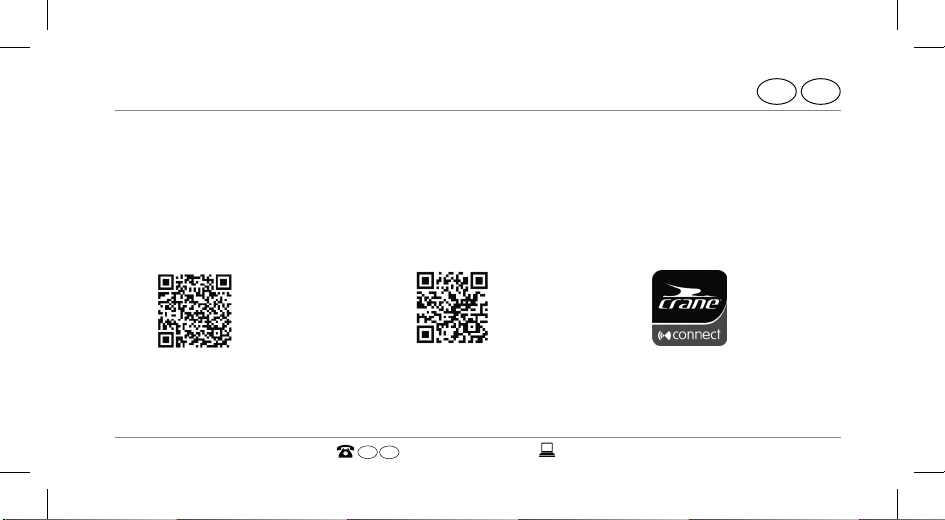
1. Download the free Crane Connect app from the App Store (if you are an iPhone® or
iPad® user), from the Google Play™ Store (if you are an Android™ user) at
www.cranesportsconnect.com/downloads or via the following QR code:
IRE
QR code for Android:
AFTER SALES SUPPORT
QR code for iOS:
GB
IRE
00800/52323000
Page 28
The Crane Connect app
32
IRE
GB
To avoid long download times and associated costs, it is recommended
that you use a Wi-Fi connection for downloads.
2. Install the Crane Connect app on your smartphone or tablet.
Follow the registration instructions step-by-step to do so.
You can also create your user account on the website
www.cranesportsconnect.com.
GB
IRE
00800/52323000
AFTER SALES SUPPORT
Page 29
Connecting the Smartwatch with the smartphone/tablet
33
AFTER SALES SUPPORT
IRE
Connecting the Smartwatch with the smartphone⁄
tablet
1. Make sure that Bluetooth® is activated on your smartphone or tablet.
2. On your smartphone or tablet, open the Crane Connect app and access
“All Settings”.
3. Push “Analogue Smartwatch”.
4. Push “Connect” in the “Pairing” field.
The app will now start to look for a compatible Smartwatch.
GB
IRE
00800/52323000
GB
Page 30
Connecting the Smartwatch with the smartphone/tablet
34
IRE
GB
The scan will take approx. 20 seconds. If the app doesn’t find a compatible
Smartwatch during this time, the scan will stop.
The app will automatically connect and synchronise with the Smartwatch.
After successful synchronisation, the app will display the ID of the paired Smart-
watch and the message “Success!” will appear.
If your smartphone or tablet has an active Internet connection, the Crane
Connect app will automatically upload all data measured to the website
www.cranesportsconnect.com for permanent storage.
GB
IRE
00800/52323000
AFTER SALES SUPPORT
Page 31
Setting the time
35
GB
Setting the time
As soon as the Smartwatch is connected with the Crane Connect app and the app is
opened, the time on the Smartwatch will be updated.
The time on the Smartwatch can only be set with the Crane Connect app.
GB
AFTER SALES SUPPORT
IRE
00800/52323000
IRE
Page 32
Messages
AFTER SALES SUPPORT
36
GB
IRE
Messages
In the Crane Connect app, you can select in which cases the Smartwatch will notify you
with status messages from your smartphone or tablet. You can select incoming calls,
missed calls, unread messages, unread e-mails, aborted connections between the
Smartwatch and paired smartphone/tablet as well as attempts of the smartphone/
tablet to find the Smartwatch.
Configuring notifications
1. On your smartphone or tablet, open the Crane Connect app and access the settings
for the Smartwatch.
2. Scroll down to “Notifications”.
GB
IRE
00800/52323000
Page 33
Messages
37
AFTER SALES SUPPORT
IRE
3. Activate the desired notification functions by pushing the corresponding slider to
the right ( ).
If you would like to configure how the Smartwatch is to alert you of a notification,
push the corresponding notification function.
You now have the choice of setting the flashing frequency (“Flash”) of the LED light
(“Off”, “Slow” or “Fast”), the dialling tone (“Off”, “Single” or “Multiple”) and the intensity of the vibration (“Off”, “Weak” or “Strong”).
You also have the option of defining the duration of each status signal. Use the “Duration” slider to select a time between 1 and 5 seconds.
GB
IRE
00800/52323000
GB
Page 34
Messages
38
IRE
GB
Receiving notifications
To be able to receive notifications, your smartphone or tablet must be
within Bluetooth® range.
If a call is received on your smartphone, the Smartwatch will notify you with the signals
configured in the app.
The
symbol will flash if you have enabled “Flash” in the settings.
If you missed a call on your smartphone, the Smartwatch will notify you with the signals
configured in the app.
The
symbol will flash if you have enabled “Flash” in the settings.
GB
IRE
00800/52323000
AFTER SALES SUPPORT
Page 35
Messages
39
AFTER SALES SUPPORT
IRE
If a message (e.g. SMS, Facebook, Twitter, WhatsApp) is received on your smartphone or
tablet, the Smartwatch will notify you with the signals configured in the app.
The
symbol will flash if you have enabled “Flash” in the settings.
If an e-mail is received on your smartphone or tablet, the Smartwatch will notify you
with the signals configured in the app.
The
symbol will flash if you have enabled “Flash” in the settings.
If the Bluetooth® connection between the Smartwatch and smartphone or tablet is
interrupted, the Smartwatch will notify you with the signals configured in the app.
The
symbol will flash if you have enabled “Flash” in the settings.
GB
IRE
00800/52323000
GB
Page 36
Messages
40
IRE
GB
An interrupted Bluetooth® connection is automatically restored as soon as
you are within range of your smartphone or tablet. In this case, the Smartwatch will synchronise the incoming notification with the smartphone
or tablet. At the beginning of the synchronisation, the Smartwatch will
vibrate once briefly.
− To access notifi cations received again, push the button for the status indicator
− To delete all notifi cations received on the Smartwatch, hold the button for the status indicator down for approx. 2 seconds.
GB
IRE
00800/52323000
AFTER SALES SUPPORT
3
.
Page 37
Messages
41
As soon as you have accessed the notification on your smartphone or
tablet, the corresponding notification on your Smartwatch will be deleted.
The prerequisite for this is that there is a Bluetooth® connection between
the Smartwatch and your smartphone or tablet.
To deactivate the receipt of notifications on the Smartwatch, hold the
button for the status indicator 3 down for approx. 5 seconds.
To reactivate the receipt of notifications on the Smartwatch, hold the
button for the status indicator down another approx. 5 seconds.
AFTER SALES SUPPORT
GB
IRE
00800/52323000
GB
IRE
Page 38
Messages
42
IRE
GB
Locating the Smartwatch
If you have misplaced the Smartwatch, you can use the Crane Connect app to find it.
1. On your smartphone or tablet, open the Crane Connect app and access the settings
for the Smartwatch.
2. Scroll down to “Find Watch”.
3. Push “Find”.
If the watch is within Bluetooth® range, it will emit an alarm.
In order for your Smartwatch to be found, Bluetooth® must be activated
on your smartphone or tablet.
GB
IRE
00800/52323000
AFTER SALES SUPPORT
Page 39
Messages
43
AFTER SALES SUPPORT
IRE
Configuring alarms
In the Crane Connect app, you can configure up to three alarms per day.
1. On your smartphone or tablet, open the Crane Connect app and access the settings
for the Smartwatch.
2. Under “Alarm”, select one of the three preset alarms by pushing the time.
3. Set the desired time at which the alarm is to be activated.
4. Push “Done” or “OK”.
5. Activate the desired alarm by pushing the corresponding slider to the right (
GB
IRE
00800/52323000
GB
).
Page 40
Daily goals
AFTER SALES SUPPORT
44
GB
IRE
You have now set the alarm.
− If necessary, you can set two further alarms in this way.
Daily goals
With the Smartwatch and the corresponding Crane Connect app, you are capable of
setting daily goals for your physical activities. Each day, the Smartwatch records your
steps using a sensor and with your personal data, it determines to what extent you
have already fulfilled the goals you set. This includes:
• Steps – The Smartwatch counts the steps you cover in a day.
• Distance – The Smartwatch determines the distance you cover in one day in km
GB
IRE
00800/52323000
Page 41
Daily goals
45
AFTER SALES SUPPORT
IRE
or miles. The calculation is based on the steps counted and your individual data,
which the Smartwatch obtains from the Crane Connect app.
• Calories – The Smartwatch calculates the calories you burn in a day. The calculation
is based on your level of activity and your individual data (height, age, gender,
weight, duration of sleep, etc.), which the Smartwatch obtains from the Crane
Connect app.
• Active time – The Smartwatch measures the amount of time you are active in hours
and minutes.
• Sleep – The Smartwatch measures your sleep in hours and minutes. The Smartwatch does not automatically recognise that you are sleeping – you have to activate sleep mode for this (see chapter “Activating sleep mode”).
GB
IRE
00800/52323000
GB
Page 42
Daily goals
46
IRE
GB
Your Smartwatch stores all data recorded for 7 days.
Setting daily goals
To set a daily activity goal that you can compare with the Smartwatch, proceed as
follows:
1. On your smartphone or tablet, open the Crane Connect app and access the settings
for the Smartwatch.
2. Scroll down to “Daily Goals”.
GB
IRE
00800/52323000
AFTER SALES SUPPORT
Page 43
Daily goals
47
AFTER SALES SUPPORT
IRE
3. With the corresponding input fields, specify how many steps you take a day, the
distance you cover every day and how many calories you would like to burn on a
daily basis.
Your entries will be stored.
Viewing your daily progress
With the Smartwatch, you can check your progress with respect to goals you set any
time you like.
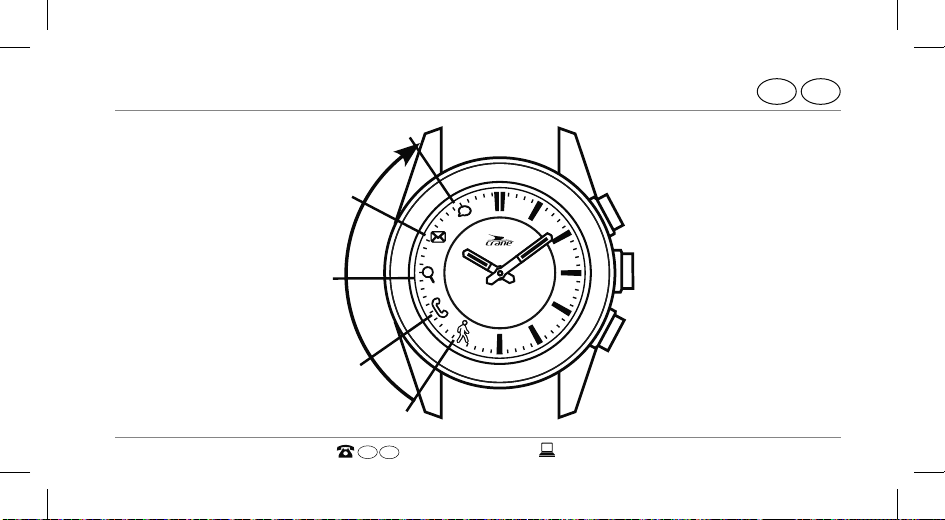
− Push the button for the goal indicator
lights that light up indicates the progress with respect to your goal achieved in per
cent.
GB
IRE
00800/52323000
5
on the Smartwatch. The number of LED
GB
Page 44
Daily goals
48
GB
IRE
In the Crane Connect app, you can configure which goal you would like to
access on the Smartwatch. For this, access the settings for the Smartwatch
in the app and select “Daily Goals”.
GB
IRE
00800/52323000
AFTER SALES SUPPORT
Page 45
Daily goals
49
AFTER SALES SUPPORT
IRE
from
from
ab 50 %
ab 75 %
from
ab 25 %
ab 0 %
from
100 %
GB
IRE
00800/52323000
GB
Page 46
Daily goals
50
IRE
GB
Use the Crane Connect app if you would like to view the exact data for your activities.
− On your smartphone or tablet, open the Crane Connect app and access “Analogue
Smartwatch” in the “Home” menu.
The screen will show you the exact number of steps covered per day, the distance
and calories burned. The per cent indicator shows the extent to which the respective figures meet the goals you set.
If you access the next screen, the “Active Time” indicates for how many hours and
minutes you have been physically active on the respective day.
On the Smartwatch, the steps, distance, calories and active minutes are
reset to zero around 12 midnight.
GB
IRE
00800/52323000
AFTER SALES SUPPORT
Page 47
Daily goals
51
AFTER SALES SUPPORT
IRE
Sleep mode
With the Smartwatch, you can measure your sleep in hours and minutes. If you wear
the Smartwatch in bed, it records how long you sleep and the quality of your sleep.
You can use the Crane Connect app to activate or deactivate “Auto sleep” and view an
analysis of your sleep cycles and the quality of your sleep.
Activating sleep mode
Wear the Smartwatch when you go to bed and set it to “Auto sleep” in the Crane
Connect app. To activate the sleep mode on the Smartwatch, proceed as follows:
− Hold the button for the goal indicator
To confirm the entry, the symbols from
GB
IRE
5
down for 2 seconds.
to will flash sequentially on the Smartwatch.
00800/52323000
GB
Page 48
Daily goals
52
IRE
GB
You can check at any time whether the Smartwatch is in sleep mode.
− Push the button once for the goal indicator.
If the Smartwatch is in sleep mode, the symbols from
to will flash sequentially.
If you would also like to receive notifications from your smartphone
or tablet when sleep mode is active, you can configure the respective
settings in the Crane Connect app.
GB
IRE
00800/52323000
AFTER SALES SUPPORT
Page 49
Daily goals
53
AFTER SALES SUPPORT
IRE
Deactivating sleep mode
When you wake up in the morning, you can deactivate sleep mode on the Smartwatch
as follows:
− Hold the button for the goal indicator down for 2 seconds.
To confirm the entry, all symbols from
Smartwatch.
GB
IRE
00800/52323000
GB
to will flash sequentially on the
Page 50
Remote trigger
AFTER SALES SUPPORT
54
GB
IRE
Remote trigger
You can also use the Smartwatch to trigger the camera on your smartphone or tablet.
1. Make sure that Bluetooth® is activated on your smartphone or tablet.
2. Open the Crane Connect app on your smartphone or tablet.
3. Push the button for triggering the camera
This will access the camera on your smartphone or tablet.
4. Push the button for triggering the camera again to trigger the camera.
Your smartphone or tablet camera will take a picture.
GB
IRE
00800/52323000
4
on the Smartwatch.
Page 51
Locating a smartphone or tablet
55
IRE
GB
If the camera on the Smartwatch does not respond, check the privacy
settings for your smartphone or tablet as to whether the camera has been
approved for the Crane Connect app.
Locating a smartphone or tablet
If you have misplaced your smartphone or tablet, you can find it with the Smartwatch.
The button for triggering the camera 4 can be configured for this purpose.
1. On your smartphone or tablet, open the Crane Connect app and access the settings
for the Smartwatch.
2. Assign the function “Find Smartphone” to the button for triggering the camera.
GB
AFTER SALES SUPPORT
IRE
00800/52323000
Page 52
Disconnecting the Smartwatch from the smartphone/tablet
AFTER SALES SUPPORT
56
GB
IRE
If your smartphone or tablet is now within Bluetooth® range and its Bluetooth®
settings are active, it will respond with a signal as soon as you push the button for triggering the camera.
Disconnecting the Smartwatch from the
smartphone⁄tablet
If you would like to disconnect the Smartwatch from your smartphone or tablet,
proceed as follows:
1. On your smartphone or tablet, open the Crane Connect app and access the settings
for the Smartwatch.
GB
IRE
00800/52323000
Page 53
Disconnecting the Smartwatch from the smartphone/tablet
57
AFTER SALES SUPPORT
IRE
2. Go to the “Pairing” field.
3. Push “Disconnect”.
To completely disconnect the Smartwatch from your smartphone or tablet, also check
for the Bluetooth® connections in your smartphone or tablet settings and remove the
Smartwatch there as well.
GB
IRE
00800/52323000
GB
Page 54
Symbol table
AFTER SALES SUPPORT
58
GB
IRE
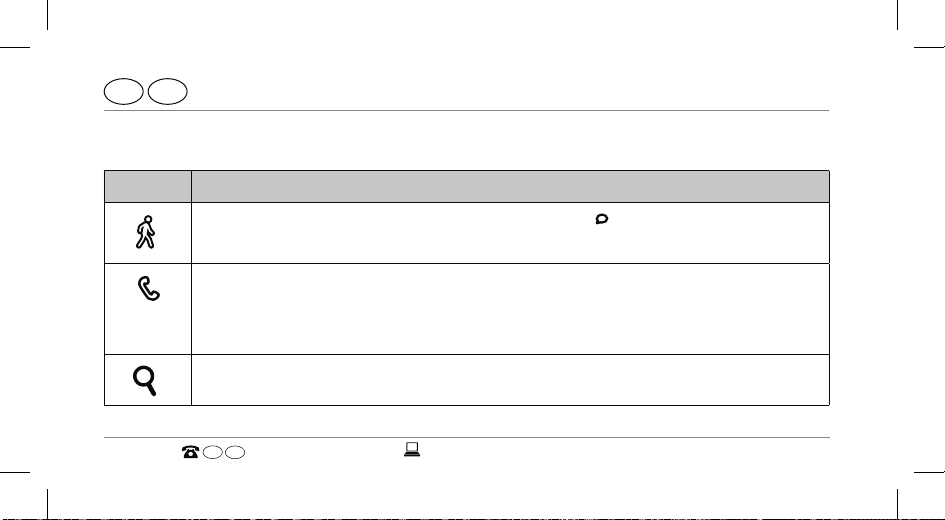
Symbol table
Symbol Meaning
• (if it flashes three times simultaneously with ): The rechargeable
• incoming call
• missed call
• (if the charger is connected) rechargeable battery is being charged
• interrupted Bluetooth® connection
GB
battery is almost empty
IRE
00800/52323000
Page 55
Symbol table
59
AFTER SALES SUPPORT
IRE
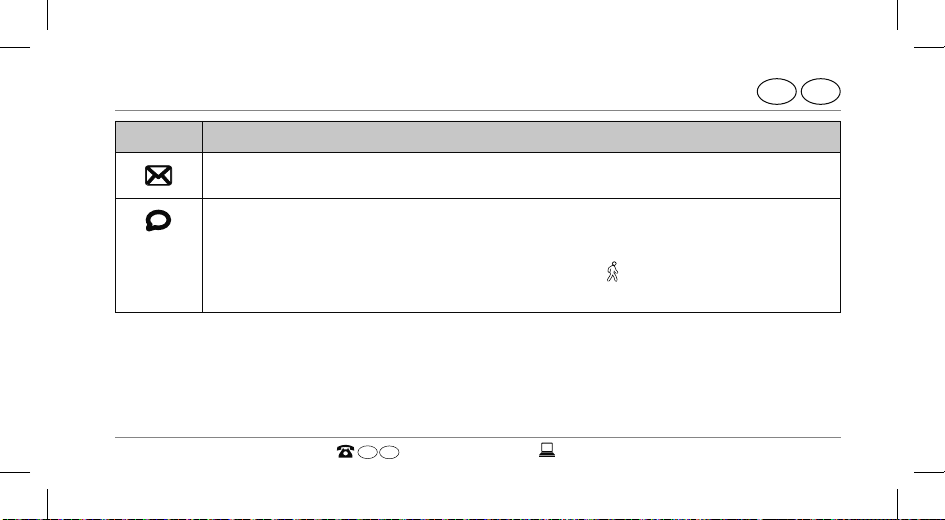
Symbol Meaning
• incoming e-mail
• incoming message (e.g. SMS, Facebook, Twitter, WhatsApp)
• (if the charger is connected) rechargeable battery has been charged
• (if it flashes three times simultaneously with
tery is almost empty
GB
IRE
00800/52323000
): The rechargeable bat-
GB
Page 56
Watertightness
AFTER SALES SUPPORT
60
GB
IRE
Watertightness
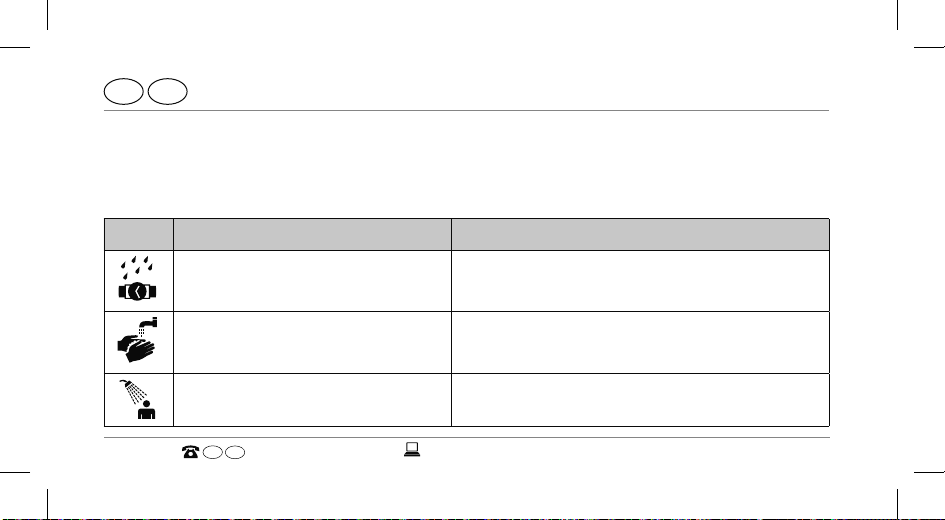
The Smartwatch has been tested for watertightness up to 5 bar. It is therefore suitable
for daily use, e.g. when showering or washing your hands.
Situation Watertight to 5 bar*
rain, splashes yes
washing your hands
yes
showering yes
GB
IRE
00800/52323000
Page 57
Watertightness
61
AFTER SALES SUPPORT
IRE
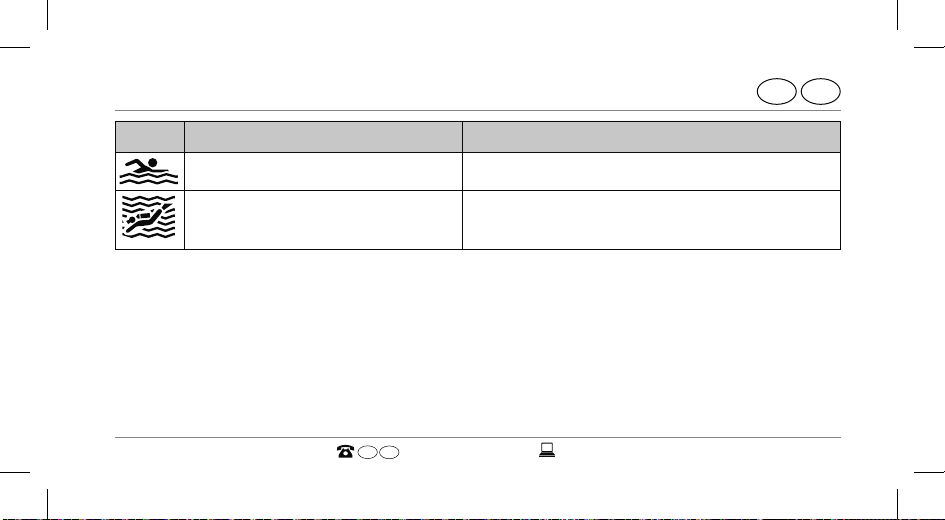
Situation Watertight to 5 bar*
bathing/swimming no
water sports no
*The specification of bar refers to the air overpressure used in connection with the
watertightness test for the Smartwatch in accordance with DIN8310.
GB
IRE
00800/52323000
GB
Page 58
Cleaning
AFTER SALES SUPPORT
62
GB
IRE
Cleaning
NOTICE!
Risk of damage!
Improperly cleaning may lead to damage.
− Do not use any aggressive cleaners, brushes with metal or nylon bristles, as
well as sharp or metallic cleaning utensils such as knives, hard scrapers and
the like. They could damage the surfaces.
− Do not submerge the Smartwatch and charger in water or other liquids.
− Only clean the Smartwatch and charger with a soft, damp and lint-free cloth.
GB
IRE
00800/52323000
Page 59
Storage
63
AFTER SALES SUPPORT
IRE
Storage
− Before storage, clean the Smartwatch and charger thoroughly as described in the
chapter “Cleaning”.
− Always store the Smartwatch and charger in a dry area.
− Protect the Smartwatch and charger against exposure to direct sunlight and other
sources of heat.
− Store the Smartwatch and charger at a storage temperature between -20°C and
+70°C.
− Store the Smartwatch and charger in an area that is not accessible for children.
GB
IRE
00800/52323000
GB
Page 60
Troubleshooting
AFTER SALES SUPPORT
64
GB
IRE
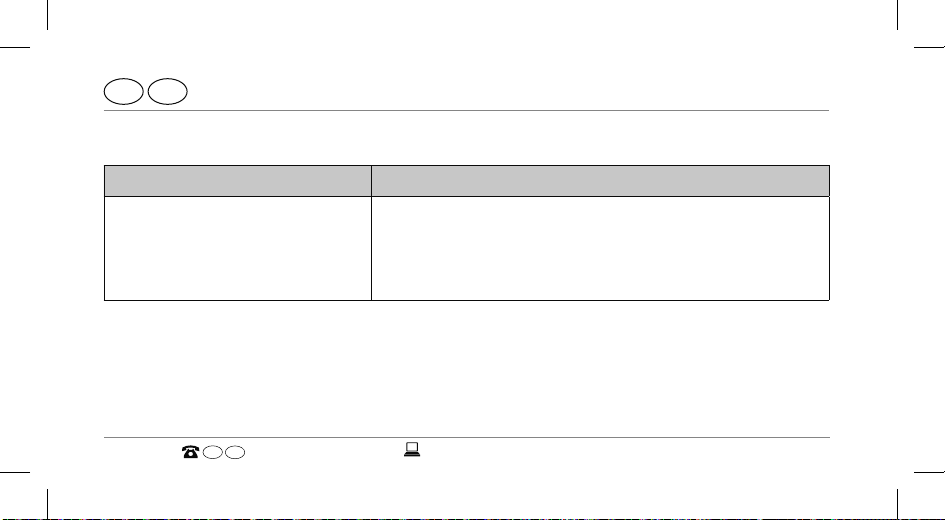
Troubleshooting
Fault Solution
The Smartwatch does not
respond to entries made on
the smartphone or tablet.
GB
IRE
00800/52323000
Your smartphone or tablet does not support Bluetooth® Smart Ready. Exchange your smartphone or
tablet with a model that supports Bluetooth® Smart
Ready.
Page 61
Troubleshooting
65
AFTER SALES SUPPORT
IRE
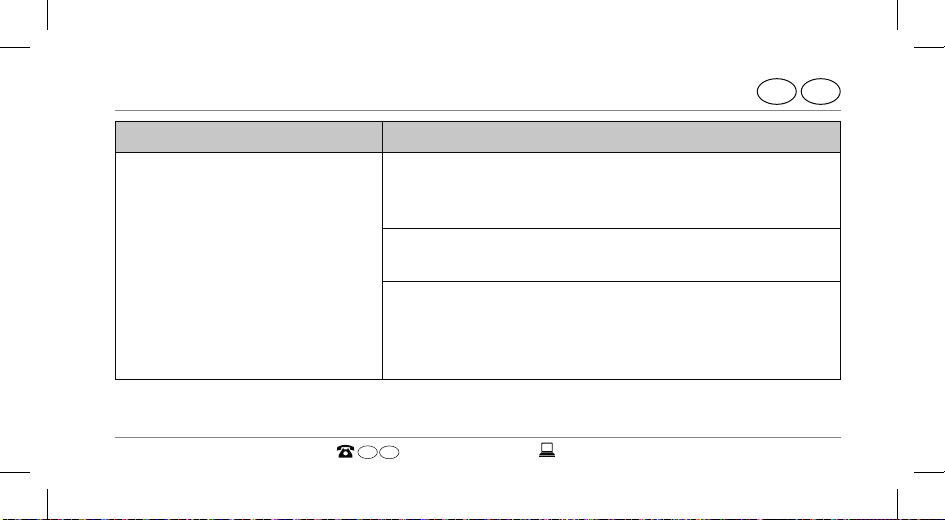
Fault Solution
No connection is established
between the Smartwatch and
your smartphone or tablet.
GB
− Do not connect the Smartwatch and Crane Connect app with the Bluetooth® settings for your
smartphone or tablet.
− Activate Bluetooth® before you open the Crane
Connect app.
− Switch Bluetooth® off on your smartphone or
tablet and then back on.
− Then restart the connection process with your
Smartwatch.
IRE
00800/52323000
GB
Page 62
Troubleshooting
66
IRE
GB
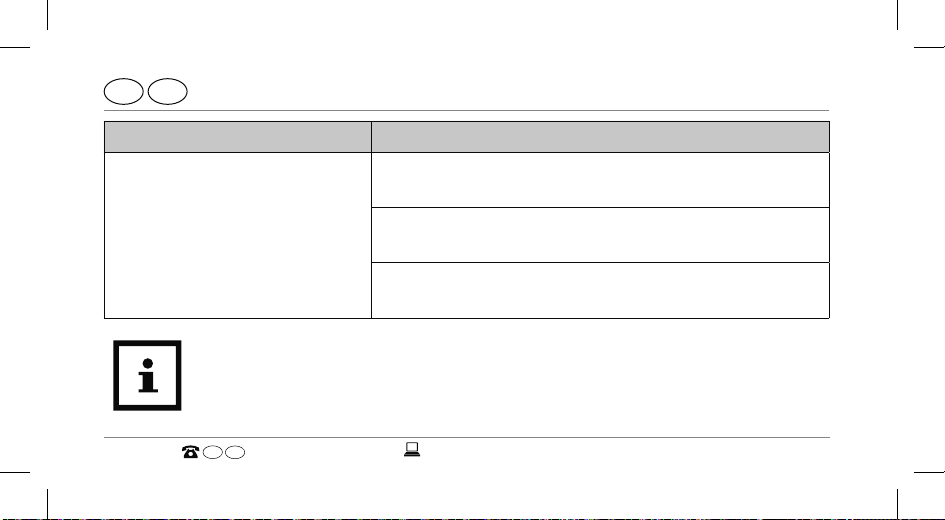
Fault Solution
No connection is established
between the Smartwatch and
your smartphone or tablet.
Before you complain about the Smartwatch, please check whether the
rechargeable battery is empty and recharge it if necessary.
GB
IRE
00800/52323000
− Switch off your smartphone or tablet and then
back on.
− Enable the visibility of your smartphone or tablet
in the Bluetooth® menu.
− Reinstall the Crane Connect app on your smartphone or tablet.
AFTER SALES SUPPORT
Page 63
IRE
Declaration of conformity
GB
Declaration of conformity
Krippl-Watches hereby declares that the analogue Smartwatch (model no. AE5-CDSM-
Krippl-Watches hereby declares that the analogue Smartwatch
Latitude hereby declares that the analogue Smartwatch
3A/3B/6) complies with the fundamental requirements and other applicable provisions
complies with the fundamental requirements and other applicable provisions
of the R&TTE 1999/5/CE and RoHS 2011/65/EU directives.
You can access the complete text for the declaration of conformity on our website:
www.produktservice.info. Go to product information and enter the EAN code 20027230.
GB
AFTER SALES SUPPORT
IRE
00800/52323000
67
Page 64
A2I385
GB
Technical data
Technical data
Model number: AE5-CDSM-3A/3B/6
Article number: 92747
EAN code: 20027230
Operating temperature: -10°C to +60 °C
GB
68
IRE
00800/52323000
Page 65
Disposal
Disposing of the packaging
Dispose of the packaging separated into single type materials. Dispose of
cardboard and carton as waste paper and foils via the recyclable material
collection service.
GB
AFTER SALES SUPPORT
IRE
00800/52323000
Disposal
GB
IRE
69
Page 66
IRE
GB
Disposal
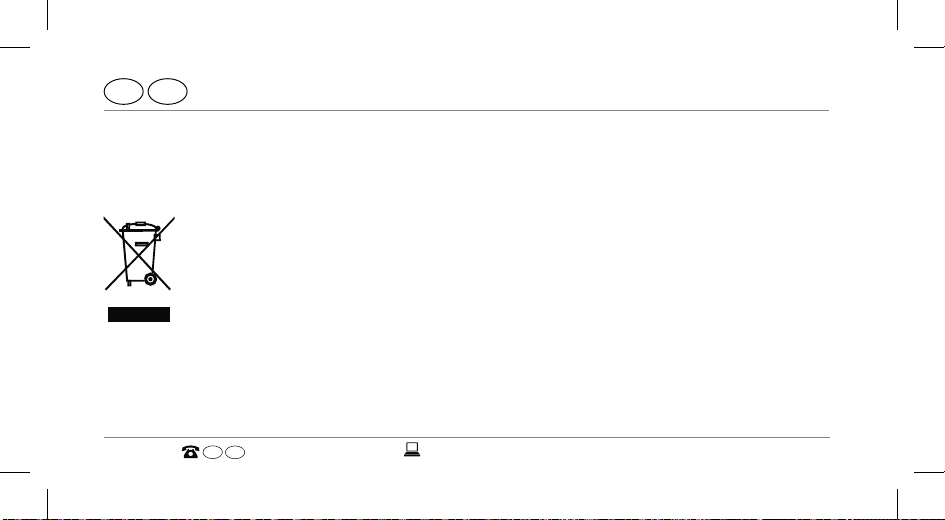
Disposing of the Smartwatch
(Applicable in the European Union and other European states with systems for the separate collection of reusable waste materials)
Old devices must not be disposed of with household waste!
If at some point it is no longer possible to use the Smartwatch, each consumer
is required by law to dispose of old devices separately from their
household waste, e.g. at a collection point in their community/borough. This
ensures that old devices are recycled in a professional manner and also rules
out negative consequences for the environment. For this reason, electrical equipment
is marked with the symbol shown here.
GB
70
IRE
00800/52323000
AFTER SALES SUPPORT
Page 67
IRE
Disposal
GB
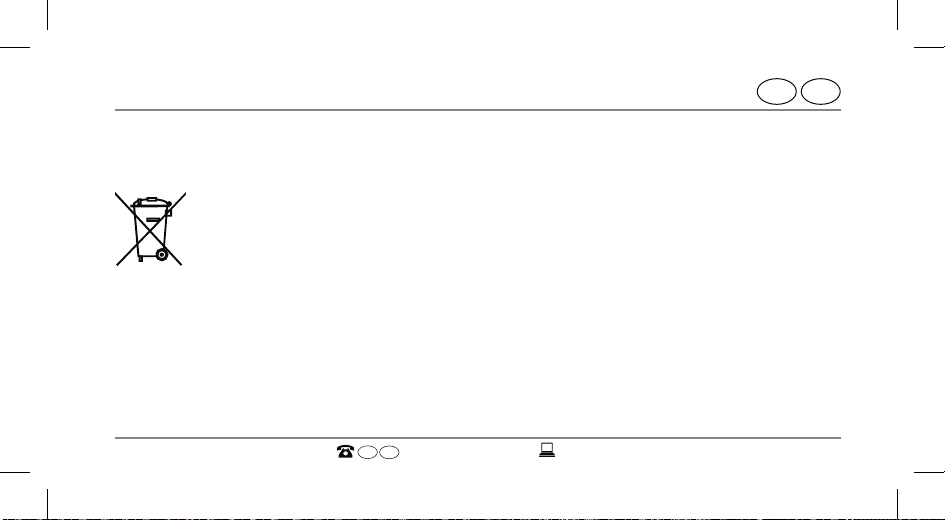
Batteries and rechargeable batteries may not be disposed of with household
waste!
As the end user you are required by law to bring all batteries and rechargea-
ble batteries, regardless whether they contain harmful substances* or not, to
a collection point run by the communal authority or borough or to a retailer,
so that they can be disposed of in an environmentally friendly manner. Only
turn in the batteries at your collection point in a discharged state.
* labelled with: Cd = cadmium, Hg = mercury, Pb = lead
GB
AFTER SALES SUPPORT
IRE
00800/52323000
71
Page 68
WARRANTY CARD
ANALOGUE SMARTWATCH
Your details:
Name:
Address:
E-mail:
Date of purchase *:
* We recommend you keep the receipt with this warranty card.
Location of purchase:
GB
IRE
Page 69
IRE
GB
Description of malfunction:
Signature:
Return your completed warranty card together
with the faulty product to:
Krippl-Watches
Free Postcode:
RLTU-ZYZE-SKLG
180 Piccadilly
W1J 9HF London
UNITED KINGDOM
AFTER SALES SUPPORT
GB IRE
00800/52323000
service@cranesportsconnect.com
Model: AE5-CDSM-3A/3B/6 Product Code: 92747
Please note: The helpline Number
is a Freephone Number however
please allow time (up to 10 seconds)
for the international connection to
take place.
11/2015
YEARS
WARRANTY
Page 70
Warranty conditions
Dear Customer,
Warranty period: 3 years from date of purchase.
6 months for wear parts and consumables under normal and proper
conditions of use (e.g. rechargeable batteries).
Costs: Free repair/exchange or refund.
No transport costs.
Hotline: Free hotline. Calls from mobile networks may apply.
GB
IRE
Page 71
GB
IRE
ADVICE:
Please contact our service hotline by phone, e-mail or fax before sending in the
device. This allows us to provide support in the event of possible
operator errors.
In order to make a claim under the warranty, please send us:
the faulty it
•
em together with the original purchase receipt and the completed
warranty card.
• the faulty product with all components included in the packaging.
The warranty does not cover damage caused by:
Page 72
IRE
GB
• Accident or unanticipated events (e.g. lightning, water, fire).
• Improper use or transport.
• Disregard of the safety and maintenance instructions.
• Other improper treatment or modification.
After the expiry of the warranty period, you still have the possibility to have your product
repaired at your own expense. If the repair or the estimate of costs is not free of charge
you will be informed accordingly in advance.
This warranty does not affect your statutory rights. In the event that a product is received for repair, neither the service company nor the seller will assume any liability for
data or settings possibly stored on the product by the customer.
Page 73
GB
IRE
Page 74
FCC Statement
FCC Caution:
Any Changes or modifications not expressly approved by the party responsible for compliance could void the user’s
authority to operate the equipment.
This device complies with part 15 of the FCC Rules. Operation is subject to the following two conditions:
(1) This device may not cause harmful interference, and
(2) this device must accept any interference received, including interference that may cause undesired operation.
IMPORTANT NOTE:
FCC Radiation Exposure Statement:
This equipment complies with FCC radiation exposure limits set forth for an uncontrolled environment.
Note: This equipment has been tested and found to comply with the limits for a Class B digital device, pursuant to
part 15 of the FCC Rules. These limits are designed to provide reasonable protection against harmful interference in
a residential installation. This equipment generates, uses and can radiate radio frequency energy and, if not installed
and used in accordance with the instructions, may cause harmful interference to radio communications. However,
there is no guarantee that interference will not occur in a particular installation. If this equipment does cause harmful
interference to radio or television reception, which can be determined by turning the equipment off and on, the user is
encouraged to try to correct the interference by one or more of the following measures:
— Reorient or relocate the receiving antenna.
— Increase the separation between the equipment and receiver.
— Connect the equipment into an outlet on a circuit different from that to which the receiver is connected.
— Consult the dealer or an experienced radio/TV technician for help.
 Loading...