

Page 1

Your Personal Training System
2.4GHz PC Link USB
Owner's Manual
Front cover Back cover
Page 2
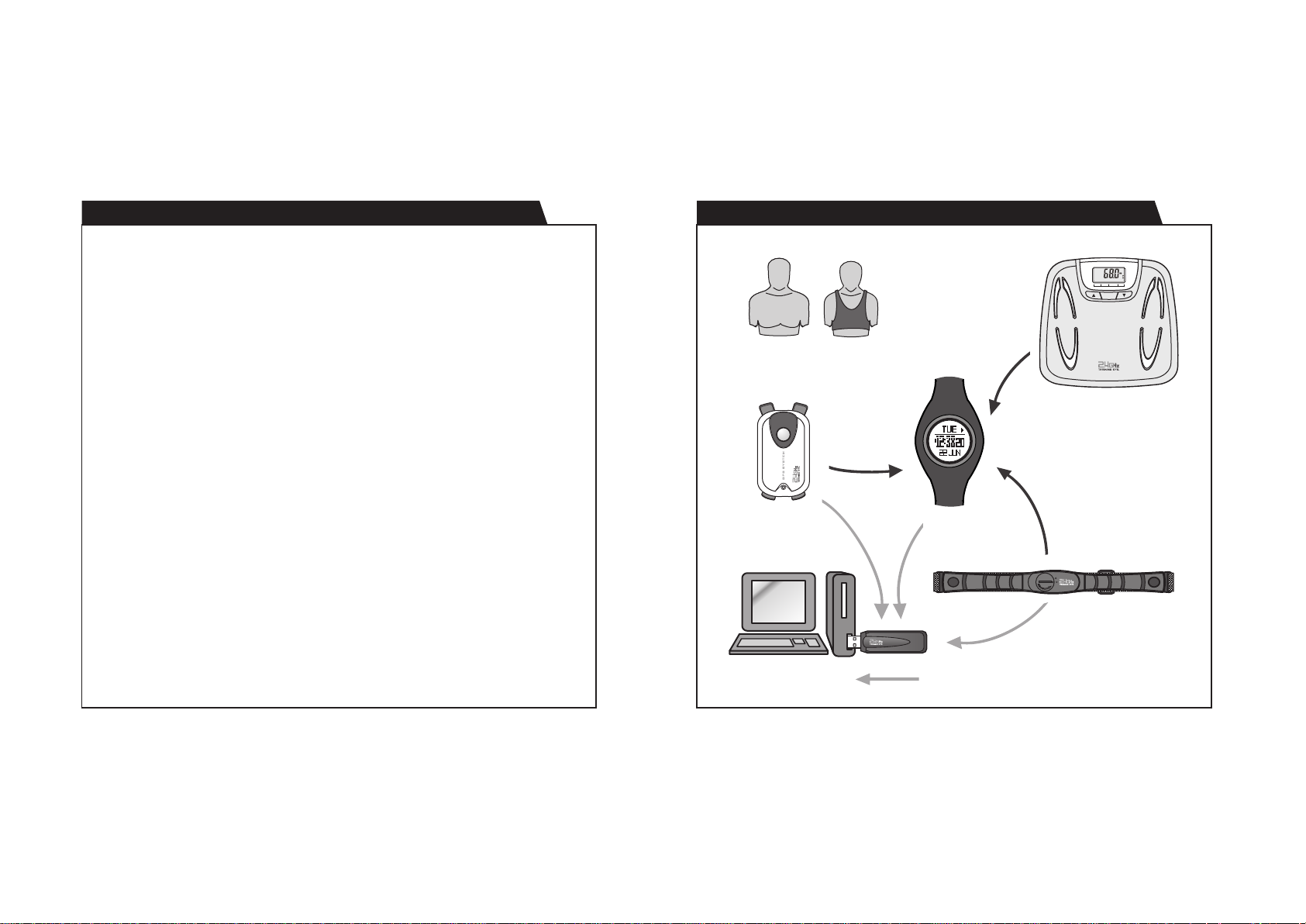
A. Introduction: 2.4 GHz Fitness-Sport Training System A. Introduction: System Connection
A01 A02
What is 2.4 GHz Fitness-Sport Training System ?
This system is designed for Fitness and Sport Training program for
athletes. The system consists of a watch controller, a chest strap heart rate
receiver , a lace-up satellite receiver (GPS Pod), a body fat scale and a PC
link kit ( ). And this system is capable to partner with
other 2.4G
By exploiting the advanced 2.4 GHz Radio Frequency Wireless
Transmission Technology, each component of this system can send/receive
data to/from the controller and download data to PC without any hassle.
Thus, the progress of the training program and the body status of the
athlete can be monitored and managed easily through the system.
2.4GHz PC Link USB
sports devices.
What are the Benefits to the User ?
Keep Track on Exercise and Body Status - This System collects the data
from exercise like heart rate (from Chest Strap), exercise time, and
run/walk steps, etc. and also information of body from Body Fat Scale like
weight, body water, and muscle mass etc. These data and information
together can give a clearer picture on the result of exercise as well as your
body status which help you to decide your own exercise plan.
For Both Indoor and Outdoor Exercise - With the GPS tracking ability of
the System, this System is ready to be used in outdoors activities like
hiking, biking, etc. On the other hand, functions for indoor exercise like
chronograph, timer, heart rate monitoring are also available in this
system.
Reliable Wireless Communication - 2.4GHz high Frequency of wireless
connection can ensure that the communication will not be interrupted
easily by other devices. Also, with the coded pairing technology, even with
the same system using around, there will not have any cross-talk between
different user.
Analyze your work with PC - With the use of the , any
information
Scale can be
o
he future
f
r
t
and data from the Watch, Chest Strap, GPS Pod or Body Fat
transferred to PC wirelessly. Also, these data can be store
analysis or track back with the bundled program.
2.4GHz PC Link USB
BF%
BW%
MM/HEIGHT
NORMAL
BM/AGE
ATHLETE
WEIGHT
LOW OPTIMAL MODE RATE HIGH
Mode
Body Fat Scale
GPS Pod
Watch
Chest Strap
d
Personal Computer
2.4GHz PC Link USB
Page 3

A. Introduction: FCC Compliance Statment (For US market)
A03 A04
A. Introduction: WARNING !
This device complies with Part 15 of the FCC Rules. Operation is
subject to the following two conditions: (1) This device may not cause
harmful interference, and (2) This device must accept any interference
received, including interference that may cause undesired operation.
WARNING: Changes or modifications to this unit not expressly
approved by the party responsible for compliance could void the
user’s authority to operate the equipment.
NOTE: This equipment has been tested and found to comply with the
limits for a class B digital device, pursuant to Part 15 of the FCC
Rules. These limits are designed to provide reasonable protection
ag ainst harmfu l in ter ference in a residen tial installation. This
equipment generates, uses and can radiate radio frequency energy
and, if not installed and used in accordance with the instructions, may
cause harmful interference to radio communications.
However, there is no guarantee that interference will not occur in a
partic ular install atio n. If this equipme nt do es ca use h armful
interference to radio or television reception, which can be determined
by turning the equipment off and on, the user is encouraged to try to
correct the interference by one or more of the following measures:
! Reorient or relocate the receiving antenna.
! Increase the separation between the equipment and receiver.
! Consult the dealer or an experienced radio/TV technician for help.
! Read this Owner's Manual and and make sure
! system
! This system is an assistant device for training only, and it is NOT a
!
!
you fully
that
system before
The is not intended for professional usage; it is intended for
home or consumer use only.
substitute for getting the health condition from a doctor and trainer.
DO NOT any unit of the system
may damage the unit and it might even cause injury.
DO NOT overload the scale, otherwise permanent damage to the
scale will occur.
disassemble as incorrect handling
understand the limitations and operations of this
using it.
2.4GHz PC Link USB
Page 4

A. Introduction: Precautions and Tips
In order to utilize these features of your product set, it is advisable to
read the following notes:
! Avoid exposing your product set to extreme conditions for an
unreasonable time.
! Avoid rough usages or severe impacts to your product set.
! DO NOT render service to your product set unless a certified service
agency because your product set contains precise electronic sensors
and components.
! Clean your product set with a soft moisten cloth occasionally that
working for a longer life cycle of your product set.
! Keep your product set away from magnets or the appliances which
contains magnetic substances such as mobile phones, speakers and
motors.
! Store your product set in a dry place when it is not in use.
! Put the connecting device in the place within 6 meters from the
PC Link USB
from
the
, otherwise the MAY NOT receive the data
device.
2.4GHz PC Link USB
A05
2.4GHz
Page 5
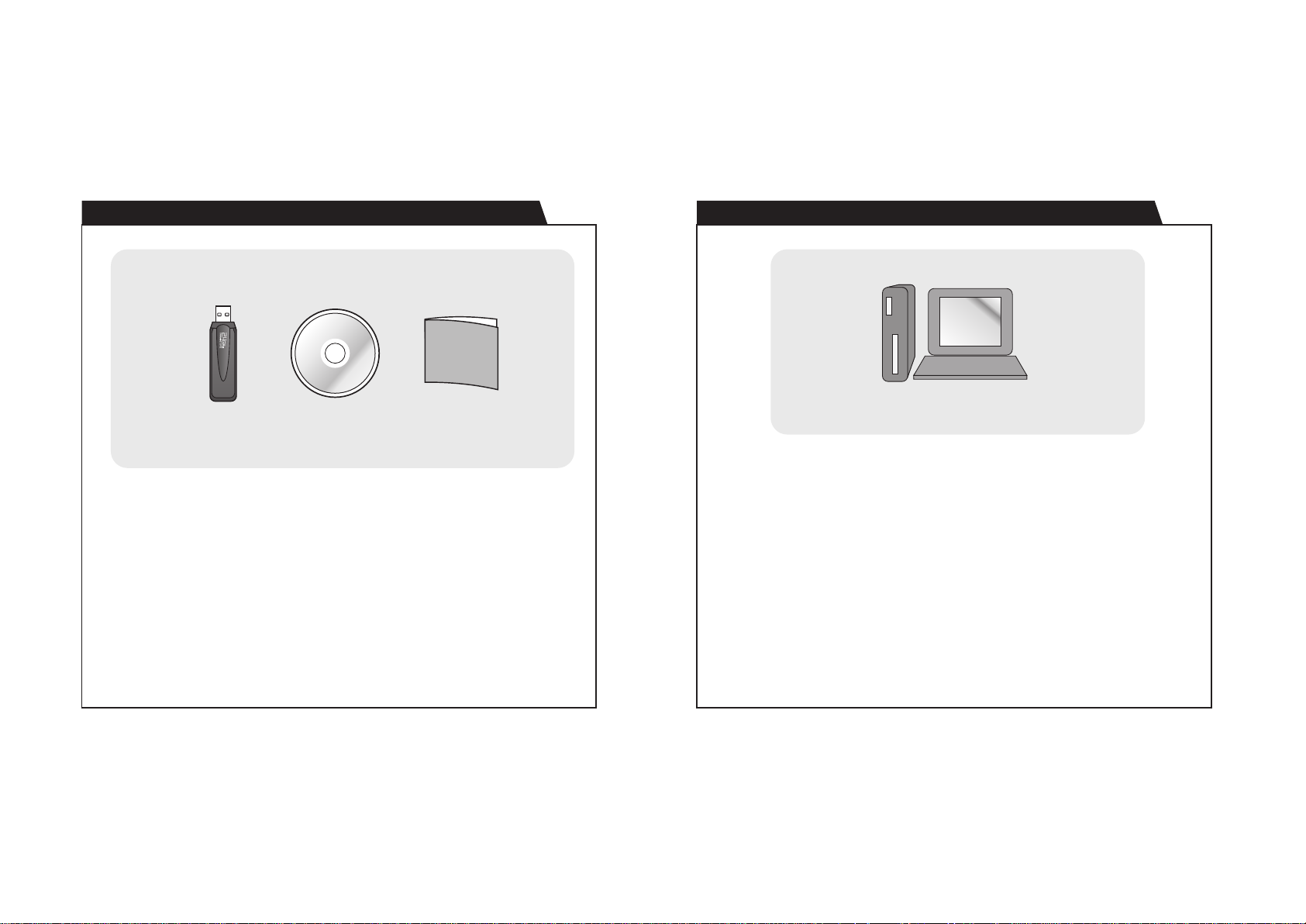
B. Getting Start: Package Contents
Quick
Started
Guide
B01 B02
B. Getting Start: System Requirements for PC
2.4GHz PC Link USB
Note: The appearance of these products may be different from the drawing,
and varied from market to market.
CD ROM
Quick Started Guide
Personal Computer
To download the data to PC, it has to install the bundled PC interface
software into the target PC.
The system requirements for the PC as follows:
! Pentium II 300MHz or higher
! 128MB Main memory or higher
! 20MB hard disk space or more
! Window ME/2000/XP/Vista operation system
! CD-ROM drive
! USB port
Page 6
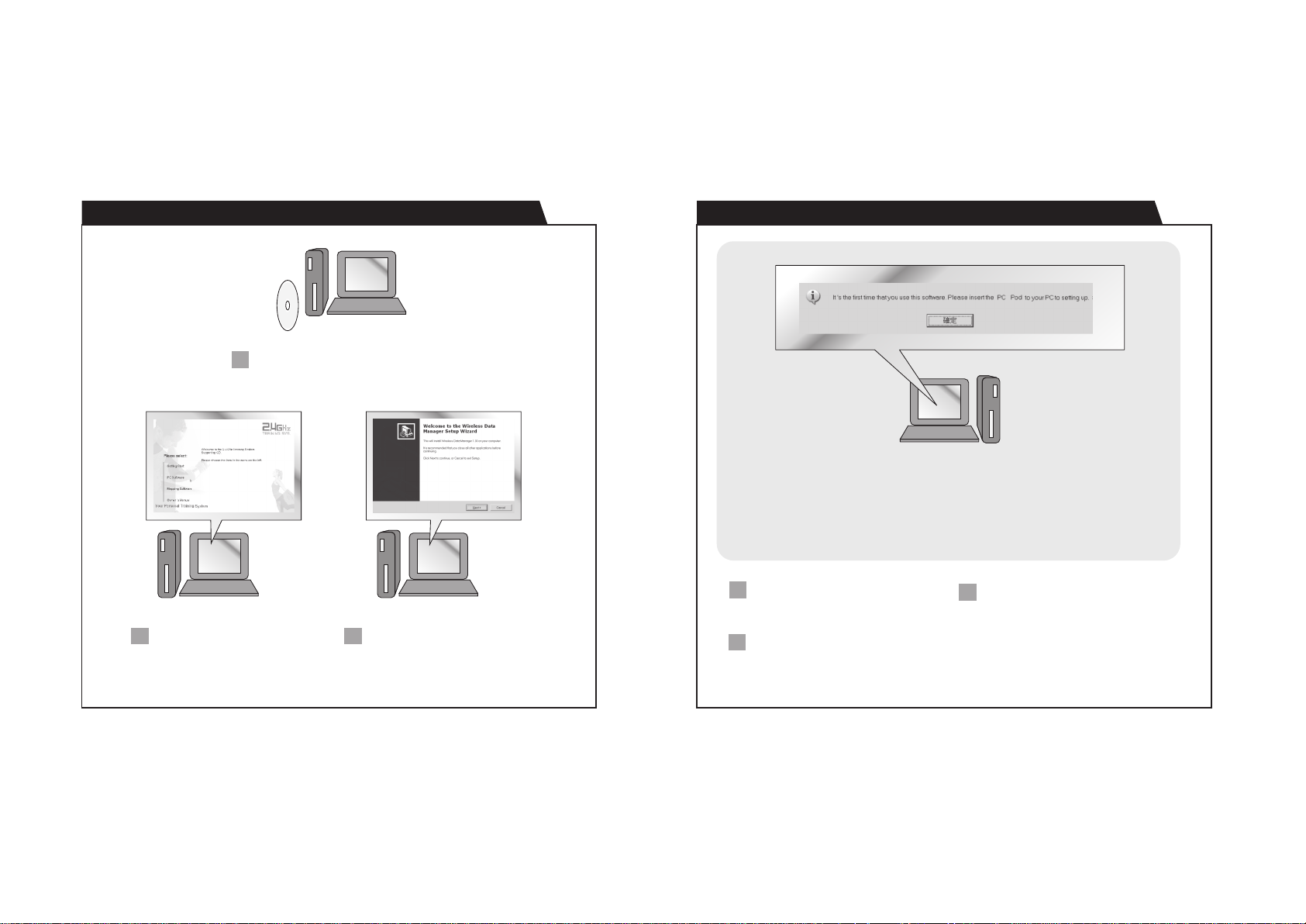
B. Getting Start: To Install the Program B. Getting Start: To Pair the Watch, Chest Strap, GPS Pod with the Program
Per sonal C omput er
Insert the b und led CD in to the CD
1
drive of t he target P C. The menu
will show automatically.
B03 B04
Personal Computer
Note: During the pairing:
(1) The Watch MUST be switched to PC- Link Display of the Logbook Mode, and activate the PC-
link function.
(2) The C hest Strap MUST be wor n on th e chest or press the two c ont act s (i.e heart rate signal is
sampling)
(3) The G PS Po d MUS T be tu rned ON.
Per sonal C omput er Per sonal C omput er
Click the 'PC Softwa re' b utton
2
from the side me nu and then
the 'here' but ton to execute the
installation wizard.
Follow the ins tru ctions to install
3
the program into the target PC.
When the i nstallation is completed.
1
execute the 'Wireles s Data Manger'
Program fr om t he Window program
menu bar.
The w izard will guide you to p air the
2
Watch, Ches t S trap and GPS Pod with
the program.
When the pa iri ng is done. The ID of
3
the Watch, che st strap and GPS Po d
will be saved into the program.
Tips: Fo r som e ins tance, the Wa tch,
Chest Strap and G PS Pod can b e paired
with the program again und er the
'Option' top menu and the 'Setting'
option.
Page 7
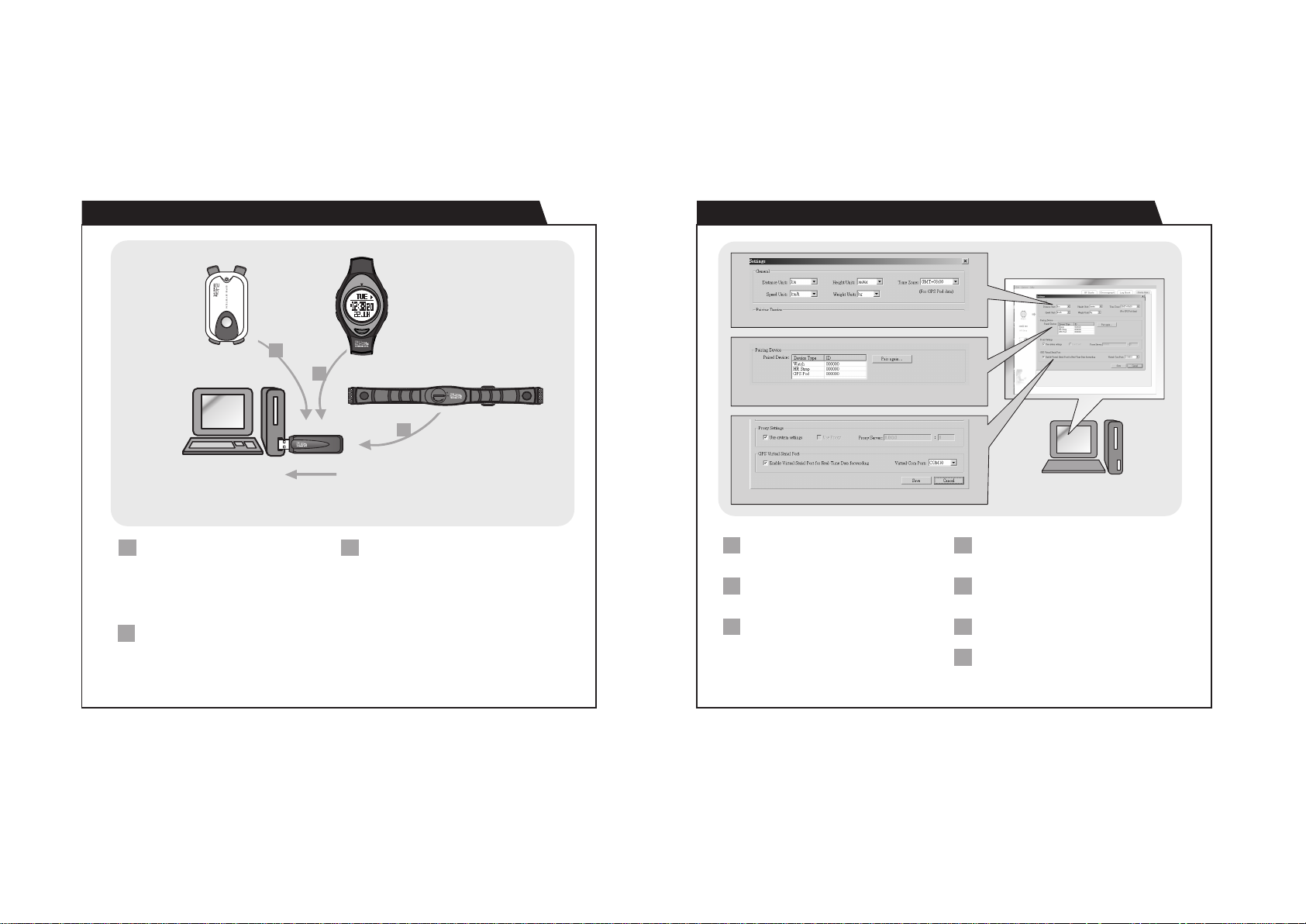
C. Operation: Data Send to PC via the PC Pod C. Operation: Setting the Program
C01 C02
General Setting
GPS Pod
Personal Computer
IMPORTANT: Put the connecting device in the place within 6 meters from the
PC Pod, otherwise the PC Pod MAY NOT receive the data from the device.
The Data Send to PC from the GPS Pod:
1
(1) Tra ck l og s e .g Da te/ Ti me , S pee d,
H ea d in g d i re c ti on , D i st a nc e ,
Longitude and Latitude, etc.
(2) Rea -time da ta e.g Speed, Headi ng,
Distance, Longitude and Latit ude , etc .
The Data Send to PC fro m the Hear t Rate
2
Chest Strap:
(1) Rea l-time data e.g Time, Cur ren t Hea rt
Rate, Averag e Heart R ate , Mininum
Heart Rate and Maximum Heart Rate,
etc.
1
3
2.4GHz PC Link USB
Watch
2
The Data Send to PC from the Watch:
3
(1) Scale logs, e.g Date/ Time, Wei ght,
Body Fat , Bod y Water, Bone Mass etc.
(2) Ch rono gra ph logs , e.g Lap ti me,
Maximum/Average/Minimum Lap tim e,
etc.
(3) Log book logs, e.g Session in fo (S tar t
time,log rate, no. of record, duration,
etc) and Se ssion summary ( Calori e
expenditure, Distance, Step s, et c.)
(4) Dai ly S tat istic l ogs, e. g ca lor ie r ead ing,
heart rate read ing s and GPS/Pedometer
readings.
Chest Strap
Device Pairing
Proxy and Serial Port Setting
Exe cu te t he 'W ir ele ss Da ta Ma ng er'
1
Program from t he Window progra m menu
bar.
Click the 'Op tio ns' from the top me nu bar,
2
and th en se lect 'Set ting s' to pop the
Setting page.
There are 4 typ es of function/setting in
3
Setting page - General Setting, Device
Pairing, Pr oxy S ett ing and Po rt Se tting.
Personal Computer
General Set ting - Sett ing the uni t for
4
he ight , s peed , weig ht and dis ta nce.
Setting the time zone for GPS Pod.
Device Pairi ng - Pairing the Watch, Chest
5
Strap and GPS Pod wit h the program. See
B04 for the 'Note' during paring.
Proxy Sett ing - S ett ing the para meter for
6
internet connection.
Por t Setting - Set-up a virtual port for
7
third p art y map software t o obtain the rea l
time data of GPS Pod .
Page 8

C. Operation: Download/Analyse/Save Data from Watch
I D L E
Watch
2.4GHz PC Link USB
Personal Computer
Note:
(1) This is functio ned with the Wat ch, see the separated Own er' s Manual of the Watch before
the connection.
(2) The wa tch MUST be sw itc hed to PC -Li nk Display of the Logbook M ode , and acti vat e the PC-
C. Operation: Analyse/Save Real-Time Data from Chest Strap
Chest Strap
2.4GHz PC Link USB
Not ebook
Computer
Note:
(1) Thi s is fun ctioned with the chest strap, see the separate d Owner's Man ual of the Watch
before the connection.
C04C03
Click the ' Wa tch ' icon from the side menu
1
to pop the 'Wat ch' Page.
Select the 'Scale', 'C hro nog raph', 'Logb ook '
or 'Daily Stat' page from the top men u.
Click 'Download' button to download th e
3
data fr om th e Wa t ch th ro ug h t he
corresponding pa ge. The respective data
will be shown on the screen after a whi le.
Analyze the data on the PC by the options
42
provided by the program. Save the data
into PC for further analysis.
Click the 'HR Strap' i con f rom the side menu
1
to pop the 'Chest Strap' Page.
The real-time heart rate readings will be
shown on that page.
Analyze the data on the PC by the options
3
provided by the program.
Save the data into PC for further ana lys is.
42
Page 9
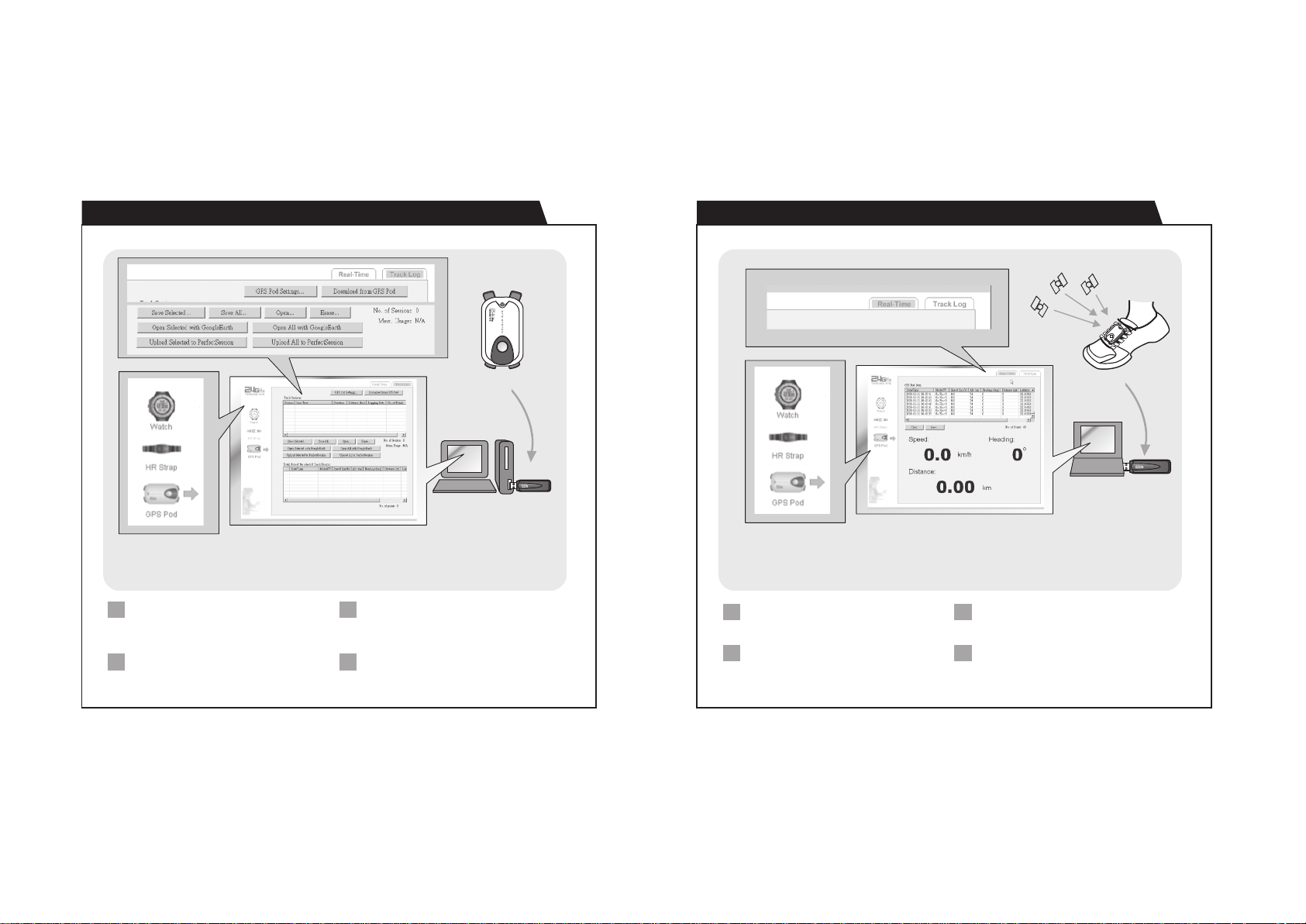
C. Operation: Download/Analyse/Save Data from GPS PodC. Operation: Download/Analyse/Save Data from GPS Pod
C05
C. Operation: Analyse/Save Real-Time Data from GPS Pod
GPS
signal
C06
GPS Pod
2.4GHz PC Link USB
Personal Computer
Note:
(1) This is f unc tio ned with the GPS Pod (optional) , see the separated Owner's Man ual of the GPS
Pod befo re th e con nection.
(2) The GPS Pod M UST b e turned ON.
Click the ' GPS Pod' icon from the s ide m enu
1
to pop the 'GPS Pod' Page.
Select the 'Tra ck L og' but ton . Cl ick the 'GP S
Pod Setting' to set the GPS Pod i.e Trac k
Log period and operation mode.
Click 'Download' button to download th e
3
data from the GP S Pod . The respective da ta
will be shown on the screen after a whi le.
Analyze the data on the PC by the options
42
provided by the program. Save the data
into PC for further analysis.
GPS Pod
Notebook
Computer
Note:
(1) This is f unc tio ned with the GPS Pod (optional) , see the separated Owner's Man ual of the GPS
Pod befo re th e con nection.
(2) The GPS Pod MUST be turned ON and it is working un der an open area with th e satel lit es are
fixed.
Click the ' GPS Pod' icon from the s ide m enu
1
to pop the 'GPS Pod' Page.
Select the 'Real-time' but ton t o view the
GPS Pod data . The respective dat a will be
appeared on the screen after a whil e.
Analyze the data on the PC by the options
3
provided by the program.
Save the data into PC for further ana lys is.
42
Page 10

D. Specifications:
1. 2.4GHz Wireles s Communucation
!
Wireless c ommunication using 2.4GHz ISM band
!
Carrier: 2 .45 GHz
!
Modulati on: FSK
!
Comply wit h EN300440 , EN301489 a nd FCC Part 15
!
Communication Distance: > 4 meters in open area, direct line of sight
D01
 Loading...