

Page 1
QUICK USER MANUAL MOB-FP2G
0
Page 2

QUICK USER MANUAL MOB-FP2G
1
Safety Information and Notice
- Read all instructions carefully before use.
- Retain manuals for future reference.
- Use this product only in the manner described.
- Only use a water-dampened soft-cloth to clean the surface of this product.
- The following will damage this product: any liquid such as water or moisture,
extreme heat; cold; humidity, dusty or sandy environments.
- Only place this device on stable surfaces and ensure that any attached cables
are secure and will not cause the device to fall.
- If charging is required, it is recommended to thoroughly charge electronic
devices for the first time overnight. Subsequent charges can be as needed. During
charging, or extended use, the product may become warm.
- There are no user serviceable parts in this product.
- Un-authorized attempts to dismantle or repair this product will void product
warranty
- Using this device near other electronic devices may cause interference.
Page 3
QUICK USER MANUAL MOB-FP2G
2
WHATS IN THE BOX
1 x MOB-FP2G Phone, 1 x USB charger, 1 x User Manual (this document)
KEYS
MAIN MENU FUNCTIONS
Contacts
Access your contacts list (Press OPTIONS to access the following)
New: To add New Contact
Delete multiple: Mark or mark all entries for further actions.
Import/Export: Copy entries from SIM card to phone or vice versa.
Others: Own number, Service number, Memory status
Message
Write message
Inbox: View received messages
Outbox: View messages waiting to be sent
Drafts: View messages saved as drafts
Sent box: View sent messages
Security inbox: View messages in Security inbox
Templates: View, edit or create a template.
Call logs Missed Calls: View missed calls
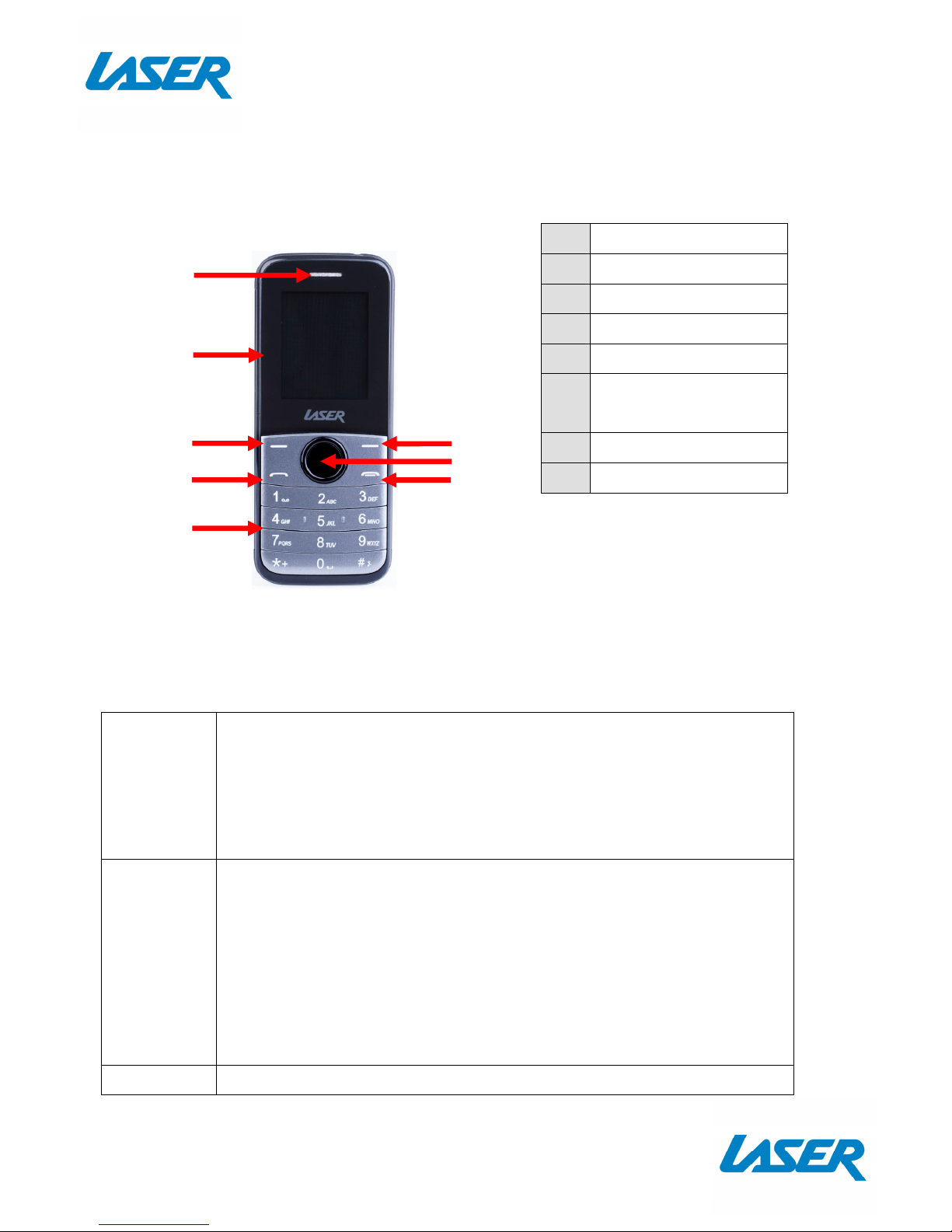
1 Earpiece
2 LCD Screen
3 Left Selection Button
4 Call Button
5 Keypad
6
Right Selection
Button
7 Enter / OK Button
8 End / Power Button
7
1
2
3
4
5
6
8
Page 4
QUICK USER MANUAL MOB-FP2G
3
Dialed calls: View dialed numbers
Received calls: View Received calls
Rejected call: View rejected calls
Delete all: Delete all call logs
Call timers: View call timers
GPRS counter: To view the GPRS counter
Internet
Input URL: Enter web address
Bookmarks: View saved bookmarks
History: View browsing history
Offline pages: View offline pages
Multimedia
Camera: Take a photo
Video: Take a video
Picture: Browse pictures
Audio Player: Play audio
Video Player: Play recorded video
Photo viewer: Play the saved photos
FM Radio: Receive the FM broadcast
Recorder: Record sound / microphone
Settings
Call Setting: Setting for Dual-SIM ,Call divert, Call waiting ,Call
barring, Hide ID, Others
Phone Setting: View and adjust time and date, power on/off,
language ,display, flight mode, music, settings.
Display: View and adjust wallpaper setting, Idle display settings,
Contrast setting, keypad backlit time.
Security: View and adjust PIN, PIN2, Privacy protection, Mobile
Tracker.
Profiles: View and adjust general, silent, meeting, outdoor
Connections: Network account, GPRS Service, Data connection
setting, Network selection.
My files View and manage saved files
Tools
View and edit Alarm, calculator, Calendar, e-book, Bluetooth,
Torchlight, Facebook, Games.
WhatsApp Access What’s App (SD card required)
Page 5
QUICK USER MANUAL MOB-FP2G
4
GETTING STARTED
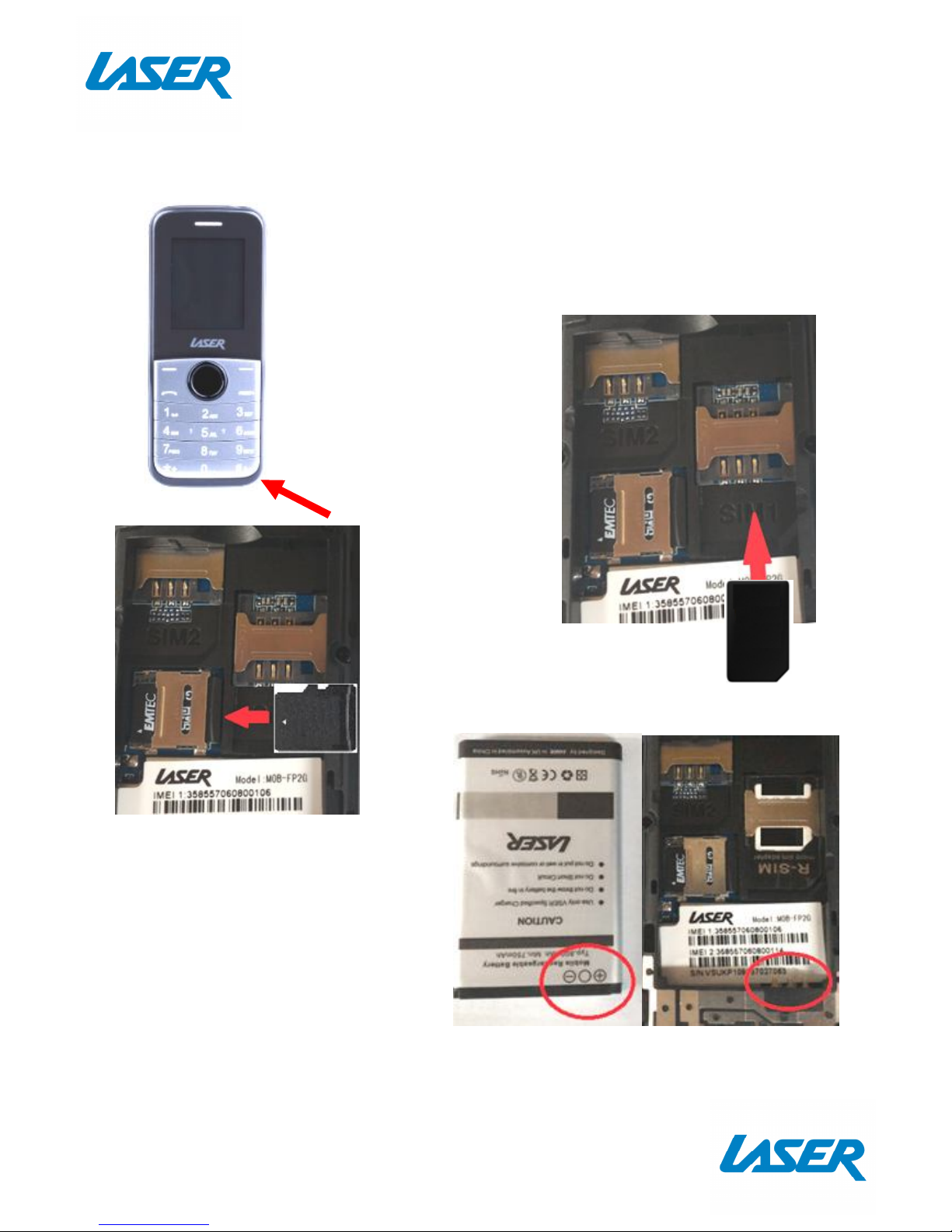
How to insert the battery and SIM card
Remove the back cover of the phone. There is a small
finger nail tab located on the bottom right side of the
phone.
Insert SIM card in the SIM card
slot
Note: Insert the SIM card face
down and insert it the same
way as shown below.
Optional: Insert micro SD card for more
memory
To open micro SD card slot, push to the
side and then lift the casing.
When inserting the battery please
make sure the contacts are orientated
the correct way.
Page 6
QUICK USER MANUAL MOB-FP2G
5
1 2
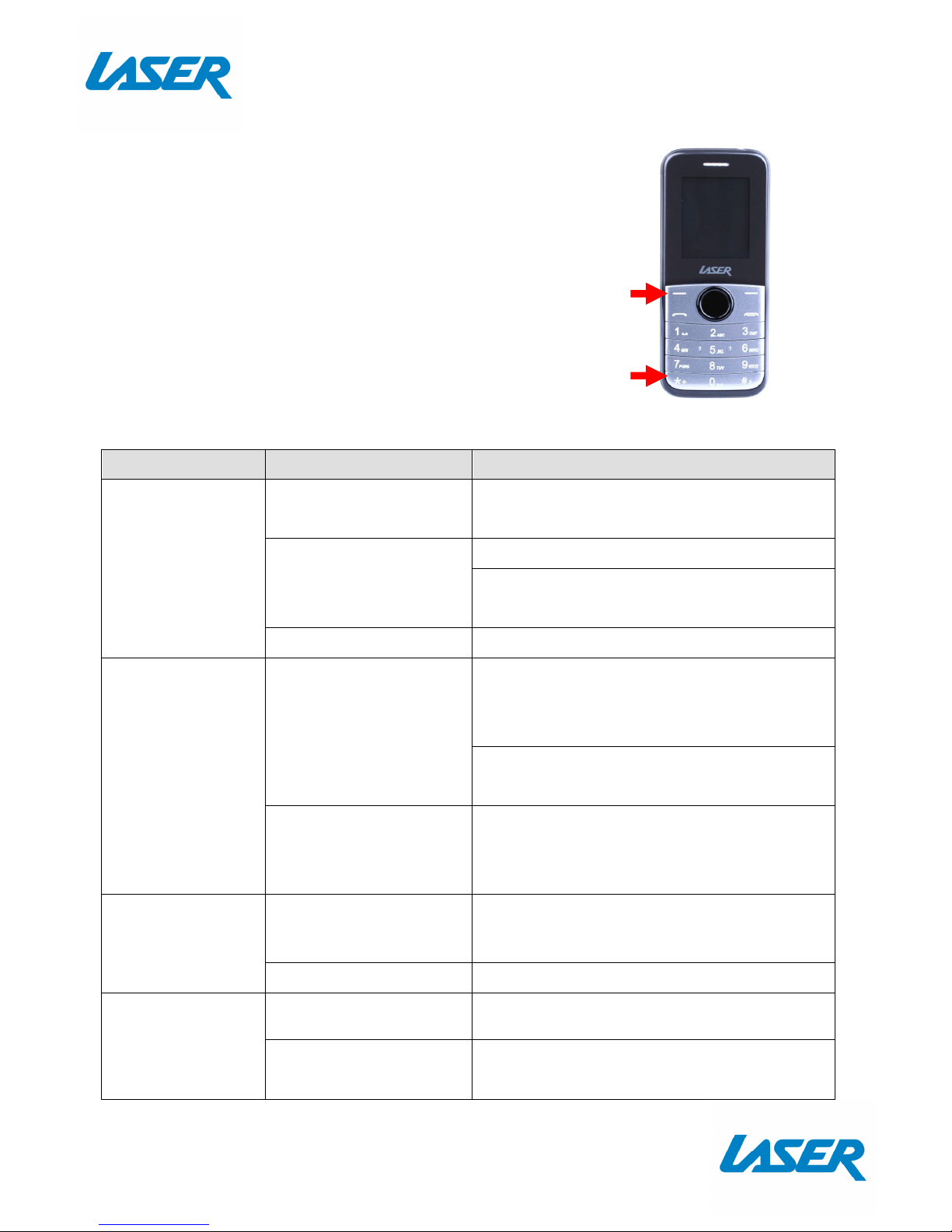
HOW TO LOCK AND UNLOCK
To lock or unlock your phone press the left button
followed by the asterisk button
FAQ
Problem Potential cause Solution
Phone display
doesn’t work
Phone is not turned on
Turn on phone by pressing and holding
the power on key for 2 seconds
Battery not connected
properly
Check if the battery is properly connected
Please remove and install it again, retry to
turn on
Battery is flat Check if battery is charged
Fail to connect
network
Weak signal
Please Try and move to a location with
strong signal and try connecting to the
network again
Please ensure that you are not beyond the
network coverage of service providers
SIM card problem
Please ensure you have a valid SIM card.
Please contact your network provider for
further information.
SIM Card Error
Dirt on the metal
surface of an SIM card.
Use clean cloth to wipe the metal touch
point on an SIM card.
The SIM card damage. Please contact network service provider.
Fail to charger
Poor contact. Please check if the plug is connected well
The battery or charger
is damaged.
You need to replace it.
Page 7

QUICK USER MANUAL MOB-FP2G
6
Warranty Against Defects
Laser Corporation Pty Ltd (“Laser”) warrants your new product to be free from defects in materials and
workmanship for 12 months, from the date of purchase, provided that the product is used in accordance
with accompanying recommendations or instructions where provided. The benefit of this warranty is in
addition to your rights under the Australian Consumer Law and to other rights and remedies of the consumer
under a law in relation to the goods or services to which the warranty relates.
Through a network of retailers and resellers, Laser will provide you with your choice of a repair, exchange
(where possible) or refund (within Dead on Arrival period) for this product if it becomes defective within the
warranty period.
This warranty will no longer apply where the defect is a result of alteration, accident, misuse, abuse, normal
wear and tear, neglect or improper storage. Please retain your receipt as proof of purchase
How to make a product warranty claim:
Step 1: Find your receipt which proves the date of purchase. Where the date of purchase cannot be
verified, your place of purchase or Laser will make an assessment based on the date of manufacture, the
condition of the Laser Product and the type of defect.
Step 2a): Contact your place of purchase. They will assess the nature of the fault and repair, replace or fund
the product as per their store refund or warranty policy.
Step 2b): If your place of purchase cannot be contacted, then you can contact Laser. Customer Service
with details of your defective Laser Product: Phone: (02) 9870 3388; or Email: [email protected] or
online at www.laserco.com.au/warranty (click on “Consumers (End Users)”). Our business address is at 1/6-8
Byfield Street, North Ryde, NSW 2113
Step 3: Laser will issue you with a Return Authorisation (RA) number within 48 hours. When requested,
send us the defective Product and a copy of your receipt. Laser will cover the cost of the return delivery.
Step 4: Wait for us to contact you. Once we have received your defective Laser Product for inspection,
we will inform you of our assessment of your claim within 7 days. When we contact you, we will firstly let
you know whether you have a valid claim under this Warranty, and if so, we will inform you whether your
defective Laser Product will be replaced or repaired, together with the number of days you can expect to
wait to receive your replaced or repaired Laser Product.
Step 5: For further details on warranty cover and returns, please check Terms and Conditions for Warranty
Returns section on http://www.laserco.com.au/warranty
Our goods come with guarantees that cannot be excluded under the Australian Consumer Law. You are
entitled to a replacement or refund for a major failure and compensation for any other reasonably
foreseeable loss or damage. You are also entitled to have the goods repaired or replaced if the goods fail to
be of acceptable quality and the failure does not amount to a major failure.
Page 8

QUICK USER MANUAL MOB-FP2G
7
 Loading...