

Page 1
Quick Start Guide
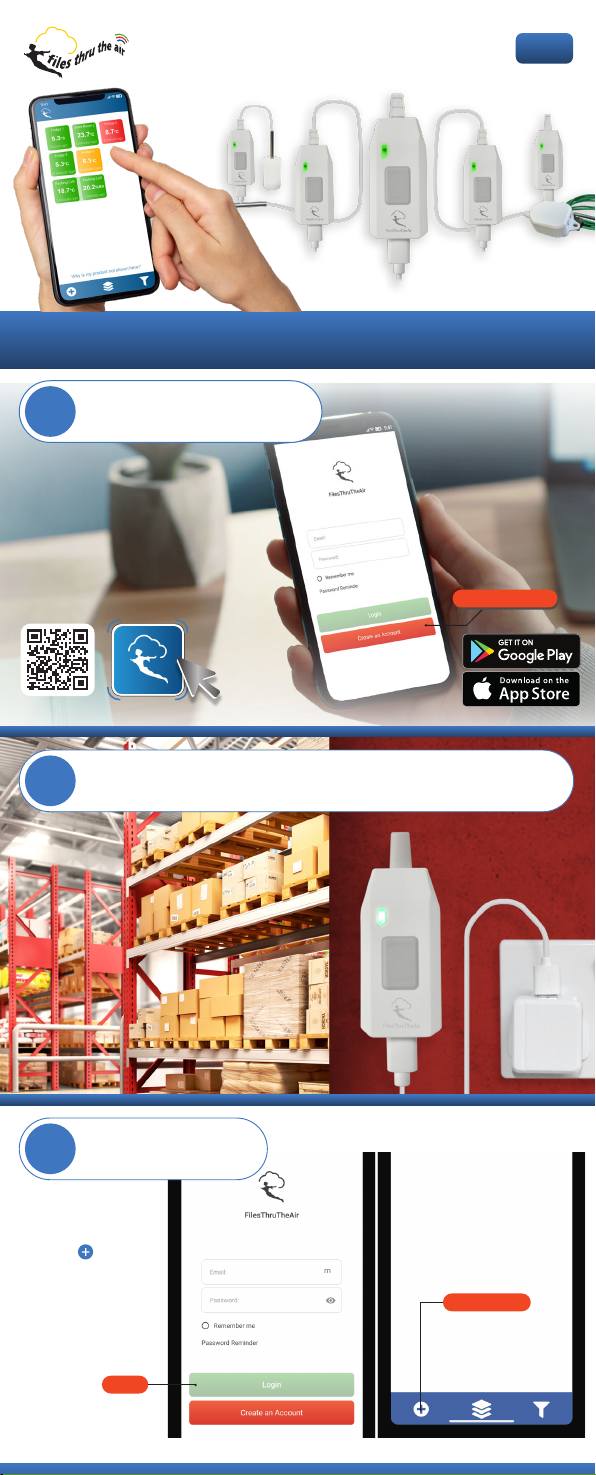
Download the FilesThruTheAir
1
app and create a user account.
Wireless Alert PRO
Create an Account
Power your Wireless Alert-PRO using the cable provided and any suitable
2
USB power adapter (optional accessory PSU-5VDC-USB-INTL-WHT).
Congure and connect
3
your Wireless Alert-PRO
Login to the
FilesThruTheAir app,
select the icon and
follow the step-by-step
instructions to set alarm
levels, notication
preferences, and
connect to a Wi-Fi
network.
Login
*****************
Add device
Page 2
Install your Wireless Alert-PRO
4
in its place of operation
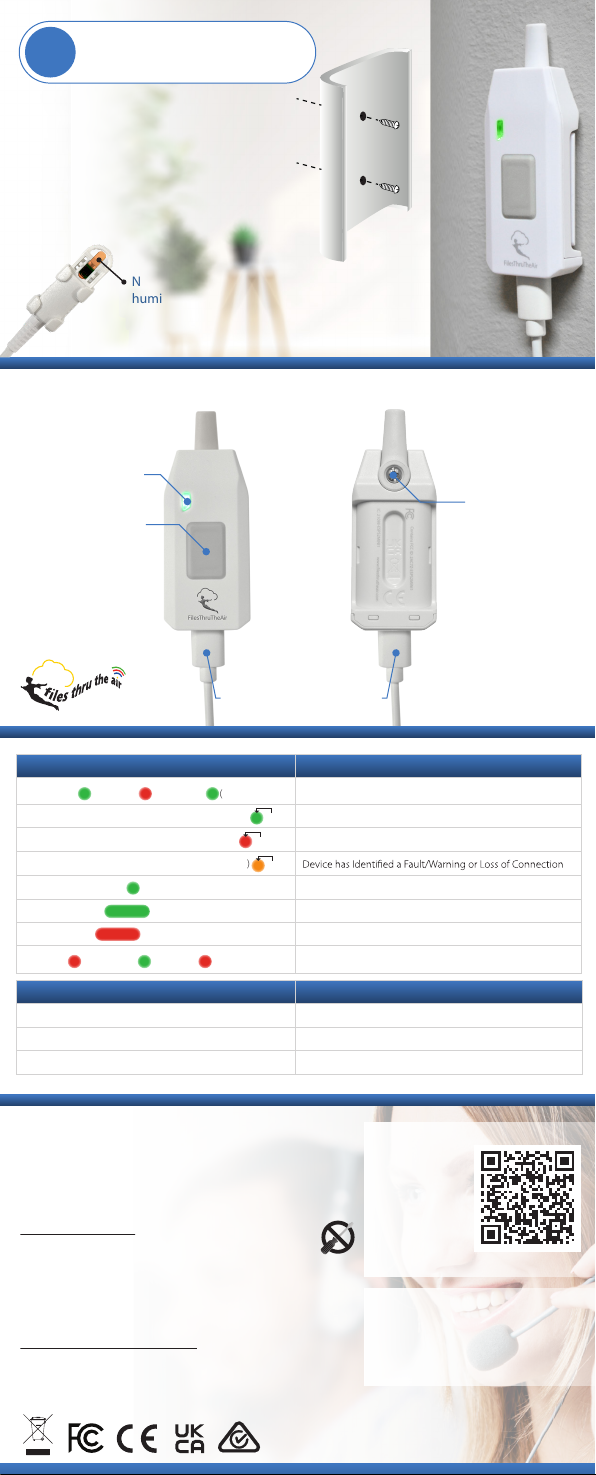
Install the bracket using the two screws
provided (wall plugs may be required)
For safety, we recommend mounting this product
no more than 2m (6’6”) above oor level.
Note: A protective lm may be tted to our
humidity sensors. Please remove it before use.
Product Overview
LED Indicator
Button
Probe Connection
Power Connection (USB-C)
LED Indication Meaning
Green Flash Red Flash Green Flash (on Button Press)
Green Flash Every Ten Seconds (or on Button Press) Device is Operating and Within Alert Limits
Red Flash Every Ten Seconds (or on Button Press) Device is Operating and in Alert
Amber Flash Every Ten Seconds (or on Button Press)
Green Flash Repeating Device is in Setup Mode
Long Green Flash Setup was Successful
Long Red Flash Setup Failed
Red Flash Green Flash Red Flash
Button Press Function
Quick Press Status Check (Refer to LED Indicator Table for Status Reference)
Three-Second Hold Enter Setup Mode
Ten-Second Hold Factory Reset
Device is in Factory Default Mode
10s
10s
10s
Factory Reset Complete (after Ten-Second Button Hold)
Safety Information
Hereby, Corintech Ltd. declares that the radio equipment type
Wireless Alert-PRO is in compliance with Directive 2014/53/EU.
The full text of the EU declaration of conformity is available at
www.lesthrutheair.com/support. Frequency Range:
2400-2483.5 MHz Power: +19.5 dBm
Repairing or Modifying
Never attempt to repair or modify Corintech Ltd products.
Dismantling them, other than for the purpose of changing
replaceable batteries, may cause damage that is not covered
under the warranty. Wireless Alert-PRO products do not
contain any replaceable batteries or user serviceable parts.
Servicing should only be provided by an authorised supplier.
Disposal and Recycling Information
You must dispose of Corintech Ltd products in accordance with
relevant laws and regulations. They contain electronic
components and therefore must be disposed of separately from
household waste.
Having
Trouble?
see our
FAQ s
Tech Support
Email: support@lesthrutheair.com
Telephone: +44 (0) 1425 651111
www.lesthrutheair.com
Designed in the UK
Manufactured in China
Issue 3 07-09-2022
 Loading...