

Page 1
Quick Start Guide
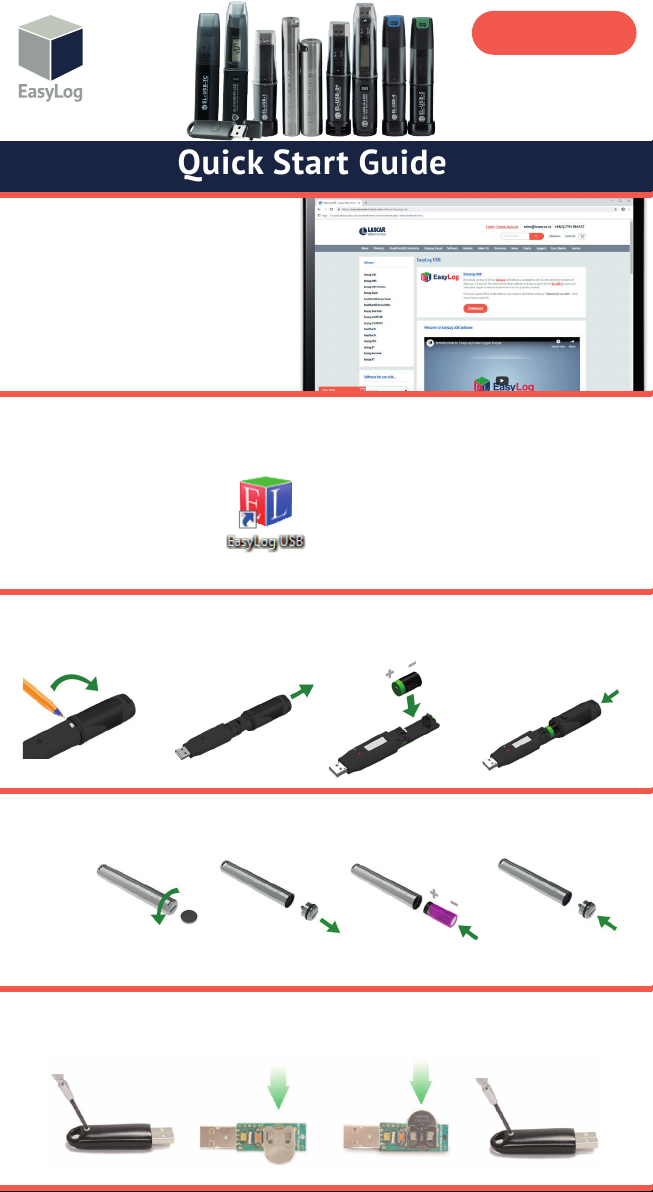
DOWNLOAD AND INSTALL
EASYLOG USB SOFTWARE
Windows™ 7/8/10 (32 & 64bit)
Visit www.easylogusb.com and click
‘Download’. Once downloaded, install the
software. You may need administrator
permissions to do so.
USING THE SOFTWARE
•Insert the data logger into an available USB port on
your computer.
•Double click on the EasyLog USB icon on
your Windows™ desktop. This will load
the conguration software. Click ‘Set
up and start the USB data logger’ and
follow the set-up wizard.
EL-USB
•When setup is complete, the data logger should be
removed from the USB port. Do not leave your data
logger in the USB port for extended periods as this will
cause some of the battery capacity to be lost (with the
exception of EL-USB-1-RCG as this is a rechargeable
device).
•You can also download the data from a logger that has
been recording or view previously saved data from the
software. After doing so, remember to set-up and start your
logger to begin a new logging session.
REPLACING YOUR DATA LOGGER’S BATTERY
Your data logger is provided with a 3.6V 1/2AA battery already installed. You can change the battery by following the instructions below.
1
EL-USB-1 PRO
Before using the data logger you will need to insert the 3.6V 2/3AA High Temperature battery provided, following the instructions below.
EL-USB-1-RCG
The EL-USB-1-RCG’s battery is preinstalled. To charge the battery, connect to a USB port with a USB cable until the green LED shows.
The rechargeable battery should only be replaced by an authorized supplier. Note that only the battery of the EL-USB-1-RCG is
rechargeable. Do not attempt to recharge any other device.
EL-USB-LITE
We recommend that a new CR1620 battery is used if any low battery state is detected by the software or if a large proportion of the
typical 30 day battery life has been consumed. Remove the screw. Pull the two halves of the case apart. Remove the old battery. Insert
the new battery. Assemble the two halves of the case. Insert the screw and tighten.
1
1
2
2
2
3
3
3
4
4
4
Page 2
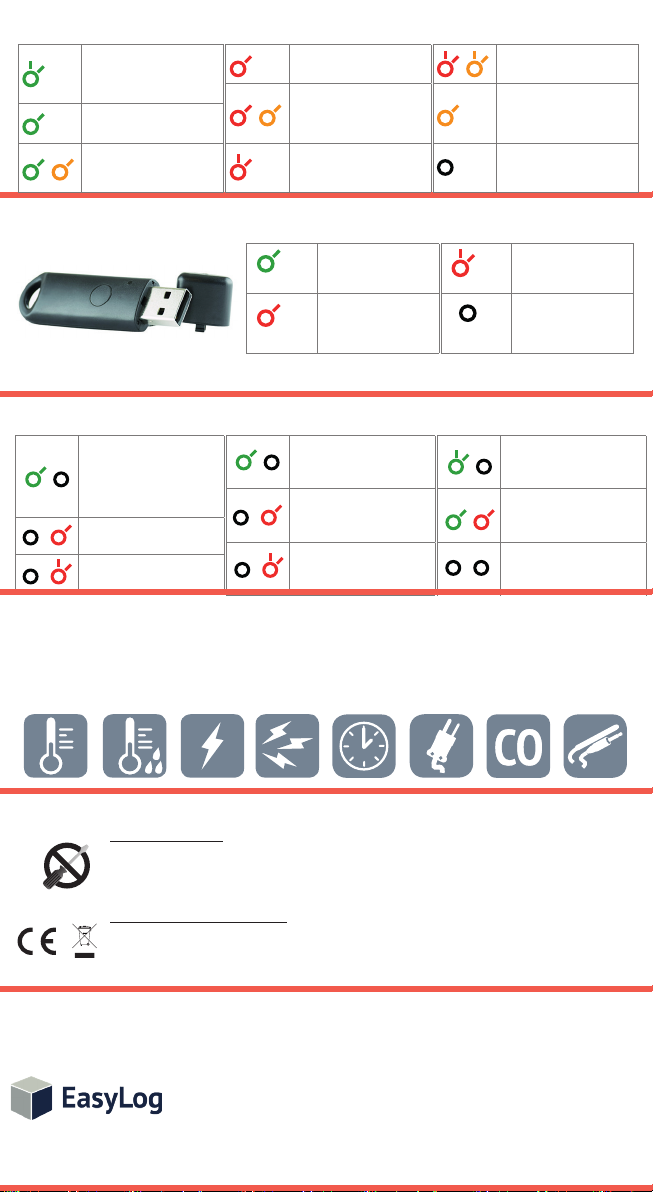
EL-USB (excluding EL-USB-1-PRO)
Green double ash
The data logger is not currently logging, but is primed
to start at a later date and
me (delayed start).
Green single ash
The data logger is currently
logging. No alarm.
Green and Amber single ash
The data logger is full and has
stopped logging. No alarm.
EL-USB-LITE
Red single ash
The data logger is currently
logging. Low alarm.
Red and Amber single ash
The data logger is full and has
stopped logging. Low alarm.
Red double ash
The data logger is currently
logging. High alarm.
Green single ash
The data logger is
currently logging. No
alarm.
Red single ash
The data logger is
currently logging. Low
alarm.
Red and Amber double ash
The data logger is full and has
stopped logging. High alarm.
Amber single ash
The baery is running low.
Data logging will connue
unl the baery voltage
drops below 2.8V.
No LEDs ash
The data logger is stopped,
the baery is empty or there
is no baery.
Red double ash
The data logger is
currently logging. High
alarm.
No LEDs ash
The data logger is
stopped, the baery
is empty or there is no
baery ed.
EL-USB-1-RCG
Green single ash (every 30s)
The data logger is not currently
logging, but is primed to
start at a later date and me
(delayed start)
Green single ash (every 10s)
The data logger is currently
logging. No alarm.
Red single ash (every 10s)
The data logger is currently
logging. Low alarm.
Red double ash (every 10s)
The data logger is currently
logging. High alarm.
For a full product datasheet for your data logger
or for more information on the rest of the EasyLog range visit
www.lascarelectronics.com/data-loggers
Temperature
IMPORTANT SAFETY INFORMATION
Temperature/
Relative Humidity
Voltage
Current
Repairing or Modifying
Never attempt to repair or modify Lascar products. Dismantling them, other than for the purpose of
changing replaceable batteries, may cause damage that is not covered under the warranty. Servicing
should only be provided by an authorized supplier.
Disposal and Recycling Information
You must dispose of Lascar products in accordance with relevant laws and regulations. They contain
electronic components and lithium batteries and therefore must be disposed of separately from
household waste.
Green single ash (every 20s)
The data logger is currently
logging. Low baery.
Red single ash (every 20s)
The data logger is currently
logging, however the baery is
running low. Low alarm.
Red double ash (every 20s)
The data logger is currently
logging, however the baery is
running low. High alarm.
Event, State &
Count
Thermocouple
Green double ash (every 20s)
The data logger is full and has
stopped logging.
Red & Green single ash
alternately (every 20s)
The data logger is full and
has stopped logging. High or
low alarm.
No LEDs ash
The data logger is stopped, the
baery is empty or there is
no baery.
Carbon Monoxide
Thermistor
SALES & SUPPORT
T +44 (0) 1794 884567
UK
T +1 (814) 835-0621
USA
www.lascarelectronics.com/data-loggers
Disclaimer:
Every effort has been made to ensure the accuracy of this publication and no responsibility or liability can be accepted by Lascar Electronics Limited
for any errors or omissions in the content of this document. Data and legislation may change, and so we strongly advise you to obtain and review the
most recently issued regulations, standards, and guidelines. This publication does not form the basis of a contract.
T +852 2389 6502
HK
Iss 13_06-2019
 Loading...